Category Focus/categories/research
Research AI Tools
Discover and compare the best research AI tools and software. Browse 37+ curated tools with reviews and rankings.
Projects tracked
37
Sort mode
RECENT
Page
1
Discover and compare the best research AI tools and software. Browse 37+ curated tools with reviews and rankings.
Projects tracked
37
Sort mode
RECENT
Page
1
Anthropologic is a zero distance consumer research platform that reads the whole internet through its Human Context Protocol to uncover consumer, category and cultural truths. It is built for people who need consumer understanding that is both fast and deep: research, innovation, marketing and foresight teams who cannot wait weeks for fieldwork but also cannot act on shallow social listening. The platform covers 239 markets and more than 100 languages, and it organises its capabilities into nine workflows, each aimed at a different type of question — what is moving in a category, what people think and feel, how segments behave online, what futures are probable, how creative performs, how a brand is read across social, search and LLMs, and where a brand can stand within a market's cultural codes. The promise is straightforward: research, innovation and foresight answers in minutes. Traditional research is deep but slow. Social listening is fast but shallow. LLMs are fluent but culturally blind. That is how Anthropologic frames the state of consumer insight, and it is the gap the platform exists to close. Deep research — surveys, ethnographic work, segmentation studies — produces trustworthy understanding, but it arrives on a timeline that rarely matches the pace at which categories move. Social listening moves at the speed of the feed but tends to capture volume and sentiment rather than meaning, leaving researchers to guess at the cultural logic underneath. Large language models can generate convincing text about consumers, yet by the platform's own description they lack cultural grounding, so their fluency masks a blindness to the codes that actually govern a market. Anthropologic positions itself between these three approaches: fast like listening, interpretive like research, and grounded in cultural context rather than surface fluency. For teams making decisions about products, positioning and communication, that combination matters because the cost of being slow is measured in missed trends, and the cost of being shallow is measured in misread consumers. The first group of workflows answers the question of what is happening. Trends shows what is moving in a category, pairing social proof with search patterns so that a signal is visible both in conversation and in demand. The live trend examples shown on the site make the shape of the output concrete: a search volume for alcohol-free club nights in the UK, a multiple showing how many scents now sit in a wardrobe where a single signature perfume once did, the number of US stores stocking overnight oats, or a search rate for Filipiniana bridal looks. Discourse goes a layer deeper and covers what people think, say and feel, mapping the positions, tensions and narratives inside a conversation rather than stopping at sentiment. Digital Segmentation takes the behavioural record and turns it into psychographic segments based on online behaviours, so teams can see not only that a category is moving but which kinds of people are moving it and with what mindset. Once a team knows what is happening, the next group of workflows helps it look forward and test. Foresight Simulator uncovers probable future scenarios reshaping a category, giving innovation and strategy teams a structured way to consider what comes next instead of relying on a single forecast. Synthetic Survey simulates consumer responses at scale using cultural ontologies, which allows researchers to explore how different audiences would respond without running a full field study for every hypothesis. Creative Evaluation scores a video ad for cultural strength across grounded signals, endorser and pillars, turning creative judgement into something that can be assessed against cultural evidence rather than taste alone. Together these workflows cover the middle of the research process: the stage where teams need to stress-test ideas, creative and scenarios before committing budget to production or media. Interpretation comes next. Ask an Anthropologist interprets an insight using cultural codes, giving teams a way to ask what a signal actually means rather than only what it says. Brand Performance shows how a brand performs across Social, Search and LLM, extending brand tracking into the place where many consumers now form impressions — the answers language models give. Cultural Semiotics reads a space in a market: the codes that govern it, the tensions between them, and where a brand can stand, which is directly useful for positioning work. The site also lists Innovation as coming soon, described as identifying opportunity spaces through convergence modelling and developing novel concepts, alongside a Research Thinking section where longer-form perspectives are published, with example essays such as 'Death of the Sugar High', 'Future of Fashion is Value', 'Medicalized Mouth', 'Beyond Classrooms' Four Walls' and 'Redesigned: Future of Aging'. The overall approach is what Anthropologic calls the Human Context Protocol: the platform reads the whole internet, rather than a single social network or a survey panel, and interprets what it finds through cultural context instead of raw keyword matching. Nine workflows sit on top of that reading, each packaged as a launchable tool with a defined question and a defined output, so a researcher does not have to assemble a methodology from scratch. Coverage is broad by design — 239 markets and 100+ languages — which means the same method can be applied across geographies and language communities rather than only in the markets where a team happens to have local researchers. The workflows range from descriptive (Trends, Discourse, Digital Segmentation) through projective (Foresight Simulator, Synthetic Survey, Creative Evaluation) to interpretive (Ask an Anthropologist, Cultural Semiotics) and diagnostic (Brand Performance). The through-line is that every output is meant to be grounded in something observable — social proof, search patterns, online behaviours, cultural codes or ontologies — rather than in a model's unaided opinion. The stated benefit is speed without sacrificing depth: research, innovation and foresight answers in minutes. For a category team, that means trend questions can be answered while a campaign or product decision is still open, rather than in a retrospective deck delivered after the moment has passed. For innovation teams, probable future scenarios and simulated consumer responses reduce the cost of exploring many hypotheses before narrowing to the few worth real investment. For brand and marketing teams, scoring creative for cultural strength and tracking performance across social, search and LLM gives a more complete picture of how a brand is actually being read. And because the platform works across 239 markets and 100+ languages, the same questions can be asked consistently in many places at once, which is difficult to do with traditional fieldwork and easy to get wrong with a culturally ungrounded model. The result is fewer decisions made on instinct alone and fewer insights that arrive too late to use. Concrete scenarios follow from the workflow list. A beauty or fashion brand tracking a new behaviour — the site's own examples include Gen Z fragrance, secondhand shopping, slow fashion and beauty after GLP-1 — would use Trends to see whether the movement shows up in both conversation and search, then Discourse to understand the narratives around it, and Digital Segmentation to identify which psychographic groups are driving it. A creative team preparing a video ad would run it through Creative Evaluation to score its cultural strength against grounded signals, endorser and pillars before committing media spend. A strategy team planning ahead would use Foresight Simulator to unpack probable future scenarios in a category and Synthetic Survey to test how consumers might respond. A brand lead would use Brand Performance to compare how the brand reads across Social, Search and LLM, and Cultural Semiotics to understand the codes and tensions in a market and where the brand can credibly stand. A researcher holding an ambiguous insight would use Ask an Anthropologist to interpret it through cultural codes. The Research Thinking section shows how those outputs are turned into published perspective pieces across topics such as fashion, education, wellness, entertainment and sportswear. Anthropologic is aimed at research, innovation and foresight functions — the product description names research, innovation and foresight answers explicitly — as well as the marketing and brand teams that consume that work. The scope is global by default: 239 markets and 100+ languages, covering categories visible in the platform's own examples, such as beauty, fashion, travel, fitness, food and drink, entertainment, education, wellness, pets and motherhood. No pricing or plan details appear on the page, and no specific third-party integrations are listed; the data domains the product describes are Social, Search and LLM, plus the platform's own cultural ontologies and semiotic codes. The product is delivered on the web at anthropologic.quilt.ai, and its Product Hunt listing categorises it under Marketing, Artificial Intelligence, and Data & Analytics. Anthropologic's core proposition is zero distance: closing the gap between a consumer signal and the decision it should inform. By combining a Human Context Protocol that reads the whole internet with nine purpose-built workflows spanning 239 markets and 100+ languages, it offers research depth at listening speed — trends with social proof and search patterns, discourse with tensions and narratives, psychographic segmentation, foresight scenarios, creative scoring, synthetic surveys, cultural interpretation, brand performance across social, search and LLM, and semiotic reading of a market. The takeaway is that cultural context, not fluency alone, is what makes consumer insight usable.
Web Search Agents by Nimble are self-learning agents that become experts at your specific research task. They are web crawling and research agents built for a specific domain — company enrichment, regulations research, and other focused use cases — and they crawl the web with surgical accuracy. Instead of returning generic results, the agents self-learn your use case to go deeper into the sources that matter most to you, giving your AI deeper and more relevant web context. The product is aimed at agent builders and teams that need expert-level web search for their AI agents, delivering higher accuracy at a fraction of the token cost. You can start by giving your AI the Nimble agent onboarding link, start building for free, or book a demo with the team. Web search is usually judged on generic benchmarks that do not resemble the queries a real agent builder faces. Nimble evaluates web search by domain instead, because that lets agent builders judge solutions against queries that resemble their own rather than generic benchmarks. Nimble argues that specialized intelligence needs a specialized web search, and invites teams whose domain is not listed to contact the company to see how Web Search Agents adapt to their use case. A second problem is cost: retrieving web context typically means redundant searches and parsing raw pages with an LLM, which consumes tokens. Nimble positions Web Search Agents as a way to retrieve exactly what is needed — with no redundant searches and no parsing of raw pages with an LLM — so teams get expert-level web search for their AI agents with higher accuracy at a fraction of the token cost. Web Search Agents are built to execute hyper-specific research workflows, crawling the web with surgical accuracy for the task at hand. They can also build and enrich web datasets: you define your schema and the agents return consistent results on every run, which makes it practical to assemble structured web data without manual cleanup. A monitoring capability, currently in beta, lets you continuously track any data point on any webpage in real time, so changes on the web surface as they happen. Together these three capabilities — hyper-specific research, schema-driven dataset building, and continuous monitoring — cover the common shapes of web data work an agent needs to perform, from answering a single research question to maintaining a dataset that stays current. Three capabilities underpin how the agents adapt to your use case and self-improve. First, compounding domain knowledge: the agents accumulate web context over time to master your domain, so their understanding of relevant sources grows with use. Second, deep web access for your sources: the agents combine web search with domain crawling to reach subpages that other tools cannot access, which matters when the useful information sits deeper than a top-level page. Third, full control over search methodology: the agents retrieve data within the scope and guardrails defined by your search plan, so you decide what is in bounds. Nimble summarizes this as agents that adapt to your use case and self-improve, rather than behaving the same way for every customer and every query. Governance is part of the design. Web Search Agents operate with full governance and control through auditable Search Plans that show exactly what was searched, where, and why — so you can inspect the path the agent took rather than trusting an opaque set of results. Accuracy compounds over time through a Proprietary Index and Memory that gets smarter with every query, meaning the agents retain and reuse what they have learned. The same retrieval discipline addresses cost: by retrieving exactly what is needed, the system avoids redundant searches and avoids the expense of parsing raw pages with an LLM. These three elements — auditable Search Plans, compounding memory, and precise retrieval — are the core promises Nimble makes for expert-level web search delivered to AI agents. The overall approach is that the agents self-learn your use case. Rather than being configured once and left static, Web Search Agents learn from the searches they run, building a memory and a Proprietary Index that improve the relevance of later results. They combine two access paths — web search and domain crawling — to reach both broad results and the deeper subpages that other tools cannot access. Each retrieval stays inside the scope and guardrails you define for the search plan, and every search is recorded so you can audit what was searched, where, and why. Nimble describes this as specialized intelligence for a specialized web search, and documents an onboarding path so your AI agent can be pointed at the product and begin building. The stated benefits concentrate on accuracy and cost. Nimble says Web Search Agents deliver expert-level web search for your AI agents with higher accuracy at a fraction of the token cost. Because retrieval returns exactly what is needed, there are no redundant searches and no need to parse raw pages with an LLM — two of the main sources of token spend in agentic web research. Accuracy compounds over time as the Proprietary Index and Memory get smarter with every query, so results improve rather than plateau. Control and trust are the other stated outcomes: auditable Search Plans show exactly what was searched, where, and why, and the agents work within the scope and guardrails you set, which makes it easier for teams to explain how a result was produced. Nimble publishes cookbook examples of what teams can build. Company research and due diligence can be run from a single prompt at audit grade. Teams can research case laws and regulations, enrich dependencies with health indicators, and find assortment gaps on the digital shelf. Retail and brand teams can find where products are sold to enforce MAP compliance, and go-to-market teams can discover businesses that match an ideal customer profile. Finance workflows include tracking analyst earnings predictions against actuals, and recruiting workflows include building a dataset of job candidates. Nimble also names the domains it evaluates and adapts to: market analysis, real estate, social media monitoring, travel and hospitality, company research, finance, product intelligence, and GTM. In those benchmarks, contestants independently completed 96 tasks per domain — covering reports, enrichment, and discovery — with each result graded fact-by-fact by an independent AI judge against a gold standard built without any contestant's input. Web Search Agents are aimed at agent builders and teams that need their AI agents to research the web reliably. Nimble says it is trusted by organizations including Databricks, Qudo and Uber under a "Trusted By" heading, and its site also displays a broader logo wall featuring brands such as Microsoft, Coca-Cola, L'Oréal, LG, TripAdvisor, Semrush and Browserbase. Native integrations are offered including Anthropic, GPT, LangChain and Vercel, and the product is documented as a Nimble SDK with an agent onboarding page you can give to your AI to get started. Security and compliance features include zero data retention, flexible PII masking, audit logs, data encryption in transit, and no training, alongside CCPA, GDPR and SOC 2 badges. Nimble invites teams to start building for free, try the product now, or book a demo to discuss use cases and see how Nimble delivers higher accuracy at a fraction of the token cost. For teams building AI agents that need reliable web context, Web Search Agents by Nimble offer a self-learning approach: agents that adapt to your domain, crawl the web with surgical accuracy, build and enrich datasets against your schema, and monitor pages for change. Auditable Search Plans provide governance, while a Proprietary Index and Memory compound accuracy over time and precise retrieval reduces token cost. The result is deeper, more relevant web context for your AI, evaluated by domain against queries that resemble your own rather than generic benchmarks.
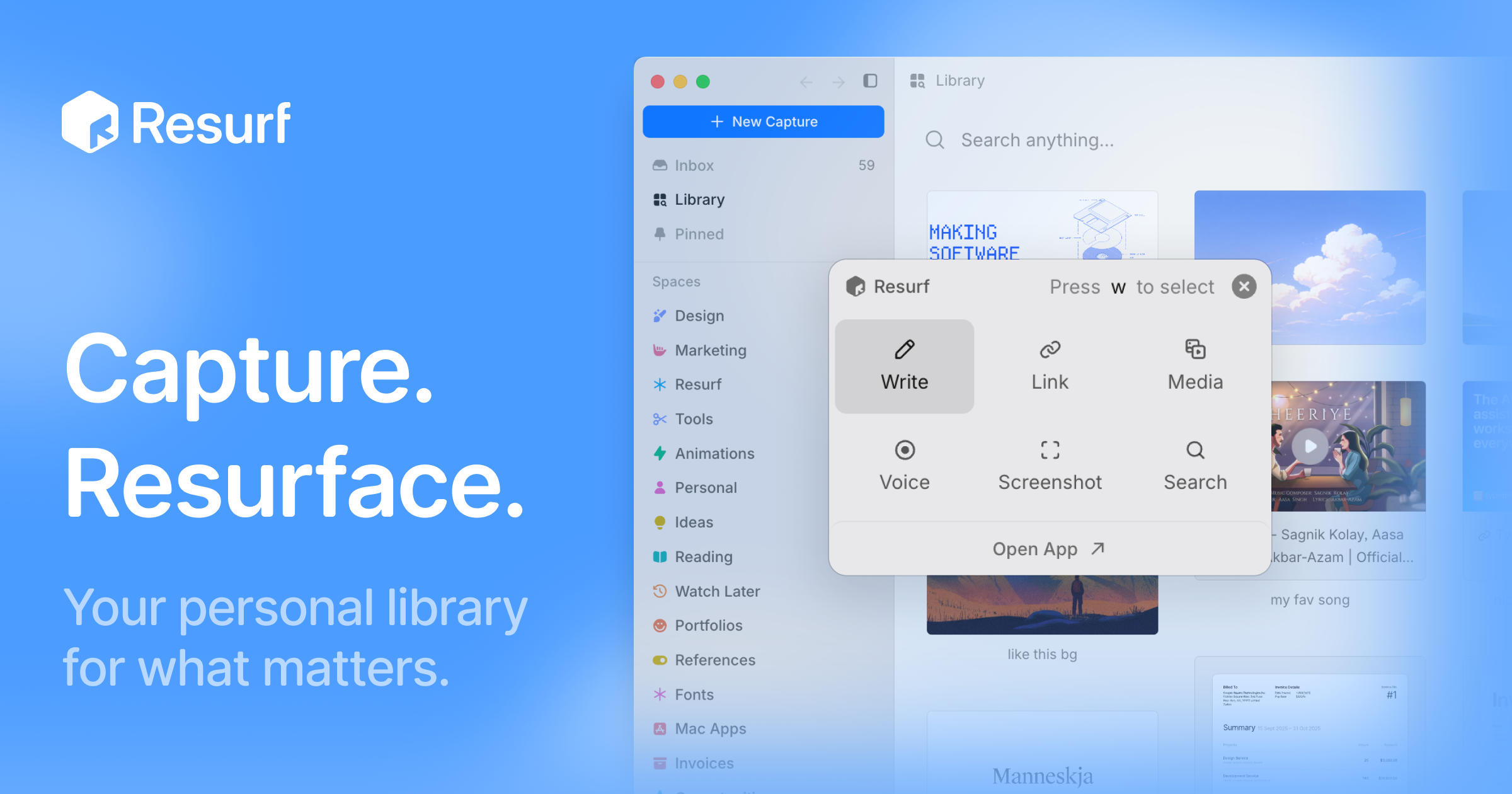
Resurf is a personal context library — one place to keep the things you like, care about, and work on. It saves notes, links, images, PDFs, and documents into a fully local library, so the material you collect stays in one searchable spot instead of being scattered across browsers, folders, and apps. The app is built for Mac, iPhone, and iPad, and it is written entirely in native Swift. Its stated purpose is twofold: capture what you find, and then find it again — or hand that accumulated context to AI when you need a model to work with your own material. There is no Resurf account required, the app works offline, and sync through your own private iCloud is optional. The problem Resurf addresses is fragmentation. The things a person wants to remember arrive in wildly different formats and from wildly different places: an article on Substack, a PDF of a paper, a screenshot, a tweet, a GitHub repository, a YouTube video, a code snippet, a voice note recorded in the middle of a walk. Each of those lands wherever the app that produced it decides to put it. Later, when the thought returns — 'I read something about typography,' 'there was a paper worth revisiting' — there is no single place to look. Resurf's answer is the inbox model: save now, organize later. The library is meant to get more useful every time you save, because a growing personal collection becomes more valuable as long as it remains findable. A second, newer problem motivates the AI side of the product: AI tools are only as good as the context you give them, and most people have no structured way to hand over what they have saved. Capture is designed to stay out of the way. Quick Capture, bound to ⌘⇧C, lets you save something without switching context — the point being that a capture tool fails if it interrupts whatever you were doing. Content can come from any app: Resurf captures from Mac, Chrome, and iPhone into the same library, and a Chrome extension is available from the Chrome Web Store for browser-based saving. The library accepts a wide range of formats — articles, PDFs, images, audio, video, code, tweets, GitHub, YouTube, and notes — and every format renders natively, meaning you view the saved item as it was rather than as a degraded copy. Once something is saved, Resurf leans on an inbox-first approach: you do not have to decide where a capture belongs at the moment you make it. Organization happens later, through Spaces and Tags that let you group material around projects, research, and ideas — the page shows examples such as Research and Writing spaces and tags like #ml, #philosophy, and #ideas. A Visual Library complements that structure by letting you browse what you saved the way you remember it, which suits image-heavy or reference-heavy collections where a thumbnail is easier to recognize than a filename. Instant Search, triggered with ⌘K, finds notes, links, PDFs, images, and files quickly across the library — the page illustrates it with an example of searching typography notes across 24 captures from the last six months. Resurf also covers the moment after capture, when you have something to say about what you saved. Highlight & Annotate keeps your thoughts beside the source, so commentary lives with the material rather than in a separate document — useful when a highlighted passage only makes sense in relation to your note about it. Voice Memos capture thoughts before they disappear, which matters for ideas that arrive away from a keyboard. The Notes surface provides a rich-text editor with a formatting toolbar and highlights, and the product describes five surfaces — Library, Inbox, View, Notes, and Assistant — as the five places you will actually spend your time in the app. AI in Resurf is opt-in across the board, and the product is explicit about that. AI Summaries help you revisit articles, links, and PDFs faster by producing a short summary of the saved item. Bring Your Own AI lets you supply your own AI key rather than relying on a bundled service, and on Mac you can hand off saved context to AI agents through MCP or the CLI — a documented connection path in the guides. Ask Your Library lets you ask questions across the context you have saved; the page illustrates this with a query such as 'What did I save about typography?' answered against a reading list. Because the library lives locally, the material used for these questions is your own collection rather than a shared index. How the product works is defined by its architecture. Resurf is written entirely in native Swift for Mac, iPhone, and iPad, so the same library runs natively across all three rather than being wrapped in a cross-platform shell. Your library lives on-device — the page names the location ~/Library/Resurf — which is what makes the 'fully local' and 'private by default' claims concrete: data stays on your Mac, the app works offline, and no account is required. Sync is optional and runs through your own private iCloud rather than a Resurf-operated service. The Chrome extension and the MCP/CLI connection on Mac are the two extensions beyond the core Apple-platform apps: the first brings browser captures into the library, the second takes the library out to AI agents. The benefits follow from those choices. Because everything lands in one library with instant search, the answer to 'where did I put that?' is a single search rather than a tour of multiple apps. Because capture is bound to a keyboard shortcut and does not require switching context, saving feels lightweight enough to actually do. Because storage is local and sync is optional and private, the library can hold personal reading, screenshots, and voice memos without being uploaded to a third-party service. And because the library is exposed to AI through your own key, MCP, or the CLI, the collection becomes an input rather than a dead archive. The app is also free to try and, per the page, free on iPhone and iPad, with a separate license purchase for Mac. Concrete uses appear throughout the product's own examples. A reader saves a Substack article tagged #reading so it can be found later, and highlights passages while annotating them. A designer or writer keeps typography references and design notes in a space, browsing them visually — the page shows a query about typography answered from saved captures. A researcher stores papers such as a PDF of 'Attention is all you need,' marking it as worth revisiting. Someone away from a desk records a voice memo about a headline's typography. A developer saves GitHub repositories, code, and YouTube videos alongside everything else. Once the library has grown, the same collection can be queried directly — 'What did I save about typography?' — or handed off to an AI agent on Mac through MCP or the CLI. Resurf is aimed at people who collect: designers gathering visual references, writers and researchers assembling sources, developers saving code and repositories, and anyone who already runs a personal knowledge practice or wants to. Availability reflects that audience. The app runs on Mac (Apple Silicon and Intel) with macOS 14.3 or later, and is free on iPhone and iPad; the Mac app can be downloaded free to try or licensed through a purchase. A Chrome extension is available for browser capture, and a guide covers connecting agents over MCP or the CLI on Mac. The library itself is stored locally at ~/Library/Resurf, with optional private iCloud sync and no Resurf account required. The takeaway is that Resurf treats your saved material as an asset with two uses: a private library you actually revisit, and a context source you can hand to AI. It is fully local by default, native across Mac, iPhone, and iPad, built around quick capture and instant search, and organized through inboxes, spaces, tags, and a visual library. Its AI capabilities — summaries, asking your library, and agent handoff through MCP or the CLI — are opt-in and can run on your own key. For anyone whose best ideas and references are currently spread across browsers, folders, and screenshots, Resurf's proposition is a single, private, searchable place to put them.
AlphaGenome Atlas is a database introduced by Google DeepMind that predicts the effects of every possible single nucleotide variant in the human genome. It was created by using the AlphaGenome AI model to pre-calculate the regulatory impact of all nine billion single-letter genetic changes, producing a massive, one-petabyte dataset. The Atlas is intended for researchers, clinical researchers, and biologists, who can explore it through an intuitive website portal that requires zero coding skills, with API and Antigravity access available for deeper research. Its stated purpose is to provide grounded genomic insights that will accelerate the pace of biological discovery. The human genome is made of about three billion base pairs of DNA, but much of it remains a mystery. Scientists understand the roughly two percent of the genome that codes for proteins relatively well, yet they have only limited knowledge of the remaining ninety-eight percent. Google DeepMind's AlphaGenome model had already shown how single changes in these non-coding DNA regions can disrupt molecular processes such as protein production, but the bigger picture across the genome remained unclear. At the same time, identifying rare, non-coding variants linked to complex traits is difficult because of statistical noise in the data. AlphaGenome Atlas was created to address this gap by turning an enormous space of possible mutations into a searchable, precomputed resource that researchers can rapidly query instead of evaluating variants one at a time. A central feature of the Atlas is the AlphaGenome Variant Impact (AVI) score. This single, easy-to-use score combines predictions for both coding and non-coding regions of the genome, giving researchers one measure to work with instead of a large collection of separate outputs. Because the score condenses coding and non-coding predictions into a single number, it allows researchers to quickly prioritize the most promising avenues for research without sifting through thousands of data points. The AVI score is described as the mechanism that helps scientists rapidly navigate the vast information held in the Atlas, making it possible to rank variants by predicted impact and focus attention where it is most likely to matter. In practice, this scoring approach is what turns a one-petabyte dataset into something a research team can act on. The Atlas covers every possible single nucleotide variant in the human genome. Google DeepMind used the AlphaGenome AI model to pre-calculate the regulatory impact of all nine billion single-letter genetic changes, resulting in a one-petabyte dataset. Crucially, these predictions span both coding and non-coding regions, rather than focusing only on the small fraction of the genome that codes for proteins. This matters because the non-coding portion of the genome is where much of the remaining biological mystery lies, and where single-letter changes can disrupt molecular processes like protein production. By precomputing predictions across the full set of possible variants, the Atlas removes the need for researchers to run predictions on demand for each variant they want to investigate, and instead gives them a comprehensive catalogue of how genetic mutations affect molecular biology. Access to the Atlas is designed to be broad. It is available through an intuitive website portal that requires zero coding skills, which the announcement frames as democratizing access for clinical researchers and biologists worldwide. For researchers who need to work at greater depth, the Atlas also offers API access, along with access through Antigravity. AlphaGenome Atlas is free to explore through the visual web interface. This combination of a no-code portal and programmatic access means the same underlying predictions can serve a biologist inspecting a single variant in a browser and a research group building variant-prioritization workflows into its own pipelines. The Atlas works by precomputation rather than on-demand prediction. Rather than running the AlphaGenome model each time a researcher wants to understand a variant, Google DeepMind used the model to pre-calculate the regulatory impact of every possible single-letter genetic change in the human genome — all nine billion of them — and stored the results as a one-petabyte dataset. The Atlas then helps scientists rapidly query this vast information, and it introduces the AVI score as a way to summarize the underlying predictions into a single usable ranking. This approach shifts the heavy computational work to a one-time, genome-wide precomputation and turns the result into something that can be explored interactively or accessed programmatically, which is what makes rapid navigation of the full variant space feasible. The stated benefit of AlphaGenome Atlas is that it provides grounded genomic insights that will accelerate the pace of biological discovery. By combining coding and non-coding predictions into a single AVI score, it lets researchers prioritize the most promising avenues for research without sifting through thousands of data points, saving effort that would otherwise be spent on manual triage. The no-code web portal broadens who can use these predictions, democratizing access for clinical researchers and biologists worldwide rather than limiting it to those who can write code or run models themselves. The announcement also describes the Atlas as acting as a powerful augmentation partner for the scientific community, accelerating research — a claim illustrated by the rare disease and complex trait examples it cites. Overall, the Atlas is positioned as a resource that makes a previously unclear genome-wide picture accessible and actionable. AlphaGenome Atlas is already being applied in real research settings. At the Broad Institute, Laura Covill and her team used the AVI score to prioritize variants for unsolved rare disease research; the tool highlighted a critical variant in the DNM1 gene, predicting that it created an incorrect splice site, which provided crucial supporting evidence that helped successfully solve the case. In a second example, Dr. Gareth Hawkes applied AlphaGenome Atlas to data from more than 54,000 UK Biobank participants to study complex traits. By grouping variants based on predicted molecular effects, he uncovered 22% more non-coding genetic associations, and by focusing on the top 1% of impactful variants he identified 19 genetic regions linked to body mass index (BMI), directing the next stage of targeted research. These examples show the Atlas being used both to prioritize individual candidate variants in rare disease and to group and rank variants across large population cohorts. AlphaGenome Atlas is aimed at the scientific community — researchers, clinical researchers, and biologists — including teams working on rare genomic variation and on complex traits. It is described as available today through an intuitive website portal that requires zero coding skills, with API and Antigravity access for deeper research, and it is free to explore. The Atlas is presented as part of Google DeepMind's ongoing commitment to accelerate genomic discovery and science, for everyone, and it builds on the earlier AlphaGenome model. For those who want more detail, the announcement points readers to the Google DeepMind blog. AlphaGenome Atlas is Google DeepMind's high-resolution, precomputed map of how single-letter changes in human DNA affect molecular biology. By calculating predictions for all nine billion possible single nucleotide variants and condensing them into the AlphaGenome Variant Impact score, it gives researchers a practical way to explore both coding and non-coding regions of the genome and prioritize the variants most worth pursuing. Free, accessible through a no-code portal, and supported by API and Antigravity access, it aims to serve as an augmentation partner for the scientific community and to accelerate the pace of biological discovery.
AI Wins is a fully automated AI good news aggregator that discovers and summarizes positive AI stories daily. It filters out fear and hype to deliver only breakthroughs and wins across categories like healthcare, education, and business.

Heywa is an AI-powered curiosity companion that creates tappable visual stories instead of ChatGPT text walls. It dynamically builds visual experiences around your questions for easy browsing and comparison.
What's Up With That is an AI-powered browser extension that helps you read articles like an expert with one click. It provides instant analysis of any article, paper, or report with 35+ tools to understand content quickly and critically.
This product analyzes 793 Y Combinator startups from the last 5 batches through 27 interactive charts. It reveals industry trends, founder patterns, and partner selection criteria.
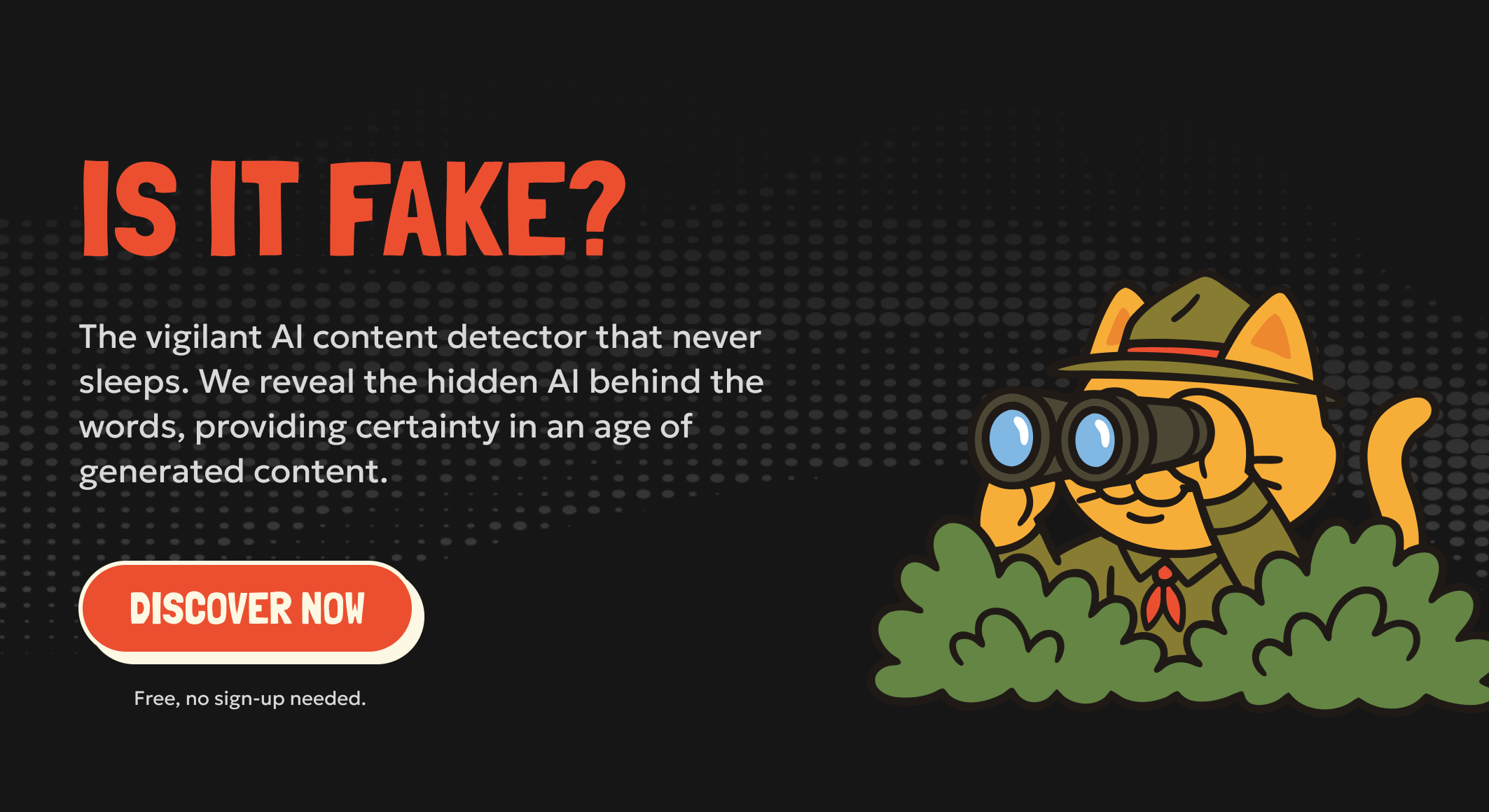
isFake.ai detects AI-generated content across text, images, videos, and audio formats with visual proof and confidence scores. It helps users verify authenticity by identifying synthetic patterns and deepfake markers.
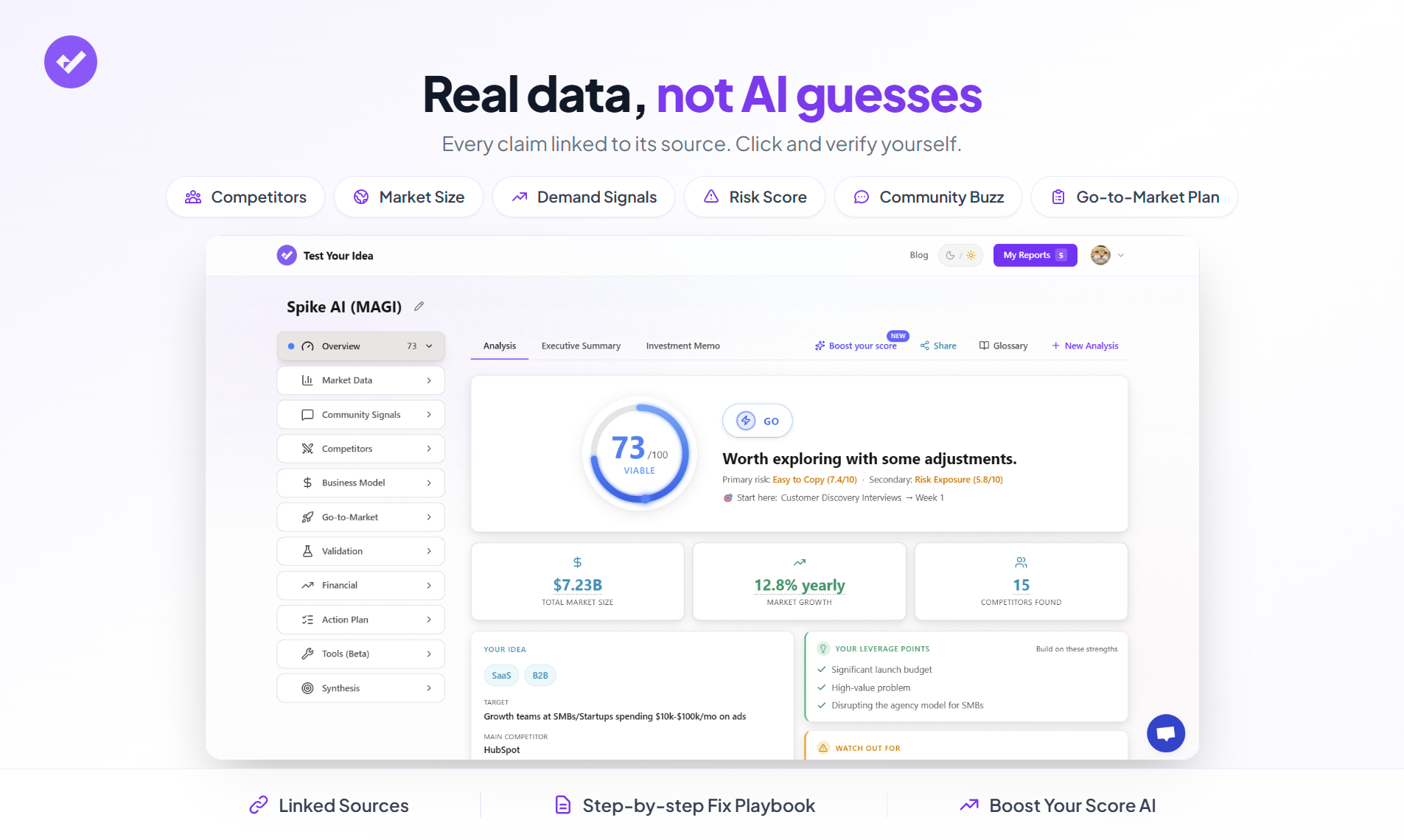
Test Your Idea scans 20+ live data sources to identify weak spots in startup ideas within 60 seconds. It provides real competitors, market size, and demand signals with every number linking to its source.

.jpg)