Category Focus/categories/research
Research AI Tools
Discover and compare the best research AI tools and software. Browse 51+ curated tools with reviews and rankings.
Projects tracked
51
Sort mode
RECENT
Page
1
Discover and compare the best research AI tools and software. Browse 51+ curated tools with reviews and rankings.
Projects tracked
51
Sort mode
RECENT
Page
1
The Brains is a directory of MCP servers that turn well-known founders, CEOs, investors and other public thinkers into searchable knowledge sources for AI assistants. Each brain is built from that person's public talks, essays, interviews and posts, and can be added to Claude, Cursor, ChatGPT or Codex. The site describes itself as the smartest brains on earth, in an MCP, and its stated purpose is straightforward: when you ask an AI assistant a question about pricing, fundraising, launching or growth, the answer should come back with a citation pointing to the talk, essay or post it was drawn from. The directory currently lists 39 brains covering 8,154 cited sources, spanning indie hackers, AI builders, CEOs, investors, marketers, operators, health experts and thinkers. Business and startup advice is abundant but scattered. A founder who wants to know how Pieter Levels prices a product, what Paul Graham says about fundraising, or how Ryan Hoover launched Product Hunt would otherwise have to search across podcasts, newsletters, essays and social posts, then hope the assistant remembers the source correctly. The Brains gathers those public materials into a single searchable unit per person and exposes it as an MCP server that plugs into the assistant the user already works in. That moves research into the tool instead of across a dozen browser tabs. The citation requirement matters because advice from public figures is easy to misattribute, and every answer is tied back to a source link so the user can read the original material and judge it in context. The core unit of the product is one MCP server per brain. Founders, CEOs and investors each become a searchable server built from their public output, and users add a brain to Claude, Cursor, ChatGPT or Codex to query it directly. The Product Hunt description notes that users can work with one URL per brain or a single URL for all of them, so the product supports both focused research on a single person and broader browsing across the whole roster. The directory also shows install counts, which give a practical signal of which brains other users reach for most: Alex Hormozi leads the listing with 85 installs, followed by Naval Ravikant with 31 and Marc Lou with 12 at the time of writing. Every answer cites its source. The site's sample questions show the intended format in practice: how do I know if my offer is underpriced, and how fast should I raise it, for Alex Hormozi; how do I come up with a startup idea worth working on, for Paul Graham; how do I validate a B2B SaaS idea before I build anything, for Vic Giurgiu. In each case the answer is expected to quote the talk, essay or post it came from with a link back to that material. That makes a brain useful both as a fast research shortcut and as a way to trace an idea to its original wording, which matters when a founder wants to quote or act on the advice. Discovery happens through the directory page, which is organized around several filters. Visitors can browse all 39 brains or narrow to indie hackers, AI builders, CEOs, investors, marketers, operators, health or thinkers. A search box lets users search founders or topics, with the site suggesting a query like pricing as an example. Results can be sorted by most installed, most sources, recently updated or alphabetically. Each entry surfaces the person's role and a short line of context, plus the number of talks and essays and posts behind the brain, an install count, and how recently it was updated, so users can judge depth and freshness before adding a server. The roster illustrates the range of the approach. It includes indie hackers and solo founders such as Marc Lou, Pieter Levels, Jack Friks, Alex West, Nevo David and Tibo Louis-Lucas; investors and fund figures such as Naval Ravikant, Jason Calacanis and Rob Walling; CEOs and operators such as Elon Musk, Sam Altman, Guillermo Rauch, Alexandr Wang and Jason Cohen; marketers and writers such as Justin Welsh, Ruben Hassid, Corey Haines, Shaan Puri, Lenny Rachitsky and Ryan Hoover; health-focused figures such as Andrew Huberman and Bryan Johnson; and even Socrates as a thinker. Source depth varies widely, from brains backed by a handful of talks and essays to Jason Cohen's 221 talks and essays and 300 posts. Overall, the product works as a layer between public knowledge and AI assistants. Public material is collected per person, packaged as an MCP server, and made reachable from Claude, Cursor, ChatGPT or Codex through a URL. The directory acts as the front door, with search, filters, sorting and per-brain statistics that help users pick the right source. The site also invites visitors to request a founder, CEO or investor for future builds, and to claim a brain if they are listed so they can verify it, fix anything that is wrong and add sources. Updates are visible on each card, with most brains showing recent refresh dates. The benefit is grounded answers rather than generic ones. Instead of asking an assistant what a well-known founder thinks and getting a plausible paraphrase, users get a response that quotes the underlying talk, essay or post and links to it. That is useful for founders making pricing, positioning, hiring or fundraising decisions, and for anyone who wants to check the original reasoning. Because the brains are exposed as MCP servers, the same source can be reused across different assistants without rebuilding the research each time, and the single-URL option makes the entire roster available in one connection. Use cases follow the sample questions on the site. A founder can ask how to tell whether an offer is underpriced and how quickly to raise prices, drawing on Alex Hormozi's material. A first-time builder can ask how to come up with a startup idea worth working on and get Paul Graham's essays as the cited basis. Someone preparing to launch can ask how Ryan Hoover approached building an audience before a product. A SaaS founder can ask how to validate an idea from Tibo Louis-Lucas or Vic Giurgiu, how to handle flattening growth from Jason Cohen, or how to set up Claude Code skills to run SaaS marketing from Corey Haines. Others use the health brains for questions about morning and evening routines for better sleep, or the marketer brains for LinkedIn growth and cold outreach replies. The audience is broad but specific in intent: founders, indie hackers, solo founders, operators, marketers, investors and anyone who wants cited answers from experienced public figures rather than unsourced AI output. The product is free and open source under the MIT license according to the Product Hunt listing. The site notes that the brains are unofficial and not affiliated with the people represented. The primary interface is the web directory, with the actual brains delivered as MCP servers that connect to AI assistants, and the roster continues to grow through requests. The Brains makes expert public material usable inside AI assistants without losing the trail back to the source. By packaging each founder, CEO or investor as a searchable MCP server and requiring every answer to cite the talk, essay or post behind it, it turns scattered advice into something a founder can query, verify and act on.
Exa 3.0 is the largest improvement to search quality that Exa has ever released, delivered as an update to its search API for AI agents. It is built for developers and teams who need to feed AI agents richer, more useful data from the web at a lower cost, and it is available today through the API. The release bundles three core changes: a larger embedding model trained with more compute and data than any previous Exa model, an index expanded with billions of new documents across useful data types, and Dynamic Highlights, which are now generally available. According to the announcement, Exa 3.0 ranks first on every benchmark the team tested, from public evaluations to coding, finance, and go-to-market intelligence. The context behind the release is the rapid growth of AI agents and personal AI assistants that depend on web retrieval to answer questions and complete tasks. Exa states that it has seen an explosion in usage from personal AI assistants, which is why it prioritized expanding its index and data partnerships to serve those use cases. At the same time, AI applications are cost-sensitive: sending full page text to a model consumes large numbers of tokens, and running heavy retrieval for every task adds up. Exa 3.0 addresses both sides of that trade-off at once, pairing broader and more accurate retrieval with a highlight model that dramatically cuts the amount of text passed downstream, plus a new lower-cost search tier for applications where budget is the binding constraint. The result, per the announcement, is a new Pareto frontier for search quality versus cost. The first pillar of the update is the retrieval stack itself. Exa trained a larger embedding model with more compute and data than any previous model, and states that every search type benefits from the improvement. Alongside the model work, the company added billions of documents to its index across data types such as products, local businesses, flights, events, sports, weather, and more. Together these changes produced gains on evaluations spanning coding, finance, deep research, and company intelligence. Because the improvements live in the shared retrieval stack rather than in a single product surface, developers do not need to switch endpoints or rebuild integrations to take advantage of them. The second pillar is Dynamic Highlights, which was previously released as a research preview and is now generally available at no additional charge. Instead of extracting highlights from each page individually, the new model selects tokens across all results, giving more tokens to the best pages, cutting repeated information, and using 95% fewer tokens than full page text. Exa reports that this approach improves answer quality while reducing token consumption, and that improvements to model efficiency have made it substantially faster and cheaper to run. For teams building agents, this means the retrieval layer returns a more compact, ranked selection of relevant text rather than long page dumps, which lowers both cost and context pressure downstream. The third pillar is the expanded index. Exa runs its own crawler and an independent index, tracking over 2 trillion URLs, serving 100 billion pages, and growing around what its customers search for. Exa 3.0 now includes 1.27B ecommerce listings with prices and availability, 211M+ local businesses with hours and ratings, real-time news, sports, weather, and market data, plus flights, local events, transit, and podcasts. This new data adds to coverage customers already rely on, including people, companies, code, and publications. The announcement highlights concrete search examples such as business hours and ratings for places, product prices and availability, game scores, and forecasts, illustrating the kinds of structured, real-world facts agents can now retrieve. Exa 3.0 also introduces Exa Lite, a new search type priced at $4 per 1,000 requests and built for cost-sensitive applications. Lite runs on the same index as Exa Auto. For higher quality, Exa Auto uses more compute across the retrieval stack, including candidate generation, highlights, and ranking, and is priced at $7 per 1,000 requests. Exa positions the two tiers as complementary: Lite offers strong search quality at a lower price, while Auto trades more compute for the highest quality. Measured as agentic search score versus cost per task, Exa 3.0 Lite scores 79 at about $0.045 per task and Auto scores 80.5 at about $0.065, which Exa describes as setting the quality-and-cost frontier among the tested providers. Overall, the product works through a retrieval pipeline that Exa operates end to end: its own crawler feeds an independent index, queries are handled by an embedding model in the retrieval stack, and candidate generation, highlighting, and ranking are applied with differing amounts of compute depending on the search type chosen. Dynamic Highlights then operates across the full result set rather than page by page, deciding how many tokens each result deserves. Developers access all of this through the API, configure which search type they want based on their quality and cost requirements, and get back ranked results with compact highlights and access to the expanded data sources at no additional charge. The stated outcomes center on benchmark performance. Exa 3.0 scores 91.8% on BrowseComp, 88.2% on DSQA, 56.1% on WideSearch, 42.0% on ATLAS, 75.5% on WebCode, 68.0% on FinSearchComp, 15.4 on Company FindAll, and 7.6 on People FindAll, and the announcement states that Exa 3.0 leads Perplexity, Brave, and Parallel on all eight benchmarks. For users, the practical benefits described are higher search quality for agent tasks, richer and more current data from an expanded index, and substantially lower token usage per query, all of which feed into better answers at a lower operating cost. Use cases named in the announcement include coding, finance, deep research, go-to-market intelligence, and company intelligence, which are the areas covered by the benchmark evaluations. The expanded index points to additional scenarios: product search with prices and availability, local business search with hours and ratings, real-time news, sports, weather, and market data lookups, and queries over flights, local events, transit, and podcasts. Exa also explicitly calls out personal AI assistants as a fast-growing usage category driving the index expansion, and cost-sensitive applications as the target for the Lite tier. Availability is immediate: Exa 3.0 is available today through the API, including Exa Lite, upgraded highlights, and the expanded index. Exa Lite costs $4 per 1,000 requests, Exa Auto is $7 per 1,000 requests, and the improved highlights and expanded data sources are included at no additional charge. Developers can get started in the API dashboard or read the documentation, and Exa hosted a live Exa 3.0 Q&A with its Head of Product and Head of R&D on Wednesday, October 21 at 1pm PT. In summary, Exa 3.0 is a search-quality release for AI agents that combines a stronger embedding model, a substantially larger and more structured index, and token-efficient Dynamic Highlights, while adding Exa Lite at $4 per 1,000 requests alongside Exa Auto at $7. Its core value proposition is straightforward: richer data and better search results for agents, delivered at a lower cost per task.
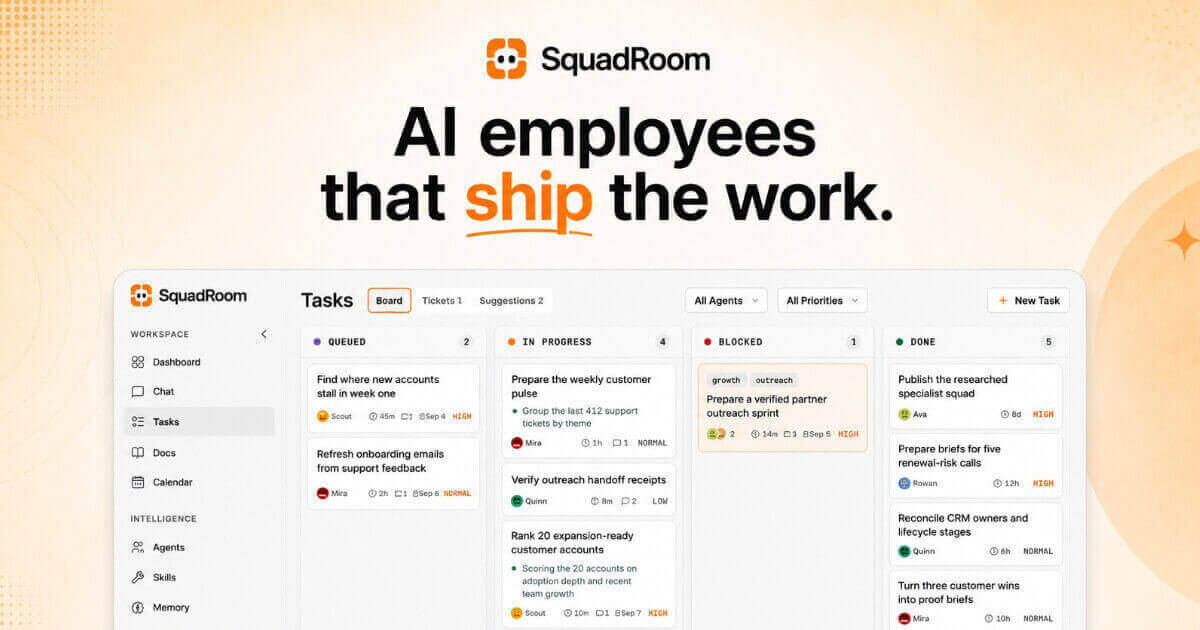
SquadRoom is a workspace where a squad of specialist AI agents works for you. According to the site, they are "AI employees that finish the work": you write the Task, you read the Report, and everything in between is the squad's job. You build the roster, put Tasks on a board, and the agents do the work, hand off to each other, and report back with proof. When you come back, the work is finished and a report shows every step and every source. The product is aimed at people who want work completed rather than a conversation, and the site advises writing a Task "the way you'd brief a new hire." A live demo with a sample company loaded lets you explore the real product, and there is no signup required for the demo. The problem SquadRoom addresses is the turn-by-turn nature of ordinary AI chat. As the FAQ puts it, you don't prompt it turn by turn: you put a Task on the board and one agent owns it, then it wakes up, reads its brief, does the work, and every step lands in Activity, Docs and a final Report. Work is therefore not something you have to supervise continuously. The site stresses visibility with the phrase "Nothing happens in the dark," and the product is designed so that agents only stop to ask you when a decision really needs you. Product Hunt notes that nothing goes out without your OK. Instead of chat logs that fade away, each Task produces a receipt showing what got done, how it got done, and the exact versions delivered. The first core capability is the Task board and routing. One line on the board gets one owner straight away, and nothing runs without an owner. Ava, the Chief of Staff, reads every new Task and hands it to the specialist whose job it is. A Task can be an Epic, with child Tasks appearing as specialists pick up stages, and the board tracks states such as Todo, In Progress, Blocked and Done, along with priority levels including high, medium and low. Every move is visible in an Activity feed as it happens, so a Task such as "Research and rank 15 integration partners" or "Turn three customer wins into proof briefs" can be followed step by step from assignment to completion. The second capability is the way agents ask for help. When an agent gets stuck it raises a Ticket: one to three plain questions, with what they found and a recommended answer, and only that one Task waits. A demo Ticket, for example, asks which verified partner batch should be contacted manually first and offers two options, one of them marked as recommended. You can reply in the Ticket inbox or in Chat, and the Task picks back up on its own. This keeps decisions with the human while letting the rest of the squad continue working, so a single question does not stall the whole board. The third capability is Reports and Docs. Every Task ends in a Report describing what got done, how it got done, and the exact versions delivered, which the site describes as "a receipt, not a chat log." Outputs live in Docs, a shared knowledge base where every save is a new version: nothing gets overwritten, any Doc can be rolled back without losing history, and any Doc can be shared with a link. Reference material can be uploaded for the squad to use, and everything they deliver lands there too. A partner outreach shortlist Doc, for instance, shows multiple versions with contact names, statuses such as verified or parked, and a note explaining why ten partners were parked rather than deleted. The squad itself follows a clear structure: one lead routes, specialists own the work. In the demo workspace the roster includes Ava as Chief of Staff, Scout in Market Research, Rowan in Partnerships, Quinn in Operations and QA, and Mira in Content Strategy. Specialists pitch in on each other's Tasks, review each other's work, and the lead groups related Tasks into Epics. Because Tasks can be blocked on dependencies, the board shows clearly when one agent is waiting on another's output, for example drafts blocked until a research shortlist is ready. The overall methodology is captured in four steps the site lays out: you assign, they work, they ask only when stuck, and you get a Report. In detail, one line on the board gets one owner immediately; the right specialists pitch in and every step shows up in Activity as it happens; a short question with findings and a recommended answer pauses only that one Task; and finally you receive a Report covering what got done, how, and the exact versions delivered. Scheduled Jobs and Playbooks let recurring work run on its own, and the Calendar view shows what the squad will run today, such as a partner signal scan at 09:00 or a pipeline receipt check at 16:30. A distinctive part of the approach is the bring-your-own-key model. You connect a ChatGPT account or a key from OpenAI, Anthropic, Google, Azure OpenAI or OpenRouter, give each agent the model that fits, and pay the provider directly with no markup from SquadRoom. The demo shows Ava on GPT-5.5, Scout on Gemini Pro, Rowan on Claude Sonnet, Quinn on GPT-5.5 and Mira on Claude Opus. The site frames this as "Your key. Your bill. No markup," and a sample month shows the SquadRoom platform fee billed by SquadRoom while model usage stays on your own provider bills. There is also a usage view showing what each API key has spent and credits consumed by day. Integration coverage is broad: 24 integrations and any MCP server. Named integrations include Gmail, Google Calendar, Notion, Slack, GitHub, Linear, HubSpot, Stripe, Google Analytics, Google Search Console, Google Drive, Google Sheets, Google Docs, Google Slides, Outlook, YouTube, Reddit, LinkedIn, Trello, GitLab, Semrush, Microsoft Clarity, Segment and PostHog. Any MCP server can be added by pasting its URL, and agents pick up every tool it exposes. Chat also works over Telegram so briefs, replies and Tickets reach your phone. Each connection has a scope such as Read, Write or Full, destructive actions need a confirmation in Chat, and tool permissions can be set per agent. Research is built in rather than bolted on. Agents have web search, full page reads and seven social platforms available with nothing to set up, covering Web, LinkedIn, X, Reddit, YouTube, Instagram, Facebook and TikTok. Findings land in a Doc and the Report cites each source, so a weekly signal sweep or market research Task produces a traceable document rather than a loose summary. For users, the benefit is finished work with evidence attached. Because every Task has an owner, every step appears in Activity, and every Task ends in a Report, you can see how an outcome was reached and which versions were delivered. Decisions stay with you: agents only stop when a decision really needs you, and nothing goes out without your OK. Work continues across the squad even while one Task waits on your answer, and customers are not contacted unless you approve it, as the proof brief example makes explicit. Concrete use cases shown in the demo include preparing a verified partner outreach sprint, where Scout scores 15 companies and recommends five, Quinn verifies contacts against two sources, and Rowan drafts five personalized partner emails; turning three customer wins into proof briefs with every claim tied to an approved source; reconciling CRM owners and lifecycle stages across reviewed records; running scheduled checks such as partner signal scans and pipeline receipt checks; and ongoing market research that ranks expansion-ready customer accounts and lands findings in versioned Docs. SquadRoom is delivered as a web workspace. Pricing is one flat plan for all the agents: the current early-access price is $49 per month, down from $99, with a 7-day money-back guarantee and the ability to cancel any time, and you keep the early-access price for as long as you stay subscribed. The plan lists unlimited AI agents, Tasks, Tickets and Reports, versioned Docs with share links, scheduled Jobs and Playbooks, Chat including Telegram, bring your own AI key, per-agent tool permissions, and 1,000 research credits a month. Model usage is paid directly to your chosen provider. A live demo with a sample company is available to try without signing up. In short, SquadRoom turns a prompt-by-prompt AI assistant into a squad of specialist AI employees that take a Task from assignment to a finished, documented result. You write the Task, the lead agent routes it, specialists do the work and hand off as needed, and you read a Report that shows every step, every source and the exact versions delivered, with your own AI key and a single flat platform fee.
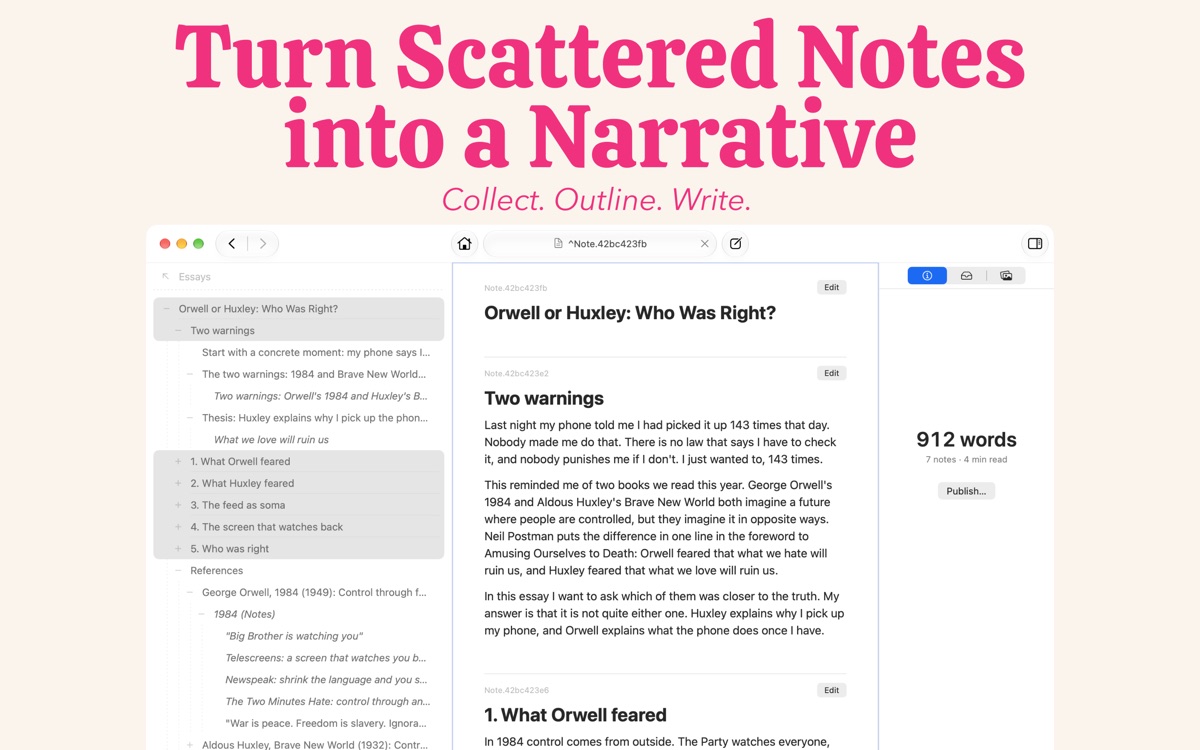
Understory is a Mac notes app for people who take notes in order to write something. It is built for students, researchers and bloggers, and for anyone carrying a research paper, an essay, a blog post, a video script or even a book from the first note to the finished draft. The app is described as part outliner and part notes app: you collect your research, shape it into an outline, write the draft, and then publish the finished piece, all inside one application and without copying anything from one app to another. The problem Understory addresses is the gap between taking notes and writing. Notes tend to be taken in one place while the writing happens in another, so material has to be moved across before it can be used. Understory closes that gap by treating notes as the raw material of a draft rather than as a separate archive. It also distinguishes itself from a conventional outliner: an outliner is good for shaping ideas into a hierarchy, but every item in it is a bullet, whereas in Understory every item is a whole note written as regular text, and the same note can appear in several outlines, or in none at all. The first step in the workflow is collecting. Understory is designed for taking notes as you read, chapter by chapter: a note is just text, and you do not have to come up with a title or a filename before you start writing. You keep each quote or idea as a short note filed under the book and the chapter it came from, so the source of every thought is preserved in the structure of the notebook rather than in a separate record. Notes can also be linked to one another; the app's own material shows reading notes filed chapter by chapter, with one note linking to a related note taken from another book, so ideas that cross between sources stay connected without being merged into a single block of text. The second step is outlining, where the argument is built out of the notes already taken. You add a note for each main point and then put the notes you have already collected underneath the points they support, moving things around until the structure works. Because every item in the outline is a full note rather than a bullet, the same note can sit in more than one place, so an idea can belong to every subject it touches. That means a single piece of research can support several arguments at once without being duplicated or rewritten, and it can also sit in no outline at all until it is needed. The third step is writing the draft. Each point is drafted in its own note, with the research you gathered listed right beneath it in the sidebar, so the supporting notes stay visible while the section is being written rather than sitting in a separate window or document. Selecting the main points lets you read the whole piece from beginning to end as one continuous draft, which gives you a way to check how the sections read together before anything is published. The app shows sections being drafted in Markdown, with their supporting notes listed alongside. Publishing turns the outline into a document that can be shared. The finished piece is published as a PDF, Rich Text, Markdown or a website, in the order you arranged it, so the structure built during outlining carries straight through to the output. The same project can therefore become a printable PDF, an editable Rich Text or Markdown file, or a web page without being rebuilt. The published result follows the arrangement of the outline rather than the order in which the notes were originally taken. The app's approach to storage is part of how it works. Notes are kept in a plain folder of Markdown files on your Mac, which Understory calls a Project Notebook, or in your own iCloud account as a Personal Notebook synced between your Macs. In both cases there is no Understory account to create, and nothing of yours passes through the developer's hands. Because the notes live as Markdown files in an ordinary folder, they remain in a form that is not tied to an account on someone else's service. For the writer, the benefit is that research and drafting live in the same place. Nothing has to be copied from one app to another between the first note and the finished draft, so quotes and ideas stay attached to the books and chapters they came from while they are being shaped into an argument. Because the same note can serve several outlines, an idea does not have to be rewritten to fit each piece it appears in. And because the published document follows the arrangement of the outline, the structure worked out during outlining becomes the structure of the final output. Use cases follow the writing the app was designed for. A student writing an essay or a research paper can take notes from each book and chapter, add a note for each main point, and move existing notes underneath the points they support until the structure works. A researcher working through a long book can file quotes and ideas chapter by chapter and link related notes from other books. A blogger can turn reading notes into a post by arranging them into an outline and drafting each section with the research beside it. The same workflow is described for a video script or a whole book, and the finished piece can be published as a PDF, Rich Text, Markdown or a website. Because one note can sit in more than one outline, a writer working on several subjects at once can reuse the same idea in every piece it touches. Understory is aimed at students, researchers and bloggers, and more broadly at anyone who takes notes in order to write something. It is a Mac app, downloaded from the Mac App Store: there is no iPhone or iPad version yet, and the app is Mac only for now. Pricing is not a subscription, as one purchase makes it yours. It is free to try first, with every feature working from the first launch, publishing included; the only limit is on how many notes a notebook holds, and there is enough room to find out whether it works for you. A one-time payment removes that limit, and the pricing page has the details. Support is available by email, and there is a Discord community for talking about the app. Understory's value proposition is straightforward: it is a notes app for writing, not just a notes app for storing. It carries a research paper, an essay, a blog post, a video script or a book from the first note to the finished draft in one place, letting you collect notes as you read, arrange them into an outline, draft each section with your research beside it, and publish in the order you arranged. Its tagline, notes that tell the tale, captures the intent: the notes are not an archive, they are the path to a finished piece of writing.
Ancher is an AI knowledge workspace that turns everything you read, watch, and save into work you can actually use. It is built for people who read, watch, and save for a living — knowledge workers, founders and indie hackers, investors, researchers and academics, creators, product, growth and marketing teams, and consultants. Instead of starting from a blank page, Ancher starts with everything you consume: you capture articles, videos, PDFs, social posts, podcasts, screenshots, and ideas, and the product connects that knowledge, answers questions across it, and helps you produce research briefs, reports, presentations, and content in your own voice. The promise is simple and repeated throughout the site: remember everything, create anything. The problem Ancher addresses is one that anyone who consumes a lot of content knows well. The products people use today start in the wrong place. As Ancher's own comparison puts it, Notion is built for documents and collaboration — it starts with a blank page, and you write it down. Obsidian is built for markdown and local knowledge — it starts after you collect, and you build it yourself. Both are excellent at what they do, but neither begins with the raw material of your thinking. Meanwhile, the material itself is slipping away: articles, videos, social posts, and podcasts disappear or become impossible to find again, and the exact part you remember from a rough description is often unrecoverable. Ancher's answer is to begin from consumption rather than from a blank document, so that everything you encounter is already connected by the time you need to create something from it. Capture is the first stage of the loop. Ancher lets you drop in URLs, PDFs, podcasts, videos, and screenshots — anything you encounter — and it accepts them from the browser, Slack, Telegram, or email, so you can save from wherever you already are. There is no tagging, no folders, and no organizing; the design intent is explicitly to let you capture and move on. The platform also saves directly from every feed, grabbing posts, threads, and videos straight from X, LinkedIn, YouTube, Reddit, Instagram, and more, plus any link, PDF, or screenshot you come across. Because saving is frictionless, the habit sticks, and the archive grows without the maintenance overhead that usually kills knowledge systems. Connect is where the stored material becomes more than a pile of links. Ancher automatically links every new piece of content to what you have saved before, surfacing patterns, contradictions, and evolving themes on their own. The company describes the effect as compounding: the more you feed it, the sharper it gets, and your knowledge compounds silently in the background. Alongside that automatic linking, every source is worked into a clean, skimmable note with key points, takeaways, and keyframes pulled straight from videos — no formatting required from you. A contribution heatmap visualizes your saving activity, turning the growth of your second brain into a habit you can actually see. Retrieval is handled by an agent rather than a search box alone. You can ask your knowledge anything across everything you have saved, and the answers are grounded in your own sources rather than the open web — which matters when accuracy and provenance are the point. Ancher also lets you find the exact part of a source from a rough description, so a half-remembered clip or paragraph is still reachable. Collections turn this into working context: you group related notes into a collection and hand that collection to the agent, so creation draws from exactly the sources you chose. That combination of grounded answers and scoped context is what separates the workspace from a generic chatbot. Create is the payoff. Ancher produces real deliverables rather than chat replies: memos, newsletters, board decks, and research briefs. Everything it generates is grounded in what you have actually consumed rather than generic AI guesswork, and it is written the way you write — the site's framing is that your editor will not know Ancher helped. Output can include charts, diagrams, and illustrations generated to match the deliverable, and the same knowledge base supports posts alongside longer documents. The company's own activity numbers describe over 1.1 million creations shipped, covering notes, briefs, posts, decks, and documents, which gives a sense of the range of formats the workspace is expected to produce. The overall method follows one loop: save, recall, create. Consumption enters the system without friction, the system connects and structures it automatically, and the agent retrieves from it with your sources as the ground truth before generating output in your voice. Ancher positions this as the new way to think, learn, and create, and it works with ChatGPT and Claude, so it sits alongside the AI tools people already use rather than replacing them. The critical difference from note-taking apps is the starting point: Ancher starts with everything you consume, rather than starting from an empty page you must fill in yourself. The stated benefit is that your saved knowledge becomes more useful every time you add to it. Because new material is linked to old material automatically, the archive does not decay into an unfindable backlog; it sharpens. Users gain recall of the exact fragment they remember from a rough description, answers that trace back to their own sources, and deliverables that reflect genuine reading and watching rather than generic model output. Framed in the site's own terms, this is described as an unfair advantage: you consume hours of content every day, and Ancher turns that consumption into work you can ship. Ancher publishes dedicated workflows for six audiences. Founders and indie hackers turn everything they track into their next move. Investors build conviction from everything they have read. Researchers and academics turn scattered sources into a brief they can trust. Creators create from everything they have already consumed. Product, growth and marketing teams keep every insight where they can use it. Consultants show up with the work already assembled. The same save-recall-create loop is reshaped to each of these jobs, which is why the platform frames itself around workflows rather than a single generic feature set. Ancher is available as a web app for saving, searching, and creating from any browser with nothing to install, as a mobile app for saving links, screenshots, and ideas from a phone with syncing everywhere, and as a browser extension for one-click capture of any page, video, or post. Pricing starts free: the Free plan is always free and includes 100 credits per month, all core features, and community support. Digest costs $5 per month, or $59.99 billed yearly, and adds 5,000 credits per month plus email support. Pro costs $15 per month, or $179.99 billed yearly, and adds 20,000 credits per month, priority support, and early access to new features. Yearly billing saves up to 20 percent. On security, Ancher states that data is protected with the same encryption banks use, that notes, files, and conversations are never used to train AI, that you can sign out of any device in a single tap and erase everything you have stored, and that Google sign-in uses only your name, email, and profile to create, secure, and open your account. Ancher's core proposition is that the content you already consume should be the raw material for the work you produce. By removing the organizing burden from capture, connecting new material to old automatically, grounding answers in your own sources, and generating deliverables in your own voice, it aims to make a knowledge base that compounds rather than a bookmark list that rots. The tagline the company uses captures it: turn everything you read and save into work you can ship.
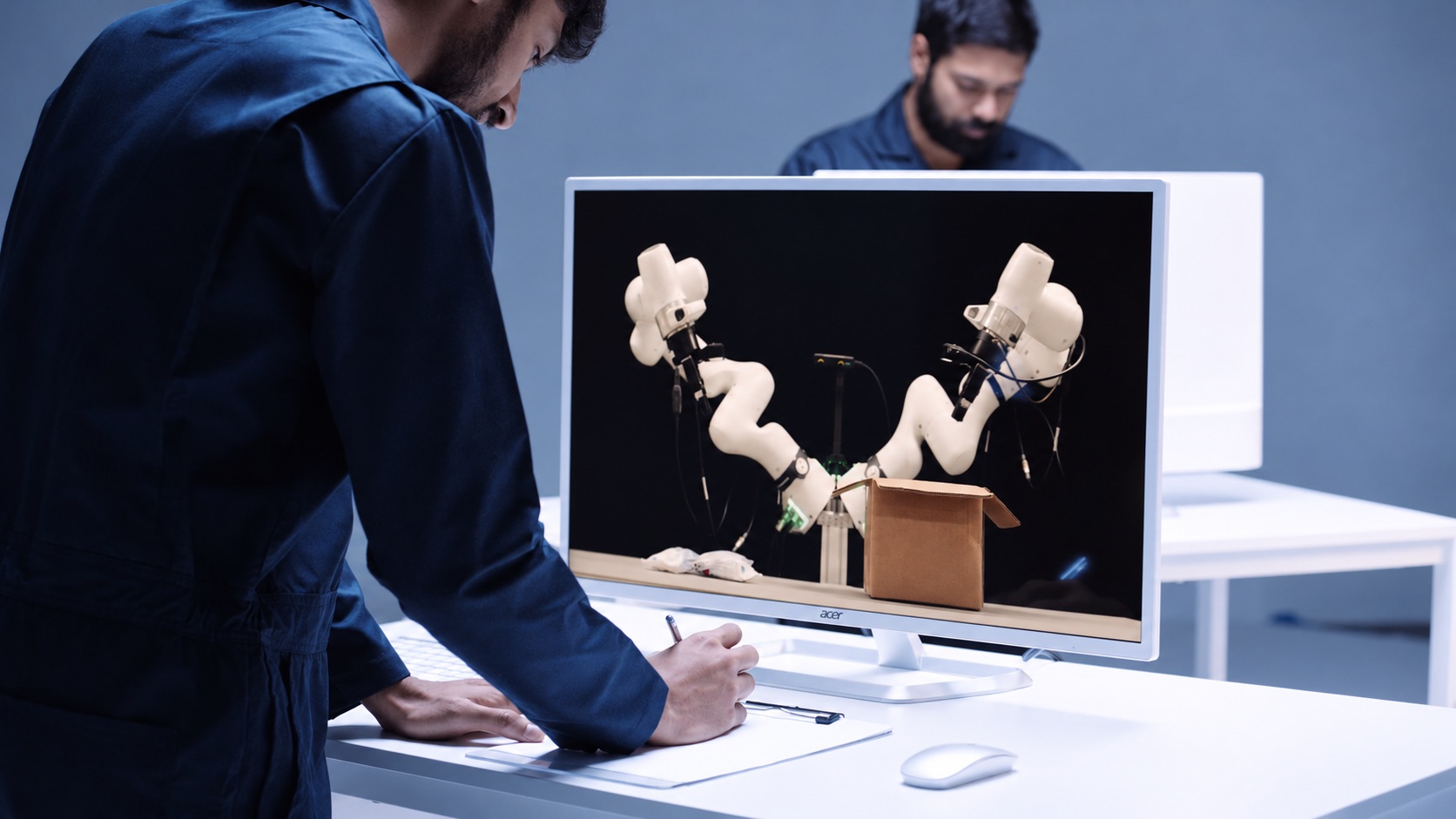
Odyssey-3 is a foundation world model that generates embodied environments from a prompt and predicts in real time how those environments change as a person or an agent takes actions or introduces events, using previous observations and the latest inputs. It is described as a learned dynamical system, implemented as an autoregressive diffusion transformer, that predicts how objects move and interact through space and how situations evolve over time. The model learns representations of physics, dynamics, and cause-and-effect from a broad dataset of visual observations, and developers use that knowledge both to simulate environments and to train policies for different physical systems. The research preview is available now, and physical AI developers who want to build with Odyssey-3 are invited to get in touch for access. The team behind Odyssey-3 comes from a decade spent building driverless cars, where predicting the world was essential to determining what a car should do next. The founders started Odyssey to pursue that idea far beyond the roads and to build a general-purpose technology that could bring learned world knowledge to all machines and tasks. Physical accuracy has been made a central focus of the research, on the reasoning that a foundation model for physical intelligence must learn to predict how the world actually behaves. In the team's own framing, with Odyssey-3 that idea is now being realized. Odyssey-3 generates embodied environments in real time and predicts how they change as a person or agent takes actions or introduces events. You can move through the environment or introduce an event during generation and observe how the model responds. The current preview provides first-person and third-person navigation alongside independent camera movement, giving different ways to interact with and inspect the model's predictions. The stated design goal was to enable dynamic, open-ended interactions with an environment that responds as the user acts. Odyssey-3 Pro sets a new state of the art on Physics-IQ Verified's video-to-video benchmark, achieving 66.1, the highest reported score. Physics-IQ, a benchmark from Anates Labs and DeepMind, tests physical behavior across fluid dynamics, optics, solid mechanics, magnetism, and thermodynamics by asking models to continue videos of real physical experiments and comparing their predictions with what actually happened. Odyssey-3 Pro also scores 54.7 in image-to-video. Reported video-to-video scores are 51.8 with base prompts, 61.6 with prompt enhancement, and 64.4 best-of-8 for the Odyssey-3 480p series, and 63.4 with prompt enhancement and 66.1 best-of-8 for Odyssey-3 Pro 720p. On image-to-video, Odyssey-3 records 41.0 with base prompts, 48.8 with prompt enhancement, and 52.8 best-of-8, while Odyssey-3 Pro records 50.0 with prompt enhancement and 54.7 best-of-8. Odyssey-3 also improves the measured tradeoff between physical accuracy and generation cost, making it possible to generate more simulations within the same compute budget. Resolutions are 832x480 for Odyssey-3 and 1280x720 for Pro. WorldMark measures control-following, visual quality, and world memory. In Odyssey's evaluation, using the benchmark's own captions and the mean of its 13 reported metric scores, Odyssey-3 ranks first in first-person stylized environments with 77.2, third-person real environments with 79.0, and third-person stylized environments with 76.3, and places third in first-person real environments with 80.6. The company notes that these results measure specific properties of generated worlds, and that applying the model to a physical system also requires evaluating the behaviors that matter for that machine and its tasks. Odyssey-3's learned world knowledge can be applied to different systems by training an action decoder or policy on paired observations and actions. These learned components translate that knowledge into the controls required by a particular machine, letting developers adapt the foundation model to a new body or task. With only tens of hours of robot demonstrations, Odyssey-3 completed manipulation tasks such as "Pour the cereal into the bowl" and "Close the screwbox" and showed recovery behaviors absent from those demonstrations, including reorienting a gripper after a missed grasp and retrieving a dropped object in an unusual position. Flexion has built humanoid control policies on Odyssey-3; the resulting policies exceeded the performance of the tested VLA baselines under environmental changes and continued to perform tasks under lighting changes that caused those baselines to fail. Odyssey-3 was also adapted to drive a car on real roads in India, training a driving policy on just 20 hours of driving data while keeping the Odyssey-3 backbone frozen. The policy uses the model's visual representations to predict waypoints ahead of the car, allowing it to drive in closed loop, and was demonstrated with instructions such as "Take the first roundabout exit" and "Drive along the road". Separately, Odyssey-3 was adapted to generate observations for particular sensor arrangements: in an early experiment using the front three cameras of an autonomous-driving dataset, an Odyssey-3 training checkpoint produced driving sequences with three camera views generated together after just 100 training steps. Odyssey-3 can also help train agents. An agent is an AI system that pursues a goal by observing its surroundings, choosing actions, and using what happens to decide what to do next. A world model can provide the environment in which those decisions are made, giving a way to study how an agent responds to changing conditions and whether it can complete a task inside a world whose behavior is learned. In Odyssey's task-completion demonstration, an agent receives a natural-language goal and pursues it inside Odyssey-3, observing the generated world as it works toward the task. Odyssey-3's training data combines internet video with time-localized, schema-verified event annotations, gameplay recordings with time-aligned keyboard and mouse inputs, and simulated rigid-body interactions with captions and metadata. Together these sources connect diverse observations with descriptions of what happens and, where available, the actions that produced it. The model is built as a multi-step video diffusion transformer, using temporally resolved prompts and controls to guide how the world unfolds. It is then extended autoregressively through teacher forcing and causal masking, training it to continue from preceding observations and predict future states conditioned on action inputs. Finally, a post-training pipeline combines distribution-matching and adversarial distillation to produce a distilled variant of Odyssey-3, a few-step model capable of real-time interaction. Odyssey believes world models will power increasingly capable physical AI, generate environments in which other intelligences can train, and enable new kinds of human experiences. Developers building robots, humanoids, self-driving cars, drones, or any other autonomous system are invited to explore how foundation world models can accelerate their work. The research preview lets people prompt an environment, act within it, and see how the world model responds, while API access is available by getting in touch with the team. In summary, Odyssey-3 is presented as the company's most powerful foundation world model, combining real-time, prompt-driven environment generation with strong physical accuracy results on Physics-IQ Verified and WorldMark, and with demonstrated adaptation to robot arms, humanoids, vehicles, multi-sensor data generation, and agent training.
Pilot5 Legal is a deliberative AI platform built for legal work. Rather than returning a single fluent answer, it puts one legal question in front of five independent frontier AI models. Each model forms its own position without seeing the others, then the models critique one another, answer objections, and revise under pressure before the panel converges on a structured recommendation. The product is aimed at lawyers and legal teams who need an answer they can inspect, challenge, and verify rather than simply trust, and it is organised around five concrete legal workflows: statutory review, contract understanding, settlement range analysis, statutory authority lookup, and firm playbooks. The product exists because a fluent answer is easy to produce, while a defensible one needs the source, the opposing view, and a record of how the conclusion was reached. A single answer leaves things out: the adverse case is not argued, the authority behind a claim cannot easily be checked, and the limits of the analysis stay invisible. Legal work that will be challenged requires a different standard of answer, and that standard is the design brief behind every part of the product. Pilot5 is described as relaunching for legal work, adding primary-source research, citation verification, contract analysis, and transparent reasoning so that lawyers can inspect, challenge, and verify AI output. The premise is that authority, challenge, and uncertainty should stay attached to the conclusion rather than being stripped away. The statutory review workflow checks a separation agreement against selected statutory requirements and shows the provision behind each finding, so a lawyer can find what the agreement is missing and see the authority behind it, with an annotated agreement delivered in Word. Contract understanding is built for getting oriented in an unfamiliar contract: it produces a clause-by-clause map explaining what each numbered clause does while quoting the source wording verbatim, and it identifies skipped material rather than silently passing over it. The stated goal is orientation without losing the original text, so that reading a new agreement starts from a structured map instead of a blank page. The settlement range workflow pressure-tests both sides of a dispute and exposes a settlement range that costs each side something, using five independent positions, statutory claims that are checked, and preserved dissent. Statutory authority lookup retrieves the enacted text: a lawyer pastes a citation and receives the publisher's own words with no generative model involved, handling up to 25 citations at a time and returning the official source and retrieval date, under the explicit rule that no text is generated and anything unresolved stays unresolved. The firm playbook workflow makes the firm's position repeatable by adding approved firm positions to the statutory baseline used in future reviews; human approval is required, the statutory baseline remains in place, and approved positions are reused in later reviews. The defining difference is that the models do not merely answer, they answer one another. The deliberation runs in four stages: blind first analysis, anonymous cross-critique, reasoned revision, and synthesis with a minority report. In the published example, the panel includes The Architect (structure, benchmarks, operational logic), The Counsel (evidence, nuance, legal clarity), The Strategist (long-range value and trade-offs), The Engineer (feasibility and failure conditions), and The Contrarian, who is required to make the strongest case against consensus. In a worked Chapter 7 preference dispute, the Engineer initially proposed building and litigating only after a six-week forensic payment audit and otherwise settling at 35 to 45 cents; the Contrarian challenged the legal premise by warning not to assume the affirmative defenses and instead attacking the trustee's prima facie case; the Counsel argued that a prima-facie-only attack is not a standalone strategy and called for quantifying ordinary-course and new-value evidence; and the Architect revised the approach so that payment timing, new-value offsets, and defense cost became settlement gates rather than a fixed dollar anchor. The final view follows that argument; it is not an average of five first drafts. Every deliberation is designed to remain reviewable. The authority sits beside the claim: primary law is fetched from the publisher's text, and analytical inference is marked separately so that confidence never masquerades as authority. The opposing view is part of the work, and the strongest dissent stays visible rather than being erased. The reasoning remains inspectable, with every source, finding, challenge, and limitation travelling with the outcome, and the lawyer remaining the decision-maker and the reviewer of record. Accepted, rejected, and overridden findings carry into the review output. The product states plainly that silence never means clearance: unresolved and unexamined issues remain explicit, and resolved citations link to publisher text while unresolved ones stay unresolved. Because client matters carry their own duty of confidentiality, Pilot5 Legal publishes the data rules that govern every review. Client data is never a training asset: there is no cross-account use and no model training. Data is encrypted with AES-256 at rest across tables, WAL, and backups, and encryption cannot be disabled. A right to erasure provides hard delete across all tables, and retention is published per data class. Frontier models run on zero-retention endpoints, and models without one are excluded. Identifiers are pseudonymized before inference, tokenized, then re-identified in the response, and traffic uses TLS 1.3 with AES-256-GCM and forward secrecy. A Zero Data Retention mode offers ephemeral processing with no outcome logging; every sub-processor is disclosed with role, region, and transfer basis; in-region deployment with BYOK and sovereign hosting is available on demand; and a DPA under Article 28 can be put in place under NDA. Every review is scoped to United States law, no other jurisdiction is consulted, and the same disclosure travels with every deliberation record. The practical benefit is that the lawyer receives an answer that arrives with its own audit trail. Because the strongest opposing view travels with the result, the thinking has already been stress-tested before it is relied on. Because sources and inference are separated, a reviewer can see which parts of a conclusion rest on authority and which rest on reasoning. Because unresolved issues stay visible, the absence of a finding is never mistaken for a clean bill of health. And because human accept, reject, and override decisions remain on the record, the output fits a review workflow rather than replacing it. Cost transparency is part of the proposition as well: the product cites fifty cents for a statutory review and about four dollars to pressure-test a settlement position. Pilot5 Legal runs where lawyers already work: deliberations can be launched from Claude, ChatGPT, Cursor, Perplexity, Mistral Le Chat, and Microsoft Copilot Studio through an MCP setup, and data can be brought in from sources including Slack, GitHub, Notion, Google Drive, Jira, Confluence, Linear, GitLab, Stripe, Zendesk, Sentry, PostgreSQL, Zotero, Finnhub, EODHD, Twelve Data, Indian Kanoon, OpenCorporates, Docket Alarm, UniCourt, Clio, SharePoint, and NetDocuments. Authority lookup and the firm playbook are free. Every plan includes all five legal workflows and differs only in monthly credit allowance: contract understanding costs 0.2 credits, statutory review 0.5 credits, and settlement range roughly 4 credits. Paid plans are Starter at $29 per month for 30 credits, Pro at $79 per month for 90 credits, Expert at $149 per month for 200 credits, Master at $299 per month for 450 credits, and Business at $999 per month for 1,750 credits. Unused credits roll over for 12 months, the credit estimate is shown before a paid run, any unused reserve is refunded when the run completes, and there are no daily caps or feature-gated plans. Pilot5 Legal's core value proposition is that it treats the record, not the answer, as the product. Five independent models argue the question, one is required to argue against consensus, the authority behind each claim can be checked, and the dissent, limits, and human decisions stay attached to the result. For legal work that will be challenged, that combination turns AI output from something a lawyer has to trust into something a lawyer can review, challenge, and stand behind.
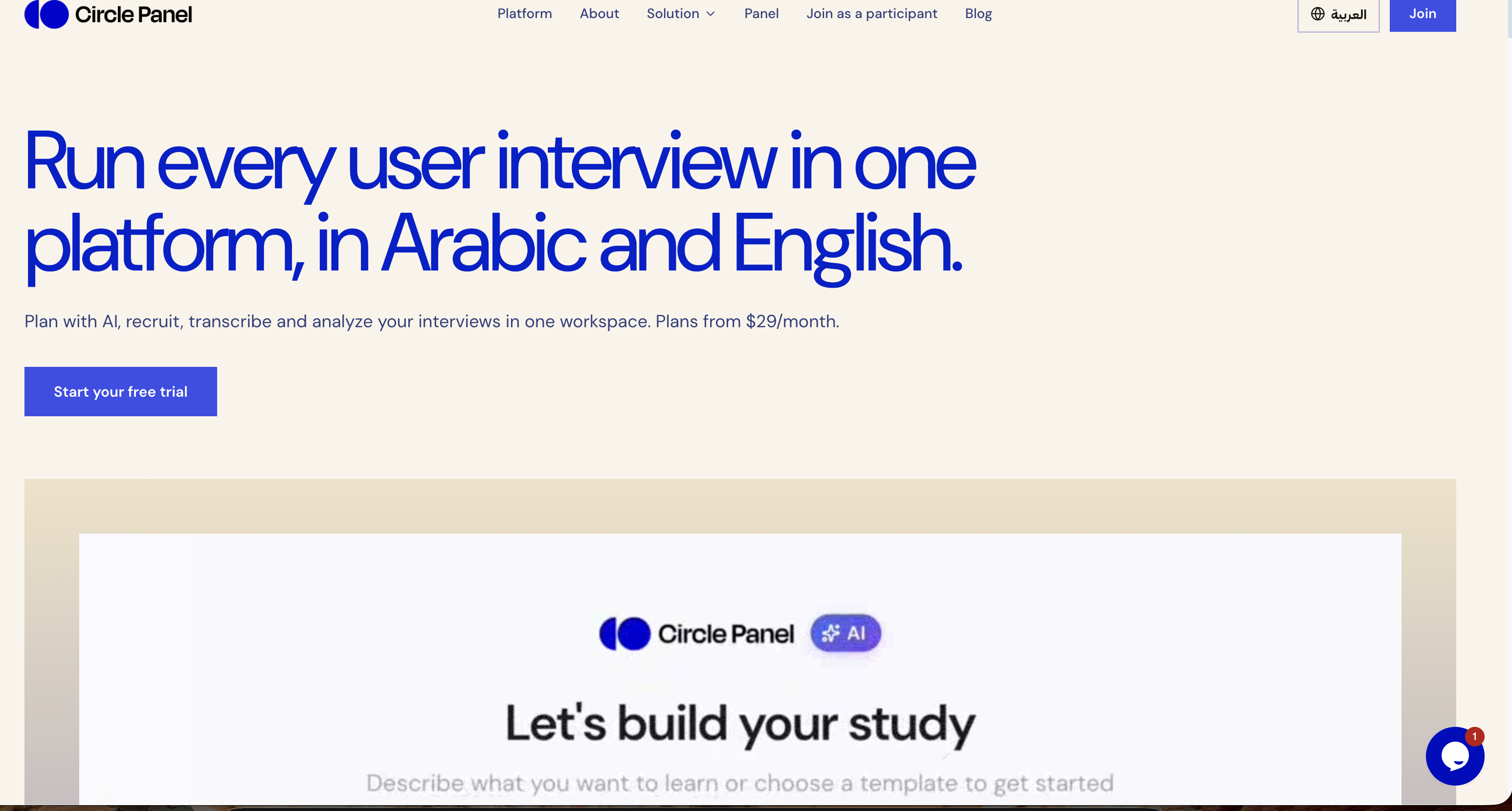
Circle Panel is an AI-native user research platform that lets teams plan, recruit, interview, analyze and share user research in one place. Its stated purpose is to turn raw research sessions into decision-ready insight, and it is explicitly built for everyone who talks to users: product managers, designers, researchers and market research teams. The platform runs in Arabic and English, and it presents itself as end to end, covering the whole path from defining a study to publishing what was learned. Rather than separating scheduling, recording, transcription and synthesis into different products, Circle Panel keeps the entire workflow inside a single workspace so that no stage of a study needs a subscription of its own. The problem Circle Panel sets out to solve is fragmentation across the research workflow. As the site describes it, teams routinely pay for a separate tool at every step: booking links for scheduling sessions, call recorders for capturing them, transcription apps for turning speech into text, and note documents for synthesis. Each of those stages traditionally carries its own subscription, and every hand-off between them costs time and context. Circle Panel folds booking links, call recorders, transcription apps and note docs into one flow, drawing a comparison with tools such as Notion, calendar apps, Calendly, Miro, Zoom, Otter and forms. The benefit it promises is that teams spend less time switching between tools and more time doing research, with no stage of a study requiring its own subscription. The first two steps of the five-step workflow cover designing a study and reaching participants. Instead of building a plan by hand, you describe in plain language what you want to learn, and Circle Panel's AI pulls proven frameworks from a knowledge base spanning 100 industries before drafting your goals, your discussion guide and your screener questions. The site states that a study can be set up in around 30 seconds, with the study plan, discussion guide and participant screener ready to launch or refine. Recruitment then works in two ways. You can share a branded booking link with your own users, or use the built-in participant panel. People book their own slots and are screened automatically against your criteria, which removes spreadsheets and back-and-forth. Screener questions filter people automatically, and incentives are handled inside the platform. Step three is running the interviews themselves. Every session is conducted with a structured, AI-generated guide, and live transcription captures every word in Arabic and English. The bilingual support extends to code-switching within a single session, meaning a participant can move between both languages and the transcript keeps up. Transcription, AI summaries and insight generation all run in Arabic and English. Live transcription is framed as a way to stay present in the conversation instead of splitting attention between listening and note-taking, and the platform includes a conference room so sessions can run at scale. Step four turns sessions into findings. AI groups patterns across sessions, pulls out the strongest quotes and ranks findings by frequency, which the site describes as turning hours of analysis into minutes. This analysis layer is the AI debrief, themes and insight ranking capability. Step five is about accumulation: every study is saved to a searchable repository, and past findings, personas and reports resurface automatically when you plan your next study. Instead of research being archived and forgotten at the end of a project, each new study starts with the context of what the team already learned, so a research repository becomes a working asset rather than a storage folder. Circle Panel's overall approach is described as five steps from question to insight, with AI handling the setup, screening and synthesis so that the researcher stays focused on the conversation. The company describes itself as AI-native and says it applies enterprise-grade controls at every step. On data handling, sessions are encrypted in transit and at rest. Enterprise plans add SSO/SAML, audit logs, a 99.9% uptime SLA and Arabic data residency in the MENA region. Pricing is tiered and published on the site: Starter, Pro and Business plans, a 14-day free trial on all paid plans with no credit card required, and 20% savings on annual billing. A custom Enterprise tier is also referenced. The outcomes the platform claims are tied to each role. Product managers get actionable findings the moment a session ends, ready to shape the next sprint rather than the one after it. Designers can put a prototype in front of real users this week and watch exactly where they hesitate. Researchers get screening, scheduling and transcription in one place so their time goes to analysis. Market research teams can reach verified segments across MENA in Arabic or English without having to build a panel first. More broadly, consolidating the workflow means fewer tools to juggle, less manual analysis, and research findings that persist and resurface instead of being lost between projects. Concrete use cases follow from those roles. A product team running continuous discovery at scale can keep multiple studies live at once, with the Pro plan allowing unlimited studies and 25 sessions per month. A solo researcher running regular studies can work within the Starter plan's two active studies and ten sessions per month. Design teams use the platform to test prototypes with real participants and observe hesitation points. Market researchers use the built-in participant panel to reach verified segments across MENA in Arabic or English without building a panel first. The platform also lists the industries it works with: healthcare, fintech, e-commerce and travel research, noting that it adapts to how a given industry runs user research. Circle Panel is aimed at four broad groups: product managers, designers, researchers and market research teams, plus the wider set of people who talk to users. Pricing starts at $29 per month for solo researchers on the Starter plan, $49 per month for product teams on Pro, and $119 per month for organizations that need the full research operations platform on Business. Starter includes 20 AI credits per month, two active studies, ten sessions per month, three seats, the AI study builder, a recruitment link and conference room, and full public share links. Pro adds 50 AI credits per month, unlimited studies, 25 sessions per month, ten seats, plus AI debrief, themes and insight ranking. Business includes 100 AI credits per month, unlimited seats, everything in Pro and priority support. Circle Panel's value proposition is a single, AI-native workspace for the whole user research cycle: plan, recruit, interview, analyze and share. It removes the need to stitch together booking links, call recorders, transcription apps and note documents, supports Arabic and English throughout, including code-switching within a single session, and keeps every study in a searchable repository that feeds future research. With plans starting at $29 per month and a 14-day free trial, it targets everyone from solo researchers to teams running continuous discovery, with enterprise-grade controls and MENA data residency available at the top tier.
Pikkai is an independent directory for discovering and publishing AI products. Visitors can browse categories, search the product library, and find recent launches. Makers can prepare a product listing and submit it for review. Discovery is free, with optional paid submission plans for makers.
Curie is an AI-powered research assistant for scientific literature and document analysis, presented as built for real scientific work rather than as a generalist chatbot. It analyzes scientific literature, processes documents and delivers intelligent insights powered by advanced AI technology. The platform adapts to many kinds of researchers — solo researchers, graduate students, systematic review teams and R&D departments — so that each can search literature, extract data and verify findings with precision. Its stated aim is to let researchers focus on the science that matters most, and you can start writing on Curie for free. Research is slowed down by repetitive work. Searching literature, screening abstracts, extracting data and drafting summaries eat up valuable hours and pull focus away from the parts of research that only a researcher can do: interpreting findings, forming hypotheses and making decisions. Curie's stated purpose is to handle those repetitive steps so that time goes back into judgment and interpretation. The problem is not only speed. Doing better research also means pushing further — covering broader literature, more complex reviews and questions that a person would otherwise not have time for. Curie is positioned as a research partner that gives researchers the confidence to take on that wider scope, so more ground is covered and more impact comes from the work. Curie's literature search does not require keywords or boolean filters. You type your question the way you would ask a colleague, and Curie figures out what to search and how to answer. Behind that plain-language interface, Curie searches PubMed, arXiv, Europe PMC, OpenAlex and Semantic Scholar in parallel, so a single question reaches multiple scientific databases at once instead of being repeated across separate tools. The site presents this focus on scientific literature as the difference from a generalist chatbot. Researchers can ask it to find recent papers on a topic, look for meta-analyses, locate studies on a specific model or method, or search PubMed and arXiv together for a subject such as quantum error correction. A central part of Curie is verification. The assistant verifies every claim against the source text, so you can see what is backed by the literature and what is not. This matters because unsupported statements are difficult to spot when synthesizing many papers. Related to this is document analysis: you can point Curie at a document and it will extract structured data, showing the quote behind each value it extracts. For example, you might extract sample sizes and outcomes from clinical trial PDFs, compare reaction yields across synthesis papers, or build a table comparing sample size and effect size across a set of studies. Because each extracted value comes with its supporting quote, results stay traceable to the original text. Curie also supports a full systematic review workflow: protocol, screening, PRISMA diagram. The important detail is that you approve every decision, so the process stays under researcher control rather than being fully automated. Researchers can draft a systematic review protocol for a topic such as antibiotic resistance studies, screen records, and produce a PRISMA diagram as part of the same flow. To keep this work organized, Curie provides Projects and a library, which hold the material and the work associated with each effort so that searches, extractions and reviews do not have to be managed across separate tools. Overall, Curie's approach combines three things that are explicitly described on its site. First, natural-language input: you ask in plain language and Curie decides what to search and how to answer. Second, parallel search: PubMed, arXiv, Europe PMC, OpenAlex and Semantic Scholar are queried at the same time. Third, verification against source text: every claim is checked against the source so backed and unbacked statements are distinguishable, and extracted data values are tied to the quote they came from. On top of that sits a human-in-the-loop model for systematic reviews, where the researcher approves each decision. Projects and a library keep the resulting work organized. The stated benefits are time and scope. Curie is presented under the promise "Save hours, not minutes," with research productivity maximized by taking over literature searching, abstract screening, data extraction and summary drafting. By removing those repetitive steps, it is intended to return focus to interpretation, hypothesis formation and decision-making. In practice that means fewer hours spent on mechanical steps every week and more capacity for the analysis that determines the quality of the output. The second benefit is reach: Curie acts as a research partner that gives researchers the confidence to tackle broader literature, more complex reviews and questions they would otherwise not have time for, meaning more ground covered and more impact from the work. The site frames this as support for both speed and ambition — working faster and pushing further. Curie's site lists concrete tasks it is used for. Researchers can summarize the latest treatments for triple-negative breast cancer; find recent papers on CRISPR gene editing for sickle cell disease; extract sample sizes and outcomes from clinical trial PDFs; explain the mechanism of action of mRNA vaccines in simple terms; search for meta-analyses on cognitive behavioral therapy for anxiety; draft a systematic review protocol for antibiotic resistance studies; compare reaction yields across synthesis papers; summarize the methodology section of an astrophysics paper; find studies on machine learning models for early Alzheimer's detection; build a table comparing sample size and effect size across studies; check whether a claim about vaccine efficacy is supported by the literature; search PubMed and arXiv for papers on quantum error correction; and generate a Python script to analyze a gene expression dataset. Questions about what current research says, such as on microplastics in drinking water, are also among the examples. Curie is presented as suitable for different kinds of researchers on one platform: academic researchers and professors, PhD and graduate students, systematic review teams, and industry R&D teams. The site shows institutions that have already tried it, including CSIC (Consejo Superior de Investigaciones Científicas), Universitat de Barcelona, Fundació Bosch i Gimpera, IrsiCaixa, Helse Bergen (Haukeland universitetssjukehus), Università degli Studi di Messina, Uganda Christian University and MICIU / AEI. Security and privacy are addressed directly: Curie states that it is strictly GDPR compliant, that its servers are located in Europe, that it does not use user data to train models or to improve Curie, and that user data is not shared with anyone. It also describes pseudonymization and anonymization of personal and identifying information in certain documents. Access is offered for free, with calls to start writing, get free access and get started. Curie's value proposition is a focused AI research assistant rather than a general chatbot: parallel search across major scientific databases, plain-language questions, verification of every claim against source text, structured data extraction with supporting quotes, and a supervised systematic review workflow with protocol, screening and PRISMA diagram. Combined with projects, a library and a privacy posture aimed at sensitive research data, it is built to save researchers hours each week and to widen the scope of questions they can take on.