Category Focus/categories/api
API AI Tools
Discover and compare the best api AI tools and software. Browse 94+ curated tools with reviews and rankings.
Projects tracked
94
Sort mode
RECENT
Page
1
Discover and compare the best api AI tools and software. Browse 94+ curated tools with reviews and rankings.
Projects tracked
94
Sort mode
RECENT
Page
1
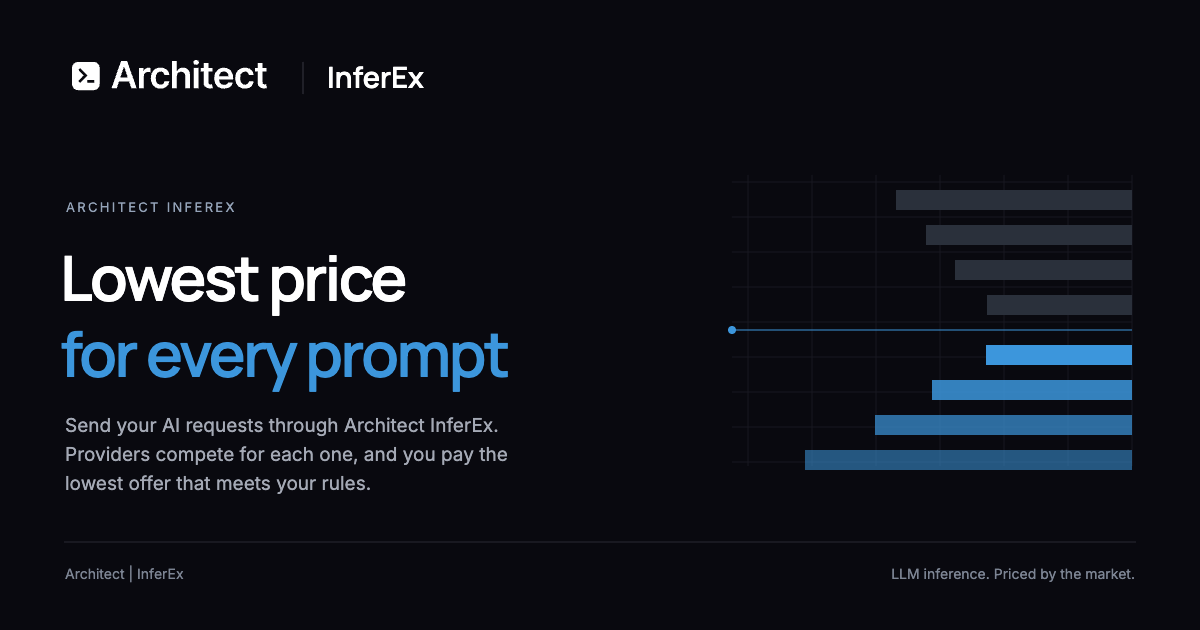
Liquid Inference is an LLM router built around a single promise: the lowest price for every prompt. You send an ordinary chat request and providers compete to answer it, so your request is completed at the lowest price that still satisfies the requirements you set. It is aimed at developers, engineers and teams who reach large language models through an API, from someone wiring up a single coding agent to organisations pushing large volumes of inference, and its purpose is to turn model access into a competitive market rather than a fixed rate card. Signing up is free with an email address, and you receive an API key to use with one base URL. The problem it addresses is that inference is normally bought at list price. Conventional access means choosing a vendor and accepting whatever rate card that vendor publishes, even though the underlying capacity is supplied by many providers whose costs and spare capacity change constantly. Providers drop their prices when they have spare capacity, but under a published rate card that movement never reaches the buyer. Liquid Inference moves that dynamic into the request path. Instead of negotiating contracts, you let providers bid for each individual prompt and you pay only for the tokens the model produces. Because routing rules constrain model, region, speed and minimum quality, the competition happens strictly inside boundaries you define. The mechanism is an instant auction for every request, described on the site in three steps. First, providers set their prices: each provider sets a price per token for each model and can change it at any time. Second, the cheapest match answers: you set the rules, covering model, region, speed and minimum quality, and the cheapest provider that meets them answers your request. Third, you pay for what you use: before the model starts you know the most a request can cost, and you are billed only for the tokens it produces, with the cap fixed before the first token. The practical effect is that cost exposure is known in advance instead of being discovered on an invoice later. Routing is yours to control. You choose the model, region, speed and minimum quality, and only providers that meet those requirements compete, which means the auction can never push a request outside your constraints. The site also supports routing rule presets and Auto routing algorithms for teams that would rather not define every rule by hand. Alongside routing sits a price limit on every request: the maximum a request can cost is fixed before the model starts. Together, the two controls make cheapness one dimension of the decision rather than the only one, since quality, geography and latency stay in your hands. The catalogue is broad. Liquid Inference covers hundreds of open- and closed-weight models with full multi-modal support. The site lists model families with their counts and lowest current offers, including GPT with 55 models, Qwen with 53, Gemini with 46, GLM with 31, Deepseek with 28, Gemma with 25, Kimi with 18, Grok with 16, Claude with 16, Mistral with 14, O with 9 and Nemotron with 8, alongside Ernie, Mimo, Llama, Muse, Seed, Doubao, Minimax, Aion, Phi, Nova, Command, Mercury, Hermes, Longcat, Ling, Ministral, Step, Hunyuan, Claw, Fugu, Nex, Reka, Granite, Synth, Laguna, Agnes, Schematron, Solar, Unslopnemo, Remm, Weaver, Sonar, Morph, Inkling and Relace. A live offer board shows the cheapest offers on the book, headed in the example shown by Nemotron: Nano 9B V2 at 0.01 and DeepSeek V3.1 at 0.02 USD per million output tokens. Compatibility is deliberately conservative: one key covers OpenAI and Anthropic APIs. OpenAI Chat Completions and Anthropic Messages are served on one base URL, so your existing code works unchanged. In practice you change the base URL in any client that speaks either API and keep everything else the same; the documented edit is a single line pointing base_url at the router with your Liquid API key. That means the router can be adopted without a rewrite, and the same key serves both API dialects. Because the interface is standard, the product plugs into the AI coding tools teams already use. The site lists Claude Code, Codex, Pi, Oh My Pi, Cursor, OpenCode, Cline, Roo Code, Kilo Code, Goose, Open WebUI, Cherry Studio and n8n as supported clients, together with the OpenAI SDK, Anthropic SDK, Claude Agent SDK, OpenAI Agents SDK, Vercel AI SDK, LiteLLM, LangChain and curl. Fully compatible with agentic coding tools and full multi-modal support are both stated up front, so an agent that already speaks the OpenAI or Anthropic API can be pointed at the router without changes to its internal logic. Transparency sits alongside the pricing model. Billing is itemized, so you can see what every request cost, line by line, and reconcile spend per request rather than per invoice. Under market data, Liquid Inference publishes a public price history: you can download live and past prices for every model and send work when prices are low. On the provider-trust side, an architect tests every provider regularly with standard benchmarks and publishes the results. Customers see a provider's price, speed and measured quality, and the same rules apply to every provider. The platform is two-sided. If you already run models, you can sell inference on them: your software posts a price and changes it whenever your costs do, and when you win a request you are paid for the tokens you serve. Providers set their own price with no fixed rate card, can change it as often as they like, control load by stopping quotes when full, and lower price when they have spare capacity. Winning is on price and quality, since customers see price, speed and measured quality under the same rules. Records are clear, with every job and payment checkable against the provider's own logs. Registration takes four steps: create an account, register the deployment you want to serve, an operator reviews it and lists it, and your agent connects and starts quoting. Registration is free, and Liquid Inference charges its fee to the customer rather than to the provider. For the buyer, the outcome is straightforward: competitive lowest marginal cost on each prompt, a hard price ceiling known before the first token, and the freedom to set constraints on model, region, speed and quality. You get one key and one base URL across OpenAI and Anthropic APIs, itemized records of what each request cost, and public price history that lets you schedule flexible work for the moments when providers are cheapest. Free signup with an email address lowers the barrier to testing, and the first 500 users receive $20 of free inference. The use cases follow directly from those mechanics. Agentic coding tools such as Claude Code, Codex, Cursor, Cline and OpenCode can be repointed at the router so each prompt is served by the cheapest provider that meets your rules, with multi-modal requests handled by the same key. Teams planning a budget can pick a model and a monthly output volume of 1M, 10M, 100M or 1B tokens and read the estimated cost per month from the lowest offer on the book, remembering that input tokens are priced separately. Cost-sensitive batch work can be timed against the public price history. Workloads with regional, latency or quality requirements can specify them and let the market satisfy them. Pricing is usage-based: you are billed per token produced, with input tokens priced separately, and there is no rate card to accept. Signing up is free with email, and the first 500 users get $20 of free inference; referrals earn 20 percent of referred fees as free inference and 10 percent for second-level referrals. On the supply side, registration is free for providers and the platform's fee is charged to the customer. The product is delivered as a web sign-up and API service reached through a single base URL, https://router.inference.ai.exchange/v1, with integrations spanning coding agents, chat UIs, automation tools, SDKs and frameworks. In summary, Liquid Inference turns AI inference into an auction. Providers post and revise prices per token, your routing rules decide who is eligible, the cheapest eligible provider answers each prompt, and a fixed cap tells you the most a request can cost before the model starts. You pay only for the tokens produced, see the cost of every request line by line, and can join the market from the other side to sell capacity on the models you already run. The value proposition is the one in the title: the lowest price for every prompt.
Claude Haiku 5.5 is Anthropic's fastest, cheapest, and most capable small model, announced on October 7, 2026. It is designed for high-volume, cost-sensitive tasks and reliably handles quick, repetitive workloads such as summaries, compactions, database queries, and classification requests. The model also pairs well with Anthropic's larger models, Opus 5.5 and Sonnet 5.5, acting as a subagent on coding work. Because it is Anthropic's fastest model to date, it is positioned for speed-sensitive workloads including live customer support and browser use, giving developers a small model they can run often rather than sparingly. The launch addresses a practical problem in production AI: many of the requests that dominate real traffic are short, repetitive, and narrow, yet teams have historically paid frontier-model prices to serve them. Anthropic notes that prompts up to 100,000 tokens make up around 90% of requests to the previous Haiku model, which means the bulk of day-to-day workloads are the kind that do not need a large model. Claude Haiku 5.5 is priced far lower than Haiku 4.5: on average, it now costs around 75% less to run. By footnote, it is priced 90% lower than Haiku 4.5 for requests up to 100,000 tokens and 50% lower for requests over 100,000 tokens. That calculation also accounts for the model's updated tokenizer, similar to those of Sonnet 5.5 and Opus 5.5, which uses slightly more tokens per task. Claude Haiku 5.5 brings substantial benchmark gains over Haiku 4.5 across knowledge work, computer use, reasoning, agentic coding, and visual reasoning. On GDPval-AA v2.1, a knowledge-work evaluation, it scores 1,620 versus 735 for Haiku 4.5, 1,437 for GPT-6 Luna, and 1,840 for Sonnet 5.5. On AA-Briefcase v1.1 it scores 1,578 against 614 for Haiku 4.5, 1,336 for GPT-6 Luna, and 1,824 for Sonnet 5.5. On the OSWorld 2.1 computer-use benchmark (offline subset) it reaches 72.4% versus 15.7% for Haiku 4.5, 48.9% for GPT-6 Luna, and 83.9% for Sonnet 5.5. On Humanity's Last Exam, a multidisciplinary reasoning test, it scores 45.9% without tools and 57.4% with tools, compared with 10.2% and 18.7% for Haiku 4.5 and 56.9% and 64.5% for Sonnet 5.5. On Terminal-Bench 4.0 agentic coding it scores 39.2% versus 0.0% for Haiku 4.5 and 70.6% for Sonnet 5.5, and on FrontierCode 1.1 (Main) it reaches 46.4%, while Chartography visual reasoning lands at 46.4% without tools versus 6.4% for Haiku 4.5. Full evaluation details are documented in the Haiku 5.5 System Card. Haiku 5.5 is the first Haiku-class model to come with an adjustable effort setting. As with Anthropic's other models, users can decide whether to optimize for cost or intelligence by choosing an effort level, with options charted across Low, Med, High, Xhigh, and Max. Anthropic publishes accuracy-versus-cost charts for three benchmarks at each setting: OSWorld 2.1 for computer use, GDPval-AA for knowledge work, and Humanity's Last Exam for multidisciplinary reasoning. OSWorld 2.1 measures how well agents can operate a real computer to finish long, multi-step tasks; GDPval-AA v2.1 evaluates agents on real-world professional work across 44 occupations; and Humanity's Last Exam tests expert-level academic knowledge and reasoning. This effort setting lets teams tune the trade-off between per-attempt cost and task accuracy without switching models or rewriting their workloads. Anthropic reports that Claude Haiku 5.5 shows major improvements across almost all of its alignment evaluations relative to Haiku 4.5, with far fewer instances of misaligned behavior and a lower willingness to cooperate with misuse; a dedicated system card describes the evaluation process and results in more detail. The model's cybersecurity safeguards are more restrictive than Haiku 4.5's but somewhat less restrictive than those applied to other recent models. In cybersecurity, they permit a wider range of defensive tasks than the safeguards for Sonnet 5.5 but still block penetration testing and other techniques more likely to be used by attackers. Its biology safeguards are the same as those for Sonnet 5, Sonnet 5.5, and Opus 5: they allow research biology questions but restrict access to requests judged likely to cause harm. Organizations working on wider-ranging biology and cyber activities can apply to the Life Sciences Verification Program and the Cyber Verification Program. The model's distinct approach is to combine a small footprint with a configurable effort dial and a clear role as a cost-efficient companion to larger Claude models. Anthropic explicitly frames Haiku 5.5 as best suited to more narrowly scoped tasks that might otherwise have been cost-prohibitive with previous versions of Claude, such as compaction, summarization, or subagent work, while Sonnet 5.5 and Opus 5.5 remain better choices for complex agentic coding tasks like those measured by Terminal-Bench 4.0. In practice this means a larger model can lead a task while Haiku 5.5 subagents handle the high-volume supporting steps. Anthropic also improved the value of its wider model range at the same time: Sonnet 5.5's cache reads were halved to $0.10 per million tokens, reducing the cost of Sonnet 5.5 on most agentic tasks by around 20%, and new monthly API credits were introduced for Max and Team subscribers. For users, the headline benefits are lower cost and lower latency at scale. The pricing table shows Haiku 5.5 at $0.01 per million tokens for cache reads on prompts up to 100,000 tokens and $0.05 over that, $0.125/$0.625 for cache writes, $0.10/$0.50 for input tokens, and $0.50/$2.50 for output tokens, against Haiku 4.5's $0.10, $1.25, $1.00, and $5.00. Early customer testing reported results consistent with the performance and cost improvements shown in the benchmarks. Asana measured over a 30% reduction in latency for task completions and up to 2.5x faster inference per agent turn. Box saw Haiku 5.5 score 11 points higher than Haiku 4.5 at about half the latency. The combination makes high-volume work affordable enough to run often rather than selectively. Anthropic and its early customers describe concrete workflows. AlphaSense's Ask in Document feature runs about 8 million calls a week in production answering very specific questions on top of one or a few documents; across 400 queries, Haiku 5.5 scored 0.84 versus 0.76 for Haiku 4.5. Box plans to use it on analytical work that runs at scale, from cost reports to financial summaries and weekly recurring reviews, across large volumes of enterprise content. HubSpot tests models on CRM tasks such as reporting on deals using simulated portals; Haiku 5.5 scored 92.8% averaged over three runs, the best result on that suite, and on a CRM audit task identifying stale but ambiguous records it was fastest to complete the task with the highest hit rate and the lowest false positive rate. Rogo uses it for quick lookups, subagents, and summaries, for example a Haiku 5.5 subagent pulling a segment revenue line from a 10-K while a bigger model builds the deck. Cognition offers Haiku 5.5 as a sidekick in Devin Fusion, holding a top-tier FrontierCode score of 66.2 while cutting cost and latency, available today in the Devin CLI with Opus 5.5 as the lead. Asana deployed it for AI Teammates use cases such as triaging bugs, setting up projects, and searching large portfolios to surface high-risk or overdue work. Claude Haiku 5.5 is available now on all platforms, including Amazon Web Services, Google Cloud, and Microsoft Azure, and developers on the Claude Platform can get started with the identifier claude-haiku-5-5; Anthropic provides a migration guide for details. For developers, Anthropic updated its Claude Python and TypeScript SDKs to add support for computer use and browser use in beta, noting that Haiku 5.5 is especially well-suited to these tasks given its combination of speed, capability, and price. Alongside the launch, Anthropic rolled out a new monthly API credit to Max and Team subscribers for use on the Claude Platform: Max 5x users receive $100 in credits per month, Max 20x users receive $200, and Team subscribers receive up to $500 pooled across their users. Credits can be used on any Claude model and are designed to let users experiment with building tools, apps, and agents that call the API. Claude Haiku 5.5's value proposition is straightforward: it is the cheapest, fastest, and most capable small model Anthropic has released, aimed squarely at high-volume, cost-sensitive work. With large benchmark gains over Haiku 4.5, an adjustable effort setting for tuning cost against intelligence, substantially lower token pricing, and availability across major cloud platforms, it gives teams a model they can run frequently for summarization, classification, lookups, subagents, customer support, and browser and computer use, while reserving larger Claude models for the most complex tasks.
Fuse AI is a revenue automation platform that uses AI agents to find, qualify, and engage high-intent customers in a given market. The company positions itself as sales superintelligence for modern revenue teams, and the site names sales representatives, founders, RevOps teams, and go-to-market professionals as the people it is built for. Its purpose is to help organizations grow revenue by handling the work around selling: discovering the right prospects, enriching their contact data, surfacing buying intent, and running personalized outreach. Fuse describes itself as open by design, able to replace point solutions or plug into an entire stack to run alongside existing tools from day one. It is backed by Y Combinator and is used by sales and marketing professionals from more than 1,000 startups and enterprises worldwide. The problem Fuse addresses is tool sprawl. As the company frames it, a go-to-market stack should not need a dozen tools, subscriptions, and APIs stitched together, with a separate product handling every step of the workflow. Fuse takes care of web automations, data enrichment, multi-channel outreach, workflows, and AI agents inside a single platform, and it lets teams build unlimited workflows and agents on top. The Product Hunt listing describes the offering as thinking of OpenRouter, Apollo, Clay, and Zapier combined. The stated consequence of the legacy approach is that reps spend their time switching between tabs, cleaning outdated contact data, and managing automation tools rather than selling, and that buying signals get missed along the way. Prospecting and Data Enrichment is the first of the three product areas Fuse highlights. Teams use it to find their ideal customer profile across more than 850 million contacts and to enrich records with better than 90% accuracy. Fuse continuously verifies and enriches data across more than 40 providers, so every record carries the latest available information and reps spend less time fixing stale details. On the site's data accuracy benchmark, Fuse reports 95% accuracy, compared with 82% for ZoomInfo, 78% for RocketReach, and 74% for Apollo. The promised outcome is straightforward: reach the right people with confidence and turn accurate data into action. Multi-Channel Engagement covers outreach. Fuse automates personalized engagement across email, LinkedIn, and phone at scale, so a single workflow can reach a prospect on the channels where they are most likely to respond. The platform benchmarks deliverability, reporting higher open rates across every campaign, audience, and message than the alternatives it compares against, with the goal of turning outreach into conversations. Teams can also track how campaigns perform across audiences, messages, and sequences to see what consistently drives higher open rates, understand which campaigns capture attention, and identify which need improvement. That performance data is meant to help refine messaging and targeting so more opens become meaningful conversations and opportunities. Signals and Account Intelligence is the third product area. Fuse spots buying intent with more than 50 real-time signals across target accounts, and the site frames signals as the difference between acting on intent and missing it, with a call to action asking whether the reader is 30 seconds from never missing a buying signal again. Agentic Search complements this by finding the right prospects through an understanding of intent, context, and the signals that matter rather than simple keywords. It uncovers relevant companies and people across multiple data points, giving teams a faster way to build targeted prospect lists, prioritize the right accounts, and turn searches into actionable opportunities. Automation Ease is how Fuse lets teams build and run powerful workflows without complex setup or technical expertise. Users create triggers, define conditions, and automate repetitive tasks across prospecting, enrichment, CRM updates, and outreach. Because fewer manual steps and less configuration are required, teams can launch workflows faster and keep processes running automatically, from simple actions to multi-step sales workflows. Fuse also exposes this capability to AI agents: a developer or agent adds the Fuse skill and connects over MCP at mcp.fuseai.com, installs it using the documentation's skill.md, and then simply signs in. Product Hunt summarizes the developer-facing pitch as one SDK and one MCP for the entire go-to-market workflow, so unlimited workflows and agents can be built on top without stitching together separate GTM products for every step. Fuse has also extended beyond its own interface. The site announces that Fuse now works inside Claude, giving Claude the ability to automate sales workflows across an organization. The same connection pattern is presented for other agents, with Claude, OpenAI, Cursor, Gemini, and GitHub Copilot all listed as tools that can be given the Fuse skill, and a note that the agent adds the Fuse skill and connects over MCP while the user just signs in. The platform is described as an agentic harness that upgrades a legacy sales stack, and because it is open by design it can run alongside existing tools from day one rather than requiring a migration away from them. For teams already working inside a coding assistant or a general-purpose AI assistant, this means sales automation becomes available from the tools they already use. Fuse also outlines the controls that enterprise IT departments are said to need before saying yes. Access control provides granular permissions over who can build, run, and connect what. Guardrails let administrators set what agents can touch and what needs a human first. A single console controls agent behavior company-wide, and full visibility covers usage and spend across every agent and every team. Infrastructure is described as secure, with isolated cloud environments per agent, and Fuse says there is no lab lock-in, meaning teams can use new models immediately when they launch without migrating to a new AI app. Compliance badges list SOC 2 Type I, described as in progress, along with GDPR, CCPA, and CASA Tier 2. The benefits Fuse claims follow directly from these capabilities. More accurate data is meant to lead to more revenue. Better deliverability is meant to mean more revenue through higher open rates across every campaign, audience, and message. Higher quality signals are meant to mean more revenue by uncovering relevant companies, people, and opportunities automatically. Powerful automation is meant to mean less setup for prospecting, research, enrichment, and outreach. Across the benchmarks section, each capability is tied back to revenue, and the overall promise is less complexity and more pipeline so teams spend more time selling and less time switching tabs. Concretely, the platform supports several common workflows. A sales team can search for the right prospects with AI, go beyond keywords, and build targeted lists of relevant companies and people. A rep or RevOps lead can build a workflow with triggers and conditions that enriches new contacts automatically, updates the CRM, and starts multi-channel outreach without manual steps. A team can monitor more than 50 real-time signals across target accounts to catch buying intent as it appears, then track campaign performance across audiences and sequences to see what drives opens. Finally, developers and AI agents can connect Fuse over MCP and give an assistant such as Claude the ability to run sales workflows across an organization. Fuse is built for revenue teams, including sales representatives, founders, RevOps, and go-to-market professionals, and the site says it is used by sales and marketing professionals from over 1,000 startups and enterprises worldwide. Larger organizations are addressed through a dedicated security and enterprise section. Fuse AI is available as a web application, with sign-in and sign-up through app.fuseai.com, and it exposes both an SDK and an MCP server for programmatic and agent-based access. A public pricing page exists, the primary call to action is to start for free, and a demo can be requested by booking time with the founders. Taken together, Fuse AI is a revenue automation platform that consolidates the tooling around outbound sales into one place. It combines prospecting and data enrichment across hundreds of millions of contacts and dozens of providers, multi-channel engagement across email, LinkedIn, and phone, and more than 50 real-time buying signals, then wraps them in automation that requires little setup. Its distinguishing approach is openness: Fuse can sit alongside an existing stack, and it can be driven by external AI agents through MCP. For revenue teams looking to reduce complexity and generate more pipeline, that combination is the core value proposition.
AUDR — Agent Usage Detail Record — is an open standard for recording who initiated an agent run and how much each cost, across every system a run passes through. It defines a common JSON schema that any harness, router, or billing system can emit and ingest, so a single agent run can be represented through records that share a common structure. AUDR was drafted at Chargebee, is licensed under Apache 2.0, and is stewarded by Chargebee, with the stated goal of moving cost governance to an independent foundation as adoption grows. It is useful anywhere you need a reliable record of what an agent run consumed and who or what it was associated with. The problem AUDR addresses is that a single agent run touches multiple systems. The application knows the customer and the feature. The router knows the tokens and the cost. The tools know what they executed. As the project describes it, a run can be fully observable at every individual layer and still leave you without a single end-to-end record of who ran it and what it cost. Without a shared way to join these observations, usage data is orphaned from the business context that gives it meaning. The telecom industry solved an analogous problem with the Call Detail Record, an open standard carriers converged on so a call's attributes could be captured and exchanged in a common format, independent of any single carrier's systems. AUDR is built on the same principle: a common record for agent runs that any harness, router, or billing system can emit and ingest to help businesses make sense of the economics at the run level. AUDR works through three rules. The first is a shared run ID, minted by the harness, passed to the router in request metadata, and echoed back, so that every system that touches the run carries the same ID. The second is clear authority per field: the harness owns attribution — customer, environment, initiator — while the router owns usage — tokens, provider. Each fact has exactly one source. A record carries the raw counts that drive cost, such as tokens, tool calls, and seconds of compute, alongside the business context that says whose cost it is: customer, feature, environment. Every layer keeps reporting what it already reports, and AUDR adds the rules that let those reports come together into one record. The third rule is strict merge rules. The sink assembles records sharing a run and span ID, and no component rewrites another's block. Conflicts are rejected, and a correction is a new record, never a mutation. The documentation illustrates this with a sample record in which run.run_id is "run_8f2a1c" (minted by the harness) and span_id is "span_4b91"; attribution includes a customer_id of "acme-corp" and an initiator of "end_user", both sourced from the harness; usage includes llm input_tokens of 1204 and output_tokens of 318, sourced from the router; and the emitter component is "router". One record, one authoritative source per field. Adapters capture records from the runtime you already use. The Core SDK builds, validates and delivers records straight from your own code, available in Python (audr) and TypeScript (@openaudr/audr), and every adapter and sink builds on it. NVIDIA NeMo Relay records completed LLM and tool scopes, with attribution read from the root scope's metadata (Python, audr-adapter-nemo-relay). LiteLLM registers as a callback on the SDK or Router and records completion, Responses API, embedding and rerank calls (Python, audr-adapter-litellm). Merge Gateway wraps the native SDK client and records every response, streamed or not, using the gateway's own token and cost report (TypeScript, @openaudr/audr-adapter-merge-gateway). Vercel AI SDK registers as an AI SDK 7 telemetry integration and records model, tool, embedding and rerank calls (TypeScript, @openaudr/audr-adapter-vercel-ai). Mastra registers as an observability exporter and records model, embedding and tool calls (TypeScript, @openaudr/audr-adapter-mastra). Adapters read identifiers, usage and timings, never prompts or outputs, and every package is Apache 2.0 and published to PyPI or npm. Sinks deliver records to your destination. The flow is runtime to adapter to core client to sink to destination. The Chargebee sink delivers records to a Chargebee site's usage-ingest batch endpoint for usage-based billing (Python audr-sink-chargebee and TypeScript @openaudr/audr-sink-chargebee), and the Lago sink delivers records to Lago's batch event endpoint for usage-based billing (TypeScript @openaudr/audr-sink-lago). Running something else? The core SDK emits records directly from your own code, and any destination can be reached with a new sink. To try it, you register an adapter with the runtime you already use and get a usage record for every model and tool call, including the customer it belongs to; you can write the records to a local file to start, with no account, hosted backend, or pricing configuration needed. AUDR is designed to sit on top of OpenTelemetry, not compete with it. OTel's GenAI semantic conventions provide the foundation for describing model calls and usage, and AUDR reuses them: an AUDR record can be emitted as an OTel span, and the OTel collector is a first-class sink. What OTel does not define is the set of rules needed when usage becomes a durable record — which attributes are required, how attribution is handled when it is missing, how retries remain idempotent, or how corrections are made. Observability can tolerate a dropped span; a usage record cannot, which is why AUDR adds those requirements and delivery semantics on top. FOCUS solves a different part of the same problem: it standardizes the billing data you receive from providers so costs from AWS, Azure and others can be represented in a common schema, while AUDR standardizes the usage you emit when an agent run happens, before that usage is priced. The two are complementary, and AUDR records can be rated by any backend and mapped into FOCUS-compatible cost data, completing the upstream half of an existing standard. The practical benefit is being able to answer concrete questions about agent economics at the run level. Wrap your router, emit the records, and AUDR can help you answer questions such as: How much does this agentic feature cost? What does this customer's agent usage look like, and how much does it cost? What are the unit economics and margins per customer for my agentic features? Which workflows or models are driving our costs? Which power users are driving our costs? AUDR adds nothing in the normal request path: it emits records asynchronously and out of band, so recording usage does not add synchronous work to inference. The one exception is optional pre-flight budget gating, which would make a single check before a run starts. Because the spec carries no prices or rating logic and the SDK has no concept of plans, invoices, or how a customer should be charged, AUDR records what happened and who it happened for, leaving what you do with that data up to you. You can point the records at Chargebee, a competing rating engine, your own, or a warehouse for analytics, and AUDR works the same way. You do not need a billing system to use it: records can be stored locally, sent to your warehouse, fed into an observability system, or used for internal cost analysis or future projections. A billing system is just one possible consumer of the record. Today five adapters, two sinks and the core SDK are published, in Python, TypeScript or both: adapters for NVIDIA NeMo Relay, LiteLLM, Merge Gateway, Vercel AI SDK and Mastra, and sinks for Chargebee and Lago. Support for OpenRouter is in development. The three rules at the core of AUDR are stable — one run ID across every layer, one authoritative source per field, and strict merging with no silent overwrites — and will not change without a major version, while the field set will continue to grow as providers introduce new things to measure. The project invites involvement: read the spec for the full schema, field ownership rules and delivery semantics; write an adapter for a harness or router not yet reached, which the project describes as roughly 200 lines against the shared fixtures; write a sink for a warehouse, ledger or billing system you already deliver usage to; or open an issue with a specific account of where a design decision breaks. Questions can be sent to audr@chargebee.com. In short, AUDR is an open, Apache 2.0 standard that turns fragmented per-layer observability into one joined record of who initiated an agent run and what it cost, giving teams building and monetizing agents a neutral, vendor-independent foundation for understanding agent economics and cost governance.
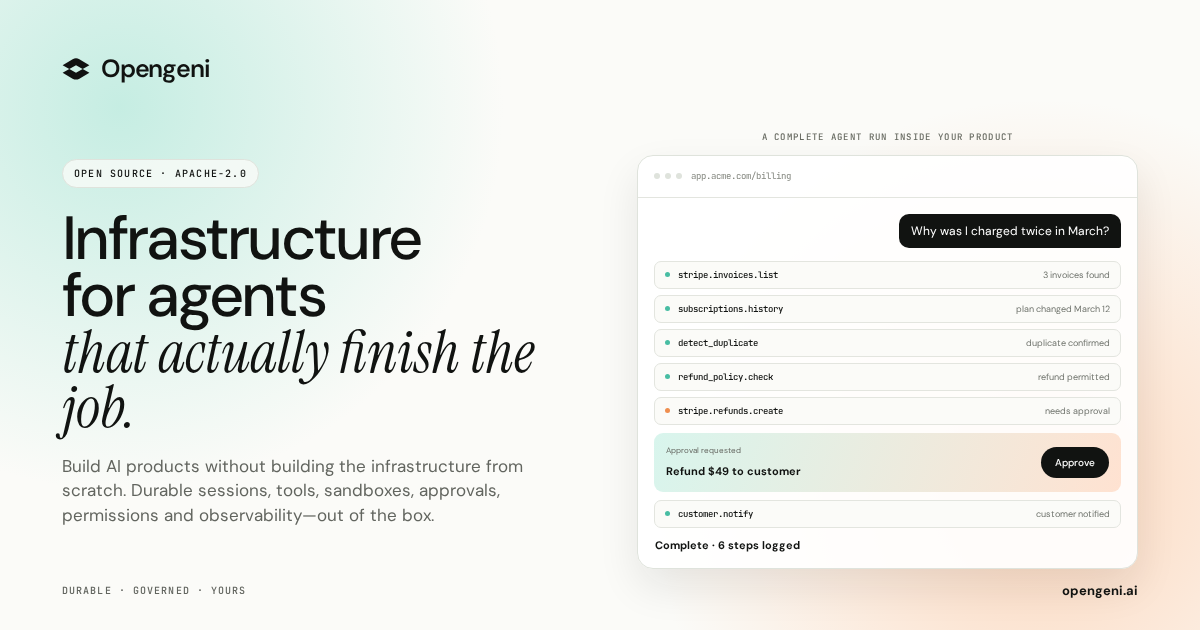
Opengeni is open-source AI infrastructure for putting agents inside your product, built so that you focus on your agents while Opengeni handles the infrastructure around them. It packages the pieces agents need to run in production: streaming, durable sessions, isolated sandboxes, tools, credentials, memory, multi-tenancy and React components. The project is licensed Apache-2.0 and, as the site states, it is built from running agents in production. The same API powers the Opengeni app, your product and your code, so a session can be rendered in the hosted app, embedded in your own interface, or driven programmatically. It is aimed at developers and teams who want to ship an agent feature rather than rebuild chat, sandboxing, credential and tenancy plumbing from scratch. The problem Opengeni addresses is the gap between an agent demo and an agent feature that survives real usage. The site lists the obstacles plainly: one dropped connection and the run is gone; agent code cannot run next to your secrets; every user needs their own OAuth tokens; every API needs wiring before an agent can use it; agents forget everything between sessions; every query has to know who is asking; and a better model ships, leaving you locked in. Each of these is framed as infrastructure you would otherwise have to build and operate yourself. Because the project comes from running agents in production, the emphasis is on the operational realities of restarts, failure recovery, per-user permissions and multiple paying customers rather than on an abstract architecture diagram. Durable sessions are the first thing Opengeni removes from your to-do list. Instead of a run dying when a worker restarts or a user closes a tab, the run keeps going and resumes at the event where it stopped; the site illustrates this with a run resuming at event 128. Sandboxes give the agent code somewhere isolated to execute, shown as a Python script that detects a duplicate charge using a scoped, short-lived token, so agent-generated code never sits next to your secrets. Credentials are handled per user, with connections to services such as Stripe, GitHub and Google Drive, and tokens that are refreshed automatically rather than pasted into prompts. Together, these three pieces mean an agent can be interrupted and still finish, can run code safely, and can act on behalf of one specific person without leaking long-lived secrets. Tools and MCP are how Opengeni connects agents to real systems. You point it at a specification such as billing.openapi.yaml and it exposes operations like invoices.list, refunds.create and customers.get as tools the agent can call; the site presents this as installing three tools from one file. That removes the manual wiring every API would otherwise need before an agent can use it. Memory is out of the box: agents learn from past sessions, so preferences such as refunds going to the original card, invoices being sent by email, or billing in EUR from April are retained, and the illustration labels memory entries with scopes such as Workspace and User. Memory removes the need to re-explain context in every conversation and lets an agent improve as it is used. Multi-tenancy is built in with row-level security, so every query knows who is asking; the illustration lists separate customers such as Acme, Globex and Initech. This means one deployment can safely serve many customers, which matters when you embed an agent for each of your own accounts. Opengeni is also model-agnostic: you can run agents on OpenAI, Azure OpenAI, OpenRouter or your own OpenAI-compatible endpoint, and swap between them so a better model shipping does not lock you in. Alongside these, the Product Hunt description highlights sessions that recover from failures, isolated sandboxes, 100+ integrations, human approvals, and visibility into every step and dollar spent. Opengeni is designed as a single API with multiple surfaces. The same session the Opengeni app renders at app.opengeni.ai can appear inside your own product or be driven from code. The code surface uses the @opengeni/sdk and @opengeni/react packages, with a provider, a session conversation component and a compiled stylesheet. The documented pattern is that your backend holds the API key and proxies the session routes, so the key never reaches the browser. Streaming, tool steps and the composer ship with the component, and these are the same packages the Opengeni app is itself built on, which keeps the embedded experience consistent with the hosted one. The React components are meant to be restyled in seconds. A single CSS custom property recolors every surface, and further variables control corners and typography, with accent options such as teal, violet, orange, blue, pink and graphite, corner styles ranging from sharp to soft to round, fonts such as DM Sans, Archivo and Mono, and a light or dark theme flipped by one attribute. A theme is applied with a wrapper class and a data attribute, so the agent adopts your existing design system instead of looking like a bolted-on widget. The site also includes an integration guide for embedding the assistant in your product and for keeping the key on your backend. Deployment is a choice between speed and control, and both options run the same Opengeni. Opengeni cloud is the fastest start: sign in and go, and you pay model cost plus 5%. Alternatively you can self-host the Helm chart on any Kubernetes, with Terraform for AWS, Azure and GCP, cloning the project from the Cloudgeni-ai/opengeni repository. Both paths share the same Opengeni API, workers and web app, so moving between them does not mean rewriting your integration. For the Product Hunt launch, the first 100 users receive $100 in cloud credit with the promo code PRODUCTHUNT100. The benefit is time to a working agent feature rather than a working demo. Sessions that survive failures mean users do not lose work when infrastructure hiccups; per-user credentials mean an agent can act with the right permissions for the right person; sandboxes mean agent code is contained; memory means the agent carries context forward; and multi-tenancy means the same deployment can serve many customers safely. Because streaming, tool steps and the composer come with the React component, the visible product experience is a few lines of code instead of a custom chat stack. The result is that engineering effort goes into the agent's behaviour and domain logic rather than into session durability, tool wiring and credential storage. The site's concrete example is a billing assistant. A customer asks why they were charged twice in March; the agent lists invoices, finds a duplicate, and issues a refund, then explains that two $49 charges landed on March 12 and that the refund will be back on the card in a few days. The same scenario is shown running in the Opengeni app, inside a customer's billing portal, and from React code. Other sessions listed in the app include a weekly churn summary, updating a refund policy document, and triaging failed webhooks, showing the same infrastructure applied to recurring analysis, internal document work and operational triage. Opengeni targets developers and engineering teams building AI agents into real products, and the Product Hunt topics are Open Source, Developer Tools, Artificial Intelligence and GitHub. The stack shown in the content is React and TypeScript on the client with CSS variables for theming, a backend that holds API keys, and Kubernetes, Helm, Terraform, AWS, Azure and GCP for self-hosting. Integrations named in the content include Stripe, GitHub and Google Drive, with other capabilities exposed as tools from OpenAPI specifications such as billing.openapi.yaml. Opengeni's promise is straightforward: agents in your product, infrastructure out of the box. By providing durable sessions, isolated sandboxes, credential handling, tool and MCP wiring, memory, multi-tenancy, model freedom and themable React components as one open-source, Apache-2.0 package that runs in the cloud or in yours, it shortens the distance between an agent idea and an agent feature your customers can actually use.
Octri is a platform that takes a single OpenAPI specification and generates four connected products from it: a documentation site, client SDKs in ten programming languages, an MCP server for AI agents, and production monitoring. It is built for API teams and developers who want their API documentation, client libraries, and agent tooling to stay current without maintaining separate pipelines for each. The core promise is that one spec generates all four products and keeps them in sync, so there is never a second place to go and update when something changes. The problem Octri addresses is what happens after an SDK is published. As the site puts it, that is the moment code leaves your visibility: it runs on someone else's machine, fails on someone else's machine, and you hear about it in a support ticket three days later. Without monitoring of any kind, the typical timeline is three days with the integration still broken in production, no visibility into what went wrong, and angry support tickets stacking up. The stated alternative with Octri is a nine-minute window to a shipped fix with zero support tickets and nobody noticing. The broader context is that APIs are increasingly consumed not only by human developers reading docs but also by AI agents, which, without a structured source like MCP, integrate an API from memory and hallucinate its surface. API Studio generates documentation from the spec, with AI writing the first draft for every endpoint that you then edit like a document, so nobody has to open the YAML. It produces three-column endpoint pages with schema trees that open a level at a time, a live try-it playground on every endpoint, MDX guides alongside the generated reference, and support for your own domain on every tier including Free. Changes are stored per page, so a new spec revision only disturbs the endpoints that actually changed, and regeneration works around your edits. The generated docs also run an OpenAPI readiness audit, scoring a spec out of 10 against the same rules SDK Studio uses, surfacing missing schemas, undeclared path parameters and awkward method names before anyone generates a client. Fourteen rules are checked, covering things like successful responses declaring a schema, unique operationIds, path placeholders having parameters, a declared server URL, described authentication, shared models in components and referenced with $ref, and documented request bodies. SDK Studio generates idiomatic client libraries in ten languages: TypeScript, Python, Go, Java, Dart, Ruby, PHP, Rust, Swift, and Kotlin. Each language gets per-language config for namespaces, pagination, idempotency and code style, so you can rename methods, exclude endpoints, pick your HTTP engine and folder structure. You can write custom hooks compiled into the client, available as beforeRequest and afterRequest, and the generator handles included capabilities like pagination and streaming. SDKs auto-publish to the registries their users already install from: npm for TypeScript with type definitions generated from your spec and a choice of fetch or axios; PyPI for Python, async first with optional sync variants; git tag distribution for Go with standard library HTTP; Maven Central for Java, signed, under a groupId on a domain you own; pub.dev for Dart, for Dart and Flutter alike; RubyGems for Ruby with a class-style client; Packagist for PHP so Composer installs it; crates.io for Rust with doc comments becoming rustdoc; git tag and Swift Package Manager for Swift, with no registry account; and Maven Central for Kotlin with OkHttp or Ktor. Build history shows exactly what shipped and when. Monitoring has two ways in: flip it on and the telemetry compiles into your generated SDKs, or drop the standalone package straight into your backend. Either way there is no agent to deploy and nothing to instrument. Monitoring is off by default and switches on from the dashboard. It provides logs you can query directly by level, route, status code or release; issues grouped by fingerprint, each with the function and file that threw it; traces showing one request end to end across client, server, cache, database and queue, with the slow span called out; a service map of every service, the calls between them, and the error rate on each edge; N+1 query detection that finds the same query fired in a loop and counts it across traces; synthetic uptime probes on a schedule with run history behind every endpoint; and alerts that fire on burn rate and regressions so a single stray 500 never wakes anyone. Errors are traced to a commit. The site describes alert examples including a checkout 5xx spike with a threshold of 25 in 5 minutes, a new-issue alert on first sighting, a regression watch when a resolved issue starts erroring again, auth failures at 100 in 15 minutes, a latency guard at 50 in 10 minutes, a rate limit surge at 200 in 5 minutes, webhook delivery failures, and transcription timeouts. Security is handled by redacting credentials and identifiers on the client side before an event leaves your process, then again at ingest, covering tokens and direct identifiers such as email, phone and IP, with personal context waiting on your app's consent under a pre-signed GDPR Article 28 DPA. The MCP server turns your API into context and callable tools for Claude, Cursor and any MCP client. Seven documentation tools let the agent search, read and navigate your docs, and there is one callable tool per endpoint so the agent can hit your API for real. The server is curated by SDK Studio, so your exclusion list becomes the agent's permission list, and installation is one line: npx @octri/mcp, with nothing to host. The unique approach across all four products is that they share one source. Deprecate an endpoint in API Studio and the SDKs mark the method, the agent tools stop offering it, and monitoring shows you who still calls it. Add a language, cut a release, or push a new spec and the same thing happens. Nothing republishes behind your back: a spec change produces a draft and a diff of what moved, you approve it, and that is when new SDK versions reach the registries. The stated outcomes for users are visibility into integration failures before support tickets are filed, faster time from spec change to shipped fix, and consistency across docs, SDKs, agent tools and monitoring without manual synchronization. The site frames the shift as moving from three days of an unnoticed production failure to a fix shipped in nine minutes. For migrating teams, the importer reads an existing config file, bringing across navigation, custom pages, SDK settings, endpoint overrides, and theme and logotype, so you do not start from a blank project; a call with the team and onboarding help are both free of charge. Concrete use cases described in the content include integrating with an API through an agent: a user asks an AI assistant to integrate with Acme's Assistants API, the agent connects through the Octri MCP server with 15 tools over MCP and the npx @octri/mcp command, searches the docs, finds relevant pages, reads the POST /v1/assistants body schema, and wires it up with a TypeScript SDK package. A second scenario runs the same flow through a Python SDK, adding an assistant that answers billing questions, calling POST /v1/assistants and using the acme.assistants.create() method from a Python package. A third use case is writing a payment integration against a reference that shows GET /payments with limit, order, after and before query parameters, a paginated response with data, first_id, last_id and has_more, and a generated TypeScript SDK request example. Monitoring use cases include triaging grouped errors like a TypeError on GET /assistants/{assistant_id} with event and user counts and a last-seen time, tracking a regressed rate limit error, and routing alerts to Slack channels or ops webhooks. The spec audit is its own use case: pasting an OpenAPI URL and getting a score out of 10 with every missing schema and undeclared path parameter listed, optionally publishing the score at a public octri.dev address for public specs only, with the document not stored. The target audience spans indie developers shipping real APIs, growing teams shipping fast, and scaling products that need more, with the pricing tiers named Starter, Growth and Business respectively, plus Enterprise for unlimited scale with SLA guarantees. Plans are not per-product, so you can leave one of the four switched off and turn it on months later without redoing existing setup. The Free tier covers side projects and first APIs with one SDK language, 50 API endpoints, 100 one-time AI credits, 100 MB of monitoring ingress per month, AI-enhanced docs and chat, GitHub sync, custom domain and registry auto-publish. Growth at $99/mo adds four SDK languages, 300 endpoints, 2,500 AI credits, 5 GB ingress, versioning and custom code and components. Business at $249/mo adds all ten languages, 600 endpoints, 5,000 AI credits, 20 GB ingress, white-label and SDK CDN hosting. Enterprise adds SSO/SAML, unlimited scale and the ability to self-host the generator and docs renderer in your own infrastructure. Extra SDK languages are a flat $50/mo add-on, and annual billing saves 15%. Support ranges from Community on Free to Email, Priority and Dedicated on higher tiers. Everything Octri does starts from a specification you already have written. Whether you need readable docs, installable SDKs across ten ecosystems, agent-callable tools, or visibility into production failures, the same spec drives it all and keeps driving it as it changes, which is the value proposition the platform is built to reinforce.
opensend.cc is an open source email platform that you run on your own server, described by its creators as "the self-hosted Resend alternative." It provides a Resend-compatible REST API and SDKs, plain SMTP, React-based email templates, broadcasts, contacts and audiences, webhooks and logs, all running on infrastructure you control. The product is built for developers and teams who want to send transactional email and product updates through their own AWS SES account, so that their domain, their data and their sender reputation stay theirs. One Docker Compose command installs the whole platform, and the software itself is free; as the site puts it, "You pay Amazon to send. Nothing to us." The dashboard, the API and the database all live on your machine rather than on a vendor's servers. The background for opensend.cc comes from its author, Kamal Panara, who runs Panara Studios, an app agency that has shipped products for clients in more than ten countries since 2021. Every one of those apps needed transactional email, and the hosted APIs available charged per send while hiding the stack behind them. That experience led to building "the open source Resend alternative I wanted." The problem it targets is the one described on the site: with a rented email API, the domain, the data and the sender reputation all sit with the provider, and pricing scales with every message you send. opensend.cc flips that model by running the email platform on your own server and sending through your own AWS account, so the sending pipeline, the contact data and the deliverability reputation remain on your infrastructure rather than shared with other customers. The core developer experience is a Resend-compatible API. Existing Resend SDKs can be pointed at your opensend.cc URL by changing the base URL, which means requests go to your server instead of a hosted provider and your application code can largely stay the same. The API supports scoped keys, batch send and idempotent retries, so teams moving from a managed service can migrate with minimal changes. The site frames this as practical migration guidance: if you are already on Resend, you change two lines and keep your code. Sending a message is a single POST to an /emails endpoint with the sender and message details, returning a message identifier that can be used for tracking. Delivery runs through AWS SES as the default relay, with plain SMTP also available for frameworks and plugins that already rely on it. Beyond simply dispatching mail, opensend.cc provides guided deliverability setup: it shows you the DKIM, SPF and DMARC records for your domain so you can publish them and authenticate your sending. Because delivery goes through your own SES account, your SES reputation stays yours and is not shared with other customers, which matters for inbox placement over time. The dashboard and feature set extend the API into a fuller email platform. Templates can be built as React components, previewed in the dashboard and sent by name, which lets developers author emails in the same component style as their application. Webhooks deliver signed events for deliveries, bounces and complaints to your endpoints, with retries, so your systems can react to what actually happened to each message. Contacts can be stored and grouped into audiences, with consent data kept in your own Convex database rather than a vendor's. Broadcasts let you send product updates and newsletters to an audience using the same SES pipeline as transactional mail. Logs and analytics make every message, event and error searchable, and bounces and complaints feed suppression automatically. Finally, test mode provides keys that accept everything and deliver nothing, which lets you wire up CI and staging environments without emailing real users. Overall, opensend.cc works as a self-contained, self-hosted stack. The one-line installer pulls prebuilt images and starts Next.js, Convex and Better Auth using Docker Compose. Data is held in self-hosted Convex on your own machine, and accounts are handled by Better Auth. The underlying schema covers domains, API keys, emails and suppression. The described path from install to first email is three steps: deploy the platform, connect SES by adding your sending domain and publishing the DKIM, SPF and DMARC records it displays and attaching your AWS SES account, and then send by creating an API key and posting your first email through curl, a Resend SDK or plain SMTP — and seeing it appear in the logs. The benefits described are ownership and cost control. Your email, your server and your AWS bill are all yours: domains, data and accounts stay on your infrastructure, and there is no per-email pricing and no feature gates from the platform. Because the API is Resend-compatible, you keep your application code and change only a base URL. Self-hosting is free, so the only costs are your own server and what AWS SES charges for sending, and community support is available on GitHub. Concrete use cases follow from that design. Teams send transactional email such as the messages every app needs, run product updates and newsletters through broadcasts to an audience, and use test mode keys to exercise CI and staging flows without contacting real users. Developers already using Resend can migrate by repointing their SDK, and agencies shipping apps for clients can deploy the same open source email platform on their own or their clients' servers. Organizations that need domain data and sender reputation to remain under their control can keep consent records in their own Convex database rather than with an external vendor. The primary audience is developers and technical teams: individual builders, app agencies and anyone who wants a self-hosted email API and does not want to rent one. The stack is explicit — Next.js for the dashboard and API, self-hosted Convex for the database, Better Auth for accounts, AWS SES or any SMTP relay for delivery, and Docker Compose for deployment. The license is Apache-2.0. The Self-host plan is free forever and includes the full source code, Next.js with self-hosted Convex and Better Auth, AWS SES or any SMTP relay, the Resend-compatible REST API and SMTP, templates, audiences, broadcasts, webhooks and logs, and community support on GitHub. A Cloud option that runs the same API with managed servers is listed as coming soon, with a waitlist open. The project is also supported by sponsors, with Gold at $249/mo and Silver tiers mentioned, and sponsors help decide what ships next and keep the project free. In short, opensend.cc takes the email API that most teams rent and turns it into something they run themselves. With a Resend-compatible API, AWS SES and SMTP delivery, React templates, audiences, broadcasts, webhooks, logs and test mode, all deployed with one Docker Compose command, it gives developers a way to own their email sending, their data and their sender reputation while paying only their own infrastructure and AWS costs.
Clarity, also referred to as Clarity 1, is a real-time speech enhancement model from KugelAudio built for voice agents and call centers. It does two jobs at once on a live call: it removes background noise, and it extracts the primary speaker so that every other voice — café chatter, a colleague at the next desk, the crowd around the caller — is cut out. What remains is one clean voice. The purpose is straightforward: whoever is listening, whether a person or a voice bot, hears clear speech, and the agent responds to the person calling rather than to the room they are calling from. Clarity is aimed at teams building and running voice agents and at call centers that need the caller, not the environment, to come through. The problem Clarity addresses is the environment callers actually call from. People call from cafés, shared offices and busy streets; images on the product site show callers on the street, on a construction site and on a train. The audio a voice agent receives is therefore a mix of the caller's voice, background noise and other people talking. Speech-to-text, turn detection and the language model behind a bot can only work with the audio they receive, so background talkers end up in transcripts and set off turn detection, and the bot ends up responding to the room instead of to the caller. Clarity is presented as the layer that fixes this before the rest of the pipeline ever sees the audio, so the models downstream work from one clean voice. The first core capability is real-time background noise removal. Clarity strips out background noise from live audio rather than from a finished recording, which matters because conversations are live and the agent has to react while the caller is still speaking. The product materials place this against loud places specifically — clear calls in the café, on the street, on the site and on the train. Because the noise is removed before it reaches the agent, the agent is not asked to guess which parts of the incoming audio are speech and which are environment; the clean signal is what arrives. The second core capability is primary speaker extraction. This goes a step beyond noise removal: it cuts out every other voice, from the café crowd to the person at the next desk, so only the caller comes through. Clarity explains how it decides which voice to keep — primary speaker extraction uses a short reference recording of the person you want to follow and cuts out every other voice. Without a reference, it keeps the loudest speaker, which gives teams a working default when no reference recording is available. Both behaviours are described as running in real time rather than as an offline post-processing step. The third group of capabilities concerns how Clarity fits into a live pipeline. It processes audio in a continuous stream, as it arrives, and is built for live conversations rather than for waiting on a completed recording. Its chunk size is stated explicitly: Clarity processes audio in 240 ms chunks and needs about 50 ms for each one. If your turn detection already reads audio in 240 ms chunks, Clarity adds only those 50 ms. With smaller input frames, a sound can come out up to 290 ms after it went in, depending on where it falls in its chunk. Those numbers are published on the site so teams can judge whether the added latency fits their pipeline, and the headline figure quoted for voice agents is +50 ms of added latency in pipelines with 240 ms chunks. How Clarity works overall is described as two jobs performed in real time on a stream: noise removal and primary speaker extraction, delivered as audio arrives. Its unique approach is doing both at once during a live call so that downstream components — speech-to-text, turn detection and the model behind the bot — all work from a single clean voice. KugelAudio also publishes comparative test results. On target-speaker quality (Libri2Mix, DNSMOS, higher is better), Clarity 1 at 240 ms is compared with StarTSE at 560 ms, scoring 3.56 on speech quality (SIG), 4.03 on background quality (BAK) and 3.27 overall (OVRL). On noise removal (DNS 2020 Challenge, DNSMOS, higher is better, with reverb), Clarity 1 at 240 ms scores 3.62 SIG, 4.11 BAK and 3.37 OVRL against unprocessed original audio, AI Acoustics at 15 ms, DeepFilterNet3 at 310 ms and GTCRN at 16 ms. These comparisons are presented on the site as evidence of quality against other approaches. The benefits Clarity states for users follow directly from a single clean voice reaching the rest of the stack. Speech-to-text, turn detection and the language model behind a bot can only work with the audio they receive, so giving them the caller's voice alone means background talkers stop ending up in transcripts and stop setting off turn detection, and the bot responds to your caller instead of the room. For voice agents, the stated outcome is that your voice bot hears only the caller. For call centers, the stated outcome is that customers hear your agent and only your agent: on a busy call center floor, Clarity removes background noise, echo and the colleagues nearby, and enhances the agent's voice so every word comes through. In both cases the through-line is accuracy of understanding and clarity of output. Concrete use cases described in the product content include voice agents on live calls, where Clarity removes background noise and chatter before the bot hears them so its turn detection and speech-to-text react only to the caller; call centers, where Clarity removes background noise, echo and nearby colleagues and enhances the agent's voice; and callers in demanding environments such as cafés, shared offices, busy streets, construction sites and trains. Teams can also hear it on their own audio: you can sign up and run your own recordings through Clarity in the dashboard, free until October 30th, and for a self-hosted deployment or a larger rollout, contact the team and bring examples from your callers' environments. The site also offers a sales conversation for teams that want to go further with the model. Clarity is aimed at anyone building or operating voice agents and at call centers, as reflected in the two audiences named on the site: voice agents and call centers. It fits into pipelines that stream audio in chunks, with the stated latency budget depending on chunk size. Deployment options include running Clarity in KugelAudio's environment, or self-hosting and on-premise deployment available on Enterprise plans. Pricing is published as a free tier at €0 until October 30th, covering noise removal and primary speaker extraction in real time at no cost while you build, followed by pay as you go at €0.0015 per audio minute excluding VAT (€0.001785 including 19% VAT), where you pay only for the audio Clarity processes. Consumers in other EU countries pay their local VAT rate, shown before payment. In summary, Clarity's value proposition is narrow and clearly stated: remove the noise, keep the voice. By removing background noise and extracting the primary speaker in real time on a live stream, it hands the rest of a voice pipeline one clean voice — the caller's — so speech-to-text, turn detection and the language model can do their jobs, and so callers reach an agent that hears them rather than the room around them.
Monospace is described as the governed API layer for every app, person, and agent. In practice, it sits between enterprise data and everyone who builds on it. Connect any data source and three very different audiences — developers, business teams, and AI agents — each receive live, read-write access to that data. All of that access runs under the same granular permissions model, and no data is copied or moved in the process. The product is offered by Directus and frames itself around a simple promise: all your data, one space. Its main purpose is to make existing enterprise data available to the modern applications, people, and AI agents that need it, without forcing the organization to rebuild the systems that already hold that data. The problem Monospace addresses is stated plainly in its own introduction: your oldest databases weren't built with AI or modern apps in mind. Enterprise data tends to accumulate in systems designed for a previous generation of software, with schemas, query patterns, and access assumptions that predate today's applications and today's AI agents. When a team wants to bring that data into a new application, or give an agent access to it, the conventional paths are unattractive. One option is to rebuild or migrate the underlying system so it fits the new use case. Another is to copy the data into a new store and point the new consumer at that copy. Both approaches create work, risk, and additional places where data has to be governed and kept consistent. Monospace takes the position that the data should stay where it is and the interface should adapt to it, rather than the other way around. Central to the product is the ability to connect any data source. Monospace presents itself as the layer that sits on top of the systems an organization already runs, and its tagline — all your data, one space — captures the intent. Rather than maintaining a separate access path for each database or application, everything that is connected becomes reachable through one governed space. Because the connection is made to the source as it exists, the value of the data is preserved in place. Teams do not have to decide which data is worth the cost of migration, and they do not have to maintain a second, divergent copy of records that already have a home. The single space becomes the surface that developers, business teams, and agents all reach through, which is what makes the “one space” promise meaningful rather than just a slogan. Once a source is connected, the access Monospace grants is live and read-write. Live matters because what consumers see reflects the state of the source system rather than a snapshot exported at some earlier point. Read-write matters because the interface is not limited to reporting: consumers of the data can change it through the same layer, which is what allows an application or an agent to actually operate on enterprise data instead of merely viewing it. Crucially, that same capability is extended to three distinct groups. Developers get programmatic access for building applications. Business teams get access without having to route every request through those developers or work directly against the underlying database. AI agents get access on the same footing, so an agent can operate on enterprise data as a first-class participant rather than through a bespoke connector built specifically for it. One connection therefore serves everyone who builds on the data, and no audience is treated as an afterthought. Governance is what makes that shared access workable, and it is delivered through a single granular permissions model. Because every consumer — app, person, or agent — arrives through the same layer, the rules determining who can see and change what are applied in one place instead of being re-implemented for each new integration that comes along. Granularity is the operative word here: the model is described as fine-grained enough to govern real enterprise access rather than offering a coarse, all-or-nothing switch. Monospace also states that no data is copied or moved. That constraint matters for governance as much as it does for engineering. If nothing is duplicated, there is no secondary copy that drifts out of sync with the source, no additional store to secure and monitor, and no ambiguity about which version of a record is authoritative. The permissions model and the no-copy principle reinforce each other: one place to govern, one place where the truth lives. Monospace's distinctive method is how it exposes existing systems in the first place. Rather than requiring a database to be rebuilt or restructured, Monospace generates interfaces directly from them, as they are. It does this by introspecting the schema and queries in real time. In other words, the layer reads the structure of the source and how it is queried, then produces the interface from that understanding, keeping itself current as the underlying source changes. Nothing needs to be pre-defined by hand against a frozen picture of the database. The practical consequence the product emphasizes is that existing databases do not need to be rebuilt in order to become consumable by modern applications or AI agents. The old system keeps doing the job it was built to do, while the layer supplies the modern access surface on top of it. The benefit for users follows directly from those mechanics. Organizations avoid the cost and risk of rebuilding systems that are working, and they avoid the sprawl of copied data sets that have to be synchronized and governed separately. Because access is live, consumers are not working against stale exports. Because access is read-write, the layer supports real operations and not just read-only reporting. Because everything flows through one permissions model, governance is defined once rather than re-created for every app, team, or agent that needs the data. And because developers, business teams, and AI agents all reach the data through the same governed space, an organization does not have to choose which of those audiences it will serve with modern tooling. Concrete scenarios follow from what the product states. An organization with an older database that was never designed for AI can connect it to Monospace and let an AI agent read and write against that data without rebuilding the database first. A development team building a new application can reach enterprise data through the generated interface rather than writing bespoke integration code against the original schema. A business team that needs live access to records can work against the same governed surface that the developers and agents use, instead of requesting exports or one-off reports. An organization that wants strict control over who can view and change data can centralize that control in a single granular permissions model spanning apps, people, and agents, rather than enforcing it separately in each consuming system. In each case, the pattern is the same: connect the source, and let every authorized consumer work against it live, without copying or moving anything. The material provided identifies the audience as enterprise data owners and everyone who builds on their data: developers, business teams, and AI agents. The product is associated with Directus and is categorized under API, Developer Tools, and Data. Beyond the statements that it connects any data source and that it introspects schema and queries in real time, the available content does not specify particular integrations, a technology stack, or pricing and plan details, so those are not asserted here. What is specified is the delivery model — a governed API layer that provides live, read-write access under one granular permissions model while leaving data where it currently lives. Taken together, the takeaway is straightforward. Monospace from Directus is a governed API layer for every app, person, and agent, built so that all your data can be reached through one space. It connects to any data source, generates interfaces directly from existing databases by introspecting schema and queries in real time, grants live read-write access to developers, business teams, and AI agents alike under a single granular permissions model, and does all of it without copying or moving data. The primary value proposition is that organizations no longer have to rebuild their oldest databases, or duplicate them, in order to make that data usable by modern applications and AI agents.
Hopscotch is a single API that gives developers access to more than 500 AI models from Anthropic, OpenAI, Google, DeepSeek, Moonshot AI, Qwen, Meta, and other providers. Instead of creating a separate integration, account, and bill for each provider, a team points the OpenAI SDK it already uses at Hopscotch's base URL, adds a Hopscotch key, and names any model in the catalog. The product is aimed at developers, engineering teams, and AI builders who need access to top models while controlling what those models cost, with spend limits available for every key, teammate, and workspace. The problem Hopscotch addresses is the fragmentation that comes with building on top of multiple AI providers. Each provider normally has its own integration to maintain, its own account, its own payment method, and its own console for usage. A team that wants to run on Anthropic, OpenAI, and Google typically wires up several SDKs and credentials, reconciles several bills, and has no single place to see which model served which request or what the account spent overall. Hopscotch was built as an intelligence layer for AI to remove that overhead; the company states it raised $7.5m to build it. The result is one base URL, one key, and one balance for a catalog of 500+ models, so moving between providers becomes a configuration change rather than a re-integration project. The first capability area is unified access. One key covers models from Anthropic, OpenAI, Google, and others on one base URL, billed to one balance. A request names the model in provider-slash-model format, for example anthropic/claude-sonnet-5, and the endpoints include chat completions and the Responses API, plus a models endpoint that lists every model you can call. Because the interface follows the OpenAI SDK shape, the quickstart shows creating a client with the base URL https://api.hopscotchlabs.ai/v1 and an API key, then calling client.chat.completions.create with any model name from the catalog. A curl example posts to the chat completions endpoint with a bearer token, a model, and messages, which means teams can test the service before touching application code. The second area is model switching. Hopscotch states that once the base URL and key are set, moving to another model means changing the model name only, with no new SDK to install, and the key, balance, and limits stay the same. The model you name is the model that runs: Hopscotch will not swap your model for a different one. If you want another model to take over when your chosen one cannot answer, you list your backups in a routing profile, in the order you choose. The Activity log shows which provider actually served each request, so the model named in code and the provider that answered are both visible, which matters when you are debugging latency, cost, or output quality. The third area is routing and reliability. If a provider has an outage, Hopscotch retries your request first; if you use a routing profile, it then moves to the next model on your list; for chat requests, a final attempt runs your model through a backup provider; if every attempt fails, you get an error. A routing profile can be arranged in the order you choose, such as Sonnet first and GPT, then Gemini, if it fails. When a provider returns a 429, Hopscotch moves the request to another of its keys for that provider, then to the next model in your routing profile, so your code sends one request and gets one response. You can also bring your own provider key: add your own key for a provider such as OpenAI and Hopscotch sends that provider's requests on your key, the provider bills you directly, Hopscotch charges nothing for those requests, and if your key fails Hopscotch does not switch to its own key. Hopscotch also states that it does not change your prompts or the answers, and that by default it never stores your prompts or the model's responses. Some features that providers run on their own servers, such as web search, audio, and hosted tools, are not supported through Hopscotch's provider accounts. The fourth area is spend control and visibility. Each key can be given a credit limit that resets daily, weekly, or monthly; monthly limits can be set for teammates and for the workspace; and the account can be capped by how fast it can spend, $50 by default. A request that would cross a limit is refused before it reaches the provider, which means an agent stuck in a loop cannot drain the balance, and an owner can pause all spending at once. The Activity log lists every request and exports to CSV, showing details such as model, provider, attempts, total tokens, cost, and duration, and a rejected request shows no upstream attempt because it was refused before fetch. Usage breaks spend down by model, provider, key, and teammate, and your code can look up any request's tokens and cost through the API. The fifth area is comparison and catalog transparency. The playground runs one prompt on up to three models side by side, billed through your key like any other request, so you can compare the answers and what each one cost before you change your code. The catalog lists each model with its context window and its price per million tokens; examples shown include anthropic/claude-sonnet-5 at 2.00 in and 10.00 out per 1M, openai/gpt-5.6 at 4.00 in and 20.00 out per 1M, google/gemini-3.6-flash at 1.50 in and 7.50 out per 1M, along with models such as deepseek/deepseek-v4-flash, moonshot/kimi-k3, and qwen/qwen3.8-max. Where several providers serve the same open-weight model, the catalog shows each provider and its price. Overall, Hopscotch works as a routing and billing layer in front of model providers. You change three settings in your existing code: the base URL, your API key, and the model name, which starts with the provider, such as anthropic/claude-sonnet-5. The rest of your OpenAI SDK code stays the same. Requests arrive at https://api.hopscotchlabs.ai/v1, Hopscotch checks them against your limits, sends them to the named model, follows your routing profile if something fails, and records the outcome. You pay each provider's list price per token, with no markup and no added fees. This combination of a stable interface, explicit routing, and enforced limits is what the product presents as its approach: the model layer becomes something you configure and meter rather than a set of connections you maintain. The benefits follow directly from those capabilities. Teams get access to 500+ models without managing a separate integration, account, or bill for each provider. Costs become controllable because limits are enforced before a request reaches a provider, and visibility is central because spend can be broken down by model, provider, key, and teammate. Reliability improves through retries, fallbacks, and backup providers. Switching models becomes a one-line change, which reduces lock-in and makes experimentation cheaper and faster. And because prompts and responses are not stored by default, teams keep their existing data posture. For anyone running AI features in production, these outcomes mean fewer surprises in the bill and fewer integration projects when the model landscape changes. Concrete scenarios from the content include production applications that need per-key budgets so a runaway agent loop cannot drain the balance, and workspaces where an owner can pause all spending at once. Another is comparison: running one prompt on up to three models in the playground, checking the answers and the cost of each, and only then changing the model name in code. Another is reliability engineering, where a routing profile such as Sonnet first, then GPT, then Gemini keeps a service answering when a provider has an outage or returns a 429. Teams can also separate staging and production traffic with different keys and different limits, and developers who already have a provider key can route some traffic through it while other traffic runs on Hopscotch credit. Hopscotch is aimed at developers and engineering teams building AI features, plus the people who own the AI budget inside those teams, since limits can be assigned per key, per teammate, and per workspace. The technical surface is an OpenAI-SDK-compatible REST API at https://api.hopscotchlabs.ai/v1 with chat completions and Responses endpoints and a models endpoint; the examples in the content use Python and curl. Payment is prepaid credit added by card, starting at $5, with optional auto top-up that refills the balance when it drops below an amount you choose. There are no plans or subscriptions, and no token markup. A Product Hunt promotion offered the first 250 Product Hunt users who signed up $50 in free model credits, redeemed with the code HOPSCOTCH50OFF in the Billing tab. In short, Hopscotch positions itself as the intelligence layer for AI: one API, one key, and one balance for 500+ models, with named models, routing profiles, per-key and per-workspace spend limits, and a complete record of what every request cost. For teams that want the best available models without a separate integration, account, and bill for each provider, that combination of access and control is the core value.