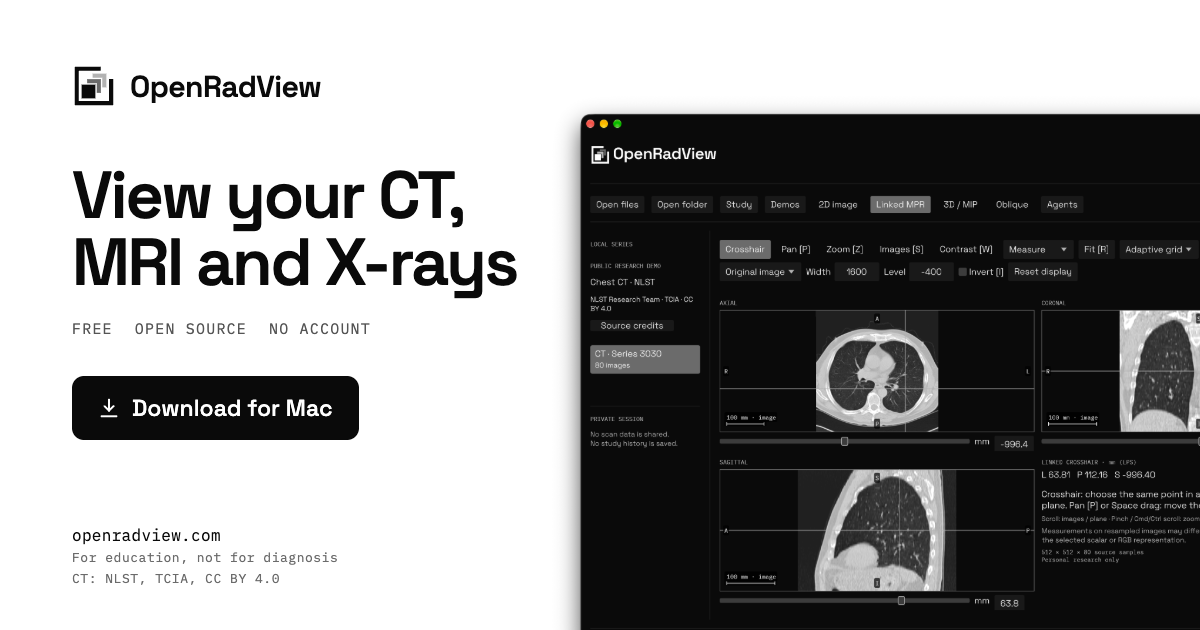
OpenRadView is a free, open-source desktop viewer for opening and exploring your own medical images on your computer. It is designed for CT, MRI and X-ray files, and it opens DICOM, NIfTI-1/2 and ZIP archives locally. The site describes it as a personal research project for education, not a clinically validated diagnostic tool. It is built for Apple Silicon and also runs on Linux, with Mac, Windows and Linux builds available from GitHub. No account is required, and the app does not upload scans or save study history.
The product addresses a practical privacy problem: scan CDs and ZIP files often contain DICOM images that are awkward to inspect without sending them to a third-party service. OpenRadView keeps imports local, reads archives without extraction, and processes images on the computer. The site states there is no telemetry, analytics, account or scan upload, and no study history is saved. This matters for people who want to look at scans they own without creating an account or handing files to a cloud viewer. The app displays images without interpreting them; the site repeatedly says it is not for diagnosis and that a qualified clinician should interpret scans.
File support is broad within the limits stated on the site. OpenRadView opens grayscale DICOM datasets including native, JPEG, RLE, JPEG-LS, JPEG 2000 and deflated data, plus 8/16-bit RGB/YBR and palette DICOM and native packed 8-bit YBR422. It reads NIfTI-1/2 as .nii, .nii.gz or paired .hdr/.img files, including gzip. Time points and vector/tensor components can appear as separate volumes, and complex data can be viewed as magnitude, phase, real or imaginary. Embedded RGB ICC profiles are converted to sRGB. Files, folders and ZIP archives including ZIP64 are supported, with up to 32 million samples per frame. The site lists unsupported formats such as RGB/RGBA or extended-precision NIfTI, legacy Analyze and alpha/enhanced DICOM palettes.
For 2D images, the viewer provides window and level controls for grayscale contrast, with presets or manual window/level adjustment, plus pan, zoom and invert for supported color images. A reset restores the initial display. The site also mentions image information, scalar and RGB histograms, and pointer pixel values, so users can inspect display settings and pixel data. Series can be filtered by modality, series number or time/component label, and source images can play at a chosen speed; slow decoding reduces speed instead of skipping images. Users can export a local PNG and view settings for the completed pane without app overlays or labels, although identifying text may remain in the pixels.
Linked MPR is a central viewing mode. It builds axial, coronal and sagittal planes from scalar or color volumes with consistent geometry, and one crosshair selects the same point in all three views. Users can move a plane with the Images control or arrow keys, which helps show how slices relate across planes. Oblique planes let users tilt a plane through a supported scalar or color volume and then step along it. The site notes that MPR, oblique and 3D views need consistent geometry, and that missing or invalid NIfTI geometry stays unlabeled in the 2D source grid. Values on resampled planes can differ from source images.
3D and maximum intensity projection views are labeled experimental. Scalar data has Source range and CT presets, while color data has brightness-based opacity and independent RGB maxima. Users can drag to orbit a projection of the same scan. Measurements include distance and angle where physical geometry is known, and rectangle statistics report scalar values or separate RGB channel codes. The site cautions that RGB maxima can combine colors from different depths, RGB codes are not physical tissue measurements, and volume views have a 512 MiB budget plus GPU limits. The decoded cache is bounded at 128 MiB, with codec and GPU allocations using additional memory.
OpenRadView has no AI of its own and gives no opinion. Its optional agent feature is an MCP connection, so an agent the user already uses, on their own subscription or a local model, can see a view the user allows. MCP support is required. The workflow is explicit: a local MCP-capable client requests access, the app shows the series, tools and risks, and the user allows one series or reviewed views. Access can be revoked, changed to another series, or ended by quitting, but copies already sent cannot be recalled. Replies come from the agent, not OpenRadView, and the site says they are experimental AI commentary that can be wrong.
Privacy controls are described in detail. All processing happens on the user's computer, with no telemetry, analytics, account or scan upload, and no study history saved. Automatic GitHub update checks are enabled by default and can be turned off on first launch or in Privacy → Updates. Checks send no scan data, but GitHub sees the IP address, app version and requested platform/architecture. Agent access only happens when the user approves a named session and its series or views and tools. A connected agent may send that data to its provider, and logs, retention and training depend on that provider's terms and settings.
The stated benefits are educational and practical. The app is good for looking at scans you own on your own computer, seeing how contrast settings change an image, and understanding how slices form planes and a volume. Three public example scans ship with the app so users can try every view before opening their own files. It is explicitly not for diagnosis, screening, treatment or emergencies, not a replacement for a doctor or second opinion, and not for deciding whether to seek care. If urgent help is needed, the site says to contact local emergency services.
Concrete use cases follow from those features. Someone with a scan CD or ZIP can open the files or folder locally and inspect the series without extraction. A user can load the bundled chest CT demo and move a linked crosshair through axial, coronal and sagittal views. On the chest X-ray demo, a user can drag to change window and level and then reset the display. A learner can tilt an oblique plane or orbit an experimental 3D/MIP projection. A user with an MCP-capable client can allow one reviewed series for their own AI agent, then revoke access. A user can export a PNG of the completed pane for their own records.
The target user is someone who has their own CT, MRI or X-ray files and wants a local, account-free way to view them, plus learners who want to understand planes, volumes and contrast settings. The site stresses education and personal research rather than clinical use. Integrations are limited to optional local MCP clients such as Claude, Codex, Cursor and Grok on a subscription, or local models through LM Studio and Ollama paired with an MCP-capable client. Any client that supports local MCP servers works. Pricing is free and open source under GPL-3.0-or-later, with no account and optional update checks.
OpenRadView's primary value is a free, local, open-source way to open and explore personal medical images without uploading them or creating an account. It combines DICOM and NIfTI support, linked MPR, 2D window/level, experimental 3D/MIP and measurements, with an optional MCP bridge to a user's own agent. It is explicitly educational, not diagnostic, and should be paired with a qualified clinician for interpretation.
Publisher
A
admin
Launch Date2026-10-28
Platformdesktop
Pricingfree