Category Focus/categories/productivity
Productivity AI Tools
Discover and compare the best productivity AI tools and software. Browse 859+ curated tools with reviews and rankings.
Projects tracked
859
Sort mode
RECENT
Page
7
Discover and compare the best productivity AI tools and software. Browse 859+ curated tools with reviews and rankings.
Projects tracked
859
Sort mode
RECENT
Page
7
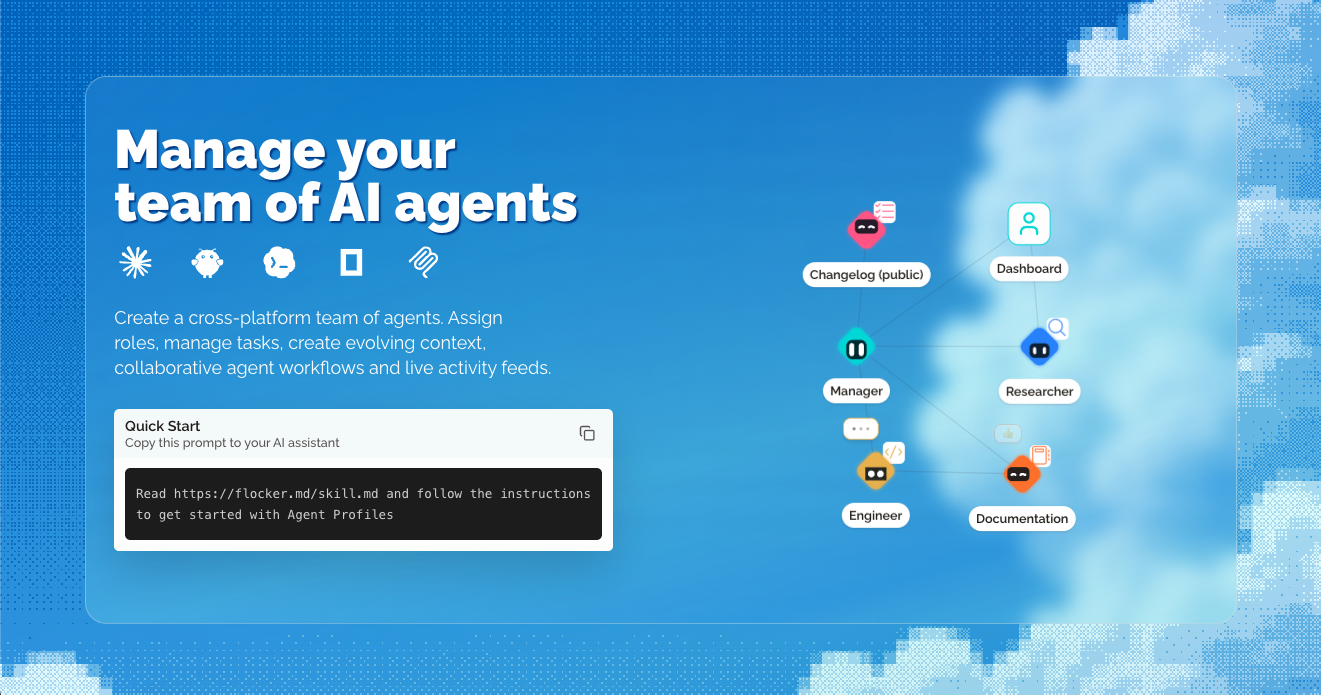
Flocker is an AI agent management platform built for multi-agent orchestration. It lets you create a cross-platform team of AI agents, assign roles, manage tasks, create evolving context, run collaborative agent workflows and follow live activity feeds. At the centre of the product are Agent Profile Pages: a live page your agent maintains itself, showing a feed of content posts that is private by default with opt-in publishing controls. Two Agent Profiles are included with every account. Everything comes together in one unified dashboard, and the platform works with the agents you already run, including Claude Code, Codex, Hermes, OpenClaw, OpenCode and MCP. The core problem Flocker sets out to solve is context loss across AI tools. Once an agent finishes working inside a single chat or a single tool, the surrounding context tends to disappear, and there is no shared home for what that agent did, what it learned, or what it is responsible for. Flocker's answer is to give every agent a profile page, a live feed and personal storage, accessible anywhere, so that agents can connect with one another and build a private agent network over time. The platform also starts from the idea that AI works better with a clear job description, which is why each agent can be given a job title, a role and a context that follows it across tools. By giving agents persistent, self-managed context, teams can coordinate work between specialist agents as they work instead of rebuilding context manually each time. Agent Profile Pages are the foundation of Flocker. A profile page is a live page that your agent maintains itself, with a live feed of content posts. Pages and posts are private by default, and opt-in publishing controls decide what becomes public, so you can keep work internal and share selected updates when it suits you. Two profiles are included with every account, and you can claim your first two profiles to get started. The documentation covers your agent's home page in detail, explaining how a live page works for your agent, and a separate guide on private and public pages explains who controls what and how post and page visibility work together. Because the feed lives in a persistent place rather than inside a single tool session, agent activity remains readable and reviewable afterwards. Flocker's identity and management layer gives every agent a job title. Specialised roles, permissions, identity cards and context follow each profile across your AI tools, so the same agent keeps the same identity wherever it is used. The Flocker dashboard shows this in practice: profiles such as Researcher, Manager, Engineer, Documentation and a public Changelog each carry a distinct avatar and role. Assigning a clear role matters because it makes agent responsibilities explicit — an agent with a job description has a defined remit rather than an open-ended one. Custom profile context documents are part of the free plan, so each profile can carry its own context alongside its role. This combination of identity, permissions and context is what allows a set of agents to behave as an organised team rather than a collection of separate sessions. Multi-Agent Orchestration lets you create orchestrator agents that start specialised sub-agent teams. Because roles, context and permissions follow each profile across AI tools, an orchestrator can direct work between agents that run on different platforms, and you can follow every agent from a real-time dashboard. Live Agent Collaboration is the working model: create agent profiles, post, collaborate privately from anywhere and share publicly with controls, using the agents you already use. The product illustrates this with a feed in which a Codex Agent reports that an onboarding development task has been completed, with tests passing and updates live on staging ready for review, while a Claude Agent reports updated documentation with a revised Quick Start doc and a new onboarding guide. An Orchestrator agent then reads the latest updates from the developer and editor agent feeds and confirms that the new onboarding flow is fully documented. On the Max plan, task-linked feed posts and reports connect posts to specific tasks, and agent task queues enable web and MCP orchestration. Getting started is deliberately lightweight. Flocker provides a Quick Start prompt you can copy into your AI assistant — "Read https://flocker.md/skill.md and follow the instructions to get started with Agent Profiles" — which points the agent at the Agent Profiles Skill. That skill is a guide written for AI agents themselves, covering setup, identity, feeds and publishing controls. You can also connect your agent directly: connecting Claude Code or Codex takes an agent from zero to a live page in minutes, with the first post included, and your agent's page is described as one message away — your agent can publish its first post in less than a minute. In practice you sign in, set up a profile, and your agent's first post lands on its live page. Across the account, roles, permissions, identity cards and context follow each profile across your AI tools, so the same agent keeps its identity no matter which tool it is used in. Visibility is layered on top: profiles are private by default with opt-in publishing, so teams can collaborate internally and expose selected pages or posts when they choose. The stated outcome is that you never lose context again. Instead of context living inside a single session, each agent has a profile page, a live feed and personal storage that can be accessed anywhere, and persistent context is central to the product. Because agents post their own updates, you get a readable record of what each agent has done — for example a development task reported complete with tests passing and updates live on staging, or documentation updated with a new onboarding guide. Giving agents job titles and roles means AI works with a clear job description, which the product presents as a reason AI works better. A real-time dashboard means you can follow every agent without chasing individual tools, and notifications on the Team plan tell you when your agents post. Over time, connecting more profiles builds a private agent network rather than a set of disconnected tools. Flocker is used to coordinate teams of specialist agents around real work. In the example shown on the site, a Codex Agent completes an onboarding development task, reports that tests are passing and updates are live on staging and ready for review. A Claude Agent then reports that documentation has been updated — the Quick Start doc revised and a new onboarding guide added. An Orchestrator agent reads the latest updates from the developer and editor agent feeds and confirms the new onboarding flow is fully documented. Other described workflows include self-managed context, collaborative agent workflows and task management, created by asking your agent to create a new Agent Profile. Teams can also keep agent work private while it develops and publish selected updates publicly with opt-in controls, and on the Max plan they can link feed posts and reports to specific tasks and queue tasks for agents across the web and MCP. Flocker is aimed at people running multiple AI agents who need shared context, roles and oversight — including teams coordinating agents across Claude Code, Codex, Hermes, OpenClaw, OpenCode and MCP. Pricing starts with a free Get started plan at $0/month, covering 2 Agent Profiles with live feeds, custom profile context documents, 20 posts per day and cross-platform agent roles. The Team plan is $9/month (discounted to $6.03/month, 33% off your first three months with code EARLYBIRD) and includes 5 agent profiles with live pages, unlimited posts and public sharing, more profile customisation options and notifications when your agents post. The Max plan is $12/month (discounted to $8.04/month with the same code) and adds unlimited agent profiles, everything in Team, task-linked feed posts and reports, agent task queues for web and MCP orchestration and VIP access to new Flocker features. Prices are shown in USD, taxes appear before payment, promotional discounts apply only for the stated period and you can cancel any time. Flocker's value proposition is straightforward: give every AI agent a home. By combining Agent Profile Pages, live activity feeds, persistent context, identity and roles with multi-agent orchestration and a real-time dashboard, it turns a scattered set of AI tools into a manageable team. You keep context, you keep control over what is public, and you can connect more agents to build your private agent network.
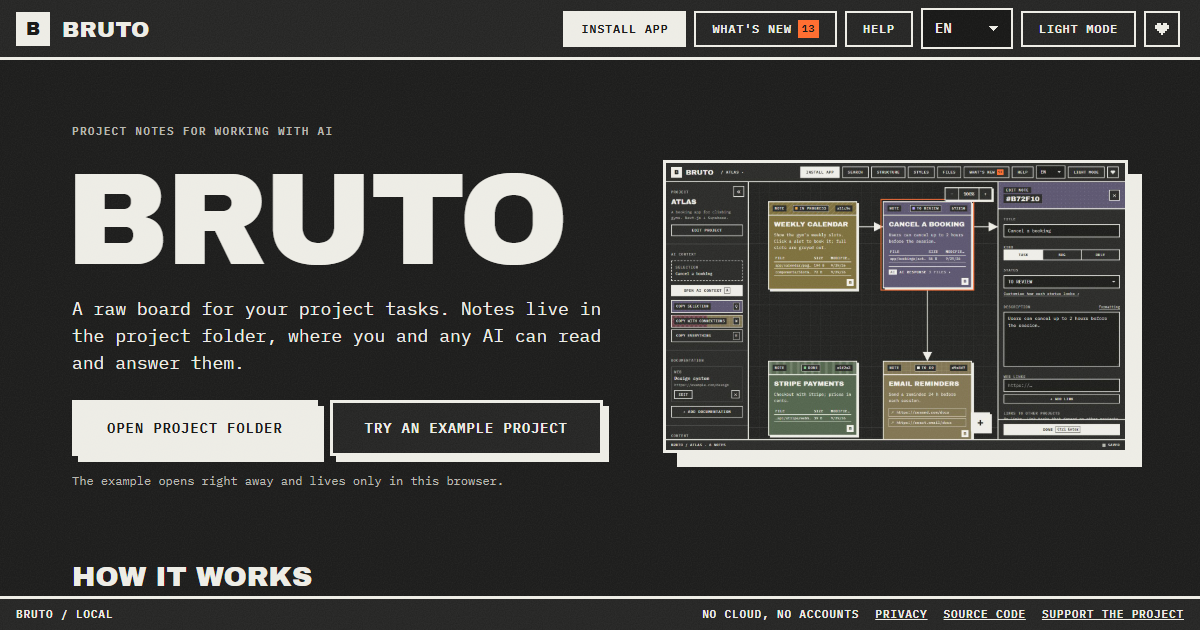
Bruto is a free, open-source task board for building with AI. It is a raw, brutalist board for project tasks where every note lives inside the project folder itself, so both the person writing the tasks and any AI assistant can read and answer them from the same place. The product is aimed at developers and teams who plan work locally, want their task context to sit next to the code, and want to hand that context to models such as Claude Code, Cursor, ChatGPT, Gemini or DeepSeek without copying and pasting scattered fragments. Its main purpose is to keep tasks, context, files, links and screenshots together in one note, and to make handing that note - and everything it points at - to an AI a single keypress. It runs in the browser, needs no account, and stores nothing on a server. Most task tools live in the cloud, far away from the code they describe. When a developer wants an AI to work on a task, they have to reassemble the relevant context by hand: open the ticket, find the files, paste the links, describe the stack, and repeat the whole ritual for every request. Bruto starts from the opposite assumption: the tasks already belong in the repository. By creating a .bruto/workspace.json file inside the chosen project folder, Bruto keeps the board inside the same versioned space as the code, with nothing leaving the computer. That means the context an AI needs is already written down where the project lives, and it stays there between sessions, between tools and between people. The problem it addresses is not tracking work for its own sake, but making sure the model receives exactly the context it needs instead of a lossy summary. The core of Bruto is a real board of notes. Each note is a task and carries a description, files, links, screenshots and a status. Notes can be dragged between statuses, connected with arrows so their relationships are visible, and edited many at once when a change applies to a whole batch. Because every note is a file-backed record inside the project, the board is not a separate silo; it reflects the actual work sitting in the folder. The visual language is deliberately brutalist and raw, and the board is built for dense, practical use rather than decoration. Screenshots let a developer show a visual bug or an intended layout, links point to external references, and files point at the exact code involved - so a task is a self-contained brief rather than a line of text. Handing work to the AI is where the board earns its place. Three shortcuts - Q, W and E - copy the selection, the selection with everything it points to, or the whole project, as clean Markdown that includes instructions for the model. A preview shows exactly what will be copied and how many tokens it amounts to, so there is no guesswork about the size or the contents of the payload before it is pasted into an assistant. A global context carries the project's stack and decisions in every copy, meaning each request is automatically framed by the architecture and conventions already agreed on. Standing rules extend this idea: a note can be a rule instead of a task, for example "run the tests before finishing", and it is included in every copy until it is closed, so the AI applies it on each task. Bruto also draws the project. The structure view shows where the work lives: folders appear as blocks and are marked with the notes that point at them, so the board and the codebase stay visibly connected. When Bruto recognises the project, it renders it for what it actually is rather than as a generic tree. Web projects - React, Vue, Svelte, Next.js, Nuxt, SvelteKit, Astro and Angular - are drawn as screens with their components. API projects - .NET, NestJS, Express, Fastify, Next.js, FastAPI, Flask and Spring - are drawn as resources with their endpoints. Database projects - Oracle PL/SQL, PostgreSQL, Supabase, SQL, Prisma and Drizzle - are drawn as tables with their keys and policies. This means a note can sit on the screen, the endpoint or the table it actually concerns. Underneath the board, Bruto behaves like a careful editor of a shared file. Every save reads the file first and merges whatever changed elsewhere, note by note, so edits coming from another tool do not silently overwrite each other. A broken file is never overwritten, and there is always a backup. The workflow starts when the project folder is opened and .bruto/workspace.json is created inside it; nothing leaves the computer. Notes are written as tasks and connected to show how they relate. They are handed to the AI by copying context, or by letting an agent with file access work the board directly. If the AI can edit files, it answers inside the note and marks it for review. When an answer still needs work, the developer writes what is wrong and marks the note "Changes requested" - and it goes back with all of its context. The outcome is a shorter loop between deciding what to do and getting it done. Because context is assembled once and reused, there is no repeated explanation of the stack, the conventions or the relevant files. Because the AI's answers remain inside the note, the reasoning sits next to the task instead of being lost in a chat window. Because the board merges changes note by note and keeps backups, it can be used alongside other tools without fear of destroying work. And because everything stays local - no server, no accounts, only anonymous usage stats and no cookies - teams keep ownership of their task data while still getting the benefit of AI assistance. Fewer copy-paste steps, less context drift, and a review trail that lives with the project. Bruto fits a number of concrete workflows. A developer can write a task with the files, links and screenshots it needs, copy the selection with everything it points to, and paste that clean Markdown into Claude, ChatGPT, Gemini or DeepSeek. Alternatively, an agent with access to the files can work the board directly: one line in AGENTS.md or CLAUDE.md tells it where the tasks are and which statuses to work on. With the MCP server, added with a single command, Claude Code and other MCP-speaking agents list and read notes, mark the one they are on, and answer it without touching the JSON by hand. Work that spans layers can be coordinated with notes that block or wait on a note in another project - front end, API or database - with both boards showing the link and one click jumping between them. An example project can be opened immediately and lives only in the browser. Bruto is built for developers and small teams already using AI assistants while they code, and for anyone who wants their AI and themselves to work from the same tasks. It is free and open source, with no account required, and it runs on the web: opening your folders needs Chrome, Edge, Brave or Opera on a computer. It can be installed as an app, works offline, and tells you when a new version is out. It ships in nine languages and two themes. It is keyboard first - every action has a shortcut, notes are reachable with Tab, and everything has a name for screen readers - and Ctrl+F searches by text, path or id, with filters by status and by what a note has, such as files, an AI response, images or a link. It works with any AI, including Claude, ChatGPT, Gemini and DeepSeek, and with agents that speak MCP. Bruto's value proposition is simple and specific: a task board that lives in the repository, for the developer and the AI alike. Notes carry the context, shortcuts hand that context over intact, agents can work the board through MCP, and the review loop keeps answers and follow-up requests inside the same note. Free, open source, local, and with no account to manage, it turns task management into the place where human intent and machine execution actually meet.
m’kay is a voice layer for the AI coding agents that already run on your Mac. It lets you talk to Claude, ChatGPT/Codex and Cursor on your own Mac from any browser or phone, so you can ask what your agents are doing, hear their replies read aloud, and hand them the next task without being at your desk. It is built for people who keep coding agents running and want a single voice interface that reaches all of them, rather than a separate assistant to manage alongside their work. The Mac app runs on Apple Silicon and requires macOS 13 or later, and you can either download the menu-bar Mac app or clone the open source project and run it locally. The problem m’kay addresses starts with a mismatch. Most voice tools for developers are built around a single assistant: you talk to one model, in one session, and that is the whole conversation. Developers rarely work that way. A working machine often has Claude Code, Codex and Cursor available at the same time, each with its own sessions and projects. The product's own framing puts it plainly — other voice apps talk to one assistant, while m’kay talks to all of your agents. On top of that, the moments when you most want to check in on a long-running task are often the moments when you are furthest from the keyboard: on the train, at the gym, or simply away from the desk. m’kay is designed for exactly those gaps, so progress on your agents is not tied to you sitting in front of the machine. The core capability is multi-agent voice control. m’kay talks to Claude Code, Codex and Cursor on your Mac, not to a single assistant, and it lets you ask which one is done, hear its reply, and tell it what to do next. Because it drives the real desktop apps rather than a separate environment, your sessions and projects stay where they are — the work already open on your Mac is the work you are talking to. That continuity matters: there is no second copy of a project to keep in sync and no separate workspace to reconstruct before an agent can continue. The packaged menu-bar Mac app puts this control within reach whenever you are at the machine, and the same voice channel is what you use once you step away from it. Remote access is the other half of the idea. The voice interface is reachable from any browser or phone, so the desk is optional. The product describes giving instructions from your phone's browser — on the train, or at the gym — where you ask what your agents are doing, listen to their replies read aloud, and give the next instruction by voice. Reading replies aloud is what makes this practical in situations where looking at a screen is awkward or impossible, and the browser-based interface means you are not tied to a particular device. The hosted voice page is available after a free sign-up, or you can run everything on your own Mac instead. m’kay also builds in an explicit confirmation step for anything it sends. The product states that nothing is sent until you say "yes" to a read-back. In practice, the system reads back what it is about to pass to an agent, and the instruction only goes through after you confirm it out loud. Because the agent apps being controlled can act on real code and projects, that read-back works as a checkpoint between what you said and what an agent is actually asked to do, which is a meaningful safeguard when your instructions arrive by voice from a phone. Getting started begins with linking your Mac. A small open source connector runs on your Mac and drives the agent apps you already use, and you sign in once to link it. From there you decide how to run the voice side of things: sign up for the hosted voice page, or run everything on your Mac with local models or your own API keys. The project is open source, so running it yourself is a supported path rather than a workaround, and the menu-bar Mac app is offered as the packaged way to use it on the desktop. The benefits follow directly from those choices. You are no longer chained to your desk to know what your agents are doing, because you can ask and hear the answer from any browser or phone. You do not have to juggle separate assistants for separate tools, because one voice interface reaches Claude Code, Codex and Cursor together. Your sessions and projects stay in the real desktop apps, so nothing is disrupted when you check in remotely. And because the read-back confirmation gates every send, you keep a spoken checkpoint before anything is passed to an agent. If you want to keep everything on your own machine, running locally with local models or your own API keys is an available route. Concrete use cases follow the workflow the product describes. You can ask which agent is done while you are away from your desk and hear its reply read aloud, then tell it what to do next. You can give a long-running agent its next task from your phone's browser on the train, without opening a laptop. You can check in and issue an instruction at the gym, where reading a screen is not practical and voice is the natural interface. You can run the whole thing locally on your Mac with local models or your own API keys. And because m’kay talks to all of your agents, you can move between Claude Code, Codex and Cursor through one voice channel instead of switching between separate interfaces. m’kay is aimed at developers who already run coding agents such as Claude Code, Codex and Cursor on a Mac and want to reach them by voice from anywhere. It runs on Apple Silicon and requires macOS 13 or later, and it is available as a menu-bar Mac app or as an open source project you can clone and run yourself. The voice interface is used from any browser or phone, with a hosted voice page available after a free sign-up. In short, m’kay turns the coding agents you already run on your Mac into something you can talk to from anywhere. One voice for all your agents, replies read aloud, a read-back before anything is sent, and sessions that stay in the real desktop apps — that is the value it offers to developers who want to stay in touch with their work without staying at their desk.
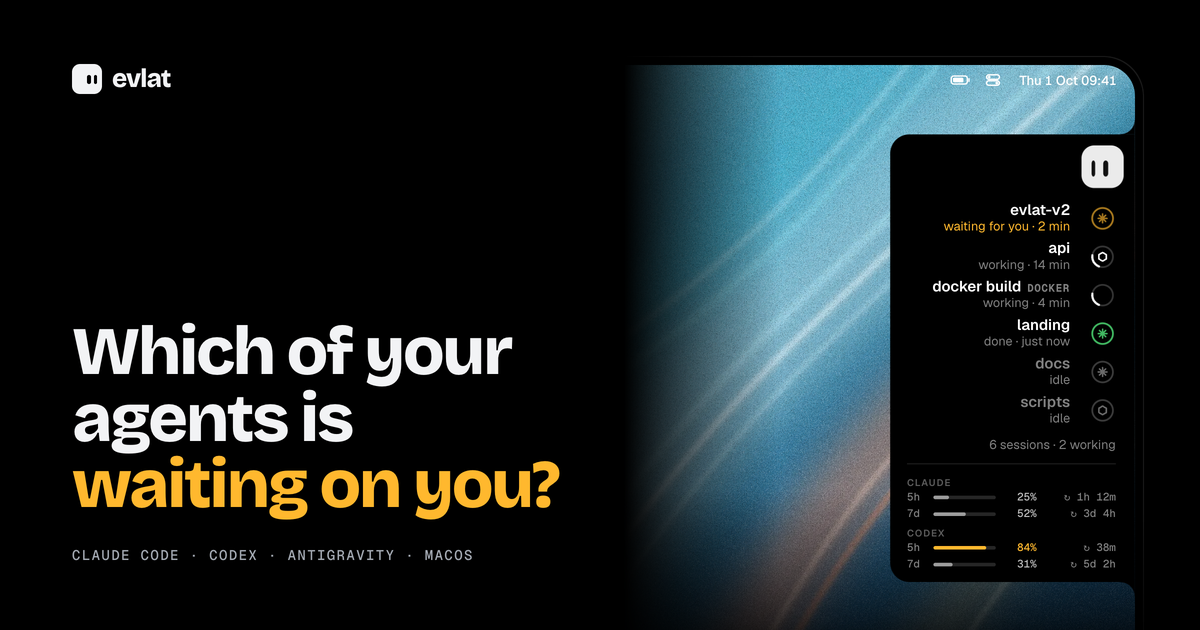
Evlat is a native macOS utility that docks a thin black strip to the edge of your Mac's screen and shows you which of your AI coding agents is waiting on you. One ring appears for every Claude Code, Codex or Antigravity session, or for every command you hand it, and a single face represents all of them. The instant an agent stops and needs your answer, its ring sends an amber pulse. Evlat is made for developers who run several AI coding sessions at the same time and want to know at a glance which one has paused and needs a decision, without hunting through terminal tabs. It runs on macOS 14 Sonoma or later on Apple silicon, is free, and installs as an app of roughly 3 MB. The problem Evlat addresses is a quiet one. AI coding agents spend long stretches working on their own and then stop to ask for a permission or an answer. If you are not looking at the right window, that session can sit idle for minutes while you continue doing something else, and the work simply stalls. Running more than one agent at a time makes this worse, because the session that needs you is rarely the one you are watching. Evlat turns that invisible waiting into something you can see. Rather than switching between terminals to poll their state, you get a single strip where every session has a ring, and the one that needs you pulses amber until you respond. The same strip also tracks long-running commands and jobs on remote servers, so work happening off your laptop is not invisible either. At the heart of Evlat is the ring. Each Claude Code, Codex or Antigravity session gets one, and so does any command you run through Evlat. A ring carries the state of its session: it can be waiting for you, working, done or idle, and each row shows how long the session has been in that state, such as "2 min", "14 min" or "just now". Waiting sessions are pushed to the top of the list so the one that needs your answer is always the most visible thing on the strip. Underneath the session rows, Evlat also shows your Claude and Codex limits, with the 5-hour and 7-day windows, their percentages and the time remaining until each resets, so you can see your remaining budget without leaving your screen. Because the strip is always docked to the edge of the screen, this information stays present without occupying a window or taking focus. Hovering over the strip makes it grow into the screen. Every session's name, what it is doing and how long it has been doing it become readable, with the waiting ones on top and your Claude and Codex limits underneath. Resting on a row slides out a card that names the tool the agent is stuck on and shows the exact command it wants to run. A "Go to session" action finds the application that owns the session — a terminal, VS Code or Orca — and brings it to the front, and Evlat asks for no permissions to do it. The strip also carries a small mascot. Clicking it, or pressing Shift Command Space, opens a balloon right out of the bar that takes your keyboard without pulling Evlat to the front. The balloon runs on your own Claude Code install, so it knows what your terminal knows. You can even drop a file onto the mascot: its eyes lock onto the file as it comes closer, and the file lands in the chat. Evlat is not limited to the agents it knows. The evlat watch command runs any command exactly as it is, with colours, input, Ctrl-C and the exit code all passing through, and tracks it as a row on the strip. If Evlat is not running, the command simply runs. For work that knows how far along it is, the evlat signal command lets your own scripts report progress and state: --progress 0.4 fills the ring, and --waiting, --done or --failed set its state, with rows that expire on their own. The same commands work on a server you reach over ssh, and those jobs arrive tagged with the machine's name, such as GPU-01, DEVBOX or BUILD-01. An agent waiting on a server pulses amber on your Mac exactly as one on your laptop does, and you answer it in that server's terminal. Evlat is honest when a link drops: when a server cannot be heard, its rows dim and say "no connection" instead of showing a stale state, and they light up again once the connection returns. Evlat's approach is to stay native and local. It is written in Swift with AppKit and SwiftUI, with no web view and no Electron. Hook entries install from the menu and talk to a listener on 127.0.0.1:48151 that turns browsers away, so sessions, commands and usage stay on your Mac. The only thing Evlat fetches from the internet is its own update, from GitHub, once a day. To connect a server, you add it by the name you give ssh, such as devbox or me@server, and Evlat carries the server's 127.0.0.1:48151 to your Mac with no account and no relay in between. It can set up the hooks and the evlat command on the server for you, or hand you one block to run yourself. Installing hooks adds Evlat's own entries to Claude Code's ~/.claude/settings.json, Codex's ~/.codex/hooks.json and Antigravity's ~/.gemini/config/hooks.json, next to any hooks you already have, and keeps a .evlat.bak copy before the first write. The outcome for users is a quieter, more predictable workflow. Instead of checking each terminal to find out whether an agent is done, you glance at the strip. Waiting sessions rise to the top and pulse amber, so the moment an agent needs a permission or an answer, you know about it, and one click brings the owning window forward. Because Evlat takes no Accessibility permission, no screen recording and no Dock icon, it does not interrupt what you are doing, and because it never takes focus, it can sit above the Dock on every Space without getting in the way. Rings beat rather than spin forever, and a bar with nothing moving draws no frames at all, so the utility stays quiet until something actually needs attention. In practice, Evlat fits several everyday situations. When you keep several Claude Code and Codex sessions open at once, the rings let you see at a glance which session is waiting, which is working and which is done. When you start a build, a test run or a deploy through evlat watch, it appears as a row with its elapsed time, while the command itself behaves exactly as it normally would. When you run training or infrastructure jobs on a remote server over ssh, those jobs arrive tagged by machine and pulse amber on your Mac when they need you, even when the link drops and later returns. And when you want to ask a question without leaving your work, the mascot balloon opens straight out of the bar, runs on your own Claude Code, and accepts files dropped onto it. Evlat is aimed at developers who run AI coding agents on a Mac, particularly those who work with more than one session at a time or who watch long jobs and remote servers. It tracks Claude Code, Codex and Antigravity — the Antigravity app, IDE and agy CLI — through hooks that Evlat installs for you. Antigravity sends no event when it asks for approval, so a session waiting there shows as working rather than amber; anything else, such as a build, test run, deploy or your own script, shows up through evlat watch or evlat signal. The app requires macOS 14 Sonoma or later on Apple silicon, with no Intel build and no Windows or Linux app, although the servers it watches can be any machine you reach over ssh. Evlat is free: there is no paid tier and no account. The source is on GitHub under the Functional Source License (FSL-1.1-ALv2), and each version becomes Apache 2.0 two years after its release. Releases are signed and notarised by Apple, and updates are delivered through Sparkle, which verifies each one against Evlat's signing key. Evlat's value proposition is simple: it tells you which AI coding agent is waiting on you, and it does so quietly. A thin strip on the edge of your Mac gives every Claude Code, Codex and Antigravity session its own ring, pulses amber the moment one needs you, and opens the right window with one click. It tracks long commands and remote servers over ssh, keeps everything local with no account, no permissions and no telemetry, and stays out of the way until something actually needs attention.
Aktar is a free, open-source application for Mac, Windows and iOS that turns file sharing into a single drop. It lives in the menu bar on macOS, and when you drop a file onto it, Aktar uploads that file straight to your own S3-compatible storage and copies the resulting shareable link to your clipboard. There is no account to create, no intermediary server involved, and no upload limit on Aktar's side. It is built for people who already pay for cloud storage — Amazon S3, Cloudflare R2, Backblaze B2, DigitalOcean Spaces, MinIO or any S3-compatible endpoint — and who want a fast, native way to share screenshots, logs, builds, videos and documents without opening an upload form in a browser. Most people who need to share a file reach for a hosted service: they open a website, create an account, upload the file to storage they do not control, and receive a link that only works as long as that service keeps running. Aktar is built around a different model. Because the app has no servers of its own, there is nothing to sign up for and nothing to phone home to. Files travel directly from your machine to the storage endpoint you configure, and you pay your storage provider rather than paying Aktar. That means the file lives in a bucket you already own, under a domain you control, and the link you paste is served from your own Public Base URL — a custom domain or CDN in front of your bucket. For developers, freelancers and small teams who already run S3-compatible storage, the upload step becomes a keystroke instead of a context switch. The core interaction is deliberately small. On macOS, Aktar lives in the menu bar with no Dock icon and no window to babysit: you click the icon, drop a file, and you are done. Files can be dragged onto the menu bar popover, picked from Finder with the Browse option, or pasted in. You can upload several files at once, follow per-file progress, and retry any upload that failed with a single click. The app also adds a global keyboard shortcut — ⌃⇧⌘U by default — that uploads whatever is currently on your clipboard from inside any app, even when the panel is closed. If you copy a file in Finder or capture a screenshot, that shortcut turns it into a link without you ever leaving the application you are working in, and the shortcut can be recorded to any key combination you prefer in Settings. Optional notifications fire when an upload finishes, the popover can auto-close after a successful upload, and Aktar can launch at login so it is always ready. On Windows and iOS the same idea carries over, with the app available for iPhone and iPad as well. Aktar works with the storage you already have. Amazon S3, Cloudflare R2, Backblaze B2, DigitalOcean Spaces and MinIO all have built-in presets, and anything else that speaks the Amazon S3 API works through the "Other S3-Compatible" option. Connecting a bucket takes under a minute: you pick a provider, paste your access keys and bucket name, and the preset fills in the right endpoint and region for you. Destinations can be named — Personal, Client Work, Homelab — and you can switch the active destination right from the popover, so one bucket can hold screenshots while another holds client work. Each destination has its own Public Base URL, the address files are served from, such as a custom domain or CDN in front of the bucket; Aktar joins that base URL with the object path to build the link it copies. Object paths themselves are templates, with a default of {year}/{month}/{uuid}.{ext} and variables including {year}, {month}, {day}, {date}, {time}, {filename}, {uuid}, {random} and {ext} available to mix in, so your naming and folder structure stay under your control. Aktar also handles the life cycle of files after they are shared. Uploads that should not last forever can be given a delete-after setting of 1, 7, 14 or 30 days, which Aktar implements by setting up your bucket's own lifecycle rules in one click — the file is deleted on schedule even when Aktar is not running, and the rules Aktar creates leave your other rules alone. A Library view lets you browse every folder and file in your buckets, not just the ones Aktar uploaded: you can search the whole bucket, preview files, upload, rename, move or delete them, and copy public or temporary links, with temporary links that work for private buckets too and can be valid for one hour, one day or seven days. From the same history you can delete a file at the source — removing it from the bucket rather than only from the list — which is useful when you have shared the wrong file. Every upload is also recorded in a searchable history with thumbnails and previews for images, PDFs, text and Markdown, filterable by destination, with bulk copy for several entries at once. The overall approach is three steps that quickly become muscle memory. First, connect your bucket: choose a provider, paste your access keys and bucket name, and the credentials go straight into the macOS Keychain, where they are only used to sign requests to your own endpoint. Second, drop, paste or browse: drag files onto the menu bar popover, select them from Finder, or press the global shortcut to upload whatever is on the clipboard. Third, paste the link anywhere: the public URL lands on your clipboard as a plain link, Markdown, HTML, or a template of your own, with images copied as embed markup and everything else as a regular link. Underneath there is no proxy and no middleman — the app signs requests directly to your storage endpoint, which is why Aktar can stay small, native and free of an account system. For Raycast users, an extension uploads the clipboard or files selected in Finder, searches your history and browses your buckets from Raycast itself, while your keys stay in Aktar. The payoff is speed and ownership at the same time. Sharing a screenshot goes from saving it, opening a browser, uploading it, waiting and copying the link down to a two-keystroke reflex, and because everything runs locally there is no upload form, no signup and no upload limit imposed by Aktar. Your files stay in storage you already pay for, so links point at your own domain and can be embedded in documents, tickets or chat without carrying someone else's branding. Temporary links keep throwaway files — a bug report screenshot, a log, a draft — from piling up in your bucket forever, and lifecycle rules keep working whether or not the app is open. Because Aktar is MIT licensed, sandboxed and notarized, runs with the Hardened Runtime, keeps keys in the Keychain and collects no telemetry, the trust question is answered by the code itself: you can read it, build it yourself or send a pull request. On macOS it is built with SwiftUI so it feels right at home on the platform. Several concrete workflows come up again and again. The screenshot-to-link flow: press ⌃⇧⌘4 to capture an area to your clipboard, then ⌃⇧⌘U to upload it, and the link is ready to paste — useful for bug reports, design feedback and chat. The upload-from-anywhere flow: copy a file in Finder or capture an image, and the shortcut uploads it without ever opening the panel. The client-work flow: keep separate named destinations so screenshots land in a personal bucket while deliverables go to a client bucket served from a different domain. The temporary-share flow: set a file to delete after a day, a week or a month so it disappears without manual cleanup. The documentation flow: choose Markdown or HTML output so images arrive as ready-to-paste embed markup. And for Raycast users, the extension uploads the clipboard or files selected in Finder, searches upload history and browses buckets without leaving Raycast. Aktar is aimed at people who already run S3-compatible storage — developers, technical freelancers and small teams — and who want file sharing to feel native rather than browser-based. On macOS it is built with SwiftUI, requires macOS 14 Sonoma or later, installs from a .dmg or with Homebrew via brew install --cask getaktar/tap/aktar, and works alongside Raycast. Windows 10 and 11 builds are available through the Microsoft Store, the iOS app is on the App Store for iPhone and iPad, and Android is listed as coming soon. The app is free and open source under the MIT license, with no subscription, no account and no upload limit on Aktar's side; you pay your storage provider, not Aktar, for the storage you use. Put simply, Aktar is a small native app that does one job well: turn a file into a link without leaving your workflow and without handing the file to a middleman. If you already own an S3-compatible bucket, it turns that bucket into an instant sharing endpoint — drop a file, paste the link, and keep control of where the file lives.
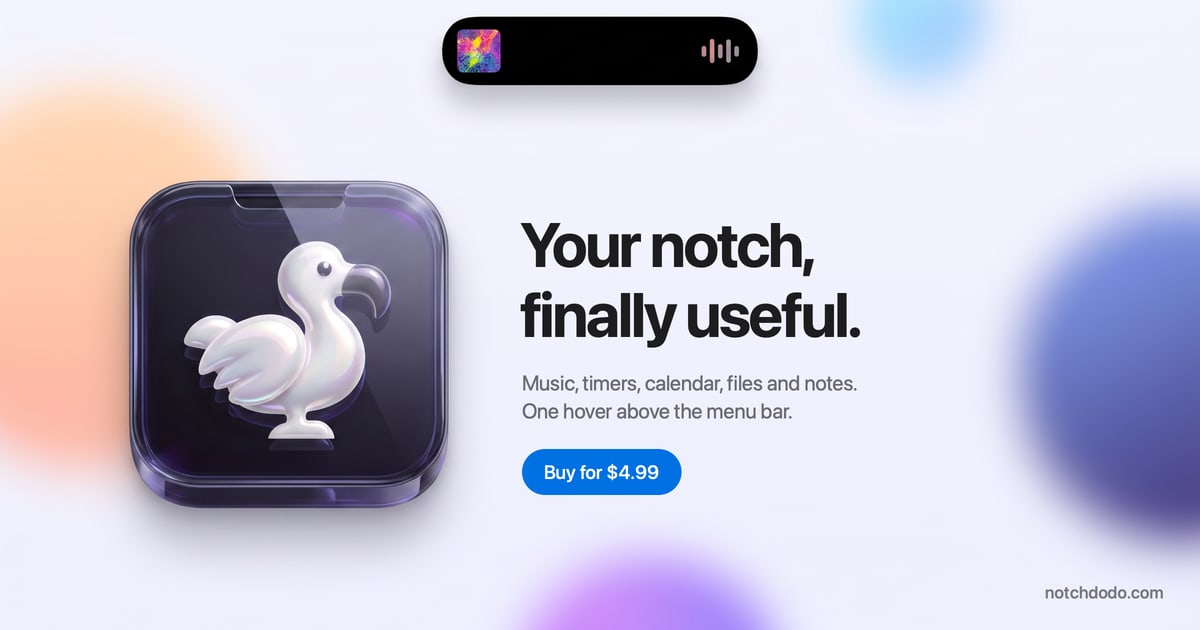
NotchDodo is a macOS app that turns the notch at the top of a MacBook display into a Dynamic Island-style panel, giving Mac users quick access to a set of everyday utilities without interrupting their work. Hovering above the menu bar opens a dark dashboard that holds music controls, timers, today's calendar, files, notes and AI agent usage in one place. It is built specifically for Macs with a notch, and it also runs on Macs without one by drawing a simulated island at the top centre of the screen. The app is a one-time purchase aimed at anyone who wants the notch to become a useful part of their daily workflow rather than dead space. On modern MacBooks the notch is a piece of hardware that most software simply works around. Menu bar icons slide behind it and vanish when a lot of apps are running, and everyday information such as the current track, a running timer or the next meeting tends to be scattered across separate apps and separate windows. NotchDodo takes the opposite approach: instead of ignoring the notch, it treats it as a surface that can show what matters right now. The result is that the user does not have to switch apps, hunt through invites or dig through logs to know the shape of their day or what their coding agents are doing. The Dashboard is the home page of the notch. It shows eight tiles on a dark panel separated by hairlines, and the user chooses which eight appear and in what order by clicking the gear. Today, Tasks, Notes and Reminders appear in miniature, each one tap away from its full tool. A Launcher shows the apps in the Dock five at a time, Day Progress tracks the workday set in Settings and rotates a short focus tip, and quick toggles cover Dark mode, Keep awake, Screenshot, Lock screen and Empty Trash. Music, AI Usage, System, Shelf and Screen Time tiles can be swapped in and reordered. Pomodoro is a watch-style dial with tick marks and a gold hand; starting a session moves the countdown into the notch so it stays visible while the user works in any app. Five modes cover the day — Work, Short break, Long break, Quick timer and Custom — and focus sounds play rain, café chatter or white noise with each focus block, fading out when the break begins. Every fourth completed session earns a long break, Focus Target attaches a session to an event, reminder or task, and a stopwatch with laps covers everything that is not a Pomodoro. AI Usage reads the session logs that Claude Code, Codex and Gemini CLI already keep on the Mac and turns them into a live picture: tokens today, estimated cost at API list prices, and the five-hour window with its budget bar, burn rate and reset time. Each session shows its state — Running, Waiting or Done — along with the model, the git branch and the last prompt typed. Model tags cover Fable, Opus, Sonnet, Haiku and Gemini, with a CLI tag and a seven-day chart, and while an agent runs the notch shows a purple burn bar and token count and flashes when the window crosses 80 and 100 percent. The budget is learned from the largest past window or set manually in Settings. Dev Servers lists every local server that is running, with its port, the project folder it was started in and the framework such as Next.js, Vite, Django, Rails or Postgres, so a server can be opened in the browser or stopped with a click, ending the "port 3000 is already in use" problem. Menu Bar lists every menu bar icon, marks the ones the notch is covering and opens any of them with a click, using the system's own reveal button on macOS 27. Today shows every event for the day in a list with a details pane giving duration, location, notes and a countdown to the next start, and Zoom, Meet, Teams, Webex and FaceTime links become a single Join button. Ten minutes before a call the notch shows a countdown without being opened; five minutes before, it opens on the meeting with the Join button and then tucks away. Events come from every calendar enabled on the Mac. Reminders reads real Apple reminder lists through EventKit and syncs back through iCloud, showing counts for overdue, due today and later, with quick add by typing and pressing Return and one-click completion reflected everywhere. Tasks is a to-do list with no setup for the small things that do not deserve a project — the list is kept on the Mac and nowhere else, with an open count, a progress bar for the day and a history of done items. Notes saves as you type, using the first line as the title, storing notes as plain files in the Application Support folder and showing word and character counts plus the time of the last save. Music provides Now Playing controls for Apple Music and the Spotify desktop app, with artwork, a scrub bar and transport controls; while something plays, the notch shows the art and four moving bars. Shelf is a holding area for files: drag them onto the notch from Finder and they wait until needed, then drag them back out into Mail or Slack, AirDrop the lot or reveal them in Finder. Downloads and screenshots land there too, and hovering an image and tapping the wand converts it to PNG or JPG, halves it, shrinks it to 1920 px or compresses it. Calculator handles maths with proper precedence, percentages the way people say them and conversions for units and currencies, updating the result as you type and keeping a history with Return. Screen Time counts active time per app only while the user is actually at the keyboard, leaving out idle time, the lock screen and sleep, and groups apps into categories such as Development, Browsing and Communication with a donut and a bar, a Now card, a daily ranking and insights for the average and longest stretch in one app; every Monday and on the 1st a shareable Wrapped recaps focus time, Pomodoros, cursor distance, meetings, the top app and AI usage. System Analytics shows CPU, memory, storage, network, battery and free disk as tick gauges in the style of a watch face, sampling only while the tab is open. Mirror gives a 4:3 mirrored preview from the built-in camera before a call, starting when the tab opens and stopping when the notch closes. Dodo Run is an endless runner inside the notch, built for the minutes Claude Code is busy; it pauses and shows the alert the moment Claude needs approval, is waiting for a prompt or finishes. Support & Feedback lets users send help requests, reviews, general feedback, feature requests or bug reports from the panel, opening an email with the macOS and app version already filled in. NotchDodo is designed the way the Dynamic Island was built. The notch band and the compact pill never change colour, so they merge with the camera housing, while the panel below is a solid dark dashboard with hairline dividers that reads on any wallpaper. Every size change uses springs rather than slides, overshooting a touch and settling, with digits that roll like a clock and nothing fading in for decoration. Seventeen tools ship in the box, each one a keyboard shortcut away if wanted; turn off ten and the rail shows seven. Permissions are asked for when a tab is opened, never at launch, and the notch stays black and silent until something is worth a glance, then grows a little and shrinks back when the user is done. It handles many things automatically: it shows album art while music plays, a running countdown and ring while focusing, a four-second notice when charging and a warning below twenty percent, a countdown ten minutes before a meeting, tokens over a purple burn bar while an agent works, download progress, a pulsing Claude mark when Claude needs approval, a chime and tick when a timer finishes, and a one-time notice when an update is ready. The benefits follow from that design. Information that would otherwise require switching apps or hunting through windows is one hover above the menu bar, so the user keeps working while staying aware of the next meeting, the running timer, the current track, the files waiting to be dealt with and how much of the AI usage window has been consumed. Because everything is read locally, nothing about the user's tasks, notes, Shelf, screen time, AI usage or Wrapped leaves the Mac; the app only goes online to check the licence when activated and about once a week, to check for updates, once if a trial key is activated, for exchange rates if currencies are converted in the calculator, and for Spotify album art while Spotify plays. The focus sounds are made on the Mac, so nothing downloads and they never loop. The app also avoids getting in the way: while another app is using the camera, hovering the notch will not open it and timers will not pop it open over a call, and NotchDodo can be hidden in full-screen apps in Settings. Concrete situations shape the way NotchDodo is used. While a coding agent runs, the user glances at the notch to watch tokens tick up over the burn bar, plays Dodo Run during the wait and sees the Claude mark pulse when approval is needed, then returns to work. Before a call, a countdown appears ten minutes ahead and the notch opens on the meeting with a Join button five minutes before, so no invite has to be searched. During a focus block, a Pomodoro session keeps its countdown in view with rain, café chatter or white noise playing, and a long break is queued automatically after every fourth session. When a file downloads in Safari, Chrome, Edge, Brave or Firefox, its progress shows in the notch and the finished file appears on the Shelf, ready to drag into Slack, while new screenshots wait there too. When local development gets tangled, Dev Servers shows which localhost servers are running and lets the user open or stop one with a click without breaking a coding agent's private helpers. At the end of a week, Screen Time's Wrapped recaps where the time went. NotchDodo is made for Mac users on macOS 14 Sonoma or later on Apple silicon, and Macs without a notch get a simulated island so everything behaves the same. It is a direct download from notchdodo.com rather than an App Store app, so a new version is announced in the notch and downloaded with one click, with no waiting on store review. Pricing is a one-time purchase: $4.99 as a launch price for the first 50 customers, then $14.99, with no subscription and no account. A licence key arrives by email and unlocks the download on 2 Macs, with lifetime updates included, a 14-day refund on request by email, and a private-by-design approach in which nothing leaves the Mac except the licence check. It integrates with Apple calendars, Apple Reminders through EventKit and iCloud, Apple Music, the Spotify desktop app, Claude Code, the Codex CLI and Gemini CLI, and asks for Accessibility access for the Menu Bar tool and camera access for Mirror. NotchDodo turns a piece of Mac hardware that most software works around into a compact dashboard for the day. Seventeen tools, one hover above the menu bar and a one-time price make it a way to keep music, timers, meetings, files, notes and AI agent usage in view without leaving the work in front of you — a more useful Mac, with the notch doing the talking.
Declutr is a Mac app that tidies your Desktop, Downloads, or any folder you choose in one click. It sorts files into folders by file type — Documents, Images, Videos, Audio, Archives, Code & Scripts, 3D Models, and Other — so a directory that was one long flat list becomes a set of clearly named folders you can browse in Finder. Declutr is built for Mac users who want a tidy machine without writing automation rules or building workflows first. Its purpose is deliberately narrow: one click to organize a folder, and one Undo button to put every file back exactly where it was. The problem Declutr solves is the quiet accumulation of clutter. Files arrive in Downloads, get saved to the Desktop, and stay there — screenshots, PDFs, ZIP archives, installers, voice memos, code scripts, 3D models. Over months, a working folder turns into a flat list where nothing can be found by name alone. One reviewer described having a very messy desktop and documents folder for years; another noted that as someone with ADHD, keeping a Mac organized had always been a struggle before finding the app. The alternatives each ask for effort up front: Hazel requires you to write rules before anything gets sorted, the tools built into macOS mean building Automator or Shortcuts workflows yourself, and AI organizers ask you to describe what you want while an AI model guesses — often without keeping files on your Mac, and often on a subscription. Declutr's first and central feature is one-click sorting by file type. You choose a location — Desktop, Downloads, or a custom folder — then choose which categories to use, tapping any category you want to leave those files where they are. Declutr reports how many items it found to sort, organizes them into category folders, and shows an "Organization Complete!" screen with Undo Changes and Start over options. The site's walkthrough uses a Downloads folder holding 16 items as its example, ending with separate folders for Images, Documents, Videos, Audio, Archives, Code & Scripts, 3D Models, and Other. Each folder gets its own icon, so you find it in Finder without reading the name. Ten categories work out of the box, which means the first cleanup is a single click rather than an afternoon of rule-writing. The second feature group is the safety net and the manual controls. On the final screen, an Undo button puts every file back where it was, so no cleanup is permanent — the content notes that after a sort of 57 items, Undo is still available. Before a folder that looks sensitive, Declutr stops and asks first rather than acting on its own. Smart Rules handle the files that don't fit the default categories: you match files by name, extension, age, or size, combine conditions with AND/OR, and then either send matching files to a folder you name or tell Declutr to leave them alone. Rules run before the categories, so your own decisions take priority over the automatic file-type buckets. Pro adds the automation layer that keeps folders tidy after the first cleanup. Watched folders sort new files the moment they land, so a Downloads folder stays clean as you work instead of becoming messy again, and a schedule lets Declutr clean up every day while you work. Pro also lets you shape the category system itself: add an extension, move one to another category, or create your own category with its own icon. A File types screen lists the extensions inside a category, each removable, so the logic that classifies your files is visible and editable rather than hidden. Together these turn organization from a task you remember to run into something that happens in the background. Declutr's approach is deliberately rule-based rather than AI-based. It sorts by file type and by the rules you set — name, extension, age, size — and it never opens a file, never uploads one, and requires no account. That design choice is the product's core methodology: because Declutr only works from file metadata rather than file contents, it can organize a folder instantly and predictably, and nothing about your documents leaves your Mac. The site sets this against three alternatives — Hazel (rules you write, $42 once), AI organizers (an AI model guesses, files often don't stay on your Mac, often a subscription), and what's built into macOS (workflows you build in Automator or Shortcuts, free) — positioning Declutr as a one-click first cleanup that still keeps every file local. The benefits follow directly from that design. Sorting happens in seconds rather than through manual dragging; reviewers describe years of mess sorted in seconds and call it a huge time saver since they no longer have to sort everything themselves. Finding files gets easier, because pics, music, dmg files, and documents end up in separate folders you can recognize by icon, and one reviewer noted it is now easier to find what they need. Because Undo sits on the final screen, trying a cleanup carries no risk: if the result isn't what you wanted, every file returns to its original location. And because there is no account and nothing is uploaded, using Declutr doesn't require trusting a third party with the contents of your Mac. Use cases described in the content include the classic messy Downloads folder, where installer files, PDFs, images, archives, audio, and scripts pile up together; a Desktop that has become a chaotic sea of docs; a Documents folder left unmanaged for years; and custom folders a user wants tidied by their own rules. The site's simulated walkthroughs show folders holding boarding passes, bank statements, contracts, receipts, project proposals, spreadsheets, screen recordings, photos, ZIP and tar.gz archives, config files, stylesheets, and 3D model files, all split apart at once. With Pro, the recurring case is maintenance rather than cleanup — a watched folder that sorts each new file as it arrives, or a daily scheduled cleanup that keeps a working folder tidy while you work. Smart Rules cover the edge cases, such as routing files that match a particular name, extension, age, or size to a specific folder, or explicitly leaving them where they are. Declutr runs on any Mac with macOS 13 Ventura or later, on both Apple silicon and Intel, and it is distributed through the Mac App Store, where it holds a 5.0 rating. It is free to download and use for sorting: organizing your Desktop, Downloads, or any folder, files sorted by type into category folders, and undo of any cleanup in one click. Pro is a single in-app purchase of $8.99 in the US — no subscription, no account, and it stays unlocked — adding scheduled cleanups, Smart Rules that run on their own, watch folders, and your own categories and extensions. US pricing is shown on the site, while the App Store displays the price in your currency. The site also offers a guide on how to organize files on a Mac, a comparison of the best file organizer apps for Mac, and a free tool that shows what's in your Downloads folder. The takeaway is that Declutr trades configuration-first automation for a one-click result. If your Mac's Desktop, Downloads, or working folders have drifted into a flat pile of mixed file types, Declutr turns that pile into labeled folders in a single click, keeps it that way with watched folders and daily cleanups if you want them, and lets you undo the whole thing if you change your mind — all without opening, uploading, or reading a single file.
Curie is an AI-powered research assistant for scientific literature and document analysis, presented as built for real scientific work rather than as a generalist chatbot. It analyzes scientific literature, processes documents and delivers intelligent insights powered by advanced AI technology. The platform adapts to many kinds of researchers — solo researchers, graduate students, systematic review teams and R&D departments — so that each can search literature, extract data and verify findings with precision. Its stated aim is to let researchers focus on the science that matters most, and you can start writing on Curie for free. Research is slowed down by repetitive work. Searching literature, screening abstracts, extracting data and drafting summaries eat up valuable hours and pull focus away from the parts of research that only a researcher can do: interpreting findings, forming hypotheses and making decisions. Curie's stated purpose is to handle those repetitive steps so that time goes back into judgment and interpretation. The problem is not only speed. Doing better research also means pushing further — covering broader literature, more complex reviews and questions that a person would otherwise not have time for. Curie is positioned as a research partner that gives researchers the confidence to take on that wider scope, so more ground is covered and more impact comes from the work. Curie's literature search does not require keywords or boolean filters. You type your question the way you would ask a colleague, and Curie figures out what to search and how to answer. Behind that plain-language interface, Curie searches PubMed, arXiv, Europe PMC, OpenAlex and Semantic Scholar in parallel, so a single question reaches multiple scientific databases at once instead of being repeated across separate tools. The site presents this focus on scientific literature as the difference from a generalist chatbot. Researchers can ask it to find recent papers on a topic, look for meta-analyses, locate studies on a specific model or method, or search PubMed and arXiv together for a subject such as quantum error correction. A central part of Curie is verification. The assistant verifies every claim against the source text, so you can see what is backed by the literature and what is not. This matters because unsupported statements are difficult to spot when synthesizing many papers. Related to this is document analysis: you can point Curie at a document and it will extract structured data, showing the quote behind each value it extracts. For example, you might extract sample sizes and outcomes from clinical trial PDFs, compare reaction yields across synthesis papers, or build a table comparing sample size and effect size across a set of studies. Because each extracted value comes with its supporting quote, results stay traceable to the original text. Curie also supports a full systematic review workflow: protocol, screening, PRISMA diagram. The important detail is that you approve every decision, so the process stays under researcher control rather than being fully automated. Researchers can draft a systematic review protocol for a topic such as antibiotic resistance studies, screen records, and produce a PRISMA diagram as part of the same flow. To keep this work organized, Curie provides Projects and a library, which hold the material and the work associated with each effort so that searches, extractions and reviews do not have to be managed across separate tools. Overall, Curie's approach combines three things that are explicitly described on its site. First, natural-language input: you ask in plain language and Curie decides what to search and how to answer. Second, parallel search: PubMed, arXiv, Europe PMC, OpenAlex and Semantic Scholar are queried at the same time. Third, verification against source text: every claim is checked against the source so backed and unbacked statements are distinguishable, and extracted data values are tied to the quote they came from. On top of that sits a human-in-the-loop model for systematic reviews, where the researcher approves each decision. Projects and a library keep the resulting work organized. The stated benefits are time and scope. Curie is presented under the promise "Save hours, not minutes," with research productivity maximized by taking over literature searching, abstract screening, data extraction and summary drafting. By removing those repetitive steps, it is intended to return focus to interpretation, hypothesis formation and decision-making. In practice that means fewer hours spent on mechanical steps every week and more capacity for the analysis that determines the quality of the output. The second benefit is reach: Curie acts as a research partner that gives researchers the confidence to tackle broader literature, more complex reviews and questions they would otherwise not have time for, meaning more ground covered and more impact from the work. The site frames this as support for both speed and ambition — working faster and pushing further. Curie's site lists concrete tasks it is used for. Researchers can summarize the latest treatments for triple-negative breast cancer; find recent papers on CRISPR gene editing for sickle cell disease; extract sample sizes and outcomes from clinical trial PDFs; explain the mechanism of action of mRNA vaccines in simple terms; search for meta-analyses on cognitive behavioral therapy for anxiety; draft a systematic review protocol for antibiotic resistance studies; compare reaction yields across synthesis papers; summarize the methodology section of an astrophysics paper; find studies on machine learning models for early Alzheimer's detection; build a table comparing sample size and effect size across studies; check whether a claim about vaccine efficacy is supported by the literature; search PubMed and arXiv for papers on quantum error correction; and generate a Python script to analyze a gene expression dataset. Questions about what current research says, such as on microplastics in drinking water, are also among the examples. Curie is presented as suitable for different kinds of researchers on one platform: academic researchers and professors, PhD and graduate students, systematic review teams, and industry R&D teams. The site shows institutions that have already tried it, including CSIC (Consejo Superior de Investigaciones Científicas), Universitat de Barcelona, Fundació Bosch i Gimpera, IrsiCaixa, Helse Bergen (Haukeland universitetssjukehus), Università degli Studi di Messina, Uganda Christian University and MICIU / AEI. Security and privacy are addressed directly: Curie states that it is strictly GDPR compliant, that its servers are located in Europe, that it does not use user data to train models or to improve Curie, and that user data is not shared with anyone. It also describes pseudonymization and anonymization of personal and identifying information in certain documents. Access is offered for free, with calls to start writing, get free access and get started. Curie's value proposition is a focused AI research assistant rather than a general chatbot: parallel search across major scientific databases, plain-language questions, verification of every claim against source text, structured data extraction with supporting quotes, and a supervised systematic review workflow with protocol, screening and PRISMA diagram. Combined with projects, a library and a privacy posture aimed at sensitive research data, it is built to save researchers hours each week and to widen the scope of questions they can take on.
Pokébinder is a free tool for Pokémon TCG collectors that turns the job of filling a cardboard binder into a plan you can see and print. Collectors search any card in English or Japanese, drag or tap those cards into the nine pockets of a 3×3 binder page, and let their own artwork run across those pockets instead of sitting in a single slot. Its main purpose is to let someone design and preview a binder page before spending money on it, and then print true-size placeholders for only the cards they do not own yet, so each empty pocket has something in it and each gap doubles as a reminder of exactly what is missing and where it belongs. No account is needed and the binder stays in the browser. Binder collecting has an awkward middle state. A collector starts a page, owns some of the cards and not others, and the unfilled pockets sit empty for weeks or months while the missing cards are hunted down. There is no easy way to see how a finished spread will read, so money can get spent on cards for a layout that turns out not to work. The Michi method — a way of building binder pages where one piece of artwork carries across several pockets so a spread reads as a single image instead of nine separate cards — normally involves printing backing art, cutting it to size and sitting cards on top of it, which is a lot of measuring and reprinting. Pokébinder addresses that by doing the layout work on screen first and producing accurate printouts afterwards, doing the same thing as the manual Michi method but without the guesswork. The tool also states plainly what its printouts are not: a placeholder holds an empty pocket until the real card turns up, and is not for play and not for sale. Card search is the starting point. Pokébinder indexes over 20,000 English cards that can be searched by name, set or artist, and over 21,000 Japanese cards that can be searched by name or set — including the printings collectors actually chase. That means a collector can track down a specific card whether they know the artist but not the set, or the set but not the exact printing. Cards are placed by dragging or tapping them into the 3×3 grid of pockets. An amber cart marks a card that is in the binder but not owned yet, which is the state that causes it to print. Hovering a card reveals the binder's own controls for adjusting what sits in the pocket. One page can be assembled in five ways, and the page always keeps the same nine pockets — what changes is how much of the page the artwork carries. An image can fill a single pocket. It can stretch across a row, covering three pockets, or run down a column across two. Several images can each hold one pocket. Or, in the extended binder art layout, one image fills all nine pockets and the cards sit on top of it in whichever pockets the collector chooses, so the art carries on around them. That last arrangement is the Michi page. Because the image is shared across pockets, taking a card out reveals the slice of art underneath it, so the picture still reads correctly. The image can be zoomed and nudged until the framing is right, and it prints one slice per pocket on the same cut guides as the cards. Printing is designed around the physical binder rather than the screen. Any card marked as not owned yet prints at true card size, 6.3 × 8.8 cm, at 300 dpi, with a dashed cut line on every card, nine to an A4 or US Letter sheet. Spanned artwork prints alongside it, aligned so the slices land in the right pockets. The print preview shows the page as it will come out — for example page three with nine cards and guidance to cut on the dashes. Once printed, the collector cuts on the dashes and adds the placeholders to the physical binder. When a real card finally turns up, the printed one slides out and the real one slides in, and nothing else on the page moves. Binder view lets a collector flip through the result: the binder opens as a two-page spread with a real page curl on desktop and turns one page per swipe on a phone, so the same pages and the same art behave like the thing on the shelf. The tool is free, with no account, no ads and no watermark, and the binder stays in the collector's own browser. The distinctive approach is that the binder exists digitally first and physically second. Rather than buying cards to find out whether a spread works, a collector builds the page, marks what is missing, and prints only the gaps. The placeholder is the card: a printed piece at exact card size holds the pocket until the real card turns up. The Michi method — popularised by @peeplop and written up at The Michi Method on woahpoke.com — is supported directly, with art able to run across up to three pockets horizontally or vertically, or to fill the whole page behind the cards, and with zoom and reposition controls that remove the trial and error of sizing printed backing art by hand. Benefits follow from that order of operations. Empty pockets stop being empty, because every missing card has a placeholder sitting in its place. Those gaps double as a shopping list: the collector always knows what is missing and exactly where it goes. Purchases become easier to sanity-check, because the spread can be seen before money is spent, and a change of mind happens on paper instead of at the counter. Nothing has to be reorganised when a card finally arrives, since sliding out a placeholder and sliding in a real card leaves the rest of the page untouched. And because the tool is free, requires no account, carries no watermark and keeps the binder in the browser, there is no commitment involved in trying a layout. Concrete workflows include planning a spread from scratch: search a card, drop it in a pocket, and see what the page wants to be. Another is completing a set — mark everything that is not owned yet, print the placeholders, and use the printed page as a guide to what to buy. The Michi page suits collectors who want a single piece of artwork to carry an entire nine-pocket spread with their cards sitting on top of it, and printing the slices keeps the alignment exact. A collector who has just bought a missing card can check where it goes and swap the placeholder out. Japanese cards can be searched by name or set for collectors building Japanese-language pages, and English cards can be searched by artist for collectors following a particular illustrator. Pokébinder is aimed at Pokémon TCG collectors who build physical binders, from someone assembling a single page to collectors chasing specific printings by artist or set. It is a browser tool, usable on desktop and on a phone, where pages are turned with a swipe. It is free, with no account, no ads and no watermark, and the binder data stays in the collector's browser. The site notes that it is an independent fan project made by one collector and is not produced, endorsed or supported by Nintendo, Creatures Inc., GAME FREAK, The Pokémon Company or Wizards of the Coast, and that card images are served from their original sources and remain the property of their rights holders. Taken together, Pokébinder is a free planning layer for Pokémon TCG binders: search real cards, arrange them into 3×3 pages, run your own art across the pockets, and print true-size placeholders for whatever is missing so that every pocket is accounted for. It moves the guesswork of binder design onto the screen and leaves the collector with something they can cut out, add to the page, and swap for the real card when it turns up.
Semos.ai Manager Agents are AI agents purpose-built for managers. They build context from your meetings and back it with behavioral science, so you can handle difficult conversations, develop your people, and grow as a leader. The product is designed for people managers who are responsible for a team and need practical, timely support in the everyday moments of leading: a 1-on-1 that did not go as planned, feedback that is overdue, recognition that was missed, or a growth conversation that keeps slipping. Rather than offering generic advice, Manager Agents work from what has actually been happening across your meetings and your team, and turn that context into something concrete you can act on right away. The problem Manager Agents address is familiar to almost every manager: team context is scattered. The site describes the situation plainly, noting notes from six different 1:1s scattered across three places, and a review due Friday you have not opened. The support that would normally help in these moments has traditionally sat behind a budget line. An HR business partner is bundled into overhead at roughly one per 200 people and is available during business hours, shared across dozens of managers. An executive coach costs $300 to $500 per session and is scheduled weeks apart. Management training runs $2,000 to $8,000 once, lasts one week, and then leaves you on your own. Each of these options is scarce, expensive, scheduled far in advance, generic rather than specific to your team, or some combination of all four. Manager Agents are positioned as an alternative: self-serve and monthly, available whenever you need it, built for you, and, as the site puts it, designed to get sharper over time. The value proposition is that support previously reserved for a few sponsored leaders becomes directly available to the manager, including at 10pm before the conversation you have been dreading. Manager Agents are organized into a set of specialized agents, each aimed at a different part of the manager's job. The Meeting Agent is described as the foundation: it builds context from every meeting you have and feeds it to every other agent. That shared context is what allows the rest of the system to give guidance grounded in what has actually been happening rather than in a blank slate. The Feedback Agent handles difficult conversations, helping you say the hard thing clearly before it is too late to say it well. The Recognition Agent helps you give recognition that is specific, timely, and fair, addressing the common failure mode where good work goes unnoticed simply because the moment passed. Together these three cover the most frequent and most time-sensitive parts of managing people: understanding what happened, correcting course when something is wrong, and reinforcing what is working. Four further agents extend that coverage. The HRBP Agent works on people challenges, structuring the conversation and the documentation before you have it, which is useful when a formal or semi-formal process is involved. The Culture Agent focuses on team health, surfacing shifts in sentiment and participation before they show up in a survey, so managers can act on early signals rather than after-the-fact reporting. The Career Agent supports career conversations and growth plans for your team, helping managers prepare for the development discussions that often get postponed. The Company Agent provides sector awareness, keeping you current on what is happening in your market in minutes a week. The site also notes that more agents are available in Enterprise mode, linking to the Semos Cloud platform. Manager Agents follow a four-step approach that the site labels proactive, draft, action, and learn. First, the system is proactive by design: it does not wait for you to ask. A missed recognition, a quiet direct report, or a hard conversation coming up is surfaced before you think to ask about it. Second, it provides a start rather than a stare: a message, a talking point, or a structure for the conversation, grounded in what has actually been happening. Third, it is built for action, so what you get is something concrete, whether that is a message, a plan, or a next step, designed to be acted on right away. Fourth, and perhaps most importantly, the judgment becomes yours. Every suggestion comes with the reason behind it, so that over time you start seeing the pattern yourself. This last step positions the product as a way of building the manager's own capability, not simply a way of outsourcing decisions to automation. Every output draws on real behavioral science. The site names three specific frameworks: Stanford's 4Is feedback framework, Big Five personality traits, and Hofstede's cultural dimensions. The stated purpose of grounding outputs in these frameworks is that they were built for how people actually change, not just for what sounds right. In practice this means suggestions are not merely plausible-sounding text; they are shaped by established models of how feedback lands, how personality shapes response, and how cultural context affects communication. The site summarizes this scientific basis with three words: proven, precise, and verified. Manager Agents describe measurable outcomes. Managers capture three times more recognition, feedback, and coaching moments each week. Eighty-five percent of feedback recipients say the guidance is clearer and more actionable, and there is an average improvement of 23 percent in engagement scores during the first week. Underneath those numbers is a simpler benefit: the support that used to sit behind a budget line is now available directly to the manager, at the moment it is needed rather than weeks later. The product also distinguishes itself from generic AI tools. A general-purpose assistant starts from zero every time, with no memory of your team and no sense of your history with them; you have to explain the whole situation before you get an answer, and the answer is the same one anyone else would get. Manager Agents carry your context forward, drawing from the same shared context of your meetings, your team, and your patterns, so that every conversation adds to what they know about how you lead and guidance gets sharper over time. The site lists example questions that illustrate how managers use the product in practice. A manager facing a first underperformance conversation can ask for help preparing. Someone who needs to write a review can ask the system to turn notes from the last quarter into a review for a named team member. A manager can ask who on the team has not been recognized in the last month, or ask for a message recognizing the work someone put in this sprint. Career conversations are covered by asking for help planning a development conversation for someone ready for more, or figuring out how to bring up a promotion case with the manager's own manager. Team health and timing questions include whether anyone has gone quiet in recent 1:1s and what to do next after a 1:1 that did not go as hoped. There are also prompts for drafting feedback for someone who has been missing deadlines, structuring a conversation about a conflict between two people, handling the aftermath of a resignation notice, and finding out what has changed in the sector that the team should know. Manager Agents are built for people managers, and the framing throughout the site is about the individual manager rather than the HR department. The alternative comparison makes the positioning explicit: whereas an HRBP is built for HR and an executive coach is typically available only to the few people a company sponsors, Manager Agents are described as built for the manager and as getting sharper over time. Availability is self-serve and monthly, and the product is available whenever the manager needs it. The site directs visitors to get started through an app login and, in its metadata, invites people to join the waitlist. For managers who want practical support in the moments that actually shape a team, whether that is the conversation before it happens, the recognition that is overdue, or the review that is due Friday, Semos.ai Manager Agents offer AI agents purpose-built for the job. They combine context captured from your meetings with behavioral-science frameworks, surface what needs attention before you ask, give you something concrete to act on, and explain the reasoning so your own judgment improves. The result is not just help leading; as the site puts it, Manager Agents make you great at it.