Category Focus/categories/code-assistant
Code Assistant AI Tools
Discover and compare the best code assistant AI tools and software. Browse 104+ curated tools with reviews and rankings.
Projects tracked
104
Sort mode
RECENT
Page
1
sre is an open-source Agent Skill that makes AI coding agents work like a careful, experienced Site Reliability Engineer. It is installed as a single folder into tools such as Claude Code, Codex, Cursor, GitHub Copilot, Antigravity and Gemini CLI, and it activates for any reliability or production-operations question — you do not have to say "SRE" to invoke it. Its stated purpose is to give agents the habits good SREs follow on every page, every change and every postmortem: mitigate first, know the blast radius, and back every recommendation with real numbers. The project is released at version 1.1.0 under MIT / CC BY 4.0 and is distributed as a public GitHub repository that you clone once and link into each tool you use. The skill starts from a specific complaint: general-purpose coding agents are fast and confident, but the advice they give about production systems can be ungrounded. The project's own framing is that advice without context is a guess, and in production the cost of a guess is paid by users. Good SRE practice is really a set of habits — mitigate before you diagnose, understand what a command will affect before you run it, prefer gradual and reversible changes, and keep what you verified separate from what you suspect. Those habits are documented in Google's Site Reliability Engineering (2016) and The Site Reliability Workbook (2018) and in LinkedIn's School of SRE, but they are not automatically part of how an AI agent behaves. The skill packages them so an agent applies them consistently, and cites the chapter each recommendation comes from so the reasoning can be checked. Two behaviours sit at the front of the skill. "Mitigate first" means that when users are hurting, the agent rolls back, drains traffic or flips a flag before hunting for the root cause — root cause can wait. In the site's on-call example, where orders-api p99 latency is 4 seconds and MySQL replica lag is 900 seconds and climbing, the agent's first moves are to check what changed in the last hour (deploys, config, cron jobs) and, if a deploy lines up, to roll it back. Alongside this, "know the blast radius" means every command comes with what it affects, whether it can be undone, and how; risky operations are marked with a warning. A rollback is described as touching all pods but being reversible by redeploying the previous version. Three more habits govern how the agent acts. "Change safely" asks for gradual, observable and reversible changes, citing the Workbook's finding that binary and config pushes cause about 68% of outages. "Confirm before acting" means read-only checks come first and anything that writes to production waits for an explicit yes — for example, recommending KILL QUERY rather than KILL because it keeps the connection, and confirming before running it. "Verify, don't assume" means the agent checks that the user-facing signal actually recovered and keeps what it saw apart from what it suspects; in the example, p99 back under the 300 ms SLO for 15 minutes and lag trending down before the incident is declared mitigated. Finally, "blameless, always" means asking what the system allowed rather than who did it, with action items that get owners and types. The skill covers a defined set of production-operations topics. For live incidents it handles latency, 5xx errors, CPU, disk, DNS, TCP, MySQL replication lag and Kafka backlogs, applying mitigation first and read-only triage afterwards. For SLOs and error budgets it helps define SLIs based on what users actually feel, set realistic targets and write an error budget policy, and it pushes back on five nines with numbers. For alerting it favours multiwindow burn-rate pages over CPU alerts, along with ticket tiers and options for low-traffic services; Prometheus rules are included. Beyond incidents, the skill supports reliability gap reviews — checking every component for SLOs, monitoring, redundancy, deploy safety and backups to answer "what's missing to make this reliable?" It writes blameless postmortems from messy notes, producing a UTC timeline, a trigger separated from causes, and owned and typed action items. It plans rollouts as canaries with a concurrent control group, abort criteria and rollback, treating config with the same care as code. It estimates capacity for machines, disk and network with real numbers, including N+2 headroom and what happens when each failure domain dies. And it covers teams: on-call sizing, toil budgets, pager load reviews, and how SRE works with dev teams. A built-in Python calculator, sre_calc.py, works out budgets and alert thresholds so the agent doesn't have to guess. Its burn subcommand generates burn-rate alerts for a given SLO; the site shows, for 99.9%, thresholds of 2% of budget spent in one hour (14.4× burn rate, error ratio above 1.44%) paging, 5% in six hours (6.0×, above 0.6%) paging, and 10% in three days (1.0×, above 0.1%) filing a ticket. Other subcommands are downtime, budget, requests, lowtraffic, and compose for chained or redundant services. A worked example shows a Checkout API at a 99.9% SLO over a 28-day window: 62.0% of the budget used, 15.3 minutes left, 40.3 minutes allowed, 25.0 minutes down so far and 99.938% achieved — and above 50% used with half the window left, the error budget policy asks for extra review and a canary on every change. The skill also ships reusable documents that the agent fills in for your system instead of inventing a format each time: an SLO document, an error budget policy, an incident state document, a postmortem template, a postmortem review checklist, a canary plan, a launch checklist, a capacity estimate worksheet, an on-call handoff template, a reliability gap assessment and an alerting pipeline health checklist. Each is a Markdown file in the repository's assets folder, so teams get a consistent structure across incidents and reviews. Installation is deliberately minimal. The skill uses the open Agent Skills format, so you clone the repository once (to ~/sre-skill) and link it into each tool you use; for Claude Code that means creating ~/.claude/skills/sre as a symlink, restarting, and calling it with /sre or simply asking an SRE question. Before a review, SLO or alerting task, the skill is designed to learn your system first and save it as sre-context.md so every later session starts from there. It reads Terraform, manifests, code and alert rules read-only, then asks only what the files can't show: what the product is and who uses it, the two or three most important user flows, traffic, team size, on-call setup and whether SLOs exist today. With no repo access, it asks the same questions instead. In a live incident those questions are skipped, because mitigation comes first. The stated benefit is judgment rather than speed: every recommendation is backed by real numbers and cites the chapter it comes from, so you can check the reasoning instead of trusting it. Risky commands are flagged before they run, writes to production wait for confirmation, and the agent distinguishes what it verified from what it suspects. Teams get consistent documents — the same SLO document, postmortem and canary plan formats every time — rather than a new format invented per session. And because the skill learns the system first, the advice is about your architecture rather than a generic pattern. Concrete scenarios on the site include an on-call engineer facing a latency spike and climbing replica lag, where the skill sequences a change check, a rollback decision, read-only diagnostics and a verification step. Another is an SLO review where the error budget is 62% consumed with half the window left, triggering the policy's extra review and canary requirement. Others are designing burn-rate alerting instead of CPU-threshold pages, running a reliability gap review to rank missing monitoring and wrong alerts by user impact, writing a postmortem from messy incident notes, planning a canary with abort criteria, estimating capacity with N+2 headroom, and sizing on-call rotations. The skill is aimed at the people who run production systems: SREs, on-call engineers, platform and infrastructure teams, and developers using AI coding agents who want reliability guidance grounded in field-tested practice rather than improvised. It is distributed as an open-source repository under MIT / CC BY 4.0, works with Claude Code, Codex, Cursor, GitHub Copilot, Antigravity and Gemini CLI, and ships a Python calculator plus Markdown templates. Its material is drawn from Google's Site Reliability Engineering (2016), The Site Reliability Workbook (2018), LinkedIn's School of SRE (CC BY 4.0) and personal experience. No book text is included; both Google books can be read free at sre.google/books, and the project states it is not affiliated with or endorsed by Google, O'Reilly or LinkedIn. Users can report bad advice or contribute through GitHub. In short, sre gives AI coding agents the judgment of an experienced Site Reliability Engineer: mitigate first, know the blast radius, change safely, and back every recommendation with real numbers and a cited source.
Co-Review is a code review tool that lets you read an entire repository the way you would read a pull request, with the coding agent that built the code sitting in the thread. Instead of scanning a diff and guessing at intent, you open the whole repository as a review, then comment on a single line, a function, a file or an entire folder and ask why. The agent answers from the code itself, not from its memory of an earlier chat. It is built for people who ship code written with AI agents and want to keep a real understanding of what is in their codebase. Beyond the whole-repository view, Co-Review also reviews diffs, pull requests and designs. The product comes directly from a problem its maker ran into while building with a coding agent most days. Each individual diff looked fine. Six months in, the codebase worked, but he could not tell where things lived or why they had been built that way. The code had stopped feeling like his. That gap, code that functions but is no longer understood by the person who owns it, is exactly what Co-Review targets. Reviewing a pull request the way you would normally read one gives you a line-by-line pass over a small change, but it never gives you a map of the whole system. Co-Review extends that familiar review ritual to the entire repository so the understanding stays with the person responsible for the code. The first capability is the whole-repository audit. In this mode the agent writes a guide to the repository covering the map, the vocabulary, the flows and the weak spots, with findings grouped by area. Rather than dumping a single wall of commentary, the audit organizes what it finds so you can work through the codebase area by area. Coverage tracks what you have actually read, which means the audit is not a one-shot report but a record of your own reading progress through the repository. For code that was largely generated by an agent, this turns an opaque codebase into something you can walk through systematically and finish with a real sense of how the pieces fit together. The second capability treats your own change as a PR page. Line comments, suggested edits and a single verdict come together in one place, and the agent acts on that verdict. In practice this means you review a change the way a reviewer would review a pull request, but the author on the other side is an agent that can respond and make the edits. A suggested edit is not just a note left for later; it is something the agent can carry out. The single verdict keeps the interaction decisive: rather than a long back-and-forth, you state the outcome and the agent responds to it. The third capability covers someone else's pull request. Here the agent takes the first pass, and you decide what goes back to the author. Once you have made that decision, Co-Review posts to GitHub as a real review with line comments. This keeps the human in the position of judgement while the agent handles the initial sweep of the code, and it means the output of the review lands where the author already works, as a genuine GitHub review rather than a separate document that has to be copied across. The fourth capability moves review earlier, to design before code. Co-Review produces an L1/L2/L3 plan with Mermaid diagrams, and that plan is revised from your comments before anything is built. Because the plan is diagrammed, the structure is visible rather than buried in prose, and because it is revised from your comments, the design conversation happens while changes are still cheap. Reviewing a design first means the agent builds against a plan you have already read and shaped, instead of you discovering the structure only after the code exists. Co-Review describes itself as a review tool with IDE features, and that framing explains its underlying approach. It is built on Eclipse Theia, so navigation, search, Git and language servers are the real thing rather than simplified reimplementations, and everything unrelated to reviewing has been removed. In other words, it keeps the parts of an editor that you need in order to read code properly and drops the rest, so the surface stays focused on review. The same approach carries into agent support: Co-Review is made for Claude Code with a one-plugin install and ships native packages for Pi and Oh My Pi, while any MCP agent works, including Codex, Cursor, Gemini CLI, Zed, OpenCode and Goose. Reviews live on your machine, there is no account and no telemetry, and your code goes only to the agent you chose. The benefits follow from that design. You keep authorship of agent-built code by reading it rather than merely accepting it, and you can ask why something exists at the exact place where the question arises, whether that is a line, a function, a file or a folder. The answers come from the code, so they stay accurate as the code changes rather than reflecting a stale conversation. Coverage tracking turns repository reading into something with a finish line. Reviewing your own changes, other people's PRs and designs all happen in the same tool, so the habit of review extends across the whole development cycle instead of being confined to merges. Concrete uses follow the same pattern. A developer who has spent months building with an agent can run a whole-repository audit to relearn the map, vocabulary, flows and weak spots of their own project. A developer finishing a change can open it as a PR page, leave line comments and suggested edits, and give one verdict for the agent to act on. A maintainer facing an incoming pull request can let the agent take the first pass, decide what goes back to the author, and have it posted to GitHub as a real review with line comments. A team can review an L1/L2/L3 plan with Mermaid diagrams before any code is written. And when a question comes up mid-read, commenting on the specific line, function, file or folder gets an answer grounded in the code. Co-Review is aimed at developers who build with coding agents and want to stay the author of what they ship, including users of Claude Code, Pi, Oh My Pi and any MCP-compatible agent such as Codex, Cursor, Gemini CLI, Zed, OpenCode or Goose. It is free, MIT licensed, requires no account and collects no telemetry. Installation is a single command run through the published install script, and reviews stay on your machine. The project is open source and its repository is publicly available. The takeaway is straightforward: agent-built code can work and still stop feeling like yours, and Co-Review fixes that by making the whole repository reviewable with the agent that built it. Comment on a line, a function, a file or a folder, ask why, and get an answer from the code, while diffs, PRs and designs get the same treatment.
QualityLayer is a software factory that keeps you in the loop while your coding agents plan, build and review software. It is designed for people who already work with AI coding agents — Claude Code, Codex, Cursor, Antigravity, Pi, OpenCode, Grok and GitHub Copilot — and who want each change to move through a structured path instead of a single prompt. You can work side by side in the QualityLayer App or in the browser, or keep using your favourite terminal or IDE, with a CLI that connects other agents. Every change travels through seven steps: Discuss, Research, Plan, Outline, Implement, Verify and Review, before your agent handles the pull request. The product describes itself as quality by design and as the software factory with you in the loop. The product's framing is stated directly on its own site: plan before you build, agree on the plan, then review the tested change. Rather than letting a change go straight from a prompt to code, QualityLayer inserts the decisions you make — Discuss, Research, Plan and Outline — before implementation begins. After implementation, your project's checks and an independent review produce proof, and the site's stated rule is that every point needs evidence. The result is presented as a workflow where you decide, agents work and agents check, in that order across the steps. A quoted engineer says that with QualityLayer, developing software with agents finally feels like doing real engineering again, and a former Pilot Shell user says that their productivity shot through the roof. QualityLayer works with the agents you already use rather than replacing them. The supported agents listed are Claude Code, Codex, Cursor, Antigravity, Pi, OpenCode, Grok and GitHub Copilot, and the CLI connects other agents. You keep your existing login or API key, and the site states that you use the models you already pay for: Opus 5.5, Sonnet 5.5, Fable 5.1, Haiku 5.5, GPT-6.1 Sol, Grok 4.7 and Gemini 3.8 Flash, reached through those agents. Models can be chosen separately for building and for independent review — for example Opus 5.5 builds it, subagents are used when useful, Codex reads the plan, Claude Code reads the plan, or one agent does every step. Any model your coding agent offers can also be used. Before any code is written, your agent maps the files a change will touch and how they connect. The site's example change map separates 'today' from 'after changes', marking three changed files, one new file and one risk, and traces connections across a gateway, billing, meters, usage windows, a handler, a new meter and a ledger with price() in the pricing file. The map can be dragged to move and zoomed, and new, changed and risk items are colour-coded. The Plan step is where you review diagrams and clickable designs and then approve the plan, and you can comment on change maps, diagrams and clickable mockups. The stated sequence is simple: agree on the plan, then review the tested change. QualityLayer runs your project's checks and security scans, and a separate agent reviews the change against your request. Project checks are described as repeatable checks from your project: tests and types run through your own recorded commands, linters using your project's rules, code health covering complexity and duplication, and recorded proof where every point needs evidence. Independent agents cover a security review of inputs, access and secrets; an independent review by an agent that did not write the code; a design review that checks each finished design; and an optional second opinion from another coding agent. Anything still open reaches you in Review together with its evidence. The workflow runs from prompt to pull request across eight numbered stages: Discuss, Research, Plan, Outline, Implement, Verify, Review and Pull request. You decide at Discuss, Plan and Review; agents work at Research, Outline, Implement and Pull request; agents check at Verify. In Discuss you settle the open questions with your agent — the site's example asks whether 400-seat customers move to usage or stay on seats, offering three choices and a recommendation. In Research, agents trace how the code works today and what can be reused. In Outline, your agent breaks the plan into small, testable tasks. In Implement, your agent builds test first and hands independent work to other agents when useful. In Verify the agent fixes the findings, and in Review you look at the code and checks, request changes or approve, control the merge, and the agent handles failing checks and review comments. You can add your own checks, tools and skills to any step. QualityLayer runs on your computer. The site lays out four layers: where you work, with your task on the left and your agent on the right in the App or browser; your agent on your own subscription, using your existing login or API key; QualityLayer planning, answering and reviewing beside your agent, with visual plans or conversation and a CLI that connects any other agent; and your repository, where every step is a Markdown file you can read, diff and commit, including the plan, decisions and test runs. Every decision, document and test run stays with the change, so the reasoning behind a piece of work remains readable and reviewable long after it was produced. Because the plan, the decisions and the test runs are stored with the change, users get a record of why the code looks the way it does rather than only the code itself. The check results and the independent review arrive together with their evidence, so you review findings rather than repeat the work. Working beside your agent in the App or browser means you do not have to abandon the terminal or IDE you already like — the same workflow is available in either place, and other agents can be connected through the CLI. Projects also accumulate reusable lessons that can be shared through Git, so working preferences and project specifics carry forward from one change to the next. The site lists concrete prompts that show how the product is used in practice: 'Using QualityLayer, add rate limits to the export API', 'Using QualityLayer, chat about the billing refactor', 'Open the settings design in my browser', 'Scan this repository for leaked secrets' and 'Share this task with my team', all asked in plain words in any language. Connected agents can plan, design and check work together — in the example, Claude Code asks Codex to review a rate-limit change on feat/export-limits, Codex reads the change and runs its tests, replies REVISE with two items (the limit resets per process, not per account), and Claude Code fixes both items in the same session. QualityLayer addresses engineers who already use coding agents, and its FAQ asks whether it is for product managers as well as engineers, and whether it can be used on your own or only with a team. The App is available for macOS, Windows and Linux, with a Linux AppImage download listed, and for servers, WSL or containers the site points to installing the command line. Settings cover agents, plan limits and reviewers, Home shows what needs you, Memory keeps useful project lessons, Artifacts let you try a screen before it is built, and Team asks the people who know. Your own model subscription is used rather than a separate one. In short, QualityLayer is a human-in-the-loop software factory: your existing agents discuss, research, plan, outline, implement, verify and review a change, you approve the plan and the result, and independent checks provide the proof.
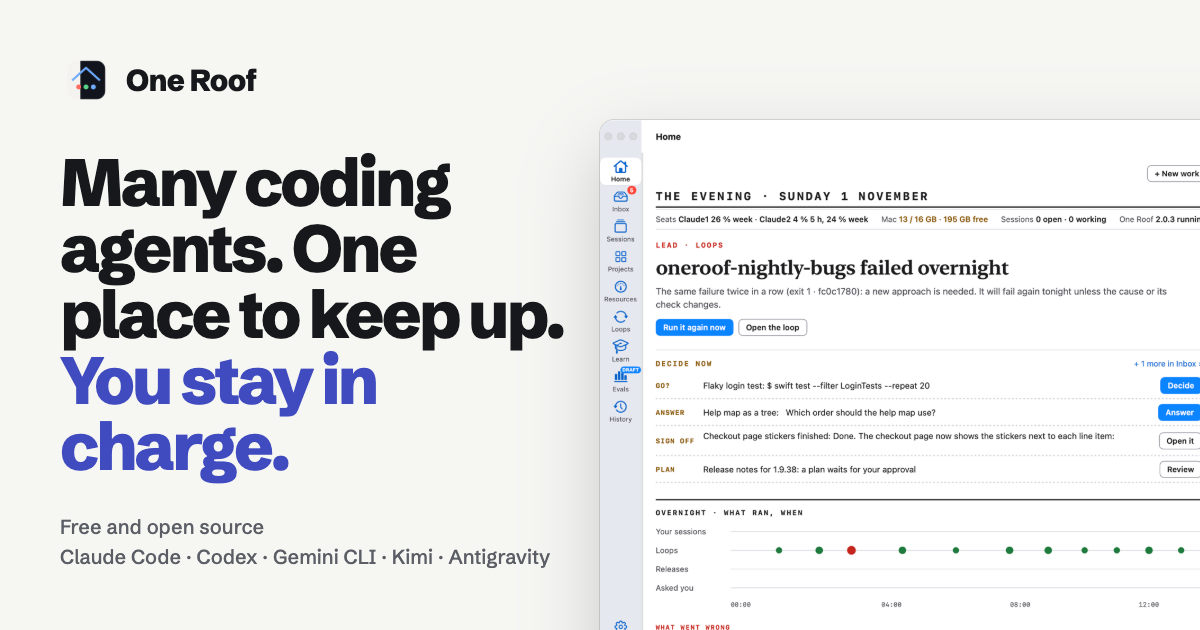
One Roof is a desktop application for macOS that gives you one place to keep up with a whole team of coding agents. It works with the agent command-line tools you already use — Claude Code, Codex, Gemini CLI, Kimi and Antigravity — plus plain shells, and it is explicitly not an IDE and not a terminal. Instead, it is the place where your agents work, with everything they ask, run, learn and cost gathered into one window. It finds the agent command-line tools on your Mac and the accounts you are signed in to, and each session runs the real tool, so you can always type straight into it. The product is free and open source under the MIT licence, and runs on Apple silicon with macOS 14 or later. The problem One Roof addresses is described by the project as chorus coding: several coding agents working on the same piece of work, each doing the part it does best, with one checking another — one plans, one builds, one reviews, and a loop re-runs the tests every night. The hard part of that way of working is keeping up. As the project puts it, the agents are not the bottleneck any more, you are. Five terminals look the same, a question waits in a tab you are not looking at, something failed at 3 AM and nobody told you, and the Mac slows down without any indication of which session is to blame. One Roof was built to keep up with that situation and to keep you the one who decides. The Inbox is the centre of day-to-day work. Every ask from every session lands in one column, one block per session that needs you, with the prompt's own options shown as buttons or selectable with keys 1 to 9. When an agent is blocked until you act, its block gets a red border and moves to the top, and a finished turn waits there too with a reply box where you can paste a screenshot for the agent to read. Nothing is approved for you, and you can always answer in the terminal instead. A Decided list keeps what you answered, newest first. Alongside it, Home is a front page for the morning, built from your own sessions and loops: a lead story about the thing that matters most, a Decide now list of what waits on you with one button each, and an overnight timeline showing every run since midnight as a dot, followed by what went wrong, what to do next and what ran fine. Sessions are real terminals that keep running. Every agent session and plain shell is grouped by state — Needs you, Active, Next, Planned and Exited — and each row shows the agent, the account, the folder and a live one-line status, so you no longer have to type prefixes in front of tab names to tell five identical terminals apart. Each session can be shown as a single terminal, a grid or a wall. Sessions run inside roofd, a small background service, so they keep going when you close the app and come back with their screens when you open it again. History is a read-only record of each session's important moments: steps, findings, errors, what the agent asked and what you answered, and hand-offs between sessions. Each session's run of moments is one card in its own colour, searchable and filterable by session, agent, kind and date, and kept for 30 days. Loops handle work that repeats until a check passes. A loop gives an agent a goal and a check, such as until the tests pass or every night at 3, and One Roof runs the check first — if it already passes, no agent is started. When the check fails the agent works one round on a separate branch, in the loop's own copy of the repo rather than yours, and then the check runs again: done, or another round, up to a limit. A loop never pushes, merges or deploys on its own, and what it produces waits in the Inbox for your approval. Resources shows memory and CPU for each session, for One Roof itself and for every app on the Mac, with 10-minute charts. A browser shows its windows and tabs and you can close a tab or a window from here, and roofd warns when a session grows past 1 GB and ends it at 2 GB, before it can freeze the Mac. Several more places sit on the rail, some of them optional. Projects shows your Linear projects and tickets — teams, projects by status and each project's roadmap — only if you connect Linear with your own API key; without it, Projects shows a single Connect Linear card. Learn is a course on agentic engineering, made of a narrated Agentic Engineering deck and a timeline of papers that shaped coding agents, listenable in the app, with narration by an AI-generated voice that says so. Evals is marked as a draft in the app: it lets you run public benchmarks or build a question set from your own repo's fixed bugs, then compare agents and models on it, with every score shown alongside its range and a plain explanation of what it means, and the cost shown before anything starts. Safety is the default throughout. Each agent has one permission mode — Manual, Plan, Auto or Full — and on a new Mac every agent starts in Manual and asks before it edits a file or runs a command; you change it per agent in Settings › Permissions. Setup asks for the folder that holds your code, or offers to create ~/Projects, and One Roof never scans your home folder, so macOS does not ask about Desktop, Documents or Downloads. The app ships no keys, no tokens and no datasets: Linear, hosted models and gated benchmarks use your own accounts, only if you add them. A crash in one session ends only that session. Underneath sits the roof kit, which makes every agent read the same rules; roof install puts it in place and roof doctor checks every layer, covering a shell default that moves a new terminal opening in ~ to your workspace, agent wrappers, PATH stand-ins, a Claude hook that blocks every prompt while a Claude session is outside the workspace, home notes in ~/CLAUDE.md and ~/AGENTS.md, and a single Claude memory pin whichever folder you launch from. The practical benefit is that you keep the deciding role while the agents do the work. Questions stop getting lost in tabs you are not watching, overnight runs stop being a mystery, and you no longer need to read every agent's full output stream to know what happened. Sessions are labelled with their state, agent, account and folder so the one you need is findable, and Resources makes it clear which session is slowing the Mac. The app is neutral by design: Claude Code, Codex, Gemini CLI, Kimi and Antigravity run side by side rather than inside one vendor's app, and the bar at the foot of the window shows how much of each subscription is used so you can pick the agent with room left. Typical use follows the chorus coding idea the project describes: several coding agents on the same piece of work, each doing the part it does best and one checking another — one plans, one builds, one reviews — while a loop re-runs the tests every night. You might press ⌘N, say what should happen, pick the agent and the repo, and launch; when the agent asks something it shows up in the Inbox. Overnight, loops run and the morning Home page tells you which ones failed and what to do next. When a session's memory grows, Resources flags it and can stop a runaway session. When you want to know how a model handles your own code, you build a question set from your repo's fixed bugs in Evals. One Roof is built for people who already pay for several coding agents and want to use them together: developers running Claude Code, Codex, Gemini CLI, Kimi or Antigravity who need to keep track of what each one is doing, what it costs and what it is waiting on. It requires Apple silicon, macOS 14 or later, git and at least one agent command-line tool that is signed in. Setup finds the agents you are signed in to, and optional extras include hosted models such as OpenCode and Goose with your own API key and a spending cap, and Linear for Projects. One Roof is free and open source under the MIT licence, signed with an Apple Developer ID and notarized by Apple, and can also be built from source with Swift 6 and Xcode 26. In short, One Roof is a place to keep up with a team of coding agents and stay the one who decides: the agents do the work, and you keep up and decide.
Flockbay is a free AI game maker built on Godot: a desktop app for Windows, macOS and Linux that hosts the full Godot editor with an AI agent and an MCP server built in. The agent writes GDScript and scenes into your Godot project, places props, builds rigged 3D models, finds plugins and playtests the game. The same app then goes on to cut trailers and Shorts from your real gameplay and draft your Steam page. It is built for developers making a Godot game they intend to ship and market, and it works with Godot 4.6+, GDScript and C#. Building a game is two jobs that usually live in different tools: writing and debugging the game itself, and then convincing players to wishlist and buy it. Flockbay is designed around the loop that actually finishes a game - write, run, read what Godot reported, fix, play again - and around the marketing work that follows. Instead of leaving you with code you have not seen run, its agent plays the game with input events, reads the live scene tree, the profiler and Godot's errors, fixes what it finds and plays again. You judge the result by playing it. Once the game exists, the agent moves on to store pages, trailers, websites, social posts and ads, all drafted inside the same editor. The editor is the real thing: the full Godot editor, opening in Minimal with Standard and Full one switch away, with Godot, standard and .NET, included. You choose the AI. Flockbay's own hosted AI is free to start, with a model menu that includes Demo (free to start), Auto (picks the model for each task), Claude Opus 5.5 as the recommended option, GPT-5.5 from OpenAI and Gemini 3.1 Pro from Google. Or bring your own AI: Claude Code on your Claude plan, ChatGPT through the bundled Codex engine on your ChatGPT plan, OpenRouter for 100+ models on your own key, or an agent over MCP such as Codex, Cursor or Gemini CLI. Your own agent is free - Flockbay sets no limit of its own, and your plan's limits apply. Playtesting is where the agent closes the loop. It plays with input events, reads the live scene tree, the profiler and Godot's errors, fixes what it finds and plays again. A real tool call shows an agent running `flockbay_run_headless` on a script, which quit by itself with exit code 0 and reported 0 errors and 0 warnings. The page shows a worked example: a SCRIPT ERROR in `hud._drop_note()` occurring 14 to 35 times per scripted demo run, where signing an offer after the first morning's note had gone passed the freed note to a typed argument. The agent added an `is_instance_valid(note)` guard, and nine scripted demo runs afterwards produced 0 SCRIPT ERRORs. The agent sends input with `flockbay_game_input` and captures the viewport with `flockbay_game_screenshot`. Content creation sits in the same editor. Blender is built in, so your agent models props and characters in it, and placeholder 3D models come from Tripo on your own key for you to swap out. A library of Godot add-ons lets the agent find and install plugins. ElevenLabs works with your own key for music, sound and voice, and your agent can make looping placeholder tracks in your game's style, saved into your project at `assets/Audio/Music`, for you to swap for your own. Paid plans add pictures and sound on every chat. Every change is reviewable. The command palette (Ctrl/Cmd+Shift+P) reaches every action in the window by name, and `/model`, `/compact`, `/undo` and `/review` work at the start of a message while `@` adds a file or asset. Permission modes (Ctrl/Cmd+Shift+M) cover Plan mode, Ask before edits and Edit automatically, with Full access in the menu. Review changes lists every file a turn changed with Revert per hunk, per file and for the whole turn. A transcript view switches between Normal, Thinking and Verbose, chats can sit side by side, and you can open the project in VS Code, Cursor, Rider or Zed, or in Terminal at the game's folder. Command line flags include `--open-game` and `--your-own-agent on`, version control (Ctrl/Cmd+Shift+G) commits, pushes and pulls with Git and GitHub, and Flockbay's skills and hooks can be installed for Claude Code and Cursor. What makes the approach distinctive is where the output lives. Your game stays a plain Godot 4 project on your own disk, on the official engine, not a fork, and it opens as a plain Godot 4 project in stock Godot. Games run locally on the copy of Godot bundled with the app - no streaming, no cloud rendering, no cloud building - and projects and assets are private. There are no royalties. An MCP server inside the editor exposes Godot tools to outside agents; Flockbay can print the `claude mcp add` or `codex mcp add` line, add the server to Cursor or VS Code, and a setup prompt asks your agent to check the connection and read the project before it changes anything. For users, the outcome is a game that has actually been run and repaired rather than code that has only been written, and every file the AI touched can be reviewed, reverted hunk by hunk, and opened in stock Godot or your own editor whenever you want. The marketing side produces assets you would otherwise have to make by hand: a trailer cut from your own Play sessions with music and titles, Shorts with captions, a Steam page draft with copy, tags, capsules and content survey, a website with wishlist buttons and an email signup, and ads written and cut from your gameplay. Free covers the app, Godot and your own AI, plus free hosted AI to start and one free video in Video studio. Use cases in the content show the range. Build logs document agents producing a 500-enemy horde with no enemy stuck, a six-legged walker, a physics truck on a mountain trail, a jump that feels like Celeste, a character controller for stairs and slopes, and a save that remembers everything. The team's own game, Shelf-Made Tycoon, is a cozy logistics tycoon on Godot 4.7 coming soon to Steam, used to illustrate a card that switched under the cursor, a drafted Steam page, a published website at shelf-made-tycoon.flockbay.app, a Short cut from a play session and a wishlist push before Next Fest running across Instagram, Facebook, TikTok, Reddit and YouTube at $40 a day. Market research shows another workflow: the agent compares your idea with similar games on Steam - their prices, reviews and estimated sales - reading prices and reviews from Steam and estimating units as reviews multiplied by 30 to 60. In the example, 15 comparable games for a cozy warehouse tycoon are listed, the closest match is Wilmot's Warehouse at 96% positive and $14.99, and the suggestion is to launch at $14.99 with a 10-15% launch discount, holding $19.99 until there is more content. Flockbay requires 64-bit Windows with an Intel or AMD processor, Macs with Apple Silicon, or an x86_64 Linux AppImage on Ubuntu 22.04, Debian 12 or Fedora 39 (glibc 2.35) or newer, with a GPU supporting Vulkan 1.0 or OpenGL 3.3. There is no browser version, browser editor, browser preview or mobile app. Pricing is free ($0) with free hosted AI, your own Claude, ChatGPT or agent, every editor feature and one free video in Video studio; optional plans are Hobby at $20, Indie Developer at $60 and Studio at $200 a month, and Studio adds 20 social accounts, 8 ad accounts, 25 published websites and 100 live playtest links. There is no team, per-seat or enterprise plan. Flockbay's value proposition is a single desktop app where a Godot game is written, playtested, repaired, reviewed and then marketed, with the project remaining an ordinary Godot project you own and can open in stock Godot at any time. The team states its intent plainly: it builds Flockbay for games worth playing - made with AI, played by people, and polished until they are beautiful.
Wavefunction is a coding agent built as a desktop application for macOS. It is aimed at developers who want an agent that stays focused on writing and changing code instead of growing into a general-purpose suite. The app puts one agent and one conversation on screen, with a simple project sidebar that leaves the conversation and the composer at the center. You give it a task and keep talking while it works on several tasks at once. Wavefunction is free and open source under the MIT license, and it can run on local models, your own API keys, or a ChatGPT sign-in. The product's starting point is a reaction to how coding agents have evolved. The site explains that coding agents keep turning into super apps, adding more with every release, while Wavefunction goes the other way: less is more, simpler is better, and building comes first. To make the contrast concrete, the site describes other apps as an interface crowded with tabs, sidebars, editor panels, and a terminal. Against that, Wavefunction shows a simple project sidebar with room for the conversation and composer, so there are fewer sidebars and fewer tabs and the conversation stays at the center. The stated intent is to leave more room to focus on your code. The minimal interface is a deliberate feature set rather than a stripped-down compromise. There are fewer sidebars and fewer tabs, and the conversation is the primary surface. Wavefunction does not ship a built-in browser: links open in your default browser, with the setup you already use. It also describes itself as just a coding agent, without dots, bots, built-in apps of all kinds, or a million extra features. The claim is that what remains is the set of tools needed to get things done, which keeps the app minimal, considered and fast instead of crowded. Parallel workflows are handled by splitting work across subagents inside a single conversation. You send the next task while the last one runs; each new piece of work that can run on its own gets a subagent, and nothing waits its turn. To stay parallel without collisions, every chat starts on its own branch, and subagents that could touch the same files each get a worktree. Wavefunction reviews their changes and brings the work together. You can also steer while it works: change your mind mid-task and your message reaches the subagent already on it, so it adjusts without starting over. Fork or rewind lets you start a new chat from any message, or put the code and the conversation back to how they were. Computer use is separated from your own machine. Other agents take over your mouse, keyboard and screen; Wavefunction gets a desktop of its own, a local Docker container with its own browser and files, so you keep working while it clicks, and you can watch it or take control at any time. The site states that it never moves your pointer, types on your keyboard, or records your screen, and that a file reaches your Mac only when the agent hands it over, into a folder you allowed. When a site needs your login, you sign in privately: the agent pauses and never sees what you type, and the chat stays signed in for next time. Downloads come to your Mac in the folder you choose, and files you add are ready to upload. Computer use needs Docker Desktop and a model that can read images. Models are a choice rather than a lock-in. You can sign in with ChatGPT Plus or Pro, use API keys from Anthropic, Google Gemini, OpenAI, OpenRouter or Vercel AI Gateway, or run models locally through Ollama on your Mac or your server, LM Studio, or another OpenAI-compatible server. You pick a model for each chat and switch whenever you like, so you are never tied to one provider's plans or limits. Running models locally or requiring zero data retention from a provider are the two privacy paths the site describes. Privacy is grounded in where things are stored and which services you connect. Your conversations and settings are stored on your computer. Using a local model keeps model inference local; alternatively you can configure a provider with zero data retention. Which services receive your data is determined by the models and connectors you choose. The app is open source down to the prompt, released under the MIT license, with a public GitHub repository containing backend, frontend, skills and a Tauri-based src-tauri directory alongside AGENTS.md, LICENSE and README.md. The project welcomes new contributors. Analytics surface what the agent consumes. Wavefunction tracks token usage, cache usage, and provider-reported costs in one place, so you can see what you use, what you spend, and how it changes over time. Connectors extend what the agent can reach: there are 70+ ready-made MCP connectors, plus any MCP server you add, and the catalogue shown includes Gmail, Outlook, Google, Microsoft 365, Airtable, Asana and Atlassian. Skills and instructions keep the agent aligned with existing practice: it follows your AGENTS.md and loads SKILL.md skills from .agents, .codex and .opencode folders. Overall, the product works as a conversation-first loop. You describe what you want in one conversation; Wavefunction can split work across subagents for the pieces that can run independently, each on its own branch or worktree. Follow-up instructions are accepted while they run and passed to the subagent already handling that work. Results are reviewed and brought back together for you to check. When a task needs a graphical environment, the agent works in its containerized desktop with its own browser and files, handing files back only into folders you permit. The outcomes the site emphasizes follow from those choices. You get to keep the conversation flowing instead of waiting for one task to finish before describing the next, which is why the app is described as optimized for parallel workflows. That parallelism is framed as parallel without collisions because of branches and worktrees, and mid-task changes do not force a restart. Your own computer stays under your control and stays yours while the agent works. Cost and usage visibility, plus the ability to bring your own model or run one locally, keeps spending and data handling under your control rather than a vendor's. Concrete workflows appear throughout the site. In the main example, a user asks for a billing dashboard; Wavefunction starts three subagents for the API, interface and tests, each in its own worktree. The user then asks to also add a usage chart, and a fourth subagent takes the chart while the rest keep moving. When the user says to use Stripe for the invoices, the instruction is passed to the Billing API subagent, which adjusts without starting over, and all four tasks come back ready to review. Separately, the computer-use example shows the agent working in its isolated desktop on a billing site, looking at a screen with invoices and a downloadable report, which the user can watch or take control of. Other described workflows include updating the docs from the project sidebar and relying on an existing AGENTS.md and SKILL.md setup so the agent works the way a repository already expects. Wavefunction is built for developers on macOS; the site states it is currently available for macOS only, and you download the app, connect a model, and start a conversation. Integrations come through the MCP connector catalogue and any MCP server you add, including the listed Gmail, Outlook, Google, Microsoft 365, Airtable, Asana and Atlassian, and through repository instructions and skills. Model providers include ChatGPT sign-in, Anthropic, Google Gemini, OpenAI, OpenRouter, Vercel AI Gateway, Ollama and OpenAI-compatible servers such as LM Studio. Pricing is free and open source under the MIT license; you bring your own models or provider account, and any model usage charges come from your provider. Computer use additionally requires Docker Desktop. The takeaway is a deliberately small tool with a large amount of leverage: one agent, one conversation, parallel subagents that keep working while you keep talking, a containerized desktop that leaves your Mac alone, and your choice of model, all in a free, MIT-licensed macOS app that is open source down to the prompt.
diff-tour is a command line tool that turns a git diff into a tour you step through with the → and ← keys. Point it at a branch in any git repository and the AI coding CLI you already use writes a guided walkthrough of the change, covering what the change is for, which files to read next — including files that did not change — what a senior engineer would ask about it, what must be fixed versus what is only a nit, and where an experienced reviewer would stop and say "wait". It is built for engineers who want to keep understanding code as AI writes more of it, and it runs on your own AI coding CLI, read-only and open source. The tool starts from a question its maker kept hearing from people who teach software engineering: now that AI writes the code, what should engineers learn? People rarely write code by hand anymore, AI often reviews it too, and software moves so fast that reading every line is hard. diff-tour's answer is that understanding code matters as much as ever, and that understanding code means learning how a senior engineer thinks. That thinking is what lets an engineer give AI the right instructions, notice what really matters in a problem, design well, and keep a project moving in the right direction. Rather than teaching those habits in the abstract, diff-tour teaches them on real changes in a real repository. The core of the product is the tour itself. Each step is navigated with the → and ← keys, so a reviewer moves through the change one question at a time instead of scrolling through a wall of diff. Every step opens with what the change is for, then points to where to look next — and that includes files that did not change, which, as reviewers on the launch noted, is often where the real risk is hiding. Because the experience is a sequence rather than a summary, you work through the change in the order a careful reviewer would, rather than skimming until something looks off. diff-tour frames each step around the questions a senior engineer asks about a change: What if this runs twice? Can it be rolled back? Would the tests fail if the code broke? Those questions are asked explicitly rather than left implicit, so a reviewer has a checklist grounded in the actual diff. The tour also separates what must be fixed from what is only a nit, and calls out what looks risky but is actually fine, so attention goes to the parts that deserve it. Beyond correctness, the tour asks design questions too: does this belong here, and does it make the next change easier or harder? A distinctive part of the format is that the moments where a senior engineer would stop and say "wait" are asked as questions, so you guess first and then see the answer. Committing to an answer before seeing it is what makes the lesson stick, and it turns the diff from something you passively read into something you actively reason about. The tour also stops at risky schema changes, flagging them as deserving extra care, though the maker notes that it does not yet walk you through what is stored and how it connects — an acknowledged gap that is open for improvement through the project's issue tracker. Several design choices are about trust. diff-tour is read-only: the AI gets a copy of the files git tracks plus read-only tools, and that restriction is enforced by command-line flags rather than only by the prompt. The code on screen is read from git at the right commit and is never copied from the AI's reply, so what you see is the actual change. There is no server and no telemetry, it is MIT licensed, and it saves nothing between runs — which also means it does not track your guesses over time. It runs on your own Claude Code, Codex, Gemini, OpenCode or Copilot plan. Getting started takes one line: install with the one-line script in the README, then run `tour` in any git repository. The first run asks for a language and an AI CLI, with recommended choices already selected — pressing Enter three times starts the tour being written. There is no separate account, dashboard, or approval workflow to learn. The product is explicit that it is not for approving a change; it is for learning how a senior engineer reads one, and because it is open source you can see how those perspectives are written in internal/generate/lessons. The outcome diff-tour aims at is a reader who can look at a change and know where to look, what to ask, and what to ignore. Instead of skimming a large diff produced by an agent and waiting for something to look off, an engineer works through the runs-twice, can-it-roll-back and would-the-tests-fail questions up front. Because the questions come before the code, and because the reader guesses first, the habits of a senior reviewer get practiced rather than merely explained. Over time that is what supports giving AI better instructions, spotting what matters in a problem, and keeping a project pointed in the right direction. Typical use cases follow from that. When an agent hands back a large diff, diff-tour gives you a structured way to read it instead of skimming. When a tour reaches a risky schema change, it stops and asks for extra care, which is useful for the data-model-sensitive reviews reviewers on the launch said they still watch closely. When you are learning, the tour is practice on a real change rather than a toy example, and the design questions it raises — does this belong here, will the next change be easier or harder — give you a vocabulary for architectural discussion. The maker also agrees that reviewing AI-written changes is not only an engineer's job anymore, so the same walkthrough can be used by managers who need to follow what a change actually does. diff-tour is aimed at software engineers, at people who teach software engineering, and at anyone who needs to read AI-written changes rather than only write them. It does not ship its own model: it plugs into the AI coding CLI you already use, including Claude Code, Gemini CLI and OpenAI Codex CLI, and the launch also lists OpenCode and Copilot plans. It is a command line tool distributed under the MIT license, free to use, with installation through a one-line script and no server component. Everything it shows is read from git at the correct commit, and nothing is stored between runs. The takeaway is simple: as writing code gets cheaper, reading it well still matters, and diff-tour teaches that reading on the real changes in front of you. It turns a git diff into a short, navigable tour built around a senior engineer's questions, keeps the experience read-only and local, and asks you to guess the answer before you see it — so the habit of understanding a change is practiced, not just described.
ilse is a visual feedback layer for AI code agents. It puts a toolbar on top of the React app you already have running in your browser, letting you click an element, write a note, or drag, resize, and tweak things directly on the live interface. Those instructions then reach the coding agent you already use — Claude Code, Codex, Cursor CLI, Gemini CLI, or any agent that speaks MCP — already pointing at the right spot in your code. ilse is built for developers and designers whose app already exists and who want to refine its interface without leaving it, on their own machine, using their project's own tokens and components. The problem ilse addresses is captured in the maker's own story. He had been a designer for over nine years and found himself spending more time in code than in Figma. He would ask Claude Code to fix a button, describe in words what he saw on screen, and the agent would edit the wrong file. As he puts it, the agent writes well, but it does not see what he sees — it was missing a designer's eye. So ilse was built so he could point at the real app, let ilse gather the context, and have the agent change the code. The site draws an explicit line between ilse and generators such as Lovable, Claude Design, and Replit: those are described as great for starting from scratch in their own environment, while ilse is for when the code already exists and lives on your machine. The core of the product is Design Mode. You click an element or select some text and write what should change. The note reaches your agent already pointing at the right spot in the code, so there is no loose "crooked button" description to interpret. That is the point-and-say workflow: the instruction is anchored to a specific element in a specific file rather than to a vague verbal description of a screen. The panel extends that same idea with gestures. Move, resize, edit text, and choose whether a change applies only to this instance or to all of them. There is also a Draw control and Screens, which is marked as new. Drag lets you reorder elements, and you can tweak spacing and colors using your project's own tokens. Simple tweaks land instantly with no AI involved, spending few or zero tokens, while anything that goes beyond a class mapping is handed to your agent to change in the code. A component library is listed as a Pro capability. Before calling your agent, ilse does the search for it. What the agent receives includes the element's file and line with only the snippet that matters, the component that wrote the JSX and where it is used, your project's design tokens, your note plus the panel tweaks and gestures you made, what a test found (the journey step, the screen, and the element), and any pasted references you optionally add. This context packaging is what replaces the agent guessing at which file to edit. Test Mode, available in Pro, is the second major capability. You describe what a person does — the site's example is "buy the lamp" — and ilse walks the flow in the real app on its own, then shows where it got stuck and reports what breaks. Pro is described as test mode with accessibility, errors, layout, the memory, and journeys, plus the Library's hands: dragging components onto the page, their copies, and taking your design system to other tools. A Review Mode is listed as coming soon: reviewers would leave notes on your product's own link without needing an account, and those notes would reach both you and the agent so the loop starts again. The overall workflow is deliberately lightweight. You run npx ilse-design@latest in your project folder; Next.js, Vite, CRA, Remix, and Astro are detected on its own; the app opens at the usual address with the bar on top. There is no extension, no app, and no account. ilse runs on your machine as a CLI and an MCP server, and the agent you already pay for is the one that changes the code. The loop is refine, test, and repeat. Privacy is a structural part of the design rather than an add-on. Everything runs on your computer and ilse has no server to send your code to. The code, the context, and the history stay local. ilse never touches a key — your agent is the one calling the AI. And the bar only exists on the dev server, so the final production build ships nothing. ilse describes itself as an agentic WYSIWYG rather than a faster generator, and it does not generate anything from scratch. The site's comparison table frames the difference: generators start from a blank prompt, while ilse starts from the app that already runs; generators produce code generated anew, while ilse edits your repo in place; generators apply whatever design system the tool picks, while ilse uses your tokens and components; and generators use the platform's AI on its credits, while ilse uses the agent you already use. A testimonial on the page from Huxley Dias of Punk Metrics states that if you develop locally, this is excellent for refining interfaces, and calls it way better than Claude Design, Replit, and Lovable. The benefits follow directly from that approach. Because simple tweaks map to a class and land instantly, common adjustments cost few or zero tokens. Because the note arrives with the file, the line, and the component context attached, the agent no longer edits the wrong file. Because your own tokens and components are part of the context, refinements stay inside your design system instead of introducing a parallel one. And because everything runs locally against your dev server, your code and history never leave your machine. Concrete use cases described on the site include clicking any element in a demo shop interface to change it, reordering items by dragging, resizing elements, editing text in place, tweaking spacing and colors against your tokens, and pasting optional references into the note. Test Mode covers journeys such as buying a lamp, where ilse walks the flow and identifies the step, screen, and element where it got stuck. Design Mode covers the everyday case of pointing at a crooked pixel and telling the agent what to do about it. ilse works with any React project that has a dev server. The listed frameworks are Next.js, Vite, Remix, Astro, and React, with CRA mentioned as auto-detected. Styling and component systems listed are Tailwind, shadcn/ui, Radix, and MUI, and the project's design tokens and components go into the context. Supported agents include Claude Code, Codex, Cursor CLI, Gemini CLI, Cline, Windsurf, GitHub Copilot, Goose, and any agent with MCP. Pricing is free for the core tool under the PolyForm Shield license, which allows free use including at work as long as you do not turn it into a competing product. A founder pre-sale offers Pro at US$49 instead of US$79 as a one-time payment, limited to the first 10 founders, with Pro shipping by November 30, 2026, a refund if it does not, renewals locked at the founder price, a roadmap vote, a direct channel with early builds, and a 30-minute 1:1 setup. The Pro purchase includes 12 months of updates counted from Pro's launch, after which the version you have stays yours. In short, ilse's value proposition is precision: you show the agent what you mean by pointing at the real running app, ilse gathers the code context so the instruction lands in the right place, and your existing agent makes the change in your repo with your tokens — all locally, with nothing shipped to production.
Gemini 4 Carbon is Google's next frontier model, described by the company as its strongest model with state-of-the-art cybersecurity and long horizon capabilities. Announced on October 28, 2026 by Koray Kavukcuoglu, SVP of Google DeepMind and Chief AI Architect at Google, Carbon is designed to take on much harder, long-horizon engineering problems and to support sustained agentic workflows. Its stated purpose is to deliver meaningful leaps in software engineering and cybersecurity defense without compromising on safety or reliability. Carbon builds directly on Gemini 4 Argon, which launched two weeks earlier, and illustrates what Google describes as the pace at which it is pushing the frontier forward, with researchers and models working hand in hand to advance capabilities faster while strengthening safeguards in tandem. Carbon targets a class of work that is hard to complete in a single step. The announcement describes complex, multi-step engineering tasks such as root-causing and patching subtle bugs across large codebases and low-level systems, and notes that Google's internal teams have seen Carbon run for days to persist through dead ends on exactly this kind of problem. Security work is framed around a defense lifecycle of vulnerability detection, validation, and remediation, and Carbon is evaluated against each stage of that lifecycle. The release also reflects a governance problem: Google states it is taking a deliberate approach to rollout, engaging in the U.S. government's voluntary process for pre-release model testing and phasing access to trusted partners rather than releasing broadly at once, so that capabilities can advance while safeguards are strengthened alongside them. Building on user feedback, Google focused Carbon's improvements across coding, agentic and scientific tasks, as well as full-stack web development and multimodal understanding. Internally, teams have seen the model run for days to persist through dead ends on complex, multi-step engineering tasks such as root-causing and patching subtle bugs across large codebases and low-level systems. On full-stack web development, improved quality of output and artifacts lifted Carbon by 89 elo points to #4 with a score of 1768 on WebDev Arena. Carbon also ranks #1 on the recently updated v5.0 of the Artificial Analysis Intelligence Index with a score of 59, and shows significant gains across coding and agentic tasks. These results matter because sustained agentic work is where models typically lose coherence over long runs; Google's claim is that Carbon keeps working through multi-step plans without stalling. Carbon's headline capability is cybersecurity defense, where Google reports state-of-the-art performance across the defense lifecycle. On external benchmarks evaluated without guardrails, Carbon scores 88.2% on SEC-bench Pro for autonomously uncovering complex flaws buried in real-world software, 54.8% on ExploitGym for validating which vulnerabilities are exploitable, and 71.0% on Collinear's CWE-bench for turning validated findings directly into working code fixes. Exploit validation matters because cyber defenders increasingly rely on models to check which vulnerabilities are exploitable so they can prioritize which ones to remediate first, or at all. Internally, Google reports more than a 2x uplift in success rate for generating secure code over Argon; the Chrome team reported Carbon performed more than 10X better than another lab's large frontier model when generating high quality patches; and Wiz, Google's leading cloud security platform, observes Carbon leading on benchmarks for web penetration testing, a core capability for its Scan for Good initiative. Gemini 4 Carbon builds on the same multi-layered safety and security stack as Argon, combining model training, real-time misuse defenses, prompt-injection resilience, and chain-of-thought monitoring. With Carbon, Google set out to go a step further on alignment, training the model to respond to complex or high-pressure tasks in the right way, and reports several concrete results. Carbon reduced successful cheating on Terminal-Bench 4.0 to 0.0%, with attempts to cheat dropping to 0.4%, all while improving overall accuracy; in live coding environments with internal teams, high-severity misalignment alerts dropped by almost 80%. Carbon cuts unsupported claims by approximately 2x over Argon, putting methodological caveats directly into the deliverable or withholding blocked actions with a clear list of what remains required rather than fabricating or hedging around missing evidence. When facing ambiguity, it retrieves the relevant sources and surfaces discrepancies to the user before acting. It simultaneously reduced overreach by 26% and under-service by 29%, and it resisted every evaluated attack attempt on Gray Swan's Indirect Prompt Injection Benchmark, achieving a 0.0% attack success rate versus Argon's 0.7%. Google describes a deliberately staged rollout rather than a broad launch. Carbon is being released under the U.S. government's voluntary process for pre-release model testing, and starting in the announcement week it was made available to a subset of cyber defenders, with access gradually phased to additional trusted partners through the Fairwind Program. Google says it is continuing to gather feedback and iterate on guardrails before making Carbon available to developers, businesses, and consumers via its product surfaces as soon as possible. Underneath that rollout, the model's approach combines the same multi-layered safety and security stack as Argon with training aimed at handling complex or high-pressure tasks correctly, an emphasis on transparency when evidence is missing, and behavior that retrieves sources and surfaces discrepancies rather than guessing or forcing a path forward. Stated outcomes for users include much more reliable execution of multi-step plans end-to-end while respecting project constraints and staying strictly within scope, fewer unsupported claims, and a better collaborative experience when requirements are ambiguous. For security teams, the payoff is a model that can help detect, validate and remediate vulnerabilities rather than stopping at a list of findings. For engineering teams, the reported benefit is persistence on long-running problems: working through dead ends across large codebases and low-level systems instead of giving up after the first failed attempt. Google also points to a stronger internal capability to generate secure code, and to reduced misalignment and fabrication rates in live coding environments with its own teams. The announcement frames several concrete scenarios where Carbon is used. It autonomously uncovers complex flaws buried in real-world software, checks which vulnerabilities are exploitable so defenders can prioritize remediation, and turns validated findings directly into working code fixes. It is applied to sustained engineering work such as root-causing and patching subtle bugs across large codebases and low-level systems over multi-day runs. It supports full-stack web development through improved quality of output and artifacts. It is also used for web penetration testing, the capability behind Wiz's Scan for Good initiative, and for generating high quality patches inside Google's own teams, including work reported by the Chrome team. The initial audience is a subset of cyber defenders, followed by additional trusted partners through the Fairwind Program, with developers, businesses, and consumers to follow via Google's product surfaces. Carbon launches at the same introductory price as Argon: $2 per million input tokens and $10 per million output tokens, with cached input tokens priced at 95% off the input token price. Google notes that after the introductory period expires, the price of $4 per 1M input tokens and $20 per 1M output tokens will apply. The model is presented as part of the Gemini 4 family, following Gemini 4 Argon, which was launched two weeks earlier. Gemini 4 Carbon's primary value proposition is combining frontier-level coding and agentic reasoning with state-of-the-art cybersecurity defense, while holding the line on safety through a deliberately staged release. Google positions it as its strongest model to date, leading the Artificial Analysis Intelligence Index and the SEC-bench Pro, ExploitGym and CWE-bench cybersecurity benchmarks, and as a step toward delivering meaningful leaps in software engineering and cybersecurity defense without compromising on safety or reliability.
Free Instagram Reel downloader. Paste a public Reel link to save the available video in HD MP4 for personal offline viewing—no login or app required. Works seamlessly on iPhone, Android, and PC.