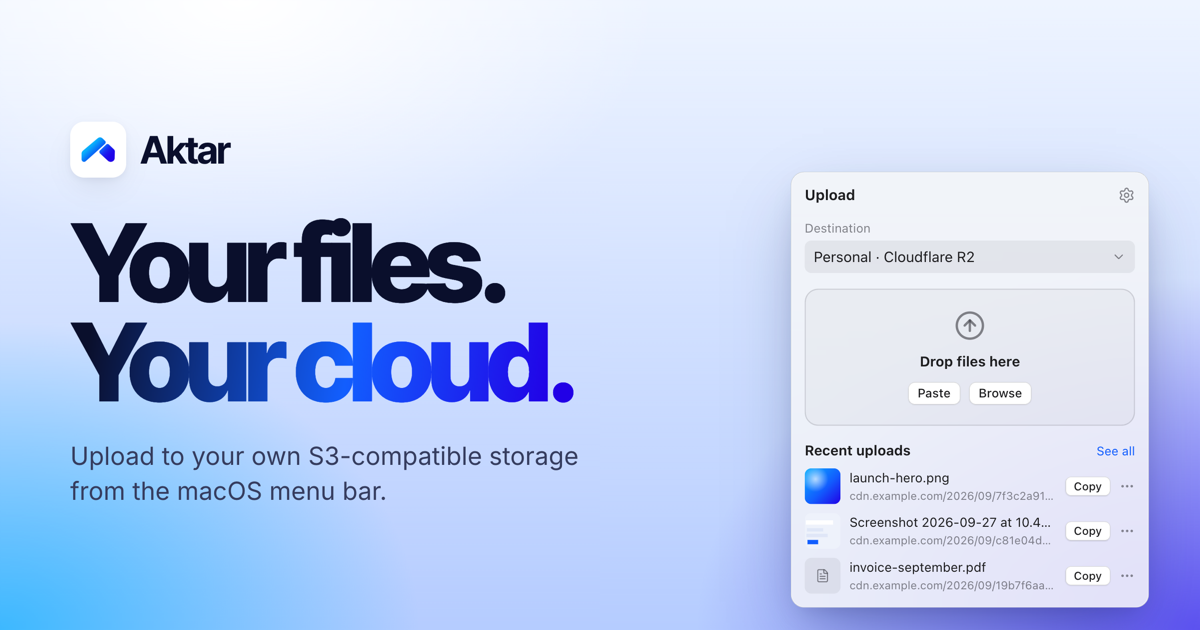
Aktar is a free, open-source application for Mac, Windows and iOS that turns file sharing into a single drop. It lives in the menu bar on macOS, and when you drop a file onto it, Aktar uploads that file straight to your own S3-compatible storage and copies the resulting shareable link to your clipboard. There is no account to create, no intermediary server involved, and no upload limit on Aktar's side. It is built for people who already pay for cloud storage — Amazon S3, Cloudflare R2, Backblaze B2, DigitalOcean Spaces, MinIO or any S3-compatible endpoint — and who want a fast, native way to share screenshots, logs, builds, videos and documents without opening an upload form in a browser.
Most people who need to share a file reach for a hosted service: they open a website, create an account, upload the file to storage they do not control, and receive a link that only works as long as that service keeps running. Aktar is built around a different model. Because the app has no servers of its own, there is nothing to sign up for and nothing to phone home to. Files travel directly from your machine to the storage endpoint you configure, and you pay your storage provider rather than paying Aktar. That means the file lives in a bucket you already own, under a domain you control, and the link you paste is served from your own Public Base URL — a custom domain or CDN in front of your bucket. For developers, freelancers and small teams who already run S3-compatible storage, the upload step becomes a keystroke instead of a context switch.
The core interaction is deliberately small. On macOS, Aktar lives in the menu bar with no Dock icon and no window to babysit: you click the icon, drop a file, and you are done. Files can be dragged onto the menu bar popover, picked from Finder with the Browse option, or pasted in. You can upload several files at once, follow per-file progress, and retry any upload that failed with a single click. The app also adds a global keyboard shortcut — ⌃⇧⌘U by default — that uploads whatever is currently on your clipboard from inside any app, even when the panel is closed. If you copy a file in Finder or capture a screenshot, that shortcut turns it into a link without you ever leaving the application you are working in, and the shortcut can be recorded to any key combination you prefer in Settings. Optional notifications fire when an upload finishes, the popover can auto-close after a successful upload, and Aktar can launch at login so it is always ready. On Windows and iOS the same idea carries over, with the app available for iPhone and iPad as well.
Aktar works with the storage you already have. Amazon S3, Cloudflare R2, Backblaze B2, DigitalOcean Spaces and MinIO all have built-in presets, and anything else that speaks the Amazon S3 API works through the "Other S3-Compatible" option. Connecting a bucket takes under a minute: you pick a provider, paste your access keys and bucket name, and the preset fills in the right endpoint and region for you. Destinations can be named — Personal, Client Work, Homelab — and you can switch the active destination right from the popover, so one bucket can hold screenshots while another holds client work. Each destination has its own Public Base URL, the address files are served from, such as a custom domain or CDN in front of the bucket; Aktar joins that base URL with the object path to build the link it copies. Object paths themselves are templates, with a default of {year}/{month}/{uuid}.{ext} and variables including {year}, {month}, {day}, {date}, {time}, {filename}, {uuid}, {random} and {ext} available to mix in, so your naming and folder structure stay under your control.
Aktar also handles the life cycle of files after they are shared. Uploads that should not last forever can be given a delete-after setting of 1, 7, 14 or 30 days, which Aktar implements by setting up your bucket's own lifecycle rules in one click — the file is deleted on schedule even when Aktar is not running, and the rules Aktar creates leave your other rules alone. A Library view lets you browse every folder and file in your buckets, not just the ones Aktar uploaded: you can search the whole bucket, preview files, upload, rename, move or delete them, and copy public or temporary links, with temporary links that work for private buckets too and can be valid for one hour, one day or seven days. From the same history you can delete a file at the source — removing it from the bucket rather than only from the list — which is useful when you have shared the wrong file. Every upload is also recorded in a searchable history with thumbnails and previews for images, PDFs, text and Markdown, filterable by destination, with bulk copy for several entries at once.
The overall approach is three steps that quickly become muscle memory. First, connect your bucket: choose a provider, paste your access keys and bucket name, and the credentials go straight into the macOS Keychain, where they are only used to sign requests to your own endpoint. Second, drop, paste or browse: drag files onto the menu bar popover, select them from Finder, or press the global shortcut to upload whatever is on the clipboard. Third, paste the link anywhere: the public URL lands on your clipboard as a plain link, Markdown, HTML, or a template of your own, with images copied as embed markup and everything else as a regular link. Underneath there is no proxy and no middleman — the app signs requests directly to your storage endpoint, which is why Aktar can stay small, native and free of an account system. For Raycast users, an extension uploads the clipboard or files selected in Finder, searches your history and browses your buckets from Raycast itself, while your keys stay in Aktar.
The payoff is speed and ownership at the same time. Sharing a screenshot goes from saving it, opening a browser, uploading it, waiting and copying the link down to a two-keystroke reflex, and because everything runs locally there is no upload form, no signup and no upload limit imposed by Aktar. Your files stay in storage you already pay for, so links point at your own domain and can be embedded in documents, tickets or chat without carrying someone else's branding. Temporary links keep throwaway files — a bug report screenshot, a log, a draft — from piling up in your bucket forever, and lifecycle rules keep working whether or not the app is open. Because Aktar is MIT licensed, sandboxed and notarized, runs with the Hardened Runtime, keeps keys in the Keychain and collects no telemetry, the trust question is answered by the code itself: you can read it, build it yourself or send a pull request. On macOS it is built with SwiftUI so it feels right at home on the platform.
Several concrete workflows come up again and again. The screenshot-to-link flow: press ⌃⇧⌘4 to capture an area to your clipboard, then ⌃⇧⌘U to upload it, and the link is ready to paste — useful for bug reports, design feedback and chat. The upload-from-anywhere flow: copy a file in Finder or capture an image, and the shortcut uploads it without ever opening the panel. The client-work flow: keep separate named destinations so screenshots land in a personal bucket while deliverables go to a client bucket served from a different domain. The temporary-share flow: set a file to delete after a day, a week or a month so it disappears without manual cleanup. The documentation flow: choose Markdown or HTML output so images arrive as ready-to-paste embed markup. And for Raycast users, the extension uploads the clipboard or files selected in Finder, searches upload history and browses buckets without leaving Raycast.
Aktar is aimed at people who already run S3-compatible storage — developers, technical freelancers and small teams — and who want file sharing to feel native rather than browser-based. On macOS it is built with SwiftUI, requires macOS 14 Sonoma or later, installs from a .dmg or with Homebrew via brew install --cask getaktar/tap/aktar, and works alongside Raycast. Windows 10 and 11 builds are available through the Microsoft Store, the iOS app is on the App Store for iPhone and iPad, and Android is listed as coming soon. The app is free and open source under the MIT license, with no subscription, no account and no upload limit on Aktar's side; you pay your storage provider, not Aktar, for the storage you use.
Put simply, Aktar is a small native app that does one job well: turn a file into a link without leaving your workflow and without handing the file to a middleman. If you already own an S3-compatible bucket, it turns that bucket into an instant sharing endpoint — drop a file, paste the link, and keep control of where the file lives.
Publisher
A
admin
Launch Date2026-10-01
Platformdesktop
Pricingfree
Tech Stack
#SwiftUI#Amazon S3 API#macOS Keychain