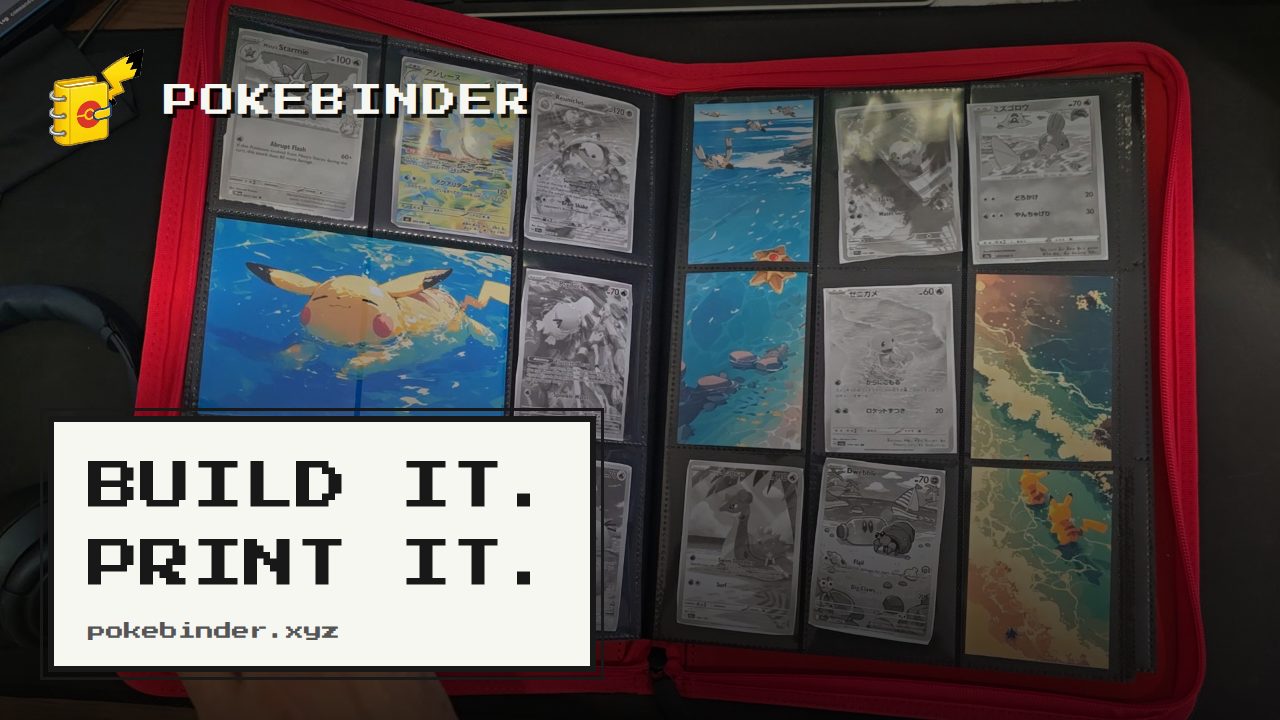
Pokébinder is a free tool for Pokémon TCG collectors that turns the job of filling a cardboard binder into a plan you can see and print. Collectors search any card in English or Japanese, drag or tap those cards into the nine pockets of a 3×3 binder page, and let their own artwork run across those pockets instead of sitting in a single slot. Its main purpose is to let someone design and preview a binder page before spending money on it, and then print true-size placeholders for only the cards they do not own yet, so each empty pocket has something in it and each gap doubles as a reminder of exactly what is missing and where it belongs. No account is needed and the binder stays in the browser.
Binder collecting has an awkward middle state. A collector starts a page, owns some of the cards and not others, and the unfilled pockets sit empty for weeks or months while the missing cards are hunted down. There is no easy way to see how a finished spread will read, so money can get spent on cards for a layout that turns out not to work. The Michi method — a way of building binder pages where one piece of artwork carries across several pockets so a spread reads as a single image instead of nine separate cards — normally involves printing backing art, cutting it to size and sitting cards on top of it, which is a lot of measuring and reprinting. Pokébinder addresses that by doing the layout work on screen first and producing accurate printouts afterwards, doing the same thing as the manual Michi method but without the guesswork. The tool also states plainly what its printouts are not: a placeholder holds an empty pocket until the real card turns up, and is not for play and not for sale.
Card search is the starting point. Pokébinder indexes over 20,000 English cards that can be searched by name, set or artist, and over 21,000 Japanese cards that can be searched by name or set — including the printings collectors actually chase. That means a collector can track down a specific card whether they know the artist but not the set, or the set but not the exact printing. Cards are placed by dragging or tapping them into the 3×3 grid of pockets. An amber cart marks a card that is in the binder but not owned yet, which is the state that causes it to print. Hovering a card reveals the binder's own controls for adjusting what sits in the pocket.
One page can be assembled in five ways, and the page always keeps the same nine pockets — what changes is how much of the page the artwork carries. An image can fill a single pocket. It can stretch across a row, covering three pockets, or run down a column across two. Several images can each hold one pocket. Or, in the extended binder art layout, one image fills all nine pockets and the cards sit on top of it in whichever pockets the collector chooses, so the art carries on around them. That last arrangement is the Michi page. Because the image is shared across pockets, taking a card out reveals the slice of art underneath it, so the picture still reads correctly. The image can be zoomed and nudged until the framing is right, and it prints one slice per pocket on the same cut guides as the cards.
Printing is designed around the physical binder rather than the screen. Any card marked as not owned yet prints at true card size, 6.3 × 8.8 cm, at 300 dpi, with a dashed cut line on every card, nine to an A4 or US Letter sheet. Spanned artwork prints alongside it, aligned so the slices land in the right pockets. The print preview shows the page as it will come out — for example page three with nine cards and guidance to cut on the dashes. Once printed, the collector cuts on the dashes and adds the placeholders to the physical binder. When a real card finally turns up, the printed one slides out and the real one slides in, and nothing else on the page moves. Binder view lets a collector flip through the result: the binder opens as a two-page spread with a real page curl on desktop and turns one page per swipe on a phone, so the same pages and the same art behave like the thing on the shelf. The tool is free, with no account, no ads and no watermark, and the binder stays in the collector's own browser.
The distinctive approach is that the binder exists digitally first and physically second. Rather than buying cards to find out whether a spread works, a collector builds the page, marks what is missing, and prints only the gaps. The placeholder is the card: a printed piece at exact card size holds the pocket until the real card turns up. The Michi method — popularised by @peeplop and written up at The Michi Method on woahpoke.com — is supported directly, with art able to run across up to three pockets horizontally or vertically, or to fill the whole page behind the cards, and with zoom and reposition controls that remove the trial and error of sizing printed backing art by hand.
Benefits follow from that order of operations. Empty pockets stop being empty, because every missing card has a placeholder sitting in its place. Those gaps double as a shopping list: the collector always knows what is missing and exactly where it goes. Purchases become easier to sanity-check, because the spread can be seen before money is spent, and a change of mind happens on paper instead of at the counter. Nothing has to be reorganised when a card finally arrives, since sliding out a placeholder and sliding in a real card leaves the rest of the page untouched. And because the tool is free, requires no account, carries no watermark and keeps the binder in the browser, there is no commitment involved in trying a layout.
Concrete workflows include planning a spread from scratch: search a card, drop it in a pocket, and see what the page wants to be. Another is completing a set — mark everything that is not owned yet, print the placeholders, and use the printed page as a guide to what to buy. The Michi page suits collectors who want a single piece of artwork to carry an entire nine-pocket spread with their cards sitting on top of it, and printing the slices keeps the alignment exact. A collector who has just bought a missing card can check where it goes and swap the placeholder out. Japanese cards can be searched by name or set for collectors building Japanese-language pages, and English cards can be searched by artist for collectors following a particular illustrator.
Pokébinder is aimed at Pokémon TCG collectors who build physical binders, from someone assembling a single page to collectors chasing specific printings by artist or set. It is a browser tool, usable on desktop and on a phone, where pages are turned with a swipe. It is free, with no account, no ads and no watermark, and the binder data stays in the collector's browser. The site notes that it is an independent fan project made by one collector and is not produced, endorsed or supported by Nintendo, Creatures Inc., GAME FREAK, The Pokémon Company or Wizards of the Coast, and that card images are served from their original sources and remain the property of their rights holders.
Taken together, Pokébinder is a free planning layer for Pokémon TCG binders: search real cards, arrange them into 3×3 pages, run your own art across the pockets, and print true-size placeholders for whatever is missing so that every pocket is accounted for. It moves the guesswork of binder design onto the screen and leaves the collector with something they can cut out, add to the page, and swap for the real card when it turns up.
Publisher
A
admin
Launch Date2026-09-30
Platformweb
Pricingfree