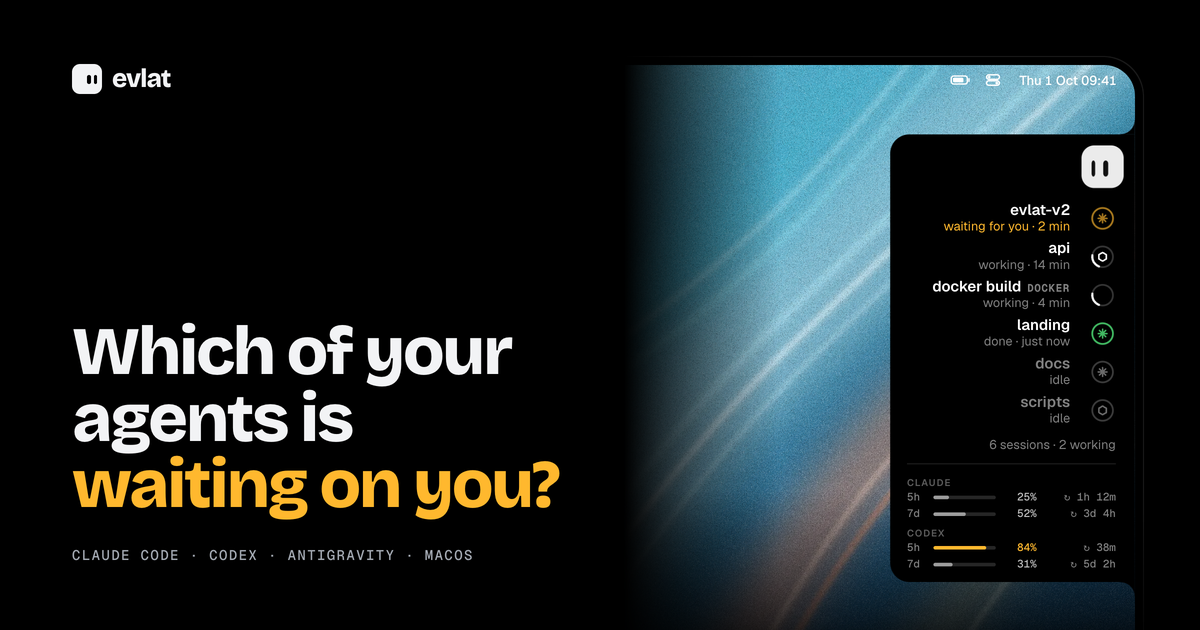
Evlat is a native macOS utility that docks a thin black strip to the edge of your Mac's screen and shows you which of your AI coding agents is waiting on you. One ring appears for every Claude Code, Codex or Antigravity session, or for every command you hand it, and a single face represents all of them. The instant an agent stops and needs your answer, its ring sends an amber pulse. Evlat is made for developers who run several AI coding sessions at the same time and want to know at a glance which one has paused and needs a decision, without hunting through terminal tabs. It runs on macOS 14 Sonoma or later on Apple silicon, is free, and installs as an app of roughly 3 MB.
The problem Evlat addresses is a quiet one. AI coding agents spend long stretches working on their own and then stop to ask for a permission or an answer. If you are not looking at the right window, that session can sit idle for minutes while you continue doing something else, and the work simply stalls. Running more than one agent at a time makes this worse, because the session that needs you is rarely the one you are watching. Evlat turns that invisible waiting into something you can see. Rather than switching between terminals to poll their state, you get a single strip where every session has a ring, and the one that needs you pulses amber until you respond. The same strip also tracks long-running commands and jobs on remote servers, so work happening off your laptop is not invisible either.
At the heart of Evlat is the ring. Each Claude Code, Codex or Antigravity session gets one, and so does any command you run through Evlat. A ring carries the state of its session: it can be waiting for you, working, done or idle, and each row shows how long the session has been in that state, such as "2 min", "14 min" or "just now". Waiting sessions are pushed to the top of the list so the one that needs your answer is always the most visible thing on the strip. Underneath the session rows, Evlat also shows your Claude and Codex limits, with the 5-hour and 7-day windows, their percentages and the time remaining until each resets, so you can see your remaining budget without leaving your screen. Because the strip is always docked to the edge of the screen, this information stays present without occupying a window or taking focus.
Hovering over the strip makes it grow into the screen. Every session's name, what it is doing and how long it has been doing it become readable, with the waiting ones on top and your Claude and Codex limits underneath. Resting on a row slides out a card that names the tool the agent is stuck on and shows the exact command it wants to run. A "Go to session" action finds the application that owns the session — a terminal, VS Code or Orca — and brings it to the front, and Evlat asks for no permissions to do it. The strip also carries a small mascot. Clicking it, or pressing Shift Command Space, opens a balloon right out of the bar that takes your keyboard without pulling Evlat to the front. The balloon runs on your own Claude Code install, so it knows what your terminal knows. You can even drop a file onto the mascot: its eyes lock onto the file as it comes closer, and the file lands in the chat.
Evlat is not limited to the agents it knows. The evlat watch command runs any command exactly as it is, with colours, input, Ctrl-C and the exit code all passing through, and tracks it as a row on the strip. If Evlat is not running, the command simply runs. For work that knows how far along it is, the evlat signal command lets your own scripts report progress and state: --progress 0.4 fills the ring, and --waiting, --done or --failed set its state, with rows that expire on their own. The same commands work on a server you reach over ssh, and those jobs arrive tagged with the machine's name, such as GPU-01, DEVBOX or BUILD-01. An agent waiting on a server pulses amber on your Mac exactly as one on your laptop does, and you answer it in that server's terminal. Evlat is honest when a link drops: when a server cannot be heard, its rows dim and say "no connection" instead of showing a stale state, and they light up again once the connection returns.
Evlat's approach is to stay native and local. It is written in Swift with AppKit and SwiftUI, with no web view and no Electron. Hook entries install from the menu and talk to a listener on 127.0.0.1:48151 that turns browsers away, so sessions, commands and usage stay on your Mac. The only thing Evlat fetches from the internet is its own update, from GitHub, once a day. To connect a server, you add it by the name you give ssh, such as devbox or me@server, and Evlat carries the server's 127.0.0.1:48151 to your Mac with no account and no relay in between. It can set up the hooks and the evlat command on the server for you, or hand you one block to run yourself. Installing hooks adds Evlat's own entries to Claude Code's ~/.claude/settings.json, Codex's ~/.codex/hooks.json and Antigravity's ~/.gemini/config/hooks.json, next to any hooks you already have, and keeps a .evlat.bak copy before the first write.
The outcome for users is a quieter, more predictable workflow. Instead of checking each terminal to find out whether an agent is done, you glance at the strip. Waiting sessions rise to the top and pulse amber, so the moment an agent needs a permission or an answer, you know about it, and one click brings the owning window forward. Because Evlat takes no Accessibility permission, no screen recording and no Dock icon, it does not interrupt what you are doing, and because it never takes focus, it can sit above the Dock on every Space without getting in the way. Rings beat rather than spin forever, and a bar with nothing moving draws no frames at all, so the utility stays quiet until something actually needs attention.
In practice, Evlat fits several everyday situations. When you keep several Claude Code and Codex sessions open at once, the rings let you see at a glance which session is waiting, which is working and which is done. When you start a build, a test run or a deploy through evlat watch, it appears as a row with its elapsed time, while the command itself behaves exactly as it normally would. When you run training or infrastructure jobs on a remote server over ssh, those jobs arrive tagged by machine and pulse amber on your Mac when they need you, even when the link drops and later returns. And when you want to ask a question without leaving your work, the mascot balloon opens straight out of the bar, runs on your own Claude Code, and accepts files dropped onto it.
Evlat is aimed at developers who run AI coding agents on a Mac, particularly those who work with more than one session at a time or who watch long jobs and remote servers. It tracks Claude Code, Codex and Antigravity — the Antigravity app, IDE and agy CLI — through hooks that Evlat installs for you. Antigravity sends no event when it asks for approval, so a session waiting there shows as working rather than amber; anything else, such as a build, test run, deploy or your own script, shows up through evlat watch or evlat signal. The app requires macOS 14 Sonoma or later on Apple silicon, with no Intel build and no Windows or Linux app, although the servers it watches can be any machine you reach over ssh. Evlat is free: there is no paid tier and no account. The source is on GitHub under the Functional Source License (FSL-1.1-ALv2), and each version becomes Apache 2.0 two years after its release. Releases are signed and notarised by Apple, and updates are delivered through Sparkle, which verifies each one against Evlat's signing key.
Evlat's value proposition is simple: it tells you which AI coding agent is waiting on you, and it does so quietly. A thin strip on the edge of your Mac gives every Claude Code, Codex and Antigravity session its own ring, pulses amber the moment one needs you, and opens the right window with one click. It tracks long commands and remote servers over ssh, keeps everything local with no account, no permissions and no telemetry, and stays out of the way until something actually needs attention.
Publisher
A
admin
Launch Date2026-10-01
Platformdesktop
Pricingfree
Tech Stack
#Swift#AppKit#SwiftUI#Sparkle