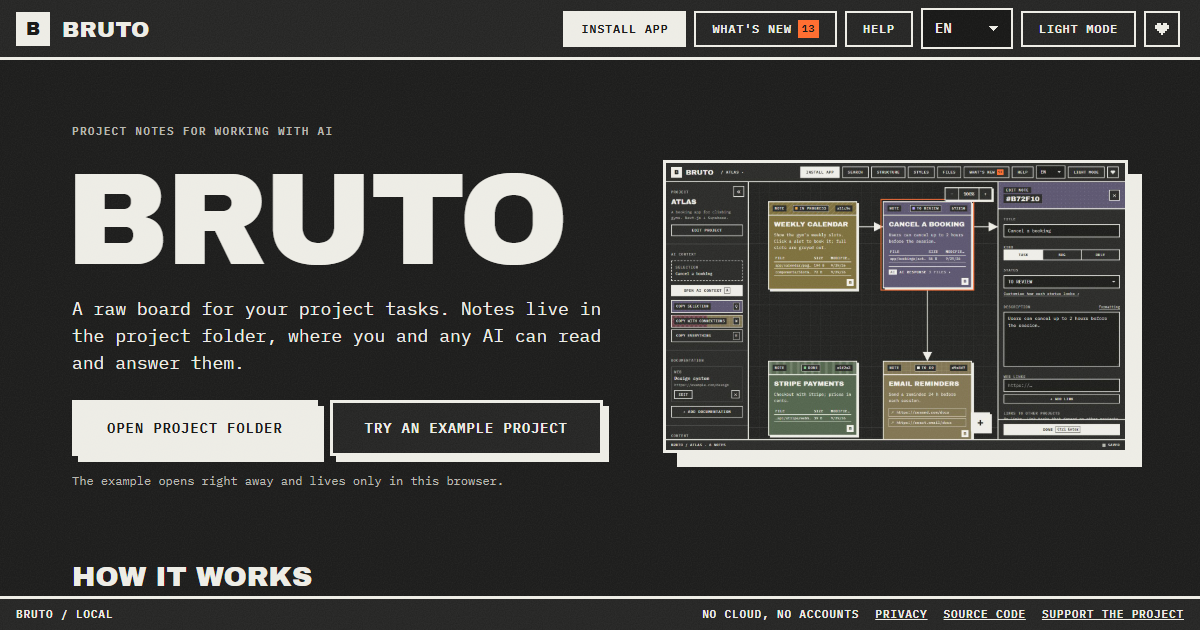
Bruto is a free, open-source task board for building with AI. It is a raw, brutalist board for project tasks where every note lives inside the project folder itself, so both the person writing the tasks and any AI assistant can read and answer them from the same place. The product is aimed at developers and teams who plan work locally, want their task context to sit next to the code, and want to hand that context to models such as Claude Code, Cursor, ChatGPT, Gemini or DeepSeek without copying and pasting scattered fragments. Its main purpose is to keep tasks, context, files, links and screenshots together in one note, and to make handing that note - and everything it points at - to an AI a single keypress. It runs in the browser, needs no account, and stores nothing on a server.
Most task tools live in the cloud, far away from the code they describe. When a developer wants an AI to work on a task, they have to reassemble the relevant context by hand: open the ticket, find the files, paste the links, describe the stack, and repeat the whole ritual for every request. Bruto starts from the opposite assumption: the tasks already belong in the repository. By creating a .bruto/workspace.json file inside the chosen project folder, Bruto keeps the board inside the same versioned space as the code, with nothing leaving the computer. That means the context an AI needs is already written down where the project lives, and it stays there between sessions, between tools and between people. The problem it addresses is not tracking work for its own sake, but making sure the model receives exactly the context it needs instead of a lossy summary.
The core of Bruto is a real board of notes. Each note is a task and carries a description, files, links, screenshots and a status. Notes can be dragged between statuses, connected with arrows so their relationships are visible, and edited many at once when a change applies to a whole batch. Because every note is a file-backed record inside the project, the board is not a separate silo; it reflects the actual work sitting in the folder. The visual language is deliberately brutalist and raw, and the board is built for dense, practical use rather than decoration. Screenshots let a developer show a visual bug or an intended layout, links point to external references, and files point at the exact code involved - so a task is a self-contained brief rather than a line of text.
Handing work to the AI is where the board earns its place. Three shortcuts - Q, W and E - copy the selection, the selection with everything it points to, or the whole project, as clean Markdown that includes instructions for the model. A preview shows exactly what will be copied and how many tokens it amounts to, so there is no guesswork about the size or the contents of the payload before it is pasted into an assistant. A global context carries the project's stack and decisions in every copy, meaning each request is automatically framed by the architecture and conventions already agreed on. Standing rules extend this idea: a note can be a rule instead of a task, for example "run the tests before finishing", and it is included in every copy until it is closed, so the AI applies it on each task.
Bruto also draws the project. The structure view shows where the work lives: folders appear as blocks and are marked with the notes that point at them, so the board and the codebase stay visibly connected. When Bruto recognises the project, it renders it for what it actually is rather than as a generic tree. Web projects - React, Vue, Svelte, Next.js, Nuxt, SvelteKit, Astro and Angular - are drawn as screens with their components. API projects - .NET, NestJS, Express, Fastify, Next.js, FastAPI, Flask and Spring - are drawn as resources with their endpoints. Database projects - Oracle PL/SQL, PostgreSQL, Supabase, SQL, Prisma and Drizzle - are drawn as tables with their keys and policies. This means a note can sit on the screen, the endpoint or the table it actually concerns.
Underneath the board, Bruto behaves like a careful editor of a shared file. Every save reads the file first and merges whatever changed elsewhere, note by note, so edits coming from another tool do not silently overwrite each other. A broken file is never overwritten, and there is always a backup. The workflow starts when the project folder is opened and .bruto/workspace.json is created inside it; nothing leaves the computer. Notes are written as tasks and connected to show how they relate. They are handed to the AI by copying context, or by letting an agent with file access work the board directly. If the AI can edit files, it answers inside the note and marks it for review. When an answer still needs work, the developer writes what is wrong and marks the note "Changes requested" - and it goes back with all of its context.
The outcome is a shorter loop between deciding what to do and getting it done. Because context is assembled once and reused, there is no repeated explanation of the stack, the conventions or the relevant files. Because the AI's answers remain inside the note, the reasoning sits next to the task instead of being lost in a chat window. Because the board merges changes note by note and keeps backups, it can be used alongside other tools without fear of destroying work. And because everything stays local - no server, no accounts, only anonymous usage stats and no cookies - teams keep ownership of their task data while still getting the benefit of AI assistance. Fewer copy-paste steps, less context drift, and a review trail that lives with the project.
Bruto fits a number of concrete workflows. A developer can write a task with the files, links and screenshots it needs, copy the selection with everything it points to, and paste that clean Markdown into Claude, ChatGPT, Gemini or DeepSeek. Alternatively, an agent with access to the files can work the board directly: one line in AGENTS.md or CLAUDE.md tells it where the tasks are and which statuses to work on. With the MCP server, added with a single command, Claude Code and other MCP-speaking agents list and read notes, mark the one they are on, and answer it without touching the JSON by hand. Work that spans layers can be coordinated with notes that block or wait on a note in another project - front end, API or database - with both boards showing the link and one click jumping between them. An example project can be opened immediately and lives only in the browser.
Bruto is built for developers and small teams already using AI assistants while they code, and for anyone who wants their AI and themselves to work from the same tasks. It is free and open source, with no account required, and it runs on the web: opening your folders needs Chrome, Edge, Brave or Opera on a computer. It can be installed as an app, works offline, and tells you when a new version is out. It ships in nine languages and two themes. It is keyboard first - every action has a shortcut, notes are reachable with Tab, and everything has a name for screen readers - and Ctrl+F searches by text, path or id, with filters by status and by what a note has, such as files, an AI response, images or a link. It works with any AI, including Claude, ChatGPT, Gemini and DeepSeek, and with agents that speak MCP.
Bruto's value proposition is simple and specific: a task board that lives in the repository, for the developer and the AI alike. Notes carry the context, shortcuts hand that context over intact, agents can work the board through MCP, and the review loop keeps answers and follow-up requests inside the same note. Free, open source, local, and with no account to manage, it turns task management into the place where human intent and machine execution actually meet.
Publisher
A
admin
Launch Date2026-10-01
Platformweb
Pricingfree
Tech Stack
#MCP