Category Focus/categories/customer-service
Customer Service AI Tools
Discover and compare the best customer service AI tools and software. Browse 40+ curated tools with reviews and rankings.
Projects tracked
40
Sort mode
RECENT
Page
1
Pertin is the remote access product from KTech AI, built for Windows computers that need help from a technician and for the technicians who provide that help. The person who needs assistance downloads and runs the Windows installer, opens Pertin, and hands over the 9-digit ID and 6-digit password shown on the Receive help screen. The technician, working from the same Pertin app on Windows or from the Pertin Android app, uses those two numbers to ask for a connection. Nothing happens until the person at the computer clicks Allow access. Receiving help and giving help with an ID and password is free and requires no account, while the paid Pro Solo and Pro Equipe plans exist for technicians and support teams who use the tool every day. Remote support usually begins in a hurry: something on a Windows PC has stopped working and the person in front of it needs a technician to look at the screen. Pertin is built around that moment. The person receiving help does not need to create an account and does not need an administrator password; the installer is described as installing only for the current Windows user. The technician does not need a different program either, because the same Pertin is used on the other side, in the Access another computer tab. Instead of accounts and stored credentials, Pertin relies on a pair of numbers shown by the computer that is being helped, combined with an explicit approval click from the person sitting in front of it. The product page frames this as a simple principle: only the person you let in gets in, and you can end the access whenever you want. The core of the connection is the ID and password pair. The ID is 9 digits and stays the same on that computer, while the password is 6 digits, is drawn at the moment, and changes every time Pertin opens and again after each access session. The password is checked by the local computer itself rather than by the technician's machine. With a valid ID and password the technician can only request entry; the session begins when the person at the PC clicks Permitir acesso (Allow access) or refuses it. Pertin shows who is asking each time a request arrives, alongside a warning telling people to allow access only if they know the requester. During a session a bar at the top of the Pertin window shows who is connected and offers Pause mouse and keyboard and End access controls, so the person being helped can freeze input or stop the session immediately. Security and trust details are visible throughout the product. The screen image and whatever the technician types are described as encrypted end to end using WebRTC. The Windows installer is digitally signed by KTech AI, so Windows displays the publisher 65.245.688 GABRIEL AUGUSTO KOGLIN instead of an unknown-publisher warning, and the installer carries the Pertin and KTech AI branding. The page publishes the SHA-256 hash of the current Pertin-setup.exe (version 0.10.6) and explains how to verify it in PowerShell with Get-FileHash, and it walks through the extra steps Edge or Chrome may require if the browser warns that the file is not commonly downloaded. It also notes that antivirus tools set their own rules and may still ask for confirmation, and it advises downloading Pertin only from the official page. Once a session is open, Pertin includes the tools a support call typically needs. The technician sees the client's screen and controls the mouse and keyboard, and files can be sent in both directions during the access. Copy and paste works between the two computers, and special keys reach the client machine: the Windows key, Alt+Tab and Ctrl+Shift+Esc are forwarded so they do not trigger menus on the technician's own computer, and Ctrl+Alt+Del is supported. Permission profiles let the client decide what the technician is allowed to do, trusted computers reduce the steps for people who are allowed to request access, and the temporary password can be kept as is or replaced with something more complex. Display work has also been addressed: the image can reach up to 1080p, a Real Size button shows the client screen at 1:1 with scrolling, switching monitors no longer blurs the picture, and the computer's graphics card is used to keep the image sharp and reduce delay. Sessions keep running when Windows asks for administrator permission on the client machine and when the internet switches networks, and on Android the session continues with the app in the background and reconnects when the connection drops. The overall workflow is described in four steps that match the button names on screen. First, the person downloads and runs Pertin-setup.exe; the installer is in Portuguese and does not ask for an administrator password. Second, the Receive help screen shows the ID and a password. Third, the person clicks Copy ID and password and pastes it into the WhatsApp conversation with the technician, or simply dictates the numbers. Fourth, when the technician connects, Pertin shows who is asking, and the person clicks Allow access or Refuse; to finish, they use End access. The technician uses the same download on Windows, or the Pertin Android app from Google Play, where signing in with a Google account is supported. Pertin on Windows updates itself automatically, while Android updates arrive through Google Play. The paid plans add capabilities aimed at technicians who work with the same clients repeatedly. Unattended access lets a technician enter a computer with a fixed password without anyone on the other side approving the connection. Trusted computers become unlimited, access history records who connected, when and for how long, and own branding places the company logo inside the client's Pertin and in the access request. The Kai button, KTech's AI, writes the service report and answers technical questions, and it also stores the registry of clients and PCs; in Pertin Equipe, Kai answers questions about the team with privacy. A Team tab opens the Pertin Equipe panel in its own window on Windows and inside the Android app, corporate monitoring can be switched on from Settings with a panel key and switched off on the computer with the manager's password, and the Manage screen allows restarting or shutting down the client computer and downloading files from the Equipe panel. The benefits follow directly from those design choices. People who only need occasional help get a free tool with no signup, no card and no administrator rights, and they stay in control because every connection needs their approval and can be paused or ended at any time. Technicians get one program for both sides of the call, the option to work entirely from an Android phone, and the tools needed for real troubleshooting, including keyboard shortcuts, file transfer, clipboard sharing and clear image quality. Because the download can be verified through a signed installer and a published hash, and because traffic is encrypted end to end, the model addresses the trust questions that come up when someone hands control of their computer to a stranger. The password changing on every launch and after every session limits the value of a password that leaks into an old chat thread. Typical situations map cleanly onto the product. A person at home copies the ID and password into WhatsApp and lets a technician take a look. A technician who supports the same small businesses every month uses unattended access with a fixed password to reach machines without waiting for someone to approve. A support team subscribes to Pro Equipe, invites each technician by e-mail, and lets every technician sign in with their own e-mail while sharing the same account. A technician on the move fixes a PC from an Android phone using touch, a keyboard, trackpad mode and zoom, with sticky Ctrl, Alt, Shift and Win keys, F1 to F12 and Ctrl+Alt+Del available. Files such as drivers, logs or documents move in either direction during the call. Companies turn on corporate monitoring from Settings, and managers can disable it on a machine with the manager password. The product is aimed at two audiences: people on Windows 10 or Windows 11 (64-bit) who need remote help, and the technicians and support teams who deliver it. Requirements are modest: Windows 10 or 11 in 64-bit for the client side, Android for the technician's phone, with Mac listed as coming soon and iPhone not yet available. On the technical side, Pertin uses WebRTC for the encrypted session and takes advantage of the computer's graphics card for image quality. Pricing is straightforward. The Free plan costs R$ 0, needs no account and no card, and covers access with ID, password and Allow access, file transfer, special keys and Ctrl+Alt+Del, permission profiles, and up to 3 trusted computers. Pro Solo costs R$ 24.90 per month, R$ 134.90 every six months (equivalent to R$ 22.48 per month, a 9% saving) or R$ 249.90 per year (equivalent to R$ 20.83 per month, a 16% saving). Pro Equipe costs R$ 29.90 per technician per month with a minimum of two technicians, R$ 161.90 per technician every six months or R$ 299.90 per technician per year, and adds multiple technicians on one account, invited by e-mail. Subscriptions are bought on the site with an e-mail and a code, or inside Pertin under Settings and Account, and are paid by Pix, boleto or card; Pix releases Pro within minutes while boleto can take up to three business days. There is no lock-in, and Pro stays valid until the end of the paid period. Pertin's value proposition is a short, repeatable loop: download, open, share an ID with a fresh password, and approve the connection. By removing accounts and administrator requirements from the receiving side while keeping approval, encryption and instant termination in the person's hands, it gives technicians a practical remote support tool and gives the people they help a clear sense of control over their own machine.
Radiant Path Therapy and Psychiatry provides psychiatric services in California for adults and adolescents, combining in-person appointments with telepsychiatry delivered over secure video. The practice focuses on careful evaluation and ongoing care, including medication management for PTSD, depression, anxiety, and ADHD. Patients can come for an initial diagnosis or for continued support with an existing treatment plan, and the psychiatrists work with each person to build a plan that fits their specific symptoms and daily life. Appointments are available with board-certified psychiatrists both in person and by secure video, and most major insurance is accepted. Mental health concerns show up differently for each person. Some people notice changes in sleep or appetite, while others struggle with racing thoughts, low motivation, or trouble focusing at work or school. The practice points to signs that are easy to miss until they start affecting daily life: trouble sleeping for more than a few weeks, difficulty concentrating at work, withdrawing from friends and family, or relying on old coping habits that no longer work. According to the site, you don't need a crisis to justify seeking care — many people benefit from psychiatric support during ordinary stretches of stress, major life transitions, or when symptoms have lingered longer than expected. A visit is framed as a way to get clear answers about what is happening and what options exist, rather than something reserved for emergencies. Trauma can cause intrusive memories, avoidance, irritability, and sleep trouble. For PTSD, the psychiatrists review a patient's trauma history and build a psychiatric treatment plan around medication at a steady, comfortable pace. Depression often appears as low energy, poor focus, appetite shifts, and lost interest; the team assesses severity and physical factors, then recommends psychiatric medication or added support. Anxiety shows up as constant worry, a racing heart, and muscle tension. In the first few sessions, the psychiatrist maps out specific triggers and how symptoms show up day to day, then starts medication at a pace that fits the patient's tolerance, checking in early to fine-tune the dose. Each case gets a careful review before any treatment approach is recommended, and the approach is shaped around the person's specific challenges and goals. Trouble finishing tasks or staying focused may point to ADHD. The ADHD evaluation checks childhood patterns, confirms a diagnosis, and discusses stimulant or non-stimulant medication as part of the treatment plan. Medication management runs alongside these evaluations: the practice checks medical records before prescribing, then tracks how well a medication works and watches for reactions, adjusting doses as needed under close psychiatric supervision. Prescription decisions come with a clear explanation of why a particular option is recommended and what side effects to watch for, so patients understand the reasoning behind their regimen instead of receiving a rushed checklist. Because getting to appointments isn't always simple, especially across a state as large as California, the practice offers online psychiatry visits through a secure video call. Telepsychiatry covers both initial assessments and follow-up medication management — whether a patient is managing PTSD, adjusting an ADHD medication, or continuing depression treatment. Telehealth visits can include prescriptions, including certain controlled substances, when consistent with state and federal regulations. Many patients find that talking from a familiar space, such as home, makes it easier to open up about how they feel. In-person visits are available at the Grand Terrace and Redlands offices, and the site also states that telepsychiatry is available to patients anywhere in the USA. Every visit follows a clear process so patients know what happens next. The first appointment is an initial psychiatric evaluation covering mental health background, physical health, and how symptoms affect daily life, and it runs longer than routine follow-ups. The psychiatrist then walks the patient through what the visit uncovered and builds a personalized treatment plan around their goals and preferences, whether that means medication, therapy coordination, or both. Follow-up visits monitor treatment response, catch reactions early, and allow dose changes, with frequency depending on stability and condition. The practice describes a whole-person approach in which psychiatric providers offer evaluations, diagnosis, and medication management, and it emphasizes collaboration between prescribers and therapists — one testimonial describes a therapist and psychiatric PA adjusting sleep medication based on EMDR sessions. Patients describe outcomes such as emotional stabilization, symptom reduction, and newfound clarity through collaborative care. One testimonial reports that by session seven of CBT exposure, racing heart and morning dread were down by half, and that learning to identify physical panic triggers before they spiraled made the difference after earlier talk therapy without a clear roadmap. Another describes finally feeling rested once a therapist and psychiatric PA communicated about what came up in sessions. The practice also frames flexibility as a benefit: patients choose between in-person visits and telepsychiatry appointments across the state, and every prescription decision is explained, including why a particular option is recommended and what side effects to watch for. Concrete scenarios described on the site include someone seeking a first diagnosis after weeks of poor sleep, trouble concentrating at work, or withdrawing from friends and family; a patient continuing an existing treatment plan with ongoing medication follow-up; and a person adjusting an ADHD medication through a secure video visit rather than traveling to an office. Adolescent care addresses pressures tied to school, social dynamics, and identity development, with parents or guardians involved in treatment discussions when appropriate. One patient testimonial describes receiving help taking medical leave: the clinical team completed HR disability paperwork so the patient could engage in virtual therapy and stabilize. Insurance and access details are spelled out on the site. The practice works with most major insurance carriers — logos for Anthem Blue Cross Blue Shield, Blue Shield of California, Cigna, Aetna, and UnitedHealthcare appear on the page — and the team can verify specific benefits before a first appointment, including copays and out-of-pocket costs, though coverage varies by policy and the office should be contacted for current accepted plans and pricing. In-person offices are listed at 12139 Mt Vernon Ave #210, Grand Terrace, CA 92313, and 308 W State St Ste 3D, Redlands, CA 92373. The psychiatric team includes Daniel Lucero, Psychiatric Nurse Practitioner (DNP, PMHNP-BC); Justin Matar, Certified Psychiatric Associate (DNP, PMHNP-BC); Jaehyun Cho, Physician Assistant (PA-C, CAQ-Psychiatry); and Adrian Cisneros, Psychiatric Nurse Practitioner. Appointments can be scheduled by calling (909) 577-1124. In short, Radiant Path Therapy and Psychiatry positions psychiatric care as a careful, ongoing relationship rather than a single transaction: thorough evaluation, a personalized plan covering medication, therapy coordination or both, and follow-up that adjusts as the patient's response becomes clear — delivered in person in Southern California or by secure video for patients across California.
Claudia is an AI receptionist built by Bits Please Technologies that answers a business's phone and WhatsApp, day and night, in English or Dutch. She greets callers with a warm, natural voice and plain sentences instead of a phone menu, and she knows the business she works for: its services, prices and business hours. Customers reach her the way they already contact the business — a phone call, a WhatsApp message, a voice note or a photo — and she helps them right away. Her job is to catch the customers who call or message at exactly the moment the owner or the team is busy, so that fewer people give up and go to a competitor. Claudia works for a wide range of small businesses, from hair salons and restaurants to clinics, hotels, taxi companies, garages, pharmacies and real estate agents. The starting point for Claudia is a simple observation that the site makes explicit: every missed call is a customer who calls someone else. Small businesses are busy doing the work itself — a customer in the chair, hands full, on the road — and that is precisely when the phone rings and WhatsApp messages pile up. Not every caller tries again, and whoever waits hours for an answer goes elsewhere. On top of that, the same questions arrive all day long: how much is it, are you open, can I come by tomorrow. Owners and staff type the same answers every day, time that should go into the work they are paid for. The site frames the choice as two paths a year from now: continuing to answer everything yourself, with notes in your head and hiring as the only fix when it gets busier, or letting an assistant take the messages off your hands. Claudia's core capability is answering. On the phone she speaks friendly, calm and in plain sentences, with no phone menu, and she answers questions about the business using only the knowledge that has been written down for her. On WhatsApp she answers messages, voice notes and photos too, and presents choices as buttons so a customer can reply with a single tap. Phone and WhatsApp are handled by one assistant, and several customers can be served at the same time — the site contrasts this with a human receptionist who helps one customer at a time. She speaks English and Dutch, following the language the customer speaks or writes. When a question is outside what she knows, she transfers the call to the team or notes the question so someone can call the customer back, and missed calls are noted with who called. Beyond answering, Claudia gets things done inside the conversation. She books appointments in the calendar from the business's hours, offering only times that are free, and she handles classes and groups until they are full; she can also move and cancel appointments. For restaurants and shops she sends the menu or product list in WhatsApp, takes orders for pickup or delivery and tells the customer as soon as the order is ready or on its way. For hotels, tours, car rental and taxi companies she books stays and rides, capturing dates and the pickup address, and the customer hears when the driver is on the way. For customer service she opens a ticket for the team, tells the customer where it stands and lets them know when it is solved. New customers are captured with name, number and what they want, plus a WhatsApp alert to the team. Claudia also covers the moments outside normal reception work. She takes urgent jobs day and night: whoever is on call receives a WhatsApp message right away, and callers who need a person are put through. She sends reminders by WhatsApp and phone at the moments the business chooses, for example a day and an hour before an appointment, and confirming takes one tap. She can call customers herself from the business's own number — to sell, to remind someone of a payment, to run a short survey or to win back old customers. And when a person makes the difference, she hands the customer over to the team with everything already noted; the team takes over a chat in one tap and Claudia takes it back afterward. Everything Claudia does lands in one dashboard, used in the browser on a computer or simply on a phone and updated live. The dashboard shows every call recorded and transcribed, appointments, orders, rides, jobs and leads, a WhatsApp inbox where the team can take over, and a clear overview of usage and costs. Recordings and chats can be listened back to, downloaded or shared, and only the business's own team sees them. The site describes this as the Claudia method — understands, handles, hands over. She understands the customer writing or talking the way they always do, with typos, voice notes, in English or Dutch and without menus or "press 1"; she handles the appointment, order, ride or lead straight into the dashboard while the customer is still there; and she hands over to the team when a person makes the difference. Getting started is deliberately light. There is nothing to install. The business chooses what Claudia does — reception, appointments, a restaurant or shop, bookings, rides, customer service, urgent jobs or calling people herself — and picks an industry from 65, from hair salon to taxi company; if the industry is not listed, an "Other industry" option is available. If there is a website, Claudia reads it and fills in the services, prices and hours. What is usual in the industry is already filled in, and the owner changes whatever is not right, because Claudia only uses what is written there. Then the business connects WhatsApp or a phone number and tries her free for three days. Alternatively, the team sets Claudia up with the customer in a short conversation, and there is no setup fee. The site is explicit about the outcomes it claims. Every customer gets an answer right away, even when the owner and team are busy, and nobody waits hours for a reply. Appointments, orders and new customers land in the dashboard with nothing to type over. The business sees every conversation and takes over whenever a customer needs a person. More messages do not mean more staff: one fixed amount a month instead of a salary, vacation pay and overtime. Claudia is described as never too busy, never sick, never complaining and never asking for a raise — she can handle phone and WhatsApp at once, works 24 hours a day, seven days a week, and stays friendly and patient even the tenth time someone asks the same question. The overall promise is that the team keeps its time for the work it is good at. Claudia is positioned for specific jobs rather than one generic use case, and each job maps to particular industries. Reception answers questions about the business and passes whoever wants something on to the team, for architects, lawyers, accountants, real estate agents, contractors and schools. Appointments books, moves and cancels appointments, classes and groups, and calls customers to remind them, for hair salons, dentists, clinics, physical therapists, garages and gyms. Restaurant sends the menu in WhatsApp, takes orders and reservations and tells the customer when the food is ready, for restaurants, snack bars, pizzerias and cafés. Shop answers questions about products, prices and stock and takes orders for pickup or delivery, for bakeries, pharmacies, supermarkets and hardware stores. Stays and bookings takes bookings with dates, number of people and wishes, for hotels, vacation rentals, tours, car rental and venues. Rides books rides with pickup, destination and time, for taxi companies, airport transfers and couriers. Customer service handles everyday questions and tickets, for telecom, utilities, online stores, banks and insurers. Emergencies and repairs takes urgent jobs day and night, for plumbers, electricians, AC repair, locksmiths and towing. Outbound calling calls a list of people from the business's own number to sell, remind of a payment, run a survey or win back old customers. Pricing is monthly and divided into phone, WhatsApp and combined plans, each in Starter, Pro and Business tiers. Phone plans cost $29, $99 and $199 a month with 40, 200 and 450 call minutes included (then $0.50, $0.45 and $0.45 a minute); WhatsApp plans cost the same with 200, 500 and 900 conversations (then $0.30, $0.25 and $0.25 per conversation); combined plans cost $49, $189 and $379, described as $9 to $19 a month less than both apart. Every plan includes several agents — 2 on Starter, 5 on Pro and unlimited on Business — each with its own job, its own number and its own knowledge, sharing the plan's minutes and conversations. A phone number is included and each extra number costs $12 a month. There is no setup fee, the three-day free trial runs on a card with $0 charged today, and payment is by card or bank transfer in US dollars, cancelable any month. Claudia answers WhatsApp for businesses anywhere, and phone lines in the US, Canada and Suriname, either with a local number or by forwarding an existing one. Calls Claudia starts herself cost $0.60 a minute. Claudia's value proposition is narrow and concrete: a business that cannot pick up the phone or answer WhatsApp should still answer every customer, in the customer's own language, around the clock, and end up with the appointment booked, the order taken or the ticket opened. She is not a menu chatbot and not a replacement for the team; she is the layer that catches what would otherwise be missed and hands the rest over. From $29 a month with no setup fee, that layer is priced for the small businesses that feel missed calls the most.
TraceX is an AI engineer for production issues, built to take a customer-reported problem from the first support message all the way to a proven root cause and a fix. When a support email, a Slack message, a Jira ticket or a question in the dashboard arrives, TraceX reads it, plans what to check, and then investigates the systems behind the issue: it queries the database read-only, reads the code and recent changes, and checks error and log tools such as Sentry, Datadog and CloudWatch. It then returns the root cause with a confidence level, what should have happened versus what actually happened, and the evidence behind every claim. From there it writes the fix as a pull request and drafts a reply for the customer. It is aimed at engineering and support teams running production software, and it is free while in private beta. The hard part of a production issue is usually not the fix but finding the cause. A customer writes that a refund has not arrived, and the explanation can be buried across a database state, a migration that renamed something weeks earlier, a code path that still filters on the old value, and a background worker that now finds nothing to process. In the example shown on the TraceX site, 34 refunds sit in a pending state created after October 21, migration 0142 renamed pending to awaiting_payout, and the refund worker still filters on pending, so it silently finds nothing to process. Sentry reports no errors at all, because nothing crashes; the worker simply has nothing to do. Tracing that by hand means jumping between a database console, a repository, a commit history and log tools, and then explaining the conclusion to a support team and to a customer. TraceX is built to do that work in one place, the way your best engineer would, and to show its work at every step so the answer can be trusted rather than guessed at. Every investigation moves through six visible steps: intake, triage, evidence, root cause, action and resolve. Intake accepts an issue from a support email, a Slack message, a Jira ticket or a question in the dashboard. TraceX then plans its checks and follows the data and the code until the cause is clear, querying PostgreSQL, MySQL or MongoDB through read-only credentials, reading the code and recent commits through the GitHub App, and checking Sentry, Datadog and CloudWatch. The result is a root cause presented with its confidence level, an expected-versus-actual comparison, and a citation for every finding pointing to the record, code or log line behind it. A second model checks the answer against that evidence, which is how TraceX keeps answers grounded in what it actually looked up rather than in plausible-sounding assumptions. From the root cause, TraceX moves to action. It writes the smallest change that fixes the cause and opens it as a pull request, with the diff reviewed and its risk level shown, along with validation steps written into the description. In the refund example, the fix changes a single filter from state="pending" to state="awaiting_payout" and is presented as low risk, with the validation step of running the refund worker against staging so that 34 refunds move to payout. TraceX also reviews your team's pull requests, giving reviews on every PR with one-click suggestions. Alongside the code fix, it drafts a reply for the customer, so the support conversation can close with an accurate answer instead of an apology and a promise to look into it. TraceX also answers questions about your systems in plain English: how many refunds are stuck, which customers were charged twice, or what changed in checkout since Monday. Answers come from your databases, code and logs rather than guesswork, each step is shown as it happens, and each claim is cited. When a longer answer is needed, TraceX produces spreadsheets, CSV and PDF exports. In the example conversation on the site, asking how many refunds are stuck returns 34 rows in the pending state, all created after migration 0142 shipped, with the query, the commits read and the verification against the evidence all displayed. This turns ad hoc production questions into documented, checkable answers that a support lead or engineer can act on immediately. For developers who prefer the terminal, the TraceX CLI brings the same capability into your repo. You sign in through your browser, link a repository with one command, and ask TraceX from your terminal with tracex -c for answers carrying the same evidence as the dashboard. It installs with one line on macOS and Linux. In a linked repository it also works in a coding mode that reads, edits and runs tests, asking for your approval before every change and command. The site shows the flow in practice: it edits app/workers/refunds.py, shows the removed and added filter lines, asks whether to apply the change, then asks whether to run pytest, and reports 12 tests passed. In a repository that is not linked, TraceX works as a coding agent that asks before every change. The design of the product is centred on trust. TraceX connects to your databases with read-only access and runs only read-only queries, so nothing in production is changed, and the site lists production writes at zero. Access is read-only and can be revoked at any time. Your records are not kept: there is no index of your code or data, answers retain what was looked up and where rather than the rows themselves, and exported files are deleted after 24 hours. You approve every change, because fixes arrive as pull requests for your review and the CLI asks before every edit and command. Enterprise sign-in covers SSO, two-factor sign-in, roles for admins, investigators and viewers, revocable sessions and a full audit log. You can also run TraceX on your own Anthropic or Gemini account, so AI usage is billed to you and never through TraceX. The outcome is that every customer issue can be traced to its root cause with evidence attached. Instead of an engineer spending time reproducing a report and correlating tools, TraceX returns a root cause, a confidence level and an expected-versus-actual comparison that a team can check line by line. Support gets a drafted reply built from the actual finding, engineering gets a reviewed pull request with validation steps, and the answer can be verified against the cited records, code and log lines. Because every finding cites its source and a second model checks the answer, the conclusion stands on evidence rather than on a model's best guess, which matters when the output is going to a customer and into production code. The product fits concrete day-to-day workflows. A support email saying a refund has not arrived starts an investigation that ends with a root cause and a reply ready to send. A teammate mentions TraceX in a Slack support thread asking why an order was charged twice, and gets the answer, with its evidence, right there in the thread. A Jira ticket about checkout timing out on Safari comes back with a comment explaining the root cause and a linked pull request. A support lead asks in plain English how many refunds are stuck and since when, and receives the rows, the commits read and the verification behind the number. A developer uses the CLI to fix the refund worker filter and run the tests. Teams also use TraceX to review the pull requests they open themselves. TraceX is in private beta with early engineering teams and is free while in beta, with 50 investigations a month during the private beta. It connects to 10 integrations — PostgreSQL, MySQL, MongoDB, GitHub, Sentry, Datadog, CloudWatch, Gmail, Slack and Jira — covering databases, code, logs and inboxes, all connected read-only. Setup is described as connecting a database and a repository and asking your first question in minutes, with an early access request and a sandbox available to try. The combination of read-only access, cited evidence, human-approved changes and the option to bring your own model keys makes it usable for teams that need to see exactly what the system looked at before they act on its conclusions. In short, TraceX's value proposition is simple: every customer issue, traced to the root cause. It reads the support email, investigates the database, logs and code read-only, proves the cause with cited evidence and confidence, writes the fix as a pull request and drafts the customer reply, while keeping production untouched and every change under your approval.
TopAgent is the AI messaging agent inside TopMessage, an SMS and WhatsApp platform for campaigns, reminders, verification, and customer conversations. The platform brings three capabilities into one account: marketing campaigns, a messaging inbox, and messaging APIs. TopAgent sits on top of that platform and runs SMS and WhatsApp messaging from start to finish — according to the site, you say what you need and TopAgent finds the right customers, writes the message, sends it, and suggests your next move. It is built for teams that reach customers by text: sales and marketing, customer service, developers, and operations. The site positions the platform as ready to use in minutes, with SMS and WhatsApp in one place and a fully agentic assistant that helps teams get the work done and improve results. The problem the product addresses is the fragmentation of business messaging work. Campaigns, two-way customer conversations, and verification codes are typically different jobs with different tools, and the site notes that developers otherwise have to manage multiple providers to send messages worldwide, verify users, and handle replies. Messages also need to be relevant, timely, and compliant, which is why the platform pairs sending with segmentation, analytics, opt-out management, and approval steps. TopMessage's answer is to keep campaigns, an inbox, and APIs in a single business messaging platform, then layer an AI agent on top so that routine setup — choosing contacts, drafting copy, building a campaign — can be described in plain language rather than configured through settings. The stated purpose is to help teams reach customers and hit their goals without technical overhead. TopAgent is the core agentic capability, and the site describes it in three steps. In Tell, you set your goal by describing it in plain language, like you would brief a colleague; no settings are needed, and TopAgent asks if anything is missing. In Send, TopAgent segments contacts, personalizes messaging for each audience, and drafts campaigns. In Improve, TopAgent suggests the next best actions to help you capture opportunities and grow revenue. The agent does not talk to customers on its own: the FAQ states that it selects contacts, writes messages, builds campaigns, and suggests replies inside TopMessage for your team, and that nothing is sent until you approve it. Campaign summaries include approve and request-changes actions. Marketing campaigns let teams run personalized SMS and WhatsApp campaigns and track performance from delivery to click. The site lists advanced segmentation, automation, and engagement analytics as the supporting capabilities, and describes the workflow as creating segments, launching campaigns, and tracking results with AI-powered automation. A campaigns dashboard shows delivery, click, and opt-out statistics per campaign. For sales and marketing teams, the platform supports interactive WhatsApp messages for driving sales, and a retail customer story reports a 3.4x return on campaign spend and an 18% average click rate from weekly product drops announced over WhatsApp. The messaging inbox is a shared space for two-way SMS and WhatsApp conversations. Customer service teams keep messages from both channels in one shared inbox so the team never misses a customer, and the inbox includes templates and suggestions. The site's example is a number customers can text, with your team answering from the inbox, and a dental clinic story reports 45% fewer inbound calls and a 4-minute average reply time after moving patient communication to text. For developers, TopMessage offers a messaging API, a verify API, and webhooks, so teams can add SMS and WhatsApp to an app without managing multiple providers. The site says developers can send messages worldwide, verify users, and handle replies, and the Verify API sends one-time passcodes by SMS so every account belongs to a real person. Transactional use cases such as order and delivery alerts can be sent from your own system through the API. A delivery company story reports 27% fewer support calls and a 98.6% delivery rate, while a fintech story reports 4x faster OTP arrival and 61% fewer fake sign-ups. Integrations connect TopMessage to a CRM, online store, and automation tools so customer data stays in sync and the right message goes out at the right moment. The site names direct CRM integrations with HubSpot and Salesforce, along with Pipedrive, Zoho, Slack, Google Sheets, and Shopify in its integrations illustration, plus no-code automation with Zapier, Make, and Power Automate. For custom builds there is a REST API and webhooks. The FAQ notes that a CRM can be connected three ways: direct integrations, Zapier for no-code connections to 1,000+ apps, or the API with webhooks. The product's unique approach is the combination of a self-service platform and a natural-language agent with an approval gate. Onboarding is described in three steps: connect, where you create your account and start right away with no waiting for setup; engage, where you segment audiences, manage replies, and send campaigns using natural language with TopAgent; and analyze, where you see what worked and what to improve next with AI-powered insights. No technical skills are required because everything works in the web app, and if a step feels technical you describe what you want to TopAgent and it sets it up, while developers can still use the API for custom flows. TopAgent works with the contacts, templates, and campaigns in your workspace, within the permissions of the person asking, and every action it takes is logged. TopMessage is GDPR-compliant and includes built-in opt-out management, so contacts who unsubscribe are excluded automatically. Benefits described on the site are practical and measurable. Automated SMS reminders cut no-shows for a beauty salon by 30% and saved 6 hours every week while keeping every chair booked. A dental clinic cut inbound calls by 45% and answered in 4 minutes on average. A retail brand turned weekly product drops into a new revenue channel with WhatsApp announcements. A delivery company reduced where-is-my-order calls by 27%. A financial company sped up sign-up verification and blocked fake accounts. Across these stories the through-line is faster replies, fewer inbound calls, fewer no-shows, and campaigns that convert. The site lists six best ways to use TopMessage. Sales teams grow revenue with campaigns, driving sales with interactive WhatsApp messages. Support teams reduce calls with texting, offering a number customers can text while the team answers from the inbox. Reminders cut no-shows by connecting TopMessage to your calendar and automatically sending reminders. Internal messaging reaches staff who are not at a desk, such as shift changes and urgent notices read in minutes. Transactional messages keep customers updated automatically with order and delivery alerts from your own system. Security verification uses one-time passcodes by SMS with the Verify API, so every account belongs to a real person. Product Hunt adds a B2B event use case: filling a conference, summit, or workshop with SMS invitations and relevant follow-ups. Pricing works on a top-up balance: you add credit and pay for the messages you send, with prices depending on the channel and the destination country. Setup is self-service and most teams send their first message the same day they sign up, though verifying a phone number or sender can take a little longer. The platform is aimed at every team — marketing, sales, support, and operations — plus developers who need messaging APIs. Channels are SMS and WhatsApp, usable for campaigns, two-way conversations in the inbox, and through the API, all from one account. The overall takeaway is that TopMessage pairs a complete business messaging platform with TopAgent, an AI agent that segments, drafts, and suggests next actions while leaving the final approval to your team.
Free Instagram Reel downloader. Paste a public Reel link to save the available video in HD MP4 for personal offline viewing—no login or app required. Works seamlessly on iPhone, Android, and PC.
Download Spotify songs, playlists, and albums for free with Spotidown – Free Spotify Downloader. Fast, high-quality Spotify downloader with no login required.
Tori is an AI support agent built by TalkJS for customer success teams. It learns a product in depth from content the company already has, including help centers, documentation, product pages, and company knowledge, and then delivers accurate answers to even the most complex customer questions. Tori runs in a help center, inside an app, or on a website through a chat interface that can be fully customized. Setup is presented as a matter of minutes: connect a URL, let Tori learn the product content, and embed the chat UI. Rather than replacing the support team, Tori works alongside it, answering what it knows and escalating what it does not. Customer success and support teams often hold product knowledge across scattered support content, while customers expect clear answers in the moment. A support queue makes customers wait, and when a conversation finally reaches a human, customers may have to repeat information they already shared. Tori is designed around a different approach: bring scattered support content into one dependable knowledge layer, use it to answer questions instantly, and hand off to a person only when human help is needed. The product explicitly positions accuracy as a priority, flagging uncertainty instead of filling gaps when confidence runs low. That matters because an answer that sounds confident but is wrong can damage customer trust. The first part of Tori's approach is knowledge. Teams connect their help center, docs, or product site by pasting a URL. From there, Tori learns the product, turning existing product content into grounded knowledge. The setup flow shows help content, website pages, guides, and updates being learned, along with a sitemap that stays up to date. The result is described as one source of truth: scattered support content is brought into a single dependable knowledge layer for every conversation. Because answers are grounded in the content the company already has, Tori can address complex product questions using the same material the support team relies on. Tori also stays in sync and can run in a help center, app, or website, so the knowledge behind the conversation is connected to the places customers already look for help. Tori does not simply return raw documentation. It first identifies what each customer needs and brings the right product context into the conversation. It then responds in your voice, using your tone, guidance, and rules so that every answer stays aligned with how your team supports customers. Customers receive clear, sourced answers in the moment without waiting in a support queue. Accuracy is handled with explicit boundaries: Tori knows its limits, flags uncertainty instead of filling gaps, and brings in your team when confidence runs low. This combination of grounded knowledge, brand-aligned responses, and visible uncertainty is central to the product's promise of accurate AI support rather than plausible-sounding guesses. When a customer needs a human, Tori escalates seamlessly. The conversation is passed to the team with context intact, and agents get the conversation and sources ready to continue without making customers repeat themselves. That handoff is a core part of the design: Tori answers what it knows and escalates what it does not. The experience is also customizable. Built on TalkJS, Tori lets teams shape the interface and behavior to match their product. They can use the ready-made chat UI, customize the experience, or connect Tori through the API, and they can embed the chat UI in docs, an app, or a website. This flexibility means the support agent can fit the surfaces where customers already interact with the product. Under the hood, Tori is built on TalkJS, which provides production-grade messaging, real-time delivery, and full conversation history as standard. TalkJS is described as the same infrastructure powering millions of real conversations across the web. That foundation supports the overall workflow: Tori understands the question, responds in your voice, answers instantly with sourced information, and escalates seamlessly when human help is needed. In practical terms, the product combines a grounded knowledge layer learned from existing content with a customizable chat interface and a context-preserving handoff to the support team. The stated result is support that never clocks out, delivered through infrastructure built for real conversations rather than a standalone answer box. For customers, the benefit is immediate help: clear, sourced answers in the moment instead of waiting in a support queue. For support teams, Tori keeps responses aligned with their tone, guidance, and rules, and it avoids filling gaps when it is uncertain, reducing the risk of inaccurate answers. When escalation is necessary, agents receive the conversation and its sources, so they can continue without asking customers to repeat themselves. Teams also gain control over the experience: they can customize the interface and behavior, embed it in their docs, app, or website, or connect through the API. Security features such as SSO, data controls, encrypted data, GDPR-ready controls, and ISO 27001 certified TalkJS infrastructure support the trust side of customer support. Tori fits several concrete support workflows. In a help center, it can answer complex questions using the documentation and guides the team has already published, giving customers a self-service path before they open a ticket. Inside an app, the embedded chat UI can identify what a customer needs, bring in the right product context, and answer instantly. On a website, Tori can use product pages as grounded knowledge and respond in the company's voice. For complex product questions, it can provide sourced answers and flag uncertainty when confidence is low. When a conversation requires a person, Tori hands it to the team with the conversation and sources attached, so the human agent can continue without a restart. This makes Tori relevant for teams that want instant first-line support while keeping human help available for the cases that need it. Tori is aimed at customer success and support teams that need accurate answers without compromising customer trust. It is built for teams that already have help docs, product pages, and company knowledge to draw from, and for organizations that want the agent to run in a help center, app, or website. The product is made by TalkJS and uses TalkJS infrastructure, with SSO, data controls, encryption, GDPR-ready controls, and ISO 27001 certification. Pricing starts with a free Trial plan with no time limit, up to 50 AI responses per month, one seat, and one agent. Basic is $35 per month for 300 AI responses, two seats, and one agent. Standard is $140 per month for 1,400 AI responses, three seats, and three agents, marked as best value. Growth is $550 per month for 6,000 AI responses, seven seats, and five agents. Enterprise is a custom plan based on team and support needs. Customers choose a plan when they sign up. Tori's core value proposition is straightforward: learn the product from the content a team already has, answer complex customer questions accurately and in the team's voice, and escalate to a human with full context when needed. By combining grounded knowledge, customizable chat, TalkJS messaging infrastructure, and enterprise-grade security controls, Tori offers customer success teams an AI support agent designed for accurate, trustworthy conversations rather than generic automated replies.
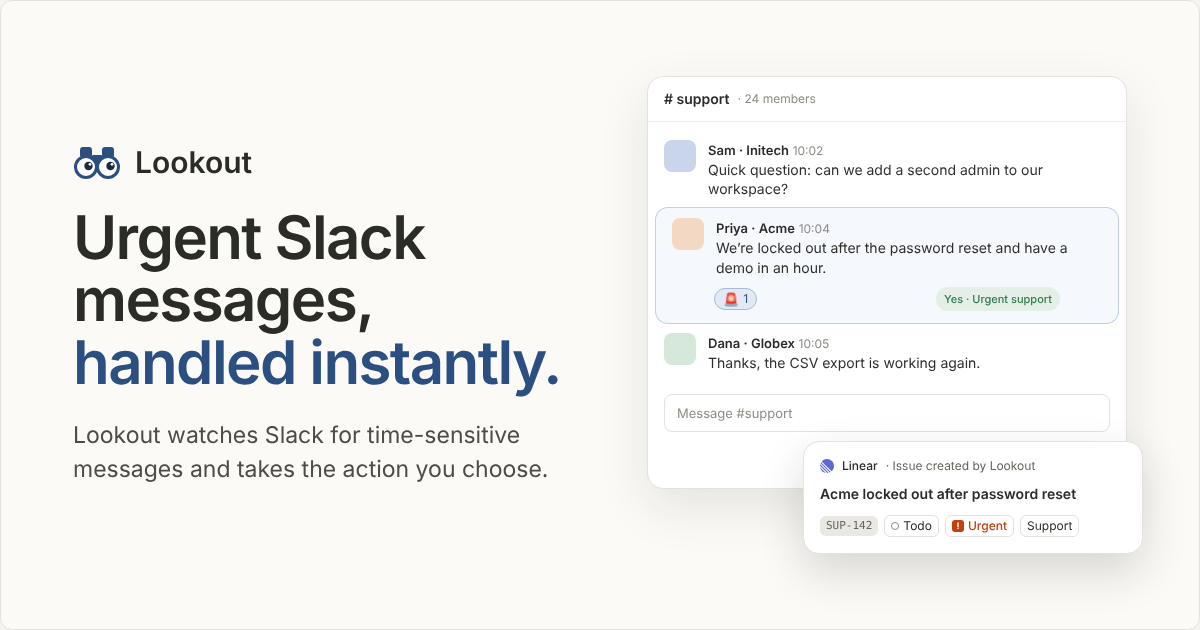
Lookout is a Slack app that watches Slack for time-sensitive messages and takes the action you choose. Powered by Jev from TypeSafe, it is built for teams whose Slack channels function as the live feed of their company — the place where a customer reports being locked out, where a production error surfaces, or where a large signup arrives. Rather than relying on someone to notice an urgent message among everyday chatter, Lookout monitors the channels you select and responds the moment a matching message appears. You describe what matters in plain words, choose where Lookout should look, and decide what should happen when it finds a match. The product is free during beta and is installed directly into Slack. The problem Lookout addresses is the mismatch between how quickly urgent requests arrive and how slowly a team can notice and act on them. The site's own illustration makes this concrete: Priya from Acme writes that the team is locked out after a password reset and has a demo in an hour, while other messages in the same #support channel ask about adding a second admin and thank the team because a CSV export is working again. Only one of those messages is time-sensitive, and missing it has real consequences. Slack is described as "the live feed of your company," which means urgent signals arrive continuously but are mixed with routine conversation. Lookout is designed to act on that feed as it happens, instead of depending on a person to watch it. Setting up a lookout starts with describing, in plain words, what Lookout should watch for. The site's example is a sentence rather than a query: "A customer is blocked from logging in or using the product." In the described flow there is no rule syntax to learn; you state the condition in ordinary language and Lookout uses it to check incoming messages. Next, you pick the channels where Lookout should look, with #support, #help-desk, and #customer-success shown as examples and an option to add more. Scope is deliberately under your control: Lookout only looks at the channels you pick. That keeps both noise and exposure down, because channels unrelated to support, engineering alerts, or sales never enter the picture. The third step is choosing what happens when Lookout finds a match. The setup flow shows two action types — a reaction (👀) and a DM — and the examples show how these play out. When Lookout spots an urgent support message such as a customer saying nobody on their team can log in since the morning and they present to their board at 2, the chosen action is to DM the on-call person. When it spots a specific error message, such as a TypeError in checkout-api reporting 142 events in the last five minutes in #alerts-prod, the chosen action is to create a Linear issue. When it spots a signup over $100 — Northwind Co. on the Team plan at $480/month in #signups — the action is to add a 💰 reaction. In every case, you choose the action and Lookout takes it instantly. The examples section shows that the same mechanism spans very different kinds of time-sensitive events. For engineering, Lookout can watch for specific error messages; the sample is a TypeError in checkout-api with a count of 142 events in the last five minutes, surfaced in #alerts-prod and turned into a Linear issue. For customer support, it can watch for urgent support messages; the sample is a customer locked out ahead of a board presentation, escalated by DM to the on-call person. For sales, it can watch for signups over $100; the sample is a $480/month Team plan subscription, acknowledged with a 💰 reaction. Because the condition is described in plain words, the same product covers monitoring, triage, and notification without a separate tool for each job. In operation, Lookout checks messages as they arrive: message text is sent to Jev (TypeSafe) to check each message, under TypeSafe's terms. The site states that Lookout never trains on your messages and that messages are cleared from Lookout after processing. Two controls reinforce this — you choose every action, and only the channels you pick are monitored. The site also discloses that visible app content may appear in session recordings retained for 30 days. The positioning is "real-time intelligence": the system acts on Slack as it happens rather than through a periodic digest or a manual review queue. The practical benefit is that urgent messages get handled instantly instead of waiting for someone to be at their desk, watching the right channel, and recognizing the signal. A lockout with a demo in an hour gets escalated to the on-call person right away; a production error becomes a Linear issue while the alert is still fresh; a significant signup gets acknowledged with a reaction. Because the action is chosen in advance, the response is consistent and does not depend on who happens to see the message. And because Lookout only looks at the channels you pick and clears messages after processing, teams can automate vigilance in sensitive channels without opening up every conversation in the workspace. The described scenarios map to concrete workflows. A support team could run a lookout over #support, #help-desk, and #customer-success for messages describing a customer blocked from logging in or using the product, with the action set to DM the on-call person. An engineering team could watch #alerts-prod for specific error messages and create a Linear issue automatically, as in the checkout-api TypeError example. A sales or growth team could watch #signups for signups over $100 and add a 💰 reaction to flag the subscription. The same pattern extends to any channel where a described condition should trigger a reaction or a DM. Lookout is aimed at teams that live in Slack and depend on it for time-sensitive signals: support organizations triaging customer issues, developers and on-call engineers watching production alerts, and sales teams tracking signups. Product Hunt lists it under Slack, Sales, and Developer Tools. Setup happens through Slack itself — "Add to Slack" installs it, and existing users sign in — and the product is free during beta. The three configuration steps and the resulting actions all live in Slack, where the messages themselves arrive. Lookout's value proposition is narrow and clear: Slack is the live feed of your company, and Lookout acts on it as it happens. By letting you describe what matters in plain words, limiting monitoring to the channels you choose, and taking the action you pick — a reaction, a DM, or a Linear issue — it turns passive monitoring into an instant, consistent response. It is free during beta and installs directly into Slack.
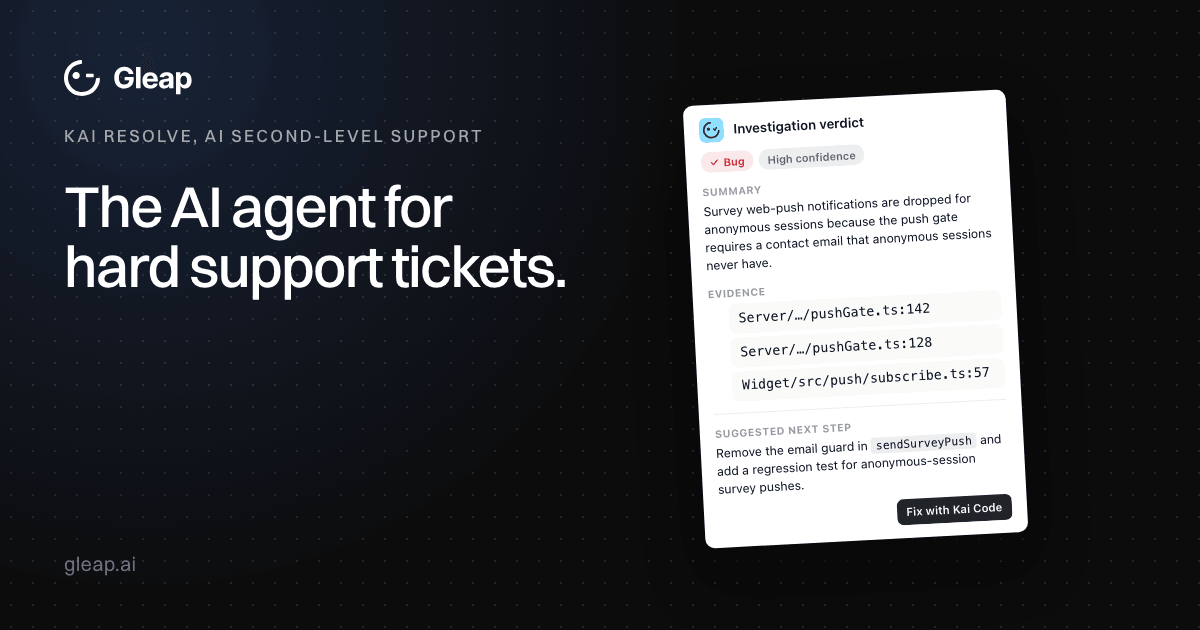
Kai Resolve is an AI support engineer from Gleap built for second-level, or tier 2, support. It handles the hard support tickets that Kai Support, Gleap's first-level AI agent, cannot answer. Rather than replying from documentation alone, Kai Resolve investigates: it reads the screen recording, console and network logs, the click trail, device and SDK versions, screenshots, account data from connected sources and read-only code access, then answers the customer or escalates with a diagnosis. It is built for SaaS and software support teams whose difficult tickets otherwise end up in an engineering queue, and it runs inside Gleap, the support platform that states it is trusted by more than 4,500 teams worldwide. The problem Kai Resolve targets is the ticket that an answer cannot settle. First-level support answers known questions around the clock, but a report like a checkout failing for some EU customers, or exported invoice PDFs coming back empty, needs someone to read logs, check configuration, trace a bug through source code and involve engineering. That investigation work is what tier 2 support does, and it is slow because the evidence is scattered and the context is rarely handed over cleanly. Kai Resolve is positioned as the second level that investigates those tickets, answers what the evidence settles and escalates the rest with a diagnosis, so engineers see the tickets that need them with the evidence already attached instead of as a bare handover. Every investigation starts from the evidence. Kai Resolve works from the ticket and thread, the device and SDK versions, console and network logs, the click trail, the screen recording and screenshots, plus repositories and data sources when the team allows them. On the website this is presented as an investigation brief with a set of sources, for example a ticket with three messages, two console errors and one failed request, a two-minute recording, read-only repositories and a read-only Postgres data source reached through MCP. Tickets that originate from the Gleap SDK carry the most evidence because console and network logs are captured automatically alongside the screenshot and any screen recording. Code investigation is explicitly read-only. Repositories are cloned into a sandbox and the report is traced through the source, and findings cite the files it read. Kai Resolve never commits or pushes. Access is listed per investigation, for example a read-only API repository and a read-only web repository, a data source queried through MCP, and any write, delete or billing tool blocked. A code change is a separate step performed by a coding task the team picks up, so the investigator itself does not modify the source code. The investigation produces three outcomes. If a setting or expected behavior explains the report, Kai Resolve sends a proposed customer reply with the cause, and the ticket can be answered without a teammate. If the report is a confirmed bug, it becomes a coding task in the ticket with the evidence attached. If a human decision is needed, the question arrives as a card with options, and the team's answer resumes the investigation. Tickets are classified as answerable, confirmed bug, suspected bug, feature request, needs more info or inconclusive, and a bug is marked confirmed or suspected with a confidence level and evidence citing the files it read. Feature requests are matched to the existing request on the public roadmap and the customer is subscribed to updates. When the customer's report is missing details, Kai Resolve asks the customer one focused question. When it is not sure, it says so: inconclusive means unknown, never no issue, and it re-investigates once when a new angle exists before asking a teammate. There are three ways an investigation starts. With "Analyze bug reports first" turned on, Kai Resolve investigates new bug reports from the Gleap widget before they reach the inbox, so they arrive classified with the evidence attached. In the chat widget, Kai Resolve takes over when Kai Support cannot answer or a customer asks for a person. And a teammate can start an investigation from any ticket, any channel, including email, Slack and integrations. The team sets the policy per project, from full second level to safety net only. Confirmed bugs become coding tasks that land in the ticket with the evidence attached. From there the team can fix the issue with Kai Code, open it in Claude Code, Codex or Cursor, or send it back with notes. Kai Code plans the change, edits the code, runs the tests and opens a pull request linked to the ticket, and engineers review and merge. With the default follow-up setting, a teammate confirms the fix is live before Gleap sends the customer reply. The company describes this chain as closing the loop from report to shipped fix, with Kai Support on first level, Kai Resolve on investigation and Kai Code on the code change. For users, the stated benefit is that hard tickets get a clear next step without the team sorting every report by hand. Customers can be answered directly when the evidence settles the ticket, engineers receive investigated escalations with a diagnosis instead of an unqualified handover, and the context travels with the work through to the pull request. The control claims are explicit: read-only code access, findings with evidence, and decisions made by the team. Inconclusive results are never silently turned into a no-issue verdict, and destructive database and billing operations are blocked. Concrete scenarios in the content include an EU checkout failing with a 500 from the tax endpoint after a deploy, where Kai Resolve reports a likely bug citing the deploy, surface survey notifications never arriving for visitors who are not logged in while chat notifications work, where the investigation finds that survey alerts skip visitors without an email, and empty exported invoice PDFs where the preview still shows every line. Others include a roadmap request for working hours per teammate that gets matched to the existing feature request and subscribes the customer, and technical questions in the chat widget that Kai Support hands over to Kai Resolve with session logs carried over. On plans, Kai Resolve is included in Gleap Team at $149 per month billed annually ($179 billed monthly), and in Pro and Enterprise. Each investigation is billed by the work it does, about $0.49 on average, a code investigation bills as Kai Code usage, and a run that fails to start is not charged. A 7-day free trial is offered with cancellation anytime. Gleap advertises a 4.6/5 rating on G2, and named customers in the content include Squarespace, Papa Johns, UNICEF, Microsoft, Universal Music, Tridonic, Commonplace, Partfox and Salesforge. In summary, Kai Resolve's value proposition is that it turns the hardest support tickets into investigated outcomes: an evidence-grounded answer, a coding task with the evidence attached, or an escalation with a diagnosis, all with read-only access and the team in control.