Category Focus/categories/marketing
Marketing AI Tools
Discover and compare the best marketing AI tools and software. Browse 174+ curated tools with reviews and rankings.
Projects tracked
174
Sort mode
RECENT
Page
1
Discover and compare the best marketing AI tools and software. Browse 174+ curated tools with reviews and rankings.
Projects tracked
174
Sort mode
RECENT
Page
1
Oogwai Beacon is an answer engine optimization audit from Oogwai. It puts 20 real buyer questions about your category to the AI assistants your buyers use — none of the questions name your brand — and records how often each engine names your brand, who it names instead, and which sources it relied on to decide. The audit reports two halves separately: whether AI crawlers can read your site at all, and whether the engines actually cite you when they answer. It is built for the marketing, SEO and content teams of companies that sell into a category where buyers now ask an assistant for a shortlist rather than scanning a page of search results. The instant readability check runs on the page in seconds with no sign-up, and the citation report follows by email. The problem Beacon was built around is a change in buying behaviour. A buyer evaluating your category used to type a query, scan a page of results and form their own shortlist. Now they ask an assistant, and the assistant hands back a shortlist already formed — three names, a sentence each, and a follow-up question. Whoever is not in those three is not in the evaluation. Answer engines do not rank pages the way a search engine does. They assemble a reply from three things: what the model absorbed during training, what it retrieves live from the web at the moment of asking, and which of those sources it trusts enough to lean on. Your own website influences the first two weakly and the third barely at all — because when a buyer asks who the best vendor is, an engine will not settle the question by quoting the vendor. That is the gap answer engine optimisation works in: not keywords and rankings, but presence, corroboration and machine legibility, measured by whether you get named. Half one is readability, and it is pure HTTP with no engine calls — which is why the result lands on the page within seconds. It answers whether GPTBot, ClaudeBot, PerplexityBot and Google-Extended can reach your pages and find anything on them. The check covers robots.txt rules for each named AI crawler; whether the site serves server-rendered HTML rather than an empty shell filled in by JavaScript; Organisation, Product and FAQ structured data; llms.txt and a machine-readable summary of what you sell; heading structure, canonical URLs and clean sitemaps; and consistent entity facts — one name, one description. Because it is a technical pass, the fixes are usually a short engineering job, and Oogwai hands over the exact changes whether or not you go on to work with them. Half two is citation, and it is the part that requires actually asking the engines. Beacon puts buyer questions about your category to the engines in your tier. None of the questions mention your brand — because a question that names you proves nothing about whether you would be recommended. The report shows how often each engine names your brand unprompted, which competitors it names instead and how consistently, the sources each engine cited to get there, what the engines believe you do (correct or not), the question types where you are strong and where you vanish, and a ranked list of the sources worth being on next. That list is evidence from your own market rather than a generic media plan. Which engines run depends on tier. The free check queries ChatGPT and Gemini. The paid audit adds Claude, and Perplexity is covered on the managed programme, where regional variations and buyer personas are also tested; Copilot is covered on the managed programme as well. Claude grades markedly harder than the other two, so a two-engine result reads higher than a three-engine one — which is exactly why the AEO score is reported only on the paid audit, where it is measured against the full set. The free citation report — who ChatGPT and Gemini name instead — requires a free business-email account. Beacon's stated position is that AEO has two halves and only one of them is a technical problem. Most tools sell a single number, and a single number hides the distinction that matters, so Beacon reports the two halves separately. A perfect readability score with zero citations is common, and the audit treats it as the most useful result it produces: it tells you the problem is not on your website. Fixing robots.txt takes an afternoon; getting named takes presence on the pages an engine reaches for when it is asked to compare vendors — roundups, review platforms, comparison pages, community threads, editorial coverage, transcripts — almost never the vendor's own homepage. The Oogwai media and content team runs that work: source mapping from your own report's citations, editorial placement, review platforms such as G2, Capterra, Product Hunt, Clutch and TrustRadius, comparison coverage, community answers on Reddit, Quora, Stack Overflow and industry Slack and Discord recaps, video and audio transcripts, quotable owned content, entity consistency and monthly measurement. The engagement runs as four stages: Audit, Map, Place, Measure. The outcome for a user is a clear answer to two different questions. First, can AI crawlers read the site — delivered in seconds, free, with no sign-up and no credit card. Second, do the engines actually recommend the brand when a buyer asks — delivered as an emailed report that names the competitors being cited instead. Because the report records the exact domains each engine cited for your category, the follow-on work is targeted at sources that demonstrably feed AI answers in your market rather than at a generic media plan. Every gap the audit finds comes with the fix, and the technical changes are handed over whether or not you continue with the programme. Monthly re-runs of the identical question set let you see share of answers over time, which competitors gained or lost ground, and which placements moved the number, so the programme is judged on citations rather than impressions. Concrete scenarios the audit is built around: a B2B marketing team suspects competitors are being recommended by ChatGPT and wants the evidence, question by question. An SEO lead runs the free readability check in seconds to learn whether GPTBot, ClaudeBot, PerplexityBot and Google-Extended can reach the site at all, before any content work begins. A content or PR team takes the cited-domain list from a report and turns it into a ranked target list for editorial placement, review platforms and comparison pages. A company with a strong readability score but zero citations learns that the problem is off-site and points its investment at third-party presence instead of the website. And a team tracking a category month to month can see whether a placement moved a number weeks later, separately from what the model has absorbed on the far slower training cycle. Beacon is aimed at the marketing, SEO and content functions of companies that are bought through evaluation, and it is equally usable by teams that suspect they are already being named and need less work than they thought — the baseline is delivered before anything is promised. The free tier covers the readability check and the ChatGPT and Gemini question set. The paid audit adds Claude and carries the AEO score. The managed programme adds Perplexity and Copilot, regional variations and buyer personas, plus the media and content work. The readability score appears on the page in seconds; the full citation report is usually in an inbox within a few minutes and always within one business day. Free use requires no credit card. Beacon's proposition is narrow and specific: stop guessing what AI assistants say about your category and measure it. It separates machine legibility from citation, tests brand naming against unbranded buyer questions put to the engines themselves, and turns the citations it finds into a workplan — with the fix attached to every gap.
LaunchReel is a Claude Code plugin that edits talking-head videos and generates launch videos for your real product. According to the product's website, you record yourself and Claude cuts the footage, adds captions and zooms, and builds visuals around what you say; you can also pin a comment on any frame and it fixes just that spot. It is aimed at founders, makers and small teams who need finished videos for a product launch, without doing a manual editing pass themselves. The site positions it as a way to get a professional-looking video out of a raw recording and out of your own repository. The problem it addresses is the gap between describing an edit and actually getting it. In the site's own comparison, using Claude Code alone means that to fix one thing you describe it, wait, and render again; a small edit costs another prompt; there is no sound; the Reels version means starting again in portrait; and getting an MP4 means setting up a renderer yourself. LaunchReel is presented as the layer that removes each of those steps: you pin a comment on the frame instead of writing a prompt, you click text to change it, you get original music and voiceover, you say "make the 9:16 version," and you press Export. That framing matters because it turns video editing from a back-and-forth prompting loop into a visual, direct-manipulation workflow while keeping the automation. The core editing capability is on talking-head footage. LaunchReel cuts the fillers, pauses and retakes out of a recording, then — according to the site — listens back to check every cut before adding captions and zooms. That sequence is what makes the output usable: filler removal alone can leave awkward jumps, so the verification step is described as a check on each cut, and captions and zooms are layered on afterward to keep attention on the parts that matter. Recordings up to 5 minutes are supported on the Creator plan and up to 10 minutes on Pro, which sets the practical ceiling on a single talking-head project. The Studio is the manual-editing surface, and it opens while Claude works. It runs locally at localhost:4747 and gives you a live preview with sound. The site's headline example is pinning a comment on any frame — the preview shows an instruction such as "make this bigger" attached to a specific moment — and Claude then fixes just that spot. Alternatively, you can click text and change it directly, with no prompt involved. The Studio is also where structure becomes visible: the preview shows the narrative beats Hook, Problem, Demo, Proof and CTA, so you can see how the video is organised as you work. The selling point the site makes is that small fixes cost no prompt, which keeps iteration cheap once the first edit exists. Alongside talking-head editing, LaunchReel writes launch videos. Claude writes every scene as code for your real product, taken from your repository, rather than from generic stock. Those videos come with original music and voiceover — the pricing page describes this as an original score and studio voices — so the finished film ships with sound rather than silence. LaunchReel also adds what the site calls a director's playbook, described in the Creator plan as "the full playbook, always current." If you are not using Claude Code, the site offers a separate path: you can generate a video from a template. The workflow is deliberately short. First, you say one sentence — the example given is "cut this recording into a reel" — and Claude does the first edit. Second, the Studio opens while Claude works, so you can watch the video build rather than waiting blind. Third, you make it yours: pin comments or edit directly on the frame, then export when it's right. Setup is also minimal and command-line based: you run "/plugin marketplace add gajanansr/launchreel-plugin" and then "/plugin install launchreel@launchreel", one at a time, with Node 20 or later installed. Because the Studio runs on localhost, the editing happens on your own machine; the site notes that Claude's work uses your own Claude plan, while edits you make in the Studio do not. Talking-head projects keep working copies of your recording and use roughly 0.07 GB per minute of 1080p, and LaunchReel tells you the cost before it starts. The stated benefits follow from that workflow. Fixing a detail no longer requires describing it, waiting and re-rendering — you mark the frame. Changing wording no longer requires a prompt — you click the text. Portrait versions no longer mean a separate edit from scratch — you say "make the 9:16 version." Sound is included through original music and voiceover. Export is a button rather than a renderer you configure yourself. And output is finished to the format you need: 16:9 or 9:16, up to 4K, with 2K and 4K available on Pro. Concrete scenarios from the site include cutting a raw recording into a reel, producing a launch film describing your real product, making a demo video, and generating the vertical 9:16 version for Reels or Shorts from the same project. Because fixes and re-renders within the same month do not count as another video, the product is also suited to iterating on one video — re-rendering it and re-voicing it — until it is right. The template option covers people who want to generate a video without using Claude Code at all. Pricing is structured around projects. A free trial lets you make one full video with every feature, exported in 1080p with a small watermark in the corner. Creator is $19 per month after a founding discount (50% off the first three months with code FOUNDING50) and includes 5 videos a month, no watermark or end screen, 1080p export, talking-head recordings up to 5 minutes, original score and studio voices, the full playbook, and use on up to 2 computers. Pro is $49 per month and adds 20 videos a month, 2K and 4K export, recordings up to 10 minutes, use on up to 3 computers, and early access to new looks and features. Team is $149 per month with everything in Pro, 80 videos a month, up to 10 computers, and one invoice. A video is one project; fixing, re-rendering and re-voicing it in the same month do not consume another video, and the count resets on the first of the month. Plans renew monthly and can be cancelled anytime; prices are in USD, billed monthly by the reseller Dodo Payments, which handles tax and invoices. In short, LaunchReel's value proposition is that Claude does the editing work while the product supplies the parts that make the result shippable: a Studio for direct fixes, a director's playbook, original music and voiceover, and export in 16:9 or 9:16 up to 4K. For a founder or small team that records talking-head videos and needs launch videos for a real product, it collapses editing, sound and export into a short, mostly automated flow.
Vitra.ai Universe is an agentic content platform that replaces a fragmented stack of content tools with one connected workflow. According to the website, it lets teams create, translate, personalize, review, and publish videos, images, documents, websites, and app content without jumping between tools. The site positions Universe as a way to "do the work of 12 AI tools in one place," and states that it is trusted by more than 120 enterprises globally. It addresses organizations whose content spans many languages, formats, and markets, including marketing, product, learning and development, and customer support teams. The core purpose is to keep the whole content workflow in one platform, with AI agents handling the repeat work while the team reviews what matters. The site emphasizes that you can start free with no credit card and build your first workflow in minutes. The problem Vitra.ai Universe addresses is tool sprawl and manual handoff. The website contrasts a "before" state of 23 manual handoffs and 12+ disconnected tools with one connected platform and unlimited content workflows. It lists the tools teams currently stitch together: asset manager, video editor, dubbing tool, image editor, image translator, translation app, CMS tool, lip-sync tool, personalization tool, website translator, app translator, Adobe apps, Figma, Canva, Office 365, SEO tool, spreadsheet, and document tool. The described consequence is people stuck between the tools, with files labeled "final_v7_revised," the recurring question "which version?", export-and-upload cycles, and missing context. The platform's stated intent is to stop video, images, documents, websites, and apps from being separate production lines by making them read and write the same brief, memory, brand system, approvals, and quality decisions. Under Create, Vitra.ai Universe covers video creation and image creation. Video creation turns an idea, a blog post, a deck, a PDF, or a product page into a finished video: it reads the blog, deck or PDF, drafts script and scenes, generates visuals and an avatar, adds voiceover and animated subtitles, burns captions onto the cut, and cuts long video into shorts. Image creation generates campaign-ready creative from a prompt or a brief, conditioned on your own brand kit; it reads the brief, conditions on the brand kit, composes the creative, fans out A/B variants, and runs a quality and compliance check. The benefit described is that the master is made once and multiplied without multiplying the work, because every capability shares the same brief and brand context. Translate & Adapt covers five capabilities. Video dubbing transcribes and splits speakers, clones each speaker's voice, carries emotion and prosody over, re-times lip-sync to the new audio, generates subtitles, and exports every delivery format. Image translation reads layers, fonts and positions, extracts the style kit, maps every text element, translates into 75+ languages, resizes type to fit the box, and rebuilds the file with layers intact, so designs do not have to be rebuilt. Document translation handles Word, PowerPoint, PDF, XLIFF, XML, JSON, HTML, DITA and more across 25+ formats and 75+ languages: it parses structure and tags, applies glossary and style guide, translates, reflows the layout, and writes back to translation memory. Website translation requires one snippet with no backend change: it crawls and segments the DOM, translates text, media and documents, server-renders so the site indexes, and picks up new content on its own. Mobile app translation drops in an SDK that reads the live screen, maps strings and dynamic content, translates on the fly, shares memory with web and video, and ships without a release. Personalization spans video personalization, image personalization, and hyper-personalization. Video personalization renders one video per person, product, or region: it starts from one master, reads the data rows, swaps name, offer and footage, re-voices and re-syncs per row, renders one cut per person, and delivers from your CRM or ESP. Image personalization takes one master creative and adapts it to every placement, audience, and market: it recomposes for each placement, resizes to every ratio, re-messages per audience, and holds the brand rules constant. Hyper-personalization starts from one video or one creative, picks the region, applies culture and festival rules, swaps the offer and creative, localizes the message, and broadcasts to WhatsApp and Facebook. Together these let a single approved asset become many localized, audience-specific outputs while brand rules remain fixed. Under Operations, Quality Control uses multimodal QC agents that check image, text, audio, and video before anything reaches an audience. The agents ingest image, text, audio and video, judge brand and accuracy, back-translate and compare, screen culture and compliance, and return APPROVED, REVIEW or BLOCKED with the evidence behind it. The site frames this as "review exceptions, not every asset," because no team can judge every language, format and market by hand. Back-translation catches drift so shifted meaning shows up as a concrete difference rather than a hunch, and regional rules and language acceptance are checked before anything ships. A blocked asset can be regenerated compliant for that market, from the decision itself. The platform's overall approach is agentic and memory-driven. A brief becomes shared intelligence: Universe connects the prompt to approved memory, product facts, brand rules, audience data, and prior campaign decisions before an agent creates anything; in the illustrated run, a memory agent linked 1,284 approved decisions to the launch brief and five context sources were connected. The demonstrated workflow expands from one brief to 200,000 content variants, moving through context, creation, 20 languages, 5 ratios, 1,000 partners, approval, and publishing, with a QC and human gate where agents verify all and reviewers resolve only the edge cases. VitraTM is described as one translation memory across video, images, documents, web and apps: it reuses exact, then fuzzy, then semantic matches, and only calls a model for genuinely new content. Approved work writes back so the next identical request is free, matches work in any direction because memory is stored per language, and glossaries are enforced during translation rather than corrected after. Review is built into the workflow engine rather than bolted on: one branch can wait for sign-off while every other branch keeps running, linguists, proofreaders and managers each see only the work that is theirs, every asset carries a defensible status of unverified, verified, or approved, and approvals or comments can be made from a phone so decisions never wait for a desk. Universe is described as not a dashboard with an API bolted on. Every capability is a callable skill that a person, event, workflow, or AI agent can trigger over MCP, REST, SDK, CLI and connectors. Any MCP agent can discover Universe skills and call them as tools; capabilities can be composed visually into one run and saved as a template; and a run can start from a business event via n8n, Make, Zapier, a CMS, or a webhook. Every run is recorded node by node against an append-only ledger and is auditable to the credit. The stated outcomes are that the content operation gets faster every time it runs, that every approved word makes the next campaign cheaper, and that handoffs such as creative handoffs, agency queues, and launch spreadsheets disappear. By team, marketing can launch one campaign in every market on the same day, turning one brief into localized video, imagery, landing pages, and social creative while every format stays on-brand and every market stays in sync, supported by 75+ languages, one shared campaign brief, market-level adaptation, and human approval before publishing. Product localizes before release, learning and development scales courses without re-recording, and customer support keeps every answer current. Integrations named in the content include Figma, Canva, Adobe apps, Office 365, CRM or ESP systems for delivering personalized video, Instagram and YouTube for publishing, CMS and LMS destinations, and automation platforms n8n, Make, and Zapier. On security and deployment, the site states SOC 2, GDPR and VAPT-aligned controls, with roles, tenant isolation, bring-your-own keys and buckets, content living where policy says, and an append-only audit ledger. Where cloud is not acceptable, the same operation runs fully air-gapped on your hardware with fine-tuned models, described as in production for defence today, and the platform can be white-labeled with tenancy, entitlements, credits and partner branding as your own product. A customer story from SOTC describes highly reliable and accurate website translation, market-specific adaptation that stayed true to brand identity, fast turnaround, and increased engagement and positive feedback after launching translated site versions. The product is rated 4.8/5 across Capterra, GetApp and Software Advice. On pricing, the website advertises starting free with no credit card and building your first workflow in minutes, without publishing specific paid tiers. Taken together, Vitra.ai Universe is a single agentic platform for content creation, translation, personalization, review, and publishing. Its primary value proposition is consolidation and controlled automation: one connected platform instead of 12+ disconnected tools, one shared memory and brand system instead of scattered files, and AI agents that handle repeatable production while people retain decision rights, approvals, and an auditable trail across every language and format a team operates in.
First 1,000 Users is a free map of short, practical guides on how founders get their first users. The 25 guides are laid out by stage: idea and validation, waitlist, private beta, launch, first 100 users and first 1,000 users, so you only read what matters for where you are now.Every tactic is rated for fit by product type: web app or SaaS, mobile app, browser extension, developer tool, AI tool, open source, marketplace, newsletter or game. A Show HN post is great for a dev tool and weak for a mobile app, and the guide says why and how to adapt. Each guide covers what to do, why it works, how it gets users, common mistakes, and what it costs in time, money and accounts.Topics range from problem interviews and waitlist referrals to Product Hunt, Reddit launch posts, directory submissions, cold outreach to your first 20 users, alternative pages, early SEO and sponsoring niche newsletters. No account, no email wall.
lurk is a free, open-source monitoring tool that watches Reddit and X to help you find customers, get cited by AI services such as ChatGPT, Claude, Perplexity and Gemini, and rank on Google. It keeps an eye on Reddit and X for people asking for a product like yours, scores every post with a one-line reason, and sends new ones to email, Slack, Discord or a webhook. Alongside lead monitoring, it finds the Reddit threads Google already ranks for your keywords, and shows which competitors get recommended in the conversations your leads sit in. It is built for founders, marketers, sales teams and anyone doing go-to-market work who wants to know where a buying conversation is happening, who started it, why it matched, and what the community allows before deciding whether to join in. It exists because watching social platforms by hand does not scale, and simple keyword alerts are not accurate enough to act on. A keyword alert fires on every match, so you get volume without judgement. lurk takes a different approach: unlike a keyword alert, it reads the whole post and the community rules before it calls something a lead. That means a post is not just a match on a string, it is assessed in context, with the stage the person is at, a written reason, and the exact phrase that triggered the match. The result is a shorter, more trustworthy list of conversations worth joining. The tool also targets a second, longer-lived opportunity: Reddit threads that already rank on Google and are increasingly cited by AI assistants, where one useful reply can keep working for a long time. Lead detection is the core of lurk. Every Reddit post, Reddit comment and X post it scans is scored, and each score comes with a written reason and the phrase that matched, so you can see the evidence rather than trust a black box. Leads are labelled by the stage the person is at, such as comparing or solution seeking, and carry signals like fit, intent and engagement. Because lurk reads the whole thread, it also surfaces cases where one thread contains more than one person asking, saving the conversation so you can follow it as a whole. Each lead shows who asked, what they said, why it matched, and the policy of the community it appeared in, such as a rule requiring you to contribute value instead of blatantly promoting yourself. Reddit SEO is the second column of the product. lurk searches your keywords on Google, filters the results down to Reddit discussions that already rank, and lists the threads along with their position, the community they sit in, when they were posted and how many comments they have. It also notes when a competitor is named in a thread, because a thread that already compares tools is a natural place for a careful answer. Positions and metrics are saved at the time they were observed, so you can see which threads are still alive rather than relying on a single snapshot, and the hosted plan refreshes this SEO data every seven days. The stated value is durability: these are threads Google already ranks, so one reply keeps working. Competitor tracking shows who gets recommended in the threads your leads sit in, measured over the last 30 days. lurk counts how many times each competitor is mentioned, for example Jotform, Typeform and Google Forms each with seven mentions in the sample shown, and it also reports how each mention was meant, including negative mentions, so you can see whether sentiment is running for or against a given tool. It groups recurring pain themes across your saved leads, such as people looking for a simpler alternative to a particular product or struggling with repetitive form building, and labels leads by situation: asking for what you sell, leaving a competitor, or building their own. Posts where someone is building their own are ranked by reach, so a reply is more likely to be seen. Delivery is deliberately low-effort. New leads arrive as a digest in Slack or Discord or by email, or they can be pushed to a custom webhook, and each item carries the score, the reason and a link, so no one has to open a dashboard to triage. Scan cadence is daily, at the hour you pick, and the product keeps 30 days of saved examples. Community policy is surfaced next to each lead, so you can see whether a subreddit forbids blatant self-promotion or requires you to contribute value first, and when the policy cannot be read, lurk says so rather than guessing. In the hosted free tier you get two projects, 25 keywords per project, 10 communities per project, daily scanning, seven-day SEO refresh, 1,000 API reads per day and daily alerts to Slack and Discord plus one custom webhook. The approach is read-only and evidence-first. lurk never posts and never sends DMs, and there is no tool in its API for posting or sending a DM; its job is to find and explain, not to act on your behalf. The software itself is open source under the MIT licence and can be self-hosted in one command: Docker starts the app and Postgres, and the scoring instructions live in a file in src/lib/prompts.ts rather than being a hidden secret, so you can run it on your own key and with your own model. A read-only API and an MCP server let your own tools and agents read projects, leads and SEO rows, and an API schema and agent guide are published for that purpose. The hosted option keeps a wallet-based free tier for people who would rather not run anything. Practically, lurk is meant to shorten the distance between a public question and a useful answer. Instead of scrolling subreddits and timelines or sifting an unfiltered keyword feed, you get a scored shortlist with the reasoning attached, which is faster to act on and easier to trust. Because community rules are shown alongside the post, you can join conversations in a way that respects the space, and because the same lead appears with its matched phrase and stage, you can prioritise the people who are furthest along. The SEO side aims at durable visibility rather than one-off traffic: threads that already rank on Google keep being found, and the same threads are increasingly surfaced by AI assistants, which is why the product frames its promise as getting cited by AI as well as ranking on Google. All of this runs on a free tier or on your own infrastructure, so the cost of watching a market is low. Concrete workflows follow the lead types. A founder selling a scheduling tool watches Reddit and X for people asking for a Calendly alternative and replying that they want round-robin scheduling; lurk surfaces that post, explains that the person needs an affordable Calendly alternative for round-robin scheduling, and flags it as a good lead so the founder can answer with something useful. A marketing team tracking a form builder looks for people who find an established tool overkill for basic surveys and want something non-technical staff can manage, then replies in the ranked Reddit threads that already sit at positions four and five on Google. A sales team routes the daily digest into Slack so account owners can pick up new asks as they appear, while a growth team checks competitor mentions to see who is being recommended and whether any of that sentiment has turned negative. Agents and internal tools can pull the same data through the read-only API or MCP to build their own views. lurk is aimed at founders, indie makers, marketers and sales teams who sell into communities rather than only through ads, and at teams that already do social listening but want scoring and SEO context instead of raw alerts. Its stated integrations are Slack, Discord, email and custom webhooks for alerts, plus a read-only API and an MCP server for tools and agents. Self-hosting requires Docker and Postgres, with the scoring logic editable in src/lib/prompts.ts and the option to run on your own key and model. Pricing is free at the base level, with a hosted free plan that includes two projects, 25 keywords per project, 10 communities per project, daily scanning, 1,000 API reads per day, and daily Slack and Discord alerts plus one custom webhook; you can also start on a house wallet within the hosted free limits, connect your own wallet, or self-host. For comparison, published entry plans for similar tools are listed at $10, $13.99 and $29 per month, while lurk itself is described as free. Taken together, lurk is best understood as a listening layer for people who sell in public. It watches Reddit and X, decides which posts are genuinely worth your attention and explains why, points you at the Reddit threads Google already ranks, and shows how competitors are being discussed in the same conversations. It never posts or DMs, it can be self-hosted from a single Docker command, and it exposes its data through a read-only API and MCP so other tools can build on it. The promise it repeats on its own homepage is simple: find the ask, and bring something useful.
Pexo is an AI video agent that turns ideas into videos through natural conversation. According to its website, users simply tell Pexo what video they want to create — for example, an instruction to create a one-minute launch video for a website with dynamic motion graphics — and Pexo produces a publish-ready video. The site states that no advanced AI video generator skills are required. Users can start from a URL, PDF, image, video, audio, or simply an idea, and Pexo takes the process from there. The product is presented as one agent for every kind of video, and on its own site it is framed as more than an AI video generator: an agent that plans, generates, assembles, and revises video content on the user's behalf. On Product Hunt, Pexo is described as a way to produce pitch perfect launch videos with precise control, where you share your product, website, or assets and direct one agent from idea to a finished, on-brand launch video. The problem Pexo addresses is framed in its own FAQ. Most AI video generators, the site explains, are tools you operate: you write prompts, pick a model, and edit the output yourself. That leaves the user responsible for creative direction, model selection, and post-production. Pexo's approach inverts this. Instead of handing the user a toolbox, Pexo asks them to describe what they want in plain language; it then figures out the approach, chooses the right model, and delivers a finished video rather than a short clip. The company notes that users can review the plan and adjust as it goes. Reviews published on the site echo the same contrast. One reviewer states they generate five to ten product videos a week now, and that what used to cost about $500 per video from freelancers is handled by Pexo in minutes. Another says they are not techy at all, but that Pexo made it effortless to get a polished video ad ready for Instagram and TikTok. A third describes trying a dozen AI video tools and finding Pexo to be the first true AI video agent. The underlying pitch is consistent: reduce the operational burden of video production by making the agent responsible for planning, model routing, assembly, and revision. Pexo accepts a wide range of starting points. The website says you can start with a URL, PDF, image, video, audio, or your idea, and the 'How Pexo Delivers A Full Video' section narrows this to pasting a URL, an image, an audio file, or a reference, after which Pexo writes, creates, and delivers the video end-to-end. The product also lists dedicated input flows as features: text to video, where you describe an idea in plain language and Pexo turns it into a finished video; image to video, where an uploaded image is animated into a moving video; URL to video, where a product or page link yields a finished video; audio to video, which turns a song, podcast, or voice note into a visual video; and script to video, which takes a written script and produces the full video. The site gives a broad range of example briefs, including a mascot launch video, a collage-style explainer, an AI avatar video, a SaaS launch video, a kinetic typography explainer, a brand launch video, an educational explainer, an infographic product animation, an app demo, a service explanation, social ads, a cinematic short film, a live-action instructional video, and an animation. The second stage of Pexo's workflow is planning. The site states that Pexo works with the user to develop the script, scenes, shots, and creative direction, and a separate section describes Pexo as building storyboards, selecting references, and structuring the video. This capability is presented as 'Plans the Creative Work.' Pexo also claims to understand intent — context, references, and creative direction beyond prompts — which the site illustrates with a reference-aware prompt understanding interface. The FAQ explains the mechanism: users talk naturally and add links, images, music, notes, or references, and Pexo turns that context into a video plan. In practice this means the user is not limited to a single text prompt; they can supply supporting materials and let the agent interpret them. For someone with a rough idea rather than a finished brief, this planning layer is what moves the project forward without requiring them to write prompts or storyboard shots themselves. Pexo markets access to 'the world's leading AI models,' stating that it understands your request, selects the right model, and routes each step for the best result. The home page displays logos for Hailuo AI, Pika, Midjourney, Kling AI, GPT Image, Veo, Seedance, Luma AI, MiniMax, and Runway, and lists individual model pages for Seedance 2.0, Happy Horse 1.0, GPT-Image 2, Nano Banana, and Kling AI 3.0. A blog description elsewhere on the site says Pexo auto-routes across Kling 3.0, Sora 2, Veo 3.1 and more to return a finished video. The product's pitch is that the user never has to pick a model themselves; the agent makes that decision per task. This is the feature that most directly supports the claim that Pexo is different from generators that require you to choose a model manually. On the output side, Pexo says it delivers finished content — complete videos with narration, music, subtitles, and transitions — and that the final deliverable includes voiceover, music, motion graphics, captions, and editing. The Product Hunt description adds that Pexo generates and assembles the scenes and handles voiceover, music, captions, motion graphics, and editing as part of a launch video workflow. Revision is handled conversationally: users mark what they want fixed and make changes through conversation, which the site compares to commenting in a Google Doc. The Product Hunt listing describes leaving a comment or circling what you want changed, after which Pexo makes the edit. Pexo frames this as improving through feedback, applying revisions naturally without restarting from scratch — a meaningful distinction for anyone who has regenerated an entire video just to fix a single scene. Beyond video assembly, Pexo includes standalone generation features. The AI avatar feature is described as a lifelike AI avatar that speaks your script in any language. Image generation lets users describe any scene and get a high-quality image in seconds, and music generation composes original music instantly from a described mood or genre. These capabilities feed the main workflow — an avatar can deliver a script while generated images and music populate the video — and the site presents them in a 'More Than an AI Video Generator' section. The product also supports a long list of formats and styles, including motion graphics explainers, launch videos, story and film formats, product ads, social media, kinetic typography, 2.5D animation, whiteboard animation, paper animation, line art, animated explainer videos, app launch videos, talking head videos, music videos, anime, UGC ads, product videos, YouTube Shorts, AI dancing videos, AI kissing videos, and ASMR videos. The stated outcomes center on speed and reduced effort. Pexo says it delivers a 'ready-to-post' video and that its videos are platform-ready, so users can post to TikTok, YouTube, Instagram, X, and more without extra editing. Customer reviews on the site describe turning product photos into video ads in minutes, describing an idea and receiving one polished ad, and generating five to ten product videos per week. Another reviewer says the videos look professional and match their brand, with no awkward AI artifacts. These claims come from customer testimonials published on Pexo's site and reflect the benefits Pexo chooses to highlight: less manual editing, consistent branding, and output that is ready for publication. Pexo's FAQ lists what the product can be used for: product ads, social posts, explainers, launch videos, personal memories, and more. A separate answer describes the types of videos Pexo can create as short-form social videos, product demos, brand ads, story videos, and publish-ready clips. The home page's example prompts and style gallery expand on this with concrete scenarios, such as creating a one-minute launch video for a website with dynamic motion graphics, building a mascot launch video, producing a SaaS launch video, making an app demo, explaining a service, creating social ads, producing a cinematic short film, generating a live-action instructional video, making a collage-style explainer, and producing an educational explainer or infographic product animation. Pexo's site indicates the product is aimed at product teams and marketers who need clear, polished visual storytelling and feature explanation, alongside creators producing social content. Product Hunt classifies Pexo under Marketing, Artificial Intelligence, and Video. Pricing information on the page is limited to a 'Start for Free' call to action, suggesting users can begin without payment, though no detailed plan tiers are listed. Platform-wise, Pexo is a web product accessed at pexo.ai; the site does not describe a dedicated mobile or desktop application. Output is tailored for TikTok, YouTube, Instagram, and X. In summary, Pexo presents itself as an AI video agent rather than a video generator tool. The user supplies an idea, link, image, audio, or script; Pexo plans the story, routes tasks to what it considers the best AI model, generates and assembles scenes with voiceover, music, captions, and motion graphics, and then revises the result through conversational feedback. Its primary value proposition is directing one agent from concept to a finished, on-brand, publish-ready video — without requiring advanced AI video generation skills.
Would you pay? is a web product where indie makers show their startup to real people who swipe right if they would pay for it and left if they would not. Makers use it to see real demand instead of likes, and to find out who would pay before they build more. The deck currently holds 102 indie startups and the site reports 6,499 swipes so far. Anyone can start swiping without an account, and makers can add their own startup for free so their card goes into the deck right away. The result makers get is a percentage — the share of people who would pay — plus a view of who those people are and how many of them clicked through to the startup's site. The problem it addresses is that most side projects fail quietly: months of building, then nobody pays. A like, a supportive comment or a spike of attention does not tell a maker whether anyone will actually open their wallet, and those signals often arrive after the work is already done. Would you pay? moves that question to the front of the process. It shows a startup to people browsing a deck of indie projects and asks them one blunt question through a single swipe: would you pay for this? Because the left swipe is as easy to give as the right one, the answer the maker receives is described as real demand rather than applause. Swiping is deliberately simple. Each card in the deck presents an indie startup, and a swiper drags right if they would pay for it and left if they would not. The site describes a right swipe as meaning that the person would pay for the product based on their first impression. It is explicitly not a purchase and nothing is charged — the swipe only tells the maker whether their pitch works. Makers see who would actually pay, which turns the deck into a lightweight demand test rather than a popularity contest. There is no signup required to swipe: the site promises that opening the deck brings up the first card in about a second. For makers, the results view is the core of the product. It reports the share of people who would pay, whether those swipers are developers, founders or marketers, and how many of them clicked through to the startup's site. The percentage only appears after 10 swipes, a rule the site explains as protection against one or two early votes skewing the number. The full breakdown is private to the maker who owns the card, but a public share page for each startup shows the headline percentage once the card passes 10 swipes, so the result is ready to be posted on X. That split matters: the maker keeps the detailed audience and click-through data, while the headline number can be shared publicly as social proof. Makers log in with a one-time email link and no password, which keeps the results view lightweight. Adding a startup costs nothing, and the site states that the card goes into the deck right away. A startup that has been added is then swiped by people who are already browsing, so the maker does not have to recruit an audience of their own to get an answer. Because the same deck mixes indie projects, every swiper sees a stream of products and makes a series of quick willingness-to-pay judgements on the cards that come up. Boost is the optional paid layer. For $19, a card is placed at the front of the deck for 24 hours so that nearly every new swiper sees it first. Up to five cards can be boosted at the same time, and they share the front of the deck in random order rather than a fixed sequence. Boost also carries a guarantee: if the card does not reach 100 swipes within 24 hours, the site keeps boosting it for free until it does. The site is explicit that swipes stay honest under Boost — people still swipe right only if they would pay — so the paid option is positioned as a way to get answers faster rather than a way to buy yes votes. The product's approach rests on a specific claim about what a swipe is worth. The site describes "I'd pay" as intent, not a sale, but argues it is a harder yes than a like, because first impressions decide whether someone clicks through at all. That framing shapes everything else: the swipe is a single, cheap judgement made on a first impression, the percentage is withheld until enough swipes accumulate to be meaningful, and the click-through count adds a second tier of signal for makers who want to know whether the card did more than earn a nod. The outcome for makers is a faster read on whether their pitch lands and who it lands with. Instead of guessing after months of building, a maker gets a percentage of people who would pay, a breakdown of the kinds of people those are, and a count of how many went as far as clicking through to the site. The public share page turns that number into something the maker can post, and the private breakdown shows whether the audience leaning in is made up of developers, founders or marketers. For swipers, the experience is a browsing activity — looking through indie startups and, in one gesture, telling the maker whether the product is worth paying for. Typical use cases follow directly from the deck. A maker with a finished or half-finished side project can add it free and let the deck tell them whether anyone would pay before committing more build time. A maker who needs an answer quickly can pay for Boost, which puts the card at the front for 24 hours and guarantees it reaches 100 swipes or keeps boosting for free. A founder preparing a launch can use the public share page, which reveals the headline percentage after 10 swipes, as material to post on X. And a maker comparing pitches can look at what share of developers, founders or marketers would pay and how many clicked through to the site, using those details to judge which audience the product speaks to. The primary audience is indie makers and founders of side projects — people who build small products and need to know whether there is paying demand before they invest more. The swiping side of the deck is open to anyone with a browser, since no account is needed to start. The product runs on the web, positioning itself around marketing and startup validation rather than around analytics dashboards. Pricing is straightforward: swiping is free, adding a startup and seeing your results is free, and the only paid option is the $19 Boost. Would you pay? reduces a hard question — will anyone pay for this? — to a single swipe and a percentage. By collecting right swipes only when a person would genuinely pay, by hiding the number until 10 swipes are in, and by keeping the detailed audience and click-through breakdown private while publishing a headline figure for sharing, it gives indie makers a real demand signal, not a pile of likes.
ZenABM is a LinkedIn Ads AI analyst that lets marketers create and launch, understand, optimize and report on their LinkedIn advertising from Claude, ChatGPT, Perplexity, Gemini and other AI tools through the ZenABM MCP server, or natively from ZenABM's own AI agent, Zena. Zena can plan, manage, analyze and optimize LinkedIn Ads, and the site presents it as a way to build, manage and optimize LinkedIn campaigns with AI. The product is aimed at people who run LinkedIn Ads and ABM campaigns and who would rather work inside a conversational AI client than operate each step by hand. The Product Hunt listing describes the underlying annoyance plainly: ditch copy-pasting into Campaign Manager. Instead of assembling campaigns field by field in LinkedIn's own interface, teams can ask an AI client for what they need and have ZenABM handle the mechanics. Reporting has a similar problem. Rather than exporting numbers and assembling a slide deck every week, ZenABM produces written reports that pair insights with action items, and it cross-references advertising performance with pipeline data. ZenABM also positions itself around company-level insights, so campaign results connect to the accounts and revenue behind them rather than living as detached impressions and clicks. Inside Zena, campaign building starts with a description. You describe the campaign you want and Zena builds it end to end: the campaign, its ad sets, targeting, and the ads themselves. Ad copy is written for you, and creatives are pulled from your media library. Before committing, you can check the audience size, reuse saved audiences and lead forms, and duplicate campaigns that already work. Crucially, nothing goes live until you confirm it, so the AI drafts and prepares while the human approves. The site illustrates this with Claude generating four document ads for a ZenABM workshop in London, showing how a request turns into a set of draft ads inside the tool. The ZenABM MCP server extends the same campaign work into whichever AI client a team already uses. You ask Claude, ChatGPT, Perplexity or Gemini for the ads you need; the MCP server generates them, pushes them into a new ad set with the objective, budget and bidding you asked for, and hands you a link to review and approve in Campaign Manager. Again, nothing launches until you approve it. The server is described as letting you build, manage and optimize LinkedIn ads and campaigns directly from Claude or any AI tool, and it can be connected during a free signup. An illustration on the page shows the ZenABM MCP server connected to Claude. Under the hood, the MCP server ships with 15 ready-made ABM skills that you run as slash commands. The site lists audits, monthly reports, strategy planning, ad decay checks and sales handoff lists, all graded against ZenABM benchmarks. Beneath the skills sit 96 read and write tools spanning LinkedIn Ads, ABM, CRM and revenue data, so an AI client can both inspect and act on the data rather than only summarise it. Because the skills come prebuilt, users do not have to design prompts for common ABM jobs; they invoke a command and the underlying tools do the work against benchmarked expectations. Automated reporting is one of the headline capabilities. Zena produces weekly, monthly and quarterly reports written for you and sent straight to your inbox, containing insights and action items that Zena can carry out on your approval, rather than a raw data dump. You can also ask for a report on the spot. In that case, performance is cross-referenced with your pipeline, top and low performers are surfaced, and the result is shareable in seconds. The Product Hunt description adds company engagements and revenue attribution to the reporting scope, produced by ZenABM's AI agents on a weekly and monthly cadence. Optimization happens without leaving the chat. Zena finds and fixes underperforming LinkedIn ads and campaigns for you: it surfaces your lowest and best performing assets and then acts on them. Actions include pausing inefficient ad sets and campaigns, changing bids and budgets, and building retargeting audiences from ad engagement and CRM events. Every change waits for your approval, so optimization stays reviewable rather than automatic. A screenshot on the site shows Zena pausing underperforming LinkedIn ad sets, which illustrates the intended flow: the analyst identifies the problem, proposes the fix, and the marketer signs off. Zena also acts as an advice channel. The agent is trained on knowledge from more than 30 ABM and LinkedIn Ads experts — the site cites Tim Davidson, Ali Yildirim, Max Herzeg and many more — drawn from their own posts. When you ask about list building or ABM strategy, the answer comes back tied to your own data and to benchmarks from other accounts, so the comparison is real rather than generic. Benchmarking material shown on the site compares ad performance to industry benchmarks, reinforcing that answers are grounded in data rather than opinion alone. Zena, the MCP server and the API are all powered by the same company-level ABM data. That shared foundation is what ties the three surfaces together: the AI agent for conversational analysis, the MCP server for bringing ZenABM into AI clients such as Claude, ChatGPT and Cursor, and the API for connecting LinkedIn Ads data anywhere and building your own dashboards. The API lets you pull LinkedIn Ads engagement, campaign performance and intent stages wherever you need them. Because the AI layer runs on the same data as the rest of the platform, users can ask Zena to analyse LinkedIn Ads performance, find top engaged companies, and surface or pause underperforming ads, then take the same data into their own systems. Concrete workflows the site describes include building a full campaign from a short description, generating a batch of document ads inside an AI client, and approving prepared ads in Campaign Manager before launch. Reporting runs as a recurring workflow: weekly, monthly and quarterly reports land in the inbox, and ad hoc reports answer point questions. Optimization workflows cover auditing spend, pausing inefficient ad sets, adjusting bids and budgets, and assembling retargeting audiences from ad engagement and CRM events. For ABM teams, ZenABM supports identifying top-engaged accounts and producing sales handoff lists, and the API supports pulling campaign and intent data into external dashboards. The product is built for the people who run LinkedIn Ads and ABM programs. The FAQ addresses readers asking whether they need to be technical, which AI clients the MCP server works with, whether ZenABM AI can take actions or only read data, how data is secured, which ZenABM plans include the AI features, and whether the AI can be tried before paying. Integrations named in the content include Claude, ChatGPT, Perplexity, Gemini and Cursor, plus LinkedIn Ads, ABM, CRM and revenue data. On pricing, the site offers a Start for Free button and a Book a Demo option, and a three-minute walkthrough is available. ZenABM's pitch is that LinkedIn Ads should be created, optimized and reported on where marketers already think and write — inside an AI tool. Zena and the MCP server carry campaign building, expert skills, optimization actions, benchmarking and reporting into that conversation, all on top of the same company-level ABM data, with human approval before anything goes live.
GoodSocials is an AI social media manager built specifically for LinkedIn. It writes posts that draw only on deep research or on your own data, and it publishes five times a week — but only after you approve each post. Onboarding is deliberately fast: you sign in with LinkedIn, paste your website, and according to the site your board is full in 90 seconds with seven posts. The product is made for the person whose name is on the profile, and the site names four groups it is built for: founders, consultants, operators and agencies. The example board shown belongs to TimeTuna.com, a scheduling service, and its stated goal is inbound leads — a useful clue to what the product is ultimately for: a steady, credible professional presence that brings in demand. The problem it addresses is framed bluntly on the site: a social media manager costs $3,000 a month. A comparison table spells out the trade-offs. A $3,000 manager posts in most weeks; GoodSocials posts every weekday. A $3,000 manager delivers first drafts after a week of onboarding; GoodSocials delivers them in 90 seconds. When you are on holiday the manager stops, while GoodSocials posts what you queued. And the price is $100 a month instead of $3,000. The site also frames the starting point many users are in: three posts in your last three months. That gap — between intending to post regularly and actually doing it — is what the product is built to close. A second, equally explicit concern is quality. GoodSocials positions itself against "AI slop" and lists the writing habits it refuses to produce: cringe openings like "Nobody talks about this, but scheduling is broken", posts built around "I spent 10 years in SaaS", and the "it's not X, it's Y" construction. Every post is one of three kinds, according to the site: market research, deep dives, and your numbers. This is the core editorial model. Market research posts come from looking at the wider landscape — one example card reports that of 12 scheduling tools compared that month, nine put round-robin scheduling behind a paid tier and two moved it there in the previous quarter. Deep dives go into a source or an idea in more depth — one example draws on 1,200 support threads from new TimeTuna users to identify the most frequent week-one question, and another weighs a famous jam study from Iyengar and Lepper (2000) against a meta-analysis of 50 experiments by Scheibehenne et al. (2010) to explain why TimeTuna shows three slots. Your numbers posts come from your own tools, such as the finding that TimeTuna reschedules fell from 18% in May to 7% in August, one change in between being that the invite now shows the guest's timezone first, based on 9,412 meetings. The site states plainly that the content is research, deep dives and your numbers, nothing else. To produce those posts, GoodSocials connects to the tools you already use. The example board lists five read-only connections: PostHog, Stripe, GitHub, Plausible and Notion. Because the connections are read-only, the product can quote your data without being able to change anything in those systems, and because they are your own tools, the resulting posts contain figures only you could publish. The output lands on a board — a kanban-style view where posts are drafted and moved through approval. You approve the posts you want, and the pipeline moves them on. Cards are scheduled to specific times, such as Tuesday at 09:00 or Wednesday at 09:00, so the cadence is planned rather than improvised. The board is shown populated with seven posts within 90 seconds of signing in with LinkedIn and pasting your website. Corrections stick: the site promises that if you correct it once, every post after follows. The mechanism is explicit. When you leave a note on a card, that note rewrites the card and becomes a rule in your voice. In the example, a reviewer's note — "Open on the number, not a question" — becomes a voice rule, joining other rules such as "Reports, does not sell". From then on, every next post follows those rules. The rules accumulate week by week: the site shows one rule in week one, two rules by week four, and five rules by week 12, every one of them originating from a note of yours. For Pro users, those rules are described as three brand principles that learn from every revision. The practical effect is that the system moves toward your voice instead of you rewriting the same feedback into every prompt. The overall flow is presented as five steps: it reads your tools, it writes the post, it draws the image, you approve, and it publishes — with "Publishes Tue 09:00" shown against the example card. Image generation is part of the pipeline rather than a separate tool, and the Pro plan includes up to 200 generated images a month. Approval sits between generation and publishing, which is what keeps a human in the loop on every piece of content that goes out under your name. The site also flags what is coming: integrations with Codex, Claude Code and a Grok bot are listed as coming soon, suggesting the generation and review loop will extend to more of the tools people already work in. Cadence is treated as the point of the product. Under the heading "Show up every weekday. The rest follows.", the site contrasts three posts in your last three months with 20 posts next month once the system is running. The claim attached to that cadence is that profile views, followers and inbound leads follow a steady month — that is, the results are framed as a consequence of showing up consistently rather than of any single viral post. For agencies, the same idea is applied across clients, with one board per client. And for the times you are away, queued posts keep publishing, which is exactly the failure mode the site attributes to a human manager who stops when you are on holiday. The site answers "who is it for" with four groups, each illustrated by an example post. Founders get posts built from business data, such as a Stripe-derived observation that 31% of August signups chose annual, up from 19% in July, with two candidate causes and neither confirmed. Consultants get posts from client work, such as the finding that across 38 client engagements most retainers end in month four and one meeting shows up in 29 of the exits. Operators get engineering-flavoured posts, such as failed deploys per release falling about 62% after one CI rule across a small sample of 11 releases. Agencies manage each client's own profile from one board per client, up to 10 clients. In every case the content is tied to the person whose profile it appears on. Pricing is published in three tiers, each starting with a seven-day free trial. Pro costs $100 a month for one LinkedIn profile and includes three brand principles that learn from every revision and up to 200 generated images a month. Agency costs $1,000 a month for up to 10 profiles, with one board per client; each client authorises their own profile so the agency never holds a password, and GoodSocials emails the agency before a client's access runs out. Consultancy costs $2,000 a month and is hands-on: Pasha, the founder, sets up your themes, principles and sources with you and has a call with you every week. There is no setup fee, and you can change plan or cancel from the pricing page or in settings. Signing in uses LinkedIn, and the board is delivered in the browser. The takeaway is a narrow, opinionated promise. GoodSocials is not a general-purpose content generator or a multi-network scheduler; it is an AI social media manager for one network, LinkedIn, that writes only from research and from your own tool data, puts every draft in front of you on a board before it publishes, learns your corrections as lasting voice rules, and keeps posting five times a week for $100 a month against a $3,000-a-month human alternative. If your presence on LinkedIn matters to how you win work and you cannot keep a cadence yourself, that is the trade it offers.
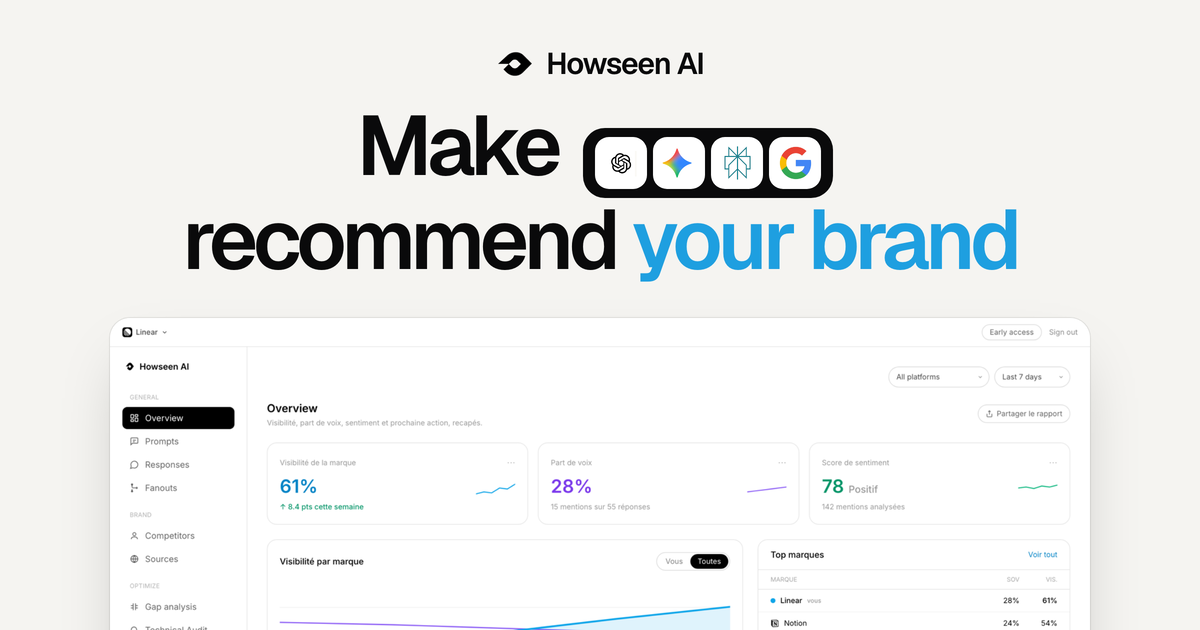
Howseen AI is an AI visibility tool for brands, marketers and agencies that tracks how a brand is recommended across ChatGPT, Gemini, Perplexity, Google AI Overviews and Google AI Mode. Its stated purpose is to help companies make AI their next growth channel: it measures how you are seen when buyers ask AI tools what to buy, and works to ensure the brand the AI names is you. The platform brings AI visibility tracking, competitor benchmarking, citation tracing, a GEO action plan and content generation together in one screen. The problem Howseen AI addresses is a shift in how buyers choose products. The site explains that buyers now ask ChatGPT, Gemini and Perplexity which tool or brand to buy, and the AI answers with a shortlist. According to the content, the brands cited in community threads, review sites and editorial make that shortlist, while the rest never come up. Howseen frames this as a new distribution channel: every day, buyers pick tools from AI answers, so being named in those answers matters. The founder states, "I believe the best product doesn't win, the most visible one does. The shelf just moved to AI, and Howseen makes sure yours gets seen." The core of the product is AI visibility and performance tracking. Howseen recaps visibility, share of voice, sentiment and a next action, tracked across ChatGPT, Perplexity, Gemini and Google AI. It shows brand visibility, share of voice and a sentiment score that compares how AI talks about you versus competitors on a -9 to +9 scale, derived from how AI describes each brand in tracked answers. A visibility-by-platform view breaks performance down per AI surface, and a brands table ranks you and competitors by visibility, share of voice, sentiment and position. This lets a team see, at a glance, whether they are named in AI answers and how that compares with the competition. Prompt tracking is the second pillar. The site argues that buyers ask full questions now, not keywords, so Howseen tracks every prompt that matters across every AI surface. You can add the prompts you want to win from day one, get high-intent suggestions from real search data, and see visibility and sentiment per prompt, per model, every 3 days. Prompts are organized by topic and tagged with intent such as buying intent, comparison or learning. A prompt table shows visibility, sentiment, position, mentions, citations, share of voice, location and when each prompt was added, making clear exactly where a brand appears and where it does not. Competitor benchmarking and citation tracing complete the measurement layer. Howseen lets you see who the models recommend when buyers compare options, right next to the recorded answer, benchmark visibility, sentiment and position against every competitor, watch AI share of voice move with each run, and spot the exact prompts where a competitor replaced you. The competitor view includes a brand comparison table, a brand-by-model heatmap, and a prompt-by-brand ranking matrix showing the top brands AI cites per tracked prompt. Because LLMs don't cite at random, Howseen traces every answer to the pages it cited, mapping each citation to its domain, page and source type so you can find the review sites, forums and wikis the models trust and prioritize outreach by how often each domain gets cited. A technical audit flags what blocks Google and AI models from reading and citing your site, covering page speed, LLM optimization, SEO optimization, indexability, sitemap.xml, robots.txt, LLMs.txt, server-rendered content, Bing indexing and trust signals. From measurement, Howseen moves to action with an action plan and content agents. Data-driven recommendations are built from citation patterns, competitor gaps and prompt performance, each tagged with priority, type (off-page, technical or content), AI engines and effort, alongside a GEO score broken into technical, off-page and content components. Content agents then turn every gap into a scheduled article written from your real buyer prompts in your voice, pushed straight to your CMS. The content plan pre-plans buyer prompts across the month, generating, queuing and publishing drafts; one-click publishing is supported to WordPress, Shopify and Next.js, and there is a recurring content calendar designed to close gaps automatically. Content is structured for specific engines, such as research pages structured so ChatGPT can cite them, product listicles created so Google AI shows them in product searches, and explainer pages written so Perplexity pulls them into detailed answers. The product's methodology is a closed loop rather than a score. Most tools stop at a score, whereas Howseen measures and then acts: it tracks where AI recommends you, benchmarks you against competitors, traces the sources that feed the answers, and publishes the fixes on a schedule. The site describes it as going from invisible to cited on autopilot, and as an agent that acts, not a dashboard that hands you a score. Everything that decides whether AI recommends you, from tracking to competitor share of voice to content and off-page citations, is brought together in one screen instead of being scattered across a dozen tools. The benefits Howseen claims center on clarity and momentum. Branded versus unbranded visibility, who gets cited ahead of you, and the exact sources behind every answer are surfaced without inflated numbers, which the company frames as "no black box". Every scan feeds a trend so you can watch your share of voice climb week after week, alongside analytics for AI-referred visits, average position and answers appeared in. The recurring content calendar keeps closing gaps, so improvement is continuous rather than a one-off audit. The site also highlights that a lead in sentiment is a real edge because AIs stay mostly neutral. Concrete scenarios in the content include an ecommerce activewear brand tracking prompts such as "best gym leggings for squats" or "most durable workout leggings", spotting gaps where AI recommends a rival instead, and then generating comparison guides, how-to posts and resource lists like "Gymshark vs Lululemon" or "affordable Lululemon alternatives" to win those prompts. Other example questions the tool is designed around include "Best CRM for B2B companies?", "What payroll tool do startups use?", "Cheapest email marketing software?" and "Which project management tool do agencies use?". Agencies use Howseen across all their client brands and share white-label reports, turning GEO into a recurring service they can sell. Howseen AI is a web platform aimed at brands and agencies that want to be recommended by AI. It tracks any AI engine including ChatGPT, Gemini, Perplexity, Google AI Overview and Google AI Mode, supports tracking and analysis in every market and location and content generation in every language your buyers speak, and includes prompt personas with ICP match prompts. Publishing integrations listed are Shopify, WordPress and Next.js. The site offers a free scan to test your AI visibility in 30 seconds with no card required, plus a demo booking link for deeper evaluation. In short, Howseen AI's primary value proposition is to turn AI from an opaque question mark into a measurable, actionable growth channel: it shows whether ChatGPT, Gemini, Perplexity and Google AI name your brand, explains why through citations and competitor benchmarks, and then generates and auto-publishes the GEO-optimized content needed to get you cited.