Category Focus/categories/seo
SEO AI Tools
Discover and compare the best seo AI tools and software. Browse 54+ curated tools with reviews and rankings.
Projects tracked
54
Sort mode
RECENT
Page
1
Promptvane is an AI visibility tracking and content optimization platform built for ChatGPT, Claude, Gemini, and Perplexity. It is designed for teams that want to know whether their brand appears in AI-generated answers, which competing brands appear alongside it, and which sources those answers actually cite. Instead of starting from a blank prompt box, you begin with your website: Promptvane reads the site to suggest relevant buyer questions, and you review those questions before any answers are requested. The free check returns one ChatGPT answer per question in about 30 seconds without a sign-up, and signing in lets you save the questions and answers you already have so you can track ChatGPT visibility over time. Paid plans expand the number of AI platforms, raise monitoring limits, and add content drafts. The problem Promptvane addresses is that a Google ranking does not guarantee a mention in an AI answer. The content explains that the question, the platform, the sources available, and the time of the check can all affect what appears in an AI response. Promptvane draws a clear line between SEO, which measures pages shown in search results, impressions, clicks, and ranking positions, and AI visibility or GEO, which measures brand mentions and source links inside AI answers. The platform also separates distinct signals that are often confused: website access, search inclusion, brand mentions, recommendations, and citations. Because a readable website or a content change does not guarantee an AI recommendation, Promptvane focuses on helping users inspect the evidence behind each answer rather than treating a single missing mention as a diagnosis of their website. The free check follows a deliberate three-step flow. First you enter your website; Promptvane reads it to suggest relevant buyer questions, and you can add a short product description if more context is needed. Second, you review the three suggested questions, checking your brand, target market, and language, and you can swap suggested alternatives or edit the questions before confirming the check. Third, you check your ChatGPT answers: you get one answer per question, see brand mentions, read the original answers, and inspect available sources without signing up. The anonymous preview covers three ChatGPT questions once, with one answer per question. Signing in saves your results; saving alone does not run another check. The site also notes that the website check assesses access and readability and does not prove that AI has indexed your site. For ongoing tracking, Promptvane lets you save the questions that matter to your business, configure monitoring, and compare answers over time. You choose your questions, target market, and language, then review brand mentions, competing brands, and cited sources, comparing runs with their platform and successful sample counts in view. Free accounts cover 1 website and 9 monitoring questions, with ChatGPT returning 1 answer per question every 14 days and no other engines or content drafts. Paid plans move ChatGPT to daily and Perplexity to weekly, with 1 answer per question on each platform per check. The platform is explicit that saving results does not start a new check or switch on scheduled monitoring, and that schedules must be configured separately. A core capability is seeing the whole answer rather than a single score. Promptvane shows whether your brand appears, which competitors are mentioned, and what the answer actually says, alongside the original response and any cited links. It stresses that a mention is not necessarily a recommendation, and that a citation is a link to a source. In the monitoring view you can see example questions across platforms with mention counts against successful samples, and you can filter to questions that have a mention gap. A worked example in the content shows six buyer questions tracked across ChatGPT, Claude, Gemini, and Perplexity with per-question mention counts, illustrating how sample counts vary by platform. Promptvane generates its suggested questions from your website content and any product description you provide. It preselects one question from each of three intent groups, and you can swap alternatives within a group or edit the questions before starting; if the website cannot be read, you can provide a short description instead. When you sign in, you add 2 questions in each of the 3 categories, giving 6 new questions plus your original 3 for 9 total. Platform coverage is tiered by plan: Free monitors 9 questions on ChatGPT every 14 days; Starter adds Perplexity; Growth and Scale add Claude and Gemini every 14 days, each returning 1 answer per selected question from the same group, covering 25 of Growth's 100 questions or 100 of Scale's shared 250 questions, with no extra questions or separate groups per platform. Google AI Overviews is not supported. On eligible paid plans, Promptvane turns observation into action. You review the evidence and can start a draft from a suitable own-site or correction opportunity, or from your own topic, confirming the details before generation. You inspect missing mentions and third-party source leads before deciding what to do, review and edit drafts based on saved answers and the facts you confirm, then copy or export Markdown and HTML and publish on your own site. The platform is careful about limits here: source outreach leads are not direct drafting actions, drafts are not automatically fact-checked or published, and no action guarantees an AI mention or citation. The stated benefit is clarity about where a brand stands in AI answers and a structured way to act on that evidence. Rather than guessing whether ChatGPT or another platform knows your brand, you read the original answers, see the competitors named alongside you, and inspect the sources cited. Because Promptvane reports mentions against successful sample counts and keeps the platform, market, language, and time in view, you can compare later results under similar conditions instead of drawing conclusions from a single answer. The content also advises comparing results carefully, noting that a change in an answer does not prove what caused it. Typical use cases described in the content include checking whether ChatGPT mentions your brand, tracking brand mentions in ChatGPT answers over time, checking how a new website performs for AI search visibility, helping a small team review sources cited in AI answers, and comparing AI visibility monitoring tools. The monitoring example also covers questions such as which tools help monitor brand visibility in AI search and what sampling limits to check in an AI visibility plan, which map to the buying scenarios the product is meant to illuminate. Promptvane is aimed at marketing teams, SEO practitioners, and small teams that need to understand how their brand shows up in AI-generated answers and where content opportunities exist. It is a web product: you enter a domain, review questions, and read results in a dashboard. Pricing starts free with the anonymous preview of three ChatGPT questions and a free account covering 9 monitoring questions, and expands through paid tiers; the content names Free, Starter, Growth, and Scale plans, with higher limits, additional platforms, and content drafts on paid plans. Full plan limits are listed on the pricing page. The takeaway is that Promptvane treats AI visibility as something to verify with evidence rather than assume. A free website check and three ChatGPT questions show whether your brand is named, which competitors appear, and which sources are cited, while monitoring and drafts give teams a repeatable path from observation to content they can edit, export, and publish themselves.
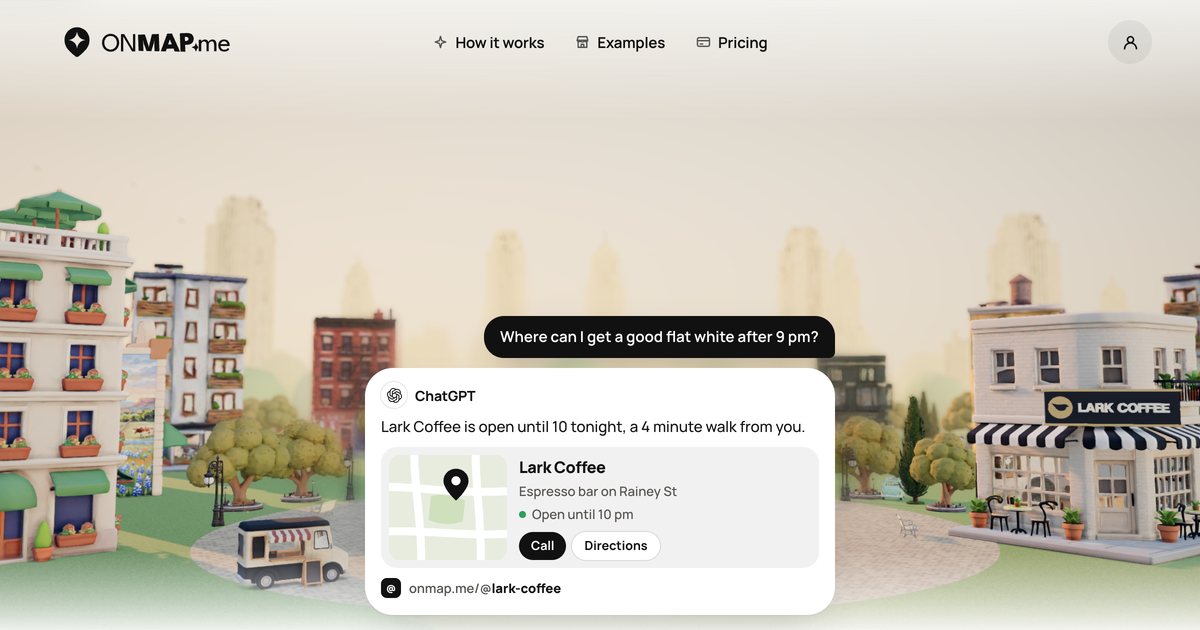
OnMap.me makes one page for a local business in the United States, written so that ChatGPT, Gemini and Claude can find and quote it. The product is aimed at local owners — a coffee bar, a barber, a bakery, a locksmith — who want to be the answer when someone nearby asks an AI assistant who to call. A business claims its link at onmap.me/@yourbusiness in a short chat, and the page states what the business does, where it is, its hours, prices and answers to common questions. According to the site, the page presents those facts as plain text and structured data and stays open to AI crawlers, so assistants can read it and quote it when they compose an answer to a local question. The pitch is built around a change in how people search. OnMap.me states that more people now ask ChatGPT, Gemini and Claude who to call, and that assistants quote the clearest page they can find. The site gives the example of someone asking where to get a good flat white after 9 pm and an assistant answering that a named coffee bar is open until 10 tonight and is a four minute walk away. It explains that ChatGPT turns a question into web searches and writes its answer from the pages and listings it finds, and that OpenAI does not publish how it decides which local businesses to recommend. For owners with no website or no time, the problem is that nothing on the open web states their facts plainly. OnMap.me argues that a page of your own is the one place where you say what you do, where and when, in your words, and that an OnMap page works without a website. The page is organized around what OnMap.me calls an answer that comes first. One line says what you do, where and when, and that is the line the site says assistants quote, using an example such as "Barber on Graham Ave, Williamsburg." Below that line, OnMap.me suggests the questions people really ask a business of that kind and answers each one in plain words — whether walk-ins are welcome on Saturdays, how long a skin fade takes, where to park. The page also carries structured data so that search engines read the business's hours, place and prices without guessing; the site shows markup such as "@type": "HairSalon" as an example of what a page declares. Hours and areas stay editable, so holidays, new neighborhoods and price changes can be edited anytime and go live right away. Claiming a page is handled through a short chat rather than a form. The owner picks a link — the business name as one short address, which the site says is yours — and tells OnMap.me the basics: hours, phone and what the business does. OnMap.me writes the page from those facts in minutes. On a phone, call and text buttons stay in reach, with no forms and no menus. The same link then works everywhere the business already shows up: in a social bio as the one link that answers everything, behind the Website button on Google, and in every text message, so an owner can send a link instead of a paragraph. A recurring piece of the product is the weekly local guide. OnMap.me describes it as a short how-to that answers one question people nearby ask, and says a new local guide is added every week. Guides are drafted with AI and, according to the site, never state a fact about the business that the owner did not supply; the owner can approve, edit or ignore them, and there is nothing to maintain. The Pro plan raises this to two guides a week and adds a monthly AI report, the business's own domain, a Google Business Profile checklist, a directory check, a review kit and a reply from a person within one business day. Overall, the approach is to give AI assistants one accurate, readable source. The site explains that ChatGPT, Gemini and Claude search the web and read the pages they find, and that an OnMap page lets their crawlers in and says what the business does, where and when, in plain sentences and structured data, which makes it easy to quote. It also points out that there is no form to submit a business to ChatGPT, and that the practical step is to let OpenAI's search crawler, OAI-SearchBot, read one accurate page. OnMap.me is explicit that it makes no ranking promise: it cannot guarantee rankings or that an assistant will name a business. What Pro provides instead is measurement — real monthly counts of reads by AI assistants' crawlers, visits that came from a link in an AI answer, and taps on Call and Text. The stated outcomes for an owner are a single page that assistants can read and quote, a link that can be reused in a bio, on a Google profile and in messages, and call, text and maps buttons that put a customer one tap away on any screen. Because guides and answers are refreshed weekly, the page keeps itself current without the owner maintaining anything, and any edit the owner makes goes live immediately. The site is candid that the list of businesses an assistant returns changes almost every time a question is asked, and it frames its job as building the page assistants rely on rather than promising placement. Use cases are illustrated with fictional demo businesses. For a coffee bar, the page answers questions about opening late and finding a flat white nearby. For a barber in Williamsburg, it quotes a price — a fade and beard trim listed at $45 with walk-ins welcome — and answers how long a skin fade takes and where to park. For a bakery on South Congress, it answers whether the kolaches sell out and where to park, alongside hours from 6:30 am and a phone number. For a 24-hour locksmith in Phoenix, the link in a bio and in texts answers what the business does and its areas. The site also addresses businesses with no website at all, which can still have a page of their own. OnMap.me is aimed at owners with no site or no time: the site says plainly that if you keep a good website current yourself, you may not need it. Pricing is in US dollars with no setup fee, no contract and no free trial, and can be cancelled anytime. Basic is $29 a month and includes the page, one new local guide a week, answers to what people nearby ask, Call and Text buttons, a live Open now status, and the business's logo and photos. Pro is $99 a month and adds everything above plus two guides a week, the monthly AI report, its own domain, a Google Business Profile checklist, a directory check, a review kit and a person's reply within one business day. OnMap.me is run by TRY2APP LTD, a UK company (no. 16526433), and states that it is not affiliated with OpenAI, Google or Anthropic. The takeaway is narrow and deliberate: one page per local business, written in the plain sentences and structured data that AI assistants read, kept current with weekly local guides and measured with real counts, so that when a neighbor asks an assistant who to call, there is a clear page to quote.
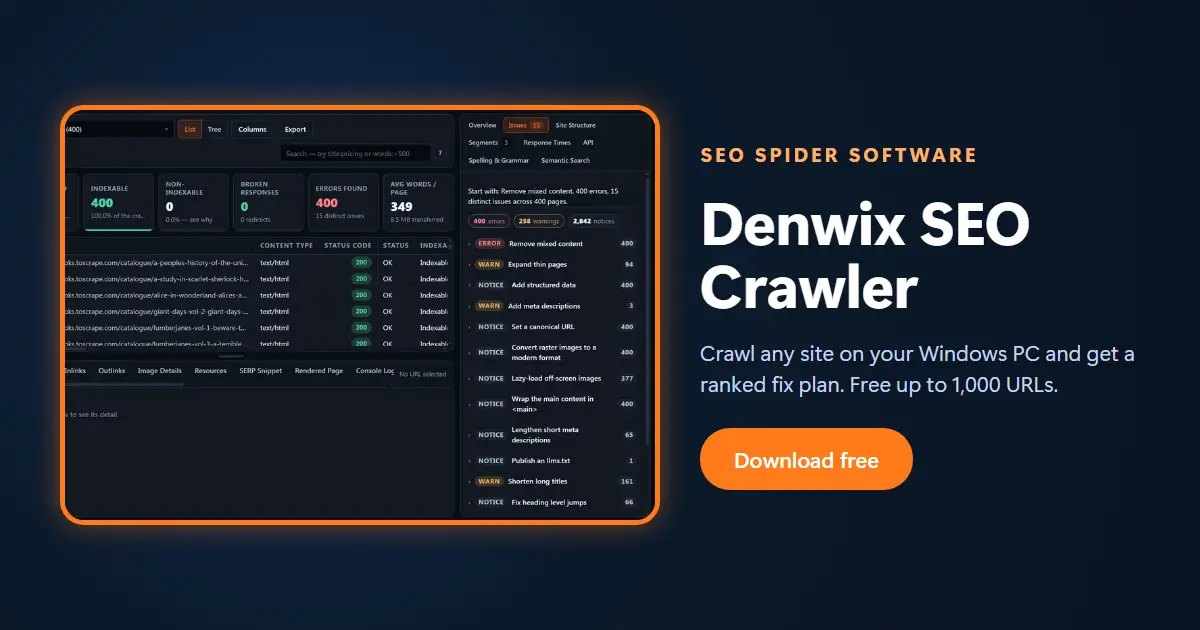
Denwix SEO Crawler is SEO spider software that runs locally on a Windows PC. It crawls a website much like a search engine bot: you enter your home page URL, and the crawler goes through every link it finds while recording the status code, the page title, the headings and many other details for each URL. The result is a view of the entire site the way Google sees it, presented in a single table. It checks every page for broken links, redirects, weak title tags, heading and canonical issues, and AI search problems, and when the crawl ends it lists the fixes in order of importance. It is built for people doing technical SEO work across a whole site rather than a single page, and the free version crawls up to 1,000 URLs per crawl with no limit on how often you run it. The problem it addresses is scope. SEO tools typically check a single page of a website, but a crawler evaluates all pages of a website and displays the relationship between those pages. That difference matters when a broken link sits on page 400, when a redirect was overlooked by everyone, or when a page has no inbound links at all — issues that a page-by-page checker will never surface. Once a crawl does find those problems, a second problem appears: a list of 2,000 problems is hard to manage. Sorting, prioritising and explaining that list is as much of the job as finding it, which is why the product pairs its audit with a ranked fix plan rather than a raw dump of URLs. Every crawl runs the same audit on both the free version and the paid plans; the only limit on Free is the number of URLs in each crawl. The first group of checks covers response codes and redirects. The crawler records 2xx, 3xx, 4xx and 5xx answers along with timeouts and blocked URLs. It follows every hop of a redirect chain, flags loops, and distinguishes a 301 from a 302. On-page metadata is checked next: page titles and meta descriptions are flagged when they are missing, repeated across URLs, cut off for length or too thin, and headings are checked for missing or repeated H1 tags and skipped heading levels. Because these problems are reported per URL, you can see exactly which pages carry them and how widespread each pattern is. A second group of checks deals with indexing and page-level quality. The crawler examines canonical tags, meta robots and X-Robots-Tag, and reports how they conflict with each other. For images it finds missing, empty or over-long alt text. For content it measures word count and flags thin pages and near-duplicate pages. Link analysis covers crawl depth, inlinks, orphan pages and internal PageRank, so you can see which pages receive no internal links at all. Finally, structured data is validated: JSON-LD that does not parse or that misses required fields is reported. All of these checks run from the same single table, so a fix can be traced from an issue on one URL to the way that URL is linked from the rest of the site. The fix plan is where the findings become work. The crawler sorts the problems into groups and ranks each one by its impact on the site and the effort the fix takes. Every problem is explained in clear words: what it is, why it matters and how to solve it. The plan can be exported as an HTML report, a JSON file or a PDF audit report; the PDF report requires Chrome or Edge, and without either browser the application generates a page that can be printed. A separate AI search audit reads robots.txt the way the robots.txt standard (RFC 9309) describes it and reports the status of all 34 known AI bots. It also scans your llms.txt, the Content-Signals Cloudflare includes in robots.txt, and the structured data on your pages, and it evaluates how easy the main content of each page would be to quote. Training crawlers and AI answer crawlers are listed separately, so you can tell whether a block was intentional and whether it could cost you traffic. Sitemap generation and audit are included on every plan. Under the hood, the product takes a deliberately small approach. The engine is built on Node.js without a single outside npm package, relying only on what Node.js itself offers, such as the built-in SQLite database and fetch. That means no Java, no Docker and no third-party libraries that an attacker could replace with harmful code. Crawl data is kept in a database file inside your Windows user profile, so you can delete, rename, export or import your crawls whenever you need, and because the crawler runs on your own computer it can also reach staging sites and pages behind a firewall. The free version requires no account. Licence keys are checked offline: Denwix holds the Ed25519 private key used to sign every licence key, the matching public key lives inside the application, and at launch the app verifies your key locally with no login and no remote server. The application connects to denwix.com only to check for updates once a day on opening and to ask whether the key tied to a claim code is available after a purchase; it collects no telemetry. Premium features that use external services such as PageSpeed Insights or an AI model send requests directly from your PC to those services, and no AI-related activity happens before you enter your own API key. The benefits follow from those choices. Crawls run as often as you like within the URL limit, and a crawl can be paused, resumed or stopped at any moment while results fill the tabs live. Data stays local, so there is no service to log into and no crawler vendor holding a copy of your site's structure. The fix plan turns a large issue list into an ordered set of tasks, which is the difference between a report nobody reads and a queue of work someone can start on. Politeness controls protect the server being crawled: the crawler leaves a pause after each request, it slows down when a server says it has too many requests (429), is unavailable (503) or keeps answering with forbidden errors (403), and you can set the crawl speed and the number of threads. Concrete uses include a full technical SEO audit of a site, where the crawler surfaces redirect chains, mixed content, heading level jumps and missing canonicals in one place instead of one page at a time. A team working on a staging site can crawl it directly from a Windows PC because the crawler runs on the machine and can reach every site that computer can open, including local and staging sites that need no password. Anyone concerned about AI search can use the AI search audit to see which of the 34 known AI bots robots.txt allows or blocks and to separate training bots from answer bots. Premium users can render JavaScript-heavy pages with Chrome or Edge and compare the rendered page with the raw HTML, run custom search and custom extraction, compare two crawls to see what changed, and schedule crawls that e-mail reports. Agencies can turn the same findings into white-label PDF and HTML reports carrying their own company name, logo, colour and contact line. The product is aimed at anyone who does technical SEO on their own machine: solo consultants, in-house SEOs and development teams who want crawler data without uploading a site to a third-party service. System requirements are a 64-bit Windows 10 (version 1809 or higher) or Windows 11 PC; JavaScript rendering, screenshots and the PDF report also need Google Chrome or Microsoft Edge. Connections to Search Console, GA4, Moz, Majestic and Ahrefs are in beta, having been tested with sample data rather than real accounts, and an MCP server for AI assistants plus API access are Premium features. Pricing is clear: Free costs nothing and crawls 1,000 URLs per crawl with one seat; Premium is 150 USDT a year for one seat and adds unlimited URLs, JavaScript rendering, all 600+ bulk exports, scheduling and e-mail reports, crawl comparison, PageSpeed Insights, Search Console and GA4 data, MCP and API access, custom search and extraction, and external link checking; Agency is 399 USDT a year with unlimited seats, white-label reports and priority email support. Both licences last one year, are paid in USDT or via Binance Pay, and every new version is free to download. After a year the app returns to the 1,000-URL free limit with saved crawls intact. The app is Windows-only and English-only, with no macOS or Linux build yet. Denwix SEO Crawler is a focused technical SEO tool rather than a platform. It crawls a site the way a search engine bot does, records what it finds URL by URL, ranks the problems by impact and effort, and explains each fix in plain English, while keeping every byte of crawl data on the Windows PC that produced it. The free tier crawls 1,000 URLs per crawl with no sign-up and no expiry, and the paid tiers remove the URL limit and add rendering, scheduling, comparison and white-label reporting. For teams that want an affordable, local, offline-licensed alternative to desktop crawlers, the offer is straightforward: install it, enter a home page, and read the ranked fix plan.
AI Visibility Checker for Shopify is a free web tool from Shopkeeper SEO that shows Shopify store owners whether leading AI assistants recommend their shop when shoppers ask buying questions. You enter your Shopify store address and email, and the checker asks ChatGPT, Claude, Gemini and Perplexity three questions a customer would ask before buying what you sell. It then emails a report showing who the assistants recommended, whether your store was named, and the exact words used. The tool is designed for Shopify merchants who want a clear, practical snapshot of how visible their store is in AI-generated shopping answers. Shoppers increasingly ask AI assistants what to buy. When someone asks ChatGPT for the best gift, cleaner or candle, the assistant names a handful of shops and the conversation usually ends there. If your shop is not one of those names, you do not get a look in. The checker addresses that problem by showing Shopify merchants what the assistants actually say today. The website notes that AI assistants pick the shops whose pages answer the question best, so visibility is something store owners can change rather than a fixed ranking. The free report makes that starting point concrete. The checker covers four AI assistants: ChatGPT, Claude, Gemini and Perplexity. It asks each assistant the same three questions, with web search switched on, and behaves as a shopper in your country would. That country-specific, web-search-enabled approach is intended to show the answers your customers actually get. Because every assistant receives the same three questions, the report gives a comparable view across platforms and highlights whether different assistants name different shops. The result is a score out of 12 answers in total, making it easy to see how often your store appears across the four assistants and three questions. Questions are not generic. The checker reads your shop's homepage to understand what you sell and who you sell to, then writes three questions a customer would ask just before buying what you sell, such as what is the best natural cleaner for quartz worktops in the UK. The questions never mention your brand, because real shoppers do not. This makes the test closer to a genuine buying conversation and helps reveal whether your store appears for the kinds of prompts customers actually use. The homepage reading also means the checker never needs access to your store. The emailed report shows the real answers word for word. It includes your score out of 12 answers, the shops AI recommends instead of you, and every question with each assistant's own words. In the example report for a UK cleaning products shop, ChatGPT and Claude did not name the store and recommended other products, while Perplexity named the store for a refillable eco cleaning spray subscription question. The report marks whether each assistant named you or did not name you, so you can scan results quickly. This exact wording is useful because it shows not just whether you were absent but which alternatives the assistants chose. The process takes three steps and about five minutes. First, the checker reads your shop's homepage to learn what you sell and who you sell to, without needing access to your store. Second, it asks four AI assistants three customer questions each, with web search on. Third, it sends the report by email, showing who they recommended, whether it was you, and the exact words they used. The checker is free, requires no sign up and no card, and uses your email only to send the report unless you opt in to SEO tips and launch news. The checker is explicitly a snapshot, not a ranking. AI answers change from day to day and person to person, so the report shows exactly what the assistants said when the questions were asked. That makes it useful as a point-in-time diagnosis rather than a permanent score. For Shopify merchants, the benefit is seeing whether ChatGPT, Claude, Gemini and Perplexity recommend their shop, which shops they recommend instead, and how those assistants phrase their answers. The website also states that AI assistants search the web before answering and quote the clearest, most trusted pages, and that pages answering the exact questions customers ask with real product facts are what get a store named. Concrete use cases include checking whether ChatGPT recommends a Shopify store when a shopper asks what to buy, identifying the shops AI assistants recommend instead, and reviewing the exact words each assistant uses. A merchant can see the three generated buying questions and the 12 answers, then understand where their store appears or does not appear. For ongoing tracking, the paid Shopkeeper SEO app asks 12 questions every month so store owners can see the trend. Shopkeeper SEO also writes and publishes articles in the merchant's voice that answer these questions and checks every month who AI names, connecting the free checker to an ongoing visibility workflow. The free checker is only for Shopify stores, because Shopkeeper SEO is a Shopify app and the team prefers to spend the cost of each report on shops it can help. It is a web tool with no sign up and no card required. The report arrives by email in about five minutes. The paid app, Shopkeeper SEO, is the Shopify app that gets stores found on Google and in AI answers, and it asks 12 questions every month for trend tracking. The checker itself is free, while the ongoing article writing and monthly checks are part of Shopkeeper SEO's paid offering as described on the site. Overall, AI Visibility Checker for Shopify gives Shopify merchants a free, fast and concrete way to see whether leading AI assistants recommend their store for real buying questions. By showing the assistants' exact answers, the other shops they name instead, and a score out of 12, it turns an otherwise invisible AI shopping conversation into a useful snapshot that store owners can review and track over time.
Kovmere is a measurement and reporting service that shows whether AI assistants recommend your business when buyers ask questions in your category. You enter your website address, and Kovmere writes the buyer questions from your site's pages, then asks OpenAI, Gemini, Perplexity, Claude and Google AI Overviews those questions three times each. You receive a dated report showing who the AI engines recommend instead of you, the pages they cite as sources, and a Fix package containing editable drafts and recommendations that you review and publish yourself. Kovmere is aimed at businesses, marketing and SEO teams, and agencies that want concrete evidence about how they appear in AI answers instead of assumptions, and it is designed so that a first look requires nothing more than a website address and an email for delivery. The problem Kovmere addresses is that buyers now ask AI assistants questions before they choose a product or service, and those answers name a short list of recommended brands. If your business is not on that list, you are effectively invisible at the moment of consideration, even if the brand is well known. Kovmere illustrates this with a real, dated example from TidyCal, a company that is explicitly not a Kovmere customer: even a well-known brand was never recommended on half of its buyer questions, appearing in 16% of buyer answers and missing from 9 of 18 buyer questions. In that example, AI answers recommended Calendly for 37% of answers, Cal.com for 29%, Acuity Scheduling for 18% and Setmore for 12%, based on a share of 255 buyer answers. Kovmere exists to make that gap measurable and to point to what can be changed on your own site. The measurement itself is the core of the product. Kovmere writes your buyers' questions from your website, keeps those questions fixed so that later checks compare like with like, and lets you name the competitors you want to watch. Every question is asked on every engine three times, across up to five AI engines: OpenAI, Perplexity, Gemini, Google AI Overviews and Claude. The report shows how often each engine recommends you, so you can see differences between platforms rather than a single blended score. If an engine cannot be measured, Kovmere marks it as "not measured" with the reason and never counts it as zero, which keeps the numbers honest. The company notes that these are search API measurements, not results from anyone's personal app. The report is structured around the questions your buyers actually ask. In the published TidyCal example, questions such as "Which team booking tool has a one-time payment option?" show 12 of 15 answers recommending the brand, while "Which free online scheduling tool should I try?" shows 1 of 15 and "Which appointment software for small business lets clients choose a team member?" shows 0 of 15. Engine-level rates in the same example run from Gemini at 30% and Claude at 25% down to Google AI Overviews at 13%, OpenAI at 9% and Perplexity at 7%. Alongside this, Kovmere lists the pages the AI engines cited, so you can see which sources are shaping the answers and which competitor brands are being named in your place. The Fix package is where the report turns into action. Kovmere groups fixes into three areas. The first is changing your site: strengthening an existing page, creating a page or section, building a comparison or alternatives page, or being told the right content format to use. The second is making information easier to use: technical files that are ready to install, simulated crawler checks, structured data, and internal links and page structure. The third is improving what AI and other sites see: a review of the cited pages, directory and profile opportunities, outreach to a specific source, a brand-fact review, and re-measurement on the same questions. Each package uses only what the measurement supports, and the pricing tier determines how many fixes you receive. Overall, the workflow is deliberately simple: three steps with no call and no setup. You enter your website, Kovmere writes your buyers' questions from it, the AI engines are asked every question three times, and you get your report and fixes. The report usually arrives in about 20 minutes and the fixes follow within about two hours. Kovmere does not change your website for you. You receive the report and editable materials, you decide what to change, and you publish it with your usual tools; nothing is published or sent on your behalf. The company is also explicit that a fix is a reasoned recommendation based on the measured answers and your own pages, and that no one can promise a fix will make AI recommend your business. The benefit for users is a clear, dated picture of where they stand in AI answers, who is being recommended instead, and what to change first, rather than a list of generic SEO tasks. Because the questions are fixed between runs, later measurements can be compared directly, and on the Pro plan Kovmere asks the same questions again so you can see what changed after you publish. The Fix package is ordered, showing which page updates to do first, which technical files are optional, and how many cited pages and brand-fact checks are included, which helps a small team sequence its work. A Check gives a first look with up to three fixes and a brand-fact review, while Pro provides a monthly benchmark plus three weekly pulses, up to 12 fixes a month, and reporting on what changed after each fix. Typical use cases follow from that structure. A business preparing to invest in content or SEO can start with a single $19 Check to see its AI visibility, the competitors being recommended and the cited pages, then decide what to change. A marketer who publishes a fix can use Pro's monthly benchmark and weekly pulses to watch whether the same buyer questions start producing different answers. An agency can use the Agency Portfolio plan to give each client website its own separate page, with Pro included for each site, and add further client websites for $39 a month. Businesses outside the United States can also run checks in the United Kingdom, Canada, Australia, Ireland and New Zealand, choosing where their buyers are at checkout. Pricing is stated clearly on the site. The Check costs $19 USD once, covers one website and one benchmark, shows who AI recommends instead, includes up to 3 fixes ready to edit, and requires no sign-up; nothing renews and there is nothing to cancel. Pro costs $49 USD per month, includes a monthly benchmark plus 3 weekly pulses, up to 12 fixes a month, and what changed after each fix, and can be cancelled anytime with no annual contract. Agency Portfolio costs $129 USD per month for Pro across 3 client websites, with additional client websites at $39 per month, chosen at checkout or added later from your dashboard. There is no free trial. Your website and the email where you want delivery are all that is required, the report comes by email, and you can create an account later with the same email. If the first measurement still cannot complete after one automatic re-run, your payment is refunded automatically. In summary, Kovmere's primary value is evidence: it shows which brands AI answers recommend for your buyers' questions, the pages those answers cite, and a dated, editable set of fixes to work from, starting at a $19 one-time Check with no sign-up.
Greta.sh is an AI app builder and vibe coding platform that turns a described idea into a live, production-ready full-stack website or web app. You type what you want to make, Greta.sh builds it on screen, and it can be deployed with one click. Alongside the builder, Greta.sh offers Self-Growing Websites: sites that find what customers search for, write pages that answer those searches, and get you showing up on Google, ChatGPT, Perplexity and everywhere else. The pages it produces are content you review and approve. The platform is positioned as one place to design, build, launch, manage and grow a product, from first idea to live product. The starting point for the product is a question every builder recognises: you built a website or an app, so why is nobody visiting? Getting found on Google and on AI tools such as ChatGPT and Perplexity takes months of SEO and AEO work. Greta.sh frames its Self-Growing Websites offering as the fix for that gap. Instead of treating search visibility as a project you complete once, the site is designed to keep growing itself: Greta.sh finds what customers search for, writes pages that answer them, and works to get the site showing up on Google, ChatGPT and elsewhere. The Product Hunt listing summarises the pitch simply: don't just build a website anymore, build a customer magnet with Greta.sh. At the centre of the platform is a four-step build flow. Step one is to describe your idea: you type what you want to make, like you are talking to a friend, and the content stresses that no special skills are needed — your idea is enough. Step two is to see it built, as the idea starts turning into something visible on screen. Step three is to bring your own tools, connecting Claude, Gemini, Slack, GitHub and more so that Greta.sh brings it all together. Step four is to deploy with one click, where everything from your domain to search ranking to safety checks just works, with the promise that you can build today and launch today. The Full Stack feature supports this: you can build your full app, website and tools without writing a single line of code, and the platform distinguishes between a Self-Growing Website, a Web App and full stack, with a "Which one do I need?" prompt to help you choose. The Self-Growing Websites capability is the growth side of the platform. Rather than leaving search visibility to manual keyword research and page writing, Greta.sh finds what customers search for, writes pages that answer those queries, and keeps adding pages that you approve. Because the content is subject to your review and approval, you stay in control of what goes live while the system handles discovery and drafting. The stated aim is presence in both traditional Google search and AI search tools, which is where the SEO and AEO combination comes in: the pages are built to answer the questions customers actually ask, so the site can appear in search results and in the answers AI assistants give. The Greta.sh MCP is the control layer for people who prefer to work inside their existing AI assistant. With the MCP, you can run the platform from Claude, ChatGPT or Cursor: you ask it to build, grow, publish or report, and the work is carried out through the connected assistant. The MCP feature is described as connecting your tools, systems and data so everything works together smoothly. In practice this means the build-and-grow workflow does not require switching into a separate dashboard each time — a builder can stay in the assistant they already use and issue instructions in natural language, whether that is to add pages, publish approved content or produce a report. Beyond building and growing, Greta.sh bundles the supporting pieces a live site needs. Domain lets you launch your brand online with your own custom domain in minutes, and the deploy step folds domain setup together with search ranking and safety checks. Asset Manager keeps files, images, videos and content in one clean, organised place, so the media that supports your pages is managed rather than scattered. Templates give you a head start: the platform advertises a choice of 100+ templates, where you find one you like, click it, and Greta.sh does the rest — the library includes published examples such as an e-commerce frontend, an analytics template, a content dashboard, a marketing template and agency or portfolio-style sites. Support scales with your plan: community support on Free, email support from Starter, and priority support on Pro and Business. The overall approach is to keep the whole lifecycle in one platform rather than stitching together a builder, a host, a domain registrar and a content team. You begin with a prompt, watch the build appear, attach the tools you already use, and deploy — then the same platform keeps working on growth by finding search demand, drafting answering pages and waiting for your approval before publishing. The MCP extends the same control surface into Claude, ChatGPT and Cursor, so the build, grow, publish and report actions are available wherever you already work. The stated benefits follow from that loop. You can go from idea to live product quickly, because deployment handles domain, search ranking and safety checks and the platform promises you can build today and launch today. You do not need to write code, since the full-stack capability covers apps, websites and tools. You do not need to run a separate SEO and AEO programme from scratch, because the site is designed to find what customers search for and write pages that answer them on your approval. And you get a single place to design, build, launch, manage and grow, rather than a set of disconnected tools. Concrete scenarios described in the content include building a full-stack web app or a website from a plain-language description; launching a brand on a custom domain; and running a site that keeps adding approved pages aimed at what customers search for. The MCP scenario is explicit: running the platform from Claude, ChatGPT or Cursor and simply asking it to build, grow, publish or report. The template library suggests additional starting points, with published examples including an e-commerce frontend, an analytics template, a content dashboard, a marketing template, and agency and portfolio-style sites. The platform is presented for people with an idea rather than a development team — the build flow explicitly says no special skills are needed, just your idea. The connector wall shows the tools the product works with: GitHub, OpenAI, Slack, AWS SES, Resend and Netlify, plus Claude, Gemini, MongoDB, Google Analytics, Stripe and xAI. Pricing detail in the content is limited to support tiers: a Free plan with community support, a Starter plan with email support, and Pro and Business plans with priority support. The Product Hunt listing categorises the product under Marketing and SEO. Greta.sh combines an AI app builder with a growth engine: describe your idea, get a production-ready full-stack site or app, deploy it with one click, and let the platform find what customers search for and draft the pages that answer them for your approval. It is aimed at getting a new site found on Google and in AI tools like ChatGPT and Perplexity without months of manual SEO and AEO work, and at keeping build, growth and publishing under one roof.
Dedica is an agent readiness testing tool for websites. It tests your site the way AI agents use it and then gives your team a fix for every place those agents fail. The product is aimed at teams whose websites are visited, compared and signed up on by AI agents such as Muse, Dots, Instinct, ChatGPT, Claude, OpenClaw and GrokBot. A free score is delivered in under a minute with no signup required, and the detailed fix kit is purchased separately. Dedica's stated purpose is simple: find where agents get stuck on your site, and hand your team the fix. Most websites are built for people and fail for software. Dedica's site names the specific failure modes: bot checks, pages that only render in a browser, and APIs with no public docs. When an agent hits one of these, it does not report the problem — it simply moves on, which means the business never learns it was skipped. Dedica cites two figures to frame the stakes: only 6% of business websites are ready for AI agents, and businesses that are ready are recommended by AI agents 1.9× more often. The core problem Dedica addresses is that this failure is invisible by default; there is no error report when an agent quietly abandons a sign-up flow, so teams have to test for it deliberately. The free report runs 125 checks across four areas: discovery, access, usability and payments. Discovery asks whether agents can find what they need on your site at all. In the sample report this area is scored out of 20 and includes checks such as whether an OpenAPI or Swagger spec is published at the usual paths, and whether an MCP server or manifest can be found. The fix kit's file list shows further discovery-oriented items, including a check for an llms.txt file and an agent-friendly 404 page. Each discovery gap is a place where an agent has nothing machine-readable to work with, so the practical result of fixing them is that agents stop guessing and start reading structured information about your product, plans and endpoints. Access checks ask whether agents are let in once they find the right page. The sample report scores access out of 30, and the top-ranked issue in that sample is a bot check that blocks agents at sign-up: acme.com/signup returns a 403 challenge page. Dedica shows what the agent actually received — a challenge page with a reference ID — next to a comparable page that returns plans, prices and a working sign-up without a bot check. The fix instruction is explicit: let verified AI agents through the bot check on public pages and sign-up while keeping rate limits in place. OAuth support appears as another item in the fix kit, covering how agents authenticate rather than being turned away. Usability checks ask whether an agent can read and act on what it finds. This is the largest check group in the sample report, scored out of 40. One issue shown is pricing that needs JavaScript to load: acme.com/pricing is empty until scripts run, so an agent that fetches the page sees no plans or prices even though a human in a browser sees a full pricing table. Dedica contrasts this with a page it can use, where plans and prices sit in the page text and the sign-up action works. The corresponding fix file, 02-content-no-js.md, addresses rendering content without JavaScript. Usability work matters because an agent that cannot read your pricing cannot compare it, and an agent that cannot complete a sign-up cannot convert on your behalf. Payments is the fourth check area, scored out of 10 in the sample report. It covers whether an agent can get all the way through a commercial action — signing up for a plan, for instance — rather than being blocked at the last step. The sample report shows an overall score of 71 out of 100 with a grade of D, and 42 fixable issues spread across discovery (11/20), access (9/30), usability (14/40) and payments (4/10). Presenting the four sub-scores separately tells a team which layer of the problem to attack first rather than treating agent readiness as a single pass or fail. Every finding is ranked by how much fixing it would move the score. The report's Fix first list puts the highest-impact issues at the top with an estimated gain: a bot check blocking agents at sign-up (+6.2), pricing that needs JavaScript (+4.6), no OpenAPI spec published (+4.2), and no MCP server (+4.1). Each issue carries check points, such as 0/6, so a team can see how much of a given check is currently passing. The fix kit then turns each finding into one instruction file per issue, written for a developer or a coding agent, stating what to change and how to check it worked. In the sample, the kit contains 42 files, named so they map directly to the issue — 01-bot-detection.md, 02-content-no-js.md, 03-openapi-spec.md, 04-mcp-server.md, 05-llms-txt-exists.md, 06-oauth-support.md, 07-agent-friendly-404.md and 35 more. The workflow is scan, fix, scan again. First, you enter your domain; the score is free and takes under a minute. Second, you hand over the fix kit — either giving the files to your developer or pasting them into Claude Code, Codex, Cursor or GitHub Copilot. Third, once the change ships, you rescan and watch each check pass. The sample walks through exactly this loop, with a score of 38 turning into 71 after the fixes are applied. Because the fix files are written for coding agents as well as people, the same artifact can be routed into an existing agent-assisted development workflow without rewriting the instructions. The outcome Dedica describes is a site that agents can actually use: they find the pricing page, read the plans and open the sign-up flow, instead of hitting a 403 challenge page and silently giving up. Teams get a documented, per-issue record of what was wrong and how to verify the repair, which removes the guesswork from a class of problem that produces no error log. Dedica also frames the upside commercially — businesses ready for agents are recommended by AI agents 1.9× more often — so the work is positioned as revenue-relevant rather than purely technical hygiene. Concrete scenarios in the content include a team asking an agent to sign up for a plan and discovering the site blocks it; a pricing page that renders in a browser but arrives empty to an agent; and an API with no published spec or MCP server that leaves agents with nothing to call. The product suits teams shipping websites with pricing and sign-up flows, developers maintaining public APIs, and teams already using Claude Code, Codex, Cursor or GitHub Copilot who want remediation delivered as instructions those tools can execute. Pricing is explicit: the score with 125 checks is free, no signup is required, and the fix kit is $30 one-time per site. Dedica also lists Claude Code, Codex, Cursor and GitHub Copilot as ready targets for its fix files. In short, Dedica makes agent readiness measurable and fixable: it scores how agents find, read and use your website, ranks the issues that cost you the most, and hands your team an instruction file for each one so a developer or a coding agent can close the gap and verify the result on the next scan.
ogimagegenerator.dev turns any URL into a social preview. Paste a link and it reads the page copy, brand colours, fonts, logo and a screenshot, then designs three on-brand Open Graph images in seconds.The AI never draws pixels. It writes a design spec that deterministic templates render, so text is always crisp and every result can be edited by hand. Formats cover Open Graph 1200x630, X header 1500x500 and square 1080x1080.Export a PNG or copy a hosted og:image URL with ready-made HTML and Next.js snippets. Free, no account.
Bottally is an AI marketing agent for SEO and AEO. Connect your site once and it researches your keywords, audits your pages and finds the topics your competitors cover and you don't. Then it writes and publishes one researched article to your blog every day (WordPress, Webflow, Ghost, Shopify, Wix, Notion, Framer, Next.js or any webhook). It tracks whether ChatGPT, Perplexity, Google AI Mode and AI Overviews mention your brand, and matches you with real businesses for do-follow backlinks.
Salience is server log intelligence for search engines and AI crawlers. It turns the server and CDN data a website already generates into a live view of every request, response and issue coming from people, search engines and AI bots. A user connects a source they already run — Cloudflare, Vercel, CloudFront, Netlify, Kinsta, Shopify, Apache, Nginx or raw log files — and Salience starts reading, verifying and classifying requests within seconds. The dashboard shows which pages Googlebot, GPTBot, ClaudeBot and other recognised crawler identities requested, the exact response the infrastructure served, and where crawl budget was wasted. Salience is built for search and organic growth teams, AI and content teams, security and platform teams, and engineering and commerce operations. The problem Salience addresses is a visibility gap between what analytics reports and what actually reaches a site. Google Analytics measures users, sessions and events collected by its tag and filters known bots out by design, so crawler behaviour never appears in it. Search Console answers some questions but not in real time: as one quoted scenario puts it, sitemap changes deployed yesterday may go unseen for 48 hours. Meanwhile raw access logs contain the answers but are difficult to read. Four situations recur in the content: not knowing whether Googlebot has seen sitemap changes, not knowing which AI systems read your content or whether they are genuine, discovering that traffic claiming to be Googlebot is not and that the real crawler is being rate-limited by a WAF, and shipping a URL change only to have Googlebot hit thousands of 404s before anyone notices. Salience exists to make those situations visible immediately. Two of the four capabilities in the Salience engine are Observe and Verify. Observe means seeing what is actually reaching the server: Salience analyses requests arriving through a CDN or web server, using server-side data only, with no browser script and no sampling by Salience. Every request that reaches the source is ingested, humans and bots alike, and each is classified as human or bot with more than 200 crawler identities recognised. Verify addresses impersonation: supported search, AI and automated identities are checked against official provider IP ranges wherever verification data is available, so legitimate GPTBot, ClaudeBot or PerplexityBot traffic can be separated from scrapers that merely reuse the User-Agent string. Verification status, per-bot crawl frequency and top URLs live on the Bots and Crawlers page. The other two capabilities are Explain and Act. Explain connects each request to the path, status code, site section, historical pattern, sitemap, robots.txt rule or index state, so a change in behaviour has a cause rather than just a number. Act moves from evidence to action: the affected bots, IPs and URLs are shown alongside the likely issue and a recommended next step. This surfaces through alerting that names the crawler, the URLs and the next step instead of saying that something happened. Example alerts in the content include 15,000 404s on /products/* from Googlebot since a 14:00 deploy, with a suggested next step to roll back or fix the URL structure, and ClaudeBot refused with 403 on 32 URLs under /collections since a WAF rule change, with a suggested next step to review the rule. Alerts can be marked reviewed, snoozed or dismissed as expected, and every alert checks that the site is reachable first. AI crawler activity gets its own view. Requests are grouped into training and other crawlers, AI search crawler requests and user-triggered AI fetches, with totals, share of traffic, unique crawlers and pages crawled. The AI Crawlers panel lists each bot with its category, verification status and unique page counts, and can be exported to CSV. Salience states clearly that recorded requests are classified by agent and do not prove training, indexing, answers or citations. For day-to-day work the dashboard gives a live view per site with shared read-only links for clients and colleagues, alerts arrive by email, Slack and webhooks, and reports provide a weekly summary per site plus CSV exports of the record behind it. A REST API with a personal API key is available on every plan including Free, a CLI lets teams query the same record from a terminal or script, and an MCP server connects Claude, Cursor or ChatGPT to the crawler data so users can ask questions of it. The overall method is a pipeline from raw request to recommended action. Signals feed the engine from search crawlers such as Googlebot and Bingbot, AI and LLM bots such as GPTBot, ClaudeBot and PerplexityBot, platform signals from Google Search Console and Google Analytics, and the primary source, CDN and web server logs. Requests move through raw, normalised, enriched and understood stages before producing Observe, Verify, Explain and Act. Setup follows three steps: connect what you already use, after which Salience starts reading requests and makes them available in the dashboard within seconds, and then act on problems that become obvious. Nothing is added to the page, there is no frontend change, and CDN sources need no agent on the origin. The stated benefits are complete visibility of real requests from people, search engines and AI agents using existing infrastructure; finding errors, blocked crawlers, missing pages and suspicious traffic early without manually digging through logs; understanding which content gets crawled, how the site responds and where problems need attention; and setup in minutes. Salience also runs 16 detectors checked every 5 minutes. On data protection, Salience states that it processes data only to provide the service, with the customer remaining the controller; core data is hosted in AWS London (eu-west-2) and encrypted at rest and in transit; collection is server-side with no client-side pixel; and logs are not sold, used for advertising or shared between customers, with a DPA available on request. Concrete workflows described in the content map to specific teams. Search and organic growth teams use it to check whether Googlebot has seen sitemap changes without waiting for Search Console. AI and content teams use it to see which AI systems read their content, whether the traffic is training or retrieval, and whether it is genuine. Security and platform teams use it to separate spoofed Googlebot traffic from the real crawler and to catch the real one being rate-limited by a WAF. Engineering and commerce operations use it to spot a URL change that produced thousands of 404s. It is also positioned for e-commerce intelligence and publisher intelligence. Historical imports support retrospective investigation: Apache, Nginx or CloudFront logs, or an export from another log analyser, can be dragged in, are auto-detected, deduplicated against real-time data and merged into the dashboard without counting against the monthly request quota. Setup is guided in about ten minutes or less for Cloudflare, Vercel and Kinsta; Apache and Nginx need someone with root or sudo for roughly ten minutes, using a read-only agent that reads the log file and sends it over HTTPS without sitting in the request path. Where a Worker collects logs, on Cloudflare and Shopify, it adds a small amount of edge compute. CloudFront real-time logs arrive at the sampling rate the customer configures. Plans scale with traffic: Free at $0 covers up to 12K visitors a month, one website, 30 days of history and two email alerts; Solo at $19/mo covers up to 125K visitors with six months of history and all 16 alerts by email and Slack plus sitemap and Search Console; Starter at $49/mo covers up to 500K visitors, five websites, one year of history, webhooks and shared dashboard links; Growth at $149/mo covers up to 2.5M visitors, 15 websites and two years of history with priority support; Pro at $499/mo covers up to 12M visitors, 50 websites, four years of history and dedicated support with a shared Slack channel; Enterprise is custom with unlimited websites, SSO/SAML, audit log, uptime SLA, DPA and custom MSA. Salience does not replace a WAF, CDN or observability tool; it reads the access logs those systems already produce and answers a narrower question well: what did search engines and AI crawlers request, what did the infrastructure return, and were they genuine. The core value is evidence from your own logs, turned into a live view and a clear next step.