Category Focus/categories/automation
Automation AI Tools
Discover and compare the best automation AI tools and software. Browse 599+ curated tools with reviews and rankings.
Projects tracked
599
Sort mode
RECENT
Page
3
Discover and compare the best automation AI tools and software. Browse 599+ curated tools with reviews and rankings.
Projects tracked
599
Sort mode
RECENT
Page
3
Autonomyware is an AI-native platform that turns a described idea into an engineered physical product. You start with a prompt, a sketch, or an existing product, and autonomous AI handles the engineering process end to end — moving from product definition through architecture, risk, CAD, BOMs, code, verification, and manufacturing preparation. The company frames the promise simply as going from text to physical products. The product is presented as one AI-native workspace that keeps every decision and engineering artifact connected from idea to implementation, so work does not scatter across disconnected tools. Its stated position is that if you can describe it, you can build it, with Autonomyware doing the engineering for you, and its tagline describes the goal as engineering anything you can imagine. The problem Autonomyware addresses is set out in its own research framing: a product is not a collection of shapes, it is a network of relationships. AI-generated geometry that merely looks right can fail to assemble, and there is a meaningful difference between a render you cannot use and a model you can inspect, verify and build. The platform also points to the engineering data companies already hold — scattered CAD, drawings and specs — as something worth interpreting rather than discarding. By taking an idea through product definition, architecture, risk, CAD, bills of materials and manufacturing preparation inside a single workspace, Autonomyware aims to close the gap between a concept and something that can actually be made. The central surface is the Forge. You open a forge, interact with the model and explore the surfaces, while a live forging narration shows exactly how the geometry was built. In the example shown on the site, a user asks for a desk sculpture of the Product Hunt kitty-cat award: the kitty in a stylized spaceship, with concentric circles and laurels around it, and a flat bottom so it prints clean. The narration reads the intent, classifies the work as SCULPT in a sculpting lane with one continuous organic body, no decoration and no assembly costing, and then creates a reference image to seed the sculpt. The platform describes the author as driving the tools with sight tags per department, with no templates and no recipes. Narration entries cover multi-view inference to complete unseen geometry, a first-pass seed acquired from four views through multi-view fusion, and Trellis native delivery remeshed to 285,000 triangles, winding-oriented with specks removed, before the whole product is assembled and reported as watertight, verified and using real materials. Everything the platform forges is described as real geometry — watertight and export-ready. Forged products appear in a library with their mode and status attached: a City bike and an EV solar charger listed as Assembly, forged, watertight, STEP and STL; a Camera drone listed as Assembly, forged, verified, STEP and STL; and a Panda sculpture listed as Sculpt, forged, coloured, watertight and STL. The site lists STEP, STL and 3MF under the heading "Made to be made", describing real 3D that is ready to print at home or send to a factory. A companion pillar, "Grounded in reality", states that an engineering mind checks the product stands up, that parts fit, and that it can be made. The model workspace also offers Material, Mesh and X-ray views alongside Render and Export controls. Agent Orchestration is where the model side of the platform is mapped. A provider list ships with "standard providers with sane defaults, ready to fly" — OpenAI, Anthropic and Google listed as defaults, plus a Local / self-hosted option. Users can add their own connection by choosing a provider family, specifying a model, a custom base URL and an API key, which the site describes as BYOK with no lock-in. Role mapping then assigns a model to each role: the main agent, the pre-read for the planner, the reviewer and verifier, image analysis, and the CAM advisor. A single model can take over all roles, or models can be mapped per role. The accompanying audit view, described as "one brain", runs every role on one shared context and keeps a full trace of every decision, cost and token for review. The overall method is presented as a five-step path in one place to create, improve and make something real. Step 01, Start with anything: describe an idea, share a sketch, or bring an existing product — plain words are enough. Step 02, Shape it together: Autonomyware asks useful questions, helps you explore options and keeps the work moving. Step 03, Watch it come alive: see the product take shape and understand how it works, explore it, then ask for changes. Step 04, Get everything you need: receive the right files, parts and guidance for the product. Step 05, Make it real: print it, manufacture it, build it or keep improving it. Refinement is conversational — the site invites users to comment on a forge with a described change, so iteration happens by chatting about the model rather than manipulating geometry directly. The stated benefits follow from that workflow. Under "Talk, don't click", you say what you want in plain words and then shape it by chatting, which lowers the barrier for people who do not drive CAD tools directly. Under "Grounded in reality", an engineering mind checks the design stands, fits and can be built, addressing the risk that a good-looking result cannot be made. Under "Made to be made", you receive real 3D that is ready to print at home or send to a factory, along with files and guidance that are described as clear and ready to use. Because the platform keeps decisions and engineering artifacts connected in one workspace, the thread from the first idea to the finished, downloadable model stays intact instead of being rebuilt by hand at each stage. Concrete scenarios shown in the content include a desk sculpture of the Product Hunt kitty-cat award, built as a single continuous sculpted body with a flat printable bottom, housed in a stylized spaceship with concentric circles and laurels. Assembly-oriented examples include a City bike, an EV solar charger and a Camera drone, all forged and watertight, with the drone also marked verified, and all offered as STEP and STL files. A Panda sculpture shows the sculpt lane producing a coloured, watertight model delivered as STL. The site also frames the end of the journey as printing or manufacturing: making the product real at home or sending it to a factory, according to the "Made to be made" messaging. Autonomyware is presented for anyone who can describe an idea, as well as for engineers who want to look deeper: the site says the surface is simple on purpose while real systems engineering sits underneath, and links to a research hub written in the open. Stated integrations include model providers OpenAI, Anthropic and Google as defaults, a Local / self-hosted option, and bring-your-own-key connections with a custom base URL, with no lock-in. Output formats named in the content are STEP, STL and 3MF. A forthcoming capability, labelled coming soon, is Evolve Outside Products: reading existing engineering data, learning from what already works, and evolving designs beyond a single product. No pricing or plan details are stated in the provided content. The takeaway is straightforward: Autonomyware positions itself as the place where an idea becomes a physical product without the user doing the engineering. You bring the idea in plain words, an autonomous AI system moves it through definition, architecture, CAD, verification and manufacturing preparation, and you end up with watertight, export-ready geometry plus the parts and guidance to make it real.
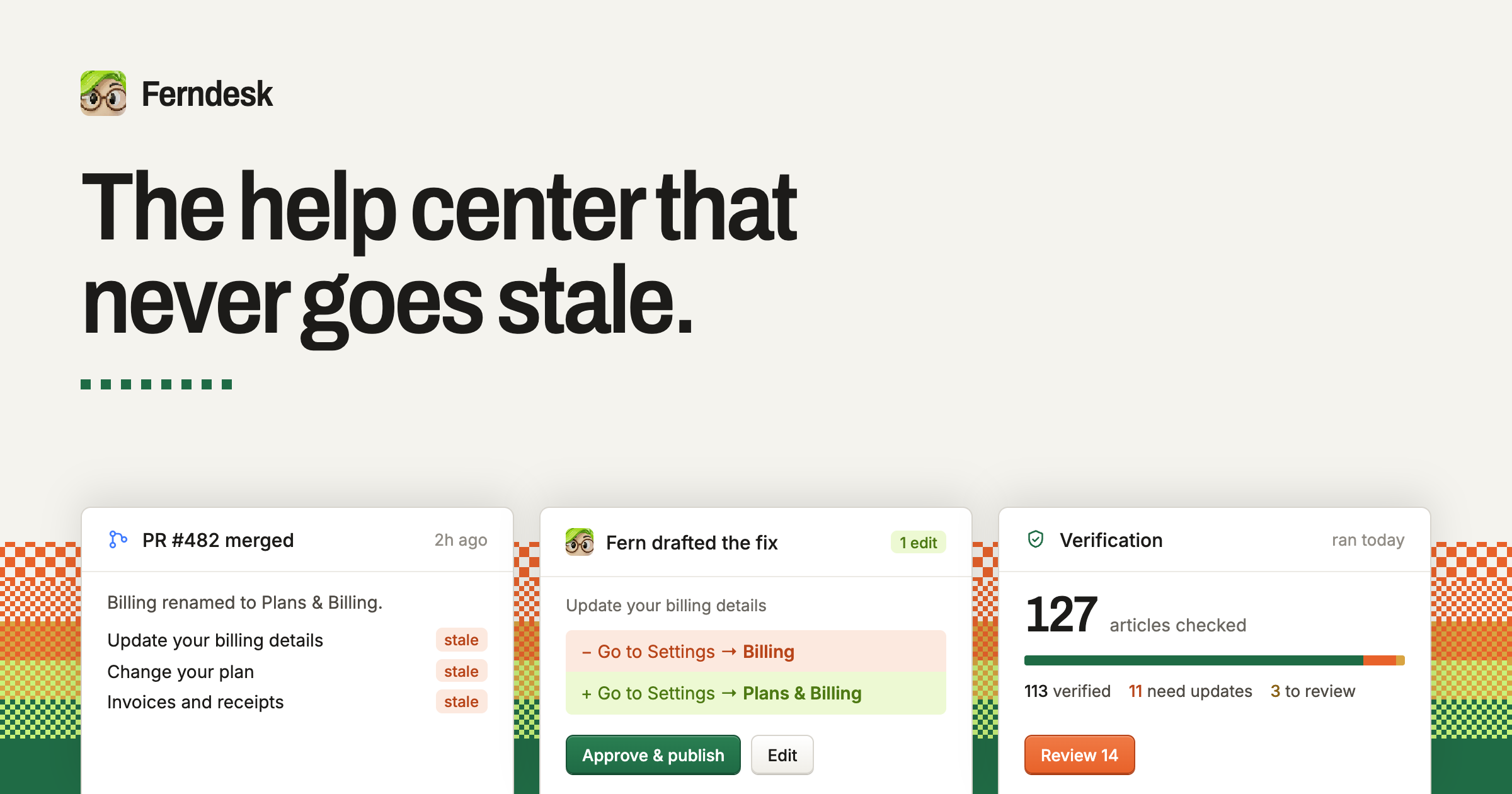
Ferndesk is a complete help center built around an agent called Fern that checks every article against your product, catches what has changed, and drafts the fixes for you. It is aimed at software teams that publish customer documentation and find it impossible to keep that documentation true while shipping features every week. Instead of treating a help center as a static set of pages that slowly drifts out of date, Ferndesk treats it as something that is continuously verified against the codebase, the live product and the support inbox, so the answers customers read match what the product actually does. The problem it solves is familiar to almost every software company. This month you changed a default, and yet your docs were last updated three months ago. Along the way you renamed a plan, killed a feature, moved the export button, added a plan, changed the pricing page, broke a link, shipped a new flow, renamed a button and changed a setting. None of those changes is dramatic on its own, but together they quietly make a knowledge base wrong. Ferndesk frames this as not the team's fault: keeping docs true while you ship every week is genuinely tough, and most teams fall back on hoping they will remember to update the documentation. The site quotes founders describing exactly this reality, including one who says their previous process for updating documentation was basically hoping they would remember to do it, another who says they ship features every week and updating docs is hell, and another who admits they used to write articles once and let them go stale right from day one. The first core capability is verification. Fern verifies every article in the help center and drafts the fix when something is wrong. Each claim is checked against the code and the product, and anything that is no longer true comes back as a change you approve, together with the reason it was flagged. A typical example shown on the site is a sentence that says a setting lives under Settings, Billing when it has actually moved to Settings, Plans and Billing; Ferndesk surfaces the outdated claim, proposes the corrected wording, and presents it for you to approve and publish. Nothing publishes without you. The second half of this capability is automatic updates for new releases: when a pull request merges, Fern drafts the documentation for that feature before the release goes out, so new functionality is documented as part of shipping rather than months later. The site illustrates this with a merged pull request that adds image editing, after which Fern drafts the docs for editing images in articles and updates the article about automating screenshots in your docs. Beyond verification and drafting, Ferndesk is a full help center product. It provides a public help center that can live on your own domain or at /help, and it is described as fast, searchable, and indexed both by Google and by AI search engines. AI conversations let customers ask questions in plain language and receive answers drawn from your verified docs rather than a guess, which matters because an AI answer is only as trustworthy as the documentation behind it. An in-app widget can be embedded with one script tag and brings search, articles and AI chat inside your product, exactly where people get stuck. Together these surfaces give customers more ways to answer their own questions before they ever open a ticket. Ferndesk also covers the more specialized documentation needs that usually require extra tools. API documentation provides an OpenAPI reference with a try-it playground that sits next to your customer docs. Private docs support magic link, OIDC or JWT access, so the same system can serve customer-facing documentation, partner documentation or an internal knowledge base for your own team. Translations produce a multilingual help center with a glossary and language-prefixed routes. Analytics surface searches, missed searches, failed answers and feedback, so you can see what to write next instead of guessing which articles are missing. Escalation connects the widget to your existing support stack: when the widget cannot answer a question, it hands the conversation off to Intercom, Zendesk or Help Scout. Ferndesk works by connecting to the tools where the truth about your product already lives. You connect your codebase, your live product and your support inbox, and the site lists GitHub, Intercom, Linear, Zendesk, your live app, Slack, Help Scout and Discord among the connectors. Setup is described as taking about ten minutes, after which Fern can see what your customers see. From that point on, verification runs continuously rather than as a one-off audit: every article is checked against what the product actually does, incorrect claims are turned into reviewable changes, and newly shipped features are drafted into articles. The workflow keeps a human in the loop at all times, since you review and approve and Fern publishes. Ferndesk also lets you manage your docs from tools such as Claude Code, Cursor or ChatGPT, meeting documentation work where developers already are. The benefits reported by customers are concrete. Ferndesk states that founders report saving 20 hours a month on docs, with one founder saying that a task which used to take an hour now takes five minutes. Because the docs Fern keeps current are the same docs a support AI trains on, better documentation also produces better AI answers. Customers describe support requests dropping significantly, and one customer reports a measurable drop in churn within three months of launch. Another says they have started to get organic clicks for queries and questions they did not expect to be ranking for. Together these point to a help center that reduces tickets, keeps customers self-serving, and continues to work as a marketing and search asset even after launch. Typical use cases follow directly from that. A team that ships weekly connects its repository so that merged pull requests turn into drafted documentation before each release. A company with a stale help center imports its existing articles and gets a verified, searchable public portal, then adds AI conversations and an in-app widget to bring tickets down. A support-driven company keeps its existing ticketing tool and uses Ferndesk for the knowledge layer, with the widget escalating unanswered questions into Intercom, Zendesk or Help Scout. A team selling internationally adds translations to run a multilingual help center, as Metricool did with seven languages live while using the same docs to train their AI support agents. A company with private or partner-facing material uses magic link, OIDC or JWT protected docs for audiences that should not see the public portal. And a content-led team reviews analytics to find missed searches and failed answers, then writes the articles those queries reveal. Ferndesk is used by more than 100 software teams, including Metricool, Zeffy, Andri, PixelFlow and SEO Gets, and is positioned for founders and support teams at software companies of varying size. Migration is deliberately low friction. Imports are supported from Intercom, Zendesk, Crisp, Help Scout, HubSpot, GitBook, Document360 and other help centers, with every URL preserved and redirects created, usually in under ten minutes, and your existing support tool stays where it is. A custom domain is supported, and customers can keep their knowledge base at a subfolder of their own domain. Getting started is a 7-day free trial with no card required, and nothing publishes without your approval. The takeaway is that Ferndesk turns documentation from something you hope is right into something you know is right. It combines a complete help center, covering the public portal, AI conversations, the in-app widget, API documentation, private docs, translations, analytics and escalation, with an agent that verifies every article against your product, drafts the fixes, documents new releases as they merge, and leaves the final decision to you. For teams whose docs have been stale for months, the promise is a help center that never goes stale, imported in ten minutes and kept current from then on.
Pexo is an AI video agent that turns ideas into videos through natural conversation. According to its website, users simply tell Pexo what video they want to create — for example, an instruction to create a one-minute launch video for a website with dynamic motion graphics — and Pexo produces a publish-ready video. The site states that no advanced AI video generator skills are required. Users can start from a URL, PDF, image, video, audio, or simply an idea, and Pexo takes the process from there. The product is presented as one agent for every kind of video, and on its own site it is framed as more than an AI video generator: an agent that plans, generates, assembles, and revises video content on the user's behalf. On Product Hunt, Pexo is described as a way to produce pitch perfect launch videos with precise control, where you share your product, website, or assets and direct one agent from idea to a finished, on-brand launch video. The problem Pexo addresses is framed in its own FAQ. Most AI video generators, the site explains, are tools you operate: you write prompts, pick a model, and edit the output yourself. That leaves the user responsible for creative direction, model selection, and post-production. Pexo's approach inverts this. Instead of handing the user a toolbox, Pexo asks them to describe what they want in plain language; it then figures out the approach, chooses the right model, and delivers a finished video rather than a short clip. The company notes that users can review the plan and adjust as it goes. Reviews published on the site echo the same contrast. One reviewer states they generate five to ten product videos a week now, and that what used to cost about $500 per video from freelancers is handled by Pexo in minutes. Another says they are not techy at all, but that Pexo made it effortless to get a polished video ad ready for Instagram and TikTok. A third describes trying a dozen AI video tools and finding Pexo to be the first true AI video agent. The underlying pitch is consistent: reduce the operational burden of video production by making the agent responsible for planning, model routing, assembly, and revision. Pexo accepts a wide range of starting points. The website says you can start with a URL, PDF, image, video, audio, or your idea, and the 'How Pexo Delivers A Full Video' section narrows this to pasting a URL, an image, an audio file, or a reference, after which Pexo writes, creates, and delivers the video end-to-end. The product also lists dedicated input flows as features: text to video, where you describe an idea in plain language and Pexo turns it into a finished video; image to video, where an uploaded image is animated into a moving video; URL to video, where a product or page link yields a finished video; audio to video, which turns a song, podcast, or voice note into a visual video; and script to video, which takes a written script and produces the full video. The site gives a broad range of example briefs, including a mascot launch video, a collage-style explainer, an AI avatar video, a SaaS launch video, a kinetic typography explainer, a brand launch video, an educational explainer, an infographic product animation, an app demo, a service explanation, social ads, a cinematic short film, a live-action instructional video, and an animation. The second stage of Pexo's workflow is planning. The site states that Pexo works with the user to develop the script, scenes, shots, and creative direction, and a separate section describes Pexo as building storyboards, selecting references, and structuring the video. This capability is presented as 'Plans the Creative Work.' Pexo also claims to understand intent — context, references, and creative direction beyond prompts — which the site illustrates with a reference-aware prompt understanding interface. The FAQ explains the mechanism: users talk naturally and add links, images, music, notes, or references, and Pexo turns that context into a video plan. In practice this means the user is not limited to a single text prompt; they can supply supporting materials and let the agent interpret them. For someone with a rough idea rather than a finished brief, this planning layer is what moves the project forward without requiring them to write prompts or storyboard shots themselves. Pexo markets access to 'the world's leading AI models,' stating that it understands your request, selects the right model, and routes each step for the best result. The home page displays logos for Hailuo AI, Pika, Midjourney, Kling AI, GPT Image, Veo, Seedance, Luma AI, MiniMax, and Runway, and lists individual model pages for Seedance 2.0, Happy Horse 1.0, GPT-Image 2, Nano Banana, and Kling AI 3.0. A blog description elsewhere on the site says Pexo auto-routes across Kling 3.0, Sora 2, Veo 3.1 and more to return a finished video. The product's pitch is that the user never has to pick a model themselves; the agent makes that decision per task. This is the feature that most directly supports the claim that Pexo is different from generators that require you to choose a model manually. On the output side, Pexo says it delivers finished content — complete videos with narration, music, subtitles, and transitions — and that the final deliverable includes voiceover, music, motion graphics, captions, and editing. The Product Hunt description adds that Pexo generates and assembles the scenes and handles voiceover, music, captions, motion graphics, and editing as part of a launch video workflow. Revision is handled conversationally: users mark what they want fixed and make changes through conversation, which the site compares to commenting in a Google Doc. The Product Hunt listing describes leaving a comment or circling what you want changed, after which Pexo makes the edit. Pexo frames this as improving through feedback, applying revisions naturally without restarting from scratch — a meaningful distinction for anyone who has regenerated an entire video just to fix a single scene. Beyond video assembly, Pexo includes standalone generation features. The AI avatar feature is described as a lifelike AI avatar that speaks your script in any language. Image generation lets users describe any scene and get a high-quality image in seconds, and music generation composes original music instantly from a described mood or genre. These capabilities feed the main workflow — an avatar can deliver a script while generated images and music populate the video — and the site presents them in a 'More Than an AI Video Generator' section. The product also supports a long list of formats and styles, including motion graphics explainers, launch videos, story and film formats, product ads, social media, kinetic typography, 2.5D animation, whiteboard animation, paper animation, line art, animated explainer videos, app launch videos, talking head videos, music videos, anime, UGC ads, product videos, YouTube Shorts, AI dancing videos, AI kissing videos, and ASMR videos. The stated outcomes center on speed and reduced effort. Pexo says it delivers a 'ready-to-post' video and that its videos are platform-ready, so users can post to TikTok, YouTube, Instagram, X, and more without extra editing. Customer reviews on the site describe turning product photos into video ads in minutes, describing an idea and receiving one polished ad, and generating five to ten product videos per week. Another reviewer says the videos look professional and match their brand, with no awkward AI artifacts. These claims come from customer testimonials published on Pexo's site and reflect the benefits Pexo chooses to highlight: less manual editing, consistent branding, and output that is ready for publication. Pexo's FAQ lists what the product can be used for: product ads, social posts, explainers, launch videos, personal memories, and more. A separate answer describes the types of videos Pexo can create as short-form social videos, product demos, brand ads, story videos, and publish-ready clips. The home page's example prompts and style gallery expand on this with concrete scenarios, such as creating a one-minute launch video for a website with dynamic motion graphics, building a mascot launch video, producing a SaaS launch video, making an app demo, explaining a service, creating social ads, producing a cinematic short film, generating a live-action instructional video, making a collage-style explainer, and producing an educational explainer or infographic product animation. Pexo's site indicates the product is aimed at product teams and marketers who need clear, polished visual storytelling and feature explanation, alongside creators producing social content. Product Hunt classifies Pexo under Marketing, Artificial Intelligence, and Video. Pricing information on the page is limited to a 'Start for Free' call to action, suggesting users can begin without payment, though no detailed plan tiers are listed. Platform-wise, Pexo is a web product accessed at pexo.ai; the site does not describe a dedicated mobile or desktop application. Output is tailored for TikTok, YouTube, Instagram, and X. In summary, Pexo presents itself as an AI video agent rather than a video generator tool. The user supplies an idea, link, image, audio, or script; Pexo plans the story, routes tasks to what it considers the best AI model, generates and assembles scenes with voiceover, music, captions, and motion graphics, and then revises the result through conversational feedback. Its primary value proposition is directing one agent from concept to a finished, on-brand, publish-ready video — without requiring advanced AI video generation skills.
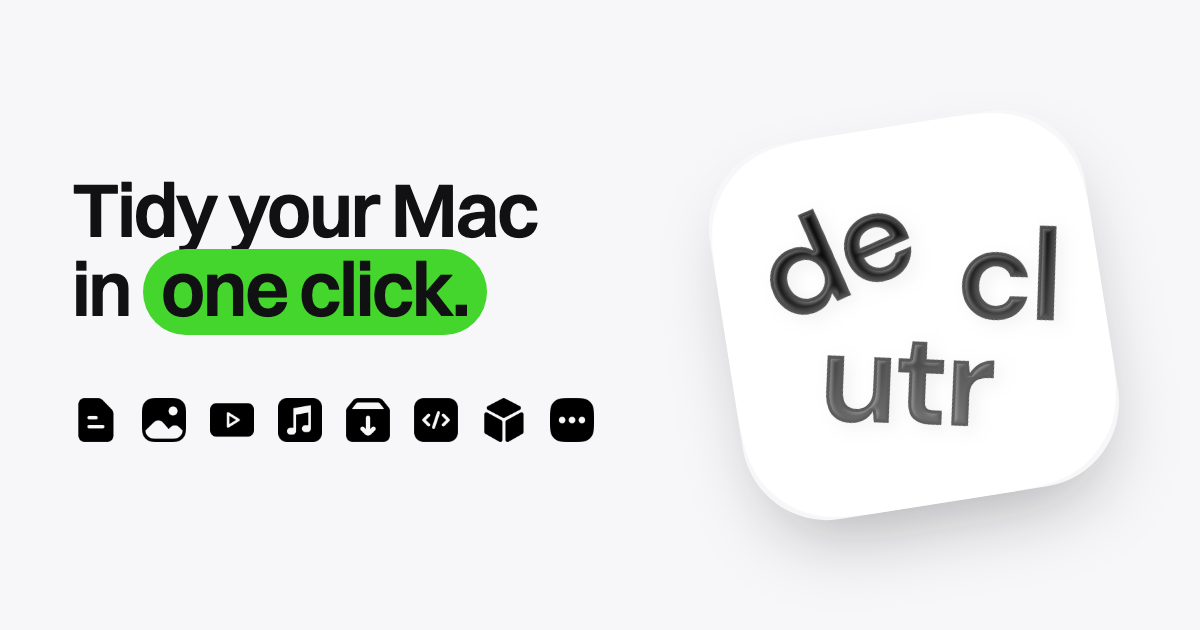
Declutr is a Mac app that tidies your Desktop, Downloads, or any folder you choose in one click. It sorts files into folders by file type — Documents, Images, Videos, Audio, Archives, Code & Scripts, 3D Models, and Other — so a directory that was one long flat list becomes a set of clearly named folders you can browse in Finder. Declutr is built for Mac users who want a tidy machine without writing automation rules or building workflows first. Its purpose is deliberately narrow: one click to organize a folder, and one Undo button to put every file back exactly where it was. The problem Declutr solves is the quiet accumulation of clutter. Files arrive in Downloads, get saved to the Desktop, and stay there — screenshots, PDFs, ZIP archives, installers, voice memos, code scripts, 3D models. Over months, a working folder turns into a flat list where nothing can be found by name alone. One reviewer described having a very messy desktop and documents folder for years; another noted that as someone with ADHD, keeping a Mac organized had always been a struggle before finding the app. The alternatives each ask for effort up front: Hazel requires you to write rules before anything gets sorted, the tools built into macOS mean building Automator or Shortcuts workflows yourself, and AI organizers ask you to describe what you want while an AI model guesses — often without keeping files on your Mac, and often on a subscription. Declutr's first and central feature is one-click sorting by file type. You choose a location — Desktop, Downloads, or a custom folder — then choose which categories to use, tapping any category you want to leave those files where they are. Declutr reports how many items it found to sort, organizes them into category folders, and shows an "Organization Complete!" screen with Undo Changes and Start over options. The site's walkthrough uses a Downloads folder holding 16 items as its example, ending with separate folders for Images, Documents, Videos, Audio, Archives, Code & Scripts, 3D Models, and Other. Each folder gets its own icon, so you find it in Finder without reading the name. Ten categories work out of the box, which means the first cleanup is a single click rather than an afternoon of rule-writing. The second feature group is the safety net and the manual controls. On the final screen, an Undo button puts every file back where it was, so no cleanup is permanent — the content notes that after a sort of 57 items, Undo is still available. Before a folder that looks sensitive, Declutr stops and asks first rather than acting on its own. Smart Rules handle the files that don't fit the default categories: you match files by name, extension, age, or size, combine conditions with AND/OR, and then either send matching files to a folder you name or tell Declutr to leave them alone. Rules run before the categories, so your own decisions take priority over the automatic file-type buckets. Pro adds the automation layer that keeps folders tidy after the first cleanup. Watched folders sort new files the moment they land, so a Downloads folder stays clean as you work instead of becoming messy again, and a schedule lets Declutr clean up every day while you work. Pro also lets you shape the category system itself: add an extension, move one to another category, or create your own category with its own icon. A File types screen lists the extensions inside a category, each removable, so the logic that classifies your files is visible and editable rather than hidden. Together these turn organization from a task you remember to run into something that happens in the background. Declutr's approach is deliberately rule-based rather than AI-based. It sorts by file type and by the rules you set — name, extension, age, size — and it never opens a file, never uploads one, and requires no account. That design choice is the product's core methodology: because Declutr only works from file metadata rather than file contents, it can organize a folder instantly and predictably, and nothing about your documents leaves your Mac. The site sets this against three alternatives — Hazel (rules you write, $42 once), AI organizers (an AI model guesses, files often don't stay on your Mac, often a subscription), and what's built into macOS (workflows you build in Automator or Shortcuts, free) — positioning Declutr as a one-click first cleanup that still keeps every file local. The benefits follow directly from that design. Sorting happens in seconds rather than through manual dragging; reviewers describe years of mess sorted in seconds and call it a huge time saver since they no longer have to sort everything themselves. Finding files gets easier, because pics, music, dmg files, and documents end up in separate folders you can recognize by icon, and one reviewer noted it is now easier to find what they need. Because Undo sits on the final screen, trying a cleanup carries no risk: if the result isn't what you wanted, every file returns to its original location. And because there is no account and nothing is uploaded, using Declutr doesn't require trusting a third party with the contents of your Mac. Use cases described in the content include the classic messy Downloads folder, where installer files, PDFs, images, archives, audio, and scripts pile up together; a Desktop that has become a chaotic sea of docs; a Documents folder left unmanaged for years; and custom folders a user wants tidied by their own rules. The site's simulated walkthroughs show folders holding boarding passes, bank statements, contracts, receipts, project proposals, spreadsheets, screen recordings, photos, ZIP and tar.gz archives, config files, stylesheets, and 3D model files, all split apart at once. With Pro, the recurring case is maintenance rather than cleanup — a watched folder that sorts each new file as it arrives, or a daily scheduled cleanup that keeps a working folder tidy while you work. Smart Rules cover the edge cases, such as routing files that match a particular name, extension, age, or size to a specific folder, or explicitly leaving them where they are. Declutr runs on any Mac with macOS 13 Ventura or later, on both Apple silicon and Intel, and it is distributed through the Mac App Store, where it holds a 5.0 rating. It is free to download and use for sorting: organizing your Desktop, Downloads, or any folder, files sorted by type into category folders, and undo of any cleanup in one click. Pro is a single in-app purchase of $8.99 in the US — no subscription, no account, and it stays unlocked — adding scheduled cleanups, Smart Rules that run on their own, watch folders, and your own categories and extensions. US pricing is shown on the site, while the App Store displays the price in your currency. The site also offers a guide on how to organize files on a Mac, a comparison of the best file organizer apps for Mac, and a free tool that shows what's in your Downloads folder. The takeaway is that Declutr trades configuration-first automation for a one-click result. If your Mac's Desktop, Downloads, or working folders have drifted into a flat pile of mixed file types, Declutr turns that pile into labeled folders in a single click, keeps it that way with watched folders and daily cleanups if you want them, and lets you undo the whole thing if you change your mind — all without opening, uploading, or reading a single file.
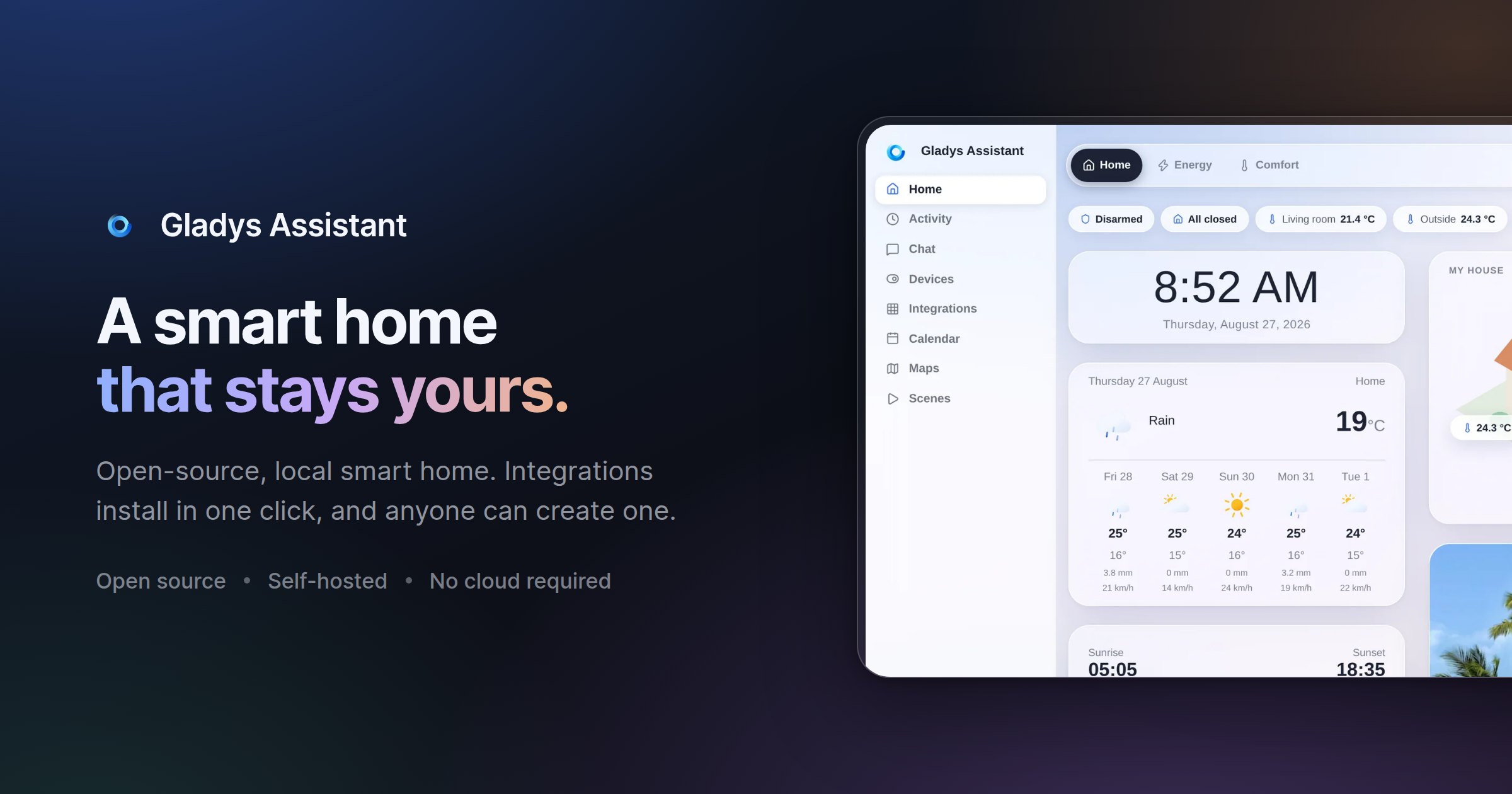
Gladys Assistant is a free, open-source smart home platform that you install and run on your own hardware, such as a mini-PC, a Raspberry Pi, a Synology NAS, a server, or even an old computer. It is designed for people who want to control and automate their home without handing their data to a cloud provider, and the project positions itself as a simpler, privacy-first alternative to heavier self-hosted systems. From a single web interface you can see your home at a glance, build automation scenes, follow your energy consumption, and control devices by voice — and Gladys keeps working even when your internet connection goes down. Most consumer smart homes depend on a vendor's cloud: the hub stops working when the internet drops, and sensor history, scenes and presence data live on someone else's servers. Gladys takes the opposite approach. It is self-hosted by design, so your smart home data — sensors, scenes and history — stays on your local network, with no mandatory cloud, no tracking and no data selling. At the same time, the project set out to remove the friction that often comes with self-hosted home automation: there is no YAML to write and no terminal needed for day-to-day use. Installation is guided through Docker, and a clear interface handles everything after that. The result is a smart home that is private, resilient and approachable at the same time. Gladys gives you a dashboard described as beautiful and phone-first, where you can see everything at a glance: temperature, security cameras and presence monitoring all live in one place. Instead of jumping between vendor apps, you get a single view of what is happening across your home. Alongside the dashboard sits the scene editor, used to automate your entire day. Coffee brewing, lights turning on, music playing — these routines run automatically, and the emphasis is that no coding is required. Scenes are built through a visual editor, so both simple schedules and more elaborate multi-step routines can be assembled without writing a line of code. This combination matters because it lowers the barrier for people who want real automation but do not want to maintain configuration files. Energy monitoring is a first-class feature in Gladys. You can follow electricity consumption, solar production and home battery status in real time, with the goal of cutting your bill where it matters most. Because the data is collected and displayed locally, you can watch production and consumption side by side and act on what you see. Control also happens by voice: you can say something like "turn on the light in the kitchen" and Gladys responds instantly through its built-in voice assistant, or you can send the same instruction by message on your phone. Finally, the interface supports both light and dark themes. The same glass effect and the same layout are available in two moods; Gladys can follow your system setting or stay on the one you pick, and you can switch whenever you like, in one click. Compatibility is handled through open protocols, native integrations and community external integrations for everything else. On the protocol side, Gladys supports Zigbee, Z-Wave, Matter and MQTT, and the project states that it works with thousands of devices. Documented integrations include Zigbee2MQTT, Matter, MQTT, Tuya, Netatmo, Sonos, Zendure and RTSP cameras, while the FAQ also lists Philips Hue, SmartThings, TP-Link Kasa and Tapo, Shelly, Reolink cameras and LG ThinQ. If a device is not supported yet, you can look at external integrations — community-built integrations you install in one click, with the list continuing to grow. If yours is still missing, you can build it yourself in the language of your choice or ask on the community forum. Product Hunt describes 90+ community integrations alongside a phone-first dashboard and no YAML. Gladys is built around a set of stated principles. Privacy comes first: because it is self-hosted, your smart home data stays on your local machine, with no mandatory cloud and no tracking. Ease of use follows: you do not need the terminal for day-to-day operation, installation is guided via Docker with documentation that includes screenshots and videos, and the interface is meant to be clear. The team also emphasises a clean UI — designing first and then coding — a stable foundation built to last decades, a fast interface with instant actions, and automatic upgrades that install new features and bug fixes for you. Under the hood, the practical architecture is straightforward: you need a Linux machine (Ubuntu Server, for example), you run Gladys via Docker, and the system runs locally. If Docker runs on it, Gladys runs on it. Optional services such as Gladys Plus exist for remote access and AI, but the core of Gladys remains self-hosted. Remote access can also be achieved by setting up your own VPN or reverse proxy, which keeps Gladys 100% free but requires technical skills. The practical outcome for users is a smart home that is private, resilient and low-maintenance. Because your data stays on your local network, there is no dependence on a vendor to keep your automations running, and Gladys keeps working when the internet goes down. Automatic upgrades mean you receive new features and fixes without manual work, and the interface is designed to stay responsive — community members report that Gladys remains responsive even when installed on a Raspberry Pi. The stated goal of stability is that your smart home will never let you down, and the project is explicitly built to last decades. For households that want automation without surveillance, Gladys offers a model where the intelligence lives in your own home rather than in someone else's data centre. Community testimonials describe a wide range of concrete uses. One user tracks room temperatures in bedrooms and the bathroom, receives alerts when a room is too hot (saving on heating), gets notified if the fridge stays open, triggers the living room lamp by movement in the morning only when waking up, and detects water leaks — and when going on vacation, Gladys becomes a security box. Another user controls openings and monitors temperatures, using scenes to build scenarios that secure the home while travelling. A third describes opening and closing a gate, controlling lights from the couch, receiving alerts on intrusion during absence, detecting water damage, and managing a garden by programming a pool pump according to water temperature and opening drip irrigation. Others use Gladys for room temperature control and home openings, and many report that the installation grows over time as they add sensors and appliances. Gladys is aimed at people who want a simple, functional, easy-to-use home automation platform that respects their privacy, including users who previously found self-hosted systems too complicated. It suits owners of Raspberry Pi boards, mini-PCs, NAS devices and spare Linux computers who are comfortable running Docker and following guided documentation. Pricing is straightforward: Gladys itself is free and open-source, installed with a single Docker command, with no subscription, no limitations and no credit card required. The optional Gladys Plus subscription adds end-to-end encrypted remote access, Google Home and Alexa, backups and AI. It starts at $7.99/month in the US and Canada (€6.99/month in Europe), includes a one-month free trial with no credit card required, and can be cancelled anytime. It works as an app on iOS and Android. A live demo is available, and a newsletter shares a few emails per month about new releases and project news, written by founder Pierre-Gilles Leymarie. Gladys Assistant combines a genuinely free, open-source smart home platform with a privacy-first architecture that runs on hardware you already own. It covers the essentials — a dashboard, scenes without code, energy monitoring, voice control, broad protocol support and automatic upgrades — while keeping your data local and continuing to work offline. For anyone weighing a self-hosted smart home, Gladys offers a simpler alternative that is documented, community-driven, and supported by an optional subscription when you need remote access or AI.
Arsaze is an AI-native video editor built for both human editors and AI agents. It presents a real, multi-track timeline — described by its makers as "Cursor for video editing" — where users can cut, rewrite, generate, grade and review footage by hand, or hand control to an AI agent that drives the same timeline. The product positions a single workspace for AI video editing, AI video generation and agent-driven video editing, aimed at people who want a genuine non-linear editor rather than a one-click automation toy. The product addresses a workflow shaped by fragmentation and feedback loss. Generation tools typically live in separate subscriptions, so material has to be downloaded and re-imported before it can be cut, and review notes left by clients tend not to survive the next cut, arriving detached from the frame they describe. Arsaze's answer is to put generation, grading, review and editing on one timeline, and to make that timeline addressable by an AI agent. Its pitch to that audience is simple: stop scrubbing, start directing. Rather than replacing the editing suite with a single automated button, it keeps a conventional multi-track editor at the center and adds an agent as an operator. The first of Arsaze's four power tools is Rewrite, which lets editors treat video like a document. Every clip is transcribed word by word, so the transcript becomes an editable surface: select a sentence and delete it, and the corresponding cut happens on the timeline. The same transcript-driven approach is used to find retakes, strip filler words and shorten pauses. Because the timeline follows the transcript, cleaning up a talking-head recording becomes a text-editing task rather than a scrubbing task. Arsaze also provides word-timed automatic captions in styles that can be reused across a project, and captions are editable like any other clip on the timeline. The Playground is a node editor for generation, usable by both the editor and their agents. Users chain prompts and AI image and video models into reusable graphs — the site gives examples such as Gemini Image into Seedance, or two stills into a single transition — and then drop the result straight onto the timeline. Beyond the Playground, generation is built into the editor across three media types with one credit balance on every paid plan, so there is no tab-hopping between five subscriptions and no downloading and re-importing files. AI video generation covers text-to-video and image-to-video from frontier models including Veo 3.1, Seedance 2.5, Kling 3.0 and PixVerse v6, landing on the timeline as real clips. AI image generation covers stills, thumbnails, style frames and b-roll plates with Nano Banana Pro, Flux 2 Pro, Seedream and Gemini Image. AI audio adds natural voiceover in dozens of languages plus music and sound effects, with ElevenLabs v3 and Multilingual v2 listed. Color is Arsaze's full grading stack, and it can be driven by hand or by asking. It includes a keyer, shot matching, a light tool, color wheels, curves, HSL qualifiers, film-stock LUTs and finishing. Grading is non-destructive and applied per shot, then rendered on export, and editors can import their own .cube files. The site highlights wheels, curves and HSL controls, film and creative LUTs, and the ability to match one shot's look to another. On the audio side, Arsaze offers voice isolation, noise reduction, loudness normalization and automatic ducking under speech. These tools matter because every one of them is also a tool the agent can call, so a request to grade a sequence teal and orange, or to clean a noisy talking-head recording, plays out on the real timeline. Arsaze runs on a dual engine: a real-time multi-track timeline and a code-to-video renderer, side by side in the same edit. The timeline engine offers unlimited video and audio tracks with frame-accurate trims, keyframes, transitions and live preview — the NLE editors already know. The code-to-video engine renders title cards, kinetic type and animated scenes written as code, by a human or an agent, frame-perfect onto the timeline; the site shows a scene definition with a stagger of words, a blur range and an easing curve, rendered at 1080p. Rounding out the toolkit are Remarker, Arsaze's frame-accurate client review tool, automatic version history that versions every edit so cuts can be branched, compared and reverted, and export options covering MP4 from the cloud, free local exports on Windows, and FCPXML for DaVinci Resolve and Premiere Pro. Arsaze works by treating the AI agent as an operator that drives the same timeline a human uses. Setup begins by connecting an agent: Arsaze is added as a custom connector in Claude, ChatGPT or Grok over MCP, a process the site says takes about two minutes and requires no code. The user then states what they want in natural language — the example given is "Cut the silences, add b-roll where I mention the car, grade it teal and orange" — and the agent edits the real timeline, with its tool calls playing back live in the editor. From there the editor reviews and tweaks, stepping in manually at any point, shares a review link, then exports MP4 or FCPXML. Crucially, the agent is optional: Arsaze is a full manual NLE with timeline, trim modes, color wheels and keyframes, and the agent is an operator you can hand the controls to rather than a requirement. Benefits center on control and continuity. Because every edit is versioned automatically as it happens, nothing an agent does is one-way: if the agent makes a bad edit, the editor can step back to any earlier state. Feedback survives the next cut because Remarker pins client comments to the exact frame and version they concern, and because those notes are agent-readable, the agent can read every note and make the fix. Generation arriving directly on the timeline removes the download-and-reimport loop. Exports render on Arsaze's servers by default, so the editor is just a browser tab and no fast machine is required, while Windows users can export locally for free with no watermark. Uploads, generated video and voice models stay tied to the account and are not used to train models without consent. Concrete use cases follow directly from these tools. A creator editing a talking-head video can run one pass to remove dead air and filler words, then fine-tune on the timeline and caption the result with word-timed captions. A marketer or filmmaker can ask an agent to cut silences, place b-roll where a topic is mentioned and grade the sequence teal and orange, then review the result and export. A motion designer can write title cards and kinetic type as code and render them frame-perfect onto the same timeline as the footage. A freelancer or studio can share a Remarker link so clients pin comments to exact frames, reply in threads and rate scenes. Teams finishing in DaVinci Resolve or Premiere Pro can export FCPXML with cuts, transitions and captions intact. Arsaze is aimed at editors, creators, freelancers and studios who want AI assistance inside a real editing environment rather than a black-box generator, and at developers and agent users who already work in tools like Claude, ChatGPT, Grok, Codex, Gemini, Cursor, Windsurf, Zed, Copilot and Perplexity, whose logos the site displays as the agents it is built for. Officially, Claude, ChatGPT and Grok are supported today over MCP. Arsaze runs in the browser and offers a Windows desktop app. Pricing is freemium: a free plan with 50 welcome AI credits, no credit card required, covers audio analysis of videos such as transcripts, captions and silence detection. AI generation of video, image, voice and music and the built-in AI assistant come with paid plans, which add monthly AI credits and cloud export hours; credit top-ups never expire and local Windows exports are always free. Arsaze's primary value proposition is a single, real timeline that both humans and AI agents can drive — the place where AI video editing, AI video generation and agent-driven video editing converge. By combining a manual NLE, a node-based generation Playground, a full color and audio stack, code-to-video rendering, frame-accurate client review, automatic version history and open exports to DaVinci Resolve and Premiere Pro, it lets editors direct rather than scrub, and lets agents do real work on a project that stays fully reversible and under human control.
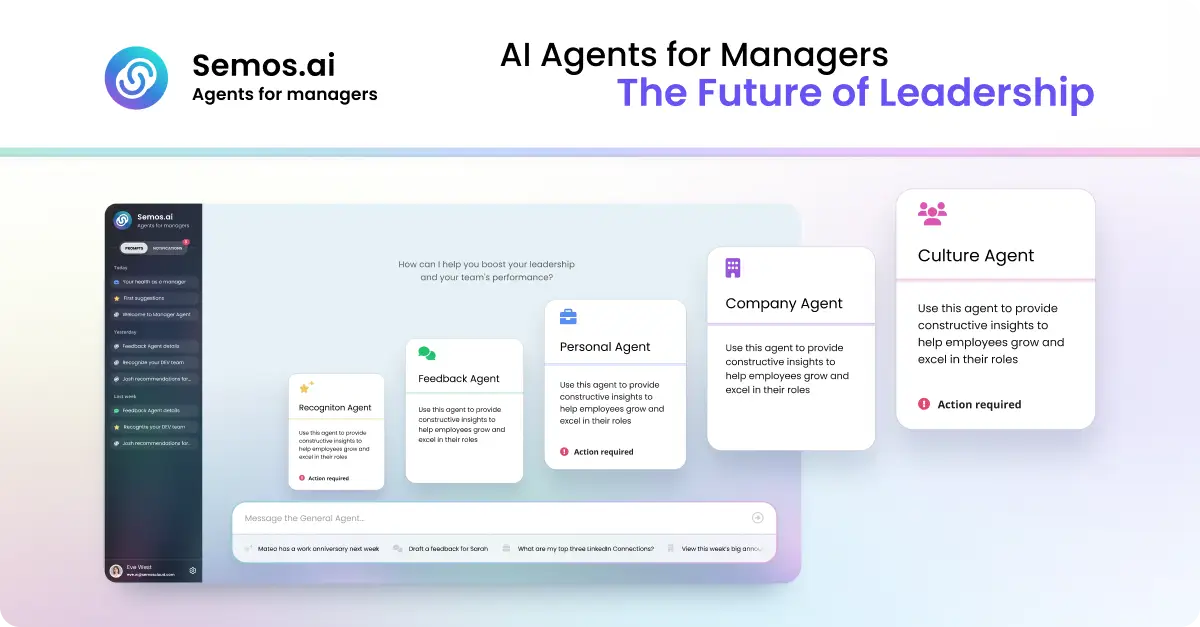
Semos.ai Manager Agents are AI agents purpose-built for managers. They build context from your meetings and back it with behavioral science, so you can handle difficult conversations, develop your people, and grow as a leader. The product is designed for people managers who are responsible for a team and need practical, timely support in the everyday moments of leading: a 1-on-1 that did not go as planned, feedback that is overdue, recognition that was missed, or a growth conversation that keeps slipping. Rather than offering generic advice, Manager Agents work from what has actually been happening across your meetings and your team, and turn that context into something concrete you can act on right away. The problem Manager Agents address is familiar to almost every manager: team context is scattered. The site describes the situation plainly, noting notes from six different 1:1s scattered across three places, and a review due Friday you have not opened. The support that would normally help in these moments has traditionally sat behind a budget line. An HR business partner is bundled into overhead at roughly one per 200 people and is available during business hours, shared across dozens of managers. An executive coach costs $300 to $500 per session and is scheduled weeks apart. Management training runs $2,000 to $8,000 once, lasts one week, and then leaves you on your own. Each of these options is scarce, expensive, scheduled far in advance, generic rather than specific to your team, or some combination of all four. Manager Agents are positioned as an alternative: self-serve and monthly, available whenever you need it, built for you, and, as the site puts it, designed to get sharper over time. The value proposition is that support previously reserved for a few sponsored leaders becomes directly available to the manager, including at 10pm before the conversation you have been dreading. Manager Agents are organized into a set of specialized agents, each aimed at a different part of the manager's job. The Meeting Agent is described as the foundation: it builds context from every meeting you have and feeds it to every other agent. That shared context is what allows the rest of the system to give guidance grounded in what has actually been happening rather than in a blank slate. The Feedback Agent handles difficult conversations, helping you say the hard thing clearly before it is too late to say it well. The Recognition Agent helps you give recognition that is specific, timely, and fair, addressing the common failure mode where good work goes unnoticed simply because the moment passed. Together these three cover the most frequent and most time-sensitive parts of managing people: understanding what happened, correcting course when something is wrong, and reinforcing what is working. Four further agents extend that coverage. The HRBP Agent works on people challenges, structuring the conversation and the documentation before you have it, which is useful when a formal or semi-formal process is involved. The Culture Agent focuses on team health, surfacing shifts in sentiment and participation before they show up in a survey, so managers can act on early signals rather than after-the-fact reporting. The Career Agent supports career conversations and growth plans for your team, helping managers prepare for the development discussions that often get postponed. The Company Agent provides sector awareness, keeping you current on what is happening in your market in minutes a week. The site also notes that more agents are available in Enterprise mode, linking to the Semos Cloud platform. Manager Agents follow a four-step approach that the site labels proactive, draft, action, and learn. First, the system is proactive by design: it does not wait for you to ask. A missed recognition, a quiet direct report, or a hard conversation coming up is surfaced before you think to ask about it. Second, it provides a start rather than a stare: a message, a talking point, or a structure for the conversation, grounded in what has actually been happening. Third, it is built for action, so what you get is something concrete, whether that is a message, a plan, or a next step, designed to be acted on right away. Fourth, and perhaps most importantly, the judgment becomes yours. Every suggestion comes with the reason behind it, so that over time you start seeing the pattern yourself. This last step positions the product as a way of building the manager's own capability, not simply a way of outsourcing decisions to automation. Every output draws on real behavioral science. The site names three specific frameworks: Stanford's 4Is feedback framework, Big Five personality traits, and Hofstede's cultural dimensions. The stated purpose of grounding outputs in these frameworks is that they were built for how people actually change, not just for what sounds right. In practice this means suggestions are not merely plausible-sounding text; they are shaped by established models of how feedback lands, how personality shapes response, and how cultural context affects communication. The site summarizes this scientific basis with three words: proven, precise, and verified. Manager Agents describe measurable outcomes. Managers capture three times more recognition, feedback, and coaching moments each week. Eighty-five percent of feedback recipients say the guidance is clearer and more actionable, and there is an average improvement of 23 percent in engagement scores during the first week. Underneath those numbers is a simpler benefit: the support that used to sit behind a budget line is now available directly to the manager, at the moment it is needed rather than weeks later. The product also distinguishes itself from generic AI tools. A general-purpose assistant starts from zero every time, with no memory of your team and no sense of your history with them; you have to explain the whole situation before you get an answer, and the answer is the same one anyone else would get. Manager Agents carry your context forward, drawing from the same shared context of your meetings, your team, and your patterns, so that every conversation adds to what they know about how you lead and guidance gets sharper over time. The site lists example questions that illustrate how managers use the product in practice. A manager facing a first underperformance conversation can ask for help preparing. Someone who needs to write a review can ask the system to turn notes from the last quarter into a review for a named team member. A manager can ask who on the team has not been recognized in the last month, or ask for a message recognizing the work someone put in this sprint. Career conversations are covered by asking for help planning a development conversation for someone ready for more, or figuring out how to bring up a promotion case with the manager's own manager. Team health and timing questions include whether anyone has gone quiet in recent 1:1s and what to do next after a 1:1 that did not go as hoped. There are also prompts for drafting feedback for someone who has been missing deadlines, structuring a conversation about a conflict between two people, handling the aftermath of a resignation notice, and finding out what has changed in the sector that the team should know. Manager Agents are built for people managers, and the framing throughout the site is about the individual manager rather than the HR department. The alternative comparison makes the positioning explicit: whereas an HRBP is built for HR and an executive coach is typically available only to the few people a company sponsors, Manager Agents are described as built for the manager and as getting sharper over time. Availability is self-serve and monthly, and the product is available whenever the manager needs it. The site directs visitors to get started through an app login and, in its metadata, invites people to join the waitlist. For managers who want practical support in the moments that actually shape a team, whether that is the conversation before it happens, the recognition that is overdue, or the review that is due Friday, Semos.ai Manager Agents offer AI agents purpose-built for the job. They combine context captured from your meetings with behavioral-science frameworks, surface what needs attention before you ask, give you something concrete to act on, and explain the reasoning so your own judgment improves. The result is not just help leading; as the site puts it, Manager Agents make you great at it.
ZenABM is a LinkedIn Ads AI analyst that lets marketers create and launch, understand, optimize and report on their LinkedIn advertising from Claude, ChatGPT, Perplexity, Gemini and other AI tools through the ZenABM MCP server, or natively from ZenABM's own AI agent, Zena. Zena can plan, manage, analyze and optimize LinkedIn Ads, and the site presents it as a way to build, manage and optimize LinkedIn campaigns with AI. The product is aimed at people who run LinkedIn Ads and ABM campaigns and who would rather work inside a conversational AI client than operate each step by hand. The Product Hunt listing describes the underlying annoyance plainly: ditch copy-pasting into Campaign Manager. Instead of assembling campaigns field by field in LinkedIn's own interface, teams can ask an AI client for what they need and have ZenABM handle the mechanics. Reporting has a similar problem. Rather than exporting numbers and assembling a slide deck every week, ZenABM produces written reports that pair insights with action items, and it cross-references advertising performance with pipeline data. ZenABM also positions itself around company-level insights, so campaign results connect to the accounts and revenue behind them rather than living as detached impressions and clicks. Inside Zena, campaign building starts with a description. You describe the campaign you want and Zena builds it end to end: the campaign, its ad sets, targeting, and the ads themselves. Ad copy is written for you, and creatives are pulled from your media library. Before committing, you can check the audience size, reuse saved audiences and lead forms, and duplicate campaigns that already work. Crucially, nothing goes live until you confirm it, so the AI drafts and prepares while the human approves. The site illustrates this with Claude generating four document ads for a ZenABM workshop in London, showing how a request turns into a set of draft ads inside the tool. The ZenABM MCP server extends the same campaign work into whichever AI client a team already uses. You ask Claude, ChatGPT, Perplexity or Gemini for the ads you need; the MCP server generates them, pushes them into a new ad set with the objective, budget and bidding you asked for, and hands you a link to review and approve in Campaign Manager. Again, nothing launches until you approve it. The server is described as letting you build, manage and optimize LinkedIn ads and campaigns directly from Claude or any AI tool, and it can be connected during a free signup. An illustration on the page shows the ZenABM MCP server connected to Claude. Under the hood, the MCP server ships with 15 ready-made ABM skills that you run as slash commands. The site lists audits, monthly reports, strategy planning, ad decay checks and sales handoff lists, all graded against ZenABM benchmarks. Beneath the skills sit 96 read and write tools spanning LinkedIn Ads, ABM, CRM and revenue data, so an AI client can both inspect and act on the data rather than only summarise it. Because the skills come prebuilt, users do not have to design prompts for common ABM jobs; they invoke a command and the underlying tools do the work against benchmarked expectations. Automated reporting is one of the headline capabilities. Zena produces weekly, monthly and quarterly reports written for you and sent straight to your inbox, containing insights and action items that Zena can carry out on your approval, rather than a raw data dump. You can also ask for a report on the spot. In that case, performance is cross-referenced with your pipeline, top and low performers are surfaced, and the result is shareable in seconds. The Product Hunt description adds company engagements and revenue attribution to the reporting scope, produced by ZenABM's AI agents on a weekly and monthly cadence. Optimization happens without leaving the chat. Zena finds and fixes underperforming LinkedIn ads and campaigns for you: it surfaces your lowest and best performing assets and then acts on them. Actions include pausing inefficient ad sets and campaigns, changing bids and budgets, and building retargeting audiences from ad engagement and CRM events. Every change waits for your approval, so optimization stays reviewable rather than automatic. A screenshot on the site shows Zena pausing underperforming LinkedIn ad sets, which illustrates the intended flow: the analyst identifies the problem, proposes the fix, and the marketer signs off. Zena also acts as an advice channel. The agent is trained on knowledge from more than 30 ABM and LinkedIn Ads experts — the site cites Tim Davidson, Ali Yildirim, Max Herzeg and many more — drawn from their own posts. When you ask about list building or ABM strategy, the answer comes back tied to your own data and to benchmarks from other accounts, so the comparison is real rather than generic. Benchmarking material shown on the site compares ad performance to industry benchmarks, reinforcing that answers are grounded in data rather than opinion alone. Zena, the MCP server and the API are all powered by the same company-level ABM data. That shared foundation is what ties the three surfaces together: the AI agent for conversational analysis, the MCP server for bringing ZenABM into AI clients such as Claude, ChatGPT and Cursor, and the API for connecting LinkedIn Ads data anywhere and building your own dashboards. The API lets you pull LinkedIn Ads engagement, campaign performance and intent stages wherever you need them. Because the AI layer runs on the same data as the rest of the platform, users can ask Zena to analyse LinkedIn Ads performance, find top engaged companies, and surface or pause underperforming ads, then take the same data into their own systems. Concrete workflows the site describes include building a full campaign from a short description, generating a batch of document ads inside an AI client, and approving prepared ads in Campaign Manager before launch. Reporting runs as a recurring workflow: weekly, monthly and quarterly reports land in the inbox, and ad hoc reports answer point questions. Optimization workflows cover auditing spend, pausing inefficient ad sets, adjusting bids and budgets, and assembling retargeting audiences from ad engagement and CRM events. For ABM teams, ZenABM supports identifying top-engaged accounts and producing sales handoff lists, and the API supports pulling campaign and intent data into external dashboards. The product is built for the people who run LinkedIn Ads and ABM programs. The FAQ addresses readers asking whether they need to be technical, which AI clients the MCP server works with, whether ZenABM AI can take actions or only read data, how data is secured, which ZenABM plans include the AI features, and whether the AI can be tried before paying. Integrations named in the content include Claude, ChatGPT, Perplexity, Gemini and Cursor, plus LinkedIn Ads, ABM, CRM and revenue data. On pricing, the site offers a Start for Free button and a Book a Demo option, and a three-minute walkthrough is available. ZenABM's pitch is that LinkedIn Ads should be created, optimized and reported on where marketers already think and write — inside an AI tool. Zena and the MCP server carry campaign building, expert skills, optimization actions, benchmarking and reporting into that conversation, all on top of the same company-level ABM data, with human approval before anything goes live.
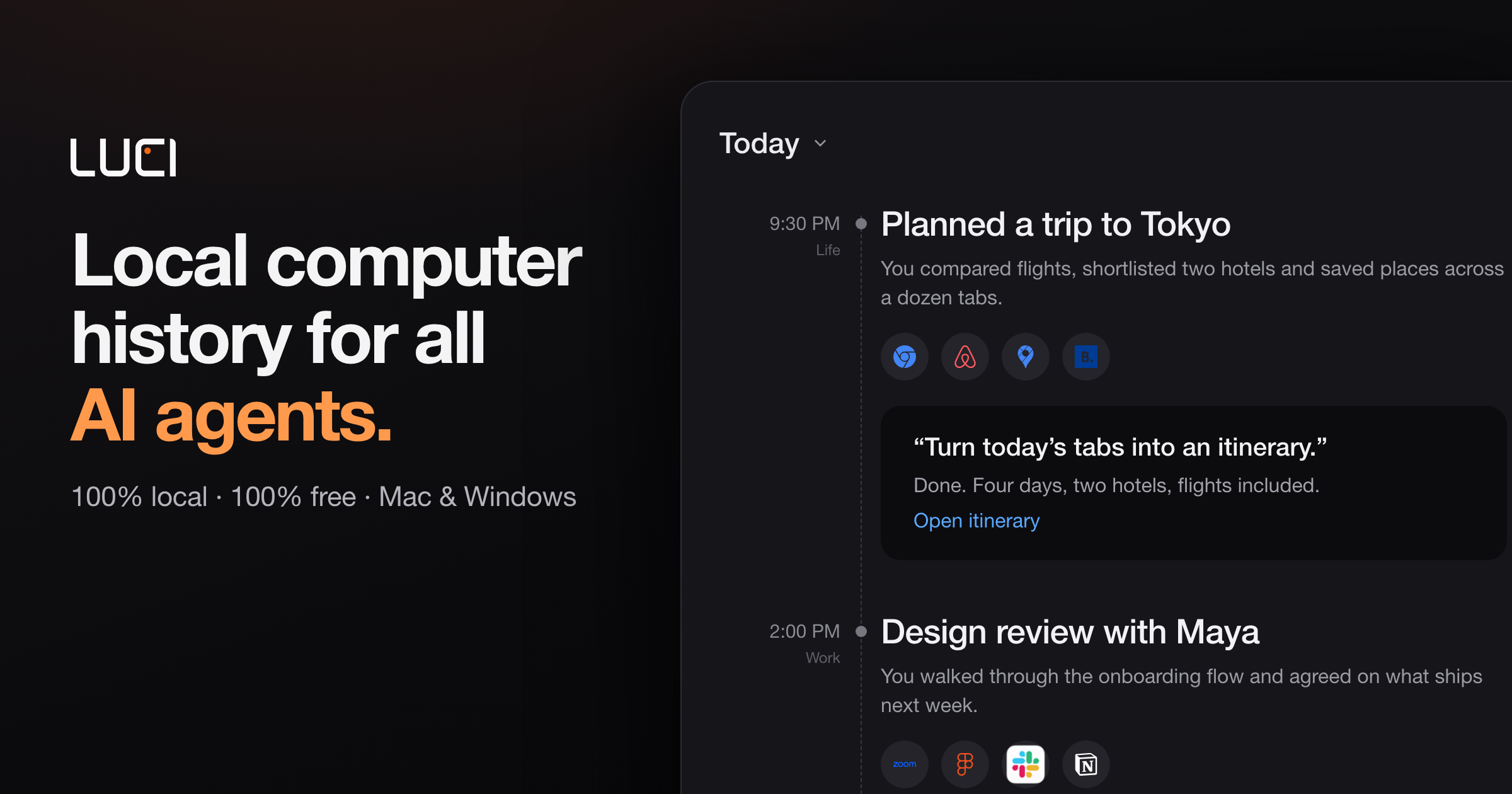
LUCI is a desktop memory layer for your computer. It remembers your whole day — meetings, code, email, and everything in between — and makes that memory available to the AI agents you already run, including Claude Code, Cursor, Codex, and Gemini. Instead of re-explaining what you were doing every time you ask an agent for help, you get one memory across everything you touch. LUCI is free, runs on Mac and Windows, and is built for anyone whose day does not fit in a chat window: developers, founders, researchers, consultants, designers, and support and operations teams. Everything it remembers is processed and stored on your own machine. The problem LUCI exists to solve is context loss. AI agents are powerful inside a single session, but they start each new conversation without any idea of what you were looking at five minutes ago, what was decided on a call this morning, or which file you were reading last week. The usual workaround is to copy, paste, and explain — dropping error traces and design specs into an editor, or reconstructing decisions from scattered calls and threads. Connector-based tools only deepen the problem: they require OAuth, API keys, and per-app configuration, and they still miss internal tools and private documents. Context windows reset between sessions, so the knowledge you build up evaporates. LUCI's answer is to remember on your behalf, locally, and then hand that memory to whichever agent you ask. LUCI's first capability group is capture and chronology. LUCI reads directly from your screen and your calls, which means there are no OAuth flows, no API keys, and nothing to configure: every app you open is already supported, including internal tools and private documents that connectors cannot reach. Chrome, Gmail, Slack, Notion, Linear, Figma, Zoom, Google Meet, Microsoft Teams, YouTube, Discord, and coding agents such as Codex, Cline, Amp, and opencode all fall inside the same record. Because capture is continuous, chronology emerges naturally: your day is laid out end to end, so you can walk back to any moment instead of trying to remember it. Day reports show the shape of that day — active capture hours, sample counts, and the time blocks where work actually happened — alongside the meetings, people, projects, organizations, and rules attached to it. Visual memory is the second piece. LUCI reads and understands what is on your screen on your device, and keeps it findable afterwards. You do not have to have bookmarked a page or saved a file: if you saw it, LUCI can bring it back. Search and insights sit on top of that record. You can ask in plain English across both screen content and meetings — describing something the way you would to a colleague — and answer questions not only about what you saw but about where the day actually went. That combination turns scattered fragments of a working day into something queryable. The third group covers meetings and written output. Voice and transcripts capture every word — yours and theirs — in meetings and calls, with on-device transcription, attached to the day it happened. That means you never take manual notes, and the record of a call sits alongside the screens you were looking at while it happened. From there, distillation takes over: your agent turns the raw day into a short written record and files it in your Life folder. Daily summaries are produced with Microsoft Foundry Local. The Life folder is plain files in a folder rather than a proprietary silo — a record that outlives any single app, including LUCI itself. The fourth group is the local model and privacy layer. Local models — Phi, Qwen, Llama, and DeepSeek — power the understanding of your day; you pick one, switch whenever you like, and your memory stays exactly where it is. Zero-leak redaction runs before anything is saved: cards, keys, and passwords are blacked out so secrets never enter the record. Everything LUCI remembers lives on your machine encrypted at rest, with no cloud copy, and retention is yours to set — keep a week, keep a year, and deleting a day removes it entirely. Agent Bridge ties this to the agents: LUCI connects itself to Claude Code, Cursor, Codex, Gemini, Copilot, Windsurf, Zed, opencode, Amp, Cline, Kilo Code, Warp, VS Code, and Grok, with nothing to set up and no per-agent configuration to keep in sync. Overall, LUCI works by moving memory out of the session and into your machine. Rather than building a connector for every tool, it reads from the screen and the microphone, so coverage is universal by construction. On-device understanding converts that raw material into something structured: days, transcripts, and distilled reports. Then Agent Bridge exposes it to your agents, which query LUCI instead of asking you to re-explain. Add a new agent tomorrow and your memory is already there. The result is a single, persistent, private record that any assistant can draw on. The benefits show up in the small frictions that disappear. A staff engineer stops copy-pasting error traces and Figma specs into Cursor, because the agent queries LUCI for what was on screen five minutes ago and gets straight to work. A head of product no longer spends Friday afternoons reconstructing decisions from scattered calls and threads, because the week is distilled into the project log in seconds. A founder ends each evening with an honest summary of where the time actually went. A principal AI engineer can recall why a specific architecture pattern was chosen three weeks ago, even though context windows reset between sessions. A solutions director gets every client call captured and organized without manual notes, so a proposal draft can pull the exact constraints the client mentioned. And for security teams, redaction plus local indexing makes sign-off frictionless — LUCI is GDPR compliant and SOC 2 Type 2 certified. The use cases LUCI highlights are the things you would ask on day one. Ask about your screen: whatever is in front of you becomes answerable, so you can resolve 'this' and 'that' across sessions and jump straight to the right source. Catch up on a call: every word, yours and theirs, is captured without you taking notes. Recap your week: your agent distills the day into plain files in your Life folder, giving an honest picture of where the week went. Search what you saw: describe a reference you scrolled past on Tuesday and find it again on Friday — a page you forgot to bookmark, a decision from a call, a half-remembered document still findable weeks later. LUCI is built for developers, founders, researchers, consultants, designers, and support and operations teams — anyone who would rather not copy, paste, and explain what they were doing every time they ask an agent for help. It runs on Mac and Windows, and it is free and fully local. Supported agents include Claude Code, Cursor, Codex, Gemini, Copilot, Windsurf, Zed, opencode, Amp, Cline, Kilo Code, Warp, VS Code, and Grok, with any agent you install next expected to connect through the same bridge. Data lives encrypted on your disk, on-device understanding keeps processing local, and your Life folder is plain files you control. LUCI's core promise is simple: your whole day on the computer, remembered on your machine, and handed to whichever agent you ask. It removes the work of carrying context between sessions while keeping the memory yours — local, redacted, encrypted, and portable as plain files.
Arc is a free AI assistant app that runs on the screen you are already looking at. On Android it appears as a floating sidebar over every app, and on Mac it is a panel you open with Control+Space over any window. Rather than asking you to describe your situation, Arc reads the current screen and acts on it: it can summarize, read aloud, rewrite, chat about, and extract information from whatever is in front of you. It is built for people who want AI help inside the apps they already use, without leaving what they are doing or explaining their context from scratch. The starting point for Arc is a simple observation: chatbots make you bring the screen to them. To get help with a document, message, or article inside a traditional chatbot, you typically select the text, copy it, open the AI app, paste it, explain what you want, and then copy the answer back — five steps across two apps, with the context lost along the way. Arc is positioned as already being on the screen instead. It is designed so that the same task becomes a single step: summon Arc over whatever you are doing, pick an action, and use the result in place. That difference matters most in the apps where work actually happens — email, chat, documents, and browsers — where switching away breaks focus and forces you to re-establish context. The AI Summary and Reader feature turns articles, PDFs, long emails, and threads into numbered key points, with an auto-detected title and source shown alongside the result. Because Arc is reading the screen rather than receiving pasted text, it already knows what the points are about, and you can ask follow-up questions about the same page without re-explaining the context. The summary panel itself offers Listen, Copy, and Save actions, so a summary can be read aloud, copied out, or kept for later. Arc can also explain or translate content in more than ten languages, which makes the same feature useful for understanding material written in a language you do not read fluently. AI Writer works inside the text box you are already using. It can rewrite text in any tone, fix grammar, draft a reply, or turn notes into a post, and then insert the result directly back into the focused field — Gmail, WhatsApp, Slack, or anything else with a text field — so nothing has to be copied or pasted. Alongside writing, AI Read provides natural text-to-speech with automatic language detection. You can have any screen read aloud, one tap from any app, whether you are listening to articles, documents, and messages while commuting, cooking, or resting your eyes. The feature is described as built with accessibility in mind, and it runs from the floating sidebar rather than from a separate reader application. Smart Extract pulls structured details out of a screen in a single pass: dates, contacts, links, phone numbers, addresses, meeting times, and tracking codes. There is nothing to select or highlight first, and each extracted item can be copied with a single tap. Chat with any screen lets you ask questions about the document in front of you with its context already loaded, so you can get clarifications or explore a topic further without pasting anything. Results and summaries can be saved to a library, with optional Google Drive backup, and saved items follow you across platforms. Related actions include an AI Note Taker for call transcripts, summaries, and action items, and an AI Reply Generator that produces context-aware replies for chats and email in your tone. Custom Actions let you write a prompt once and save it as a one-tap action that can be run on any screen. Any action can be bound to a global hotkey, so a frequently used prompt becomes as quick to trigger as a keyboard shortcut. Beyond your own prompts, Arc ships with access to a community library of more than 500 ready-made actions built and shared by other users for work, study, writing, and research. You can filter that library by category and language, add an action to your sidebar with a tap, and share your own actions back with the community. The same library is described as free to install. Arc also turns reading into remembering. The Flashcards feature generates a flashcard deck from whatever is on your screen — a page, lecture notes, or a paper — and lets you review it inside Arc using a question-and-answer review mode. Decks are saved to your library and follow you across devices, so study material created on one screen can be reviewed on another. Combined with AI Summary and AI Note Taker, this gives students a workflow where the same screen content that was summarized or transcribed can then be converted into review material. Using Arc is designed to take about three seconds from question to answer. On Mac you press Control+Space; on Android you tap the floating Arc bubble; either way the assistant opens over whatever you are doing. You then pick an action — summarize, read aloud, write, chat, extract, or one of your own custom actions — or simply type a prompt into the actions and prompt field. The result can be inserted into the field you were typing in, listened to, copied, or saved to your library. Pressing Esc returns you to work, and because Arc is summoned rather than running in the background, nothing happens until you ask. Arc is available on Android and Mac. The Android app is a floating sidebar over every app with every Arc feature, distributed through Google Play, and the Mac app is a Control+Space panel over any window that is notarized by Apple and requires macOS 14.0 or later on Apple Silicon or Intel. A Windows version with Ctrl+Space is in beta, and an iPhone version is in development. The free plan costs $0 forever on every platform and includes 7 requests per week on basic features, no ads, and no trial countdown, and you can use it as a guest without an account. A Premium plan for power users is unlimited and priced in your local currency inside the app; it covers unlimited AI summaries, unlimited text-to-speech, AI chat about any screen, workflow automation and custom actions, and one subscription covers every platform. Google Play shows a 4.6-star rating. Privacy is treated as a core part of the design, because an assistant that sees your screen has to earn trust. Arc is on-demand by design: there is no background monitoring and no keylogging, and it reads the screen when you run an action and not otherwise. Screenshots require explicit permission and are only taken when you initiate an action that needs them. Arc automatically disables itself in nearly 400 sensitive apps, including banking, crypto, and password-manager apps, and you can add your own exclusions. Screen content is processed to produce the answer and then discarded rather than stored on Arc's servers, and saved items stay on your device unless you turn on Google Drive backup. Arc works on top of the apps you already use and any other app that shows text. The site lists Chrome, Safari, Gmail, WhatsApp, Slack, Notion, Mail, Preview, Obsidian, Reddit, and LinkedIn among the applications it works over, and the FAQ states that Arc works with virtually any app, subject to the sensitive-app exclusions. Because it operates at the screen level instead of through per-app integrations, there is nothing to connect or configure before using it in a new application, and the same actions are available wherever text appears. Arc suits anyone who reads, writes, or studies on a screen: people handling long email threads and documents, students turning lecture notes into flashcards, users who want text read aloud, and anyone who wants to automate repetitive steps across apps through reusable actions. Its promise is straightforward — an AI assistant that already knows what is on your screen, so the work of summarizing, rewriting, listening, extracting, and automating happens where you already are, on Android and Mac, free to start.