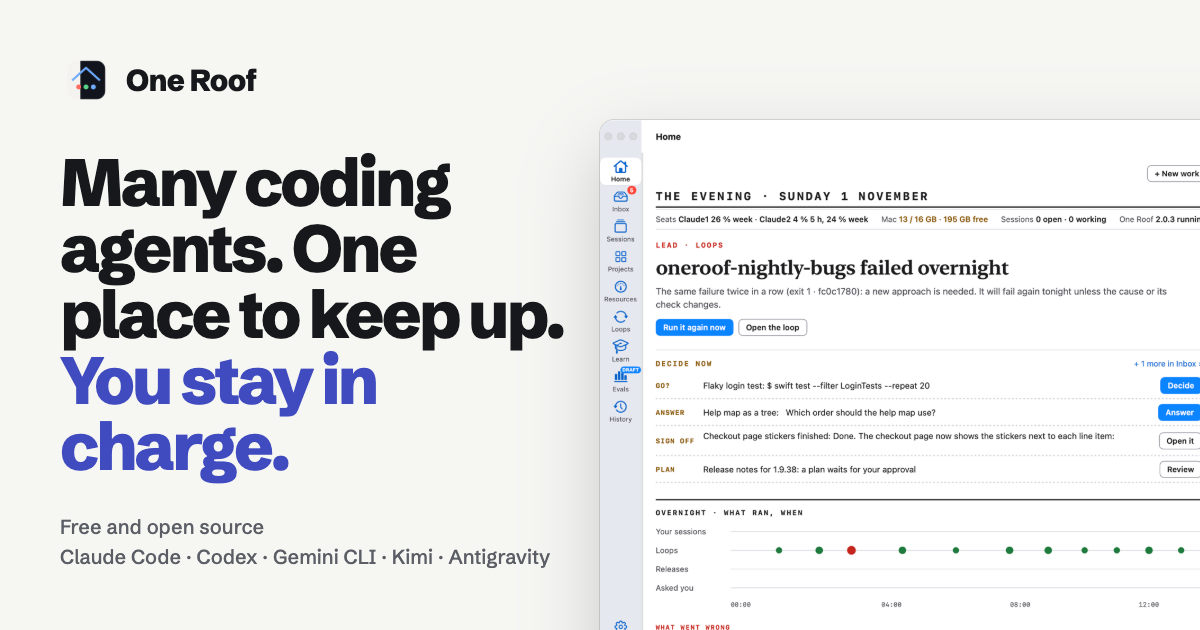
One Roof is a desktop application for macOS that gives you one place to keep up with a whole team of coding agents. It works with the agent command-line tools you already use — Claude Code, Codex, Gemini CLI, Kimi and Antigravity — plus plain shells, and it is explicitly not an IDE and not a terminal. Instead, it is the place where your agents work, with everything they ask, run, learn and cost gathered into one window. It finds the agent command-line tools on your Mac and the accounts you are signed in to, and each session runs the real tool, so you can always type straight into it. The product is free and open source under the MIT licence, and runs on Apple silicon with macOS 14 or later.
The problem One Roof addresses is described by the project as chorus coding: several coding agents working on the same piece of work, each doing the part it does best, with one checking another — one plans, one builds, one reviews, and a loop re-runs the tests every night. The hard part of that way of working is keeping up. As the project puts it, the agents are not the bottleneck any more, you are. Five terminals look the same, a question waits in a tab you are not looking at, something failed at 3 AM and nobody told you, and the Mac slows down without any indication of which session is to blame. One Roof was built to keep up with that situation and to keep you the one who decides.
The Inbox is the centre of day-to-day work. Every ask from every session lands in one column, one block per session that needs you, with the prompt's own options shown as buttons or selectable with keys 1 to 9. When an agent is blocked until you act, its block gets a red border and moves to the top, and a finished turn waits there too with a reply box where you can paste a screenshot for the agent to read. Nothing is approved for you, and you can always answer in the terminal instead. A Decided list keeps what you answered, newest first. Alongside it, Home is a front page for the morning, built from your own sessions and loops: a lead story about the thing that matters most, a Decide now list of what waits on you with one button each, and an overnight timeline showing every run since midnight as a dot, followed by what went wrong, what to do next and what ran fine.
Sessions are real terminals that keep running. Every agent session and plain shell is grouped by state — Needs you, Active, Next, Planned and Exited — and each row shows the agent, the account, the folder and a live one-line status, so you no longer have to type prefixes in front of tab names to tell five identical terminals apart. Each session can be shown as a single terminal, a grid or a wall. Sessions run inside roofd, a small background service, so they keep going when you close the app and come back with their screens when you open it again. History is a read-only record of each session's important moments: steps, findings, errors, what the agent asked and what you answered, and hand-offs between sessions. Each session's run of moments is one card in its own colour, searchable and filterable by session, agent, kind and date, and kept for 30 days.
Loops handle work that repeats until a check passes. A loop gives an agent a goal and a check, such as until the tests pass or every night at 3, and One Roof runs the check first — if it already passes, no agent is started. When the check fails the agent works one round on a separate branch, in the loop's own copy of the repo rather than yours, and then the check runs again: done, or another round, up to a limit. A loop never pushes, merges or deploys on its own, and what it produces waits in the Inbox for your approval. Resources shows memory and CPU for each session, for One Roof itself and for every app on the Mac, with 10-minute charts. A browser shows its windows and tabs and you can close a tab or a window from here, and roofd warns when a session grows past 1 GB and ends it at 2 GB, before it can freeze the Mac.
Several more places sit on the rail, some of them optional. Projects shows your Linear projects and tickets — teams, projects by status and each project's roadmap — only if you connect Linear with your own API key; without it, Projects shows a single Connect Linear card. Learn is a course on agentic engineering, made of a narrated Agentic Engineering deck and a timeline of papers that shaped coding agents, listenable in the app, with narration by an AI-generated voice that says so. Evals is marked as a draft in the app: it lets you run public benchmarks or build a question set from your own repo's fixed bugs, then compare agents and models on it, with every score shown alongside its range and a plain explanation of what it means, and the cost shown before anything starts.
Safety is the default throughout. Each agent has one permission mode — Manual, Plan, Auto or Full — and on a new Mac every agent starts in Manual and asks before it edits a file or runs a command; you change it per agent in Settings › Permissions. Setup asks for the folder that holds your code, or offers to create ~/Projects, and One Roof never scans your home folder, so macOS does not ask about Desktop, Documents or Downloads. The app ships no keys, no tokens and no datasets: Linear, hosted models and gated benchmarks use your own accounts, only if you add them. A crash in one session ends only that session. Underneath sits the roof kit, which makes every agent read the same rules; roof install puts it in place and roof doctor checks every layer, covering a shell default that moves a new terminal opening in ~ to your workspace, agent wrappers, PATH stand-ins, a Claude hook that blocks every prompt while a Claude session is outside the workspace, home notes in ~/CLAUDE.md and ~/AGENTS.md, and a single Claude memory pin whichever folder you launch from.
The practical benefit is that you keep the deciding role while the agents do the work. Questions stop getting lost in tabs you are not watching, overnight runs stop being a mystery, and you no longer need to read every agent's full output stream to know what happened. Sessions are labelled with their state, agent, account and folder so the one you need is findable, and Resources makes it clear which session is slowing the Mac. The app is neutral by design: Claude Code, Codex, Gemini CLI, Kimi and Antigravity run side by side rather than inside one vendor's app, and the bar at the foot of the window shows how much of each subscription is used so you can pick the agent with room left.
Typical use follows the chorus coding idea the project describes: several coding agents on the same piece of work, each doing the part it does best and one checking another — one plans, one builds, one reviews — while a loop re-runs the tests every night. You might press ⌘N, say what should happen, pick the agent and the repo, and launch; when the agent asks something it shows up in the Inbox. Overnight, loops run and the morning Home page tells you which ones failed and what to do next. When a session's memory grows, Resources flags it and can stop a runaway session. When you want to know how a model handles your own code, you build a question set from your repo's fixed bugs in Evals.
One Roof is built for people who already pay for several coding agents and want to use them together: developers running Claude Code, Codex, Gemini CLI, Kimi or Antigravity who need to keep track of what each one is doing, what it costs and what it is waiting on. It requires Apple silicon, macOS 14 or later, git and at least one agent command-line tool that is signed in. Setup finds the agents you are signed in to, and optional extras include hosted models such as OpenCode and Goose with your own API key and a spending cap, and Linear for Projects. One Roof is free and open source under the MIT licence, signed with an Apple Developer ID and notarized by Apple, and can also be built from source with Swift 6 and Xcode 26.
In short, One Roof is a place to keep up with a team of coding agents and stay the one who decides: the agents do the work, and you keep up and decide.
Publisher
A
admin
Launch Date2026-11-04
Platformdesktop
Pricingfree
Tech Stack
#Swift 6#Xcode 26#macOS#roofd