Category Focus/categories/audio
Audio AI Tools
Discover and compare the best audio AI tools and software. Browse 78+ curated tools with reviews and rankings.
Projects tracked
78
Sort mode
RECENT
Page
1
Discover and compare the best audio AI tools and software. Browse 78+ curated tools with reviews and rankings.
Projects tracked
78
Sort mode
RECENT
Page
1
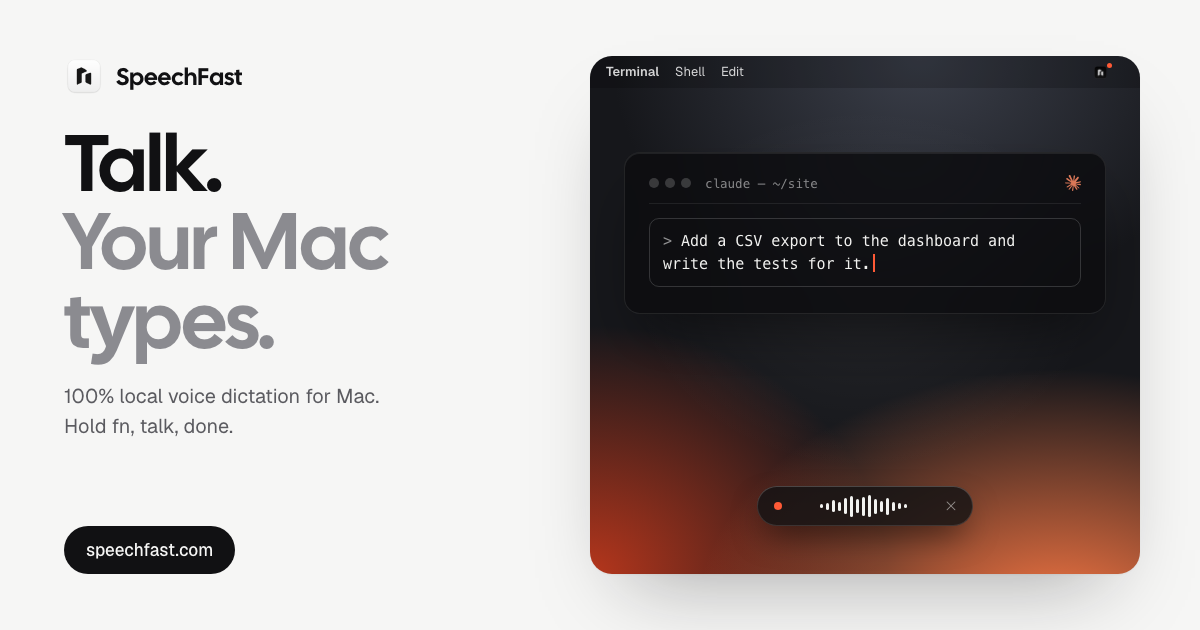
SpeechFast is a voice dictation app for Mac that turns speech into clean, ready-to-send text in any app where you can type. You hold the fn key, talk the way you normally talk, and the text lands at your cursor about a second after you let go. It works in Mail, Slack, Notion, your code editor, or anywhere else a text field accepts your keyboard. The core promise is privacy: transcription and clean-up run on the Mac itself. The speech model is downloaded once, and after that no audio and no text ever leaves your machine, so you can dictate offline, on a plane, or behind a locked-down corporate network. The gap SpeechFast addresses is the distance between how people actually speak and what they want to send. Spoken sentences arrive with filler words, repeated words and false starts, and typing them out by hand is slow. The site shows the difference directly: a dictation that begins with 'Um, soSo for Thursday's demo, we're, we're we're almost ready. Just uh the sign-up left to finish, I think Tuesday, no wait, Wednesday morning at the latest' is presented alongside the clean text that gets typed instead. The second problem is privacy. Most dictation tools work by sending your audio somewhere else to be transcribed, which is a difficult trade for anyone handling confidential material or working on a restricted network. SpeechFast takes the opposite position, and an automated test enforces it: the test fails if transcription or clean-up makes a single network request. The everyday interaction is built around three gestures. Holding fn starts dictation, and a pill opens at the bottom of your screen and follows your voice; when you let go, the text lands at your cursor in about a second. Pressing shift plus fn switches to hands-free mode for long messages, which keeps listening without you holding the key, and a tap on fn stops and processes what you said. Pressing esc cancels the dictation entirely, so nothing is pasted and nothing is kept. If fn is not comfortable, the right command key works as an alternative. Because the app pastes at the cursor and restores your clipboard afterwards, it fits into whatever writing you were already doing rather than asking you to move to a separate window. SpeechFast ships with three transcription engines, all running on your Mac. You choose between speed and accuracy in Settings and can switch any time. Parakeet is the default engine: it is fast and accurate, detects the language you speak on its own, runs on the Neural Engine, covers 25 languages, takes roughly one second from release to text, and requires a one-time 600 MB download. Cohere Transcribe is the most accurate option, intended for text where every word counts, at the cost of a few more seconds per sentence; the site lists a word error rate of 1.5% in English and 1.3% in French, with a one-time 2 GB download. Apple is the on-device transcription built into macOS, installed by macOS, working in one fixed language that you pick in Settings. Beyond raw transcription, SpeechFast cleans up what you say. Filler words, repeats and false starts are removed and punctuation is fixed, with clean-up handled by Apple Intelligence on the device. You can also keep your own vocabulary for names and jargon so that the things you say often come out spelled the way you need them. Every dictation is kept in a local history for 30 days by default, which you can shorten, turn off or erase entirely. The audio itself is never stored: your voice stays in memory just long enough to transcribe it. If no text field is selected, the text goes to your clipboard and your history, so no dictation is lost. The overall approach is a single on-device pipeline. Transcription runs on the Neural Engine, clean-up is handled by Apple Intelligence, and everything happens on the chip. The app asks for Accessibility access so it can detect the fn key from any app and paste the text at your cursor; your clipboard is saved before pasting and restored right after. Because the model is downloaded once rather than queried over a network, the app keeps working in airplane mode, on a train, in flight, or on a locked-down corporate network. There is no account and no sign-up either, just one email at checkout to receive your key. The benefits follow from those choices. Dictation is as fast as speech, the text does not need a second editing pass to remove the ums and the repeats, and privacy needs no extra effort because nothing is sent anywhere. Language handling is more flexible than the dictation built into macOS: with Parakeet the language is detected on its own, so you can go from English to French from one sentence to the next, whereas Apple's dictation requires switching languages from a menu next to the cursor. And because the same app accepts Apple's own engine if you prefer it, you are not locked out of the transcription you already trust. Typical use cases map to the situations the product describes. You can dictate a long message hands-free with shift plus fn instead of holding a key. You can work on a flight, on a train, or behind a corporate network where nothing may leave the machine. You can dictate into Mail, Slack, Notion or a code editor, since any text field that accepts your keyboard accepts your voice. You can switch between English, French, German, Spanish and other languages sentence by sentence, or pick Cohere Transcribe when you are writing text where every word counts. SpeechFast requires an Apple Silicon Mac (M1 or later) running macOS 26. Clean-up uses Apple Intelligence, and if it is turned off the app pastes the transcript as it is. It is a one-time purchase of 39.99 euros for three Macs with updates included, not a subscription; the site compares that with Wispr Flow Pro at 15 dollars a month. A 7-day free trial is available, and after the trial dictation stops and the app offers you a license while your history and settings stay put. To move to another Mac you deactivate the old one from Settings and License. The listed version is 1.0.10, signed and notarized by Apple. The takeaway is simple: SpeechFast is a focused dictation tool that gives you clean text at your cursor in any Mac app, with the whole transcription and clean-up pipeline running on your own machine. It replaces typing and server-based dictation with one key, your voice, and an on-device model that never sends your words anywhere.
Openbroca is an AI dictation app for Mac that turns spoken words into clear, ready-to-send text inside whatever app you are already typing in. You press a shortcut, talk the way you normally do, and Openbroca writes the result at your cursor — in email, messages, notes, documents, or AI prompts. It is built as a native Swift application for Mac with a download of roughly 6.5 MB, and it is positioned as a lightweight alternative to Typeless for Mac. Its stated purpose is simple: let you talk messy and read clean, so the way you speak naturally becomes the way your writing reads. It is aimed at Mac users who would rather speak a draft than type one, and who want the output to still sound like them rather than like a generic AI rewrite. Most people speak faster and more naturally than they type, yet dictation has historically been awkward in practice. Standard voice-to-text produces transcripts littered with fillers, false starts, and repetition, so the cleanup can take as long as typing the text by hand. Many writing assistants go the other way: they rewrite your words into a generic AI voice, and getting a usable result requires prompt tweaking and re-prompting. Openbroca is built around the gap between those two experiences. It assumes you will talk messily — the way people actually think out loud — and takes responsibility for turning that into clean, readable text that keeps your meaning and your tone, with no prompt tweaking required. The product sums this up as talk messy, read clean. AI cleanup is the core of the product. Instead of transcribing verbatim, Openbroca removes fillers and repetition from what you said while preserving your meaning and tone. That means you can speak a draft the way you would explain it to a colleague, complete with the ums, the half-restarts, and the repeated phrases, and still get text that is ready to send. Because no prompt tweaking is involved, there is no instruction to write, no model to coach, and no template to fill in — you simply dictate and the cleaned result appears. The stated benefit is text that still sounds like you, which matters for emails, messages, and AI prompts where your own phrasing carries intent and personality. A personal dictionary handles the vocabulary that generic dictation tends to get wrong. You add names, terms, and preferred spellings, and Openbroca can also learn from corrections you make right after dictation, so a mistake you fix once is less likely to recur. The dictionary supports spoken-phrase replacements — the site shows the example of mapping the spoken phrase open broker to Openbroca — which is useful for product names, client names, and jargon. Openbroca also supports importing a Typeless dictionary, so people switching from Typeless can carry their vocabulary across. An optional Screen Context feature helps recognize names and terms that appear on screen, and it is enabled during setup and can be switched on or off in Preferences. Translation extends dictation beyond a single language. You speak naturally, then choose one of 28 output languages, and Openbroca translates your dictation and puts the result at your cursor — so the source and the destination both stay inside the app you are working in. The language list spans English, Simplified Chinese, Japanese, Korean, Spanish, French, German, Portuguese, Italian, Arabic, Hindi, Thai, and more. On the input side, Openbroca supports dictation in 30 languages with automatic language detection, which means you do not have to declare a language before you start speaking. Together, automatic input detection and selectable output languages let you draft in one language and deliver in another without leaving your document. Operationally, Openbroca is built around a keyboard shortcut. Press Option-Space to start or stop dictation, or hold the shortcut while you talk. A second shortcut brings back your previous transcript when you want to reuse or recover it. Speech recognition and text cleanup are cloud-powered, so an internet connection is required, and Openbroca stores no audio. Setup involves granting microphone access and text insertion permission, with optional Screen Context if you want on-screen names and terms recognized. Preferences cover the microphone, shortcuts, and translation language. If direct insertion is unavailable, Openbroca copies the text so you can paste it manually, and you can retry a recording if the first attempt did not come out as expected. The whole setup is described as a few clean settings. The benefits follow from that design. You can speak a draft directly into the field you are working in and keep editing without switching apps, which keeps your flow intact. Cleanup happens automatically, so the time you would spend deleting fillers and repeated words is not spent at all. Because cleanup preserves meaning and tone, the result reads like your writing rather than like an AI paraphrase. The personal dictionary reduces repeated corrections of the same names and terms, and dictionary import lowers the cost of moving from another dictation tool. Translation into 28 languages removes the need to draft in one app and translate in another, since the translated text lands at your cursor. Concrete use cases named on the site include emails, messages, notes, docs, and AI prompts. In an email, you might speak a quick update to a colleague — the site's own example is a launch update about moving a final review to Thursday afternoon and sending an updated brief before lunch — and get a clean, sendable message. In messages, dictation lets you reply at speaking speed without typing on a keyboard. In notes and docs, you can capture a draft while it is fresh and edit afterward. For AI prompts, speaking a detailed prompt is often faster than typing one, and cleanup produces a clearer prompt while keeping your phrasing. With translation, you can dictate in your own language and deliver the output in one of 28 target languages. Openbroca is a universal Mac app for both Apple silicon and Intel, requiring macOS 15 or later, and it is distributed as a native Swift build of roughly 6.5 MB, which is the basis for its lightweight positioning. Dictation works in the apps you already use rather than in a separate editor, so there is no new workspace to learn. Pricing is free to try: the free plan includes 3,000 text units weekly with all features and no card required, and the site describes all features as free to try. A Windows version is not yet available; the site offers a waitlist for Windows availability and early-access updates. The takeaway is that Openbroca targets a narrow, practical problem — the distance between how you speak and how you need to write — and closes it inside the Mac apps you already use. Speak naturally, keep your tone, and get clean text at your cursor, with a personal dictionary that learns your vocabulary and translation into 28 languages when you need it.
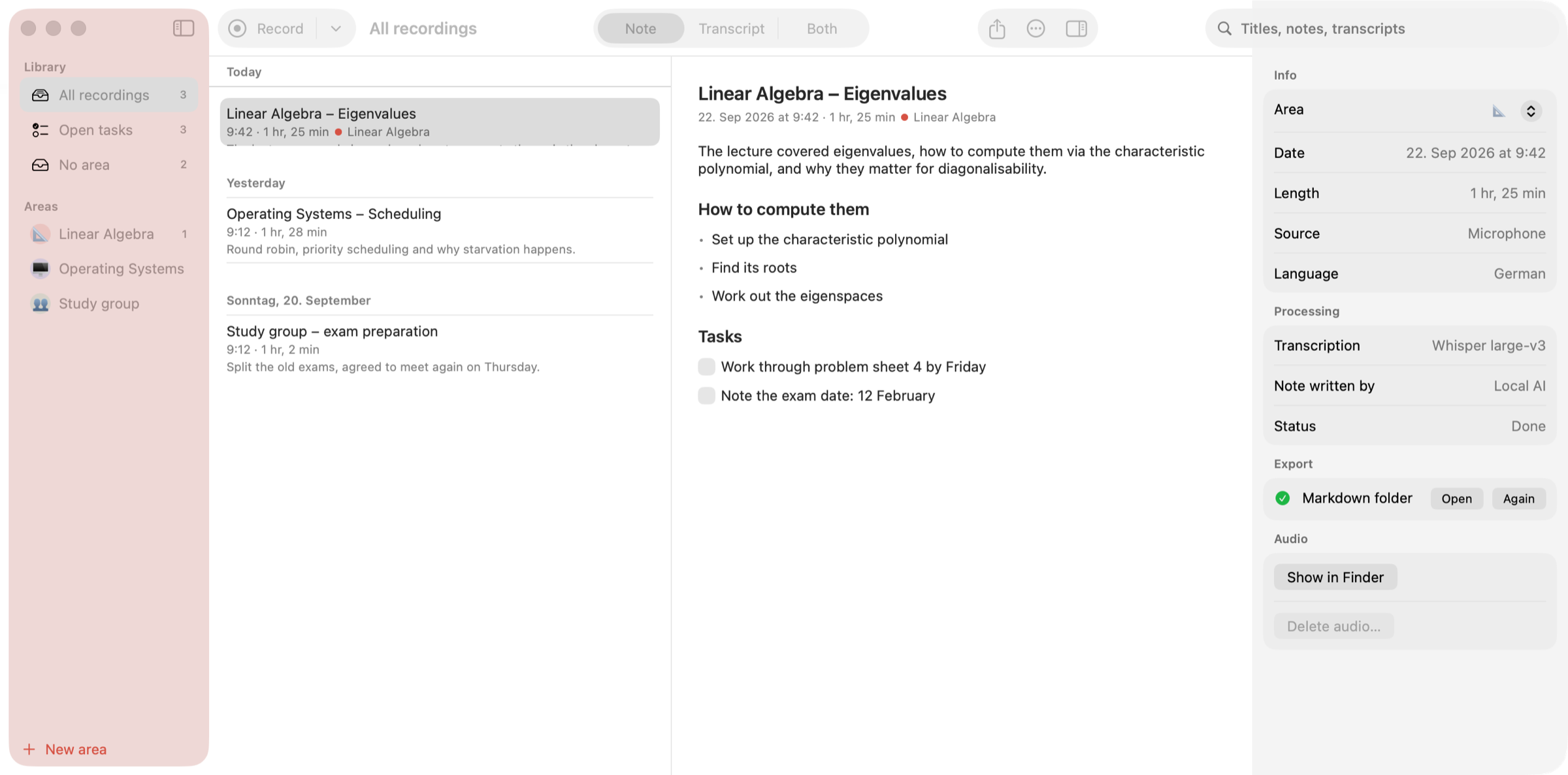
Earnote is a note-taking app for Mac, iPhone and iPad that records lectures, meetings and calls, transcribes them with Whisper and turns the recording into a structured written note. Instead of leaving you with a wall of transcript, it produces a short summary, the topics that actually came up, decisions and tasks you can tick off, plus flashcards and a printable PDF study sheet. It is built for students sitting in lectures, for people who need a record of meetings and calls, and for anyone who wants to talk through an idea and keep the result as a written note. The app is free and open source under the MIT licence, with no account, no ads and no subscription. The problem Earnote addresses is the gap between what is said in a room and what a person manages to write down. A lecturer who speaks quickly, a meeting where several people talk at once, or a call that ends with a list of follow-ups all produce information that is easy to lose. A plain recording solves only half of it: the audio exists, but finding the relevant minute later means scrubbing through an hour of sound. A plain transcript produces text that still has to be read and reorganised by hand, and the details that matter — decisions, tasks, exam hints — disappear into the paragraphs. Earnote's stated ambition is to write what you would have written yourself if you had been fast enough: a short summary, the topics that actually came up, decisions and tasks, all while the recording stays on your own devices. Recording starts with ⇧⌘R or a single click in the menu bar, and Earnote captures the microphone and system audio together, so everyone on a Zoom, Teams or Meet call ends up in the transcript as well as the people in the room. A global shortcut, ⌃⌥⌘R, starts and stops a recording from any app without hunting for a window first. On iPhone and iPad the app records the whole lecture even with the screen off and the phone locked, and offers a Live Activity on the Lock Screen, Control Center and Action button controls, and widgets. It pauses for phone calls, notices when Zoom, Teams or Meet is running, asks whether it should take notes and can stop when the call ends. If a calendar event is running, the recording is named after the event — "Linear Algebra" instead of "Uni, 21 Sep" — and you choose which calendars count. Transcription runs with Whisper, and on the Mac the speech recognition happens locally on the machine. On a Mac with enough power you see the transcript live while you are still in the room, and because Earnote transcribes while it records, most of the work is already done by the time you press stop. On an M1 MacBook Air a 60-minute lecture is transcribed in about five to six minutes, roughly 12× real time, and the note then takes a few minutes more while you watch it being written. Low Power Mode makes everything about three times slower, and Earnote tells you when that happens. Recordings can be transcribed in many languages and you choose the language of the notes separately; the interface follows your Mac and is available in English or German. The note is written by a language model, downloaded once and run on your device, and it contains a summary and the topics that actually came up rather than a reformatted transcript. Decisions are pulled out, and follow-ups become tasks with checkboxes you can tick off. You can edit any part of the note by hand, or summarise again with your own instruction while the AI version stays one click away. Six local AI models are available and Earnote preselects the one that fits your Mac. Per-area instructions give every subject or client its own style for the AI, so the notes for a maths lecture and for a client call do not read the same way. Study material comes out of the same note. Flashcards — question and answer cards written straight from the lecture — can be edited inside the note and exported to Anki so you can quiz yourself. The note can be printed or saved as a clean PDF study sheet with headings, bullet points and tasks rendered as boxes, which makes revision possible away from the screen. For a whole subject there is an overview across every lecture at once, showing the topics, how they build on each other and any exam hints that were mentioned along the way. Listening back is built into the transcript. Every timestamp is a button: click the time and you hear exactly that moment, so when the lecturer went too fast you can jump straight to the sentence instead of hunting. The paragraph that is playing stays highlighted while you read along, and ⌘3 puts the note and the transcript side by side with the transcript scrolling along with the audio. Search inside recordings finds a term across all transcripts, steps through the matches with ⌘G and lets you hear the spot. Names and terms that Whisper gets wrong can be corrected once in a dictionary: the correction applies to the title, the note and the transcript, and the dictionary is handed to Whisper and to the AI so the next recording gets it right, per area or for everything. Privacy is treated as a default rather than a setting. Transcription runs locally with Whisper and the notes are written by a language model that Earnote downloads once and then runs on your device — no account, no API key, works offline. Recordings, transcripts and notes live in your home folder and are never synced. The app sends no analytics and no crash reports, and there is no server that belongs to Earnote. Cloud AI is possible only if you ask for it: you can pick Claude, OpenAI, Gemini or your own server, and the app says clearly when text would leave the machine. Housekeeping follows the same principle — you can see what the recordings take up and drop the audio of old ones while notes and transcripts stay, and Earnote filters the sentences Whisper invents during silence instead of writing them down. Notes are filed where you already work: Notion, Obsidian, Logseq, Apple Notes, Bear, Craft or a plain Markdown folder. Open tasks go to Apple Reminders, Things or Todoist, with one list per subject, and every subject or client can be set up as an area with its own colour, AI instructions and export targets. The app keeps itself up to date by telling you when a new version is there, showing what changed and installing it after you agree. On iPhone, a recording can be written up on the device itself, by your Mac through your own iCloud — with the audio deleted afterwards — or with your own free Google key, where only the text is sent and never the audio; notes then sync with your Mac. The Mac app requires macOS 15 or newer on Apple Silicon with about 8 GB of memory, and the first run downloads the speech model (~1.6 GB) and the local AI (~2.3 GB) once. It is a 26 MB download, signed and notarised by Apple, and it is not in the Mac App Store because the sandbox there would get in the way of recording system audio and filing notes into other apps. iPhone and iPad versions require iOS 26 / iPadOS 26 and are available on the App Store; on iPhone 15 Pro and later even the note is written on-device. There is no Windows version, because Earnote builds on Apple's CoreML and MLX frameworks. Everything on the Mac is free; on iPhone and iPad an optional one-time Earnote Pro purchase adds speaker detection, ask your notes and translation, with no subscription. Typical use is a student recording a linear algebra lecture, getting a summary and tasks, quizzing themselves with flashcards and revising from a PDF study sheet before the exam. It is a meeting where Zoom, Teams or Meet audio is captured alongside the room, the recording is named after the calendar event, follow-ups land in a task manager and the note is exported to Notion or Obsidian. It is an explanation recorded out loud that comes back as a structured note, or a phone on the desk recording a full lecture with the screen off and the notes waiting afterwards. It is also semester-scale work: one overview across every lecture of a subject, with search across all transcripts when a term needs to be found again. Earnote's value proposition is narrow and concrete: press record, keep talking, and end up with a note you would have written yourself — summary, topics, decisions, tasks, flashcards and a PDF — while the audio and the transcript never leave your devices unless you explicitly send them somewhere.
Chathonk is described in the provided content as a fun and engaging chat platform that lets people connect with friends. Its Product Hunt tagline says it offers instant chat, web games, and audio calls with friends. The product description adds that users can search for other users by email or username and spice up conversations with emojis and GIFs. The website content shows a login page where people access the product through an account, with options to continue with Google or use an email and password. There is also a forgot-password link, a create-account link, and a continue-as-guest option. Chathonk is listed under Messaging, Games, and Chat rooms on Product Hunt, matching the chat and games positioning in the available content. The provided content does not include a detailed problem statement or origin story. It frames Chathonk around connecting with friends and making conversations more fun and engaging. The stated features address common needs in a chat product: finding people to talk to, expressing yourself in conversation, and spending time together through lightweight activities. Searching by email or username gives users a way to locate people without relying only on display names. Emojis and GIFs add expressive elements to messages. Web games and audio calls extend the experience beyond plain text chat. The content does not claim to replace any specific tool or solve a named industry problem; it simply presents these capabilities as part of a fun chat platform. The login page shows several ways to enter Chathonk. Users can continue with Google, or they can sign in with an email address and password. A forgot-password link is available for account recovery, and a create-one link supports new account registration. The page also offers a continue-as-guest option for people who are just looking. These access paths matter because they set the tone for how people begin using the product. Google sign-in can reduce the need to remember another password, while email and password login gives users a direct account option. Guest access lets someone explore without creating an account first. The content does not describe any additional authentication methods beyond these. Chathonk's description says users can search for users by email or username. This is the only user-discovery method explicitly mentioned in the provided content. It supports a direct way to find a specific person when you already know their email address or their chosen username. The content does not describe browseable directories, contact imports, friend suggestions, or other discovery tools. For the purpose of this extraction, the stated capability is limited to searching by email or username. That capability is important because it gives the platform a concrete way to help people locate one another before starting a conversation. The product description states that Chathonk lets users spice up conversations with emojis and GIFs. These are explicitly mentioned expressive elements for chat. Emojis can add tone or emotion to a message, and GIFs can add animated visual reactions. The content does not specify how emojis and GIFs are selected, whether there is a library, or whether they can be used in every conversation type. It only states that they are part of the chat experience. Within the available information, this feature supports the broader positioning of Chathonk as a fun and engaging platform rather than a plain text-only messaging tool. The tagline says Chathonk includes web games and audio calls with friends. These are the two non-text interaction modes explicitly named in the provided content. Web games are described as part of the product alongside instant chat, which suggests that games are available within the same platform. Audio calls are also named as a way to connect with friends. The content does not list specific games, describe game rules, state call limits, or explain how calls are started. It also does not say whether games and calls are available to guest users. The extraction therefore records only the stated presence of web games and audio calls. Based on the provided content, the overall flow is straightforward. A person arrives at the Chathonk website and sees a login screen. They can continue with Google, enter an email and password, recover a forgotten password, create an account, or continue as a guest. Once inside, the product is described as a chat platform for connecting with friends. Users can search for other users by email or username, then chat with them. Conversations can be enhanced with emojis and GIFs. The tagline adds that the platform also offers web games and audio calls with friends. The website footer shows an Edit with Base44 label, which is the only technology-related detail explicitly present in the content. No further technical architecture or workflow details are provided. The stated benefits are centered on fun, engagement, and connection. Chathonk is described as a fun and engaging chat platform, so the content positions enjoyment as a core outcome. Searching by email or username can make it easier to find the right person to talk to. Emojis and GIFs can make conversations more expressive. Web games and audio calls can add variety beyond text chat. The login options can reduce friction because users can choose Google, email and password, or guest access. These benefits are directly tied to features named in the content. The provided material does not include claims about security, speed, privacy, reliability, or business outcomes, so those are not included here. Several concrete use cases follow directly from the stated features. A user can search for a friend by email or username and start an instant chat. Friends can make conversations more fun by adding emojis and GIFs. A group of friends can use the web games capability as part of their time on the platform. Friends can also make audio calls through Chathonk. Someone who is just looking can continue as a guest before deciding to create an account. A new user can create an account, and an existing user who has forgotten a password can use the recovery link. These scenarios are based on the login page, product description, and tagline provided. The target audience, as described by the content, is people who want to connect with friends through a fun chat platform. The product is listed under Messaging, Games, and Chat rooms, which points to social chat and casual gaming interests. Login through Google is the only integration explicitly named. The website shows Base44 in an Edit with Base44 label, making Base44 the only technology named in the provided content. No pricing, plan, free-tier, or paid-tier information appears in the provided content. No mobile app, desktop app, or API details are stated. The available platforms information is therefore limited to the web, because the content is a website and login page. In summary, Chathonk is presented as a fun and engaging chat platform for connecting with friends. Its core stated capabilities are instant chat, user search by email or username, emojis and GIFs, web games, and audio calls. The login page adds Google sign-in, email and password login, password recovery, account creation, and guest access. The content does not provide deeper detail on pricing, plans, technical architecture, or specific game and call functionality. Within those limits, Chathonk's primary value proposition is a casual, expressive, and multi-activity way to chat with friends.
Nostaliga is an iPhone and iPad app that turns your listening history into a personal timeline. Pick any song and see the day around it: your photos, places, runs, check-ins, shows and posts. The app brings your music, photos, workouts, walks, the places you have been, and the movies and shows you have watched into one timeline, so that a single track becomes an entry point into a period of your life rather than just a piece of audio. Nostaliga is made for anyone who has ever heard a song and been pulled straight back to a specific time and wanted to see that moment again, the photos that were taken, the route that was ridden, the place that was checked in to, and not only feel a vague sense of nostalgia. The app grew out of a very specific memory. The maker describes hearing "1-800-273-8255" by Logic and being instantly back in 2017, the first year he was cycling, doing long rides with that song on repeat. The song remembered those rides better than he did, but the routes and the photos from them were scattered across Strava, his camera roll and Last.fm. That fragmentation is exactly the problem Nostaliga sets out to solve. The music that triggers a memory lives in one service, the photographic evidence lives in another, the workout data in a third, and the check-ins, shows and social posts somewhere else again. Nostaliga anchors all of those threads to listening history, so instead of hunting through several apps for the same day, you can start from the song and let the app reassemble the context around it. The central interaction is deliberately simple: pick any song and Nostaliga shows you the day around it. The app looks through your listening history and brings back the photos, places, rides, walks and moments from the times you played that track before. Photos, places, runs, check-ins, shows and posts all sit in the same view, arranged around the music rather than around a date. This matters because most memory tools ask you to remember a date or scroll a photo library; Nostaliga starts from the thing that actually triggered the memory. The song is the index, and everything else, where you were, what you photographed, what you were doing, hangs off it. Nostaliga also includes an On This Day experience that works across the years. Instead of looking only at a single song, you can go back to the same date in earlier years and see what belongs to it. That gives the timeline a second axis: one direction from a song into a day, and another from a calendar date back through the years. Together they turn the app into something closer to a personal archive with two ways in, so the memory can be found whether you remember the music or the date. The app draws on a broad set of sources so the timeline is not limited to music. It works with Apple Music and Last.fm for listening history, Photos for imagery, Apple Health and Strava for runs, rides, workouts and walks, Swarm for check-ins, Trakt for the movies and shows you have watched, and Calendar for events. If your listening history does not live in those services, you can import your Spotify listening history, and you can also import your Twitter, Instagram or Facebook archives. Each of these sources contributes a different kind of evidence about a day, where you went, what you did, what you watched, what you shared, and Nostaliga's job is to line them up against the music. Underneath, Nostaliga's approach is defined as much by what it does not do as by what it does. There is no account, and there is no analytics or tracking. Your timeline is built and stored on your device, so the assembled record of your listening, photos, places and activity stays with you instead of being uploaded and held by a service. That makes the app a local, personal archive rather than a social or cloud product. The result is a timeline you can explore without signing up, without a profile, and without the sense that your memories are being collected by someone else. The benefits follow from that design. A song stops being only a song and becomes a way back into a particular stretch of life, the year you were cycling, the city you were in, the film you were watching that week. Because the sources are gathered rather than scattered, you do not have to remember which app holds which fragment; the timeline does it for you. And because the listening history is the organizing principle, the memory is triggered by the same thing that would have triggered it in real life: hearing the track. Finally, the on-device, no-account model means the value of the archive is not tied to a subscription or a login. Concretely, Nostaliga is used when a song brings back a period and you want to see it rather than only recall it. You might pick a track that was on repeat during a first year of cycling and use it to pull up the routes and photos from those long rides. You might use On This Day to revisit the same date in earlier years and see what you were listening to, where you checked in and what you were watching. You might start from a film or show in Trakt and work back to the music of that month, or start from a check-in in Swarm and see what was playing. If your history is spread across Apple Music, Last.fm, Strava, Photos and social archives, importing those sources is the first step in building the timeline you then browse by song or by date. Nostaliga is an iOS app for iPhone and iPad, listed under iOS, Music and Photography. Its connected sources include Apple Music, Last.fm, Photos, Apple Health, Strava, Swarm, Trakt and Calendar, along with imports for Spotify listening history and Twitter, Instagram or Facebook archives. It is free to use. Because it requires no account and performs no analytics or tracking, there is nothing to sign up for before you begin: the timeline is assembled and kept on your own device. The takeaway is that Nostaliga treats your listening history as the thread that ties your memories together. By combining music with photos, places, runs, check-ins, shows, posts and calendar events in one on-device timeline, and by letting you enter it either from a song or from a date, it makes rediscovering the days behind your favorite songs a matter of picking a track and seeing what comes back.
Table Canon is a tool for tabletop RPG game masters that turns uploaded game-night audio into a session recap, an outline, and a prep desk. It is built for the person running the game — the game master who wants to stay in the scene while playing and then sit down later with the whole night in one place. The product states its promise plainly: play the session, prep from the recap. Rather than asking a GM to write notes while the story is moving, Table Canon takes the recording of the session and turns it into written material the GM can actually use when preparing the next game. Callbacks from earlier sessions show up when you prep, so the campaign's own history becomes the source of future hooks. The site frames the whole product around a simple idea: solid foundation, lasting stories. The problem Table Canon addresses is stated directly on its site: you meant to write it down, but the scene had already moved on. Prep night should not start by reconstructing the last session from memory. Notes capture only what you had time to scribble during play, and a general chatbot only knows what you paste into it. Table Canon puts the recap, the outline, and the open threads in one desk, so a promise made three sessions ago can become next week's hook without pausing the table to record it. The goal is to let the GM focus on the game and then prep from what already happened, instead of losing the thread between sessions or hunting through old chats and documents for details that may never have been written down at all. The process begins with uploading a recording. The audio is the notes: you played, and the recording stands in for the note-taking you did not do. Today, on the web, a game master uploads an audio file from game night. Live recording on the mobile app and in the browser is described as coming soon. Also marked coming soon are optional GM notes for secrets and corrections, layered on top of the audio — a way to add information the recording alone would not capture. This approach keeps the GM inside the scene rather than at the edge of it with a notebook, and it means the record of the session is created automatically rather than depending on how much time anyone had to write things down. Once a recording is uploaded, the night lands in one place. Table Canon produces a transcript, speaker labels, an outline, and a Recap. The site states that this material is usually ready in about 15 to 20 minutes, depending on session length, and that users see a "Building your campaign…" indicator until the session is ready. Having the transcript, the speakers, the outline, and the recap assembled together means the GM does not have to piece the evening back together from scattered files, memory, or half-finished notes. The recap and outline are designed to be read before planning the next scene, so preparation starts from a written account of what actually happened at the table. Preparation then starts from that desk. The prep desk surfaces open threads, hooks, and the people who mattered during the session. Earlier nights resurface as callbacks, which is how continuity across a long campaign is maintained without manual bookkeeping. This is described on the site as "the desk you open on prep night" — a single place where the loose ends from previous sessions are already visible. Instead of asking the GM to remember which promise, faction, or unresolved question is still live, the prep desk collects those elements from the campaign's own history and puts them in front of the person planning the next game. The campaign's world is also kept current. Table Canon maintains NPCs, places, and factions that are updated from play, described as "a world that keeps up." When the AI gets something wrong, the site says that this happens and provides tools to fix it: voice samples can be calibrated for better speaker labels, and on any World dossier a GM can use GM corrections to fix names, blurbs, aliases, and mistaken duplicates, merging or marking them distinct. Reviewing the session Recap before sharing it is recommended, and corrections stick for Ask and future sessions. When a fact is fuzzy, the GM can ask — for example, "What did they promise the tavern keeper?" — and the answers cite the sessions they came from. That citation behaviour is a stated differentiator from pasting text into a chatbot: the memory is derived from play, with evidence. The site positions Table Canon against do-it-yourself approaches with a direct comparison. Taking notes while you play means you leave the scene; Table Canon keeps audio as the record and notes optional. Reconstructing the last session before you can even prep leads to scattered memory and old chats; Table Canon puts recap, outline, and prep in one place. Coming back next week and pasting into a new chat causes names to drift; Table Canon keeps the same campaign desk, updated from each night. Building a campaign wiki by hand drifts from what players actually did; Table Canon's memory is derived from play, with evidence. And asking "what did they promise in session 4?" normally means hunting old chats and docs, while Table Canon lets you ask with citations into your actual sessions. The stated outcomes for users follow from that design. After game night you get the night in one place: a recap and outline you can read before planning the next scene. You get a prep desk with open threads and hooks, including callbacks from earlier nights. And you get a world that keeps up, with NPCs, places, and factions updated from play. Together these pieces mean prep time is spent planning forward rather than reconstructing backward. The memory of the campaign evolves each session rather than being frozen at whatever was written down at the time, and answers about past events are backed by the sessions they came from. Concrete use cases appear throughout the site. A game master can upload a recording after game night and, roughly 15 to 20 minutes later, read the recap and outline before planning the next scene. During prep, they can open the desk to see open threads and hooks, including callbacks from earlier nights that become next week's hooks. When a detail is fuzzy, they can ask a question such as what the party promised the tavern keeper and get an answer citing their sessions. They can browse a real campaign from a live table — World, Story, and night-by-night Recaps — and try Ask on the sample campaign, including questions that pull from an earlier night, before uploading anything themselves. After a session is processed, they can review the Recap before sharing it, calibrate voice samples for better speaker labels, and use GM corrections on World dossiers to fix names, blurbs, aliases, or merge mistaken duplicates. Table Canon is built for the table and works with the systems game masters already run, listing Dungeons & Dragons, Pathfinder, Call of Cthulhu, and indie TTRPGs. The site notes that memory stays campaign-shaped, not system-locked. Pricing starts with a free tier: 6 hours of processed audio lifetime, no login and no credit card required, with the option to try as a Guest. Free access includes the full desk — campaigns, World, Story, Prep, and Ask — and the sample campaign tour can be explored without uploading anything. Plans are priced on processed audio hours once a user outgrows Free. The site states that session audio and campaign content run on your account only and are not used for public model training, and that live recording on the mobile app and in the browser is coming soon, while the web beta today supports uploading a session recording. Table Canon's core value proposition is that the session itself becomes the campaign's memory. By turning uploaded game-night audio into a transcript, speakers, outline, Recap, a prep desk of open threads and hooks, and an evolving world of NPCs, places, and factions — all searchable with answers that cite your sessions — it removes the need to take notes during play or reconstruct the last session from memory before prep. Game masters stay in the scene while playing, then open one desk on prep night where earlier nights surface as callbacks, corrections stick, and the story keeps its foundation from session to session.
Mira Tours is an AI tour guide that turns a walk through any city into a narrated audio tour. Mira tells you the story of what is around you as you walk, and every tour is researched and written for you, wherever you happen to be. It offers walking audio tours anywhere in the world, with narration chosen per tour. The product is aimed at people who want to understand the place they are walking through, whether they are visiting a city for the first time, living somewhere they have never fully explored, or simply dreaming about a destination from home. Most walking tours require planning: choosing a route, finding a guide, joining a group and following a fixed schedule. Mira takes a different approach, built around four ways to start walking and a promise that you can plan it out or plan nothing at all. You can shape a route in conversation, start walking and let Mira find something interesting near you, head towards a destination you were going to anyway, or walk a tour someone else has shared. Rather than one fixed route for everyone, every tour is researched and written for you, so the stories you hear at each stop relate to the walk you are actually on and to what you said you were curious about. The four ways to start walking cover different intentions. The first is making your own tour: you say what you are in the mood for and build the route together in a chat, adding, dropping and reordering stops until the plan feels right. The second is wandering: there is nothing to plan or pick, you tap start, Mira finds something interesting near you and keeps finding stops for as long as you feel like walking. The third is heading somewhere: if you are going somewhere anyway, Mira routes you there and narrates what you pass, and if you give an arrival time she paces the walk to make it. The fourth is walking someone else's tour: others have shared the best of their cities, so you can walk one near you or listen from home to a city you are dreaming about. Building your own audio tour works like planning a day out with a friend who knows every street. You tell Mira what you are curious about and build the tour together. You can say what you are in the mood for, whether that is hidden history, film spots or something the kids will love, and any idea works. Mira then proposes real places near you, in walkable order, and you add, drop and reorder stops until the plan feels right. In the example shown on the site, a walker says "I have an hour and I love hidden history", and Mira responds by offering a route through the oldest corners of Chinatown starting a short walk away: Portsmouth Square, Old Saint Mary's Cathedral, Waverly Place and Ross Alley, about an hour on foot. When the walker asks for coffee near the end, Mira adds Caffe Trieste. Then you just walk, and every stop is narrated as you arrive, researched and written for your tour. As you walk, stories arrive when you do: you can lock your phone, put it in your pocket and keep walking, with narration delivered as you reach each stop. Your interests shape what you hear at every stop, because you can tell Mira what you love and what you can skip, and every stop leans your way; a topics screen lets you turn subjects such as Legends and Ghosts up and Politics down. At a stop you can see what else a place has to offer, hear another story, or just keep walking. You can also ask anything, anytime, about something you just heard or something you just walked past. Ask your guide, get a real answer, and turn it into more audio if you want to keep going. Tours are also designed to be shared. You can share a link and everyone walking with you hears the same stops you do, live as you walk. They install Mira, tap the link and follow the whole tour without spending any of their own minutes, because walking along is free for your friends. Tours are narrated in 23 languages, chosen per tour: Arabic, Bangla, Dutch, English, French, German, Hindi, Indonesian, Italian, Japanese, Korean, Marathi, Polish, Portuguese, Romanian, Russian, Spanish, Tamil, Telugu, Thai, Turkish, Ukrainian and Vietnamese. Overall, Mira's approach is to research and write each tour for the person walking it, whether that route was shaped in a chat, discovered stop by stop while wandering, or planned to finish at a particular place at a particular time. The main benefit is that you do not have to plan, book or study to get the story of a place. You can begin with no plan at all, or shape one in a short conversation, and hear researched narration at each stop instead of reading it. Because Mira keeps finding stops for as long as you feel like walking, a walk does not end when a fixed itinerary does, and you can stop whenever you like. You can put your phone away and simply listen as you arrive, and you can bend the tour towards your own interests at every stop, leaning into legends and ghosts or turning politics down. If you are walking with others, everyone hears the same stories live rather than one person reading aloud from a guide. Concrete uses follow directly from the four modes. A visitor with an hour and a taste for hidden history can ask for that in a chat and immediately receive a walkable route with real stops and a coffee finish. Someone already heading somewhere can have Mira route them there and narrate what they pass, with the walk paced to an arrival time. A local with no plan can tap start and keep walking while Mira finds something interesting nearby, and keep going for as long as they like. Someone dreaming about a distant city can listen from home to a tour others have shared, and a group of friends walking together can follow one shared link so everyone hears the same stops live. Anyone who wants to try it first can walk a real city in street view in the browser as Mira tells them about it, with nothing to install. Availability and pricing are stated plainly: your first 30 minutes are free, and after that you buy listening time when you want it, with no subscription and no monthly fee. Thirty minutes for a quick tour costs $0.99, two hours costs $2.99 and saves 24%, and five hours costs $5.99 as the best value. Time never expires, and it is only spent on narration and research you actually use. Prices are in US dollars, and the app shows your store's local price. Mira runs in the browser at mira.tours/wander as well as in mobile apps, with downloads on the App Store and on Google Play, and Product Hunt lists it under Android, Travel, Artificial Intelligence and Google Cloud Run. In short, Mira Tours is a personal tour guide in audio form: an AI guide that plans a route with you or finds one for you, narrates it stop by stop as you arrive, adapts to your interests, answers your questions, and can be shared so everyone walking with you hears the same stories.
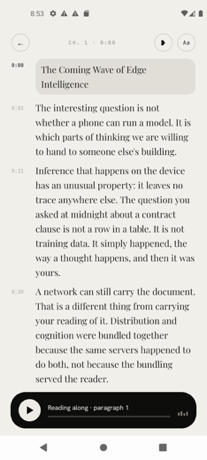
Fluence is a reading app for your phone that turns your PDFs, ebooks, reports and saved articles into something you can listen to, follow along with, and ask questions about. It is built for readers who want to get through long documents without keeping their eyes on a screen — people with reading piles, reports, books and saved articles, and anyone who prefers to listen. The promise is stated plainly on the product's own site: your books and documents, read aloud by a voice you choose. Its main purpose is to make listening to written material a first-class way of reading, with everything happening on the phone in your hand rather than on a remote server, so the app keeps working and your material stays with you. Documents are long, and the moments when you could actually get through them are usually the moments when reading is impossible. That is the gap Fluence addresses. Walking, driving, doing chores or commuting, you can listen even when you cannot look at a page, so a report or a book stops being something that only progresses when you are sitting still. The alternative tools tend to add friction of their own: accounts to create, servers to upload documents to, and subscriptions that keep charging month after month. Fluence is deliberately built the other way around. It does all of the work on the device in your hand — reading the file, making the speech, answering your questions — with no account, no server and no subscription. The result is a reader that still works on a plane, in a car, or anywhere the signal drops. The first thing Fluence changes about reading is that you never lose your place. The sentence being spoken lights up as you listen, so the text and the audio stay in step and your eye can follow every word as it is spoken. A highlighted line is also a foothold: after a distraction you can re-enter the document where the voice is, rather than hunting back through the page. Alongside following along, you can bookmark a line or write a note beside it. Those marks let you treat a listen as active reading — flagging the passage you want to return to and capturing the thought you had while it was being read out. The voice that reads to you comes with the app, so there is no voice pack to pick and nothing to download before you can start listening to your first document. That removes the setup step that usually sits between installing a reader and hearing a page. The voice that ships inside the app reads 31 languages, which means documents written in any of those languages are covered without extra configuration. If none of the available voices suit you, Fluence lets you use your own, made from a short recording you speak yourself. Choosing the voice is not a cosmetic detail — it is the difference between listening to a document with attention and merely tolerating it, and a voice you recorded yourself is one you already recognize. Fluence also lets you ask about what you read. You put a question to the document and get an answer drawn from the document itself, with the app showing you the passages the answer came from. Showing the source passages is what makes this usable for reports, research and non-fiction: instead of taking a summary on trust, you can see exactly where in the text the answer is grounded and read around it. Because the answer is drawn from the document's own passages, the feature works as a way of interrogating a file you have already loaded rather than as a general-purpose chatbot. Any book or document can become one audio file. Fluence prepares the audio for the whole document ahead of time while you do something else, and tells you when it is ready. What you get is a single file to keep, to play in the car, or to send to another app. Turning a document into one finished audio object is a different proposition from pressing play in a reader: the result is yours to carry with you and to hand to whatever player you already use. Preparing the audio is free; saving it out is part of the full version. Everything stays on your phone. Fluence does all of the work on the device in your hand — reading the file, making the speech, answering your questions — so your library, your notes and your recorded voice stay with you, and the app works offline rather than depending on a connection. On the input side, Fluence opens what you already read. It accepts PDF, EPUB, Word, OpenDocument, Rich Text, Slides, Text, Markdown and web articles, so you can bring the files you have instead of converting them into a format the app prefers. Between the on-device processing and the wide format support, the practical effect is that your existing reading pile is usable as it stands. Fluence is made for Android and is distributed through Google Play. Ten documents are free, so you can see how it feels first before deciding. The full version is a one-time payment of €14.99: buy once and it stays yours, on every phone you sign into with the same Google account. There is no subscription attached, which means the cost of listening to your documents does not recur month after month. The free allowance covers ten documents and includes preparing audio, while saving the finished audio file is part of the full version. The outcomes Fluence is built around are practical ones. You keep your place automatically because the spoken sentence is highlighted as it plays. You can listen while your hands and eyes are busy, which is when written material otherwise stalls. You can mark and annotate as you go, so listening still produces something you can return to. You can convert material into a single audio file that travels with you. And you can do all of this privately — offline, with no account and nothing leaving your phone. Together these make the app a way of finishing documents rather than a way of starting them. In daily use, Fluence fits the moments when reading is not possible. A commute is the obvious one: load a report or a book and follow the highlighted text on the screen, or just listen with the phone pocketed. Because any document can be turned into one audio file, the car is another: prepare the audio ahead of time, save the finished file, and play it through whatever you already use. For study and research, following the spoken line while reading, bookmarking the passages that matter and writing notes beside them supports close reading of dense material, and asking the document a question returns an answer with the passages it came from so you can check it against the text. Fluence is for anyone who has more to read than time to sit and read it. That includes people with long reports and work documents, students and researchers working through dense material, readers with a backlog of ebooks and saved articles, and anyone who would rather listen than look at a screen. Because it is an Android app that opens the formats people already have and works offline, it also suits listeners who want their documents and recordings to stay on their own device. Fluence's value proposition is narrow and clear: your books, documents and saved articles, read aloud on your phone by a voice you choose, with follow-along highlighting, answers drawn from the text itself, and finished audio files you can keep. It runs offline, keeps everything on your device, and costs one payment of €14.99 after ten free documents.
TapNoise is a macOS app that gives your Mac the sound of a dream keyboard. It ships with 20 keyboard sounds, from a deep thock to tiny paws, and adds Tappy, a little keycap character that lives on your desktop and reacts to everything you do. The app is built for Mac users who want typing to feel and sound better, and it also tells you when your AI coding agent is done. It runs on macOS 14 or later and is sold as a one-time purchase for one Mac (Solo) or two Macs (Duo), with no subscription. Most keyboard sound apps play the same clip for every key and every keystroke. TapNoise starts from a different premise: most keyboard sound apps play every key the same, so fast typing ends up sounding like a machine gun. Instead, TapNoise feels how hard you press through the MacBook's motion sensor, and every key plays as loud as you hit it. Every key also gets a take of its own, so fast typing never sounds like a machine gun. Space, Return and Delete sound like the bigger keys they are, and the stereo follows the key, left to right. TapNoise includes 20 keyboard sounds, which the site groups into Keyboards and Fun. The Keyboards set covers Thock, Creamy, Clicky, Silky, Hushed, Bumpy, Pillowy, Clunky, Chunky and Retro, including a deep and heavy thock that sounds like a custom board. The Fun set adds Typewriter, 8-bit, Bubble, Piano, Rain, Paws, Kalimba, Woody, Marbles and Laser. On the website you can pick a sound, click a box and type to hear the real sounds from the app. On a Mac they play under every key, in every app, and you switch sounds with one click from the menu bar, where you also turn TapNoise on or off and set the volume; Tappy, Clean Mode and Guard Mode are there too. Tappy is a little keycap with a face that sits in a corner of your screen, and you can drag it anywhere. It presses along with every key and shows your words per minute underneath. Tappy has moods drawn from what you are doing: Happy when typing along with you, Sweating when you type fast, On fire when you are really fast, Dizzy when someone slaps the Mac, Snacking when the charger goes in, Ears covered when Caps Lock is on, Sleepy when it is late, Asleep when you have been away, Party when you level up, and Bye! when the lid is closing. Every tap is XP: you type, level up, and Tappy unlocks hats to wear, including a party hat at level 2, sunglasses at level 4, headphones at level 6, a beanie at level 8, a chef's hat at level 10 and a crown at level 15. You can keep a daily streak going, watch your typing speed, and get a card of your week to share. Because it reads the MacBook's motion sensor, TapNoise can do more than play key sounds. Type softly and it whispers, hit hard and it clacks: every key plays as loud as you hit it. The MacBook itself has sounds too. Slap it and it says ouch, harder hits are louder. Opening the lid makes the hinge creak like an old door, faster the faster you move it. The charger and USB plugs get their own little sounds: Tappy has a snack when you plug in the charger, and USB gets a happy little chime. Slaps, knocks and pressure need a MacBook with a motion sensor, which means a MacBook Pro with M1 Pro or later, or a MacBook Air with M2 or later, and the lid creak needs a lid angle sensor, found on the same models plus the 2019 16-inch MacBook Pro. The same sensors that make the sounds do real work. Knock twice on your MacBook to pause the music, mute your mic in a call, or answer a waiting AI agent, and three knocks lock the screen. Guard Mode is for leaving your MacBook at a café table: if someone lifts it or pulls the charger, it sounds a loud alarm, and turning it off takes your Touch ID or password, though Force Quit ends Guard and closing the lid may put the Mac to sleep. Lift detection needs a MacBook with a motion sensor; other Macs get the charger alarm only. Clean Mode holds the keyboard and trackpad still so you can wipe them without typing nonsense or clicking anything, with a countdown so you know when it is done, and holding Esc stops it early. A shortcut cheat sheet appears when you hold Command for a second, showing every shortcut in the app you are using, and disappears when you let go. Tappy also acts as a break buddy, reminding you to stretch after a long stretch of work and nudging you when you start hammering the keys. Song Mode lets Piano, Kalimba or 8-bit play the next note of a song with every key, so you can type an email and hear Für Elise. Typing speed shows your words per minute live under Tappy, with your best today and your best ever. Quiet in calls means TapNoise goes silent while any app is using your microphone, so nobody in the meeting hears your thock. For developers, TapNoise puts your AI agent on speaker. If you code with Claude Code, Codex or Cursor, you can look away while it works, because TapNoise chimes when your agent is done or needs you, so you stop checking the terminal. A rising little chime and a Tappy party mean done; two quick taps and a sweating Tappy mean the agent needs you; a falling note and covered ears mean an error. When an agent is waiting, knock twice on your MacBook and its window jumps to the front, or just click Tappy. Connecting takes one click in Settings › Agents › Connect: TapNoise backs up your settings first, adds one small hook, and Remove takes it out again. The cues are made from the keyboard sound you picked, so they sound like part of your Mac rather than another alert, and they stay quiet in calls and follow your volume. It works with Claude Code (done, needs you and errors), Cursor (done and errors) and the Codex CLI (done). Knocking needs a MacBook with a motion sensor, while clicking Tappy works on any Mac. TapNoise is private by design: it hears keys, never words. It learns which key position went down, so it can play the right sound, and it never sees what you type, keeping only counts. From AI agents it hears only done, needs you or error, never your code. There is no account to sign up for and no analytics in the app; your stats, levels and hats stay on your Mac. TapNoise goes online to activate and check your license key with Dodo Payments, and once a day to look for an update, and nothing about your typing is sent. It is also built to be light: on a MacBook Air, typing at full speed uses about 4% of one CPU core and around 30 MB of memory, the motion sensor slows down when you are not typing, and it turns off with the features that use it. TapNoise is free for 3 days with no card, then sold as a one-time purchase. Solo covers 1 Mac and Duo covers 2, and every sound and every tool, plus every update, is included, with 14 days to change your mind. At launch the site lists a discounted price while launch licenses last: US$4.99 instead of US$9.99 for Solo and US$7.99 instead of US$14.99 for Duo, which works out at US$4 per Mac at launch, with the launch discount applied at checkout and no code to type. Standard pricing is listed as US$9.99 for one Mac (Solo) or US$14.99 for two (Duo), plus tax, with no subscription; checkout is handled by Dodo Payments and there is a 14-day refund policy. The license key arrives by email the moment you buy and is pasted into TapNoise Settings, License, Enter Key; a Solo key works on 1 Mac at a time and a Duo key on 2 Macs, and to move it you click Remove from this Mac on the old Mac and then activate it on the new one. Any Mac with macOS 14 or later plays the key, click, charger and USB sounds, with the built-in keyboard or any keyboard you plug in, and Guard Mode sounds its charger alarm. TapNoise is made independently by Rudra Satani, who also makes NotchMind. In short, TapNoise is more than a keyboard sound app. It pairs 20 carefully built sounds with a pressure-aware sound engine, a desktop companion that reacts to your typing and your moods, a set of genuinely useful tools such as Knock commands, Guard Mode and Clean Mode, and agent notifications that call you back when your AI finishes. It is a one-time purchase with no subscription, so every key really does get a little joy.
Onepin is an AI voice production agent that turns any script into voice that is ready to ship — model-matched, validated, and auto-fixed. It sits on top of the text-to-speech models teams already use, handling the models, the cleanup, the pronunciations, and the checks so that every line comes out production-ready. The site describes its role simply: text-to-speech creates voice, and Onepin decides what ships. It is built for teams shipping AI voiceover in several languages, including product videos, dubbing, and courses, and it is free to start with no credit card required. Onepin exists because of a specific gap in modern voice AI. AI voices sound human now, but they still guess names from the spelling, and nobody has time to listen to every line. Addresses, prices, dates, and abbreviations make every TTS model stumble, and mispronouncing a brand, a drug, or a name can make an entire line unusable — it is the first thing generic TTS gets wrong. One wrong name ruins the take. Onepin attacks these failures on both sides of synthesis so that teams producing multilingual voice work do not have to catch every error by ear or listen to each take twice. The first pillar of Onepin is access to every top text-to-speech model in one place. A script flows into 30+ models behind one account, routed line by line. Named providers shown on the site include ElevenLabs, OpenAI, Google, Microsoft, AWS, Cartesia, Murf AI, Deepgram, MiniMax, Inworld, Rime, Fish Audio, and Naver Clova, with more than twenty additional models listed. Because no model wins every language, Onepin benchmarks continuously and picks per run, so the model choice is made for each job instead of being fixed up front. That has a practical operational value: if a provider hikes prices, deprecates a capability, or shuts down, the pipeline does not move. Teams shipping at scale never have to marry one model again, which matters most when the output is going out to customers and legal teams alike. The pipeline then starts by cleaning the text before a single line is generated. Addresses, prices, dates, and abbreviations — described as the most common cause of misreads — are normalized in every language before synthesis, so the model pronounces the script the way it was meant. The site illustrates this with strings such as 3042 becoming thirty forty-two, St. resolved as either Saint or Street depending on context, and NW expanded to NorthWest. Because these cases are fixed before synthesis rather than after, roughly half of voice errors are removed up front, which means fewer regenerations, fewer review cycles, and far less manual correction for anyone producing voice at volume. Pronunciation is the next stage, and it is treated as the highest-stakes one. Onepin uses a 4M word dictionary that teaches how to say the hard words right, in any language. It covers brand and product names, complex medical and drug terms, and hard names in any language. The examples on the site span consumer brands and artists — AbbVie, Versace, Sade, Siobhán, Måneskin, Hermès, Givenchy, Björk, Saoirse, Stromae, Balenciaga, Rammstein, Röyksopp, Moët, Ng, Xóchitl, and Hoegaarden — alongside medical and scientific terms such as semaglutide, esomeprazole, hydroxychloroquine, esophagogastroduodenoscopy, and electroencephalography, each paired with a phonetic transcription. The point is that a single mispronounced name or drug term forces a redo of the whole line, so getting pronunciation right is the difference between a usable take and a wasted one. After generation comes validation. Every line comes back scored on four dimensions: naturalness, word accuracy, clarity, and pronunciation. The same bar is applied in every language, and lines are scored against your bar rather than the provider's, so one standard holds across an entire multilingual project. The site shows this working across locales — a US line, a Spanish line, a Japanese line, a Korean line, and a German line — each returning with its own score. That means a team can review a project by looking at scores instead of listening line by line, and can spot which specific lines need attention before anything ships. The final stage is automatic repair. Misses fix themselves: when a line is flagged, Onepin either regenerates the line or fixes just the word that missed. The example given is a line where Siobhan was misread — the system holds the gate on that line and corrects it, using the same model with new settings, without re-rendering the entire take. The stated outcome is that you always get the best take. Because only the failing word or line is touched, the rest of the approved audio is preserved, which keeps a review workflow from cascading into a full re-record. Overall the method is a single drop-in workflow: you drop in your script, and Onepin handles the models, the cleanup, the pronunciations, and the checks. The site frames it as a three-part flow on screen — select, generate, validate — backed by four pipeline steps: clean, pronounce, validate, and fix. The promise is a script that goes in and production-ready lines that come out, on the voices you already use, without a person having to listen to every line twice. The benefits extend beyond audio quality into how a team operates. Because output quality is scored rather than guessed at, review becomes a matter of checking scores and fixing flagged lines. Because model routing is abstracted, procurement risk is reduced. The site also addresses ownership directly: every output is assigned to you and cleared for commercial use, and Enterprise adds a negotiated IP indemnity, so the audio can legally ship. On the cost side, you buy one credit volume and allocate it across workspaces, reallocating anytime, with seats provided free — a structure designed for multiple teams drawing from a single pool. Use cases named on the site include product videos, dubbing, and courses for teams shipping AI voiceover in several languages, and the demo script panel offers verticals such as Product, L&D, Healthcare, Support, Travel, and Sports. The site also illustrates the kinds of lines where pronunciation decides the outcome: a gaming line — Slough off the poison before it spreads; an audiobook line about the minute inscription above Hawthorne's tomb; an advertising line about booking a stay in Yosemite before the summer rush; an e-learning line about the reign of Louis XIV; and a film line about subtlety never being his forte. Each depends on a name, a number, or a word that generic text-to-speech tends to get wrong. The product also states it is trusted by teams shipping voice at scale, listing HeyGen, Hyundai Motor Group, Sierra, Bland, and Johns Hopkins University. On integrations and commercial terms, Onepin connects to the voice providers it routes across, including ElevenLabs, OpenAI, Google, Microsoft, AWS, Cartesia, Murf AI, Deepgram, MiniMax, Inworld, Rime, Fish Audio, and Naver Clova, with more than twenty additional models reachable through the same account. Access starts free with no credit card required, and the pricing section positions Pro for when you are shipping, with a contact option for larger needs. Enterprise adds the negotiated IP indemnity mentioned above. In short, Onepin is the production layer between your script and shippable voice: it cleans the text, gets the names right, scores every line, and fixes the misses automatically across 30+ TTS models in any language. Its core value proposition is confidence — shipping AI voice you do not have to listen to twice.