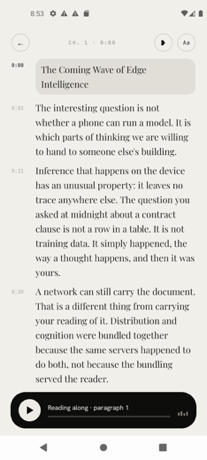
Fluence is a reading app for your phone that turns your PDFs, ebooks, reports and saved articles into something you can listen to, follow along with, and ask questions about. It is built for readers who want to get through long documents without keeping their eyes on a screen — people with reading piles, reports, books and saved articles, and anyone who prefers to listen. The promise is stated plainly on the product's own site: your books and documents, read aloud by a voice you choose. Its main purpose is to make listening to written material a first-class way of reading, with everything happening on the phone in your hand rather than on a remote server, so the app keeps working and your material stays with you.
Documents are long, and the moments when you could actually get through them are usually the moments when reading is impossible. That is the gap Fluence addresses. Walking, driving, doing chores or commuting, you can listen even when you cannot look at a page, so a report or a book stops being something that only progresses when you are sitting still. The alternative tools tend to add friction of their own: accounts to create, servers to upload documents to, and subscriptions that keep charging month after month. Fluence is deliberately built the other way around. It does all of the work on the device in your hand — reading the file, making the speech, answering your questions — with no account, no server and no subscription. The result is a reader that still works on a plane, in a car, or anywhere the signal drops.
The first thing Fluence changes about reading is that you never lose your place. The sentence being spoken lights up as you listen, so the text and the audio stay in step and your eye can follow every word as it is spoken. A highlighted line is also a foothold: after a distraction you can re-enter the document where the voice is, rather than hunting back through the page. Alongside following along, you can bookmark a line or write a note beside it. Those marks let you treat a listen as active reading — flagging the passage you want to return to and capturing the thought you had while it was being read out.
The voice that reads to you comes with the app, so there is no voice pack to pick and nothing to download before you can start listening to your first document. That removes the setup step that usually sits between installing a reader and hearing a page. The voice that ships inside the app reads 31 languages, which means documents written in any of those languages are covered without extra configuration. If none of the available voices suit you, Fluence lets you use your own, made from a short recording you speak yourself. Choosing the voice is not a cosmetic detail — it is the difference between listening to a document with attention and merely tolerating it, and a voice you recorded yourself is one you already recognize.
Fluence also lets you ask about what you read. You put a question to the document and get an answer drawn from the document itself, with the app showing you the passages the answer came from. Showing the source passages is what makes this usable for reports, research and non-fiction: instead of taking a summary on trust, you can see exactly where in the text the answer is grounded and read around it. Because the answer is drawn from the document's own passages, the feature works as a way of interrogating a file you have already loaded rather than as a general-purpose chatbot.
Any book or document can become one audio file. Fluence prepares the audio for the whole document ahead of time while you do something else, and tells you when it is ready. What you get is a single file to keep, to play in the car, or to send to another app. Turning a document into one finished audio object is a different proposition from pressing play in a reader: the result is yours to carry with you and to hand to whatever player you already use. Preparing the audio is free; saving it out is part of the full version.
Everything stays on your phone. Fluence does all of the work on the device in your hand — reading the file, making the speech, answering your questions — so your library, your notes and your recorded voice stay with you, and the app works offline rather than depending on a connection. On the input side, Fluence opens what you already read. It accepts PDF, EPUB, Word, OpenDocument, Rich Text, Slides, Text, Markdown and web articles, so you can bring the files you have instead of converting them into a format the app prefers. Between the on-device processing and the wide format support, the practical effect is that your existing reading pile is usable as it stands.
Fluence is made for Android and is distributed through Google Play. Ten documents are free, so you can see how it feels first before deciding. The full version is a one-time payment of €14.99: buy once and it stays yours, on every phone you sign into with the same Google account. There is no subscription attached, which means the cost of listening to your documents does not recur month after month. The free allowance covers ten documents and includes preparing audio, while saving the finished audio file is part of the full version.
The outcomes Fluence is built around are practical ones. You keep your place automatically because the spoken sentence is highlighted as it plays. You can listen while your hands and eyes are busy, which is when written material otherwise stalls. You can mark and annotate as you go, so listening still produces something you can return to. You can convert material into a single audio file that travels with you. And you can do all of this privately — offline, with no account and nothing leaving your phone. Together these make the app a way of finishing documents rather than a way of starting them.
In daily use, Fluence fits the moments when reading is not possible. A commute is the obvious one: load a report or a book and follow the highlighted text on the screen, or just listen with the phone pocketed. Because any document can be turned into one audio file, the car is another: prepare the audio ahead of time, save the finished file, and play it through whatever you already use. For study and research, following the spoken line while reading, bookmarking the passages that matter and writing notes beside them supports close reading of dense material, and asking the document a question returns an answer with the passages it came from so you can check it against the text.
Fluence is for anyone who has more to read than time to sit and read it. That includes people with long reports and work documents, students and researchers working through dense material, readers with a backlog of ebooks and saved articles, and anyone who would rather listen than look at a screen. Because it is an Android app that opens the formats people already have and works offline, it also suits listeners who want their documents and recordings to stay on their own device.
Fluence's value proposition is narrow and clear: your books, documents and saved articles, read aloud on your phone by a voice you choose, with follow-along highlighting, answers drawn from the text itself, and finished audio files you can keep. It runs offline, keeps everything on your device, and costs one payment of €14.99 after ten free documents.
Publisher
A
admin
Launch Date2026-10-11
Platformmobile
Pricingfreemium