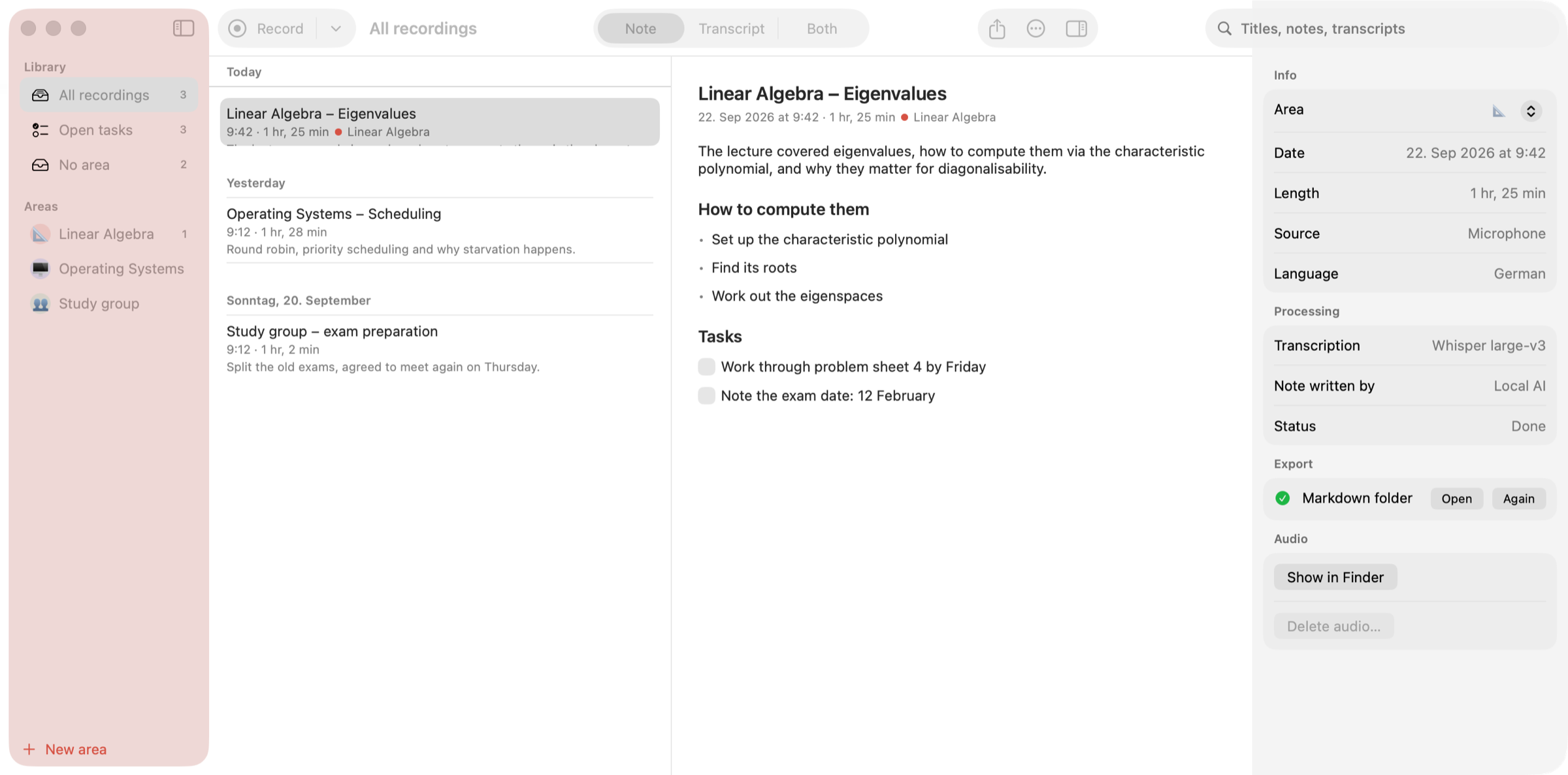
Earnote is a note-taking app for Mac, iPhone and iPad that records lectures, meetings and calls, transcribes them with Whisper and turns the recording into a structured written note. Instead of leaving you with a wall of transcript, it produces a short summary, the topics that actually came up, decisions and tasks you can tick off, plus flashcards and a printable PDF study sheet. It is built for students sitting in lectures, for people who need a record of meetings and calls, and for anyone who wants to talk through an idea and keep the result as a written note. The app is free and open source under the MIT licence, with no account, no ads and no subscription.
The problem Earnote addresses is the gap between what is said in a room and what a person manages to write down. A lecturer who speaks quickly, a meeting where several people talk at once, or a call that ends with a list of follow-ups all produce information that is easy to lose. A plain recording solves only half of it: the audio exists, but finding the relevant minute later means scrubbing through an hour of sound. A plain transcript produces text that still has to be read and reorganised by hand, and the details that matter — decisions, tasks, exam hints — disappear into the paragraphs. Earnote's stated ambition is to write what you would have written yourself if you had been fast enough: a short summary, the topics that actually came up, decisions and tasks, all while the recording stays on your own devices.
Recording starts with ⇧⌘R or a single click in the menu bar, and Earnote captures the microphone and system audio together, so everyone on a Zoom, Teams or Meet call ends up in the transcript as well as the people in the room. A global shortcut, ⌃⌥⌘R, starts and stops a recording from any app without hunting for a window first. On iPhone and iPad the app records the whole lecture even with the screen off and the phone locked, and offers a Live Activity on the Lock Screen, Control Center and Action button controls, and widgets. It pauses for phone calls, notices when Zoom, Teams or Meet is running, asks whether it should take notes and can stop when the call ends. If a calendar event is running, the recording is named after the event — "Linear Algebra" instead of "Uni, 21 Sep" — and you choose which calendars count.
Transcription runs with Whisper, and on the Mac the speech recognition happens locally on the machine. On a Mac with enough power you see the transcript live while you are still in the room, and because Earnote transcribes while it records, most of the work is already done by the time you press stop. On an M1 MacBook Air a 60-minute lecture is transcribed in about five to six minutes, roughly 12× real time, and the note then takes a few minutes more while you watch it being written. Low Power Mode makes everything about three times slower, and Earnote tells you when that happens. Recordings can be transcribed in many languages and you choose the language of the notes separately; the interface follows your Mac and is available in English or German.
The note is written by a language model, downloaded once and run on your device, and it contains a summary and the topics that actually came up rather than a reformatted transcript. Decisions are pulled out, and follow-ups become tasks with checkboxes you can tick off. You can edit any part of the note by hand, or summarise again with your own instruction while the AI version stays one click away. Six local AI models are available and Earnote preselects the one that fits your Mac. Per-area instructions give every subject or client its own style for the AI, so the notes for a maths lecture and for a client call do not read the same way.
Study material comes out of the same note. Flashcards — question and answer cards written straight from the lecture — can be edited inside the note and exported to Anki so you can quiz yourself. The note can be printed or saved as a clean PDF study sheet with headings, bullet points and tasks rendered as boxes, which makes revision possible away from the screen. For a whole subject there is an overview across every lecture at once, showing the topics, how they build on each other and any exam hints that were mentioned along the way.
Listening back is built into the transcript. Every timestamp is a button: click the time and you hear exactly that moment, so when the lecturer went too fast you can jump straight to the sentence instead of hunting. The paragraph that is playing stays highlighted while you read along, and ⌘3 puts the note and the transcript side by side with the transcript scrolling along with the audio. Search inside recordings finds a term across all transcripts, steps through the matches with ⌘G and lets you hear the spot. Names and terms that Whisper gets wrong can be corrected once in a dictionary: the correction applies to the title, the note and the transcript, and the dictionary is handed to Whisper and to the AI so the next recording gets it right, per area or for everything.
Privacy is treated as a default rather than a setting. Transcription runs locally with Whisper and the notes are written by a language model that Earnote downloads once and then runs on your device — no account, no API key, works offline. Recordings, transcripts and notes live in your home folder and are never synced. The app sends no analytics and no crash reports, and there is no server that belongs to Earnote. Cloud AI is possible only if you ask for it: you can pick Claude, OpenAI, Gemini or your own server, and the app says clearly when text would leave the machine. Housekeeping follows the same principle — you can see what the recordings take up and drop the audio of old ones while notes and transcripts stay, and Earnote filters the sentences Whisper invents during silence instead of writing them down.
Notes are filed where you already work: Notion, Obsidian, Logseq, Apple Notes, Bear, Craft or a plain Markdown folder. Open tasks go to Apple Reminders, Things or Todoist, with one list per subject, and every subject or client can be set up as an area with its own colour, AI instructions and export targets. The app keeps itself up to date by telling you when a new version is there, showing what changed and installing it after you agree. On iPhone, a recording can be written up on the device itself, by your Mac through your own iCloud — with the audio deleted afterwards — or with your own free Google key, where only the text is sent and never the audio; notes then sync with your Mac.
The Mac app requires macOS 15 or newer on Apple Silicon with about 8 GB of memory, and the first run downloads the speech model (~1.6 GB) and the local AI (~2.3 GB) once. It is a 26 MB download, signed and notarised by Apple, and it is not in the Mac App Store because the sandbox there would get in the way of recording system audio and filing notes into other apps. iPhone and iPad versions require iOS 26 / iPadOS 26 and are available on the App Store; on iPhone 15 Pro and later even the note is written on-device. There is no Windows version, because Earnote builds on Apple's CoreML and MLX frameworks. Everything on the Mac is free; on iPhone and iPad an optional one-time Earnote Pro purchase adds speaker detection, ask your notes and translation, with no subscription.
Typical use is a student recording a linear algebra lecture, getting a summary and tasks, quizzing themselves with flashcards and revising from a PDF study sheet before the exam. It is a meeting where Zoom, Teams or Meet audio is captured alongside the room, the recording is named after the calendar event, follow-ups land in a task manager and the note is exported to Notion or Obsidian. It is an explanation recorded out loud that comes back as a structured note, or a phone on the desk recording a full lecture with the screen off and the notes waiting afterwards. It is also semester-scale work: one overview across every lecture of a subject, with search across all transcripts when a term needs to be found again.
Earnote's value proposition is narrow and concrete: press record, keep talking, and end up with a note you would have written yourself — summary, topics, decisions, tasks, flashcards and a PDF — while the audio and the transcript never leave your devices unless you explicitly send them somewhere.
Publisher
A
admin
Launch Date2026-10-18
Platformmobile
Pricingfreemium
Tech Stack
#Whisper#CoreML#MLX#Apple Silicon