Category Focus/categories/chatbot
Chatbot AI Tools
Discover and compare the best chatbot AI tools and software. Browse 48+ curated tools with reviews and rankings.
Projects tracked
48
Sort mode
RECENT
Page
2
Discover and compare the best chatbot AI tools and software. Browse 48+ curated tools with reviews and rankings.
Projects tracked
48
Sort mode
RECENT
Page
2
Cuey is a Chrome extension that lets you compare any AI answer against 30+ models without leaving the AI tool you already use. It sends your prompt to ChatGPT, Claude, Gemini, Grok, DeepSeek and other leading models, then displays their responses side by side in a clean sidebar so you can see what they agree on, what they disagree on, and what your original model missed. It is built for anyone who relies on AI for everyday work and wants a second opinion before acting on a single model's confident-sounding answer. It is free to install, and no account is required to start. AI models deliver wrong answers in exactly the same confident tone as correct ones, which makes it hard to tell when you should trust a response and when you should look closer. Different models also have different strengths: one may reason through a problem better, another may write stronger ad copy, and another may have real-time internet access. Because each tool lives in its own tab, checking a second or third model normally means copy-pasting the same prompt, repeating your context, and juggling multiple subscriptions. Cuey removes that friction by putting the comparison directly where the question was asked, so a second opinion is available at the moment you need it rather than after a manual round trip between browser tabs. The core capability is multi-model comparison. Cuey works directly inside your AI tool, so there is no separate app to learn and no new interface to adopt. You send one prompt to multiple models at once, and Cuey runs it across your selected models before laying the responses out side by side in its sidebar. The free plan includes full side-by-side model comparison and works inside all seven major AI model providers covered by the extension, while cross-checking answers against more than 30 models is available with a daily free limit. Seeing the responses next to each other makes it possible to judge differences in reasoning, tone, and completeness at a glance instead of relying on memory of what another tab produced earlier. Cuey does more than display answers in parallel; it highlights the relationships between them. It shows where models agree, where they diverge, and why the difference matters, plus what your original model missed. Agreement is a signal that you can move forward with more confidence, while disagreement is a signal that the question deserves a closer look before you act. This is the mechanism that turns a wall of competing text into a usable judgment: instead of reading three or four answers and guessing which one to trust, you see the points of consensus and the points of conflict isolated in the sidebar. Memory portability is the second pillar of the product. Cuey lets your context follow you when you move between models, so you never start from zero again. You can import your chat history and memories from ChatGPT, Claude, and Gemini, then carry that context, along with your preferences and history, across supported models. Switching to a different model no longer means re-explaining your project, your tone requirements, or the background of the conversation, because the history you have already built up in one tool stops being trapped there and becomes portable. Cuey is not a replacement for the AI you already pay for. It runs alongside the assistant you use and supplies a second opinion from other models, so people who already have ChatGPT Plus can keep their existing subscription and still see how other models respond. There is nothing to configure: no API keys are required and no account is required to start, and side-by-side comparison, cross-checking, and multi-language support are free, with a daily free limit on the 30+ model cross-check. Cuey accesses the page content needed to provide model comparison and context features, and the developer states that your data is not sold to third parties and is not used for purposes unrelated to the extension's core functionality. The practical outcome is fewer bad decisions made on the back of a single confident-sounding answer. Because the comparison happens in place, there is no copy-pasting, no tab-switching, and no guessing, and users do not need to take on extra subscriptions to hear from more than one model. The extension also saves the time that would otherwise go into re-establishing context each time you try a new model, and it gives you a repeatable check before you commit to an answer in writing, analysis, or research. When the models agree, you can move on with more confidence; when they do not, you know to investigate further. Concrete workflows in the content include checking an AI-generated answer before acting on it, which is the scenario the extension is built around: catching a confident-sounding wrong answer before it burns you. Writers can compare how different models handle the same brief, such as ad copy, where models are described as having different strengths. Questions that depend on current information benefit from including models with real-time internet access in the comparison alongside models without it. People who move between AI tools can carry their imported history and preferences so each new model starts with context rather than a blank slate. And because comparison, cross-checking, and multi-language support are free, the workflow can be tried without a subscription commitment. Cuey is delivered as a Chrome extension published by Llama Valley Inc and distributed through the Chrome Web Store, where the listing shows version 0.1.20.9, an install size of 8.9MiB, and support for 8 languages: Deutsch, English, español, français, italiano, português (Brasil), 中文(中国), and 日本語. The listing notes that the extension offers in-app purchases and places it under Productivity / Tools within the Extensions category. The free tier covers side-by-side comparison, cross-checking with a daily free limit, and multi-language support, all with no account required, while the publisher's stated mission is to make AI easier to use and more useful for everyday work. Cuey's value proposition is straightforward: the AI answer you already have is only one opinion, and a confident tone is not evidence of correctness. By comparing that answer against 30+ models inside the tool where the question was asked, surfacing where models agree and disagree, and carrying your context between models, Cuey makes a second opinion a normal step rather than a chore. It is free to install, requires no account to start, and adds no extra subscription if you already pay for an AI assistant.
Eclatira is a platform for powering applications with conversational voice and video AI. It lets developers build conversational agents with native voice, camera, and screen sharing, and then connect those agents to their own APIs, MCPs, and more than 3,000 apps. The product is described as a conversational video agent that plugs into any stack, giving developers native voice-to-voice, live vision, and full-stack execution across custom APIs, MCPs, and a large library of connected apps. Its stated goal is to help teams ship autonomous multimodal video agents quickly, with agents that are fast enough to barge in and sharp enough to see what you show them. The primary audience is developers and product teams who want to add real-time conversational video intelligence to their own software. Teams can start building through the web app, book a demo, or create agents, upload documents, define tools, and start calls through a versioned REST API. Most conversational agents have been built as text-first systems, with voice treated as an add-on layer. Eclatira takes a different starting point: voice and video are native to the session, and audio and video stream through the same bidirectional pipeline from the start. Another common obstacle is integration. Connecting an agent to a company's own systems usually means writing custom integration code for every service. Eclatira states that developers can connect agents to APIs, MCPs, and 3,000+ apps without writing custom integration code. The company's own FAQ frames the questions teams ask before adopting this kind of tool, including how Eclatira differs from a chatbot that also does voice, how the web widget compares with telephony, how fast a real conversation feels in practice, how long it takes to get an agent live, whether code is required to connect your own APIs, how recorded audio and video are handled, and whether video costs more than voice. The video engine is built around live visual input processed in the same real-time stream as voice. When a webcam is pointed at the agent, it perceives the live video stream continuously and tracks what changes in the frame while the conversation keeps going, so visual awareness does not interrupt the dialogue. Screen sharing works the same way as camera input: the agent watches what is on screen and can guide someone through a page, a form, or a piece of software step by step. The agent can also read what is in frame. Point the camera at a printed page, a screen, or a label and it reads the text through OCR, then acts on what it has just read. Beyond text, the agent identifies physical objects, products, and packaging in frame with high accuracy, which the product positions as useful for guided troubleshooting or visual verification. Video is processed at up to 30 frames per second against the same sub-800ms latency budget as voice, so visual understanding keeps pace with the conversation. On the voice side, Eclatira uses native voice-to-voice processing, which it describes as the reason an agent responds at conversational speed. The site separates this from a chatbot that also does voice, framing native voice-to-voice as a different starting point. Voice and video run through one pipeline: audio and video stream through the same bidirectional session, so the agent can talk about what it is seeing in the same breath. The core capabilities list separates the video engine, voice engine, telephony, agent builder, knowledge and tools, web widget, and platform and API, indicating that agents can be reached both through a web widget embedded in an application and through telephony. Agents can be assembled in two ways. In the agent builder, you describe the job in plain language, then refine the prompt, voice, and tools until the agent is ready to ship. This makes the builder the place to shape what the agent knows and how it behaves before it goes live. The platform also exposes a versioned REST API, where developers can create agents, upload documents, define tools, and start calls programmatically, which suits teams that want agent creation and call handling to live inside their own systems. Knowledge and tools are listed as a core capability alongside the web widget, suggesting that agents can be grounded in uploaded material and given tools to act with. Integrations extend that reach: agents connect to custom APIs, MCPs, and more than 3,000 apps without custom integration code, and public documentation is available for the API. The underlying approach is a single bidirectional session that carries audio and video together in real time. Live camera and screen input are processed in the same stream as voice, part of one session from the start, so the agent's understanding of what it sees and its spoken response are handled together rather than as separate processes joined after the fact. Latency is managed as a shared budget: video runs at up to 30 frames per second under the same sub-800ms target that voice uses. Agents are created either conversationally in the builder or programmatically through the versioned REST API, and are then connected to external systems, tools, and documents so they can execute rather than only converse. For users, the benefit of native voice-to-voice is responsiveness at conversational speed, which is the difference between a natural exchange and a slow one. Real-time vision means the agent can see through a camera or a shared screen while it talks, so support, guidance, and verification happen inside the same conversation instead of across separate steps. Continuous frame tracking keeps the agent aware of changes while the conversation continues. OCR lets it respond to printed pages, screens, and labels it is shown; object recognition lets it identify products and packaging, which the product links to guided troubleshooting and visual verification. Processing video at up to 30 frames per second within the same sub-800ms latency budget as voice means visual understanding keeps pace with speech. Connecting to APIs, MCPs, and 3,000+ apps without writing custom integration code reduces the work required to make an agent useful. Several concrete scenarios follow from the features described. A user can point a webcam at the agent and have it perceive the live stream, which suits situations where someone needs to show something rather than describe it. When a user shares their screen, the agent can guide them through a page, a form, or a piece of software step by step, which fits onboarding, walkthroughs, and support. If someone holds a printed page, a screen, or a label to the camera, the agent reads the text through OCR and acts on it. Object recognition supports guided troubleshooting and visual verification of physical products and packaging. Agents can be deployed through a web widget inside an application or through telephony, and they can be connected to custom APIs, MCPs, and 3,000+ apps so that a conversation can trigger real work across a stack. Eclatira is aimed at developers and teams building conversational agents into their own applications, including those who want to ship autonomous multimodal video agents quickly. The integrations named in the content are custom APIs, MCPs, and 3,000+ apps, with connections described as requiring no custom integration code. Agents can be created in the builder or through a versioned REST API that supports creating agents, uploading documents, defining tools, and starting calls. Delivery channels mentioned are the web widget and telephony. The site offers a free start to building and an option to book a demo. The site also notes that Google Analytics is used and that analytics cookies are only set if a visitor accepts, with a link to the privacy policy. Eclatira's core promise is a conversational agent that both hears and sees in real time and can act across a company's existing stack. By making voice and video native to a single bidirectional session, adding OCR and object recognition on live frames, holding to a sub-800ms latency budget, and connecting to APIs, MCPs, and 3,000+ apps without custom integration code, it gives developers a way to build multimodal agents fast enough to keep a real conversation going.
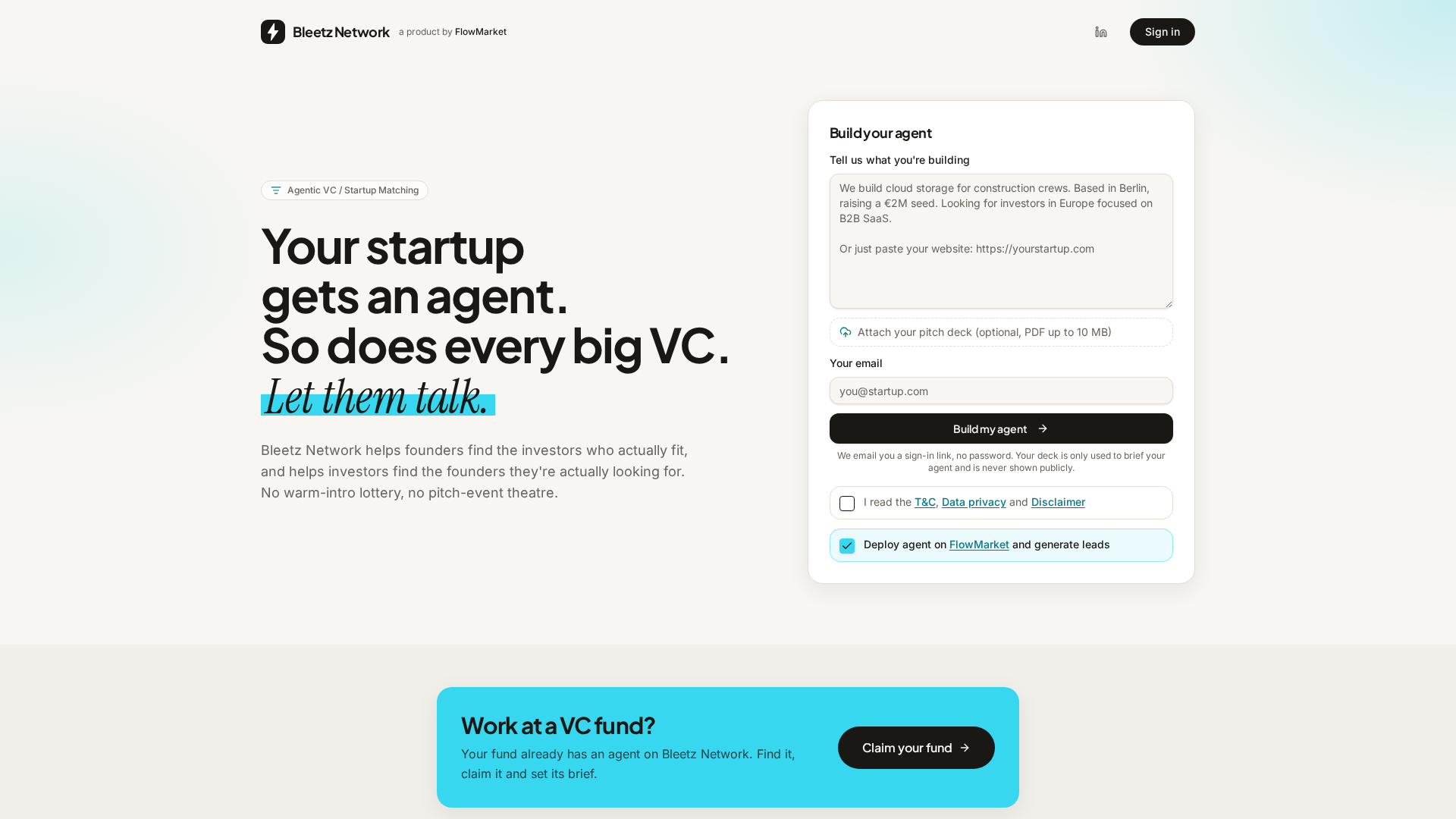
Bleetz Network is an agentic venture capital and startup matching network where every startup and every fund gets an AI agent. Founders build a startup agent by describing what they are building, optionally attaching a pitch deck (PDF up to 10 MB) and providing an email address. The platform then matches that agent with agents representing VC funds, and the agents have the first conversation so the humans only talk when there is a reason to. The purpose is twofold: Bleetz Network helps founders find the investors who actually fit, and helps investors find the founders they are actually looking for. Instead of a warm-intro lottery or pitch-event theatre, matching happens on facts, and founders receive a clear yes, no or maybe outcome, with a fund's direct contact details unlocked on a yes. Fundraising is broken. Founders spend weeks searching for VCs, researching investment theses, checking sectors, stages and geographies, and sending cold emails, often without knowing who is actually a good fit. The same inefficiency runs in reverse for investors, who trawl inboxes and databases to find startups that match their stage, geography, categories and thesis. Bleetz Network automates the first part of this process. Rather than a founder blasting messages at every fund they can find, an agent searches a database of several thousand VC funds and keeps only those that fit the founder's stage, geography and category. Rather than a VC manually screening every inbound opportunity, a preselected list of relevant startups arrives already filtered. Both sides are matched on facts, so the introductions that happen are the ones that make sense. For startups, Bleetz Network begins with instant matching. The startup agent searches a database of several thousand VC funds and keeps only those that fit the startup's stage, geography and category. This is filtering rather than ranking: stage and geography have to line up, and then the fund's thesis has to fit. What remains is a short list, not a spray-and-pray list, so founders reach out only to the few highly relevant funds instead of burning weeks on investors who were never going to invest. The startup agent then pitches every fund on the shortlist, whether the fund's agent is claimed or unclaimed, answering their questions in a strictly business conversation that runs up to ten rounds, with three pitches a day. There are no cold emails and no warm-intro lottery involved. Outcomes are explicit. When a fund's agent says yes, the founder receives the contact details of the people at that fund who should hear from them. A no comes with the actual reason, and both outcomes land in the founder's inbox. Because every conversation is readable, founders can do their homework: they can see which questions came up, where a fund lost interest and why it passed. That feedback can be used to sharpen the pitch and the pitch deck before a human ever sees them, fixing weak spots while the cost is still low. The combination of a short relevant list, direct contacts on a yes, and detailed conversation feedback turns fundraising from guesswork into a fact-based process with a binary outcome. For VCs, Bleetz Network provides screening that runs itself. A fund gets a preselected list of startups that already match its stage, geography, categories and thesis. Discovery that used to take weeks of inbox and database trawling happens while the investor does something else. No time is lost on manual screening because every startup has already been through the first rounds of questions, so the investor reads the outcome rather than the noise. Fund-to-startup discovery is instant, and because both sides are matched on facts, the introductions that happen are the ones that make sense. Every fund already has an agent on Bleetz Network from day one; the fund can find it, claim it and set its brief, so the thesis is applied every time and the agent screens the same way on Monday morning and Friday night. The fund stays in control: it reads every conversation, decides who to talk to, and keeps contact details out of anyone's hands until it says yes. The overall workflow runs from profile to yes or no. First, the founder builds a startup agent by dropping a deck or a few lines; Bleetz fills out the profile and the founder checks it, and the agent only says what the founder gave it. Second, the system filters rather than ranks: stage and geography have to line up, then the fund's thesis has to fit. Third, the agents talk it through, with the startup agent pitching and the fund's agent digging in, strictly business, up to ten rounds and three pitches a day. Fourth, the founder gets a yes or a no. A yes comes with the fund's real contact people; a no comes with the actual reason. Both land in the founder's inbox. An example conversation on the site shows a startup agent describing a retrofit vision kit that cuts warehouse picking errors by 38%, with €42k MRR from 11 sites in DACH and a €1.5M pre-seed round, and a fund agent asking what a site pays and how long from install to first invoice before saying the deal fits its logistics thesis and ticket size. Bleetz Network is explicit about the nature of its agents. Every fund has an agent from day one, and whether the fund itself runs it is labelled on every page and in every conversation. An unclaimed agent is built from public information about the fund; nobody from the fund has taken it over, read its conversations or approved what it says, making it a well-informed simulation but still a simulation. A claimed agent is one where someone at the fund verified themselves and took over the agent, set its brief, reads the conversations and sees who made it through. Founders are told that a conversation with an unclaimed agent is a simulation, not the fund's opinion and not a decision by anyone at the fund, and that a yes from an unclaimed agent means this looks like a good fit on paper, a reason to reach out rather than an expression of interest. With a claimed agent, the fund manages the agent and can read the conversation. Investors are told that every unclaimed agent is based on open data only and speaks for nobody at the fund, and that nothing an agent says is binding: no offers, no commitments, no term sheets and no advice. Every positive outcome is a recommendation for a human follow-up, and contact details are only shared on a yes, only through the platform. The stated motivation is to help both sides with early-stage discovery and matching, reducing friction between founders and investors and making the market more efficient. Listing every fund from day one is what makes matching useful immediately. Funds that do not want to be listed can claim the fund with a work email and then delete the agent. Every claim is checked by hand, and one account runs one fund. Concrete use cases follow directly from that design. A pre-seed startup raising a round can build its agent, attach its deck, and let the agent pitch the funds whose stage, geography and category fit, receiving a shortlist of yes outcomes with partner contacts instead of a list of cold-email addresses. A founder preparing for those conversations can read every simulated exchange to learn which questions recur, where interest dropped and why a fund passed, then fix the weak spots in the pitch and the deck before a human sees them. A VC fund can claim its existing agent, set the brief to match its stage, geography, categories and thesis, and receive a preselected list of startups that have already been through the first rounds of questions. A fund that prefers not to participate can claim and delete its agent. And an investor who wants the next big thing without weeks of inbox and database trawling can rely on the fact-based matching to surface startups in seconds. Bleetz Network is aimed at early-stage founders who are raising, and at venture capital funds and the people who scout and screen for them. It is a web product. Building a startup agent takes a deck or a few lines and an email; sign-in is by emailed link with no password, and the deck is used only to brief the agent and is never shown publicly. Every fund has an agent from day one, so investors can find and claim their fund's agent even before they have signed up as users. The service is free while it is in beta, and free with no strings attached according to the Product Hunt description. A yes unlocks the fund's contact details. In short, Bleetz Network turns early-stage fundraising and scouting into an agent-to-agent matching process. Startups get an agent that filters several thousand VC funds down to the ones that fit their stage, geography and category, pitches them, and returns a yes with real contacts or a no with the actual reason. Funds get a self-running screen that applies their thesis consistently and delivers a preselected list of startups. Both sides can read every conversation, both sides stay in control of human contact, and the outcome is a fact-based conversation with a binary result instead of guesswork, cold emails and pitch-event theatre.
Fez is a desktop app for Mac where several AI agents work together as members of one workspace, and the room decides who takes what. Each agent is its own member with its own identity, its own model and its own skills, and you talk to them the way you would talk in any chat channel. Instead of you picking which assistant should handle a request, the room reads the message and decides who takes it, whether the work is done, and whether you even need to read the answer. Fez is built on nostr and on Jev, a judgment model built by TypeSafe, and it is released early as an MIT licensed app for Apple silicon Macs. The problem Fez is built around is management. Most agent apps give you one assistant; some give you several, and then you become the manager: you pick the agent, repeat the question, judge the answer, and call the next one. That overhead grows with every agent you add, and it is exactly the work you were hoping an agent would take off your hands. Fez moves that job into the room itself. Instead of you deciding who should handle a message, the room evaluates it first, and chat models run only when there is real work to do. A message that needs no answer costs nothing and produces no noise in the channel. That routing is handled by Jev, the judgment model built by TypeSafe. Every message goes to Jev, which does not write anything itself: it decides, with a calibrated probability, in under a second, for a fraction of a cent. The room reads the message and picks the agent, or nobody, as the site illustrates with a "Who takes it?" decision at 0.95. The published routing results report 96 of 97 messages routed to the right agent, a 184 ms median decision, and $0.002 for the whole run — one pass, three agents, frozen fixtures, which the site explicitly notes is not a universal guarantee. The practical consequence is that a cheap, fast decision happens before any expensive chat model is invoked. The room also closes the loop after an agent responds. "Is it done?" runs at 0.94: it checks the answer against what you asked and signs off, silently, so you are not left manually judging whether the agent actually finished the work. And "Does it need a reply?" runs at 0.08: a thanks gets a reaction, not a paragraph. When the room decides a message needs no reply, there is no turn and no cost. Together these three checks — who takes it, is it done, does it need a reply — are what the site calls the room doing the managing. Agents are real members of the workspace rather than tools you switch between. Each one has its own identity, model and skills, and the roster shown on the site includes @fez, @drift and @quill. @fez is the guide: docile and helpful, it knows its way around, and when you ask it anything it brings in the teammate the work belongs to. You mention @fez in a channel and it routes the request onward; it ships with the app, so there is a natural starting point on first launch. Because agents are referenced by mention in an ordinary channel, several of them can share one thread instead of each living in a separate assistant window. The overall approach is a single pass of judgment followed by chat models that only wake up for real work. You interact with the app through the channel: mention an agent with @, press Enter and it answers, and press Esc and the relay remembers. Identity is handled without accounts. Your identity is a keypair generated on first launch, and every agent has one too, so every message is signed by the key that posted it. Nobody issued the keys, so nobody can suspend them. Everything lives on a nostr relay rather than inside the app, and the site describes Fez as a window onto it — you can run a relay on your laptop or on a server. The release is available as a macOS Apple silicon build under the MIT license, with the source on GitHub. The benefits follow from that design. You stop acting as the dispatcher for your agents: no picking the agent, repeating the question, judging the answer, or calling the next one. Routing costs a fraction of a cent and takes under a second, so decisions are cheap and fast compared with running a chat model for every message. Unnecessary replies are suppressed, which keeps channels readable and avoids paying for turns that add nothing. Completion is verified against the original request, so threads close rather than drift. And because identity is a keypair on a relay you can host yourself, conversations are not tied to an account that someone else can suspend. Concrete scenarios come straight out of the material. The recorded demo shows two agents, two models, two keys and one thread running for seven minutes, live — a single conversation where more than one model does the work and the room keeps track of who takes which message. If you do not know which agent is right for a question, you mention @fez and it brings in the teammate the work belongs to. When someone says thanks, the room returns a reaction rather than a paragraph, so no turn is spent. When a piece of work appears finished, the room checks the answer against what you asked and signs off silently. And if you want the history to outlive the app, you run your own nostr relay and press Esc — the relay remembers. Fez is aimed at Mac users on Apple silicon who already work with AI agents and no longer want to be the manager of several of them. It suits people who want more than one model and more than one agent in a single conversation, who prefer a signed, account-free identity, and who value open source: Fez is MIT licensed with the repository on GitHub, and the app ships as a direct download. The site describes the release as early, and it notes that the routing numbers come from one pass over frozen fixtures rather than a universal guarantee. There is also a lightweight update list for new releases and what changed in them, described as occasional and nothing else. Pricing is not described beyond the free, MIT licensed download. In short, Fez turns a chat room into the manager of a team of agents. Several members, each with its own identity, model and skills, share one workspace; a fast, inexpensive judgment model decides who takes each message, whether the work is finished, and whether a reply is needed at all; and everything is signed and stored on a nostr relay you can run yourself. The value proposition is simple: you stop coordinating agents and start talking in the room.
Multimodal Agents by Sierra are AI agents that bring voice, text, and visuals into the same customer conversation. Sierra has long believed that the conversation is the interface: the customer says what they need and the agent figures out the rest. Multimodal agents extend that belief beyond a single medium. Rather than making customers choose between talking, typing, or looking at something, the agent gives them the best of each — voice to explain what you need, a visual to compare options side by side, and text when you want to reference something later. The result is a single, continuous conversation that adapts to what the customer is trying to accomplish at that moment. The problem this solves is familiar to anyone who has tried to make a decision over the phone. Sierra describes trying to upgrade a mobile plan over the phone: the representative talks through models, colors, storage sizes, and monthly rates, and the customer is left comparing things in their head and picking a phone they cannot picture. Voice is genuinely good for parts of that interaction — you can say what you actually need and ask questions more easily than you can over text — but you cannot see the thing you are about to buy. Multimodal agents close that gap. Stitching channels together is not the hard part; the real trick, as Sierra puts it, is knowing which one to use when. That is where the agent's judgement comes in. Agents built on Sierra anticipate what is needed for each conversation and automatically shift between modes — voice, visuals, or text — without making the customer start over or repeat themselves. The choice of medium follows the shape of the task: voice to explain what you need, a visual to compare options side by side, or text when you want to reference something later. Because that switching is automatic, the customer never has to manage the interface. They simply continue the conversation, and the agent keeps the relevant context intact as the medium changes, which is precisely what prevents the restarting and repeating that usually happens when a support interaction jumps between a phone call, a chat window, and a web page. Visuals are part of the conversation rather than a separate destination. Sierra's example is a disrupted flight: you call the airline to get a new flight, and instead of a representative reading off alternate options one by one, you see them laid out with departure times, layovers, and pricing right in the conversation. You pick one, and the agent keeps going from there. Choosing a seat works the same way — you see the map and tap the seat you want. And for times when it is easier to talk than type, you can switch to voice and explain exactly what you need; the agent captures those details without making you type a paragraph into a text box. In each case the visual carries the comparison work that language handles poorly, while voice carries the nuance that menus and forms handle poorly. Sierra's approach is also designed to avoid rebuilding the same experience for every place the agent lives. With Sierra, you can build your agent once and easily deploy across all channels, and the same is true for multimodal agents: once you build a visual component, your agent can use it everywhere it lives. A comparison table or a calendar does not need to be recreated for each surface the agent operates on. That single-build approach reduces duplication for the team maintaining the experience and keeps behaviour consistent for the customer, who encounters the same kind of interactive element regardless of where the conversation happens to be taking place. Sierra's MCP UI integration is what lets teams bring interactive components into the conversation: product cards, comparison tables, calendars, and forms. Those components are designed and hosted by your own team, so you decide how they look, what they show, and when they change. That control matters because the visual layer is often the part of a customer experience that carries brand and merchandising decisions, not just function. Because your team hosts the components, when you make an update it is automatically reflected everywhere without needing to redeploy or maintain different versions for each platform. And when a component needs more room, it can expand to full screen to show calendars, long comparison tables, multi-step forms, and more — so the same building block can serve as an inline detail inside a conversation or as a focused, full-attention task when the customer needs to complete something substantial. Taken together, the methodology is straightforward: keep the conversation as the interface, let the agent decide which medium each moment calls for, and make the interactive pieces reusable across every surface. Sierra frames the goal as customers never having to choose. On one call, customers can talk through what they need, glance at a screen to compare their options, and tap to confirm — without ever pausing the conversation to switch tools. The agent, not the customer, manages the transitions, which is what makes an interaction that spans voice, visuals, and text feel like a single continuous exchange rather than three separate ones. The outcomes described are practical. Customers get through decisions faster because they can see options while hearing about them, and they avoid the frustration of describing the same need twice or rebuilding context after a channel change. They can also reference something later in text when that is easier than listening. Businesses, meanwhile, get a single deployment path: build the agent and its visual components once, use them across channels, update them in one place, and avoid maintaining separate versions per platform. And the experience is described as being as easy to build and deploy as it is for customers to use, which lowers the practical barrier to offering a multimodal customer experience at all. Concrete workflows in Sierra's own examples include upgrading a mobile plan, where a customer talks through what they need and compares phones, colors, storage sizes, and monthly rates visually instead of holding the options in their head. A disrupted flight is another: the agent surfaces alternate flights with departure times, layovers, and pricing in the conversation, and the customer picks one and continues. Seat selection follows the same pattern, with a map the customer taps rather than a description they have to parse. Voice-first moments are covered too — when it is easier to explain something than to type it, the customer can switch to voice and the agent captures the details. More broadly, any conversation that involves comparing options side by side, filling in a form, or choosing a time can use interactive components inside the exchange itself. Multimodal Agents by Sierra are aimed at organizations that handle customer conversations and want those conversations to adapt to the customer rather than the other way around — customer experience and support functions in particular. The people who build the visual layer are the customer's own teams: Sierra states that your team designs and hosts the components used in the conversation. Deployment is described in terms of channels rather than a single app, since the same agent and the same visual components are meant to work everywhere the agent lives. Sierra's MCP UI integration is the mechanism named in the content for bringing interactive components such as product cards, comparison tables, calendars, and forms directly into a conversation. The core idea behind Multimodal Agents by Sierra is that the best interface is the one the conversation needs. Voice, visuals, and text stop being competing options and become modes the agent moves between as the situation changes — voice when explaining is easier, a visual when comparing side by side helps, text when something needs to be referenced later. Because agents built on Sierra anticipate what is needed and shift automatically, customers never start over or repeat themselves, and because visual components are built once and hosted by your team, they can appear everywhere the agent works. That is the promise: one agent, every surface, and a conversation that morphs to fit the customer.
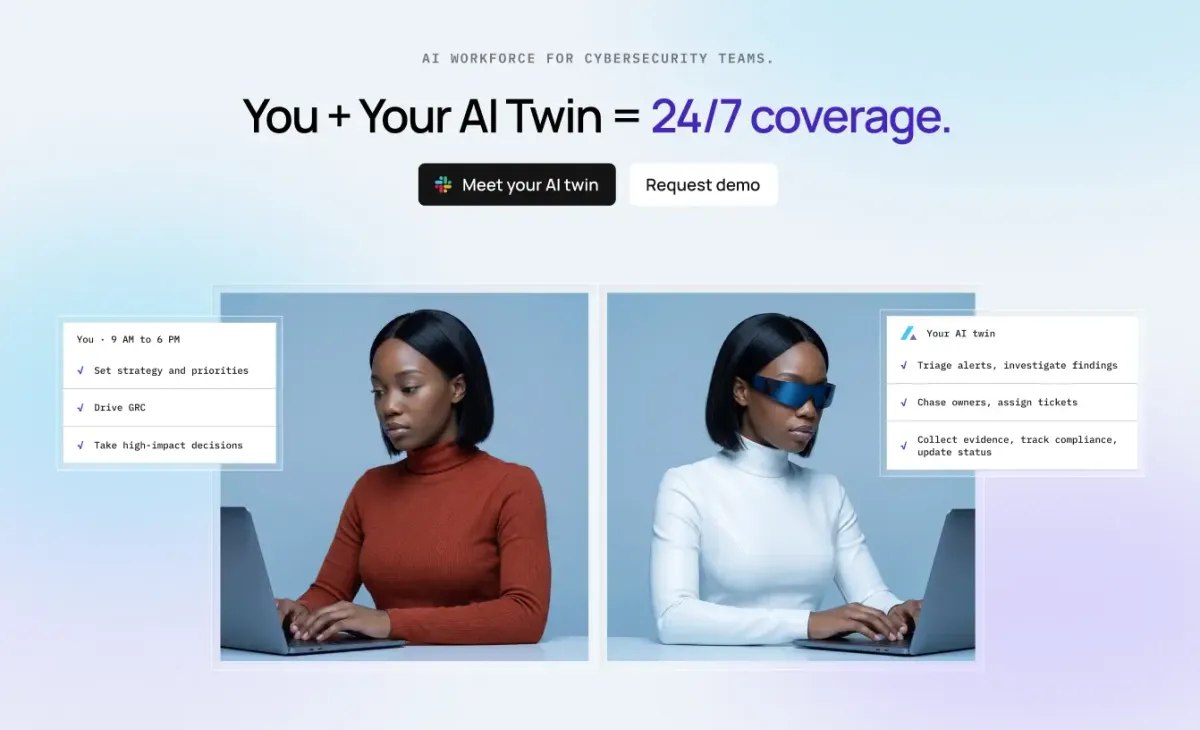
Axari is an AI twin for cybersecurity teams — an AI workforce product that is given real work rather than asked questions. The company's pitch is simple: you plus your AI twin equals indefatigable. A security leader spends the working day setting strategy and priorities, leading the security program, and making the decisions that matter. The twin, meanwhile, runs 24/7: it understands what needs attention, coordinates work across tools and teams, and executes, follows up and verifies until the work is actually done. Users can assign it a goal, let it work proactively, or give it recurring responsibilities, and all of this happens from within Slack or Microsoft Teams. It is aimed squarely at security organizations rather than general business users, and it is meant to be given real security work, not just to answer questions. The problem Axari addresses is the coordination overhead that surrounds security work. Security teams already own scanners, ticketing systems, identity platforms, cloud accounts and compliance tools; what they often lack is someone to keep the resulting work moving between them. Axari's own framing of this is quantitative: it claims time back of 10–15 hours per person, per week, on coordination-heavy work, notes that organizations spend $8–10 per $1 hiring people to operate a security tool, and describes a cognitive load of 17 of 20 items already in motion before a leader opens Slack — leaving only the 3 that genuinely need them. Its overhead claim is zero: no training sessions, onboarding programs, or new tools to learn. Customer quotes echo the same theme, including "We couldn't hire more people; we hired Axari," "We didn't rip out a single tool," and a fractional CISO noting that control drift used to be caught during the next audit cycle but is now flagged the same day it happens. Axari works across the tools a security team already runs instead of replacing them. The integrations shown on the site include Slack, Jira, GitHub, Gmail, Wiz, Splunk, Okta, Snyk, CyberArk, Tenable, Vanta, AWS, Datadog, Kubernetes, Google Cloud, Terraform, Confluence, CrowdStrike Falcon, Google Drive and HubSpot. The important point is what the twin does with those connections: it reads finding and asset context from a scanner, writes and assigns tickets, pulls policy language, collects evidence, scores vendors, lists entitlements, groups alerts and enriches them with telemetry. Because the twin operates inside the collaboration layer — Slack or Microsoft Teams — colleagues see the work happening in the channels they already use, and owners can be nudged or asked for a decision without anyone logging into a separate console. Several of the documented use cases concern exposure and threat work. In critical exposure protection, the twin pulls the finding and asset context from Wiz, creates the ticket in Jira and assigns the owner, then re-checks the scanner before anything is closed. In cloud exposure protection, it detects the misconfiguration, maps it to the owning AWS service, and prepares the fix in GitHub for review. In threat response assurance, it groups overnight alerts from Splunk, enriches them with endpoint telemetry from CrowdStrike Falcon, and opens the investigation in Jira with an owner assigned. In ransomware resilience, the twin confirms containment, revokes compromised sessions, and keeps legal and leadership on a single timeline in Slack. Each of these follows the same pattern: gather context, do the coordination, and hand the judgement call to a human. A second group of use cases covers governance and assurance work. For continuous compliance, the twin collects access evidence, maps that evidence to controls in Vanta, and chases owners in Slack who have not responded. For trusted vendor onboarding, it requests missing documents by email, scores the vendor against your policy, and routes the decision to the risk owner. For security review acceleration, it drafts from your approved answers, pulls current policy language from Confluence, and flags the answers that need human judgement. For access assurance, it lists every account and entitlement, nudges reviewers with a cutoff, then revokes and confirms the removal. The recurring theme is follow-up: the twin does not stop at producing an artifact, it pursues the response it needs and verifies that the change actually happened. Axari describes its approach in four stages. Connect: it maps what your tools do and learns exactly how your team operates daily. Understand: it works out who owns what, what matters, how work is routed, and where you are needed — the product illustration shows a daily brief in Slack summarizing priorities and where you are needed. Act: it prepares the work, assigns owners, follows up, and executes what you authorize; in the example shown, the twin drafts a SOC 2 reply in Slack with approve, edit and discard actions. Compound: it learns how you decide, anticipates what's next, and keeps getting smarter — for instance, proactively asking whether it should check with a colleague before sending a vendor exception approval. The site labels this "compounding intelligence," suggesting the twin's usefulness grows as it observes more of your decisions. The stated outcomes are time, money, cognitive load and overhead. The company reports 10–15 hours back per person, per week, on coordination-heavy work; a spend pattern of $8–10 per $1 currently going to people operating a security tool; a cognitive load figure of 17 of 20 items already in motion before the leader opens Slack, so only 3 need them; and zero overhead in training sessions, onboarding programs or new tools to learn. Testimonials support the positioning: one CISO says that nothing was ripped out and Axari simply made existing tools work harder, a CIO says the team could not hire more people so they hired Axari, and a former Google Chrome security lead describes Axari as a full AI security team that learns how an organization works and actually gets the work done. Concretely, a security team might use Axari in a daily rhythm. Overnight, the twin groups alerts, enriches them, and opens investigations with owners attached, so the morning starts with work already in motion rather than a blank page. During the day, it keeps compliance evidence flowing — collecting, mapping and chasing — and nudges access reviewers before a cutoff so certifications do not stall. When a vendor request arrives, it asks for the missing documents, applies the policy score, and asks a human before sending an exception. When a security questionnaire lands, it drafts from approved answers and flags what needs judgement. Because the twin lives in Slack or Teams, each of these shows up as a short, actionable exchange rather than another dashboard to check. The site names CISO / Head of Security, GRC, Security Operations, Security Engineering and Security PMO as the roles Axari serves, and lists customers and partners including HiddenLayer, Boyd, Supabase, CAVA, Yext, Hydrolix and OpenLoop. On trust, Axari emphasizes control, security-native design and security posture. Controls include scoped access, human approval for consequential actions, a complete audit trail, the promise that your data stays yours, and the ability to bring your own model. The company says the product is shaped by 300+ conversations with security leaders and built alongside security leaders from Google, Anthropic, Atlassian, Supabase and Roblox. It reports SOC 2 Type 1 complete, red-teaming against the OWASP Top 10, zero data retention where applicable, and BYOC / on-prem support in progress. A CISO testimonial notes that Axari earned access rather than asking for it all on day one. Axari's core proposition is straightforward: security leaders cannot hire their way out of coordination work, and attackers are not going to use less AI. By giving teams a persistent AI twin that lives in Slack or Microsoft Teams, understands the environment, coordinates across existing tools, and follows work through to verification, Axari aims to close the execution gap that sits between a security program's plans and its outcomes — without replacing a single tool in the stack. As the company puts it, you plus your AI twin equals indefatigable.
Muse is a personal AI agent from Meta, described on its website as an agent that gets things done. Instead of stopping at conversation, Muse is designed to be given a goal or an everyday task and then to handle the rest, covering areas such as finances and health through to shopping and the people you care about. It is built for people who want to delegate real tasks rather than just ask questions, while remaining in control of what the agent actually does on their behalf. Everyday life is full of small but consequential jobs: paying attention to finances, keeping up with health, shopping for the right item, staying in touch with the people you care about, and turning long-term intentions into actual progress. These are the kinds of activities that consume time and attention without being anyone's main job. Muse is positioned around taking tasks and projects off your plate, so that recurring work and longer-running goals keep moving even when you are busy elsewhere. Because these tasks often involve accounts, money, and personal messages, doing them well requires more than a chat window: it requires an environment where an agent can act, a way for the owner to approve actions, and clear guarantees about privacy and security. Muse's product choices are organized around exactly those requirements. Muse Secure VM is the foundation of how the agent does work. It runs on a persistent, isolated Linux virtual machine equipped with a full browser and enough storage, CPU, and memory to do the kinds of things you would do on your own computer. Treating the agent's working environment as a dedicated, secure computer, separate from your own device, means Muse can work inside a browser the way a person would rather than being limited to a fixed set of pre-built integrations. The isolation of that machine is part of the security story: the agent's work happens in its own environment rather than directly on your personal computer. The product imagery on the site shows the agent working with floating browser, search, map, calendar, and confirmation panels, illustrating how much surface area a single task can span. Muse is designed around the way you already communicate. You chat with your agent in the same way you message other people, using the Muse app or directly in WhatsApp. There is, in the company's words, no learning curve, because you simply tell Muse what you want to get done. The site's illustrations highlight familiar messaging conventions such as message bubbles, voice notes, reactions, and a shared photo, which signals that the interaction model is deliberately conversational rather than a dashboard or a command language. For many people that is the difference between an agent that gets used every day and one that is abandoned, because delegating a task ends up feeling like sending a message rather than operating software. Control is built into the flow. You approve actions your agent takes on your behalf before they happen, such as sending emails and making purchases. Muse also shows a complete audit trail of everything the agent has done and what it is planning to do. Together, approval prompts and an activity record give you a way to review what happened and to intervene before something irreversible occurs. The site visualizes this with purchase, message, activity, permission, and decision controls, so these safeguards are presented as part of the product experience rather than something buried in settings. Muse also places heavy emphasis on keeping your data secure and private. Your logins can be saved to a secure credential store that Muse cannot see, and a 1Password integration is described as coming soon. When shopping, a one-time card number is generated at checkout so your real card stays hidden from both the merchant and your agent. Eligible purchases are covered by Link's purchase protections, described as a first for AI agents, and the site states that your conversations are not shared with Meta's ad systems. Each of these choices reduces how much sensitive information is exposed while a task runs: the agent can complete a purchase without ever holding your real card details, and it can log in to services without being able to read the stored credentials. Muse is also designed to be proactive rather than purely reactive. It helps you stay on top of things, takes tasks and projects off your plate, and turns long-term goals into real progress. Muse learns from conversations, reflects on what matters and gets sharper, coming back with ideas built around what you actually need, ready to act on them under your direction. The key qualifier is "under your direction": suggestions and ideas arrive ready to be actioned, but they remain subject to your approval. The site illustrates this with checklist, calendar, route, progress, and idea panels, showing how goals, schedules, and plans sit alongside the conversation. Muse connects to the apps you use daily, such as email, calendar, and Instagram. You decide what your agent can see and what it can do, which keeps permissions explicit rather than open-ended. If a task needs a tool that does not exist, your agent builds it for you. That combination, connecting to familiar services and generating new tools on demand, is what allows Muse to keep working when it encounters something outside its standard set of capabilities instead of stopping and asking you to do it manually. Taken together, Muse's approach is to pair a conversational interface with an execution environment. You start with a message: a goal or an everyday task. Muse interprets it, works in its secure virtual machine and through connected apps, and either completes the task or pauses for your approval when an action needs it. Everything it does and plans to do is recorded, credentials are stored where the agent cannot read them, and purchases can be made with a one-time card number rather than your real one. Proactive suggestions and self-built tools extend the same loop: Muse reflects on what matters to you, proposes next steps, and can build the tool it needs to follow through. The stated benefits follow from that design. Tasks and projects come off your plate instead of piling up, and long-term goals turn into real progress rather than remaining intentions. You stay in control through approvals and an audit trail, and you get privacy reassurance in the specific forms described on the site: a credential store the agent cannot see, one-time card numbers at checkout, Link purchase protections on eligible orders, and conversations that are not shared with Meta's ad systems. Because the interaction happens in the Muse app or in WhatsApp, using the agent fits into messaging habits people already have. Concrete scenarios described on the site include handling aspects of finances, keeping up with health, shopping, where Muse can generate a one-time card number at checkout and where eligible purchases are covered by Link's protections, and staying connected with the people you care about. The agent can also act on your behalf in communication, since sending emails is one of the actions you can approve in advance. Connecting email, calendar, and Instagram means tasks that span work and personal life can be handled through one agent, and turning long-term goals into progress covers the longer-horizon work of staying on top of plans, checklists, and schedules. Access begins by logging in or creating an account using a mobile number or email. The site notes that you may receive SMS notifications if you use your mobile number, and links to Meta's help pages for more detail. Muse can be used through the Muse app or directly in WhatsApp, and the website offers app downloads alongside a guided product walkthrough presented by a product designer. Product Hunt lists Muse by Meta under Android, Bots, and Facebook Messenger, and the site points to two further resources, "How We Designed Muse" and "How We Built Safety Into Muse," for readers who want to understand the product choices and the safety principles behind the agent. Muse's proposition is simple to state and ambitious to deliver: a personal AI agent you message like a person, which works in its own secure computer, connects to the apps you already use, and asks permission before it does something that matters. With approvals, an audit trail, a credential store the agent cannot read, one-time card numbers at checkout, and purchase protections on eligible orders, Muse is presented as an agent built to deserve your trust while it takes tasks and projects off your plate.
Expressive Mode creates voice agents so expressive they blur the line between AI and human conversation. It is powered by Eleven v3 Conversational and a new turn-taking system for better-timed responses with fewer interruptions.

MaxClaw is an always-on managed AI agent powered by MiniMax that deploys instantly with zero maintenance. It connects to popular messaging platforms like Telegram, WhatsApp, Slack, and Discord for seamless integration.

KiloClaw is a fully managed, hosted version of OpenClaw, the most popular open source AI agent. It handles infrastructure, security, and updates so you can deploy in seconds with 500+ models and enterprise features.