Category Focus/categories/chatbot
Chatbot AI Tools
Discover and compare the best chatbot AI tools and software. Browse 62+ curated tools with reviews and rankings.
Projects tracked
62
Sort mode
RECENT
Page
1
Claudia is an AI receptionist built by Bits Please Technologies that answers a business's phone and WhatsApp, day and night, in English or Dutch. She greets callers with a warm, natural voice and plain sentences instead of a phone menu, and she knows the business she works for: its services, prices and business hours. Customers reach her the way they already contact the business — a phone call, a WhatsApp message, a voice note or a photo — and she helps them right away. Her job is to catch the customers who call or message at exactly the moment the owner or the team is busy, so that fewer people give up and go to a competitor. Claudia works for a wide range of small businesses, from hair salons and restaurants to clinics, hotels, taxi companies, garages, pharmacies and real estate agents. The starting point for Claudia is a simple observation that the site makes explicit: every missed call is a customer who calls someone else. Small businesses are busy doing the work itself — a customer in the chair, hands full, on the road — and that is precisely when the phone rings and WhatsApp messages pile up. Not every caller tries again, and whoever waits hours for an answer goes elsewhere. On top of that, the same questions arrive all day long: how much is it, are you open, can I come by tomorrow. Owners and staff type the same answers every day, time that should go into the work they are paid for. The site frames the choice as two paths a year from now: continuing to answer everything yourself, with notes in your head and hiring as the only fix when it gets busier, or letting an assistant take the messages off your hands. Claudia's core capability is answering. On the phone she speaks friendly, calm and in plain sentences, with no phone menu, and she answers questions about the business using only the knowledge that has been written down for her. On WhatsApp she answers messages, voice notes and photos too, and presents choices as buttons so a customer can reply with a single tap. Phone and WhatsApp are handled by one assistant, and several customers can be served at the same time — the site contrasts this with a human receptionist who helps one customer at a time. She speaks English and Dutch, following the language the customer speaks or writes. When a question is outside what she knows, she transfers the call to the team or notes the question so someone can call the customer back, and missed calls are noted with who called. Beyond answering, Claudia gets things done inside the conversation. She books appointments in the calendar from the business's hours, offering only times that are free, and she handles classes and groups until they are full; she can also move and cancel appointments. For restaurants and shops she sends the menu or product list in WhatsApp, takes orders for pickup or delivery and tells the customer as soon as the order is ready or on its way. For hotels, tours, car rental and taxi companies she books stays and rides, capturing dates and the pickup address, and the customer hears when the driver is on the way. For customer service she opens a ticket for the team, tells the customer where it stands and lets them know when it is solved. New customers are captured with name, number and what they want, plus a WhatsApp alert to the team. Claudia also covers the moments outside normal reception work. She takes urgent jobs day and night: whoever is on call receives a WhatsApp message right away, and callers who need a person are put through. She sends reminders by WhatsApp and phone at the moments the business chooses, for example a day and an hour before an appointment, and confirming takes one tap. She can call customers herself from the business's own number — to sell, to remind someone of a payment, to run a short survey or to win back old customers. And when a person makes the difference, she hands the customer over to the team with everything already noted; the team takes over a chat in one tap and Claudia takes it back afterward. Everything Claudia does lands in one dashboard, used in the browser on a computer or simply on a phone and updated live. The dashboard shows every call recorded and transcribed, appointments, orders, rides, jobs and leads, a WhatsApp inbox where the team can take over, and a clear overview of usage and costs. Recordings and chats can be listened back to, downloaded or shared, and only the business's own team sees them. The site describes this as the Claudia method — understands, handles, hands over. She understands the customer writing or talking the way they always do, with typos, voice notes, in English or Dutch and without menus or "press 1"; she handles the appointment, order, ride or lead straight into the dashboard while the customer is still there; and she hands over to the team when a person makes the difference. Getting started is deliberately light. There is nothing to install. The business chooses what Claudia does — reception, appointments, a restaurant or shop, bookings, rides, customer service, urgent jobs or calling people herself — and picks an industry from 65, from hair salon to taxi company; if the industry is not listed, an "Other industry" option is available. If there is a website, Claudia reads it and fills in the services, prices and hours. What is usual in the industry is already filled in, and the owner changes whatever is not right, because Claudia only uses what is written there. Then the business connects WhatsApp or a phone number and tries her free for three days. Alternatively, the team sets Claudia up with the customer in a short conversation, and there is no setup fee. The site is explicit about the outcomes it claims. Every customer gets an answer right away, even when the owner and team are busy, and nobody waits hours for a reply. Appointments, orders and new customers land in the dashboard with nothing to type over. The business sees every conversation and takes over whenever a customer needs a person. More messages do not mean more staff: one fixed amount a month instead of a salary, vacation pay and overtime. Claudia is described as never too busy, never sick, never complaining and never asking for a raise — she can handle phone and WhatsApp at once, works 24 hours a day, seven days a week, and stays friendly and patient even the tenth time someone asks the same question. The overall promise is that the team keeps its time for the work it is good at. Claudia is positioned for specific jobs rather than one generic use case, and each job maps to particular industries. Reception answers questions about the business and passes whoever wants something on to the team, for architects, lawyers, accountants, real estate agents, contractors and schools. Appointments books, moves and cancels appointments, classes and groups, and calls customers to remind them, for hair salons, dentists, clinics, physical therapists, garages and gyms. Restaurant sends the menu in WhatsApp, takes orders and reservations and tells the customer when the food is ready, for restaurants, snack bars, pizzerias and cafés. Shop answers questions about products, prices and stock and takes orders for pickup or delivery, for bakeries, pharmacies, supermarkets and hardware stores. Stays and bookings takes bookings with dates, number of people and wishes, for hotels, vacation rentals, tours, car rental and venues. Rides books rides with pickup, destination and time, for taxi companies, airport transfers and couriers. Customer service handles everyday questions and tickets, for telecom, utilities, online stores, banks and insurers. Emergencies and repairs takes urgent jobs day and night, for plumbers, electricians, AC repair, locksmiths and towing. Outbound calling calls a list of people from the business's own number to sell, remind of a payment, run a survey or win back old customers. Pricing is monthly and divided into phone, WhatsApp and combined plans, each in Starter, Pro and Business tiers. Phone plans cost $29, $99 and $199 a month with 40, 200 and 450 call minutes included (then $0.50, $0.45 and $0.45 a minute); WhatsApp plans cost the same with 200, 500 and 900 conversations (then $0.30, $0.25 and $0.25 per conversation); combined plans cost $49, $189 and $379, described as $9 to $19 a month less than both apart. Every plan includes several agents — 2 on Starter, 5 on Pro and unlimited on Business — each with its own job, its own number and its own knowledge, sharing the plan's minutes and conversations. A phone number is included and each extra number costs $12 a month. There is no setup fee, the three-day free trial runs on a card with $0 charged today, and payment is by card or bank transfer in US dollars, cancelable any month. Claudia answers WhatsApp for businesses anywhere, and phone lines in the US, Canada and Suriname, either with a local number or by forwarding an existing one. Calls Claudia starts herself cost $0.60 a minute. Claudia's value proposition is narrow and concrete: a business that cannot pick up the phone or answer WhatsApp should still answer every customer, in the customer's own language, around the clock, and end up with the appointment booked, the order taken or the ticket opened. She is not a menu chatbot and not a replacement for the team; she is the layer that catches what would otherwise be missed and hands the rest over. From $29 a month with no setup fee, that layer is priced for the small businesses that feel missed calls the most.
Inspiration City is an interactive, shared workspace where humans, city agents and outside personal assistants work together in one place. Rather than treating AI as a conversation window or a single application, it presents itself as a digital city wired for intelligence, with places built for creativity, work and growth. The product is aimed at people who already use assistants such as Claude, ChatGPT, Gemini, Grok, Muse, Hermes or OpenClaw and want those assistants to operate inside a common environment alongside a crew of purpose-built city agents. Its main purpose is collaboration: pages, projects, tasks, notes, conversations and messaging tools are shared between the people and the agents working in the same space, so work continues in one persistent location instead of being scattered across separate chats and tools. Inspiration City is built around a specific argument about how AI tools should be organized. The site states that "AI 3.0 won't be about your model or your harness. It will be about your environment," and it frames the shift in a series of contrasts: not a smarter model, but multiple models in one place; not a better harness, but an environment for collaboration. The premise is that intelligence does not reside in conversations or in individual applications, but in places built for creativity, work and growth. That reframing matters for anyone who has tried to run real work across several chat windows and assistants: the model is rarely the bottleneck, while the place where the work happens, and who can see it, usually is. Inspiration City answers that by treating the workspace itself, not the model, as the product. Inside the workspace, users assemble a crew from scores of highly trained city agents. The site presents a roster that includes agents such as Albert, Nicole, Edison, Harry, Misti and Gideon, with a "Meet more" path to the rest of the roster, and it describes The Exchange as the place to meet agents and build a team. Agents are not external chatbots that must be copied and pasted into; they work inside the workspace and see what the user sees, so the context of the work travels with the agent. Because the roster is presented as a place to browse and recruit rather than a settings menu, choosing agents becomes a team-building act: users pick the specialists they want for a project and give them a shared location to operate in. Several described behaviors make those agents feel like continuous participants rather than stateless queries. Conversations build continuously and never get full, according to the site, which means a thread of work is not cut short by a context limit and does not need to be restarted. Intelligence adapts to where the user is and what the user does, so an agent's behavior is tied to the place in the workspace and to the activity taking place there. Tasks, notes and communication are tightly integrated, so instructions, records and discussion sit alongside one another instead of being spread across separate products. Everything is described as fully composable and able to work together easily, which is the structural claim behind the city metaphor: individual capabilities are pieces that can be combined into a workflow rather than fixed features locked to a single screen. The second half of the model is bring-your-own-agent. A user can attach any city agent to an assistant they already use, and that agent then acquires access to anything the assistant can do; the site describes toggling between the assistant's intelligence and the city's in one click. Connection happens through MCP: adding inspiration.city/connect as a custom connector in Claude, as a remote MCP server in Hermes, or as an MCP server in Codex, then signing in and approving. The site lists Claude, ChatGPT, Gemini, Grok, Muse, Hermes, OpenClaw and Codex among the assistants that can join, and states that anything with an MCP connector can take part. The stated outcome is that all of a user's assistants can talk to each other and work as a team inside the city, so a person is no longer relaying messages between separate AI subscriptions by hand. Overall the product is organized as a set of places rather than a single feed. The homepage invites visitors to start exploring a few interesting places: the Intelligence Lab, described as fresh research from the lab on AI systems; the City Library, described as nearly a thousand pages on how the city works; and The Exchange, where users meet agents and build a team. This is the concrete expression of the environment argument: research lives in one place, documentation in another and agent selection in a third, and agents operate within those places rather than hovering above them. Pages, projects and messaging tools are shared across the environment, which is what allows humans and agents to work on the same material from the same location. The benefits the site states follow from that structure. Because agents work inside the workspace and see what the user sees, users do not have to re-explain context or move material between tools. Because conversations build continuously and never get full, long-running work can stay in one thread. Because assistants connected through MCP can talk to each other, work as a team and hand off work to each other, a user can combine the strengths of different models instead of committing to one. And because tasks, notes and communication are tightly integrated and fully composable, the workspace can be shaped around a project rather than the project being reshaped to fit the tool. Concrete scenarios suggested by the content include reading fresh research on AI systems in the Intelligence Lab, learning how the city itself works through the nearly thousand pages in the City Library, and assembling a team of agents at The Exchange before starting a project. A user who already works in Claude, ChatGPT, Gemini, Grok, Muse, Hermes or OpenClaw can connect that assistant, give it access to city agents and then switch between the two intelligences in a click. Teams that run work across several assistants can let those assistants communicate with each other rather than acting as the messenger between them. The site also points visitors toward side-by-side comparisons with Obsidian, Asana, Slack, TypingMind and Marblism for people evaluating where such a workspace fits alongside tools they already use. The product is presented for people and teams who want multiple models working in one shared environment: individuals who already use several assistants, and collaborators who need agents and humans looking at the same pages, projects and conversations. Integration is deliberately broad rather than exclusive, since anything with an MCP connector can join, and the site names Claude, ChatGPT, Gemini, Grok, Muse, Hermes, OpenClaw and Codex individually. Setup instructions are given per assistant, with different connector types (a custom connector, a remote MCP server, an MCP server) depending on the tool. No pricing, plan tiers or platform requirements are stated on the page. Inspiration City's value proposition is environmental rather than model-level: put people, purpose-built city agents and the assistants someone already trusts into one persistent, composable place, and let them see the same work, keep conversations running and cooperate through a single MCP connector. For anyone whose AI work has outgrown a chat window, it offers a city to move into.
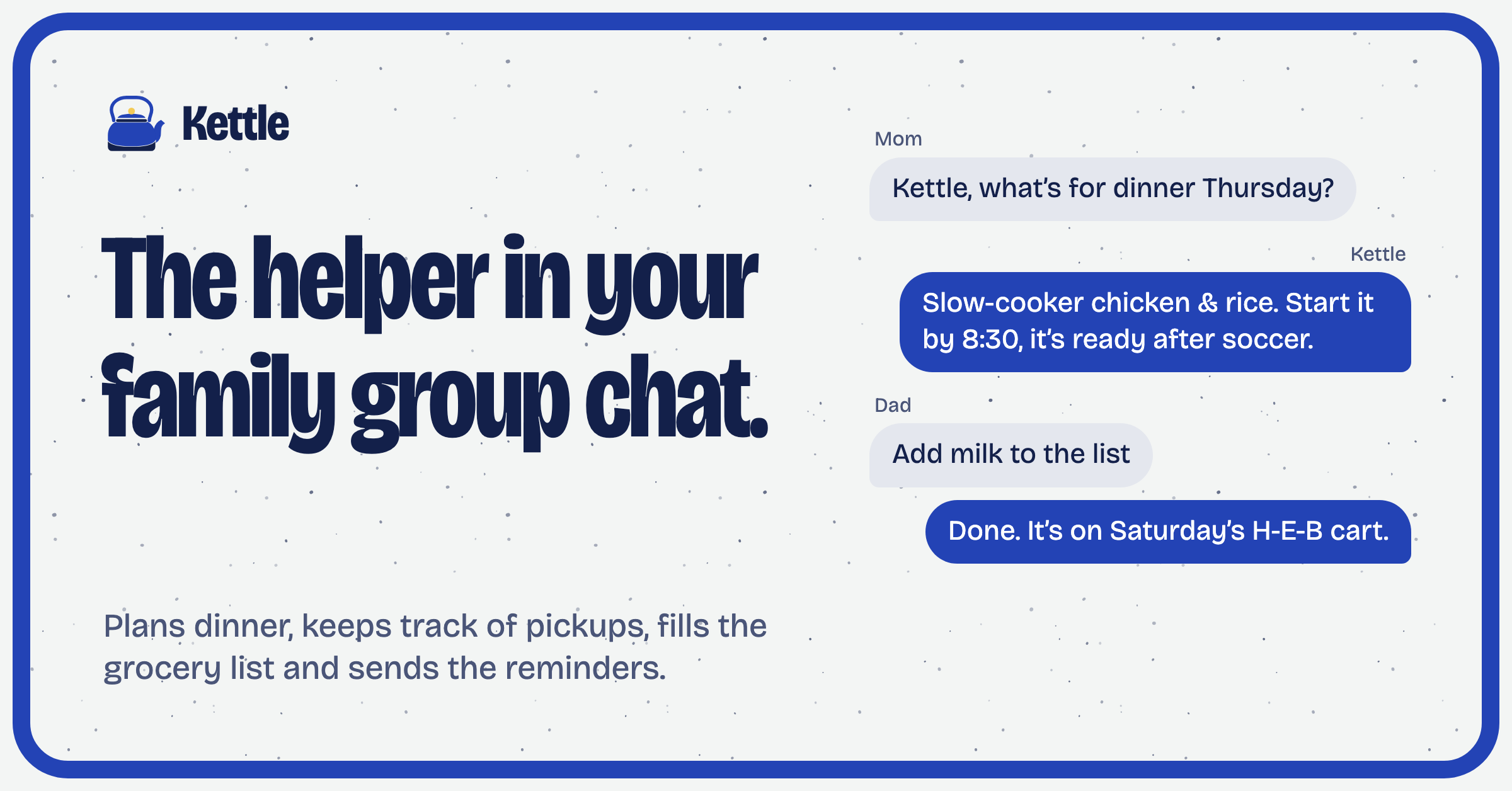
Kettle is a helper that lives inside your family's group chat. You text it like a person — either on its own number or by starting a message with "Kettle" in the family group — and it keeps track of pickups, plans dinners, fills the grocery list and sends the reminders. There is no app, no dashboard and nothing for anyone to set up: Kettle is a contact in Messages. It is built for families who already coordinate by text and want the everyday details handled without adding another tool anyone has to remember to open. Family life runs on small details that are easy to lose: who is picking up which child, when picture day actually is, who finished the milk, what the dentist said about Maya, which night is soccer and which night is pizza night. Those details usually live in a scrolling group chat where they get buried within hours, or in one person's head. Kettle is aimed at exactly that gap — the things that fall through the cracks. Rather than asking a family to adopt a new app, maintain a shared calendar or learn a dashboard, Kettle joins the conversation that is already happening, so coordination stays where the family already looks every day. Kettle remembers the details you tell it — allergies, teachers, shoe sizes, what the dentist said — and once you have told it, anyone in the family can ask later and get the answer in the chat. In the example shown on Kettle's site, when one family member asks whether picture day is tomorrow, Kettle answers that picture day is Thursday, that poster board and milk are on Ben's list, and that it will remind him at 5. That is the pattern: information given once to Kettle becomes available to the whole family, instead of being trapped in a private thread or in someone's memory. Kettle plans dinner. It assembles a week of meals that fits around the family's schedule — soccer nights, for example — and around the people who will not eat mushrooms, drawing on recipes the family already likes. A parent can ask by text something as simple as "Plan dinners this week, no mushrooms" or "Dinners, no mushrooms," and Kettle comes back with the week's meals. Because the plan is built around the actual week rather than an abstract rotation, it can account for the nights when there is no time to cook and for the preferences of the people who will be sitting at the table. Kettle fills the grocery cart. It turns the week's dinners and the running grocery list into an H-E-B cart, which the family reviews and checks out. Requests like "Add diapers to the list" or "Fill the H-E-B cart for the week" build that cart, and Kettle messages when it is ready — one example notification reads "Your H-E-B cart is ready: 23 items for this week's dinners." The point is that the list and the meal plan stay connected: whatever the week's dinners require, plus whatever anyone added to the list along the way, ends up in one cart to look over before checkout. Kettle sends reminders — pickups, practice, birthdays and bills — to the person who needs them rather than sending everything to everybody. Family reminders go to the group and personal ones go only to the individual. Kettle also follows up: it asks again until someone says done, so a reminder is not simply a notification that disappears. Requests like "Remind us Friday is pizza night," "Put flu shots on the calendar" or "Text me when it's time to leave for soccer" are handled in the same chat, and the reminder arrives with the specific detail needed — for example, "Leave in 15 for soccer. Cleats and a water bottle for Leo." Kettle texts first, at the right time. It sends a short morning brief, a nudge fifteen minutes before you need to leave, and a message when the grocery cart is ready. The sample brief shown on the site reads "Morning! Rain after 3, soccer at 5:30, and it's taco night." Other examples in the same thread include a note that library books are due tomorrow and that Maya has three checked out, and a note that Grandma lands at 6:40 with Ben on airport duty. Because Kettle starts the message instead of waiting to be asked, the family does not have to remember to check anything. Any of that behavior can be changed by text, in plain language — for instance, "Kettle, skip the morning brief on weekends." Kettle is also private by default: what you text it on its own stays between the two of you, and in the family group it only shares what the whole family should know. The site states that Kettle checks who is in the group before every message, which matters in a chat where children, partners or extended family may be present. Privacy is handled through the same conversational interface as everything else, with no settings screen to configure. Getting started takes three steps. First, you text Kettle hi at (205) 243-9463; it asks what to call you and what you would like help with first. Second, each person in the family texts Kettle once so it knows who is who. Third, you add Kettle to your family group — then you say "Kettle, say hi" and ask it anything. From there Kettle operates as a participant in Messages: in a group, a message that starts with "Kettle" is addressed to it, and in a one-to-one thread every message is. There is nothing to install and no dashboard to check, which is the whole design premise. Families moving from Ollie are also offered a way to bring what it knew to Kettle. The outcome Kettle describes is that the things that fall through the cracks get handled. Because Kettle remembers what it is told, other family members can get answers themselves instead of asking the same person again. Because it plans dinners around the week and turns them into a cart, the meal plan and the shopping trip stop being separate chores. Because reminders go to the right person and Kettle asks again until someone says done, the follow-through does not depend on someone remembering to chase it. And because the brief and the nudges arrive on their own, the family does not have to check a tool to find out what is coming. Typical use looks like the conversations shown on the site: someone asks "What time is Leo's game?" and gets an answer in the group; someone adds diapers to the list; a parent asks Kettle to plan the week's dinners with no mushrooms; flu shots go on the calendar; and the H-E-B cart gets filled for the week. In the background Kettle sends the morning brief, the fifteen-minute warning before soccer, the note that library books are due, and the message that the cart is ready. Reminders such as pizza Friday and bills go to whoever needs them, and Kettle keeps asking until someone says done. Kettle is priced at 7 days free, then $19 a month for the whole family, and it tells you the day before your trial ends. The price covers the family rather than a single seat, which fits a product that only works when everyone is in the same thread. It is aimed at households already coordinating through text messages — parents juggling pickups, practices, dinners and appointments — and it runs through Messages rather than a standalone app or dashboard. Kettle's value proposition is narrow and practical: put a helper in the family group chat, let everyone text it like a person, and let it hold the details, the dinners, the grocery cart and the reminders. No app, no dashboard, nothing to set up — just a contact that answers when asked and speaks up at the right time.
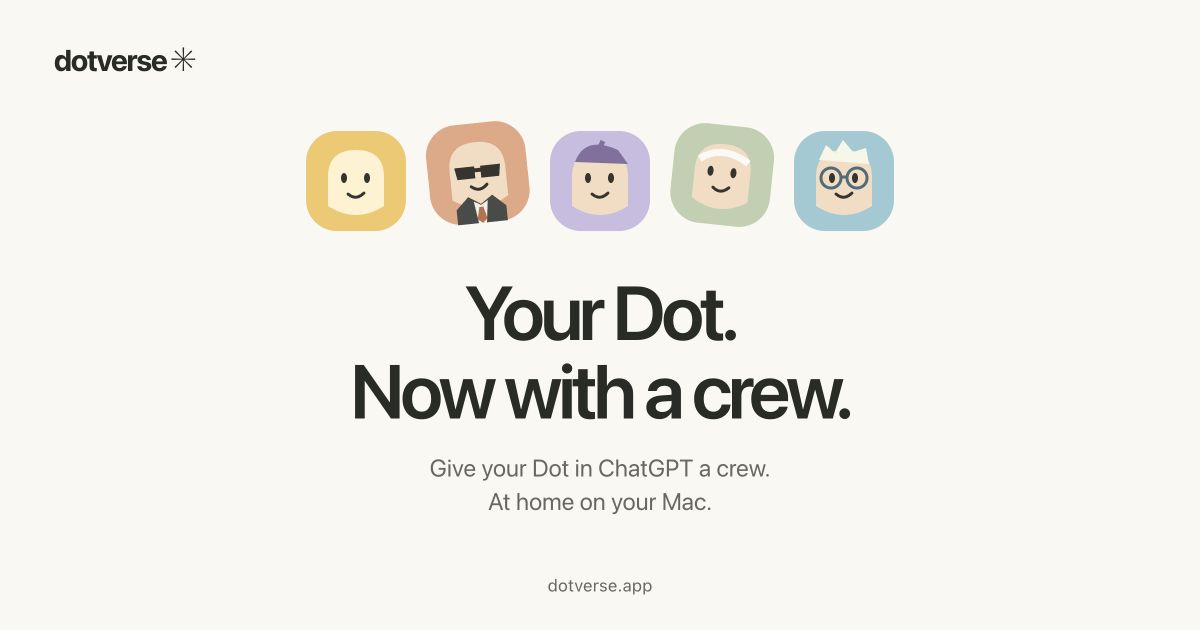
Dotverse is a Mac app designed for people who already have a Dot in ChatGPT and want to bring that Dot to their Mac in a new form. The app's central idea is expressed in its title: "Your Dot. Now with a crew." Instead of offering a separate AI service or requiring an API key, Dotverse connects to an existing Dot through a sign-in window. Once connected, users can create a crew of custom Dots, each with a different role and personality, and each suited to a different task. The website gives three illustrative examples: a Dot for writing, a Dot for planning, and a Dot for learning. Dotverse is intended for Apple Silicon Macs running macOS 14 or later, and it requires an existing Dot in ChatGPT. It does not replace that Dot; it extends the way the user can organize and interact with it. The product addresses a practical tension: one Dot may be useful across many activities, but different activities call for different styles of help. A writing task may benefit from a candid editor that sharpens a draft while keeping the user's voice. A planning task may call for a pragmatic planner that turns a big idea into manageable next steps. A learning task may call for a patient tutor that explains tricky topics with examples. Dotverse responds by letting users create different Dots for different tasks, giving each one a role and a personality. The content frames this as forming a crew around the existing Dot, rather than starting over with a separate assistant. Because custom Dots share the existing Dot's memory and capabilities, the crew is connected to the same underlying Dot. That shared foundation matters because the user does not have to recreate context for every new role; the custom Dots operate with the same underlying memory and capabilities, while each has its own role, personality, and conversation view in the app. Requests run one at a time, according to the FAQ. The first feature group is the creation of custom Dots for different tasks. Dotverse lets users create different Dots for different tasks and give each one a role and a personality. The website describes this directly and provides examples: a Dot for writing, described as a candid editor to sharpen a draft while keeping your voice; a Dot for planning, described as a pragmatic planner to turn a big idea into manageable next steps; and a Dot for learning, described as a patient tutor to explain tricky topics with examples. These examples show how role and personality are tied to a task. The writing Dot is not merely a general assistant; it is framed as an editor with candor. The planning Dot is framed as pragmatic and focused on next steps. The learning Dot is framed as patient and example-driven. Dotverse does not limit the concept to these examples in the text; it presents them as "a few you could create," while the explicit capability is that each custom Dot can have a role and a personality for a different task. The second feature group is shared memory and capabilities. According to the website, custom Dots share the existing Dot's memory and capabilities. The FAQ adds that each custom Dot has its own role, personality, and conversation view in Dotverse, but they use the same underlying Dot and share its memory. This distinction is important: the roles and conversation views are separate in the app, while the underlying Dot and memory are shared. The FAQ also states that requests run one at a time. The product therefore presents a crew of differentiated Dots without claiming that each one is a separate AI service or a completely isolated assistant. The shared memory is described as a feature of the custom Dots, and the site explicitly says, "Your custom Dots share your existing Dot's memory and capabilities." This allows a user to move between task-specific roles while remaining connected to the same Dot foundation. The third feature group concerns connection, privacy, and local storage. Dotverse connects to an existing Dot through a sign-in window. It does not provide a separate AI service and does not ask for an API key. An internet connection is required to chat, and some features open in the connected Dot window. On the storage side, Dotverse keeps encrypted copies of conversations and drafts on the user's Mac. Messages are also sent to the connected Dot service. The FAQ notes that clearing local history does not clear Dot's own conversations or memory. This means the app maintains local encrypted copies while the connected Dot service also receives messages. The content does not describe the encryption method or the exact scope of local data beyond conversations and drafts. Those details are simply not stated. What is stated is that the copies are encrypted, that they are stored on the Mac, and that clearing local history has a limited effect: it does not clear the Dot's own conversations or memory. Dotverse works as a Mac app that the user downloads as a DMG. The website provides installation steps: open the downloaded DMG, drag Dotverse into Applications, then open it. After opening, the user signs in to their existing Dot and meets their crew. The app runs on Apple Silicon Macs with macOS 14 or later. It requires an existing Dot in ChatGPT. The website lists version 0.2.0 and links to release notes. The overall approach is to bring an existing Dot into a Mac app and then layer a crew of custom Dots on top of it, each with a role, personality, and conversation view, while the underlying Dot and its memory remain shared. The FAQ also notes that some features open in the connected Dot window, which indicates that part of the experience remains connected to the Dot service rather than being fully reimplemented inside Dotverse. The stated benefits follow from those mechanics. Users can create different Dots for different tasks rather than relying on one general-purpose Dot for every activity. They can assign roles and personalities that match the task at hand, such as a candid editor for writing, a pragmatic planner for planning, or a patient tutor for learning. Because the custom Dots share the existing Dot's memory and capabilities, the crew remains connected to the same underlying Dot. Each custom Dot has its own conversation view in Dotverse, which supports separate task-specific interactions, while requests run one at a time. The app also keeps encrypted copies of conversations and drafts on the Mac, and it connects through a sign-in window rather than an API key. These are the outcomes the content supports; it does not make broader claims about productivity gains or accuracy. The content describes concrete use cases through its examples. A writer can create a writing Dot, described as a candid editor, to sharpen a draft while keeping their voice. A user with a big idea can create a planning Dot, described as a pragmatic planner, to turn that idea into manageable next steps. A learner can create a learning Dot, described as a patient tutor, to explain tricky topics with examples. More broadly, the app is for creating different Dots for different tasks, so a user can maintain a crew of task-specific Dots and switch between their conversation views. The FAQ's note that each custom Dot has its own conversation view supports the idea of separate interactions per role, while the shared underlying Dot and memory keep the crew connected. The content does not list other use cases beyond these examples and the general task-specific framing. Dotverse is aimed at people who already have a Dot in ChatGPT and use an Apple Silicon Mac with macOS 14 or later. The website states these requirements directly: "For Apple Silicon Macs · macOS 14+ · Requires an existing Dot in ChatGPT." The app is distributed as a DMG download, and the site lists version 0.2.0 with a release notes link. The connection is made through a sign-in window to the existing Dot, and no API key is required. The content does not state pricing, subscription plans, or a free trial. It also does not list third-party integrations beyond the connected Dot service. The only technical environment details given are Apple Silicon, macOS 14 or later, an internet connection for chatting, and the existing Dot in ChatGPT requirement. The website metadata mentions joining a launch list, but the main page content focuses on the download and setup. In summary, Dotverse's primary value proposition is contained in its tagline: "Your Dot. Now with a crew." It takes an existing Dot in ChatGPT and brings it to a Mac app where users can create a crew of custom Dots with different roles and personalities. The examples—a candid writing editor, a pragmatic planner, and a patient tutor—show how the crew concept maps to different tasks. The custom Dots share the existing Dot's memory and capabilities, each has its own conversation view, and requests run one at a time. The app keeps encrypted copies of conversations and drafts on the Mac, connects through a sign-in window rather than an API key, and requires Apple Silicon, macOS 14 or later, and an existing Dot in ChatGPT. Dotverse is therefore a way to organize task-specific interactions around one existing Dot rather than a separate AI service.
Kiwi is a free, proactive AI assistant that lives in your messages. Rather than waiting for you to open an app and type a request, Kiwi keeps track of what is coming up in your life — your trips, plans, bills and the people in them — and texts you first at the right moment. When something needs doing, it does it on any app or website as soon as you say yes. It is available for iPhone and Android, works with your calendar and email, and always asks before it spends. The product is built for people who want the small jobs of daily life handled without opening yet another app, and its stated purpose is to help you spend less time on your phone and more time with the people around you. The problem Kiwi addresses is described on its site plainly: the flights, the bills, the replies, the birthdays — each one pulls you back to your phone. Every small task means opening an app and tapping through it, and the small ones tend to wait until later. Kiwi's answer is not another dashboard to check but a proactive assistant that brings those tasks to you at the right time and gets them done while you get on with your day. The site also frames the economics of the problem: a personal assistant costs about $67,000 a year — citing the average base pay of an executive assistant in the US in 2026, from Payscale, at $67,567 a year, or $1,299 a week — while Kiwi does the same small jobs, every week, for nothing. The first layer of the product is awareness. Kiwi reads your calendar and email, so it knows what is coming up. It texts you once, at the right time, with the small jobs already done, and anything that can wait comes in your morning summary. Examples given on the site include reminding you an hour before a call with the link, sending your ticket on the night with what to bring, and spotting a delayed flight and booking a car for when you land. Kiwi also supports an on-demand watch: you can ask it to keep an eye on something and it tells you the moment it happens. In the site's example, a user writes "Tell me if my flight to Rome gets any cheaper," and Kiwi later replies that the flight just dropped to €84, down from €112 on Monday, offering to send the booking link. A Sunday wrap summarises the week in one text. The second layer is action. When you say yes, Kiwi books, orders and replies for you on any app or website; when there is no app for something, it uses the website. It checks you in, moves a delivery, books a restaurant or a car. Several guardrails are stated: anything that costs money shows its price first, it only says something is booked once the company confirms it, and it never pays twice for the same thing. In one example, a parcel needs a signature while you are at the office until 6, and Kiwi asks whether to move the delivery to Saturday; after the reply "Yes please" it confirms the delivery was moved to Saturday morning and that UPS has confirmed it. In another, a Saturday dinner at 9 leads Kiwi to offer an UberX at about €14 or a Comfort at €18, book the pickup for 8:35, and promise to let you know when the driver is close. Control and privacy sit underneath all of that. Nothing happens without your yes: anything that costs money or speaks for you waits. Kiwi does put your own plans in your calendar and set reminders on its own, but spending or messaging someone always waits for your approval. You can reply with one word, and it only asks again if something is unclear or the price changes. Nothing written in an email or on a website can tell Kiwi what to do — only you can. Passwords are encrypted before they are saved using AES-256-GCM, the AI never sees them, and Kiwi types them for you. Data is never sold, there are no ads, no business can pay to change what Kiwi suggests, nothing is shared for marketing, and nobody at Kiwi reads your conversations. You can delete a single memory, or your whole account and everything in it, from the app. The overall approach is messaging-first. The entire relationship happens in conversation: in the Kiwi app, in Messages and in WhatsApp. You start by tapping Sign up and picking your phone, iPhone or Android; it opens Messages or WhatsApp with "Hi Kiwi" already written, you press send, and Kiwi asks a few quick questions to set you up. After each conversation, Kiwi goes back over it and fixes anything it got wrong or forgot to do. A future piece of hardware, the Kiwi Band, is described as coming later: a band for your wrist with no screen that buzzes when Kiwi needs you, with answers given by a tap or your voice so your phone can stay in your pocket. It is explicitly not available yet. The benefits follow from that design. Nothing sneaks up on you, because Kiwi texts first rather than waiting to be asked. Small jobs that would otherwise wait until later are brought to you at the right moment and finished while you get on with your day, so you spend less time on your phone and more time with the people around you. You also get confirmation-based certainty: Kiwi only says something is booked once the company confirms it, and it never pays twice for the same thing. The site's example receipt for a week shows what this looks like in practice — a reminder before the 10am call with the link, concert tickets the night before with what to bring, a delivery moved to Saturday with UPS confirming it, dinner for five booked with the restaurant confirming it, and a Sunday wrap of the week in one text — with ads none, selling your data never, paying to be suggested never, and no app to install. Concrete use cases recur throughout the site. A free Saturday afternoon prompts Kiwi to offer to plan something with the kids, or the whole day. A delayed flight prompts it to check you in, spot the delay, tell you the new landing time and book a taxi from arrivals. A free evening prompts it to book dinner somewhere you will like with friends. A money question turns into a standing watch — tell me when my flight gets cheaper — and Kiwi reports the drop. A parcel needing a signature while you are at work becomes a request to move the delivery to Saturday. A dinner reservation becomes a car to get you there on time, with prices shown before you agree. Anything that can wait is collected into the morning summary, and the week closes with a Sunday wrap. On integrations and availability, Kiwi starts with your calendar and email — Google Calendar, Gmail and Outlook — then extends to the rest you already use, like Slack, WhatsApp, Spotify, Uber and many more, and can use any website when there is no app for it. It runs on iPhone and Android, and you talk to it in the Kiwi app, in Messages and in WhatsApp. Pricing is simple: Kiwi is free, with no card and no plan to pick, and it is free during the pilot. There are no ads, your data is never sold, and no business can pay to change what Kiwi suggests. The takeaway Kiwi repeats is that it texted first and you said yes. It is a proactive assistant rather than a prompt box: it watches what is coming up, arrives at the right moment in the messaging app you already use, shows the price before it spends, waits for your one-word yes, and only claims something is done once the company confirms it — aiming to give you back the small jobs of the week and, with them, your attention.
Experience Viston AI in Action Don't just read about AI—experience it. Try our live AI demonstrations and see how our solutions transform business operations
Yourcast is a Telegram bot that turns the messaging app into a podcast player. Rather than installing a separate podcast client, a listener opens a chat with @yourcastbot, searches for a show, taps to subscribe, and new episodes arrive as audio right in the conversation. The bot is aimed at people who already spend their day inside Telegram and want podcast discovery, subscription and listening to happen in the same place they already talk, read channels and share files. Yourcast 2.0 builds on that listen-in-chat model with AI summaries that carry timestamps you can tap to jump into the audio, the ability to ask questions about any episode, feeds that repair themselves, file support up to 2 GB, OPML import and payments in Telegram Stars. Podcast listening usually starts by leaving whatever app you are in. You open a dedicated podcast client, search for a show you just heard about, and manage a separate subscription list that lives apart from your conversations. Yourcast addresses that split. Telegram already holds chats, channels and audio files, so keeping a listener's shows in the same space removes a step between hearing about a podcast and following it. The subscribe flow is deliberately reduced to a tap: find the show, tap once, and future episodes are delivered as audio messages in the chat instead of waiting in another library. That matters most in the moment of discovery, when the intent to follow a show is strongest and any friction tends to end it. The core of the product is search and subscription inside a chat. A user searches for a podcast by name, reviews the results the bot returns, and taps to subscribe. From then on, new episodes of that show arrive as audio directly in the Telegram conversation, so playback happens where the notification already is. There is no separate library screen to open and no episode list to refresh: the chat itself becomes the feed. The bot also points to a channel, @yourcast_channel, and a chat, @yourcast_chat, alongside the bot itself, giving listeners a place to follow updates and talk with other users. Because everything happens in a Telegram chat, the same interface works across the Telegram apps a person already uses, with the bot link launching it directly. Version 2.0 adds AI summaries to the listening experience. After an episode is available, the bot can provide a summary of it, and that summary carries timestamps. The timestamps are tappable: tapping one jumps to the corresponding point in the audio. This turns a summary from a static block of text into a navigation tool. A listener can read the summary first to decide whether a long episode is worth the time, then jump straight to the segment that matters instead of scrubbing through the player looking for it. For shows where only one topic is relevant, or for episodes that run long, the combination of an AI summary and tap-to-jump timestamps compresses the decision of what to listen to and where to start into a single screen inside the chat. Beyond summaries, Yourcast lets a user ask questions about any episode. Instead of reading or listening to the whole thing to find one answer, the listener asks the bot directly about the episode in the chat. The second reliability feature is feeds that repair themselves. Podcast feeds can break, and Yourcast 2.0 handles it by repairing the feed rather than leaving the subscription dead. For a listener, that means a show they subscribed to keeps delivering new episodes without manual re-adding or troubleshooting, and the maintenance work that usually falls to the user is handled by the bot. 2.0 also lifts several practical limits. Files up to 2 GB are supported, so long episodes and larger audio files that would previously exceed a limit can be delivered into the chat. OPML import means a listener can bring an existing subscription list from another podcast app into Yourcast rather than rebuilding it show by show. Payments run through Telegram Stars, so upgrading happens inside Telegram without leaving the app or entering card details elsewhere. On the free tier, users get 10 episodes a week on demand, which sets a clear boundary between casual listening and heavier use. How the product works overall is intentionally simple: it is a bot, not a separate app. A user launches it from the bot link, lands in a chat with @yourcastbot, and interacts through messages. Searching, subscribing, requesting an episode on demand, reading a summary, tapping a timestamp and asking a question are all chat actions in the same thread. Because the bot lives inside Telegram, there is nothing to install beyond Telegram itself, and episode delivery uses the app's existing audio file handling. The website presents the product in a single line, the podcast bot that searches, subscribes and plays podcasts, with a Start Bot button as the whole onboarding path. The benefit is consolidation. Listening, subscribing and catching up happen in a place the user already opens many times a day, which makes following a new show a one-tap decision instead of a context switch. AI summaries with timestamps reduce the time spent deciding what to play and finding the relevant part of an episode, and asking questions about an episode replaces hunting through audio for a single answer. Self-repairing feeds remove a maintenance chore from the listener. OPML import protects existing subscriptions, 2 GB file support removes a size ceiling, and Telegram Stars keeps payment inside the app. The free allowance of 10 episodes a week on demand makes it possible to try the workflow before paying. Typical scenarios follow directly from those features. Someone sees a podcast mentioned in a Telegram channel or a group chat, opens @yourcastbot, searches the title, taps subscribe, and the next episode shows up in that same conversation. A commuter with a forty-minute window reads the AI summary of a long episode, taps the timestamp for the segment they care about, and listens to just that part. A listener with an established library in another podcast app imports it via OPML instead of re-adding shows one at a time. Someone curious whether an episode covers a specific topic asks the bot a question about it before committing to a full listen. And a heavy listener who runs past the free 10 episodes a week on demand upgrades through Telegram Stars without leaving the chat. Yourcast is built for Telegram users who listen to podcasts, from casual listeners who follow a handful of shows to heavier users who subscribe to many. The bot interface is available in English, Russian, Portuguese, Spanish, German and Hebrew, so the same chat workflow works for listeners across those languages. The project is open source under GPL v3, with GitHub listed among its topics, which matters to users who want to inspect or reuse the code behind a bot they rely on. Pricing follows a freemium model: a free tier with 10 episodes a week on demand, and paid upgrades handled with Telegram Stars. Yourcast 2.0's value proposition is straightforward: it moves podcast search, subscription and listening into Telegram, then adds AI summaries with tap-to-jump timestamps and episode questions so that the time spent with audio is time spent on the parts that matter. Combined with self-repairing feeds, OPML import, 2 GB files and in-app Telegram Stars payments, it turns a chat window into a complete, low-friction podcast workflow.
Tori is an AI support agent built by TalkJS for customer success teams. It learns a product in depth from content the company already has, including help centers, documentation, product pages, and company knowledge, and then delivers accurate answers to even the most complex customer questions. Tori runs in a help center, inside an app, or on a website through a chat interface that can be fully customized. Setup is presented as a matter of minutes: connect a URL, let Tori learn the product content, and embed the chat UI. Rather than replacing the support team, Tori works alongside it, answering what it knows and escalating what it does not. Customer success and support teams often hold product knowledge across scattered support content, while customers expect clear answers in the moment. A support queue makes customers wait, and when a conversation finally reaches a human, customers may have to repeat information they already shared. Tori is designed around a different approach: bring scattered support content into one dependable knowledge layer, use it to answer questions instantly, and hand off to a person only when human help is needed. The product explicitly positions accuracy as a priority, flagging uncertainty instead of filling gaps when confidence runs low. That matters because an answer that sounds confident but is wrong can damage customer trust. The first part of Tori's approach is knowledge. Teams connect their help center, docs, or product site by pasting a URL. From there, Tori learns the product, turning existing product content into grounded knowledge. The setup flow shows help content, website pages, guides, and updates being learned, along with a sitemap that stays up to date. The result is described as one source of truth: scattered support content is brought into a single dependable knowledge layer for every conversation. Because answers are grounded in the content the company already has, Tori can address complex product questions using the same material the support team relies on. Tori also stays in sync and can run in a help center, app, or website, so the knowledge behind the conversation is connected to the places customers already look for help. Tori does not simply return raw documentation. It first identifies what each customer needs and brings the right product context into the conversation. It then responds in your voice, using your tone, guidance, and rules so that every answer stays aligned with how your team supports customers. Customers receive clear, sourced answers in the moment without waiting in a support queue. Accuracy is handled with explicit boundaries: Tori knows its limits, flags uncertainty instead of filling gaps, and brings in your team when confidence runs low. This combination of grounded knowledge, brand-aligned responses, and visible uncertainty is central to the product's promise of accurate AI support rather than plausible-sounding guesses. When a customer needs a human, Tori escalates seamlessly. The conversation is passed to the team with context intact, and agents get the conversation and sources ready to continue without making customers repeat themselves. That handoff is a core part of the design: Tori answers what it knows and escalates what it does not. The experience is also customizable. Built on TalkJS, Tori lets teams shape the interface and behavior to match their product. They can use the ready-made chat UI, customize the experience, or connect Tori through the API, and they can embed the chat UI in docs, an app, or a website. This flexibility means the support agent can fit the surfaces where customers already interact with the product. Under the hood, Tori is built on TalkJS, which provides production-grade messaging, real-time delivery, and full conversation history as standard. TalkJS is described as the same infrastructure powering millions of real conversations across the web. That foundation supports the overall workflow: Tori understands the question, responds in your voice, answers instantly with sourced information, and escalates seamlessly when human help is needed. In practical terms, the product combines a grounded knowledge layer learned from existing content with a customizable chat interface and a context-preserving handoff to the support team. The stated result is support that never clocks out, delivered through infrastructure built for real conversations rather than a standalone answer box. For customers, the benefit is immediate help: clear, sourced answers in the moment instead of waiting in a support queue. For support teams, Tori keeps responses aligned with their tone, guidance, and rules, and it avoids filling gaps when it is uncertain, reducing the risk of inaccurate answers. When escalation is necessary, agents receive the conversation and its sources, so they can continue without asking customers to repeat themselves. Teams also gain control over the experience: they can customize the interface and behavior, embed it in their docs, app, or website, or connect through the API. Security features such as SSO, data controls, encrypted data, GDPR-ready controls, and ISO 27001 certified TalkJS infrastructure support the trust side of customer support. Tori fits several concrete support workflows. In a help center, it can answer complex questions using the documentation and guides the team has already published, giving customers a self-service path before they open a ticket. Inside an app, the embedded chat UI can identify what a customer needs, bring in the right product context, and answer instantly. On a website, Tori can use product pages as grounded knowledge and respond in the company's voice. For complex product questions, it can provide sourced answers and flag uncertainty when confidence is low. When a conversation requires a person, Tori hands it to the team with the conversation and sources attached, so the human agent can continue without a restart. This makes Tori relevant for teams that want instant first-line support while keeping human help available for the cases that need it. Tori is aimed at customer success and support teams that need accurate answers without compromising customer trust. It is built for teams that already have help docs, product pages, and company knowledge to draw from, and for organizations that want the agent to run in a help center, app, or website. The product is made by TalkJS and uses TalkJS infrastructure, with SSO, data controls, encryption, GDPR-ready controls, and ISO 27001 certification. Pricing starts with a free Trial plan with no time limit, up to 50 AI responses per month, one seat, and one agent. Basic is $35 per month for 300 AI responses, two seats, and one agent. Standard is $140 per month for 1,400 AI responses, three seats, and three agents, marked as best value. Growth is $550 per month for 6,000 AI responses, seven seats, and five agents. Enterprise is a custom plan based on team and support needs. Customers choose a plan when they sign up. Tori's core value proposition is straightforward: learn the product from the content a team already has, answer complex customer questions accurately and in the team's voice, and escalate to a human with full context when needed. By combining grounded knowledge, customizable chat, TalkJS messaging infrastructure, and enterprise-grade security controls, Tori offers customer success teams an AI support agent designed for accurate, trustworthy conversations rather than generic automated replies.
Cited answers, a compliance matrix, and a deterministic verifier that refuses to export what it cannot prove.
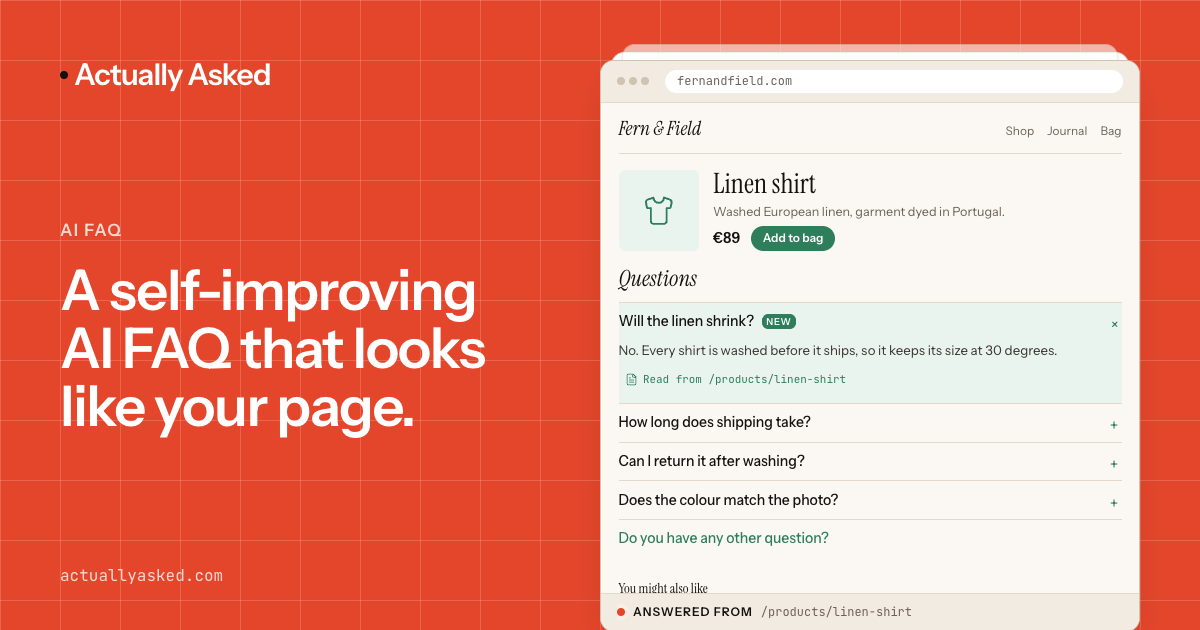
Actually Asked is an AI FAQ app for websites and Shopify stores. Rather than adding a floating chat bubble, it places a FAQ section directly inside your page, styled in your own fonts and colours, so it looks like part of the site. Visitors ask their question in their own words and receive answers taken only from your own pages, your help center and files you upload. The questions visitors ask most then join your FAQ on their own. The problem it addresses is a familiar one: businesses answer the same questions again and again by email. Sizing, shipping times, caffeine content, whether a jacket is truly waterproof, what a cancellation policy covers, what to bring to a first appointment. The answers usually already exist somewhere on a product page, in a help centre article or inside a PDF, but visitors either cannot find them or do not want to dig. Actually Asked is aimed at any site where people ask before they buy, book or sign up. The company puts the filter simply: if people email you the same questions again and again, it is for you; if nobody asks you anything yet, it is not. Three features carry the core experience. The first is an inline FAQ: a FAQ section that lives in your page rather than a chat bubble, and that is styled like your site. The marketing content shows the same widget rendered in the look of three different shops, a linen shirt store, a coffee roaster and an outdoor gear shop, each with its own typography and colours. The second is highlight to ask. Visitors select any sentence on the page and ask a question about it, which turns a specific line of copy, such as a sizing note or a care instruction, into an entry point for an answer. The third is the self-improving FAQ. The questions visitors ask most join your FAQ on their own, with nothing for you to approve. You can still edit, pin or remove any entry, and the product states that your edits are never overwritten. Answers are restricted to your own sources and nothing else. On the Sources page you connect your site, its pages, and on Shopify your products and store policies, which are read again every 7 days. You can add the address of a help center or knowledge base, and you can upload PDF or Word files such as size charts, care guides, manuals and price lists, including files that are not public. Answers can quote a file but never link to it. The onboarding view shows a site of 38 pages, a Shopify catalogue of 212 pages and four policy pages, all read at 04:00 with the next read scheduled for 04:00 the following day. The weekly gap report arrives as one email every Monday. It lists the questions asked most, the ones your pages do not answer, and what was added to your FAQ. A sample report shows 214 questions asked in the week, 87% of them answered and nine with no answer to write about. A separate leads feature captures visitors who leave an email address, so you have someone ready to reply to. Finally, an MCP integration lets you manage your FAQ by asking Claude, ChatGPT or another assistant, for example publishing FAQ entries through a tool call. Setup is presented as three steps. First, you add your domain, plus your help center or PDF and Word files if you have them; those sources are read, private files included, and your first FAQ entries are written from them. Second, you paste two lines, a div carrying your site key and an async script tag from the Actually Asked CDN, and the FAQ appears where you put it; on Shopify you add it as a block in the theme editor instead. Third, visitors ask, and your FAQ grows. The distinguishing choices are the absence of a chat bubble, the tight sourcing rule that answers come only from your pages, and the fact that popular questions are promoted into the FAQ automatically rather than waiting on a human editor. The outcome the product describes is a FAQ that looks like yours and learns from visitors. Popular questions are answered once and added permanently, so the same email does not need to be written twice. Because answers are grounded only in your own material, the reply a visitor sees reflects what you already publish. The Monday report gives a regular view of the questions your pages fail to answer, which points at content worth writing. Leads are collected for follow-up, and the whole FAQ can be maintained from a dashboard, the Shopify admin or an AI assistant. Four use cases are documented. Online stores, including Shopify, WooCommerce, Squarespace and custom shops, use it for product and policy questions such as whether a size runs small. SaaS and apps use it on pricing pages and documentation for plan and "does it do X" questions, illustrated by a per-seat pricing example where an annual discount question is answered from the /pricing page. Travel and hospitality businesses such as hotels, rentals and tours handle check-in, cancellations and what is included, illustrated by a room booking page answering whether breakfast is included from the /rooms page. Services and clinics, including agencies, clinics, studios and coaches, cover booking, pricing and what to expect, illustrated by a first-visit page that answers what to bring. Actually Asked was built first for Shopify stores but works on any website whose visitors have questions before they buy, book or sign up. Integration paths include a Shopify theme block, a WordPress Custom HTML block or footer script, a Webflow Code Embed, a Framer Marketplace plugin or pasted component, a Squarespace Code block, and static HTML, React, Next.js or custom templates. There is also a free gap-finder tool to find FAQ gaps and an MCP route for managing the FAQ through Claude or ChatGPT. Pricing starts free with 50 AI answers a month on one site, then $12 a month; every plan includes unlimited team members, and you pay for the answers you use and the sites you run. Actually Asked replaces the chat bubble with something more durable: a branded, inline FAQ that answers from your own sources and quietly grows with the questions visitors actually ask. It is free to start, live on your site in about ten minutes, and aimed at any business that keeps answering the same question by email.