Kiwi is a free, proactive AI assistant that lives in your messages. Rather than waiting for you to open an app and type a request, Kiwi keeps track of what is coming up in your life — your trips, plans, bills and the people in them — and texts you first at the right moment. When something needs doing, it does it on any app or website as soon as you say yes. It is available for iPhone and Android, works with your calendar and email, and always asks before it spends. The product is built for people who want the small jobs of daily life handled without opening yet another app, and its stated purpose is to help you spend less time on your phone and more time with the people around you.
The problem Kiwi addresses is described on its site plainly: the flights, the bills, the replies, the birthdays — each one pulls you back to your phone. Every small task means opening an app and tapping through it, and the small ones tend to wait until later. Kiwi's answer is not another dashboard to check but a proactive assistant that brings those tasks to you at the right time and gets them done while you get on with your day. The site also frames the economics of the problem: a personal assistant costs about $67,000 a year — citing the average base pay of an executive assistant in the US in 2026, from Payscale, at $67,567 a year, or $1,299 a week — while Kiwi does the same small jobs, every week, for nothing.
The first layer of the product is awareness. Kiwi reads your calendar and email, so it knows what is coming up. It texts you once, at the right time, with the small jobs already done, and anything that can wait comes in your morning summary. Examples given on the site include reminding you an hour before a call with the link, sending your ticket on the night with what to bring, and spotting a delayed flight and booking a car for when you land. Kiwi also supports an on-demand watch: you can ask it to keep an eye on something and it tells you the moment it happens. In the site's example, a user writes "Tell me if my flight to Rome gets any cheaper," and Kiwi later replies that the flight just dropped to €84, down from €112 on Monday, offering to send the booking link. A Sunday wrap summarises the week in one text.
The second layer is action. When you say yes, Kiwi books, orders and replies for you on any app or website; when there is no app for something, it uses the website. It checks you in, moves a delivery, books a restaurant or a car. Several guardrails are stated: anything that costs money shows its price first, it only says something is booked once the company confirms it, and it never pays twice for the same thing. In one example, a parcel needs a signature while you are at the office until 6, and Kiwi asks whether to move the delivery to Saturday; after the reply "Yes please" it confirms the delivery was moved to Saturday morning and that UPS has confirmed it. In another, a Saturday dinner at 9 leads Kiwi to offer an UberX at about €14 or a Comfort at €18, book the pickup for 8:35, and promise to let you know when the driver is close.
Control and privacy sit underneath all of that. Nothing happens without your yes: anything that costs money or speaks for you waits. Kiwi does put your own plans in your calendar and set reminders on its own, but spending or messaging someone always waits for your approval. You can reply with one word, and it only asks again if something is unclear or the price changes. Nothing written in an email or on a website can tell Kiwi what to do — only you can. Passwords are encrypted before they are saved using AES-256-GCM, the AI never sees them, and Kiwi types them for you. Data is never sold, there are no ads, no business can pay to change what Kiwi suggests, nothing is shared for marketing, and nobody at Kiwi reads your conversations. You can delete a single memory, or your whole account and everything in it, from the app.
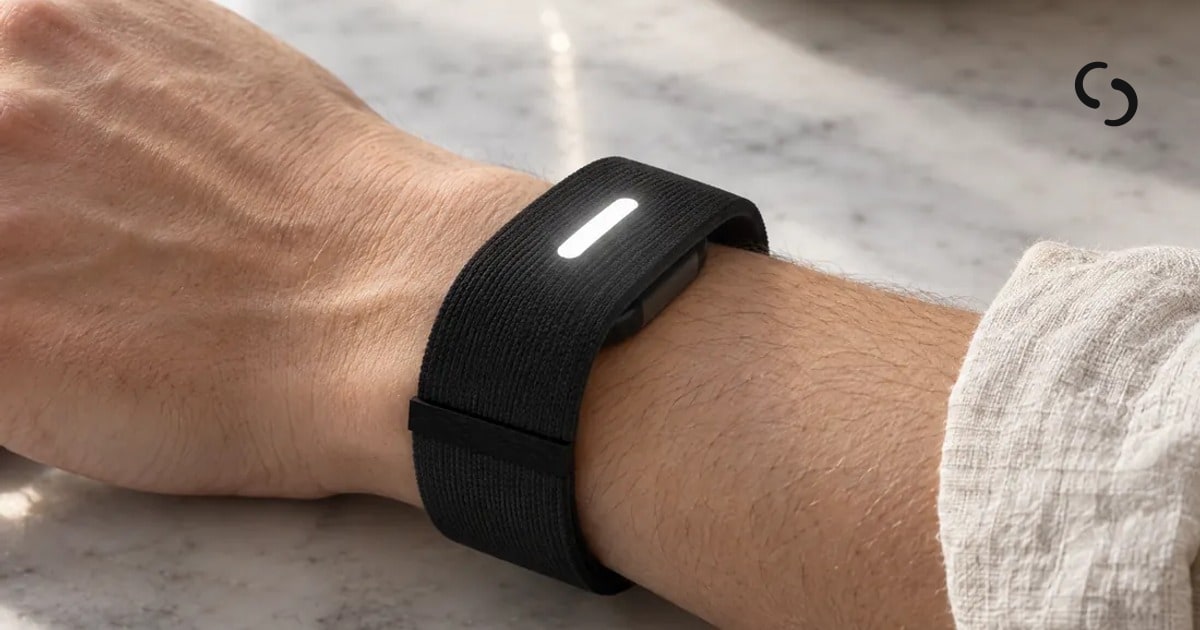
The overall approach is messaging-first. The entire relationship happens in conversation: in the Kiwi app, in Messages and in WhatsApp. You start by tapping Sign up and picking your phone, iPhone or Android; it opens Messages or WhatsApp with "Hi Kiwi" already written, you press send, and Kiwi asks a few quick questions to set you up. After each conversation, Kiwi goes back over it and fixes anything it got wrong or forgot to do. A future piece of hardware, the Kiwi Band, is described as coming later: a band for your wrist with no screen that buzzes when Kiwi needs you, with answers given by a tap or your voice so your phone can stay in your pocket. It is explicitly not available yet.
The benefits follow from that design. Nothing sneaks up on you, because Kiwi texts first rather than waiting to be asked. Small jobs that would otherwise wait until later are brought to you at the right moment and finished while you get on with your day, so you spend less time on your phone and more time with the people around you. You also get confirmation-based certainty: Kiwi only says something is booked once the company confirms it, and it never pays twice for the same thing. The site's example receipt for a week shows what this looks like in practice — a reminder before the 10am call with the link, concert tickets the night before with what to bring, a delivery moved to Saturday with UPS confirming it, dinner for five booked with the restaurant confirming it, and a Sunday wrap of the week in one text — with ads none, selling your data never, paying to be suggested never, and no app to install.
Concrete use cases recur throughout the site. A free Saturday afternoon prompts Kiwi to offer to plan something with the kids, or the whole day. A delayed flight prompts it to check you in, spot the delay, tell you the new landing time and book a taxi from arrivals. A free evening prompts it to book dinner somewhere you will like with friends. A money question turns into a standing watch — tell me when my flight gets cheaper — and Kiwi reports the drop. A parcel needing a signature while you are at work becomes a request to move the delivery to Saturday. A dinner reservation becomes a car to get you there on time, with prices shown before you agree. Anything that can wait is collected into the morning summary, and the week closes with a Sunday wrap.
On integrations and availability, Kiwi starts with your calendar and email — Google Calendar, Gmail and Outlook — then extends to the rest you already use, like Slack, WhatsApp, Spotify, Uber and many more, and can use any website when there is no app for it. It runs on iPhone and Android, and you talk to it in the Kiwi app, in Messages and in WhatsApp. Pricing is simple: Kiwi is free, with no card and no plan to pick, and it is free during the pilot. There are no ads, your data is never sold, and no business can pay to change what Kiwi suggests.
The takeaway Kiwi repeats is that it texted first and you said yes. It is a proactive assistant rather than a prompt box: it watches what is coming up, arrives at the right moment in the messaging app you already use, shows the price before it spends, waits for your one-word yes, and only claims something is done once the company confirms it — aiming to give you back the small jobs of the week and, with them, your attention.
Publisher
A
admin
Launch Date2026-10-27
Platformmobile
Pricingfree