Category Focus/categories/no-code
No-Code AI Tools
Discover and compare the best no-code AI tools and software. Browse 93+ curated tools with reviews and rankings.
Projects tracked
93
Sort mode
RECENT
Page
2
Discover and compare the best no-code AI tools and software. Browse 93+ curated tools with reviews and rankings.
Projects tracked
93
Sort mode
RECENT
Page
2
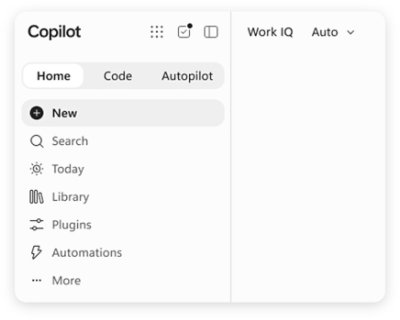
Microsoft Copilot is AI built for work. According to Microsoft, Copilot connects with your work content and the apps you already use, bringing together the latest AI models to help you create finished work, not just answers. It is designed for people who work inside Microsoft's productivity ecosystem: individuals who want to simplify everyday work, businesses that want their teams to move from ideas to impact, and enterprises that need secure AI grounded in their own organization. Copilot is available across desktop, mobile, and web, and it can be used with voice, keyboard, or pen, so the same assistant follows the user from one device to the next. The starting point for Copilot is a simple observation about how knowledge work actually happens. Most AI tools respond with an answer and stop there, while real work continues across documents, spreadsheets, presentations, email, meetings, and chat. Microsoft positions Copilot as a response to that gap: instead of an isolated chatbot, Copilot lives in the apps where work already happens — Word, Excel, PowerPoint, Outlook, and Teams — and it is grounded in work content rather than in generic information. That grounding is delivered through Work IQ, which ties Copilot to your company, your team's roles, and the context behind your projects. The stated goal is finished work, not just answers, which is why the product is framed as AI built for work rather than a general-purpose assistant. Feature group one is AI integrated into the apps you already use and grounded in your work. Copilot is integrated into Word, Excel, PowerPoint, Outlook, and Teams, where your work already happens, so users do not have to leave the tools they rely on to get help. Work IQ grounds Copilot in your company, your team's roles, and the context behind your projects, which means responses can reflect the reality of a specific organization rather than a generic model's best guess. Microsoft describes this as "AI that knows your work." Because the assistant already sits inside the productivity apps, the distance between asking for something and applying it to a real document, message, or meeting is much shorter. Feature group two is leading AI models brought together in one place, with automatic model selection. Copilot brings together leading AI models with Work IQ so users can benefit from the distinct strengths of each in a single experience — there is no need to switch between separate tools to reach a different model. A capability Microsoft calls "Auto advantage" handles the choice for you: Auto weighs accuracy, speed, and cost for each request, helping determine the right model and effort for the task at hand. The stated intent is to let people focus on the work, not the model. Microsoft also says that, looking ahead, Copilot will help orchestrate work across Chat, Cowork, and Code. Feature group three covers the surfaces where Copilot does the work. Home is the starting point in Copilot, bringing Chat and Cowork together in one place so users can review recent activity, discover suggested actions, pick up where they left off, or start something new. Chat is used for answers grounded in your work, while Cowork is designed for complex, multi-step work handed off across your apps, data, and workflows. Copilot Code requires no coding experience: you describe the dashboard, tracker, or app you want and Copilot builds it with the power of code. Copilot Autopilot is described as an always-on personal agent with its own identity, memory, and access to tools; it is cloud-hosted and keeps work moving in the background, using Microsoft 365 and Work IQ to take action within the guardrails you and your organization set. Home view and Copilot Code are noted as available in Microsoft Frontier, while Autopilot is described as available in Private Preview. Feature group four is building your own agents and working across devices. With Agent Builder in Copilot, users can turn their expertise into personalized, work-grounded agents in minutes using natural language; when they are ready to scale, those agents can be extended and managed with Copilot Studio. This is presented as "Build your agents. Work your way." In parallel, Microsoft emphasizes one Copilot across your devices: the same assistant is available on desktop, mobile, and web, and it can be driven with voice, keyboard, or pen. Together these capabilities are presented as a way to customize AI to specific work rather than accept a one-size-fits-all assistant. How the whole system fits together is described through grounding and orchestration. Work IQ supplies the context — company, team roles, and project background — and the leading AI models supply the reasoning. Auto sits between the request and the model, weighing accuracy, speed, and cost to determine the right model and effort for the task at hand. Autopilot adds an always-on layer with its own identity, memory, and access to tools, operating in the background within organizational guardrails. Microsoft states that Copilot will also help orchestrate work across Chat, Cowork, and Code, tying the conversational, multi-step, and code-building modes into one flow rather than three separate tools. The benefits Microsoft highlights are practical. Because Copilot is grounded in your work and lives in the apps you already use, users can move from ideas to impact inside the tools where they already operate. Chat returns answers grounded in work rather than generic responses, and Cowork takes on multi-step tasks across apps, data, and workflows so those tasks do not have to be assembled by hand. Copilot Code lets people without coding experience produce dashboards, trackers, and apps, which turns an idea into a working artifact. Autopilot keeps work moving even when a person is not actively asking, and the shared experience across desktop, mobile, and web means work can continue wherever the user happens to be. Security and privacy are presented as foundational rather than optional. Copilot is designed to be secure and private and is built on the trusted Microsoft 365 foundation that organizations already use. Enterprise-grade controls protect data, people, and business, and the design keeps work and personal accounts separate — a detail that matters for people who use the same devices and accounts for both. For enterprises and businesses, this means Copilot can be grounded in internal content and context while still operating inside existing security and compliance expectations. Concrete use cases named in the material include catching up on email and calendar work in Outlook, reviewing meeting notes and suggested actions in the Copilot app, and starting something new or picking up where you left off from a single starting point. Cowork is aimed at handling complex, multi-step work across apps, data, and workflows, while Copilot Code is aimed at building a dashboard, a tracker, or an app from a plain-language description. Agent Builder supports creating work-grounded agents from individual expertise, and Copilot Studio is used to extend and manage those agents when they need to scale across an organization. Copilot offers solutions for three audiences. Copilot for Individuals is positioned to simplify everyday work in the apps you use, from creating to managing email and calendar. Copilot for Business is positioned to help a business work smarter with AI built into the apps the team uses every day, so everyone can move from ideas to impact. Copilot for Enterprise is positioned to empower an organization with secure AI grounded in the business and built into the apps teams use daily. Pricing shown on the site starts at $9.99 per month for individuals; $23.50 per user per month, paid yearly, for business; and $30.00 per user per month, paid yearly, for enterprise. The business tier includes Copilot with Work IQ, productivity apps, identity management, security, and cloud storage; the enterprise tier adds Copilot Studio and enterprise-grade security. Taken together, Microsoft Copilot is positioned as an AI assistant for work rather than a general-purpose chatbot: it is integrated into Word, Excel, PowerPoint, Outlook, and Teams, grounded in organizational context through Work IQ, able to draw on leading AI models with automatic selection, and extended by agents, Autopilot, and Copilot Code. The consistent promise across the material is that Copilot helps you create finished work, not just answers.
Floot MCP is a connector that lets you build and ship web and mobile apps from inside the AI chat tools you already use. Add Floot to Claude, ChatGPT, or Cursor, describe what you want, and Floot builds the whole thing with the backend, database, and hosting included. The product is aimed at people who want to turn their ideas into products without coding, all on one platform, and the website sums up the promise bluntly: build apps in Claude, ChatGPT, or Cursor and get them live in minutes. Building an app normally means stitching together a long list of separate services. You need somewhere to run the backend, a database to store information, a way for users to create accounts, an email provider for receipts and notifications, hosting, and a route into the app stores. On top of that, the modern AI-assisted workflow introduces its own friction: git, the terminal, and build credits, plus per-token pricing that adds up fast. Floot's website addresses these pain points directly. It says you can get an app live with no git, no terminal, and no build credits, and it contrasts its flat plans against pay-per-token tools. The comparison section on the site frames the difference in four practical areas: token cost, ease of use for non-coders, whether everything is built in or requires many external services, and whether hosting scales with you. The workflow begins with connecting Floot to your AI. Step one is to connect Floot to Claude, ChatGPT, or Cursor as a connector. Floot is available through the Claude directory and the ChatGPT plugins listing, and the site also points to an integrations page for adding it to Cursor and others. Because Floot works as a connector inside the chat tools you already pay for, your existing Claude or ChatGPT subscription does the thinking, which is why Floot does not charge based on AI usage. There is nothing to install or configure on your side, since Floot provides a ready-to-use workspace rather than a set of libraries you have to wire up yourself. Once connected, you prompt your AI to build your project, and the conversation becomes the build environment. The site describes the next two steps as prompting your AI to build your project and then keeping refining until it is exactly what you want. The example shown on the homepage is an order book for a bakery: a project appears at its own floot.app address, with an "Order now" page, and a later refinement step shows a request as simple as making the headline bigger. This is iterative by design, so you stay in the same conversation and keep shaping the app rather than leaving the chat to edit files or run commands. A walkthrough video on the site, titled "How to use Floot MCP", is described as building and publishing a real app from a chat. The fourth step is publishing on both web and mobile. Floot describes publishing as one click, after which your app is live on the web and in the app stores, with the site showing App Store and Google Play. The bakery example moves from an orderbook.floot.app address to a live custom domain. The Product Hunt listing adds that when you are ready you publish the same project to the web, iOS, and Android, and then keep shipping updates from the same conversation. Publishing is presented as part of the same single platform rather than a separate deployment project. Under "Everything you need, built-in", Floot lists backend, data, and logins as a core capability. Your app can save information, let users create accounts, and run recurring tasks automatically, and Floot handles the technical setup for you. The homepage illustrates this with a small dashboard for your app: records saved in the database, users signed up through accounts, and a recurring task that runs daily at 9:00, each marked as set up. The point is that the app is not a sketch sitting in a chat window, because it has persistent data, real user accounts, and scheduled jobs running behind it. A second built-in capability covers emails and notifications. You can send emails, receipts, updates, and notifications from your app without setting up extra tools. The homepage shows a receipt sent to a customer's email address, marked as sent. For anyone building something transactional, such as an order confirmation, a status update, or a notification, this removes the need to bolt on a separate email service and connect it up yourself. It also reinforces the all-in-one positioning, since features that would otherwise be individual third-party accounts are handled inside Floot. Floot also states that apps built on the platform are built to be found. Floot makes your app easy for search engines like Google to understand and discover, with SEO essentials built in automatically. The example on the site shows a bakery order tracker ranking at number one for a search, with an orderbook.shop result titled "Order Book — Bakery orders". This matters because a live app with a real URL is only useful if people can find it, and having SEO fundamentals handled automatically means non-technical builders do not have to learn search optimisation to get discovered. Finally, Floot supports integrating your tools. The site names Stripe payments, Google login, Zapier, and thousands of other services, and says Floot guides you through the setup step by step. That combination covers the most common needs of a small product: taking payments, letting people sign in with an existing account, and connecting to the wider ecosystem of tools through Zapier. As with the rest of the platform, the emphasis is on guided setup rather than leaving the user to read integration documentation. The overall approach is what Floot calls connecting your AI agent. Instead of an AI builder that generates code you then have to deploy, Floot supplies a ready workspace and lets your chat tool drive it: the AI thinks, while Floot runs the backend, database, hosting, and everything else. The homepage summarises this as a sequence of connecting Floot to your AI, describing what you want, and getting it live. Because the AI usage is covered by your existing subscription, Floot's plans are flat rather than per-token, with credits applying only to the optional Floot agent and AI image generation. Floot is backed by Y Combinator, according to the site. The benefits Floot claims follow from that structure. You can go from an idea to a real, hosted app with a database and a live link in a single conversation, in minutes rather than weeks. There is no technical background needed, no server configuration, no separate email or payment setup, and no need to manage deployments for web and mobile separately. Because hosting is built in and scales with you, and because flat plans avoid the pay-per-token model, costs stay predictable as you keep building. And since updates ship from the same conversation, maintaining the app does not require switching to a different tool. The concrete scenarios shown on the site centre on a small business example: a bakery building an order book app that takes orders, saves records, signs up customers, sends receipts, and is published to a custom domain and the app stores. More generally, the described workflow suits anyone who wants to build a web or mobile app from a chat prompt, such as a booking tool, a tracker, an internal tool, or a storefront, and then publish it to the web, iOS, and Android and keep refining it. The platform is equally relevant for people extending an existing AI workflow in Claude, ChatGPT, or Cursor with a live app endpoint. Floot is aimed at non-coders and at anyone already working inside Claude, ChatGPT, or Cursor who wants to ship something real. The site's comparison table claims no technical background is needed, and the tagline promises you can turn your ideas into products without coding, all on one platform. Integrations explicitly mentioned include Stripe payments, Google login, and Zapier, alongside App Store and Google Play distribution. Floot is offered on flat plans rather than per-token pricing, with credits applying only to the optional Floot agent and AI image generation, and the launch on Product Hunt includes 30% off your first month on the launch page. The takeaway is straightforward: Floot MCP turns the AI chat you already use into a full app-building workspace, handling the backend, database, logins, email, SEO, hosting, and publishing so you can go from a description to a live web and mobile app without touching git, a terminal, or build credits.
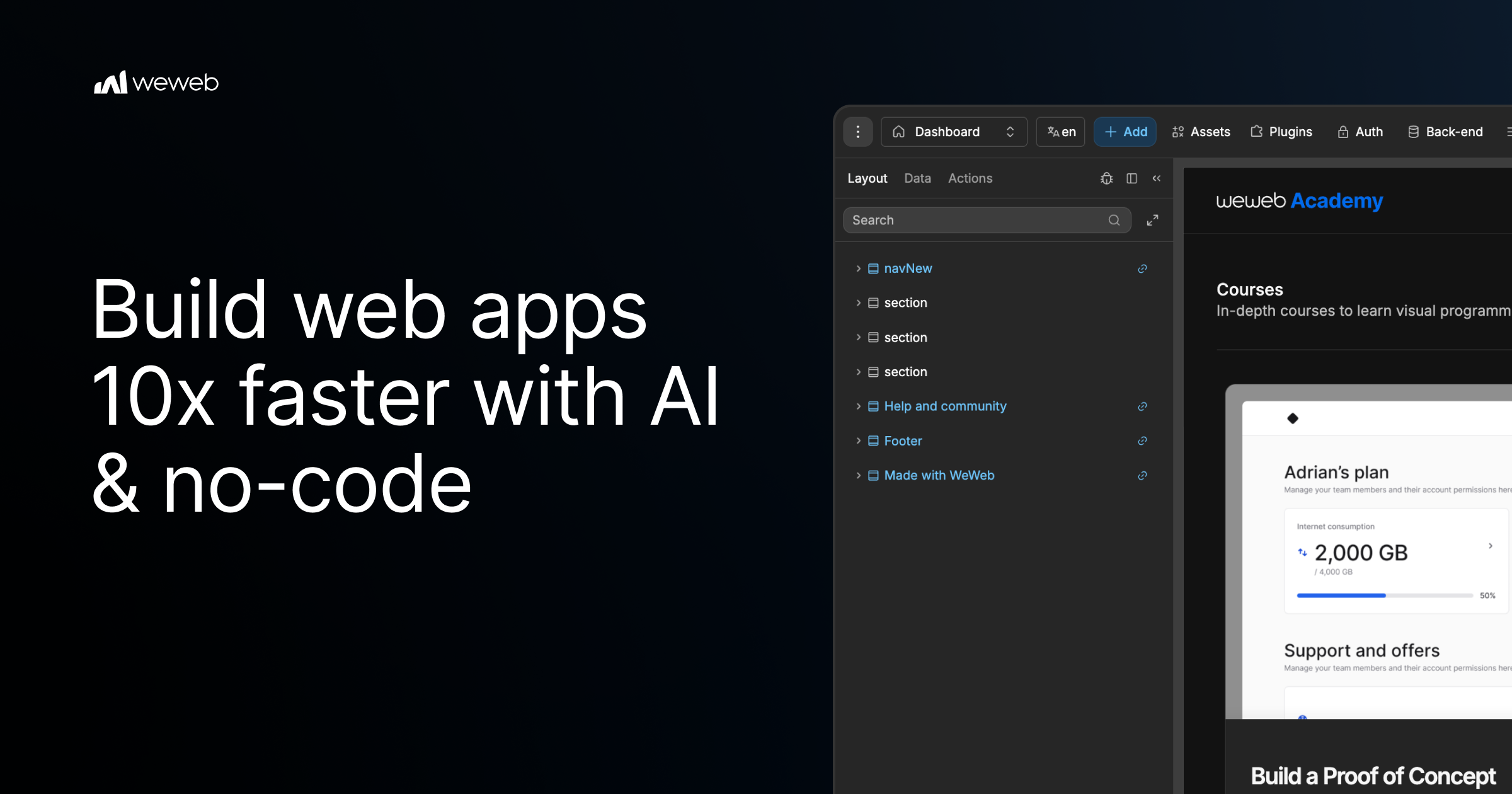
WeWeb MCP is a connection layer that lets you build inside WeWeb with the AI agent you already use. You point Claude Code, Cursor, Codex, Antigravity, ChatGPT, or any MCP-compatible agent at WeWeb, and the agent builds the pages, workflows, data models, tables, authentication, and integrations that make up a real WeWeb project. Instead of producing code you cannot inspect, every change the agent makes lands in the WeWeb visual editor, where you can review it, keep prompting the agent, or edit it yourself. WeWeb MCP is aimed at builders and teams who want the speed of agentic development without giving up visual control over what actually ships. AI-assisted development has made it fast to generate application logic, but the output often arrives as a black box: it is hard to see exactly what changed, why it changed, or how to adjust it without another round of prompting. No-code tools solve the visibility problem, but traditionally require a person to click through every screen, workflow, and data relationship by hand. WeWeb MCP is positioned between those two worlds. It keeps the speed of an agent that can read a brief, plan structure, and wire data together, while keeping the result fully visible and editable in a visual environment. The stated goal is AI speed with visual control, so teams are not forced to choose between moving quickly and knowing what is inside their app. Connecting an agent to WeWeb follows three documented steps. First, you add the server configuration to your MCP client settings, using the WeWeb MCP endpoint through the mcp-remote command. Second, you sign in to WeWeb and authorize access so the agent can call tools on your project. Third, you pick your project and build: you can ask the agent to list your workspaces and projects, switch to the right one, and then describe what you want, for example building a dashboard page. The agent you bring can be Claude Code, which plans and builds in WeWeb using Claude's reasoning; Codex, which turns GPT-powered build plans into WeWeb apps; Antigravity, which builds with Gemini and Google models inside WeWeb; Cursor, which uses Cursor's agent and your model of choice; ChatGPT; or any other MCP-compatible agent. It runs on your account, your model, and your tokens. The product also starts from your brand's design DNA rather than a default AI look. You can import design rules and design context from Figma, Google Stitch, Claude Design, or design.md into WeWeb, so the agent has visual rules before it builds. From there you can create a component system using shadcn, React references, or custom coded components to build reusable blocks with no-code properties. A second major capability is turning PRDs into WeWeb apps. The agent reads a brief and creates the pages, forms, states, and flows users need, moving from user journeys to screens. It also maps data to backend structure, covering the database, fields, relationships, authentication, storage, and backend workflows behind the app. Finally, it turns business rules into integrations: Slack alerts, email triggers, CRM updates, API calls, and approval flows become part of how the app works. Importantly, the first version is not the final word, because everything stays editable after generation. WeWeb MCP is also designed to work across your wider MCP stack. You can pair WeWeb with a backend MCP such as Xano, Supabase, or Airtable MCP, or any APIs, to build the WeWeb frontend in context or bring data into the WeWeb backend. Product context can be turned into screens using docs, transcripts, websites, Figma files, or media assets to create onboarding, dashboards, and forms. A refactoring capability helps you move fast without creating maintenance debt: the agent can find unused variables, outdated workflows, test components, and leftover build artifacts, and it can standardize naming across pages, components, workflows, API requests, tables, and fields. Control features let you decide how much of the app the AI can touch, working across the full app or staying focused on one page, one workflow, or one database, and letting you control what happens next by reviewing output inside WeWeb before continuing. How the product works overall rests on the combination of an agent, a standard protocol, and a visual editor. The agent connects through MCP, the protocol used to give AI clients tool access, and calls tools on your WeWeb project once you authorize access. Because changes are applied to the WeWeb project rather than handed back as opaque text, the visual editor becomes the place where you inspect, adjust, and shape the result. You can scope the agent's access to the exact page, workflow, data, or design-system task you want changed, which keeps AI edits bounded and reviewable. When the app is ready, deployment is also part of the workflow: you can deploy in one click and launch on your custom domain while WeWeb handles hosting and infrastructure, or export code and run it on your own infrastructure when you need full control. The benefits described are speed with control, and ownership of the result. Teams get AI speed without the mystery of what changed in the app, because every change stays visual and reviewable. Because the agent runs on your account, your model, and your tokens, and because WeWeb states that WeWeb MCP does not use WeWeb AI credits, the cost and model choice stay under your control. Users keep the ability to keep prompting the agent or to open the visual editor and edit things themselves, so the app is never locked behind a generation process. Refactoring support helps prevent maintenance debt, and deployment options mean the app can go live on a custom domain or be self-hosted. Together these points support the claim that no-code does not mean low-performance, as expressed by a customer quoted on the site. Concrete scenarios described for WeWeb MCP include turning a PRD or brief into a working app with pages, forms, states, and flows; mapping a described data model into database structure with fields, relationships, auth, storage, and backend workflows; and translating business rules into integrations such as Slack alerts, email triggers, CRM updates, API calls, and approval flows. Another scenario is establishing a design system first, importing brand rules from Figma, Google Stitch, Claude Design, or design.md and building reusable components from shadcn, React references, or custom coded components. Teams also use it alongside backend MCP servers like Xano, Supabase, or Airtable to build the frontend in context. Finally, it can be used before launch to refactor an app by removing unused variables, outdated workflows, test components, and leftover build artifacts, and by standardizing naming across pages, components, workflows, API requests, tables, and fields. WeWeb MCP is for teams and builders who want agentic development with visual control, including those already using Claude Code, Cursor, Codex, Antigravity, or ChatGPT. The site highlights that the platform is trusted by Fortune 500 companies, showing logos for PwC, La Poste, L'Oréal, JLL, Qonto, Decathlon, Carrefour, and Biwaki by BNP Paribas, and it features testimonials from a Digital Project Manager at PwC, the CEO of Shunpo, and the CEO of ALOE Digital Solutions. WeWeb also documents that MCP works with the Cursor agent and your model of choice, with Claude Code, Codex, Antigravity, and ChatGPT, and with other MCP servers such as Xano, Supabase, and Airtable. The site offers the option to start for free and to request a demo, alongside calls to try for free. In summary, WeWeb MCP connects any MCP-compatible AI agent to WeWeb so that briefs, designs, and app logic become a real, structured WeWeb project. It combines agent speed with a visual editor, run on your own tokens and without WeWeb credits, keeps every change reviewable and editable, works alongside your existing MCP stack and backend tools, supports refactoring to avoid maintenance debt, and lets you deploy in one click or export and self-host. The core promise is straightforward: your AI agent builds the app, and you stay in control.
WZRD is an AI-native workspace built for teams and creators who work with documents, slides, forms and sheets. Its purpose is to generate these everyday business artifacts with AI and then turn them into something users can actually engage with rather than simply read. According to the website, WZRD can generate slides, forms, sheets and docs, and its Product Hunt listing describes it as a workspace for "AI-native documents, slides, forms and sheets that talk back." The product positions itself around the idea that the output of a document should stay conversational and responsive, so the slides, sheets, forms and documents you create become interactive experiences that respond to the people using them. Traditional documents, slides, spreadsheets and forms are static. A presentation is presented at an audience, a spreadsheet is read, and a form is filled in silently. WZRD's core premise, expressed in its tagline "Slides that talk back," is that these formats can be given a voice and made conversational. The website invites users to "Give your slides a voice that walks people through the story," and the Product Hunt description says the goal is to "turn it into an AI experience users can engage with." Instead of leaving the audience to interpret the material alone, WZRD aims to make the artifact itself responsive: forms that collect answers by speaking or typing, sheets that explain numbers out loud, and slides that walk people through the story. This addresses the gap between creating content and having that content communicate on its own. On the creation side, WZRD offers an AI presentation generator that produces presentations in minutes. The website lists "Slides — AI presentations in minutes," and the launch messaging focuses heavily on slides that talk back, giving presentations a voice that walks an audience through the story. Alongside slides, WZRD includes Docs, described as "AI-crafted smart documents." These are documents generated or enhanced by AI so that they can engage every user, per the Product Hunt description: "Documents engage every user." The result is a document that is not a fixed block of text but a piece of content designed to be interacted with. Both slides and docs are generated within the same workspace, allowing teams to move between formats without leaving WZRD. WZRD also generates Forms and Sheets. Forms are presented as "smart form flows," and the Product Hunt description notes that forms "collect answers by speaking or typing." That means a respondent is not limited to typing into input boxes; they can speak their answers, and WZRD handles the collection of that information as part of the flow. Sheets are described as "smart sheets with structured generation," and the Product Hunt description says that sheets "explain numbers out loud." This turns a spreadsheet from a grid that must be interpreted into something that can verbally walk a user through the figures. Both formats are generated by AI and are described with the word "smart," indicating that structure and intelligence are added to the output rather than the user building everything manually. A key part of the WZRD workflow is the starting point. The interface asks, "What are we building today?" and offers two paths: drop a file to start, or click to browse documents. Supported file types are listed as XLS, CSV, PPT, PDF and DOCS, so users can bring existing spreadsheets, presentations, PDFs and documents into the workspace. Alternatively, users can "Generate with AI" from a prompt. This dual approach means WZRD can work with material a team already has or create new material from scratch. The website also references a "Tap to talk" interaction, and the site description mentions the ability to "talk to your business with AI voice agents." Together with the conversational output of slides, sheets, forms and docs, this shows that voice and conversation are central to the WZRD experience rather than an add-on. WZRD positions itself as an AI workspace rather than a single-purpose tool. The site describes it as "the AI workspace" that lets you "Generate slides, docs, sheets and forms, and talk to your business with AI voice agents." The overall methodology, based on the content provided, is: start with an existing file or a prompt, let AI generate the artifact, and then deliver it as a conversational, responsive experience. The Product Hunt listing summarizes this as: "Upload existing work or create from a prompt, then turn it into an AI experience users can engage with." The output "stays conversational and responsive," which is the distinguishing characteristic WZRD repeats across its messaging. In practice, this means the generated slides, forms, sheets and documents are not static deliverables—they are meant to be experienced, listened to, or spoken with. The stated benefit is engagement. Where static documents are passively consumed, WZRD's formats "talk back," which the content frames as a way to make users engage with the material. Forms keep respondents involved because they can answer by speaking or typing. Sheets communicate numerical results out loud, reducing the need for readers to decode rows and columns themselves. Slides deliver the narrative in a voice. Documents are designed to "engage every user." For teams and creators, the promise is less time spent building static artifacts from scratch—AI presentations are generated "in minutes"—and a more interactive final product that holds attention and communicates its content directly. The content suggests several concrete scenarios. A team can drop an existing XLS or CSV file into WZRD and get a smart sheet with structured generation that can explain its numbers out loud. A marketer or founder can bring a PPT or PDF and have WZRD turn it into an AI presentation whose slides walk an audience through the story with a voice. Someone needing feedback or data can generate a form whose smart flow collects answers by speaking or typing. Teams working with documents can upload a DOC and have WZRD produce an AI-crafted smart document that engages every user. And because WZRD describes AI voice agents, a business can use voice interaction to talk to its own data and content. All of these start from the same simple entry point: "What are we building today?" WZRD is aimed at "teams and creators working with documents, slides, forms and sheets," according to its Product Hunt description. The website's initial prompt—"What are we building today?"—and the option to drop a file or browse documents suggest a workspace intended for knowledge work and content production. The Product Hunt topics for WZRD are Productivity, No-Code and Design, which align with its positioning as an AI workspace for generating business formats. No specific integrations, pricing tiers, or technology stack are mentioned in the provided content, so those details cannot be confirmed; the described interfaces are the website at wzrd.to and the Product Hunt launch page. WZRD's core value proposition is simple and repeated throughout its messaging: it is the AI workspace that generates slides, docs, sheets and forms—and makes them talk back. Rather than producing static files, WZRD turns them into conversational AI experiences. Teams can start from an existing file or a prompt, generate in minutes, and end up with responsive content that engages the people who use it.
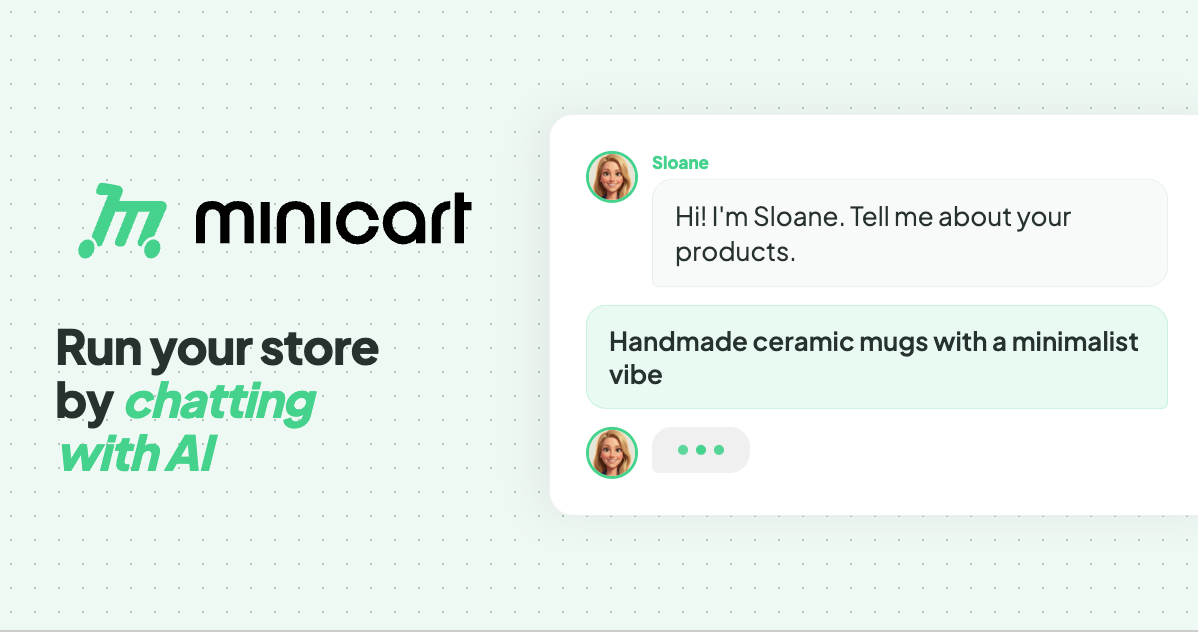
Minicart is a platform for launching and running an online store by chatting with AI. According to the website, you snap a photo of what you make and Minicart builds you a real website that you own, then gives you AI teammates to run it for you. The site positions Minicart for the people who make and sell things — it names makers, creators and resellers — rather than for developers or ecommerce specialists. Its stated purpose is to let someone launch and run a store without learning ecommerce software: no code, no design work, nothing to configure. The promise is deliberately plain: if you can take a photo and send a text, you can run a Minicart store. The site frames Minicart against selling inside someone else's platform. In its own words, a store should not be "a booth in someone else's marketplace." Marketplaces charge listing fees and keep the customer relationship buried in a feed, and building on existing store software can mean monthly fees and a stack of apps. The problem Minicart addresses is twofold. First, getting a real store live is usually slow and technical. Second, once a store is live, the everyday work — listings, marketing, shipping, customer replies, sales tax — turns into a second job. Minicart's answer is to give you a storefront of your own plus AI teammates that handle that busywork around the clock. Getting started is built around photos and imports. Minicart states that a single photo is enough to get started: you take a photo of what you make, answer a few quick questions, and Minicart builds the rest, turning the photo into a polished product listing and a full website automatically. The site advertises going from photo to live store in under ten minutes, with no design work to do. For sellers who are already trading elsewhere, Minicart offers one-click import. You paste your Etsy shop link and Minicart pulls in every listing — titles, prices, photos and variations — then rebuilds them on a site that is yours, while your Etsy shop keeps running. The same one-click approach works for Shopify, bringing products, images and collections across, and for eBay, importing titles, prices, photos and variations onto a site you own. Minicart describes these as read-only connections, so your existing store is never touched or paused. After launch, three named AI teammates take over the daily work. Sloane is the storefront teammate: she builds the site, takes payments, tracks sales and keeps listings current. Milo is the marketing teammate: Milo drafts lifestyle photos, social posts and discount codes that bring people in, and the site shows Milo drafting Instagram posts for new products. Logan is the logistics teammate: Logan ships orders, tracks inventory, handles refunds and drafts customer replies, with the site showing Logan preparing a shipping label and writing a reply to a customer question. The site describes these teammates as working 24/7 — its example timeline runs from turning photos into products in the morning through processing payments and sending a payout in the evening. Everything is driven through chat. The site says that if you can text, you can run a store: you manage inventory, draft social posts and talk to customers through a simple chat interface. Commands are given in plain language, and the site gives the example of creating a 20% summer promo code for all bracelets, which the assistant confirms with the code SUMMER20. The same chat interface powers a bulk editor for updating everything at once. Saying "increase price of all red necklaces by $5" makes the team line up the affected items and show a confirmation list before anything changes. Minicart makes clear that you review the list, uncheck anything you want to skip, and confirm — nothing changes until you say so. The same review-and-confirm pattern applies to inventory updates such as new stock numbers for bracelets and necklaces. The overall method is a three-step loop: snap a photo, let Minicart build your store, then go live and sell. Step one is taking a photo of what you make and answering a few quick questions. Step two is Minicart turning that photo into a polished product listing and a full website automatically. Step three is launching the site, sharing the link anywhere and taking orders in minutes. From there, the teammates keep running the operation under a single stated rule: you are always in control, and nothing goes out without your say-so. The stated outcomes for users are concrete and tied to ownership. You get your own website that lives on your own domain under your brand, rather than inside a marketplace feed, and you can bring your own domain or grab a new one, with your store carrying your name, colors and style from day one. There are no listing fees, so you can list as much as you want, and Minicart says it only charges a small card fee when you actually make a sale. Because the store is yours, you keep your customers: their emails are yours to build repeat business and a brand you can grow for years. The site also highlights speed — launch in minutes rather than weeks, and live in ten minutes — along with dropping monthly fees and the app stack associated with other platforms. The use cases shown on the site are drawn from real stores. Minicart says it helps you sell resin art, and its how-it-works example builds a store from a photo of a candle. It lists storefronts selling trading cards and sports memorabilia, sneakers, boutique gifts, handmade accessories and faith-inspired apparel, plus a diecast model car store. Imports are pitched at sellers who already trade on Etsy, Shopify or eBay and want a store they own while keeping their existing shop open. The bulk editor scenario — repricing a set of red necklaces or adding new butterfly bracelets and ruby necklaces — shows a typical day of small catalog updates handled by chatting. Minicart is aimed at makers, creators and resellers who have no interest in coding, designing or configuring ecommerce software; the FAQ states that if you can take a photo and send a text, you can run a Minicart store. Integrations explicitly mentioned are one-click imports from Etsy, Shopify and eBay, custom domains, and social posting such as Instagram. On pricing, Minicart says there is a generous free plan with no monthly fees to start selling, and that paid plans lower the card rates; no credit card is required to start. Every visitor can connect their own domain and brand, and the FAQ confirms the store runs on a Minicart domain such as yourstore.minicart.com or a custom domain you own, with the customer list yours to keep. In short, Minicart's value proposition is ownership without overhead. It pairs a real store on your own domain and your own customer list with AI teammates who handle listings, marketing, shipping, refunds, customer replies and sales tax through plain conversation — so makers and resellers can launch in minutes, list without listing fees, stay in control of every change, and spend their time making instead of managing store software.
Bolt Forge is a new agent inside Bolt.new, the AI app builder, that runs on open-source AI models only. It launched on September 14, 2026 as a research preview and sits in the agent picker next to the Standard and Max agents that Bolt users already work with. Forge is an agent rather than a single model, so builders can switch into it, build with open models, and switch back to Standard or Max at any time. Its headline promise is scale of usage: every individual Pro plan includes up to 50X more Forge usage at no extra cost through October 14, 2026, with no daily caps. In exchange, builders who opt in share de-identified build sessions that help train new open models, starting with the U.S. open-model lab Arcee AI. Bolt Forge was created because price has decided who gets to build with AI at speed and scale. Builders arrive at Bolt with an idea and the skill to see it through, then ration prompts like fuel: every brainstorm, every rough draft, every dead end burns credits priced for polished work. The drafting phase of building, the part where you need room to wander, is exactly the part usage caps punish. Forge removes that penalty by making the allocation big enough to draft, test, tear down, and rebuild, so builders can test a big idea, play around with new concepts, and experiment as far outside the box as they want, while saving premium credits for the work that needs them. A second motivation is the models themselves: Bolt states that AI inference costs have dropped 280x in 18 months according to the Stanford HAI AI Index 2025, a collapse that makes an allocation this large possible, and open-source models improve when they see how real software gets built, which is the one thing you cannot scrape. Opted-in Forge sessions provide exactly that, with consent. Forge runs a lineup of open models that users can see and select. As of September 2026 that means GLM 5.3 Flash with GLM 5.3 alongside it, plus Kimi K3 and DeepSeek v4 Pro as experimental options. The lineup will evolve, and when a new open model drops, Forge is the first place in Bolt it lands. Two honest notes accompany the lineup: these models are experimental inside Bolt, so builders should duplicate their project before switching a serious build into Forge and keep complex production work in Standard or Max; and they do not all cost the same to run, because Kimi K3 and DeepSeek v4 Pro burn through usage faster than the GLM pair, so starting on the default and reaching for the heavier models when the work calls for it is the recommended approach. Forge also cannot take PDF uploads yet. Capability was tested before shipping: the Forge lineup ran through the Bolt Build Index, Bolt's own benchmark for how well a model completes real Bolt projects, and came out at 92.2 against 101.0 for the top paid model, Claude Opus 5, which is 91% of the top score. The Forge allocation is a headline part of the offer. Every individual Pro plan includes it at no extra cost through October 14, drawn from a single monthly bar that resets on the renewal date, with no daily limits and a hard stop at 100%. Every Pro tier gets the same allowance, and Forge usage is separate from Standard and Max usage. When the bar hits 100%, Bolt switches the builder back to Standard rather than charging an overage, so usage can be read at a glance with no daily math and no surprise pause mid-project. Bolt describes the allocation itself as the payment for the data builders choose to share, and says the amount is big enough to draft, test, tear down, and rebuild. Training in Forge is opt-in. A one-tap consent screen spells out the trade in plain language before a builder begins working in Forge. The shared data includes prompts, code, project files and configuration, the tool calls Bolt makes, and edit histories including the fix traces Bolt creates. Bolt strips and de-identifies secrets and personal information before anything leaves its infrastructure, and validates the pipeline against seeded test data. Switching back to Standard or Max stops Forge from collecting anything new, and builders can email privacy@stackblitz.com to ask Bolt to stop using Forge content it has already collected. Teams and Enterprise workspaces are excluded from Forge and from AI training and dataset licensing, and sessions from the EEA, the UK, and Switzerland are not used for training or datasets either, so builders in those regions get the Forge allocation without the trade. The training side starts with Arcee AI, the U.S. open-model lab behind the Apache 2.0-licensed Trinity model family; Bolt has partnered with Arcee to help train a trillion-parameter-class model, and sessions shared during the preview window from September 14 to October 14, 2026 feed the first training run, which begins in October. A data license agreement governs every transfer, StackBlitz may be paid for the datasets it licenses, and those datasets may go to other AI developers as well as Arcee. Forge works in five steps from start to finish. First, pick Forge in the agent picker, where it appears as a third agent next to Standard and Max on every individual Pro plan. Second, opt in with one tap after a consent screen spells out the trade. Third, build: Forge usage draws from one monthly bar with no daily limits and a hard stop at 100%. Fourth, Bolt de-identifies shared sessions before anything leaves its infrastructure, stripping secrets, sensitive data, and personal information as a rule and validating the pipeline against seeded test data. Fifth, the sessions go into datasets that Bolt licenses to AI developers under a data license agreement, with Arcee AI as the first. Underneath, two pieces of infrastructure make the economics work. Bolt runs Forge on its own reserved hardware instead of paying a provider per request, so a fixed, predictable cost means more of what you pay goes to building instead of markup. And Forge projects run in the browser on WebContainers, the technology StackBlitz built and Bolt runs on, so there is no server rented for every build, builds stay fast, and costs stay low. Benefits of Forge centre on removing the competition between experimentation and production work. Brainstorms, MVPs, and experiments stop competing with production work for premium credits. Users get 91% of the top paid model's Bolt Build Index score included with Pro at no extra cost. Usage is readable at a glance: one monthly bar, no daily limits, and a hard stop instead of an overage bill. And builders get a hand in what comes next, because their sessions teach open models how real software actually gets built. Bolt frames it simply: every Forge build does two jobs, it ships your thing and it teaches open models how real software gets built. Already on Pro, there is nothing to buy and no line to stand in. In practice, Forge is designed for the drafting phase of building. It is the place to test a big idea, play around with new concepts, and experiment far outside the box, with enough room to draft, test, tear down, and rebuild without rationing prompts. Because the allocation is separate from Standard and Max usage and has no daily limits, builders can run brainstorms, MVPs, and experiments in Forge while keeping premium credits for production work. Users who want to try the heavier experimental models such as Kimi K3 and DeepSeek v4 Pro can do so when the work calls for it, while starting on the default GLM pair for everyday building. Duplicating a project before switching a serious build into Forge is the recommended workflow, given that the models are experimental inside Bolt. Forge is aimed at individual Pro plan builders on Bolt.new: people who arrive with an idea and the skill to see it through, and who want room to experiment without burning premium credits. Teams and Enterprise workspaces are excluded from Forge, and from AI training and dataset licensing, and sessions from the EEA, the UK, and Switzerland are not used for training or datasets. Getting started on an individual Pro plan means opening the agent picker, choosing Bolt Forge, and taking the one-tap opt-in; Bolt says you are building on open models in under a minute. Builders who are not on Pro have two doors: join the Bolt Lite waitlist, where codes go out in waves and the first seats open by September 21, 2026, or skip the line with Pro at $25 a month billed yearly, which includes up to 50X Forge usage at no extra cost and no access code required. Bolt Lite is offered at $9 a month, and anyone on Bolt Lite when sign-ups close on October 14, 2026 keeps the plan. Bolt Forge is Bolt.new's experiment in making open-source models the everyday building surface. It trades up to 50X more usage, no daily caps, and a dedicated allocation for opt-in, de-identified build sessions that help train open models with Arcee AI. The trade-off against Bolt's top paid model is nine index points; the payoff is room to draft, test, tear down, and rebuild without rationing prompts, plus a hand in what comes next for open models.
Neopress is an AI website builder that lets you build, publish, and grow a website by chatting with an AI assistant. Instead of assembling pages by hand, you describe what you want in plain language and the assistant helps create pages, organise structured content, and refine the result. It is aimed at people who need a real content workflow behind their site — a built-in CMS, server-rendered SEO, GEO tools, forms, and analytics — rather than a static page that never changes. Neopress describes itself as connecting website creation, structured content publishing, SEO tools, and traffic insights into a single workspace so you can keep improving after launch. The problem Neopress addresses is that a website is not finished when it goes live. As the site explains, a website needs ongoing content updates, search settings, and performance review after launch, and those tasks usually live in separate tools. Neopress was built by a team that has shipped hundreds of content sites, and it is optimised for one thing: websites that get found — clean structure, a real CMS, and SEO that works by default. The product brings content management, search configuration, and analytics into one place, so the post-launch loop of updating, measuring, and improving becomes part of the same workflow as building the site in the first place. Neopress works through agents that operate alongside you. The first is a design agent: describe the page you want in plain language and watch it take shape, then refine layout, copy, and style through conversation. The stated advantage is that there are no templates to wrestle with and no design tools to learn. The second is a CMS agent: work with AI to draft and organise content in CMS collections, review the copy and SEO settings, then publish when you are ready. The Launch plan includes unlimited pages, unlimited CMS collections, and unlimited forms and lead capture, so the content structure of the site is not capped by the plan. Search visibility is handled by built-in SEO and GEO tools. Neopress delivers page content as server-rendered HTML, so search engines and AI crawlers read the structure and text of a page instead of an empty browser-rendered shell. Metadata and Open Graph settings can be reviewed and edited for search results and social previews. Neopress generates a sitemap.xml automatically so search engines can understand and crawl the site structure, and it publishes the emerging llms.txt standard for you — a clean, curated map of your key pages for AI assistants. Structured data (JSON-LD) can be added and reviewed to help search engines understand a page's content, and robots.txt gives control over crawler access so you can block pages you do not want indexed. Beyond the core tags, Neopress adds the plumbing that content sites usually need later: HTTPS with SSL by default, automatic canonical tags to avoid duplicate content, a custom 404 page, 308 redirects from old URLs to new pages when reorganising a site, an automatically generated RSS feed, image alt text for accessibility and image search, and clean, human-readable, keyword-friendly URL slugs. Fonts are self-hosted and preloaded to cut layout shift and speed up first paint, images are optimised for size, format, and delivery, and pages are responsive so you can review how they appear on mobile screens. Neopress states it is built for Core Web Vitals, with server rendering, caching, and a global CDN supporting fast page delivery. Multilingual publishing lets you configure site languages, review translations, and publish language versions with hreflang support. Neopress describes its overall approach as a flywheel with four stages: build, publish, measure, and improve. You build by chatting with AI, publish structured content through the CMS, measure with the analytics dashboard, and improve by asking AI to review site and performance data. One agent focuses on measurement: ask AI about the analytics available for your site, review its explanation and suggested changes, then choose what to improve. Another agent reviews available site and performance data, identifies issues, and suggests changes for you to decide which improvements to apply. The recurring theme is that AI proposes and explains, while you review and decide — publishing and publishing changes always remain your choice. The stated outcome is a website that gets found and keeps improving. Because every page ships as real HTML rendered on the server, crawlers can access content without relying on browser-side rendering. Because the CMS, SEO settings, and analytics sit in the same workspace, there is no gap between writing content and configuring how it is indexed. Analytics covers tracking search queries, checking post indexing status, seeing which LLMs crawl your pages, and tracking paid, campaign, and visitor data, with Google Search Console and Google Analytics integrations available on the Growth plan. On ownership, Neopress states that you retain full ownership of all content, copy, and structural assets generated by the AI — Neopress provides the hosting and the engine. Neopress is used to build and grow content-driven websites. Its template gallery shows the range: Blog & Editorial, Corporate, Documentation, and Landing Page templates, with published examples spanning skincare and dermatology clinics, a non-surgical spine and joint hospital, an oriental medicine clinic, a boutique Pilates studio, an artisan bakery and cafe, a design studio journal, and a bespoke jewellery atelier. For teams with an existing site, Neopress offers website migration — moving your existing pages, content, domain, and redirects over without a rebuild from scratch — and design services for a new page or a fresh look, discussed directly with the Neopress team. Day to day, the workflow is drafting and organising content in CMS collections, publishing pages, then reviewing analytics and applying SEO improvements. Pricing is subscription-based with plan-based AI usage and traffic allowances, and it starts with a 7-day free trial. Launch costs $25 per month per site with 10,000 pageviews per month included and $1 per additional 1,000 pageviews. It includes AI chat creation and editing, unlimited pages, unlimited CMS collections, unlimited forms and lead capture, built-in SEO and AEO optimisation, search-readable pages via SSR, llms.txt, robots.txt and sitemap control, JSON-LD structured data, RSS feed, URL redirect rules, custom domain connection, logo and favicon settings, a social share (OG) image, a custom 404 page, removal of the Made by Neopress badge, a real-time analytics dashboard covering the last three months, one editor seat with unlimited viewers, version history and Rewind restore, and MCP support. Growth costs $99 per month per site with 50,000 pageviews included, about three times the AI usage of Launch, ten editor seats with role-based permissions, real-time collaboration presence, full analytics with paid, campaign and visitor tracking, visibility into which LLMs crawl your pages, search query tracking, post indexing status, Google Search Console and Google Analytics integrations, two years of data history, multi-language support, a multilingual sitemap with hreflang, and priority support. When a trial ends or you stop paying, published content remains available on your Neopress subdomain on the Free plan while custom domains pause. Pageviews count human visits plus crawls made by AI to cite your pages in its answers; search engine indexing and AI training crawlers are not counted. Security and trust features include Supabase infrastructure with authentication-controlled database access, Supabase Auth, Vercel's DDoS protection, Polar as merchant of record for payments, and version history for restoring previous versions of pages and site layout. In short, Neopress positions itself as one AI-powered loop for building and growing a website: you create pages through conversation, publish structured content through a real CMS, ship server-rendered HTML that search engines and AI crawlers can read, and then use analytics plus AI review to decide what to improve next. The core value proposition is a website that gets found and keeps getting better, managed end to end in a single workspace rather than scattered across separate building, CMS, SEO, and analytics tools.
Viso Now is a self-building AI vision platform that turns images, video, and camera feeds into working computer vision applications. Instead of training models, annotating data, or writing code, users describe in plain language what they want to understand, and Viso Now builds the agentic vision logic and custom live dashboards for them. The platform is aimed at teams and individuals who need to solve real-world visual problems across industries such as construction, manufacturing, logistics, healthcare, food and beverage, oil and gas, hospitality, and transport, and who want to create, run, and manage entire computer vision products and systems from scratch on one platform. Traditional computer vision projects depend on model training, data annotation, and custom software engineering. That work is slow, expensive, and hard to maintain, and it often results in isolated, single-purpose solutions that address one use case at a time. The website states this directly: not all computer vision is equal, and isolated solutions are no longer enough. Viso's stated answer is a platform that drives business capabilities rather than leasing a single outcome that solves a single use case, offering flexibility, extensibility, and complete control of data across multiple locations. Because prompt-driven building removes labeling and model maintenance, the platform reports 90% less ML engineering effort compared with conventional approaches, along with an 85% reduction in the time-to-value of computer vision applications. At the center of Viso Now is prompt-based application building. A user describes the real-world situation they want AI to solve in plain language, and watches as Viso builds the application with them in real time. No model training and no annotation are needed. Each build produces agentic vision logic together with a custom live dashboard, so the result is not simply a detection model but an application that can be monitored and operated. The product page describes prompt-to-live-vision-agent in minutes and Visual General Intelligence for any use case, meaning the same engine is applied regardless of the industry or the problem being addressed, and applications connect seamlessly to other systems. Viso Now accepts multiple kinds of visual input. Users can click to upload or drag video files in MP4, MOV, or MKV, and images in PNG or JPG, or they can capture media directly using a device camera by taking a photo or recording video. When building, users choose how much effort the system applies by selecting between Fast, Balanced, and In-Depth modes. They can also start from a template or an example instead of a blank prompt. Once a draft application exists, users iterate on it until they are happy with the finished solution, and then go live by connecting cameras or uploading connectors so the application can be used immediately. The platform provides a template gallery of ready-made vision applications that illustrate what can be built. Templates include Task-Aware PPE Check, Excavator Near-Miss Monitor, Hot Work Safety Check, Work-at-Height Safety Check, MEWP Fall Protection Check, Clinical PPE Protocol Check, GMP Hygiene Check, Loading Dock Exclusion Zone, Dock Turnaround Intelligence, Front Desk Wait Tracking, Check-in Queue Orchestrator, Restricted Site Vehicle Alert, Hazardous Area PPE Check, Pipeline Integrity Scout, Visible Release Detection, Robot Cell Intrusion Detection, Production Area Access Check, 5S Shop Floor Audit, Emergency Exit Clearance, Reversing Vehicle Danger Zone, HSE Workplace Audit, Commercial Vehicle Safety Screening, Dump Zone Safety Inspector, Abandoned Luggage Response, Handling Risk Assessment, and Service Queue Pressure Analysis. Each template describes the assessment it performs — for example assessing truck handling performance at loading bays, or tracking whether a warehouse is safe, clear, and compliant for operation. Viso handles the end-to-end infrastructure behind these applications, from compute and visual analysis to governance, authentication, and integrations, so teams do not have to assemble and maintain that stack themselves. The offering is organized as two products on one platform. Viso Now is the free entry point with no credit card required; it is free forever, users can invite their team, and sign-up works with Google, Microsoft, or an email address. Viso Suite is the enterprise product for running vision intelligence at the scale of an operation: 10,000+ cameras across hundreds of sites, a full lifecycle of build, deploy, govern, and scale, edge AI with on-premises or cloud support, and compliance with SOC 2, ISO 27001, GDPR, and CCPA. Overall, Viso Now follows a describe, build, refine, and operate workflow. A user uploads or captures media and describes the situation they want the AI to solve. The system then generates agentic vision logic and a live dashboard in real time, so the application is visible and testable while it is being created. The user iterates until the solution matches the requirement. Going live is a matter of connecting cameras or uploading connectors, at which point the application runs continuously. Because Viso manages compute, visual analysis, governance, authentication, and integrations, the same platform supports building, running, and managing complete computer vision systems, and the enterprise tier extends that approach to governed applications and agentic workflows across many sites. Viso states a number of outcomes for users. Visual data can be understood ten times faster, to drive efficiency, automation, and innovation. The company reports an 85% reduction in time-to-value of computer vision applications and a 90% reduction in ML engineering effort, since there is no labeling and no model maintenance. A customer story describes a global manufacturer that replaced four point solutions with one Viso deployment and saw near-miss incidents fall 54% within 90 days, with the safety team spending zero hours rebuilding models. The platform is described as giving 24/7 eyes on every camera that never blink and never tire, and as running AI vision ten times faster than other methods. PwC is quoted saying that building computer vision applications with Viso Suite allows them to deliver business value faster and easier, while Stadt Schaffhausen notes that Viso Suite let them integrate existing camera and software systems across platforms while meeting strict privacy requirements. The applications listed on the site show the practical range of use cases. In construction, templates cover PPE compliance, near-miss monitoring around excavators and plant, hot work safety, work-at-height checks, and MEWP fall protection. In manufacturing, they cover robot cell intrusion detection, production area access checks, 5S shop floor audits, emergency exit clearance, and handling risk assessment for lifting tasks. In logistics and warehousing, they cover loading dock exclusion zones, dock turnaround intelligence, and warehouse HSE audits. In healthcare, they cover clinical PPE protocol checks and service queue pressure analysis; in food and beverage, GMP hygiene checks and foreign object detection; in oil and gas, hazardous area PPE checks, restricted site vehicle alerts, pipeline integrity scouting, and visible release detection; and in hospitality and transport, front desk wait tracking, check-in queue orchestration, airport baggage detection, and abandoned luggage response. Customer stories reference worksite safety for a rail group, safety and compliance oversight for a global food retailer, PPE detection for a leading oil company, and crowd safety at a major annual event. Viso Now is designed for people who need vision AI but do not want to run a machine learning program — operators, safety and compliance teams, and builders who want to turn an idea into a working vision agent quickly. The free tier requires no credit card and allows inviting a team. Enterprise customers move to Viso Suite for camera fleets at scale, governed applications, edge, on-premises or cloud deployment, and formal compliance certifications. Access is through the web, with sign-in via Google, Microsoft, or email. The company reports that its platform covers 136+ applications tuned for every industry, all running on the same Visual General Intelligence engine, and states that it is trusted by Fortune 500 organizations, with customer logos including Enpro, Vinci, CPI, Intel, Rhomberg, and Datwyler. Viso Now's core promise is that if you can describe it, you can build it. By removing model training, annotation, and coding from the computer vision workflow, and by generating agentic vision logic and live dashboards from a plain-language prompt, the platform lets teams go from an idea to a running vision agent in minutes and then scale the same approach across many cameras and sites with Viso Suite. The result is faster time-to-value, far less ML engineering effort, and continuous, tireless monitoring of the physical world — detecting, inspecting, alerting, and understanding — without assembling a large specialist team.
Type is a shared workspace where your entire team can collaborate with Claude and Codex using the subscriptions you already pay for. Its own description frames it as a place where your team's best AI work compounds: it puts skills, files, and threads in one place your whole team can see, so AI output is no longer trapped inside a single person's chat window. Type is designed for the entire team, and the company says it is built to help operations and go-to-market teams get the most out of AI. Users can connect their tools once, then use any model, and build custom apps and automations on top of a company brain that gets smarter as they work. Most day-to-day AI work starts and ends inside a single person's conversation with a single model. Type describes its purpose as sharing work from individual Claude or ChatGPT conversations into a central, collaborative space. That matters because the best prompts, files, skills and context a team discovers are usually invisible to everyone else, and every new teammate has to start from scratch. Type also addresses the risk of being locked into one model provider: it says you should own your data and rent the best intelligence, letting teams connect their Claude or connect their Codex and switch between models as needed. A third stated goal is simply helping an entire team get great at using AI. Type labels its core capability multiplayer AI. Team members can share work from individual Claude or ChatGPT conversations into a central, collaborative space, and then collaborate together on chats, docs, and apps. The workspace also provides secure sharing of access to integrations, so the tools a team relies on can be used by others without exposing credentials publicly. On top of that, teams build what Type calls a shared company brain: context, memory, and skills that constantly self-improve. Every thread, file, and skill becomes part of a common resource that the whole team draws on, and the workspace includes thread actions such as sharing a thread, replying to a thread, and creating in a companion workspace. Type emphasizes that it works where you already work. Teams can use Type from Slack, email, or wherever their team already communicates. You can tag Type in any channel, email, or meeting, so asking the workspace for something does not require opening a separate tool. Everything then syncs to Type's dedicated desktop and mobile apps, keeping the same workspace and threads available across devices. Type also works 24/7 in shared cloud computers, which means agents can keep running even when individual team members are offline. The website illustrates this with a Slack thread in the #brand-creative channel where a team member tags a Creative agent to respond to a request for brand assets. Under the heading "Easy to use, powerful underneath," Type describes three behaviors. First, Type proactively finds, suggests, and does work rather than waiting for a precise prompt. Second, it is not just chat: teams can build custom dashboards, apps, and automations that are tailored to their own business. Third, every answer is grounded in the company's context, so ads, images, landing pages and analytics questions reflect what the business actually knows. A demo shows this in action: a user asks Type to combine the last 30 days of customer feedback from Zendesk, Slack, and Intercom into one dashboard, and Type connects all three sources, deduplicates repeated conversations, groups 1,284 feedback items by theme and sentiment, then builds a focused app with a daily refresh and ranked emerging themes. Type makes it easy to switch between models so teams do not get locked into one model provider: the site states that you own your data and rent the best intelligence, and offers connect-your-Claude and connect-your-Codex actions. Behind the scenes, Type is described as one integration gateway with enterprise-grade security. Integrations can be connected via OAuth, MCP, or API, and administrators can define granular permissions by user, space, and role. The permission model is visible in questions such as who can use a Creative Space, whether it is specific people or all of a company, and whether an API connection is private to one person or usable by everyone in the organization. Type points users to a catalog of 900+ integrations to explore. The stated outcome of using Type is that a team's best AI work compounds instead of disappearing. Because context, memory, and skills live in one shared place and constantly self-improve, the workspace gets smarter as the team works. Best practices are built in, which the company frames as a way to help the entire team get great at using AI rather than leaving individuals to figure it out alone. Security is handled at the gateway level with granular permissions, and Type notes that it is trusted by teams at companies including True Classic, Raycon, Intelligems, BoostCous, Moovs, Agree.com, Vitaly Design, Cloud Campaign, Thigh Society, and InBuild. Type's own demos show concrete workflows. In one, a marketing team member asks Type to start a new product announcement email in Customer.io by duplicating the August email and updating the content based on the latest releases to Shopify. In another, a colleague in Slack's #brand-creative channel asks whether creative assets exist for an upcoming photoshoot with a brand agency; when the answer is no, the Creative agent produces four brand-image examples based on recent creative and brand guidelines. A support example combines Zendesk, Slack, and Intercom feedback into a feedback pulse dashboard with sentiment, emerging themes and daily refresh. Other activities listed on the site include competitor research, generating ad creative for October's campaigns, brand voice content review, campaign artwork, social media campaign strategy, and launch video work, using integrations such as Firecrawl, Higgsfield, Remotion, Imagen 2, Microsoft PowerPoint, Word and Excel, and LinkedIn, TikTok and Instagram. Type is designed for the entire team, with a particular emphasis on operations and go-to-market teams such as marketing and support. It is used from Slack, email, and meetings, and it syncs to dedicated desktop and mobile apps, so it fits teams that already communicate in those channels and want an agent in the room. Integration coverage is broad: Type advertises 900+ integrations and connection via OAuth, MCP, or API, with permissions scoped by user, space, and role. People can start by getting started for free from the website, and demo walkthroughs are available for those who want to see the workspace in action. Type's core promise is straightforward: instead of isolated AI conversations scattered across individuals, tools and models, Type gives a team one shared workspace for Claude, Codex and each other. Skills, files, threads, integrations and a self-improving company brain live in one place, reachable from Slack, email, meetings and dedicated apps. That is what makes the best AI work compound across a company.
Diiverge is a web platform that turns a single picture into a playable, point-and-click adventure. It presents itself as a series of explorable worlds, where each volume is grown from one seeded image and becomes a persistent adventure that visitors can walk through. A player clicks something in the frame, chooses what happens to it, and the system generates the next scene together with a short film of the moment in between. The public worlds are free to play, and the tagline sums up the promise: start with a picture and see where it goes. Diiverge is built for people who want to explore AI-generated stories rather than simply read them, and for creators who want to turn a photo, painting or screenshot into a world of their own. Conventional point-and-click adventures are authored in advance: artists paint the scenes, writers script the branches, and developers wire the choices together before anyone plays. The result is fixed, and every player walks the same limited set of paths. Diiverge takes a different starting point by treating a single image as the seed for an entire world. Instead of shipping a finished story, it grows one scene at a time as visitors interact with the picture in front of them. That approach also addresses a familiar limitation of AI-generated content, where images and clips tend to disappear the moment they are produced. On Diiverge, the scenes people carve out stay part of the volume, so the world accumulates structure and history rather than resetting to a blank slate. Playing a volume is deliberately simple. A volume begins as one seeded image, and glowing dots mark the things inside the frame that can be interacted with. You click one of those elements, choose what happens to it, and the platform responds by generating a new scene while the moment in between plays as a short film. From there you can keep going deeper into the world or go back and take a different route. Nothing about the interaction requires technical skill: the choices are offered on top of the picture, and the AI handles the artwork, the transition and the continuity. The set of available interactions is derived from the image itself, which is why any picture can serve as a starting point, whether it is a photograph, a painting or a screenshot. Persistence is the structural idea behind the whole series. Every path anyone takes is saved, so a scene that one visitor carves becomes part of the volume for good. A later visitor can walk the same path, and the volume's map shows every branch that has been taken so far. Shared links land on the exact scene they point to, which makes it possible to send someone directly to a moment inside a world rather than to its front door. Because each world grows as people explore it, the numbers attached to a volume are a record of that collective activity: The Crystal Pass is listed as Volume II with 2,831 scenes so far, while Volume I, The Lantern Cove, is listed with 3,033 scenes. The series is described as persistent point-and-click adventures, and that persistence is what separates them from one-off AI image or video generations. The studio is where people make their own worlds. You upload a picture, sign in with your email, and the studio turns that photo, painting or screenshot into an explorable adventure. You buy scenes in packs, and the adventure stays private until you choose to share it. Sharing produces a link that others can follow, and the paths they take are saved just like the paths in the public volumes. The economics are connected to the cost of generation: playing is free, and replaying scenes that others have already carved costs nothing at all, but generating a new scene costs real money. Because of that, each volume in the series comes with a fixed number of free scenes and stops growing once they are used up. Sponsors add more scenes, and those additions are for everyone. A sponsorship is bought as a tier starting from $25 and adds roughly two scenes per dollar to the volume chosen; the scenes never expire, and the sponsor's name goes on the volume's frames. Underneath the experience is a chain of specialised models, and Diiverge describes each step explicitly. A segmentation model cuts the things in the frame out and makes them clickable, which is what produces the glowing dots that mark interactive elements. A vision model decides what each of those things is and what it might do, translating the contents of the picture into plausible choices. When a player picks a choice, an image model paints the aftermath of that chosen event as the next frame, and a video model renders the moment between the two frames as film. Overseeing the sequence is a judge model that reads the story so far and cuts any choice that breaks its continuity. Together these steps mean a single still image can become a branching, narrated world with motion and a sense of consequence, without anyone hand-authoring the scenes. For players, the direct benefit is that the whole experience is free to enjoy and free to revisit. Replaying scenes that others have already carved needs nothing at all, so there is no cost to exploring a volume that has already grown. Every path is saved, which means the effort of exploration produces something permanent rather than a disposable result: the world you walked through is still there for the next visitor, and the branches you opened become part of the map. For creators, the studio provides a way to turn an ordinary picture into a shareable adventure without any art or engineering work, and the privacy default means a world can be built and reviewed before it is shown to anyone. Sponsors get their name placed on the frames of a volume and the knowledge that the scenes they fund are added for everyone and never expire. Concrete scenarios follow from those mechanics. A player can open The Crystal Pass, the latest volume, step in, and start clicking through its scenes, using the map to see which branches other visitors have already taken. Someone who wants to follow in another person's footsteps can open a shared link and land on the exact scene it points to, then continue from there. A creator who has a photograph, a painting or a screenshot they like can bring it into the studio, buy a pack of scenes, and shape it into a private adventure before sharing the link with friends or an audience. A sponsor can pick a volume and a tier, from $25, and add roughly two scenes per dollar so that every future visitor to that world has more to explore. Anyone who simply wants to look around can replay scenes that have already been generated at no cost. Diiverge runs on the web at diiverge.co and is presented as a game and world-building experience rather than a developer tool. The audience implied by its features spans casual players who want a free, interactive AI story, people who enjoy branching adventures and want to see where a choice leads, and creators who want to turn an image into an explorable world and share it by link. The pricing model is mixed: playing the public volumes and replaying existing scenes is free, while generating new scenes requires buying scene packs in the studio, and sponsorships that add scenes for everyone start at $25 per tier with roughly two scenes added per dollar. Worlds created in the studio remain private until their creator chooses to share them. The takeaway is that Diiverge treats a single picture as the starting point for something durable. Click something in the frame, choose what happens, watch the moment play as film, and leave behind a path that the next visitor can follow. Free to play, persistent by design, and open to anyone with an image to upload, it turns passive pictures into worlds that grow with every person who explores them.