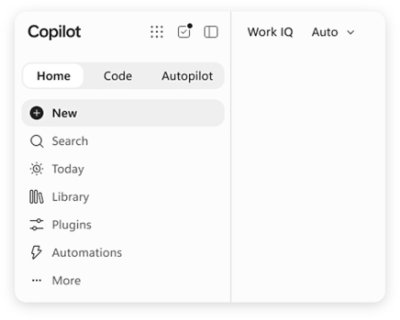
Microsoft Copilot is AI built for work. According to Microsoft, Copilot connects with your work content and the apps you already use, bringing together the latest AI models to help you create finished work, not just answers. It is designed for people who work inside Microsoft's productivity ecosystem: individuals who want to simplify everyday work, businesses that want their teams to move from ideas to impact, and enterprises that need secure AI grounded in their own organization. Copilot is available across desktop, mobile, and web, and it can be used with voice, keyboard, or pen, so the same assistant follows the user from one device to the next.
The starting point for Copilot is a simple observation about how knowledge work actually happens. Most AI tools respond with an answer and stop there, while real work continues across documents, spreadsheets, presentations, email, meetings, and chat. Microsoft positions Copilot as a response to that gap: instead of an isolated chatbot, Copilot lives in the apps where work already happens — Word, Excel, PowerPoint, Outlook, and Teams — and it is grounded in work content rather than in generic information. That grounding is delivered through Work IQ, which ties Copilot to your company, your team's roles, and the context behind your projects. The stated goal is finished work, not just answers, which is why the product is framed as AI built for work rather than a general-purpose assistant.
Feature group one is AI integrated into the apps you already use and grounded in your work. Copilot is integrated into Word, Excel, PowerPoint, Outlook, and Teams, where your work already happens, so users do not have to leave the tools they rely on to get help. Work IQ grounds Copilot in your company, your team's roles, and the context behind your projects, which means responses can reflect the reality of a specific organization rather than a generic model's best guess. Microsoft describes this as "AI that knows your work." Because the assistant already sits inside the productivity apps, the distance between asking for something and applying it to a real document, message, or meeting is much shorter.
Feature group two is leading AI models brought together in one place, with automatic model selection. Copilot brings together leading AI models with Work IQ so users can benefit from the distinct strengths of each in a single experience — there is no need to switch between separate tools to reach a different model. A capability Microsoft calls "Auto advantage" handles the choice for you: Auto weighs accuracy, speed, and cost for each request, helping determine the right model and effort for the task at hand. The stated intent is to let people focus on the work, not the model. Microsoft also says that, looking ahead, Copilot will help orchestrate work across Chat, Cowork, and Code.
Feature group three covers the surfaces where Copilot does the work. Home is the starting point in Copilot, bringing Chat and Cowork together in one place so users can review recent activity, discover suggested actions, pick up where they left off, or start something new. Chat is used for answers grounded in your work, while Cowork is designed for complex, multi-step work handed off across your apps, data, and workflows. Copilot Code requires no coding experience: you describe the dashboard, tracker, or app you want and Copilot builds it with the power of code. Copilot Autopilot is described as an always-on personal agent with its own identity, memory, and access to tools; it is cloud-hosted and keeps work moving in the background, using Microsoft 365 and Work IQ to take action within the guardrails you and your organization set. Home view and Copilot Code are noted as available in Microsoft Frontier, while Autopilot is described as available in Private Preview.
Feature group four is building your own agents and working across devices. With Agent Builder in Copilot, users can turn their expertise into personalized, work-grounded agents in minutes using natural language; when they are ready to scale, those agents can be extended and managed with Copilot Studio. This is presented as "Build your agents. Work your way." In parallel, Microsoft emphasizes one Copilot across your devices: the same assistant is available on desktop, mobile, and web, and it can be driven with voice, keyboard, or pen. Together these capabilities are presented as a way to customize AI to specific work rather than accept a one-size-fits-all assistant.
How the whole system fits together is described through grounding and orchestration. Work IQ supplies the context — company, team roles, and project background — and the leading AI models supply the reasoning. Auto sits between the request and the model, weighing accuracy, speed, and cost to determine the right model and effort for the task at hand. Autopilot adds an always-on layer with its own identity, memory, and access to tools, operating in the background within organizational guardrails. Microsoft states that Copilot will also help orchestrate work across Chat, Cowork, and Code, tying the conversational, multi-step, and code-building modes into one flow rather than three separate tools.
The benefits Microsoft highlights are practical. Because Copilot is grounded in your work and lives in the apps you already use, users can move from ideas to impact inside the tools where they already operate. Chat returns answers grounded in work rather than generic responses, and Cowork takes on multi-step tasks across apps, data, and workflows so those tasks do not have to be assembled by hand. Copilot Code lets people without coding experience produce dashboards, trackers, and apps, which turns an idea into a working artifact. Autopilot keeps work moving even when a person is not actively asking, and the shared experience across desktop, mobile, and web means work can continue wherever the user happens to be.
Security and privacy are presented as foundational rather than optional. Copilot is designed to be secure and private and is built on the trusted Microsoft 365 foundation that organizations already use. Enterprise-grade controls protect data, people, and business, and the design keeps work and personal accounts separate — a detail that matters for people who use the same devices and accounts for both. For enterprises and businesses, this means Copilot can be grounded in internal content and context while still operating inside existing security and compliance expectations.
Concrete use cases named in the material include catching up on email and calendar work in Outlook, reviewing meeting notes and suggested actions in the Copilot app, and starting something new or picking up where you left off from a single starting point. Cowork is aimed at handling complex, multi-step work across apps, data, and workflows, while Copilot Code is aimed at building a dashboard, a tracker, or an app from a plain-language description. Agent Builder supports creating work-grounded agents from individual expertise, and Copilot Studio is used to extend and manage those agents when they need to scale across an organization.
Copilot offers solutions for three audiences. Copilot for Individuals is positioned to simplify everyday work in the apps you use, from creating to managing email and calendar. Copilot for Business is positioned to help a business work smarter with AI built into the apps the team uses every day, so everyone can move from ideas to impact. Copilot for Enterprise is positioned to empower an organization with secure AI grounded in the business and built into the apps teams use daily. Pricing shown on the site starts at $9.99 per month for individuals; $23.50 per user per month, paid yearly, for business; and $30.00 per user per month, paid yearly, for enterprise. The business tier includes Copilot with Work IQ, productivity apps, identity management, security, and cloud storage; the enterprise tier adds Copilot Studio and enterprise-grade security.
Taken together, Microsoft Copilot is positioned as an AI assistant for work rather than a general-purpose chatbot: it is integrated into Word, Excel, PowerPoint, Outlook, and Teams, grounded in organizational context through Work IQ, able to draw on leading AI models with automatic selection, and extended by agents, Autopilot, and Copilot Code. The consistent promise across the material is that Copilot helps you create finished work, not just answers.
Publisher
A
admin
Launch Date2026-09-29
Platformweb
Pricingpaid
Traffic Insights
Month2026-09
Estimated Visits1.1B
MoM Visits GrowthN/A
Avg Time on Site-
MoM Time GrowthN/A
Global Rank#39
Bounce Rate-
Updated 2026-09-29