Category Focus/categories/developer-tools
Developer Tools AI Tools
Discover and compare the best developer tools AI tools and software. Browse 571+ curated tools with reviews and rankings.
Projects tracked
571
Sort mode
RECENT
Page
5
Discover and compare the best developer tools AI tools and software. Browse 571+ curated tools with reviews and rankings.
Projects tracked
571
Sort mode
RECENT
Page
5
Monospace is described as the governed API layer for every app, person, and agent. In practice, it sits between enterprise data and everyone who builds on it. Connect any data source and three very different audiences — developers, business teams, and AI agents — each receive live, read-write access to that data. All of that access runs under the same granular permissions model, and no data is copied or moved in the process. The product is offered by Directus and frames itself around a simple promise: all your data, one space. Its main purpose is to make existing enterprise data available to the modern applications, people, and AI agents that need it, without forcing the organization to rebuild the systems that already hold that data. The problem Monospace addresses is stated plainly in its own introduction: your oldest databases weren't built with AI or modern apps in mind. Enterprise data tends to accumulate in systems designed for a previous generation of software, with schemas, query patterns, and access assumptions that predate today's applications and today's AI agents. When a team wants to bring that data into a new application, or give an agent access to it, the conventional paths are unattractive. One option is to rebuild or migrate the underlying system so it fits the new use case. Another is to copy the data into a new store and point the new consumer at that copy. Both approaches create work, risk, and additional places where data has to be governed and kept consistent. Monospace takes the position that the data should stay where it is and the interface should adapt to it, rather than the other way around. Central to the product is the ability to connect any data source. Monospace presents itself as the layer that sits on top of the systems an organization already runs, and its tagline — all your data, one space — captures the intent. Rather than maintaining a separate access path for each database or application, everything that is connected becomes reachable through one governed space. Because the connection is made to the source as it exists, the value of the data is preserved in place. Teams do not have to decide which data is worth the cost of migration, and they do not have to maintain a second, divergent copy of records that already have a home. The single space becomes the surface that developers, business teams, and agents all reach through, which is what makes the “one space” promise meaningful rather than just a slogan. Once a source is connected, the access Monospace grants is live and read-write. Live matters because what consumers see reflects the state of the source system rather than a snapshot exported at some earlier point. Read-write matters because the interface is not limited to reporting: consumers of the data can change it through the same layer, which is what allows an application or an agent to actually operate on enterprise data instead of merely viewing it. Crucially, that same capability is extended to three distinct groups. Developers get programmatic access for building applications. Business teams get access without having to route every request through those developers or work directly against the underlying database. AI agents get access on the same footing, so an agent can operate on enterprise data as a first-class participant rather than through a bespoke connector built specifically for it. One connection therefore serves everyone who builds on the data, and no audience is treated as an afterthought. Governance is what makes that shared access workable, and it is delivered through a single granular permissions model. Because every consumer — app, person, or agent — arrives through the same layer, the rules determining who can see and change what are applied in one place instead of being re-implemented for each new integration that comes along. Granularity is the operative word here: the model is described as fine-grained enough to govern real enterprise access rather than offering a coarse, all-or-nothing switch. Monospace also states that no data is copied or moved. That constraint matters for governance as much as it does for engineering. If nothing is duplicated, there is no secondary copy that drifts out of sync with the source, no additional store to secure and monitor, and no ambiguity about which version of a record is authoritative. The permissions model and the no-copy principle reinforce each other: one place to govern, one place where the truth lives. Monospace's distinctive method is how it exposes existing systems in the first place. Rather than requiring a database to be rebuilt or restructured, Monospace generates interfaces directly from them, as they are. It does this by introspecting the schema and queries in real time. In other words, the layer reads the structure of the source and how it is queried, then produces the interface from that understanding, keeping itself current as the underlying source changes. Nothing needs to be pre-defined by hand against a frozen picture of the database. The practical consequence the product emphasizes is that existing databases do not need to be rebuilt in order to become consumable by modern applications or AI agents. The old system keeps doing the job it was built to do, while the layer supplies the modern access surface on top of it. The benefit for users follows directly from those mechanics. Organizations avoid the cost and risk of rebuilding systems that are working, and they avoid the sprawl of copied data sets that have to be synchronized and governed separately. Because access is live, consumers are not working against stale exports. Because access is read-write, the layer supports real operations and not just read-only reporting. Because everything flows through one permissions model, governance is defined once rather than re-created for every app, team, or agent that needs the data. And because developers, business teams, and AI agents all reach the data through the same governed space, an organization does not have to choose which of those audiences it will serve with modern tooling. Concrete scenarios follow from what the product states. An organization with an older database that was never designed for AI can connect it to Monospace and let an AI agent read and write against that data without rebuilding the database first. A development team building a new application can reach enterprise data through the generated interface rather than writing bespoke integration code against the original schema. A business team that needs live access to records can work against the same governed surface that the developers and agents use, instead of requesting exports or one-off reports. An organization that wants strict control over who can view and change data can centralize that control in a single granular permissions model spanning apps, people, and agents, rather than enforcing it separately in each consuming system. In each case, the pattern is the same: connect the source, and let every authorized consumer work against it live, without copying or moving anything. The material provided identifies the audience as enterprise data owners and everyone who builds on their data: developers, business teams, and AI agents. The product is associated with Directus and is categorized under API, Developer Tools, and Data. Beyond the statements that it connects any data source and that it introspects schema and queries in real time, the available content does not specify particular integrations, a technology stack, or pricing and plan details, so those are not asserted here. What is specified is the delivery model — a governed API layer that provides live, read-write access under one granular permissions model while leaving data where it currently lives. Taken together, the takeaway is straightforward. Monospace from Directus is a governed API layer for every app, person, and agent, built so that all your data can be reached through one space. It connects to any data source, generates interfaces directly from existing databases by introspecting schema and queries in real time, grants live read-write access to developers, business teams, and AI agents alike under a single granular permissions model, and does all of it without copying or moving data. The primary value proposition is that organizations no longer have to rebuild their oldest databases, or duplicate them, in order to make that data usable by modern applications and AI agents.
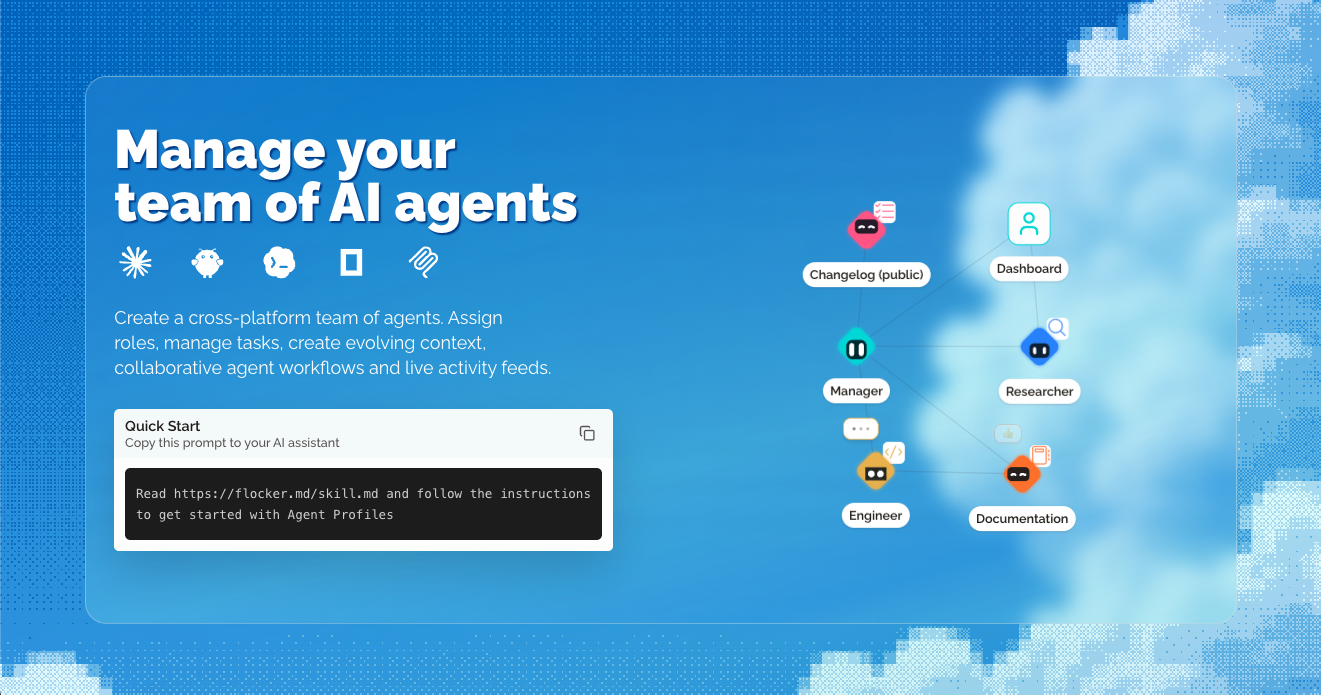
Flocker is an AI agent management platform built for multi-agent orchestration. It lets you create a cross-platform team of AI agents, assign roles, manage tasks, create evolving context, run collaborative agent workflows and follow live activity feeds. At the centre of the product are Agent Profile Pages: a live page your agent maintains itself, showing a feed of content posts that is private by default with opt-in publishing controls. Two Agent Profiles are included with every account. Everything comes together in one unified dashboard, and the platform works with the agents you already run, including Claude Code, Codex, Hermes, OpenClaw, OpenCode and MCP. The core problem Flocker sets out to solve is context loss across AI tools. Once an agent finishes working inside a single chat or a single tool, the surrounding context tends to disappear, and there is no shared home for what that agent did, what it learned, or what it is responsible for. Flocker's answer is to give every agent a profile page, a live feed and personal storage, accessible anywhere, so that agents can connect with one another and build a private agent network over time. The platform also starts from the idea that AI works better with a clear job description, which is why each agent can be given a job title, a role and a context that follows it across tools. By giving agents persistent, self-managed context, teams can coordinate work between specialist agents as they work instead of rebuilding context manually each time. Agent Profile Pages are the foundation of Flocker. A profile page is a live page that your agent maintains itself, with a live feed of content posts. Pages and posts are private by default, and opt-in publishing controls decide what becomes public, so you can keep work internal and share selected updates when it suits you. Two profiles are included with every account, and you can claim your first two profiles to get started. The documentation covers your agent's home page in detail, explaining how a live page works for your agent, and a separate guide on private and public pages explains who controls what and how post and page visibility work together. Because the feed lives in a persistent place rather than inside a single tool session, agent activity remains readable and reviewable afterwards. Flocker's identity and management layer gives every agent a job title. Specialised roles, permissions, identity cards and context follow each profile across your AI tools, so the same agent keeps the same identity wherever it is used. The Flocker dashboard shows this in practice: profiles such as Researcher, Manager, Engineer, Documentation and a public Changelog each carry a distinct avatar and role. Assigning a clear role matters because it makes agent responsibilities explicit — an agent with a job description has a defined remit rather than an open-ended one. Custom profile context documents are part of the free plan, so each profile can carry its own context alongside its role. This combination of identity, permissions and context is what allows a set of agents to behave as an organised team rather than a collection of separate sessions. Multi-Agent Orchestration lets you create orchestrator agents that start specialised sub-agent teams. Because roles, context and permissions follow each profile across AI tools, an orchestrator can direct work between agents that run on different platforms, and you can follow every agent from a real-time dashboard. Live Agent Collaboration is the working model: create agent profiles, post, collaborate privately from anywhere and share publicly with controls, using the agents you already use. The product illustrates this with a feed in which a Codex Agent reports that an onboarding development task has been completed, with tests passing and updates live on staging ready for review, while a Claude Agent reports updated documentation with a revised Quick Start doc and a new onboarding guide. An Orchestrator agent then reads the latest updates from the developer and editor agent feeds and confirms that the new onboarding flow is fully documented. On the Max plan, task-linked feed posts and reports connect posts to specific tasks, and agent task queues enable web and MCP orchestration. Getting started is deliberately lightweight. Flocker provides a Quick Start prompt you can copy into your AI assistant — "Read https://flocker.md/skill.md and follow the instructions to get started with Agent Profiles" — which points the agent at the Agent Profiles Skill. That skill is a guide written for AI agents themselves, covering setup, identity, feeds and publishing controls. You can also connect your agent directly: connecting Claude Code or Codex takes an agent from zero to a live page in minutes, with the first post included, and your agent's page is described as one message away — your agent can publish its first post in less than a minute. In practice you sign in, set up a profile, and your agent's first post lands on its live page. Across the account, roles, permissions, identity cards and context follow each profile across your AI tools, so the same agent keeps its identity no matter which tool it is used in. Visibility is layered on top: profiles are private by default with opt-in publishing, so teams can collaborate internally and expose selected pages or posts when they choose. The stated outcome is that you never lose context again. Instead of context living inside a single session, each agent has a profile page, a live feed and personal storage that can be accessed anywhere, and persistent context is central to the product. Because agents post their own updates, you get a readable record of what each agent has done — for example a development task reported complete with tests passing and updates live on staging, or documentation updated with a new onboarding guide. Giving agents job titles and roles means AI works with a clear job description, which the product presents as a reason AI works better. A real-time dashboard means you can follow every agent without chasing individual tools, and notifications on the Team plan tell you when your agents post. Over time, connecting more profiles builds a private agent network rather than a set of disconnected tools. Flocker is used to coordinate teams of specialist agents around real work. In the example shown on the site, a Codex Agent completes an onboarding development task, reports that tests are passing and updates are live on staging and ready for review. A Claude Agent then reports that documentation has been updated — the Quick Start doc revised and a new onboarding guide added. An Orchestrator agent reads the latest updates from the developer and editor agent feeds and confirms the new onboarding flow is fully documented. Other described workflows include self-managed context, collaborative agent workflows and task management, created by asking your agent to create a new Agent Profile. Teams can also keep agent work private while it develops and publish selected updates publicly with opt-in controls, and on the Max plan they can link feed posts and reports to specific tasks and queue tasks for agents across the web and MCP. Flocker is aimed at people running multiple AI agents who need shared context, roles and oversight — including teams coordinating agents across Claude Code, Codex, Hermes, OpenClaw, OpenCode and MCP. Pricing starts with a free Get started plan at $0/month, covering 2 Agent Profiles with live feeds, custom profile context documents, 20 posts per day and cross-platform agent roles. The Team plan is $9/month (discounted to $6.03/month, 33% off your first three months with code EARLYBIRD) and includes 5 agent profiles with live pages, unlimited posts and public sharing, more profile customisation options and notifications when your agents post. The Max plan is $12/month (discounted to $8.04/month with the same code) and adds unlimited agent profiles, everything in Team, task-linked feed posts and reports, agent task queues for web and MCP orchestration and VIP access to new Flocker features. Prices are shown in USD, taxes appear before payment, promotional discounts apply only for the stated period and you can cancel any time. Flocker's value proposition is straightforward: give every AI agent a home. By combining Agent Profile Pages, live activity feeds, persistent context, identity and roles with multi-agent orchestration and a real-time dashboard, it turns a scattered set of AI tools into a manageable team. You keep context, you keep control over what is public, and you can connect more agents to build your private agent network.
Openship is an open source, self-hostable deployment platform — a PaaS you can run on Openship Cloud or on servers you own. You push your code and Openship handles the builds, the configuration, the deployment, the domains and SSL, the monitoring, the backups, the secrets, and the services your applications depend on. It is built for developers who want the convenience of a managed platform without giving up ownership of their infrastructure: start fully managed on Openship Cloud, self-host on your own cloud or on-premises machines, or mix the two, and move between them without changing how you deploy. Setup starts with a single command, npm i -g openship, and the platform is designed for stacks such as Next.js, Node, Python, Go, Rust, Docker, Postgres, Redis, Rails, Laravel, Django and Bun. The deployment market has traditionally forced a trade-off. Fully managed platforms such as Vercel and Netlify run your workload for you and run it well, but they are managed-only — there is no version you can host yourself. Self-hosted alternatives such as Coolify, Dokploy and Dokku let you host the control panel yourself, but you still bring, run and pay for every server, and a long-lived control-plane box has to stay up around the clock, with your source code landing there first. Openship is built to remove that binary choice. It describes itself as zero lock-in and completely open source under the Apache-2.0 license: on your own servers, removing a project deletes Openship's record and nothing else, so containers, data and configuration keep serving traffic, and Openship can pick them back up later. The dashboard, the CLI, the agents and the infrastructure adapters are all public, readable and auditable, so you can run the platform on a Raspberry Pi or a fleet and contribute back when you want to. The Deploy group covers six capabilities. Push-to-deploy means every commit builds and ships, with branch environments included, so a branch can have its own environment without manual wiring. Preview deployments give every pull request its own URL that is automatically torn down on merge. Local builds run the image build on your machine so production servers stay focused. Auto-detected stacks figure out the framework, language, package manager and commands for you — Node, Python, Go, Rust, Docker or a monorepo. Smart fixes diagnose and patch common failures such as missing imports and version drift. Instant rollbacks work because every deploy is immutable, so any version can be restored in one click. The Run group handles what happens once an application is live: auto-scaling that scales horizontally per service, up on traffic and down when idle; load balancing with health checks, weighted routing and sticky sessions built in; live monitoring of CPU, memory, network and disk with real-time charts and alerts; streaming logs that live-tail across services and replicas with search, filter and persistence; scheduled cron-like jobs with retries, visibility and per-run logs; and zero-downtime deploys using rolling restarts, blue-green releases and connection draining. The Connect group covers the network edge: custom domains with unlimited apex and subdomains plus wildcard support; free SSL from Let's Encrypt by default with auto-renewing wildcard certificates; DNS management with visual records, propagation and domain verification in seconds; edge routing on a global edge with anycast IPs and low-latency routing; private networking so services talk over an isolated network with no exposed ports; and first-class WebSockets with persistent connections and sticky routing. The Services group provisions the backing infrastructure your app depends on: PostgreSQL versions 14 through 17 with daily backups, point-in-time recovery and scheduled upgrades; Redis in cache or persistent mode with cluster mode, pub/sub and streams; MongoDB and MySQL with replica sets, sharding, automated upgrades and migration tools; S3-compatible object storage with signed URLs, lifecycle rules and replication; a mail server for transactional email from your domain with an auto-configured authentication chain; and a CDN for static asset acceleration with cache invalidation on deploy. The built-in mail server is a real mail server on your own box rather than a send-only API. Outbound mail relays through a trusted provider such as Amazon SES or any SMTP so it lands from a warmed, high-reputation IP, while every mailbox, message and byte stays on your server. One click sets up the domains, certificates and the SPF, DKIM and DMARC chain, with reverse DNS verified and configured for you. You can add unlimited sending domains with no add-on or per-domain pricing, and plug straight in from your code through an open SMTP and REST API, with webhooks for opens, clicks and bounces. The Manage group spans the CLI, the web dashboard, the desktop app, an MCP server, a secrets vault and an audit log. The CLI is a single binary covering deploy, logs, secrets, domains and rollbacks. The web dashboard offers visual deploys, metrics, billing and team access. The desktop app is native to Mac and Windows, letting you push from local and stream logs natively. The MCP server drives deploys from AI agents such as Claude, Cursor or any MCP client, exposed as standard authenticated tools. The secrets vault is encrypted at rest and environment-scoped, with secrets rotated without redeploying, and the audit log records every action, is exportable and is retained for compliance. The Secure group adds a default-deny inbound firewall with per-service policies, per-route rate limiting by IP or token with burst and sustained limits, production security headers including HSTS, CSP, COOP and COEP, edge-level DDoS mitigation with automatic challenge, TLS everywhere with encrypted backups and encrypted secrets, and logs and configuration suitable for SOC 2 and ISO 27001. The Collaborate group adds workspaces for multiple isolated organizations per account, team roles from owner and admin through member and a restricted role, per-resource access down to individual projects and resources, restricted-by-default permissions following least privilege, email invitations with expiring links, an accept flow and per-inviter rate limits, and a member audit of every join, role change and removal. Openship's overall approach follows a six-stage path: Push, Build, Ship, Wire, Route and Roll back. A git push, a CLI command, the desktop app, or an AI agent over MCP triggers the process. In the Connect stage you link a Git repo and pick a target — Openship Cloud or your own server over SSH — and nothing is installed on your box: no agent, no daemon, no dashboard. Build happens on your machine (or in the cloud) on every push; the image runs your tests and is tagged as an immutable, versioned artifact, keeping production servers focused on serving. Ship streams the built image to the target over plain SSH, where it starts as a fresh container on an isolated private network, with no exposed ports and no hand-written Docker or Compose. Wire joins Postgres, Redis, mail and object storage to the app on that isolated private network, reachable by the app but never by the internet. Route points your domains at the edge, wired through OpenResty with automatic Let's Encrypt SSL, which hands each incoming request to the new container and swaps traffic with zero downtime. Roll back keeps the previous version warm so one click restores it, with no rebuild, no waiting and no lost state. Operate then lets you stream logs, watch metrics and roll back to any previous version in one click from the CLI, the web dashboard, the desktop app or an AI agent over MCP. The benefits follow from that design. Because the build happens on your machine and the artifact ships to the target over SSH, your source code does not have to sit on an always-on control plane, and production servers can stay focused on serving. Because every deploy is immutable and the previous version stays warm, rollbacks are instant. Because applications are plain containers and services are standard images, workloads can be moved between Openship Cloud and your own servers without rebuilding or rewriting — described as migration in one click, any time, with no exit tax. Self-hosting is free and open source under Apache-2.0 with no billing. Concrete scenarios include a developer deploying a Next.js, Node, Python, Go or Rust application straight from a Git repository; a team that wants a preview URL for every pull request with automatic teardown on merge; an operator connecting an existing VPS from Hetzner, DigitalOcean, AWS or bare metal and adding nodes as they grow; a hybrid setup where burst workloads run on Openship Cloud while sensitive data stays on owned servers; a self-hoster running the whole platform on a Raspberry Pi or a fleet; and an AI-agent workflow where Claude or Cursor drives a deployment over MCP. Openship also points at servers with things already on them, picking up containers already running there without rebuilding or restarting them, and can carry on with an existing Traefik, nginx or Caddy proxy on ports 80 and 443, with the switch reversible in one step. Openship comes in three shapes. Openship Cloud is the managed option: build and deploy web apps from your repository and manage deployments, domains and logs in one place, with managed builds and application runtimes, HTTPS domains and static site hosting, and credit usage tracked in the dashboard, starting from $5/mo on monthly or annual billing. The self-hosted option runs the entire platform on machines you own — any Linux box, any provider, any region — connecting any VPS such as Hetzner, DigitalOcean, AWS or bare metal, with multi-server fan-out across regions and no agent or dashboard on your boxes; it is free and open source under Apache-2.0. The hybrid option mixes the two: apps on your servers with services on the cloud, or production locally with previews managed, under one billing, one team and one dashboard, where one Cloud subscription covers unlimited self-hosted boxes. The platform is designed for stacks including Next.js, Node, Python, Go, Rust, Docker, Postgres, Redis, Rails, Laravel, Django and Bun, and the interfaces include the CLI, the web dashboard, a native Mac and Windows desktop app, and an MCP server for AI agents. In summary, Openship takes the convenience of a managed deployment platform and makes it something you can own: push your code, let the build happen locally on an immutable versioned artifact, ship it over SSH to cloud or your own servers, and keep full control of the containers, data and configuration. Deploy anything. Own everything. No proprietary runtime, no vendor lock-in, and an open source codebase you can run, fork and ship.
Macaly Cloud is an infrastructure and skills layer that you add on top of the AI agent you already use. It connects to Claude, ChatGPT or Grok Bot, and also works inside Claude Code and Codex, so you can build apps and websites without leaving the chat or terminal you are already working in. Once connected, your agent gets a database, hosting, a domain and more than 70 other skills — everything the code needs to go live. Macaly sums the idea up as "bring your own agent": Claude, ChatGPT or Grok Bot writes the code, while Macaly Cloud supplies the production infrastructure that turns a chat conversation into something published on the internet. It is built for people who already pay for an AI subscription and want a real, live product at the end of it, with nothing to set up themselves. Vibe coding elsewhere usually means paying twice. Tools such as Lovable and Base44 charge AI credits for every message, so if you already have a Claude, ChatGPT or Grok Bot subscription, paying for a second AI subscription makes little sense. The do-it-yourself route is not cheap either. Macaly's own comparison lays out the alternative: hosting billed monthly, a database billed monthly, a domain paid yearly, plus CI/CD that eats a Saturday and environment variables that eat a Sunday — two AI agents, two subscriptions and relentlessly charged credits. Every change, from building a landing page to making a signup form to putting it back how it was, carries its own credit cost. With Macaly Cloud, the bill you already pay for Claude or ChatGPT is the bill you keep, and the infrastructure comes with it. Getting started is deliberately short. Macaly describes three steps. First, Connect: one click and a sign-in is the whole setup. Second, Ask: you say what you want and your agent builds it. Third, Publish: you say publish and it is on the internet. You never leave your Claude or ChatGPT chat to do any of this, which means there is no new editor to learn, no separate dashboard to switch between and no context to rebuild. The conversation that produced the idea is also the conversation that produces, tests and ships the implementation. Macaly frames the promise simply as building apps in Claude or ChatGPT with nothing to set up. Macaly Cloud handles two things that most often slow a project down. The database normally means a separate service with its own subscription; here it is created the moment the code needs it, and it is tested by your agent first, so the agent can verify its own work before you ever look at it. Hosting, previews and a live address work the same way. Elsewhere you would buy a hosting plan and spend a weekend configuring it. Here every change produces a preview link, and a single message puts the finished version live on your own macaly.app address. Previews make it possible to check each iteration as the agent works, and publishing becomes a sentence rather than a deployment pipeline. User accounts are the part every platform charges for and every DIY builder gets wrong. Macaly Cloud provides them out of the box, with Google sign-in, email or one-time codes, so the app you described in the chat can have real users from the start without you writing authentication logic. SEO arrives on the same basis — metadata, server-side rendering and favicons ship in every build, and the site is indexable from day one with no plugin to purchase. Macaly presents this as SEO that would be an upsell elsewhere: the fundamentals of being found in search are part of the build rather than an add-on you discover you need later. AI features can be added to your own app without API keys. Chatbots, summaries, image and video generation and even voice all become features of the product you are building, with nothing extra to sign up for and no separate bill to manage. On top of that, more than 70 skills let your agent extend its reach: email, analytics, payments and voice, plus connections to the tools you already use. Your agent picks these skills up mid-conversation, which means the capabilities available to it grow as the project demands them rather than being chosen and configured up front. Macaly also notes that some skills may still use Macaly AI credits. The overall approach is to keep your existing agent as the thing that writes code, and to make Macaly Cloud the layer that makes that code real. Infrastructure is provisioned on demand while the conversation continues: the database appears when the code needs it, previews appear with every change, and publishing happens on request. Your app stays live on a macaly.app address at no cost. A custom domain is the one thing nobody can hand out for free — you can buy one through Macaly or connect one you already own, and Macaly handles the records and the certificate. Your site and its data run on European infrastructure in Frankfurt and Ireland, Macaly is GDPR compliant, and your content is never used to train AI models. The source code and all of the data are yours, and you can export them at any time. The practical benefit is that the only payment you make is the one you were already making. Macaly Cloud's own receipt illustration shows a $10.00 monthly price struck through to $0.00 during early access, with message credits, coding, database, hosting, domain, previews, publishing, debugging and agent skills all listed at $0.00. You stop paying credits for every message and you stop paying for a second AI subscription. Instead, an agent you already trust turns a description into a deployed application with a database, user accounts and search visibility — and you do the whole thing from the chat window or terminal where you already work. Concrete workflows follow the connect-ask-publish loop. A founder or marketer can describe a landing page in Claude, see it as a preview link, and say publish to put it live on a macaly.app address. A builder can ask for a signup form and get Google sign-in, email or one-time codes without writing auth code by hand. Someone shipping a small product can have the database created as the code needs it, tested by the agent first. Teams adding AI can turn on chatbots, summaries, image or video generation and voice inside their own app without any API keys. And anyone wanting a branded destination can buy or connect a domain while Macaly handles the records and the certificate. Macaly Cloud is designed for people who already have a Claude, ChatGPT or Grok Bot subscription, including users of Claude Code and Codex, and it fits indie builders, small teams and agencies. Named connections and integrations include Claude, ChatGPT, Grok Bot, Claude Code, Codex, Google sign-in, email, one-time codes, payments, analytics and voice. The tech stack your agent builds on is a modern web stack: React and Next.js on the front end with a managed Postgres database behind it, and you never have to pick, install or configure any of it. Early access is free until October 1st, after which Macaly Cloud becomes a standalone plan at $10 a month. The free period covers a database with a free base allowance, hosting, previews, a macaly.app address, SEO, analytics and 70+ other skills, with some skills possibly still using Macaly AI credits. Teams, agencies and anything bigger than the standard plan are handled by a person — write to hi@macaly.com and tell them what you need. Macaly Cloud's value proposition is simple and specific: bring your own agent, keep your existing subscription, and get a database, hosting, a domain, user accounts, SEO, AI features and 70+ skills without a second bill. Your agent writes the code; Macaly Cloud makes it live.
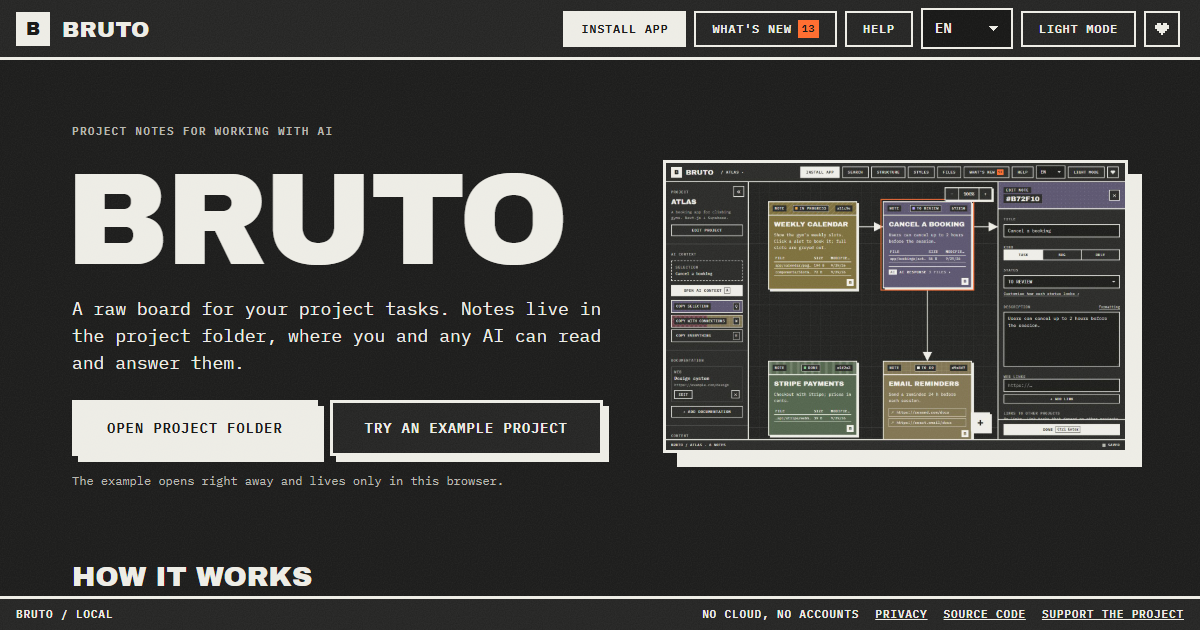
Bruto is a free, open-source task board for building with AI. It is a raw, brutalist board for project tasks where every note lives inside the project folder itself, so both the person writing the tasks and any AI assistant can read and answer them from the same place. The product is aimed at developers and teams who plan work locally, want their task context to sit next to the code, and want to hand that context to models such as Claude Code, Cursor, ChatGPT, Gemini or DeepSeek without copying and pasting scattered fragments. Its main purpose is to keep tasks, context, files, links and screenshots together in one note, and to make handing that note - and everything it points at - to an AI a single keypress. It runs in the browser, needs no account, and stores nothing on a server. Most task tools live in the cloud, far away from the code they describe. When a developer wants an AI to work on a task, they have to reassemble the relevant context by hand: open the ticket, find the files, paste the links, describe the stack, and repeat the whole ritual for every request. Bruto starts from the opposite assumption: the tasks already belong in the repository. By creating a .bruto/workspace.json file inside the chosen project folder, Bruto keeps the board inside the same versioned space as the code, with nothing leaving the computer. That means the context an AI needs is already written down where the project lives, and it stays there between sessions, between tools and between people. The problem it addresses is not tracking work for its own sake, but making sure the model receives exactly the context it needs instead of a lossy summary. The core of Bruto is a real board of notes. Each note is a task and carries a description, files, links, screenshots and a status. Notes can be dragged between statuses, connected with arrows so their relationships are visible, and edited many at once when a change applies to a whole batch. Because every note is a file-backed record inside the project, the board is not a separate silo; it reflects the actual work sitting in the folder. The visual language is deliberately brutalist and raw, and the board is built for dense, practical use rather than decoration. Screenshots let a developer show a visual bug or an intended layout, links point to external references, and files point at the exact code involved - so a task is a self-contained brief rather than a line of text. Handing work to the AI is where the board earns its place. Three shortcuts - Q, W and E - copy the selection, the selection with everything it points to, or the whole project, as clean Markdown that includes instructions for the model. A preview shows exactly what will be copied and how many tokens it amounts to, so there is no guesswork about the size or the contents of the payload before it is pasted into an assistant. A global context carries the project's stack and decisions in every copy, meaning each request is automatically framed by the architecture and conventions already agreed on. Standing rules extend this idea: a note can be a rule instead of a task, for example "run the tests before finishing", and it is included in every copy until it is closed, so the AI applies it on each task. Bruto also draws the project. The structure view shows where the work lives: folders appear as blocks and are marked with the notes that point at them, so the board and the codebase stay visibly connected. When Bruto recognises the project, it renders it for what it actually is rather than as a generic tree. Web projects - React, Vue, Svelte, Next.js, Nuxt, SvelteKit, Astro and Angular - are drawn as screens with their components. API projects - .NET, NestJS, Express, Fastify, Next.js, FastAPI, Flask and Spring - are drawn as resources with their endpoints. Database projects - Oracle PL/SQL, PostgreSQL, Supabase, SQL, Prisma and Drizzle - are drawn as tables with their keys and policies. This means a note can sit on the screen, the endpoint or the table it actually concerns. Underneath the board, Bruto behaves like a careful editor of a shared file. Every save reads the file first and merges whatever changed elsewhere, note by note, so edits coming from another tool do not silently overwrite each other. A broken file is never overwritten, and there is always a backup. The workflow starts when the project folder is opened and .bruto/workspace.json is created inside it; nothing leaves the computer. Notes are written as tasks and connected to show how they relate. They are handed to the AI by copying context, or by letting an agent with file access work the board directly. If the AI can edit files, it answers inside the note and marks it for review. When an answer still needs work, the developer writes what is wrong and marks the note "Changes requested" - and it goes back with all of its context. The outcome is a shorter loop between deciding what to do and getting it done. Because context is assembled once and reused, there is no repeated explanation of the stack, the conventions or the relevant files. Because the AI's answers remain inside the note, the reasoning sits next to the task instead of being lost in a chat window. Because the board merges changes note by note and keeps backups, it can be used alongside other tools without fear of destroying work. And because everything stays local - no server, no accounts, only anonymous usage stats and no cookies - teams keep ownership of their task data while still getting the benefit of AI assistance. Fewer copy-paste steps, less context drift, and a review trail that lives with the project. Bruto fits a number of concrete workflows. A developer can write a task with the files, links and screenshots it needs, copy the selection with everything it points to, and paste that clean Markdown into Claude, ChatGPT, Gemini or DeepSeek. Alternatively, an agent with access to the files can work the board directly: one line in AGENTS.md or CLAUDE.md tells it where the tasks are and which statuses to work on. With the MCP server, added with a single command, Claude Code and other MCP-speaking agents list and read notes, mark the one they are on, and answer it without touching the JSON by hand. Work that spans layers can be coordinated with notes that block or wait on a note in another project - front end, API or database - with both boards showing the link and one click jumping between them. An example project can be opened immediately and lives only in the browser. Bruto is built for developers and small teams already using AI assistants while they code, and for anyone who wants their AI and themselves to work from the same tasks. It is free and open source, with no account required, and it runs on the web: opening your folders needs Chrome, Edge, Brave or Opera on a computer. It can be installed as an app, works offline, and tells you when a new version is out. It ships in nine languages and two themes. It is keyboard first - every action has a shortcut, notes are reachable with Tab, and everything has a name for screen readers - and Ctrl+F searches by text, path or id, with filters by status and by what a note has, such as files, an AI response, images or a link. It works with any AI, including Claude, ChatGPT, Gemini and DeepSeek, and with agents that speak MCP. Bruto's value proposition is simple and specific: a task board that lives in the repository, for the developer and the AI alike. Notes carry the context, shortcuts hand that context over intact, agents can work the board through MCP, and the review loop keeps answers and follow-up requests inside the same note. Free, open source, local, and with no account to manage, it turns task management into the place where human intent and machine execution actually meet.
m’kay is a voice layer for the AI coding agents that already run on your Mac. It lets you talk to Claude, ChatGPT/Codex and Cursor on your own Mac from any browser or phone, so you can ask what your agents are doing, hear their replies read aloud, and hand them the next task without being at your desk. It is built for people who keep coding agents running and want a single voice interface that reaches all of them, rather than a separate assistant to manage alongside their work. The Mac app runs on Apple Silicon and requires macOS 13 or later, and you can either download the menu-bar Mac app or clone the open source project and run it locally. The problem m’kay addresses starts with a mismatch. Most voice tools for developers are built around a single assistant: you talk to one model, in one session, and that is the whole conversation. Developers rarely work that way. A working machine often has Claude Code, Codex and Cursor available at the same time, each with its own sessions and projects. The product's own framing puts it plainly — other voice apps talk to one assistant, while m’kay talks to all of your agents. On top of that, the moments when you most want to check in on a long-running task are often the moments when you are furthest from the keyboard: on the train, at the gym, or simply away from the desk. m’kay is designed for exactly those gaps, so progress on your agents is not tied to you sitting in front of the machine. The core capability is multi-agent voice control. m’kay talks to Claude Code, Codex and Cursor on your Mac, not to a single assistant, and it lets you ask which one is done, hear its reply, and tell it what to do next. Because it drives the real desktop apps rather than a separate environment, your sessions and projects stay where they are — the work already open on your Mac is the work you are talking to. That continuity matters: there is no second copy of a project to keep in sync and no separate workspace to reconstruct before an agent can continue. The packaged menu-bar Mac app puts this control within reach whenever you are at the machine, and the same voice channel is what you use once you step away from it. Remote access is the other half of the idea. The voice interface is reachable from any browser or phone, so the desk is optional. The product describes giving instructions from your phone's browser — on the train, or at the gym — where you ask what your agents are doing, listen to their replies read aloud, and give the next instruction by voice. Reading replies aloud is what makes this practical in situations where looking at a screen is awkward or impossible, and the browser-based interface means you are not tied to a particular device. The hosted voice page is available after a free sign-up, or you can run everything on your own Mac instead. m’kay also builds in an explicit confirmation step for anything it sends. The product states that nothing is sent until you say "yes" to a read-back. In practice, the system reads back what it is about to pass to an agent, and the instruction only goes through after you confirm it out loud. Because the agent apps being controlled can act on real code and projects, that read-back works as a checkpoint between what you said and what an agent is actually asked to do, which is a meaningful safeguard when your instructions arrive by voice from a phone. Getting started begins with linking your Mac. A small open source connector runs on your Mac and drives the agent apps you already use, and you sign in once to link it. From there you decide how to run the voice side of things: sign up for the hosted voice page, or run everything on your Mac with local models or your own API keys. The project is open source, so running it yourself is a supported path rather than a workaround, and the menu-bar Mac app is offered as the packaged way to use it on the desktop. The benefits follow directly from those choices. You are no longer chained to your desk to know what your agents are doing, because you can ask and hear the answer from any browser or phone. You do not have to juggle separate assistants for separate tools, because one voice interface reaches Claude Code, Codex and Cursor together. Your sessions and projects stay in the real desktop apps, so nothing is disrupted when you check in remotely. And because the read-back confirmation gates every send, you keep a spoken checkpoint before anything is passed to an agent. If you want to keep everything on your own machine, running locally with local models or your own API keys is an available route. Concrete use cases follow the workflow the product describes. You can ask which agent is done while you are away from your desk and hear its reply read aloud, then tell it what to do next. You can give a long-running agent its next task from your phone's browser on the train, without opening a laptop. You can check in and issue an instruction at the gym, where reading a screen is not practical and voice is the natural interface. You can run the whole thing locally on your Mac with local models or your own API keys. And because m’kay talks to all of your agents, you can move between Claude Code, Codex and Cursor through one voice channel instead of switching between separate interfaces. m’kay is aimed at developers who already run coding agents such as Claude Code, Codex and Cursor on a Mac and want to reach them by voice from anywhere. It runs on Apple Silicon and requires macOS 13 or later, and it is available as a menu-bar Mac app or as an open source project you can clone and run yourself. The voice interface is used from any browser or phone, with a hosted voice page available after a free sign-up. In short, m’kay turns the coding agents you already run on your Mac into something you can talk to from anywhere. One voice for all your agents, replies read aloud, a read-back before anything is sent, and sessions that stay in the real desktop apps — that is the value it offers to developers who want to stay in touch with their work without staying at their desk.
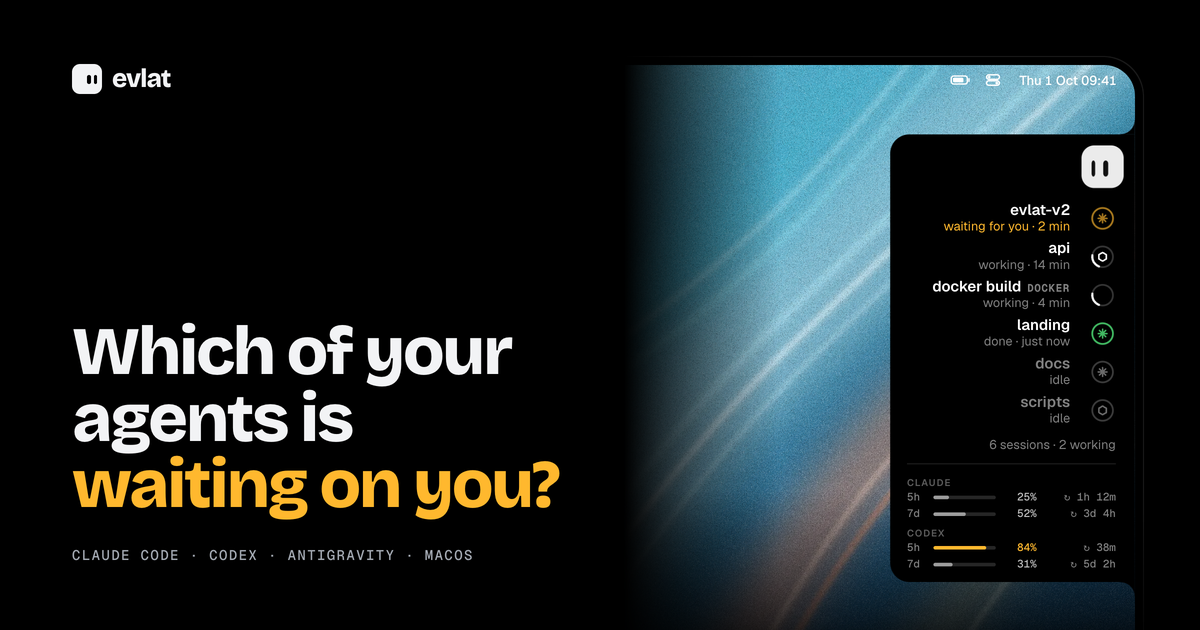
Evlat is a native macOS utility that docks a thin black strip to the edge of your Mac's screen and shows you which of your AI coding agents is waiting on you. One ring appears for every Claude Code, Codex or Antigravity session, or for every command you hand it, and a single face represents all of them. The instant an agent stops and needs your answer, its ring sends an amber pulse. Evlat is made for developers who run several AI coding sessions at the same time and want to know at a glance which one has paused and needs a decision, without hunting through terminal tabs. It runs on macOS 14 Sonoma or later on Apple silicon, is free, and installs as an app of roughly 3 MB. The problem Evlat addresses is a quiet one. AI coding agents spend long stretches working on their own and then stop to ask for a permission or an answer. If you are not looking at the right window, that session can sit idle for minutes while you continue doing something else, and the work simply stalls. Running more than one agent at a time makes this worse, because the session that needs you is rarely the one you are watching. Evlat turns that invisible waiting into something you can see. Rather than switching between terminals to poll their state, you get a single strip where every session has a ring, and the one that needs you pulses amber until you respond. The same strip also tracks long-running commands and jobs on remote servers, so work happening off your laptop is not invisible either. At the heart of Evlat is the ring. Each Claude Code, Codex or Antigravity session gets one, and so does any command you run through Evlat. A ring carries the state of its session: it can be waiting for you, working, done or idle, and each row shows how long the session has been in that state, such as "2 min", "14 min" or "just now". Waiting sessions are pushed to the top of the list so the one that needs your answer is always the most visible thing on the strip. Underneath the session rows, Evlat also shows your Claude and Codex limits, with the 5-hour and 7-day windows, their percentages and the time remaining until each resets, so you can see your remaining budget without leaving your screen. Because the strip is always docked to the edge of the screen, this information stays present without occupying a window or taking focus. Hovering over the strip makes it grow into the screen. Every session's name, what it is doing and how long it has been doing it become readable, with the waiting ones on top and your Claude and Codex limits underneath. Resting on a row slides out a card that names the tool the agent is stuck on and shows the exact command it wants to run. A "Go to session" action finds the application that owns the session — a terminal, VS Code or Orca — and brings it to the front, and Evlat asks for no permissions to do it. The strip also carries a small mascot. Clicking it, or pressing Shift Command Space, opens a balloon right out of the bar that takes your keyboard without pulling Evlat to the front. The balloon runs on your own Claude Code install, so it knows what your terminal knows. You can even drop a file onto the mascot: its eyes lock onto the file as it comes closer, and the file lands in the chat. Evlat is not limited to the agents it knows. The evlat watch command runs any command exactly as it is, with colours, input, Ctrl-C and the exit code all passing through, and tracks it as a row on the strip. If Evlat is not running, the command simply runs. For work that knows how far along it is, the evlat signal command lets your own scripts report progress and state: --progress 0.4 fills the ring, and --waiting, --done or --failed set its state, with rows that expire on their own. The same commands work on a server you reach over ssh, and those jobs arrive tagged with the machine's name, such as GPU-01, DEVBOX or BUILD-01. An agent waiting on a server pulses amber on your Mac exactly as one on your laptop does, and you answer it in that server's terminal. Evlat is honest when a link drops: when a server cannot be heard, its rows dim and say "no connection" instead of showing a stale state, and they light up again once the connection returns. Evlat's approach is to stay native and local. It is written in Swift with AppKit and SwiftUI, with no web view and no Electron. Hook entries install from the menu and talk to a listener on 127.0.0.1:48151 that turns browsers away, so sessions, commands and usage stay on your Mac. The only thing Evlat fetches from the internet is its own update, from GitHub, once a day. To connect a server, you add it by the name you give ssh, such as devbox or me@server, and Evlat carries the server's 127.0.0.1:48151 to your Mac with no account and no relay in between. It can set up the hooks and the evlat command on the server for you, or hand you one block to run yourself. Installing hooks adds Evlat's own entries to Claude Code's ~/.claude/settings.json, Codex's ~/.codex/hooks.json and Antigravity's ~/.gemini/config/hooks.json, next to any hooks you already have, and keeps a .evlat.bak copy before the first write. The outcome for users is a quieter, more predictable workflow. Instead of checking each terminal to find out whether an agent is done, you glance at the strip. Waiting sessions rise to the top and pulse amber, so the moment an agent needs a permission or an answer, you know about it, and one click brings the owning window forward. Because Evlat takes no Accessibility permission, no screen recording and no Dock icon, it does not interrupt what you are doing, and because it never takes focus, it can sit above the Dock on every Space without getting in the way. Rings beat rather than spin forever, and a bar with nothing moving draws no frames at all, so the utility stays quiet until something actually needs attention. In practice, Evlat fits several everyday situations. When you keep several Claude Code and Codex sessions open at once, the rings let you see at a glance which session is waiting, which is working and which is done. When you start a build, a test run or a deploy through evlat watch, it appears as a row with its elapsed time, while the command itself behaves exactly as it normally would. When you run training or infrastructure jobs on a remote server over ssh, those jobs arrive tagged by machine and pulse amber on your Mac when they need you, even when the link drops and later returns. And when you want to ask a question without leaving your work, the mascot balloon opens straight out of the bar, runs on your own Claude Code, and accepts files dropped onto it. Evlat is aimed at developers who run AI coding agents on a Mac, particularly those who work with more than one session at a time or who watch long jobs and remote servers. It tracks Claude Code, Codex and Antigravity — the Antigravity app, IDE and agy CLI — through hooks that Evlat installs for you. Antigravity sends no event when it asks for approval, so a session waiting there shows as working rather than amber; anything else, such as a build, test run, deploy or your own script, shows up through evlat watch or evlat signal. The app requires macOS 14 Sonoma or later on Apple silicon, with no Intel build and no Windows or Linux app, although the servers it watches can be any machine you reach over ssh. Evlat is free: there is no paid tier and no account. The source is on GitHub under the Functional Source License (FSL-1.1-ALv2), and each version becomes Apache 2.0 two years after its release. Releases are signed and notarised by Apple, and updates are delivered through Sparkle, which verifies each one against Evlat's signing key. Evlat's value proposition is simple: it tells you which AI coding agent is waiting on you, and it does so quietly. A thin strip on the edge of your Mac gives every Claude Code, Codex and Antigravity session its own ring, pulses amber the moment one needs you, and opens the right window with one click. It tracks long commands and remote servers over ssh, keeps everything local with no account, no permissions and no telemetry, and stays out of the way until something actually needs attention.
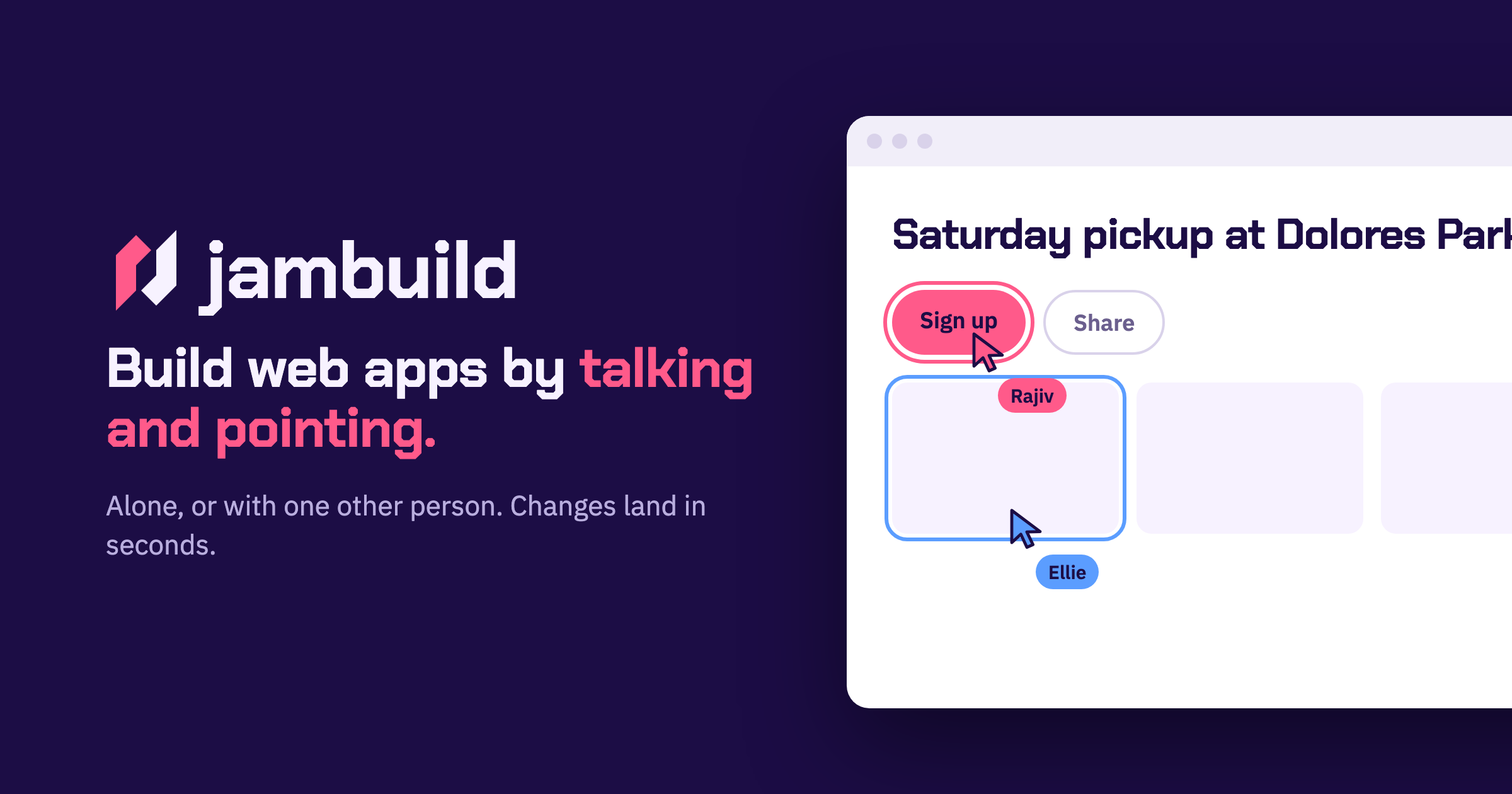
jambuild is a web app builder that works in real time through talking and pointing. You say what you want to build, point at what you mean, and changes land in less than ten seconds while you keep talking. You can use it on your own, or send a link to one other person and build together in the same room. According to the site, your microphone becomes the keyboard: you describe a page out loud and a first version appears in seconds. It is built for fast, conversational building rather than long written prompts. In most building workflows, the person with the idea has to translate intent into text — write a prompt, wait for a result, read it, then try to describe the correction in words. The jambuild approach shortens that loop. The site frames the product around a simple idea: say what you want to build, and point at what you mean. Speaking removes the typing step, and pointing anchors the request to a specific part of the page so both people can see exactly what is being discussed. Because changes land in under ten seconds, you can keep the conversation going instead of waiting between attempts, and because the pointing is shared, both participants stay on the same page — literally — while the app takes shape. Talk is the first input. The site describes your microphone as the keyboard: you describe a page and a first version appears in seconds. Nothing has to be typed into a prompt box; you simply say what you want, and the window shows when your voice is being heard. The example on the site shows Maya describing a sign-up page out loud, with her words appearing in the prompt box and the window outlined in pink while she is heard. Speaking is useful because describing a layout or an interaction out loud is often faster and more natural than writing it down, especially when you are still working out what the page should be. Point is the second input. As you move over the page, whatever you are on lights up — and it lights up for both of you. You then say what that thing should become. In the example, Sam moves over a roster, it lights up in his colour, and he asks for it to be split into three teams. Highlighting matters because it removes ambiguity: instead of saying “that section” or “the list near the top” and hoping the other person or the tool interprets it the same way, the highlighted element is visibly the subject of the request. Both participants see the same highlight, so a shared cursor effectively becomes part of the conversation. Click is the third input, and it adds action to description. You click anything on the page and say what should happen to it, and the change lands in seconds. The site’s example is Maya clicking the Sign up button and asking for it to be bigger and orange. Clicking gives you a precise handle on an element — a button, a section, a piece of content — while your voice carries the instruction about what should change. Together with talking and pointing, clicking covers the three ways people naturally refer to something: describing it, hovering over it, and selecting it. Together is what makes jambuild multiplayer. You send the link, and both people talk, both point, and it is one page. Changes land in seconds for both of you. Sign-in is done with Google, and the site notes that the person you invite does not need an account. The site shows Maya and Sam talking at once: both requests are building and both changes land. So the model is a shared room rather than a shared document — the room holds one page, two cursors, and two voices, and the page responds to both. The overall approach is conversational and spatial at the same time: language supplies the intent, the cursor supplies the target, and the short turnaround keeps the loop between the two people tight enough to feel like a normal back-and-forth conversation. The main benefit the site claims is speed: changes land in less than ten seconds, and you keep talking. That pace matters because it removes the wait between saying something and seeing it — you do not have to stop the conversation, and you do not have to hold a mental backlog of edits while waiting for the previous one to finish. A second benefit is that you are never building in isolation if you do not want to be: send a link and one other person can join, point at the same elements you are pointing at, and speak their own requests into the same page. Both participants get the same sub-ten-second turnaround, so neither is working against a slower view of the app. The site’s own examples show the kinds of tasks jambuild is used for. Maya describes a sign-up page out loud and a first version appears — a typical first-pass scenario where you want something on screen quickly so you can react to it. Sam hovers over a roster and asks for it to be split into three teams — a concrete structural edit made by pointing at the part of the page that needs to change. Maya clicks the Sign up button and asks for it to be bigger and orange — a visual tweak aimed at a specific element. And Maya and Sam both talk at once, with both requests building and both changes landing — two people editing the same page at the same time. Across these examples, the pattern is short, spoken, precisely targeted edits rather than large written specifications. jambuild runs in the browser and you sign in with Google to start a room; the person you invite does not need an account, which lowers the barrier to a two-person session. The product is aimed at people who want to build web apps by talking rather than by writing code or long prompts — the Product Hunt listing describes it as a multiplayer vibecoding tool. Availability is handled with credits: the listing says there are limited credits to try it out, and that you can bring your own (BYO) API keys to unlock more usage. No further plan, tier, or platform details are stated on the site. The takeaway is that jambuild turns app building into a conversation with a shared cursor. You talk, you point, you click, and the page answers in less than ten seconds. One other person can join through a link, see your highlights, and add their own voice to the same page. If you want to go from “I want this kind of page” to a working first version without typing out a specification, and you want to do it alongside someone else, jambuild is built for exactly that.
Aktar is a free, open-source application for Mac, Windows and iOS that turns file sharing into a single drop. It lives in the menu bar on macOS, and when you drop a file onto it, Aktar uploads that file straight to your own S3-compatible storage and copies the resulting shareable link to your clipboard. There is no account to create, no intermediary server involved, and no upload limit on Aktar's side. It is built for people who already pay for cloud storage — Amazon S3, Cloudflare R2, Backblaze B2, DigitalOcean Spaces, MinIO or any S3-compatible endpoint — and who want a fast, native way to share screenshots, logs, builds, videos and documents without opening an upload form in a browser. Most people who need to share a file reach for a hosted service: they open a website, create an account, upload the file to storage they do not control, and receive a link that only works as long as that service keeps running. Aktar is built around a different model. Because the app has no servers of its own, there is nothing to sign up for and nothing to phone home to. Files travel directly from your machine to the storage endpoint you configure, and you pay your storage provider rather than paying Aktar. That means the file lives in a bucket you already own, under a domain you control, and the link you paste is served from your own Public Base URL — a custom domain or CDN in front of your bucket. For developers, freelancers and small teams who already run S3-compatible storage, the upload step becomes a keystroke instead of a context switch. The core interaction is deliberately small. On macOS, Aktar lives in the menu bar with no Dock icon and no window to babysit: you click the icon, drop a file, and you are done. Files can be dragged onto the menu bar popover, picked from Finder with the Browse option, or pasted in. You can upload several files at once, follow per-file progress, and retry any upload that failed with a single click. The app also adds a global keyboard shortcut — ⌃⇧⌘U by default — that uploads whatever is currently on your clipboard from inside any app, even when the panel is closed. If you copy a file in Finder or capture a screenshot, that shortcut turns it into a link without you ever leaving the application you are working in, and the shortcut can be recorded to any key combination you prefer in Settings. Optional notifications fire when an upload finishes, the popover can auto-close after a successful upload, and Aktar can launch at login so it is always ready. On Windows and iOS the same idea carries over, with the app available for iPhone and iPad as well. Aktar works with the storage you already have. Amazon S3, Cloudflare R2, Backblaze B2, DigitalOcean Spaces and MinIO all have built-in presets, and anything else that speaks the Amazon S3 API works through the "Other S3-Compatible" option. Connecting a bucket takes under a minute: you pick a provider, paste your access keys and bucket name, and the preset fills in the right endpoint and region for you. Destinations can be named — Personal, Client Work, Homelab — and you can switch the active destination right from the popover, so one bucket can hold screenshots while another holds client work. Each destination has its own Public Base URL, the address files are served from, such as a custom domain or CDN in front of the bucket; Aktar joins that base URL with the object path to build the link it copies. Object paths themselves are templates, with a default of {year}/{month}/{uuid}.{ext} and variables including {year}, {month}, {day}, {date}, {time}, {filename}, {uuid}, {random} and {ext} available to mix in, so your naming and folder structure stay under your control. Aktar also handles the life cycle of files after they are shared. Uploads that should not last forever can be given a delete-after setting of 1, 7, 14 or 30 days, which Aktar implements by setting up your bucket's own lifecycle rules in one click — the file is deleted on schedule even when Aktar is not running, and the rules Aktar creates leave your other rules alone. A Library view lets you browse every folder and file in your buckets, not just the ones Aktar uploaded: you can search the whole bucket, preview files, upload, rename, move or delete them, and copy public or temporary links, with temporary links that work for private buckets too and can be valid for one hour, one day or seven days. From the same history you can delete a file at the source — removing it from the bucket rather than only from the list — which is useful when you have shared the wrong file. Every upload is also recorded in a searchable history with thumbnails and previews for images, PDFs, text and Markdown, filterable by destination, with bulk copy for several entries at once. The overall approach is three steps that quickly become muscle memory. First, connect your bucket: choose a provider, paste your access keys and bucket name, and the credentials go straight into the macOS Keychain, where they are only used to sign requests to your own endpoint. Second, drop, paste or browse: drag files onto the menu bar popover, select them from Finder, or press the global shortcut to upload whatever is on the clipboard. Third, paste the link anywhere: the public URL lands on your clipboard as a plain link, Markdown, HTML, or a template of your own, with images copied as embed markup and everything else as a regular link. Underneath there is no proxy and no middleman — the app signs requests directly to your storage endpoint, which is why Aktar can stay small, native and free of an account system. For Raycast users, an extension uploads the clipboard or files selected in Finder, searches your history and browses your buckets from Raycast itself, while your keys stay in Aktar. The payoff is speed and ownership at the same time. Sharing a screenshot goes from saving it, opening a browser, uploading it, waiting and copying the link down to a two-keystroke reflex, and because everything runs locally there is no upload form, no signup and no upload limit imposed by Aktar. Your files stay in storage you already pay for, so links point at your own domain and can be embedded in documents, tickets or chat without carrying someone else's branding. Temporary links keep throwaway files — a bug report screenshot, a log, a draft — from piling up in your bucket forever, and lifecycle rules keep working whether or not the app is open. Because Aktar is MIT licensed, sandboxed and notarized, runs with the Hardened Runtime, keeps keys in the Keychain and collects no telemetry, the trust question is answered by the code itself: you can read it, build it yourself or send a pull request. On macOS it is built with SwiftUI so it feels right at home on the platform. Several concrete workflows come up again and again. The screenshot-to-link flow: press ⌃⇧⌘4 to capture an area to your clipboard, then ⌃⇧⌘U to upload it, and the link is ready to paste — useful for bug reports, design feedback and chat. The upload-from-anywhere flow: copy a file in Finder or capture an image, and the shortcut uploads it without ever opening the panel. The client-work flow: keep separate named destinations so screenshots land in a personal bucket while deliverables go to a client bucket served from a different domain. The temporary-share flow: set a file to delete after a day, a week or a month so it disappears without manual cleanup. The documentation flow: choose Markdown or HTML output so images arrive as ready-to-paste embed markup. And for Raycast users, the extension uploads the clipboard or files selected in Finder, searches upload history and browses buckets without leaving Raycast. Aktar is aimed at people who already run S3-compatible storage — developers, technical freelancers and small teams — and who want file sharing to feel native rather than browser-based. On macOS it is built with SwiftUI, requires macOS 14 Sonoma or later, installs from a .dmg or with Homebrew via brew install --cask getaktar/tap/aktar, and works alongside Raycast. Windows 10 and 11 builds are available through the Microsoft Store, the iOS app is on the App Store for iPhone and iPad, and Android is listed as coming soon. The app is free and open source under the MIT license, with no subscription, no account and no upload limit on Aktar's side; you pay your storage provider, not Aktar, for the storage you use. Put simply, Aktar is a small native app that does one job well: turn a file into a link without leaving your workflow and without handing the file to a middleman. If you already own an S3-compatible bucket, it turns that bucket into an instant sharing endpoint — drop a file, paste the link, and keep control of where the file lives.
Autonomyware is an AI-native platform that turns a described idea into an engineered physical product. You start with a prompt, a sketch, or an existing product, and autonomous AI handles the engineering process end to end — moving from product definition through architecture, risk, CAD, BOMs, code, verification, and manufacturing preparation. The company frames the promise simply as going from text to physical products. The product is presented as one AI-native workspace that keeps every decision and engineering artifact connected from idea to implementation, so work does not scatter across disconnected tools. Its stated position is that if you can describe it, you can build it, with Autonomyware doing the engineering for you, and its tagline describes the goal as engineering anything you can imagine. The problem Autonomyware addresses is set out in its own research framing: a product is not a collection of shapes, it is a network of relationships. AI-generated geometry that merely looks right can fail to assemble, and there is a meaningful difference between a render you cannot use and a model you can inspect, verify and build. The platform also points to the engineering data companies already hold — scattered CAD, drawings and specs — as something worth interpreting rather than discarding. By taking an idea through product definition, architecture, risk, CAD, bills of materials and manufacturing preparation inside a single workspace, Autonomyware aims to close the gap between a concept and something that can actually be made. The central surface is the Forge. You open a forge, interact with the model and explore the surfaces, while a live forging narration shows exactly how the geometry was built. In the example shown on the site, a user asks for a desk sculpture of the Product Hunt kitty-cat award: the kitty in a stylized spaceship, with concentric circles and laurels around it, and a flat bottom so it prints clean. The narration reads the intent, classifies the work as SCULPT in a sculpting lane with one continuous organic body, no decoration and no assembly costing, and then creates a reference image to seed the sculpt. The platform describes the author as driving the tools with sight tags per department, with no templates and no recipes. Narration entries cover multi-view inference to complete unseen geometry, a first-pass seed acquired from four views through multi-view fusion, and Trellis native delivery remeshed to 285,000 triangles, winding-oriented with specks removed, before the whole product is assembled and reported as watertight, verified and using real materials. Everything the platform forges is described as real geometry — watertight and export-ready. Forged products appear in a library with their mode and status attached: a City bike and an EV solar charger listed as Assembly, forged, watertight, STEP and STL; a Camera drone listed as Assembly, forged, verified, STEP and STL; and a Panda sculpture listed as Sculpt, forged, coloured, watertight and STL. The site lists STEP, STL and 3MF under the heading "Made to be made", describing real 3D that is ready to print at home or send to a factory. A companion pillar, "Grounded in reality", states that an engineering mind checks the product stands up, that parts fit, and that it can be made. The model workspace also offers Material, Mesh and X-ray views alongside Render and Export controls. Agent Orchestration is where the model side of the platform is mapped. A provider list ships with "standard providers with sane defaults, ready to fly" — OpenAI, Anthropic and Google listed as defaults, plus a Local / self-hosted option. Users can add their own connection by choosing a provider family, specifying a model, a custom base URL and an API key, which the site describes as BYOK with no lock-in. Role mapping then assigns a model to each role: the main agent, the pre-read for the planner, the reviewer and verifier, image analysis, and the CAM advisor. A single model can take over all roles, or models can be mapped per role. The accompanying audit view, described as "one brain", runs every role on one shared context and keeps a full trace of every decision, cost and token for review. The overall method is presented as a five-step path in one place to create, improve and make something real. Step 01, Start with anything: describe an idea, share a sketch, or bring an existing product — plain words are enough. Step 02, Shape it together: Autonomyware asks useful questions, helps you explore options and keeps the work moving. Step 03, Watch it come alive: see the product take shape and understand how it works, explore it, then ask for changes. Step 04, Get everything you need: receive the right files, parts and guidance for the product. Step 05, Make it real: print it, manufacture it, build it or keep improving it. Refinement is conversational — the site invites users to comment on a forge with a described change, so iteration happens by chatting about the model rather than manipulating geometry directly. The stated benefits follow from that workflow. Under "Talk, don't click", you say what you want in plain words and then shape it by chatting, which lowers the barrier for people who do not drive CAD tools directly. Under "Grounded in reality", an engineering mind checks the design stands, fits and can be built, addressing the risk that a good-looking result cannot be made. Under "Made to be made", you receive real 3D that is ready to print at home or send to a factory, along with files and guidance that are described as clear and ready to use. Because the platform keeps decisions and engineering artifacts connected in one workspace, the thread from the first idea to the finished, downloadable model stays intact instead of being rebuilt by hand at each stage. Concrete scenarios shown in the content include a desk sculpture of the Product Hunt kitty-cat award, built as a single continuous sculpted body with a flat printable bottom, housed in a stylized spaceship with concentric circles and laurels. Assembly-oriented examples include a City bike, an EV solar charger and a Camera drone, all forged and watertight, with the drone also marked verified, and all offered as STEP and STL files. A Panda sculpture shows the sculpt lane producing a coloured, watertight model delivered as STL. The site also frames the end of the journey as printing or manufacturing: making the product real at home or sending it to a factory, according to the "Made to be made" messaging. Autonomyware is presented for anyone who can describe an idea, as well as for engineers who want to look deeper: the site says the surface is simple on purpose while real systems engineering sits underneath, and links to a research hub written in the open. Stated integrations include model providers OpenAI, Anthropic and Google as defaults, a Local / self-hosted option, and bring-your-own-key connections with a custom base URL, with no lock-in. Output formats named in the content are STEP, STL and 3MF. A forthcoming capability, labelled coming soon, is Evolve Outside Products: reading existing engineering data, learning from what already works, and evolving designs beyond a single product. No pricing or plan details are stated in the provided content. The takeaway is straightforward: Autonomyware positions itself as the place where an idea becomes a physical product without the user doing the engineering. You bring the idea in plain words, an autonomous AI system moves it through definition, architecture, CAD, verification and manufacturing preparation, and you end up with watertight, export-ready geometry plus the parts and guidance to make it real.