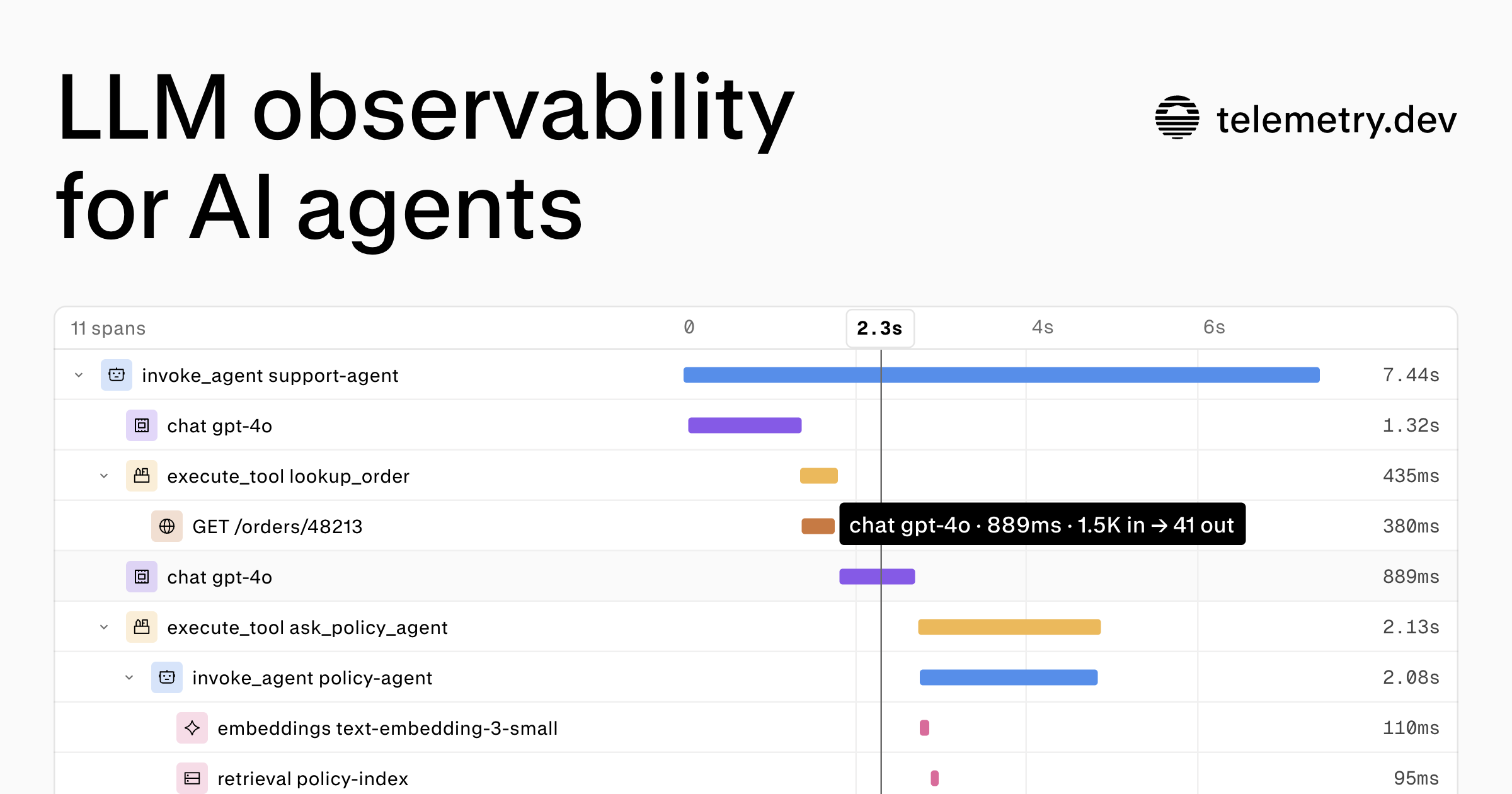
telemetry.dev is an LLM observability platform for AI applications and agents, built on OpenTelemetry. It shows each run of an AI agent as one trace, where each model call and tool call is a span carrying its duration, tokens, cost, and error. From that trace, developers follow model calls, tool steps, and retrievals together, find failures, inspect latency, and track token usage and cost. The product is aimed at teams building and operating AI agents and LLM-backed applications who need to see what actually happens inside a run instead of inferring it from scattered logs.
An agent run is rarely a single request. The live demo on the site shows a support-agent trace containing thirteen spans: loading a customer profile, loading a session, routing intent, retrieving policy context, generating embeddings with text-embedding-3-small, calling gpt-4.1-mini, searching a help center, running a second retrieval, calling the model again, running a guardrail output step, and saving the session. When something breaks in that chain, the failure can sit in any step, and the slowest step is often not the model call itself. telemetry.dev frames the problem plainly: find the slow step, inspect the failed call, pinpoint a tool timeout, inspect a model response, and see where your budget goes. It also aims to tell you about errors, cost spikes, agent loops, and model or tool errors before your users do.
The core of the product is trace detail. Each trace lists its spans with the duration of every step, so a run is readable end to end. In the example trace, a track_shipment span takes 2,418ms and accounts for 49% of the run, while the two chat steps take 845ms and 1.16s. Selecting a span opens its summary and attributes, including fields such as gen_ai.operation.name set to "execute_tool", gen_ai.tool.name set to "track_shipment", and gen_ai.tool.call.id. Those attributes identify precisely which tool executed inside the run, which is what makes it possible to separate a model problem from a tool timeout.
Finding the right trace is handled through search and filtering. Traces can be searched by name, or filtered by status, environment, framework, or session. The production view lists runs such as support-agent, classify-ticket, and summarize-session with their durations, and a selected trace reports how many spans it contains and what it cost. A separate overview keeps cost and reliability in view by comparing spend, latency, and errors by model, provider, and environment. In the sample dashboard, LLM cost for the last seven days totals $2.98 across gpt-4.1-mini, claude-sonnet-4.5, gemini-2.5-flash, and text-embedding-3-small, alongside 812 requests, a p95 latency of 1.8s, and 2.6M tokens.
For Model Context Protocol workloads, telemetry.dev reports spans, failures, and p95 duration by method and tool, measured from both the client and the server. The example MCP analytics table lists create_refund with 2,330 spans, a 2.4s p95, and 18.0% failed; get_invoice with 5,912 spans, 640ms, and 1.1% failed; check_inventory with 4,208 spans, 310ms, and 0.2% failed; and cancel_order with 1,077 spans, 880ms, and 0.6% failed. Email alerts complement the dashboards, covering cost, budgets, agent loops, and model or tool errors, with states such as tool errors alerting, monthly budget all clear, agent loop all clear, and missing prices needing more data.
Privacy controls determine what gets stored. Prompt capture is on by default and can be turned off for an environment before storage. The settings screen lists production, staging, development, and preview with whether stored prompts and responses were captured, and in the example production shows prompts and responses are not stored. Redaction patterns, both built-in and project-specific, are applied, but the product states that pattern matching cannot catch all sensitive data, that capture controls only cover recognized prompt, response, and tool-payload fields, and that removing sensitive content in your instrumentation before export is the way to prevent transmission. Separately, prompts and evals use the same traces: a prompt can be changed without a deploy, then run on a dataset and its scores compared with production.
Overall the product works by ingesting OpenTelemetry data. You create a project API key, configure a telemetry.dev integration or an OTLP/HTTP exporter, run an instrumented request, and open its trace in your project. Cost is calculated at ingest from reported token usage and a model-pricing catalog, with cache-read and cache-write tokens using separate rates when available, reasoning tokens not charged separately, and an explicit span cost taking precedence; without matching model pricing or token usage, computed cost is unavailable. Trace detail depends on what your instrumentation emits, and each integration guide describes its coverage. Ingestion is metered in ingestion units, where each normalized span, OTLP log record, or metric data point uses one unit.
The benefits follow from that structure. Instead of stitching together provider dashboards and application logs, a team gets one view of a run with durations per step, so a tool timeout or a slow model call is visible in context. Cost is attributed by model, provider, and environment, which makes the source of spend changes observable. Failure rates and p95 latency for MCP tools show which tool calls are unreliable. Alerts on budgets, agent loops, and errors surface incidents before users report them, and per-environment prompt capture settings give a way to keep recognized prompt and response fields out of storage.
Typical scenarios map directly to the interface. A developer debugging a failing support agent opens the trace, scans spans for the longest duration, and inspects the selected tool span and its attributes. An engineer investigating errors in production filters traces by status and environment to isolate affected sessions. A team watching spend compares the cost breakdown across models and providers over the last seven days and drills into the traces contributing to it. An MCP-based integration checks which tools have the highest failure rate or p95 duration. An on-call engineer relies on email alerts for cost spikes, budget thresholds, agent loops, and tool errors. A team preparing a prompt change tests it on a dataset and compares scores against production on the same traces.
Development teams connect through a first-party TypeScript SDK or Python SDK, or through any exporter that sends OTLP/HTTP. Model provider integrations cover OpenAI, Anthropic, Claude SDK, Claude Platform, Google Gen AI, Amazon Bedrock, OpenRouter, and LiteLLM. Framework integrations cover Vercel AI SDK, TanStack AI, LangChain and LangGraph, CrewAI, Pydantic AI, Eve, and Model Context Protocol. Coding agents can be traced as well, including Claude Code, Cursor, opencode, OpenClaw, Hermes Agent, Oh My Pi, and Pi, and the platform exposes a read-only MCP server so an AI agent can investigate errors, latency, and cost through telemetry.dev itself. The Free plan costs $0 with no credit card, includes 30,000 ingestion units per month, 14-day retention, one project, and two seats. A demo call is offered for teams that want tracing, cost tracking, and privacy controls walked through for their own frameworks and providers.
In short, telemetry.dev turns an AI agent run into a single inspectable trace of model calls, tool steps, and retrievals with duration, tokens, cost, and errors attached to each span, and layers search, cost and reliability overviews, MCP analytics, alerts, and prompt capture controls on top of OpenTelemetry data you already emit.
Publisher
A
admin
Launch Date2026-11-01
Platformweb
Pricingfreemium
Tech Stack
#TypeScript#Python#OpenTelemetry#OTLP/HTTP#Model Context Protocol