Category Focus/categories/automation
Automation AI Tools
Discover and compare the best automation AI tools and software. Browse 702+ curated tools with reviews and rankings.
Projects tracked
702
Sort mode
RECENT
Page
19
Spaces is a desktop app that gives a team one shared space per project, where the people on the team and their AI agents work together. Instead of each person holding a private AI chat history, a space keeps the project's chats, files, and routines in one place, so Monday's decision is still there on Thursday for everyone. It is built for teams that already use AI assistants every day and want that work to be shared rather than scattered across separate laptops and browser tabs. Spaces runs as a desktop application on Apple silicon Macs and Windows PCs, and a single person can start with it free before inviting anyone else. The problem the product sets out to solve is described on its own site as five people with five private chat histories. Everyone on a team has their own AI thread, and none of them can see each other's. The project's context ends up spread across browser tabs on separate machines, so every new question begins by re-explaining the job to the assistant. Each individual gets faster, but the team as a whole does not. A shared space is the product's answer to that gap: one project, one conversation, with chats and files living in the space rather than in somebody's personal thread. Getting started follows three explicit steps. First you download Spaces; it is free, needs no account, and installs like any other desktop app. Next you connect your AI by pasting the ChatGPT, Claude, or Gemini key you already have — one provider is enough to begin with. Then you open a space by naming the project and putting a specialist to work, and from that moment the space starts holding the context. Because each person's agents, API keys, and connected accounts stay on their own computer, the account you connect is not moved into someone else's cloud. The shared space is the core of the product. Chats and files live in the space itself, not in one person's thread, so a Product Launch space can show a press list for launch week, waitlist copy, and a battery claims comparison beside a launch brief, all visible to everyone in the space. The example space is managed by a Launch Lead and also includes a Copywriter and a Researcher. Because the space holds the history, nobody has to reconstruct what was decided or re-feed the same background into a fresh chat. Rather than one general assistant, a space can hold specialists. The site frames this as hiring agents, not one assistant: a researcher, a copywriter, a launch lead, each keeping its own notes so anyone in the space can put them to work. Each specialist gets its own instructions, memory, and tools, so it can research, draft, work through an inbox, or run a report. Agents have skills and tools attached, and the studio view lets you pick an agent to chat with or add someone new to the space. Routines are the part of Spaces that keeps working when nobody is watching. They are described as things that run on a schedule — check-ins, follow-ups, and reminders. In the product demo there are three routines in the Product Launch space: a launch morning brief that runs daily at 9:00 AM, a Friday recap that runs at 4:00 PM, and a paused waitlist follow-up. The stated behaviour is that the space does the standing work and pings someone only when it needs a decision, which means routine output does not depend on a person remembering to ask. Spaces takes the position that teams should use the models they already pay for. You connect ChatGPT, Claude, or Gemini, or run a model on the computer itself — Ollama is shown running locally — and the keys stay on that person's computer. Providers can be switched per agent at any time, and more than one provider can be brought in. The stated benefit is that you are buying the space, not another subscription for tokens: Spaces is not a reseller of AI, it is the app those models work in. Agents can also use the real web through a built-in browser. Research, clicking through, and staying signed in all happen inside the app, so the agent sees the page the user sees. The site illustrates this with a supplier specification page for a solar backpack being checked against claims held in the space's files — a 65W peak panel, a 20,000 mAh pack, and a weatherproof shell — along with the instruction not to claim that the pack charges a laptop in an hour. Having the browser inside the app keeps the agent's view and the team's files in the same workspace. Spaces separates what stays local from what the cloud carries. Each person's agents, API keys, and connected accounts stay on their own computer and never go to the cloud. The cloud carries the space, the chats, the files, and the routines, and nothing else, and shared-space content is encrypted at rest with a per-space key held in Google Cloud KMS; only members of the space receive it. A space begins as yours, and when you invite someone it becomes a shared space you both work in — the same chats, the same files, the same routines, with their agents alongside yours. The outcomes stated on the site follow from that structure. Context stops being personal: the project's history, decisions, and files belong to the space and remain available to everyone in it. Standing work continues without anyone prompting it, because routines run on a schedule. Each person keeps control of their own keys and accounts, so joining a shared space does not mean handing a colleague access to a personal AI account. And because the team is not buying tokens from Spaces, adding a seat does not add an AI subscription — the models are the ones the team already pays for. Concrete scenarios appear throughout the site. A product launch team keeps a press list for launch week, drafts waitlist copy, and compares battery claims against a launch brief with a researcher, all inside one space. The same space runs a morning brief at 9:00 AM and a Friday recap at 4:00 PM, and it can follow up on a waitlist when someone switches that routine on. Agents use the built-in browser to check supplier specification pages against internal claims. A solo user can run unlimited spaces on their own machine with specialists, routines, and playbooks, and only moves to a shared cloud space when other people need to work in it. Pricing is stated clearly. The desktop app is free on your own computer with no account, and includes unlimited local spaces, specialists, routines, and playbooks, plus your own AI keys. Spaces Cloud is listed at $10.99 a year per person, described on the pricing panel as $0.92 a month, and the FAQ gives $1.49 a month or $10.99 a year per person; it adds cloud-hosted spaces with shared chats, files, and routines, plus the ability to invite anyone who has a seat. A team of five is $55 a year. Everyone who works in a shared space needs their own seat because each person runs their own agents, and anyone who works alone stays free. Enterprise is a conversation rather than a checkout, and puts Spaces inside your own cloud so the data never leaves it, with help setting the whole thing up. The desktop app runs on Apple silicon Macs and Windows PCs. The takeaway Spaces promotes is that AI work on a team should live in a place the team can see. One space per project holds the chats, files, and routines; specialists take on defined roles; routines keep the standing work moving; and the models doing the work are the ones you already pay for. Start free on your own computer, connect a key, and invite the team when you are ready.
Formesign is a tool for collecting legally binding eSignatures inside Google Forms. It adds signature fields to the forms you have already built, so the people who fill in your form can sign it directly instead of printing, signing and scanning a document. When a form is submitted, Formesign converts the responses into signed PDF files, saves an audit-ready copy to Google Drive, and syncs the submission to Google Sheets. Signed forms can also be emailed to respondents and collaborators for record-keeping. Formesign is built for compliance-focused businesses and organisations that need signatures as a normal part of a data-collection workflow, and it is used across healthcare, HR, education, events, real estate and construction. Its purpose is simple: keep the Google Forms workflow an organisation already relies on, and add a signature step to it that stands up as legally enforceable. Google Forms is great at collecting data from users, but it does not have a built-in option to collect signatures. That gap matters whenever a form is not just information gathering but an agreement: a consent form, an acknowledgement, a rental agreement or an approval request. Organisations in these situations often fall back on printing forms, asking people to sign by hand, and then scanning and storing the paper themselves, or they turn to dedicated eSignature platforms that charge far more than the workflow justifies. A customer quoted on the Formesign site describes the industry-standard signature provider as "TOO expensive" for their HIPAA-compliant Google Forms signature needs. Formesign addresses exactly that problem: it keeps the Google Forms workflow the organisation already uses, while adding a signature collection step that meets electronic signature regulations, so organisations that care about compliance do not have to leave the tools they know or pay enterprise eSignature prices. Formesign ensures that signatures collected through Google Forms are legally enforceable, meeting electronic signature regulations, so a signed Google Form can be relied on as a record of agreement rather than a loose acknowledgement. Alongside a single signer, Formesign supports collecting multiple signatures, so a document can require additional parties such as a witness or a guardian to sign as well. This lets organisations ensure that all necessary parties sign the document before the form submission is complete, rather than chasing missing signatures after the fact. For compliance-focused teams, the practical result is that the signature step is built into the same submission that captures the rest of the data, so the signed record and the submitted answers stay tied together. Google Drive integration is central to how Formesign handles documents. It automatically converts form responses into signed PDF files and syncs them to a Google Drive folder when the user submits the form, which gives the organisation a stored, audit-ready copy of every signed document without manual exports or filing. Email delivery complements this: Formesign sends customised emails with the signed PDF files to respondents and collaborators for seamless communication and record-keeping. A respondent can therefore keep their own copy of what they signed, while internal collaborators receive the same document inside the workflow that collected the signature, removing the need to forward attachments or reconcile separate copies by hand. Responses also sync automatically to Google Sheets, providing a familiar interface for organising and analysing the data that accompanies each signature, so the answers people submit alongside the signature remain usable for reporting and follow-up. The signing experience itself is designed to be seamless: users can easily sign forms on any device, including mobiles and tablets, for a convenient, secure and accessible signing experience. One customer highlights the ability to update a form without needing to regenerate the link, which means corrections can be made to a live form without invalidating links that have already been distributed to signers — particularly useful for teams that send consent, registration or application links out widely. The overall approach is to keep the form the organisation already has and add to it, rather than replace it. You add signature fields to your existing Google Form and continue to publish and share it as usual. When someone submits the form, Formesign generates a signed PDF from that submission, stores the file in Drive, emails it out to the relevant parties, and records the response in Sheets. Because the whole flow runs through Google Forms, Google Drive and Google Sheets, the process stays inside the tools the team already uses, and the signature becomes part of the submission itself rather than a separate document-handling exercise. There is also a library of blank, ready-made signature forms on the site, so teams can start from a template rather than building a signature form from scratch. The benefits follow directly from that design: legally enforceable signatures without leaving Google Forms, signed PDFs generated and filed automatically, email copies in the hands of respondents and collaborators, and response data arriving in Sheets ready to organise and analyse. The site emphasises a secure, accessible signing experience across devices, and it highlights customers moving from paper-based processes to a modern digital workflow — one customer describes their company as having moved "from the stone age to modern age" through the ability to use the feature. Another customer, working with HIPAA-compliant Google Forms, notes that they needed a way to collect signatures and that Formesign worked perfectly, and that the company worked with them to evolve the product so that a PDF copy of the form could be provided after signing. With more than 500 organisations trusting Formesign, the product is positioned for teams that need signature collection at volume and at a lower cost than dedicated eSignature platforms. The site also presents a range of ready-made signature forms, which show the kinds of concrete workflows Formesign supports: an employee handbook acknowledgement form for HR, a HIPAA privacy notice acknowledgement form for healthcare, photo release forms and catering agreements for events, a tattoo consent form for legal compliance, a rental agreement form for real estate, an equipment rental agreement and a vendor application form for business, a school application form for education, a contest entry form for events, a reference request for HR, an IT service request for IT, and a purchase request approval form for finance. Each of these is a scenario where a signature is required alongside the data a Google Form already collects, and where the signed PDF then needs to be retained and circulated to the right people. Formesign is aimed at compliance-focused businesses and organisations working in healthcare, HR, education, events, real estate, finance, IT, construction and legal-compliance contexts — the site notes that its customers span from healthcare to construction, and that more than 500 organisations trust it. It is used by organisations working with HIPAA-compliant Google Forms, and by small teams that describe themselves as not tech savvy and who use it to create registration links for clients. Because Formesign operates as an add-on to Google Forms, the integrations it relies on are Google Drive for document storage and signed PDFs, Google Sheets for response data, and email for delivering signed PDFs to respondents and collaborators. In short, Formesign adds the missing signature step to Google Forms: legally binding eSignatures, multiple signers when a witness or guardian must also sign, signed PDFs generated and saved to Drive, customised emails to respondents and collaborators, and responses synced to Sheets — all inside the Google tools a team is already using. For organisations that need signature collection to be compliant, simple and affordable, it turns an ordinary Google Form into a source of signed, audit-ready documents.
Cadenya is a hosted agent runtime that layers tools, agents, and objectives on top of the APIs you already run. Rather than a framework you bolt into your application stack, Cadenya runs the agentic loop for you, so you can build, test, and improve agents without rebuilding your stack. You connect your MCP servers, OpenAPI specs, and existing endpoints through a single tool layer agents can use as they are. From there you define an agent, shape its abilities, and run objectives. It is built for teams that already have working systems and want to add agentic capability on top of them. Teams that want agents in their product usually face an awkward choice: adopt a framework and integrate and maintain it inside their own stack, or build the agentic loop themselves — handling context windows, approvals, event delivery, and model comparison along the way. Cadenya starts from the opposite assumption, that the APIs already exist and already work. Its stated purpose is to layer tools, agents, and objectives on top of the APIs you already run so you can build, test, and improve agents without rebuilding your stack. Because the runtime is hosted and model-agnostic, teams can adopt frontier models fast, test behaviors, compare approaches, and add functionality rather than complexity. You start with your stack. Cadenya connects your MCP servers, OpenAPI specs, and existing endpoints through a single tool layer agents can use, and the documentation states plainly that you do not rewrite your APIs to use it. Tools are connected using specs you already know, so existing endpoints become usable capabilities for agents as they are. Inference is kept separate from that tool layer: Cadenya is model-agnostic, so you point it at OpenRouter or any OpenAI-compatible endpoint and it uses that for inference. Each new account comes with $5 in credits on OpenRouter pre-configured for you, and after that you provide your own LLM provider credentials. That separation is what allows you to swap models, evolve behaviors, and expand capabilities while retaining infrastructure. Defining an agent means assembling concrete building blocks. An agent has assignments — individual tools, tool sets, and sub-agents — shown in the product's interface as items like a reroute shipment tool, an update ETA tool, a dispatch API tool set, and a customs broker sub-agent. It has memory layers, such as a carrier playbook or SLA policies, and a system prompt that describes the agent's role and how it should behave. Agents can dispatch sub-agents, and the model configuration for sub-agents can be changed to best suit the job, which the product describes as the most efficient approach for token usage and outcome. Objectives are then run against that configuration, and each objective keeps its trail. Token usage is managed inside the runtime rather than left to chance. Cadenya provides live token metering so you can stay on top of costs, reduce waste through progressive discovery, and improve efficiency as agents adapt. Progressive tool discovery keeps tool schemas out of the context window until the agent asks for them — only names ride along, so every request gets smaller. It is configurable: you can enable progressive tool discovery, set the maximum number of tools per search, provide search hints such as delays, reroutes, or customs, and set a rerank threshold, which can be left blank to skip reranking. Context compaction is handled out of the box, and context window compaction is also emitted as a webhook event type. Real-time behavior is a first-class part of the runtime. Webhooks and SSE push agent events into your apps as they happen, so downstream services react immediately, and the documentation notes that Cadenya makes it easy to wire agent events into your applications. Every event in your agentic loop is sent to a webhook endpoint you provide; the interface lists event types including assistant message, tool result, tool approval requested, sub-agent spawned, context window compacted, and timed out, each with a delivery status such as HTTP 204 and a completed state. When a tool call needs sign-off, approval-gated tools pause the agent and deliver a tool_approval_requested event so a person or system can approve before anything runs. Cadenya also ships Widgets that can be dropped into any frontend to enable agentic features like conversations and more, alongside SDKs in four languages. Observation and experimentation are built in. Cadenya lets you monitor outcomes and understand how behaviors take shape in the real world, on the premise that clear visibility means your agents show their worth. You can run variations — the interface shows a Default and a Canary side by side with different models, creation dates, assignments, memory layers, and system prompts — which lets you test behaviors and compare approaches without uprooting what already works. Feedback is captured against variations and objectives with sentiment-style scores, so a reroute that happened before an SLA breach scores positively while a case where the agent held at a facility when a reroute was available scores negatively. Every objective keeps its trail: tool calls, webhook deliveries, token usage, and the feedback people leave on the outcome. The benefits follow from that structure. You iterate without uprooting: swap models, evolve behaviors, and expand capabilities while retaining infrastructure. You evolve with what's next by adopting frontier models fast, testing behaviors, and comparing approaches, so the unified runtime lets you add functionality, not complexity. You experiment safely because variations and feedback let you evaluate behavior before and while real objectives run. Costs stay visible through live token metering and progressive discovery. And because agents can talk to your systems in real time and every objective keeps its trail, you can answer the question of what an agent actually did. Concrete workflows run through the product's own material. A freight shipment-exceptions agent watches for stalled deliveries and reroutes them via a dispatch API; the interface describes a system prompt for the shipment-exceptions agent that instructs it to reroute when a delivery stalls. A related feedback comment credits the agent with catching a customs hold and updating the ETA proactively, and another with escalating a frozen-goods lane correctly. Approval-gated tool calls pause for sign-off before running. Webhook deliveries notify an application endpoint as events occur. Widgets embed agentic conversation into a frontend. And canary variations let the same objectives be run against different models for comparison. Cadenya is aimed at developers and teams that already run APIs and want agentic capabilities without a rewrite. Getting started is deliberately short — kick off an agent using APIs you already have, and the first step is signing up. New accounts receive $5 in OpenRouter credits pre-configured, after which you bring your own LLM provider credentials; the team also offers a free month for those who email support@cadenya.com. API documentation is published, SDKs come in four languages, and the product runs as a hosted runtime rather than something you install and maintain in your own stack. Cadenya's value proposition is straightforward: bring agentic possibilities to life on top of the stack you already have. By layering tools, agents, and objectives over your MCP servers, OpenAPI specs, and existing endpoints, keeping inference model-agnostic, and shipping the operational pieces — context compaction, tool approvals, webhooks and SSE, widgets, SDKs, token metering, and observability — it lets teams start with one agent and grow from there.
sizeless is an AI-powered documentation platform for civil engineering that turns a smartphone video of an open trench into the deliverables utilities and contractors are legally required to produce: a 3D model, CAD/BIM plans, and the quantities they bill from. It is built for network operators and construction teams working on civil engineering, district heating, and house connections who need precise 3D twins of open trenches and house connections delivered directly for GIS and CAD. The platform pairs a guided iPhone Pro capture app called SiteScan with processing that generates high-resolution 3D reconstructions, industry-standard as-built plans, and GIS-ready digital twins, so that a single scan produces every output a team already works with. The problem sizeless addresses is the gap between how fast underground infrastructure is built and how slowly it is documented. Producing compliant as-built documentation has traditionally taken months and required a surveyor, which means trenches must either stay open or be revisited, crews wait for separate surveying appointments, and the final record is assembled from manual sketches that end up in disconnected data silos. Because documentation lags behind construction, billing and cash flow slow down, and construction errors can go unnoticed until they are buried under backfill. sizeless moves documentation into the moment of excavation: the existing project team films the open trench themselves, and the required outputs are generated from that single capture, in hours rather than months. The workflow begins with trench capture. Using a standardized capture process on an iPhone Pro directly at the excavation, the existing project team records the open trench. No special hardware is required and no extra appointments have to be scheduled, which means documentation starts while the trench is still open rather than in a later, separate surveying visit. Because capture is carried out by the people already on site, the process does not depend on specialists being available, and technicians can document house connections independently via smartphone. The same guided approach is used by the SiteScan iPhone app to capture properties, trenches, and technical rooms in minutes. From that captured video, algorithms developed at ETH Zurich generate a high-resolution 3D point cloud of the open trench that is centimeter-accurate. The point cloud is the objective basis for earthwork volumes, dimensions, and audit trails, giving teams a measurable 3D reconstruction of the scanned space instead of a hand-drawn approximation. The reconstruction is interactive, so users can rotate and zoom through it to inspect the captured geometry. This continuous 3D evidence also covers third-party utilities and house entries, and it works without GPS in basement areas, which keeps documentation complete in places where positioning signals are unavailable. The capture then converts into a 2D CAD as-built plan in DWG/DXF, the industry-standard format for revision documentation. In these plans, couplings and pipes are quickly identified and measurement extraction is simplified, so the as-built record can be handed to the processes and tools that already consume CAD drawings. Alongside the 2D plan, sizeless produces a 3D model and digital twin of the pipe route including house entries, with seamless integration into GIS systems for future-proof planning and maintenance. Together these outputs mean one capture yields a 3D point cloud, 2D CAD, and BIM/GIS deliverables ready to drop into existing tools. sizeless describes its approach as a four-step AI-powered workflow. Step one is trench capture at the excavation by the existing project team. Step two is the generation of a centimeter-accurate 3D point cloud using algorithms developed at ETH Zurich. Step three is the production of 2D CAD as-built plans in DWG/DXF for revision documentation. Step four is the 3D model and GIS output that represents the pipe route as a digital twin, including house entries. The differentiating idea is that no surveyor and no special hardware are needed: the documentation is filmed by the crew themselves and turned into compliant deliverables from a single scan, which is why sizeless can produce documentation in hours where the traditional route takes months. The benefits follow directly from that workflow. Trenches can be backfilled immediately after the video, with no waiting for separate surveying appointments, and complete documentation is available weeks earlier, which enables faster billing and cash flow. Documentation is described as quality-assured and audit-proof, because the continuous 3D evidence eliminates manual sketches and data silos and allows construction errors to be identified before backfilling. Process autonomy is another stated outcome: technicians document house connections independently with a smartphone, and existing internal or external teams can handle a higher project volume through more efficient workflows, without specialists. The headline references include 72-hour documentation, DWG/DXF outputs, instant backfill, iPhone Pro capture, GIS-ready data, and higher throughput. Concrete use cases include documenting open trenches for civil engineering and district heating projects, capturing house connections and house entries, documenting third-party utilities encountered in the trench, and scanning properties and technical rooms with the SiteScan iPhone app. Because the outputs include as-built plans and quantities, the documentation also feeds revision documentation and the measurement quantities that contractors bill from. For network operators, the resulting digital twin of the pipe route integrates into GIS systems to support future planning and maintenance of underground infrastructure. The primary audience is network operators, utilities, and contractors active in civil engineering, district heating, and house connections, along with the existing field teams and technicians who carry out the work on site. Documentation is available through the web platform at sizeless.co, where users can book a demo, request an in-person demo, or see the workflow in action, and through SiteScan, the sizeless iPhone app available on the App Store. sizeless was founded by engineers from ETH Zurich and UC Berkeley and is backed by Y Combinator, ETH Zurich, UC Berkeley, Cambridge, and MIT. In summary, sizeless replaces months of surveying and manual sketching with an AI-powered, video-first documentation workflow for underground infrastructure. A single smartphone scan of an open trench becomes a centimeter-accurate 3D point cloud, DWG/DXF as-built plans, and a GIS-ready digital twin of the pipe route, giving utilities and contractors audit-proof documentation, faster backfill, faster billing, and greater process autonomy without special hardware or specialist surveyors.
ChatHop is a browser-based tool that moves your AI conversation from one assistant to another mid-thought, with the context included. Instead of starting over on a different AI service, you take the conversation you were already having and carry it into a fresh chat on the assistant you choose. ChatHop is aimed at people who work inside AI chat interfaces every day and want the freedom to switch without losing the thread. It is not a new place to chat; it is a way to move the chats you already have. Its purpose is a single idea: your conversation should be able to travel with you, so you never have to re-explain what you were doing, what you asked, or what you already got back. The problem ChatHop addresses is the wall. You ask something and get a bad answer. You hit a rate limit. You want a second opinion on the response you just received. Any of these moments can stop a session dead, and the usual workaround — opening another AI, copying fragments of the old conversation, and retyping your instructions — costs time and breaks the flow of thought. It arrives at the worst possible moment, right when the work is going well. Re-explaining context is not only tedious; it can change the result, because the new assistant never sees the full exchange that led to your question. ChatHop treats the conversation itself as the thing worth moving, so the work you have already done stays intact. The site sums the promise up in one line: your conversation, carried over, no re-explaining. The core capability is a one-click transfer of conversation context into a fresh chat on the AI you pick. When you run into a bad answer, a rate limit, or a need for a second opinion, you trigger a hop rather than start from scratch. ChatHop asks you to choose why you are moving the conversation and then to choose your destination, and it carries the conversation into the new chat. Answering that first question turns a vague urge to escape a stuck conversation into a deliberate choice about where the work should go next. The result lands in the destination composer, ready for you to review and continue. Auto-send is optional and off by default, so nothing sends without you — you keep control of what leaves your hands and when it does. ChatHop also copies the complete conversation to your clipboard in plain text or Markdown. This is the 'take it with you' half of the product: when you need the conversation somewhere other than another AI chat, you can paste it into a document, an email, a notes app, a code editor, Slack, another AI, or anywhere else you choose. The format choice matters for practical reasons, since plain text drops cleanly into almost any destination while Markdown preserves structure in the tools that read it. Because the copy is a full conversation rather than a single reply, it captures the back-and-forth that gives the exchange its meaning. ChatHop's framing is that you decide where it goes — the copy is an export you control, not an automatic sync. Privacy is presented as a design principle rather than an afterthought. ChatHop reads conversation context only when you initiate a transfer or a copy action, meaning it acts on your instruction instead of scanning continuously in the background. Conversation text is never sent to ChatHop's billing service, which keeps the content of your chats out of the payment path. Your chats are not used for advertising, profiling, or chat analytics, and ChatHop states that it does not sell conversation data. The design intent is that the tool holds your text only long enough to do the job you asked for. Taken together, these commitments mean the product's access to your conversations is bounded by the specific action you take. The workflow is deliberately three steps. First, open your conversation and work where you already work, because ChatHop supports the major AI chat services you use every day. Second, click and pick: choose why you are moving the conversation, then choose your destination, and ChatHop carries the conversation into the new chat. Third, review, send, and flow on — the conversation is placed in the destination composer for your review, and if you have enabled Auto-send, ChatHop can send it automatically, though it never does so without your say-so. Each step hands a decision back to you before the next one begins. Putting the review step in the middle keeps the human decision point inside the process rather than bolted on at the end. The stated benefit is speed and continuity. The site puts it as seconds from stuck to shipping — that is a hop. Instead of losing a session to a rate limit or a weak answer, you keep the thread alive somewhere new, with the previous exchange in hand. Because context travels with the conversation, you do not pay the re-explaining tax. Because nothing auto-sends by default, you do not trade that convenience for loss of control. For anyone working through a long problem in stages, that continuity is the difference between a session that survives the interruption and one that quietly dies. The product is positioned around a simple expectation: switching assistants should feel like continuing, not restarting. Concrete scenarios follow directly from the page. You get a bad answer and want to see whether a different assistant handles the same prompt history better. You hit a rate limit mid-task and need to keep working rather than wait. You want a second opinion on a response you already received, with the original exchange in front of the new assistant. Or you need the conversation outside an AI chat altogether — pasted into a document, an email, a notes app, a code editor, Slack, or anywhere else you choose, in plain text or Markdown. Each case is the same underlying move: take what exists and put it somewhere it can continue. ChatHop is built for people who treat AI chat interfaces as a working environment rather than a novelty, and who would rather carry a conversation forward than rebuild it. It is distributed as a browser tool; its Product Hunt listing places it under Chrome Extensions, Productivity, and Artificial Intelligence. It supports the major AI chat services you use every day, without naming individual providers on the page. Pricing starts free: 20 free uses every month, with no signup, no password, and no card required to start. That free tier reads as a way to learn the habit rather than a hard wall. There is no ChatHop account or password. If you upgrade, Stripe securely handles checkout and subscription management, and ChatHop never sees your full card details. ChatHop's value proposition is portable conversation. It takes the moment you hit a wall — a bad answer, a rate limit, a need for a second opinion — and turns it into one click that carries your context into a fresh chat on the AI you choose, or copies the whole exchange to your clipboard as plain text or Markdown. With 20 free uses a month, no signup to begin, review-before-send by default, and a privacy stance built around acting only when you do, ChatHop is a focused utility for a specific and recurring friction: your chat should be yours to move.
Wisry is an agentic ad platform for ecommerce brands that turns an existing store into a source of high-ROAS campaigns. Described as an Agentic AdClone for ecommerce, it uses AI agents that analyze winning ads and generate high ROAS campaigns. The workflow begins when you paste your store URL: Wisry builds brand memory covering your products, voice, visual identity, and audience so that every agent stays on-brand. It then researches the ads already working in your market, generates evidence-backed campaign angles, generates video and static ads cloned from the best performing creative, and ships them to Meta and Google. It is built for ecommerce brands and agencies that want to launch high-ROAS ads roughly ten times faster, with research, creative, and launch handled end to end in minutes rather than weeks. The problem Wisry addresses is the guesswork behind ecommerce advertising. Advertisers typically start from a blank canvas, invent angles, produce creative, and then wait to see what converts, which is an expensive and slow loop. Wisry starts from a different premise: winning ads already exist in the market. Its research agent reads the Meta ad library and TikTok top ads, deep-analyzes competitor ads and content, and identifies what is already converting. Instead of briefs built on assumptions, campaigns begin from ads with a live track record. In the studio's ad library view, ads are ranked to clone, for example one ad shown at 64 days live with 17 variants and 2.4M impressions, another at 35 days live with 10 variants and 1.1M impressions, and a third at 23 days live with 6 variants and 740K impressions, drawn from a set of 1,323 reviewed. That ranking makes the market's proven patterns visible before any budget is spent, which matters because in categories such as supplements the window for a trend closes quickly, and teams that spot and replicate what is winning first gain the advantage. Agentic ad research is one of Wisry's two flagship features. Research agents read the ads already running in your market, cite what they found, and turn the winners into angles you can brief. This is not a list of raw ads: the strategist agent converts research into campaign concepts covering audience, hooks, and messages, and provides source citations behind every angle. Evidence-backed angles mean the reasoning behind a campaign is traceable back to a real, running ad rather than to opinion. In practice, an ecommerce team can see which concept has survived the longest, which format has survived a full test cycle, and which has the fastest variant ramp in the category, and then brief creative against those findings. Wisry's second flagship feature is video ad cloning. You point Wisry at a video ad that works and get your own version of it, with the same structure and pacing but your product and your brand; the structure matched includes the hook, proof, and close. Static ad cloning works on the same principle: Wisry rebuilds a winning static in your palette, with your type and your product shots, then fans it out into every placement you need. What is kept and what is swapped is explicit: layout, headline structure, and type are retained from the source, while the palette and product are swapped for yours. This lets a brand reuse a proven creative formula without copying a competitor's product or visual identity. The studio also includes ad templates and video editing. Templates let you start from formats with a track record instead of a blank canvas, and every template arrives sized and safe-area-checked for its placement. Formats shown include listicle, problem-solution, quiz, portrait, us-versus-them, seasonal, feature-benefit, and how-to, sized for Feed 1:1, Feed 4:5, Portrait 2:3, Landscape 16:9, Reels 9:16, and Story 9:16, so the same idea can be produced across the placements a campaign actually needs. Video editing means every generated cut opens in a real editor where you can retime scenes, restyle captions, swap a shot, and re-render without leaving Wisry. Together these capabilities keep generated creative editable and controllable rather than locked, so teams can fine-tune an asset before it ships. Wisry works as a five-step loop handled end to end by agents. Step one: Wisry pulls your brand and products, so you paste your store URL and it builds brand memory covering products, voice, visual identity, and audience, keeping every agent on-brand. Step two: it studies your market's winning ads, with a research agent deep-analyzing your Meta and TikTok competitors' ads and content to find what is already converting. Step three: it generates evidence-backed angles for your campaigns, turning research into campaign concepts covering audience, hooks, and messages, with source citations behind every angle. Step four: it copies winning creatives for your products, generating video and static ads from the best performing ads and your chosen angles. Step five: the ads agent launches, optimizes, and repeats 24/7, shipping your ads to Meta and Google, watching performance, moving budget to winners, and keeping new creatives coming. The studio ships nine capabilities in total, all pointed at selling more of your products, with research and cloning described as the two flagship capabilities and the rest downstream of them. The stated outcomes are speed and performance. Wisry reports a +200% average boost in ad performance, says its strategist was trained on over $1B in ad spend, and claims it is 10x faster to launch a high-ROAS campaign with AI, with research, creative, and launch handled end to end in minutes rather than weeks. The intended benefit is that advertisers stop testing blindly and start scaling what is proven. In testimonials, a seller of a hardware product to Tesla owners, a niche audience where every ad dollar counts, says Wisry took what was already working in the account and multiplied it, with ROAS up 300%. A supplements advertiser says the value is spotting what is winning and replicating it before the window closes, shipping winning variations twice as fast. An agency says the bottleneck of research and iteration was removed, letting it scale client accounts much faster than a manual team could. Concrete scenarios follow from the workflow. An ecommerce brand pastes its store URL, lets Wisry build brand memory, and receives campaign angles plus cloned static and video ads ready to launch on Meta and Google. A growth team watching the ad library ranking picks a proven concept, such as a long-running contrarian concept with many live variants, and clones its structure into its own product. A creative team takes a generated cut into the editor to retime scenes, restyle captions, or swap a shot, then re-renders and ships. A media buyer uses the ads agent to keep optimizing, watching performance, moving budget to winners, and continuously receiving new creatives. An agency runs the same research and cloning loop for multiple client accounts, turning market research into output at a pace the testimonial describes as beyond what a team could touch manually. Brands in trend-driven categories such as supplements use it to react to what is winning while the window is open. Wisry is aimed at ecommerce brands and the agencies and media buyers serving them, particularly teams that want to scale paid social and search without adding research and creative headcount. Its agents are orchestrated using leading models: Grok, Gemini, OpenAI, Claude, KlingAI, and Nano Banana. The product is web-based, and the connections described in the content cover the Meta and TikTok ad libraries for research and Meta and Google for ad delivery. Pricing is a paid, prepaid subscription: 2 weeks at $49.50, 4 weeks at $99 marked Most Popular and offered at $49.50 with a 50% saving, and 8 weeks at $198 offered at $89.10 with a 55% saving. The checkout note states one payment of $49.50 for 4 weeks, then $99 per month, cancel anytime, secured by Stripe, and plans are described as costing less per day the longer you commit. Wisry was featured on Product Hunt with 308 votes and 49 comments. Wisry's proposition is straightforward: your store in, winning ads out. By turning the public ad libraries of Meta and TikTok into a ranked source of proven creative, rebuilding that creative for your brand as static and video ads, and then launching, optimizing, and repeating around the clock on Meta and Google, Wisry compresses ecommerce ad research, production, and optimization into minutes. For ecommerce brands and agencies that want high-ROAS campaigns without the guesswork, it positions the market's already-winning ads as the starting point rather than a blank canvas.
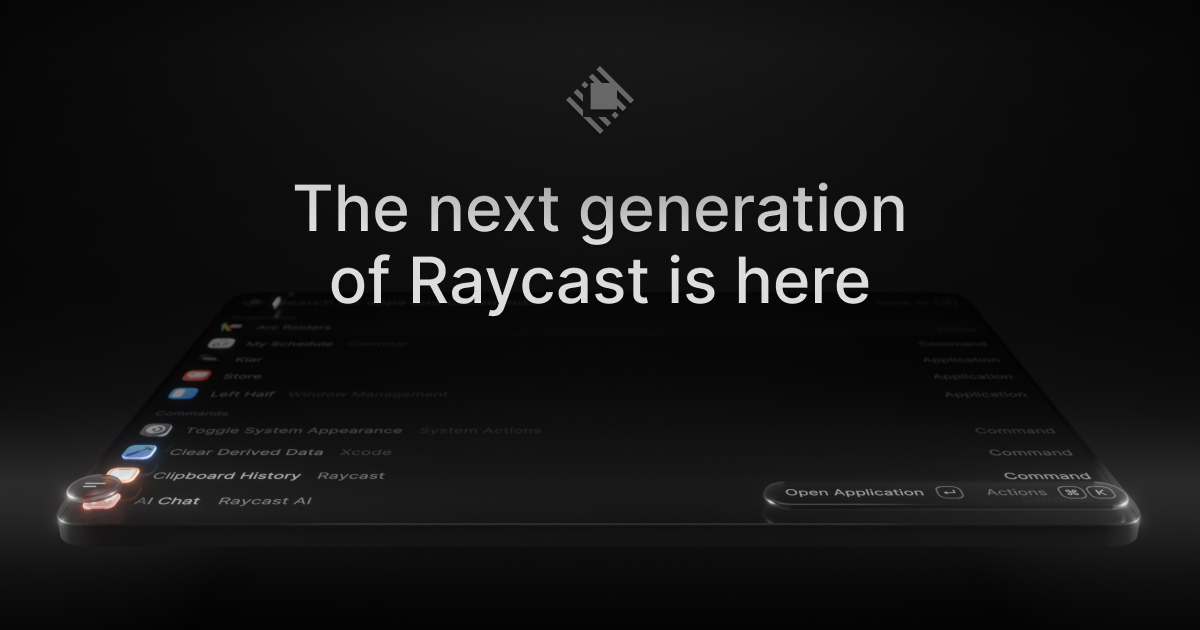
Raycast 2.0 is the next generation of Raycast, the macOS launcher that acts as a single shortcut to everything you do on your Mac. This release is built on a new foundation and redesigned from the inside out, with a refreshed interface that feels right at home on macOS Tahoe. It is made for people who work from the keyboard: it brings AI that can take action across your apps, Automations for recurring tasks, and Projects to keep ongoing work together, alongside the commands and extensions you already use every day. Raycast 2.0 replaces Raycast V1 on installation, and existing users can import their existing setup during onboarding so everything feels familiar. Raycast 2.0 is described as a major update rather than a small point release. On installation, the new Raycast replaces Raycast V1; there are just a handful of missing features, and these will be added soon. The team notes that users should expect frequent updates and occasional rough edges, which signals the product is being shipped and improved continuously. The reason for the rebuild is the scope of what has been added on top of a launcher: an AI experience that can take action across your apps, Automations for recurring tasks, and Projects that keep ongoing work together. Delivering that on top of the original foundation required building a new one, which is why the release is described as redesigned from the inside out and as the launcher, relaunched. The most visible change is the AI experience. Quick AI lives in the same Tab as your existing search, so you do not have to learn a new place to type — it simply brings more power from the surface you already use. AI Chat brings skills, agents, and memory together in one place, so longer-running work can build on what came before instead of starting from zero each time. Raycast 2.0 also brings AI that can take action across your apps, and you can connect your own ChatGPT or Claude account, which means the assistant works alongside the commands and extensions you use every day rather than in a separate tool. Built-in dictation lets you type with your voice, covering the moments when speaking is faster or more practical than using the keyboard. Navigation and search received attention too. File Search now sits in root, described simply as one less step to find your files, while file search itself is faster. Quicklinks and snippets tagging are listed among what is new, and hotkey handling has been improved. Settings have been reorganized so configuration is easier to find, and you can configure inline: hotkeys and aliases can be assigned directly from root search, so a command can be set up the moment you find it. The overall look and feel has been updated to feel right at home on macOS Tahoe, so the launcher matches the operating system it runs on. Beyond the interface, Raycast 2.0 adds two organizing concepts: Automations for recurring tasks and Projects to keep ongoing work together. Automations address the work you repeat — instead of walking through the same steps by hand, the recurring task is handled by Raycast. Projects give ongoing work a home so related items stay together rather than being scattered across your setup. The extension story carries over as well: custom extensions continue to work, and for extensions that do not import automatically you can run npx @raycast/api@latest dev, with the dev command described as clever enough to pick up the new version if it is running. Commands and extensions remain the everyday surface that AI works alongside. Getting started with Raycast 2.0 follows a defined path. You download the build for macOS — version 2.3.1.0 is referenced on the site — and macOS Tahoe and Apple Silicon are required. Raycast v2 is built for macOS Tahoe; if you are still on Sequoia or earlier, you need to upgrade macOS before installing v2. To ensure a seamless onboarding experience, Raycast asks you to install the latest version of Raycast v1, or at least v1.104.16. During onboarding you are prompted to import or migrate your data from Raycast v1. If you skip that step or want to rerun it, you can do it manually with one of two commands: Migrate from Raycast v1, which automatically migrates your data from v1, or Import Settings and Data, a manual import from a .rayconfig file that you must export from Raycast v1. The recommended migration approach also protects your habits. Migrate from Raycast v1 imports settings and migrates all of your shortcuts to Raycast 2.0 while disabling them from working in Raycast v1, which ensures your hotkeys do not conflict. Raycast notes this is the recommended approach because there is some extra data that is not imported with the manual import — this includes Clipboard History, Wrapped and the Emoji picker. The outcome is that you keep a familiar setup while gaining the new capabilities: AI in the same surface as your commands, voice dictation, faster file search, Automations for repeated work, and Projects that keep related work together. Because the update replaces V1 on installation, the transition is a single step rather than running two launchers side by side. Concrete workflows follow the same shape. A developer can keep using Raycast to run commands and custom extensions, and can hand recurring steps to Automations. Someone who works across several apps can use AI that takes action across those apps and connect their own ChatGPT or Claude account so the assistant sits next to the commands and extensions they already use. When files need to be found, File Search in root removes a step and faster file search shortens the wait. When typing is impractical, built-in dictation turns speech into text. Ongoing efforts, rather than one-off tasks, can be grouped into Projects, while quicklinks and snippets tagging cover the links and text that get pasted again and again. Raycast 2.0 is built for macOS users who want a keyboard-first way to work: Product Hunt classifies it under Mac, Productivity and Developer Tools, and the site's own navigation points developers to an API, a manual, a browser extension and a dedicated Developers area. The release requires macOS Tahoe and Apple Silicon and is installed as an app on the Mac. Integrations explicitly mentioned include connecting your own ChatGPT or Claude account and the extension ecosystem, including custom extensions built with the Raycast API and the npx @raycast/api@latest dev command. On the commercial side, the site links to Pro, Teams, Enterprise and Pricing pages, which indicates offerings for both individuals and organizations, although no specific prices are stated on this page. Taken together, Raycast 2.0 is a rethink of an everyday Mac launcher rather than a feature patch. It keeps the launcher at the center — commands, extensions, search and shortcuts — and layers on AI that can take action across your apps, Automations for recurring tasks, Projects for ongoing work, and built-in dictation, all wrapped in an interface redesigned for macOS Tahoe. The goal is stated plainly by the product itself: your shortcut to everything, now with AI put to work alongside the commands and extensions you use every day.
hob is an independent workspace for professional agent work, built for engineering teams that need control. It is aimed at developers who already use agent CLIs such as Claude Code, Codex, or OpenCode as part of real engineering work rather than casual prompting. hob does not provide model access of its own; instead it gives the tools a team already pays for a durable, local-first place to run. Multiple models, terminals, repositories, and parallel agent sessions live inside one workspace, and agents can shape that workspace around each task, coordinate through it, and guide the developer inside it. The stated purpose is to let teams run, review, automate, and recover agent work in the same system, directing more parallel work without piecing together the infrastructure themselves. Agent CLIs are powerful tools, but they were not designed to be a workspace. Running several of them across several repositories turns into a logistics problem: sessions scatter, context is lost when providers change, and returning to work in progress means hunting through terminal windows. Testimonials on the site describe exactly this. One user says they used to run more than six Claude Code instances in a terminal and that coming back to them was a nightmare; another says that with how fast agentic coding changes, staying current used to be a pain. hob answers that gap by separating the model layer from the workspace layer, so the workspace holds parallel sessions, terminals, local history, remote access, and project context across whatever providers a team already pays for. Independence from any single provider is the first pillar of the product. hob works with the inference your team already uses, naming Claude Code, Codex, and OpenCode among the agents it supports. Because subscriptions stay separate from the workspace, switching agent, provider, account, or model is one click, and work no longer lives inside one provider's ecosystem. The workspace runs many models and keeps workflows independent of each other, so a change in one agent does not disturb the others. hob is explicit that it is not a model provider and does not resell tokens: teams bring the agent CLIs, model accounts, API keys, and routing choices they already use, and hob supplies an independent workspace around them. The product describes itself as built from scratch for agent work and always at the frontier of agentic coding, so the work stays consistent and predictable, gets easier, and lets developers do more. Automations are a core part of doing real work in hob. They are used to automate recurring work, such as reviewing and addressing user feedback, and the steps are defined once so that every run does exactly the same thing. That repeatability is the point: a recurring job stops being a manual chore and becomes a defined process that behaves identically each time it runs. Secrets hold the keys an automation needs, and no agent gets them, so no provider does either, meaning credentials stay inside the workspace rather than travelling into a model provider's environment. hob also supports auto-starting anything that needs to stay on while the project is open, so long-running pieces of a workflow come back up with the project. Pull request work happens where the work happens. hob lets you open pull requests, comment on them, and close them, keeping the diff, the conversation, and the change in one place instead of spread across tools. You can run hob pr from an agent, or drive the pull request surface by hand, so the same surface serves automated and manual workflows. Remote issues extend this to the issue tracker: create, comment on, and close issues on GitHub, Gitea, or Forgejo without leaving hob, then hand any of them to an agent to fix. Agent-made issues stay linked to the conversation that produced them, so the reason a change exists does not get lost between the tracker and the agent session. The agent control surface is what makes hob different from a terminal multiplexer. Every agent you run can operate hob itself, not just edit your files, so agents open the files, diffs, and panes you need instead of leaving you to hunt for them. One agent can hand work to another, and both keep running side by side, which supports multi-step jobs where different agents own different parts. An agent can also explain how something works by walking you through the interface, which turns the workspace itself into something an agent can navigate and describe. Together these capabilities make the workspace a shared surface that both the developer and the agents act on, rather than a static container for terminal sessions. Remote access puts the full workspace in a browser and adds a phone companion for steering agents on the move. It drives your actual desktop session rather than a copy of it, so what you see remotely is the same workspace you left. Traffic runs through an encrypted relay and hob never opens a port to the public internet. Worktrees handle isolation on the local side: agents can be given separate worktrees when their tasks need isolation, the main tree stays clean, and parallel edits stay out of each other's way. When the work lands you can keep the branch; when it does not, you throw the worktree away. Together, remote access and worktrees let a developer supervise and separate many concurrent streams of agent work. Privacy is described as a matter of architecture rather than policy. hob runs locally and stores agent conversations in a local database on your device. Regular hob service traffic is limited to read-only checks such as app updates and model-list updates, and agent work travels between you and whatever agent provider you already use, such as Anthropic or OpenAI; hob describes itself as the interface, not the middleman. Pro+'s remote access uses a managed relay at roam.hob.dev, where frames are end-to-end encrypted by hob on top of WebSocket TLS before entering the relay, which forwards encrypted frames only and does not hold the plaintext needed to read workspace or session data. The stated consequence is simple: the hob team cannot read your panes, agent sessions, files, or history. Overall, hob works by taking the infrastructure concerns of agent work and putting them into one local application. You download hob for Linux or request a demo, point it at the agent CLIs, model accounts, and API keys you already use, and the workspace becomes the place where sessions, terminals, history, automations, pull requests, and issues are managed. Agents are not boxed into the workspace passively; they are given the ability to operate it, coordinate with each other, and guide you through it. Because the workspace layer is independent of the provider layer, swapping a model or an account does not require rebuilding a workflow. The same system is used to run work, review it, automate it, and recover it, which is what the product means when it says the tools the job needs are already there. The promised outcomes are control, continuity, and portability. Control comes from keeping subscriptions, provider choices, and credentials separate from the workspace, so a provider change is one click rather than a migration. Continuity comes from local history and persistent workspaces: users describe being able to shut a laptop and return to every workspace exactly where they left it, ready to resume, instead of rebuilding context. Portability comes from the local database, which stays on the machine and remains accessible regardless of subscription status, so if you cancel, your conversations, workspaces, and history remain yours. Reviewability comes from having diffs, conversations, and changes in one place, and recoverability comes from worktrees that can be kept or discarded depending on whether the work landed. Several concrete workflows are described on the site. Teams automate recurring work such as reviewing and addressing user feedback, defining the steps once so each run is identical. Developers open, comment on, and close pull requests from inside hob, or run hob pr from an agent, keeping the diff and its discussion together. Issues on GitHub, Gitea, or Forgejo are created, discussed, and closed inside hob, then handed to an agent to fix while staying linked to the conversation that produced them. Parallel agent work is isolated using worktrees so the main tree stays clean. Developers steer agents from a phone or a browser through encrypted remote access, and can ask an agent to walk them through the interface when they need to understand how something works. The vendor also notes when hob is not worth it: if you only use AI coding tools occasionally or mostly chat with one model in one app, the organizational benefits do not apply. hob's stated audience is developers who already use agent CLIs as part of real engineering work, not casual prompting, specifically people who run Claude Code, Codex, OpenCode, terminals, multiple repos, or parallel agent sessions daily. Integrations mentioned in the content include Claude Code, Codex, and OpenCode for agents; GitHub, Gitea, and Forgejo for remote issues; and the inference providers a team already uses, with Anthropic and OpenAI given as examples of where agent work goes. The Linux build is distributed directly, and a demo can be requested. The content references a plan called Pro+, whose remote access uses the managed relay at roam.hob.dev, and notes that subscription status does not affect access to local data. hob does not include Claude, Codex, or model access and does not resell tokens. In short, hob is an independent, local-first workspace that gathers the tools of professional agent work, models, sessions, automations, pull requests, issues, remote access, and isolation, into one place. It leaves model access and routing with the providers a team already pays for, and keeps the workspace itself under the team's control.
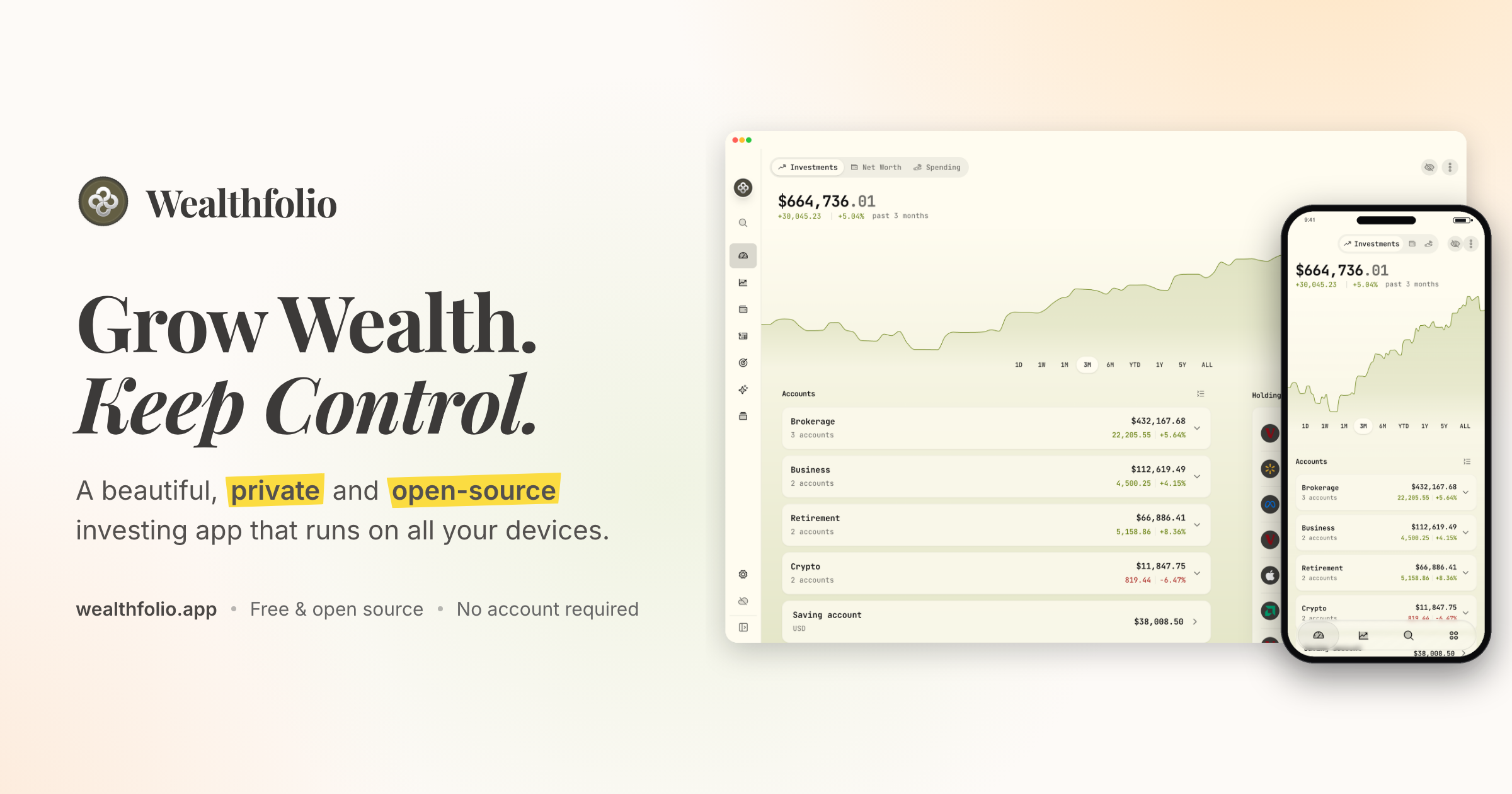
Wealthfolio is a private, open-source investing and personal finance app that runs locally on all your devices. It lets you track holdings, performance, allocation and income across your accounts, follow your net worth, understand your spending, and plan for goals and retirement. The product is aimed at people who want to grow their wealth while keeping control of their financial data, and its core app works without an account or a subscription. Wealthfolio is available on desktop, iPhone and iPad, and can also be self-hosted so you can access it through a web browser on infrastructure you control. The project describes itself as a beautiful, private and open-source investing and personal finance app that runs locally. The problem Wealthfolio addresses is the trade-off many people face between useful financial software and control over sensitive data. Traditional money apps typically require an account and keep financial history in a cloud platform, which means your financial history becomes dependent on another service. Wealthfolio takes the opposite approach: it runs locally, works without an account, and keeps your financial history under your control. The project is also open source, so the code can be inspected, contributed to and run on infrastructure you choose, and users are not forced to create an account or commit to a subscription before they can start. In the investments area, Wealthfolio brings all your brokers and banks into one view. You can track holdings, performance, allocation and income across your accounts, and import CSV statements from anywhere, which means data from a brokerage or bank that is not automatically supported can still be brought into the app. Portfolio Insights help you understand your asset allocation, sector exposure and geographic distribution, so you can see how your money is spread rather than just what it is worth. A Performance Dashboard lets you compare accounts and benchmark against the S&P 500 or any ETF. Allocation Targets & Rebalance let you set target weights, see your drift and get a clear rebalance plan, while Income Tracking follows dividends and interest income across your entire portfolio. Net Worth Tracking pulls all your assets and liabilities together so you can see your complete financial picture over time, rather than looking at individual accounts in isolation. The Spending & Budgets area tracks cash flow, auto-categorizes transactions and helps you build budgets that fit you. Together these tools let you follow both sides of your finances: what you own and what you owe, and where your money is going month to month. Planning tools cover both long-term retirement and shorter-term goals. The Retirement & FIRE Planner provides a year-by-year simulation with a Monte Carlo Risk Lab and a dedicated FIRE mode, so you can model how a plan might evolve under different conditions rather than relying on a single projection. The Goals & Save-Up Planner projects savings to a target with a milestone glide path and an on-track status, which makes it easier to see whether you are moving toward a specific purchase or savings milestone. Contribution Limits help you stay on top of IRA, 401(k) and TFSA contribution room, so you do not lose track of how much you have already contributed or how much room remains. Architecturally, Wealthfolio keeps a local database on your device where accounts, transactions and history are stored. You can install it directly as a standalone application, or self-host it with a Docker deployment and access it through a browser. Wealthfolio Connect is not a third way to run the app; it is an optional paid service that adds automation and synchronization on top of a standalone or self-hosted setup. Connect automatically imports from your brokerages through aggregators such as SnapTrade and keeps your Wealthfolio database in sync across devices. The core app remains fully usable on its own, with manual accounts and transactions, CSV imports and local data ownership. The main benefit is keeping your financial life under your control. Because the app runs locally and works without an account, your financial history stays on your devices instead of becoming dependent on another cloud platform. Because it is open source, you can inspect the implementation, follow development, contribute through GitHub, or run the software on infrastructure you control. Flexibility is another outcome: you can start free with manual tracking and add automation only when manually maintaining your financial data no longer makes sense. Typical use cases include importing CSV statements from a broker or bank to consolidate holdings in one view; tracking net worth across assets and liabilities over time; tracking cash flow and building budgets with automatically categorized transactions; comparing accounts and benchmarking returns against the S&P 500 or an ETF; setting target allocation weights and following a rebalance plan; and projecting retirement or FIRE scenarios year by year. Users who want everything in one always-available place can self-host with Docker and reach Wealthfolio from a browser, and households that want shared finances can use Connect's household sharing. Wealthfolio is available as a standalone install for macOS, Windows, Linux, iPhone and iPad, and as a self-hosted instance reachable through a web browser. The Wealthfolio app is free and open source and does not require an account, while Wealthfolio Connect is an optional subscription for automatic brokerage imports, encrypted device sync, household sharing, background updates and connection management. The project can be extended through add-ons such as the Investment Fees Tracker, Goal Progress Tracker and Stock Trading Tracker, and through custom price feeds for assets and markets not covered by the default providers. Supported AI and agent integrations are available through an MCP server, and an AI Assistant lets you ask questions about your portfolio. In short, Wealthfolio combines investment tracking, net worth tracking, spending and budgeting, and retirement and goal planning in one app that stores your data locally. It is free and open source by default, works without an account, and can be extended with automation through the optional Connect service. For anyone who wants a complete picture of their finances without handing their financial history to another cloud platform, Wealthfolio's primary value proposition is simple: grow wealth, keep control.
Viso Now is a self-building AI vision platform that turns images, video, and camera feeds into working computer vision applications. Instead of training models, annotating data, or writing code, users describe in plain language what they want to understand, and Viso Now builds the agentic vision logic and custom live dashboards for them. The platform is aimed at teams and individuals who need to solve real-world visual problems across industries such as construction, manufacturing, logistics, healthcare, food and beverage, oil and gas, hospitality, and transport, and who want to create, run, and manage entire computer vision products and systems from scratch on one platform. Traditional computer vision projects depend on model training, data annotation, and custom software engineering. That work is slow, expensive, and hard to maintain, and it often results in isolated, single-purpose solutions that address one use case at a time. The website states this directly: not all computer vision is equal, and isolated solutions are no longer enough. Viso's stated answer is a platform that drives business capabilities rather than leasing a single outcome that solves a single use case, offering flexibility, extensibility, and complete control of data across multiple locations. Because prompt-driven building removes labeling and model maintenance, the platform reports 90% less ML engineering effort compared with conventional approaches, along with an 85% reduction in the time-to-value of computer vision applications. At the center of Viso Now is prompt-based application building. A user describes the real-world situation they want AI to solve in plain language, and watches as Viso builds the application with them in real time. No model training and no annotation are needed. Each build produces agentic vision logic together with a custom live dashboard, so the result is not simply a detection model but an application that can be monitored and operated. The product page describes prompt-to-live-vision-agent in minutes and Visual General Intelligence for any use case, meaning the same engine is applied regardless of the industry or the problem being addressed, and applications connect seamlessly to other systems. Viso Now accepts multiple kinds of visual input. Users can click to upload or drag video files in MP4, MOV, or MKV, and images in PNG or JPG, or they can capture media directly using a device camera by taking a photo or recording video. When building, users choose how much effort the system applies by selecting between Fast, Balanced, and In-Depth modes. They can also start from a template or an example instead of a blank prompt. Once a draft application exists, users iterate on it until they are happy with the finished solution, and then go live by connecting cameras or uploading connectors so the application can be used immediately. The platform provides a template gallery of ready-made vision applications that illustrate what can be built. Templates include Task-Aware PPE Check, Excavator Near-Miss Monitor, Hot Work Safety Check, Work-at-Height Safety Check, MEWP Fall Protection Check, Clinical PPE Protocol Check, GMP Hygiene Check, Loading Dock Exclusion Zone, Dock Turnaround Intelligence, Front Desk Wait Tracking, Check-in Queue Orchestrator, Restricted Site Vehicle Alert, Hazardous Area PPE Check, Pipeline Integrity Scout, Visible Release Detection, Robot Cell Intrusion Detection, Production Area Access Check, 5S Shop Floor Audit, Emergency Exit Clearance, Reversing Vehicle Danger Zone, HSE Workplace Audit, Commercial Vehicle Safety Screening, Dump Zone Safety Inspector, Abandoned Luggage Response, Handling Risk Assessment, and Service Queue Pressure Analysis. Each template describes the assessment it performs — for example assessing truck handling performance at loading bays, or tracking whether a warehouse is safe, clear, and compliant for operation. Viso handles the end-to-end infrastructure behind these applications, from compute and visual analysis to governance, authentication, and integrations, so teams do not have to assemble and maintain that stack themselves. The offering is organized as two products on one platform. Viso Now is the free entry point with no credit card required; it is free forever, users can invite their team, and sign-up works with Google, Microsoft, or an email address. Viso Suite is the enterprise product for running vision intelligence at the scale of an operation: 10,000+ cameras across hundreds of sites, a full lifecycle of build, deploy, govern, and scale, edge AI with on-premises or cloud support, and compliance with SOC 2, ISO 27001, GDPR, and CCPA. Overall, Viso Now follows a describe, build, refine, and operate workflow. A user uploads or captures media and describes the situation they want the AI to solve. The system then generates agentic vision logic and a live dashboard in real time, so the application is visible and testable while it is being created. The user iterates until the solution matches the requirement. Going live is a matter of connecting cameras or uploading connectors, at which point the application runs continuously. Because Viso manages compute, visual analysis, governance, authentication, and integrations, the same platform supports building, running, and managing complete computer vision systems, and the enterprise tier extends that approach to governed applications and agentic workflows across many sites. Viso states a number of outcomes for users. Visual data can be understood ten times faster, to drive efficiency, automation, and innovation. The company reports an 85% reduction in time-to-value of computer vision applications and a 90% reduction in ML engineering effort, since there is no labeling and no model maintenance. A customer story describes a global manufacturer that replaced four point solutions with one Viso deployment and saw near-miss incidents fall 54% within 90 days, with the safety team spending zero hours rebuilding models. The platform is described as giving 24/7 eyes on every camera that never blink and never tire, and as running AI vision ten times faster than other methods. PwC is quoted saying that building computer vision applications with Viso Suite allows them to deliver business value faster and easier, while Stadt Schaffhausen notes that Viso Suite let them integrate existing camera and software systems across platforms while meeting strict privacy requirements. The applications listed on the site show the practical range of use cases. In construction, templates cover PPE compliance, near-miss monitoring around excavators and plant, hot work safety, work-at-height checks, and MEWP fall protection. In manufacturing, they cover robot cell intrusion detection, production area access checks, 5S shop floor audits, emergency exit clearance, and handling risk assessment for lifting tasks. In logistics and warehousing, they cover loading dock exclusion zones, dock turnaround intelligence, and warehouse HSE audits. In healthcare, they cover clinical PPE protocol checks and service queue pressure analysis; in food and beverage, GMP hygiene checks and foreign object detection; in oil and gas, hazardous area PPE checks, restricted site vehicle alerts, pipeline integrity scouting, and visible release detection; and in hospitality and transport, front desk wait tracking, check-in queue orchestration, airport baggage detection, and abandoned luggage response. Customer stories reference worksite safety for a rail group, safety and compliance oversight for a global food retailer, PPE detection for a leading oil company, and crowd safety at a major annual event. Viso Now is designed for people who need vision AI but do not want to run a machine learning program — operators, safety and compliance teams, and builders who want to turn an idea into a working vision agent quickly. The free tier requires no credit card and allows inviting a team. Enterprise customers move to Viso Suite for camera fleets at scale, governed applications, edge, on-premises or cloud deployment, and formal compliance certifications. Access is through the web, with sign-in via Google, Microsoft, or email. The company reports that its platform covers 136+ applications tuned for every industry, all running on the same Visual General Intelligence engine, and states that it is trusted by Fortune 500 organizations, with customer logos including Enpro, Vinci, CPI, Intel, Rhomberg, and Datwyler. Viso Now's core promise is that if you can describe it, you can build it. By removing model training, annotation, and coding from the computer vision workflow, and by generating agentic vision logic and live dashboards from a plain-language prompt, the platform lets teams go from an idea to a running vision agent in minutes and then scale the same approach across many cameras and sites with Viso Suite. The result is faster time-to-value, far less ML engineering effort, and continuous, tireless monitoring of the physical world — detecting, inspecting, alerting, and understanding — without assembling a large specialist team.