Category Focus/categories/automation
Automation AI Tools
Discover and compare the best automation AI tools and software. Browse 599+ curated tools with reviews and rankings.
Projects tracked
599
Sort mode
RECENT
Page
1
Discover and compare the best automation AI tools and software. Browse 599+ curated tools with reviews and rankings.
Projects tracked
599
Sort mode
RECENT
Page
1
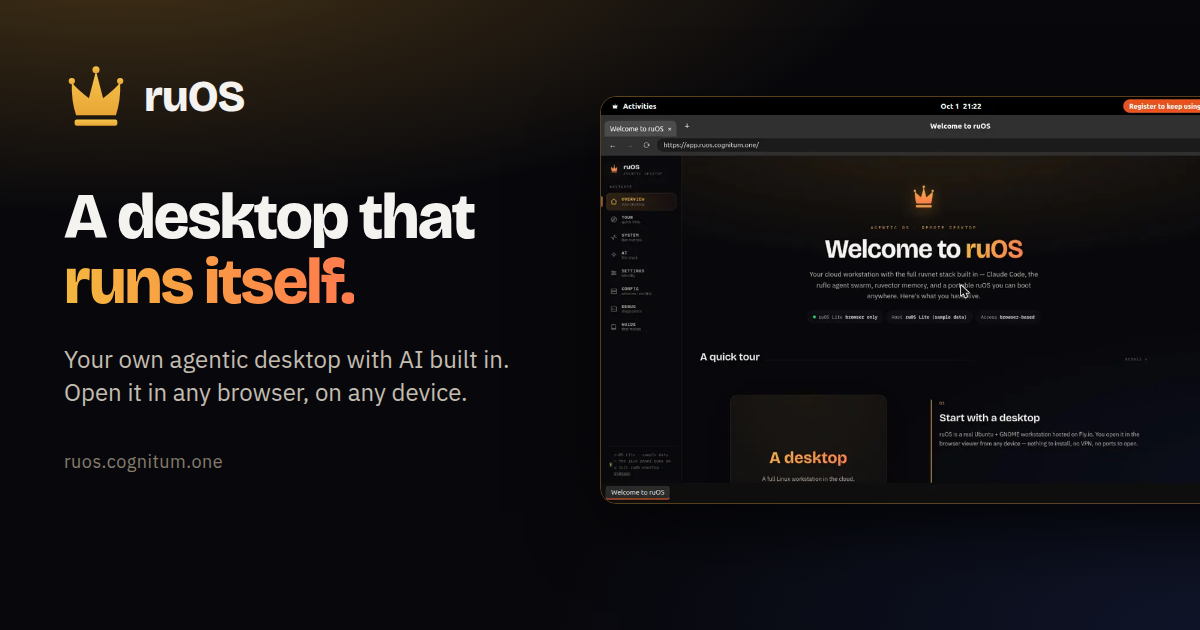
ruOS is a private cloud desktop with an AI team built in. Instead of installing software or waiting for a machine, you sign up and get your own agentic desktop, bound to your account, that starts in seconds with the whole AI stack preinstalled and signed in — Claude Code, a team of AI helpers, and self-learning memory, all ready to go. You ask for research, writing or code and the helpers do it side by side, either while you watch or after you step away. The whole desktop opens in any web browser and reshapes to fit any screen, so the same session works on a Mac, an iPad, a Chromebook or a Linux laptop. Most people who want AI to do real work end up assembling it themselves: installing editors, wiring up agents, keeping contexts straight across tools, and repeating the same explanations to a model that has already forgotten the project. ruOS starts from the opposite position. There is no machine to wait for and nothing to configure — the desktop turns on with its AI helpers already installed and signed in, and everything the AI learns is saved automatically so you never explain twice. Files and AI memory persist across devices, so the desktop is not tied to the laptop you happened to start on. The point is to remove the setup and the syncing, not to add another tool you have to manage. At the center of ruOS is a set of AI helpers that ship ready on the desktop. Claude Code writes and runs code for you. ruflo acts as a team of AI helpers, splitting a big job across several agents that work side by side. ruvector remembers your work, so projects carry their context forward. ruview understands what is on your screen. Codex provides extra coding help, and VS Code, the code editor, is part of the dock. Together they turn a request into finished work: tell it what you want changed and it edits the files, runs the tests, and tells you when it is done. Ask a question and it browses the web, reads the sources, and brings back the answer. ruOS runs as a desktop that streams to any web browser and reshapes to the screen it lands on — the same session on your Mac, iPad, or laptop, with nothing to install and nothing to sync. It fits any window the moment you open it: sharp on a big monitor and comfortable on a tablet, with no fiddling with zoom. Because the desktop is not tied to one machine, you can start work on your laptop and keep going on your iPad. ruOS Lite takes the same idea and removes the wait entirely: it is a real Chrome browser drawn as your ruOS desktop, right inside your web page, opening in about a second with tabs and windows, a dock of apps, and the ruOS app first. It is free and needs no sign-up. ruOS picks up where you left off. Files and everything the AI has learned are saved automatically, so you can come back tomorrow and continue — even from a different device. In ruOS Lite, sign-ins, site data and open tabs are saved and encrypted. VS Code runs from the dock as vscode.dev, with extensions such as 1Password, Bitwarden, Claude and uBlock Origin Lite available when you turn them on. Your AI can drive the desktop too: ChatGPT and Claude see and click it through the ruOS connector, but never your extensions, and payments wait for you. Each desktop is your own — your files, your work, your AI — kept separate and private from everyone else's. The setup is four steps. First, you sign up: enter your email and ruOS sets up a private agentic desktop bound to your account, with no setup and nothing to configure, ready in minutes. Second, your desktop turns on in seconds with the AI stack preinstalled and signed in. Third, the AI gets to work: ask for something and a team of helpers researches, writes, and codes while you watch, or step away and come back to finished work. Fourth, you open it anywhere — the desktop streams to any browser and reshapes to the screen. Under the hood, for developers and power users, it is a real Linux box with the full ruvnet stack and programmatic control already installed. The payoff is that work happens without you operating every step. Hand ruOS a job and it picks the right tool and gets to work; the helpers write and run code, research on the web, remember your projects, and understand what is on your screen, all from one agentic desktop. Big jobs get split across several AI helpers instead of queuing behind one. Because memory persists, you avoid re-explaining the project each time. Because the desktop lives in a browser, your environment follows you rather than being locked to one machine. And because your desktop is private and separate, your files, your work and your AI stay your own. Concrete uses map directly to what you can ask for. Code: tell ruOS what you want changed, and it edits the files, runs the tests, and reports when it is done. Research: ask a question and it browses the web, reads the sources, and brings back the answer. Parallel work: split a big job across several AI helpers that work side by side. Cross-device continuity: start on your laptop and keep going on your iPad. Browser-first sessions: ruOS Lite gives you a Chrome-based desktop with VS Code, Wikipedia and ChatGPT in windows and a taskbar in about a second, useful for trying the environment or working on a Chromebook, iPad or locked-down machine. Developer automation: point an MCP client such as Claude at your desktop and let it drive the machine. ruOS ships an MCP server, ruos-computeruse-mcp, that lets an AI client drive the desktop for real: see the screen, move the mouse and type, run shell commands, trigger system actions, and change the resolution on the fly, using tools such as screenshot, mouse_move, left_click, type_text and key via xdotool, run_shell, system_action and desktop_resolution. You can point a client at the desktop with stdio over SSH, or connect through the hosted address at the quick start page — ChatGPT under Settings, Apps & Connectors, Create; Claude under Settings, Connectors, Add custom connector; and Claude Code with a single command. Resolution presets include 720p, 1080p, 1440p, qxga or a custom width by height, applied server-side via xrandr, with a hosted MCP endpoint on the roadmap. The preinstalled ruvnet stack is one command away too: npx ruflo@latest init wizard for agent-swarm orchestration, npx ruflo@latest swarm init --topology hierarchical to spin up a team of AI agents, npx ruvector for long-term self-learning memory, and npx ruflo to run the ruflo agent runtime. ruOS is built for people who want AI to carry work through to completion without a local setup project — developers and power users who want a real Linux box with programmatic control, and anyone who wants research, writing and code handled from a browser on whatever device is in front of them. It is free to try, since ruOS Lite opens in seconds with no sign-up, while early access to your own private agentic desktop requires a sign-up and the desktop is ready a few minutes later. In ChatGPT, ruOS uses only the desktops and metered entitlements already assigned to your account, and the ChatGPT app and its linked review surfaces do not present pricing, checkout, subscriptions, upgrades or credit purchases. The takeaway is simple: sign up once, and your desktop does the rest. ruOS puts a private agentic desktop in any browser, with an AI team that researches, writes and codes for you while you watch or step away, and keeps your files and memory waiting when you return.
Ghostifier is a data privacy service that finds every company holding your personal information and gets them to delete it. Rather than completing one request form per company by hand, Ghostifier starts from your inbox: after you sign in with Google, it scans your Gmail to identify the companies that email you and builds a list of everyone who has your details. From there it unsubscribes you from mailing lists, opts you out of the sale and sharing of your data, and asks companies to delete what they hold, tracking every reply along the way. It is free to see who has your data, and it works with Gmail. Companies accumulate a great deal of information about you over time. Your name and address are handed over with every account you open and every order you place. What you buy is saved in purchase histories attached to a profile with your name on it. How you browse is gathered to target ads at you. Where you go is collected by apps and sometimes sold. Data brokers add another layer: they collect and sell information about people who never heard from them at all. Exercising your privacy rights normally means hunting down each company and filing a separate request, which is why most people never do it. Ghostifier's approach is to begin from the records already sitting in your inbox, so the work of identifying who holds your data happens automatically instead of manually. The first step is connecting Gmail. You sign in with Google, and the first scan looks back about two years and shows you every company it finds. Ghostifier is explicit about what it accesses: the sender, the subject line, the date and any unsubscribe link in the header. It cannot open your message bodies or attachments, and it does not store your emails. That narrow set of signals is enough to recognize the companies behind the mail you receive. The scan starts right away after a single sign-in, and the result is a list of every company that has your information along with what kind of company each one is. Once the scan finishes, you see the scale of the problem laid out. In the example shown on the site, 412 companies have your data, of which 148 are marketing mail suitable for unsubscribing. Ghostifier also flags companies it will not delete: 108 in the example, including 61 used within the last year and 38 household names. Nothing has been sent at this point, the scan is purely informational, and the free plan covers this discovery step plus unsubscribing from every list that supports one-click unsubscribe. Seeing who has your data costs nothing; asking them to delete it is where the paid plans begin. After you approve, Ghostifier unsubscribes you from every list that supports one-click unsubscribe, tells each company in writing to stop selling or sharing your data, and then asks it to delete. Deletion happens once any waiting period has passed, such as the return window on an order. Each request is tracked to the legal deadline where your state has one, and if a company misses its deadline Ghostifier follows up once. Every request generates a receipt: the letter, when it went out, and what the company said back, kept in the company's own words as proof. Data brokers are handled too. Ghostifier asks 220 registered brokers to delete your details even if they never emailed you, and the dashboard shows how many were asked, how many replied and how many were done or had nothing on file. You stay in control throughout. You see every company and the plan for it before anything goes out, and nothing is sent until you say go; you can also approve each company yourself. The control center lets you pick how much Ghostifier does on its own for each kind of company, using defaults by relationship from the Balanced preset. Marketing-only relationships are handled automatically for unsubscribe, opt-out and delete, with deletion held 48 hours first. Account and updates, and purchases, ask you before unsubscribing or opting out, and are left alone for deletion. Certain categories are never deleted whatever you pick: banks, insurers, doctors, schools and employers; password managers, email and storage, domains and crypto; anything you used in the last year; and household names like Google and Spotify. Those companies can still be asked to stop selling your data, as your settings say. Settings can be changed at any time. Ghostifier's distinguishing choice is its method. Requests are sent from Ghostifier's own address on your behalf, acting as an authorized agent with a signed written authorization you grant once when you pick a plan. The site publishes the deletion request it sends, which cites the California Consumer Privacy Act as amended by the CPRA, notes the 45-day response window, and asks companies to instruct any service providers or third parties they shared data with to delete it too. A separate version is used for data brokers, covering records they gathered from other sources. There is no AI in the loop: every decision follows fixed rules, so behavior is predictable. Autopilot adds a daily check of your inbox, handling companies found later as they appear and following up with companies that keep emailing after you unsubscribe. Payments go through Stripe, and Ghostifier never sees your card. The outcome is a measurable reduction in who holds your data. The dashboard shows counts for Ghosted, meaning companies that have confirmed deletion, and Waiting, plus a Needs you queue for anything requiring your attention, such as a company that emailed you directly to verify the request. A daily activity view over the last three days breaks down requests per day into sent, replies received and completed. Companies confirm in their own words, as illustrated by a confirmation that data was deleted from their systems, and those messages land in your inbox as proof. One user quoted on the site, Jonathan W., describes the emails from companies he never knew had his data confirming deletion as a highlight. Data retention is limited: a list of companies and a few dates, plus each letter and reply encrypted so only you can read them, held until 30 days after a request finishes and deletable sooner. Typical scenarios include clearing out years of accumulated marketing mail by unsubscribing from lists in bulk; reducing the sale and sharing of your data by sending written opt-outs; requesting deletion from online retailers after a waiting period such as a return window has closed; asking 220 registered data brokers to remove records you never signed up for; and keeping the picture current with Autopilot's daily inbox check and weekly summary email so newly appearing companies are handled as they show up. The Needs you queue handles the common case where a company writes to your account address to verify a deletion request, sending you a link or asking for a reply that you complete yourself and then mark done. The site also answers twelve questions in its FAQ, with longer explanations on its data page. Ghostifier is aimed at people who want their personal data reduced without doing the paperwork themselves, particularly those comfortable connecting Gmail and granting written authorization for an agent to act on their behalf. It works with Gmail only, and is delivered as a web dashboard. Payment processing runs through Stripe. Pricing has three tiers: Free at $0 forever, which includes seeing every company that has your data and unsubscribing from every list that supports one-click unsubscribe; Cleanup at $29 one time, adding opt-out and deletion requests to every company found so far, deletion requests to 220 registered data brokers, tracking to the legal deadline with a follow-up, and a receipt for every request; and Autopilot at $59 per year, about $5 a month billed yearly or $8 monthly, which is recommended and adds companies found later handled as they appear, a daily check of your inbox, follow-ups for companies still emailing after you unsubscribe, and a weekly summary email. Upgrading to Autopilot within 60 days counts the $29 Cleanup toward the first year. In short, Ghostifier turns a scattered, manual privacy chore into a single tracked workflow that begins with your inbox: you connect Gmail once, review the companies it finds, approve what should happen, and then watch unsubscribes, opt-outs and deletion requests go out and get answered, with every step recorded and nothing sent without your say-so.
Fuse AI is a revenue automation platform that uses AI agents to find, qualify, and engage high-intent customers in a given market. The company positions itself as sales superintelligence for modern revenue teams, and the site names sales representatives, founders, RevOps teams, and go-to-market professionals as the people it is built for. Its purpose is to help organizations grow revenue by handling the work around selling: discovering the right prospects, enriching their contact data, surfacing buying intent, and running personalized outreach. Fuse describes itself as open by design, able to replace point solutions or plug into an entire stack to run alongside existing tools from day one. It is backed by Y Combinator and is used by sales and marketing professionals from more than 1,000 startups and enterprises worldwide. The problem Fuse addresses is tool sprawl. As the company frames it, a go-to-market stack should not need a dozen tools, subscriptions, and APIs stitched together, with a separate product handling every step of the workflow. Fuse takes care of web automations, data enrichment, multi-channel outreach, workflows, and AI agents inside a single platform, and it lets teams build unlimited workflows and agents on top. The Product Hunt listing describes the offering as thinking of OpenRouter, Apollo, Clay, and Zapier combined. The stated consequence of the legacy approach is that reps spend their time switching between tabs, cleaning outdated contact data, and managing automation tools rather than selling, and that buying signals get missed along the way. Prospecting and Data Enrichment is the first of the three product areas Fuse highlights. Teams use it to find their ideal customer profile across more than 850 million contacts and to enrich records with better than 90% accuracy. Fuse continuously verifies and enriches data across more than 40 providers, so every record carries the latest available information and reps spend less time fixing stale details. On the site's data accuracy benchmark, Fuse reports 95% accuracy, compared with 82% for ZoomInfo, 78% for RocketReach, and 74% for Apollo. The promised outcome is straightforward: reach the right people with confidence and turn accurate data into action. Multi-Channel Engagement covers outreach. Fuse automates personalized engagement across email, LinkedIn, and phone at scale, so a single workflow can reach a prospect on the channels where they are most likely to respond. The platform benchmarks deliverability, reporting higher open rates across every campaign, audience, and message than the alternatives it compares against, with the goal of turning outreach into conversations. Teams can also track how campaigns perform across audiences, messages, and sequences to see what consistently drives higher open rates, understand which campaigns capture attention, and identify which need improvement. That performance data is meant to help refine messaging and targeting so more opens become meaningful conversations and opportunities. Signals and Account Intelligence is the third product area. Fuse spots buying intent with more than 50 real-time signals across target accounts, and the site frames signals as the difference between acting on intent and missing it, with a call to action asking whether the reader is 30 seconds from never missing a buying signal again. Agentic Search complements this by finding the right prospects through an understanding of intent, context, and the signals that matter rather than simple keywords. It uncovers relevant companies and people across multiple data points, giving teams a faster way to build targeted prospect lists, prioritize the right accounts, and turn searches into actionable opportunities. Automation Ease is how Fuse lets teams build and run powerful workflows without complex setup or technical expertise. Users create triggers, define conditions, and automate repetitive tasks across prospecting, enrichment, CRM updates, and outreach. Because fewer manual steps and less configuration are required, teams can launch workflows faster and keep processes running automatically, from simple actions to multi-step sales workflows. Fuse also exposes this capability to AI agents: a developer or agent adds the Fuse skill and connects over MCP at mcp.fuseai.com, installs it using the documentation's skill.md, and then simply signs in. Product Hunt summarizes the developer-facing pitch as one SDK and one MCP for the entire go-to-market workflow, so unlimited workflows and agents can be built on top without stitching together separate GTM products for every step. Fuse has also extended beyond its own interface. The site announces that Fuse now works inside Claude, giving Claude the ability to automate sales workflows across an organization. The same connection pattern is presented for other agents, with Claude, OpenAI, Cursor, Gemini, and GitHub Copilot all listed as tools that can be given the Fuse skill, and a note that the agent adds the Fuse skill and connects over MCP while the user just signs in. The platform is described as an agentic harness that upgrades a legacy sales stack, and because it is open by design it can run alongside existing tools from day one rather than requiring a migration away from them. For teams already working inside a coding assistant or a general-purpose AI assistant, this means sales automation becomes available from the tools they already use. Fuse also outlines the controls that enterprise IT departments are said to need before saying yes. Access control provides granular permissions over who can build, run, and connect what. Guardrails let administrators set what agents can touch and what needs a human first. A single console controls agent behavior company-wide, and full visibility covers usage and spend across every agent and every team. Infrastructure is described as secure, with isolated cloud environments per agent, and Fuse says there is no lab lock-in, meaning teams can use new models immediately when they launch without migrating to a new AI app. Compliance badges list SOC 2 Type I, described as in progress, along with GDPR, CCPA, and CASA Tier 2. The benefits Fuse claims follow directly from these capabilities. More accurate data is meant to lead to more revenue. Better deliverability is meant to mean more revenue through higher open rates across every campaign, audience, and message. Higher quality signals are meant to mean more revenue by uncovering relevant companies, people, and opportunities automatically. Powerful automation is meant to mean less setup for prospecting, research, enrichment, and outreach. Across the benchmarks section, each capability is tied back to revenue, and the overall promise is less complexity and more pipeline so teams spend more time selling and less time switching tabs. Concretely, the platform supports several common workflows. A sales team can search for the right prospects with AI, go beyond keywords, and build targeted lists of relevant companies and people. A rep or RevOps lead can build a workflow with triggers and conditions that enriches new contacts automatically, updates the CRM, and starts multi-channel outreach without manual steps. A team can monitor more than 50 real-time signals across target accounts to catch buying intent as it appears, then track campaign performance across audiences and sequences to see what drives opens. Finally, developers and AI agents can connect Fuse over MCP and give an assistant such as Claude the ability to run sales workflows across an organization. Fuse is built for revenue teams, including sales representatives, founders, RevOps, and go-to-market professionals, and the site says it is used by sales and marketing professionals from over 1,000 startups and enterprises worldwide. Larger organizations are addressed through a dedicated security and enterprise section. Fuse AI is available as a web application, with sign-in and sign-up through app.fuseai.com, and it exposes both an SDK and an MCP server for programmatic and agent-based access. A public pricing page exists, the primary call to action is to start for free, and a demo can be requested by booking time with the founders. Taken together, Fuse AI is a revenue automation platform that consolidates the tooling around outbound sales into one place. It combines prospecting and data enrichment across hundreds of millions of contacts and dozens of providers, multi-channel engagement across email, LinkedIn, and phone, and more than 50 real-time buying signals, then wraps them in automation that requires little setup. Its distinguishing approach is openness: Fuse can sit alongside an existing stack, and it can be driven by external AI agents through MCP. For revenue teams looking to reduce complexity and generate more pipeline, that combination is the core value proposition.
Incredible is an AI that does tasks on your computer. It is a desktop app for macOS and Windows that clicks and types in your browser, files, and apps, exactly like you do, so the busywork gets done while you do something else. Incredible is a personal AI assistant that gets work done directly inside the applications you already use. Rather than only producing an answer you must act on yourself, Incredible performs the action on your machine: you give it a task, and Incredible does the work on your computer, in the same places you would. The company describes the product as "vibe computing" and frames it as a way to control your computer with your voice. The problem Incredible addresses is the gap between getting an answer and getting work finished. As the website puts it, a chatbot writes the answer, but you still have to put it into each app yourself — Incredible puts it there for you. Repetitive work such as building leads lists, summarizing reviews, screening resumes, filing receipts, sending invites, booking meetings, drafting reports, updating a CRM, reconciling a sheet, submitting forms, answering threads, organizing docs, compiling research, and outlining a deck still has to be carried out step by step across many different applications. Incredible is designed to close that last mile by acting on your computer instead of only advising you. The site illustrates the difference with a comparison measured on select repetitive workflows across multiple domains, showing work done on your own, with a chatbot, and with Incredible, while noting results vary by task. The first capability group centers on how you direct Incredible: voice and screen. You hold the activation key and say what you need in your own words, and you can also type the task. When you activate Incredible, it can see the page or document in front of you. That screen context means you can say something like "reply to this" without explaining which email you mean, because Incredible uses whatever is in front of you as the reference point. Voice removes the need to navigate menus for routine requests, and screen awareness removes the need to spell out context that is already visible. The second capability group covers where Incredible works: your browser and your apps. Incredible uses websites the way you do, clicking through pages and filling in forms on the sites you are already signed in to. It opens the apps you already use and moves information between them, so you no longer copy and paste from one app to the next. More than 3,000 apps connect to Incredible directly, and any other app you can open in your browser works too. Because Incredible operates in the same places you do, there is no migration step and no need to rebuild your workflows inside a new tool. The third capability group covers what Incredible actually does and how you stay in control: actions, reminders, control, and privacy. Incredible sends the emails and fills in the forms for you, then tells you when the task is done. You can also tell Incredible what needs your attention and when, and Incredible reminds you at that time with the details you gave attached to the reminder. Crucially, Incredible asks you before anything is sent; you can approve the step or change it first, and you can stop Incredible at any time. On privacy, Incredible only looks at your screen after you activate it — the rest of the time, your screen stays private. The fourth capability group covers files. Incredible can read and update the spreadsheets and documents on your computer, so you stop copying numbers between them by hand. It works with the material already on your machine, reading documents and updating totals, adding slides, and capturing key points so your files stay current without manual data entry. Incredible's overall approach is to learn from what is already on your computer. It learns how you work by watching you do it: you show it a task on your computer, talk through the steps, and let it handle the routine from there — from processing invoices and updating your CRM to editing spreadsheets. It uses your files and the page in front of you as context, so you can give a task without explaining everything first. And it works from what is already there rather than requiring new inputs. The benefits are framed around getting repetitive work done faster and boosting rather than replacing people. The comparison on the site shows workflows moving from work done on your own, to work done with a chatbot, to work completed with Incredible, measured on select repetitive workflows across multiple domains. CellMark, which uses Incredible in its offices in Sweden, France, and the United States, describes the impact in a customer story: "It's not about taking the work away from me. It's about boosting me. We are seeing higher accuracy and better results across the board," says Håkan Enhager, VP Global IT & Digital at CellMark. Concrete use cases span sales, marketing, recruiting, operations, founders, and everyday work. For sales, Incredible can find and reach out to 50 VP of Product at fintech SMEs with personal intros, reading profiles, adding contacts, and sending personalized emails. For marketers, it can read 100 G2 reviews of a competitor and pull out what users complain about. For recruiters, it can screen a folder of 200 resumes against the role being hired for, producing a top 10 ranked with reasons. For operations, it can find every receipt in an inbox this month and organize them for accounting. For founders, it can find the speakers at a conference and invite each one to a dinner. And for everyone, it can turn a long email thread into a meeting with everyone included. Incredible is available as a desktop app for macOS and Windows, and you can download it for either platform or book a demo. Its integrations span more than 3,000 connected apps plus any app you can open in your browser, with the site showing icons for tools across categories such as email, messaging, docs, CRM, and project management. On security and data privacy, the company states that Incredible is SOC 2 Type 2 audited by Sensiba and GDPR compliant, that data is encrypted at rest and in transit, and that there is no training on your data. It also lists operational protections such as protection against malicious code, confidentiality agreements with staff and partners, feedback on every response, and a dashboard of your team's usage, along with a dedicated success team, priority support with an SLA, guidance on setting up your first tasks, and onboarding for your whole team. In summary, Incredible is an AI that does tasks on your computer, clicking and typing in your browser, files, and apps exactly like you do. By learning from how you work, seeing the screen in front of you, and acting inside the tools you already use — with your approval before anything is sent — it moves repetitive, multi-step work from "answer" to "done."
OpenBot is a free desktop app that runs a team of AI agents on your own computer. Rather than a single chat window, OpenBot gives you persistent AI teammates: each agent has its own name, instructions and workspace, and agents can send each other messages, hand off tasks and share files while they work. OpenBot connects to Codex, Claude Code, Gemini, Grok, OpenCode, Cursor and Cline, so you can run your agents with the ChatGPT, Claude, Gemini or Grok plan you already pay for, or with your own model. It is available for macOS, Windows and Linux. The usual way to work with an AI assistant is one assistant, one chat, one provider. OpenBot starts from a different assumption: that the AI plans people already pay for should be able to work together as a team on the machine in front of them. OpenBot is positioned as an alternative to Grok Bot, and the site describes it as a free, local, open-source and multiplayer workspace for AI teammates. The problem it addresses is practical. Agent work is fragmented across providers and accounts, an agent loses its context when you close it or switch tools, and everything it touches tends to live on someone else's servers. OpenBot answers those points directly: agents keep their workspace and conversation when you restart the app or move an agent to a different provider, and workspaces, conversations, files and browser data stay on the computer that runs OpenBot rather than on OpenBot's servers. The source code is public on GitHub, so you can read, change and run it for any noncommercial purpose. Agents work as a team. Each agent you create has its own name, its own instructions and its own workspace, so you can describe the agent you want in one prompt, check its instructions and save it. From there the agents act like colleagues rather than tools: they send each other messages, hand off tasks and share files. In the launch example shown on the site, an agent called Research verifies the evidence while Builder checks the rollout path and Launch owns the release, and the user asks the team to prepare the launch plan, tag Research, and keep every decision traceable. The result comes back as a written plan with a workstream table, owners and statuses, plus attached files such as launch-brief.md and launch-metrics.csv. A later message asks the team to turn this into the final launch brief, using @Research's evidence and @Builder's rollout notes and attaching the source files. Because the agents are named and addressable, you can direct work to a specific teammate instead of hoping a single assistant remembers everything. The site also shows an agent handing a task to another agent, who fixes a file, asks a third to review it, and gets the change merged and the issue closed. OpenBot works with the AI plans you already have. Codex signs in with your ChatGPT plan and Claude Code signs in with your Claude plan; Gemini uses a Google AI Pro or Ultra plan, and OpenCode ships free models that need no account at all. Grok, Cursor and Cline are also supported providers. If none of those fit, you can connect any OpenAI-compatible endpoint, or run local models through Ollama or LM Studio. The provider is not a lock-in either: an agent keeps its workspace and conversation when you move it to a different provider, so the same teammate can start a job on one model and continue it on another. In the demo on the site, an agent called Ada begins a billing migration with Codex, which reports that six tables use the billing code and then changes four files and writes the migration, and Ada then continues the work on Claude Code to write the test for that migration. Everything the agents produce is stored on your computer. Workspaces, conversations, files and browser data stay on the machine that runs OpenBot, not on OpenBot's servers; the only external traffic is the prompts your agents send to the AI provider you chose, and the pages an agent opens in its browser. That browser is built into OpenBot: agents can open, read and control pages inside it, which is how they can work through a sign-in screen or a dashboard without you switching windows. OpenBot also lets you queue work. If an agent is already busy, you can send more messages and they wait in a queue that you can pause, resume or cancel, so you can line up the next task without interrupting the current one. And the workspace is multiplayer: you can invite other people to your team and collaborate live with the same agents, which requires an account. OpenBot's approach is to keep the orchestration on your desktop and to treat each model as an interchangeable worker. You download the app, connect a provider, describe the agent you want in one prompt, review its instructions and save it, then send it work immediately. Agents are described as persistent AI teammates, which means an agent is not a conversation you lose when the app restarts: its workspace and its conversation survive restarts and provider changes. Roles, rather than one-off prompts, are the organising unit. One agent can own research, another the build, another the release, and they coordinate by messaging each other and handing off tasks while you steer from the same window. Tasks given to a busy agent simply wait in the queue instead of being dropped. Because OpenBot is free, with no hidden fees and no locked features, the only cost is the AI plan you already pay for. Because it runs locally, your workspaces, conversations, files and browser data remain on your own machine. Because agents keep their workspace and conversation, work can continue across restarts and across providers rather than starting from zero each time. Because agents have names, instructions and their own workspaces, responsibility for a task is visible and handoffs between teammates are explicit. And because the source is public under the PolyForm Noncommercial License 1.0.0, you can read, change and run the code for any noncommercial purpose, although commercial use needs a separate license. OpenBot is explicit that it is a development preview: agents can read and change files, run commands, use the network and control the built-in browser without asking each time, so it advises giving them only tasks you trust and keeping backups. From the material on the site, OpenBot's use cases cluster around multi-step work that benefits from several specialised agents. Launch coordination is one: preparing a launch plan, tagging work, verifying claims and evidence, checking a rollout path, confirming the rollback owner and publishing a release note. Software changes are another: reading billing code, moving tables to their own schema, editing files, writing a migration and then writing the test for it, with a second agent reviewing a change before it is merged and the issue closed. Ongoing operational chores are a third: summarising the support inbox, drafting release notes and checking new sign-ups, all queued up while another agent is busy. Web-based tasks are a fourth, since an agent can drive the built-in browser through a page such as a sign-in screen or a dashboard as part of its work. And for anyone who wants to avoid hosted plans, Ollama or LM Studio plus an OpenAI-compatible endpoint covers the local-model path. OpenBot is aimed at people who already pay for an AI plan and want more than a single chatbot: developers, small product teams and anyone coordinating multi-step work, including teams that want to share the same agents live. It runs on macOS 13 or newer on Apple silicon or Intel, Windows 10 or newer on x64, and Linux on x64 or arm64 as an AppImage. No account is needed to use the app; you only need one to invite other people to your team. Pricing is $0, with no hidden fees and no locked features, and the code is published on GitHub under the PolyForm Noncommercial License 1.0.0, which is not an OSI open-source license because commercial use requires a separate license. OpenBot is, in short, a free and open-source desktop workspace that turns the AI plans you already pay for into a persistent team of local agents, complete with roles, handoffs, shared files, a built-in browser, a task queue and live multiplayer collaboration, all running on your own computer.
Crosswalk is an AI newsletter reader built into Claude and ChatGPT, described by its makers as a third place for you and your agents. It provides an inbox, groups, calendar and notes, and it lets anything sent to you@crosswalk.to — or sent directly to @username — be read inside your Claude or ChatGPT. Claude reads anything you ask it, and can answer what's new, what matters, and store important stuff for later. The pitch is deliberately simple: catch up on everything and forget nothing, using the AI assistant you already work with as the reading surface instead of yet another standalone app to open, check and lose track of. The problem crosswalk addresses is stated plainly on the site: you have too many newsletters and emails that you never get to. AI reading the open web is working from content written by anyone for anyone. A crosswalk is framed as the opposite — curated, trusted sources plumbed directly into your agent. Your inbox is the first crosswalk, and only what you subscribe to gets in. That design choice matters because it means your agent reads sources you have deliberately chosen rather than whatever the open web happens to contain, which is what the site describes as giving your agent your point of view. Beyond your own inbox, you can also share with other people's agents — friends, groups, or your public feed. Getting started is intentionally short. Step one is to add crosswalk to your AI: one click for Claude, and four steps for ChatGPT, with a free ChatGPT plan supported too. In practice this means adding a custom connector named crosswalk with the remote MCP server URL https://mcp.crosswalk.to — the site notes the form is prefilled so you just press Add. The same route is offered for Claude Code, Codex and Cursor. Crosswalk supports a broad set of agents beyond the two headline assistants: Claude, ChatGPT, Cursor, Muse, Grok Bot, dots and Instinct, plus a more developer-oriented set covering Claude Code, Codex, Gemini CLI, GitHub Copilot, Windsurf, Zed, Cline, opencode, Warp and JetBrains AI. Step two is picking newsletters. You pick the ones you read and your agent reads them too. Crosswalk says it will sign you up, or you can use your crosswalk email anywhere. The site lists examples of the newsletters available, including One Useful Thing, Latent Space, Benedict Evans, The Pragmatic Engineer, 1440, Simon Willison's Weblog, Import AI, Platformer, Newcomer and Fabricated Knowledge. There is also a live-ranked list of the most subscribed newsletters on crosswalk and a ranked list of the most visited bundles, with the full directory reported as 773 newsletters. Step three is checking crosswalk: you ask Claude what's new, ask it to read an issue, or ask it anything about them. The site shows a sample exchange where the agent returns what is worth knowing today, one sharp idea worth noting, a note to skip the rest, and a summary line covering five issues and 42 minutes of reading. Beyond the inbox, crosswalk describes four related capabilities, and notes that the first two take a minute while the last two are the same idea, bigger. The first is your own crosswalk, where username@crosswalk.to lands. You already have one and it is private to you: pick a username and every email sent to that address becomes a post there, newest first. Your agents read it from every repo and session and can add to it, so it doubles as a CLAUDE.md that lives on the server instead of in one repo. The site notes that nothing else depends on this feature. The second is inviting a friend. One call, their email, and you share a duo crosswalk — nothing to install on their side. The suggested use is the thing you never quite send: the Paris list with all 47 places and 44 links, the setup that finally worked, the post-mortem. Your agent writes it up from what it already has, and their agent reads it. This turns an informal, half-finished share into something an agent on the other end can actually consume. The third is going public: other people's agents read your feed by name at @username. The public feed is separate from your inbox, which stays private. You can use it to broadcast your CLAUDE.md, the tips you keep repeating, or just a readme about you — how to reach you, what you're building, what you want to learn. The site notes that writing to public crosswalks is invite-only, which it frames as being for your agent's security. The fourth is group crosswalks, private for a team and public for a community. Private groups are suggested for decisions, post-mortems and playbooks. Public groups are suggested for a subreddit or a Discord used through agents. The site adds a specific case: if you ship an MCP server, CLI, or API that people use through agents, this is where your users trade best practices, tips, and things to try. Public crosswalks can be browsed on the popular page. Alongside the inbox, groups, calendar and notes, these capabilities form the broader "third place" the product is named for — a shared space that people and their agents both inhabit. The site also describes how crosswalk behaves from the agent's side. Facts, not instructions, is the framing. Crosswalk is an MCP server at mcp.crosswalk.to. For a connected agent, one get_context call returns the user's inbox — newsletters and email sent to their crosswalk address — along with what their friends and groups shared. Connecting is always user-initiated, whether through a terminal command or a connector the user adds in their client's settings. A machine-readable summary lives at /llms.txt, and the page states that it asks nothing of any agent reading it: whether to connect is the user's call. That stance is consistent with the newsletter model, where only what you subscribe to gets in. The benefits described follow directly from that design. Rather than letting subscriptions accumulate unread, you can ask a question and get an answer about what is new and what matters, with the agent able to store important things for later. Because the sources are curated and trusted rather than open-web, the agent's reading reflects your chosen point of view. Because crosswalk works inside Claude, ChatGPT and a long list of other agents, the workflow fits tools you already use, and your crosswalk address can follow you across repos and sessions. The result the product promises is summed up in its own headline: catch up on everything, forget nothing. Concrete use cases appear throughout the site. The most direct is catching up on newsletters by asking your agent what's new or asking it to read an issue. A second is sharing something personal and rich — the Paris list, the setup that finally worked, a post-mortem — with a friend's agent through a duo crosswalk, with no installation required on their side. A third is a private group crosswalk for a team's decisions, post-mortems and playbooks. A fourth is a public group crosswalk for a community such as a subreddit or Discord accessed through agents. A fifth is for builders who ship an MCP server, CLI, or API used through agents, who can host a crosswalk where their users trade best practices, tips and things to try. A sixth is treating your own username@crosswalk.to as a server-side CLAUDE.md that your agents read from every repo and session and can add to. Crosswalk is aimed at people drowning in newsletters and email they never get to, and at the agents they already rely on. The supported agent list spans everyday assistants such as Claude and ChatGPT and coding-oriented tools including Claude Code, Codex, Cursor, Gemini CLI, GitHub Copilot, Windsurf, Zed, Cline, opencode, Warp and JetBrains AI, which suggests the audience includes both general readers and developers. It also serves friends and groups who want to pass curated material between agents, teams that need a private space for decisions and playbooks, and communities or product builders who want a shared place where users of an MCP server, CLI or API can exchange tips. Connecting is always initiated by the user, either as a terminal command or through a connector added in the client's settings, and the connector setup lists the remote MCP server URL as https://mcp.crosswalk.to. Taken together, crosswalk positions itself as the inbox layer of a shared space for people and their agents. Its primary value proposition is straightforward and repeatedly stated: only what you subscribe to gets in, your agent reads it on your behalf, and you can ask your AI what's new, what matters, and keep what you need for later. By turning newsletters and email into curated, trusted sources plumbed directly into Claude, ChatGPT and a wide range of other agents, crosswalk aims to help you catch up on everything and forget nothing.
DailyHelm is an agentic AI business reviewer that watches a company's analytics, advertising, SEO and store data overnight, then tells the operator what to fix today. Instead of handing over charts that still have to be interpreted, it delivers a prioritized list of fixes ranked by likely revenue impact. It is built for founders and growth teams who run the whole business themselves, the people wearing the marketing hat, the engineering hat and the finance hat at the same time. The promise on its own site is simple: stop guessing what to do next, and start each day with a punch list that points at the issues worth acting on. Traditional dashboards answer the question of what happened but leave the harder question of what to do about it entirely to the person reading them. Founders describe opening five tabs and spending ninety minutes every morning reviewing data while still feeling like they were guessing. Meanwhile, the most expensive problems are silent: conversion tracking that breaks after a deploy so paid ads optimize against zero data, search terms burning budget with no conversions, near-me queries dropping out of the local pack, a best-selling product page returning a 404, a lead form that quietly stops submitting, or a surge in failed payments that churns subscribers for days before anyone notices. DailyHelm exists to surface exactly those kinds of issues and to rank them by the revenue they put at risk. The core of the product is the daily digest. Every morning it greets the user with a business review that states what changed overnight and lists today's recommended actions as a numbered, prioritized punch list. Each item carries an impact score and an effort estimate, so a high-impact, low-effort fix can be separated from lower-priority work. In the example shown on the site, the digest opens with a conversion tracking outage: tracking has been broken for four days and $8,400 of ad spend has been optimizing against zero conversion data. The two recommended actions are to restore GA4 conversion tracking at an impact of 9 out of 10 with low effort, and to pause campaigns until tracking is verified at an impact of 7 out of 10, also low effort. Findings are produced by six specialist AI agents, each of which owns a domain. Iris covers analytics and growth, including funnels, pipeline health and churn signals. Pitch covers ads, including spend, keywords, search terms and CPA. Echo covers SEO, including rankings, indexation and on-page signals. Ada covers code, investigating the repository when business data smells off. Penny covers cost, including cloud spend by SKU, cost forecasts and egress leaks. Sage covers site UX, including crawl-driven performance and conversion blockers. Aria is the lead agent: she correlates the specialists' findings, ranks them by expected impact and writes the morning brief, and she is also the agent users chat with when they want to dig deeper into a finding. Every finding is evidence-backed. A finding lists its impact score, a confidence percentage, an effort rating and the raw evidence behind it, for example a GA4 purchase metric reading zero for the window while Stripe shows 47 successful charges, alongside the specific commit that removed the tracking tag. From there DailyHelm recommends a concrete next action, such as restoring a line of code removed in a named commit and pausing a set of Google Ads campaigns until the next sync confirms tracking is live. Users can accept, snooze or dismiss a finding, or open a chat with Aria to ask what broke and how it slipped through. Findings can also come from more than one specialist at once, for instance Ada and Iris cross-referencing a tracking blackout, or Iris, Ada and Sage teaming up on a lead form regression, which is how a business-data symptom gets traced back to its technical cause. Setup is designed to be quick. Users first describe their business, including what they sell, who buys it and what success looks like, which anchors every later recommendation. They then connect platforms one click at a time: DailyHelm opens the approval page and the user confirms. Supported integrations shown on the site include Google Analytics 4, Google Ads, Google Search Console, Shopify, GitHub, Stripe, Meta Ads and a site crawler, with GCP billing also listed in the connection flow. DailyHelm pulls a daily snapshot from each platform and, in its own words, stores nothing it does not need. The site quotes a setup time of under five minutes on average and says findings start arriving within the hour. Because the product reads advertising, analytics and repository data, DailyHelm makes a point of being safe to plug in. It is read-only on every connector: OAuth scopes across GA4, Search Console, Ads, GitHub and the store are read-only, and the company states it cannot write, post or modify anything in connected accounts. Integrations use OAuth only, with no API keys, so users approve scopes on the platform's own consent screen and can revoke access from either DailyHelm or the platform at any time. Traffic is encrypted with TLS 1.2+, data is encrypted at rest, and OAuth refresh tokens and webhook secrets are encrypted at the field level. The company states that AI processing happens through providers contractually prohibited from training on customer data, and that the service is GDPR and CCPA compliant, with access, correction, export and deletion rights honoured. Deleting an account revokes every connected token, purges findings and removes personal information within 30 days. What makes the approach distinctive is that it is agentic rather than purely analytical. DailyHelm does not simply aggregate metrics into a dashboard; it runs a review, the way a specialist would, and returns conclusions. Each agent monitors its own domain overnight, Aria correlates their findings, ranks them and writes the brief, and every conclusion must cite its evidence and carry a confidence level. The cross-domain correlation, pairing a marketing symptom with a code change or a billing anomaly with a churn signal, is what lets the product point at a root cause rather than a chart. And because everything is read-only, the system's output is advice, so the user stays in control of every change. The stated outcomes are about time and money. Early users report that problems which used to go unnoticed for days are caught the same morning: one founder describes a Shopping campaign flagged at 6am for running against 47 zero-conversion search terms, with negatives added before lunch and $340 a day of spend recaptured. Another describes a Friday deploy that broke the GA4 purchase event and cost $2,200 over a weekend of blind paid ads, and says it will not happen again now that deploy-to-tracking breaks are caught the same day. A solo founder reports replacing 90 minutes across five dashboards with an eight-minute brief and one clear priority. The site also cites a 4.9 out of 5 rating from early users, a 24-hour path to a first finding, and a 100% read-only guarantee. The site groups findings by business type. For DTC and e-commerce businesses, Pitch flags wasted ad spend on specific keywords or search terms burning budget with zero conversions, and recommends negative keywords and bid changes. For SaaS and app businesses, Iris and Ada work together on conversion tracking blackouts, identifying the deploy that broke the tag and pointing at the line of code to restore. For local and service businesses, Echo catches local-search ranking collapses, surfacing which categories regressed and the on-page or schema fix likely behind it. For dropshippers, Echo and Ada catch a best-selling product page that disappeared from the sitemap or started returning a 404 after a deploy, within hours rather than weeks. For B2B and lead-gen teams, Iris, Ada and Sage cross-reference to catch lead forms that silently regressed after a deploy broke validation or the success event. For subscription businesses, Penny flags a surge in failed charges, the dunning gap behind it and the recoverable MRR before the churn compounds. DailyHelm is aimed at operators who run the whole business: DTC and Shopify founders, dropshippers, B2B SaaS operators, solo founders who want something like a part-time COO reading every dashboard, and, as a coming-soon capability, agencies that want to manage multiple client businesses from one panel with branded daily briefs they can forward to clients. It is also positioned for anyone short on time who would rather get a punch list than open eight dashboards. The product is offered with a 7-day free trial and no credit card, and setup is described as taking about five minutes. In short, DailyHelm turns the daily grind of checking analytics, ads, SEO and store tools into a single AI-written review that ranks the fixes most likely to protect or grow revenue. It combines domain-specific specialist agents, cross-agent correlation, evidence-backed recommendations and read-only access to the platforms a business already uses, so operators can stop guessing and start working on the thing that actually matters that morning.
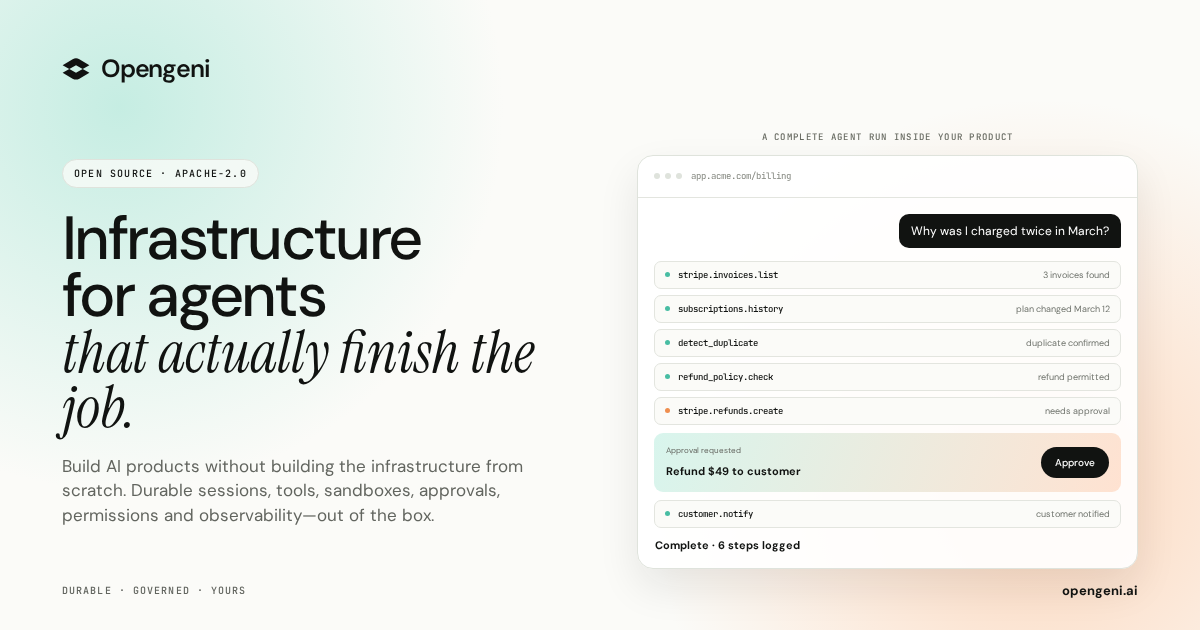
Opengeni is open-source AI infrastructure for putting agents inside your product, built so that you focus on your agents while Opengeni handles the infrastructure around them. It packages the pieces agents need to run in production: streaming, durable sessions, isolated sandboxes, tools, credentials, memory, multi-tenancy and React components. The project is licensed Apache-2.0 and, as the site states, it is built from running agents in production. The same API powers the Opengeni app, your product and your code, so a session can be rendered in the hosted app, embedded in your own interface, or driven programmatically. It is aimed at developers and teams who want to ship an agent feature rather than rebuild chat, sandboxing, credential and tenancy plumbing from scratch. The problem Opengeni addresses is the gap between an agent demo and an agent feature that survives real usage. The site lists the obstacles plainly: one dropped connection and the run is gone; agent code cannot run next to your secrets; every user needs their own OAuth tokens; every API needs wiring before an agent can use it; agents forget everything between sessions; every query has to know who is asking; and a better model ships, leaving you locked in. Each of these is framed as infrastructure you would otherwise have to build and operate yourself. Because the project comes from running agents in production, the emphasis is on the operational realities of restarts, failure recovery, per-user permissions and multiple paying customers rather than on an abstract architecture diagram. Durable sessions are the first thing Opengeni removes from your to-do list. Instead of a run dying when a worker restarts or a user closes a tab, the run keeps going and resumes at the event where it stopped; the site illustrates this with a run resuming at event 128. Sandboxes give the agent code somewhere isolated to execute, shown as a Python script that detects a duplicate charge using a scoped, short-lived token, so agent-generated code never sits next to your secrets. Credentials are handled per user, with connections to services such as Stripe, GitHub and Google Drive, and tokens that are refreshed automatically rather than pasted into prompts. Together, these three pieces mean an agent can be interrupted and still finish, can run code safely, and can act on behalf of one specific person without leaking long-lived secrets. Tools and MCP are how Opengeni connects agents to real systems. You point it at a specification such as billing.openapi.yaml and it exposes operations like invoices.list, refunds.create and customers.get as tools the agent can call; the site presents this as installing three tools from one file. That removes the manual wiring every API would otherwise need before an agent can use it. Memory is out of the box: agents learn from past sessions, so preferences such as refunds going to the original card, invoices being sent by email, or billing in EUR from April are retained, and the illustration labels memory entries with scopes such as Workspace and User. Memory removes the need to re-explain context in every conversation and lets an agent improve as it is used. Multi-tenancy is built in with row-level security, so every query knows who is asking; the illustration lists separate customers such as Acme, Globex and Initech. This means one deployment can safely serve many customers, which matters when you embed an agent for each of your own accounts. Opengeni is also model-agnostic: you can run agents on OpenAI, Azure OpenAI, OpenRouter or your own OpenAI-compatible endpoint, and swap between them so a better model shipping does not lock you in. Alongside these, the Product Hunt description highlights sessions that recover from failures, isolated sandboxes, 100+ integrations, human approvals, and visibility into every step and dollar spent. Opengeni is designed as a single API with multiple surfaces. The same session the Opengeni app renders at app.opengeni.ai can appear inside your own product or be driven from code. The code surface uses the @opengeni/sdk and @opengeni/react packages, with a provider, a session conversation component and a compiled stylesheet. The documented pattern is that your backend holds the API key and proxies the session routes, so the key never reaches the browser. Streaming, tool steps and the composer ship with the component, and these are the same packages the Opengeni app is itself built on, which keeps the embedded experience consistent with the hosted one. The React components are meant to be restyled in seconds. A single CSS custom property recolors every surface, and further variables control corners and typography, with accent options such as teal, violet, orange, blue, pink and graphite, corner styles ranging from sharp to soft to round, fonts such as DM Sans, Archivo and Mono, and a light or dark theme flipped by one attribute. A theme is applied with a wrapper class and a data attribute, so the agent adopts your existing design system instead of looking like a bolted-on widget. The site also includes an integration guide for embedding the assistant in your product and for keeping the key on your backend. Deployment is a choice between speed and control, and both options run the same Opengeni. Opengeni cloud is the fastest start: sign in and go, and you pay model cost plus 5%. Alternatively you can self-host the Helm chart on any Kubernetes, with Terraform for AWS, Azure and GCP, cloning the project from the Cloudgeni-ai/opengeni repository. Both paths share the same Opengeni API, workers and web app, so moving between them does not mean rewriting your integration. For the Product Hunt launch, the first 100 users receive $100 in cloud credit with the promo code PRODUCTHUNT100. The benefit is time to a working agent feature rather than a working demo. Sessions that survive failures mean users do not lose work when infrastructure hiccups; per-user credentials mean an agent can act with the right permissions for the right person; sandboxes mean agent code is contained; memory means the agent carries context forward; and multi-tenancy means the same deployment can serve many customers safely. Because streaming, tool steps and the composer come with the React component, the visible product experience is a few lines of code instead of a custom chat stack. The result is that engineering effort goes into the agent's behaviour and domain logic rather than into session durability, tool wiring and credential storage. The site's concrete example is a billing assistant. A customer asks why they were charged twice in March; the agent lists invoices, finds a duplicate, and issues a refund, then explains that two $49 charges landed on March 12 and that the refund will be back on the card in a few days. The same scenario is shown running in the Opengeni app, inside a customer's billing portal, and from React code. Other sessions listed in the app include a weekly churn summary, updating a refund policy document, and triaging failed webhooks, showing the same infrastructure applied to recurring analysis, internal document work and operational triage. Opengeni targets developers and engineering teams building AI agents into real products, and the Product Hunt topics are Open Source, Developer Tools, Artificial Intelligence and GitHub. The stack shown in the content is React and TypeScript on the client with CSS variables for theming, a backend that holds API keys, and Kubernetes, Helm, Terraform, AWS, Azure and GCP for self-hosting. Integrations named in the content include Stripe, GitHub and Google Drive, with other capabilities exposed as tools from OpenAPI specifications such as billing.openapi.yaml. Opengeni's promise is straightforward: agents in your product, infrastructure out of the box. By providing durable sessions, isolated sandboxes, credential handling, tool and MCP wiring, memory, multi-tenancy, model freedom and themable React components as one open-source, Apache-2.0 package that runs in the cloud or in yours, it shortens the distance between an agent idea and an agent feature your customers can actually use.
LaunchReel is a Claude Code plugin that edits talking-head videos and generates launch videos for your real product. According to the product's website, you record yourself and Claude cuts the footage, adds captions and zooms, and builds visuals around what you say; you can also pin a comment on any frame and it fixes just that spot. It is aimed at founders, makers and small teams who need finished videos for a product launch, without doing a manual editing pass themselves. The site positions it as a way to get a professional-looking video out of a raw recording and out of your own repository. The problem it addresses is the gap between describing an edit and actually getting it. In the site's own comparison, using Claude Code alone means that to fix one thing you describe it, wait, and render again; a small edit costs another prompt; there is no sound; the Reels version means starting again in portrait; and getting an MP4 means setting up a renderer yourself. LaunchReel is presented as the layer that removes each of those steps: you pin a comment on the frame instead of writing a prompt, you click text to change it, you get original music and voiceover, you say "make the 9:16 version," and you press Export. That framing matters because it turns video editing from a back-and-forth prompting loop into a visual, direct-manipulation workflow while keeping the automation. The core editing capability is on talking-head footage. LaunchReel cuts the fillers, pauses and retakes out of a recording, then — according to the site — listens back to check every cut before adding captions and zooms. That sequence is what makes the output usable: filler removal alone can leave awkward jumps, so the verification step is described as a check on each cut, and captions and zooms are layered on afterward to keep attention on the parts that matter. Recordings up to 5 minutes are supported on the Creator plan and up to 10 minutes on Pro, which sets the practical ceiling on a single talking-head project. The Studio is the manual-editing surface, and it opens while Claude works. It runs locally at localhost:4747 and gives you a live preview with sound. The site's headline example is pinning a comment on any frame — the preview shows an instruction such as "make this bigger" attached to a specific moment — and Claude then fixes just that spot. Alternatively, you can click text and change it directly, with no prompt involved. The Studio is also where structure becomes visible: the preview shows the narrative beats Hook, Problem, Demo, Proof and CTA, so you can see how the video is organised as you work. The selling point the site makes is that small fixes cost no prompt, which keeps iteration cheap once the first edit exists. Alongside talking-head editing, LaunchReel writes launch videos. Claude writes every scene as code for your real product, taken from your repository, rather than from generic stock. Those videos come with original music and voiceover — the pricing page describes this as an original score and studio voices — so the finished film ships with sound rather than silence. LaunchReel also adds what the site calls a director's playbook, described in the Creator plan as "the full playbook, always current." If you are not using Claude Code, the site offers a separate path: you can generate a video from a template. The workflow is deliberately short. First, you say one sentence — the example given is "cut this recording into a reel" — and Claude does the first edit. Second, the Studio opens while Claude works, so you can watch the video build rather than waiting blind. Third, you make it yours: pin comments or edit directly on the frame, then export when it's right. Setup is also minimal and command-line based: you run "/plugin marketplace add gajanansr/launchreel-plugin" and then "/plugin install launchreel@launchreel", one at a time, with Node 20 or later installed. Because the Studio runs on localhost, the editing happens on your own machine; the site notes that Claude's work uses your own Claude plan, while edits you make in the Studio do not. Talking-head projects keep working copies of your recording and use roughly 0.07 GB per minute of 1080p, and LaunchReel tells you the cost before it starts. The stated benefits follow from that workflow. Fixing a detail no longer requires describing it, waiting and re-rendering — you mark the frame. Changing wording no longer requires a prompt — you click the text. Portrait versions no longer mean a separate edit from scratch — you say "make the 9:16 version." Sound is included through original music and voiceover. Export is a button rather than a renderer you configure yourself. And output is finished to the format you need: 16:9 or 9:16, up to 4K, with 2K and 4K available on Pro. Concrete scenarios from the site include cutting a raw recording into a reel, producing a launch film describing your real product, making a demo video, and generating the vertical 9:16 version for Reels or Shorts from the same project. Because fixes and re-renders within the same month do not count as another video, the product is also suited to iterating on one video — re-rendering it and re-voicing it — until it is right. The template option covers people who want to generate a video without using Claude Code at all. Pricing is structured around projects. A free trial lets you make one full video with every feature, exported in 1080p with a small watermark in the corner. Creator is $19 per month after a founding discount (50% off the first three months with code FOUNDING50) and includes 5 videos a month, no watermark or end screen, 1080p export, talking-head recordings up to 5 minutes, original score and studio voices, the full playbook, and use on up to 2 computers. Pro is $49 per month and adds 20 videos a month, 2K and 4K export, recordings up to 10 minutes, use on up to 3 computers, and early access to new looks and features. Team is $149 per month with everything in Pro, 80 videos a month, up to 10 computers, and one invoice. A video is one project; fixing, re-rendering and re-voicing it in the same month do not consume another video, and the count resets on the first of the month. Plans renew monthly and can be cancelled anytime; prices are in USD, billed monthly by the reseller Dodo Payments, which handles tax and invoices. In short, LaunchReel's value proposition is that Claude does the editing work while the product supplies the parts that make the result shippable: a Studio for direct fixes, a director's playbook, original music and voiceover, and export in 16:9 or 9:16 up to 4K. For a founder or small team that records talking-head videos and needs launch videos for a real product, it collapses editing, sound and export into a short, mostly automated flow.
Sente is teai.io's official coding agent CLI, described as a thin launcher over OpenCode (MIT, 203k GitHub stars). One curl line installs it, and every teai.io model becomes an agent in your terminal. It is built for people who work in a repository rather than a chat window: Sente reads and edits the files in your repository, runs commands, and reports back. It sits in the teai.io CLI family alongside te, which you type at, and fuseki, which watches without being called. Sente itself is free; usage is metered through teai.io credits, and the site states the limits honestly rather than promising unlimited use. The starting point is the gap between a chat app and an actual working agent. A chat interface can answer questions, but it cannot reach into the files in your repository, run commands on your machine, or report back on what changed. Sente is built to remove that gap, and to do so without a conversion layer: teai.io is natively OpenAI-compatible, and Sente, being OpenCode-based, speaks OpenAI-compatible natively, so tool calls travel through teai without a translation step — zero conversion layer, nothing to break when routing through teai. The other half of the problem is trust and cost: agents fail, retries multiply, and metered usage can feel opaque. Sente's answer is billing that ignores empty responses and refunds failed paid media jobs and failed MCP tool calls, plus a safety model that asks before anything destructive. Sente is deliberately not a fork. The install is one line — curl -fsSL https://teai.io/te | sh — which installs OpenCode if it is missing and points OPENCODE_CONFIG at a teai.io-generated config. On each launch Sente syncs the teai.io model catalog, so upstream OpenCode improvements arrive without the project having to maintain a diverged codebase. A coding discipline file, sente-rules.md, is auto-written to ~/.config/teai/ and injected into every session, mechanically enforcing rules such as read before you write and always ship a deliverable. The command is short — te — and a sente alias is also installed. Setup continues with te login using a free API key obtained at registration. Sente exposes 380+ models on a single account and makes switching a one-line affair. The daily driver is glm-5.2 at roughly ¥0.34 per task; quality-critical work routes through te lux to the Claude/OpenAI flagship (Fable 5); hard tasks use te max on Kimi K3 (2.8T, 1M); and DeepSeek V4 Pro comes in around ¥0.03 per task. One base_url decides routing, which is how the product aims to stay cheap without breaking quality, and a task is measured as approximately 1K input plus 500 output tokens. Because the endpoints are OpenAI- and Anthropic-compatible, existing tooling patterns carry over, and the API-compatible endpoints never store request bodies — only metadata, kept for 90 days. Voice is a first-class input. te talk starts a voice conversation: you say what you want done and Sente reads its reply back to you, on macOS, Linux and WSL. Enrollment takes about one sentence — roughly ten seconds — and is consent-first: the delete key is yours, and teai.io states that it never clones a voice that isn't yours. For work that outlasts a laptop session, Sente Cloud at sente.teai.io runs in your browser on a cloud workspace; you sign in with an emailed one-time code, and closing your laptop doesn't stop the work. Optional GUI apps are installed explicitly with te app install sente for a menu-bar Sente.app, te app install koe for an always-listening Koe.app, or te app install both, and they are placed in /Applications only when you run that command. Safety is expressed as a three-tier risk model shared across the family: reads run automatically, writes are treated as reversible and proceed, and anything in the delete, send, publish or pay category asks first. fuseki, the third stage of the CLI family, is in Alpha and inherits the same tiers: it keeps an eye on your board — human-gates, recent repos — without being called, and only thinks and logs plus speaks a suggestion when something actually changes. It defaults to proposing only and never executes on its own; te stop stops it. The design intent is stated plainly: the agent moves before you do, but the risky moves still need you. Privacy is handled locally and is opt-in. te privacy scrub on masks emails, phone numbers, addresses, API keys, private keys and high-entropy tokens — plus names harvested from your Contacts dictionary with te privacy scrub harvest, Japanese honorific heuristics and Apple's on-device name recognition — on this Mac before the request reaches teai.io. The cost is about 0.1 ms per request with no local LLM required, and the reply is restored before it is shown. teai.io is explicit that this is not a guarantee of complete detection: Japanese given names without an honorific or a dictionary entry are not caught, and the optional Ollama layer (--llm) exists but is slow. Enterprise concerns are covered by invoice billing and a DPA, with BYOK in preparation. Five beta skills, announced for 2026-08, are backed by a reference corpus of 748 Q&A entries searched with lightweight retrieval — semantic embedding plus a relevance cutoff — before the model answers. te legal covers Japanese law with 259 entries across 21 topics and is cross-checked against actual e-Gov statute text, returning no match rather than fabricating; te security covers secure coding with 131 entries across 13 topics such as SQLi/XSS/CSRF mitigation, auth, secrets management and dependency vulnerabilities; te freelance covers 125 entries on contract checkpoints, Japan's invoice system, tax filing and social insurance; te infra covers 117 entries on Fly.io, Docker, CI/CD, SQLite/libsql, DNS and TLS, including real gotchas teai.io hit running this exact stack; and te license covers 116 entries on MIT/Apache/GPL-family licenses and AGPL's SaaS network clause. They are callable as te legal "question" or straight from the API by passing a model such as shitate/legal to /v1/chat/completions. The practical benefits are deliberately narrow and concrete. Nothing is billed for failure: empty responses are not billed, and failed paid media jobs and failed MCP tool calls are refunded in full, so you pay for results rather than errors. Cost control is explicit — cheap models for routine work, flagship routing for quality-critical work, and a maximum-performance tier when a task is hard — all switched with one line rather than a new subscription. Work continues while your Mac sleeps through Sente Cloud, discipline is enforced mechanically through sente-rules.md, and privacy scrubbing happens on-device before anything leaves the machine. Concrete workflows follow the same pattern. In a terminal you can run te run "explain this repo" for a one-shot explanation, ask te run "refactor this function" to edit code in place, or hand an agent a file generation task; switching to te max puts a hard task on Kimi K3. Away from the keyboard you can start te talk, describe the task out loud and hear the reply read back. For work that must keep going, Sente Cloud runs in the browser on a cloud workspace while the laptop is closed. Mid-implementation you can sanity-check risk with te security "how do I prevent SQL injection?"; outside code you can ask te legal about a statutory reserve share, te freelance how to register for Japan's invoice system, te infra how to set a secret on Fly.io, or te license what to watch for when using AGPL in a SaaS. Language settings also matter for Japanese and English users: /language (or /lang) switches the language dialog and skill list, /skills searches skills by display name, description or skill ID, and the initial language follows your terminal locale. Sente itself is free, and teai.io runs on credits. The Free plan gives 100 credits on signup with no credit card required — enough for roughly 300,000 short chats on Qwen3.7 Flash or about 2,000 on glm-5.2, at 1K input plus 500 output per task. Pro is ¥4,350 per month (about $29 USD) with 30,000 credits, and Business is ¥14,800 per month (about $99 USD) with 100,000 credits. Usage is metered rather than unlimited, and you top up monthly credits if you go over; invoice billing and a DPA are available, with BYOK in preparation. It runs on macOS, Linux and WSL (Windows through WSL), is Japan-built with a Tokyo region, JPY billing and Japanese support, and the source is MIT-licensed at github.com/yukihamada/sente. Documentation lives at teai.io/docs. Sente's proposition is narrow and consistent: one line to install, one account for 380+ models, three ways to call an agent — by typing, by speaking, or by letting fuseki watch — and a billing and privacy stance that refuses to charge for failures. For developers who want an agent inside their repository rather than inside a chat window, it is a thin, updatable, honestly metered layer over OpenCode.