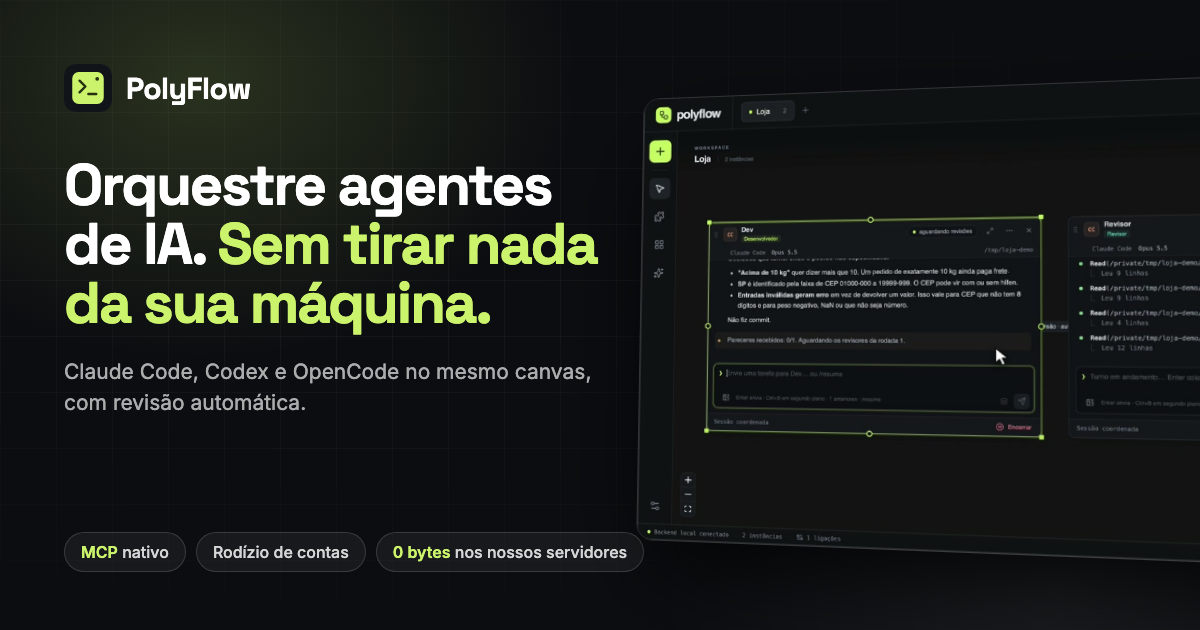
PolyFlow is a desktop application for Windows, macOS and Linux that puts Claude Code, Codex, Cursor and OpenCode side by side on a single canvas, so several AI coding agents can work on the same project at once. Rather than juggling separate terminal windows and copying context between them, you create instances, connect one panel to another and let the agents pass context and review each other's work. It is aimed at developers who already use AI coding CLIs and want a local workbench where those agents cooperate, while code, prompts and terminals stay on their own machine.
The problem PolyFlow addresses is the way most AI-assisted development still happens: a row of disconnected terminal tabs, manual copy-paste of context between tools, and no structured hand-off between the agent that writes code and the agent that checks it. Cloud-based AI workspaces add two further frictions that matter to professional developers. First, code and prompts travel through the vendor's infrastructure, which many teams cannot accept. Second, when an account reaches its usage limit in the middle of a task, the agent simply stops and the developer has to wait or reconfigure. PolyFlow describes itself as not another AI wrapper but a workbench, built on four product choices it says no cloud tool can copy without changing its business model: a native MCP server, zero bytes of your code on its servers, running with the credentials you already pay for, and automatic account rotation.
The core of the product is the canvas. You create instances and choose Claude Code, Codex CLI, Cursor CLI, OpenCode or a plain terminal, then point each one at a project directory. Every panel is described as a real terminal that you can drag, resize and connect, with a group chat where you assign tasks to the team. Connecting two panels creates a link that defines the instruction and the context flowing between them; a link can be set to a review mode so one agent automatically reviews and audits the work of another. The site's demo shows a Planejador, a Construtor and a Revisor passing a task from one to the next, and the automatic mode lets the reviewer and the tester work on whatever each task changed. Shared context is layered as global rules, workspace rules and per-connection instructions, so the recipient receives only what matters to it.
PolyFlow speaks MCP on both sides. It exposes its own server, polyflow-workspace, with 16 tools: ver_workspace, listar_workspaces, criar_workspace, editar_workspace, criar_instancia, editar_instancia, remover_instancia, ligar_instancias, remover_ligacao, criar_banco, criar_arquivos, criar_navegador, criar_nota, ligar_card, desligar_card and remover_card. That is how the assistant assembles the team from a conversation: your agents build workspaces, instances, connections and cards themselves. Alongside it, the polyflow-consult tool lets a cheaper model read files, database or memory cards and return only the answer into the instance's context, which saves tokens. The playwright tool gives each browser card its own headless Chrome so the agent can navigate, click and validate without asking for approval at every step, and ai-memory provides long-term memory served locally in the workspace scope, so agents read and write decisions between sessions. All of this runs on localhost.
Account rotation is one of the product's headline capabilities. You register several Claude Code and Codex accounts, and PolyFlow tracks the usage of each window, both the 5-hour and the weekly one, across all of them. A session opens on the account with the most headroom. If an account passes 95% or shows the limit warning, the session moves to another account immediately, takes the conversation along and redoes the task on the new account, with no copy-paste involved. Each account lives in its own profile folder and the login is performed by the CLI itself, on your machine.
The canvas is also a small ecosystem of tools attached to the agents. The embedded browser is a separate headless Chrome per card controlled through Playwright MCP. AI commits separate your changes into cohesive commits that you review and edit, and you are the one who commits. A PostgreSQL database can be wired to an agent with psql service=, keeping the password out of the prompt and offering optional read-only writing. Folders and PDFs can be indexed so the agent receives a summary and the indexed text ready to use. At the end of each flow a report shows tokens and estimated cost per instance, and project memory is served by ai-memory in workspace scope.
Getting started follows three described steps. First you create your instances by choosing Claude Code, Codex, OpenCode or a pure terminal and informing the directory. Second you connect the agents by dragging a link between two panels and defining the instruction and context that flow between them. Third you automate the flow by switching on automatic mode and letting the reviewer and tester work on what each task changed. The download is free for Windows, macOS and Linux; to use the app you paste a license key on first launch. The app updates itself by announcing a new version and installing a signed package, without going back to the website.
Privacy is presented as an architectural property rather than a promise. Your code and repositories are read straight from disk, prompts, responses and terminals go from your machine to the provider you chose, workspaces, rules and connections are saved locally inside the application, API keys live in the operating system credential vault, and project memory is served by ai-memory on localhost. What reaches PolyFlow's servers is only what the license and subscription require: the key, the plan and dates, a code derived from the computer and a hash of a CPF or CNPJ for support. No code, prompt, file or conversation is stored, and the site states there is no telemetry and no cloud account.
Typical use cases follow the canvas model closely. A developer pair where a Claude Code agent implements and a Codex agent reviews in review mode; a three-stage chain where a planner, a builder and a reviewer hand a task along automatically; UI validation where a browser card lets the agent open localhost:3000, navigate and check its own work; long-running tasks that continue across several accounts when one hits its limit; workspace setup done entirely by chatting with the MCP server instead of clicking through configuration; and documentation or database context attached to an agent so it answers with the indexed material rather than guesswork.
The product is aimed at developers and small teams who work daily with AI coding CLIs, who already hold subscriptions such as Claude Pro or Max and ChatGPT Plus or Pro, and who want several agents cooperating on one project without sending code to a third-party cloud. Supported agents are Claude Code, Codex CLI, Cursor CLI and OpenCode plus plain terminals, and through OpenCode and API providers you can also use DeepSeek, Gemini, OpenRouter, Ollama and LM Studio. It requires Node.js and at least one AI CLI already logged in, and runs on Windows 10 and 11 64-bit, macOS on Apple Silicon and Intel, and Linux x86_64 via .deb or AppImage. Pricing is by license: R$ 90 per month, R$ 72 per month billed R$ 432 every six months, or R$ 54 per month billed R$ 648 per year, each including unlimited workspaces and tabs, all CLIs and API providers, account rotation, the embedded browser with Playwright MCP, AI commits, token and cost reports and fully local operation.
PolyFlow's value proposition is straightforward: a local bench where your existing AI coding agents become a coordinated team on one canvas, reviewing each other, sharing context and keeping the work moving when an account runs out, with your code never passing through the vendor's servers.
Publisher
A
admin
Launch Date2026-11-19
Platformdesktop
Pricingpaid
Tech Stack
#Tauri#Rust#Node.js#MCP#Playwright