Category Focus/categories/audio
Audio AI Tools
Discover and compare the best audio AI tools and software. Browse 78+ curated tools with reviews and rankings.
Projects tracked
78
Sort mode
RECENT
Page
2
Discover and compare the best audio AI tools and software. Browse 78+ curated tools with reviews and rankings.
Projects tracked
78
Sort mode
RECENT
Page
2
Off the Record is a macOS app built by Weird Machines that blocks AI from transcribing your meetings. It reshapes your voice in real time, so the people on the call hear and understand you exactly as usual, while AI notetakers, meeting bots and hidden interview copilots get nothing usable to work with. The product is for anyone who spends their day on Zoom, Google Meet, Microsoft Teams or any other application that uses a microphone, and who wants to decide for themselves when AI is allowed to hear them. Rather than asking other people's notetakers to behave, Off the Record changes the audio itself before it ever leaves your machine, and it does that work entirely on your own device. You stay on the record when you want to be, and off it when you don't. AI notetakers have become a normal part of online meetings, and, as the site acknowledges, they are often useful. The problem is that not every notetaker announces itself. Some run quietly on the other person's computer, with no bot ever joining the call and no notice to anyone on the invite. They do not simply transcribe either; they pick out what was said between the two of you and send it to everyone on the invite. Interviewing has its own version of the same problem: AI copilots hide on candidates' screens, listen to your questions and write polished answers in seconds, which makes it hard to know whether an answer is really the candidate's. As the site puts it, you cannot say no to what you cannot see. Off the Record gives that choice back, letting you keep the lock off when you are happy to be transcribed and turn it on when you are not. The core capability is real-time voice reshaping. A small model running on your Mac alters your voice as you speak, adding small amounts of noise at strategic points that are aimed at speech-to-text systems rather than human ears. The result is that colleagues and friends hear you normally, though they may sometimes notice a slight change, and the site recommends headphones for the best results. Off the Record is honest that the effect is subtle rather than invisible: people still understand every word, live or in a recording. What changes is what a machine can do with the audio afterwards. A demo on the site plays a clip twice, first as original audio and then off the record, so visitors can hear the difference for themselves. Compatibility is deliberately broad. Off the Record works with Zoom, Google Meet and Microsoft Teams, and with any app that uses your microphone, with no per-app setup required. The site backs the claim with unedited output from four widely used speech-to-text engines, including one running live, with names withheld. Across the engines, the protected audio produces nonsense, garbled phrases and, in one live case, no text returned at all, while the intended sentence is simply that the people on this call can understand everything the speaker says, and the robots cannot. Visitors can download a protected sample audio file and run it through any transcriber of their choosing. Voice processing stays on your Mac. Everything happens on your device, and your voice is never sent to Weird Machines or to any cloud service, which the company frames as both a privacy and an ownership point: it stays private, and it stays yours. A menu bar app shows a lock and a processing-on-this-device indicator; clicking the lock takes you off the record. For hiring, Off the Record protects the interviewer's side of a conversation, so a candidate's hidden copilot hears nonsense while the candidate hears the questions as usual. The same protection is being extended beyond meetings with the Off the Record Stick, a device available for pre-order at $59.99 that brings protection to phone calls, since regular calls are not end-to-end encrypted. The Stick works with any phone you can pair a Bluetooth headset with, iPhone or Android, protects calls 100% on your device as you speak, and turns on or off with one click. The approach is different from asking platforms or notetakers to respect a setting. Off the Record does not fight AI notetakers directly; it changes the signal they receive. Your voice is reshaped before it leaves your Mac, which means the protection travels with the audio: because the reshaping happens at the source, a recording carries the same protection, and transcribing it later still gets nothing usable. That answers the obvious question of whether someone could simply listen to the recording. Yes, they can, and that is the point. Humans hear you as usual, live or recorded. What Off the Record stops is AI. Getting started reflects the same simplicity: download it for macOS, open it from the menu bar and click the lock. The benefits follow from that design. You keep speaking normally and being understood, without changing how you present yourself on calls. You gain a way to say no to transcription that you cannot see, including notetakers running silently on someone else's computer and copilots listening in to feed answers. Your voice never leaves your device, so the tool does not create a new copy of your speech in the cloud. Because processing is local, the protection applies both to what is said live and to any recording of it. And because it sits at the microphone level, it covers every app you already use rather than requiring you to switch tools or configure each meeting platform separately. Concrete scenarios are described throughout the site. In an ordinary online meeting, you speak as usual while AI notetakers and meeting bots that transcribe calls get nothing worth sharing with everyone on the invite. In a hiring interview, the interviewer turns protection on so that a hidden interview copilot on the candidate's screen hears nonsense instead of the questions, and every answer is genuinely the candidate's own. On a personal or business phone call, the Off the Record Stick is designed to bring the same protection to calls that are not end-to-end encrypted. Should you want the notetaker to work normally, you simply leave the lock off and stay on the record. The site also positions the tool for company-wide rollouts through its Organization plan. Off the Record is priced in tiers. The Free plan costs $0, needs no account, and gives you 60 protected minutes a week that reset every Monday, with your voice staying on your Mac; the site describes it as a way to try the product on real calls. Pro is $8 per month, or $72 a year, saving 25%, and removes the limits: unlimited protected minutes, up to five Macs, and email sign-in with no password. Hiring is $30 per seat per month, billed yearly at $360 per seat, and gives Pro to every interviewer, lets a team invite members by email and add or remove seats at any time. Organization is custom priced for a team's size, includes everything in Pro for everyone, sets up seats for you, and offers custom terms and invoicing. Prices are in USD, tax may apply at checkout, and you can upgrade anytime from the app. The target users are people in meetings on Zoom, Google Meet, Teams or any mic-based app, interviewers and hiring teams, and organizations rolling the tool out company-wide. Off the Record is, in Weird Machines' words, the company's first machine, not its last, and it targets a narrow, specific job: choosing when AI hears you. It does not pretend to make you invisible to humans, and it does not ask other people's tools to cooperate. It reshapes your voice in real time on your own Mac so that the people you are talking to understand you as usual while speech-to-text gets nothing usable, whether live or from a recording later. With a free tier to test it on real calls, paid plans that lift the limits, an interview-focused plan and a phone-call Stick on the way, it gives control back to the person speaking.
Clarity, also referred to as Clarity 1, is a real-time speech enhancement model from KugelAudio built for voice agents and call centers. It does two jobs at once on a live call: it removes background noise, and it extracts the primary speaker so that every other voice — café chatter, a colleague at the next desk, the crowd around the caller — is cut out. What remains is one clean voice. The purpose is straightforward: whoever is listening, whether a person or a voice bot, hears clear speech, and the agent responds to the person calling rather than to the room they are calling from. Clarity is aimed at teams building and running voice agents and at call centers that need the caller, not the environment, to come through. The problem Clarity addresses is the environment callers actually call from. People call from cafés, shared offices and busy streets; images on the product site show callers on the street, on a construction site and on a train. The audio a voice agent receives is therefore a mix of the caller's voice, background noise and other people talking. Speech-to-text, turn detection and the language model behind a bot can only work with the audio they receive, so background talkers end up in transcripts and set off turn detection, and the bot ends up responding to the room instead of to the caller. Clarity is presented as the layer that fixes this before the rest of the pipeline ever sees the audio, so the models downstream work from one clean voice. The first core capability is real-time background noise removal. Clarity strips out background noise from live audio rather than from a finished recording, which matters because conversations are live and the agent has to react while the caller is still speaking. The product materials place this against loud places specifically — clear calls in the café, on the street, on the site and on the train. Because the noise is removed before it reaches the agent, the agent is not asked to guess which parts of the incoming audio are speech and which are environment; the clean signal is what arrives. The second core capability is primary speaker extraction. This goes a step beyond noise removal: it cuts out every other voice, from the café crowd to the person at the next desk, so only the caller comes through. Clarity explains how it decides which voice to keep — primary speaker extraction uses a short reference recording of the person you want to follow and cuts out every other voice. Without a reference, it keeps the loudest speaker, which gives teams a working default when no reference recording is available. Both behaviours are described as running in real time rather than as an offline post-processing step. The third group of capabilities concerns how Clarity fits into a live pipeline. It processes audio in a continuous stream, as it arrives, and is built for live conversations rather than for waiting on a completed recording. Its chunk size is stated explicitly: Clarity processes audio in 240 ms chunks and needs about 50 ms for each one. If your turn detection already reads audio in 240 ms chunks, Clarity adds only those 50 ms. With smaller input frames, a sound can come out up to 290 ms after it went in, depending on where it falls in its chunk. Those numbers are published on the site so teams can judge whether the added latency fits their pipeline, and the headline figure quoted for voice agents is +50 ms of added latency in pipelines with 240 ms chunks. How Clarity works overall is described as two jobs performed in real time on a stream: noise removal and primary speaker extraction, delivered as audio arrives. Its unique approach is doing both at once during a live call so that downstream components — speech-to-text, turn detection and the model behind the bot — all work from a single clean voice. KugelAudio also publishes comparative test results. On target-speaker quality (Libri2Mix, DNSMOS, higher is better), Clarity 1 at 240 ms is compared with StarTSE at 560 ms, scoring 3.56 on speech quality (SIG), 4.03 on background quality (BAK) and 3.27 overall (OVRL). On noise removal (DNS 2020 Challenge, DNSMOS, higher is better, with reverb), Clarity 1 at 240 ms scores 3.62 SIG, 4.11 BAK and 3.37 OVRL against unprocessed original audio, AI Acoustics at 15 ms, DeepFilterNet3 at 310 ms and GTCRN at 16 ms. These comparisons are presented on the site as evidence of quality against other approaches. The benefits Clarity states for users follow directly from a single clean voice reaching the rest of the stack. Speech-to-text, turn detection and the language model behind a bot can only work with the audio they receive, so giving them the caller's voice alone means background talkers stop ending up in transcripts and stop setting off turn detection, and the bot responds to your caller instead of the room. For voice agents, the stated outcome is that your voice bot hears only the caller. For call centers, the stated outcome is that customers hear your agent and only your agent: on a busy call center floor, Clarity removes background noise, echo and the colleagues nearby, and enhances the agent's voice so every word comes through. In both cases the through-line is accuracy of understanding and clarity of output. Concrete use cases described in the product content include voice agents on live calls, where Clarity removes background noise and chatter before the bot hears them so its turn detection and speech-to-text react only to the caller; call centers, where Clarity removes background noise, echo and nearby colleagues and enhances the agent's voice; and callers in demanding environments such as cafés, shared offices, busy streets, construction sites and trains. Teams can also hear it on their own audio: you can sign up and run your own recordings through Clarity in the dashboard, free until October 30th, and for a self-hosted deployment or a larger rollout, contact the team and bring examples from your callers' environments. The site also offers a sales conversation for teams that want to go further with the model. Clarity is aimed at anyone building or operating voice agents and at call centers, as reflected in the two audiences named on the site: voice agents and call centers. It fits into pipelines that stream audio in chunks, with the stated latency budget depending on chunk size. Deployment options include running Clarity in KugelAudio's environment, or self-hosting and on-premise deployment available on Enterprise plans. Pricing is published as a free tier at €0 until October 30th, covering noise removal and primary speaker extraction in real time at no cost while you build, followed by pay as you go at €0.0015 per audio minute excluding VAT (€0.001785 including 19% VAT), where you pay only for the audio Clarity processes. Consumers in other EU countries pay their local VAT rate, shown before payment. In summary, Clarity's value proposition is narrow and clearly stated: remove the noise, keep the voice. By removing background noise and extracting the primary speaker in real time on a live stream, it hands the rest of a voice pipeline one clean voice — the caller's — so speech-to-text, turn detection and the language model can do their jobs, and so callers reach an agent that hears them rather than the room around them.
Lofi Cities is a free web app that pairs animated pixel-art city nights with endless lofi music generated live in your browser. It is made for anyone who wants a calm, continuous background for studying, working or winding down, and it asks for nothing beyond a browser: there is nothing to install, no account needed, and no pop-ups. You pick a city, press play, and let it run. Every scene is a 480×270 pixel-art animation that loops seamlessly every four minutes, with its own weather, landmarks and city sounds, while new lofi tracks are composed on the fly. It works on computers, phones and tablets. Lofi music has become a familiar companion for focus, study and sleep, but most ways of listening depend on an app, an account or a fixed playlist that eventually ends. Lofi Cities takes a different route. Rather than streaming a catalogue of recordings, it composes music while you listen, so the stream never runs out. Rather than showing a single looping video, it renders each city as a pixel-art animation drawn with its own weather, landmarks and ambient sounds. The result is a background that behaves more like a place than a playlist, one that can be left running for hours while you work, read or fall asleep. There are 16 cities to choose from: Paris, Tokyo, New York, London, Rio de Janeiro, Istanbul, Hong Kong, Sydney, San Francisco, Hamburg, Amsterdam, Dubai, Madrid, Rome, Prague and Munich. Each one is a distinct scene — rain on a painter's attic window under the zinc roofs of Paris with the Eiffel Tower sparkling far off; neon rain by Tokyo Tower; snow over the Brooklyn Bridge; fog and drizzle on the Thames; a Copacabana summer night; a rooftop tea garden on the Bosphorus; Victoria Harbour after dark; a jacaranda night on Sydney harbour; fog pouring through the Golden Gate; harbour lights on the Elbe; canal bridge lights in Amsterdam; a fountain night at the Burj; a summer night on Gran Vía; a warm night by the Colosseum; lamps on Charles Bridge; and a Christmas market in the snow in Munich. The city picker shows each city's local time and how many people are in it right now, and new cities are added over time. Every track is composed on the spot with the Web Audio API: a chord progression, a drum groove, a bass line and often a melody, finished with tape wobble and vinyl crackle. Chords, drums, bass and melody are all synthesized in real time, with no samples or recordings, which is why the music never runs out and every track is new. Track titles are inspired by the city on screen, so the music and the scene stay connected as you listen. The Vibe panel shapes what is playing. Style offers nine options: jazzhop, the default, built on a Rhodes, jazzy chords and a swung boom-bap beat at 68 to 88 BPM; piano, a sleepy felt piano with soft drums; ambient, slow warm pads with barely a beat, made for sleep and deep focus; bossa, nylon guitar over a bossa nova groove; synth, 80s city-pop synths; house, lofi deep house on a soft four-on-the-floor kick; guitar, a clean electric guitar fingerpicked over a lazy beat; sad, slow minor chords and a lonely muted trumpet; and medieval, a lute and a recorder over hand drums. Energy moves the mood from chill (slower and darker) to upbeat (faster and brighter), and Band plays the full band, no drums, or the chords only. A new style starts with the next track. A separate ambience layer mixes each city's own sounds under the music. The city sounds mixer goes further, offering a slider for every sound of the city — turn the rain up, the traffic off or the bells down — and that setting carries over to every city that has the same sound. The Weather chip brings rain, snow, autumn leaves or a clear night to any city, and the city sounds and track titles follow it: rain brings the sound of rain in, while snow arrives with a hush of wind. Music and city sounds each have their own volume slider, and the Up next list shows the coming tracks so you can pick one to play right away. Focus and sleep timers are built in. The focus timer runs 25 minutes of focus and 5 of break, or 50 and 10, on repeat, with a soft chime at each break and a bell to call you back; the sleep timer fades the music and city sounds out after 15 to 90 minutes and then pauses. The Tour chip moves on to the next city every 5, 10, 15 or 30 minutes, or follows the night, showing whichever city is closest to 1 am local time and moving west from Sydney to San Francisco as the hours pass, with cities on the same clock taking turns. Together adds a social layer: pick a heart, note, star or moon and tap the scene to float it up from that spot on everyone's screen there, or release a paper lantern that rises over the city for about a minute in the same place for everyone. The Chat button opens short messages from the last hour under a random two-word name such as "sleepy fox", with emoji available from a smiley button or by typing a colon and a name like :coffee:. The whole thing runs in your browser. Because the cities and the music are generated locally, Lofi Cities works offline after your first online visit, every city included. There is no sign-in and no cookies: settings such as the last city, volumes and vibe, plus anonymous random ids for statistics and the live count, are kept in your browser's local storage. Anonymous usage statistics, such as which cities are viewed, are collected without cookies, and browsers that send Do Not Track are left out of them. For chat, a random id in local storage makes your tabs count as one person, the server forgets it about 25 hours after your last visit, and other people only ever see your two-word name. For studying and working, the app gets out of the way: fullscreen hides everything else, H hides the interface, the controls fade out on their own when you stop moving the mouse, and P opens a picture-in-picture mini player that keeps the scene floating over your other apps on computers in browsers that support it. Streamers can add a browser source at 1920×1080 pointing to a city page with ?obs, which keeps the interface hidden and starts the music on its own, with the option to control audio via OBS. The save button or the S key exports the current frame as a 1080p PNG, and the city videos can also be bought on Gumroad as a 16-city collection of four-minute 1920×1080 MP4 loops at 60 fps without audio, for personal use and video or livestream backgrounds. Every city also has a billboard for rent where a business can be drawn in pixel art. In practice, Lofi Cities fits around a working day and around sleep. It can sit in a browser tab as a background for studying, coding, writing or reading, run in fullscreen with the interface hidden so only the city and the music remain, or float in a mini player over other applications. The focus timer turns it into a Pomodoro companion with chimes at each break. In the evening it becomes a wind-down: the ambient style, the sleep timer and the fader that pauses the music after 15 to 90 minutes. Streamers use it as a browser source behind their overlay, listeners save frames as 1080p wallpapers or loop the city videos, and people who like a bit of company can release lanterns, send a reaction or chat with whoever else is in the same city. Lofi Cities turns a browser tab into a place: sixteen animated pixel-art cities, each with its own weather and sounds, and lofi music composed live so it never runs out. It is free, needs no account, works on phone and desktop, and is built to be left running quietly in the background — a simple way to get a calm, endless lofi atmosphere for work, study or sleep.
SOUND is a free macOS menu-bar app from CPL OF MNGS that gives every app on your Mac its own equalizer, volume control, and audio output destination. Its purpose is simple to state: per-app sound control, right from your menu bar — an equalizer, volume, and speaker for every app. Instead of relying on the single volume slider macOS provides, SOUND shows controls for every app that is currently playing audio, plus a System master that applies to everything you have not individually overridden. The app is built for people who want finer control over how each application sounds, whether they are listening to music, taking calls, watching video, or working in audio and video production tools. It lives in the menu bar, requires no account, and is free to download. macOS ships with one volume slider and no equalizer. That single control governs everything the Mac plays, which creates everyday friction: turning down a loud meeting also turns down the music you were enjoying, and there is no built-in way to boost the bass on one track or shape the tone of a specific application. The result of the default is that every adjustment is global — raising the volume for a quiet podcast raises it for everything else, and quieting one noisy source means adjusting the whole system. Many Mac equalizers try to solve this by installing a virtual audio driver and applying one curve to everything, which adds another piece to the Mac's audio stack and can require setup or a restart. SOUND addresses the same problem through a different route: it builds on the modern per-app audio engine inside macOS, so each app gets its own equalizer, volume, and output, nothing extra is added to the audio stack, and there is no audio driver to install. The first core capability is the per-app equalizer. SOUND provides an 8-band equalizer for every app that is playing sound, spanning 63 Hz to 8 kHz with a range of ±12 dB. That means you can shape the tone of a single application without changing anything else: add low end to one track, soften harsh high frequencies in another, or tune an app to suit your speakers or headphones. Band adjustments apply in real time — there is no audio driver setup and no restart. Alongside the per-app controls, a System master shapes everything you have not individually overridden. This makes SOUND usable as a system-wide equalizer for the Mac while still allowing per-app exceptions whenever you want them, so a global curve and individual app curves can coexist. The second capability group covers volume and routing. Volume, per app, means you can turn one app down without touching the others — useful when you want to quiet a single source rather than the whole machine, and it removes the need to race to mute a browser tab. Output control lets you route an app to the system output or pin it to a specific speaker, so music can play on the good speakers while calls stay in the headset. Routing matters because a Mac often has more than one output available at the same time, and SOUND's own examples show the intended use: music on the good speakers, calls in the headset. Together these two controls handle the common situation where different apps compete for attention at the same moment. A third group of features covers presets, visual feedback, and a global bypass. SOUND ships with starting presets — Flat, Bass Boost, Vocal, Podcast, and Bright — and you can save your own. Custom presets sync across your Macs via iCloud, so a curve you build on one machine travels with you to the others. A live spectrum glow and a BPM readout show what is playing in real time, and the display stays quiet when nothing musical is happening. Finally, one switch turns processing off entirely: flip it and every app plays untouched, with SOUND stepping aside completely. That gives you a fast way to compare processed and unprocessed sound or to return your Mac to its default behavior without quitting the app. Under the hood, SOUND uses real-time per-process audio taps with an 8-band peaking-filter cascade, processed with Apple's Accelerate framework. There are no virtual audio drivers and no kernel extensions. Because it is built on the modern per-app audio engine inside macOS, nothing new appears in Audio MIDI Setup, and when you quit SOUND your Mac's audio is exactly as it was. To shape the sound of other apps, macOS requires a one-time system audio capture permission; you grant it once through the standard system prompt, and SOUND only uses it to process audio in real time. The interface is native SwiftUI following the macOS Liquid Glass design language, and it includes accessibility fallbacks for Reduce Transparency and Increase Contrast. SOUND processes audio locally on your Mac, in real time. It does not record, store, or upload what you listen to, and there is no account to create — no email required, and no extra hardware needed. That privacy posture is the practical benefit of the local processing approach: your audio never leaves your Mac, so nothing you listen to is transmitted anywhere. Updates work the same low-friction way: SOUND ships signed, notarized builds that update themselves in the background, so you download once and stay current. When a new version is available you are asked once, and the update installs in the background without a return trip to the website. The product describes three concrete scenarios. Movie night: send the film to your good speakers while a call stays in your headset. Focus calls: turn one too-loud meeting down without touching your music. Everyday music: add the bass a track is missing, then save it as a preset. Beyond those, SOUND shows controls for every app that is currently playing audio, and its site lists music and streaming services, audio and video production tools, media players, communication apps, and browsers among the apps it works with. For anyone working in audio or video production, the same per-app controls apply to their creative tools rather than only to playback. SOUND is free to download and use, from the App Store or as a direct DMG, and it is available in 10 languages. It requires macOS 26 (Tahoe) or later, relying on modern system audio APIs and the current macOS design language, so earlier versions are not supported. There is no account and no extra hardware required. SOUND is built specifically for macOS, and there are no current plans for an iOS or Windows version. A changelog is published on the site for users who want to follow what changes between releases. SOUND takes the one volume slider macOS gives you and replaces it, per app, with an equalizer, an independent volume control, and a chosen output device — all from the menu bar. It does this without virtual audio drivers or kernel extensions, keeps audio processing local and account-free, and costs nothing. For Mac users who want each app to sound the way they want it to sound, SOUND is a direct, privacy-respecting answer to a long-standing limitation of the platform.
Hemory is an always-on listening product that captures what you live through and turns it into a private, searchable memory — then wires that memory into your AI agents. The name comes from Hear + Memory, and the product is explicitly not meeting transcription: it listens on the phone or Apple Watch you already own and keeps every conversation as memory. Your day is automatically split into moments with speaker labels, and each moment settles into a private, searchable memory that you can connect to Claude, Codex, Cursor, or any agent over MCP. The goal stated on the site is that your AI finally has real context to revisit what you heard and build on it, with everything grounded in what actually happened — ready to answer questions or generate any document you need. Most people now work with AI agents that are powerful but cut off from the details of their actual day. The moments where commitments are made, scope is decided, or ideas are floated happen in conversation — on a walk, at lunch, in a review — and none of that becomes source material for the tools that are supposed to help you afterwards. Hemory addresses that gap by keeping the listening always on (or on exactly when you choose) and preserving what was said as searchable memory, rather than treating each session as an isolated recording you will never reopen. Instead, you get memory an agent can query, so the context behind a promise, a decision, or a plan survives past the moment it was spoken. Listening is controlled in two ways. Manual mode keeps Hemory on only when you need it, so the privacy boundary stays yours. Schedule mode lets you define windows such as weekdays 9:00–18:00, and Hemory is nudged right on time — the site describes this as what always-on feels like, and shows a running listening counter with the active schedule beside it. Quota is counted with VAD, or voice-activity detection: always-on listening sounds expensive, but VAD only counts the moments when someone is actually speaking, while silence, gaps, and background noise never touch your quota. That is why the company says you can leave Hemory listening all day — keeping your bill low is presented as Hemory's job. Once listening is running, Hemory organizes the day for you. It auto-splits your day into moments with speaker labels and shows them on a timeline with titles, times, durations, and the people involved — for example an "App 2.0 release review — scope, search latency and ship date" meeting from 10:30 to 12:00 with David and Mike, a lunch with Mike, a voice note on the walk back, and a "Product UI review · Memory palace" with Jenny and Mike. Those moments settle into a private, searchable memory. You then query it through your agent: the site shows the question "what did Daniel promise me in last Tuesday's sync?" answered by a hemory search_memory (MCP) call that returns "Daniel" · 3 sessions together with the specific commitment — Daniel committed to the final launch budget by Thursday, with his team owning the App Store screenshots. Connecting an agent takes two steps. First you start listening in Hemory; then you connect Hemory to your agent via MCP. The site lists support for Claude Code, Codex, Gemini, Cursor, VS Code, OpenClaw, Hermes, and other standard MCP clients, and shows the connection happening in seconds with terminal commands such as "codex mcp add hemory" and "claude mcp add hemory" followed by a connected confirmation and the available tool, search_memory. Once connected, you chat with your agent about the memories Hemory has heard, and the agent can revisit real, past context instead of relying only on what you paste in during a session. Privacy is positioned as a default, not a setting. Hemory states zero audio retention: your audio is never stored in the cloud, it is processed as a stream, and it is destroyed the moment processing ends. Raw audio is stored only on the listening device and is never synced across devices, so recordings stay where they were captured. A self-host option is listed as coming soon, for people who want to optionally run Hemory entirely on their own infrastructure. Combined with manual mode and scheduled listening windows, these choices are meant to keep the privacy boundary in the user's hands while still making the resulting memory available to the agents they already use. Overall, Hemory's approach is to make real life the source material. Two steps — start listening, connect your agent over MCP — sit in front of everything else, and the resulting memory is grounded in what actually happened. Rather than forcing you to write notes, record meetings, or reconstruct context later, Hemory hears it, splits it into labeled moments, stores it privately on the listening device, and exposes it to agents through a single search tool. From that foundation, answering questions or generating documents becomes one prompt away. With Hemory as source material, the site lists concrete outputs, each described as one prompt away. A monthly work report deck can be generated from the work heard over the past month and delivered as a web page with progress, key takeaways, and next month's plan, ready to present at a management meeting. A nightly journal can be produced at 22:00, writing down the interesting things from your day as a brief note — one entry every night. A smart ring PRD draft can be assembled from recent customer interviews plus internal brainstorm sessions, distilled into a complete PRD. In the agent example shown, a follow-up draft is written to follow-up.md and reported as 12 lines, ready to send, based on what was heard. Pricing starts with a Free Trial at $0 one-time with 10 hours of listening, no renewal. Starter is $10 per month with 20 hours per month, described as the budget pick for just the conversations that matter. Pro is $20 per month with 60 hours per month, aimed at professional use and enough for everyday work, and is marked most popular. Max is $50 per month with unlimited listening under a 24-hour-per-day cap and fair use, for all-day listening and building your memory palace. All plans count quota with VAD. Hemory is available for iOS through the App Store and for Android, with macOS, Windows, Linux, Web, and self-host listed as coming soon. Hemory's value proposition is straightforward: keep listening, and let every real conversation become memory your agents can search and generate from. By combining always-on or scheduled listening, automatic moment splitting with speaker labels, private-by-default audio handling, and MCP connections to the agents people already use, it aims to give AI the one thing it usually lacks — grounded context from your actual day.
Speechka is a real-time voice translation app that lets you speak naturally in one language while others hear you in theirs. According to its website, Speechka translates what you say in real time and delivers it in your own voice into any call, meeting, stream, or conference. Rather than relying on captions, subtitles, or transcripts, it delivers translated speech as audio, spoken in your Personal voice. The product is aimed at anyone who communicates across languages live: people in online meetings, sales and client calls, livestreams, presentations, conferences, keynotes, workshops, classrooms, and international events. Speechka runs as a desktop application for macOS and Windows, and a limited version of the experience can be tried directly in the browser for free. The problem Speechka addresses is the friction that language barriers create in live conversation. Traditional solutions such as subtitles or transcripts shift attention away from the speaker, and less immediate approaches can turn a conversation into a series of delayed voice messages. Speechka's website frames the goal simply: once translation becomes part of the conversation, language stops getting in the way. It positions itself as built for conversations, not subtitles, translating live speech with natural timing so that conversations stay fluid. The site also notes that participants should not have to follow subtitles, repeat themselves, or rely on separate streams and dubbed recordings. At its core, Speechka provides real-time voice translation. You speak in your language while others hear you in theirs, and the company describes this as low-latency voice translation built for meetings, calls, conferences, and live conversations. Speechka listens, translates, and delivers every sentence in sequence, which the site says keeps conversations smooth, natural, and easy to follow. A related capability is ordered playback: every translated sentence is delivered in the correct order, which keeps multilingual conversations clear even when multiple people are speaking. The site also states that Speechka automatically handles pauses, sentence boundaries, and playback timing, so translated speech follows the rhythm of a real conversation rather than sounding fragmented. Together these mechanisms are meant to make translation feel like part of the exchange instead of an interruption layered on top of it. Personal voice is one of Speechka's most distinctive features. Instead of generic AI narration, translated speech preserves your identity and speaking style, so you keep your own voice, accent, and identity across every supported language. Setting it up involves recording a short voice sample—the interface allows recording up to 10 seconds of your voice, and offers a sample text you can read. After recording, you can listen to the sample and re-record it if needed, and you can remove or replace your voice at any time. Speechka states that every translation is spoken using your Personal voice, preserving your identity, speaking style, and natural accent across supported languages. The voice sample has its own language setting, and by creating a personal voice and using translation you agree to the Terms & Conditions and confirm that you have permission to use that voice. Speechka's context-aware translation is designed to understand complete ideas rather than individual words. By recognizing context, sentence structure, tone, and intent, the company says translated speech sounds natural instead of robotic or fragmented. Users can also choose between two quality modes. Faster is optimized for the lowest possible latency, making it suitable for fast-paced conversations, while High quality prioritizes the most natural voice generation and translation quality, which the site recommends for presentations, meetings, podcasts, and professional communication. Two listening modes are described in the FAQ: Listen Mode plays translated speech only for you through your headphones or speakers, while Broadcast Mode sends translated speech directly to other participants through your microphone, so they hear the translation while you continue speaking naturally. Getting started follows a simple three-step flow. First, you choose your languages—Speechka translates both ways between 44 languages. Second, you create your voice, which will be used for translation. Third, you start translation and can listen to the result in real time. The browser experience follows the same three steps and lets you hear how Speechka translates you before downloading anything, but free browser translation time is limited to 5 free minutes; after that, the site prompts you to download Speechka and complete your account to keep translating in real time. On desktop, Speechka integrates with the tools already in use, which the company describes as a seamless fit with existing communication tools. Because it works with virtually any application that accepts microphone input, the translation can flow into the same channels people already use. The stated benefits center on keeping conversations moving and preserving the speaker's identity. In online meetings, Speechka translates your voice in real time so everyone hears you in their own language, with no subtitles to follow and no need to repeat yourself. For presenters, the promise is to speak once and reach every room: present in your own language while Speechka delivers your voice to multilingual audiences in real time without interrupting the flow of the presentation. For streamers, Speechka translates your voice live for viewers around the world, so you can grow your audience without creating separate streams, subtitles, or dubbed recordings—every viewer hears the same content, naturally translated and spoken in your own voice. Speechka's site names several concrete scenarios. In online meetings, it covers daily stand-ups, client calls, and remote workshops where everyone can hear you in their own language. For conferences and events, it is described as perfect for conferences, keynotes, workshops, classrooms, and international events where clear communication matters more than language. Livestreamers use it to go live for a global audience on Twitch, YouTube, Kick, TikTok, or their own platform, and the site notes it suits livestreaming software as well. For professional communication, the High quality mode is recommended for presentations, meetings, podcasts, and professional communication, and the Pro subscription is described as designed for those who communicate across languages regularly, including sales calls and customer calls. Speechka works with virtually any application that accepts microphone input. The site explicitly lists Zoom, Google Meet, Microsoft Teams, Discord, Slack, OBS, Webex, browser-based meetings, and livestreaming software, and displays logos for Zoom, Google Meet, Microsoft Teams, Slack, Discord, and Webex. It is available as a desktop app for macOS and Windows (the site offers download links for Mac and Windows), and the browser experience is offered as a way to try real-time voice translation before downloading. Pricing is structured around credits. There is a 7-day free trial with 10 credits and no feature limitations, described as enough to experience real-time voice translation in real meetings, calls, presentations, or livestreams. The Pro subscription costs $19.99 per month and includes 180 credits every month. Additional credits can be purchased without changing the subscription: 60 credits for $9.99, 180 credits for $24.99, and 360 credits for $39.99. Questions and privacy requests can be sent to support@speechka.io. Speechka's core proposition is straightforward: speak naturally in your own language and be heard in someone else's, in your own voice. By combining real-time translation, ordered playback, context-aware processing, and Personal voice with support for 44 languages and compatibility with the communication tools people already use, it turns language from a barrier into something that simply becomes part of the conversation. For teams, presenters, and streamers who work across languages every day, that is the value Speechka sets out to deliver.
Hola AI is an AI voicemail app that picks up your missed calls, talks to whoever called, and sends you a clear summary in seconds. It is built for busy professionals who cannot answer every call but still need to know who called, why they called, and how important the call was. Rather than leaving callers with a beeping recorder, Hola AI answers like a human, understands the intent behind the call, and delivers actionable text instead of long audio. The product is presented as a smart voicemail replacement and also works as an AI call assistant that handles calls for you, so you stay reachable without picking up every call. Traditional voicemail is passive and robotic. As the site puts it, old voicemail records everything and filters nothing: it captures every cold pitch, robocall, and telemarketer, leaving you to guess who called until you listen through minutes of static audio. The familiar experience of a beep followed by silence and then a rushed message means missed context, wasted time, and lost opportunities. Hola AI positions itself as the opposite: proactive and human. It listens and talks like a human, filters the noise, understands intent, and sends only what is worth your attention. For people whose work depends on the phone, the difference between a raw recording and an understood message is the whole point, because the call itself stops being something you have to decode later. The core of the product is answering like a human. When a call is missed, Hola AI answers, talks to the caller, understands why they called, and makes them feel heard instead of ignored. Alongside that, automated spam filtering removes junk before it reaches you, so robocalls and cold pitches never take up space in your inbox or your attention. Because the assistant understands intent, it can capture next steps rather than just ambient sound. The site contrasts this directly with traditional voicemail in its comparison table: Hola AI talks like a human while traditional systems just record sound, and Hola AI filters junk automatically while traditional voicemail records spam too. After each answered call you receive an instant summary. Instead of long, unclear audio, Hola AI sends a concise summary of who called, why, and how important the call is, described by the company as actionable text rather than audio you have to replay. Summaries are delivered via app, SMS, or email, so you can receive them through the channel that fits how you work. Hola AI also records and transcribes conversations, which helps you understand why someone called and gives you the context you need before you call back. The comparison table summarises the difference in effort: with Hola AI you skim and act instantly, whereas with traditional voicemail you replay and guess. Hola AI can be personalised with multiple personalities, letting you choose how it sounds. The company gives examples of a sharp tone for work, a warm tone for friends, and a witty tone with spam. This customisable tone applies based on the caller, in contrast with the single robotic voice of traditional voicemail. Privacy is a stated priority: all recordings and transcripts are encrypted end-to-end and stored safely, and you have full control, with the ability to delete any call or wipe everything anytime from the app. The site also notes that Hola AI works in flight mode or when your phone is off, while traditional voicemail only works when your phone is on. Mechanically, Hola AI is straightforward to adopt. You do not need a new number. Your unanswered calls are simply forwarded to Hola AI, which takes over when you cannot pick up. From there the assistant answers the call, holds a conversation with the caller, captures the intent and next steps, filters spam, and produces the summary that is sent to you. The comparison table frames the overall approach as capturing call context such as intent and next steps, versus traditional voicemail which merely stores an audio message. The site summarises the workflow in its FAQ: Hola AI answers calls like a human even when your phone is off or in flight mode, talks to callers, understands why they called, filters spam, and sends a short summary via app, SMS, or email. The outcome for users is less time spent on the phone without becoming unreachable. Instead of replaying audio and guessing at importance, you skim a summary and act. Spam and robocalls stop consuming attention, urgent calls are surfaced with context, and callers feel heard rather than ignored. Because summaries arrive in seconds, users can triage calls and respond to the ones that matter first, with the context they need before calling back. The comparison table lists the differences users feel most: a human-like response, automatic spam filtering, short text summaries instead of long audio, customisable tone and personality, minimal effort, availability when the phone is off, and captured call context rather than a stored audio message. Use cases are illustrated by the company's own customer stories. Marcus Thorne, a legal partner, used to miss urgent calls when in court; now Hola AI handles the greeting and he receives a text summary instantly. Sarah Jenkins, a freelance creative, uses the witty personality with spam, letting it waste telemarketers' time while she focuses on her work. David Chen, a real estate agent, cannot talk when he is showing houses, so Hola AI asks the right questions and he can identify serious leads by reading the summary. More broadly, the stated scenario is anyone who cannot pick up, whether they are in a meeting, driving, on a flight, or simply unavailable. Hola AI is aimed at busy professionals who depend on the phone, including legal partners, freelancers, and real estate agents, and anyone who wants smart voicemail without changing their number. It runs as a mobile app, downloadable from the App Store and Google Play, with summaries also delivered by SMS and email. Pricing is subscription based: a limited-time 50% off offer gives new customers $4.99 per month for their first six months, after which the price is $9.99 per month, and you can cancel anytime; the site also notes that annual billing saves 17% more. The product is powered by ElevenLabs Grants. In short, Hola AI turns voicemail from a passive recorder into an active assistant: it answers missed calls in a human-like way, filters spam, captures intent, and delivers a short, actionable summary so you never miss an important call again.
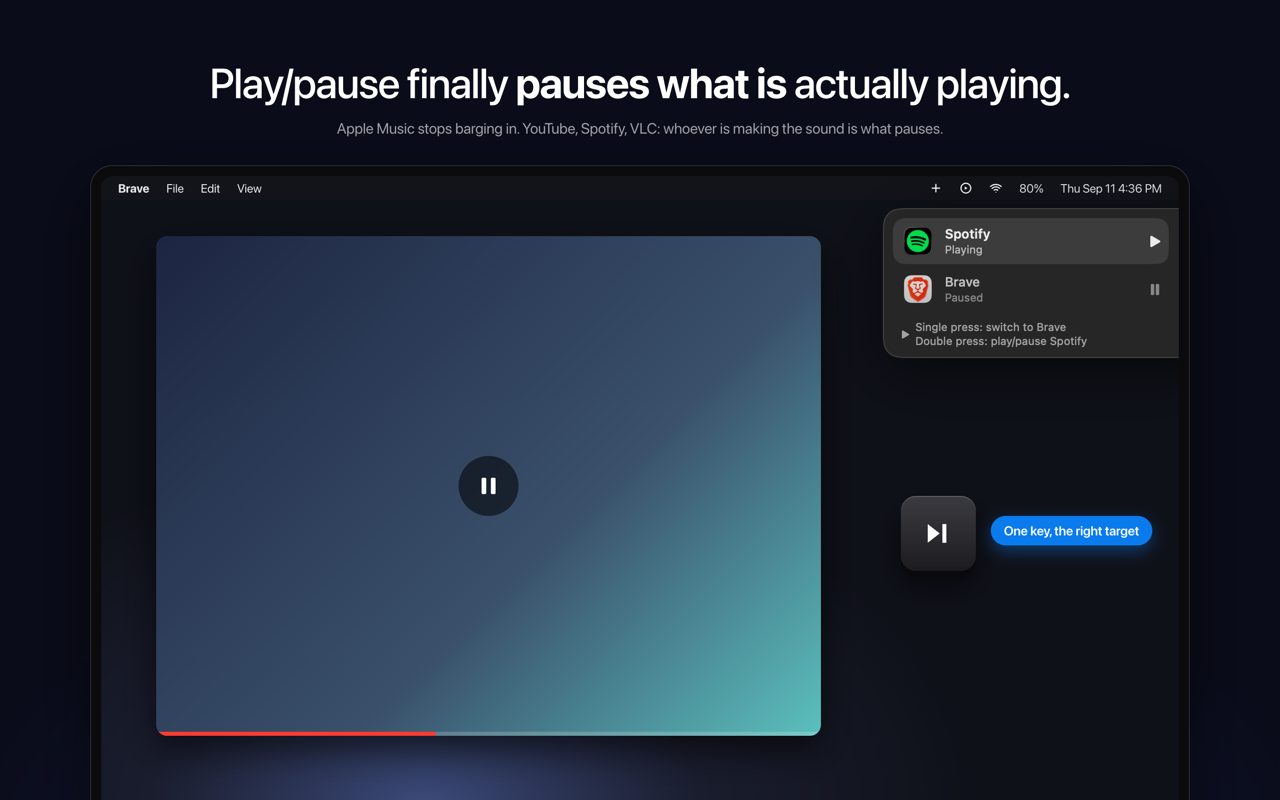
SmartPause is a free, open-source macOS menu bar app that sends the play/pause media key to the app that is actually making sound on your Mac, rather than to whatever the system remembers as "Now Playing." It is built for Mac users who listen to audio from more than one place at once — someone watching a YouTube video in Brave while Spotify sits paused, for example — and who simply want the play/pause key to do the obvious thing. The app lives in the menu bar, requires no account, and its stated purpose is direct: press play, and the right thing pauses. macOS routes media keys to its own idea of "Now Playing," a piece of state that is often stale and sometimes points at nothing at all. The practical result is a familiar annoyance: you are watching a YouTube video, you press play/pause, the video keeps going, and Apple Music opens by itself. The key press is delivered to the remembered app instead of the audible one. SmartPause exists to close that gap so the media key behaves the way users intuitively expect, controlling the audio they are actually hearing in that moment rather than a remembered guess. On every press, SmartPause asks Core Audio which process is outputting sound right now, and then sends the command to that app. Because the decision is made at the moment of the key press and is based on real audio output rather than remembered state, Apple Music stays closed when it is not the app making noise. Nothing has to be pre-configured per app for this core behavior to work. If nothing is playing at all, the press falls back to the last thing you paused and resumes it, so the key remains useful instead of doing nothing. When two apps are playing at the same time, one key still handles it. A single press switches between them: the currently playing app pauses, the other one starts, and it moves to the top. A double press plays or pauses the selected app. A widget at the top right of the screen shows what just happened and what the next press will do, so the current state is visible rather than guessed at. SmartPause is deliberately small. It asks for one permission — Accessibility — which it needs in order to hear the media keys, and it does not request the microphone or screen recording. Audio detection uses Core Audio's public process list and runs only when you press a key, so the app costs nothing when idle. Apps that have no adapter get the key handed back to the system untouched, so the media key is never dead. The app is open source under the MIT license, written in Swift, with no analytics and no accounts, so users can read every line. Out of the box, SmartPause works with Spotify, Apple Music, VLC, Chrome, Brave and Safari, which covers the mix of browser and native playback that causes most media key confusion in the first place. The app is available in English and Turkish. Installation is a one-minute job. You can install it with a single Homebrew command — brew install --cask yasinozmeen/smartpause/smartpause — or download the zip from the GitHub releases page. The app requires macOS 14.2 or newer and runs on both Apple Silicon and Intel Macs. On first launch it asks for the Accessibility permission, and that is the whole setup. The benefit is the removal of a small but daily annoyance. Instead of the media key triggering a surprise launch of Apple Music or doing nothing at all, it acts on the audio you can hear. Because unsupported apps get the key handed back to the system, the key never becomes dead just because SmartPause does not recognize the app. Because detection only runs on a key press, there is no idle cost. And because there is no analytics and no account, using the app does not add tracking to a routine keyboard shortcut. Concretely, the workflows are the ones that break today. You are watching YouTube in Brave and press the key; the video pauses and Apple Music stays closed. A browser and Spotify are both playing; a single press switches between them and the widget shows what happened. Nothing is playing; the press resumes the last thing you paused. The app making sound has no adapter; the key is handed back to the system untouched. SmartPause is aimed at Mac users who listen across browsers and native players, and at users who prefer small, private, open-source utilities that need no account. It is free and staying free; the developer accepts coffee donations that go toward the Apple Developer ID so the app can be notarized. The app is menu bar only, with no windows to manage. In short, SmartPause fixes a specific, repeatable macOS annoyance by aiming the play/pause key at the process that is genuinely producing sound right now — free, open source, and small enough to forget about until the moment you press the key.
The 101 Plays Itself is a live musical instrument made from a public traffic camera. The page plays a Caltrans camera on the US-101 in Studio City, Los Angeles, and turns that real traffic into music in the browser: every car that crosses a line on the road surface plays a note, and the music is being made as the cars go past. It needs nothing more than a browser with the sound turned up, and it is aimed at anyone who wants to hear a freeway playing itself — listeners, music fans, and people curious about what five lanes of LA highway sound like when they are treated as a score. The project takes something ordinary — a public Caltrans traffic camera — and treats it as an instrument rather than a feed. Nothing on the page is pre-recorded: the timestamp burned into the top of the picture is the real one, and if you come back at three in the morning you will hear an almost empty freeway. That contrast between a busy freeway and a nearly silent one at night is central to the piece, and the page states it plainly. The work has been called "a musical instrument" by kottke.org, featured by NBC4 Los Angeles on The News Zone, and covered by The Drive, which described it as "strangely beautiful" — a browser turning five lanes into a musical staff, with real highway traffic and a public camera providing the score. Three cameras are available to play. The page lists the US-101 Southbound at Moorpark St in Studio City, the US-101 Northbound at SR-170 / Tujunga in North Hollywood, and the US-101 Northbound at Balboa Blvd in Encino. A map shows every camera the page can play, with the lit pin marking the one you are listening to and other pins available to tap and switch. The map is built with Leaflet and OpenStreetMap tiles. The video comes from Caltrans CAM 618, a public traffic camera used under the department's conditions of use, with detection and synthesis running entirely in the browser. If the page reports Cameras Down — Caltrans' whole video network unreachable, not just this camera — it offers an alternative: tap to play a recording, three real minutes of the same freeway. Sixteen voices make up the instrument palette, and you can tap any pad and stack as many as you like; by default two play together. Each voice has its own described character: Theremin (gliding, breathing), Glass (inharmonic bells), Rhodes (warm electric piano), Strings (bowed, slow, swelling), Choir (vowels, distant), Flute (breath and air), Vibraphone (metallic, trembling), Handpan (warm steel, hollow), Gamelan (beating bronze), Harp (plucked, ringing), Music Box (tiny, brittle, sweet), Marimba (woody, struck), Kalimba (thumb piano, round), Organ (cathedral drawbars), Sub Bass (felt more than heard), and a Drum Kit where the lanes become the kit. This palette is what turns a single stream of passing vehicles into a layered, deliberately tonal piece of music rather than a series of beeps, and the ability to stack voices lets the same traffic be heard in completely different moods. The musical timing comes from ten sampling patches laid onto the road surface, two in each of the five lanes. They are not rectangles: each one is a slice of its own lane, leaning and narrowing with distance exactly as the lane does. The browser reads those patches fifteen times a second and watches for the road to stop looking like the road — that is a car, and that is a note. A vehicle trips one patch and then the other, and the gap between them gives its speed, forming a real speed trap 13.4 metres long. How long the vehicle covers a patch gives its length, which is how the page tells a truck from a car and hands it a different voice. A readout on the page tracks notes played, the speed of a vehicle passing, notes per minute, trucks, the five lanes, and how long you have been listening. The approach is unusual because everything happens inside the browser. Detection and synthesis run entirely in this browser — no server, no samples, no recordings — so the music you hear is generated from the live picture at the moment you hear it. Lane geometry was solved offline from an earlier recording of this same camera, which is how the patches line up correctly with the road surface. The page also surfaces live conditions such as the number of lanes, the speed trap length in metres, night and tail lights, and the sun angle, so you can see what state the freeway is in while you listen. The benefit is a piece of music that is never the same twice, because it is being composed by whatever traffic happens to be crossing the camera at that moment. Because the source is a public camera and the timestamp is real, the sound you hear corresponds exactly to conditions on the road right now — busy during the day, near-silent in the small hours. You do not need to install anything or operate a synthesiser; you open the page, turn your sound up, and start listening. Switching cameras changes both the view and the musical material, and stacking voices changes the instrumentation without changing the traffic that is driving it. Concrete uses follow directly from this. You can open the page and listen live to the southbound 101 at Moorpark St, or switch the map pin to the northbound camera at SR-170 / Tujunga or Balboa Blvd for a different stretch of freeway. You can return at three in the morning deliberately to hear how sparse the traffic becomes and how that changes the music. When the Caltrans network is down, you can play the recording of three real minutes of the same freeway instead of listening live. You can tap into the instrument pads and stack voices to hear the same traffic rendered as Theremin and Glass, or as Sub Bass and Drum Kit, and you can watch the on-page readout to follow the speed of a vehicle, the note count, and how many trucks have passed. Target users are anyone with a browser and speakers: casual listeners, music and sound enthusiasts, and people interested in the freeway as a subject. The page runs on the web in the browser, and its technical building blocks as described are Leaflet with OpenStreetMap tiles for the camera map, a public Caltrans video feed (CAM 618) as the live source, and in-browser detection and synthesis with no server, samples, or recordings. Lane geometry was solved offline from an earlier recording of the same camera. No pricing information is stated in the material provided. In short, The 101 Plays Itself turns five lanes of LA highway into an instrument: a live Caltrans camera, real cars passing in this minute, and a browser that reads the road and plays a note for every vehicle that crosses it. The value is the live, generative performance — traffic you can watch and hear at the same time, composed in the browser as you listen.
Lull is a personalized meditation app that writes a guided meditation based on what you tell it. Instead of browsing a library of pre-recorded sessions, you speak your mind for a minute or so about what is actually going on, and Lull creates the rest. You then hear the meditation read in one of 11 voices, with Oura recovery able to shape the tone and Apple Watch heart-rate tracking recording how your body settled. The app is built for people who want a meditation made for this moment rather than a generic recording, and it is distributed as an iOS app through the App Store. Most meditation products work like a feed. You open the app, scroll through options, and try to find something that roughly matches your state. Lull's site frames the alternative directly with the line 'Instead of an endless feed, scroll inward.' The problem it addresses is fit. A session recorded months ago for a general audience cannot know that you are carrying the weight of a specific day, that you are wired late at night, or that you need to let go of something particular. Lull starts from your own words — 'Tell it how you feel. It creates the rest' — so the practice begins with your moment rather than with a catalogue. The site also sums it up as 'Your moment. Your way. Your peace,' and promises no searching and no scrolling. The primary capability is spoken input turned into a written meditation. The landing page instructs simply: 'Speak your mind.' You talk through what is going on — the example shown is a person saying they need to let go of today's stress and find some peace — and Lull writes a meditation for that moment. The site states that it takes roughly two minutes from thought to session, and that the result is 100% personalized guidance. With Premium, every session is generated fresh, described as created just now for you, and the number of unique meditations is represented as unlimited. Even the sample listed on the site reflects this: 'The Weight of the Ground' is described as a meditation for settling at the end of the day, and the app notes that with Premium every session is written fresh for you. Lull includes mood tracking built around the question 'How are you feeling today?' The app presents a calendar view so you can log how you feel and watch the pattern build across days and weeks. Three statements describe the experience: every session adapts to your mood, your moment, and your rhythm; the more you practice, the more it understands what you need; and you can watch yourself evolve over days, weeks, and months. This matters because a meditation that fits you today is partly a function of what you have been feeling lately, and the calendar gives that history a visible shape instead of leaving it as a vague impression. Mood tracking turns a one-off session into something closer to an ongoing practice. The audio experience is described in specific terms. Lull promises crystal-clear audio that draws you deeper into stillness, and spatial audio that wraps around you like a warm blanket — 'depth you can feel.' Playback is seamless from start to finish, with no jarring volume changes, just smooth and continuous stillness. You can layer your perfect atmosphere by mixing ambient sounds such as rain or waves with your meditation. You can also share what helps by sending a meditation to someone who needs it, since the app notes that stillness is contagious. Finally, you choose the voice: Lull offers 11 voices described as warm, gentle, and grounding, so you can find a guide that feels right for you. Lull's methodology is what separates it from playback-based meditation apps: Lull does not play recordings. You talk for a minute about what is actually going on, and it writes a meditation for that moment. Two health integrations shape that session. Oura recovery can shape the tone, and Apple Watch records your heart rate during the meditation. Afterwards Lull shows 'one honest number' — how far your heart settled below your own resting baseline — or it shows nothing at all. The app deliberately avoids gamification: there are no streaks and no scores, and the site states plainly that there is nothing here to keep alive and that you should come when you need to. One plan, a real 7-day trial, and cancellation two taps away in Apple's own settings reinforce the same low-pressure philosophy. The site frames meditation as more than stillness: it describes clarity, focus, and resilience as what regular practice unlocks. Three outcomes are named. New pathways: your brain rewires itself with every session, old patterns soften, and new possibilities emerge. Sharper focus: scatter fades, clarity rises, and you find the concentration that has been there all along. Quiet strength: life will push, you will bend rather than break, and you build the inner steadiness that carries you. The app's own description adds that Lull helps reduce stress, improve sleep, and find your ease. The Apple Watch settle measurement gives these benefits a personal reference point — your own resting baseline — rather than a shared score to chase. Concrete scenarios appear throughout the content. The featured meditation 'The Weight of the Ground' is written for settling at the end of the day, which maps to unwinding after work or before sleep. The example spoken prompt on the landing page describes needing to let go of today's stress and find some peace, a scenario for coping with accumulated daily pressure. The mood calendar supports a daily check-in habit: logging how you feel and then receiving a session adapted to that mood. Sharing a meditation supports sending support to a friend or family member who needs it. And Quick Sessions, which stay free and unlimited, cover the moments when you want something short without a subscription. Lull is built for iOS and distributed through the App Store, with Android listed as coming soon. Its stated health integrations are Apple Watch, which records heart rate and shows the settle after a session, and Oura, whose recovery data shapes the tone. Pricing is deliberately simple: one plan, described as 'the price is the price,' with a real 7-day trial, and cancellation available two taps away in Apple's own settings. The free tier is positioned as a practice rather than a preview — Quick Sessions stay free and unlimited for as long as you want them. A path for people already subscribed on the web is also referenced. Lull's core proposition is meditation that listens. By turning a minute of honest speech into a freshly written, spatially mixed session — optionally shaped by Oura recovery and measured by Apple Watch — it replaces the endless feed with something made for this moment, delivered in a voice you choose. No streaks, no scores, one honest number, and unlimited free Quick Sessions make the practice feel sustainable rather than gamified, which is exactly the point the product is making.