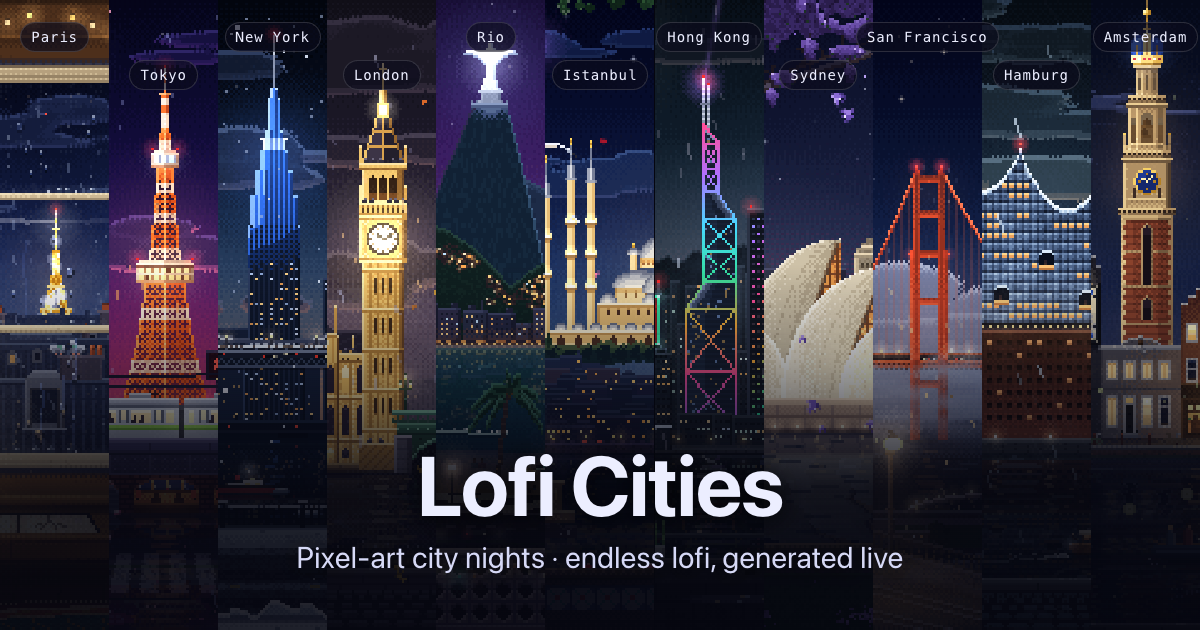
Lofi Cities is a free web app that pairs animated pixel-art city nights with endless lofi music generated live in your browser. It is made for anyone who wants a calm, continuous background for studying, working or winding down, and it asks for nothing beyond a browser: there is nothing to install, no account needed, and no pop-ups. You pick a city, press play, and let it run. Every scene is a 480×270 pixel-art animation that loops seamlessly every four minutes, with its own weather, landmarks and city sounds, while new lofi tracks are composed on the fly. It works on computers, phones and tablets.
Lofi music has become a familiar companion for focus, study and sleep, but most ways of listening depend on an app, an account or a fixed playlist that eventually ends. Lofi Cities takes a different route. Rather than streaming a catalogue of recordings, it composes music while you listen, so the stream never runs out. Rather than showing a single looping video, it renders each city as a pixel-art animation drawn with its own weather, landmarks and ambient sounds. The result is a background that behaves more like a place than a playlist, one that can be left running for hours while you work, read or fall asleep.
There are 16 cities to choose from: Paris, Tokyo, New York, London, Rio de Janeiro, Istanbul, Hong Kong, Sydney, San Francisco, Hamburg, Amsterdam, Dubai, Madrid, Rome, Prague and Munich. Each one is a distinct scene — rain on a painter's attic window under the zinc roofs of Paris with the Eiffel Tower sparkling far off; neon rain by Tokyo Tower; snow over the Brooklyn Bridge; fog and drizzle on the Thames; a Copacabana summer night; a rooftop tea garden on the Bosphorus; Victoria Harbour after dark; a jacaranda night on Sydney harbour; fog pouring through the Golden Gate; harbour lights on the Elbe; canal bridge lights in Amsterdam; a fountain night at the Burj; a summer night on Gran Vía; a warm night by the Colosseum; lamps on Charles Bridge; and a Christmas market in the snow in Munich. The city picker shows each city's local time and how many people are in it right now, and new cities are added over time.
Every track is composed on the spot with the Web Audio API: a chord progression, a drum groove, a bass line and often a melody, finished with tape wobble and vinyl crackle. Chords, drums, bass and melody are all synthesized in real time, with no samples or recordings, which is why the music never runs out and every track is new. Track titles are inspired by the city on screen, so the music and the scene stay connected as you listen.
The Vibe panel shapes what is playing. Style offers nine options: jazzhop, the default, built on a Rhodes, jazzy chords and a swung boom-bap beat at 68 to 88 BPM; piano, a sleepy felt piano with soft drums; ambient, slow warm pads with barely a beat, made for sleep and deep focus; bossa, nylon guitar over a bossa nova groove; synth, 80s city-pop synths; house, lofi deep house on a soft four-on-the-floor kick; guitar, a clean electric guitar fingerpicked over a lazy beat; sad, slow minor chords and a lonely muted trumpet; and medieval, a lute and a recorder over hand drums. Energy moves the mood from chill (slower and darker) to upbeat (faster and brighter), and Band plays the full band, no drums, or the chords only. A new style starts with the next track.
A separate ambience layer mixes each city's own sounds under the music. The city sounds mixer goes further, offering a slider for every sound of the city — turn the rain up, the traffic off or the bells down — and that setting carries over to every city that has the same sound. The Weather chip brings rain, snow, autumn leaves or a clear night to any city, and the city sounds and track titles follow it: rain brings the sound of rain in, while snow arrives with a hush of wind. Music and city sounds each have their own volume slider, and the Up next list shows the coming tracks so you can pick one to play right away.
Focus and sleep timers are built in. The focus timer runs 25 minutes of focus and 5 of break, or 50 and 10, on repeat, with a soft chime at each break and a bell to call you back; the sleep timer fades the music and city sounds out after 15 to 90 minutes and then pauses. The Tour chip moves on to the next city every 5, 10, 15 or 30 minutes, or follows the night, showing whichever city is closest to 1 am local time and moving west from Sydney to San Francisco as the hours pass, with cities on the same clock taking turns. Together adds a social layer: pick a heart, note, star or moon and tap the scene to float it up from that spot on everyone's screen there, or release a paper lantern that rises over the city for about a minute in the same place for everyone. The Chat button opens short messages from the last hour under a random two-word name such as "sleepy fox", with emoji available from a smiley button or by typing a colon and a name like :coffee:.
The whole thing runs in your browser. Because the cities and the music are generated locally, Lofi Cities works offline after your first online visit, every city included. There is no sign-in and no cookies: settings such as the last city, volumes and vibe, plus anonymous random ids for statistics and the live count, are kept in your browser's local storage. Anonymous usage statistics, such as which cities are viewed, are collected without cookies, and browsers that send Do Not Track are left out of them. For chat, a random id in local storage makes your tabs count as one person, the server forgets it about 25 hours after your last visit, and other people only ever see your two-word name.
For studying and working, the app gets out of the way: fullscreen hides everything else, H hides the interface, the controls fade out on their own when you stop moving the mouse, and P opens a picture-in-picture mini player that keeps the scene floating over your other apps on computers in browsers that support it. Streamers can add a browser source at 1920×1080 pointing to a city page with ?obs, which keeps the interface hidden and starts the music on its own, with the option to control audio via OBS. The save button or the S key exports the current frame as a 1080p PNG, and the city videos can also be bought on Gumroad as a 16-city collection of four-minute 1920×1080 MP4 loops at 60 fps without audio, for personal use and video or livestream backgrounds. Every city also has a billboard for rent where a business can be drawn in pixel art.
In practice, Lofi Cities fits around a working day and around sleep. It can sit in a browser tab as a background for studying, coding, writing or reading, run in fullscreen with the interface hidden so only the city and the music remain, or float in a mini player over other applications. The focus timer turns it into a Pomodoro companion with chimes at each break. In the evening it becomes a wind-down: the ambient style, the sleep timer and the fader that pauses the music after 15 to 90 minutes. Streamers use it as a browser source behind their overlay, listeners save frames as 1080p wallpapers or loop the city videos, and people who like a bit of company can release lanterns, send a reaction or chat with whoever else is in the same city.
Lofi Cities turns a browser tab into a place: sixteen animated pixel-art cities, each with its own weather and sounds, and lofi music composed live so it never runs out. It is free, needs no account, works on phone and desktop, and is built to be left running quietly in the background — a simple way to get a calm, endless lofi atmosphere for work, study or sleep.
Publisher
A
admin
Launch Date2026-09-28
Platformweb
Pricingfree
Tech Stack
#Web Audio API