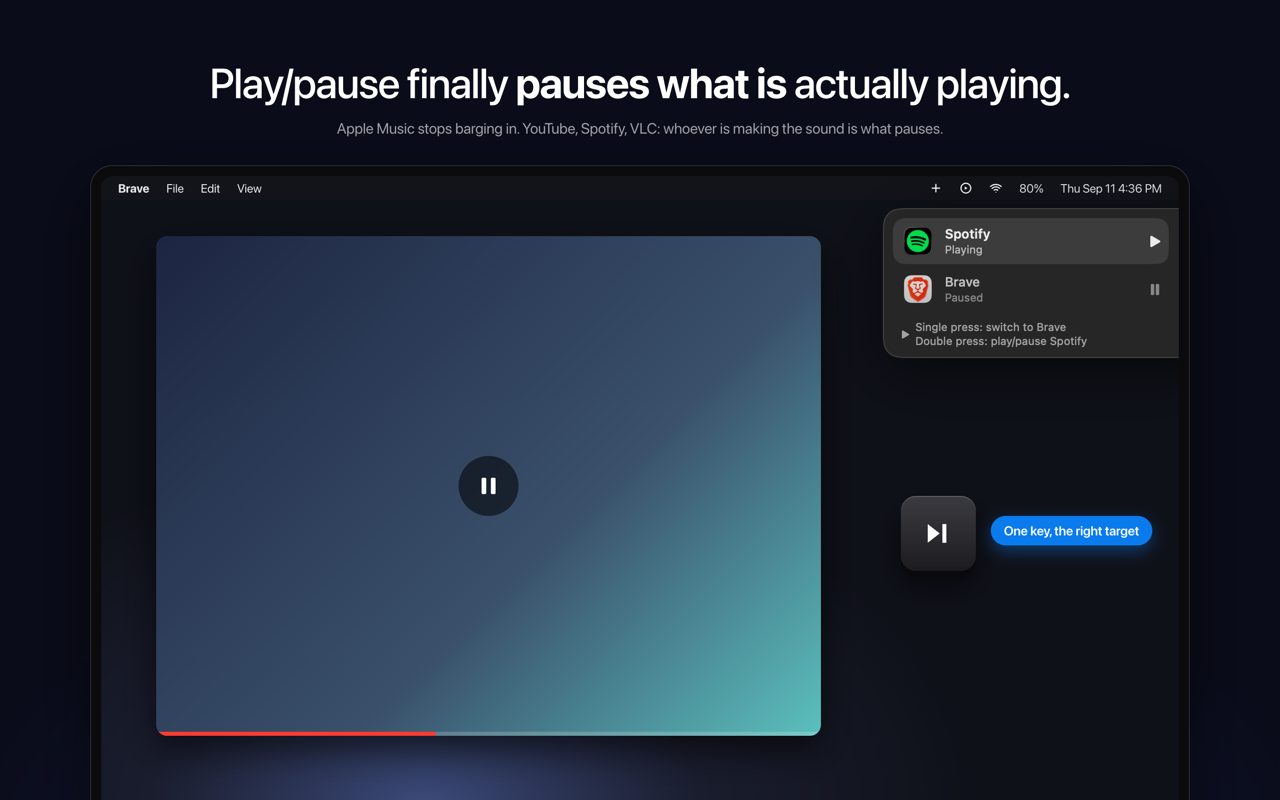
SmartPause is a free, open-source macOS menu bar app that sends the play/pause media key to the app that is actually making sound on your Mac, rather than to whatever the system remembers as "Now Playing." It is built for Mac users who listen to audio from more than one place at once — someone watching a YouTube video in Brave while Spotify sits paused, for example — and who simply want the play/pause key to do the obvious thing. The app lives in the menu bar, requires no account, and its stated purpose is direct: press play, and the right thing pauses.
macOS routes media keys to its own idea of "Now Playing," a piece of state that is often stale and sometimes points at nothing at all. The practical result is a familiar annoyance: you are watching a YouTube video, you press play/pause, the video keeps going, and Apple Music opens by itself. The key press is delivered to the remembered app instead of the audible one. SmartPause exists to close that gap so the media key behaves the way users intuitively expect, controlling the audio they are actually hearing in that moment rather than a remembered guess.
On every press, SmartPause asks Core Audio which process is outputting sound right now, and then sends the command to that app. Because the decision is made at the moment of the key press and is based on real audio output rather than remembered state, Apple Music stays closed when it is not the app making noise. Nothing has to be pre-configured per app for this core behavior to work. If nothing is playing at all, the press falls back to the last thing you paused and resumes it, so the key remains useful instead of doing nothing.
When two apps are playing at the same time, one key still handles it. A single press switches between them: the currently playing app pauses, the other one starts, and it moves to the top. A double press plays or pauses the selected app. A widget at the top right of the screen shows what just happened and what the next press will do, so the current state is visible rather than guessed at.
SmartPause is deliberately small. It asks for one permission — Accessibility — which it needs in order to hear the media keys, and it does not request the microphone or screen recording. Audio detection uses Core Audio's public process list and runs only when you press a key, so the app costs nothing when idle. Apps that have no adapter get the key handed back to the system untouched, so the media key is never dead. The app is open source under the MIT license, written in Swift, with no analytics and no accounts, so users can read every line.
Out of the box, SmartPause works with Spotify, Apple Music, VLC, Chrome, Brave and Safari, which covers the mix of browser and native playback that causes most media key confusion in the first place. The app is available in English and Turkish.
Installation is a one-minute job. You can install it with a single Homebrew command — brew install --cask yasinozmeen/smartpause/smartpause — or download the zip from the GitHub releases page. The app requires macOS 14.2 or newer and runs on both Apple Silicon and Intel Macs. On first launch it asks for the Accessibility permission, and that is the whole setup.
The benefit is the removal of a small but daily annoyance. Instead of the media key triggering a surprise launch of Apple Music or doing nothing at all, it acts on the audio you can hear. Because unsupported apps get the key handed back to the system, the key never becomes dead just because SmartPause does not recognize the app. Because detection only runs on a key press, there is no idle cost. And because there is no analytics and no account, using the app does not add tracking to a routine keyboard shortcut.
Concretely, the workflows are the ones that break today. You are watching YouTube in Brave and press the key; the video pauses and Apple Music stays closed. A browser and Spotify are both playing; a single press switches between them and the widget shows what happened. Nothing is playing; the press resumes the last thing you paused. The app making sound has no adapter; the key is handed back to the system untouched.
SmartPause is aimed at Mac users who listen across browsers and native players, and at users who prefer small, private, open-source utilities that need no account. It is free and staying free; the developer accepts coffee donations that go toward the Apple Developer ID so the app can be notarized. The app is menu bar only, with no windows to manage.
In short, SmartPause fixes a specific, repeatable macOS annoyance by aiming the play/pause key at the process that is genuinely producing sound right now — free, open source, and small enough to forget about until the moment you press the key.
Publisher
A
admin
Launch Date2026-09-21
Platformdesktop
Pricingfree
Tech Stack
#Swift#Core Audio