Category Focus/categories/api
API AI Tools
Discover and compare the best api AI tools and software. Browse 124+ curated tools with reviews and rankings.
Projects tracked
124
Sort mode
RECENT
Page
3
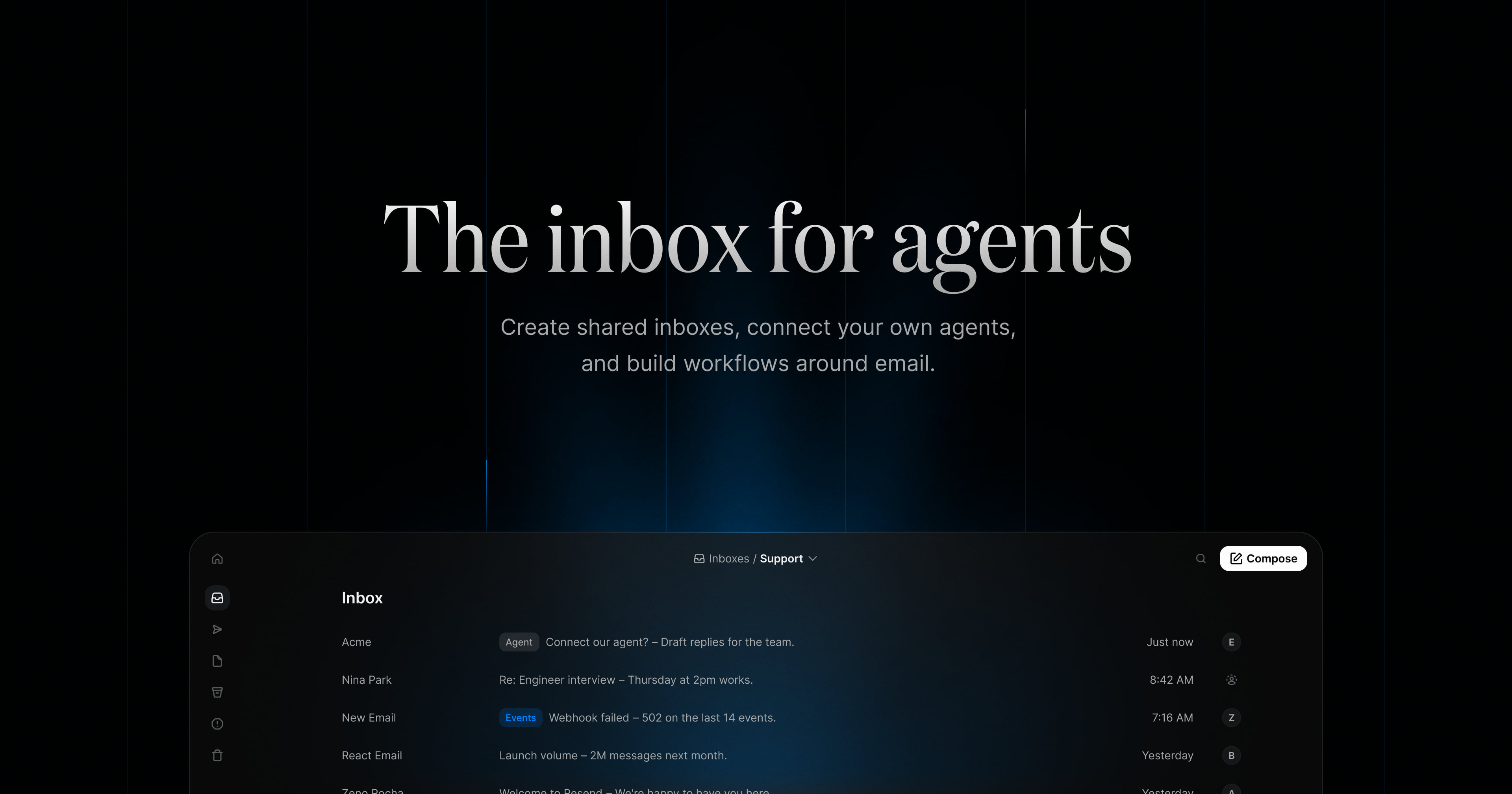
Resend Inboxes is a product from Resend that lets you create shared inboxes, connect your own agents, and build workflows around email. It gives an application or a team a real email address and turns the messages that arrive there into conversations that can be read, labeled, assigned, drafted on, and answered. The product page describes it as "the inbox for agents," and the central idea is that inbound email becomes something your product, your team, and your AI agents can all work with in the same place. Instead of a mailbox sitting apart from the software you build, the inbox is created programmatically, handled through an Inbox API, and shared with the people and agents who need to act on it. It is aimed at developers and teams who want email to be part of their product workflow rather than a separate destination. The problem Resend Inboxes addresses is that a great deal of operational work arrives as email, yet traditional mailboxes sit outside the product and outside the workflow. The page shows the kinds of messages that pile up: a spike in bounce rate reported by a support contact, a customer asking to connect an agent, an interview scheduling reply, a webhook failure alert from Linear, a launch volume update, a pending DNS verification, a morning triage summary, receipt replies nobody is seeing, a release notification, an on-call rotation request, and a first inbound email waiting to be assigned or handed off. Each of these is a task disguised as a message. Resend Inboxes turns inbound email into structured objects, inboxes, threads, emails, and drafts, that can be listed, fetched, labeled, filed into folders, and replied to. That structure is what makes email programmable and shareable, so conversations can be routed instead of merely received. The first feature group is the API-first approach. The Inbox API lets you create inboxes programmatically, receive email, and work with conversations. Creating an inbox is a single call that gives your app a dedicated email address and starts receiving messages. Receiving is handled by listing conversations as they arrive, then fetching a thread and the emails inside it. Replying is a call that sends a reply on an existing thread from your app, an agent, or an automated workflow. The page shows endpoint patterns such as a GET request for inbox threads with a query parameter, a POST request to create drafts on an inbox, and a folder value of inbox. A Node.js example shows the Resend SDK creating an inbox with an email address, a name, and a from name, which illustrates how little code is needed to stand up a working address. Because the inbox is an API resource rather than a screen, it can be embedded in whatever product or internal tool you already run. The second feature group is agent readiness. Resend Inboxes lets you connect the agents you already use through MCP or skills, giving them access to conversations, messages, and the tools they need to work with email. The page lists Claude Code, Cursor, Codex, Grok, and Gemini as agents you can connect. This means an agent does not need a separate mail integration built from scratch; it can be pointed at an inbox and given the same conversations your team sees. Giving an agent access to messages and threads is what allows it to summarize, label, draft, and route, and because it works through the same inbox the team uses, the results land where people can review them. The third feature group is agentic workflows that put the inbox on autopilot. You give an agent instructions and let it handle routine email work triggered by webhooks, while your team stays in control. Instructions shown on the page include keeping the inbox organized by labeling and triaging new emails, drafting replies, and assigning anything that needs attention; triaging incoming support email, labeling by urgency, and drafting a reply when there is enough context; labeling anything urgent, forwarding invoices to finance, and drafting follow-ups; and labeling candidate conversations, archiving stale threads, and drafting a short next step for the team. The page also references available actions, with an all-actions option, which suggests the agent's scope is defined by the instructions and actions you grant it. The value is that routine triage and drafting happen continuously without a person opening every message, while assignment and review keep humans in the loop. The fourth feature group is shared inboxes for team collaboration. You can share inboxes with your team, assign conversations, and pick up where someone else left off. The recruiting example shows folders for Review, Scheduled, Next steps, and Offer, with candidate conversations labeled by team such as Design, Engineering, Marketing, Success, and Ops, and each thread showing who is handling it. The support example shows labels for Support, Agent, and Incident, unread and read states, timestamps, and messages from agents such as an agent address sending a morning triage note. Together, labels, folders, assignment, drafts, and read state give a shared inbox the structure a team needs to divide work without losing track of who owns which thread. Overall, Resend Inboxes works by combining three layers. The inbox layer provides an address and stores conversations, threads, emails, and drafts. The API layer exposes those objects so your application, an agent, or an automated workflow can create inboxes, list threads, fetch messages, create drafts, and reply. The agent layer connects external agents through MCP or skills and runs them against your instructions, triggered by webhooks, so routine work is handled automatically. Your team then works in the same inbox, reviewing, assigning, and replying. The unique approach is that email is treated as product data with a shared human interface on top, rather than as a standalone mailbox. The benefits follow directly from that structure. Developers get a dedicated address in one call and a documented API for threads, emails, and drafts, so inbound email can be built into a product instead of bolted on. Teams get shared inboxes where conversations are assigned and labeled, so nothing sits unassigned and anyone can pick up a thread. Agents get real access to conversations and messages, so they can triage, label, and draft replies rather than working from copied context. And because agent work is triggered by webhooks under instructions you write, automation runs continuously while the team retains control of what gets sent. Use cases described on the page cover several concrete workflows. For agents, each AI agent can get its own address to receive tasks, approvals, and updates. For support, support email can be routed into your product and threads fetched through the API. For an executive assistant, an agent can sort incoming requests, draft replies, and keep threads moving. For recruiting, teams and agents share an inbox to track every candidate conversation. For on-call, alerts are collected in one inbox and each one is assigned so nothing sits unassigned. For notifications, receipts, alerts, and updates can be sent to one address for your app to process. Pricing and audience details are stated plainly on the page. You can start at $0 per month with up to 3 inboxes, send and receive 3,000 emails, connect your own agents, and no credit card required, with a link to a pay-as-you-go Inboxes pricing page. The Node.js SDK example indicates a JavaScript and TypeScript-friendly developer workflow, and the agent integrations listed are Claude Code, Cursor, Codex, Grok, and Gemini. Resend positions the product for the teams and developers building on its email infrastructure, noting that Resend delivers mission-critical emails for some of the fastest growing teams. In summary, Resend Inboxes turns inbound email into shared, programmable conversations. Create an inbox, connect your agents, and build workflows around email, with the API handling the structure and your team staying in control of the outcome.
Mouse-1 is a decision model and fast decision layer designed for AI agent harnesses. It is built for developers and teams who run agents that make many decisions during a task. Instead of sending every small decision to a large frontier model, the harness can plug Mouse-1 into its current stack and use it to resolve those decisions. The product takes the agent's state and the options available, returns a probability, and lets the harness route, gate, or verify while the main frontier model handles reasoning or code. The website presents Mouse-1 as something you plug directly into your agent harness and says users can see measurable results right away. An agent makes hundreds of small decisions during every task. These decisions are not the main reasoning or coding work, but they still need to be handled. Using a frontier model for all of them can consume time and money. Mouse-1 is built to handle these decisions so the agent does not have to spend frontier-model capacity on them. The website frames this as a decision layer that saves time and money, and Product Hunt metadata describes it as a decision model for an agent harness. The core problem is straightforward: agents need many small decisions resolved, and a fast, low-cost decision model can take that work while the main model focuses on the tasks that require deeper reasoning. Mouse-1 works by taking the agent's state and options and returning a probability. That probability lets the harness handle small decisions while the main frontier model takes care of reasoning or code. The harness is the part of the agent stack that can route, gate, and verify; Mouse-1 supplies the decision signal. The website's side-by-side diagram shows Mouse-1 at roughly 100 ms for Decide and labels the harness steps as Route, gate, verify. The main model is labeled Plan & write code, and tools are labeled Shell, edit, MCP. The sequence shows Propose, Execute, and Results. In this arrangement, Mouse-1 does not replace the frontier model; it adds a fast decision layer alongside the current stack. The website emphasizes speed. It says Mouse-1 answers in about 100 ms, and one request can answer up to 128 questions. It also says this is faster than a chat model's first token. In a side-by-side example, the same prompt is sent to Mouse-1 and a frontier model. The website says Mouse-1 finishes the task before the frontier model returns its first token. This is a strong illustration of the difference between a decision model and a chat model: the purpose is not to generate prose or code, but to return a choice quickly from the provided options. The ~100 ms figure and the up-to-128-questions-per-request detail are the key performance facts stated on the page. The page shows three image-based examples. In a content moderation example, an image of hot dogs is shown with the label hot_dog >99.99% and a moderation question: Is this image safe to post? The returned options and probabilities are safe 99.96%, spam 0.03%, nudity <0.01%, and violence <0.01%. In a document routing example, a 2020 Form 1040-ES is shown with the question Where does this document go? and the options tax_return 99.99%, invoice 0.01%, contract <0.01%, and id_document <0.01%. In a browser use example, Chrome's offline page is shown with the question What state is the screen in? and the options error 99.95%, loading 0.03%, ready 0.02%, and login_required <0.01%. These examples show Mouse-1 returning probability distributions over explicit options. The benchmarks section reports average decision accuracy on unfamiliar tools and repositories. Mouse-1 is listed at 89.1%, followed by d3 at 85.8%, Clef at 84.2%, OpenAI at 82.5%, d3-flash at 81.4%, and Jev at 79.1%. The page also reports a decision flip rate, described as decisions changed by a planted instruction, where lower is better. Mouse-1 is listed at 0%, followed by d3-flash at 27.6%, Clef at 37.4%, d3 at 40.4%, OpenAI at 53.9%, and Jev at 65.4%. The page says the 0% result supports the claim that Mouse-1 is hard to inject. These benchmarks are presented as evidence that a dedicated decision model can perform well on small decisions. The page lists zero data retention as a feature. It says Mouse-1 scores the request and drops it, and nothing is stored or used for training. It also says Mouse-1 is hard to inject because it only picks from the options given; planted instructions changed 0% of decisions in the tests. This matters for agent harnesses that process user content, documents, or browser screens, because the decision model is not asked to generate free-form output. It chooses among options. The combination of zero retention and option-only selection is presented as a security and privacy advantage. Pricing is listed as cost per 1,000 decisions. Mouse-1 is $0.10, with input at $0.10 per 1M tokens and output free. The page says this is up to 65× cheaper than frontier models. For comparison, the table lists GPT-6 Sol at $6.50 per 1,000 decisions, Claude Opus 5 at $6.25, Claude Sonnet 5 at $3.75, Gemini 3.7 Flash at $1.88, DeepSeek V4 at $1.52, Claude Haiku 4.5 at $1.25, Cloudflare Clef at $0.24, OpenAI Decisions at $0.10, and TypeSafe Jev at $0.042. The table notes 1,000 input tokens per decision and says generative models add 50 output tokens. Mouse-1 is positioned as a low-cost decision layer rather than a general-purpose generative model. The benefits stated on the page are time and money savings, fast decisions, low latency, low cost, zero data retention, and resistance to planted instructions. The use cases shown are content moderation, document routing, and browser use state detection, plus the general harness workflow of routing, gating, and verifying small decisions. The target users are developers and teams building agent harnesses, especially those already using a frontier model and tools such as shell, edit, and MCP. Mouse-1 is added alongside the current stack rather than replacing it. The page invites users to start building in the console and read the documentation, and it offers a copyable agent prompt. Mouse-1's primary value proposition is a fast, cheap decision layer for agent harnesses. It handles the hundreds of small decisions an agent makes during a task, returns probabilities over the options it is given, and leaves reasoning and code to the main frontier model. The website supports this with ~100 ms latency, up to 128 questions per request, 89.1% average decision accuracy on unfamiliar tools and repositories, a 0% decision flip rate in planted-instruction tests, zero data retention, and a $0.10 per 1,000 decisions price. For teams building agents, Mouse-1 is presented as a way to keep the frontier model focused while the harness gets fast, measurable decisions.
The Brains is a directory of MCP servers that turn well-known founders, CEOs, investors and other public thinkers into searchable knowledge sources for AI assistants. Each brain is built from that person's public talks, essays, interviews and posts, and can be added to Claude, Cursor, ChatGPT or Codex. The site describes itself as the smartest brains on earth, in an MCP, and its stated purpose is straightforward: when you ask an AI assistant a question about pricing, fundraising, launching or growth, the answer should come back with a citation pointing to the talk, essay or post it was drawn from. The directory currently lists 39 brains covering 8,154 cited sources, spanning indie hackers, AI builders, CEOs, investors, marketers, operators, health experts and thinkers. Business and startup advice is abundant but scattered. A founder who wants to know how Pieter Levels prices a product, what Paul Graham says about fundraising, or how Ryan Hoover launched Product Hunt would otherwise have to search across podcasts, newsletters, essays and social posts, then hope the assistant remembers the source correctly. The Brains gathers those public materials into a single searchable unit per person and exposes it as an MCP server that plugs into the assistant the user already works in. That moves research into the tool instead of across a dozen browser tabs. The citation requirement matters because advice from public figures is easy to misattribute, and every answer is tied back to a source link so the user can read the original material and judge it in context. The core unit of the product is one MCP server per brain. Founders, CEOs and investors each become a searchable server built from their public output, and users add a brain to Claude, Cursor, ChatGPT or Codex to query it directly. The Product Hunt description notes that users can work with one URL per brain or a single URL for all of them, so the product supports both focused research on a single person and broader browsing across the whole roster. The directory also shows install counts, which give a practical signal of which brains other users reach for most: Alex Hormozi leads the listing with 85 installs, followed by Naval Ravikant with 31 and Marc Lou with 12 at the time of writing. Every answer cites its source. The site's sample questions show the intended format in practice: how do I know if my offer is underpriced, and how fast should I raise it, for Alex Hormozi; how do I come up with a startup idea worth working on, for Paul Graham; how do I validate a B2B SaaS idea before I build anything, for Vic Giurgiu. In each case the answer is expected to quote the talk, essay or post it came from with a link back to that material. That makes a brain useful both as a fast research shortcut and as a way to trace an idea to its original wording, which matters when a founder wants to quote or act on the advice. Discovery happens through the directory page, which is organized around several filters. Visitors can browse all 39 brains or narrow to indie hackers, AI builders, CEOs, investors, marketers, operators, health or thinkers. A search box lets users search founders or topics, with the site suggesting a query like pricing as an example. Results can be sorted by most installed, most sources, recently updated or alphabetically. Each entry surfaces the person's role and a short line of context, plus the number of talks and essays and posts behind the brain, an install count, and how recently it was updated, so users can judge depth and freshness before adding a server. The roster illustrates the range of the approach. It includes indie hackers and solo founders such as Marc Lou, Pieter Levels, Jack Friks, Alex West, Nevo David and Tibo Louis-Lucas; investors and fund figures such as Naval Ravikant, Jason Calacanis and Rob Walling; CEOs and operators such as Elon Musk, Sam Altman, Guillermo Rauch, Alexandr Wang and Jason Cohen; marketers and writers such as Justin Welsh, Ruben Hassid, Corey Haines, Shaan Puri, Lenny Rachitsky and Ryan Hoover; health-focused figures such as Andrew Huberman and Bryan Johnson; and even Socrates as a thinker. Source depth varies widely, from brains backed by a handful of talks and essays to Jason Cohen's 221 talks and essays and 300 posts. Overall, the product works as a layer between public knowledge and AI assistants. Public material is collected per person, packaged as an MCP server, and made reachable from Claude, Cursor, ChatGPT or Codex through a URL. The directory acts as the front door, with search, filters, sorting and per-brain statistics that help users pick the right source. The site also invites visitors to request a founder, CEO or investor for future builds, and to claim a brain if they are listed so they can verify it, fix anything that is wrong and add sources. Updates are visible on each card, with most brains showing recent refresh dates. The benefit is grounded answers rather than generic ones. Instead of asking an assistant what a well-known founder thinks and getting a plausible paraphrase, users get a response that quotes the underlying talk, essay or post and links to it. That is useful for founders making pricing, positioning, hiring or fundraising decisions, and for anyone who wants to check the original reasoning. Because the brains are exposed as MCP servers, the same source can be reused across different assistants without rebuilding the research each time, and the single-URL option makes the entire roster available in one connection. Use cases follow the sample questions on the site. A founder can ask how to tell whether an offer is underpriced and how quickly to raise prices, drawing on Alex Hormozi's material. A first-time builder can ask how to come up with a startup idea worth working on and get Paul Graham's essays as the cited basis. Someone preparing to launch can ask how Ryan Hoover approached building an audience before a product. A SaaS founder can ask how to validate an idea from Tibo Louis-Lucas or Vic Giurgiu, how to handle flattening growth from Jason Cohen, or how to set up Claude Code skills to run SaaS marketing from Corey Haines. Others use the health brains for questions about morning and evening routines for better sleep, or the marketer brains for LinkedIn growth and cold outreach replies. The audience is broad but specific in intent: founders, indie hackers, solo founders, operators, marketers, investors and anyone who wants cited answers from experienced public figures rather than unsourced AI output. The product is free and open source under the MIT license according to the Product Hunt listing. The site notes that the brains are unofficial and not affiliated with the people represented. The primary interface is the web directory, with the actual brains delivered as MCP servers that connect to AI assistants, and the roster continues to grow through requests. The Brains makes expert public material usable inside AI assistants without losing the trail back to the source. By packaging each founder, CEO or investor as a searchable MCP server and requiring every answer to cite the talk, essay or post behind it, it turns scattered advice into something a founder can query, verify and act on.
Exa 3.0 is the largest improvement to search quality that Exa has ever released, delivered as an update to its search API for AI agents. It is built for developers and teams who need to feed AI agents richer, more useful data from the web at a lower cost, and it is available today through the API. The release bundles three core changes: a larger embedding model trained with more compute and data than any previous Exa model, an index expanded with billions of new documents across useful data types, and Dynamic Highlights, which are now generally available. According to the announcement, Exa 3.0 ranks first on every benchmark the team tested, from public evaluations to coding, finance, and go-to-market intelligence. The context behind the release is the rapid growth of AI agents and personal AI assistants that depend on web retrieval to answer questions and complete tasks. Exa states that it has seen an explosion in usage from personal AI assistants, which is why it prioritized expanding its index and data partnerships to serve those use cases. At the same time, AI applications are cost-sensitive: sending full page text to a model consumes large numbers of tokens, and running heavy retrieval for every task adds up. Exa 3.0 addresses both sides of that trade-off at once, pairing broader and more accurate retrieval with a highlight model that dramatically cuts the amount of text passed downstream, plus a new lower-cost search tier for applications where budget is the binding constraint. The result, per the announcement, is a new Pareto frontier for search quality versus cost. The first pillar of the update is the retrieval stack itself. Exa trained a larger embedding model with more compute and data than any previous model, and states that every search type benefits from the improvement. Alongside the model work, the company added billions of documents to its index across data types such as products, local businesses, flights, events, sports, weather, and more. Together these changes produced gains on evaluations spanning coding, finance, deep research, and company intelligence. Because the improvements live in the shared retrieval stack rather than in a single product surface, developers do not need to switch endpoints or rebuild integrations to take advantage of them. The second pillar is Dynamic Highlights, which was previously released as a research preview and is now generally available at no additional charge. Instead of extracting highlights from each page individually, the new model selects tokens across all results, giving more tokens to the best pages, cutting repeated information, and using 95% fewer tokens than full page text. Exa reports that this approach improves answer quality while reducing token consumption, and that improvements to model efficiency have made it substantially faster and cheaper to run. For teams building agents, this means the retrieval layer returns a more compact, ranked selection of relevant text rather than long page dumps, which lowers both cost and context pressure downstream. The third pillar is the expanded index. Exa runs its own crawler and an independent index, tracking over 2 trillion URLs, serving 100 billion pages, and growing around what its customers search for. Exa 3.0 now includes 1.27B ecommerce listings with prices and availability, 211M+ local businesses with hours and ratings, real-time news, sports, weather, and market data, plus flights, local events, transit, and podcasts. This new data adds to coverage customers already rely on, including people, companies, code, and publications. The announcement highlights concrete search examples such as business hours and ratings for places, product prices and availability, game scores, and forecasts, illustrating the kinds of structured, real-world facts agents can now retrieve. Exa 3.0 also introduces Exa Lite, a new search type priced at $4 per 1,000 requests and built for cost-sensitive applications. Lite runs on the same index as Exa Auto. For higher quality, Exa Auto uses more compute across the retrieval stack, including candidate generation, highlights, and ranking, and is priced at $7 per 1,000 requests. Exa positions the two tiers as complementary: Lite offers strong search quality at a lower price, while Auto trades more compute for the highest quality. Measured as agentic search score versus cost per task, Exa 3.0 Lite scores 79 at about $0.045 per task and Auto scores 80.5 at about $0.065, which Exa describes as setting the quality-and-cost frontier among the tested providers. Overall, the product works through a retrieval pipeline that Exa operates end to end: its own crawler feeds an independent index, queries are handled by an embedding model in the retrieval stack, and candidate generation, highlighting, and ranking are applied with differing amounts of compute depending on the search type chosen. Dynamic Highlights then operates across the full result set rather than page by page, deciding how many tokens each result deserves. Developers access all of this through the API, configure which search type they want based on their quality and cost requirements, and get back ranked results with compact highlights and access to the expanded data sources at no additional charge. The stated outcomes center on benchmark performance. Exa 3.0 scores 91.8% on BrowseComp, 88.2% on DSQA, 56.1% on WideSearch, 42.0% on ATLAS, 75.5% on WebCode, 68.0% on FinSearchComp, 15.4 on Company FindAll, and 7.6 on People FindAll, and the announcement states that Exa 3.0 leads Perplexity, Brave, and Parallel on all eight benchmarks. For users, the practical benefits described are higher search quality for agent tasks, richer and more current data from an expanded index, and substantially lower token usage per query, all of which feed into better answers at a lower operating cost. Use cases named in the announcement include coding, finance, deep research, go-to-market intelligence, and company intelligence, which are the areas covered by the benchmark evaluations. The expanded index points to additional scenarios: product search with prices and availability, local business search with hours and ratings, real-time news, sports, weather, and market data lookups, and queries over flights, local events, transit, and podcasts. Exa also explicitly calls out personal AI assistants as a fast-growing usage category driving the index expansion, and cost-sensitive applications as the target for the Lite tier. Availability is immediate: Exa 3.0 is available today through the API, including Exa Lite, upgraded highlights, and the expanded index. Exa Lite costs $4 per 1,000 requests, Exa Auto is $7 per 1,000 requests, and the improved highlights and expanded data sources are included at no additional charge. Developers can get started in the API dashboard or read the documentation, and Exa hosted a live Exa 3.0 Q&A with its Head of Product and Head of R&D on Wednesday, October 21 at 1pm PT. In summary, Exa 3.0 is a search-quality release for AI agents that combines a stronger embedding model, a substantially larger and more structured index, and token-efficient Dynamic Highlights, while adding Exa Lite at $4 per 1,000 requests alongside Exa Auto at $7. Its core value proposition is straightforward: richer data and better search results for agents, delivered at a lower cost per task.
Composio Instant is a way for AI agents to use paid tools without a separate account, subscription or API key for each service. According to the site, with Instant your agent can search the web, find business contacts, create voiceovers, turn audio into text, and so much more. It is built for people running agents such as Claude, ChatGPT, Cursor, Cline, Codex, Gemini, Devin, Perplexity and other MCP clients, and for developers building their own agents. The stated purpose is to give your agent a wallet, not a pile of subscriptions: the agent connects once, calls the tools it needs, and each call is paid from a Composio balance rather than through a new vendor relationship. The problem Composio Instant addresses is subscription sprawl. The site frames it plainly: every new tool should not mean another subscription, and separate plans add up even though an agent may only need a few calls from each service. Composio illustrates the gap with a side-by-side comparison. Search at $49/mo, an email finder at $49/mo, voice at $22/mo and scraping at $19/mo total four subscriptions at $139 per month — a fixed monthly cost regardless of usage. The same four calls through Instant are shown at roughly $0.118 in total: about $0.005 for search, $0.020 for the email finder, $0.090 for voice and $0.003 for scraping, at provider prices with zero markup. The page labels these prices as illustrative and notes that subscriptions are monthly while Instant charges depend on usage, but the contrast is the product's whole argument: pay for the calls you actually make instead of buying a plan for every provider. The core of the product is tool coverage. Composio Instant advertises more than 1,500 tools with 0% markup, and its Discover directory lists 72 apps grouped by category, including Artificial Intelligence, Sales & CRM, Marketing, Productivity & Project Management, Content & Files, Developer Tools, Data & Analytics, Databases & Storage, HR & Recruiting, and Lifestyle. Named partners include Exa and Tavily for finding pages, answers and research across the web; Parallel and You.com for research and grounded answers; Firecrawl and Bright Data for collecting public web pages and search results; Browser Use and TinyFish for letting an agent navigate and read websites; ElevenLabs and Deepgram for creating voiceovers and transcribing audio; Apollo and People Data Labs for business contacts and company information; Akta for company research; Ahrefs for SEO data; Mathpix; Black Forest Labs for image generation with FLUX; Luma Labs for video from text or images; plus Higgsfield, fal.ai, AccuWeather and CarsXE. The FAQ summarises the scope as audio, video, search, browser, data, company enrichment, SEO, weather and scraping, with more tools added over time. Payment runs through a single wallet. Each Instant call is billed per use from one Composio wallet balance, and the site states there is no markup on Instant provider usage — charges come from the Composio balance at provider prices. A team wallet view shows available credits with an Add Credits action and a list of recent charges by provider, such as ElevenLabs at $0.090, Exa at $0.005, Deepgram at $0.168, Findymail at $0.020 and AccuWeather at $0.002. New users get a starting balance: the page promises that your agent's first $2 is on us, invited as an agent budget of $2.00 in the illustrated card. When the balance runs out, Instant calls stop once Composio confirms the balance is exhausted, and users can add funds to keep using Instant. The page is explicit that balance checks are asynchronous, so the balance is not a strict per-call spending cap. Control and transparency sit alongside the wallet. Execution logs show the tool used and what each Instant call cost, so a team can review exactly which tools ran and at what price. You can turn Instant off for your team in one click, and agents keep working on the accounts you have already connected; previous calls remain reviewable in the logs. Connected accounts also still work while Instant is on, without an Instant charge — Instant only covers tools you have not connected. That distinction matters in practice: the page shows connected apps like Notion and ElevenLabs alongside Instant tools like Firecrawl, with calls through your own accounts carrying no Instant charge. The unique approach is the combination of connected apps and Instant tools in one agent session. The page shows the agent connecting through MCP, then calling Instant tools, with payment flowing via the Composio wallet instead of provider keys. A worked example describes researching a company with Instant and then saving the brief to a connected Notion account, so work that already lives in your own subscriptions continues normally while Instant fills the gaps for tools you have not signed up for. For developers building their own agents, Instant can be added in a few lines of code: a sample session is created with a user ID and a toolkit list such as Firecrawl and ElevenLabs, and the tools are then retrieved from that session. Calls are paid from the team's balance, and the site notes that your users skip provider accounts. A task example of reading a page aloud shows the chained cost — Firecrawl at $0.003 and ElevenLabs at $0.090 for a $0.093 total. The benefits follow directly from that design. Agent builders avoid stacking subscriptions for features they use occasionally, avoid collecting and managing API keys from each provider, and get a single place to top up and monitor spend. Because pricing is per call at provider prices with zero markup, cost tracks actual usage rather than seat counts or monthly minimums, and because every call appears in the execution logs, spend is visible after the fact. Teams retain an off switch and a clear boundary between their own connected accounts and Instant-covered tools, which means turning Instant off does not break the integrations they already rely on. The page supplies concrete workflows. An agent can be asked to voice a launch post as a 60-second trailer, and ElevenLabs returns a 0:58 file voiced from the blog post for $0.09 instead of a $22/mo plan. An agent can find the Head of Growth at a named company, with Apollo returning the contact and email for $0.01 instead of a $59/mo finder. A task can read a page aloud by chaining Firecrawl and ElevenLabs. Research can be gathered with Exa, Tavily, Parallel, You.com or scraping tools and then saved to a connected Notion account. Directory entries extend the same pattern to company research, SEO data, image and video generation, vehicle specifications and weather lookups. On targeting and access, the site speaks to two audiences: people using MCP-capable agents like Claude, ChatGPT, Cursor, Cline, Codex, Gemini, Devin, Perplexity, Grok and OpenClaw, and developers embedding agent capabilities who want their users to skip provider accounts. The integration surface is MCP plus a code-level session API, with documentation available for Instant tools. Pricing is pay per call from one wallet balance, no markup, plus the initial $2 balance; the site also invites tool providers to partner with Composio. In short, Composio Instant turns a pile of provider subscriptions into a wallet an agent can spend from. Connect once, call whichever Instant tools the task needs, see the cost per call, and keep your own accounts exactly as they are — the primary value is giving an agent tool access without the signups, keys and monthly plans that usually come with it.
withHuman is the approval layer for AI agents. It lets you put your most consequential agent actions behind human approvals so that your agents can do real work. Its core behaviour is interception: every tool call an agent makes is held before it runs, checked against your rules, and either approved or denied automatically or routed to the right person on your team. withHuman is framework-agnostic, open source and built on open standards, and it works across Claude Code, Codex and agents built with LangGraph, Pydantic AI and more through an open protocol called AAP. Crucially, it gives you one set of rules for every agent your company runs. Agents are increasingly trusted with actions that carry real consequences: refunding a customer, paying an invoice, merging a pull request, rolling back a production deployment or sending a marketing campaign. Once such a call is made, it is often impossible to take back. The site describes the purpose of withHuman as covering "the actions you can't take back" by letting agents draft everything while shipping nothing until someone accountable has looked. Without a control layer, teams must choose between blocking agents from useful work entirely or letting them act unsupervised. withHuman exists to remove that trade-off, so agents can be put to work accountably rather than being held back. Every tool call, whatever the agent. Each tool call is intercepted by AAP, the Agent Approval Protocol, and sent to withHuman for approval. If the agent supports AAP, withHuman just works. Concretely, the product ships SDKs for LangGraph, CrewAI, Mastra and other agent frameworks, hooks for Claude Code, Codex and other coding agents, and the open Agent Approval Protocol for your own agents. In the worked example, a support agent's stripe.refund call is held by withHuman before it reaches Stripe, so nothing leaves the agent runtime until a decision has been made. This interception layer is what makes everything else in the product possible: because the call is paused rather than executed, withHuman can inspect it, apply policy, notify a person and only then let it run. No approval fatigue. The site is explicit that approval fatigue is the enemy, and the way to avoid it is to write policy rules that approve or deny routine requests automatically, sending only the tough stuff to humans. An approval pipeline can express conditions on the agent, the tool, the arguments and the agent context; an AI judge handles calls that rules can't describe; and webhooks hand decisions to your own policy service. In a live example pipeline, kubernetes.pods_list is approved by a rule for read-only tools, an email reply is approved by an AI judge as a routine support reply, db.drop_table is denied by a rule against schema changes, and a vendor.pay call over the team budget is sent to a person through a webhook, meaning three of four calls were decided without a person. The refund example shows the same idea in miniature: refunds under $20 are automatically approved, and anything more asks a human. Escalation paths decide which requests go to which team or person. You write rules that route by agent, tool, arguments or team; teams set their own escalation order and on-call flows; and requests escalate when nobody answers in time. In the illustrated example an under-$1,000 refund goes to the support team, a $2,400 refund goes to finance lead Sam Alvarez, and an out-of-hours request goes to Priya Nair, who is on call. Reviewers are then met where they already work: requests arrive in Slack and Discord, in iPhone and Android apps with push, and by email, text message and WhatsApp, so each reviewer's notification rules pick the channels. Every decision is kept on the record. withHuman maintains an append-only audit log run history: each entry records the request, the decision and the reviewer, such as db.delete_rows approved by d.chen, stripe.refund approved by s.alvarez with a note verifying with finance, k8s.apply denied by m.okafor, and crm.update_contact approved by d.chen. The log keeps reviewer identity on every row and the full request with each decision, so when someone asks who approved a given action, the answer is available. Overall, withHuman acts as a pipeline between the agent and the tool it wants to call. In the site's step-by-step example, a customer asks for a refund and the support agent decides to issue it; the agent's tool call is intercepted and held by withHuman before it reaches Stripe; the rules check the call and either approve or deny it automatically or ask a human to look; the request is sent to the Payments team, where Chris is on call; the human is notified on their preferred platform; the human sees the tool call and request context and decides; and the approved refund finally reaches Stripe while the agent carries on. The distinctive architectural choice is that integrations are made with AAP rather than with withHuman, so agents and frameworks wait on human decisions through an open spec, and you can swap providers without rewriting a single agent. The benefit is straightforward: withHuman lets teams put agents to work without giving up accountability. Because routine calls are decided automatically by rules or an AI judge, reviewers are not buried in approvals. Because risky calls are routed to the right person together with the full request context, decision-makers see exactly what is being proposed before it happens. Because every request, decision and note is kept in an append-only history with reviewer identity, the question of who approved something always has an answer. And because the protocol and the core are open source, teams avoid lock-in and can leave whenever they choose, running the queue, audit trail and web UI on their own infrastructure or letting withHuman host it. Use cases centre on consequential actions: an AI SRE agent requesting a kubernetes.rollout_undo to roll payments-api back to v2.41.0 after the 5xx rate crossed 2%; coding agents running Bash commands; customer support agents issuing stripe.refund calls; finance and accounting agents running bill.pay; sales agents using docusign.send; marketing agents sending campaign.send; and personal assistants creating calendar events with calendar.create_event. In each case the pattern holds: the agent prepares the action, withHuman pauses it, a rule or a person decides, and only then does the action execute. withHuman is aimed at teams running agents in production across engineering, support, finance, sales, marketing and SRE functions; the example reviewers include a Payments team member who is on call, a finance lead and an SRE. Integration is broad. Installing the CLI connects every supported agent on your machine, covering Claude Code, Codex, OpenClaw, Pi, Hermes and DeepSeek, and the supported list also includes the MCP gateway, LangGraph, Deep Agents, Pydantic AI, OpenAI Agents, Claude Agent SDK, Google ADK, CrewAI, AI SDK, Mastra and an HTTP API with POST /api/aap/v1/requests. withHuman is open source with a hosted version, and the Product Hunt listing notes a promotion giving three months of the Scale plan free with the code PRODUCTHUNT. In summary, withHuman is the approval layer for AI agents: it intercepts tool calls, applies automatic policy for routine actions, escalates the consequential ones to the right accountable human, records every decision, and does so through an open, self-hostable protocol that avoids lock-in. Its value proposition is simple and stated plainly on the site: put your agents to work, accountably.
daily.dev for agents is a marketplace of plugins that teach you or your agent new workflows on top of the daily.dev API. daily.dev is where millions of developers find out what's next, and this product extends that reach to your agent: you connect Claude, Cursor, Codex or any MCP client, and your agent can read personalized feeds, search posts, learn from discussions, save bookmarks and tune your feed. Every listing in the catalog is published either as a Plugin or as an Agent skill, and the marketplace is built and shared by developers. Alongside the plugin marketplace there is also an apps ecosystem for people who want to build on daily.dev rather than only consume from it, with a documented path for connecting your agent and submitting a plugin. Most of the value a developer collects from daily.dev does not disappear, it just goes stale. Bookmarks pile up and rot in a list you never reopen. Notifications stack into an undifferentiated inbox of replies, mentions, squad reviews and fresh content. The feed follows tags that may no longer match what you are actually building, while your git branch touches libraries, APIs and patterns your feed has never heard about. When an incident fires, when a dependency gets bumped, or when you want to know whether a tool is genuinely worth adopting, the answers live scattered across posts and comment threads that you have no time to read. The marketplace exists to route that knowledge into the surfaces you already work in — your terminal, your editor, your notes folder, your agent — so the content finds you instead of waiting to be found. The reading plugins bring daily.dev into wherever you already look. Unofficial dailydev CLI reads daily.dev from your terminal: your feed, popular and discussed posts, search, comments and bookmarks, and every command has a --json flag so scripts and coding agents can use it too. It installs with npm install -g @devopsdaily/dailydev-cli. daily.dev TUI for Terminal is a Text User Interface made in Go that calls the Daily.dev API into the terminal. daily.dev statusline for Claude Code rotates daily.dev headlines at the bottom of Claude Code while you wait, combining curated major headlines with the community's most-upvoted posts of the day, clickable in your terminal and requiring no API token. daily.dev RSS lets you read daily.dev in any RSS reader: sign in with daily.dev and get a private RSS or JSON Feed URL for your personalized feed. daily.dev Hello world is a starter app for building on daily.dev that signs in with daily.dev and shows your profile, personalized feed and latest bookmarks, pulled live from the public API, ready to fork. Bookmark, notification and profile workflows are covered by their own set of plugins. Bookmarks to Notes exports your daily.dev bookmarks to Markdown notes for Obsidian, Logseq or any folder of files: one note per post with summary, tags, source and links, and later runs sync only what's new so your second brain stays current without duplicates. Bookmark Recap turns what you bookmarked this week into a short reading report you can paste into standup, Slack or a newsletter, grouping your saves by topic, pulling the one-line summaries and telling you what is worth reading first. Inbox Zero summarizes your daily.dev notifications in one short briefing, split into what needs you (replies, mentions, squad reviews), what's social, and what's just new content, with links on everything actionable, and it marks them all read only when you say so. Profile Autofill takes your CV, LinkedIn export or a short career summary and has your agent fill in your daily.dev work history, education, projects, certifications and tech stack, after you approve the plan first. daily.dev Roulette spins the cylinder on a forgotten bookmark: one comes up, and you either spare it and go read it, or pull the trigger and it is deleted from daily.dev for good. Feed tuning and research plugins turn daily.dev into a decision surface. Feed Tuner compares what you bookmark on daily.dev with the tags and sources you follow, then proposes follow, unfollow and unblock changes and applies only the ones you approve. Stack Sync points your agent at a repository, reads the dependency manifests, updates your daily.dev tech stack and follows the matching tags so your feed matches what you actually build, showing you the plan before anything changes. Feed Builder takes a plain-English description such as "Rust backend and observability, 50+ upvotes, no videos" and produces a daily.dev custom feed with the right tags, sources and thresholds, with your agent resolving the tags, creating the feed and applying the filters. Branch Reads reads your git branch, spots the libraries, APIs and patterns you are touching, and finds the 3-5 daily.dev posts worth reading for that exact change. Trend Radar compares daily.dev's popular feed against last week's snapshot and surfaces what broke in, what cooled off and the posts that drove the change. Release Radar is a weekly changelog for your stack, finding release notes, breaking changes, deprecations and migration posts for the tags you follow, writing a digest that leads with what breaks, and saving posts to a bookmark list. Upgrade Scout pulls migration guides, gotchas and community reactions from daily.dev for a library and version and gives you a verdict before you run the upgrade. Community Check reads the most-discussed posts and their comment threads on a topic and summarizes the consensus, the dissent and the production gotchas, with sources. On-call Lookup takes an error or a log line from an incident, has your agent search daily.dev for posts about the same failure, reads the comments for corrections, and gives you the likely causes, the checks to run first and the fixes, each with its source, sending only generic terms and never hostnames or secrets. Hot Take Drafter finds the most-argued post on daily.dev this week, lays out both sides from the comment thread and drafts three takes — the contrarian, the synthesis and the sharp question. daily.dev Roulette rounds out the catalog with a playful but concrete way to clear your backlog. The marketplace is built on the daily.dev API, and the entry point is connecting your agent, with documented instructions for doing so and for how plugins work. A recurring pattern across the agent skills is an approval-first design: Profile Autofill has you approve the plan before anything is written, Stack Sync shows you the plan before anything changes, Feed Tuner applies only the changes you approve, and Inbox Zero marks notifications read only on your instruction. Hot Take Drafter drafts takes but you press send, not the agent. The plugins run in surfaces you already use — the terminal, an editor statusline, an RSS reader, a notes folder or an MCP client — rather than asking you to learn a new destination. The stated outcomes focus on keeping your knowledge current and your attention where it matters. Bookmarks stop piling up and rotting, and your second brain stays current without duplicates. Notifications collapse into one short briefing, with links on everything actionable. Your feed matches what you actually build, so the posts you see relate to your branch, your repository and your tech stack. Incidents get a starting point with sources attached. Dependency bumps come with a verdict before you run them. Adopting a tool comes with the community consensus and the production gotchas up front. Because all of it is delivered where you already work, you spend less time searching and more time on the change in front of you. Concrete workflows show how these plugins fit together. During an incident, you paste an error or a log line into On-call Lookup and get likely causes, first checks and fixes with sources, without leaking hostnames or secrets. Before bumping a dependency or reviewing a PR that does, you run Upgrade Scout for migration guides, gotchas and community reactions. Each week you can run Release Radar for a changelog of your stack that leads with what breaks, then Bookmark Recap to turn your saves into a report for standup, Slack or a newsletter. If you keep a second brain, Bookmarks to Notes exports bookmarks to Obsidian or Logseq and syncs only what's new. When you start work on a branch, Branch Reads finds the 3-5 posts worth reading for that exact change, and Stack Sync keeps your daily.dev tech stack aligned with the repository. Before adopting a tool or technique, Community Check gives you the consensus, the dissent and the production gotchas. Between all of that, Inbox Zero triages your notifications and Feed Builder or Feed Tuner keeps your feed pointed at what you follow and what you actually read. The product targets developers who already rely on daily.dev and who now work through agents and MCP clients such as Claude, Cursor and Codex, along with anyone building on the daily.dev API. The ecosystem is explicitly built and shared by developers, so contributors and plugin authors are part of the audience too. Integrations named in the content include Claude, Cursor, Codex and any MCP client, CSS readers via RSS or JSON feed, Obsidian and Logseq for notes, Slack for sharing recaps, and the terminal and Claude Code statusline as reading surfaces. Technologies that appear explicitly include an MCP server, a Text User Interface written in Go, and npm distribution for the CLI. On pricing, the marketplace itself is a catalog of plugins, and a limited-time promotional offer is noted on the site: a Product Hunt week promotion gives 25% off with the discount already applied, ending October 20th, redeemable through Get Plus. Taken together, daily.dev for agents is the bridge between the developer news that daily.dev curates for millions of developers and the agents that now do much of the day-to-day work. It keeps your feed, bookmarks, notifications, profile and research habits connected to the places you already work, and it does so with plugins and agent skills that are built and shared by developers themselves.
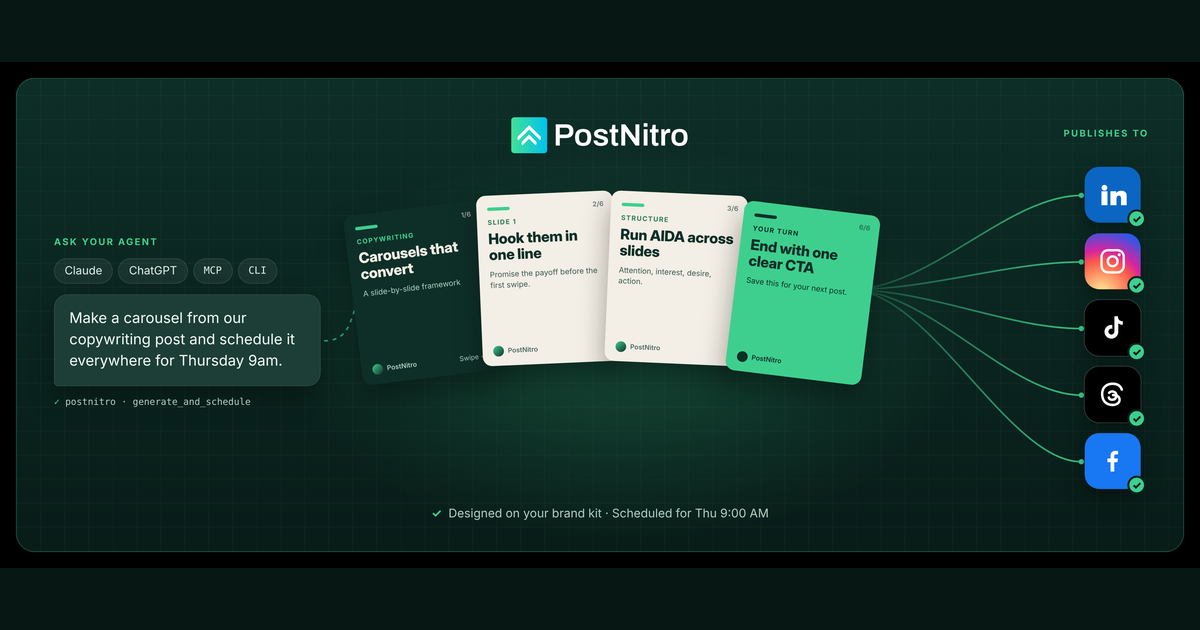
PostNitro for Agents is a social media API and design engine that lets AI agents create and publish social media content. Most social APIs an agent can reach will publish text or pre-made media, but PostNitro gives the agent the design layer too: on-brand carousels, single-image posts and animated video built from more than 100 templates and the user's own brand kit. The service then schedules and publishes that output natively to LinkedIn, Instagram, TikTok, Threads, Facebook and Pinterest. It is built for creators, marketers and teams who want one continuous chain, from prompt to designed, scheduled and published post, with no human in the loop unless they choose to add one. The site states the product is used by 85,000+ creators, with its editor embedded in 200+ platforms. PostNitro frames the problem it addresses directly: most social APIs that an agent can reach will only publish text and pre-made media. An agent can therefore write a caption and push a finished file, but it cannot produce a designed post on its own, because the design engine lives outside the API in a graphic design tool that a human has to operate. PostNitro's stated purpose is to give your AI agent a design engine, not just a publishing API, so that the agent can own the entire chain. That matters because the formats that carry a social presence, such as multi-slide carousels, consistently branded image posts and short vertical video, are precisely the ones that normally require manual design work. Moving design into the API layer means a single prompt can produce a publishable, on-brand asset rather than only a caption or a pre-made image. The creation capability covers carousels, single-image posts and short video, generated from several kinds of input: a topic, raw text, an article URL, or an X post. The agent can also add AI-generated images and bake them into slides as part of the same job. A separate import path lets the agent bring its own slide content and have PostNitro design it using the same templates and the same brand kit, with no AI writing step involved. That distinction matters for teams that already have approved copy: the design engine can be used purely as a layout and branding layer, so the agent's role can be limited to formatting and rendering rather than authoring. Combined, these two paths mean content can either be written by the model or supplied by the user, and either way it comes out designed rather than plain. Everything PostNitro generates is meant to be on-brand, and the brand capability is exposed through the API rather than handled by a prompt. Agents can list, read, create and update brand kits, which cover fonts, colours, logos and headshots. The practical value is that output is on-brand without the model needing a prompt that describes the brand each time; the agent simply points a generation job at the right brand kit and the design engine applies it. Because brand kits can be created and updated programmatically, an agent or an automated pipeline can manage them as data, keeping multiple brands, sub-brands or client identities separate and current. This is what makes the output of an unattended agent something a marketing team can publish rather than something that needs to be redesigned from scratch before it is usable. Scheduling and publishing are first-class capabilities in the toolset. Agents can create, read, update and delete scheduled posts, connect and inspect social accounts, and publish natively to six networks. Publishing destinations are LinkedIn, Instagram, TikTok, Threads, Facebook and Pinterest; X (Twitter) is supported as a content source and as an export format, but not as a publishing destination. The site also notes a recent addition, publishing straight to Facebook Pages and Pinterest boards. Alongside scheduling, a browse capability lets an agent list templates, AI presets and audio tracks so it can pick deliberately rather than accept a default. That gives an agent control over the look, the motion preset and the soundtrack of a video, all through the same interface it uses to generate and schedule the post. Generation jobs are handled in two ways, which matters for how an agent behaves. Every generator has a fire-and-forget form and an and-wait form, plus status and output polling, so an agent can choose between streaming and blocking depending on its own design. A long design job does not have to stall the agent, and a short one does not have to be polled unnecessarily. A second, more unusual capability is the handoff: if the agent asks for the DESIGN output, PostNitro returns an editable design instead of a rendered file. The agent can do the work at 3am, and the human opens the result in the editor, changes the headline, and publishes. PostNitro describes this as the one place where the human and the agent share a workspace rather than a handover, because every publish-only API returns something you cannot edit. Access works through six interfaces that share one engine, one account, one brand kit and one template library. Claude connects in one click via Claude's Connector Directory, and ChatGPT installs in one click via ChatGPT's plugin directory; both use OAuth, so there is no API key to fetch. Any MCP client can be pointed at mcp.postnitro.ai, which exposes the whole engine as 35 tools. The CLI installs with npm i -g @postnitro/cli and is described as JSON in, designed post out, script-safe and built for CI and automations. The REST API, whose design and publish chain is exposed at POST /post/initiate/generate, is the layer the others are built on. Finally, a Skill for OpenClaw and Claude Code installs with npx skills add postnitro/postnitro-agent so an agent can drive PostNitro end to end. The core outcome the product promises is a shorter chain from idea to published post. The site's demo line is 56 seconds: prompt, designed on your brand kit, scheduled, published. An agent can generate, schedule and publish in a single chain with no review step, or it can save posts as drafts on the calendar so a human approves them and hits schedule. Output can be delivered as PNG, PDF, MP4 or an editable design, which lets the user choose between a finished asset and a working file. One benefit PostNitro calls out specifically concerns video: output video is the carousel slides rendered as an MP4 with animated slide text and an audio track the user chooses. It is a design feature rather than a generative video model, and the company notes this is how carousels reach TikTok, which static-export tools cannot do. Concrete workflows are illustrated with sample prompts on the site. Turning a latest blog post into a LinkedIn carousel produces a carousel and a PDF. Announcing a launch as an Instagram post on a chosen brand kit produces an image post. Making a 20-second TikTok video from five tips produces video as MP4. Planning a week of content, three carousels from Monday to Wednesday at 9am, saves three drafts for review. Each of these runs through the same engine: the agent is handed a topic, article or X thread and returns an on-brand, designed asset, which is then either scheduled or held as a draft. Because the CLI is script-safe and the REST API accepts HTTP requests, the same jobs can also be wired into pipelines and automation tools without a human typing prompts. PostNitro is designed for anything that speaks MCP, anything that can run a command, and anything that can make an HTTP request. Named MCP clients include Claude Desktop, Claude Code and the Claude web app, Cursor, ChatGPT and VS Code, along with agent frameworks that support MCP servers. The CLI is usable from OpenClaw via the Skill, n8n, Make and CI pipelines. Agent access is priced with the rest of the product: included in Creator+ at $30/month with 200 credits per month, and Team+ at $60/month with 500 credits, or available on the Starter plan as a $10/month add-on with 250 credits. Credit volume can be increased. An imported slide costs 1 credit and an AI-generated slide costs 2 credits, and the site states there is no free tier for the API. Taken together, PostNitro for Agents positions design as the missing layer in agent-driven social publishing. Instead of asking an agent to write a caption for media that already exists, it exposes a design engine through MCP, CLI and REST so the agent can produce on-brand carousels, image posts and video, schedule them to six networks, or hand back an editable draft. The same engine, the same brand kit and the same templates sit behind every interface, and OAuth removes the key step for Claude and ChatGPT. For teams that want an AI agent to carry social content from a raw idea to a scheduled, publishable, on-brand post, that combination of design plus publishing in one API is the product's central value proposition.
Manifold is a hosted MCP server that gives your AI agent live marketing data across every channel you grow on. Rather than opening another dashboard, you connect Manifold to the AI app you already use — Claude, ChatGPT, Cursor, Claude Code, Codex, Gemini CLI, Grok, OpenCode or any other client that supports remote MCP servers — and ask questions in plain words. Your agent picks the right tools and brings back answers built on real data: Google rankings and backlinks, what AI assistants say about a brand, social posts and videos, Reddit threads, competitors' live ads, and companies and people with verified work emails. It is aimed at marketers, founders and growth teams, and it is free to start for every new workspace. Marketing data is usually spread thin. Rankings live in one tool, AI answer visibility in another, creator research somewhere else, competitor ads in an ad library, and buyer intent across LinkedIn, X and Reddit. Pulling that together means a pile of tabs, several logins and API keys for services like Reddit, LinkedIn or a search data provider. Manifold collapses it into one hosted connection: your agent signs in once and uses Manifold's own provider accounts, so there is no Reddit API app, no LinkedIn login and no DataForSEO deposit to manage. The result is a single place where an agent can look up live marketing data whenever it needs to, and answer with real numbers rather than guesses. SEO is the first data group. Your agent can see every keyword you rank for, who outranks you and why, and what to fix on your site. A typical question — which keywords do we rank 5 to 15 for that could reach page one? — returns terms sitting just below the first page. A sample answer might tell you to put a phrase in a page title because you already rank seventh for it, to answer a question directly on the page because an AI assistant gets it wrong, or to link to that page from your best-ranking posts. Because the data is fetched live from search providers, the recommendations reflect current rankings rather than a stale export. AI answers, sometimes called AEO, covers how assistants describe your brand. Your agent can ask ChatGPT, Claude, Gemini, Perplexity and Google's AI Overviews any prompt, on demand, and report which brands each answer names, in what position, and which pages it cites. You can check whether AI assistants recommend you for the questions your buyers ask, see who they name instead, and review which pages they cite. You pay per prompt and engine rather than a monthly fee for tracked prompts, and a free check shows whether your site lets AI crawlers read it — a prerequisite for appearing in AI answers at all. Social research finds the creators and videos already winning your niche. Your agent can locate the TikTok, YouTube and Instagram creators your buyers watch, along with their audience and their top videos with transcripts — for example, which sales creators on TikTok and YouTube get the most views and what their top videos are. Instagram, Facebook, LinkedIn and X are covered too. Ad libraries sit alongside this: you can pull competitors' live ads on Meta and Google, see what each one says, and check how long it has run, so you can write better ads by seeing what already works. Reddit and lead research connect that data to action. Your agent can find every thread that asks for what you make, read the replies and draft your answer — for instance, threads this month asking for a CRM, or Reddit threads asking for recommendations. On the people side, Manifold spots posts on LinkedIn and X about the problem you solve and returns each author's verified work email, so you can reach buyers who are looking right now. The agent writes from this data too: blog posts, Reddit replies, ad copy and outreach emails are drafted in the chat with real numbers behind them, and you check the drafts and use them where you want. Manifold is the data your agent works from — not a scheduler or an autoposter. Under the hood, Manifold is a remote MCP server. You connect your agent once — in Claude, add the URL as a custom connector and sign in; in Claude Code, run claude mcp add --transport http manifold followed by the URL — and every client uses one URL, https://mcp.manifoldmcp.com/mcp, and one credit balance. Tools carry names such as seo_get_ranked_keywords, aeo_run_ai_answers, reddit_search_posts and linkedin_search_posts, and your agent picks the ones it needs for your question. Manifold fetches data live from specialist providers when your agent asks: search, keyword, backlink and AI answer data come from DataForSEO, while Reddit, TikTok, Instagram, YouTube, Facebook, LinkedIn, X and the ad libraries come from the platforms' public data. Results are cached briefly — most for a day to a week — so a repeat question comes back fast and costs less. Answers you can act on are the point. Instead of raw exports, the agent returns specifics: what to fix on a page, who to reach out to, which threads to join. From there it can take the next steps for you, drafting the content or the outreach in the same conversation. You get real numbers rather than estimates, one balance and one URL across every client instead of a collection of keys and logins, and cost control built in — every call is paid from a single credit balance, each tool states its price before it runs, and your agent can cap what a call spends. Concrete workflows run across the product. In SEO, teams ask which keywords they rank 5 to 15 for that could reach page one. In AI visibility, they ask whether they are recommended for a query like "best CRM for startups". In social, they ask which sales creators on TikTok and YouTube get the most views and what their top videos are. In prospecting, they ask who posted about leaving their CRM this week. In competitive research, they ask what a competitor is running on Meta this week. And in community marketing, they ask for threads posted this month asking for a CRM. Manifold is for marketers, founders and growth teams doing SEO, AEO, social, ads or lead research, and it works with Claude, ChatGPT, Cursor, Claude Code, Codex, Gemini CLI, Grok, OpenCode and any other client that supports remote MCP servers. Clients without OAuth use a Manifold API key instead. Pricing is easy to start: every new workspace gets 250 free credits, then a Pro plan from $20 a month for 2,500 credits, or Max at a lower rate per credit, with top-ups from $10 between renewals. Manifold is a marketing data MCP server founded in London in September 2026 by Jesse Sibley, and it is not related to Manifold Markets. Manifold MCP turns the AI assistant you already use into a marketing research and growth partner. One connection, one credit balance, and live data from Google, AI answers, Reddit, social platforms, ad libraries and lead sources — so your agent can answer in plain language, then help act on what it finds.
Busabase is an open-source (MIT) database and workspace built for AI agents and the people who work alongside them. It keeps business records, documents, skills, and apps in one shared place so that what an agent produces stays as data your team can reuse, instead of disappearing into a chat window. The product calls itself the general system of record for AI agents, and it is aimed at teams and individuals who already run agents such as Claude Code, Codex, Cursor, or their own custom agent and want the output of that work to land somewhere durable. Busabase can run on your own machine as Busabase Desktop, on your own server through Docker, or in Busabase Cloud. The problem Busabase addresses is that agent work keeps evaporating. Teams already use AI, and the work gets done, but it scatters across personal chat windows and leaves when people do. The site contrasts a scenario without Busabase — Amy drafting a quote in ChatGPT, Ben cleaning a customer list in Claude, Chris finishing a data cleanup script in Cursor before leaving the company, Dana recording a meeting decision in Gemini — with a scenario where the same output lands in one team workspace as customers, quotes, meeting notes, an app, and a skill. The stated consequences of the scattered approach are that results stay in a chat log nobody finds again, every session starts from zero, and when someone leaves, their work goes too. Busabase's answer is to keep AI work in the company rather than in chat histories, so the next task can build on the previous one. Busabase organises work into Bases. The Data Base holds customers, projects, and inventory in tables with fixed columns, so every agent reads and writes the same fields rather than free-form text. The Knowledge Base is described as the team's shared memory: answers you can find, with a source, that someone checked. A record in Busabase carries its body, its sources, and its review history, which is what separates it from a pile of unstructured notes accumulating in different tools. Because the structure is fixed, an agent writing into a Data Base produces something a person can open tomorrow, and a person editing a record produces something the next agent can read. The Apps Base collects your internal tools, called AirApps, in one place and builds them on the same data, so every screen shows the latest version — the Busa CRM template, for example, presents pipeline, deals, and follow-ups from the same underlying records. The Skills Base lets you save a workflow once as a skill, and any agent can run it next time, which turns a single successful run into a repeatable capability. Playbooks are written-down descriptions of how your team does things; agents check them before every task and follow them instead of improvising. Layered together, these Bases turn isolated agent output into assets the whole workspace shares. Busabase does not ask teams to switch tools. You connect the agents you already use — Claude Code, Codex, Cursor, n8n, or your own agent — through Agent Skills, MCP, OpenAPI, or the CLI, and any agent that can call a REST API can work with it; the documentation suggests pasting the SKILL.md file and going. You can also talk to a connected agent right inside Busabase, or connect 40+ external agents over Agent Skills, MCP, and more, with Claude Code, Codex, and OpenClaw named as examples. Either way, they read and write the same workspace. Every write is on the record: each change carries who made it, what changed, and a full history, and for the writes that matter you can hold the change for a person to review. Rejected work never enters your canonical data, and every decision — approve, request changes, or reject — stays attached so the record remains explainable later. The mechanics are described in three steps. First, connect your agents: an agent like Claude Code, Codex, Cursor, n8n, or your own connects through Agent Skills, MCP, OpenAPI, or the CLI, then runs a task such as logging today's customer calls and updating the CRM. Second, every write is on the record, with the change carrying who made it, what changed, and a full history, and important writes held for human review. Third, reuse it next time: the Data Base, Knowledge Base, Apps Base, and Skills Base are read by the next agent, a teammate, or an AirApp, so nobody starts from zero. This loop — connect, record, reuse — is the product's core methodology, and it applies whether Busabase runs on a laptop, a company server, or in the cloud. The benefits follow from that loop. Agent output stops being ephemeral and becomes typed data, documents, skills, and apps that survive sessions and staff changes. Because every change keeps its source and its full history, teams can explain later what happened and why, and because review is built in, the writes that matter can wait for a person. Individuals get a private, local place where data stays in a folder on their computer, with no usage tracking and continued offline operation. Teams get one workspace where the rules agents follow, the data they touch, and the agents themselves all live together. And because every screen reads the same data, internal tools built as AirApps always show the latest version rather than a stale export. Use cases are grouped into eight kinds of work you can start keeping today. Customer support keeps Q&A and product facts, where agents draft the reply and a person approves it. Marketing holds CRM contacts, campaign records, social posts, and creative assets in one place. Content manages briefs, drafts, and published pieces moving through one pipeline. Team memory stores decisions, meeting notes, and context the next agent can read. Operations tracks projects, to-dos, and supplier details in one place. Research gathers market signals and monitored sources, verified and adding up over time. Product catalog keeps SKUs, specs, pricing, and relations searchable and managed in one place. Compliance covers access reviews, vendor checks, and a complete audit log. A worked example on the site shows a content calendar of scheduled social posts with visuals, platform, copy, and status, read from a Products base and written to a Content base. Deployment is a deliberate choice rather than a default. Busabase Desktop runs on your machine with data staying in a folder on your computer, no usage tracking, and offline operation. Self-hosting via a Docker image deploys the same engine inside your company network so data never has to leave it, and the project offers a security page for teams heading into a security review. Busabase Cloud is for teams that want to work together right away with nothing to install. Pricing follows: the open-source engine is free forever, and Cloud starts free with one space you own, three seats per space, 5,000 records per space, 1 GB of attachment storage, and one self-hosted connection online. Plus costs $10 per seat per month billed $120 per seat annually and adds three spaces you own, ten seats per space, 20 GB of attachment storage, and OpenAPI, webhooks, and MCP. Pro costs $20 per seat per month billed $240 per seat annually and adds unlimited spaces, unlimited seats, 100 GB of attachment storage, and priority support over WhatsApp, WeChat, or email. In summary, Busabase is an open-source, local-first database and workspace that gives AI agents somewhere to put their work. Data, docs, skills, playbooks, and apps share one structure with a full history behind every change, agents connect through the tools they already speak, and important writes can wait for a human. Start local for free, and add Cloud when the team is ready.