Category Focus/categories/sales
Sales AI Tools
Discover and compare the best sales AI tools and software. Browse 81+ curated tools with reviews and rankings.
Projects tracked
81
Sort mode
RECENT
Page
2
Agent Craft is a team social media system that turns a company's employees into a coordinated content engine. Instead of asking marketers to write posts for a single company page, Agent Craft has each team member answer a daily prompt in a mobile app with a short voice note or video of about three minutes. The product then handles the formatting, narration, logo and URL placement, hashtags, classification, analysis and adaptation to each platform's best practices, and publishes the results across eight social platforms from each person's own account. A single web dashboard at app.agentcraft.ai collects everything for review, so nothing goes out unseen. Agent Craft is built on a simple observation stated on its site: people follow people, not logos. The same message delivered from a real team member's account earns roughly seven times the engagement of a company page post, because customers get to know the humans behind the business and trust follows. A company page today is one account with one voice — a logo avatar and a marketing voice — which the site describes as a 1× baseline. Real numbers published by Agent Craft from its own three-person team show the gap in practice: over the 30 days to September 13, 2026, exposure reached 234.1K, up 183% on 82.7K in the previous 30 days; engagements hit 13.3K, up 377% on 2.8K, including 10.4K likes, 1.8K comments, 854 shares and 225 saves; the engagement rate reached 5.7%, up 2.3 points from 3.4%; and 285 posts were published, up 115 on 170, across 26 active days at 11.0 posts a day with a longest gap of two days. The starting point is the Agent Craft mobile app. Every team member receives one prompt a day — a question about their work, a customer, or the week's news — and the prompts are tied to your campaigns so the whole team stays on message. The site gives an example prompt: "What's one thing a customer taught you this week?" The person answers by talking rather than typing, the way they would explain it to a colleague, with no scripts and no editing. A recording takes about three minutes, after which it flows automatically to the dashboard for review. Agent Craft states that team members do not need to be marketers: if someone can talk for three minutes about their work, they can use the product, which was built for teams where the people with the most expertise have the least time to write. Once a recording lands, Agent Craft runs the "Craft" step. The system handles formatting, narration, the placement of your logo and URL, hashtags, classification, analysis, and adaptation to each platform's best practices, producing platform-native versions of the content in the speaker's own voice. Agent Craft describes the flow as three steps: record a short voice note or video in the app about a customer story, a lesson or a take on the news; let Craft handle formatting, narration, brand assets, hashtags and platform-native versions; then review and publish through a single queue — one approval covering eight platforms. The eight platforms named across the site are LinkedIn, TikTok, YouTube, Instagram, Facebook, X (Twitter), Threads and Bluesky. All team content flows through one unified web dashboard where it is approved, edited and kept on brand before it posts. Three capabilities are called out. Approve means one queue for the whole team, so nothing ships unseen. Edit means any post can be refined before it goes out, per platform. Stay on brand means templates put your visuals, logo and URL on every post. Because the queue is shared, managers always know what is going out, from everyone, everywhere. The summary the product uses for the workflow is "3 min a day, 8 platforms, 1–1,000 teammates, 1 review queue." Agent Craft's methodology is captured in its "math" section: 7× engagement × 8 different platforms × number of team members = 100× the engagement you currently get from social media. The site breaks that down step by step — a company page today is one account with one voice at 1×; one teammate's account, because people follow people, performs at 7×; distributing that across eight platforms where each post is adapted natively reaches 56×; and putting the whole team to work in unison takes it to 100×. Coordinated campaigns are what hold it together: a promotion, a customer win or industry news goes out across the team in the same week, with each post delivered in that individual's own voice, while custom templates close every post with brand visuals, logo and URL. The outcomes Agent Craft publishes are engagement, reach, follower growth and qualified pipeline. Case studies on the site include Dr. Dominick Gadaleta, a facial plastic surgeon, with +644% and 73.3K impressions in 30 days, a 6% engagement rate that the site calls twice the industry standard, and 13.9% follower growth (+2,561 in 30 days). Mindset AI, a B2B AI SaaS company, recorded +296% and 148.9K impressions in 30 days, a 5.4% engagement rate described as almost twice industry standard, and 1.5% follower growth (+611 in 30 days). Juan Mouton, a fractional CMO, saw 41.3K views in 15 days, a 2.2% engagement rate and 2 new clients in 15 days. Agent Craft's own accounts reported 326.4K impressions in 90 days, reach +812% and a 5.1% engagement rate, and the site notes that many of its earliest users started brand-new accounts and began posting immediately on sign-up. On the lead side, Agent Craft moves "from engagement to pipeline." Hundreds of thousands of engagements generate hundreds of comments and DMs, and Craft reads every one across every teammate and all eight platforms. It captures each comment and DM, automatically qualifies buying intent and separates it from noise while keeping the context of what the person engaged with, and pushes qualified leads to your CRM where the sales team already works. The site illustrates this with an example inbox: a comment from a 40-person sales team asking how onboarding works, a DM from someone looking to replace their agency by Q1, and more than 412 further engagements in a week, with the buyer-intent messages surfaced as hot leads. The stated goal is that reps focus on the conversations that matter instead of sorting through everything manually. Agent Craft is designed for teams that want many voices rather than one, and the dashboard supports from a team of 1 to a team of 1,000. Published examples include a solo facial plastic surgeon, a B2B AI SaaS company, a fractional CMO, and a startup posting around a Product Hunt launch. Pricing is $95/month for the first teammate and $75/month for each additional teammate, and the plan is stated to include everything: unlimited recordings, 8 platforms, custom brand templates, analytics and dedicated onboarding. A 30-day free trial is available with no card needed, and teams can also book a 20-minute demo in which Agent Craft maps the first week of coordinated posts. Comment and DM data is pushed to the CRM the sales team already uses, and the mobile app handles recording while the web dashboard handles review and publishing. Agent Craft's core promise is that three minutes a day per person, multiplied across a whole team and eight platforms, produces engagement and leads that a single company page cannot. It removes the two biggest obstacles to consistent social posting — deciding what to say and doing the production work — by prompting each teammate for a spoken answer and handling everything from narration and brand templates to platform-native formatting, review and publishing. The result is coordination without scripts, brand consistency without bottlenecks, and a flow of qualified conversations moving from social engagement into the CRM.
SalesRep is an all-in-one omnichannel customer communication platform built around a single, AI-powered team inbox. It unifies every customer channel, CRM and AI provider in one place so teams can capture leads, automate conversations, broadcast campaigns and close deals faster from a single platform. The product also acts as a virtual sales rep that sells for you 24/7: it pulls live prices and stock from Shopify, WooCommerce, PrestaShop, Meta Catalog or your own database and API, answers customers on WhatsApp, Instagram, Messenger, email, SMS and other channels, and sends product cards and quotes on the fly in any channel. SalesRep follows up automatically until the deal closes, allows human takeover at any time, and works in more than 30 languages that are auto-detected. It is used by more than 1,000 businesses worldwide. As chats and calls multiply, old inboxes and workflows break. Teams that sell and support customers across WhatsApp, Instagram, Messenger, email, SMS, voice and social media end up juggling multiple platforms, losing context and leaving conversations unanswered. SalesRep addresses this fragmentation by giving every customer one reliable record and every conversation one thread, no matter which channel it came from. Instead of silos, the platform offers a unified conversation history, automatic contact merging and deduplication, real-time sync with your CRM, and smart routing based on channel and context. The stated goal is to help businesses manage the entire customer journey in one place, even at high volume — a framework SalesRep calls Conversation-Led Growth. At the centre of SalesRep is the Omnichannel Team Inbox. It unifies contacts from voice calls, email, WhatsApp, TikTok, Facebook Messenger, Instagram, Telegram, SMS, WeChat, MS Teams, Slack, iMessage, Google Business and more, including Asterisk. Every conversation appears in a single thread and every customer in one place, so agents no longer switch between apps or maintain separate inboxes. The inbox includes unified conversation history across all channels, automatic contact merging and deduplication, real-time sync with your CRM (or SalesRep's own CRM), and smart routing based on channel and context. SalesRep states that chat channels deliver 92%+ open rates, and that messaging channels support product catalogs and in-chat payments. The inbox also supports team and custom inboxes, live chat and popup widgets, a knowledge base and canned responses, mobile app access with 2FA, and AI call and chat summaries. SalesRep's AI Agents are AI that sells, supports and scales. Ready-made or custom agents qualify leads, answer FAQs, recommend products, book appointments, route enquiries and handle support requests around the clock, across every messaging channel. The site reports that 75% of chats are handled entirely by AI and 80% of conversations are resolved by AI. Agents perform multimodal processing — text, images, audio and files — so they can send documents and images and process screenshots, audio and files for full context understanding. AI sales automation sends product offers with photos, prices and live stock in real time, answers voice messages with its own voice replies, auto-detects each customer's language and replies in it, generates and sends quotes instantly without human intervention, follows up automatically on every quote until it closes, and hands the conversation to your team whenever needed. Additional AI Agent capabilities round out the offering. Guardrails define what AI Agents say and do so they stay on-brand and compliant, and humans can take over active conversations instantly. A RAG-powered knowledge base lets agents pull verified answers from knowledge sources such as PDFs, doc files, catalogs, images and websites, continuously updated for accuracy. Voice AI provides natural, human-like speech. Agent specialization lets you orchestrate teams of micro-agents focused on tasks like retrieval, routing and escalation for precision results at scale. Teams can start quickly with ready-made AI Agent templates or build a fully customized agent tailored to their business needs and workflows. Agents also collect data, update lifecycle stages, resolve support issues, recommend products, share images and trigger workflows automatically. Beyond the inbox and agents, SalesRep provides AI Workflows and Broadcast campaigns. Workflows let teams build powerful automations with a visual drag-and-drop builder to automate repetitive tasks, sync data across platforms and keep the team focused on closing deals rather than manual busywork, with automatic lead routing and assignment, real-time CRM sync and custom field mapping. Broadcast lets you send targeted messages across WhatsApp, SMS, Facebook, Instagram, Telegram and Email in one click, sharing promotions, product updates and newsletters directly to the channels your customers use most. Broadcast features include multi-channel campaigns, audience segmentation and targeting, delivery and engagement analytics, and automated opt-in/opt-out management. SalesRep connects to HubSpot, Salesforce, Jira, Zapier and 40+ tools, plus Shopify, WooCommerce and PrestaShop. SalesRep's overall approach is organised around its Conversation-Led Growth framework, which is designed to help businesses manage the entire customer journey across every channel in one place, even at high volume. The platform describes three pillars. The first is the Omnichannel Team Inbox, which unifies contacts from voice, email, WhatsApp, TikTok, Facebook Messenger, Instagram and more into one thread per customer. The second is AI Agents, which answer FAQs, qualify leads, route enquiries, book appointments and handle support requests around the clock. The third is Automate & Integrate, which connects SalesRep to HubSpot, Salesforce, Jira, Zapier and 40+ tools to automate workflows, sync data and eliminate manual busywork. A published sample conversation shows an AI agent greeting a customer, quoting an IP phone with a reference, price and live stock, preparing a quote for four units, sending a PDF quote by WhatsApp and email, and scheduling an automatic follow-up. The site publishes a range of outcome metrics. SalesRep reports 42.5x average ROI, 500K+ conversations per month, 99.9% uptime and 1,000+ businesses across 30+ countries. It also cites a 60% faster sales cycle, an 81% conversion rate with AI Agents and 3x more leads from ads. Customer stories describe AirCharter.com cutting its sales cycle by 60% with the omnichannel inbox for private jet charter bookings, Maroc Ventes eCommerce handling support and sales across WhatsApp, email and live chat from one inbox with 3x faster quotes, Sport Center reaching an 81% conversion rate with AI Agents on SalesRep, and Sip.ma tripling leads and streamlining customer communication. The stated promise is to transform customer conversations into revenue. SalesRep is marketed as built for a range of business types, each with a concrete workflow. Clinics and healthcare use it for bookings, confirmations, reminders and patient follow-ups right inside WhatsApp. Sales teams use it to capture, qualify and close leads from ads and chats in one visual pipeline. E-commerce and retail teams use it for order updates, abandoned-cart recovery and product campaigns that convert. Salons and local services use it for appointment scheduling, deposits and no-show reduction on autopilot. Customer support teams use one shared omnichannel inbox, with AI resolving the routine majority. Real estate and agencies route property and project inquiries to the right agent in seconds. A separate workflow example shows quote requests for hardware being received via WhatsApp, assigned to an agent, tracked through lifecycle stages such as Proposal, Warm Lead and Purchased, and answered with a quote attached. SalesRep targets businesses that sell and support customers through messaging apps — sales teams, support teams, e-commerce and retail operations, clinics, salons and local services, and real estate agencies — and reports being used by 1,000+ businesses worldwide. Integrations named in the content include HubSpot, Salesforce, Jira and Zapier, plus Shopify, WooCommerce and PrestaShop, and the product states it connects to 40+ tools; it also supports Zapier, Make and n8n, API access and webhooks, and Meta & TikTok Ads and Catalog. Pricing starts at $39/mo for the Starter plan with 3 users included and +$12/seat, then $20 per extra 1,000 conversations that never expire, with conversation-per-month tiers of 1000, 2500, 5000 and 10000+. The Growth plan is $79/mo with 5 users, the Advanced plan $139/mo with 10 users, and Enterprise $249/mo with 20 users. A 21-day free trial requires no credit card. SalesRep emphasises safety and onboarding. It uses the official WhatsApp Business API and enforces Meta's messaging policies — opt-ins, approved templates and sending limits — so your number stays safe, and the team helps resolve any issues with Meta. The WhatsApp Business API requires its own dedicated number, which can be new or migrated, and SalesRep guides users through every step. Teams can migrate contacts, templates and automations from other tools or from the WhatsApp Business app without interrupting ongoing conversations. The free trial lasts 21 days with no credit card required, including help connecting channels and launching first automations, with evaluation extensions available on request. Most teams launch within a few days, and guided onboarding is free on every plan. The platform is available in 30 languages and AI agents converse naturally in Arabic (including Darija), French, English, Spanish and more, with a tone you control. AI agents do not replace teams; they take over repetitive work such as answering common questions, qualifying leads and routing conversations, handing anything complex to the right human agent with full conversation context. As a summary, SalesRep combines an omnichannel team inbox, AI sales agents, workflow automation and broadcast marketing into one platform for businesses that sell and support customers across messaging channels. Its central value proposition is that a virtual sales rep can pull live prices and stock, answer in the customer's own language, generate and send quotes, follow up until the deal closes, and hand off to a human whenever needed — turning everyday customer conversations into revenue while reducing response times and manual workload.
kōdlo is an AI-native sales workspace for high-ticket B2B teams. It finds prospects that fit your ICP, tells you how to warm each one up, and writes the message, the offer, and the deck from your own documents. Instead of stopping at a list, the workspace carries a deal through the full cycle: ICP interview, lead sourcing, list enrichment, deep research, cited brief, personalized outreach, pipeline update, campaign content, and closed deal. Your team tracks clients, contacts, and tasks in the same place, so nothing gets lost between steps. An agent sits on every page, and a shared memory layer means the research, outreach, and CRM capabilities never start from zero context. The product positions itself as the AI workspace for sales, built around one source of truth. Most sales tooling solves one slice of the cycle. As the site itself puts it, other sales tools hand you a list and stop. The gap is everything that comes after: understanding whether a prospect genuinely fits, finding the public signals that show how to approach them, writing outreach that sounds like you, and keeping the pipeline current while you do it. When each of those steps lives in a different tool, context fragments — the reasoning behind a lead, the sources behind a claim, and the history of a relationship all get scattered. kōdlo addresses this by holding your ICP, your contacts, your campaigns, and every brief the agent has written in one place, so prospects arrive with their signals and sources attached and stay that way. kōdlo's outbound loop starts with the ICP Builder, an interview-style setup where the agent builds your ideal customer profile with you. From there the Lead Discovery agent hunts for leads that match it, and each lead is backed by real signals rather than a guess. Those signals are drawn from public record sources the site lists explicitly: press releases, patent filings, job postings, trademark registries, conference programs, public funding rounds, open repositories, public LinkedIn pages, podcast transcripts, tender notices, Companies House, and SEC EDGAR. Every signal is cited to its source, so you can check for yourself that the fit is real. A list enrichment step sits between sourcing and research, filling out the records that discovery produces before the agent goes deeper on them. Deep research turns every account into a cited brief. The agent plans the question, runs the searches, cross-checks what it finds, and cites every source — on screen, step by step, while it happens. That visible trace (ask, plan, search, cross-check, cite) is what lets you see exactly where the agent went wrong when it is wrong. Research draws only on public sources, and every record carries the links it came from. The site notes that the record is live and re-indexed hourly, and that the lawful basis for processing is legitimate interest, documented. The result is a brief you can verify rather than a summary you have to trust, which matters a great deal when the account in question is a high-ticket deal where a wrong assumption is expensive. Outreach goes out personalized over LinkedIn or email and is drafted in your tone of voice. What makes it specific is the Knowledge Hub: you upload product catalogues and other documents, the hub parses them with OCR, and the agent turns them into personalized messages, offers, deep searches, and decks. The Knowledge Hub holds up to 1,000 pages on the Starter edition and up to 10,000 pages on Pro. On the closing side, pitch decks and proposals generate from your own template, so a deal that advances or closes turns into campaign content that keeps the account warm. Documents and attachments that arrive through the inbound lane are parsed and made queryable in the same workspace. The workspace pairs tools and agents on one shared context. On the tool side sit the capabilities your team works with every day: outreach, web intelligence, the Knowledge Hub, and CRM operations. On the agent side sit deep research, lead discovery, content and slide-deck generation, and scheduled automation jobs. Everything sits on a single memory layer made up of short-term memory, long-term session-wise memory, and user profiling memory, so no capability and no agent ever starts from zero context. The CRM and contact management keep the pipeline current, holding companies as an entity layer, people in each role, and the industry they move in. A ticket system handles inquiries, replies are grounded in Knowledge Hub citations and the memory of past threads, and Telegram and Google Chat connections deliver follow-ups and digests. Pro adds long-term session memory and agent learning. The stated outcome is continuity: each step feeds the next because they all run on the same data. Open a contact six weeks later, ask "what's next?", and the agent answers from the record it built — grounded in their public profile, their company news, and your own history with them. On the data side, the promise is that you pay for signal rather than seats: no per-contact charges and no data add-ons. Your data stays in your workspace, under GDPR, CCPA, and global privacy standards, with sourcing the site describes as GDPR-clean. Two workflows are described in detail on the site. In the outbound loop, you define the play with an ICP block, the Lead Discovery agent discovers leads, deep research qualifies prospects with cited briefs, and personalized LinkedIn and email outreach goes out in your tone of voice; the flow ends in a close-and-retain stage with pitch decks, proposals, and scheduled check-ins, and wins and losses feed back to refine the ICP. In the inbound lane, incoming inquiries become contacts and tickets with attachments parsed and queryable, every reply is grounded in Knowledge Hub citations and past threads, follow-ups and digests reach you in Telegram and Google Chat, and pitch decks and proposals generate from your own template. Closing and retaining run in the same workspace as the hunt. kōdlo is aimed at high-ticket B2B sales work: solo reps ready to work a real pipeline, small teams sharing one workspace, and organizations whose needs do not fit a standard plan. Pricing runs across three editions. A free tier offers a seven-day trial with one seat, the agent-native workspace, ICP Builder and Prospect Finder, integrated web and deep research, CRM and contact management, Knowledge Hub with OCR, cited deep research briefs, Telegram and Google Chat connection, and the ticket system. Starter is $49 per month plus VAT (about $43 per month on quarterly billing, a 15% saving) for one seat and Knowledge Hub OCR up to 1,000 pages. Pro is $199 per month plus VAT (about $169 per month quarterly) for up to three seats, workspace collaboration features, 4x month limits, long-term session memory, agent learning, and OCR up to 10,000 pages. An Enterprise edition adds custom AI agents built around your workflow, custom integrations, SSO and advanced security, SLA, DPA and procurement support, dedicated onboarding, and an optional bring-your-own-API-key option. Claude Desktop, ChatGPT Work, or your code agent can connect with kōdlo MCP to scale and orchestrate contexts. kōdlo's core proposition is an end-to-end sales workspace with unified context: one record that finds the prospect and answers the inquiry that arrives without one, one memory that every tool and agent shares, and one place where the ICP, the briefs, the outreach, and the pipeline live together. For high-ticket B2B teams, that means the research behind a lead is cited and checkable, the outreach is written from your own documents and in your voice, and nothing gets lost between the steps of the cycle.
AgentSDR is an open-source, self-hosted AI SDR workspace that runs outbound across email, LinkedIn and WhatsApp from a single place, and pairs that outreach with an AI CRM. Teams use it to build sequences, import and enrich lead lists, contact prospects on the channel that fits, and let AI read and classify every reply before an answer is drafted from their own knowledge base. Rather than renting several separate outbound subscriptions, they keep leads, campaigns and conversations in one workspace that they run on their own server with their own model key. The Product Hunt listing positions AgentSDR as the open-source AI SDR workspace that replaces Clay, Smartlead, HubSpot "and many more." The landing page makes the same point visually with a wall of familiar tools — Smartlead, Clay, Instantly, HubSpot, HeyReach, Attio, lemlist, Salesforce, Apollo.io, Pipedrive, Expandi, Close, Outreach, Lusha, Salesloft, Hunter, Waalaxy and folk. Outbound work is normally scattered across sending tools, enrichment tools and a CRM, and each one needs its own subscription, its own data import and its own login. AgentSDR's answer is to put reach, triage and measurement in one workspace: sequences on email, LinkedIn and WhatsApp inside each channel's limits, every reply classified by AI with the answer already drafted, and replies, meetings and customers measured by channel in a single view. Email is the first channel. Sequences run from your own Google Workspace mailboxes, connected through a service account with domain-wide delegation, and they can be multi-step. Any CSV or XLSX column can be used as a {{merge field}}, and {A|B} spin text lets one step read differently per lead. Each mailbox carries its own daily cap (30 by default), sending window and signature, and several campaigns can share the same pool of mailboxes, which are assigned round-robin. List hygiene is handled at send time with one-click unsubscribe and automatic bounce suppression. AgentSDR deliberately does not record opens or clicks, so reply rate is the engagement metric to watch rather than open or click rates. LinkedIn runs through Unipile and can spread sending across several accounts. A typical sequence is an invite, an accept message and three follow-ups. Pacing stays inside LinkedIn's limits: 30 invites a day on premium accounts and 5 on free, with a randomised 30–60 second gap between invites and sending only inside each account's working hours; an account that hits LinkedIn's own limit pauses for the day. Search batches can pull up to 400 leads a day per account into campaigns. Every LinkedIn reply lands in one thread view with an AI draft already prepared, so nothing depends on remembering to check a separate LinkedIn inbox. WhatsApp is the third channel, and it is built around calling. Linking your number through Unipile and installing the AgentSDR Call Recorder Chrome extension lets you dial a lead from AgentSDR; the extension places the call inside WhatsApp Web and records both sides. The recording goes to your own storage bucket and your chosen model transcribes it. Unanswered leads can be called again after 1, 2 and 4 days, and messages sync as well, with a 24-hour warm-up for new numbers and a limit of 25 new chats a day per number. WhatsApp calling relies on WhatsApp Web's English interface. The AI CRM and inbox is where the three channels converge. Every reply is classified as Interested, Customer, Not interested or Other — or into stages you define yourself — and the answer is drafted from your knowledge base and held for approval. Every follow-up step in a reply sequence is drafted for review too. The inbox is keyboard-first: J and K move, Enter opens, and ⌘K jumps anywhere. Autonomy is deliberately narrow. The AI can move a lead forward in the pipeline on its own when it is confident, but a backward move, a low-confidence classification and every new Customer are held for a person. Drafts wait in "Action required" until someone sends them, as written or edited, and analytics track how many drafts went out as-is, edited or discarded, along with the override rate for labels a person changed. Underneath the channels sits one database of people and companies, shared by every channel. You import CSV or XLSX, add your own columns (text, number, date, select) and match duplicates on email or LinkedIn. Enrichment tables go further: a column can call an API, run a formula, ask your model or pull from Apollo, and the finished table can be turned into a campaign directly. Every AI call — classification, reply drafts, transcription and AI table columns — runs on your own OpenRouter key, pinned to the provider you chose, with fallbacks turned off so data only goes where you decided. Leads, conversations and call recordings live in your Postgres and your own storage bucket; recordings are reached only through short-lived signed links, and provider keys are encrypted at rest with AES-256-GCM. There is no hosted AgentSDR service in the middle. Deployment is the other half of the design. AgentSDR is free and open source, and you run it yourself. The quick start is a clone, a copy of the example environment file (database URL, auth secret, encryption key), and docker compose up — after which the app answers on localhost:3000 with Postgres, schema, app and scheduler in place. It needs a machine that runs Docker and PostgreSQL 16 or newer, though the Compose file brings its own database. Because it is a TypeScript Next.js app on Postgres, adding a column type, an enrichment provider or your own channel is ordinary application work, and issues and pull requests are welcome on GitHub. One deployment can also hold several organizations, each with its own leads, inboxes and connected accounts, fully separate from the others; teammates sign in with their own accounts and are invited as owners, admins or members. The benefits follow from that combination. Replies, meetings and customers are measured by channel in one analytics view, so you can see which channel actually brings conversations in, alongside counts of interested, customer, not interested, other and unclassified replies, funnel stages, drafts sent and the override rate. Guardrails run on every channel — daily caps, sending windows, warm-up for new numbers and Do Not Contact honoured everywhere — which keeps sending behaviour inside the limits the channels themselves enforce. Because the AI proposes rather than sends, the human stays in the loop: low-confidence classifications wait for review, and drafts sit in a queue until someone approves them. And because leads, conversations, recordings and model keys stay on your infrastructure, your data is not handed to a third-party SaaS vendor. Concrete workflows follow the channels. A sales team imports a CSV of leads, enriches company data in a table with an AI column, and creates an email campaign from that table, letting the mailbox pool pace itself under daily caps. A founder runs LinkedIn outreach across two accounts with an invite, accept message and three follow-ups, and answers replies from the unified thread view. A rep places WhatsApp calls from AgentSDR, gets a transcript written by their own model, and queues retries for the leads who did not pick up. An agency runs several organizations in one deployment, each with separate leads, inboxes and connected accounts. Throughout, the AI CRM keeps a priority queue of conversations waiting on a person, follow-ups that are due, and drafts to review. AgentSDR targets sales and go-to-market teams, founders doing their own outbound, and agencies running campaigns for multiple clients — anyone who wants multi-channel outreach and an AI-assisted CRM without per-seat or per-contact fees. The integrations it connects are your own accounts: Google Workspace for email mailboxes, Unipile for LinkedIn and WhatsApp accounts, OpenRouter for every AI step, and Cloudflare R2 for call recordings, plus optional lead enrichment integrations for emails, phones and company data in Tables (Hunter, Lusha, RocketReach, Snov, FullEnrich, LeadMagic, Findymail, ZeroBounce, Apollo and others). The stack is Next.js 16, React 19, TypeScript, Postgres, Drizzle, Tailwind 4, Bun and Docker. Pricing is simply free and open source: no seats, tiers or per-contact fees — you pay for your server, the accounts you connect, and your own AI usage. The takeaway is that AgentSDR turns outbound into one owned system: reach on email, LinkedIn and WhatsApp inside each channel's limits, triage where every reply is classified and every answer drafted, and measurement that shows replies, meetings and customers by channel. Because it is open source and self-hosted, your leads, conversations, recordings and model key never leave your infrastructure, and you can change how it works.
Ownfeed is a daily social feed built for indie makers who have shipped a product and want to find the people who need it. You paste your product's URL, and Ownfeed reads that page to learn what the product does and who it is for, writes roughly thirty search terms, and searches public posts across Reddit, X, Bluesky and Hacker News. What comes back is your own timeline of posts from people who need what you built, refreshed every day with posts from the last 24 hours. Ownfeed is explicit that it does not post or reply for you: it finds the posts, and you write the replies yourself. The whole routine is designed to take about five minutes a day. The product begins from a situation most indie makers recognize: you built it, you shipped it, nobody came. Ownfeed illustrates this with a launch post that was removed by a moderator, sitting next to a counter showing ten visitors over the last thirty days. Searching for people to talk to, the site says, eats your whole day. One quoted maker describes spending three hours on Reddit looking for people who might need their app and concluding there has to be a better way. Another asks for a tool that tells them when someone asks for something like their product, because they keep finding these threads a week too late. The framing Ownfeed uses is simple: the people who need your product are writing about their problem today, you just cannot see them. Setup is deliberately reduced to a single step. You paste your product's URL, and that is described as the whole setup. Ownfeed reads the page to learn what the product does and who it is for, then writes about thirty search terms to find your people. There are no keywords for you to configure and no alert inbox to manage. The site shows a working screen that narrates the process: reading the product page and generating thirty search terms, searching four sources, and then picking the ones that matter. Ownfeed states that your first feed is ready in a few minutes, and the interface suggests it usually takes about fifteen minutes. That first feed contains posts from the last 24 hours. Ownfeed searches four sources: Reddit, X, Bluesky and Hacker News. A sample run displayed on the site returned 42 posts from Reddit, 18 from X, 11 from Bluesky and 9 from Hacker News. Every plan includes all four of these sources, starting from the $1 one-day trial. The three-month plan additionally unlocks beta sources, namely LinkedIn, Threads, TikTok, Instagram, YouTube and Product Hunt, which the site says arrive in small daily amounts with no guarantees while they are in beta. Because the sources are public social platforms, discovery happens in the places where people already describe their problems in their own words, rather than in a destination you have to convince them to visit. The filtering step is where Ownfeed's AI does its heaviest work: it reads posts across those platforms and keeps only the ones where your product helps. The output is a daily timeline with views such as Today and All relevant, and individual posts are labelled by type, including Pain point, Looking for a tool, and Mention. Your part is intentionally small. Ownfeed asks you to spend five minutes in your feed each morning and reply to the people you want to talk to. The site states plainly that you write the replies, not an AI, and that this is why they land. There is no alert inbox to work through and no keyword list to maintain. Ownfeed positions itself against a specific set of alternatives with three explicit negatives: no keywords, no alert inbox, no auto-replies. Instead of building query lists and then triaging a stream of alerts, you get one curated timeline per day. And because replies are written by hand from your own accounts, Ownfeed never touches your social accounts, so you reply in your own words, as usual. The site presents this as both a safety choice and a quality choice. It also keeps the scope narrow by design: the feed is not a general-purpose listening suite, it is a list of posts where your product is relevant. The stated payoff is time saved and timing improved. Five minutes in the feed each morning replaces the all-day search that the site describes as eating your whole day, and it removes the need to set up and tune monitoring before you see anything useful. Because the feed is built from the last 24 hours of posts, you can reach people while their problem is still live instead of a week after the thread went quiet. And because the reply comes from you rather than a bot, the outreach stays personal, which is Ownfeed's own argument for why those replies land. Cancelling is also frictionless: every option renews automatically, but you can cancel any of them from Billing in Settings and keep access until the end of the period you have already paid for. Ownfeed's demo feed uses an invoicing product, Tidybill, to show what a day of the feed looks like. The posts it surfaces include a freelance copywriter asking how to chase unpaid invoices without sounding desperate, labelled a pain point; a solo designer looking for a dead-simple invoicing app for around six invoices a month, labelled looking for a tool; a Bluesky post from a freelancer saying the worst part of freelancing is asking to be paid; an Ask HN thread asking freelancers how they deal with late payments; a Bluesky post from someone who switched to Tidybill for the automatic reminders and described their unpaid list dropping from nine to two, labelled as a mention; and a Reddit post from an Etsy seller asking for an invoicing app that sends polite reminders automatically. That mix of pain points, direct requests for a tool, and unprompted mentions of the product is the shape of the feed Ownfeed aims to produce for any product URL you give it. Ownfeed is aimed at indie makers who built something and want to find the people looking for it without spending the whole day searching. Pricing is in USD and tax may be added at checkout. The trial costs $1 for one day and shows you a day of your feed before you decide; $1 is charged today and then $39 per month starts the next day unless you cancel first. The monthly plan is $39 per month and keeps your feed running month to month. The three-month plan is $89 every three months, which the site describes as a lower price, and it adds the beta sources on top of everything in Monthly. All plans cover one product and a daily timeline, and every option renews automatically until you cancel. In short, Ownfeed turns a product URL into a daily reading habit. It reads your page, generates roughly thirty search terms, sweeps Reddit, X, Bluesky and Hacker News, and filters the results down to posts where your product actually helps. You spend five minutes, you pick your conversations, and you reply in your own words. For indie makers whose launch disappeared into the void, that is the difference between searching all day and knowing where your people are already talking.
Fuse AI is a revenue automation platform that uses AI agents to find, qualify, and engage high-intent customers in a given market. The company positions itself as sales superintelligence for modern revenue teams, and the site names sales representatives, founders, RevOps teams, and go-to-market professionals as the people it is built for. Its purpose is to help organizations grow revenue by handling the work around selling: discovering the right prospects, enriching their contact data, surfacing buying intent, and running personalized outreach. Fuse describes itself as open by design, able to replace point solutions or plug into an entire stack to run alongside existing tools from day one. It is backed by Y Combinator and is used by sales and marketing professionals from more than 1,000 startups and enterprises worldwide. The problem Fuse addresses is tool sprawl. As the company frames it, a go-to-market stack should not need a dozen tools, subscriptions, and APIs stitched together, with a separate product handling every step of the workflow. Fuse takes care of web automations, data enrichment, multi-channel outreach, workflows, and AI agents inside a single platform, and it lets teams build unlimited workflows and agents on top. The Product Hunt listing describes the offering as thinking of OpenRouter, Apollo, Clay, and Zapier combined. The stated consequence of the legacy approach is that reps spend their time switching between tabs, cleaning outdated contact data, and managing automation tools rather than selling, and that buying signals get missed along the way. Prospecting and Data Enrichment is the first of the three product areas Fuse highlights. Teams use it to find their ideal customer profile across more than 850 million contacts and to enrich records with better than 90% accuracy. Fuse continuously verifies and enriches data across more than 40 providers, so every record carries the latest available information and reps spend less time fixing stale details. On the site's data accuracy benchmark, Fuse reports 95% accuracy, compared with 82% for ZoomInfo, 78% for RocketReach, and 74% for Apollo. The promised outcome is straightforward: reach the right people with confidence and turn accurate data into action. Multi-Channel Engagement covers outreach. Fuse automates personalized engagement across email, LinkedIn, and phone at scale, so a single workflow can reach a prospect on the channels where they are most likely to respond. The platform benchmarks deliverability, reporting higher open rates across every campaign, audience, and message than the alternatives it compares against, with the goal of turning outreach into conversations. Teams can also track how campaigns perform across audiences, messages, and sequences to see what consistently drives higher open rates, understand which campaigns capture attention, and identify which need improvement. That performance data is meant to help refine messaging and targeting so more opens become meaningful conversations and opportunities. Signals and Account Intelligence is the third product area. Fuse spots buying intent with more than 50 real-time signals across target accounts, and the site frames signals as the difference between acting on intent and missing it, with a call to action asking whether the reader is 30 seconds from never missing a buying signal again. Agentic Search complements this by finding the right prospects through an understanding of intent, context, and the signals that matter rather than simple keywords. It uncovers relevant companies and people across multiple data points, giving teams a faster way to build targeted prospect lists, prioritize the right accounts, and turn searches into actionable opportunities. Automation Ease is how Fuse lets teams build and run powerful workflows without complex setup or technical expertise. Users create triggers, define conditions, and automate repetitive tasks across prospecting, enrichment, CRM updates, and outreach. Because fewer manual steps and less configuration are required, teams can launch workflows faster and keep processes running automatically, from simple actions to multi-step sales workflows. Fuse also exposes this capability to AI agents: a developer or agent adds the Fuse skill and connects over MCP at mcp.fuseai.com, installs it using the documentation's skill.md, and then simply signs in. Product Hunt summarizes the developer-facing pitch as one SDK and one MCP for the entire go-to-market workflow, so unlimited workflows and agents can be built on top without stitching together separate GTM products for every step. Fuse has also extended beyond its own interface. The site announces that Fuse now works inside Claude, giving Claude the ability to automate sales workflows across an organization. The same connection pattern is presented for other agents, with Claude, OpenAI, Cursor, Gemini, and GitHub Copilot all listed as tools that can be given the Fuse skill, and a note that the agent adds the Fuse skill and connects over MCP while the user just signs in. The platform is described as an agentic harness that upgrades a legacy sales stack, and because it is open by design it can run alongside existing tools from day one rather than requiring a migration away from them. For teams already working inside a coding assistant or a general-purpose AI assistant, this means sales automation becomes available from the tools they already use. Fuse also outlines the controls that enterprise IT departments are said to need before saying yes. Access control provides granular permissions over who can build, run, and connect what. Guardrails let administrators set what agents can touch and what needs a human first. A single console controls agent behavior company-wide, and full visibility covers usage and spend across every agent and every team. Infrastructure is described as secure, with isolated cloud environments per agent, and Fuse says there is no lab lock-in, meaning teams can use new models immediately when they launch without migrating to a new AI app. Compliance badges list SOC 2 Type I, described as in progress, along with GDPR, CCPA, and CASA Tier 2. The benefits Fuse claims follow directly from these capabilities. More accurate data is meant to lead to more revenue. Better deliverability is meant to mean more revenue through higher open rates across every campaign, audience, and message. Higher quality signals are meant to mean more revenue by uncovering relevant companies, people, and opportunities automatically. Powerful automation is meant to mean less setup for prospecting, research, enrichment, and outreach. Across the benchmarks section, each capability is tied back to revenue, and the overall promise is less complexity and more pipeline so teams spend more time selling and less time switching tabs. Concretely, the platform supports several common workflows. A sales team can search for the right prospects with AI, go beyond keywords, and build targeted lists of relevant companies and people. A rep or RevOps lead can build a workflow with triggers and conditions that enriches new contacts automatically, updates the CRM, and starts multi-channel outreach without manual steps. A team can monitor more than 50 real-time signals across target accounts to catch buying intent as it appears, then track campaign performance across audiences and sequences to see what drives opens. Finally, developers and AI agents can connect Fuse over MCP and give an assistant such as Claude the ability to run sales workflows across an organization. Fuse is built for revenue teams, including sales representatives, founders, RevOps, and go-to-market professionals, and the site says it is used by sales and marketing professionals from over 1,000 startups and enterprises worldwide. Larger organizations are addressed through a dedicated security and enterprise section. Fuse AI is available as a web application, with sign-in and sign-up through app.fuseai.com, and it exposes both an SDK and an MCP server for programmatic and agent-based access. A public pricing page exists, the primary call to action is to start for free, and a demo can be requested by booking time with the founders. Taken together, Fuse AI is a revenue automation platform that consolidates the tooling around outbound sales into one place. It combines prospecting and data enrichment across hundreds of millions of contacts and dozens of providers, multi-channel engagement across email, LinkedIn, and phone, and more than 50 real-time buying signals, then wraps them in automation that requires little setup. Its distinguishing approach is openness: Fuse can sit alongside an existing stack, and it can be driven by external AI agents through MCP. For revenue teams looking to reduce complexity and generate more pipeline, that combination is the core value proposition.
lurk is a free, open-source monitoring tool that watches Reddit and X to help you find customers, get cited by AI services such as ChatGPT, Claude, Perplexity and Gemini, and rank on Google. It keeps an eye on Reddit and X for people asking for a product like yours, scores every post with a one-line reason, and sends new ones to email, Slack, Discord or a webhook. Alongside lead monitoring, it finds the Reddit threads Google already ranks for your keywords, and shows which competitors get recommended in the conversations your leads sit in. It is built for founders, marketers, sales teams and anyone doing go-to-market work who wants to know where a buying conversation is happening, who started it, why it matched, and what the community allows before deciding whether to join in. It exists because watching social platforms by hand does not scale, and simple keyword alerts are not accurate enough to act on. A keyword alert fires on every match, so you get volume without judgement. lurk takes a different approach: unlike a keyword alert, it reads the whole post and the community rules before it calls something a lead. That means a post is not just a match on a string, it is assessed in context, with the stage the person is at, a written reason, and the exact phrase that triggered the match. The result is a shorter, more trustworthy list of conversations worth joining. The tool also targets a second, longer-lived opportunity: Reddit threads that already rank on Google and are increasingly cited by AI assistants, where one useful reply can keep working for a long time. Lead detection is the core of lurk. Every Reddit post, Reddit comment and X post it scans is scored, and each score comes with a written reason and the phrase that matched, so you can see the evidence rather than trust a black box. Leads are labelled by the stage the person is at, such as comparing or solution seeking, and carry signals like fit, intent and engagement. Because lurk reads the whole thread, it also surfaces cases where one thread contains more than one person asking, saving the conversation so you can follow it as a whole. Each lead shows who asked, what they said, why it matched, and the policy of the community it appeared in, such as a rule requiring you to contribute value instead of blatantly promoting yourself. Reddit SEO is the second column of the product. lurk searches your keywords on Google, filters the results down to Reddit discussions that already rank, and lists the threads along with their position, the community they sit in, when they were posted and how many comments they have. It also notes when a competitor is named in a thread, because a thread that already compares tools is a natural place for a careful answer. Positions and metrics are saved at the time they were observed, so you can see which threads are still alive rather than relying on a single snapshot, and the hosted plan refreshes this SEO data every seven days. The stated value is durability: these are threads Google already ranks, so one reply keeps working. Competitor tracking shows who gets recommended in the threads your leads sit in, measured over the last 30 days. lurk counts how many times each competitor is mentioned, for example Jotform, Typeform and Google Forms each with seven mentions in the sample shown, and it also reports how each mention was meant, including negative mentions, so you can see whether sentiment is running for or against a given tool. It groups recurring pain themes across your saved leads, such as people looking for a simpler alternative to a particular product or struggling with repetitive form building, and labels leads by situation: asking for what you sell, leaving a competitor, or building their own. Posts where someone is building their own are ranked by reach, so a reply is more likely to be seen. Delivery is deliberately low-effort. New leads arrive as a digest in Slack or Discord or by email, or they can be pushed to a custom webhook, and each item carries the score, the reason and a link, so no one has to open a dashboard to triage. Scan cadence is daily, at the hour you pick, and the product keeps 30 days of saved examples. Community policy is surfaced next to each lead, so you can see whether a subreddit forbids blatant self-promotion or requires you to contribute value first, and when the policy cannot be read, lurk says so rather than guessing. In the hosted free tier you get two projects, 25 keywords per project, 10 communities per project, daily scanning, seven-day SEO refresh, 1,000 API reads per day and daily alerts to Slack and Discord plus one custom webhook. The approach is read-only and evidence-first. lurk never posts and never sends DMs, and there is no tool in its API for posting or sending a DM; its job is to find and explain, not to act on your behalf. The software itself is open source under the MIT licence and can be self-hosted in one command: Docker starts the app and Postgres, and the scoring instructions live in a file in src/lib/prompts.ts rather than being a hidden secret, so you can run it on your own key and with your own model. A read-only API and an MCP server let your own tools and agents read projects, leads and SEO rows, and an API schema and agent guide are published for that purpose. The hosted option keeps a wallet-based free tier for people who would rather not run anything. Practically, lurk is meant to shorten the distance between a public question and a useful answer. Instead of scrolling subreddits and timelines or sifting an unfiltered keyword feed, you get a scored shortlist with the reasoning attached, which is faster to act on and easier to trust. Because community rules are shown alongside the post, you can join conversations in a way that respects the space, and because the same lead appears with its matched phrase and stage, you can prioritise the people who are furthest along. The SEO side aims at durable visibility rather than one-off traffic: threads that already rank on Google keep being found, and the same threads are increasingly surfaced by AI assistants, which is why the product frames its promise as getting cited by AI as well as ranking on Google. All of this runs on a free tier or on your own infrastructure, so the cost of watching a market is low. Concrete workflows follow the lead types. A founder selling a scheduling tool watches Reddit and X for people asking for a Calendly alternative and replying that they want round-robin scheduling; lurk surfaces that post, explains that the person needs an affordable Calendly alternative for round-robin scheduling, and flags it as a good lead so the founder can answer with something useful. A marketing team tracking a form builder looks for people who find an established tool overkill for basic surveys and want something non-technical staff can manage, then replies in the ranked Reddit threads that already sit at positions four and five on Google. A sales team routes the daily digest into Slack so account owners can pick up new asks as they appear, while a growth team checks competitor mentions to see who is being recommended and whether any of that sentiment has turned negative. Agents and internal tools can pull the same data through the read-only API or MCP to build their own views. lurk is aimed at founders, indie makers, marketers and sales teams who sell into communities rather than only through ads, and at teams that already do social listening but want scoring and SEO context instead of raw alerts. Its stated integrations are Slack, Discord, email and custom webhooks for alerts, plus a read-only API and an MCP server for tools and agents. Self-hosting requires Docker and Postgres, with the scoring logic editable in src/lib/prompts.ts and the option to run on your own key and model. Pricing is free at the base level, with a hosted free plan that includes two projects, 25 keywords per project, 10 communities per project, daily scanning, 1,000 API reads per day, and daily Slack and Discord alerts plus one custom webhook; you can also start on a house wallet within the hosted free limits, connect your own wallet, or self-host. For comparison, published entry plans for similar tools are listed at $10, $13.99 and $29 per month, while lurk itself is described as free. Taken together, lurk is best understood as a listening layer for people who sell in public. It watches Reddit and X, decides which posts are genuinely worth your attention and explains why, points you at the Reddit threads Google already ranks, and shows how competitors are being discussed in the same conversations. It never posts or DMs, it can be self-hosted from a single Docker command, and it exposes its data through a read-only API and MCP so other tools can build on it. The promise it repeats on its own homepage is simple: find the ask, and bring something useful.
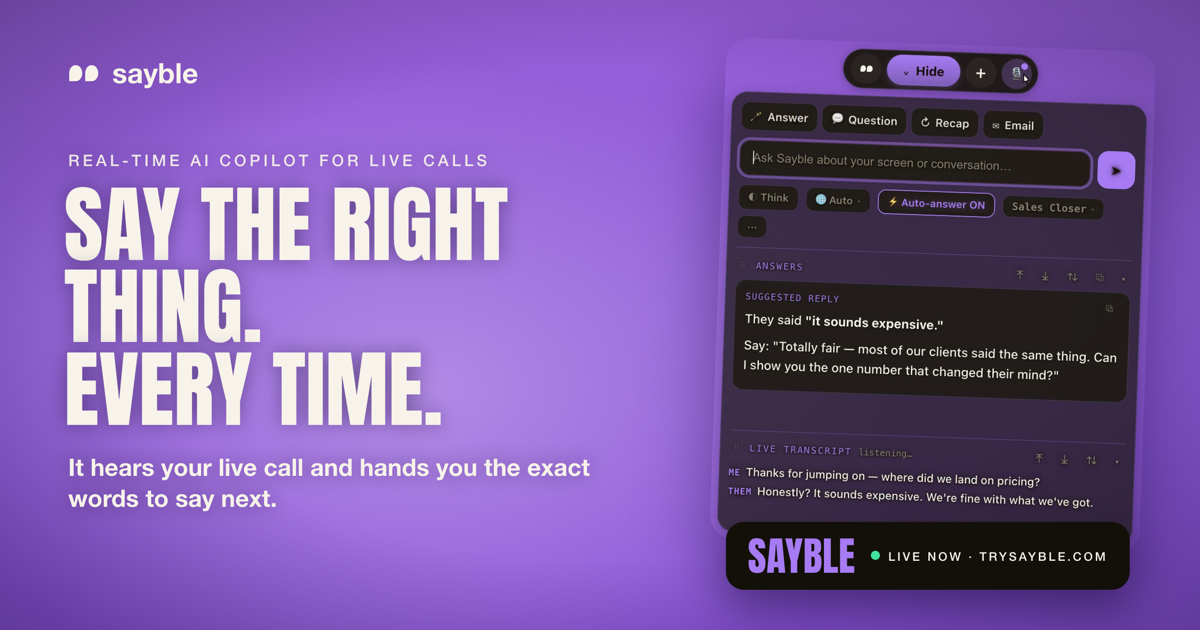
Sayble is a real-time AI copilot for conversations that matter — sales calls, client meetings, negotiations and everyday professional calls. It listens to your live call, hears what the other person just said, and hands you the exact words to say next, plus a backup line, in about half a second. When the call ends, it writes a structured recap and a ready-to-send follow-up email. Sayble runs on Mac and Windows, hears and answers in 10 languages, and is built for professionals who close, pitch and advise — people whose income depends on the next conversation going well. Its stated purpose is simple: perform better when the conversation matters, with sharper objection handling, faster thinking and confidence under pressure. High-stakes conversations move faster than most people can think. A prospect says "honestly, your price is way higher than the other quote I got," and the answer you give in the next few seconds often decides the deal. Under pressure, people reach for the wrong words, defend the price instead of reframing it, forget what was promised, and let follow-ups slip. Sayble is built for that exact moment. Instead of turning the conversation into a wall of text you would never read mid-sentence, it gives you one clean line you can actually say out loud — and then it turns the whole call into a written record you can act on afterwards. The core of Sayble is real-time assistance. It listens to the other person's latest point and returns the single best thing to say next — one line, not a wall of text. The site states the timing as 0.8 seconds from words spoken to answer on your screen, or roughly half a second. Each suggestion also comes with a backup line, so if the first approach does not land you have another ready. The website shows this in practice: when the other side says "Honestly, it sounds expensive. We're fine with what we have," Sayble suggests "Totally fair — most of our clients said that too. Can I show you the number that changed their mind?" and offers a backup line: "What would it need to save you monthly to be worth a look?" The second you hang up, Sayble writes the recap. The recap is pulled from the real transcript and captures what was decided, the objection that actually stuck, and what you owe them — the site's example reads "Decided: Pilot on 3 sites, 60 days," "Objection that stuck: Onboarding ate a month of our time last vendor," and "You owe them: Pricing sheet + the 3-day onboarding plan, by Friday." The follow-up email is drafted from what was actually agreed, so it is written before you have closed the laptop. You review it, send it, and move on. Call recording, recaps and drafted follow-ups are all included in the plan. The Home screen keeps your calls in one place. Today's calls are pulled from Google Calendar with one-click join, every recorded call is ready to replay, and each one carries an auto-written recap plus a follow-up email. A live transcription engine transcribes both sides of the conversation as it is said and separates who said what, so nothing is lost or misremembered. Sayble auto-detects the language of the conversation and answers in kind across 10 languages. It works on the calls you already take — Google Meet, Zoom, Microsoft Teams, Slack huddles, phone calls and anything on screen. Your modes, prompts and reference files follow your account across every device, and six skins with day and night canvases let you change the whole app's look without restarting. Sayble's approach is deliberately narrow. Rather than narrating the meeting in real time or filling the screen with analysis, it focuses on the next sentence — one line, in quotes, ready to speak. It is also built to stay off screen share: Sayble is designed to stay hidden from screen sharing and recording software, and that protection is included in your plan rather than sold as an expensive add-on. Everything it produces is grounded in the transcript of the actual call, which is why the live suggestions, the recap, the follow-up email and the answers you can interrogate later all come from what was really said. The site also carries an explicit AI notice: Sayble uses AI to analyze the conversation and generate real-time suggestions, AI output can be incomplete or inaccurate, and the user stays in control and always uses their own judgment. The conversation intelligence layer turns your calls into data. Sayble remembers every call, meeting and pitch, then lets you interrogate them in plain language — described as a private analyst that has sat in on all of your conversations and forgets nothing. You can scope the question to the last 5 days, the last 30 days, 100 calls or this quarter, then ask things like "What objection cost me the most deals this month?" The site illustrates the answer: "'It's too expensive' showed up in 61% of the calls you lost. In the 3 you won after it, you reframed to monthly savings within 20 seconds. In the ones you lost, you defended the price instead." Ask who to follow up with first and it reportedly flags the contacts who asked for pricing and never got a recap email, and offers the drafts. You can also ask what changed the mind of everyone who bought, and get back the exact lines that worked. The benefits compound across a book of business. Live, you get sharper objection handling, faster thinking and confidence under pressure. After the call, you never lose the thread of a back-to-back day, because live talking points during the call are followed by a structured recap and a drafted email afterwards. Over time, Sayble surfaces the objection you fumble most, the moment calls go quiet and the promise you keep forgetting — pulled from your own transcripts rather than a guess. Because it can read whole ranges of calls and answer with the lines that worked, you can scale what your best calls do and make your average conversation perform like your best one. Sayble is used across a range of high-stakes calls. Closers and SDRs use it to kill objections while the prospect is still talking — "too expensive," "let me think about it," "we already have a vendor" — and get a clean, human answer in quotes, ready to speak. Founders bring it into partnerships, negotiations and raises, where it keeps a record of what was actually said and keeps them sharp when the room gets expensive. Customer success and support teams use it to stay warm, on-message and quick under pressure. Recruiters use it to ask the sharp follow-up and summarise what matters accurately every time. Anyone working back-to-back days uses it to hold the thread from a live call through to a structured recap. The named audiences are sales closers, SDRs, account executives, founders, mortgage pros, insurance, real estate, customer success, call centers, recruiters, consultants, coaches and financial advisors. The app runs on macOS (Apple Silicon, .dmg) and Windows 10 and 11 (.exe), with the newest build listed as 1.2.30. Mobile for iOS and Android is listed as coming soon with a waitlist, and App Store, Google Play, Mac App Store and Microsoft Store availability is described as coming soon. It works alongside Google Meet, Zoom, Microsoft Teams, Slack huddles and phone calls, and uses Google Calendar for today's meetings on the Home screen. Pricing begins with a free download and a 3-minute live session with no card required. Sayble Pro is $24.99/month at the founder rate for the first 12 months, then $39.99/month, and includes unlimited real-time live-call copilot, screen-share hiding, objection handling and closing lines, follow-ups, recaps and email drafts, call recording and multilingual support on Mac and Windows. Sayble Teams is custom-priced per seat for sales floors and client-facing teams, with team onboarding, priority support and volume pricing for call centers. For professionals whose income depends on the next conversation going well, Sayble positions itself as a quiet edge: one line to say next in the moment, a recap and follow-up the moment the call ends, and a searchable record of every conversation you have ever had.
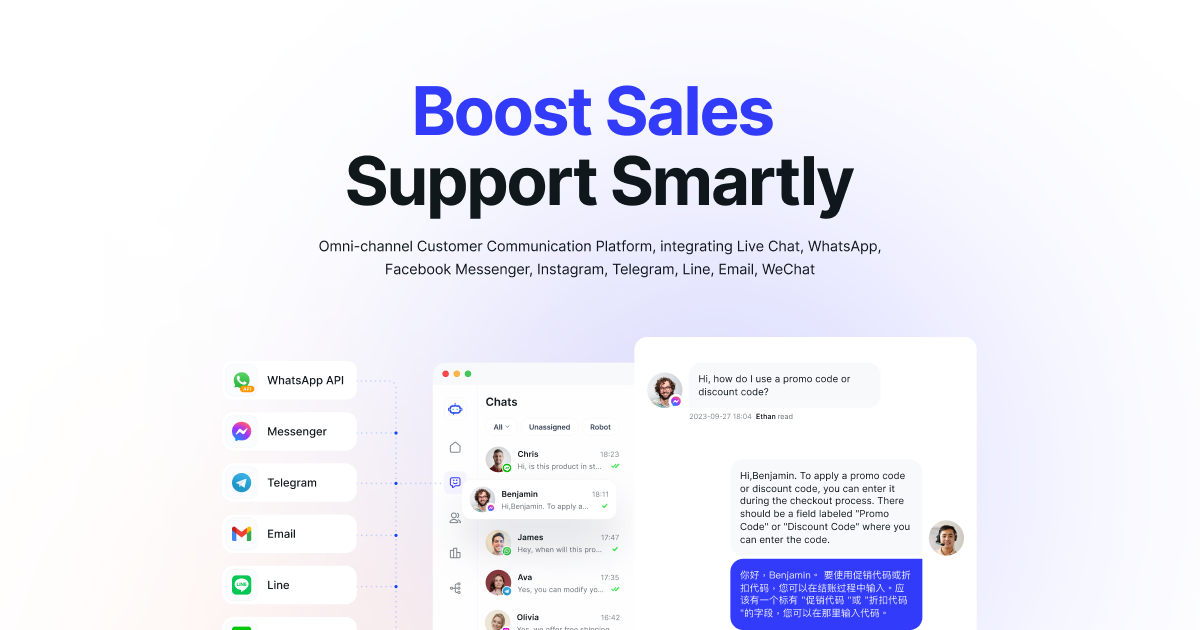
SaleSmartly is an AI-powered omnichannel customer engagement platform that brings customer conversations from WhatsApp, Instagram, Messenger, TikTok, Telegram, LINE, WeChat and other channels into a single workspace. It is built for teams that handle customer service, sales and growth, and it combines three things in one product: an omnichannel inbox, AI agents, and a built-in CRM. The platform's stated purpose is to keep every conversation connected and every lead managed, so businesses can capture, convert and retain customers across the entire customer lifecycle and serve global customers as easily as local ones. SaleSmartly frames the problem it solves around a simple observation: most platforms lose context when customers move across channels, and more messages across different channels do not automatically create more revenue. Slow replies, scattered context and disconnected omnichannel messaging can quietly hold growth back. As the website puts it, a conversation problem eventually becomes a revenue problem, leading to lost leads, lost customers and slower growth. SaleSmartly was designed to remove that friction by centralizing omnichannel customer engagement in one workspace, so every inquiry is captured as a lead and the team can follow up faster. The site cites three times faster follow-up as an outcome of this centralized approach. The most visible part of the product is the Omnichannel Inbox. SaleSmartly states that it connects 14 messaging channels and platforms in one unified workspace, so agents do not have to switch between tools and do not risk missing messages. Channels named on the website include WhatsApp and WhatsApp Business API, Facebook Messenger, Instagram, Facebook, TikTok, Telegram, LINE, WeChat, Zalo, VKontakte, YouTube, Email, Live Chat and the website chat widget. Within the inbox, specific capabilities include a Team Inbox, Instagram DM management, TikTok DM management and Conversation APIs. Centralizing engagement in this way means every inquiry is captured as a lead and the team can follow up faster, which is the first stage of the journey SaleSmartly describes. The second pillar is AI. SaleSmartly describes a smarter AI agent for customer service: an AI employee that responds instantly, qualifies leads, translates conversations and automates next steps. The website summarizes this as a 4-in-1 capability covering respond, qualify, translate and hand off. High-value conversations are handed off to human agents with full context, an arrangement the company calls Human–AI Collaboration, supported by a Flexible AI Ecosystem and 24/7 AI Support. In practice this means routine questions can be answered around the clock while more complex or valuable conversations reach a person who already has the background needed to continue them. Real-time translation is also listed as a standalone feature, which helps teams serve customers in different languages without adding separate translation tools to their workflow. The third pillar is CRM. SaleSmartly's Social CRM keeps tags, notes, lifecycle stages and conversation history in one profile, so every follow-up feels personal and connected. The site highlights unified customer profiles, smart segmentation, AI-powered insights and WhatsApp CRM, describing the result as a 360-degree customer view. This matters because the platform's core promise is turning conversations into CRM context: rather than letting useful detail disappear into individual chat threads, the CRM preserves it so it can be reused for later follow-ups, segmentation and reporting. For sales teams in particular, that means leads and relationships stay in one place instead of being tracked manually. The fourth pillar focuses on customer retention and lifetime value. SaleSmartly uses customer data to identify dormant, high-intent and high-value customers, then triggers personalized outreach across WhatsApp, email, SMS and Messenger. Named capabilities include inactive segments, channel follow-ups, personalized outreach and LTV tracking. The company states that this approach delivers 30% higher customer lifetime value. The goal is to bring customers back into live conversations, measure every response and turn customer re-engagement into long-term growth. Related features listed elsewhere on the site include targeted broadcasts, tracking links and live QR codes, customer analytics, marketing attribution, auto-assign conversations, automation, and team collaboration and routing. SaleSmartly describes its approach as combining Omnichannel Customer Engagement, an AI workforce and CRM in one platform. The customer journey is organized into four stages: capture more leads, convert leads, strengthen relationships and drive repeat growth. Capture happens in the omnichannel inbox; conversion is handled by human agents working alongside AI agents; strengthening relationships runs through the CRM; and repeat growth comes from retention and re-engagement campaigns. Rather than treating messaging, automation and customer data as separate tools, SaleSmartly keeps them in one connected system so context survives as customers move between channels and between AI and human agents. That connected context is presented as the reason follow-ups stay relevant and handoffs stay smooth. Stated benefits include faster follow-up, a 100% after-sales response rate for support teams, stronger customer lifetime value and clearer visibility into team activity. SaleSmartly also positions itself as a way to protect customer assets: business owners can monitor team activity and maintain visibility across every channel, while marketing teams can link chats to campaigns and track attribution to optimize channel performance. Customer testimonials on the site echo these themes, describing centralized communications that reduce lost leads, a unified inbox across multiple networks that saves time, and automation that improves response times. One reviewer highlights intuitive design and accessible pricing for smaller brands, while another mentions increased Instagram sales and an easy initial setup. Use cases described on the website are organized both by role and by industry. For customer support teams, SaleSmartly is presented as a global after-sales management platform aimed at eliminating missed orders and lost customers, using an omnichannel inbox, AI support and team collaboration. For business owners, it offers WhatsApp management and customer asset protection alongside oversight of all team conversations. For sales teams, it provides lead management, pipeline tracking and a Social CRM to unify leads and relationships and keep opportunities moving. For marketing and growth teams, it supports CTM, Meta Conversion API and marketing attribution so chats can be linked to campaigns and ROI can be tracked. Individual reviewers describe using the product for Instagram sales, managing leads and social media inquiries, and centralizing information from multiple communication channels into one platform that also creates related task tickets. SaleSmartly says it is trusted by more than 300,000 businesses worldwide, and displays customer logos including ByteDance, Shein, Miniso and Alibaba Cloud on its brand wall. The platform supports a wide range of messaging and social integrations plus a website chat widget, and it references Conversation APIs and an Android SDK, indicating options for developers who want to connect their own systems. On the trust side, the company lists Meta Business Partner status, ISO 27001, ISO 27701 and CCRC certifications, and a 4.5/5 rating on G2. Detailed pricing is not published on the page, but visitors can start for free or book a demo; the free trial includes all channels and AI agents, and the site states that no credit card is needed. Overall, SaleSmartly's value proposition is straightforward: bring every customer conversation into one workspace, put AI agents and a CRM behind it, and use the resulting context to turn more conversations into customers. For teams juggling multiple channels, it aims to replace scattered inboxes and disconnected follow-ups with a single, connected system for service, sales, marketing and retention.
Bump is an AI collections engine for accounts receivable, built to work every overdue invoice through to paid. It is designed as an automated AR collections team that chases payments across email and WhatsApp, reads the replies that come back, tracks promises to pay and payment plans, and escalates on its own, so the cash comes in without the user sending another "just following up" email. The product is built for freelancers, agencies and small businesses in the United States, Europe and India, and positions itself as a way to add a collections function without hiring a collections team. Its central promise is that getting paid runs itself: once set up, Bump handles the chasing, follow-up and escalation that would otherwise sit on an owner's to-do list. Bump exists because late payment is a persistent cash-flow problem for small businesses. According to the product's own framing, one in four invoices to small businesses is paid late — cash the business has already earned but that is stuck. Beyond the money itself, chasing invoices consumes time: Bump states that the average owner burns more than 14 hours a month writing and re-sending payment reminders. The worst part, in Bump's words, is that chasing feels rude when the client is someone you want to keep, so most people simply wait rather than follow up. That combination — real money delayed, hours spent on repetitive reminders, and the emotional awkwardness of pursuing a client relationship — is the gap Bump is designed to close. Instead of relying on willpower and uncomfortable emails, Bump turns invoice follow-up into a repeatable workflow that runs on autopilot within guardrails the user defines. Getting started with Bump begins with connecting invoices. Users can enter invoices manually, import them from a CSV file, or sync them from Stripe, QuickBooks and Xero. Once the invoices are in, Bump tracks what is owed and prioritises which accounts to chase first, so the most important balances get attention before less pressing ones. This step matters because collections only works if the system knows what is outstanding and in what order it should act; Bump centralises that picture instead of leaving the user to remember who owes what. Because the import options include both CSV and direct syncs with accounting and payment platforms, the setup can fit businesses that already run billing through Stripe, QuickBooks or Xero, as well as those that keep invoices in a simpler form. Bump then works every account, channelling outreach through email and WhatsApp. Email is used for polished, on-brand reminders that include a clear pay link, giving the business a professional, traceable record of the request. WhatsApp is used as the channel that gets read in minutes, which Bump describes as essential in India and growing fast in Europe. The product picks the channel that gets a response and keeps the tone human on both. In a sample WhatsApp nudge shown in the content, Bump drafts a message that opens warmly, notes the invoice number and amount, states when the invoice was due and includes a payment link; the sample reply shows the client paying immediately, with the invoice marked paid and nudges stopped automatically. That example illustrates the intended dynamic: a friendly, specific reminder delivered where the client actually replies, followed by automatic de-escalation the moment payment happens. A large part of Bump's work happens after the first message is sent. Bump reads replies, tracks promises to pay and records payment plans so that nobody slips through the cracks. Rather than firing off identical reminders, it escalates progressively — moving from friendly to firm, and from email to WhatsApp — in the user's voice. Tracking a promise to pay means the system knows when a client has said they will pay by a given date and can follow up if that commitment is broken; tracking payment plans means instalment arrangements are remembered rather than forgotten. Escalation provides a structured way to increase pressure without the user drafting each step themselves, and doing it in the user's voice keeps correspondence consistent with how the business normally talks to clients. On autopilot, Bump sends within the guardrails users set, follows up on broken promises, brings only the exceptions to their attention, and stops the second an invoice is paid. That hands-off behaviour is the core of the "set it once, Bump handles the rest" promise: routine chasing happens without intervention, and the user is pulled in only when something genuinely needs a human decision. Control remains with the user at every stage. They can approve the first message to any client before it sends, or flip on full autopilot instead. Bump respects quiet hours, never double-texts, and stops instantly the moment an invoice is paid or a client replies. Together these controls mean the automation does not create a risk of pestering clients: timing and frequency are bounded, and any sign of resolution ends the sequence. Bump is built for three markets out of the box and adapts currency, timing and tone to each. For the United States, it handles USD formatting, includes TCPA and CAN-SPAM opt-out built in, and uses a firm-but-friendly tone. For Europe, it supports multi-currency amounts in euros and pounds, takes a GDPR-first approach to data handling, and leans toward a more formal register. For India, it formats amounts in rupees, times nudges to IST, leads with WhatsApp-first outreach and uses a warm, relationship-led tone. Bump nudges in the client's local business hours, formats money the way the client expects, and respects the rules that matter in each market — details that matter for businesses invoicing clients across borders, where the wrong tone, currency format or send time can undermine an otherwise reasonable reminder. The stated outcomes for users follow directly from those capabilities. Businesses get paid faster because every overdue invoice keeps being worked rather than waiting on the owner's motivation. Owners reclaim hours previously spent writing and re-sending reminders — time Bump quantifies as more than 14 hours a month for the average owner. Cash flow improves as money that has already been earned stops sitting unpaid, and the awkwardness of chasing clients is absorbed by an automated system that escalates politely rather than personally. Bump also reduces the risk of accounts being forgotten: promises to pay and payment plans are tracked, broken promises trigger follow-up, and the sequence only ends when the invoice is actually paid. In short, the product turns collections from an uncomfortable manual chore into a background process. Concrete scenarios described in the content include a freelancer who has finished work and is owed on an overdue invoice; an agency managing several client balances at once, where Bump's prioritisation of who to chase first is useful; and a small business syncing invoices from Stripe, QuickBooks or Xero so the collection process attaches to billing it already does. A typical workflow looks like this: invoices are entered, imported or synced; Bump tracks and prioritises what is owed; it sends an on-brand email or a friendly WhatsApp nudge containing the invoice details and a pay link; the client replies and pays through the link; the invoice is marked paid and nudges stop automatically. When a client says they will pay later, Bump records the promise and follows up if it is broken. For businesses selling into the US, Europe and India, the same flow adapts to local currency formatting, timing and tone, and to WhatsApp-first outreach where that is the norm. Bump is explicitly built for freelancers, agencies and small businesses in the United States, Europe and India. The integrations named in the content are Stripe, QuickBooks and Xero, alongside manual entry and CSV import for invoices. Outreach runs over email and WhatsApp. Pricing is straightforward: Bump is free for up to three clients, and no credit card is required to create a free account. That free tier lets a small operator start using automated collections immediately, while the reference to adding "a collections team, without hiring one" frames the product as a substitute for the cost and overhead of dedicated collections staff. Taken together, Bump is an AI collections engine that takes over the repetitive, awkward work of accounts receivable: connecting invoices, chasing them across email and WhatsApp, reading replies, tracking promises and payment plans, escalating within user-defined guardrails and stopping automatically when payment lands. Its value proposition is simple and clearly stated — getting paid runs itself, so freelancers, agencies and small businesses in the US, Europe and India collect what they have earned without sending another follow-up email.