Category Focus/categories/automation
Automation AI Tools
Discover and compare the best automation AI tools and software. Browse 702+ curated tools with reviews and rankings.
Projects tracked
702
Sort mode
RECENT
Page
15
GoodSocials is an AI social media manager built specifically for LinkedIn. It writes posts that draw only on deep research or on your own data, and it publishes five times a week — but only after you approve each post. Onboarding is deliberately fast: you sign in with LinkedIn, paste your website, and according to the site your board is full in 90 seconds with seven posts. The product is made for the person whose name is on the profile, and the site names four groups it is built for: founders, consultants, operators and agencies. The example board shown belongs to TimeTuna.com, a scheduling service, and its stated goal is inbound leads — a useful clue to what the product is ultimately for: a steady, credible professional presence that brings in demand. The problem it addresses is framed bluntly on the site: a social media manager costs $3,000 a month. A comparison table spells out the trade-offs. A $3,000 manager posts in most weeks; GoodSocials posts every weekday. A $3,000 manager delivers first drafts after a week of onboarding; GoodSocials delivers them in 90 seconds. When you are on holiday the manager stops, while GoodSocials posts what you queued. And the price is $100 a month instead of $3,000. The site also frames the starting point many users are in: three posts in your last three months. That gap — between intending to post regularly and actually doing it — is what the product is built to close. A second, equally explicit concern is quality. GoodSocials positions itself against "AI slop" and lists the writing habits it refuses to produce: cringe openings like "Nobody talks about this, but scheduling is broken", posts built around "I spent 10 years in SaaS", and the "it's not X, it's Y" construction. Every post is one of three kinds, according to the site: market research, deep dives, and your numbers. This is the core editorial model. Market research posts come from looking at the wider landscape — one example card reports that of 12 scheduling tools compared that month, nine put round-robin scheduling behind a paid tier and two moved it there in the previous quarter. Deep dives go into a source or an idea in more depth — one example draws on 1,200 support threads from new TimeTuna users to identify the most frequent week-one question, and another weighs a famous jam study from Iyengar and Lepper (2000) against a meta-analysis of 50 experiments by Scheibehenne et al. (2010) to explain why TimeTuna shows three slots. Your numbers posts come from your own tools, such as the finding that TimeTuna reschedules fell from 18% in May to 7% in August, one change in between being that the invite now shows the guest's timezone first, based on 9,412 meetings. The site states plainly that the content is research, deep dives and your numbers, nothing else. To produce those posts, GoodSocials connects to the tools you already use. The example board lists five read-only connections: PostHog, Stripe, GitHub, Plausible and Notion. Because the connections are read-only, the product can quote your data without being able to change anything in those systems, and because they are your own tools, the resulting posts contain figures only you could publish. The output lands on a board — a kanban-style view where posts are drafted and moved through approval. You approve the posts you want, and the pipeline moves them on. Cards are scheduled to specific times, such as Tuesday at 09:00 or Wednesday at 09:00, so the cadence is planned rather than improvised. The board is shown populated with seven posts within 90 seconds of signing in with LinkedIn and pasting your website. Corrections stick: the site promises that if you correct it once, every post after follows. The mechanism is explicit. When you leave a note on a card, that note rewrites the card and becomes a rule in your voice. In the example, a reviewer's note — "Open on the number, not a question" — becomes a voice rule, joining other rules such as "Reports, does not sell". From then on, every next post follows those rules. The rules accumulate week by week: the site shows one rule in week one, two rules by week four, and five rules by week 12, every one of them originating from a note of yours. For Pro users, those rules are described as three brand principles that learn from every revision. The practical effect is that the system moves toward your voice instead of you rewriting the same feedback into every prompt. The overall flow is presented as five steps: it reads your tools, it writes the post, it draws the image, you approve, and it publishes — with "Publishes Tue 09:00" shown against the example card. Image generation is part of the pipeline rather than a separate tool, and the Pro plan includes up to 200 generated images a month. Approval sits between generation and publishing, which is what keeps a human in the loop on every piece of content that goes out under your name. The site also flags what is coming: integrations with Codex, Claude Code and a Grok bot are listed as coming soon, suggesting the generation and review loop will extend to more of the tools people already work in. Cadence is treated as the point of the product. Under the heading "Show up every weekday. The rest follows.", the site contrasts three posts in your last three months with 20 posts next month once the system is running. The claim attached to that cadence is that profile views, followers and inbound leads follow a steady month — that is, the results are framed as a consequence of showing up consistently rather than of any single viral post. For agencies, the same idea is applied across clients, with one board per client. And for the times you are away, queued posts keep publishing, which is exactly the failure mode the site attributes to a human manager who stops when you are on holiday. The site answers "who is it for" with four groups, each illustrated by an example post. Founders get posts built from business data, such as a Stripe-derived observation that 31% of August signups chose annual, up from 19% in July, with two candidate causes and neither confirmed. Consultants get posts from client work, such as the finding that across 38 client engagements most retainers end in month four and one meeting shows up in 29 of the exits. Operators get engineering-flavoured posts, such as failed deploys per release falling about 62% after one CI rule across a small sample of 11 releases. Agencies manage each client's own profile from one board per client, up to 10 clients. In every case the content is tied to the person whose profile it appears on. Pricing is published in three tiers, each starting with a seven-day free trial. Pro costs $100 a month for one LinkedIn profile and includes three brand principles that learn from every revision and up to 200 generated images a month. Agency costs $1,000 a month for up to 10 profiles, with one board per client; each client authorises their own profile so the agency never holds a password, and GoodSocials emails the agency before a client's access runs out. Consultancy costs $2,000 a month and is hands-on: Pasha, the founder, sets up your themes, principles and sources with you and has a call with you every week. There is no setup fee, and you can change plan or cancel from the pricing page or in settings. Signing in uses LinkedIn, and the board is delivered in the browser. The takeaway is a narrow, opinionated promise. GoodSocials is not a general-purpose content generator or a multi-network scheduler; it is an AI social media manager for one network, LinkedIn, that writes only from research and from your own tool data, puts every draft in front of you on a board before it publishes, learns your corrections as lasting voice rules, and keeps posting five times a week for $100 a month against a $3,000-a-month human alternative. If your presence on LinkedIn matters to how you win work and you cannot keep a cadence yourself, that is the trade it offers.
Jango is a macOS app for testing the parts of your application that need more than one person. Rather than coordinating colleagues or paid testers, Jango gives your app a cast of AI participants. Each cast member has its own account, its own goal and its own isolated browser, so it signs in to your app as a distinct user and interacts with the other participants in real time. You point Jango at your development URL, decide who shows up, and watch the scenario play out. You can direct the cast, join in as yourself, or take control of any participant's screen. When the run ends, Jango leaves a report of actions, errors and screenshots. It is aimed at developers building social feeds, marketplaces, sandbox order books and collaborative workflows. Multi-user features are hard to test alone. The interactions that make a product interesting — two accounts trading on an order book, a group chat where messages arrive from several people, a team app where one user invites another and a third updates a shared task — all require other people to be present at the same time, using separate accounts, in the same app. That coordination is slow and unreliable. Testers have to be scheduled, briefed and kept in sync, and by the time the scenario is reproduced tomorrow the context has to be rebuilt from scratch. Jango targets exactly that gap: test apps with people, without the wait. The product's own framing is that you build the interactions that need other people, and Jango exists to exercise them. Setting up a scenario in Jango starts with the app itself. You add your development URL and your test accounts, and each participant receives its own isolated browser. From there you assign roles and goals: a buyer places a test order, a seller lists an item, a teammate updates a task. Because every participant acts through a separate browser session, the app sees several independent users rather than several tabs inside one signed-in session. In the illustrative order book example on the site, Rin acts as a buyer and selects Buy, enters three units at $100 and submits a limit order; Theo acts as a seller, offers two units at $99 and checks the resulting fill; Morgan acts as a market participant, places another test order and reviews the updated book. Each of those steps runs from a separate account inside the same shared application. Once a run is underway, Jango is built to be watched and steered rather than left alone. You can use your app alongside the participants, inspecting their screens as they go. You can pause when something breaks. You can direct participants with instructions — the site's CLI example shows a direction such as asking Maya to invite Alex to the group — or take manual control of any user's screen. Cast members do more than chat: each operates your web app through its own browser, navigating, clicking controls, filling forms, selecting options and uploading supplied images. What a participant can do depends on the controls Jango can observe in your app, and goals are used to exercise posts, profiles, shared tasks, marketplace listings or a sandbox order book. Jango's runs are designed to leave something useful behind. The app keeps an app memory built on three kinds of context. Known identities capture roles, relationships and encrypted login state, so the cast can be brought back with the accounts and relationships it already had. Observed app controls are reusable hints backed by an execution history, giving the cast a navigation hint grounded in an actual action rather than an assumption. Run evidence covers activity, observable checks and comparisons — evidence that an expected message appeared, for example. Together these let you save a repeatable situation instead of rebuilding context the next day. Pro plans also add multi-user checks and saved checkpoints. Architecturally, Jango splits work between your machine and your account. Browsers run locally on your computer, and Node.js and Chromium are bundled, so no separate Node or Playwright installation is required. Your account keeps projects, evidence and browser checkpoints in the cloud, and sign-in credentials use your operating system's credential protection. Browser destinations are restricted to your configured app origins. For intelligence, you can connect your own AI key — described as bring your own key — or buy managed AI credits. Providers named in the content are OpenAI, Anthropic and Vercel AI Gateway. Relevant page text, goals and participant memories are sent to the AI provider you select. Jango runs on macOS for both Apple silicon and Intel, ships as version 1.1.1, checks for updates automatically and installs them when you restart or quit. The practical benefit is that a multi-user scenario becomes something you can run on demand, alone, rather than something you have to schedule. You get a group of participants that sign in with separate accounts and act at the same time, a live view you can interrupt the moment something looks wrong, and evidence afterwards — actions, errors and screenshots — that documents what happened. Because casts, identities and observed controls are saved, the same situation can be repeated on your next change. Jango is explicit that its AI participants are not real people: they act through real browser sessions to help you exercise interactions and explore scenarios, and they do not replace research with real users. The site lists several concrete workflows. Social app testing exercises social app interactions with AI participants — invitations, conversations, community roles and shared activity — alongside your own test account. Chat app testing covers messaging and group chat flows without coordinating a group of testers, with AI participants directed in separate browsers while you join the conversation yourself. Collaboration testing explores team invitations, shared tasks and role-based workflows in collaborative web apps without gathering a testing team. Order books and marketplaces exercise sandbox order books and marketplace workflows with separate AI participants that navigate pages, fill forms and submit test orders. There is also a guide for the solo developer, describing a practical workflow for testing social and collaborative apps alone: separate accounts, purposeful scenarios, AI participants and checks across browsers. Jango is aimed at developers — particularly solo developers and small teams — testing real multi-user flows in apps they control. It fits where you build: the dashboard, a terminal launch, or a coding assistant given access through MCP, with a workspace API and portable casts keeping the cast and its memory together. The CLI example starts a cast with node ./jango-cli.mjs start --live --ai byok, and directions can be sent with node ./jango-cli.mjs direct . Pricing starts free: $0 with three participants per session, one project, your own AI key and managed AI credits at cost plus 20%. Pro is $9 per month at a founding price and includes twelve participants per session, unlimited projects, multi-user checks and saved checkpoints, and managed AI credits at cost plus 10%. Enterprise is custom, with participant limits set with you, invoiced billing, negotiated managed AI rates and direct support. Managed AI credits are prepaid and can be bought on any plan, while bringing your own key is available on every plan. Supported today are separate browser sessions, saved casts and memory, uploads, live views and manual control, plus CLI and coding-assistant integrations. Canvas-only apps, popup sign-in flows and CAPTCHA may need a different integration. Jango's value proposition is straightforward: it lets one developer run the multi-user parts of an application with a cast of AI participants that behave like separate signed-in users, watch and steer them live, and keep the memory and evidence afterwards. If a feature only reveals itself when more than one person is using the app, Jango is built to put those people there without the wait.
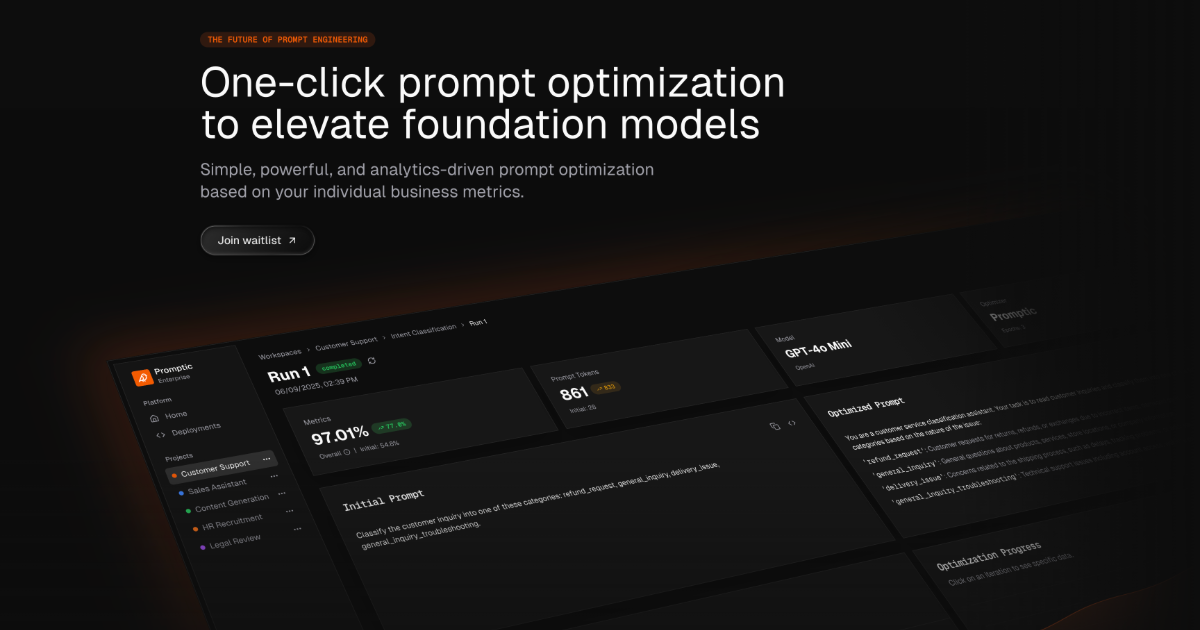
Promptic is an optimization platform for GenAI applications, built around a single promise: better quality at lower cost. According to its own description, it benchmarks models, tunes prompts and agents, and optimizes tool use against your own data and business metrics. The product is aimed at the people who actually have to decide what a generative AI application ships with — which foundation model, which prompt, which agent setup, which tools — and it exists so those decisions rest on measured evidence rather than intuition. Promptic presents itself as simple, powerful, and analytics-driven, with one-click prompt optimization and foundation model optimization as its headline capabilities. The problem Promptic addresses is the gap between how GenAI applications are configured and how they are judged in production. Modern applications built on large language models involve a long chain of choices: which model to call, how the prompt is worded, how an agent is structured, and how tools are invoked. Each of those choices affects both the quality of the output and the cost of producing it, and the space of possible combinations is far larger than any team can explore by hand. The product description states the consequence directly: without a disciplined way to compare candidates, you ship the configuration that sounded right instead of the one that wins. Promptic's stated mission is to replace that guesswork with analytics-driven optimization tied to the individual business metrics a team cares about, so quality and cost are evaluated together rather than traded off blindly. The first capability Promptic describes is model benchmarking. Rather than relying on generic leaderboards or vendor claims, the platform benchmarks models against your own data and business metrics. That matters because the model that performs best on a public benchmark is frequently not the model that performs best on the specific tasks, tone, domain vocabulary, and edge cases of a given application. By running the comparison on the organization's own inputs and scoring the results against the metrics it already tracks, Promptic lets teams see how candidate foundation models behave on the work that actually matters to them. The outcome is a defensible basis for choosing a model — or for confirming that an existing choice is still the right one — instead of an opinion formed from a handful of manual tests. The second capability is prompt and agent tuning. Promptic describes tuning prompts and agents as core to the platform, and its messaging leads with one-click prompt optimization to elevate LLMs. Prompt engineering is iterative by nature: small changes in wording, structure, or examples can shift output quality noticeably, and agents add another layer of complexity on top because their behaviour depends on instructions, intermediate steps, and the sequence of actions they take. Promptic treats these as things to be optimized systematically rather than edited by feel. The "one click" framing signals that the platform is intended to lower the barrier to running an optimization, so that teams can generate and evaluate improved configurations without hand-writing and hand-testing every variation. Because agents are named alongside prompts, the same approach is extended beyond a single instruction string to the broader agent definition. Promptic also covers tool use. In GenAI systems that call external tools, the model's effectiveness depends on how tools are described, when they are selected, and how their results are fed back into the workflow. The platform states that it optimizes tool use against your own data and business metrics, which places tool configuration in the same evidence-based loop as model choice and prompt wording. Running through all of this is the scoring mechanism: every candidate is scored on the quality and cost you actually care about. Quality and cost are presented as the two dimensions that matter, and because candidates are scored on both, a team can see the trade-offs between them rather than optimizing one in isolation. The result the description promises is that you ship the configuration that wins, not the one that merely sounded plausible. Promptic's overall approach is analytics-driven optimization anchored to individual business metrics, and it is designed to run wherever a team already works. The description names three surfaces: a dashboard UI, your CI, and your coding agent. The dashboard gives a graphical place to run and review optimizations, which suits teams that want to inspect results, compare candidates, and share findings. Running in CI places optimization inside the development pipeline, so configurations can be evaluated as part of the same process that builds and tests the software, before changes reach users. Running from a coding agent keeps the work inside the environment where the developer is already writing code, so an optimization can be triggered without switching context. That flexibility is the distinguishing element of the stated methodology: the same optimization capability is delivered through different surfaces so it can fit the workflow a team prefers, whether that is an interactive session in a browser, an automated check in a pipeline, or an action taken directly from an AI coding environment. The benefits Promptic states follow from that methodology. Teams get better quality at lower cost, because candidates are evaluated on both dimensions and the winning configuration is the one that performs best on the metrics that matter. Decisions become evidence-based: rather than debating which prompt or model feels better, a team can point to scores produced against its own data and business metrics. The one-click framing reduces the effort required to explore alternatives, which makes it practical to revisit model and prompt choices as models are updated or requirements change. And because optimization can run in the dashboard, in CI, or from a coding agent, it can be folded into existing habits rather than requiring a separate process. The overarching benefit described is confidence: shipping the configuration that wins instead of the one that sounded right. Several concrete scenarios follow from the capabilities described. A team building a new GenAI feature can benchmark multiple foundation models against its own data before committing to one, rather than guessing based on reputation or a public leaderboard. An application already in production can have its prompts tuned through one-click optimization to lift quality without changing the underlying model. Teams working with agents can tune the agent definition — the instructions and behaviour that shape its multi-step work — using the same optimization loop. Projects that depend on external tools can optimize how those tools are used so the model calls them more effectively. Organizations with a delivery pipeline can run optimizations in CI, treating a configuration as something to be evaluated automatically as part of the build, so a change that degrades quality or raises cost is visible before it ships. Developers who work inside a coding agent can trigger optimization from that environment, keeping the whole task in one place. In each case, the candidate configurations that result are scored on quality and cost, and the configuration that wins is the one put into production. Promptic is aimed at teams and developers building generative AI applications — the people responsible for choosing models, writing and refining prompts, assembling agents, and wiring up tool calls. Its topics on Product Hunt include SaaS, Developer Tools, and Artificial Intelligence, which aligns with that audience: it is a tool for people who build software with AI rather than an end-user application. The product is described as running in a dashboard UI, in your CI, and in your coding agent, so it reaches both interactive and automated development workflows. It is positioned as an optimization platform rather than a model provider, sitting alongside whatever foundation models and infrastructure a team already uses. No pricing or plan details, technology stack, or specific third-party integrations are stated in the material available, so those aspects are not described here. In short, Promptic is a one-click, analytics-driven optimization platform for GenAI applications. It benchmarks models, tunes prompts and agents, and optimizes tool use against a team's own data and business metrics, scoring every candidate on the quality and cost that actually matter. The value proposition is straightforward: replace configuration guesswork with measured results and ship the configuration that wins.
Quiver GTM is an agentic developer marketing system built for technical founders, developer marketing teams and the agents working alongside them. Its purpose is to run developer marketing like an engineering system rather than a set of disconnected tactics, keeping product context, customer evidence, campaigns, content, tasks and results connected in one controlled system. Quiver gives developer marketing the architecture engineers expect: a source of truth, version history, explicit states, APIs, observability and feedback loops. Everything a team learns, creates, ships and measures stays connected, so each cycle improves the context and the decisions behind the next one without the system changing behind the user's back. Quiver is available as a hosted product or as a free, MIT-licensed self-hosted edition, and it runs on the user's own model account. The problem Quiver addresses is not a lack of ideas. According to Quiver, marketing is usually handed to technical founders as vibes and disconnected tactics: another chat has the positioning, a document has the plan, customer evidence is somewhere else, content loses its history when it ships, and performance gets reported and then disappears before the next decision. Quiver's answer is to give the whole operation state, structure and memory so that people and agents can work inside the same controlled system, because "just post more" is not an architecture. Importantly, Quiver does not train a mystery model on the company. It preserves the evidence, decisions, shipped work and results that should inform what happens next, and it keeps the human in control of what becomes part of the system. Quiver is not a metaphor painted over a chatbot; the site describes its primitives as the operating properties of the product. The first is a source of truth for product context: positioning, ICP, messaging, customer language, proof points and hypotheses live in one active context that every agent can use. The second is version control for decisions with history: every context and artifact change is versioned and restorable, so agents can propose updates while the human decides what becomes true. The third is a set of state machines that create a real production workflow. Work moves through Draft, Review, Approved, Live and Archived states instead of losing finished work inside chat history, which means generation and production are never collapsed into a single, uncontrolled step. The remaining primitives cover how the system connects outward and how it learns. Interfaces come in the form of a Content API plus MCP: approved content is published as structured JSON, and the agents a team already uses can operate Quiver through a real tool surface, with a ready-to-connect MCP endpoint secured through OAuth or scoped tokens. Observability keeps work tied to outcomes, so the plan, research, content, tasks and performance stay connected and a team can trace what shipped and what happened next. Feedback loops make the system improve: teams log the outcome, capture what worked, and review proposed context changes before that learning shapes the next cycle. Day to day, Quiver offers purpose-built Strategy, Create, Feedback, Analyze and Optimize sessions, or the option to connect an external agent through MCP; either way, the work lands in the system instead of disappearing with the conversation. Customer evidence feeds the system rather than sitting in a folder: calls, surveys, reviews and field notes are turned into themes, Voice of Customer quotes, product signals and evidence for or against active hypotheses, and that language is then made available to the agents doing the next piece of work. Content is treated as infrastructure rather than a text box, keeping its versions, publish state, SEO and social metadata, distribution history, repurposing lineage and metrics, supported by a content calendar. Campaigns link sessions, research, content and results, and the hosted edition adds built-in tasks, assignments and reminders. Quiver's runtime is built around keeping the work connected. A team starts by giving the system context, meaning the product, audience, positioning, customer language, proof and hypotheses, rather than opening a blank chat window. From there, research, sessions, artifacts, content and tasks stay connected to the initiative they are meant to move forward. Work ships through explicit states: agents create, humans review and approve what is true, and finished work is published without collapsing generation and production. Finally, results are fed back in: the outcome is measured, the learning is preserved, and the context and decisions behind the next cycle improve with human approval. Getting started follows the same logic: connect your own model provider account, then paste your website or describe the product so Quiver can draft a starting context for review. Because context and artifacts keep version history and explicit state, agent proposals never silently become truth; a person approves what enters the active context or moves from draft to live. The stated benefit is a marketing operation with a system of record instead of a context that has to be rebuilt every cycle. Teams no longer have to maintain a separate knowledge base by hand, because Quiver can propose updates from the research, creation and measurement activity the team is already doing. Every session and connected agent starts from the same approved, versioned source of truth, and the resulting work is linked to campaigns, publishing states and results, so the reasoning, approvals and learning that individual tools tend to leave disconnected are preserved. Quiver does not replace a CMS, CRM or analytics tools; it acts as the context and decision layer around them, while the Content API lets approved work be served as structured JSON so the company's own site keeps control of presentation. Concrete workflows described by Quiver include managing positioning and product context in one place, processing customer research into themes and Voice of Customer quotes, planning campaigns, creating and reviewing artifacts, coordinating tasks, publishing approved content and logging performance. A founder can paste a website or describe the product to bootstrap the context, connect an Anthropic, OpenAI, Google, OpenRouter or OpenAI-compatible account, and then open a session, connect an MCP client, or begin with research, with every action starting from the same approved context and writing back to the same system. When work goes live, Quiver creates the reminder to measure it, so the team logs quantitative results and qualitative notes, synthesizes what worked, and reviews proposed context updates before they affect future sessions. Quiver is explicitly aimed at technical founders, developer marketing teams and the agents working alongside them. It ships in two deployment shapes. Self-hosting gives the MIT-licensed foundation for free, forever, with unlimited seats on your own infrastructure: you host the app and database, maintain the deployment and bring your own model account, and you deploy and expose the MCP server code yourself. Hosted plans start at $49 per month for Founder (up to three seats, $490 billed annually) and $99 per month for Team (unlimited seats, $990 billed annually), with two months free on annual billing, a 14-day trial requiring a card, and cancellation any time. Hosted adds a ready-to-connect MCP endpoint using OAuth or scoped tokens, built-in tasks, assignments and reminders, a ready-to-invite shared workspace, and managed authentication, infrastructure and updates. Both editions support BYOK with per-job model selection. The takeaway Quiver repeats is simple: stop rebuilding the context. By giving developer marketing a system of record, with versioned product context, explicit production states, a Content API and MCP interface, observability into what shipped, and feedback loops with human approval, it lets a team and its agents operate from the same approved system. Quiver is not another AI writing tool; it is the structure around the models you already choose, so that the evidence, decisions, shipped work and results of one cycle become the context and better decisions of the next.
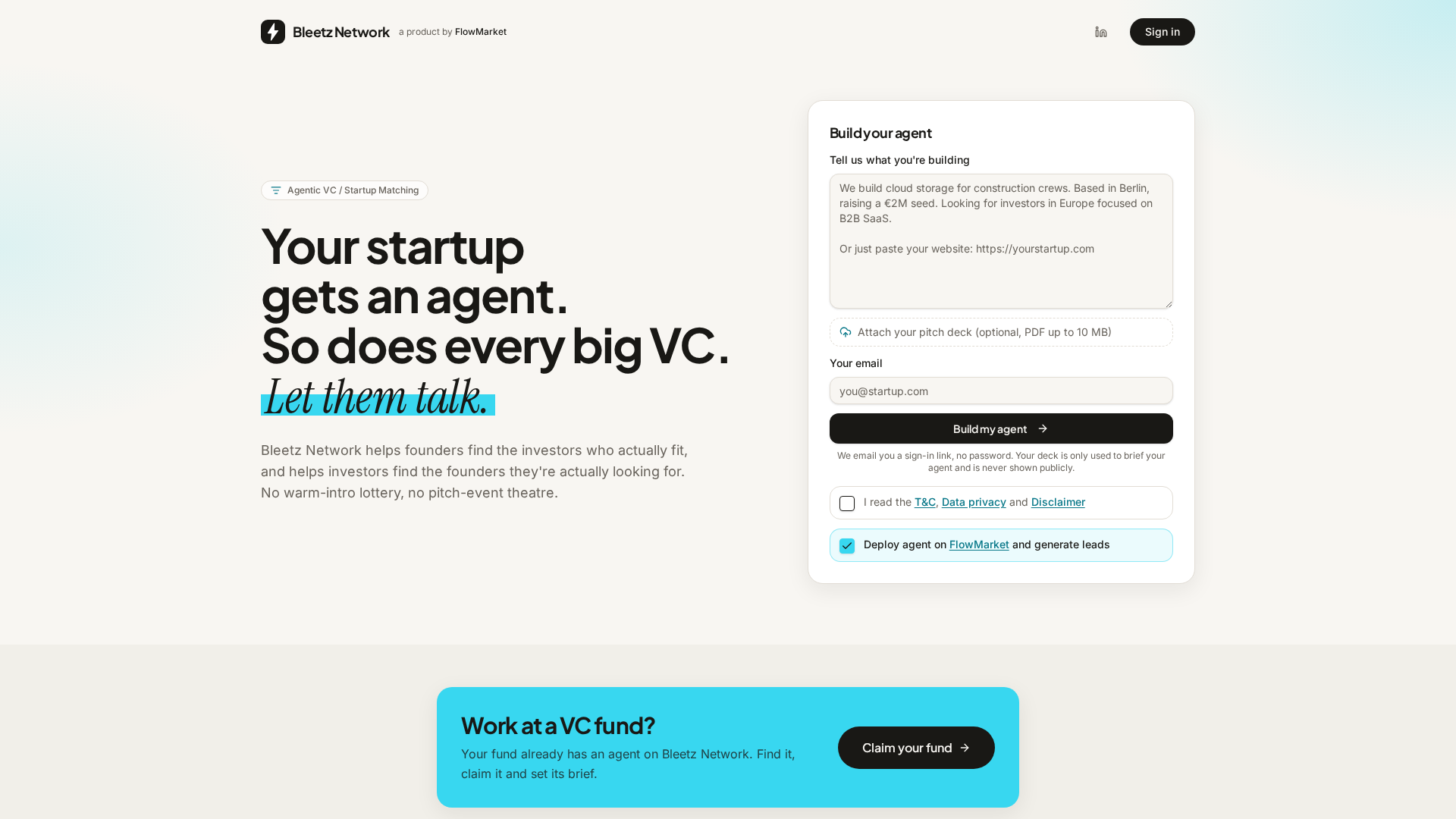
Bleetz Network is an agentic venture capital and startup matching network where every startup and every fund gets an AI agent. Founders build a startup agent by describing what they are building, optionally attaching a pitch deck (PDF up to 10 MB) and providing an email address. The platform then matches that agent with agents representing VC funds, and the agents have the first conversation so the humans only talk when there is a reason to. The purpose is twofold: Bleetz Network helps founders find the investors who actually fit, and helps investors find the founders they are actually looking for. Instead of a warm-intro lottery or pitch-event theatre, matching happens on facts, and founders receive a clear yes, no or maybe outcome, with a fund's direct contact details unlocked on a yes. Fundraising is broken. Founders spend weeks searching for VCs, researching investment theses, checking sectors, stages and geographies, and sending cold emails, often without knowing who is actually a good fit. The same inefficiency runs in reverse for investors, who trawl inboxes and databases to find startups that match their stage, geography, categories and thesis. Bleetz Network automates the first part of this process. Rather than a founder blasting messages at every fund they can find, an agent searches a database of several thousand VC funds and keeps only those that fit the founder's stage, geography and category. Rather than a VC manually screening every inbound opportunity, a preselected list of relevant startups arrives already filtered. Both sides are matched on facts, so the introductions that happen are the ones that make sense. For startups, Bleetz Network begins with instant matching. The startup agent searches a database of several thousand VC funds and keeps only those that fit the startup's stage, geography and category. This is filtering rather than ranking: stage and geography have to line up, and then the fund's thesis has to fit. What remains is a short list, not a spray-and-pray list, so founders reach out only to the few highly relevant funds instead of burning weeks on investors who were never going to invest. The startup agent then pitches every fund on the shortlist, whether the fund's agent is claimed or unclaimed, answering their questions in a strictly business conversation that runs up to ten rounds, with three pitches a day. There are no cold emails and no warm-intro lottery involved. Outcomes are explicit. When a fund's agent says yes, the founder receives the contact details of the people at that fund who should hear from them. A no comes with the actual reason, and both outcomes land in the founder's inbox. Because every conversation is readable, founders can do their homework: they can see which questions came up, where a fund lost interest and why it passed. That feedback can be used to sharpen the pitch and the pitch deck before a human ever sees them, fixing weak spots while the cost is still low. The combination of a short relevant list, direct contacts on a yes, and detailed conversation feedback turns fundraising from guesswork into a fact-based process with a binary outcome. For VCs, Bleetz Network provides screening that runs itself. A fund gets a preselected list of startups that already match its stage, geography, categories and thesis. Discovery that used to take weeks of inbox and database trawling happens while the investor does something else. No time is lost on manual screening because every startup has already been through the first rounds of questions, so the investor reads the outcome rather than the noise. Fund-to-startup discovery is instant, and because both sides are matched on facts, the introductions that happen are the ones that make sense. Every fund already has an agent on Bleetz Network from day one; the fund can find it, claim it and set its brief, so the thesis is applied every time and the agent screens the same way on Monday morning and Friday night. The fund stays in control: it reads every conversation, decides who to talk to, and keeps contact details out of anyone's hands until it says yes. The overall workflow runs from profile to yes or no. First, the founder builds a startup agent by dropping a deck or a few lines; Bleetz fills out the profile and the founder checks it, and the agent only says what the founder gave it. Second, the system filters rather than ranks: stage and geography have to line up, then the fund's thesis has to fit. Third, the agents talk it through, with the startup agent pitching and the fund's agent digging in, strictly business, up to ten rounds and three pitches a day. Fourth, the founder gets a yes or a no. A yes comes with the fund's real contact people; a no comes with the actual reason. Both land in the founder's inbox. An example conversation on the site shows a startup agent describing a retrofit vision kit that cuts warehouse picking errors by 38%, with €42k MRR from 11 sites in DACH and a €1.5M pre-seed round, and a fund agent asking what a site pays and how long from install to first invoice before saying the deal fits its logistics thesis and ticket size. Bleetz Network is explicit about the nature of its agents. Every fund has an agent from day one, and whether the fund itself runs it is labelled on every page and in every conversation. An unclaimed agent is built from public information about the fund; nobody from the fund has taken it over, read its conversations or approved what it says, making it a well-informed simulation but still a simulation. A claimed agent is one where someone at the fund verified themselves and took over the agent, set its brief, reads the conversations and sees who made it through. Founders are told that a conversation with an unclaimed agent is a simulation, not the fund's opinion and not a decision by anyone at the fund, and that a yes from an unclaimed agent means this looks like a good fit on paper, a reason to reach out rather than an expression of interest. With a claimed agent, the fund manages the agent and can read the conversation. Investors are told that every unclaimed agent is based on open data only and speaks for nobody at the fund, and that nothing an agent says is binding: no offers, no commitments, no term sheets and no advice. Every positive outcome is a recommendation for a human follow-up, and contact details are only shared on a yes, only through the platform. The stated motivation is to help both sides with early-stage discovery and matching, reducing friction between founders and investors and making the market more efficient. Listing every fund from day one is what makes matching useful immediately. Funds that do not want to be listed can claim the fund with a work email and then delete the agent. Every claim is checked by hand, and one account runs one fund. Concrete use cases follow directly from that design. A pre-seed startup raising a round can build its agent, attach its deck, and let the agent pitch the funds whose stage, geography and category fit, receiving a shortlist of yes outcomes with partner contacts instead of a list of cold-email addresses. A founder preparing for those conversations can read every simulated exchange to learn which questions recur, where interest dropped and why a fund passed, then fix the weak spots in the pitch and the deck before a human sees them. A VC fund can claim its existing agent, set the brief to match its stage, geography, categories and thesis, and receive a preselected list of startups that have already been through the first rounds of questions. A fund that prefers not to participate can claim and delete its agent. And an investor who wants the next big thing without weeks of inbox and database trawling can rely on the fact-based matching to surface startups in seconds. Bleetz Network is aimed at early-stage founders who are raising, and at venture capital funds and the people who scout and screen for them. It is a web product. Building a startup agent takes a deck or a few lines and an email; sign-in is by emailed link with no password, and the deck is used only to brief the agent and is never shown publicly. Every fund has an agent from day one, so investors can find and claim their fund's agent even before they have signed up as users. The service is free while it is in beta, and free with no strings attached according to the Product Hunt description. A yes unlocks the fund's contact details. In short, Bleetz Network turns early-stage fundraising and scouting into an agent-to-agent matching process. Startups get an agent that filters several thousand VC funds down to the ones that fit their stage, geography and category, pitches them, and returns a yes with real contacts or a no with the actual reason. Funds get a self-running screen that applies their thesis consistently and delivers a preselected list of startups. Both sides can read every conversation, both sides stay in control of human contact, and the outcome is a fact-based conversation with a binary result instead of guesswork, cold emails and pitch-event theatre.
AutonomyAI is described as the OS for building in production, built around Fei Studio. Its stated purpose is turning product managers and product designers into product builders. Rather than writing a specification and waiting for engineering to pick it up, product and design teams can describe a change, have it built against the real codebase, get a rendered and validated result, and hand engineers one click of approval. AutonomyAI frames this as Autonomous Product Delivery: product and design build it, engineers approve it, and the whole loop runs as one system. The site states that AutonomyAI is trusted by 170+ product teams. The problem AutonomyAI sets out to solve is that writing code got 10x faster, but shipping stayed the same speed. Every change still goes through engineering, so a PM can spec a feature in an afternoon and then watch it wait in the backlog for a quarter. AI coding tools make engineers faster, but because only engineers can ship, the backlog keeps growing anyway. Meanwhile, app builders produce demos that cannot touch a real codebase, so the work either gets redone from scratch or dies. AutonomyAI positions the fix as a second lane to production: a path where the people who spec the work are also the people who ship it, on the real codebase, with engineering still holding the approval. Codebase ingestion is the foundation of that approach. Fei Studio plugs into your repository and models how your engineers write code, covering components, standards, design system, APIs, hooks and architecture, so every task is built the way your team would build it rather than from a generic AI template. The website states that your real stack is understood in under two minutes. You connect your git provider with no manual config, and CSS, API, SSO and DB connections are all ingested. Ingestion is self-updating as your codebase evolves, which matters because it means the system's understanding of your product does not go stale after the first setup. Task Execution takes raw product ideas and turns them into production-ready product updates. Fei Studio accepts any input, including prompts, PRDs, screenshots, tickets and Figma, and turns those inputs into codebase-aligned variants and testable implementation options before generating production-ready output. Ideas are broken into structured plans based on your infrastructure, and those plans are translated into real system changes and pull requests. The site notes that each task involves 36+ orchestrated steps with transparent output, so the work is not a black box even though the workflow itself is autonomous. Production Grade output is what makes the handoff workable. Every task produces production-ready code, a clean PR and full specs, all built to match your codebase, so engineering can review and merge. The generated code is production quality and written to your standards, the pull requests are clean and ready for engineering review, and full specs plus change history are provided for complete context. In the described workflow, Fei writes the change, renders it and validates it within minutes, then opens a PR that an engineer approves with one click. That is the entire path, compared with a coding agent that hands the work back into the engineering queue. The loop now also starts before the ticket exists. Discover Mode researches your analytics, tickets, customer calls and code to find what to build, and it can either answer a question you ask or suggest the next improvement on its own. After something ships, Fei Studio measures the result and proposes the next build. The site states that every merge makes the system smarter, so the delivery loop compounds over time rather than resetting with each task. This is the end-to-end sequence AutonomyAI describes as Discover, plan, build, ship, repeat. Fei Studio also works inside other AI agents through a new MCP Server. Claude Code, Cursor or any MCP client can connect to it, so wherever a team already works, Fei Studio's delivery layer is one connection away. The site draws a direct comparison with coding agents: both start from the same point, but a coding agent hands the work back to engineering, while Fei Studio hands engineers one click. A published comparison table contrasts Fei Studio with Cursor/Copilot, Lovable and Claude Code across creating prototypes, enhancing existing screens, live preview of changes, a friendly UI for non-technical people, matching your product's look and feel, reusing existing components, production-ready code for review, handling branches, commits and PRs, output per task, and an Agent Knowledge Hub. Fei Studio is listed as supporting each of these, with your product's look and feel auto-ingested. The stated outcomes include a faster path from an idea to a merged change, engineering time protected from environment setup, code review and fixing, and a shorter feedback loop when a build misses what the PM actually meant. AutonomyAI reports that its own product team has opened 50+ PRs against its production codebase while writing zero code, with an engineer approving every merge. That first-party example is presented as proof that the model works on a real codebase. The documented use cases run across the product lifecycle. Teams can validate product ideas, improve existing features, turn support feedback into product changes, create stakeholder demos, accelerate feature delivery, build enterprise customizations, refactor legacy interfaces, prototype with real code, explore UX improvements, align with a design system, and redesign elements. Role-specific pages address PMs with "Ship features, not just specs," designers with "Design in the real product," and engineers with "Stop rebuilding from scratch." AutonomyAI speaks to product managers, product designers and engineering teams, positioning PMs and designers as the primary builders and engineers as the approvers. Enterprise offerings, compliance and security documentation, a knowledge base and comparison resources are available on the site. A Playground sign-up is offered at studio.autonomyai.io, alongside a "Book a Demo" flow. Pricing is described as per task, contrasted in the comparison table with per-seat plus usage, per-credit usage-based and subscription or per-token models. The takeaway is that AutonomyAI's Autonomous Product Delivery closes the gap between how fast code can be written and how fast product actually ships. By ingesting your real codebase, executing structured plans into production-ready code, opening clean PRs for engineering approval, and using Discover Mode to keep proposing what to build next, it gives product and design a second lane to production without removing engineers from the final decision.
CtrlOps is a local-first desktop application for managing Linux servers with AI. It brings an AI-assisted terminal, real-time infrastructure monitoring, SSH access, security auditing, access management, a visual file manager, log search, backups, and single-click deployments together into one screen. It is built for the people who run Linux servers — developers, DevOps engineers, technical teams, and non-terminal people such as designers or solo founders — and its purpose is to give complete visibility across a whole fleet of servers from a single application, without installing an agent on those servers. The problem CtrlOps was built to solve comes from the founders' own experience running an IT service company. They were designers and product people at heart, but every client they worked with had their own server. To check anything — even something as simple as finding out why a server is slow by checking memory and CPU — someone had to open a terminal, remember the right IP, find the right credentials, and log in. Separately. Every single time. For every single client. Servers were a black box, and they had a minimum of seven to ten projects and more than forty servers running every month. There was no unified view and no quick way to know what was happening across the infrastructure without pulling in the one person on the team who knew how to navigate it all; everything ran through him, and if he was unavailable, the team was blind. CtrlOps answers the question they kept asking: why does managing Linux servers have to feel like this, why is there no tool that gives full visibility across all your servers in one place, that feels intuitive enough for a non-terminal person to use, and that does not make you dependent on a single engineer to keep everything running. They built it first for themselves, then made it for everyone. The AI terminal is the centrepiece of the product. Instead of memorising commands, you describe what you need in plain English — for example, clearing disk space on prod-web — and CtrlOps works out the command for you. Crucially, it keeps a human in the loop: you review and approve every command before it runs, and the app makes clear exactly which server you are on before anything executes. Web search, MCP servers, and one-click saved scripts are built in, so questions can be researched and repeat fixes can be stored and run again with a single click. Reviewers describe this preview and approval step as the whole game when AI touches live infrastructure, because nothing changes on a production server until a person has seen the exact command. Security auditing and access management address the question of who can actually reach your servers. CtrlOps runs 25 security audits over SSH and gives you a hardening score, a PDF audit report, and fix commands for every issue found — each one waiting for your approval before it runs. Access management scans your whole fleet to show who can log in where and who has sudo. When someone leaves the team, you can revoke access across every server at once and assign any level of roles and access without touching the terminal. Every log file is found and searchable without SSH, so you do not need to know where a log lives in order to read it. Day-to-day server work is covered by the rest of the toolkit. Multi-server management keeps your whole fleet in one app, letting you switch between servers by alias instead of remembering IP addresses. The visual file manager lets you upload, download and unzip files in one click, which removes the need for a separate SFTP client and separate logins just to edit a single config file. Real-time infrastructure monitoring shows live CPU, memory, disk and network data for every server, and the product is described as offering backups that prove they ran. Single-click deployment takes a GitHub repository, environment variables and a domain through one form and puts the app live, with PM2, Nginx and SSL handled for you, so there are no scripts to write and no CI/CD pipeline to set up. The approach behind all of this is deliberately architectural. CtrlOps speaks SSH directly to your fleet — there is no service in between, no cloud bridge to breach and no vendor to lock you in. It runs entirely on your machine: SSH keys, server IPs and credentials never touch a cloud, there is no telemetry, and sensitive data is stored only on your device. It requires only your SSH key, never your AWS IAM, GCP service account or Azure credentials, and it needs no agent installed on the servers themselves. Connections are made over SSH using ED25519 keys on port 22 directly to your machines. This local-first design is the reason the product can state that your credentials never leave your machine while still managing an entire fleet. The outcomes reported by users follow from that design. Teams describe doing in ten minutes what used to take an hour, and deployments that no longer cause stress because the flow is simply pasting the repository, filling in environment variables, toggling SSL and finishing. Offboarding becomes a quick check that can be performed by whoever needs it — including an HR team member who reported checking SSH management herself and flagging access in two minutes instead of going back and forth with the technical team. Users report catching issues before they became outages, onboarding a developer in minutes, and no longer depending on one person who is the only one who knows how the infrastructure is wired. CtrlOps is described as trusted by more than 700 engineers in more than 160 countries and is rated 4.8 out of 5 on G2. Concrete use cases described in the content include deploying a GitHub repository to a server without writing scripts or setting up CI/CD; checking why a server is slow by looking at live CPU, memory and disk; finding a misconfigured Nginx configuration and checking the service status through the AI terminal; clearing disk space on a production server with an approved command; editing a configuration file directly through the file manager rather than a separate SFTP client; searching logs across a fleet without SSH; auditing servers against 25 security checks and generating a PDF report for review; revoking a departing employee's access across every server at once; running a saved script or playbook of common fixes with one click; onboarding a new developer quickly; and, for solo builders and designers who do not know DevOps or Linux commands, asking the AI terminal in plain English what to do and following the steps to take a finished website live by themselves. The product is aimed at developers and DevOps engineers, IT service companies running many client servers, teams that need a unified view across a fleet, solo founders wearing the DevOps hat, and non-terminal users such as designers and no-code builders who are otherwise blocked at deployment. CtrlOps connects to any server over SSH, and the content names AWS, Google Cloud, Azure, DigitalOcean and any VPS as environments it manages, along with GitHub repositories for deployments. It is available as a desktop app for macOS, with separate Apple Silicon (M1, M2, M3, M4, M5) and Intel x64 (Core i5, i7, i9) builds, for Windows through the Microsoft Store, and for Linux. Pricing is free to start, with a one month free trial that requires no credit card, and a lifetime subscription is referenced by users. The takeaway is that CtrlOps brings everything needed to manage servers into one local desktop application: an AI terminal that asks before it acts, security hardening you can measure and report on, access control you can audit and revoke, monitoring, file management, backups, log search and one-click deployment — all speaking SSH directly to your fleet while your credentials stay on your machine.
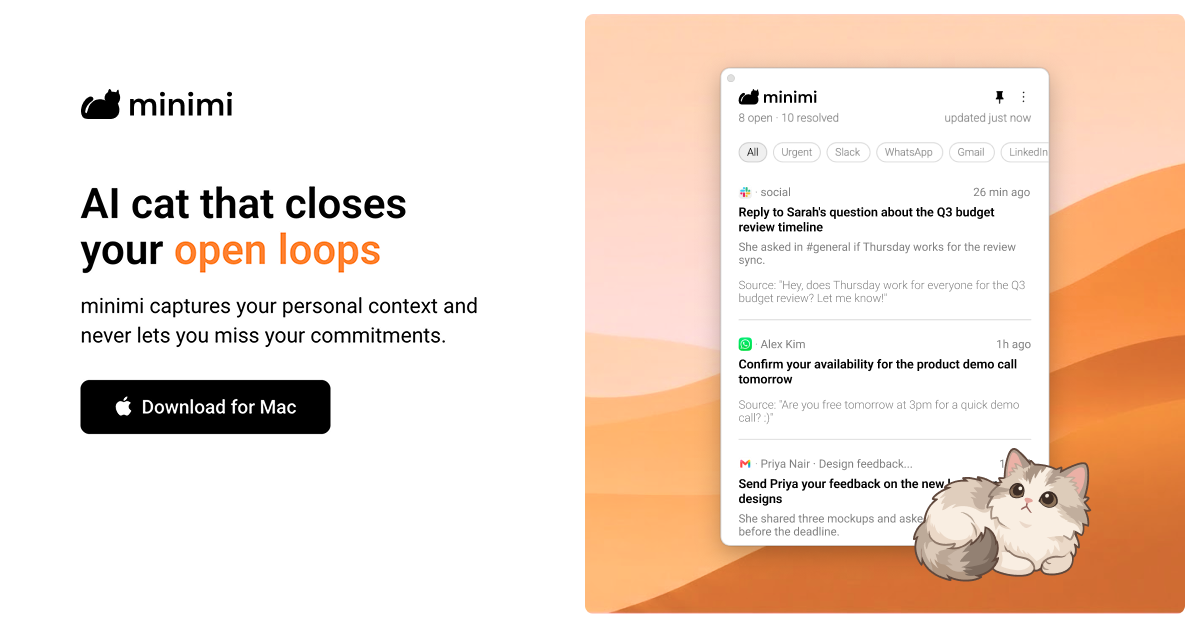
minimi is a Mac application from Shram Intelligence that its makers describe as an AI cat that closes your open loops. It captures your personal context as you work and never lets you miss your commitments. Rather than being another destination you have to visit, minimi is positioned as personal intelligence that comes to you: it runs on your Mac, reads your digital activity through the operating system's accessibility infrastructure, and uses what it learns to find the things that still need your attention. The stated ambition is a world where, before you have said a word, AI already understands you and frees you from the work of managing your own life, so you can spend that time actually living it. The product is aimed at anyone who is tired of re-explaining themselves to AI and of manually tracking what they promised to do. The problem minimi addresses is the fragmentation of personal context. The commitments you make are scattered across WhatsApp messages, Gmail threads, calendar entries and the other applications you use throughout a laptop day, and nothing keeps track of them as a coherent whole. The site notes that if you context-switch frequently, minimi can be a life-saver because it never misses what should be on your plate. People quoted on the page describe the value of contextual clarity over memory-based decisioning, of no longer paying separately for meeting transcription, and of not having to re-explain their whole situation in every AI conversation. minimi's answer is to capture context passively and continuously instead of waiting for you to log it yourself. The first half of the product is finding your open loops. minimi captures your personal context and, from that context, identifies your high-value action items. Because the detection is based on the work you actually did rather than on a to-do list you maintain by hand, the items it surfaces are tied to real commitments you already made somewhere in your apps. The site describes this as a discovery step that works like magic: instead of you remembering to write something down, minimi notices that a loop is still open and brings it forward. For anyone who ends the day unsure what they still owe someone, this step is what converts scattered activity into a visible, actionable picture of outstanding work. The second half is closing those loops automatically. minimi traces your decisions and resolves closed loops without manual effort. In other words, once it knows what you decided and what has been handled, it can consider the loop finished on its own rather than asking you to mark it complete. This matters because the maintenance overhead of a task system is usually what causes people to abandon it: the more manual upkeep required, the faster the system dies. By pairing automatic detection with automatic resolution, minimi aims to keep your picture of outstanding work accurate without asking you to do bookkeeping, and the whole flow is summarised on the site as 'Works like magic' in two steps. minimi also states that it supports all apps and works right out of the box without the need for any integrations. The page lists WhatsApp, Gmail, Calendar and 'and more' as the kinds of surfaces it covers. This approach removes the connector-by-connector setup that most context tools require, and it means you do not have to decide in advance which of your tools are worth connecting. Users commenting on the site highlight the same idea from a different angle, noting that minimi eliminates the need for integrations and MCPs across hundreds of tools while still capturing laptop work context. Practically, that means you download the app, and the context capture begins without configuration work. Privacy and ownership of memory are treated as first-class features under the heading 'Own your memory'. Your memory is stored on your Mac, and the company states that none of your data is stored on their servers. There is no cloud database, and the FAQ adds that they do not retain your data or train on it. minimi also clarifies that it does not take screenshots of your screen; instead it reads what is on your screen via Apple's accessibility infrastructure on your Mac. The comparison the site draws is with a brain that relies on senses to create and store memories: minimi does the equivalent for your digital activity on your Mac, but keeps the resulting memory local and under your control. Structurally, minimi is organised around two components. Memory MCP captures your personal context so you never explain yourself to AI again, and Open loops Inbox uses that personal context so you never miss your commitments. The FAQ describes minimi MCP as a digital pendrive that you can use to plug all your memories into any AI, including LLMs such as Claude, ChatGPT and Gemini, as well as harnesses such as OpenClaw and Hermes. The product is presented through characters: Cotton captures your personal context, Melody uses that context and never lets you miss your commitments, and the company says more cats are coming. This character framing is how the two capabilities are made memorable and distinct. The benefits described are straightforward. You stop being the person who has to remember and reconcile everything, because minimi finds the open loops and resolves them automatically. You avoid the setup tax of integrations. You keep your context private on your own machine. And you can context-switch like a pro, because the system tracks what should be on your plate rather than depending on your recollection. The site summarises the onboarding experience as 'No setup needed. Just download and begin.' and frames the outcome as staying on top of your work. Concrete scenarios are visible in the material around the product. One video walkthrough is titled 'minimi: Your Meeting Notetaker', and a user quoted on the page says they stopped paying for meeting transcription and that minimi also captures offline discussions and makes notes with accuracy. Another video is titled 'minimi: The Ultimate Company Brain', pointing at team knowledge use. Several commenters describe everyday workflows: feeding captured context into Claude, ChatGPT or Cursor through the MCP so the assistant already knows the situation, and using the memory to reconstruct what was actually done the previous day. The most repeated scenario is the context-switching knowledge worker who moves between messaging, email and calendar all day and needs one reliable place that knows what is still owed. minimi is a Mac download, so the desktop platform is the core surface. It is described as trusted by people at a set of companies shown as logos on the site, and it launched on Product Hunt where it gathered 303 upvotes and 45 comments under the topics Productivity, User Experience and Artificial Intelligence. On the AI side, the explicitly named connections are Claude, ChatGPT, Gemini, and harnesses such as OpenClaw and Hermes, all reached through minimi MCP. No pricing plans, tiers or subscription details are stated in the provided content, and the only commercial signal is a user note that minimi already had paying customers globally shortly after launch. Taken together, minimi 2.0 is best understood as a personal context layer for your Mac rather than a single-purpose app. It watches your digital activity through accessibility infrastructure, builds a private memory that stays on your device, uses that memory to find and close your open loops automatically, and exposes the same memory through MCP so any AI you already use can start from an understanding of you instead of a blank slate. Its primary value proposition is simple and consistently repeated across the site: capture your personal context and never let you miss your commitments.
GBrain is a team workspace built around a single shared AI memory that stays synced to every AI its members use. Rather than each person keeping private notes and separate account connections for the AI tools they rely on, the workspace holds one memory, one set of connected accounts and one set of skills that everyone on the team draws from. The memory is stored in files the team owns, and the workspace is described as the room a team works in, plus the server underneath it. GBrain is positioned as Garry Tan's AI memory, tools, and skills for any harness, aimed at teams who prompt AI together and want what one person tells an AI to be available to everyone else. Teams today work across several AI tools at once, and each one tends to remember only what was told to it, in its own silo. Notes written while working in one assistant stay invisible to the next one, and account access has to be wired up again and again. GBrain addresses this by putting memory and connected accounts in one place that every AI can reach. The stated example is simple: write a note in Claude Code and ChatGPT knows it. The same principle applies to accounts, where connecting Gmail once means Cursor can search it without a key sitting in a config file. Instead of memory being a feature scattered across separate products, it becomes something the workspace holds and the team shares. Memory is the first of the four parts of GBrain, described as what the workspace knows about the team and the work, held in files the team owns. Everything the workspace has learned is plain markdown in a folder that can be copied, and copying that folder takes the notes with you. Because the memory is made of readable markdown rather than a proprietary store, the team can read it, correct it directly, and carry it out of the product whenever they choose. The open source parts are free to run yourself, which means the team is not locked into the hosted service to keep access to what it has accumulated. This matters because the value in an AI workspace compounds over time: the longer a team uses it, the more context it holds, and the more important it becomes that this context belongs to the team rather than to a vendor. Tools make up the second part: the accounts the workspace reaches, and what each AI may do with them. Email, calendar and the web are connected once, at the workspace level, and then become available to the AIs the team uses. The stated benefit is that connecting Gmail once lets Cursor search it without a key in a config file, removing the repetitive setup work of granting each assistant its own credentials. Some of these tools are metered, such as web search and page crawling, and those are paid for from the usage credit included with the workspace. Keeping connections at the workspace level also means an administrator can express what each AI may do with a connected account, rather than leaving that decision to individual configs scattered across people's machines. Skills are the third part, described as the jobs the workspace knows how to run, on demand or on a schedule. Skills come already installed, so the workspace arrives with work it can already do rather than an empty shell the team has to build from scratch. The scheduled side is what GBrain calls work that runs while you sleep: jobs triggered on a cadence rather than in response to someone sitting at a keyboard. Onboarding and support come direct from the team behind GBrain, which is presented alongside the skills as part of the package. Taken together, memory, tools and skills are the raw material, and the workspace is where the team puts them to use. The workspace is the fourth part, and it is both a shared room for the team and the server underneath it. GBrain is multiplayer, meaning the whole team works in one workspace rather than in separate accounts, and an invitation to the rest of the team costs nothing extra. Members share the same conversation and the same memory, so context from one person's session is available to the others. On the model side, the workspace uses models from Anthropic and OpenAI and they can be switched at any time, and it can run on your own inference or on GBrain's. Getting started is a sign-in rather than a setup project: the workspace is described as running in about two minutes, with nothing to install. The benefits follow from that structure. A team gets one place where what it has learned lives, rather than a set of disconnected memories inside separate AI tools. Access to email, calendar and the web is granted once and reused by every AI, which removes the repeated key-in-a-config-file work. Scheduled skills mean recurring jobs happen without anyone remembering to start them. Because memory is markdown in a folder the team owns, leaving takes the notes with you, and the open source parts are free to run yourself. On cost, one price covers the workspace and everyone invited into it rather than being charged per person, and a monthly usage credit of $100 covers the AI models the workspace thinks with as well as metered tools, with the workspace telling you before you run out rather than after if you reach the limit. Concrete use cases follow from the parts. A developer writes a note while working in Claude Code, and a teammate using ChatGPT can rely on it without being told separately. Someone connects Gmail once in the workspace, and Cursor can search that mailbox with no key in a config file, so a coding assistant can draw on email context. A team member sets up scheduled work that runs while they sleep, so recurring jobs complete on their own cadence. Several people prompt in the same workspace and share one memory and one conversation, so the context of the team accumulates instead of fragmenting per person. And when a team leaves, they copy the markdown folder so the notes come with them and can be carried to whatever they use next. On pricing and plans, the Product Hunt launch offers the whole workspace at $99 for the first month, then $199 a month, billed monthly, and it can be stopped at any time from the workspace's own billing page. The $99 covers the workspace and everyone invited into it, so adding the rest of the team costs nothing extra, and nothing about the workspace changes when the first month ends. Each month includes $100 of usage credit for AI models and metered tools, and more can be bought from the billing page if heavy use exhausts it. The offer ends on September 29, after which the link stops selling that price, though a workspace started before then keeps the price it started on. GBrain's core promise is a single shared AI memory and one set of connected accounts and skills that every AI a team uses can reach, running in a workspace the whole team prompts together in. The memory belongs to the team as plain markdown files, the accounts are connected once instead of per tool, the work can be scheduled, and the whole thing starts with a sign-in rather than an installation.
Solid gives AI agents their own computers, accounts, and budgets, then lets them take on a job from start to finish. You describe what you need in plain language, and the agents work out the steps, connect to the tools the job requires, build anything that is missing, and check the result before reporting back. The product is positioned for complex, long-running work that a person or a team hands over rather than supervises click by click. Instead of a personal assistant that lives inside a chat window, Solid is described as a system for work that continues after you close your laptop: the agents keep going and ping you when it is done. The site lists builders and operators at companies including Revolut, ElevenLabs, EY, British Airways, NVIDIA, Stanford, Berkeley, MIT, NYU, Swiggy, and the Government Digital Service among its users. The problem Solid targets is the distance between asking for something and actually having it done. A request in a chat tool typically ends with a suggestion, a draft, or a set of instructions that a person still has to carry out across several apps. Real jobs, however, involve signing up for services, connecting accounts, writing code, deploying it, testing it, and following up — often over hours or days. Solid's answer is to give the agents their own machines, their own accounts, and a budget, so they can perform those steps themselves. The website stresses that no prebuilt connector is required: agents can connect through an API, build a missing integration, or operate a website, desktop application, or phone app directly. That matters because the tools needed for a job are frequently ones that have never been added to an integration directory, and because the person delegating the work may not know how to use them either. Self-sufficiency is the first capability Solid highlights. The agents choose the tools they need and handle the setup themselves, even for software you have never used; the site's framing is that if a person can use it, they can too. They work from their own devices — Windows and macOS computers, Linux servers, iPhones, and Android phones — and their own Google and Apple accounts. Beyond devices and accounts, they can sign up for services and pay for them within the budget and approval rules you set. The illustration the site uses shows an agent controlling its computers and phones alongside account badges, a budget gauge, and a checked payment receipt. The practical effect is that you are not asked to prepare an environment, purchase the tooling, or configure integrations before work can begin; you provide the access that is required, choose the approval rules, and let the agent work out the rest. Solid describes its agents as self-healing. If a tool fails or their setup breaks, they can investigate the failure, make a repair, and check that the job runs again; when they genuinely need help, they explain what is blocking progress rather than stalling silently. This is paired with self-improvement: the next job starts with what they learned. The agents keep the fixes that worked and learn from your team's corrections, and those lessons change how they use tools and approach future jobs. The site illustrates this with an agent reusing a corrected pattern from a previous job as a drawing guide for the next one. In practice, this means corrections are not one-off patches that have to be repeated — feedback about how something should be done becomes part of how the agent operates on later, similar work. Self-scaling covers how Solid handles work that outgrows a single agent. The agents can create more Solid agents or bring in outside agents such as Codex and Claude Code, divide the work across whatever tools the job needs, coordinate the team, and return a single checked result. The site's illustration shows a Solid agent gathering results from other agents working across business tools and handing one verified outcome to a person. This matters for jobs that are too broad or too long for one worker: rather than a single agent attempting everything sequentially, the work can be split across agents and then reassembled into one deliverable. The example workflows Solid publishes follow the same pattern — a defined job with a numbered sequence of steps, ending in a result a person can review, approve, or share. Overall, Solid works as an always-on system rather than an interactive session. You bring the goal and the ground rules; the agents work out the steps, check the result, and report back. While a job runs, you can watch progress — the site's example shows an agent that has connected Gmail and HubSpot, researched on LinkedIn, built a dashboard, deployed it, and is verifying the data — but you do not have to be present. You close your laptop, and the agents keep working, messaging you when the result is ready or asking when they need a decision. You choose what the agents can access and which actions require approval; for example, they can research and draft freely while approval is required before sending a message, buying a service, or deploying a change. The agent is described as a meta-agent that can see and manage its own workspace within the access you give it, so you can ask what is running, why it is needed, or how much a job cost, including a breakdown of the AI usage, machines, and purchases used for the job. The stated benefits follow from that design. You are not managing every step of setup and troubleshooting, because the agents handle configuration, connections, and code on their own. You do not need to stay online or babysit a process, because the job continues without you and returns a finished result rather than an open question. Costs are visible and bounded: budgets and approval rules limit what agents can spend, and each job's consumption of AI, machines, and purchases can be broken down on request. Corrections persist across jobs, so instructions do not have to be repeated. When an agent remains blocked, it explains what needs your help, and the site notes you can also talk to a real person on the Solid team. For teams, the outcome is the ability to delegate more work without giving up control. Solid publishes example workflows that show what a finished job looks like, each starting from a first request and ending with a result you can review. In a sales demo workflow, an agent reads customer meeting notes, maps the buyer's workflow, builds the demo with sample data, hosts and tests the app, and returns the hosted link along with test results. In lead generation, an agent applies your targeting criteria, researches buying signals on LinkedIn, qualifies accounts and contacts, drafts outreach and waits for approval, then follows up, books qualified meetings, and updates the CRM. For AI product evaluation, an agent builds user scenarios and success criteria, runs after each release or change, simulates users completing key tasks, judges outcomes against expected behavior, and reports what passed, what failed, and why. A bug resolution agent investigates a production alert, reproduces the issue and assesses its impact, writes and tests a fix, opens a pull request for engineer approval, and verifies recovery after deployment. A support agent reads a stalled ticket, gathers the full customer history, finds the cause across systems, applies the fix within your policies, and confirms and records the resolution. Solid is aimed at individuals and teams with work they lack the time or expertise to do, and the site lists builders and operators at large companies, universities, and public sector organizations. On integrations, the position is that none are required in advance: agents can connect through an API, build a missing integration, or operate a website, desktop software, or phone app directly, using the access you approve. Pricing is subscription-based, with the full monthly payment becoming one balance for AI usage, machines, and purchases the agents make, with no extra platform fee. Starter is $40 per month for getting started with a focused task, a simple app, or a small workflow; Pro is $160 per month for regular work, active app building, and more room to test and iterate; Max is $640 per month for heavier workloads, larger apps, and several projects running at once. The trial lets you start with $20 on Solid. A Solid API lets you deploy always-on agents inside your product, and an enterprise offering adds access, budgets, policies, and approvals across a workspace, running on Solid Cloud, in your own VPC, or on-premises depending on your setup. The takeaway Solid offers is a shift from assisted work to delegated work. By giving agents their own computers, accounts, and budgets, and by letting them handle setup, repair, coordination, and verification, the product aims to let you hand over a goal — a sales demo, a researched lead list, an evaluation run, a production fix, or a stalled ticket — and receive a checked result without supervising the steps in between. You keep the ground rules, the approvals, and the spending limits; the agents keep working, and they ping you when it is done.