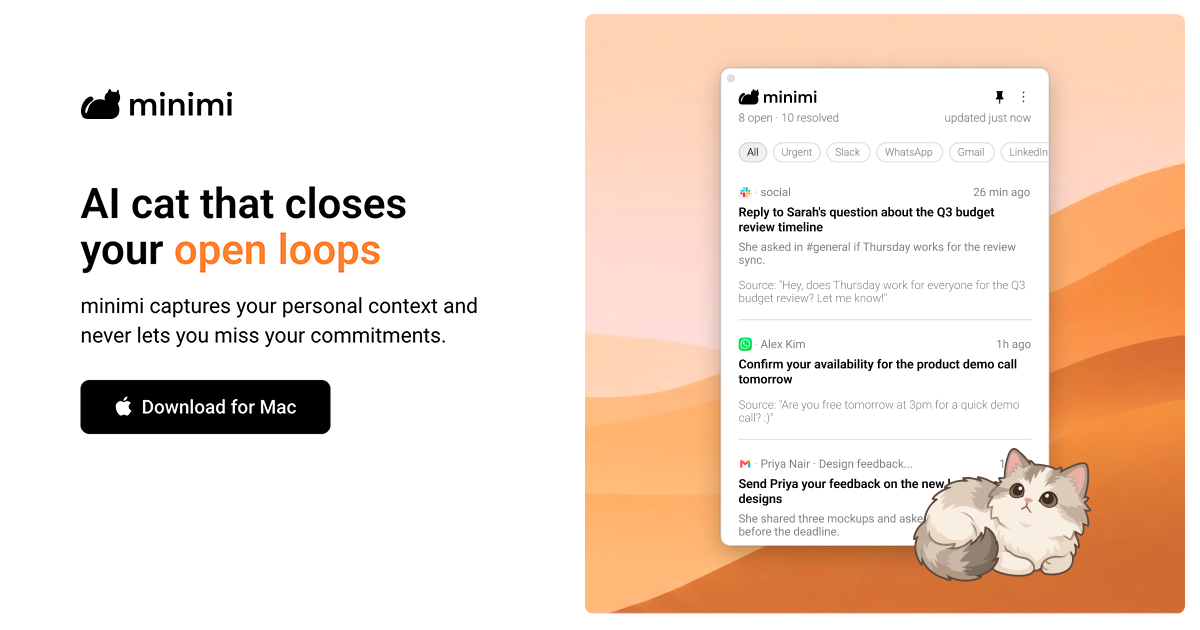
minimi is a Mac application from Shram Intelligence that its makers describe as an AI cat that closes your open loops. It captures your personal context as you work and never lets you miss your commitments. Rather than being another destination you have to visit, minimi is positioned as personal intelligence that comes to you: it runs on your Mac, reads your digital activity through the operating system's accessibility infrastructure, and uses what it learns to find the things that still need your attention. The stated ambition is a world where, before you have said a word, AI already understands you and frees you from the work of managing your own life, so you can spend that time actually living it. The product is aimed at anyone who is tired of re-explaining themselves to AI and of manually tracking what they promised to do.
The problem minimi addresses is the fragmentation of personal context. The commitments you make are scattered across WhatsApp messages, Gmail threads, calendar entries and the other applications you use throughout a laptop day, and nothing keeps track of them as a coherent whole. The site notes that if you context-switch frequently, minimi can be a life-saver because it never misses what should be on your plate. People quoted on the page describe the value of contextual clarity over memory-based decisioning, of no longer paying separately for meeting transcription, and of not having to re-explain their whole situation in every AI conversation. minimi's answer is to capture context passively and continuously instead of waiting for you to log it yourself.
The first half of the product is finding your open loops. minimi captures your personal context and, from that context, identifies your high-value action items. Because the detection is based on the work you actually did rather than on a to-do list you maintain by hand, the items it surfaces are tied to real commitments you already made somewhere in your apps. The site describes this as a discovery step that works like magic: instead of you remembering to write something down, minimi notices that a loop is still open and brings it forward. For anyone who ends the day unsure what they still owe someone, this step is what converts scattered activity into a visible, actionable picture of outstanding work.
The second half is closing those loops automatically. minimi traces your decisions and resolves closed loops without manual effort. In other words, once it knows what you decided and what has been handled, it can consider the loop finished on its own rather than asking you to mark it complete. This matters because the maintenance overhead of a task system is usually what causes people to abandon it: the more manual upkeep required, the faster the system dies. By pairing automatic detection with automatic resolution, minimi aims to keep your picture of outstanding work accurate without asking you to do bookkeeping, and the whole flow is summarised on the site as 'Works like magic' in two steps.
minimi also states that it supports all apps and works right out of the box without the need for any integrations. The page lists WhatsApp, Gmail, Calendar and 'and more' as the kinds of surfaces it covers. This approach removes the connector-by-connector setup that most context tools require, and it means you do not have to decide in advance which of your tools are worth connecting. Users commenting on the site highlight the same idea from a different angle, noting that minimi eliminates the need for integrations and MCPs across hundreds of tools while still capturing laptop work context. Practically, that means you download the app, and the context capture begins without configuration work.
Privacy and ownership of memory are treated as first-class features under the heading 'Own your memory'. Your memory is stored on your Mac, and the company states that none of your data is stored on their servers. There is no cloud database, and the FAQ adds that they do not retain your data or train on it. minimi also clarifies that it does not take screenshots of your screen; instead it reads what is on your screen via Apple's accessibility infrastructure on your Mac. The comparison the site draws is with a brain that relies on senses to create and store memories: minimi does the equivalent for your digital activity on your Mac, but keeps the resulting memory local and under your control.
Structurally, minimi is organised around two components. Memory MCP captures your personal context so you never explain yourself to AI again, and Open loops Inbox uses that personal context so you never miss your commitments. The FAQ describes minimi MCP as a digital pendrive that you can use to plug all your memories into any AI, including LLMs such as Claude, ChatGPT and Gemini, as well as harnesses such as OpenClaw and Hermes. The product is presented through characters: Cotton captures your personal context, Melody uses that context and never lets you miss your commitments, and the company says more cats are coming. This character framing is how the two capabilities are made memorable and distinct.
The benefits described are straightforward. You stop being the person who has to remember and reconcile everything, because minimi finds the open loops and resolves them automatically. You avoid the setup tax of integrations. You keep your context private on your own machine. And you can context-switch like a pro, because the system tracks what should be on your plate rather than depending on your recollection. The site summarises the onboarding experience as 'No setup needed. Just download and begin.' and frames the outcome as staying on top of your work.
Concrete scenarios are visible in the material around the product. One video walkthrough is titled 'minimi: Your Meeting Notetaker', and a user quoted on the page says they stopped paying for meeting transcription and that minimi also captures offline discussions and makes notes with accuracy. Another video is titled 'minimi: The Ultimate Company Brain', pointing at team knowledge use. Several commenters describe everyday workflows: feeding captured context into Claude, ChatGPT or Cursor through the MCP so the assistant already knows the situation, and using the memory to reconstruct what was actually done the previous day. The most repeated scenario is the context-switching knowledge worker who moves between messaging, email and calendar all day and needs one reliable place that knows what is still owed.
minimi is a Mac download, so the desktop platform is the core surface. It is described as trusted by people at a set of companies shown as logos on the site, and it launched on Product Hunt where it gathered 303 upvotes and 45 comments under the topics Productivity, User Experience and Artificial Intelligence. On the AI side, the explicitly named connections are Claude, ChatGPT, Gemini, and harnesses such as OpenClaw and Hermes, all reached through minimi MCP. No pricing plans, tiers or subscription details are stated in the provided content, and the only commercial signal is a user note that minimi already had paying customers globally shortly after launch.
Taken together, minimi 2.0 is best understood as a personal context layer for your Mac rather than a single-purpose app. It watches your digital activity through accessibility infrastructure, builds a private memory that stays on your device, uses that memory to find and close your open loops automatically, and exposes the same memory through MCP so any AI you already use can start from an understanding of you instead of a blank slate. Its primary value proposition is simple and consistently repeated across the site: capture your personal context and never let you miss your commitments.
Publisher
A
admin
Launch Date2026-09-25
Platformdesktop
Pricingfree