Category Focus/categories/video
Video AI Tools
Discover and compare the best video AI tools and software. Browse 129+ curated tools with reviews and rankings.
Projects tracked
129
Sort mode
RECENT
Page
1
Rabotka Business is complete recruitment software — an applicant tracking system built for companies and organisations hiring in Africa. It brings every stage of hiring into a single pipeline: a job is written and published, applications arrive from several channels, CVs are read and ranked against the role, interviews run as video calls inside the workspace, and the team decides together up to the contract. It is aimed at companies and SMEs, education and training providers, NGOs and international organisations, public sector bodies and health facilities — any organisation that wants to receive, sort and meet the right candidates in one place, with each candidate's status and history kept in the same system. Most hiring processes are spread across too many places. Candidates arrive from LinkedIn, Google, WhatsApp, a QR code, a careers page or a mailbox; interviews go into a calendar; reports live with whoever wrote them. Rabotka Business is positioned against that fragmentation: the product describes itself as more than a job board, and the promise is that a candidate moves from the job being posted all the way to the contract with nothing lost along the way — nothing gets lost between two emails. Recruiters, reviewers and hiring managers work from one pipeline rather than disconnected inboxes and spreadsheets, so the history of each application stays attached to the candidate. The attraction tools cover job writing and distribution. Job posts are written for you: a few words are enough for the platform to produce the full job post. Posting to LinkedIn is built in — you connect your LinkedIn account once from a job, and it is published on your profile as a card with ready-made text you review and an image of your choice. The card opens your careers page, where candidates apply, and those applications are flagged as coming from LinkedIn; each recruiter on the team posts on their own profile. Distribution extends to Rabotka, your careers page, Google and LinkedIn, so a job is visible in more than one place without copy-paste work. Sourcing and sorting tools put the right profiles on top. Profile search covers verified profiles and field agents. CV analysis reads, scores and ranks CVs for each role — including scanned or photographed CVs — and shows why a candidate sits at the top, criterion by criterion. Applications can be pulled from a Gmail inbox: you connect Gmail once, read-only, see recent emails that contain a CV, tick the ones to analyse, and only those attachments are read; no email is kept or sent and the connection can be disconnected at any time. CVs can also be uploaded from your device as PDFs, Word files or photos, and a QR code offers another route into the pipeline. Evaluation tools keep every candidate followed. Applicant tracking presents the pipeline by stage with the best-matched candidates at the top of the list, each showing a score, a source, a scheduled video call and a report. Interviews happen inside Rabotka: on the day, the video call opens in your workspace with nothing to install, and the candidate joins with the link in their invitation on a computer or a phone without needing an account. The call transcribes the interview automatically, sentence by sentence, with nothing to switch on, and notes typed or dictated stay beside the call. Afterwards Rabotka writes the report from the transcript and your notes, notifies you when it is ready, and lets you review it, edit it, send it to the team or save it as a PDF. The decision stage is built for more than one person. Recruiters and reviewers give their opinion and leave notes, and Team Activity keeps track of every decision so the reasoning behind a hire is recorded rather than scattered. Once a candidate is chosen, contracts are generated and missions are followed, and a hiring report is available. On the board, team members can see which candidates have a report ready and which have been hired. Rabotka Business describes its own workflow in six steps. Distribution comes first: jobs go to Rabotka, the careers page, Google and LinkedIn. Applications then arrive in one place. Sorting and ranking follows, with every CV read, scored and explained. Interviews are next, with a choice of slots, a video call and a report. Then the decision, where the team's opinions are gathered and a candidate is hired. Finally the contract and mission: the contract is generated and the mission is followed. The positioning is that Rabotka sits at the heart of hiring — candidates come from LinkedIn, Google, WhatsApp or your mailbox, interviews go into your calendar, reports go to your team, and everything is decided in Rabotka. The product is explicitly built for African organisations and is available in 13 countries: Congo-Brazzaville, Congo-Kinshasa (RDC), Cameroon, Gabon, Benin, Côte d'Ivoire, Senegal, Sierra Leone, Kenya, Uganda, Rwanda, Zambia and Mozambique. Each organisation hires in its own country: the documents required and the cities offered are the country's, jobs are published where that country's candidates are, and the subscription is paid by mobile money in the local currency. Candidates are reached on WhatsApp, and field agents are part of the sourcing model, which matters where a large share of hiring happens through mobile channels and local networks. The stated outcome is that recruiters receive, sort and meet the right candidates in one place. Because every CV is read and scored against the role, the ranking is explained criterion by criterion rather than being a black box, so a recruiter can defend a shortlist. Because the pipeline shows each candidate's status and history, handoffs between colleagues stay visible. Because the video call, the transcript and the report live in the same workspace, the interview does not have to be written up as a separate task, and the report can be shared with the team or saved as a PDF. The site lists five sectors with the roles they typically hire. Companies and SMEs in retail, industry, services and construction hire from short-term help to permanent staff, commonly for sales rep, accountant, site manager and warehouse worker roles. Education and training — private schools, universities and vocational training centres — hire teachers, trainers, supervisors and secretaries. NGOs and international organisations hire project managers, field officers and consultants for local programmes. The public sector uses it for administrative officer, legal officer and engineer roles with a traceable process. Health employers such as clinics, medical practices, pharmacies and laboratories hire nurses, pharmacists, lab technicians and front-desk staff. Start-ups, cooperatives, economic interest groups, associations and foundations can also open an account. Rabotka Business is for organisations rather than individual job seekers: companies, NGOs, schools, health facilities and public bodies where recruiters and reviewers work together. Pricing is by subscription paid by mobile money in the organisation's local currency; no plan amounts are published on the page. Onboarding starts with a demo of 30 minutes by video or phone, run on a role you actually need to fill rather than a ready-made example, with a reply within one business day. In short, Rabotka Business is recruitment software for African organisations that want one pipeline instead of many tools: job writing and multi-channel distribution, CV analysis that ranks and explains, a readable applicant tracking pipeline, video interviews that transcribe themselves and produce a report, and team-based decisions that carry through to the contract and mission.
Cliplato is a web product that turns streams and videos into vertical TikTok and YouTube Shorts clips. According to the site, a user can paste a link to a stream or video from Twitch, Kick, YouTube, Dailymotion, Vimeo, Rumble, Facebook, X, Bilibili or Odysee, or upload a video file. Cliplato then reads the chat replay and the audio to find moments viewers reacted to, cuts them into 9:16 clips with word-by-word captions and facecam placement, and writes TikTok captions and YouTube descriptions. It is aimed at streamers, clippers, and editors who want clips that look ready to post rather than raw cuts. The product addresses the gap between a long stream and a short-form post. The site describes a workflow where the best parts are tied to loudness, chat reactions, moments viewers clipped, and YouTube's most replayed point. Finding those moments and preparing them for TikTok or Shorts is treated as a separate job from streaming itself. Cliplato says it reads what was said around each candidate moment and has the AI pick the moments, so the output is built around viewer attention rather than a simple random cut. The site also notes that other clippers count minutes uploaded, while Cliplato counts one credit per video whatever its length, and that a 6-hour stream costs the same as a 20-minute video. On the input side, Cliplato works with links from listed sites or with an uploaded file in MP4, MOV, MKV or WebM up to 4 GB. The upload goes straight to Cliplato's storage, is clipped like a link, and is deleted once the clips are made. For linked videos, the product uses multiple signals to locate highlights: loudness, chat's reactions, the moments viewers clipped, and YouTube's most replayed point. The AI reads what was said around each moment and picks the best parts. Users can ask for the AI's best moments first, watch them, and then choose only the ones they want made into clips. They can trim a pick, rewrite its hook and title, and then create the clip. The output is a 9:16 MP4 at 1080×1920, described by the site as ready for TikTok, Shorts and Reels. Cliplato finds the facecam and places it scene by scene, even when the stream layout changes mid-stream. Captions are burned in word by word, with slurs starred out. Every clip can include a hook on top and a progress bar. The site lists four caption styles—Bold, Box, Punch and Clean—and four layouts—stacked, webcam, crop and fill—plus an Auto option. A user can set the style and layout once or choose them clip by clip. Each clip also comes with written post copy. Cliplato writes a TikTok caption with hashtags and a YouTube description that credits the streamer, for every clip, in the video's own language. The product detects the language itself or lets the user pick it next to the link, and titles, hooks, captions and post text are written in that language. The site lists English, French, Arabic and Moroccan Darija, and says it works with any language the speech model knows. Moroccan Darija is written the way it is texted, in Latin letters (3arbizi), mixed French and all. Beyond one-off jobs, Cliplato offers automation and editing options. With Pro, Cliplato watches a Twitch or Kick channel and clips each new stream by itself, described as working while the user sleeps. A high-effort edit option makes the AI cut, zoom and add pop-up text to each pick, and a reviewer watches the frames until the edit passes. The AI that picks and edits clips is included in every plan, so no key or setup is required. Users who prefer their own Anthropic key can add it in Account; the AI then runs on that key, billed by Anthropic at its prices, without the included limit, while a job still stops at $5 of AI and a month at $50. The high-effort edit comes with Pro and Studio. The workflow is presented as three steps around one link. First, the user pastes a stream or video link or uploads a file, then chooses how many clips, the language, and whether the AI also edits them. Second, a job page shows each stage as it happens, including the video's loudness and the AI's picks; the site says the user can leave whenever they like because the clips keep being made. The stages shown on the site are Listen, Moments, Transcribe, Pick, Webcam, Render and Review. Third, the user downloads each MP4 with its TikTok caption and YouTube description, ready to copy. The stated outcome is a clip that looks posted, not just cut. Cliplato combines a vertical frame, a hook, word-by-word captions, facecam placement and a progress bar, and adds the TikTok caption and YouTube description so the post copy travels with the video. Because the AI is included, a user can start without a card, a password or an AI key. The free plan offers three videos a month, and each plan includes an amount of AI per month that Cliplato pays for: Free $1, Starter $2, Pro $6 and Studio $25. For users who want to post daily, Pro is described as three times Starter's credits for $5 more. Concrete use cases named on the site include turning Twitch, Kick or YouTube streams into TikToks and Shorts; letting Pro watch a Twitch or Kick channel and clip each new stream automatically; and uploading a video file that has no chat, where the moments come from the sound and what is said. The site also addresses clippers and editors running several channels with the Studio plan. It notes that linked videos must be videos or past streams from the supported sites, pasted as the video's own link rather than its channel's, and that some sites keep some videos behind a login, which cannot be clipped. Users should clip only videos they own or have the rights to use. Cliplato is for streamers who want short-form posts from their streams, clippers and editors handling several channels, and users who need clips in languages such as English, French, Arabic or Moroccan Darija. The pricing page lists Free at $0 forever with 3 credits a month and up to 6 clips each; Starter at $8.99 a month with 20 credits and up to 20 clips each, described as $0.45 a video; Pro at $13.99 a month with 60 credits and up to 20 clips each, described as $0.23 a video; and Studio at $49.88 a month with 250 credits and up to 20 clips each, described as $0.20 a video. One credit clips one video whatever its length. Credits return on the 1st of every month UTC, and unused credits do not carry over. Users can buy non-renewing credit packs, and inviting friends can earn bonus videos. The summary takeaway is that Cliplato turns a stream or video link into a set of vertical, captioned clips with the facecam placed and the post copy written. Its primary value is the combined job of finding moments, formatting for 9:16, and preparing TikTok and YouTube text, with AI included and a free starting plan. The site frames the product simply: videos in, Shorts out.
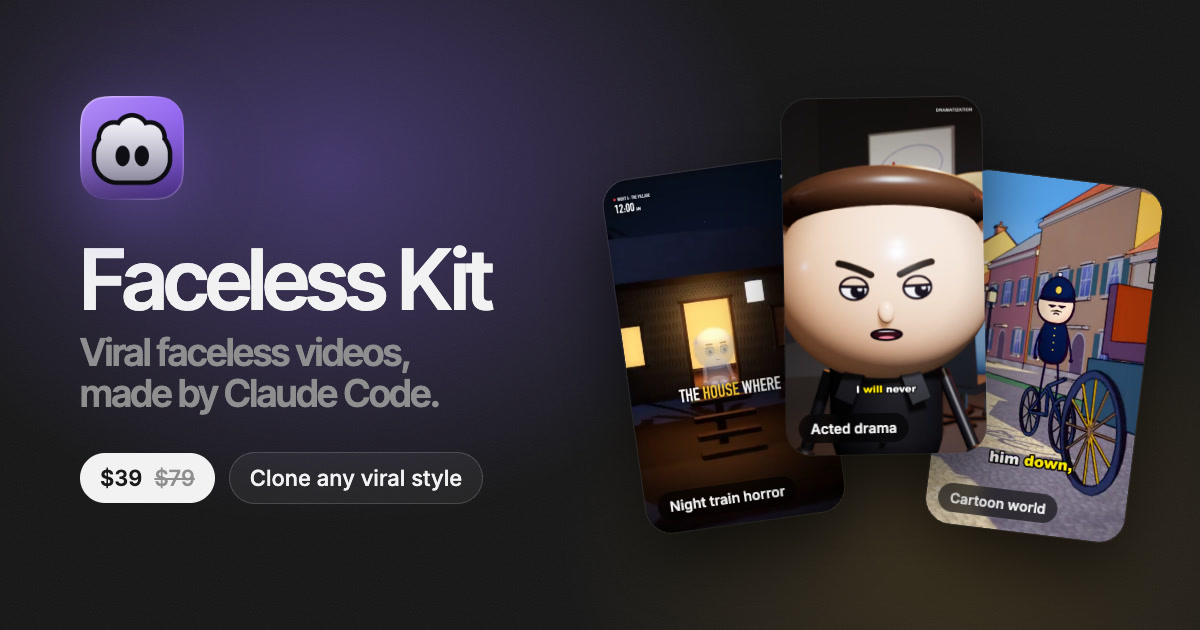
Faceless Kit is a faceless video studio that runs inside Claude Code or Codex. Instead of handing you a timeline editor, it turns the coding agent you already use into an animation pipeline: you pick a style or paste a viral video you like, type the idea for your video, approve the script it writes, approve the stills it draws, and receive a finished animated video with voice, music and captions. It ships as a downloadable app for Mac and Windows that connects to your Claude Code or Codex, and also as a skill you can add to Claude Code or Codex by pasting a single message. It is aimed at people who want to publish faceless animated videos on YouTube Shorts, TikTok and Instagram Reels without editing footage or burning AI generation credits. The site frames the problem in two parts. First, faceless animated accounts are already drawing large audiences — the page shows analytics screenshots with view and like counts from real faceless animated accounts and invites you to make your own — so creators want a repeatable way to produce that kind of content. Second, the usual route to AI video is a stack of image and video generators that charge credits per generation; the site names that category directly by showing logos for Higgsfield, Runway, Midjourney, Kling and Pika alongside the promise of "No AI generators. No credits." Character consistency is the other theme: Faceless Kit repeatedly emphasizes "same characters, every shot," which it ties to drawing every frame in code on your own computer rather than generating frames elsewhere. Styles are the starting point of every project. Faceless Kit ships with ready-to-go looks including Toon Reality, In this town, Documentary and Drama, plus styles shown on the site such as Cartoon world Day, Acted drama, Night Train Horror, Low-poly 3D, snow hare and clay. The library grows: the team says it updates often, and when a new faceless format trends it becomes a style, with new styles added free for owners. If the look you want is not in the library, you can clone one — paste a YouTube, TikTok or Instagram link and Faceless Kit watches every frame, studies the video's pacing, camera and look, then makes your own story in that style. The site is explicit that it never copies the original characters, lines or music, only the look. The workflow is deliberately four steps, and the product checks in with you twice along the way. Step one: pick a style, or paste a viral video you like, then type what your video is about. Step two: it writes the script, and you can change anything or approve it as it stands. Step three: it voices the script and draws every scene, and you check the stills before anything is rendered. Step four: it renders the finished video, ready to post. The site's pitch for this flow is "No editing, no timeline" — there is no footage to cut and no render settings to tune, so the two approvals are the only manual decisions. Because both the script and the stills are reviewable, a line or a frame can be fixed before the video is produced rather than after. Characters on screen speak the script, so the voice stage matters. Faceless Kit supports ElevenLabs and Fish Audio, both connected with your own API key and both marked ready on the site. A free voice that runs on your own computer is listed as coming soon. Using your own key means voice is the only part of the pipeline that relies on an outside service, while everything visual is produced locally by code. The finished video arrives with voice, music and captions already assembled, so there is no separate audio or captioning tool in the loop. The unusual part of Faceless Kit is what it does not use. Every frame is drawn by code that your Claude Code or Codex writes and rendered on your own computer, rather than being produced by an AI image or video generator. That choice drives most of the product's claims: there are no credits to burn because nothing is metered per generation, and characters stay the same from shot to shot because they are described in code. It also means the work happens locally on a machine you own, with Claude Code or Codex driving each stage — the script, the voice pass, the scene drawing and the final render. Faceless Kit is best understood not as a video editor but as a packaged studio process that the coding agent executes on your behalf, with your approvals as the checkpoints. For users, the outcome is a finished, ready-to-post MP4 without a timeline session. Videos come out as vertical 9:16 for YouTube Shorts, TikTok and Instagram Reels, or wide 16:9 for YouTube, so one product covers short-form and standard formats. Because characters are drawn consistently and no credits are consumed, a creator can make episode after episode with recurring characters. Pricing is a one-time payment of $39 at launch, with the site stating the launch price ends Nov 30 and that it then goes to $49. There is no subscription and no credits, and new styles are added free. The only running cost mentioned is your own voice key, if you use one. The concrete scenarios described on the site center on short-form social video. The page leads with viral faceless animated posts and analytics from faceless animated accounts — view counts in the millions and hundreds of thousands, follower counts in the tens and hundreds of thousands — and invites creators to make their own. A typical session: choose Cartoon world or Acted drama, type an idea, approve the script, review the stills, publish to Shorts, TikTok or Reels. Other sessions start from a viral video link, where the goal is to reproduce a look that is already working with new characters and a new story. Wide 16:9 output covers YouTube uploads that are not short-form, and the affiliate program covers creators who already have an audience to promote to. Faceless Kit is aimed at creators who already work with Claude Code or Codex, or are willing to install one — the site states plainly that you need one of them. It comes in two delivery options with one purchase: a Mac and Windows app (Windows 10 or 11, 64-bit) that connects to your coding agent, and a skill you add to Claude Code or Codex by pasting one message, after which typing /faceless opens it in your browser. The skill also works on Linux, and one purchase covers one computer. Setting up the skill involves an emailed 6-digit code. Only the voice layer depends on third-party services: ElevenLabs or Fish Audio, with your own key. Support runs through private tickets on Discord, and there is an affiliate program paying 30% of every sale you bring, up to 50%, tracked in a Whop dashboard. All sales are final. Faceless Kit's value proposition is narrow and clear: it turns a coding agent you already run into a faceless animated video studio, with styles, style cloning, talking characters, real voices, music and captions, producing ready-to-post MP4s in 9:16 or 16:9 without AI image or video generators and without credits. You approve the script and the stills, the render happens in code on your own computer, and you pay $39 once rather than per generation. For creators publishing faceless short-form video, that combination of consistency, local rendering and one-time pricing is the whole pitch.
Highreel is a tool for businesses with regular customers to give each person a personal year in review. It turns a simple spreadsheet into an animated story of slides — a Highreel — for every customer on the list. Each Highreel includes the customer's first name, their own numbers from the spreadsheet, and the business's logo and look. The product is made for apps, newsletters, online shops, gyms, studios, camps, daycares, cafés, schools, and any other business that knows what each customer did during the year. The main purpose is to let a business create and send personalized, shareable recaps without needing a designer or developer. The result is a short story that each customer can tap through, save, and share at a private link. The problem Highreel addresses is that many businesses already hold rich data about their customers' activity — active days, longest streaks, orders, favorite products, badges, or other yearly numbers — but turning that data into something personal and engaging for each customer is difficult. Doing it manually for hundreds or thousands of people would require design work, development work, and a way to deliver a unique link to each person. Highreel removes that barrier by taking a spreadsheet with one row per customer and converting each row into a branded, animated year-in-review story. This matters because a personal recap can make customers feel recognized and give them something they may want to share with others, while the business can see how the recaps are received. The first key feature is the spreadsheet-based workflow. A business fills in a sheet with one row per customer: a first name and their numbers for the year. The file can be CSV or Excel, and it can use Highreel's columns or the business's own columns. If anything needs fixing, it turns red, and the business can fix it right in the grid. The columns supplied in the spreadsheet become the slides of each customer's Highreel, so the data a business already tracks drives the story. An email address or phone number is only needed if the business wants to send the Highreels from Highreel; those contact details never appear inside a Highreel. The second feature group is brand customization. After uploading the sheet, a business can add its logo, pick a design and its colors, and rewrite any line of the story. Clicking any customer shows their Highreel changing as the business types, so edits to numbers, words, or the look can be previewed immediately. Highreel provides a template for the business type — apps, newsletters, shops, cafés, gyms, schools, camps, and daycares are mentioned — and puts the business's brand on every slide. This means the final Highreels carry the business's logo, words, design, and colors rather than a generic look. The third feature group covers sharing and delivery. After publishing, everyone on the list gets a personal link. The business can send those links from its own domain, with Highreel sending each email as the business's own address (for example, hello@yourbusiness.com) the way a newsletter tool does, for any number of people. It can also send from its own email account, such as Gmail or Outlook, for a few hundred people. It can connect a newsletter tool — MailerLite, Mailchimp, Klaviyo, Brevo, or beehiiv — and put each person's link into the next send. It can use one link for everyone, posted as a link or QR code, where each person types their email and gets their own Highreel. Or it can send via WhatsApp, one tap per person, from the phone. After publishing, the business can still edit a line or a number, and the links stay the same. Each Highreel also comes with a share image and a link preview, so it is made to be shared. Highreel's overall approach is a three-step campaign: fill in the sheet, customize to fit the brand, and share with the members. One campaign is one round of Highreels for one list: the sheet of customers, the brand and wording, and a personal Highreel for each person on it. The business pays once for the whole list, not per customer, and there is no subscription. Before publishing, the business can preview everyone's Highreel as often as it likes; nothing reaches customers until the business publishes and sends it. Once a campaign is published, the list is set: the business can correct the numbers, but cannot add or swap customers. A 2026 campaign is separate from a 2027 campaign. The benefits are stated directly in the product content. Each customer gets a personal, animated year-in-review story to tap through, save, and share. The business gets brand placement on every slide, the ability to edit after publishing without changing links, and a share image plus link preview for every customer. It also gets engagement visibility: for each customer and in total, it can see who opened their Highreel, how far they got, who watched to the end, saved an image, or shared it, and who tapped the button at the end. It can also see how the Highreel reached the customer and where it was opened, such as on Instagram or on a computer. A free Highreel about the business's own year can be published to post for followers, separate from the paid customer Highreels. Concrete use cases follow from the business types Highreel names. A habit-tracking app with active days and longest streaks can give each user a personal recap showing their year in the app. An online shop can use orders, a favorite product, or other yearly numbers to create a customer recap. A gym, fitness studio, or dance studio can highlight active days, streaks, or other activity for each member. A newsletter can give each reader a personal year in review based on their own numbers. A summer camp or daycare can create a recap for each family. The content also notes that an agency or a business serving multiple businesses can make Highreels for more than one business, because each Highreel has its own business name, logo, and website, and emails go out from the connected address under that business's name. The target users are businesses with regular customers: apps, newsletters, online shops, gyms, studios, summer camps, daycares, cafés, and schools are explicitly listed. The pricing is per campaign: $99 for up to 1,000 customers (founding price, $100 off the usual $199), $399 for up to 10,000 customers, and $799 for up to 50,000 customers. Every campaign includes a template for the business type, the business's logo and words on every slide, the ability to edit after publishing, and a share image and link preview for every customer. A demo runs the whole process with sample data and needs no account, covering upload, branding, preview, publishing, and opening the links. The core value proposition is that a business can turn a spreadsheet of customer numbers into a personal, branded, shareable year-in-review story for every customer, at one price for the whole campaign.
Magneterie is a browser-based video streamer centered on the magnet link. Its own description states that it streams any magnet link or MP4 URL right in your browser, with no downloads and no installs. The product opens on a single panel labeled 'Load video,' where a user supplies a source — a magnet link, a video URL, or a web page address — or uploads a .torrent file, and then presses Play. The purpose is narrow and practical: take a link or a torrent file and turn it into playing video inside the browser tab, without a separate desktop client and without a download step preceding playback. It is built for people who already handle magnet links, .torrent files, or direct video URLs and want a lighter way to play them. The friction Magneterie targets is the overhead that normally sits between a link and a playing video. The site frames its value around the two things it removes: downloads and installs. In a conventional workflow, a magnet link or .torrent file implies acquiring software first and then waiting for content to arrive on disk before anything can be watched. Magneterie collapses that sequence into a browser tab — the link goes in, playback starts, and the file does not have to be saved anywhere first. That matters most for casual, one-off viewing, for checking whether a source is the right one, and for anyone who does not want to maintain a dedicated client just to play a single link. The pitch is deliberately minimal: no downloads, no installs, just the browser. The input surface is intentionally small. A single text field accepts a magnet link, a video URL, or a page address, and a separate upload control accepts a .torrent file. Once a source is supplied, a Play button starts the stream. Because the field accepts a web page as well as a direct video address, the same entry point covers several kinds of sources without a separate mode for each, and the .torrent upload gives users whose source is a file rather than a link a path in as well. Every route converges on the same player, so the experience after pressing Play does not change based on how the source was provided. Magneterie documents how the player is wired, which is unusual for a consumer-facing streaming tool. The interface explains that the online player runs browser-side peers over WebRTC and uses webseeds. There is also a 'Server mode (TCP/UDP peers)' control, but the site is explicit that server mode is not available online: on the hosted site only the browser player runs, using WebRTC peers and webseeds. To use TCP/UDP peers, the project has to run on your own machine via npm start. This is spelled out directly in the interface rather than buried in documentation, so a user knows before flipping the switch which peer types are actually in play in the hosted version and which require the local build. While a stream is running, Magneterie surfaces a live status panel. The readouts include Downloaded as a percentage, Speed in B/s, and a Peers count. A second group reports on the media itself: Size, Duration, Resolution, and Type. A third group describes provenance: Page, Origin, and Video source. Together these turn an otherwise opaque playback into something observable — a user can see whether peers have connected at all, whether data is arriving, how fast, and how far the transfer has progressed, while also confirming that the duration and resolution match the expected file and that the video is coming from the source they intended. When nothing is loaded, the panel simply reads zero: 0% downloaded, 0 B/s, 0 peers, with the media fields blank. Below the player, a 'Torrent files' section lists the files contained in the torrent. For a torrent that holds several items, this is what tells a user what is actually inside the source before or during playback, rather than treating the link as a single anonymous blob. Combined with the provenance fields — page, origin, and video source — the interface gives a compact audit trail of what is being played and where it came from, which is useful when a link has been passed around or when several similar sources are being compared. The overall approach is to keep the heavy lifting in the browser and be explicit about the boundary. On the hosted site, playback is handled by the browser player using WebRTC peers and webseeds; the server-side peer mode is deliberately not offered online, and the local run via npm start is the documented way to reach TCP/UDP peers. The product does not try to hide this split — it states it in the interface. The result is a tool with a very thin surface: one load panel, one play control, a status readout, and a file list. There are no accounts, libraries, or queue management described in the content; the flow is source in, playback out, with telemetry visible throughout. The benefits follow directly from what is claimed. Because there are no downloads and no installs, there is nothing to set up and nothing left behind on disk after a viewing session — the video plays in the tab. Because the browser player uses WebRTC peers and webseeds, playback can proceed without the local server component. Because the status panel is always visible, problems are diagnosable in place: a peers count stuck at zero or a speed holding at 0 B/s is immediately visible rather than surfacing as an unexplained buffering spinner. And because duration, resolution, type, page, origin, and video source are all displayed, a user can verify that what is playing is what they meant to play. Typical scenarios map to the interface. Someone handed a magnet link can paste it into the load field and press Play instead of installing a client. Someone with a direct MP4 or video URL can use the same field as a quick browser player. Someone holding a .torrent file can upload it and play from there. A user who needs TCP/UDP peers can run the project locally with npm start and use server mode, which is the documented route for that configuration. Someone comparing several links can watch the peers, speed, and video source readouts to tell which source is actually serving data. And anyone who wants to know what is inside a torrent can read the files list. Magneterie is listed publicly under Web App, Video Streaming, and Developer Tools, which matches its shape: a single-page browser tool that also documents its own plumbing. Its stated mechanisms are WebRTC peers and webseeds for the online player, with TCP/UDP peers available only through a local run started with npm start. No pricing, plans, or tiers appear in the content provided, and no account system is described. The intended user is someone comfortable enough with magnet links and .torrent files to have one on hand, who wants playback rather than a download, and who may also be the sort of person who appreciates being told exactly which peer types the hosted player supports. The takeaway is that Magneterie reduces torrent playback to a browser tab. Paste a magnet link, video URL, or page, or upload a .torrent file, press Play, and watch with live numbers for speed, peers, and progress alongside the file's duration, resolution, and origin. No downloads, no installs, and an honest account of what runs where — WebRTC peers and webseeds online, TCP/UDP peers through the local npm start build.
Radiant Path Therapy and Psychiatry provides psychiatric services in California for adults and adolescents, combining in-person appointments with telepsychiatry delivered over secure video. The practice focuses on careful evaluation and ongoing care, including medication management for PTSD, depression, anxiety, and ADHD. Patients can come for an initial diagnosis or for continued support with an existing treatment plan, and the psychiatrists work with each person to build a plan that fits their specific symptoms and daily life. Appointments are available with board-certified psychiatrists both in person and by secure video, and most major insurance is accepted. Mental health concerns show up differently for each person. Some people notice changes in sleep or appetite, while others struggle with racing thoughts, low motivation, or trouble focusing at work or school. The practice points to signs that are easy to miss until they start affecting daily life: trouble sleeping for more than a few weeks, difficulty concentrating at work, withdrawing from friends and family, or relying on old coping habits that no longer work. According to the site, you don't need a crisis to justify seeking care — many people benefit from psychiatric support during ordinary stretches of stress, major life transitions, or when symptoms have lingered longer than expected. A visit is framed as a way to get clear answers about what is happening and what options exist, rather than something reserved for emergencies. Trauma can cause intrusive memories, avoidance, irritability, and sleep trouble. For PTSD, the psychiatrists review a patient's trauma history and build a psychiatric treatment plan around medication at a steady, comfortable pace. Depression often appears as low energy, poor focus, appetite shifts, and lost interest; the team assesses severity and physical factors, then recommends psychiatric medication or added support. Anxiety shows up as constant worry, a racing heart, and muscle tension. In the first few sessions, the psychiatrist maps out specific triggers and how symptoms show up day to day, then starts medication at a pace that fits the patient's tolerance, checking in early to fine-tune the dose. Each case gets a careful review before any treatment approach is recommended, and the approach is shaped around the person's specific challenges and goals. Trouble finishing tasks or staying focused may point to ADHD. The ADHD evaluation checks childhood patterns, confirms a diagnosis, and discusses stimulant or non-stimulant medication as part of the treatment plan. Medication management runs alongside these evaluations: the practice checks medical records before prescribing, then tracks how well a medication works and watches for reactions, adjusting doses as needed under close psychiatric supervision. Prescription decisions come with a clear explanation of why a particular option is recommended and what side effects to watch for, so patients understand the reasoning behind their regimen instead of receiving a rushed checklist. Because getting to appointments isn't always simple, especially across a state as large as California, the practice offers online psychiatry visits through a secure video call. Telepsychiatry covers both initial assessments and follow-up medication management — whether a patient is managing PTSD, adjusting an ADHD medication, or continuing depression treatment. Telehealth visits can include prescriptions, including certain controlled substances, when consistent with state and federal regulations. Many patients find that talking from a familiar space, such as home, makes it easier to open up about how they feel. In-person visits are available at the Grand Terrace and Redlands offices, and the site also states that telepsychiatry is available to patients anywhere in the USA. Every visit follows a clear process so patients know what happens next. The first appointment is an initial psychiatric evaluation covering mental health background, physical health, and how symptoms affect daily life, and it runs longer than routine follow-ups. The psychiatrist then walks the patient through what the visit uncovered and builds a personalized treatment plan around their goals and preferences, whether that means medication, therapy coordination, or both. Follow-up visits monitor treatment response, catch reactions early, and allow dose changes, with frequency depending on stability and condition. The practice describes a whole-person approach in which psychiatric providers offer evaluations, diagnosis, and medication management, and it emphasizes collaboration between prescribers and therapists — one testimonial describes a therapist and psychiatric PA adjusting sleep medication based on EMDR sessions. Patients describe outcomes such as emotional stabilization, symptom reduction, and newfound clarity through collaborative care. One testimonial reports that by session seven of CBT exposure, racing heart and morning dread were down by half, and that learning to identify physical panic triggers before they spiraled made the difference after earlier talk therapy without a clear roadmap. Another describes finally feeling rested once a therapist and psychiatric PA communicated about what came up in sessions. The practice also frames flexibility as a benefit: patients choose between in-person visits and telepsychiatry appointments across the state, and every prescription decision is explained, including why a particular option is recommended and what side effects to watch for. Concrete scenarios described on the site include someone seeking a first diagnosis after weeks of poor sleep, trouble concentrating at work, or withdrawing from friends and family; a patient continuing an existing treatment plan with ongoing medication follow-up; and a person adjusting an ADHD medication through a secure video visit rather than traveling to an office. Adolescent care addresses pressures tied to school, social dynamics, and identity development, with parents or guardians involved in treatment discussions when appropriate. One patient testimonial describes receiving help taking medical leave: the clinical team completed HR disability paperwork so the patient could engage in virtual therapy and stabilize. Insurance and access details are spelled out on the site. The practice works with most major insurance carriers — logos for Anthem Blue Cross Blue Shield, Blue Shield of California, Cigna, Aetna, and UnitedHealthcare appear on the page — and the team can verify specific benefits before a first appointment, including copays and out-of-pocket costs, though coverage varies by policy and the office should be contacted for current accepted plans and pricing. In-person offices are listed at 12139 Mt Vernon Ave #210, Grand Terrace, CA 92313, and 308 W State St Ste 3D, Redlands, CA 92373. The psychiatric team includes Daniel Lucero, Psychiatric Nurse Practitioner (DNP, PMHNP-BC); Justin Matar, Certified Psychiatric Associate (DNP, PMHNP-BC); Jaehyun Cho, Physician Assistant (PA-C, CAQ-Psychiatry); and Adrian Cisneros, Psychiatric Nurse Practitioner. Appointments can be scheduled by calling (909) 577-1124. In short, Radiant Path Therapy and Psychiatry positions psychiatric care as a careful, ongoing relationship rather than a single transaction: thorough evaluation, a personalized plan covering medication, therapy coordination or both, and follow-up that adjusts as the patient's response becomes clear — delivered in person in Southern California or by secure video for patients across California.
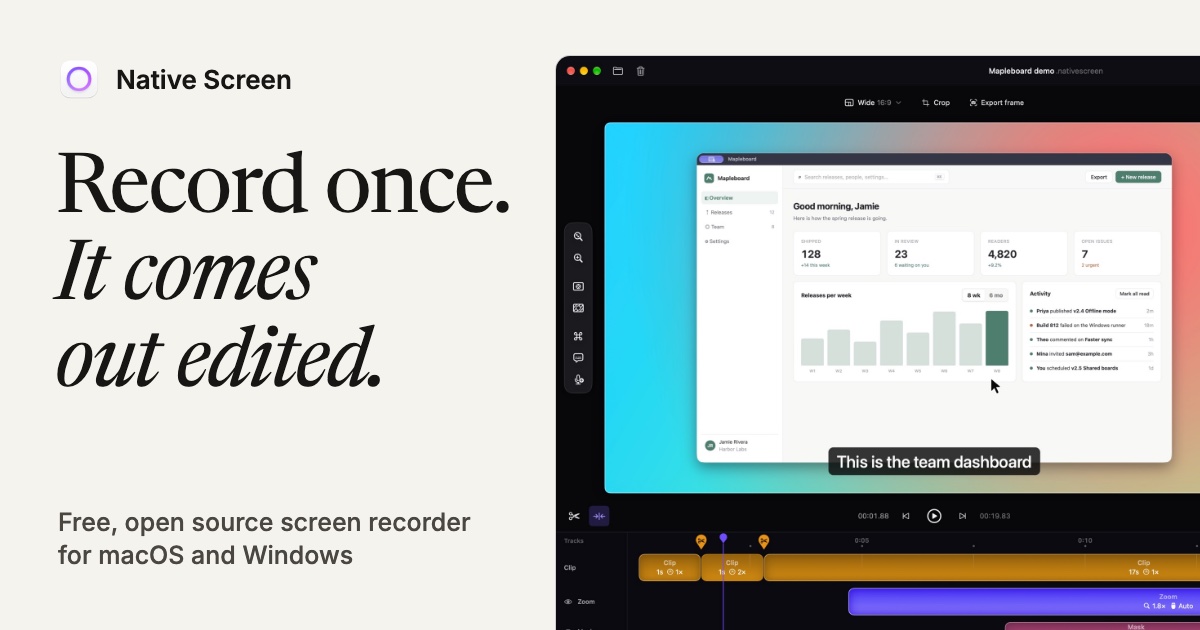
Native Screen is a free, open-source screen recorder and demo video editor for macOS and Windows. It is built for people who need to turn a plain screen recording into a polished product demo, walkthrough or tutorial, and it is designed so that most of the editing happens on its own. The product's promise is simple: record once, and it comes out edited. Clicks and typing become zooms automatically, shaky cursor paths are smoothed, and a real multi-track timeline is there whenever you want manual control. Everything — recording, captions, sensitive data detection and export — runs on your computer. There is no account, no upload and no watermark, and the project is MIT licensed with every line on GitHub. Native Screen positions itself as an open-source alternative to Screen Studio, native on both macOS and Windows. Most screen recorders give you a raw video file and a single row of controls, then leave the work of making the recording watchable to the person who recorded it. Zooms have to be keyframed by hand, cursor movement arrives exactly as the mouse moved, captions are typed out separately, and anything sensitive in the frame has to be covered frame by frame. As a result, a five-minute product demo can take an hour of editing, which is why many recordings never get published at all. Native Screen is built around the opposite idea: the recording should arrive already edited, and the editor should exist for the parts that genuinely need a human decision. The centre of the editor is a real multi-track timeline. Where many recorders give you one row for zooms and call it editing, Native Screen gives each kind of item its own track — zooms, blur masks, annotations, shortcuts and captions — and lets you add more. Two blurs can overlap, caption lines can be stacked for two speakers, and keyboard shortcuts can sit on their own lane. Items can be dragged between tracks, trimmed, split and duplicated, and everything snaps to edges, cuts and the playhead so timing stays clean. A track can be hidden while you work or deleted along with everything on it, and every change counts as one undo step. Zooms follow you. Clicks and typing become zooms on their own, so the audience is already looking at the right part of the screen without anyone placing keyframes. Those zooms can be moved, their depth changed, or switched to a loupe that magnifies a single spot. The cursor glides rather than jitters: shaky paths are smoothed, and the pointer can be resized or restyled after the recording is finished. Clicks get a quiet ripple so viewers register them. Fast moves also pick up a short motion blur, the way a camera would see them, so nothing jumps between positions. Keyboard shortcuts you press appear as keycaps on their own track, so viewers can see exactly how you got somewhere — useful for developer tools, IDEs or anything driven by hotkeys. You can also draw while you talk: press a key during a recording and draw on the screen with a pen, a highlighter, arrows or boxes. Anyone watching live sees the strokes as you present, and every stroke lands in the editor as an annotation you can still change afterwards. Text, arrows, shapes and images can be added on their own tracks; they draw in and fade out right on time, and the top track sits in front. Backgrounds and framing are handled without leaving the app. You can blur the room behind you or swap it for a photo, then add a sticker that stays on your face as you move; it all runs on your computer and can be changed at any time. The canvas can switch between wide, square and vertical formats whenever you like, and zooms re-aim and captions move so they stay readable. Reel mode lays the TikTok, Reels or Shorts interface over the preview, so you can see whether anything important will end up under a button before you publish. Captions are made on your computer, in your language. The transcript then becomes an editor in its own right: delete a sentence and the matching video is cut, or clear every filler word and long pause in a single pass. The transcript view marks filler words and pauses and offers buttons to remove them. Captions support styles for line or word animation, per-caption colours, and export as .srt files. Native Screen also speaks the Model Context Protocol, which lets AI agents such as Claude, Codex and Cursor operate the editor. Through its MCP server an agent can record, cut, zoom, caption, restyle and export inside the editor you are looking at, and every change it makes can be undone. The connection is a local socket that only your account can open. Setup is described in three steps: turn on Settings › AI Agents, copy the command for your agent from that page, and describe the video you want. The app is not a web page in a window. It is written with each system's own tools — SwiftUI, AppKit and Metal on the Mac, WinUI 3 and Direct3D 11 on Windows — so it uses the windows, menus, shortcuts, text fields and accessibility you already know, and it stays out of the way of your fans and your battery. The GPU draws every frame and the hardware encoder writes it; there is no FFmpeg and no browser engine. Recording, captions, sensitive data detection and export all run locally, with no account, no upload and no telemetry. Recordings are written in small pieces as you go, so a crash or a dead battery does not lose the take. Projects are folders with documented JSON, and the same project opens on Mac and Windows, so work is not locked into a proprietary file format. The interface ships in fifteen languages — English, Vietnamese, Simplified and Traditional Chinese, Japanese, Korean, German, French, Spanish, Italian, Brazilian Portuguese, Russian, Czech, Turkish and Arabic — and supports light and dark themes that follow the system or can be picked manually, with the editor, the recording bar and the page all switching together. The payoff is that a plain screen recording becomes a polished demo without a separate editing session. Zooms, cursor smoothing, motion blur and captions are already in place when the recording stops, so the time between finishing a take and sharing it shrinks to minutes. Sensitive material such as an email address, a phone number or a new key can be covered with two overlapping mask tracks — a blur for one, a pixelate for the other — instead of being avoided altogether. And because nothing is uploaded and nothing is watermarked, the finished video is yours to publish wherever you like. Concretely, the product fits product demos and feature walkthroughs exported straight to a web app; tutorials and documentation videos where viewers need to see which shortcut was pressed; short vertical clips for TikTok, Reels or Shorts using Reel mode; live presentations where you draw on screen while talking and keep every stroke as an editable annotation; and privacy-sensitive recordings where emails, phone numbers or keys must be masked on separate tracks. Because of the MCP server, an agent can also drive a rough cut, add captions and export, with each step undoable in the open editor. Native Screen runs on macOS 14 or later on Apple silicon and Intel, and on Windows 10 or 11 x64. The Mac build is signed and notarized by Apple and receives updates inside the app. On Windows you can install from the Microsoft Store, which is signed and kept up to date by the Store, or use the installer from GitHub — the same app, though the GitHub installer is not yet signed, so SmartScreen shows a warning the first time and you can compare the file with the SHA-256 on the release page. The product is free for good: no trial, no plan, no watermark. Native Screen's value proposition is straightforward: record once and let the editing largely take care of itself. Automatic zooms, a gliding cursor, motion blur, shortcut keycaps, on-device captions and a genuine multi-track timeline are combined with a native, local-only architecture that keeps recordings private and costs nothing to use.
Free online video downloader for TikTok, Instagram, YouTube, X, Facebook and 1000+ sites. Paste a link to save HD MP4 videos, MP3 audio, images, thumbnails and subtitles. No login, no app and no ads. Works on iPhone, iPad, Android and PC.
Cackles is a social app built around live voice rooms for friends and communities, available free on iPhone, iPad, and Android. The product lets people drop into a room with friends, share a moment, catch up in chat, or stay up talking. Anyone can drop in to listen, raise a hand to join the stage, or host a room of their own. Cackles combines drop-in audio rooms with Bubbles, which are public or private group homes with member invites and rooms for different conversations, along with direct and group messaging, Stories, and shared activities like listening parties and synced video watching on iPhone and iPad. One Cackles account works on Android and iPhone, so friends on different phones share the same rooms. The app is for adults 18 and older. Cackles is positioned as a simpler alternative to existing social audio and chat products. A user comment quoted on the site sums up the framing: "clubhouse is dead, spaces is a mess, discord is way too much. this is what audio apps should've been from the start." The product addresses the friction around getting a group together, such as scheduling, links, and complicated setup, by trying to make the first hangout easy. Cackles offers a planning path where a host picks a plan that works for everyone's devices, gets a setup checklist, and receives an invitation to make their own, with no signup required. The core idea is that a hangout should start with a tap rather than a calendar negotiation, and that rooms do not need to be scheduled in advance. Live Rooms are drop-in audio rooms where no scheduling is needed, just tap and talk. The hallway view shows who is around, so a user can see who is talking right now, tap to listen, and raise a hand to jump on stage. Hosts can run a room of their own and pull friends in with one tap through Invite to Room, which the site describes as pulling friends into a room with no links and no hassle. Because rooms are drop-in rather than scheduled events, a conversation can start spontaneously and last as long as people want to stay. The site frames this as effortless room hopping with an authentic, low-pressure vibe. Bubbles give a crew a home, with public or private bubbles, member invites, and rooms for different conversations. That structure lets a group keep multiple threads of conversation alive, such as one room for catching up and another for music, without scattering across separate apps. Messaging is described as real messaging: one-to-one or group threads with read receipts, so plans can be made in a group chat or a direct conversation can pick up where it left off after a room ends. Stories add a lighter layer, letting people share a moment from their day and catch up with friends from the hallway. On iPhone and iPad, Cackles adds shared activities. Listening Parties let a host DJ from Apple Music or Spotify, build a shared queue, and balance music and conversation, so a group can bring a track to the room and make a night of it. Watch Together lets friends watch videos in sync while staying in the room for the commentary; one Infinity member unlocks it for the room, and each viewer needs access to the video. Portals are 10-second live video broadcasts meant to pull friends into the moment. Games such as F*ck Marry Kill and Would You Rather, on iPhone and iPad, give people something to do while hanging out. Time spent together is tracked in Agora audio and video participant-minutes, which the site lists at 1,895,748 minutes through November 9, 2026, alongside 556 registered users. Inside a room, hosts and members have tools for keeping things lively. Room Photos & Spotlight let people share photos, before-and-after pairs, and reactions, and hosts can put a photo in Spotlight. A Soundboard & Reactions feature sends an emoji or plays a sound when the conversation calls for it, and favorites can be saved for next time. Cackles also makes room for different screen sizes: it runs on iPhone, iPhone Duo, and iPad with layouts that make room for the conversation. On iPhone Duo, Watch Together places the audience beside the video; on iPad, the video sits alongside the chat. Overall, the app's approach is tap-first and unscheduled. Someone opens the hallway, sees who is around, and drops into a conversation; if they want to speak, they raise a hand and join the stage. Group identity lives in Bubbles, persistent chat covers the in-between moments, and optional activities fill the room. Accounts may require community approval, and the app is for adults 18 and older. Because one account works on both Android and iPhone, a crew split across phones still lands in the same rooms. The stated benefits center on connection and ease. The site says people use Cackles to hang out, debate random stuff, and actually stay connected, with new rooms dropping every day. Users quoted on the site say hopping into rooms feels effortless, that hosting 20 or more rooms has been a blast because the controls are intuitive and people love jumping on stage, and that the experience feels like what audio apps should have been from the start. Having a hallway, persistent chats, and shared activities means the conversation does not stop when a room ends, which supports the goal of staying in touch between hangouts rather than only during scheduled calls. Concrete scenarios described on the site include catching up over music in a Listening Party with a shared queue; sharing a photo, a before-and-after pair, or a reaction in a room; settling in for a watch party with synced video and running commentary; playing Would You Rather or F*ck Marry Kill while hanging out; and dropping into the hallway to see who is around and joining a conversation. Groups can use Bubbles to organize separate conversations, use group chats to make plans before or after a room, and use Stories to share a moment from the day. Portals support quick 10-second video broadcasts to pull friends into the moment. Cackles is for friends and communities who want to hang out by voice, and for adults 18 and over; accounts may require community approval. It is free forever with no credit card needed, and it is available on the App Store and Google Play, including iPad. The site offers a planning path for people organizing a first hangout, letting them choose a plan that fits everyone's devices, get a setup checklist, and receive an invitation to make their own without signing up. Android and iPhone users share the same rooms through one account, and Watch Together relies on an Infinity member to unlock it for the room. Cackles' primary value proposition is straightforward: your crew is one tap away. By combining drop-in live voice rooms, Bubbles for group identity, real messaging, and shared activities on iPhone and iPad, it aims to make hanging out feel immediate rather than scheduled and to keep friends connected between rooms.
FreeVoice is a free online voice and audio chat room service that runs entirely in a web browser. It is built for small groups who want to talk together without creating an account or installing anything: you open a room, share the link, and the people you shared it with join and start talking. Each room holds up to 10 people at the same time — enough for a squad, a study group or a family call — and starting one takes a single tap. Beyond the voice conversation itself, a room carries what a group call usually needs: games that are played while people keep talking, screen sharing, a text room chat, personal avatars and per-person volume control. FreeVoice is free, and rooms, voice, screen sharing, room chat and the games cost nothing and have no time limit. The friction FreeVoice is built around is the setup that normally comes before a group call. The product's own framing is "no account, nothing to download", and its answers repeat the same point: FreeVoice runs in any modern browser on a computer or phone, so there is nothing to download or install, and friends who receive a link open it in their browser and are in the room without an account. The Android app is described as optional rather than required. That matters most in the situations where a call is spontaneous — a handful of people who want to talk now, not after everyone has installed the same application and signed up. FreeVoice is also described as free and built by one person, and the site asks visitors for an upvote or a comment on Product Hunt rather than for payment. The core loop is deliberately short. From the home page you can start a room or join one with a link, and the page presents two paths: talking with friends, or meeting new people through the option to talk to strangers. Starting is one tap. Once a room exists, the link is the invitation — anyone who has it can join until the room reaches its limit of 10 people at the same time. For people who sign in, there is also a Friends page: you can add friends, see when they are online, and jump into their room in one tap instead of waiting for a fresh link. Every FreeVoice room includes free games under an Activities section: Seal Deal, a quick card game; Cheat, a bluffing card game; Sketch Seal, a draw-and-guess game for 2 to 10 players; and Tencord, a live multiplayer arena game with proximity voice for 1 to 10 players. The point is that the games sit inside the same room as the conversation — you keep talking while you play, rather than leaving the call to open something else. The games are listed as part of what costs nothing, with no time limit, alongside rooms, voice, screen sharing and room chat. Product Hunt metadata also describes playing games together while you talk, or watching YouTube in sync. Around the voice channel FreeVoice adds a set of smaller room controls. Screen sharing lets anyone show a game, a document or a video to the whole room. Room chat is a text channel for dropping a link or a joke without interrupting whoever is speaking. Each person picks a character and a colour as their avatar, which is how friends spot them in the room. And volume is adjustable per person, so if one participant is too loud you turn just them down rather than the whole call. Underneath, FreeVoice is a browser application: it runs in any modern browser on a computer or phone, with an optional Android app. Voice goes peer-to-peer and encrypted, and nothing is recorded — the site states plainly that FreeVoice never records or stores voice, and that a room disappears about ten minutes after the last person leaves. Access is link-based by default: a room is for you and the people you share the link with. If you want strangers to be able to join, you switch on "Strangers can join" while you are alone in the room, then pick a language and how many strangers can come in; your friends still join with the link, and while the option is on everyone who joins confirms they are 18+, friends included. The interface speaks 39 languages, including right-to-left languages. The result is a group call that starts in the time it takes to paste a link. Nobody has to create an account, nobody has to install anything, and the room is ready for up to 10 people. Because the games, screen sharing and chat live in the same place as the voice, a group does not need to coordinate several tools to hang out, play something together or work through a document. And because voice is peer-to-peer and encrypted, nothing is recorded, and the room disappears about ten minutes after the last person leaves, the conversation stays with the people who were in it. The site names the shapes these rooms fit: a squad, a study group or a family call, each within the 10-person limit. A squad can play Seal Deal, Cheat, Sketch Seal or Tencord while talking. A study group can share a screen to look at a document together and use room chat for links and notes. A family can meet across devices without anyone installing software. A host who wants company can open the room to strangers, choosing a language and a cap on how many arrive, while friends still join by link. People who sign in can also drop into a friend's room in one tap when they see them online. FreeVoice runs on the web — any modern browser on a computer or phone — with an optional Android app; there is nothing to download or install to use it. It is free, including rooms, voice, screen sharing, room chat and the games, with no time limit. No paid plan or pricing tier is described in the content; FreeVoice is presented as free and built by one person, with Product Hunt support requested instead of payment. FreeVoice's value proposition is simple: instant voice rooms for you and your people. A tap to start, a link to invite, up to 10 people in the browser with no account and no download, games to play while you talk, screen sharing, room chat, 39 languages, and peer-to-peer encrypted voice that is never recorded.