Category Focus/categories/learning
Learning AI Tools
Discover and compare the best learning AI tools and software. Browse 58+ curated tools with reviews and rankings.
Projects tracked
58
Sort mode
RECENT
Page
1
Discover and compare the best learning AI tools and software. Browse 58+ curated tools with reviews and rankings.
Projects tracked
58
Sort mode
RECENT
Page
1
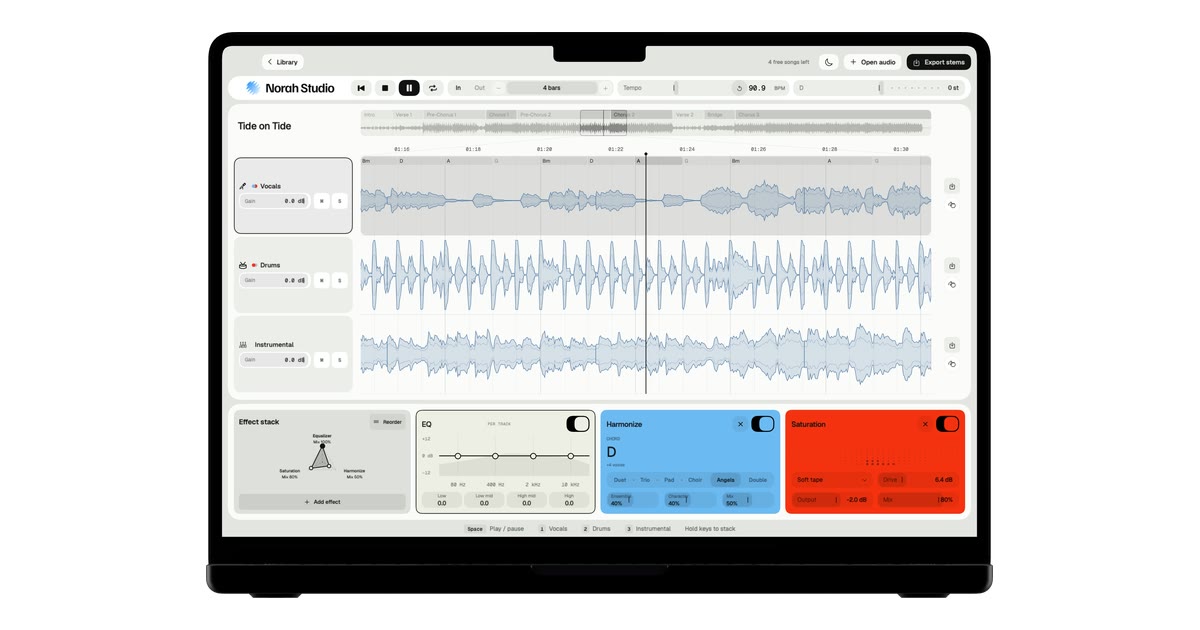
Norah Studio is a creative studio for exploring, transforming and reimagining your music on Mac, iPad and iPhone. It separates any song into vocals, drums and instrumental on the device in your hands, then lets you loop it by bars, change its tempo and key, add effects, take the stems with you, follow chords, build harmonies, turn melodies into instruments and export audio or MIDI. It is aimed at anyone who wants to take a song apart — to learn a part, build a backing track or pull a drum loop — and it works as both a practice room and a remix desk. Recorded music usually arrives as one finished mix. The vocal, the drums and the band are already blended together, which is exactly what you want for listening and exactly what gets in the way when you want to learn a part, play along in a different key, sing over the record's own band or sample a drum groove. Norah Studio's answer is to split the song into its parts first: vocals, drums and instrumental, each in its own lane, ready to be soloed, looped, reshaped and exported. Because streaming services lock their files to their own apps, the app works with audio files you already have that the system decodes — MP3, M4A and AAC, WAV, AIFF, FLAC, CAF and more, up to ten minutes — rather than with tracks from streaming catalogues. The workflow starts with Open, split, play. You open a song and three tracks come out. It starts playing from the first second while the rest is still being separated, so there is no queue and nothing to wait for. The app reports 1.1 s to first sound on a Mac and 1.5 s to first sound on an iPhone 16, measured in October 2026 with a song of 2 min 18 s, and 0 bytes uploaded, ever. There is no account to create and no upload step: the models that take the song apart travel inside the app and run on your own chip. The chosen lane can be soloed on its own, so you can hear just the vocal, just the drums or just the instrumental. Once the song is apart, the practice tools take over. Loop by bars gives you a bar grid and named sections, so you can loop exactly one section or any number of bars instead of guessing at a selection by ear. Tempo and key let you slow a song down without the pitch dropping, or move it to your range without changing its speed. Chords are read above the vocal, one per beat group, together with the key and the tempo, so you can see the harmonic shape of the passage you are working on. The app labels tempo, key and chord results as estimates — good enough to loop by bars and play along. Each lane has its own processing chain. Norah Studio offers 24 effects and 4 visualizers, an EQ on every lane, and the effects run in the order you choose. MIDI Learn maps any control to a knob on your controller, so the parameters you reach for most can sit under your hands rather than on the screen. Melody Synth takes the vocal melody and plays it with 19 instruments, from synth leads to a grand piano, turning a sung line into an instrumental part. Harmonize adds a choir that follows the chords, with six voicings — Duet, Trio, Pad, Choir, Angels and Double. Export closes the loop. You can take the three stems with their effects, and the melody as MIDI, so the work you did inside the app can move into whatever comes next. The Library keeps recent songs and reopens them with everything as you left it, so a session can be picked up later rather than rebuilt from scratch. Reopening a song you already took apart is always free. Norah Studio is the same engine, native on each device. On a Mac it is the whole desk, with a keyboard and a mouse; on an iPad it is the whole desk under your fingers; on an iPhone it is the desk folded upright for one thumb. Your songs never travel between them: each device separates on its own, offline. There is no server and no analytics, and the App Store privacy label reads Data Not Collected. Because the models are inside the app, the first song works in airplane mode, and nothing leaves your device. The app is also candid about its limits: no separation is perfect, and on a dense mix a little of the voice can stay in the instrumental; tempo, key and chords are estimates and are labelled as such. The practical benefit is that a finished recording becomes material you can work with. A song you own can become a slower version in the same key for practice, a version without the singer for karaoke, a drum loop lifted from a track you like, a backing track built from the record's own band, or a vocal melody handed to a piano. Because everything happens on the device, the work is private by default and available without a connection — on a plane, in a practice room, wherever the song and the device are. Because every feature is in the free version, the whole studio can be tried on five songs before deciding about Pro. The app suggests concrete places to start. Remove vocals takes the singer out of any song you own, leaving the record's own band. Slow down a song lets you practise at your speed in the same key, with looping to repeat the passage you are learning. Karaoke gives you the record's own band in your key. Beyond those, the separated lanes make it possible to learn a part against the lane that carries it, pull a drum loop for reuse, or turn a vocal melody into an instrument line and export it as MIDI. Norah Studio runs on a Mac with Apple silicon on macOS 15 or later, an iPad on iPadOS 26 or later, or an iPhone on iOS 26 or later. The free version includes every feature and five songs; Pro adds unlimited songs and nothing else, with Pro Monthly at €7.99 per month (cancel any time) and Pro Lifetime at €69.99 once (never renews). Prices are shown in your country's currency on the App Store, and Pro bought on one device also covers your other devices signed in with the same Apple Account. In short, Norah Studio turns any song you own into parts you can play with — separated, looped, retuned, processed and exported entirely on your own device, with no account, no upload and no connection required.
TONKO is a pocket money app for the whole family. A parent sets the allowance, the jobs and the family rules; a child earns money by doing jobs, then decides how to split every euro between three jars — Spend, Save and Grow — and saves toward goals with a picture and a finish line. It is built for families with children aged 6 to 14, with content that adjusts by age band (6–8, 9–11, 12–14), and its purpose is to teach money skills through a child's own pocket money, week after week, rather than through lectures or worksheets. One app serves the whole family: everyone downloads the same TONKO, and what it shows depends on whose phone it is and whose turn it is. The idea behind the product is that money isn't just a number on a screen. It's small decisions, every day, around the kitchen table — and TONKO turns those decisions into habits that last a lifetime. Its own framing is that money is a skill learned by doing, not by lecture: the lessons come from a child's own euros, from waiting for a goal to fill up, and from choosing where each euro goes every single week. TONKO also removes the parts parents worry about. There are no ads, nothing is sold, and there is no bank card and no real investing — TONKO is a family ledger for pocket money you already give, in real currency, but it does not hold or move money. You pay out the way you always do; TONKO makes it visible and meaningful. Earning is the first lesson. Work has a value, agreed in advance, so a job done well turns into pocket money — but only once a parent says well done. Jobs pay out only after a parent approves them, nothing moves on its own, and approval takes one tap from the parent's phone. Parents can invite a second parent with a link, and both can set jobs, approve them and see progress. The app's example moments show how this plays out: a child tidies his room and the job waits for Mum, it is marked done, Mum says well done, and the money lands in his pocket. On the parent side, a dashboard shows the next allowance and the jobs waiting for approval — for example, “Tidied his room, Leo, €2.00” and “Watered the plants, Mia, €1.50.” Every euro gets a job. New pocket money waits until the child decides where it goes, choosing between three jars: Spend, for now — small treats chosen on purpose; Save, for later — a goal with a picture and a finish line; and Grow, for much later — a family bonus that rewards waiting. Making that choice is the lesson, and it happens every week. Goals make saving concrete: a “My first bike” goal showing €67.50 of €120 (56%) fills up week by week, and a goal streak shows progress such as four weeks of saving. Wishes complete the picture: a wish becomes a goal to save for rather than something to drop in a basket, because the gap between wanting and having is where judgement grows. The Money Time Machine is a playful tool kids find inside TONKO, and the same tool appears on the website as the Money Lab. Move the sliders — for example €5.00 every week for 1 year — and see what a little every week could become: the illustration shows €273 from €260 put in plus a €13 family bonus, and lists example targets like headphones at €45, a bike at €120 and a school trip at €300, with a bike reached in about six months. The bonus is a family reward the parent sets (10% a year in the example), not a market return — no markets, no investing, no trading. The one-euro story on the site walks the same path: a euro is earned, then given a job, then added to week after week, and a euro a week for five years is €260 put in, about €337 with a 10% yearly family bonus. Alongside these tools, children learn money skills in short lessons inside the app. Getting started is designed to be quick — “ready before dinner.” First you set up your family: download TONKO, add your children with a nickname and an avatar, and choose their pocket money and jobs. Second, you connect their phone with a one-time code, or simply hand them your own phone; it is the same app, with their own space. Third, they earn, share out and grow: they mark jobs done, you say well done, and they decide where every euro goes, with goals to aim for. The first time a child opens TONKO, Tonko the mascot shows them around — a tickle, five practice coins and a dream to save for, with no lectures — while parents get their own short tour explaining why TONKO works the way it does, plus a “First steps” card that gets the family ready in five minutes. The outcomes are framed as five things a child walks away with: that money is earned, because work has a value agreed in advance and a job done well becomes pocket money once a parent says well done; that every euro needs a job, because choosing between spending now, saving for a goal and growing for later happens every week; that saving has a point, because a goal with a picture and a finish line is easier to reach than a vague “someday”; that waiting pays, because a little every week becomes something real over months and years and kids see it before they believe it; and that wanting isn't buying, because a wish becomes a goal to save for rather than an impulse. Together these turn everyday money moments into visible progress a child can watch accumulate. Typical use cases follow the family routine. A parent sets a weekly allowance, shown in the app as allowance arriving on Saturday, and the child splits it across the three jars. Jobs around the house become earning opportunities — tidying a room for €2.00, watering the plants for €1.50 — each waiting for a one-tap parental approval before it pays out. A child saving for a bike watches the goal reach 56% and eventually “Goal reached!” after months of small transfers. A family using a shared phone can hand the device to a child, whose space stays open until the parent takes it back with a fingerprint, face or the family PIN. A second parent joins by link and approves jobs too. And because TONKO tracks pocket money the family already gives, parents keep paying out exactly as they always have. Safety is built around parents. Jobs pay out only after a parent says well done, and nothing moves on its own. On a child's phone, grown-up settings open only with an OK from a parent's phone or the family PIN, then close again. Wrong PIN guesses slow things down, and every sign-in is kept encrypted on the phone. Kids see no ads and nothing is sold — the website itself carries no analytics. Children stay private: they use a nickname and an avatar, with no email, password or photo needed, and a child only sees their jars, jobs, goals, the Money Lab and their own progress — never family settings or other children's details. TONKO is free on Android with one child, with an iPhone version planned for later, and it speaks English and Croatian, following the phone's language with a setting to change it at any time. In short, TONKO's value proposition is simple: one app for the whole family where kids learn how money works by earning it, sharing it out and saving for something they really want, with a parent approving every step. Little habits, a lifetime ahead.
Download Threads videos, photos, and carousels in seconds. Free, no login. Works on iPhone, Android, and PC. Threads video Downloader.
Tomo for ChatGPT is a plugin that turns any topic into a playable course inside a ChatGPT conversation. Ask ChatGPT for a Tomo course on anything you are curious about, or convert the chat you are already having into one, and a game card drops into the conversation with quick questions, instant feedback, hearts and stars. It is aimed at curious learners who want to practice what they are reading or discussing rather than just read it. It works on the web, in the desktop app and in the ChatGPT app on iPhone and Android, courses are ready to play in about a minute, and you can start without a sign-up. ChatGPT can already ask you a few questions when you prompt it, but a handful of questions is not a course: there are no levels, no scoring and nothing that brings you back the next day. Tomo for ChatGPT addresses that gap by building a real course with levels, grading every answer, keeping score and bringing learners back with a streak, in the chat and in the app. The premise behind the product is that talking a topic through is not the same as remembering it, so Tomo offers a way to practice what you just talked through so it actually sticks. Each level takes only a few minutes and ends with a takeaway, so the big idea stays with you after the questions are over. Course creation is the entry point. Once Tomo is added to ChatGPT, you simply say what you are curious about. Prompts such as "Make me a Tomo course on black holes" work for any topic you can name, and the course is ready to play in about a minute. A second route is to say "turn this chat into a Tomo course," which converts the conversation you are already in into practice material, so a discussion you just had becomes something you can drill instead of something you only read. A third route is discovery: you can ask Tomo to find a course about a subject, such as latte art, and play courses other curious people have already made. Together these three paths cover learning something new, reinforcing something you just covered, and picking up a course someone else built. Inside the conversation, each level is a few minutes of questions presented on a card. Tap an answer and you see right away whether you nailed it, along with a one-line explanation of why. That immediate grading loop means you are not waiting until the end of a quiz to find out what you misunderstood; the correction arrives with the question. Finishing a level also gives you its big idea as a takeaway, so each short session leaves a single memorable point rather than a scattered set of facts. The card format keeps everything inside the chat, so the learner never has to switch to another window or tab to play. The game loop mirrors the Tomo app: hearts, combos and stars. You keep your hearts, build a combo as you answer, and finish a level with up to three stars, plus XP. You also choose who teaches you, picking from personas such as your bestie, a professor, a storyteller, a pirate, or an explanation pitched like you are five. A deliberate design choice is that there are no spoilers: ChatGPT never sees the answers, because Tomo sends each level's answers only to the game card, never to ChatGPT, so the model cannot give a level away. That separation is what keeps the game honest while it lives inside a conversational assistant. Getting started takes three steps. First, open Tomo's page in ChatGPT and tap Install. Second, connect or skip: ChatGPT opens Tomo's sign-in, and you can sign in to keep your streak or tap Continue without an account to play as a guest. Third, ask for a course by naming any topic or saying "turn this chat into a Tomo course." Playing courses is free, and a new learner gets enough sparks to build a course; building more courses uses sparks from your Tomo account. Nothing is sold inside ChatGPT. A free Tomo account keeps your streak, unlocks every level of a course and carries your progress into the Tomo app on iPhone and Android, so you can play a level on the bus and pick it back up in ChatGPT. The benefits follow from that loop. Instead of passively reading an answer, you test yourself on it immediately and get a correction in the same breath, which is why the product frames itself as practice so the material actually sticks. Levels are short enough to fit into a few minutes, so learning a topic does not require blocking out a study session. Stars, combos, hearts, XP and streaks add the reasons to come back that a plain Q&A exchange lacks. And because progress travels between ChatGPT and the Tomo mobile app, a single habit spans both surfaces rather than resetting each time you switch devices. Concrete use cases appear throughout the product's own examples. You can ask for a Tomo course on the history of coffee and work through questions such as which specific region the coffee plant first thrived in, with Ethiopia marked correct and a short explanation. You can ask for a course on black holes when a topic catches your interest. You can turn a chat you just had into a course so the conversation turns into retained knowledge. You can ask Tomo to find a course about latte art and play something another learner already built. And because it runs in the ChatGPT app on iPhone and Android as well as on the web and desktop, you can play a level on the bus and continue later. Tomo for ChatGPT is for anyone already using ChatGPT who wants to turn curiosity into practice: casual learners, students reinforcing a discussion, and people who prefer a game loop to a wall of text. It requires no account to try, since guest play is supported, and a free Tomo account adds streak keeping, full level access and continuity with the Tomo app. Availability covers ChatGPT on the web, the desktop app and the ChatGPT app on iPhone and Android. Tomo itself is rated 4.7 on the App Store and Google Play, and the plugin is free to start, with additional course building using sparks from a Tomo account. In short, Tomo for ChatGPT takes the conversational reach of ChatGPT and wraps a real game around it: any topic becomes a leveled course with instant grading, hearts, combos, stars, streaks and a takeaway, all without leaving the chat. It is a small, focused addition to a conversation you are already having, and that is exactly its value.
Memory Chess is a free chess memory game and chess memory trainer that runs in a browser on desktop and mobile. It is designed for anyone who wants to practise holding a chess position in their head, from beginners who do not know openings to chess masters. In each round, you study a position for a few seconds, the board goes blank, and you rebuild the position from memory. The round ends with an accuracy reading from 0 to 100% and a map showing every square you got right or wrong. The site says it has hosted 48,697 games played, offers a 1–60s study window, uses 2–32 pieces per round, and is available in 24 languages. The product’s premise is that most chess practice trains decisions, while very little of it checks whether you can actually hold the board in your head. The site says this skill sits under calculation, blindfold play and spotting tactics, and is usually left to chance. It describes a common failure: players lose track of pieces mid-calculation, so that three moves deep a bishop on the long diagonal quietly disappears from the picture in their head. The board in front of them was right; the one in their mind was not. Memory Chess frames board recall as a trainable, testable skill: hold a position briefly, rebuild it, check the result, and repeat with more pieces and less time. The site explicitly says it makes no claims about your brain; it gives you a reading you can track. The core round is deliberately simple. You choose how many pieces you want and how long you want to study the board; the site supports 2–32 pieces and a 1–60s study window. When the position disappears, the board clears and you place the pieces back on the squares you remember. You submit your answer to see your accuracy and time. The site notes that placing more pieces than the position had lowers your accuracy, so you should only place what you remember. Each round is a short memory test with an accuracy reading from 0 to 100% and a map of every square you got right or wrong. Rounds take under a minute, so you can run many. A calibration reading is offered as a starting point. The Medium round uses 6 pieces, two kings among them, and 10 seconds of exposure; then the board clears and you rebuild it. You get a readout card with your accuracy and recall by piece type, and the readout card shows correct squares, rebuild time, wrong pieces, exposure, and recall by piece type after your first run. A suggested difficulty appears after the reading. The calibration works with mouse, touch and keyboard. The site describes the flow: press start, study the position until the meter empties, pick a piece from the palette, tap a square, tap a placed piece to remove it, and submit. Difficulty is organised into four presets and one custom rig. Easy uses 2 pieces and 10 seconds and is described as just kings, perfect for starting out. Medium uses 6 pieces and 10 seconds, described as a few pieces with comfortable time to memorize. Hard uses 12 pieces and 8 seconds, described as more pieces with less time to memorize. Grandmaster uses 20 pieces and 5 seconds and is described as being for chess masters with photographic memory. The CustomRig lets you set your own variables to isolate one weakness, with 2–32 pieces and 1–60s exposure. The site advises moving up a tier when your readings hold steady, not after one lucky round. The site also walks through a round under the microscope using the final position of Kasparov’s Immortal, after 44.Qa7. Phase 1 is Study: eleven pieces, ten seconds, and the advice to take in the whole board, not square by square. Phase 2 is Anchors: start with the kings, fix two points first, and place everything else relative to them. Phase 3 is Chunk: group pieces by what they do to each other, such as the kings fighting over d2, two pawn staircases, and the queen and rook each aiming at an unguarded h-pawn. Phase 4 is Encode: turn each group into a sentence, naming it by its job: Stand-off, Stairs, and Long shots. Phase 5 is Blank: the board clears with no pieces and no hints, and you rebuild from the sentences, not from a picture. Phase 6 is Rebuild: rebuild group by group, placing each group with its sentence before starting the next. Phase 7 is Score: re-check each relation on the rebuilt board, then score; the example shows 10 of 11 squares is 91%. The site says the overlays show one way to memorise it, not a recording of anyone’s attention. It also references de Groot’s experiments, Chase and Simon (1973), and Gobet and Simon (1996) in explaining anchors and chunking. The dashboard, called the lab record, is built around the idea that one reading is a snapshot while ten readings are a measurement. Every round you play is kept on the device, and the panels fill in from your own rounds. Before your first round, panels show sample values, not real players; after it, a panel that cannot read your record yet says what it still needs. The figures include memory span, pieces held, accuracy over time, recall pace, today’s board, days in a row, a forgetting curve, a lab notebook, a miss map, recall by piece type, insights, programs, a goal, personal bests, and a leaderboard. Some figures unlock only after enough rounds or sightings, such as memory span at two rounds at 80%+ with 3+ pieces, pieces held at five rounds over two days, and recall by piece type at twenty sightings of a non-king piece. The daily board is one board a day, the same for everyone. A new position opens every day at midnight UTC; everyone gets the same board and study time, and you get one try. The streak counts any finished round, game or practice, for its day, and one missed day in any seven is forgiven. For forgetting, boards you score under 80% on come back for review 1, 3, 7 and 14 days after you first see them, and the curve plots how much you recall at each gap. Programs include Baseline week, a 7-day plan with one Medium round a day, logging the reading, and comparing day 7 against day 1; Edge-file drill, a 14-day plan with a custom rig of 8 pieces and 15 seconds, reviewing the miss map every 3 days and pairing with the board vision guide; and Step-down ladder, an open-ended plan that has you hold 90% for three rounds in a row, then cut study time by 2 seconds, and when study time bottoms out, add pieces. The leaderboard compares readings worldwide or in your country. Each difficulty is ranked by correct pieces, then fewer wrong pieces, then faster memorize time, then faster solve time, and every row shows the player’s country. You submit a score from the result screen, then check where it stands. A goal lets you pick a piece count and an accuracy; the bar fills from your best round at that count or more since you set the goal. Personal bests are kept per setting because 6 pieces and 20 pieces are different tests, and practice readings on the page stay apart from games. Memory Chess is free, with no account and no server. Your lab record is kept on this device; you can download a copy to move it to another browser or to keep it safe, and the site lists import and Back up across devices (coming soon). Adding a name to the leaderboard is optional. The site is available in 24 languages, and Product Hunt notes that version 2.0 includes a redesign in 24 languages, a daily board everyone plays once, a skill rating that moves both ways, a dashboard of memory span and progress, and shareable round replays. Product Hunt also points players to a Telegram group at t.me/TheMemoryChess to swap scores. A reference library, called the Learning Center, pairs short guides with drills so each reading points to something you can practise. The listed guides cover board vision (seeing the whole board at once instead of one corner at a time), visualization (holding a moving position in your head as pieces shift), calculation (looking further ahead without losing track of the board), memory (chunking and pattern techniques that raise your readings), and blindfold chess training (a four-stage plan from board recall to full blindfold games). There is also a browse chess guides entry and a guide on how to stop blundering. The FAQ says beginners can play because you do not need to know chess openings or calculate moves; start with fewer pieces and more study time, then make the game harder when ready. For memorizing, it suggests starting with anchors such as kings, queens, corners, and edge squares, then looking for groups, lines, diagonals, and empty spaces instead of trying to remember every piece on its own. To make the game harder, add more pieces, shorten study time, or hide board coordinates, changing one setting at a time.
Mira Tours is an AI tour guide that turns a walk through any city into a narrated audio tour. Mira tells you the story of what is around you as you walk, and every tour is researched and written for you, wherever you happen to be. It offers walking audio tours anywhere in the world, with narration chosen per tour. The product is aimed at people who want to understand the place they are walking through, whether they are visiting a city for the first time, living somewhere they have never fully explored, or simply dreaming about a destination from home. Most walking tours require planning: choosing a route, finding a guide, joining a group and following a fixed schedule. Mira takes a different approach, built around four ways to start walking and a promise that you can plan it out or plan nothing at all. You can shape a route in conversation, start walking and let Mira find something interesting near you, head towards a destination you were going to anyway, or walk a tour someone else has shared. Rather than one fixed route for everyone, every tour is researched and written for you, so the stories you hear at each stop relate to the walk you are actually on and to what you said you were curious about. The four ways to start walking cover different intentions. The first is making your own tour: you say what you are in the mood for and build the route together in a chat, adding, dropping and reordering stops until the plan feels right. The second is wandering: there is nothing to plan or pick, you tap start, Mira finds something interesting near you and keeps finding stops for as long as you feel like walking. The third is heading somewhere: if you are going somewhere anyway, Mira routes you there and narrates what you pass, and if you give an arrival time she paces the walk to make it. The fourth is walking someone else's tour: others have shared the best of their cities, so you can walk one near you or listen from home to a city you are dreaming about. Building your own audio tour works like planning a day out with a friend who knows every street. You tell Mira what you are curious about and build the tour together. You can say what you are in the mood for, whether that is hidden history, film spots or something the kids will love, and any idea works. Mira then proposes real places near you, in walkable order, and you add, drop and reorder stops until the plan feels right. In the example shown on the site, a walker says "I have an hour and I love hidden history", and Mira responds by offering a route through the oldest corners of Chinatown starting a short walk away: Portsmouth Square, Old Saint Mary's Cathedral, Waverly Place and Ross Alley, about an hour on foot. When the walker asks for coffee near the end, Mira adds Caffe Trieste. Then you just walk, and every stop is narrated as you arrive, researched and written for your tour. As you walk, stories arrive when you do: you can lock your phone, put it in your pocket and keep walking, with narration delivered as you reach each stop. Your interests shape what you hear at every stop, because you can tell Mira what you love and what you can skip, and every stop leans your way; a topics screen lets you turn subjects such as Legends and Ghosts up and Politics down. At a stop you can see what else a place has to offer, hear another story, or just keep walking. You can also ask anything, anytime, about something you just heard or something you just walked past. Ask your guide, get a real answer, and turn it into more audio if you want to keep going. Tours are also designed to be shared. You can share a link and everyone walking with you hears the same stops you do, live as you walk. They install Mira, tap the link and follow the whole tour without spending any of their own minutes, because walking along is free for your friends. Tours are narrated in 23 languages, chosen per tour: Arabic, Bangla, Dutch, English, French, German, Hindi, Indonesian, Italian, Japanese, Korean, Marathi, Polish, Portuguese, Romanian, Russian, Spanish, Tamil, Telugu, Thai, Turkish, Ukrainian and Vietnamese. Overall, Mira's approach is to research and write each tour for the person walking it, whether that route was shaped in a chat, discovered stop by stop while wandering, or planned to finish at a particular place at a particular time. The main benefit is that you do not have to plan, book or study to get the story of a place. You can begin with no plan at all, or shape one in a short conversation, and hear researched narration at each stop instead of reading it. Because Mira keeps finding stops for as long as you feel like walking, a walk does not end when a fixed itinerary does, and you can stop whenever you like. You can put your phone away and simply listen as you arrive, and you can bend the tour towards your own interests at every stop, leaning into legends and ghosts or turning politics down. If you are walking with others, everyone hears the same stories live rather than one person reading aloud from a guide. Concrete uses follow directly from the four modes. A visitor with an hour and a taste for hidden history can ask for that in a chat and immediately receive a walkable route with real stops and a coffee finish. Someone already heading somewhere can have Mira route them there and narrate what they pass, with the walk paced to an arrival time. A local with no plan can tap start and keep walking while Mira finds something interesting nearby, and keep going for as long as they like. Someone dreaming about a distant city can listen from home to a tour others have shared, and a group of friends walking together can follow one shared link so everyone hears the same stops live. Anyone who wants to try it first can walk a real city in street view in the browser as Mira tells them about it, with nothing to install. Availability and pricing are stated plainly: your first 30 minutes are free, and after that you buy listening time when you want it, with no subscription and no monthly fee. Thirty minutes for a quick tour costs $0.99, two hours costs $2.99 and saves 24%, and five hours costs $5.99 as the best value. Time never expires, and it is only spent on narration and research you actually use. Prices are in US dollars, and the app shows your store's local price. Mira runs in the browser at mira.tours/wander as well as in mobile apps, with downloads on the App Store and on Google Play, and Product Hunt lists it under Android, Travel, Artificial Intelligence and Google Cloud Run. In short, Mira Tours is a personal tour guide in audio form: an AI guide that plans a route with you or finds one for you, narrates it stop by stop as you arrive, adapts to your interests, answers your questions, and can be shared so everyone walking with you hears the same stories.
Kooler is a free cocktail recipe app for people who like making drinks at home. You tell it what is in your bar — the bottles and ingredients you already have — and it shows you the drinks you can make right now, drawn from a library of more than 100 curated recipes covering classics, modern cocktails and Brazilian drinks. Every recipe is presented with clear measurements, a step-by-step method and a consistent photo. Kooler runs on the web and on iOS, and it is free to use: no ads and no paywall. The problem Kooler addresses is the gap between a shelf of bottles and a drink in your hand. People who mix drinks at home typically own a set of spirits, liqueurs and mixers, but it is not obvious which combinations of them actually add up to a good cocktail. The product states the premise directly: classic and Brazilian cocktail recipes with measurements and step-by-step method — tell us what's in your bar and see what you can make. Inverting the usual way of browsing recipes, from what do I feel like drinking to what can I make with what I already have, is what turns a recipe collection into something you can use on the spot instead of a list of drinks that require a shopping trip. My Bar is the heart of the app. You add the bottles and ingredients you have, and Kooler then shows you every drink you can make right now. This removes guesswork from the moment you decide to mix something: instead of reading through recipes and discovering halfway down the ingredient list that you are missing a component, you start from what is physically available to you. Because the bar inventory is the starting point, the drinks surfaced are ones you can actually pour without leaving the house, which is exactly the promise in the app's tagline: find cocktails you can make with what's in your bar. Behind My Bar sits a curated recipe library of more than 100 drinks, organised so that there is something for every level of effort and taste. The Classics selection includes well-known standards such as the Old Fashioned, Dry Martini, Negroni, Espresso Martini, Cosmopolitan, Margarita, Manhattan, Mojito, Aperol Spritz and Daiquiri. A dedicated Brazilian section covers drinks such as Caipirinha, Rabo de Galo, Macunaíma, Caju Amigo, Caipiroska, Batida de Coco, Passion Fruit Batida, Quentão, Clericot, Bombeirinho, Leite de Onça and Rabo de Galo Paulista, alongside Brazilian Frozen Limeade and Sakerinha. Further collections include Just in for recently added drinks, To impress for more involved serves such as the Penicillin, Mai Tai, French 75, Sidecar, Boulevardier, Pisco Sour, Clover Club, Alexander, Aviation and Brandy Crusta, Sours such as the Whiskey Sour, Tom Collins, Virgin Mojito, Amaretto Sour, Gimlet, Tommy's Margarita, Fitzgerald and Gin Fizz, and Built in the glass for simple drinks mixed directly in the serving glass, such as Gin and Tonic, Mimosa, Dark 'n' Stormy, Shirley Temple, Fernet and Coke, Passion Fruit Tonic, Rusty Nail, Black Russian, Garibaldi and Campari Soda. An A–Z index lists the full catalogue alphabetically, from Adonis and Algonquin through to White Russian and Zombie, so a specific drink can be found quickly by name. Each recipe is built around clarity. Kooler gives clear measurements for every ingredient and a step-by-step method that walks through how the drink is made, rather than leaving the reader to interpret a loose ingredient list. Recipes are accompanied by consistent photos, so the drink you are aiming for looks the same across the catalogue and you can see what the finished serve should resemble. These three elements — measurements, method and photography — are the reason the app describes itself as a source of classic and Brazilian cocktail recipes with measurements and step-by-step method. The library is also organised as browsable collections rather than one flat list. Collections such as Classics, Brazilian, Just in, To impress, Sours and Built in the glass group drinks by theme and by how they are made, which makes it easier to move from a general intention — something simple, something sour, something to serve to guests — to a specific recipe. The Just in collection highlights recent additions, and a From the community section surfaces drinks submitted by users, including entries such as Honey Deuce, Carajillo and Espresso Tonic with Orange and Spices. On the home page these collections sit alongside a For you feed, and each collection links through to a see all page for the complete list. Beyond recipes, Kooler adds a social layer through check-ins. You can rate a drink you had at a bar and share it, which extends the app beyond your own kitchen and lets you record what you thought of a cocktail you tried out. Signing in — with Apple or Google — creates an account that lets you save your favourite drinks, interact with the community and submit your own best recipes. That account layer is what turns a recipe reference into something personal, where the drinks you like and the drinks you have created accumulate over time. Kooler's overall approach is bar-first and curated. Instead of an open-ended database of every cocktail imaginable, it presents a defined set of over 100 curated recipes and pairs it with an inventory you control. The two halves work together: the inventory answers the question of what is possible tonight, and the curated library answers the question of what is worth making. Collections then give a second route into the same catalogue, by style, by occasion or by method, so the app can be used either by typing in what you own or by browsing by mood. The practical result is a recipe app that does not get in the way. There are no ads and there is no paywall, so the entire recipe library and the My Bar matching are available without interruption or subscription. It is available on the web at kooler.me and as an app on the App Store for iOS, meaning the same account and collection can be reached from a laptop in the kitchen or a phone at the bar. The site is also offered with a Portuguese (Brazil) locale alongside English, reflecting the Brazilian cocktails that are a distinct part of the catalogue. Use cases follow directly from how the app is built. Someone with a partly stocked home bar opens My Bar, enters their bottles and ingredients, and sees a list of drinks they can make immediately. Someone curious about Brazilian drinking culture browses the Brazilian collection and works through Caipirinha, Rabo de Galo or Macunaíma. Someone hosting looks at To impress for a more involved serve such as a Mai Tai or Clover Club, or at Built in the glass when they want something quick like a Gin and Tonic or Mimosa. Someone at a bar uses check-ins to rate a drink and share it. Someone with their own variation submits it to the community, and someone who simply wants to remember what they liked saves favourites to their account. Kooler is aimed at people who like making drinks at home — from those who keep a basic set of bottles and want to know what those bottles can produce, to drinkers interested in classic cocktails and in Brazilian recipes in particular. Access is through the web at kooler.me or the iOS app, with an optional free account created via Apple or Google sign-in that unlocks favourites, community interaction and recipe submission. There is no paid tier described: the product is free, with no ads and no paywall. The takeaway is that Kooler solves a narrow, everyday question well: what can I make with what I have? By connecting a My Bar inventory to more than 100 curated classic, modern and Brazilian recipes, each with clear measurements, a step-by-step method and consistent photos, it removes the shopping-list problem from home bartending and lets you pour something good tonight.
HireKey is a recruiter-informed AI job-search co-pilot designed to help people apply strategically and interview with confidence. It brings the entire job search into a single workspace: assessing how well a candidate fits a role, tailoring a resume to a specific job description, preparing answers out loud with an interactive AI voice coach, drafting cover letters, researching companies, and tracking every application and next step. HireKey is built for professionals applying to competitive roles, including engineers, product managers, designers, data professionals, marketers, sales professionals, and operators. Its stated purpose is to help job seekers see their next move more clearly — to understand their fit, apply with purpose, practice the conversation, and keep moving forward instead of sending applications and hearing nothing back. Much of the frustration HireKey addresses is captured in its own framing: sending applications, hearing nothing, and not knowing where to focus. The platform is informed by the other side of the hiring process, drawing on ten years of tech recruiting experience at Microsoft, Amazon, and Stripe. HireKey explicitly warns that a high ATS score may not lead to interviews and that a score or recommendation cannot predict an employer's decision, so the product takes a different angle. Instead of promising a prediction, it aims to explain which gaps need clearer communication and which need actual experience. That distinction shapes every feature — from role-fit analysis to resume tailoring — and gives candidates a clearer reason to apply, improve, or move on. Role-fit analysis compares a resume with a specific job description. It separates the experience a candidate can genuinely support from the wording of the resume itself, showing where the evidence is strong, what needs a clearer explanation, and where there may be a genuine gap. HireKey assesses role fit and resume impact separately and explains the evidence behind each assessment, so users can understand their strengths and gaps and decide where to focus their effort. A companion free tool, the recruiter resume review, checks a resume on its own for positioning, evidence, scan visibility, and seniority signals; it requires no account, and the free checker processes the resume on the user's device. The distinction matters: the free checker looks at the resume alone, while role-fit analysis in HireKey compares documented experience with a specific job description. Resume tailoring turns vague bullets into a clearer account of what a candidate actually did, bringing the experience that matters for the role to the front. Users review original and tailored wording side by side, so they can see what changed and why each revision clarifies their contribution and impact. HireKey keeps the candidate in control: the final say over every change stays with the user, and tailoring is intended to make real experience clearer and more relevant rather than to invent qualifications, results, or responsibilities. It should not turn a contributing role into ownership the candidate did not have, and every revision is meant to be reviewed before use. Cover letters follow the same principle — a draft grounded in the user's background and the specific job, connected to the opportunity and given the user's own voice before it is sent. Interview preparation centers on an interactive AI voice coach. Candidates work through their answers in a live audio conversation on their own schedule, choosing questions for a recruiter screen or a hiring-manager conversation, or adding their own. The coach asks follow-up questions based on the answers given, so practice feels like a real conversation rather than a script; it also provides feedback during practice and a debrief on what to improve. For those who prefer preparing on paper, HireKey can save role-specific questions and answer guidance as a PDF. Company research briefs build context before an interview, turning what the candidate learns into more specific questions and a clearer reason for their interest. Together these features aim to give job seekers a clearer story for their application and better context for the next conversation. The job application tracker keeps every opportunity in one place, from the first application to the final interview. Users can see their whole pipeline in either a table or a Kanban view, with stages covering Not Applied, Applied, Phone Screen, Interview, Offer, Rejected, and Withdrawn, and keep stages, deadlines, notes, and follow-ups together rather than scattered across spreadsheets. Each opportunity stays connected to the preparation that supports it. Overall, HireKey describes a simple loop: find your fit, apply, practice, and keep moving. Role-fit analysis informs the decision to apply, resume tailoring and cover letters shape the application, the AI voice coach and company research briefs prepare the conversation, and the tracker keeps the whole search moving forward with a visible next step. The benefits HireKey claims are visibility and confidence at each stage of the search. Candidates know their fit before they apply rather than guessing; they can tailor a resume to the role so their contribution and impact are easier to see; they can practice out loud and receive real-time interview feedback before the interview counts; and they can track every application and next step without another spreadsheet. Because assessments are explained with evidence, users can separate a genuine experience gap from a communication gap and decide where to spend their effort — apply, improve, or move on. The result the site describes is a search with a clearer plan: understanding fit, applying with purpose, practicing the conversation, and keeping momentum instead of sending applications into silence. Concrete scenarios map closely to that four-step workflow. A candidate finds a job posting they are excited about and runs role-fit analysis to compare their resume against the job description, seeing where the evidence is thin. If the role is worth pursuing, they use resume tailoring to review original and tailored bullets side by side and confirm what each rewrite clarifies, then draft a cover letter connected to that opportunity. Before a recruiter screen, they practice out loud with the AI voice coach in recruiter-screen mode, receive feedback and a debrief, and save role-specific questions and answer guidance as a PDF. Company research briefs prepare them to ask more specific questions. Throughout, the tracker shows which applications sit at the Not Applied, Applied, Phone Screen, Interview, Offer, Rejected, or Withdrawn stage, and what follow-up comes next. HireKey is built for professionals applying to competitive roles, including engineers, product managers, designers, data professionals, marketers, sales professionals, and operators. It is available on the web, and users can start with a free plan. Free costs $0 per month and includes 5 resume tailoring sessions, 5 interview practice sessions, 2 live voice coaching sessions, 5 cover letters, 5 company research briefs, and unlimited job application tracking in the dashboard. Premium costs $39 per month for candidates actively applying, interviewing, and preparing for competitive opportunities, and includes 50 resume tailoring sessions, 50 interview practice sessions, 10 live voice coaching sessions, unlimited cover letters, unlimited company research briefs, unlimited job application tracking, plus Pipeline Intelligence and Application Insights. Premium can be selected after sign-in and onboarding under Settings > Billing, and additional credits are available: 5 voice sessions for $9.99 and 15 resume tailors for $9.99. The free checker and the full app have different data workflows; the free checker processes the resume on the device, while the app uses the information provided to deliver its features. For job seekers tired of sending applications and hearing nothing, HireKey's value proposition is a clearer plan informed by a recruiter's perspective: understand your fit, apply with purpose, practice the conversation out loud, and keep moving forward. It does not promise to predict an employer's decision; it aims to make the experience a candidate already has easier to see, explain, and prove — and to keep every opportunity connected to the preparation behind it.
Coddy is an interactive platform for learning to code through short, gamified lessons. It covers more than 20 languages and technologies, including Python, JavaScript, TypeScript, React, Next.js, HTML, CSS, Java, C++, SQL, C, C#, PHP, Dart, Go, R, Rust, Lua, Luau, Ruby, Swift, SwiftUI, Verilog, Solidity, Kotlin and Assembly, plus adjacent skills such as AI Prompts, Terminal, Excel, Git, Docker and Kubernetes. Learners write and run real code in the browser, from their first line to a finished project, with no setup required. The product is available on web, iOS and Android, describes itself as free to start, and states that more than 5,540,471 codders have joined. Its stated goal is to make learning to code feel like a game you want to return to every day. The problem Coddy addresses is explained directly by its founders, Barak, Nati and Kevin: 'We built Coddy because learning to code should feel like a game you want to come back to every day, not a textbook you dread.' The Product Hunt description frames the same issue differently, saying Coddy teaches you to code with short, interactive lessons you actually finish. Many beginners abandon traditional courses because the material is long, passive and disconnected from practice. Coddy's response is to break learning into short, interactive lessons built around real coding, and to wrap that learning in game mechanics such as streaks, leagues and rewards that give learners a reason to return each day. It also removes common practical barriers by running everything in the browser and on mobile, so no downloads or environment setup are needed before a lesson can begin. Coddy's core feature is learning by doing. Every lesson is built around a real code editor that runs in the browser, where learners write actual code rather than reading about it. The editor supports running code, viewing a console, and checking work against test cases; the landing page shows test cases passing and failing alongside their expected input and output so learners can see exactly what is correct. The experience is organised into tabs covering Code, SQL, Web, AI Chat and Terminal, which reflects the breadth of the catalogue. A separate Playground lets users write and run code in the browser with no setup, and reference documentation exists for every supported language. The same editor technology can be embedded into other websites through a free, runnable code editor added with a single iframe. Gamification is the second major pillar. Coddy tracks a daily coding habit with a streak counter and a calendar view, and shows how many days remain to keep the streak alive. Streak Freeze items protect the streak, and the interface shows a limited number of freezes remaining, while a Double or Nothing challenge runs across multiple days. Learners also accumulate a score and an energy counter, visible alongside their current language. Goals and Daily Challenges appear in the sidebar navigation alongside Journey, Leaderboard and Profile. Competition is organised through leaderboards such as the Challenger League, where the top seven advance and a promotion zone is displayed. The leaderboard shows ranked learners with their scores and streak length, and the product encourages users to invite friends to earn rewards and compete on global leaderboards. Learning is supported by several reinforcement features. Bugsy, the AI tutor, reads your code and your error, explains what is happening and gives hints, and is explicitly described as never giving the answer. The landing page frames the model as read, listen, test yourself, ask the AI, or look up anything you have already covered. Each lesson can therefore be approached in several ways: an Audio mode narrates lesson content, with playback speed and a named voice; a Quiz lets learners test themselves; Ask AI brings in the tutor; and References let learners look up material they have already covered. Coddy also issues a Certificate of Completion for every course finished. The example certificate names the learner and the course, carries a verified mark, includes a date, and offers a one-click Add to LinkedIn action so the achievement can be added to a LinkedIn profile and resume. The overall approach is a structured journey rather than a flat catalogue. The main screen presents language courses as a path of hexagonal nodes. Completed nodes are marked as done, the current node is highlighted and labelled as a theory challenge, and later nodes are shown locked until earlier ones are finished, with a prominent Continue button driving the next step. Lessons alternate between theory and challenge content, and progress is reflected in the score, streak and energy indicators shown at the top of the journey. Beyond the core journey, Coddy has introduced Spaces: Coding, where users write and run real code from their first line to a finished project; Chess, where users learn the rules, tactics and openings one interactive board at a time; and Math, currently labelled Beta, where users solve equations move by move and draw graphs by hand with every step checked on an interactive board. The stated benefits centre on consistency, completion and proof of skill. Because lessons are short and interactive, the platform's positioning is that learners actually finish them. Streaks, freeze days and rewards are designed to build a daily habit, and leaderboards add social competition and encouragement. Bugsy's hint-only approach is intended to keep learners reasoning through problems rather than copying answers. Certificates give learners a shareable artefact for every completed course, ready for LinkedIn or a resume. Accessibility is part of the value as well: the product is described as available on iOS, Android and Web with 4.9-star ratings, so learners can code anywhere with no setup and no downloads. The product supports a range of concrete scenarios. A complete beginner can start with a first lesson in the browser, use the code editor and test cases to practise, and keep a daily streak going with the support of Streak Freeze on days when they cannot code. A learner preparing for interviews or coursework can follow the path for a specific language such as Python or SQL, listen to the audio version of a lesson, take the quiz, and ask Bugsy for a hint when stuck in the editor. A developer who wants to build a full-stack app can use Coddy Build, which allows chatting, previewing and publishing with AI. A teacher can assign lessons, track progress and grade automatically using the Teachers offering. Anyone who wants to look something up can use the free Tools, Cheat Sheets, Glossary, Git Commands and Visualizations resources, or open the Playground to run code without setup. Coddy is aimed at current and aspiring developers who want to learn to code, supported by the Product Hunt topics that list Android, Education, Developer Tools and Artificial Intelligence. The product also explicitly serves teachers through its Teachers offering, and runs an Affiliate programme that pays commissions on referrals. A dedicated resources section supports learners and developers with Blog, Docs, Playground, Cheat Sheets, Glossary, Git Commands, Visualizations, Certifications and free Tools. On distribution, Coddy is available on web, iOS and Android. Pricing is free to start, with a daily limit on the free tier and paid plans available: the Product Hunt landing page offers visitors a 50% discount on any plan, saved and applied automatically at checkout, and the Product Hunt description states the offer lasts 72 hours. Coddy's value proposition is straightforward: make coding education short, interactive and habit-forming, then make it available everywhere. By combining a real in-browser code editor and test cases with streaks, leaderboards, audio, quizzes and a hint-only AI tutor named Bugsy, Coddy tries to turn daily practice into something learners want to return to. With more than 20 languages, a free entry point with a daily limit, mobile and web apps, and shareable certificates, it targets beginners and developers who would rather build something every day than read a textbook.
First 1,000 Users is a free map of short, practical guides on how founders get their first users. The 25 guides are laid out by stage: idea and validation, waitlist, private beta, launch, first 100 users and first 1,000 users, so you only read what matters for where you are now.Every tactic is rated for fit by product type: web app or SaaS, mobile app, browser extension, developer tool, AI tool, open source, marketplace, newsletter or game. A Show HN post is great for a dev tool and weak for a mobile app, and the guide says why and how to adapt. Each guide covers what to do, why it works, how it gets users, common mistakes, and what it costs in time, money and accounts.Topics range from problem interviews and waitlist referrals to Product Hunt, Reddit launch posts, directory submissions, cold outreach to your first 20 users, alternative pages, early SEO and sponsoring niche newsletters. No account, no email wall.