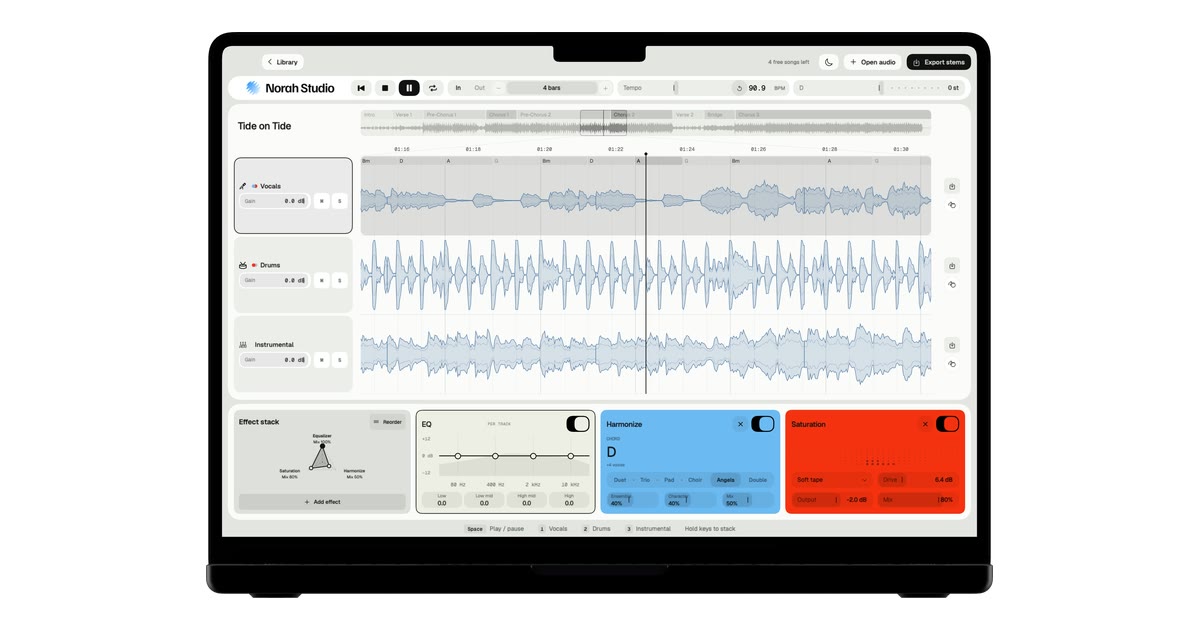
Norah Studio is a creative studio for exploring, transforming and reimagining your music on Mac, iPad and iPhone. It separates any song into vocals, drums and instrumental on the device in your hands, then lets you loop it by bars, change its tempo and key, add effects, take the stems with you, follow chords, build harmonies, turn melodies into instruments and export audio or MIDI. It is aimed at anyone who wants to take a song apart — to learn a part, build a backing track or pull a drum loop — and it works as both a practice room and a remix desk.
Recorded music usually arrives as one finished mix. The vocal, the drums and the band are already blended together, which is exactly what you want for listening and exactly what gets in the way when you want to learn a part, play along in a different key, sing over the record's own band or sample a drum groove. Norah Studio's answer is to split the song into its parts first: vocals, drums and instrumental, each in its own lane, ready to be soloed, looped, reshaped and exported. Because streaming services lock their files to their own apps, the app works with audio files you already have that the system decodes — MP3, M4A and AAC, WAV, AIFF, FLAC, CAF and more, up to ten minutes — rather than with tracks from streaming catalogues.
The workflow starts with Open, split, play. You open a song and three tracks come out. It starts playing from the first second while the rest is still being separated, so there is no queue and nothing to wait for. The app reports 1.1 s to first sound on a Mac and 1.5 s to first sound on an iPhone 16, measured in October 2026 with a song of 2 min 18 s, and 0 bytes uploaded, ever. There is no account to create and no upload step: the models that take the song apart travel inside the app and run on your own chip. The chosen lane can be soloed on its own, so you can hear just the vocal, just the drums or just the instrumental.
Once the song is apart, the practice tools take over. Loop by bars gives you a bar grid and named sections, so you can loop exactly one section or any number of bars instead of guessing at a selection by ear. Tempo and key let you slow a song down without the pitch dropping, or move it to your range without changing its speed. Chords are read above the vocal, one per beat group, together with the key and the tempo, so you can see the harmonic shape of the passage you are working on. The app labels tempo, key and chord results as estimates — good enough to loop by bars and play along.
Each lane has its own processing chain. Norah Studio offers 24 effects and 4 visualizers, an EQ on every lane, and the effects run in the order you choose. MIDI Learn maps any control to a knob on your controller, so the parameters you reach for most can sit under your hands rather than on the screen. Melody Synth takes the vocal melody and plays it with 19 instruments, from synth leads to a grand piano, turning a sung line into an instrumental part. Harmonize adds a choir that follows the chords, with six voicings — Duet, Trio, Pad, Choir, Angels and Double.
Export closes the loop. You can take the three stems with their effects, and the melody as MIDI, so the work you did inside the app can move into whatever comes next. The Library keeps recent songs and reopens them with everything as you left it, so a session can be picked up later rather than rebuilt from scratch. Reopening a song you already took apart is always free.
Norah Studio is the same engine, native on each device. On a Mac it is the whole desk, with a keyboard and a mouse; on an iPad it is the whole desk under your fingers; on an iPhone it is the desk folded upright for one thumb. Your songs never travel between them: each device separates on its own, offline. There is no server and no analytics, and the App Store privacy label reads Data Not Collected. Because the models are inside the app, the first song works in airplane mode, and nothing leaves your device. The app is also candid about its limits: no separation is perfect, and on a dense mix a little of the voice can stay in the instrumental; tempo, key and chords are estimates and are labelled as such.
The practical benefit is that a finished recording becomes material you can work with. A song you own can become a slower version in the same key for practice, a version without the singer for karaoke, a drum loop lifted from a track you like, a backing track built from the record's own band, or a vocal melody handed to a piano. Because everything happens on the device, the work is private by default and available without a connection — on a plane, in a practice room, wherever the song and the device are. Because every feature is in the free version, the whole studio can be tried on five songs before deciding about Pro.
The app suggests concrete places to start. Remove vocals takes the singer out of any song you own, leaving the record's own band. Slow down a song lets you practise at your speed in the same key, with looping to repeat the passage you are learning. Karaoke gives you the record's own band in your key. Beyond those, the separated lanes make it possible to learn a part against the lane that carries it, pull a drum loop for reuse, or turn a vocal melody into an instrument line and export it as MIDI.
Norah Studio runs on a Mac with Apple silicon on macOS 15 or later, an iPad on iPadOS 26 or later, or an iPhone on iOS 26 or later. The free version includes every feature and five songs; Pro adds unlimited songs and nothing else, with Pro Monthly at €7.99 per month (cancel any time) and Pro Lifetime at €69.99 once (never renews). Prices are shown in your country's currency on the App Store, and Pro bought on one device also covers your other devices signed in with the same Apple Account.
In short, Norah Studio turns any song you own into parts you can play with — separated, looped, retuned, processed and exported entirely on your own device, with no account, no upload and no connection required.
Publisher
A
admin
Launch Date2026-10-31
Platformdesktop
Pricingfreemium
Tech Stack
#macOS#iPadOS#iOS#Apple silicon#on-device models