Category Focus/categories/analytics
Analytics AI Tools
Discover and compare the best analytics AI tools and software. Browse 115+ curated tools with reviews and rankings.
Projects tracked
115
Sort mode
RECENT
Page
2
Discover and compare the best analytics AI tools and software. Browse 115+ curated tools with reviews and rankings.
Projects tracked
115
Sort mode
RECENT
Page
2
ZenABM is a LinkedIn Ads AI analyst that lets marketers create and launch, understand, optimize and report on their LinkedIn advertising from Claude, ChatGPT, Perplexity, Gemini and other AI tools through the ZenABM MCP server, or natively from ZenABM's own AI agent, Zena. Zena can plan, manage, analyze and optimize LinkedIn Ads, and the site presents it as a way to build, manage and optimize LinkedIn campaigns with AI. The product is aimed at people who run LinkedIn Ads and ABM campaigns and who would rather work inside a conversational AI client than operate each step by hand. The Product Hunt listing describes the underlying annoyance plainly: ditch copy-pasting into Campaign Manager. Instead of assembling campaigns field by field in LinkedIn's own interface, teams can ask an AI client for what they need and have ZenABM handle the mechanics. Reporting has a similar problem. Rather than exporting numbers and assembling a slide deck every week, ZenABM produces written reports that pair insights with action items, and it cross-references advertising performance with pipeline data. ZenABM also positions itself around company-level insights, so campaign results connect to the accounts and revenue behind them rather than living as detached impressions and clicks. Inside Zena, campaign building starts with a description. You describe the campaign you want and Zena builds it end to end: the campaign, its ad sets, targeting, and the ads themselves. Ad copy is written for you, and creatives are pulled from your media library. Before committing, you can check the audience size, reuse saved audiences and lead forms, and duplicate campaigns that already work. Crucially, nothing goes live until you confirm it, so the AI drafts and prepares while the human approves. The site illustrates this with Claude generating four document ads for a ZenABM workshop in London, showing how a request turns into a set of draft ads inside the tool. The ZenABM MCP server extends the same campaign work into whichever AI client a team already uses. You ask Claude, ChatGPT, Perplexity or Gemini for the ads you need; the MCP server generates them, pushes them into a new ad set with the objective, budget and bidding you asked for, and hands you a link to review and approve in Campaign Manager. Again, nothing launches until you approve it. The server is described as letting you build, manage and optimize LinkedIn ads and campaigns directly from Claude or any AI tool, and it can be connected during a free signup. An illustration on the page shows the ZenABM MCP server connected to Claude. Under the hood, the MCP server ships with 15 ready-made ABM skills that you run as slash commands. The site lists audits, monthly reports, strategy planning, ad decay checks and sales handoff lists, all graded against ZenABM benchmarks. Beneath the skills sit 96 read and write tools spanning LinkedIn Ads, ABM, CRM and revenue data, so an AI client can both inspect and act on the data rather than only summarise it. Because the skills come prebuilt, users do not have to design prompts for common ABM jobs; they invoke a command and the underlying tools do the work against benchmarked expectations. Automated reporting is one of the headline capabilities. Zena produces weekly, monthly and quarterly reports written for you and sent straight to your inbox, containing insights and action items that Zena can carry out on your approval, rather than a raw data dump. You can also ask for a report on the spot. In that case, performance is cross-referenced with your pipeline, top and low performers are surfaced, and the result is shareable in seconds. The Product Hunt description adds company engagements and revenue attribution to the reporting scope, produced by ZenABM's AI agents on a weekly and monthly cadence. Optimization happens without leaving the chat. Zena finds and fixes underperforming LinkedIn ads and campaigns for you: it surfaces your lowest and best performing assets and then acts on them. Actions include pausing inefficient ad sets and campaigns, changing bids and budgets, and building retargeting audiences from ad engagement and CRM events. Every change waits for your approval, so optimization stays reviewable rather than automatic. A screenshot on the site shows Zena pausing underperforming LinkedIn ad sets, which illustrates the intended flow: the analyst identifies the problem, proposes the fix, and the marketer signs off. Zena also acts as an advice channel. The agent is trained on knowledge from more than 30 ABM and LinkedIn Ads experts — the site cites Tim Davidson, Ali Yildirim, Max Herzeg and many more — drawn from their own posts. When you ask about list building or ABM strategy, the answer comes back tied to your own data and to benchmarks from other accounts, so the comparison is real rather than generic. Benchmarking material shown on the site compares ad performance to industry benchmarks, reinforcing that answers are grounded in data rather than opinion alone. Zena, the MCP server and the API are all powered by the same company-level ABM data. That shared foundation is what ties the three surfaces together: the AI agent for conversational analysis, the MCP server for bringing ZenABM into AI clients such as Claude, ChatGPT and Cursor, and the API for connecting LinkedIn Ads data anywhere and building your own dashboards. The API lets you pull LinkedIn Ads engagement, campaign performance and intent stages wherever you need them. Because the AI layer runs on the same data as the rest of the platform, users can ask Zena to analyse LinkedIn Ads performance, find top engaged companies, and surface or pause underperforming ads, then take the same data into their own systems. Concrete workflows the site describes include building a full campaign from a short description, generating a batch of document ads inside an AI client, and approving prepared ads in Campaign Manager before launch. Reporting runs as a recurring workflow: weekly, monthly and quarterly reports land in the inbox, and ad hoc reports answer point questions. Optimization workflows cover auditing spend, pausing inefficient ad sets, adjusting bids and budgets, and assembling retargeting audiences from ad engagement and CRM events. For ABM teams, ZenABM supports identifying top-engaged accounts and producing sales handoff lists, and the API supports pulling campaign and intent data into external dashboards. The product is built for the people who run LinkedIn Ads and ABM programs. The FAQ addresses readers asking whether they need to be technical, which AI clients the MCP server works with, whether ZenABM AI can take actions or only read data, how data is secured, which ZenABM plans include the AI features, and whether the AI can be tried before paying. Integrations named in the content include Claude, ChatGPT, Perplexity, Gemini and Cursor, plus LinkedIn Ads, ABM, CRM and revenue data. On pricing, the site offers a Start for Free button and a Book a Demo option, and a three-minute walkthrough is available. ZenABM's pitch is that LinkedIn Ads should be created, optimized and reported on where marketers already think and write — inside an AI tool. Zena and the MCP server carry campaign building, expert skills, optimization actions, benchmarking and reporting into that conversation, all on top of the same company-level ABM data, with human approval before anything goes live.
FixMyFX is a free, no-sign-up calculator built for founders who sell or spend in foreign currencies. Its purpose is straightforward: show you what FX fees are costing your business and what you could do about it. You enter your annual revenue, the share of it in foreign currency, your annual expenses, and the share paid in a foreign currency. The tool then estimates roughly what FX fees cost you per year and gives you a plain-English plan to minimise those costs by receiving and spending in the same currency — for example, using a multi-currency account from Wise or Airwallex alongside a local bank. The calculation runs entirely in your browser: none of your numbers are collected, sent to a server, or tracked. The problem FixMyFX addresses is stated directly on the site: most founders get charged FX fees twice, on income and on expenses. The share text used by the tool puts it plainly — most founders lose 2–5% of revenue to hidden FX fees. On the income side, Stripe auto-conversion is described as charging 1% (US) or 2% (UK/EU/Rest) on inbound foreign revenue. On the spending side, a bank FX markup of around 3% is described as a typical bank spread on foreign spending and subscriptions. The calculator labels this combined situation the "lazy tax" — the cost of a standard single-currency setup in which you use your local bank for everything. These costs are easy to miss individually but compound over a 12-month period, quietly taking money that could otherwise stay in the business. The tool is also explicit about who does not need it: if your company, clients, and suppliers are all in the same country, you probably don't need it. FixMyFX starts by asking where your company is registered, offering the United Kingdom (GBP), United States (USD), Eurozone (EUR), Australia (AUD), Canada (CAD), the Nordics (DKK/NOK/SEK), New Zealand (NZD), Singapore (SGD), and Other (USD). That choice sets the home currency for the calculation. It then asks how you manage currency, with two options: Single Currency, described as using your local bank for everything (the standard setup), and Multi Currency, described as holding funds in multi-currency accounts (an FX-optimised setup). From there you enter your annual revenue per year together with the percentage in foreign currency, and your annual expenses per year together with the percentage paid in foreign currency — with SaaS tools, ads, and hosting paid in USD given as examples. You then execute the calculation, or update it when you change an input. The results screen places two setups side by side. Under "Current setup (lazy tax)", the tool models Stripe auto-convert plus bank FX and shows estimated annual fees. Its own explanation of the calculation is twofold: Stripe auto-conversion of 1% (US) or 2% (UK/EU/Rest) on inbound foreign revenue, and a bank FX markup of roughly 3% as a typical bank spread on foreign spending and subscriptions. Under "FixMyFX setup (zero leak)", it models a multi-currency account and shows estimated annual fees. That calculation is explained in three parts: direct payout at a 0% fee, meaning you receive foreign currencies into matching multi-currency bank accounts; direct spend at a 0% fee, meaning you pay foreign bills directly from matching currency balances; and a net profit transfer at roughly 0.4% fee, meaning interbank rate conversion only when moving balances home. The gap between the two estimates becomes the potential annual savings, calculated over a 12-month period. When there are savings to capture, FixMyFX explains how to achieve them in four numbered steps. First, open a multi-currency account (e.g. Wise Business, Airwallex) matching the currencies your customers pay in (EUR/GBP/USD). Second, connect these local bank accounts to Stripe so payouts land directly without Stripe's 1–2% auto-conversion markup. Third, pay foreign expenses such as SaaS, ads, and overseas contractors directly from those currency balances with zero FX spread. Fourth, convert only what is left back to your home currency at transparent ~0.4% interbank rates. The tool also translates the estimated saving into equivalencies, listing MacBooks Pro, months of Claude Max 20x, months of Claude Max 5x, months of Claude Pro, and fancy coffees. You can share the result on Twitter/X or LinkedIn, optionally including your savings amount. If your inputs already describe an optimised setup, the tool switches to a "You are winning!" state instead. That state states you are already using an optimised setup, that most founders lose money per year on this volume but you keep it, that this is because you don't auto-convert revenue (saving 1–2%), and that paying expenses directly from your foreign currency balances stops the FX leak completely; the annual fees shown in that case assume you pay a ~0.4% conversion fee only on the net profit you bring home. The distinctive methodology behind FixMyFX is that typically FX tools compare transfer rates, whereas this tool looks at your whole flow — income and spending. Rather than optimising a single transfer, it models the money coming in and the money going out, then compares a standard single-currency setup against a multi-currency, FX-optimised setup. The entire calculation runs in your browser, and the site states that none of your numbers are collected, sent to a server, or tracked. That means you can get an estimate without creating an account, without a sign-up, and without any of your figures leaving your device — a design choice that also makes it practical to test several scenarios quickly and privately. For users, the outcome is visibility plus a concrete path to saving. Instead of guessing whether FX fees matter at their volume, a founder sees an estimated annual fee figure for their current setup, an estimated annual fee figure for an FX-optimised setup, and the difference, described as money going back into the business every year. The four-step plan turns that estimate into action by naming the specific moves: opening a multi-currency account, connecting it to Stripe for direct payouts, paying foreign expenses from matching currency balances, and converting only the remainder at transparent interbank rates. The equivalencies — MacBooks Pro or months of Claude subscriptions — reframe an abstract percentage as things the business could otherwise buy, and the built-in sharing options let a founder circulate the result, optionally with the savings amount included. Concrete scenarios where FixMyFX fits are the ones its inputs describe. A founder whose customers pay in EUR, GBP, or USD while the company is registered elsewhere can enter annual revenue and the share received in foreign currency to see what Stripe auto-conversion costs them. A business paying SaaS tools, ads, and hosting in USD can enter those expenses and the percentage paid in foreign currency to see what a typical bank FX spread adds on top. Someone deciding whether to move from a single-currency setup to a multi-currency one can switch the currency-management choice between Single Currency and Multi Currency and compare the two fee estimates. A founder who already holds funds in multi-currency accounts can run their numbers to confirm they are in the "You are winning!" state. And anyone who wants to know the size of the prize before doing the work can use the savings figure and the equivalencies to justify the change. The product is aimed squarely at founders who sell or spend in foreign currencies, and the site notes that if your company, clients, and suppliers are all in the same country, you probably don't need it. It is free — no sign-up, no account required — and it runs in the browser on the web. Named in the content are the accounts and services it references: Wise Business and Airwallex multi-currency accounts, Stripe and its payout and auto-conversion behaviour, and local banks. It also lets you support the builder with a voluntary, non-refundable gratuity in USD, GBP, or EUR at $5, $15, $25, or a custom amount. FixMyFX was built by Tania Bell, described as a product manager who can code and an ex-finance manager, and it carries a disclaimer that it provides estimates based on standard publicly available fee structures, does not constitute financial advice, and that you should always check your own bank's PDS. In short, FixMyFX is a free, browser-only calculator that shows founders what FX fees are costing them across their whole flow, compares their current setup against a multi-currency one, and then hands them a plain-English four-step plan for keeping more of their revenue in the business.
GameRoll is a single app built to bring a gamer's entire gaming life into one place. It tracks your library across 219 platforms, spanning PC, PlayStation, Xbox, Nintendo, mobile and classic retro systems, so every title you own or want sits in one unified collection instead of being scattered across storefronts and consoles. Alongside backlog tracking, GameRoll handles your wishlist, favorites and custom collections, your ratings and reviews, a real-time community feed, and the question every player eventually faces: what should I play next? It is made for players who own games across multiple systems and want their backlog, their opinions and their gaming friends gathered into one home. The problem GameRoll addresses is the slow collapse of the personal game backlog. Most players keep their list in their head or in a spreadsheet they stopped updating in 2022, which means games get forgotten, bought twice, or never finished at all. Wishlists usually live inside individual storefronts, so a release you have been waiting for can arrive without you noticing, and a price drop on a wishlisted game is easy to miss entirely. Gaming conversation is scattered too: a short clip on TikTok or Instagram might show a game you cannot name, and there is no easy way to turn that moment into a library entry. GameRoll takes a different approach. Every game you add, start, complete or drop gets logged automatically, so your record stays current without manual spreadsheet upkeep. At the centre of GameRoll is Your Roll, a backlog system built on four unambiguous states: pending, playing, completed or dropped. Every game you touch is placed into one of those four states, and the status is always in view, so there is no confusion about what you are actually working through and no ambiguity about whether a game has been finished or quietly abandoned. If you cannot decide what is next, you can spin your Roll and it picks a pending game for you. Around that foundation sit wishlists, favorites and collections: you can save games for later, mark the ones you love, and organize everything into your own custom collections. Together, these features turn a flat list into a structured library that reflects the way you actually play rather than the way a spreadsheet expects you to. GameRoll also watches your wishlist so you do not have to. You get notified the moment a game you are waiting for comes out, and again when one of your wishlisted games drops in price. The deal alerts are part of GameRoll UNLIMITED, powered by IsThereAnyDeal. Because that watching is not limited to a single store or console, the wishlist works across the same breadth as the library itself. GameRoll tracks games across 219 platforms, covering PC, PlayStation, Xbox, Nintendo, mobile and more, with your whole library and no borders between platforms. For players who own hardware from several generations, that means one backlog and one wishlist instead of a handful of separate lists that never quite stay in sync. A distinctive part of the product is sharing from anywhere. If you see a game in a video, you do not have to pause the clip to read the title or hunt through a search box. Instead, you share the post to GameRoll and it works out which game it is about. Sharing happens straight from your feed on TikTok, Instagram, YouTube, Facebook and X, without leaving the app you are already in. GameRoll reads the post and identifies the game for you, so you never have to type a name you are not sure how to spell, and a single tap sends it into your Roll or your wishlist so you can get back to scrolling. The community layer sits on top of the tracking. GameRoll's feed is not a list but the real activity of the people you follow: what they are playing, what they just finished, and what review they just wrote, updating in real time with no refreshing needed, so you can see who is playing right now and jump straight into a chat. Every game has its own thread where players debate theories, ask for help, or talk about the ending with people who have played it too. Reviews that actually matter are rated and shared, letting you see what your people think before you start a game. Discovery is folded into the same feed through trending picks, top rated titles, most wishlisted games, the latest reviews and upcoming releases, plus gaming news. As you play, you unlock medals and watch your stats build up by status and platform, right on your profile. What ties all of this together is a deliberately simple model. A game exists in one of four states, and everything else in the app is arranged around that single record: the wishlist keeps future games, collections organize them, the Roll surfaces them, the feed gives them a social context, and reviews capture what you thought. Adding a game is meant to be low effort, whether you select it in the app or share a social post and let GameRoll identify it, and moving a game forward is a matter of changing its state. The spin mechanic removes the paralysis from choosing what to play, and the real-time feed removes the effort of hunting for what your friends are into. Rather than bolting separate tools together, GameRoll treats the backlog as the centre of gaming life and builds tracking, alerts, discovery and conversation around it. The benefits are largely about removing friction and keeping a record. Your backlog no longer depends on you remembering to update a spreadsheet, because games are logged automatically as you add, start, complete or drop them. You stop missing the games you actually wanted, since wishlist alerts fire at release and at price drops. You stop losing track of a game you saw in a clip, because sharing the post is enough for GameRoll to name it and file it. Your library stops being divided by platform, because it spans 219 of them. And your opinions stop disappearing, because ratings and reviews sit alongside your stats and medals on your profile, giving you a visible history of what you played and what you thought about it. Concrete scenarios show how the app fits together. You are scrolling TikTok and see a clip from a game you do not recognise, so you share the post to GameRoll, it identifies the title, and one tap puts it in your wishlist. You have games spread across a PlayStation, a Switch, a PC and a retro handheld, and you log them all into one library where each one carries a clear status. It is Friday night and you cannot choose, so you spin your Roll and it picks a pending game. You are waiting on a release or hoping for a discount, and your wishlist alerts tell you when it arrives or when the price falls. You finish a game and want to talk about the ending, so you open its thread, read your friends' reviews and post your own. Over time you watch your medals and stats build up on your profile. GameRoll is aimed at people who play a lot of games, often across several platforms and generations of hardware, and who want their library organised without spreadsheet upkeep. It reaches users through mobile apps and the web, with the Product Hunt listing categorised under Android, iOS and Games. Its deal alerts are powered by IsThereAnyDeal, and sharing works from TikTok, Instagram, YouTube, Facebook and X, while game imagery in the app is served from IGDB and user content from Firebase. Deal alerts are packaged as part of GameRoll UNLIMITED, the app's named tier, alongside the core tracking, wishlist, community and review features. In short, GameRoll replaces the abandoned spreadsheet, the scattered storefront wishlists and the forgotten game names with one home for everything you play. It tracks your backlog across 219 platforms, turns four simple states into a clear picture of your progress, watches your wishlist for releases and price drops, identifies games from a shared post, and surrounds it all with a community that is actually playing. It is, as the tagline puts it, one app for your gaming life.
Inqueria is an AI-moderated qualitative research platform. According to its website, it deploys qualitative research studies and interviews customers along adaptive conversational paths, then extracts cross-session themes in seconds. It runs interviews the way a trained researcher would: adapting to every answer, probing deeper when responses are thin, and following threads the study designer did not anticipate. It is built for product teams, researchers, and consultants who need qualitative depth at scale — the site notes it is used by top product teams at fast-growing startups. The stated promise is to run 50 deep interviews overnight, letting teams set up a research guide in under five minutes and host audio conversations with participants anywhere in the world. The problem Inqueria addresses is the bottleneck at the heart of qualitative research. A human researcher runs one interview at a time, meaning a study of 50 conversations can take a month just to schedule, let alone conduct and analyse. Once interviews are recorded, someone still has to manually code transcripts to find themes, and that coding is slow and hard to trace back to the raw evidence. Survey tools, meanwhile, cannot follow up on an interesting answer or explore a thread that emerges mid-conversation, so they reach breadth but not depth. Inqueria's positioning is direct: stop manual transcript coding, and skip the month it takes to schedule five interviews. Instead of a scheduling queue, the platform conducts conversations concurrently and turns them into evidence-linked themes. The first stage is research design. A researcher describes their research objective in plain English — for example, understanding why new users churn within their first week and what would have made them stay — along with the audience and the desired tone. Inqueria then generates a complete question plan with a system prompt, follow-up probes, and an ideal conversational flow, ready to share in under five minutes, with no scripting or guesswork required. The platform also applies methodological rigor: rather than defaulting to one interview style, it recommends the best-fit method from a rigorous toolkit and tells the researcher why, and the recommendation can be overridden at any time. The stated toolkit includes Jobs-to-be-Done, Laddering, Critical Incident, Journey, Evaluative, Phenomenological, and Semi-structured methods. The site gives the example of a Jobs-to-be-Done approach being auto-selected for discovery and switching decisions, identifying the progress people seek, the struggle that triggered it, and the forces pulling them toward or away from a switch. The second stage is adaptive interviewing. Participants join through a secure link and speak directly with Inqueria, answering questions such as 'Can you walk me through the specific moment you realised the onboarding wasn't working for your team?' The AI listens, probes deeper when answers are thin, and follows threads the researcher did not anticipate — all without a human moderator. Sessions can be anonymous and show progress such as 'Question 3 of 8', and participants can either speak their answer or type a response. Concurrency is a core design principle: a human researcher runs one interview at a time, while Inqueria runs as many as the plan allows at once, with no calendar to fill. The website describes this as unlimited parallel capacity in its summary, with response limits applied by plan. The third stage is synthesis and a compounding research library. One click surfaces cross-session themes, sentiment, and verbatim quotes that back up each theme. Inqueria goes further than a single study: it surfaces cross-study patterns, theme saturation, and response-level engagement signals, and every study adds to the research library so patterns surface across all of a team's work. The site's illustrated synthesis example shows 148 sessions, top themes such as 'Invite links expire too quickly' at 83% and 'Feature discovery is accidental' at 67%, a sentiment score of Net +41, an engagement signal noting that 23 respondents described setup as 'fine' but hesitated and backtracked, a compounding marker indicating a theme also appeared in three past studies, and saturation reached at 142 interviews. The Product Hunt listing adds that each theme is checked against every transcript and the platform shows the participants who disagree. Privacy is built into the workflow rather than added on top. Inqueria performs automated PII redaction in-house: it detects and strips names, emails, phone numbers, IDs, and addresses before any data leaves Inqueria, and the company states that redaction happens before any model sees a transcript. Configurable data-retention policies are also provided. The site illustrates this with raw input such as 'My name is John and I work at Apple…' becoming 'My name is [REDACTED] and I work at [REDACTED]…'. Taken together, the overall approach is a three-step loop: design the interview from a plain-English objective, let Inqueria conduct adaptive conversations concurrently, and then read evidence-linked themes from a library that compounds with each new study. The stated average setup time is five minutes, with instant AI generation. The stated benefits follow from that approach. Teams get interviews that hold up methodologically while removing the scheduling queue, because Inqueria interviews concurrently instead of one at a time. Setup takes about five minutes rather than requiring a hand-scripted guide, and the question plan is generated instantly. Analysis is compressed into one-click thematic synthesis, so researchers see themes, sentiment, and the exact quotes behind them without manual transcript coding. Because themes are linked to quotes and checked against every transcript, findings are traceable rather than impressionistic, and reviewers can see the participants who disagree. And because every study contributes to a shared research library, patterns compound across projects, with cross-study recurrence and theme saturation visible as evidence that a finding is well supported. Strategic use cases on the site cover every kind of qualitative discovery. Customer Discovery is framed around uncovering the jobs, triggers, and switches behind why people choose a product or don't — with an example question such as 'When did you first realise the alternatives weren't solving your problem?' Other listed use cases include Churn & Retention, Market Validation, Concept & Packaging, Brand Perception, Employee Experience, Academic Research, Community & Policy, and 'something else entirely.' A churn study, for instance, would use the design flow described on the homepage: an objective about why new users churn in their first week, an audience of recently churned users, a warm and professional tone, and an AI-generated eight-question plan. The Product Hunt description frames the overnight scenario: run 50 interviews overnight instead of spending a month scheduling five. Inqueria's plans indicate who it is for. The free Explore tier runs 3 free qualitative interviews with no card required and includes 1 active study, the qualitative AI agent, and 10 insight refreshes per month. Research, at $55 USD per month, is described as designed for freelance researchers and UX teams and includes 30 interviews per month with unused interviews rolling into the next month (capped at one month's allowance), 5 active studies, thematic synthesis and sentiment, 15 insight refreshes per month, Excel spreadsheet data export, and a custom AI interview persona. Consultant, at $109 USD per month, is best for consulting teams sharing findings with clients and adds 75 interviews per month, 10 active studies, 30 insight refreshes per month, a client read-only insights share link, and removal of Inqueria branding from the participant page. Scale, at $169 USD per month, is for larger corporate teams conducting research and includes 5 team seats, 150 interviews per month, unlimited active studies, 50 insight refreshes per month, and personalised email distributions. Enterprise offers unlimited interviews, studies, and seats, SSO and security review, and dedicated support on custom pricing. A one-off study pack with 20 interviews that never expires costs $35 USD. The site notes GST is added at checkout for Australian customers, with AUD billing. In short, Inqueria is a qualitative research platform whose value proposition is evidence-linked speed: AI-moderated interviews that adapt like a trained researcher, in-house PII redaction before any transcript reaches a model, and one-click synthesis into themes with the exact quotes behind them. It replaces the scheduling queue and manual transcript coding with concurrent interviews and a research library that compounds across every study.
ZenMode OS is an open source Android launcher built on one idea: make the healthier choice easier than the impulsive one. It is made for people who do not want to abandon their phones but do want a better relationship with them, and it turns mindless phone use into intentional engagement through mindfulness, accountability and positive rewards. ZenMode is explicitly not a blocker, not a detox, and not a lecture about your screen time; it will not shame you, cap your minutes, or treat every hour on a screen as a failure. The current release is described as a V3 revamp, it is Android only by design, it is free to use, and its source is public. Everything lives inside the launcher, so there is nothing else to open, and you can use one of its tools or all of them. The problem ZenMode sets out to solve is stated plainly: unintentional and meaningless phone use. Most screen-time tools count down on you, showing a shrinking budget that turns every minute into a loss. ZenMode takes the opposite position, giving you a score you earn back, a person who sees it, and a reward worth keeping. The site describes the solution as an environment that makes intentional use easier, while providing accountability and rewards for healthier behaviour. Its positioning is that people do not need to abandon their phones, they need a better relationship with them. That framing matters because it removes guilt from the equation: the goal is not zero screen time, it is conscious screen time, and the phone stays in your hand as a tool rather than becoming an enemy to defeat. The launcher's surface is deliberately quiet. The home screen is black and holds about eight apps you choose, with no badges and no widgets lit up asking to be tapped; swiping right reveals your Zen Score, and you can pick light or dark. On top of that sits a centralised search bar that covers apps, files, settings and the web, so you type what you want instead of browsing a grid. The search experience shows time left on an app before you tap it and ranks the obvious app first, and centralised search is free on every plan. The Distraction Blocker is the third piece of that surface: it quiets Reels and Shorts while keeping the app itself, so messages and search still work inside Instagram and YouTube. That means you can reply to a DM or look something up without the feed pulling you back in, and a 30-minute pause is listed as a Pro capability. ZenMode's core measurement is the Zen Score, a single number out of ten. Three quarters of it compares your screen time against the daily promise you set for yourself, and one quarter measures session quality, where calm and intentional use counts fully while entertainment counts half. A score of seven or more is described as a mindful day. That daily promise comes from My Promise, where you pick a screen-time target you can actually keep, editable once a week and twice on Pro. Sitting underneath the score is the Zen Report, one receipt a day where every deduction and gain is itemised with minutes attached, from screen time against your promise to session quality and drifts into a feed. Your accountability partner sees the number and the direction, nothing else, which keeps the accountability narrow and the privacy intact. Accountability is handled socially but without a social network. Zen Circle is a small circle of friends ranked by calm, with a wheel that turns to whoever is around today. Random Connect lets you share a link, trade codes, or get matched with someone who wants the same quiet; it is free up to five times a week and up to fifty times on Pro. Pairing with one other ZenMode user creates no social graph, no mutual friends and no feed, just one person who sees your number move. Finally, the Weekly Recap delivers five cards every week covering what pulled at you, what you kept, and one change for next week, including how often an app knocked and how many times you actually opened it. Zen Gold is the reward layer, and it is explicitly designed so that you cannot doomscroll it. A streak that turns into a badge, the site argues, is just dopamine wearing a different hat, so ZenMode points the habit at something that holds value instead: Gold BeES, the gold ETF traded on the NSE. Keep your promise five days of seven and Gold Invest opens. You pick the quantity of units you want, ZenMode shows you the number and never a recommendation, and you are then handed off to Zerodha Kite, where the broker handles KYC, payment, execution, settlement and demat custody. ZenMode states that it never touches your money and never holds your units, and that the gold sits in your demat account in your name. The site also notes there is no price shown in the app because Gold BeES trades on the exchange and moves all day; the number you pay is the one Kite shows at the second you confirm. ZenMode is not a broker, an exchange, or an investment adviser, and Gold BeES is a market-traded ETF whose value moves with the gold price and can fall. The product describes itself as having three moving parts. The first is intent: you say why you opened an app and declare a session and a length before it opens, and the friction is the feature, lasting about two seconds. The second is the Zen Score, the single number out of ten built from screen time against your promise plus session quality. The third is the Zen Report, the daily receipt that itemises every deduction and gain with minutes attached. A delayed unlock feature is listed as coming soon, where a quieted app will wait a moment before it opens, long enough to ask if you meant it. ZenMode also notes that usage stats are worked out on your phone, so your buddy sees a score, not a log, and that nothing in ZenMode is paid for by holding your attention longer. The outcomes ZenMode describes follow directly from those mechanics. Instead of counting down on you, it gives you a number that can go up. Intentional sessions count fully and entertainment counts half, so the score rewards the behaviour you are trying to build rather than punishing every minute on a screen. Accountability comes from one person seeing your number move, which the site says turns out to be all the pressure anyone needs. Rewards land in gold instead of dopamine, so a kept promise produces something that holds value rather than a badge. And the quiet home screen itself is a benefit: reviewers describe the experience as clean, distraction-free, simple, smooth, organised and lightweight, with a minimalist design that helps improve focus. ZenMode OS is Android only by design and free to use, with the source public. Some capabilities are tied to a Pro tier, including the 30-minute pause in the Distraction Blocker, editing My Promise twice a week instead of once, and up to fifty Random Connect matches a week instead of five, while centralised search is free on every plan. The app is built in the open under GPLv3, with code, issues and fixes welcome on GitHub and a Telegram group where v3 gets decided. Its design system, called Albeit, documents every colour, type layer, icon and sticker, and the whole thing is public with a brand guide and Figma tokens available. Gold Invest integrates with Zerodha Kite for order placement. Reviewers on Google Play mention parental controls, screen time sharing, random connect and conscious usage, and the app is distributed through Google Play. ZenMode OS is, in its own words, an environment that makes intentional use easier, backed by accountability and rewards for healthier behaviour. It gives one number that can go up, one person who sees it, and one reward worth keeping, all inside a launcher that is open source, ad-free and built to be read.
VehicleERP is cloud-based used car dealership management software built in Surat, Gujarat, for used car dealers across India. It is designed so that dealers can buy, sell, and track their profit on every single car, and then run their whole dealership from one platform covering inventory, purchases, expenses, sales, payments, GST bills, partners, staff, and every branch. It works on any phone, in the dealer's own language, and replaces Excel sheets and lost WhatsApp messages with a single connected system. The problem VehicleERP addresses is one that used car dealers know well: most dealers only find out what they really made on a car months later, if at all. In the old way of working, stock is tracked in Excel sheets and WhatsApp chats, real profit is only known once the books are closed, pricing is a guess based on gut feel, GST bills are typed out by hand in Excel, the business cannot be checked from a phone, there is no visibility across branches, and partner shares are settled by hand and argued over. VehicleERP frames itself as the answer to that scattered way of working, turning disconnected spreadsheets and separate tools into one system a dealer can actually run the business on. The centrepiece of the platform is profit per car. VehicleERP records every cost against the exact vehicle - purchase price, reconditioning, and other expenses - and calculates real profit the moment the sale is recorded, with no waiting for month-end, no accountant, and no Excel formulas. A worked example shown on the site describes a 2019 Honda City bought for ₹6,20,000, with ₹28,000 of reconditioning and ₹12,000 of other expenses, sold for ₹7,45,000, producing a profit of ₹85,000 on that car. This sits on top of full inventory management, where every car, its cost, and its papers live in one place and stay up to date, and purchase management, where a dealer scans the invoice and RC and the car is on the books the moment it arrives. VehicleERP also handles the money side end to end. Every rupee in and out is tracked in one place, and GST-ready bills can be generated in seconds. Office expenses are captured and tied back to real profit, so running costs are not recorded separately from the vehicles they belong to. For dealerships that run on partnerships, VehicleERP records each partner's investment and calculates their profit share automatically, removing manual reconciliation and the disputes that come with it; the site illustrates this with partners holding ₹40.0L at 42%, ₹28.5L at 30%, and ₹26.7L at 28%. Supporting this are employee management - team, roles, access, and salaries in one place - and sales management, which tracks every enquiry across branches so no follow-up is missed. Multi-branch operations are handled from a single owner-level view: inventory, sales, and staff across locations are consolidated, with branch-level stock counts such as Andheri with 48 in stock, Bandra with 36, and Pune with 29. The platform groups everything a dealership does into four simple areas - knowing profit on every car, settling partners automatically, tracking every payment and GST, and managing expenses and staff - and records all 16 kinds of entries a dealership runs on, connected so that stock, books, and profit always agree. Reports turn daily activity into one-click numbers and AI forecasts. AI is woven through the product rather than bolted on. VehicleERP's AI prices every car by looking at past sales, ageing stock, and the market, then suggesting the right price so cars sell faster without leaving money on the table. It flags ageing stock before it ties up cash, and it reads invoices, RCs, and documents to fill fields automatically, cutting hours of paperwork. Dealers can ask questions in plain language - for example, which branch made the most profit this month - and get an instant answer from their own data. The AI also watches every entry and flags duplicates, unusual expenses, and wrong numbers before they become costly mistakes, and it delivers a morning business summary of what changed, including cars sold, profit earned, stock at risk, and what needs attention. According to the site, the AI works on data the dealer already enters, with no setup and no data team: it connects to the business as soon as a purchase, sale, or expense is logged, learns the dealership's own patterns of buying, pricing, and selling, and then acts and recommends clear next steps. The claimed effects are 90% less manual data entry, 3x faster pricing decisions, 24/7 anomaly monitoring, and zero reports built by hand. The workflow follows the real lifecycle of a vehicle with AI at every step. In the acquire stage, the dealer scans the invoice and RC, and AI reads the details and files the purchase the moment a vehicle arrives. In the recondition stage, reconditioning work and expenses are logged so every vehicle carries its true cost. In the list and sell stage, AI recommends the right price and surfaces the hottest enquiries, with stock synced across branches. In the settle and profit stage, profit, partner shares, and ledgers update automatically the instant the car is sold. The AI Copilot dashboard shows this in practice, with vehicles auto-priced, flags raised, ageing vehicles identified, markdown suggestions, branch trends, and forecasts of the strongest month in the quarter. The stated benefits are visibility and control. Dealers see their exact profit the moment they sell a car instead of months later. They get a live inventory they can search in seconds, AI-suggested prices for every car, GST-ready bills in seconds, the ability to run everything from a phone in their own language, a live view of every branch on one screen, and partner shares calculated automatically without disputes. Testimonials from dealership owners describe moving away from managing vehicle details, expenses, and sales records across Excel and different files, gaining better control over stock and documents, understanding business numbers faster through reports, tracking vehicle-wise profit together with expenses and selling price, and managing both owned and commission-sold cars in the same system. VehicleERP is explicitly built for Indian used car dealers. It names three groups: used-car dealers running single showrooms who want to know their real profit on every deal without wrestling with Excel; multi-branch groups running two or more locations who need one live view of stock, sales, and cash across every branch; and traders and partnerships with partners and investors who want profit shares calculated automatically. The product is shaped around Indian dealership practice, including GST, partners, and multiple branches. It is cloud-based, works on any phone, supports use in the dealer's language, states that the dealer's data stays their own, and is offered through a free demo rather than published plan pricing. In short, VehicleERP's value proposition is clarity: one connected platform that tells a used car dealer their profit on every car the moment they sell it, instead of months later buried in spreadsheets. By combining per-vehicle profit tracking, inventory, purchases, payments, GST billing, partner settlement, staff and branch management, and an AI layer that prices, flags, summarises, and answers questions, it aims to be the single system an Indian dealership runs on - on a phone, in their language.
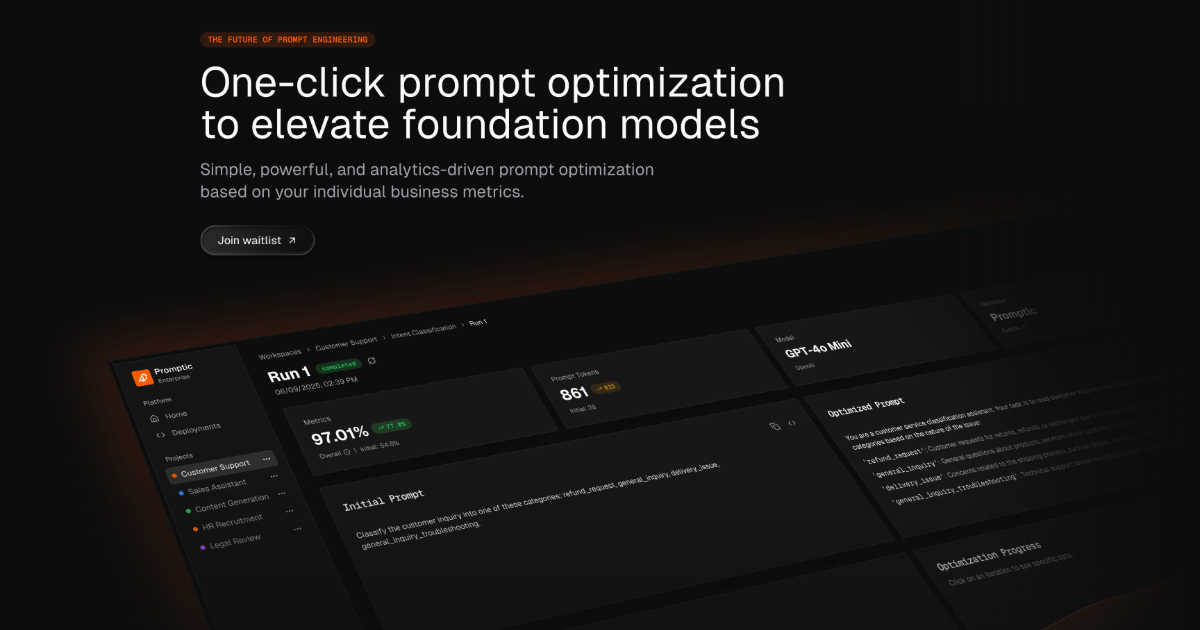
Promptic is an optimization platform for GenAI applications, built around a single promise: better quality at lower cost. According to its own description, it benchmarks models, tunes prompts and agents, and optimizes tool use against your own data and business metrics. The product is aimed at the people who actually have to decide what a generative AI application ships with — which foundation model, which prompt, which agent setup, which tools — and it exists so those decisions rest on measured evidence rather than intuition. Promptic presents itself as simple, powerful, and analytics-driven, with one-click prompt optimization and foundation model optimization as its headline capabilities. The problem Promptic addresses is the gap between how GenAI applications are configured and how they are judged in production. Modern applications built on large language models involve a long chain of choices: which model to call, how the prompt is worded, how an agent is structured, and how tools are invoked. Each of those choices affects both the quality of the output and the cost of producing it, and the space of possible combinations is far larger than any team can explore by hand. The product description states the consequence directly: without a disciplined way to compare candidates, you ship the configuration that sounded right instead of the one that wins. Promptic's stated mission is to replace that guesswork with analytics-driven optimization tied to the individual business metrics a team cares about, so quality and cost are evaluated together rather than traded off blindly. The first capability Promptic describes is model benchmarking. Rather than relying on generic leaderboards or vendor claims, the platform benchmarks models against your own data and business metrics. That matters because the model that performs best on a public benchmark is frequently not the model that performs best on the specific tasks, tone, domain vocabulary, and edge cases of a given application. By running the comparison on the organization's own inputs and scoring the results against the metrics it already tracks, Promptic lets teams see how candidate foundation models behave on the work that actually matters to them. The outcome is a defensible basis for choosing a model — or for confirming that an existing choice is still the right one — instead of an opinion formed from a handful of manual tests. The second capability is prompt and agent tuning. Promptic describes tuning prompts and agents as core to the platform, and its messaging leads with one-click prompt optimization to elevate LLMs. Prompt engineering is iterative by nature: small changes in wording, structure, or examples can shift output quality noticeably, and agents add another layer of complexity on top because their behaviour depends on instructions, intermediate steps, and the sequence of actions they take. Promptic treats these as things to be optimized systematically rather than edited by feel. The "one click" framing signals that the platform is intended to lower the barrier to running an optimization, so that teams can generate and evaluate improved configurations without hand-writing and hand-testing every variation. Because agents are named alongside prompts, the same approach is extended beyond a single instruction string to the broader agent definition. Promptic also covers tool use. In GenAI systems that call external tools, the model's effectiveness depends on how tools are described, when they are selected, and how their results are fed back into the workflow. The platform states that it optimizes tool use against your own data and business metrics, which places tool configuration in the same evidence-based loop as model choice and prompt wording. Running through all of this is the scoring mechanism: every candidate is scored on the quality and cost you actually care about. Quality and cost are presented as the two dimensions that matter, and because candidates are scored on both, a team can see the trade-offs between them rather than optimizing one in isolation. The result the description promises is that you ship the configuration that wins, not the one that merely sounded plausible. Promptic's overall approach is analytics-driven optimization anchored to individual business metrics, and it is designed to run wherever a team already works. The description names three surfaces: a dashboard UI, your CI, and your coding agent. The dashboard gives a graphical place to run and review optimizations, which suits teams that want to inspect results, compare candidates, and share findings. Running in CI places optimization inside the development pipeline, so configurations can be evaluated as part of the same process that builds and tests the software, before changes reach users. Running from a coding agent keeps the work inside the environment where the developer is already writing code, so an optimization can be triggered without switching context. That flexibility is the distinguishing element of the stated methodology: the same optimization capability is delivered through different surfaces so it can fit the workflow a team prefers, whether that is an interactive session in a browser, an automated check in a pipeline, or an action taken directly from an AI coding environment. The benefits Promptic states follow from that methodology. Teams get better quality at lower cost, because candidates are evaluated on both dimensions and the winning configuration is the one that performs best on the metrics that matter. Decisions become evidence-based: rather than debating which prompt or model feels better, a team can point to scores produced against its own data and business metrics. The one-click framing reduces the effort required to explore alternatives, which makes it practical to revisit model and prompt choices as models are updated or requirements change. And because optimization can run in the dashboard, in CI, or from a coding agent, it can be folded into existing habits rather than requiring a separate process. The overarching benefit described is confidence: shipping the configuration that wins instead of the one that sounded right. Several concrete scenarios follow from the capabilities described. A team building a new GenAI feature can benchmark multiple foundation models against its own data before committing to one, rather than guessing based on reputation or a public leaderboard. An application already in production can have its prompts tuned through one-click optimization to lift quality without changing the underlying model. Teams working with agents can tune the agent definition — the instructions and behaviour that shape its multi-step work — using the same optimization loop. Projects that depend on external tools can optimize how those tools are used so the model calls them more effectively. Organizations with a delivery pipeline can run optimizations in CI, treating a configuration as something to be evaluated automatically as part of the build, so a change that degrades quality or raises cost is visible before it ships. Developers who work inside a coding agent can trigger optimization from that environment, keeping the whole task in one place. In each case, the candidate configurations that result are scored on quality and cost, and the configuration that wins is the one put into production. Promptic is aimed at teams and developers building generative AI applications — the people responsible for choosing models, writing and refining prompts, assembling agents, and wiring up tool calls. Its topics on Product Hunt include SaaS, Developer Tools, and Artificial Intelligence, which aligns with that audience: it is a tool for people who build software with AI rather than an end-user application. The product is described as running in a dashboard UI, in your CI, and in your coding agent, so it reaches both interactive and automated development workflows. It is positioned as an optimization platform rather than a model provider, sitting alongside whatever foundation models and infrastructure a team already uses. No pricing or plan details, technology stack, or specific third-party integrations are stated in the material available, so those aspects are not described here. In short, Promptic is a one-click, analytics-driven optimization platform for GenAI applications. It benchmarks models, tunes prompts and agents, and optimizes tool use against a team's own data and business metrics, scoring every candidate on the quality and cost that actually matter. The value proposition is straightforward: replace configuration guesswork with measured results and ship the configuration that wins.
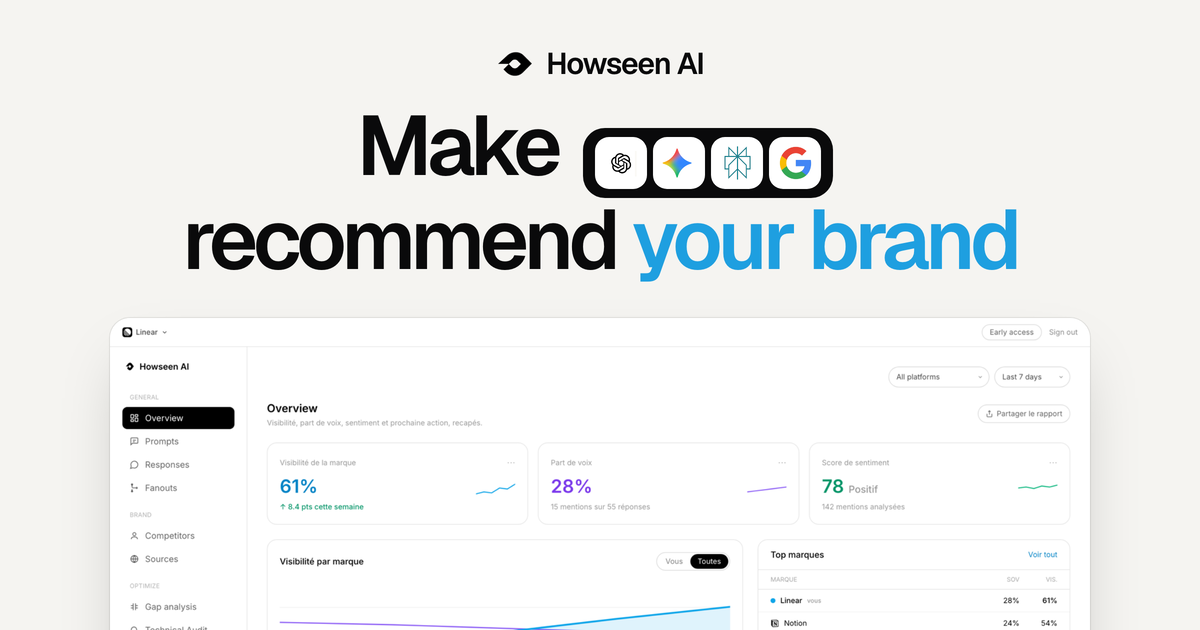
Howseen AI is an AI visibility tool for brands, marketers and agencies that tracks how a brand is recommended across ChatGPT, Gemini, Perplexity, Google AI Overviews and Google AI Mode. Its stated purpose is to help companies make AI their next growth channel: it measures how you are seen when buyers ask AI tools what to buy, and works to ensure the brand the AI names is you. The platform brings AI visibility tracking, competitor benchmarking, citation tracing, a GEO action plan and content generation together in one screen. The problem Howseen AI addresses is a shift in how buyers choose products. The site explains that buyers now ask ChatGPT, Gemini and Perplexity which tool or brand to buy, and the AI answers with a shortlist. According to the content, the brands cited in community threads, review sites and editorial make that shortlist, while the rest never come up. Howseen frames this as a new distribution channel: every day, buyers pick tools from AI answers, so being named in those answers matters. The founder states, "I believe the best product doesn't win, the most visible one does. The shelf just moved to AI, and Howseen makes sure yours gets seen." The core of the product is AI visibility and performance tracking. Howseen recaps visibility, share of voice, sentiment and a next action, tracked across ChatGPT, Perplexity, Gemini and Google AI. It shows brand visibility, share of voice and a sentiment score that compares how AI talks about you versus competitors on a -9 to +9 scale, derived from how AI describes each brand in tracked answers. A visibility-by-platform view breaks performance down per AI surface, and a brands table ranks you and competitors by visibility, share of voice, sentiment and position. This lets a team see, at a glance, whether they are named in AI answers and how that compares with the competition. Prompt tracking is the second pillar. The site argues that buyers ask full questions now, not keywords, so Howseen tracks every prompt that matters across every AI surface. You can add the prompts you want to win from day one, get high-intent suggestions from real search data, and see visibility and sentiment per prompt, per model, every 3 days. Prompts are organized by topic and tagged with intent such as buying intent, comparison or learning. A prompt table shows visibility, sentiment, position, mentions, citations, share of voice, location and when each prompt was added, making clear exactly where a brand appears and where it does not. Competitor benchmarking and citation tracing complete the measurement layer. Howseen lets you see who the models recommend when buyers compare options, right next to the recorded answer, benchmark visibility, sentiment and position against every competitor, watch AI share of voice move with each run, and spot the exact prompts where a competitor replaced you. The competitor view includes a brand comparison table, a brand-by-model heatmap, and a prompt-by-brand ranking matrix showing the top brands AI cites per tracked prompt. Because LLMs don't cite at random, Howseen traces every answer to the pages it cited, mapping each citation to its domain, page and source type so you can find the review sites, forums and wikis the models trust and prioritize outreach by how often each domain gets cited. A technical audit flags what blocks Google and AI models from reading and citing your site, covering page speed, LLM optimization, SEO optimization, indexability, sitemap.xml, robots.txt, LLMs.txt, server-rendered content, Bing indexing and trust signals. From measurement, Howseen moves to action with an action plan and content agents. Data-driven recommendations are built from citation patterns, competitor gaps and prompt performance, each tagged with priority, type (off-page, technical or content), AI engines and effort, alongside a GEO score broken into technical, off-page and content components. Content agents then turn every gap into a scheduled article written from your real buyer prompts in your voice, pushed straight to your CMS. The content plan pre-plans buyer prompts across the month, generating, queuing and publishing drafts; one-click publishing is supported to WordPress, Shopify and Next.js, and there is a recurring content calendar designed to close gaps automatically. Content is structured for specific engines, such as research pages structured so ChatGPT can cite them, product listicles created so Google AI shows them in product searches, and explainer pages written so Perplexity pulls them into detailed answers. The product's methodology is a closed loop rather than a score. Most tools stop at a score, whereas Howseen measures and then acts: it tracks where AI recommends you, benchmarks you against competitors, traces the sources that feed the answers, and publishes the fixes on a schedule. The site describes it as going from invisible to cited on autopilot, and as an agent that acts, not a dashboard that hands you a score. Everything that decides whether AI recommends you, from tracking to competitor share of voice to content and off-page citations, is brought together in one screen instead of being scattered across a dozen tools. The benefits Howseen claims center on clarity and momentum. Branded versus unbranded visibility, who gets cited ahead of you, and the exact sources behind every answer are surfaced without inflated numbers, which the company frames as "no black box". Every scan feeds a trend so you can watch your share of voice climb week after week, alongside analytics for AI-referred visits, average position and answers appeared in. The recurring content calendar keeps closing gaps, so improvement is continuous rather than a one-off audit. The site also highlights that a lead in sentiment is a real edge because AIs stay mostly neutral. Concrete scenarios in the content include an ecommerce activewear brand tracking prompts such as "best gym leggings for squats" or "most durable workout leggings", spotting gaps where AI recommends a rival instead, and then generating comparison guides, how-to posts and resource lists like "Gymshark vs Lululemon" or "affordable Lululemon alternatives" to win those prompts. Other example questions the tool is designed around include "Best CRM for B2B companies?", "What payroll tool do startups use?", "Cheapest email marketing software?" and "Which project management tool do agencies use?". Agencies use Howseen across all their client brands and share white-label reports, turning GEO into a recurring service they can sell. Howseen AI is a web platform aimed at brands and agencies that want to be recommended by AI. It tracks any AI engine including ChatGPT, Gemini, Perplexity, Google AI Overview and Google AI Mode, supports tracking and analysis in every market and location and content generation in every language your buyers speak, and includes prompt personas with ICP match prompts. Publishing integrations listed are Shopify, WordPress and Next.js. The site offers a free scan to test your AI visibility in 30 seconds with no card required, plus a demo booking link for deeper evaluation. In short, Howseen AI's primary value proposition is to turn AI from an opaque question mark into a measurable, actionable growth channel: it shows whether ChatGPT, Gemini, Perplexity and Google AI name your brand, explains why through citations and competitor benchmarks, and then generates and auto-publishes the GEO-optimized content needed to get you cited.
Flan helps couples and young professionals see their financial future, not just past spending. Visual projection-first budgeting, shared goals, and life-event planning. Available on iOS and the web, coming soon to Android.
Opaline is a team-wide analytics platform for Claude Code and Codex sessions. It provides message-level insights, tracking token cost, time, and skill usage for every single message across your team's sessions. Designed for development teams using AI coding assistants, Opaline aims to pull back the curtain on coding sessions and turn teammate struggle into learning. By capturing granular data, it helps teams understand exactly how their AI tools are being used, where costs are accumulating, and where teammates might need support. As AI coding assistants like Claude Code and Codex become integral to development workflows, teams often lack visibility into their usage and impact. Without proper analytics, it's challenging to optimize costs, identify struggling team members, or measure the effectiveness of these tools. Opaline addresses this gap by providing a comprehensive dashboard that aggregates data from every session. It answers critical questions: How much are we spending on API calls? Who is using the tools most? Which repositories or models drive the highest costs? What language patterns emerge during sessions? This visibility is essential for making informed decisions about AI adoption and team training. One of Opaline's core features is detailed cost tracking. The dashboard displays total API cost for a selected period, such as $3,200.99 for August 1-31, 2026. It includes a daily UTC chart, allowing teams to see spending trends over time. Cost is broken down by individual member, repository, and model, providing a multi-dimensional view of expenses. For example, in the demo, Rafa spent $1,175.59 (37% of total), Evren $1,046.61 (33%), and Marc $978.79 (31%). This per-member breakdown helps identify high usage and enables accountability. It also helps in budgeting and forecasting future AI costs. The repository and model breakdowns add another layer of insight. Opaline shows API cost per repository, such as evrendom/rudel at $3,104.04 (97%) and opalinehq/athena at $96.95 (3%). Similarly, it breaks down cost by model, like GPT 5.6 Sol at $2,051.43 (64%) and Fable 5 at $1,149.56 (36%). These breakdowns help teams understand which projects and models consume the most resources. They can then make strategic decisions, such as optimizing prompts, switching models, or allocating budgets more effectively. This level of detail is invaluable for teams managing multiple projects and AI models. Opaline also tracks session and usage metrics. It records the number of sessions (e.g., 85), agent runs (e.g., 1,864), and language signals (e.g., 385). Language signals are particularly unique: they capture specific phrases used during sessions, such as "You're absolutely right" from Claude or "I know, you f*cking idiot" from a frustrated teammate. These signals can reveal patterns of interaction and emotional tone. By surfacing these phrases, Opaline helps teams turn moments of struggle into learning opportunities. For instance, if a teammate frequently expresses frustration, managers can offer assistance or adjust workflows. This feature aligns with the product's goal of turning teammate struggle into learning. The platform is built as an open-source CLI tool, installed via `npx opaline@latest`. It integrates with Claude Code and Codex sessions, collecting message-level data without disrupting existing workflows. The data is then aggregated and presented in a web-based dashboard. The dashboard uses daily UTC grouping for consistent time-based analysis. It includes visualizations such as cost charts and tables for members, repositories, and models. The product demo showcases a sample period from August 1 to August 31, 2026, illustrating how the analytics appear in practice. Being MIT open source, Opaline allows teams to self-host, customize, and contribute to the project. The benefits of using Opaline are clear for teams adopting AI coding assistants. First, it provides cost transparency, helping teams avoid unexpected API bills. Second, it fosters a culture of learning by identifying struggles and enabling targeted support. Third, it offers data-driven insights for optimizing tool usage and model selection. Fourth, it promotes accountability through per-member metrics. Fifth, it saves time by automating the collection and visualization of session data. Ultimately, Opaline empowers teams to get the most out of their AI investments while supporting their developers. Concrete use cases illustrate Opaline's value. A team lead can use the dashboard to monitor monthly API spend and identify the most expensive repository. An engineering manager can spot a teammate with high frustration signals and schedule a mentoring session. A developer can review daily cost trends to adjust their own usage habits. A team can compare model costs to decide which model to standardize on. An organization can use Opaline during onboarding to show new hires how to interact effectively with AI agents. These scenarios demonstrate how Opaline turns raw session data into actionable insights. Opaline is designed for development teams that use Claude Code and Codex. This includes engineering managers, team leads, and individual contributors who want visibility into their AI usage. It is also suitable for open-source maintainers and organizations that prioritize open-source tools. Since it is MIT licensed and free to use, it appeals to teams of all sizes, from startups to enterprises. The product requires no complex setup, just a simple `npx` command. It integrates seamlessly with existing Claude Code and Codex workflows, making adoption straightforward. In summary, Opaline brings PostHog-style analytics to AI coding sessions. It offers team-wide, message-level tracking of token cost, time, and skill usage. By making usage visible, it helps teams control costs, support struggling teammates, and learn from every session. Whether you are a small team or a large organization, Opaline provides the insights needed to optimize your AI coding assistant usage. Its open-source nature and free pricing make it accessible to all. With Opaline, you can pull back the curtain on your coding sessions and turn every interaction into an opportunity for growth.