Category Focus/categories/customer-service
Customer Service AI Tools
Discover and compare the best customer service AI tools and software. Browse 40+ curated tools with reviews and rankings.
Projects tracked
40
Sort mode
RECENT
Page
2
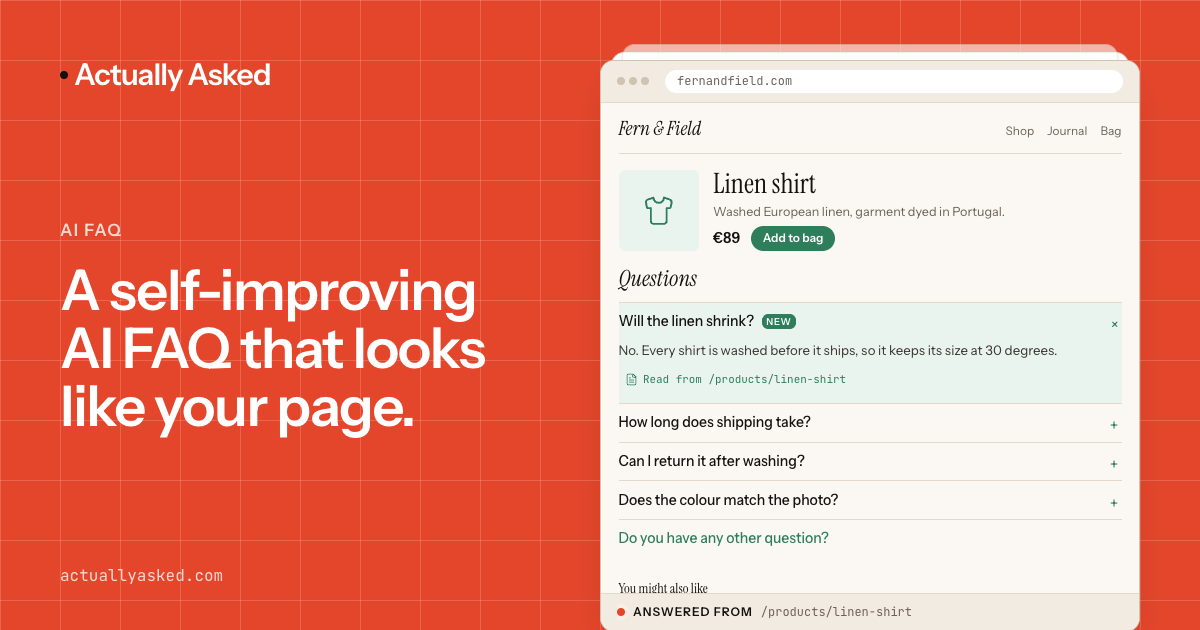
Actually Asked is an AI FAQ app for websites and Shopify stores. Rather than adding a floating chat bubble, it places a FAQ section directly inside your page, styled in your own fonts and colours, so it looks like part of the site. Visitors ask their question in their own words and receive answers taken only from your own pages, your help center and files you upload. The questions visitors ask most then join your FAQ on their own. The problem it addresses is a familiar one: businesses answer the same questions again and again by email. Sizing, shipping times, caffeine content, whether a jacket is truly waterproof, what a cancellation policy covers, what to bring to a first appointment. The answers usually already exist somewhere on a product page, in a help centre article or inside a PDF, but visitors either cannot find them or do not want to dig. Actually Asked is aimed at any site where people ask before they buy, book or sign up. The company puts the filter simply: if people email you the same questions again and again, it is for you; if nobody asks you anything yet, it is not. Three features carry the core experience. The first is an inline FAQ: a FAQ section that lives in your page rather than a chat bubble, and that is styled like your site. The marketing content shows the same widget rendered in the look of three different shops, a linen shirt store, a coffee roaster and an outdoor gear shop, each with its own typography and colours. The second is highlight to ask. Visitors select any sentence on the page and ask a question about it, which turns a specific line of copy, such as a sizing note or a care instruction, into an entry point for an answer. The third is the self-improving FAQ. The questions visitors ask most join your FAQ on their own, with nothing for you to approve. You can still edit, pin or remove any entry, and the product states that your edits are never overwritten. Answers are restricted to your own sources and nothing else. On the Sources page you connect your site, its pages, and on Shopify your products and store policies, which are read again every 7 days. You can add the address of a help center or knowledge base, and you can upload PDF or Word files such as size charts, care guides, manuals and price lists, including files that are not public. Answers can quote a file but never link to it. The onboarding view shows a site of 38 pages, a Shopify catalogue of 212 pages and four policy pages, all read at 04:00 with the next read scheduled for 04:00 the following day. The weekly gap report arrives as one email every Monday. It lists the questions asked most, the ones your pages do not answer, and what was added to your FAQ. A sample report shows 214 questions asked in the week, 87% of them answered and nine with no answer to write about. A separate leads feature captures visitors who leave an email address, so you have someone ready to reply to. Finally, an MCP integration lets you manage your FAQ by asking Claude, ChatGPT or another assistant, for example publishing FAQ entries through a tool call. Setup is presented as three steps. First, you add your domain, plus your help center or PDF and Word files if you have them; those sources are read, private files included, and your first FAQ entries are written from them. Second, you paste two lines, a div carrying your site key and an async script tag from the Actually Asked CDN, and the FAQ appears where you put it; on Shopify you add it as a block in the theme editor instead. Third, visitors ask, and your FAQ grows. The distinguishing choices are the absence of a chat bubble, the tight sourcing rule that answers come only from your pages, and the fact that popular questions are promoted into the FAQ automatically rather than waiting on a human editor. The outcome the product describes is a FAQ that looks like yours and learns from visitors. Popular questions are answered once and added permanently, so the same email does not need to be written twice. Because answers are grounded only in your own material, the reply a visitor sees reflects what you already publish. The Monday report gives a regular view of the questions your pages fail to answer, which points at content worth writing. Leads are collected for follow-up, and the whole FAQ can be maintained from a dashboard, the Shopify admin or an AI assistant. Four use cases are documented. Online stores, including Shopify, WooCommerce, Squarespace and custom shops, use it for product and policy questions such as whether a size runs small. SaaS and apps use it on pricing pages and documentation for plan and "does it do X" questions, illustrated by a per-seat pricing example where an annual discount question is answered from the /pricing page. Travel and hospitality businesses such as hotels, rentals and tours handle check-in, cancellations and what is included, illustrated by a room booking page answering whether breakfast is included from the /rooms page. Services and clinics, including agencies, clinics, studios and coaches, cover booking, pricing and what to expect, illustrated by a first-visit page that answers what to bring. Actually Asked was built first for Shopify stores but works on any website whose visitors have questions before they buy, book or sign up. Integration paths include a Shopify theme block, a WordPress Custom HTML block or footer script, a Webflow Code Embed, a Framer Marketplace plugin or pasted component, a Squarespace Code block, and static HTML, React, Next.js or custom templates. There is also a free gap-finder tool to find FAQ gaps and an MCP route for managing the FAQ through Claude or ChatGPT. Pricing starts free with 50 AI answers a month on one site, then $12 a month; every plan includes unlimited team members, and you pay for the answers you use and the sites you run. Actually Asked replaces the chat bubble with something more durable: a branded, inline FAQ that answers from your own sources and quietly grows with the questions visitors actually ask. It is free to start, live on your site in about ten minutes, and aimed at any business that keeps answering the same question by email.
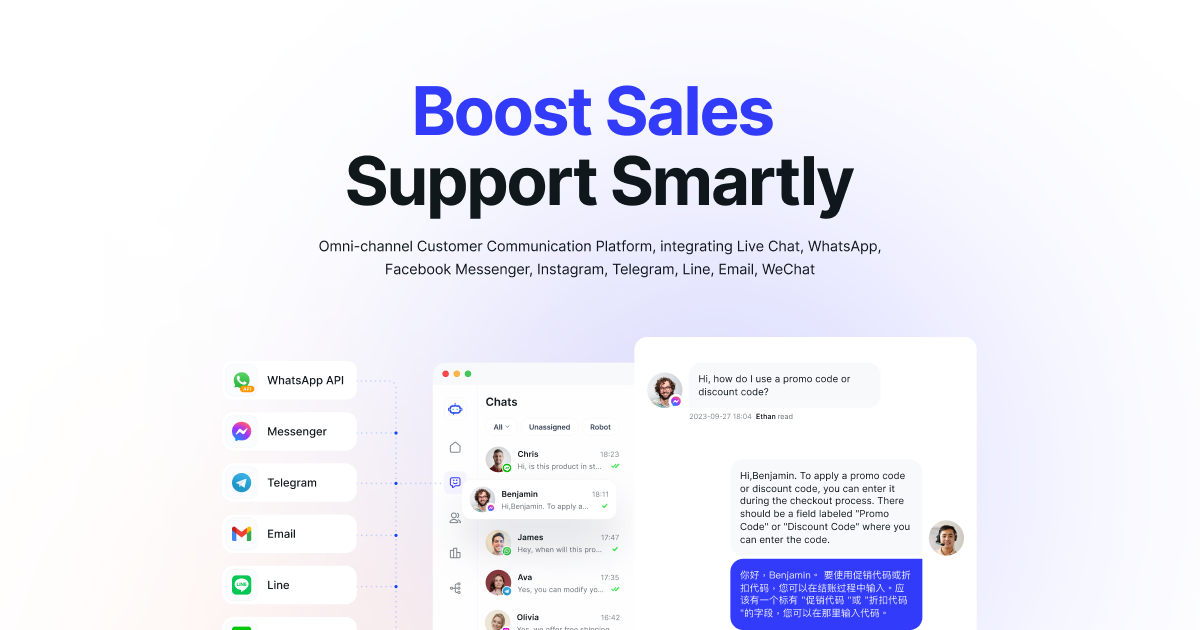
SalesRep is an all-in-one omnichannel customer communication platform built around a single, AI-powered team inbox. It unifies every customer channel, CRM and AI provider in one place so teams can capture leads, automate conversations, broadcast campaigns and close deals faster from a single platform. The product also acts as a virtual sales rep that sells for you 24/7: it pulls live prices and stock from Shopify, WooCommerce, PrestaShop, Meta Catalog or your own database and API, answers customers on WhatsApp, Instagram, Messenger, email, SMS and other channels, and sends product cards and quotes on the fly in any channel. SalesRep follows up automatically until the deal closes, allows human takeover at any time, and works in more than 30 languages that are auto-detected. It is used by more than 1,000 businesses worldwide. As chats and calls multiply, old inboxes and workflows break. Teams that sell and support customers across WhatsApp, Instagram, Messenger, email, SMS, voice and social media end up juggling multiple platforms, losing context and leaving conversations unanswered. SalesRep addresses this fragmentation by giving every customer one reliable record and every conversation one thread, no matter which channel it came from. Instead of silos, the platform offers a unified conversation history, automatic contact merging and deduplication, real-time sync with your CRM, and smart routing based on channel and context. The stated goal is to help businesses manage the entire customer journey in one place, even at high volume — a framework SalesRep calls Conversation-Led Growth. At the centre of SalesRep is the Omnichannel Team Inbox. It unifies contacts from voice calls, email, WhatsApp, TikTok, Facebook Messenger, Instagram, Telegram, SMS, WeChat, MS Teams, Slack, iMessage, Google Business and more, including Asterisk. Every conversation appears in a single thread and every customer in one place, so agents no longer switch between apps or maintain separate inboxes. The inbox includes unified conversation history across all channels, automatic contact merging and deduplication, real-time sync with your CRM (or SalesRep's own CRM), and smart routing based on channel and context. SalesRep states that chat channels deliver 92%+ open rates, and that messaging channels support product catalogs and in-chat payments. The inbox also supports team and custom inboxes, live chat and popup widgets, a knowledge base and canned responses, mobile app access with 2FA, and AI call and chat summaries. SalesRep's AI Agents are AI that sells, supports and scales. Ready-made or custom agents qualify leads, answer FAQs, recommend products, book appointments, route enquiries and handle support requests around the clock, across every messaging channel. The site reports that 75% of chats are handled entirely by AI and 80% of conversations are resolved by AI. Agents perform multimodal processing — text, images, audio and files — so they can send documents and images and process screenshots, audio and files for full context understanding. AI sales automation sends product offers with photos, prices and live stock in real time, answers voice messages with its own voice replies, auto-detects each customer's language and replies in it, generates and sends quotes instantly without human intervention, follows up automatically on every quote until it closes, and hands the conversation to your team whenever needed. Additional AI Agent capabilities round out the offering. Guardrails define what AI Agents say and do so they stay on-brand and compliant, and humans can take over active conversations instantly. A RAG-powered knowledge base lets agents pull verified answers from knowledge sources such as PDFs, doc files, catalogs, images and websites, continuously updated for accuracy. Voice AI provides natural, human-like speech. Agent specialization lets you orchestrate teams of micro-agents focused on tasks like retrieval, routing and escalation for precision results at scale. Teams can start quickly with ready-made AI Agent templates or build a fully customized agent tailored to their business needs and workflows. Agents also collect data, update lifecycle stages, resolve support issues, recommend products, share images and trigger workflows automatically. Beyond the inbox and agents, SalesRep provides AI Workflows and Broadcast campaigns. Workflows let teams build powerful automations with a visual drag-and-drop builder to automate repetitive tasks, sync data across platforms and keep the team focused on closing deals rather than manual busywork, with automatic lead routing and assignment, real-time CRM sync and custom field mapping. Broadcast lets you send targeted messages across WhatsApp, SMS, Facebook, Instagram, Telegram and Email in one click, sharing promotions, product updates and newsletters directly to the channels your customers use most. Broadcast features include multi-channel campaigns, audience segmentation and targeting, delivery and engagement analytics, and automated opt-in/opt-out management. SalesRep connects to HubSpot, Salesforce, Jira, Zapier and 40+ tools, plus Shopify, WooCommerce and PrestaShop. SalesRep's overall approach is organised around its Conversation-Led Growth framework, which is designed to help businesses manage the entire customer journey across every channel in one place, even at high volume. The platform describes three pillars. The first is the Omnichannel Team Inbox, which unifies contacts from voice, email, WhatsApp, TikTok, Facebook Messenger, Instagram and more into one thread per customer. The second is AI Agents, which answer FAQs, qualify leads, route enquiries, book appointments and handle support requests around the clock. The third is Automate & Integrate, which connects SalesRep to HubSpot, Salesforce, Jira, Zapier and 40+ tools to automate workflows, sync data and eliminate manual busywork. A published sample conversation shows an AI agent greeting a customer, quoting an IP phone with a reference, price and live stock, preparing a quote for four units, sending a PDF quote by WhatsApp and email, and scheduling an automatic follow-up. The site publishes a range of outcome metrics. SalesRep reports 42.5x average ROI, 500K+ conversations per month, 99.9% uptime and 1,000+ businesses across 30+ countries. It also cites a 60% faster sales cycle, an 81% conversion rate with AI Agents and 3x more leads from ads. Customer stories describe AirCharter.com cutting its sales cycle by 60% with the omnichannel inbox for private jet charter bookings, Maroc Ventes eCommerce handling support and sales across WhatsApp, email and live chat from one inbox with 3x faster quotes, Sport Center reaching an 81% conversion rate with AI Agents on SalesRep, and Sip.ma tripling leads and streamlining customer communication. The stated promise is to transform customer conversations into revenue. SalesRep is marketed as built for a range of business types, each with a concrete workflow. Clinics and healthcare use it for bookings, confirmations, reminders and patient follow-ups right inside WhatsApp. Sales teams use it to capture, qualify and close leads from ads and chats in one visual pipeline. E-commerce and retail teams use it for order updates, abandoned-cart recovery and product campaigns that convert. Salons and local services use it for appointment scheduling, deposits and no-show reduction on autopilot. Customer support teams use one shared omnichannel inbox, with AI resolving the routine majority. Real estate and agencies route property and project inquiries to the right agent in seconds. A separate workflow example shows quote requests for hardware being received via WhatsApp, assigned to an agent, tracked through lifecycle stages such as Proposal, Warm Lead and Purchased, and answered with a quote attached. SalesRep targets businesses that sell and support customers through messaging apps — sales teams, support teams, e-commerce and retail operations, clinics, salons and local services, and real estate agencies — and reports being used by 1,000+ businesses worldwide. Integrations named in the content include HubSpot, Salesforce, Jira and Zapier, plus Shopify, WooCommerce and PrestaShop, and the product states it connects to 40+ tools; it also supports Zapier, Make and n8n, API access and webhooks, and Meta & TikTok Ads and Catalog. Pricing starts at $39/mo for the Starter plan with 3 users included and +$12/seat, then $20 per extra 1,000 conversations that never expire, with conversation-per-month tiers of 1000, 2500, 5000 and 10000+. The Growth plan is $79/mo with 5 users, the Advanced plan $139/mo with 10 users, and Enterprise $249/mo with 20 users. A 21-day free trial requires no credit card. SalesRep emphasises safety and onboarding. It uses the official WhatsApp Business API and enforces Meta's messaging policies — opt-ins, approved templates and sending limits — so your number stays safe, and the team helps resolve any issues with Meta. The WhatsApp Business API requires its own dedicated number, which can be new or migrated, and SalesRep guides users through every step. Teams can migrate contacts, templates and automations from other tools or from the WhatsApp Business app without interrupting ongoing conversations. The free trial lasts 21 days with no credit card required, including help connecting channels and launching first automations, with evaluation extensions available on request. Most teams launch within a few days, and guided onboarding is free on every plan. The platform is available in 30 languages and AI agents converse naturally in Arabic (including Darija), French, English, Spanish and more, with a tone you control. AI agents do not replace teams; they take over repetitive work such as answering common questions, qualifying leads and routing conversations, handing anything complex to the right human agent with full conversation context. As a summary, SalesRep combines an omnichannel team inbox, AI sales agents, workflow automation and broadcast marketing into one platform for businesses that sell and support customers across messaging channels. Its central value proposition is that a virtual sales rep can pull live prices and stock, answer in the customer's own language, generate and send quotes, follow up until the deal closes, and hand off to a human whenever needed — turning everyday customer conversations into revenue while reducing response times and manual workload.
Sellio is an AI customer support platform built around one shared inbox. It collects website live chat, WhatsApp, Instagram, Telegram, and email conversations into a single place so a team can reply, take notes, and hand off work without losing context. Beyond the inbox, Sellio adds tickets, automations, an AI agent, and analytics. The AI agent is trained on your own knowledge — your site, docs, and FAQs — so its answers stay grounded in what you actually ship. Sellio is positioned for stores, hotels, SaaS teams, local businesses, help desks, and agencies: organizations that answer customer questions across several channels and want one shared inbox for every conversation, with AI added only when they are ready. The problem Sellio addresses is fragmented, easily missed customer conversations. Customer messages arrive on website chat, WhatsApp, Instagram, Telegram, and email, and when those conversations live in separate tools it becomes hard to keep track of the next step. Sellio's site puts it plainly: missed replies look the same in every industry. By keeping every reply, note, and handoff in one thread, the product aims to make the next step always clear, whether the conversation was raised by a live chat visitor, a WhatsApp message, or an email. It also raises work from a conversation as a ticket when a single reply is not enough, so nothing falls through the cracks as a thread turns into ongoing work. At the center of Sellio is the shared inbox. Every conversation lives in a clear thread that holds every reply, note, and handoff, so whoever picks it up next can see the full history and the clear next steps. The inbox is designed for teams: multiple people can work the same queue together rather than trading messages in private tools, and every channel lands in one place instead of being scattered across apps. When a conversation turns into work that continues beyond a single reply, Sellio raises a ticket from it, letting the team assign it and keep the full history attached. This means a support question can move from a live chat greeting to an assigned ticket without ever leaving the platform. The AI agent is optional and arrives when you decide you are ready. It is trained on your knowledge by pointing it at your site, docs, and FAQs, which keeps its answers grounded in what you actually ship rather than generic responses. It is designed to cover the first reply on website chat, so common questions get an immediate answer. When the AI cannot finish the job, it hands off to a person without losing context — the human agent inherits the same thread and history. Sellio also lets teams stay in control of cost, and the free plan includes one AI agent and five AI conversations to get started. Analytics are built to show what to fix next. Sellio follows every conversation to how it ended and how it felt, placing automation, resolution, and CX rates beside each other in one funnel. Topics are drawn from real chats, so teams can see what customers actually ask about, and response time is tracked so it can improve over time. CSAT is described as explaining itself, tying satisfaction back to the conversations that produced it. Automations are part of the same toolkit, sitting alongside the inbox, tickets, AI agent, and analytics in the product's main navigation, so routine steps can be handled while people focus on the conversations that need them. Getting started is deliberately simple. Sellio asks you to add one line to your site: a single script tag that installs an on-brand live chat widget, free to start. Website chat and the shared inbox are free, and the AI is used only when you want it. Email and messaging channels start on the Mini plan, and you pay only when you need more. Channels connect so that website chat, WhatsApp, Instagram, Telegram, and email all land in one inbox, and Slack, Discord, and Teams can mirror new conversations for your team. The overall approach is to centralize every conversation first, then layer AI on top of a knowledge base you control. For users, the outcome is one place to work rather than several. Teams see every reply, note, and handoff in a single thread, so the next step is always clear and colleagues can pick up work as a team. AI gives a first reply on website chat and hands off without losing context, so customers are not left waiting while staff stay in control of cost. Tickets keep ongoing work attached to the conversation that started it, and analytics turn real chats into topics, response times, and CX and CSAT measures that show what to fix next. Sellio describes itself as support that fits your industry, with concrete scenarios for each. For ecommerce, live chat on Shopify sits in the same inbox as WhatsApp, Instagram, and email. In hospitality, WhatsApp, Instagram, and website chat share one inbox for the front desk and operations. SaaS teams put website chat first and every other channel beside it in one shared inbox. Local businesses get a live chat bubble on their site plus the channels their neighborhood already uses. For help desks, work is raised from a conversation, assigned, and kept with its full history. Agencies get a shared inbox their team can assign, note, and resolve together, and any website can start with one script tag. Sellio is aimed at stores, hotels, SaaS, local teams, and agencies — anyone whose customers message on a mix of channels. Supported conversation channels are website chat, WhatsApp, Instagram, Telegram, and email, with Slack, Discord, and Teams able to mirror new conversations. The integrations page lists Stripe, ClickUp, Zoom, Salesforce, Discord, Telegram, Trello, GitLab, WhatsApp, Messenger, Jira, Linear, Shopify, Notion, Microsoft Teams, Zapier, Instagram, Asana, Slack, HubSpot, and GitHub, noting that six integrations are available now and the rest are on the way. Pricing starts free: website chat and the shared inbox cost nothing, with no trial clock and no credit card. The Free plan includes two seats, one channel, and one API key, plus one AI agent and five AI conversations. Nothing expires, and paid plans add more seats, channels, AI agents, and AI credits. Sellio's core value proposition is straightforward: one shared inbox for every conversation, the channels customers already use, and the numbers that show how every answer went. Start free with website chat and the shared inbox, then add AI when you are ready.
America.gov is a free government question-and-answer service that lets people describe what they need in plain language and receive a clear answer drawn only from official sources. It is built by the National Design Studio together with the General Services Administration, and it exists so that anyone — a job seeker, a veteran, a new business owner, or a parent applying for a passport — has a single place to start when they need something from government. The site's promise is simple: whatever you need from government, start here. The problem it addresses is fragmentation. Government information is spread across agencies, each with its own website, its own forms, and its own vocabulary, and the America.gov team puts the scale of that fragmentation at roughly 29,000 websites. A single real-life task can touch several of them at once: changing a legal name, for instance, involves the Social Security Administration, MyTravelGov, CBP Trusted Traveler Programs, and Global Entry or TSA PreCheck. People do not know which agency owns which step, so they wander from site to site, repeat the same search across different domains, and risk acting on information that is outdated or unofficial. America.gov is designed to remove that wandering. As the site puts it, no more wandering from site to site — America.gov brings the government together in one place. The core experience is a single input box framed by the instruction to describe what you need. Visitors type an everyday question rather than a set of government keywords. The site's own examples show the range: help me find a new job, how do I register my new business, how do I update my address with USPS, how do I get a passport for my child, which military service is best for me, how do I replace my social security card, how do I book a campsite in a national park, I am a veteran and how do I get care, I just got married and how do I change my last name, and when do I qualify for Medicare. Behind that box, America.gov uses SI to return simple answers, and every answer is exclusively sourced from federal, state, and local government websites. That sourcing rule is the product's central design decision: the tool is built to give official information rather than general web results. Privacy is treated as a feature rather than a footnote. America.gov states that personal information is not collected or stored, and that a conversation disappears when the visitor leaves. There is no advertising anywhere in the experience, and the service is free to use. For people researching sensitive topics — benefits eligibility, travel programs, health coverage, or a name change — that combination of official sourcing, no ads, and no stored conversation is the reason the answers can be trusted and the session can be private. Access is deliberately lightweight. There is no app to download: visitors simply open America.gov in a browser on a phone, tablet, or computer, which means the service works the same way on whatever device is at hand. Product Hunt lists availability in English, French, and Spanish, so the answers are not limited to English speakers. The overall aim is to lower the barrier from both directions — no installation on the device and no specialized knowledge required to ask a question. Beyond answering questions, America.gov is building toward completing tasks. The site states that more is coming in 2027, when users will be able to complete forms, track progress, and organize everything in one place, and Product Hunt describes the next step as applying, enrolling, and tracking progress right in chat. Previews on the site show what that looks like in practice. Job seekers will be able to drop a resume, get matched to federal jobs based on their experience, and compare matches that list the hiring agency, location, salary, and remote-work details. Campers will be able to choose a campground from a map — the example shows four campgrounds near Greer, Arizona, complete with photos and addresses. Health and identity tasks are previewed in the same way. Users will be able to compare medication costs by adding a medication and choosing its form, strength, and package size, then choose preferred pharmacies from a map that shows nearby names and addresses. A name-change flow would let someone update a legal name across multiple agencies at once, with Social Security, MyTravelGov, CBP Trusted Traveler Programs, and Global Entry or TSA PreCheck shown as the destinations. A housing preview shows a multifamily housing development with a photo and address. A passport flow shows confirming a photo and submitting an application, then tracking it from submitted to processing with an estimated arrival date. A sign-in option appears as the entry point for accessing services. Underneath all of this, the methodology stays constant: one place, plain language, official sources. The site describes it as bringing 29,000 government websites into one, and it reinforces the sourcing claim visually with agency badges and seals — the Department of the Interior, the Department of State, and the Department of Commerce appear as badges, while seals for the Treasury, Veterans Affairs, Commerce, Interior, Social Security, Labor, the Patent and Trademark Office, Transportation, and Energy appear on the page. Every answer is exclusively sourced from federal, state, and local websites, and the free, ad-free, privacy-protected model applies across the whole experience. A link to how it works and a link explaining privacy are provided for anyone who wants to understand the mechanics and the data handling. The benefit for users is time and certainty. Instead of running the same question through a search engine and sorting official pages from unofficial ones, a person types one question and receives a plain, clear answer. Because the answer is sourced only from government websites, there is less need to verify where the information came from. Because the service is free, ad-free, and does not store personal information, and because the conversation disappears on exit, using it carries no cost and no lasting footprint. And because it runs in a browser, there is nothing to install before the first question. Concrete use cases span the moments when people actually interact with government. Someone looking for work can describe their goal and get pointed toward federal job information. A new business owner can ask how to register a business. Someone who has moved can ask how to update an address with USPS. A parent can ask how to get a passport for a child, and later apply for and track that passport. A veteran can ask how to get care. A newly married person can ask how to change a last name and see which agencies are involved. A future retiree can ask when they qualify for Medicare. And an outdoors enthusiast can ask how to book a campsite in a national park, or choose one from a map. America.gov is for anyone in the United States who needs something from government and does not know exactly where to look — job seekers, small business owners, veterans, families handling passports and name changes, people approaching Medicare eligibility, and travelers dealing with trusted traveler programs. It is also useful for people who prefer not to use English, given availability in English, French, and Spanish. Pricing is straightforward: it is free to use, never includes ads, and keeps privacy protected. There is nothing to buy, nothing to download, and no account needed simply to ask a question. America.gov turns the search for government information into a conversation. Ask in plain language, get a clear answer drawn only from official federal, state, and local sources, and keep your privacy while doing it — with forms, progress tracking, and one-place organization promised next.
Chat.sh is a help center that answers questions instead of simply returning a list of titles. According to the website, search reads the question and answers it, with the pages it used. It can be served on your own domain, or in a folder on the site you already run. The product is presented as a help center built after Intercom's search broke, and it is aimed at teams that want a public support site, an AI search experience, and content that AI assistants can consume. The main purpose is to let visitors ask anything in their own words and receive an answer drawn from published articles, while the team keeps the help center on a domain or path they control. It is free for 50 pages and 100 AI answers a month with no card, and your own domain costs $399 once rather than a subscription. The background is stated directly on the site: I was a longtime Intercom customer until its help center search broke. The fix didn't come fast enough, so I built my own. That story frames the problem the product addresses. Most help centers, according to the launch description, give you a subdomain, a keyword search, and a monthly bill. Chat.sh positions itself differently by offering AI search that writes the answer and cites the pages it used, living in a folder on your own site, making every page available as markdown for ChatGPT, Claude, and llms.txt, and charging once instead of a subscription. The problem matters because a help center that only hands back a list of titles can leave customers searching for the right page, while an answer that shows its sources can resolve the question directly. For teams already paying for support software, the monthly bill and the subdomain are also friction points that chat.sh explicitly calls out. One of the central features is search that reads the question. The website explains that a model retrieves the passages and writes the answer, then shows the pages it used. It is not a keyword index handing back five titles that all contain the word 'domain'. Answers come from published articles only, which means the help center is grounded in the articles the team has published. The site shows live examples at testimonial.to/guide and chat.sh/help. This approach is useful because a customer can ask in their own words and still receive a response that points back to the source article. The interaction is designed around a simple prompt: ask anything, or search for a page. When a person asks a question such as whether the help center can be put under /guide, the system answers and shows the page it used. The product is built around one knowledge base that can answer in three ways. Articles, links, and files go in once, and the help center, the messenger, and the markdown you hand to an assistant all come from that same knowledge base. The content types explicitly listed include articles, web links, files, and TXT and Markdown. The help center is a public site that answers instead of handing back a list of titles. The chat messenger is marked as coming soon; it will put the same answers in a widget on your app, so a customer who is stuck never has to leave the page they are stuck on. The AI agent capability is available now: on each article, you can copy the page as markdown, open it in ChatGPT or Claude, or copy the whole help center. An agent can also start from llms.txt. The copy options include Copy page as Markdown for LLMs, View as Markdown, Open in ChatGPT, Open in Claude, and Copy all docs as Markdown. This matters because it turns the help center into a source that AI tools and agents can use directly, rather than leaving the content trapped in a proprietary format. A key differentiator is hosting. The help center can live at yoursite.com/help, at help.yoursite.com, or at your-team.chat.sh. It can also be hosted in a folder on the site you already run: name it /guide, /help, or whatever you call it, and the help center is served from there on the same domain, with the same analytics, and no subdomain to explain. A custom domain can be added by pointing a domain you own at the help center. The site contrasts old-style URLs such as /en/articles/8341022-add-a-custom-domain with readable addresses that contain no numeric id wedged into the path. In chat.sh, the slug is the title, and it is yours to change. Another detail is that each article draws its own preview card, so a link dropped in Slack arrives as the article rather than as your logo. The visual design is also configurable: you can pick the accent and the mark, and every page follows and stays readable, because the colour is darkened until it is. Overall, the product works from a single knowledge base and exposes it through the help center, the forthcoming messenger, and markdown for AI assistants. The website frames this under the heading One knowledge base, three ways to answer. The search methodology is retrieval combined with answer generation: a model retrieves passages and writes the answer, then shows the pages it used, and answers come from published articles only. The site also asks what a fixed format can't give you, arguing that the old stack hands every team the same URLs, the same search, and the same page with a different logo on it. Chat.sh claims to differ in hosting, addresses, preview cards, and theme control. The commercial approach is described as Get all three. Pay once. It is free on a chat.sh address. The lifetime option adds your own domain, bigger ceilings, and your agents. The site says what you get never changes, and only the price does: it goes up $100 each time we ship. At every price, the help center is live now and includes AI answers on your domain or in a folder, 1,000 pages, and 1,000 AI credits a month per workspace. A link counts as one page for every 2,500 characters of its text, and an article counts as one page. A PDF counts as one page per page of the file. One credit is one answer, here or in the messenger. When the month's credits are gone, 1,000 more are $20, paid once. The chat messenger is shipping next, and each AI reply uses 1 credit from the monthly allowance. The inbox is shipping after; teammates take over a conversation, with 3 people per workspace, and each person after that is $10 a month. Human replies don't use AI credits, and buying another person does not move the lifetime onto a subscription. Benefits follow from those features. Customers get an answer with the pages used, which can reduce the back-and-forth of a keyword search that returns titles only. Teams can keep the help center on a domain or folder they already run, preserving their own analytics and avoiding a subdomain to explain. Because every article can be copied as markdown and the whole help center can be copied or accessed through llms.txt, the same content can feed ChatGPT, Claude, and AI agents. The card preview for every article makes shared links more useful in tools like Slack. The free tier lets teams start with 50 pages and 100 AI answers a month without a card. The lifetime option adds a custom domain, 1,000 pages, and 1,000 AI credits a month per workspace, and it is a one-time payment rather than a subscription. The site emphasizes that human replies in the inbox don't use AI credits and that adding a person does not convert the lifetime into a subscription. For teams tired of a monthly bill for a fixed-format help center, these outcomes are the stated value: a help center that answers, lives where they want it, and can be handed to AI assistants. Concrete use cases appear throughout the content. A customer can ask a question in their own words and receive an answer that shows the page it used. A team can host the help center in a folder such as /guide or /help on the site it already runs, keeping the same domain and analytics. A team can add a custom domain by pointing a domain it owns at the help center. A user can copy a single page as markdown, view it as plain text, open it in ChatGPT, open it in Claude, or copy all published articles as markdown for pasting into AI tools. An AI agent can start from llms.txt to access the help center. When the chat messenger ships, it will place the same answers in a widget on an app so a stuck customer does not leave the page. When the inbox ships, teammates can take over a conversation. The site also shows live examples at testimonial.to/guide and chat.sh/help, and the launch description points to chat.sh/help as a place to try it. The target audience is implied by the story and the product framing: teams that run a help center or support site, particularly SaaS and customer success teams. The launch metadata lists topics such as Customer Success, SaaS, and Artificial Intelligence. The product is for people who want answers served on their own domain or in a folder on an existing site, and who want content available as markdown for ChatGPT, Claude, and llms.txt. Pricing is stated clearly. It is free for 50 pages and 100 AI answers a month, no card. Your own domain is $399 once and never a subscription. A launch-day offer gives $200 off any lifetime deal with code PHLAUNCH: $399 becomes $199, and $799 becomes $599, ending Oct 2, 12 AM PT. The lifetime includes 1,000 pages and 1,000 AI credits a month per workspace. Extra credits are 1,000 for $20, paid once. The chat messenger is shipping next, and the inbox is shipping after with 3 people per workspace and $10 a month for each additional person. No specific tech stack is named, but the product explicitly works with markdown, ChatGPT, Claude, and llms.txt. Chat.sh's primary value proposition is a help center that answers the question. It combines AI search that reads the question and cites the pages it used with hosting on your own domain or in a folder on the site you already run. One knowledge base powers the help center, the coming messenger, and markdown for AI assistants. It is free to start, and the lifetime plan adds your own domain, bigger ceilings, and agents for a one-time payment. For teams frustrated by keyword search, subdomains, and monthly bills, chat.sh presents a different model: answers instead of titles, your site instead of a subdomain, and a pay-once lifetime instead of a subscription.
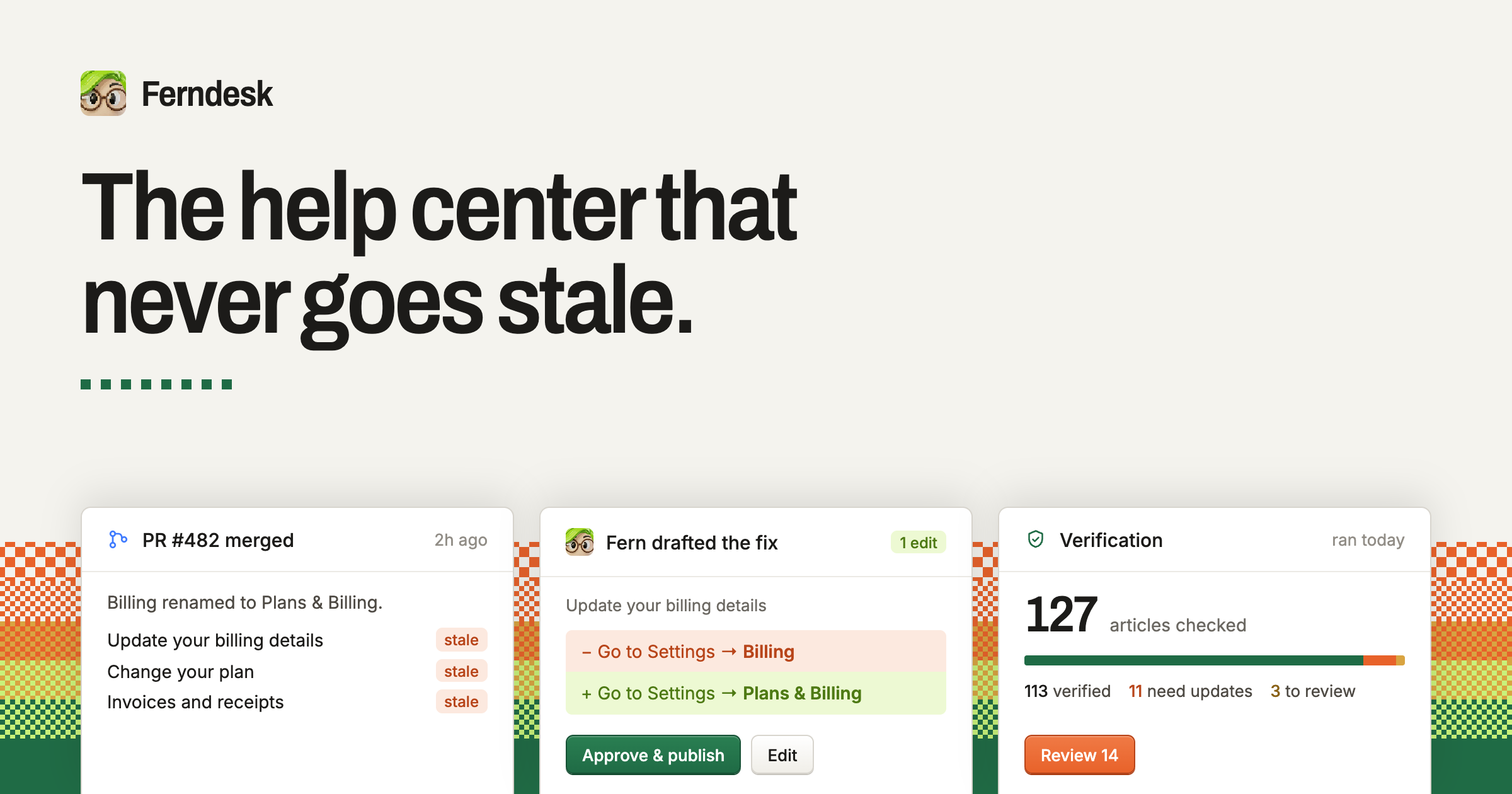
Ferndesk is a complete help center built around an agent called Fern that checks every article against your product, catches what has changed, and drafts the fixes for you. It is aimed at software teams that publish customer documentation and find it impossible to keep that documentation true while shipping features every week. Instead of treating a help center as a static set of pages that slowly drifts out of date, Ferndesk treats it as something that is continuously verified against the codebase, the live product and the support inbox, so the answers customers read match what the product actually does. The problem it solves is familiar to almost every software company. This month you changed a default, and yet your docs were last updated three months ago. Along the way you renamed a plan, killed a feature, moved the export button, added a plan, changed the pricing page, broke a link, shipped a new flow, renamed a button and changed a setting. None of those changes is dramatic on its own, but together they quietly make a knowledge base wrong. Ferndesk frames this as not the team's fault: keeping docs true while you ship every week is genuinely tough, and most teams fall back on hoping they will remember to update the documentation. The site quotes founders describing exactly this reality, including one who says their previous process for updating documentation was basically hoping they would remember to do it, another who says they ship features every week and updating docs is hell, and another who admits they used to write articles once and let them go stale right from day one. The first core capability is verification. Fern verifies every article in the help center and drafts the fix when something is wrong. Each claim is checked against the code and the product, and anything that is no longer true comes back as a change you approve, together with the reason it was flagged. A typical example shown on the site is a sentence that says a setting lives under Settings, Billing when it has actually moved to Settings, Plans and Billing; Ferndesk surfaces the outdated claim, proposes the corrected wording, and presents it for you to approve and publish. Nothing publishes without you. The second half of this capability is automatic updates for new releases: when a pull request merges, Fern drafts the documentation for that feature before the release goes out, so new functionality is documented as part of shipping rather than months later. The site illustrates this with a merged pull request that adds image editing, after which Fern drafts the docs for editing images in articles and updates the article about automating screenshots in your docs. Beyond verification and drafting, Ferndesk is a full help center product. It provides a public help center that can live on your own domain or at /help, and it is described as fast, searchable, and indexed both by Google and by AI search engines. AI conversations let customers ask questions in plain language and receive answers drawn from your verified docs rather than a guess, which matters because an AI answer is only as trustworthy as the documentation behind it. An in-app widget can be embedded with one script tag and brings search, articles and AI chat inside your product, exactly where people get stuck. Together these surfaces give customers more ways to answer their own questions before they ever open a ticket. Ferndesk also covers the more specialized documentation needs that usually require extra tools. API documentation provides an OpenAPI reference with a try-it playground that sits next to your customer docs. Private docs support magic link, OIDC or JWT access, so the same system can serve customer-facing documentation, partner documentation or an internal knowledge base for your own team. Translations produce a multilingual help center with a glossary and language-prefixed routes. Analytics surface searches, missed searches, failed answers and feedback, so you can see what to write next instead of guessing which articles are missing. Escalation connects the widget to your existing support stack: when the widget cannot answer a question, it hands the conversation off to Intercom, Zendesk or Help Scout. Ferndesk works by connecting to the tools where the truth about your product already lives. You connect your codebase, your live product and your support inbox, and the site lists GitHub, Intercom, Linear, Zendesk, your live app, Slack, Help Scout and Discord among the connectors. Setup is described as taking about ten minutes, after which Fern can see what your customers see. From that point on, verification runs continuously rather than as a one-off audit: every article is checked against what the product actually does, incorrect claims are turned into reviewable changes, and newly shipped features are drafted into articles. The workflow keeps a human in the loop at all times, since you review and approve and Fern publishes. Ferndesk also lets you manage your docs from tools such as Claude Code, Cursor or ChatGPT, meeting documentation work where developers already are. The benefits reported by customers are concrete. Ferndesk states that founders report saving 20 hours a month on docs, with one founder saying that a task which used to take an hour now takes five minutes. Because the docs Fern keeps current are the same docs a support AI trains on, better documentation also produces better AI answers. Customers describe support requests dropping significantly, and one customer reports a measurable drop in churn within three months of launch. Another says they have started to get organic clicks for queries and questions they did not expect to be ranking for. Together these point to a help center that reduces tickets, keeps customers self-serving, and continues to work as a marketing and search asset even after launch. Typical use cases follow directly from that. A team that ships weekly connects its repository so that merged pull requests turn into drafted documentation before each release. A company with a stale help center imports its existing articles and gets a verified, searchable public portal, then adds AI conversations and an in-app widget to bring tickets down. A support-driven company keeps its existing ticketing tool and uses Ferndesk for the knowledge layer, with the widget escalating unanswered questions into Intercom, Zendesk or Help Scout. A team selling internationally adds translations to run a multilingual help center, as Metricool did with seven languages live while using the same docs to train their AI support agents. A company with private or partner-facing material uses magic link, OIDC or JWT protected docs for audiences that should not see the public portal. And a content-led team reviews analytics to find missed searches and failed answers, then writes the articles those queries reveal. Ferndesk is used by more than 100 software teams, including Metricool, Zeffy, Andri, PixelFlow and SEO Gets, and is positioned for founders and support teams at software companies of varying size. Migration is deliberately low friction. Imports are supported from Intercom, Zendesk, Crisp, Help Scout, HubSpot, GitBook, Document360 and other help centers, with every URL preserved and redirects created, usually in under ten minutes, and your existing support tool stays where it is. A custom domain is supported, and customers can keep their knowledge base at a subfolder of their own domain. Getting started is a 7-day free trial with no card required, and nothing publishes without your approval. The takeaway is that Ferndesk turns documentation from something you hope is right into something you know is right. It combines a complete help center, covering the public portal, AI conversations, the in-app widget, API documentation, private docs, translations, analytics and escalation, with an agent that verifies every article against your product, drafts the fixes, documents new releases as they merge, and leaves the final decision to you. For teams whose docs have been stale for months, the promise is a help center that never goes stale, imported in ten minutes and kept current from then on.
SaleSmartly is an AI-powered omnichannel customer engagement platform that brings customer conversations from WhatsApp, Instagram, Messenger, TikTok, Telegram, LINE, WeChat and other channels into a single workspace. It is built for teams that handle customer service, sales and growth, and it combines three things in one product: an omnichannel inbox, AI agents, and a built-in CRM. The platform's stated purpose is to keep every conversation connected and every lead managed, so businesses can capture, convert and retain customers across the entire customer lifecycle and serve global customers as easily as local ones. SaleSmartly frames the problem it solves around a simple observation: most platforms lose context when customers move across channels, and more messages across different channels do not automatically create more revenue. Slow replies, scattered context and disconnected omnichannel messaging can quietly hold growth back. As the website puts it, a conversation problem eventually becomes a revenue problem, leading to lost leads, lost customers and slower growth. SaleSmartly was designed to remove that friction by centralizing omnichannel customer engagement in one workspace, so every inquiry is captured as a lead and the team can follow up faster. The site cites three times faster follow-up as an outcome of this centralized approach. The most visible part of the product is the Omnichannel Inbox. SaleSmartly states that it connects 14 messaging channels and platforms in one unified workspace, so agents do not have to switch between tools and do not risk missing messages. Channels named on the website include WhatsApp and WhatsApp Business API, Facebook Messenger, Instagram, Facebook, TikTok, Telegram, LINE, WeChat, Zalo, VKontakte, YouTube, Email, Live Chat and the website chat widget. Within the inbox, specific capabilities include a Team Inbox, Instagram DM management, TikTok DM management and Conversation APIs. Centralizing engagement in this way means every inquiry is captured as a lead and the team can follow up faster, which is the first stage of the journey SaleSmartly describes. The second pillar is AI. SaleSmartly describes a smarter AI agent for customer service: an AI employee that responds instantly, qualifies leads, translates conversations and automates next steps. The website summarizes this as a 4-in-1 capability covering respond, qualify, translate and hand off. High-value conversations are handed off to human agents with full context, an arrangement the company calls Human–AI Collaboration, supported by a Flexible AI Ecosystem and 24/7 AI Support. In practice this means routine questions can be answered around the clock while more complex or valuable conversations reach a person who already has the background needed to continue them. Real-time translation is also listed as a standalone feature, which helps teams serve customers in different languages without adding separate translation tools to their workflow. The third pillar is CRM. SaleSmartly's Social CRM keeps tags, notes, lifecycle stages and conversation history in one profile, so every follow-up feels personal and connected. The site highlights unified customer profiles, smart segmentation, AI-powered insights and WhatsApp CRM, describing the result as a 360-degree customer view. This matters because the platform's core promise is turning conversations into CRM context: rather than letting useful detail disappear into individual chat threads, the CRM preserves it so it can be reused for later follow-ups, segmentation and reporting. For sales teams in particular, that means leads and relationships stay in one place instead of being tracked manually. The fourth pillar focuses on customer retention and lifetime value. SaleSmartly uses customer data to identify dormant, high-intent and high-value customers, then triggers personalized outreach across WhatsApp, email, SMS and Messenger. Named capabilities include inactive segments, channel follow-ups, personalized outreach and LTV tracking. The company states that this approach delivers 30% higher customer lifetime value. The goal is to bring customers back into live conversations, measure every response and turn customer re-engagement into long-term growth. Related features listed elsewhere on the site include targeted broadcasts, tracking links and live QR codes, customer analytics, marketing attribution, auto-assign conversations, automation, and team collaboration and routing. SaleSmartly describes its approach as combining Omnichannel Customer Engagement, an AI workforce and CRM in one platform. The customer journey is organized into four stages: capture more leads, convert leads, strengthen relationships and drive repeat growth. Capture happens in the omnichannel inbox; conversion is handled by human agents working alongside AI agents; strengthening relationships runs through the CRM; and repeat growth comes from retention and re-engagement campaigns. Rather than treating messaging, automation and customer data as separate tools, SaleSmartly keeps them in one connected system so context survives as customers move between channels and between AI and human agents. That connected context is presented as the reason follow-ups stay relevant and handoffs stay smooth. Stated benefits include faster follow-up, a 100% after-sales response rate for support teams, stronger customer lifetime value and clearer visibility into team activity. SaleSmartly also positions itself as a way to protect customer assets: business owners can monitor team activity and maintain visibility across every channel, while marketing teams can link chats to campaigns and track attribution to optimize channel performance. Customer testimonials on the site echo these themes, describing centralized communications that reduce lost leads, a unified inbox across multiple networks that saves time, and automation that improves response times. One reviewer highlights intuitive design and accessible pricing for smaller brands, while another mentions increased Instagram sales and an easy initial setup. Use cases described on the website are organized both by role and by industry. For customer support teams, SaleSmartly is presented as a global after-sales management platform aimed at eliminating missed orders and lost customers, using an omnichannel inbox, AI support and team collaboration. For business owners, it offers WhatsApp management and customer asset protection alongside oversight of all team conversations. For sales teams, it provides lead management, pipeline tracking and a Social CRM to unify leads and relationships and keep opportunities moving. For marketing and growth teams, it supports CTM, Meta Conversion API and marketing attribution so chats can be linked to campaigns and ROI can be tracked. Individual reviewers describe using the product for Instagram sales, managing leads and social media inquiries, and centralizing information from multiple communication channels into one platform that also creates related task tickets. SaleSmartly says it is trusted by more than 300,000 businesses worldwide, and displays customer logos including ByteDance, Shein, Miniso and Alibaba Cloud on its brand wall. The platform supports a wide range of messaging and social integrations plus a website chat widget, and it references Conversation APIs and an Android SDK, indicating options for developers who want to connect their own systems. On the trust side, the company lists Meta Business Partner status, ISO 27001, ISO 27701 and CCRC certifications, and a 4.5/5 rating on G2. Detailed pricing is not published on the page, but visitors can start for free or book a demo; the free trial includes all channels and AI agents, and the site states that no credit card is needed. Overall, SaleSmartly's value proposition is straightforward: bring every customer conversation into one workspace, put AI agents and a CRM behind it, and use the resulting context to turn more conversations into customers. For teams juggling multiple channels, it aims to replace scattered inboxes and disconnected follow-ups with a single, connected system for service, sales, marketing and retention.
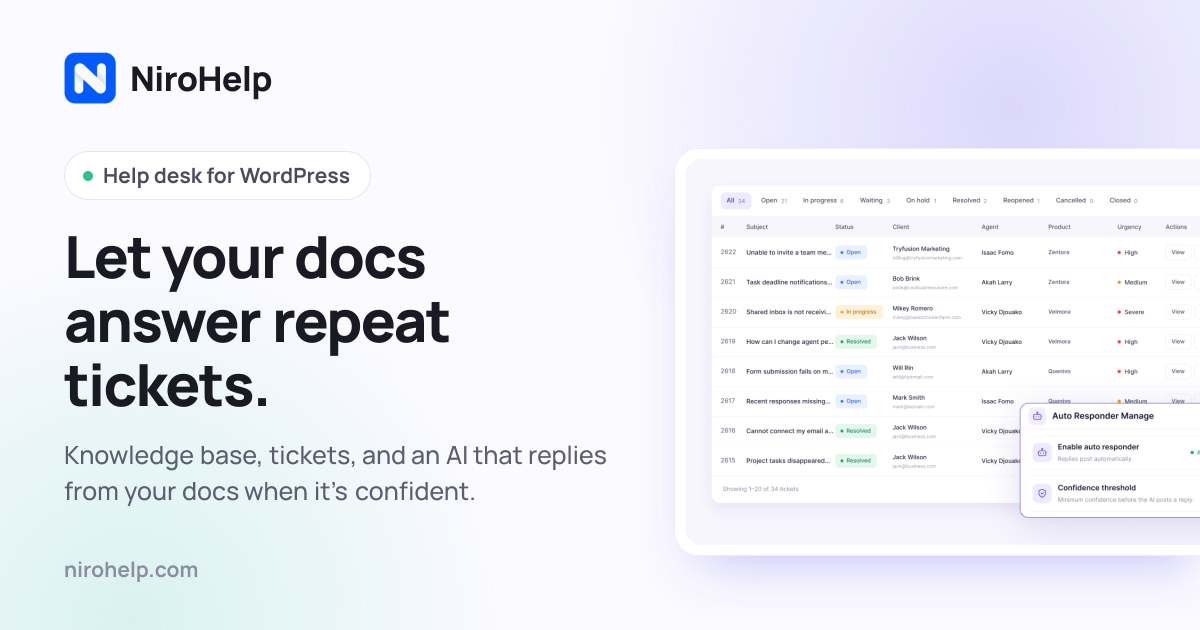
NiroHelp is an AI-native help desk built for WordPress. It bundles a knowledge base, a support ticket system, an AI chatbot, and an AI auto-responder into a single plugin that lives inside the WordPress admin, so docs, tickets, and AI all sit in the same menu. It is designed for teams that answer the same customer questions over and over — WordPress plugin, theme, and WooCommerce businesses, small support teams, and agencies managing multiple sites. The core purpose is straightforward: let your own help articles answer repeat tickets, and only pull in a human when the AI is not confident enough to reply. The help desk itself — knowledge base, ticketing, and dashboard — is free on WordPress.org, while paid plans switch on the AI features and email piping. Support teams often end up paying for several separate tools to cover one job: a documentation plugin, a ticketing plugin, and a chat or help-desk subscription. NiroHelp's founder, Nazmul Ahsan, says the team built it because they were tired of paying for five plugins to do what should be one job. The result is a single plugin where the knowledge base customers read is the same knowledge base the AI reads before it replies, and where docs, tickets, and AI live in one admin menu with nothing extra to install or learn. Because documentation usually already exists in WordPress product businesses and the questions already repeat, NiroHelp goes after the repetitive pre-sales and licensing questions that fill support queues. Customers get faster answers, and the team spends less time on questions the docs already cover. The knowledge base module lets you publish help articles your customers can search and browse. Articles are written with a familiar editor that supports titles, images, and formatting, and they are grouped into topics so visitors find things fast. Customers can mark an article helpful or not helpful, giving you a direct signal about which documentation needs work — the dashboard later surfaces those votes alongside the tickets that referenced the article. Article pages are clean and readable, with a table of contents and readable code snippets, and they stay fast to load even with hundreds of articles. Crucially, the AI reads these articles before it ever replies to anyone, so the quality of your docs directly shapes how much support the AI can handle on its own. Ticketing covers the conversations the AI cannot answer. Every ticket moves through clear stages — open, in progress, waiting, resolved, and more, eight stages in total on the free plan — and status updates itself whenever your team or the customer replies. New tickets are handed to an available agent automatically, so no single person gets overloaded. Manager, Agent, and Customer roles define who can access what, custom fields can be added without any code, and everyone gets an email the moment something changes. Tickets can also be embedded on any page, which means the same system can collect requests from a contact page, a checkout screen, or anywhere else on your site. The AI layer has two halves. The live chatbot is a chat bubble that already knows your product: you add a single line of vanilla JavaScript to any website, WordPress or not, and visitors get answers pulled straight from your help docs. You pick the agent name, avatar, and color so the widget matches your brand, choose which pages it appears on and when — it can go quiet outside business hours — and preview the exact widget in your dashboard before it goes live. It also remembers the conversation, so customers can move between pages without repeating themselves for as long as the tab lasts. The AI auto-responder applies the same documentation-grounded AI to incoming tickets. If your docs clear the confidence threshold you set, it replies on its own; if they do not, it stays quiet and leaves the ticket for your team. Answers post after a delay you choose — five minutes by default — so a customer who is still typing is not interrupted. Email piping turns the support inbox your customers already write to into your ticket queue. NiroHelp connects to any mailbox over IMAP or POP3 — including Gmail, Microsoft 365, and cPanel — and every email arrives as a tracked ticket while every reply threads back into the same conversation, so customers never have to learn a new tool. Multiple shared inboxes can each be routed to their own agents. Quoted history is stripped, attachments are carried over, and auto-replies are ignored. The AI auto-responder answers piped tickets too, which means even requests that arrive as ordinary email can be resolved from your docs before a person opens them. The dashboard gives a 360-degree view of your support for the last 30 days. At a glance you can see which tickets are waiting on your team, how many are overdue, your median first reply time, what percentage of conversations the AI deflected, and which threads have turned unhappy or been flagged. A needs-attention list sorts tickets by risk, and a separate panel highlights customers whose sentiment is turning negative. Then there is the copilot: a chat box you can ask questions such as which customers are most at risk this month, or what you should fix in the docs first, and it answers from your open tickets, replies, and doc votes. The workflow of the auto-responder is deliberately simple. A customer writes in, either as a new ticket or a reply, just like normal. The AI checks your docs for an article that actually answers the question. If it is confident, the answer posts after the delay you set. If it is not sure, it stays quiet and the ticket waits for a person — no guessing. Everything is contained in a single plugin: the free core handles docs, tickets, and the dashboard, while paid plans add the chatbot, the auto-responder, the copilot, and email piping. Each module can be enabled or disabled independently from Settings, and disabling one never touches the other's data because docs are posts, tickets are posts, and replies are comments. NiroHelp places privacy and ownership at the center of its design. The knowledge base, tickets, and replies live in your own WordPress database as ordinary posts and comments, not in a proprietary table and not on NiroHelp's servers. Docs, tickets, emails, and migration contact no external service at all, so the help desk keeps working with the internet unplugged; only the AI features talk outward, and when the auto-responder is on, that includes the ticket it is answering. There is no OpenAI or Anthropic key field anywhere in the plugin — the AI is included in your plan as an allowance of replies, and when it is used up the AI pauses until it resets rather than generating a per-token bill. Uninstalling deletes nothing of yours; it clears only the plugin's own bookkeeping. Migration is built in as well. A Migrate action copies articles, topics, and tickets — replies included — from seven other plugins: BetterDocs, weDocs, Echo Knowledge Base, BasePress, Awesome Support, SupportCandy, and JS Help Desk. Your old plugin keeps its data until you choose to clean it up, and every imported item is marked, so re-running the migration creates no duplicates; each source has its own guide describing exactly what comes across. NiroHelp also positions itself against a stitched-together stack. In its own cost comparison for a three-agent team, running Intercom, Zendesk, HubSpot, or Help Scout alongside a separate docs plugin comes to between $1,499 and $3,309 per year, while NiroHelp Starter is listed at $79.99 per year with unlimited agents. Pricing is based on how many sites you run, not how many people are on your team, and unlimited agents are included on every plan. The free plan, available on WordPress.org with no time limit, covers the knowledge base with search, ticketing with eight stages, automatic ticket assignment, the support dashboard, imports from seven plugins, and unlimited agents and tickets. Starter is $9.99 per month or $79.99 per year for one site and adds email piping, the AI chatbot trained on your docs, the AI auto-responder for tickets, and 1,000 AI credits per month. Growth is $29.99 per month or $239.99 per year for five sites with 6,000 AI credits per month and priority email support. Agency is $49.99 per month or $399.99 per year for ten client sites with 15,000 AI credits per month and voice call support. The product is aimed at WordPress product companies, small support teams of two to ten people, and agencies running multi-site setups. It is translation-ready, with a .pot template shipping with the plugin, and clients can log in without a WordPress account using a one-time verification code, a magic link, or a standard password. NiroHelp's primary value proposition is that the documentation you already wrote can do more of the support work. By keeping the knowledge base, tickets, chatbot, and auto-responder in one WordPress plugin — and by grounding every AI reply in your own articles — it lets a smaller team handle more customers at lower cost, while leaving the hard questions to people.
Koreshield is a runtime trust control layer for AI support workflows. It exists to stop untrusted customer content from becoming trusted instructions inside an AI workflow, and it is built for the teams that run AI support agents, including the engineers and security reviewers responsible for what those agents read and what they do. The product states the problem plainly: every AI support agent takes input from someone it should not trust, namely the customer message, the documents it retrieves, and the tool calls it proposes. Koreshield screens all three of those boundaries before they become trusted model behavior or application execution, so that data leaks, hidden instructions in help articles, policy drift, and unsafe agent actions are checked before the model acts. Rather than replacing the model or the authorization system, it sits beside the workflow as a decision point that produces a recorded reason for each decision. The underlying problem is a question of trust inheritance. A support agent is designed to be helpful, and helpfulness means treating the text it receives as usable input. But the customer message is written by someone outside the organization, and retrieved documents such as help articles, CRM notes, and ticket comments are not always written or edited by people with the system's interests in mind. When that text is folded into a prompt, it can inherit authority it never earned. Hidden instructions buried in a help article, a poisoned ticket, or a crafted customer message can quietly steer the model, and policy drift or unsafe agent actions can follow. Koreshield frames this as trust handoffs: one request passing through three places where trust can fail. The value of catching those failures at the boundary, before the model acts, is that the decision remains a controlled one rather than an after-the-fact investigation. The first boundary Koreshield evaluates is customer input. It inspects messages, attachments, and externally controlled text before model execution. In a support workflow, the customer message is the most obviously untrusted element, yet it is also the element the agent is most eager to act on. Koreshield evaluates this boundary independently of the other two and records the reason for its decision, so a reviewer can see what was flagged and why. Because the inspection happens before model execution, suspicious input never reaches the point where it could be treated as a system-level instruction. The coverage of externally controlled text means the same boundary applies whether the incoming content is a plain customer message or something attached to it. The second boundary is retrieved context. Koreshield keeps poisoned tickets, CRM notes, and RAG documents from inheriting system authority. Retrieval is where a support agent's helpfulness is most dangerous, because retrieved material is usually presented to the model as trusted reference material. A ticket comment or a knowledge base article that carries embedded instructions can therefore be read with the same confidence as internal policy. Koreshield screens retrieved context before it is allowed to take on that authority. Each boundary is evaluated independently and receives its own recorded decision, which matters in practice, because a flagged retrieval is a different kind of event than a flagged customer message, and the evidence trail should distinguish them rather than collapsing everything into a single pass or fail judgment. The third boundary is proposed actions. Koreshield evaluates tool calls against trust, approval, and authorization limits before execution. This is the last opportunity to intervene before the agent's reasoning turns into something real, such as a refund, a data lookup, or a change in a downstream system. The product is explicit that it does not replace your authorization system and does not make high-risk agents autonomous. Instead it adds an evaluation step at the point where an action is proposed but not yet performed. Tool calls are judged against limits around trust, approval, and authorization, and the outcome is recorded. If a proposed action exceeds what the workflow permits, Koreshield can hold it for policy rather than letting it execute, as the console view shows when an action is held. Koreshield's approach is deliberately staged, and the staging is the point. The product describes a rollout posture of observe first, enforce with evidence. Teams begin with live traffic in detect mode, which records threats without interrupting traffic. They then run validation checks against benign and adversarial support cases to see how the system behaves on both. Only once expected behavior, misses, and false positives have been reviewed, and once the fallback path is understood, does enforcement get enabled. Enforce mode stops requests that violate policy. A request trace illustrates the mechanics: a POST to the scan endpoint with an API key, tagged with a source such as a ticket comment and a trust level of untrusted, returns a decision of detected, a severity, and the mode it was evaluated under. Integration is described as one call, and the stated integration path is to create a server-side scan key, run detect mode beside live traffic, review evidence, misses, and false positives, and enforce only where fallback behavior is understood. The benefit Koreshield claims is evidence rather than promises: the product is meant to prove itself against your support workflow before any request is blocked. Because detect mode records threats without interrupting traffic, a team can adopt it without a disruptive cutover and can observe real threats in their own environment before changing behavior. Because the reason for every decision is recorded, security and support teams get an evidence trail they can review rather than an opaque block. And because the same layer inspects input, retrieved context, and proposed actions, the coverage is applied consistently across the three trust handoffs instead of being patched in one place. The stated limits are part of the same honesty: it does not promise complete attack coverage, it does not inspect arbitrary files or images today, it does not replace your authorization system, and it does not make high-risk agents autonomous. Concrete scenarios follow directly from the three boundaries. A support agent receives a customer message containing text that tries to become an instruction; Koreshield inspects it before model execution and records a detected threat while running in detect mode. An agent retrieves a help article or ticket comment that carries hidden instructions; Koreshield keeps that poisoned context from inheriting system authority. An agent proposes a tool call that exceeds its limits; Koreshield evaluates it against trust, approval, and authorization and holds it for policy. Before any of this goes live, a team runs benign and adversarial support cases through validation to see what the system catches and what it misses, then reviews the evidence before deciding where to enforce. Koreshield is aimed at teams running AI support workflows: the engineering and security functions that need to control what an AI support agent reads and does, along with the support operations owners who understand the expected behavior of the workflow. The deployment boundary is described clearly. You run the FastAPI security service with PostgreSQL and connect from the hosted console or your own support infrastructure, keeping the security decision close to the workflow. Integration is server-side, using a server-side scan key, and is described as one call to integrate. An interactive demo and a free evaluation are offered, and the product is listed on Product Hunt. The page does not state specific pricing plans. Koreshield's proposition is narrow and specific, which is what makes it useful: one request, three places trust can fail, and a recorded reason for every decision. It does not claim to replace the model, the authorization system, or human judgment about high-risk agents. It claims to stand at the handoff points where untrusted content becomes trusted instruction, namely customer input, retrieved context, and proposed actions, and to give teams the evidence they need to decide when to enforce. For anyone deploying AI support agents on live customer traffic, that is the difference between hoping the workflow behaves and being able to show what it did.
Multimodal Agents by Sierra are AI agents that bring voice, text, and visuals into the same customer conversation. Sierra has long believed that the conversation is the interface: the customer says what they need and the agent figures out the rest. Multimodal agents extend that belief beyond a single medium. Rather than making customers choose between talking, typing, or looking at something, the agent gives them the best of each — voice to explain what you need, a visual to compare options side by side, and text when you want to reference something later. The result is a single, continuous conversation that adapts to what the customer is trying to accomplish at that moment. The problem this solves is familiar to anyone who has tried to make a decision over the phone. Sierra describes trying to upgrade a mobile plan over the phone: the representative talks through models, colors, storage sizes, and monthly rates, and the customer is left comparing things in their head and picking a phone they cannot picture. Voice is genuinely good for parts of that interaction — you can say what you actually need and ask questions more easily than you can over text — but you cannot see the thing you are about to buy. Multimodal agents close that gap. Stitching channels together is not the hard part; the real trick, as Sierra puts it, is knowing which one to use when. That is where the agent's judgement comes in. Agents built on Sierra anticipate what is needed for each conversation and automatically shift between modes — voice, visuals, or text — without making the customer start over or repeat themselves. The choice of medium follows the shape of the task: voice to explain what you need, a visual to compare options side by side, or text when you want to reference something later. Because that switching is automatic, the customer never has to manage the interface. They simply continue the conversation, and the agent keeps the relevant context intact as the medium changes, which is precisely what prevents the restarting and repeating that usually happens when a support interaction jumps between a phone call, a chat window, and a web page. Visuals are part of the conversation rather than a separate destination. Sierra's example is a disrupted flight: you call the airline to get a new flight, and instead of a representative reading off alternate options one by one, you see them laid out with departure times, layovers, and pricing right in the conversation. You pick one, and the agent keeps going from there. Choosing a seat works the same way — you see the map and tap the seat you want. And for times when it is easier to talk than type, you can switch to voice and explain exactly what you need; the agent captures those details without making you type a paragraph into a text box. In each case the visual carries the comparison work that language handles poorly, while voice carries the nuance that menus and forms handle poorly. Sierra's approach is also designed to avoid rebuilding the same experience for every place the agent lives. With Sierra, you can build your agent once and easily deploy across all channels, and the same is true for multimodal agents: once you build a visual component, your agent can use it everywhere it lives. A comparison table or a calendar does not need to be recreated for each surface the agent operates on. That single-build approach reduces duplication for the team maintaining the experience and keeps behaviour consistent for the customer, who encounters the same kind of interactive element regardless of where the conversation happens to be taking place. Sierra's MCP UI integration is what lets teams bring interactive components into the conversation: product cards, comparison tables, calendars, and forms. Those components are designed and hosted by your own team, so you decide how they look, what they show, and when they change. That control matters because the visual layer is often the part of a customer experience that carries brand and merchandising decisions, not just function. Because your team hosts the components, when you make an update it is automatically reflected everywhere without needing to redeploy or maintain different versions for each platform. And when a component needs more room, it can expand to full screen to show calendars, long comparison tables, multi-step forms, and more — so the same building block can serve as an inline detail inside a conversation or as a focused, full-attention task when the customer needs to complete something substantial. Taken together, the methodology is straightforward: keep the conversation as the interface, let the agent decide which medium each moment calls for, and make the interactive pieces reusable across every surface. Sierra frames the goal as customers never having to choose. On one call, customers can talk through what they need, glance at a screen to compare their options, and tap to confirm — without ever pausing the conversation to switch tools. The agent, not the customer, manages the transitions, which is what makes an interaction that spans voice, visuals, and text feel like a single continuous exchange rather than three separate ones. The outcomes described are practical. Customers get through decisions faster because they can see options while hearing about them, and they avoid the frustration of describing the same need twice or rebuilding context after a channel change. They can also reference something later in text when that is easier than listening. Businesses, meanwhile, get a single deployment path: build the agent and its visual components once, use them across channels, update them in one place, and avoid maintaining separate versions per platform. And the experience is described as being as easy to build and deploy as it is for customers to use, which lowers the practical barrier to offering a multimodal customer experience at all. Concrete workflows in Sierra's own examples include upgrading a mobile plan, where a customer talks through what they need and compares phones, colors, storage sizes, and monthly rates visually instead of holding the options in their head. A disrupted flight is another: the agent surfaces alternate flights with departure times, layovers, and pricing in the conversation, and the customer picks one and continues. Seat selection follows the same pattern, with a map the customer taps rather than a description they have to parse. Voice-first moments are covered too — when it is easier to explain something than to type it, the customer can switch to voice and the agent captures the details. More broadly, any conversation that involves comparing options side by side, filling in a form, or choosing a time can use interactive components inside the exchange itself. Multimodal Agents by Sierra are aimed at organizations that handle customer conversations and want those conversations to adapt to the customer rather than the other way around — customer experience and support functions in particular. The people who build the visual layer are the customer's own teams: Sierra states that your team designs and hosts the components used in the conversation. Deployment is described in terms of channels rather than a single app, since the same agent and the same visual components are meant to work everywhere the agent lives. Sierra's MCP UI integration is the mechanism named in the content for bringing interactive components such as product cards, comparison tables, calendars, and forms directly into a conversation. The core idea behind Multimodal Agents by Sierra is that the best interface is the one the conversation needs. Voice, visuals, and text stop being competing options and become modes the agent moves between as the situation changes — voice when explaining is easier, a visual when comparing side by side helps, text when something needs to be referenced later. Because agents built on Sierra anticipate what is needed and shift automatically, customers never start over or repeat themselves, and because visual components are built once and hosted by your team, they can appear everywhere the agent works. That is the promise: one agent, every surface, and a conversation that morphs to fit the customer.