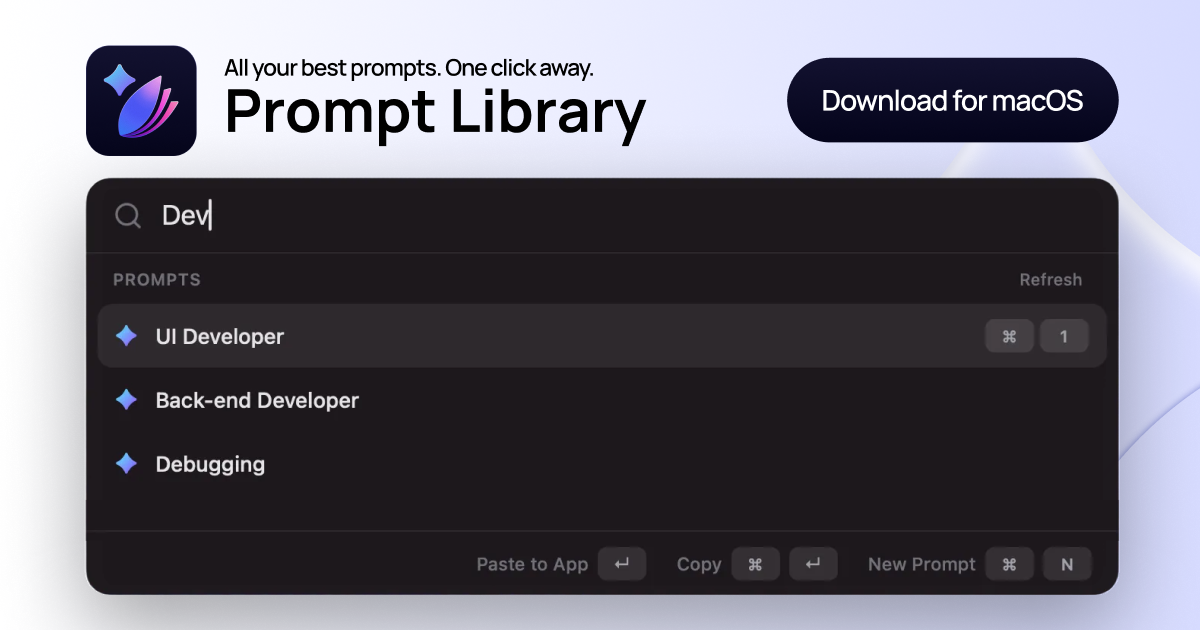
Prompt Library helps you save, organize, and instantly reuse your best prompts across ChatGPT, Claude, Gemini, and more. It turns prompt chaos into a clean, searchable system accessible via a global shortcut.
Prompt Library is a dedicated AI prompt manager for macOS that consolidates your best prompts from tools like ChatGPT, Claude, and Gemini into a single, searchable library. It is designed for anyone who regularly works with AI—marketers, engineers, support agents, researchers, and content creators—and aims to streamline the prompt reuse process. The core value proposition is replacing scattered notes, endless browser tabs, and manual copying with a clean system where every proven instruction is accessible via the ⌘⌥P global shortcut. By centralizing prompt management, it helps users focus on creating rather than searching, which directly improves AI interaction quality and saves significant time.
Before Prompt Library, users often struggle with prompt chaos: half-updated snippets buried in notes apps, repeated searching through old chat histories for the "perfect" prompt version, and constant context switching just to copy, tweak, and paste instructions. This disruption breaks creative flow and reduces output quality. Prompt Library solves this by providing a single source of truth where all prompts live in one clean app with tags and collections. Users can instantly recall prompts with ⌘⌥P, search by keyword, and paste in one action, eliminating the need to search through multiple sources. The result is higher output quality because users reuse prompts that already worked instead of rewriting from scratch.
The first major feature group is the global launcher accessed via the ⌘⌥P shortcut. This keyboard combination opens a searchable overlay from anywhere on the Mac, allowing users to filter prompts in real time as they type. The launcher supports fast keyboard navigation, so users can select a prompt with the arrow keys and press Enter to insert it directly into the current application. Alternatively, pressing ⌘⌘↵ copies the prompt without inserting, and ⌘N creates a new prompt quickly. This feature is useful because it keeps the user's hands on the keyboard, maintains focus, and removes the friction of switching between windows to find the right instruction.
The second feature group is the organizational structure built around collections and tags. Users can build collections for each context, such as marketing, product, engineering, support, or hiring, giving every reusable instruction a clear home. Tags further refine accessibility, allowing users to mark prompts as campaign-ready, role-specific, or fast triage for debugging. This system turns a flat list of prompts into a structured library that aligns with a user's workflow. By categorizing prompts by role, project, or use case, it becomes effortless to locate the exact instruction needed, even as the library grows. The benefit is that users spend less time searching and more time using their best prompts.
Publisher
A
admin
Launch Date2026-02-15
Platformdesktop
Pricingfreemium