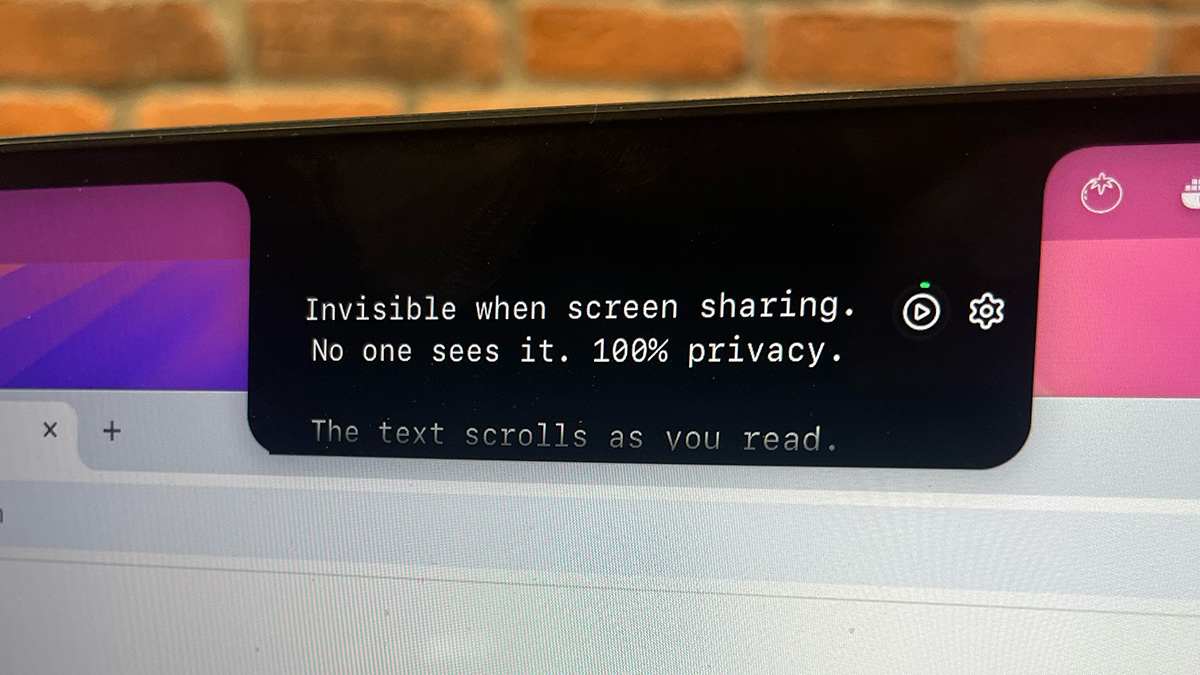
Notchie is a dedicated Mac notch teleprompter designed for professionals who need to deliver scripted content during video calls while maintaining natural eye contact. It utilizes the unused space surrounding your MacBook's notch to display text discreetly, sitting right next to the camera lens. This clever placement means you can read your notes, scripts, or talking points while appearing to look directly at your audience. What sets Notchie apart is its absolute invisibility during screen sharing: the overlay never shows up in any recording or shared window, making it completely undetectable. Whether you are a founder pitching investors, a salesperson running a demo, or a content creator recording a tutorial, this tool gives you the confidence to speak fluently without memorization. It transforms rigid, scripted delivery into a natural, conversational flow that keeps your credibility intact.
The high-stakes nature of modern remote communication creates a paradox: you must be impeccably prepared, yet sound completely unscripted. When presenting to executives, closing a deal, or recording a course, the pressure can cause your mind to go blank at the worst moment. Glancing at notes on a second screen or a physical notebook breaks the eye contact that builds trust, signaling to everyone that you are reading rather than engaging. Even worse, reading directly from a visible script leads to robotic cadence, scanning eyes, and unnatural pauses—telltale signs that erode your authority. The moment an audience member wonders whether you are reading from a prompt, your message loses its persuasive power, and your hard work on the content evaporates. This pain point is especially acute for non-native speakers and those facing critical, one-shot opportunities like job interviews or live product launches, where a single stumble can cost a deal or an offer.
Notchie’s standout feature is its voice-sync scrolling technology, which listens to your speech and scrolls the script in real time. As you speak into your Mac’s microphone, the text advances automatically; when you pause for emphasis, the scrolling stops, and when you speed up excitedly, it accelerates to keep exactly in sync. This intelligent behavior means you never have to match a fixed scroll speed, eliminating the common teleprompter problem of either lagging behind or racing ahead. It creates a truly adaptive reading experience that supports dramatic pauses, sudden rushes, and conversational ebb and flow. For those who prefer traditional control, a classic auto-scroll mode is available with adjustable speed and instant hover-to-pause functionality. The voice-sync mode, however, is the game-changer, enabling even inexperienced presenters to deliver a professional-sounding monologue that feels alive and unrehearsed, all while their eyes remain fixed on the camera with unwavering focus.
admin
A core innovation of Notchie is its complete invisibility during screen sharing sessions. The app renders its text overlay on a specialized macOS compositor layer that screen capture APIs cannot access. This means that whether you are sharing your entire screen or a specific window in Zoom, Google Meet, Microsoft Teams, or OBS Studio, the teleprompter remains permanently hidden from viewers. They see only your slides, application, or desktop—never the script that is guiding you. There is no toggle to accidentally reveal your notes, no watermark, and no fiddly exceptions for certain apps; the protection is universal and always active. This design choice gives you absolute peace of mind, allowing you to focus entirely on delivering your message rather than worrying about exposure. The result is a seamless, indistinguishable-from-improvisation performance that leaves your audience marveling at your eloquence and command of the subject.
Beyond its core reading and hiding abilities, Notchie offers extensive customization to fit any workflow. The teleprompter window is fully resizable, allowing you to adjust its width, height, and font size to match your camera position precisely. A background opacity slider lets you set the transparency so that you can see meeting notes or video feeds behind the script, keeping contextual awareness. Global keyboard shortcuts provide frictionless control: use Shift plus the arrow keys to speed up, slow down, or scroll manually without ever leaving your presentation application. Hovering your mouse over the text instantly pauses the scroll, giving you the freedom to go off-script to answer a question or elaborate. Setup is immediate—there is no account creation, no complex configuration; you simply paste your script and are ready to present in under a minute. These touches make Notchie both a powerful assistant for seasoned presenters and an intuitive tool for first-time users.
Using Notchie follows a straightforward, three-step workflow. First, you launch the native macOS application, which runs natively on both Apple Silicon and Intel processors with minimal resource usage, and paste your prepared script, bullet points, or even rough notes into its editor. The text immediately appears in the notch-adjacent area near your camera. Next, you select either voice-sync mode to have the scroll follow your speech or auto-scroll mode with a preset speed, and you fine-tune the display settings such as opacity and font size. Finally, when your video call or recording begins, you simply look at the camera and read. Notchie stays invisible during any screen sharing, so you can navigate slides, demos, or applications while reading your script without detection. Because the app requires no internet connection and keeps all data locally, your sensitive presentation scripts remain private and secure on your Mac, aligning with modern privacy expectations.
Notchie proves invaluable across a wide range of real-world scenarios. In client calls, a sales manager can scroll through objection handlers and closing techniques without losing eye contact, converting more conversations into signed contracts. During product demos, a technical presenter follows a feature checklist to ensure nothing is overlooked, delivering a polished walkthrough that impresses stakeholders. Content creators record YouTube explainer videos or online course modules in a single take, bypassing the editing room and saving hours of post-production work. For job seekers, having STAR interview stories and salary negotiation points subtly available transforms anxious video interviews into confident, offer-winning performances. Even keynote speakers and webinar hosts use Notchie to keep their outlines on track while interacting with live audiences, achieving a dynamic yet flawlessly structured presentation. In every case, the common outcome is a dramatic boost in confidence and a marked reduction in preparation stress.
Notchie is built explicitly for Mac users running macOS 14 or later on Apple Silicon or Intel hardware, and it integrates seamlessly with every major video conferencing platform. Its primary audience includes content creators, startup founders, sales professionals, remote consultants, and anyone who must perform convincingly on camera. The pricing model is refreshingly straightforward: a one-time payment of $29.99 (discounted from $49) grants lifetime access to the app and all future updates, with no subscription ever. A 30-day money-back guarantee and a free trial option let you test its capabilities risk-free. Apple has notarized the app, confirming it is sandboxed and free of malicious code, and it collects no user data whatsoever. By combining intelligent voice-sync scrolling, absolute screen-share invisibility, and user-friendly controls, Notchie delivers a level of poise and polish that can elevate any remote communication, transforming a nervous script-reader into a calm, commanding speaker.
Notchie is designed for professionals who regularly present, pitch, or record in high-stakes virtual settings. This includes content creators—YouTubers, course instructors, and live streamers—who need to deliver scripts flawlessly in one take. Sales professionals, from account executives to demo specialists, use it to nail every client call and product walkthrough. Founders and executives rely on it for board meetings, investor pitches, and keynote presentations. Remote workers in consulting, law, and medicine use it during client consultations. Additionally, job seekers practicing for virtual interviews benefit from having their talking points subtly available. Essentially, any Mac user who wants to appear unrehearsed while reading a script will find Notchie invaluable.