Category Focus/categories/developer-tools
Developer Tools AI Tools
Discover and compare the best developer tools AI tools and software. Browse 571+ curated tools with reviews and rankings.
Projects tracked
571
Sort mode
RECENT
Page
8
Discover and compare the best developer tools AI tools and software. Browse 571+ curated tools with reviews and rankings.
Projects tracked
571
Sort mode
RECENT
Page
8
Designeer is a curated platform that brings the best of the internet together for designers, developers, and builders. According to its own description, it helps people discover interface craft, component libraries, design systems, AI tools, inspiration, and people worth learning from, all in one place. The site is organised into numbered sections: Design Galleries, Interface Design, and Reading. Each section is a hand-picked list of external resources, from design showcase sites and prototyping canvases to books, essays and tutorials. The Product Hunt listing frames the same idea as "Explore the Best of the Internet for Builders," with a tagline of "Bringing the best of the internet together" and a four-step promise: Discover. Learn. Build. Showcase. The value of a platform like Designeer comes from how dispersed the material it collects normally is. Design inspiration lives on award sites, personal galleries, mobile flow archives and visual moodboarding platforms. Tooling lives on the sites of individual products. Learning material lives in books, course platforms, engineering blogs and pattern libraries. Keeping track of all of it is a manual exercise. Designeer's approach is to curate rather than generate: it selects resources and presents each one with a short, one-line description so a visitor can judge relevance before clicking through. The result is a single index covering galleries, canvases, tokens, tutorials and AI tooling, which is exactly what the phrase "bringing the best of the internet together" describes. The platform places itself in the middle of a workflow it names in four words — Discover, Learn, Build, Showcase — and serves each of those stages from the same list. The largest section is Design Galleries, described on the site as covering "design galleries, interface patterns, and web inspiration." It contains dozens of listings. Some are broad awards and community platforms, such as Awwwards for exceptional digital web craft, Dribbble's global community for sharing design concepts, Behance's Adobe showcase for creative portfolios, and Pinterest's visual discovery engine for creative ideas. Others are tightly focused galleries: 60fps collects recordings of interfaces that move well, Minimal Gallery showcases minimal and restrained websites, Sombra and Dark Mode Design celebrate dark-mode interfaces, Hover States showcases innovative interactive web design, and wwwtf.site gathers quirky and experimental interactive web corners. Several listings target specific page elements — Supahero curates website hero sections, navbar.design and navbar.gallery focus on navigation bar patterns, footer.design collects creative website footers, cta.gallery curates call-to-action buttons and banners, and Sections.wtf presents a real-world website section and hero gallery. Product and mobile references are covered too: Mobbin offers real mobile and web product flows, UX Archive holds a historical archive of mobile onboarding flows, Screenlane is a searchable gallery of interface screens, Pttrns is a directory of mobile UI patterns, and Appinspo curates mobile application design. For marketing pages there are Land-book, Lapa Ninja, Landingfolio, Saaspo, SaaSFrame, SaaS Landing Page, Best SaaS Web Designs and Landdding. The section also reaches into motion and imagery with Motionimo's library of motion design clips, Imageory's galleries pairing images with prompts, Backgrounds Supply's handcrafted website backgrounds and Venust Backgrounds' free AI-generated backgrounds. The Interface Design section is introduced as covering "interface design canvases, tokens, and layout systems." It lists end-to-end design platforms alongside narrower references. Figma is described as a collaborative interface design and prototyping platform; Framer as a visual canvas for designing and publishing websites; Penpot as an open-source web design platform supporting SVG; and Spline as browser-based 3D design software with physics. make.design is an AI generator that turns prompts into polished designs, and design.dev is an AI-assisted design token and system editor. Around those tools sit craft-focused references: Interface Craft publishes articles exploring modern digital interface craftsmanship, UI Labs is a laboratory deconstructing animated UI components, UIWTF showcases experimental web interface patterns, Lab01 presents refined UI experiments from a studio, and UI Playbook is a guide to common UI component states. The third section, Reading, is described as "essential books, design engineering essays, and craft tutorials." It mixes foundational books with ongoing publications and courses. Refactoring UI is listed as a practical design guide for building interfaces, and Practical Typography as an essential book covering typographic rules and layout; Design Books is a directory of essential design literature by discipline. For web standards and performance there is web.dev, and Inclusive Components is a pattern library teaching accessible component design. Interactive learning appears through Josh Comeau's tutorials breaking down CSS mechanics, Learn UI's video course on practical user interface design, Animations.dev's course on creating web animations that feel right, SVG Guide's guide to SVG markup and animations, and Learn Kernels' interactive guide to GPU kernel programming. Design system practice is supported by the Design System Checklist and by userinterface.wiki, a knowledge base documenting interface guidelines and rules. On the AI side, UI Skills teaches techniques for designing with AI, AI for UI teaches AI workflows for interfaces, and The Shape of AI is a pattern library highlighting AI interface design. Editorial and community sources include Smashing Magazine, Codrops, Muzli, UX Collective, Designer News, Web Designer Depot, Designmodo, Abduzeedo, Boxes and Arrows, Interfaces, Making Software, Visual Rambling, Design Spells, Good UI, Laws of UX, Degreeless Design, UI Land's interviews with design engineers, 99designs Discover and Inspiration Grid. Designeer works as a browsable index rather than a hosted toolset. The homepage is divided into numbered sections — 01 Design Galleries, 02 Interface Design and 03 Reading — and each entry within a section is a card with a favicon, the resource name and a one-sentence description. Selecting a card sends the visitor out to the original resource through a tagged outbound link, so Designeer itself stays a directory. Search is exposed at the top of the page and is bound to the CtrlK shortcut, while the Explore view is bound to CtrlE, giving keyboard-first users a fast way to filter the collection. A sponsored placement sits above the listings; currently the slot features Loops, described as marketing and transactional email for SaaS, from onboarding to product launches. Because every entry is hand-picked and summarised, the platform's stated benefit is that designers, developers and builders can find interface craft, component libraries, design systems, AI tools and inspiration in one place instead of across dozens of bookmarks. The one-line descriptions carry much of the value: a visitor can tell whether a resource is an archive of onboarding flows, a gallery of hero sections, a course on animation or an AI design tool without leaving the page. Coverage extends across the whole workflow the site names — Discover, Learn, Build and Showcase — so the same index serves someone gathering inspiration, someone choosing a design canvas, someone studying typography, and someone looking for people worth learning from. Concrete workflows follow the three sections. A designer starting a landing page can browse the landing-page and hero galleries — Lapa Ninja, Landingfolio, Land-book, Saaspo, SaaSFrame, Supahero — and then check navbar.design, footer.design or cta.gallery for the specific components they need to build. A team reviewing onboarding can study Mobbin's real product flows or UX Archive's historical archive of mobile onboarding flows. Someone choosing tooling can compare Figma, Framer, Penpot, Spline, make.design and design.dev in the Interface Design section. A developer building skills can work through Reading entries such as Animations.dev, SVG Guide or Josh Comeau's CSS tutorials. A design engineer looking for peers and portfolios can use Wall of Portfolios, Folios Gallery, desengs.com, designeng.tools, designengineer.tools and bestdesignsonx, while someone following AI build tooling can look for AI tools, coding agents and MCP servers referenced in the platform's own description. The platform names its audience directly: designers, developers, and builders. The Product Hunt listing tags it with the topics Design Tools, Developer Tools, Artificial Intelligence and Vercel Day. The website is localised in English, uses Designeer as application name, author, creator and publisher, and exposes Open Graph and Twitter card imagery plus rich search metadata for sharing. A sponsorship slot indicates commercial placement on the homepage, currently occupied by Loops. No pricing tiers, subscription plans or account requirements are described in the available content, apart from a Log in control shown in the interface. In short, Designeer is a curation layer for the design and build internet. Rather than offering its own editor, it collects galleries, interface design canvases, design systems, AI tooling, books, essays and tutorials, describes each one in a sentence, and lets visitors jump straight to the source. For designers, developers and builders who want to discover interface craft and people worth learning from without maintaining a sprawling bookmark folder, the platform's promise is simple: the best of the internet, brought together in one place.
DEV·TV is a retro television interface for following developer news. It takes the sources developers already check out of habit — GitHub, Hacker News, DEV, Hugging Face, plus Releases, AI Papers, Latest Papers, CVE, HN Video and AI Video — and turns them into 10 live channels that play on their own, like TV. It is made for developers and dev teams who want to glance at what is rising in their field, catch one story, and get back to coding instead of opening a dozen tabs. Everything runs on one always-on screen with an ON AIR indicator, a running clock, numbered channels and a built-in reader for the story currently playing. Most developers check the same sources every day as a habit: GitHub for rising repositories, Hacker News for discussion, DEV for posts, Hugging Face for models and demos, plus release notes, papers and security advisories. Those checks are fragmented across tabs and feeds, and they are easy to skip when you are deep in work — which means a team can miss a release, a vulnerability or a story that everyone else is talking about. DEV·TV frames this habitual checking as television: content plays on its own in a fixed, glanceable screen, so catching up takes seconds rather than a dedicated browsing session. The Product Hunt listing frames the value simply: glance, catch one story, get back to coding. The product is organised around 10 channels: GITHUB, HACKER NEWS, DEV, HUGGING FACE, RELEASES, AI PAPERS, LATEST PAPERS, CVE, HN VIDEO and AI VIDEO. Each channel is numbered from 01 to 10 and listed in the channel panel, where individual channels can be switched ON or OFF. Channels surface different kinds of items — for example, GitHub shows a RISING REPOSITORY with its star count and creation time, and the ticker at the bottom of the screen labels upcoming items by source, such as GH for GitHub, HN for Hacker News, DEV, HF for Hugging Face, REL for releases, NEW for new papers, CVE for advisories, VID for HN Video and AIV for AI Video. Because every channel is a different feed, the viewer can move between code, community, research and security without leaving the TV. Playback is deliberately simple. WATCH/STOP only plays or freezes the current channel, and channels never change on their own — the viewer stays in control of what is on screen. The channel lineup shows the current item under NOW, along with NEXT and LATER items, and a scrolling ticker repeats the upcoming queue. On the keyboard, the left and right arrow keys or the number keys change channel, while the space bar or the WATCH/STOP control plays or freezes the current channel; pressing escape closes a story. On touch devices the same actions map to taps: tap a channel to switch, tap a story to read, and use the gear icon for channel settings. The interface also shows a 1× speed indicator, a power control, a fullscreen button and an on-screen clock. When a story is playing, clicking it opens it inside DEV·TV using the built-in reader — a link marked "Open original source" is available for reading the item at its origin. This keeps the reading experience on the same screen rather than sending you off to another tab. The TV also produces commercial breaks: fake dev ads appear roughly every five minutes, labelled with the disclaimer "this is not a real advertisement". When a channel has nothing to show, the screen displays a NO SIGNAL state rather than an empty feed. A gear icon opens channel settings, and the channel panel lists each channel with its own ON switch alongside a commercial breaks control that notes the fake dev ads run about every 5 minutes. Together these details give the experience the rhythm of broadcast television without pretending to be a real broadcast. Under the hood, DEV·TV is deliberately minimal: one HTML file, with no backend, no login and no build step. It uses real source data and a built-in reader, and it explicitly does not generate AI summaries — the content you see is the source content itself. That approach means the product can be dropped onto any screen or hosted as a static page, and the listing notes it can be starred on GitHub and is MIT-licensed. The channel model is the core idea: instead of a dashboard of widgets or an infinite feed, the sources become television channels with a lineup, numbers and a play state, which makes the habit of checking developer sources feel like watching TV rather than working through a reading list. The practical benefit is a low-effort way to stay current. Because channels play on their own and the current item is always visible under NOW, a developer can look up, catch one story, and return to code without leaving their editor context for long. The Product Hunt description points to a second benefit for groups: leave DEV·TV on an office screen or on a remote team's always-on tab and it becomes shared context — everyone sees what is rising, and anyone can point and ask "did you see this?". That turns private feed checking into a common reference point, which is useful for releases, papers and CVEs where timing matters. Free, MIT-licensed access also means teams can adopt it without procurement or cost. Concrete uses follow from that design. An office can run DEV·TV fullscreen on a shared screen, letting the channels cycle through GitHub, Hacker News and other feeds so the room has a passive stream of what is happening. A remote team can keep it open in an always-on browser tab, giving distributed colleagues the same shared context and a reason to point at a story together. An individual developer can watch a single channel — for example the CVE channel for advisories, the RELEASES channel for new versions, or AI VIDEO and HN VIDEO for talks and clips — and freeze it with WATCH/STOP until they are done. And because there is a built-in reader, someone who spots an interesting story can read it inside the TV and then optionally open the original source. DEV·TV is aimed at developers, and more specifically at dev teams that want ambient awareness of the ecosystem: office teams with a spare screen, remote teams with a shared tab, and individuals who follow GitHub, Hacker News, DEV, Hugging Face, releases, papers and CVEs. It is tagged on Product Hunt under Open Source, TV, Developer Tools and GitHub. The technology footprint is intentionally tiny — one HTML file, no backend, no login and no build step — and the product is free and MIT-licensed, so there are no paid tiers or plan details to consider. Channels are configurable through channel settings, where each source can be switched on or off. DEV·TV's core proposition is simple: take the developer sources you already check out of habit and turn them into 10 live TV channels you can glance at. Real source data, a built-in reader, no AI summaries, no backend, no login, no build step — free and MIT-licensed. Whether it runs on a wall screen or a shared browser tab, it turns routine feed checking into something closer to watching television, and into shared context for a team.
Quiver GTM is an agentic developer marketing system built for technical founders, developer marketing teams and the agents working alongside them. Its purpose is to run developer marketing like an engineering system rather than a set of disconnected tactics, keeping product context, customer evidence, campaigns, content, tasks and results connected in one controlled system. Quiver gives developer marketing the architecture engineers expect: a source of truth, version history, explicit states, APIs, observability and feedback loops. Everything a team learns, creates, ships and measures stays connected, so each cycle improves the context and the decisions behind the next one without the system changing behind the user's back. Quiver is available as a hosted product or as a free, MIT-licensed self-hosted edition, and it runs on the user's own model account. The problem Quiver addresses is not a lack of ideas. According to Quiver, marketing is usually handed to technical founders as vibes and disconnected tactics: another chat has the positioning, a document has the plan, customer evidence is somewhere else, content loses its history when it ships, and performance gets reported and then disappears before the next decision. Quiver's answer is to give the whole operation state, structure and memory so that people and agents can work inside the same controlled system, because "just post more" is not an architecture. Importantly, Quiver does not train a mystery model on the company. It preserves the evidence, decisions, shipped work and results that should inform what happens next, and it keeps the human in control of what becomes part of the system. Quiver is not a metaphor painted over a chatbot; the site describes its primitives as the operating properties of the product. The first is a source of truth for product context: positioning, ICP, messaging, customer language, proof points and hypotheses live in one active context that every agent can use. The second is version control for decisions with history: every context and artifact change is versioned and restorable, so agents can propose updates while the human decides what becomes true. The third is a set of state machines that create a real production workflow. Work moves through Draft, Review, Approved, Live and Archived states instead of losing finished work inside chat history, which means generation and production are never collapsed into a single, uncontrolled step. The remaining primitives cover how the system connects outward and how it learns. Interfaces come in the form of a Content API plus MCP: approved content is published as structured JSON, and the agents a team already uses can operate Quiver through a real tool surface, with a ready-to-connect MCP endpoint secured through OAuth or scoped tokens. Observability keeps work tied to outcomes, so the plan, research, content, tasks and performance stay connected and a team can trace what shipped and what happened next. Feedback loops make the system improve: teams log the outcome, capture what worked, and review proposed context changes before that learning shapes the next cycle. Day to day, Quiver offers purpose-built Strategy, Create, Feedback, Analyze and Optimize sessions, or the option to connect an external agent through MCP; either way, the work lands in the system instead of disappearing with the conversation. Customer evidence feeds the system rather than sitting in a folder: calls, surveys, reviews and field notes are turned into themes, Voice of Customer quotes, product signals and evidence for or against active hypotheses, and that language is then made available to the agents doing the next piece of work. Content is treated as infrastructure rather than a text box, keeping its versions, publish state, SEO and social metadata, distribution history, repurposing lineage and metrics, supported by a content calendar. Campaigns link sessions, research, content and results, and the hosted edition adds built-in tasks, assignments and reminders. Quiver's runtime is built around keeping the work connected. A team starts by giving the system context, meaning the product, audience, positioning, customer language, proof and hypotheses, rather than opening a blank chat window. From there, research, sessions, artifacts, content and tasks stay connected to the initiative they are meant to move forward. Work ships through explicit states: agents create, humans review and approve what is true, and finished work is published without collapsing generation and production. Finally, results are fed back in: the outcome is measured, the learning is preserved, and the context and decisions behind the next cycle improve with human approval. Getting started follows the same logic: connect your own model provider account, then paste your website or describe the product so Quiver can draft a starting context for review. Because context and artifacts keep version history and explicit state, agent proposals never silently become truth; a person approves what enters the active context or moves from draft to live. The stated benefit is a marketing operation with a system of record instead of a context that has to be rebuilt every cycle. Teams no longer have to maintain a separate knowledge base by hand, because Quiver can propose updates from the research, creation and measurement activity the team is already doing. Every session and connected agent starts from the same approved, versioned source of truth, and the resulting work is linked to campaigns, publishing states and results, so the reasoning, approvals and learning that individual tools tend to leave disconnected are preserved. Quiver does not replace a CMS, CRM or analytics tools; it acts as the context and decision layer around them, while the Content API lets approved work be served as structured JSON so the company's own site keeps control of presentation. Concrete workflows described by Quiver include managing positioning and product context in one place, processing customer research into themes and Voice of Customer quotes, planning campaigns, creating and reviewing artifacts, coordinating tasks, publishing approved content and logging performance. A founder can paste a website or describe the product to bootstrap the context, connect an Anthropic, OpenAI, Google, OpenRouter or OpenAI-compatible account, and then open a session, connect an MCP client, or begin with research, with every action starting from the same approved context and writing back to the same system. When work goes live, Quiver creates the reminder to measure it, so the team logs quantitative results and qualitative notes, synthesizes what worked, and reviews proposed context updates before they affect future sessions. Quiver is explicitly aimed at technical founders, developer marketing teams and the agents working alongside them. It ships in two deployment shapes. Self-hosting gives the MIT-licensed foundation for free, forever, with unlimited seats on your own infrastructure: you host the app and database, maintain the deployment and bring your own model account, and you deploy and expose the MCP server code yourself. Hosted plans start at $49 per month for Founder (up to three seats, $490 billed annually) and $99 per month for Team (unlimited seats, $990 billed annually), with two months free on annual billing, a 14-day trial requiring a card, and cancellation any time. Hosted adds a ready-to-connect MCP endpoint using OAuth or scoped tokens, built-in tasks, assignments and reminders, a ready-to-invite shared workspace, and managed authentication, infrastructure and updates. Both editions support BYOK with per-job model selection. The takeaway Quiver repeats is simple: stop rebuilding the context. By giving developer marketing a system of record, with versioned product context, explicit production states, a Content API and MCP interface, observability into what shipped, and feedback loops with human approval, it lets a team and its agents operate from the same approved system. Quiver is not another AI writing tool; it is the structure around the models you already choose, so that the evidence, decisions, shipped work and results of one cycle become the context and better decisions of the next.
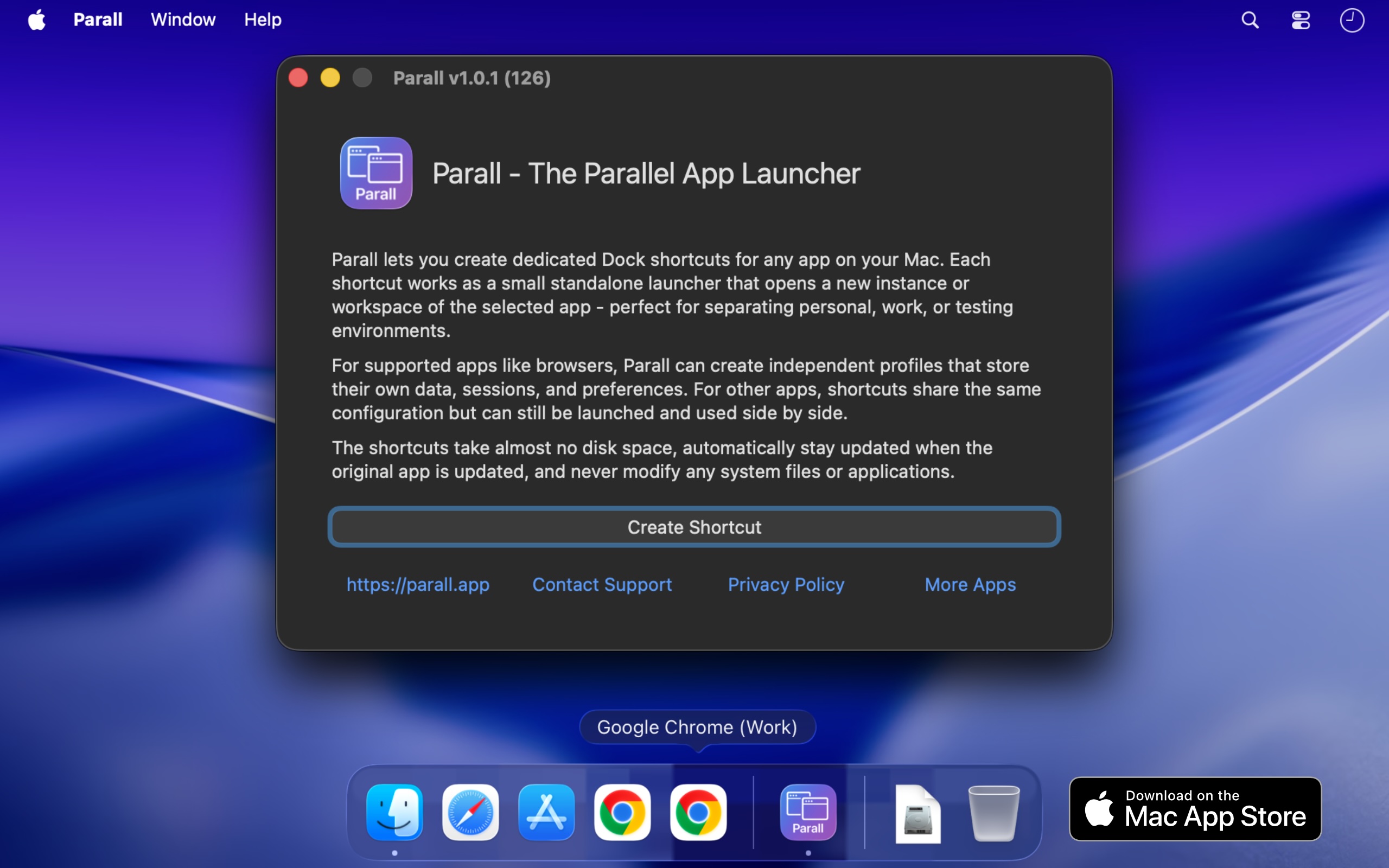
Parall is a native macOS application that lets you run multiple independent instances of the same supported app on your Mac, each with its own name and Dock icon. Where the target app supports it, those instances can also use separate accounts, profiles, and data. Beyond running app instances, Parall turns any website URL into a Web App Shortcut, and can also launch files, folders, and command-line tools as shortcuts. It is built for Mac users who need genuine separation between accounts, brands, clients, or working contexts without logging out and back in every time. Parall does all of this through lightweight shortcuts that keep the original app untouched. The problem Parall addresses is a long-standing limitation in macOS. macOS gives a regular app one usable running identity, so launching it again cannot reliably produce a separate instance with its own Dock icon and Spaces behavior. App data is stored wherever the app decides, which means accounts, profiles, and working data often cannot be moved to an external drive, cloud storage, or an easy to access folder. And to use more than one account, users usually have to log out and log back in every time. Parall was built by Ihor July, a cybersecurity expert and reverse engineer, who dealt with these macOS limitations for more than a decade, built scripted app bundles for himself as a workaround, and then realized there was no easy, polished way for regular users to run truly independent app instances. Parall's central capability is running supported apps as separate instances. Instead of being limited to one running copy, you can run multiple supported app instances side by side. Where the target app allows it, each instance can be given its own data folder, account set, profile, or storage location, so the accounts and settings stay apart. Each instance can also appear with its own Dock identity, pinned with its own name and icon, so macOS treats it like a distinct app. Parall automatically detects supported Electron, Eclipse, Chrome, Firefox, and ToDesktop based apps and separates their data even when the target app is sandboxed. Examples listed as supported include Slack, Notion, VS Code, Cursor, OBS, Dropbox, and Philips Hue Sync. Parall can turn any website URL into a Web App Shortcut with its own Dock identity and custom storage path. These shortcuts run on native WebKit, without Electron or a bundled Chrome engine, and can have their own data paths where the website supports separate storage. MS Teams and WhatsApp web apps are supported with notifications, unread badges, and an optional menu bar background mode. Parall also creates file and folder shortcuts that open in their default app, and command shortcuts that run command-line tools from the Dock with custom arguments and environment variables. The site describes three shortcut types: Web App Shortcut mode, command shortcut mode, and file and folder shortcuts. Parall gives each shortcut a recognizable presence in the Dock and menu bar. You can set custom app names and icons, draw labels on top of shortcut icons, and extract icons from any app or file for use in custom shortcuts. Appearance can be overridden per shortcut with Follow System, Light, or Dark mode regardless of the macOS system setting. Dock effects and animations can be applied per shortcut, and there is experimental control of Dock icon visibility. For supported Chrome based browsers you can control full screen menu bar behavior, and optional menu bar icons can be added for any shortcut while the target app is running, with menu bar icon appearance customizable by scale, grayscale, and template mask. For users who need exact per-shortcut behavior, Parall exposes advanced launch configuration. You can set custom data paths for Web App Shortcuts, set separate data folders for supported apps, define custom environment variables per shortcut, and override HOME for compatible apps that have a containerized structure. Command-line arguments can be passed to command shortcuts, and advanced Info.plist parameter overrides are available for each shortcut for experienced users. These controls let a shortcut reproduce the precise launch environment an app needs. Parall's approach is described as original macOS engineering built from research rather than a recipe. The app behavior it depends on is undocumented, so Parall's compatibility profiles come from observing how each target app launches, stores data, handles separate processes, and interacts with the Dock, the same reverse-engineering work that makes shortcuts function correctly when opened through Spotlight, Raycast, and Alfred. A script can sometimes start another process, but Parall solves the harder problem of giving supported instances their own usable identity, Dock behavior, and, where the target app allows it, separate data, accounts, profiles, and settings while keeping them connected to the original app. Parall shortcuts are small macOS launcher app bundles that directly execute the installed target app's binary and do not contain a copy of the target app. Parall never edits or freezes the target app. Every shortcut continues to launch the original installed app, preserving its code signature and allowing its built-in updater to keep working; after an update, all shortcuts use the new version when restarted. Parall does not use private APIs, inject or patch code, or modify macOS or the original app. The shortcut bundles are not sandboxed by design because they must launch the original application directly without additional layers. Parall also works locally with no automatic telemetry, no background daemons, no Electron runtime, and no bundled Chrome engine, and it does not modify system files or app data. The practical benefit is that Mac users can keep multiple accounts signed in and work in parallel instead of logging in and out. Reviewers describe keeping each Vivaldi or Chrome window scoped to a specific brand with the brand's icon in the Dock, running multiple Claude instances side by side, managing Cursor IDE accounts with different logins and extensions, running company and personal versions of apps, and running separate OBS instances with separate data. One reviewer notes it replaced an hour or two of reconfiguration after each Mac update. Others emphasize the time saved navigating between open browser profiles and the value of not needing fast user switching. Parall is listed on the Mac App Store with Family Sharing support. Use cases documented on the site and in reviews include browser profiles, developer environments, creative tools, multi-client work, and app setups that need real separation. Specifically: separate browser profiles each with their own Dock icon; multiple Claude and Claude Code desktop instances for personal and work accounts; multiple Cursor IDE accounts with separate logins and extensions; multiple Emacs instances with different command-line arguments, environment variables, custom icons, and app names; separate OBS instances with independent data; and separate Philips Hue Sync instances with different LED assignments for different displays. Parall also notes limited iOS and iPadOS app shortcuts, without data separation or a dedicated Dock icon. Parall is aimed at Mac users who juggle multiple accounts across the same apps, including people working under multiple brands, freelancers and part-time workers using one computer, developers, and creative professionals. It is a native macOS app that works from macOS 10.11 through macOS 27 Golden Gate, and the site maintains a compatibility table with 124 compatibility records. Parall is distributed through the Mac App Store with Family Sharing, and pricing is not stated on the website; one reviewer describes it as the best $9.99 spent on an app. Buyers who need a specific app tested are advised to check compatibility or contact support before purchasing. Parall's core promise is simple: run each Mac app instance separately, with its own identity, its own Dock presence, and, where the app allows it, its own data. By building shortcuts that launch the original signed app rather than modifying or copying it, Parall adds the multi-instance control macOS does not provide, while keeping the work local, private, and updateable.
Harness Manager is a native Mac app for managing an AI coding stack in one place. Described as the App Store and control center for AI coding harnesses on Mac, it lets you discover, install, and update tools such as Claude Code, Codex, OpenCode, and Pi, automatically detects what is already installed, manages MCP servers and AI skills, checks versions and paths, and diagnoses broken installations or configuration issues. It is built for developers and anyone working with multiple AI coding tools who wants their tools, connections, and updates together where they can see them. The app gathers an entire AI coding stack into one workspace, with the stated goal of less setup to manage and more space to build. Harness Manager is free and open source. The problem it addresses is familiar to anyone working with modern AI coding tools. Each new harness, MCP server, or skill arrives with its own install path, its own version, and its own update mechanism, and keeping track of them spreads across terminals, bookmarks, and a growing pile of browser tabs. Harness Manager targets that sprawl directly. Instead of checking each tool separately, you get a single view of what is installed, what is running, and what needs an update. The product's own framing is explicit: your tools, connections, and updates, together, where you can see them. The site also positions it as a way to keep up with the ecosystem without keeping twenty tabs open, and as a way to get your stack sorted and get back to building. Discovery is the first job Harness Manager takes on. The Discover screen lets you browse harnesses, MCPs, and skills by popularity, moving from well-known tools like Claude Code and Codex to options you have not tried yet. The app presents tools with logos and install options, so adding the next piece of a workflow does not require hunting down a separate download page. Harness Manager works in the other direction as well: it finds supported tools and configuration already present on your Mac, so your existing stack appears in one view rather than needing to be re-entered. Tools shown in this context include Claude Code, Codex, Gemini CLI, Cursor, OpenCode, Warp, Antigravity, Antigravity IDE, T3 Code, Conductor, Superset, Paseo, cmux, Orca, Herdr, and Emdash. Update handling is deliberately conservative. The app shows what needs an update, lets you see installed versions, and lets you compare available updates. Before anything runs, you can review the command and decide when it runs. The phrase used on the site is "Your updates. Your call." — the point being that you decide when an update runs rather than having changes applied silently. Reviewing the command first gives you a chance to understand what will happen to your environment before anything changes. The same workspace surface shows what is installed and what is running, so update decisions can be made with a view of the current state of the stack. Beyond tools and updates, Harness Manager surfaces the rest of your setup in plain sight. It shows provider configuration, described on the site as local configuration signals; MCP servers, described as your tools' connections; skills, described as reusable instructions; and processes, showing what is running and where. Placing these details alongside the tools that use them means you can see how a connection or a skill relates to a particular harness instead of inspecting configuration files one at a time. The app also checks versions and paths and can diagnose broken installations or configuration issues, which is useful when a tool that used to work stops behaving as expected. Harness Manager also includes benchmarks and rankings for comparing models. The app presents 31 ranked collections and seven comparison metrics, with data by Modelgrep. Collections are grouped into themes. General covers Smartest, Coding, Agents, Fastest, Low latency, Cheapest, and Free. Development covers Design, UI components, Full-stack apps, Mobile apps, Tool calling, and Long-context reasoning. Reasoning and knowledge covers Reasoning, Math, Science, Writing, Instruction following, RAG, and SQL and analysis. Deployment covers Local, Open-source, Small and fast, Long context, Vision, and Uncensored. Creative and specialist covers Data visualization, SVG, Game development, 3D, and Roleplay. Individual metrics include intelligence, coding, agentic performance, design, speed, latency, and context. The site notes that rankings are a starting point and that results depend on your task. The Harness Briefing is a built-in news surface that goes beyond a changelog. It collects new harnesses, useful ideas, and the story behind releases, drawing on publisher news, community finds, and official releases. Named sources on the site include OpenAI, Google Developers, Simon Willison, Hacker News, and project releases. Every story links to its source, so the original material is always one step away, and articles can be read inside the app. For developers trying to follow a fast-moving ecosystem, this replaces the habit of monitoring many separate feeds and tabs with a single, sourced feed inside the same app that manages the tools being discussed. Getting started follows three steps. First, download, drag, and open: you move Harness Manager to Applications and open your workspace, with no build tools required. Second, see your existing stack: the app finds supported tools and configuration already on your Mac and shows them together in one view. Third, make your next move: review an update, discover a skill, or compare models for your next project. That sequence reflects the product's overall approach — begin from what you already have, make the current state visible, then act from that shared picture rather than from guesswork or scattered notes. It is a native Mac application, which is central to how it inspects local tools, configuration, and processes. The stated benefit is a stack that stays sorted. By concentrating discovery, installation, updates, configuration visibility, diagnostics, and model comparison in one native workspace, Harness Manager reduces the number of places a developer has to look and the amount of manual bookkeeping involved in maintaining a set of AI coding tools. Automatic detection means less time reconstructing what is already installed. Review-before-run updates mean changes to your environment remain under your control. Diagnostics for broken installations or configuration issues mean problems can be identified from inside the same app. And built-in model rankings and news mean evaluating new options does not require leaving the tool that manages your current ones. Concrete scenarios follow from these capabilities. A developer who has accumulated several coding harnesses can open the workspace to see everything installed alongside provider configuration, MCP servers, skills, and running processes in a single view. Someone preparing a new project can browse the Discover screen by popularity to find a harness, MCP, or skill and install it without leaving the app. A user who notices an available update can review the exact command before allowing it to run. When a tool stops working, versions, paths, and diagnostics can help identify a broken installation or configuration issue. Anyone weighing a model switch can compare options across the ranked collections — for example coding, agents, or tool calling — before committing. And a developer who wants to keep up with releases can read sourced stories from the Harness Briefing inside the app. Harness Manager targets Mac users who work with AI coding tools: developers, and anyone maintaining a collection of harnesses, MCP servers, and skills. It requires macOS 14 or later and runs on both Apple silicon and Intel. The site lists it as free to use, inspect, and make your own, licensed under Apache 2.0, with the project available on GitHub. It is distributed as a download for Mac rather than as a web service. The build is described as an early preview and is noted as not yet notarized, so macOS may require approval in Privacy & Security on first launch. No paid tier or pricing plan is mentioned; the product is presented as free and open source. In short, Harness Manager is a free, open-source Mac app that treats an AI coding stack as something to be managed rather than endured. It brings discovery, installation, updates, configuration and process visibility, diagnostics, model rankings, and ecosystem news into one native workspace built around what is already on your machine. The value proposition it states is simple: your stack, sorted, and back to building.
AutonomyAI is described as the OS for building in production, built around Fei Studio. Its stated purpose is turning product managers and product designers into product builders. Rather than writing a specification and waiting for engineering to pick it up, product and design teams can describe a change, have it built against the real codebase, get a rendered and validated result, and hand engineers one click of approval. AutonomyAI frames this as Autonomous Product Delivery: product and design build it, engineers approve it, and the whole loop runs as one system. The site states that AutonomyAI is trusted by 170+ product teams. The problem AutonomyAI sets out to solve is that writing code got 10x faster, but shipping stayed the same speed. Every change still goes through engineering, so a PM can spec a feature in an afternoon and then watch it wait in the backlog for a quarter. AI coding tools make engineers faster, but because only engineers can ship, the backlog keeps growing anyway. Meanwhile, app builders produce demos that cannot touch a real codebase, so the work either gets redone from scratch or dies. AutonomyAI positions the fix as a second lane to production: a path where the people who spec the work are also the people who ship it, on the real codebase, with engineering still holding the approval. Codebase ingestion is the foundation of that approach. Fei Studio plugs into your repository and models how your engineers write code, covering components, standards, design system, APIs, hooks and architecture, so every task is built the way your team would build it rather than from a generic AI template. The website states that your real stack is understood in under two minutes. You connect your git provider with no manual config, and CSS, API, SSO and DB connections are all ingested. Ingestion is self-updating as your codebase evolves, which matters because it means the system's understanding of your product does not go stale after the first setup. Task Execution takes raw product ideas and turns them into production-ready product updates. Fei Studio accepts any input, including prompts, PRDs, screenshots, tickets and Figma, and turns those inputs into codebase-aligned variants and testable implementation options before generating production-ready output. Ideas are broken into structured plans based on your infrastructure, and those plans are translated into real system changes and pull requests. The site notes that each task involves 36+ orchestrated steps with transparent output, so the work is not a black box even though the workflow itself is autonomous. Production Grade output is what makes the handoff workable. Every task produces production-ready code, a clean PR and full specs, all built to match your codebase, so engineering can review and merge. The generated code is production quality and written to your standards, the pull requests are clean and ready for engineering review, and full specs plus change history are provided for complete context. In the described workflow, Fei writes the change, renders it and validates it within minutes, then opens a PR that an engineer approves with one click. That is the entire path, compared with a coding agent that hands the work back into the engineering queue. The loop now also starts before the ticket exists. Discover Mode researches your analytics, tickets, customer calls and code to find what to build, and it can either answer a question you ask or suggest the next improvement on its own. After something ships, Fei Studio measures the result and proposes the next build. The site states that every merge makes the system smarter, so the delivery loop compounds over time rather than resetting with each task. This is the end-to-end sequence AutonomyAI describes as Discover, plan, build, ship, repeat. Fei Studio also works inside other AI agents through a new MCP Server. Claude Code, Cursor or any MCP client can connect to it, so wherever a team already works, Fei Studio's delivery layer is one connection away. The site draws a direct comparison with coding agents: both start from the same point, but a coding agent hands the work back to engineering, while Fei Studio hands engineers one click. A published comparison table contrasts Fei Studio with Cursor/Copilot, Lovable and Claude Code across creating prototypes, enhancing existing screens, live preview of changes, a friendly UI for non-technical people, matching your product's look and feel, reusing existing components, production-ready code for review, handling branches, commits and PRs, output per task, and an Agent Knowledge Hub. Fei Studio is listed as supporting each of these, with your product's look and feel auto-ingested. The stated outcomes include a faster path from an idea to a merged change, engineering time protected from environment setup, code review and fixing, and a shorter feedback loop when a build misses what the PM actually meant. AutonomyAI reports that its own product team has opened 50+ PRs against its production codebase while writing zero code, with an engineer approving every merge. That first-party example is presented as proof that the model works on a real codebase. The documented use cases run across the product lifecycle. Teams can validate product ideas, improve existing features, turn support feedback into product changes, create stakeholder demos, accelerate feature delivery, build enterprise customizations, refactor legacy interfaces, prototype with real code, explore UX improvements, align with a design system, and redesign elements. Role-specific pages address PMs with "Ship features, not just specs," designers with "Design in the real product," and engineers with "Stop rebuilding from scratch." AutonomyAI speaks to product managers, product designers and engineering teams, positioning PMs and designers as the primary builders and engineers as the approvers. Enterprise offerings, compliance and security documentation, a knowledge base and comparison resources are available on the site. A Playground sign-up is offered at studio.autonomyai.io, alongside a "Book a Demo" flow. Pricing is described as per task, contrasted in the comparison table with per-seat plus usage, per-credit usage-based and subscription or per-token models. The takeaway is that AutonomyAI's Autonomous Product Delivery closes the gap between how fast code can be written and how fast product actually ships. By ingesting your real codebase, executing structured plans into production-ready code, opening clean PRs for engineering approval, and using Discover Mode to keep proposing what to build next, it gives product and design a second lane to production without removing engineers from the final decision.
Opaline is a team-wide analytics platform for Claude Code and Codex sessions. It provides message-level insights, tracking token cost, time, and skill usage for every single message across your team's sessions. Designed for development teams using AI coding assistants, Opaline aims to pull back the curtain on coding sessions and turn teammate struggle into learning. By capturing granular data, it helps teams understand exactly how their AI tools are being used, where costs are accumulating, and where teammates might need support. As AI coding assistants like Claude Code and Codex become integral to development workflows, teams often lack visibility into their usage and impact. Without proper analytics, it's challenging to optimize costs, identify struggling team members, or measure the effectiveness of these tools. Opaline addresses this gap by providing a comprehensive dashboard that aggregates data from every session. It answers critical questions: How much are we spending on API calls? Who is using the tools most? Which repositories or models drive the highest costs? What language patterns emerge during sessions? This visibility is essential for making informed decisions about AI adoption and team training. One of Opaline's core features is detailed cost tracking. The dashboard displays total API cost for a selected period, such as $3,200.99 for August 1-31, 2026. It includes a daily UTC chart, allowing teams to see spending trends over time. Cost is broken down by individual member, repository, and model, providing a multi-dimensional view of expenses. For example, in the demo, Rafa spent $1,175.59 (37% of total), Evren $1,046.61 (33%), and Marc $978.79 (31%). This per-member breakdown helps identify high usage and enables accountability. It also helps in budgeting and forecasting future AI costs. The repository and model breakdowns add another layer of insight. Opaline shows API cost per repository, such as evrendom/rudel at $3,104.04 (97%) and opalinehq/athena at $96.95 (3%). Similarly, it breaks down cost by model, like GPT 5.6 Sol at $2,051.43 (64%) and Fable 5 at $1,149.56 (36%). These breakdowns help teams understand which projects and models consume the most resources. They can then make strategic decisions, such as optimizing prompts, switching models, or allocating budgets more effectively. This level of detail is invaluable for teams managing multiple projects and AI models. Opaline also tracks session and usage metrics. It records the number of sessions (e.g., 85), agent runs (e.g., 1,864), and language signals (e.g., 385). Language signals are particularly unique: they capture specific phrases used during sessions, such as "You're absolutely right" from Claude or "I know, you f*cking idiot" from a frustrated teammate. These signals can reveal patterns of interaction and emotional tone. By surfacing these phrases, Opaline helps teams turn moments of struggle into learning opportunities. For instance, if a teammate frequently expresses frustration, managers can offer assistance or adjust workflows. This feature aligns with the product's goal of turning teammate struggle into learning. The platform is built as an open-source CLI tool, installed via `npx opaline@latest`. It integrates with Claude Code and Codex sessions, collecting message-level data without disrupting existing workflows. The data is then aggregated and presented in a web-based dashboard. The dashboard uses daily UTC grouping for consistent time-based analysis. It includes visualizations such as cost charts and tables for members, repositories, and models. The product demo showcases a sample period from August 1 to August 31, 2026, illustrating how the analytics appear in practice. Being MIT open source, Opaline allows teams to self-host, customize, and contribute to the project. The benefits of using Opaline are clear for teams adopting AI coding assistants. First, it provides cost transparency, helping teams avoid unexpected API bills. Second, it fosters a culture of learning by identifying struggles and enabling targeted support. Third, it offers data-driven insights for optimizing tool usage and model selection. Fourth, it promotes accountability through per-member metrics. Fifth, it saves time by automating the collection and visualization of session data. Ultimately, Opaline empowers teams to get the most out of their AI investments while supporting their developers. Concrete use cases illustrate Opaline's value. A team lead can use the dashboard to monitor monthly API spend and identify the most expensive repository. An engineering manager can spot a teammate with high frustration signals and schedule a mentoring session. A developer can review daily cost trends to adjust their own usage habits. A team can compare model costs to decide which model to standardize on. An organization can use Opaline during onboarding to show new hires how to interact effectively with AI agents. These scenarios demonstrate how Opaline turns raw session data into actionable insights. Opaline is designed for development teams that use Claude Code and Codex. This includes engineering managers, team leads, and individual contributors who want visibility into their AI usage. It is also suitable for open-source maintainers and organizations that prioritize open-source tools. Since it is MIT licensed and free to use, it appeals to teams of all sizes, from startups to enterprises. The product requires no complex setup, just a simple `npx` command. It integrates seamlessly with existing Claude Code and Codex workflows, making adoption straightforward. In summary, Opaline brings PostHog-style analytics to AI coding sessions. It offers team-wide, message-level tracking of token cost, time, and skill usage. By making usage visible, it helps teams control costs, support struggling teammates, and learn from every session. Whether you are a small team or a large organization, Opaline provides the insights needed to optimize your AI coding assistant usage. Its open-source nature and free pricing make it accessible to all. With Opaline, you can pull back the curtain on your coding sessions and turn every interaction into an opportunity for growth.
CtrlOps is a local-first desktop application for managing Linux servers with AI. It brings an AI-assisted terminal, real-time infrastructure monitoring, SSH access, security auditing, access management, a visual file manager, log search, backups, and single-click deployments together into one screen. It is built for the people who run Linux servers — developers, DevOps engineers, technical teams, and non-terminal people such as designers or solo founders — and its purpose is to give complete visibility across a whole fleet of servers from a single application, without installing an agent on those servers. The problem CtrlOps was built to solve comes from the founders' own experience running an IT service company. They were designers and product people at heart, but every client they worked with had their own server. To check anything — even something as simple as finding out why a server is slow by checking memory and CPU — someone had to open a terminal, remember the right IP, find the right credentials, and log in. Separately. Every single time. For every single client. Servers were a black box, and they had a minimum of seven to ten projects and more than forty servers running every month. There was no unified view and no quick way to know what was happening across the infrastructure without pulling in the one person on the team who knew how to navigate it all; everything ran through him, and if he was unavailable, the team was blind. CtrlOps answers the question they kept asking: why does managing Linux servers have to feel like this, why is there no tool that gives full visibility across all your servers in one place, that feels intuitive enough for a non-terminal person to use, and that does not make you dependent on a single engineer to keep everything running. They built it first for themselves, then made it for everyone. The AI terminal is the centrepiece of the product. Instead of memorising commands, you describe what you need in plain English — for example, clearing disk space on prod-web — and CtrlOps works out the command for you. Crucially, it keeps a human in the loop: you review and approve every command before it runs, and the app makes clear exactly which server you are on before anything executes. Web search, MCP servers, and one-click saved scripts are built in, so questions can be researched and repeat fixes can be stored and run again with a single click. Reviewers describe this preview and approval step as the whole game when AI touches live infrastructure, because nothing changes on a production server until a person has seen the exact command. Security auditing and access management address the question of who can actually reach your servers. CtrlOps runs 25 security audits over SSH and gives you a hardening score, a PDF audit report, and fix commands for every issue found — each one waiting for your approval before it runs. Access management scans your whole fleet to show who can log in where and who has sudo. When someone leaves the team, you can revoke access across every server at once and assign any level of roles and access without touching the terminal. Every log file is found and searchable without SSH, so you do not need to know where a log lives in order to read it. Day-to-day server work is covered by the rest of the toolkit. Multi-server management keeps your whole fleet in one app, letting you switch between servers by alias instead of remembering IP addresses. The visual file manager lets you upload, download and unzip files in one click, which removes the need for a separate SFTP client and separate logins just to edit a single config file. Real-time infrastructure monitoring shows live CPU, memory, disk and network data for every server, and the product is described as offering backups that prove they ran. Single-click deployment takes a GitHub repository, environment variables and a domain through one form and puts the app live, with PM2, Nginx and SSL handled for you, so there are no scripts to write and no CI/CD pipeline to set up. The approach behind all of this is deliberately architectural. CtrlOps speaks SSH directly to your fleet — there is no service in between, no cloud bridge to breach and no vendor to lock you in. It runs entirely on your machine: SSH keys, server IPs and credentials never touch a cloud, there is no telemetry, and sensitive data is stored only on your device. It requires only your SSH key, never your AWS IAM, GCP service account or Azure credentials, and it needs no agent installed on the servers themselves. Connections are made over SSH using ED25519 keys on port 22 directly to your machines. This local-first design is the reason the product can state that your credentials never leave your machine while still managing an entire fleet. The outcomes reported by users follow from that design. Teams describe doing in ten minutes what used to take an hour, and deployments that no longer cause stress because the flow is simply pasting the repository, filling in environment variables, toggling SSL and finishing. Offboarding becomes a quick check that can be performed by whoever needs it — including an HR team member who reported checking SSH management herself and flagging access in two minutes instead of going back and forth with the technical team. Users report catching issues before they became outages, onboarding a developer in minutes, and no longer depending on one person who is the only one who knows how the infrastructure is wired. CtrlOps is described as trusted by more than 700 engineers in more than 160 countries and is rated 4.8 out of 5 on G2. Concrete use cases described in the content include deploying a GitHub repository to a server without writing scripts or setting up CI/CD; checking why a server is slow by looking at live CPU, memory and disk; finding a misconfigured Nginx configuration and checking the service status through the AI terminal; clearing disk space on a production server with an approved command; editing a configuration file directly through the file manager rather than a separate SFTP client; searching logs across a fleet without SSH; auditing servers against 25 security checks and generating a PDF report for review; revoking a departing employee's access across every server at once; running a saved script or playbook of common fixes with one click; onboarding a new developer quickly; and, for solo builders and designers who do not know DevOps or Linux commands, asking the AI terminal in plain English what to do and following the steps to take a finished website live by themselves. The product is aimed at developers and DevOps engineers, IT service companies running many client servers, teams that need a unified view across a fleet, solo founders wearing the DevOps hat, and non-terminal users such as designers and no-code builders who are otherwise blocked at deployment. CtrlOps connects to any server over SSH, and the content names AWS, Google Cloud, Azure, DigitalOcean and any VPS as environments it manages, along with GitHub repositories for deployments. It is available as a desktop app for macOS, with separate Apple Silicon (M1, M2, M3, M4, M5) and Intel x64 (Core i5, i7, i9) builds, for Windows through the Microsoft Store, and for Linux. Pricing is free to start, with a one month free trial that requires no credit card, and a lifetime subscription is referenced by users. The takeaway is that CtrlOps brings everything needed to manage servers into one local desktop application: an AI terminal that asks before it acts, security hardening you can measure and report on, access control you can audit and revoke, monitoring, file management, backups, log search and one-click deployment — all speaking SSH directly to your fleet while your credentials stay on your machine.
NOAN is the fact layer for agentic business. It takes the facts a company has approved — pricing, positioning, policies, products, customers, and more — and turns them into a verified, versioned source of truth that is served through one API and MCP. The product is built for anyone who wants their models, agents, and applications to run on the same company facts rather than each AI interpreting the company's documents in its own way. Verity, the assistant on the NOAN site, is the product demonstrating itself: give her your work email and she reads your website, draws your company graph, and turns it into your workspace. The problem NOAN addresses is that most companies have thousands of documents but only one version of the truth. Documents are not facts. A document is something an AI can read and interpret, and different models and agents will pull different conclusions from the same pile of material. NOAN draws a clear distinction between a fact and memory: a fact is something true about your company that is approved, versioned, and served from one API, whereas memory is what an AI picks up along the way and nobody signed off on. When every model, agent, and app is fed the same approved facts, they all run from the same source of truth instead of letting each AI interpret your documents differently. That is why the product is described as the fact layer for agentic business: the facts, not the interpretation around them, become the thing everything else is built on. The core of NOAN is the fact itself. According to the product, a fact is something true about your company: it is approved, it is versioned, and it is served from one API. That combination matters because it gives the business a controlled, authoritative record of what is true — not a draft, not a document open to interpretation, but an approved statement that carries a version. The approved facts NOAN works with include pricing, positioning, policies, and products, as well as customers. Instead of scattering that information across thousands of files, NOAN collects it and serves it through the NOAN API, so anything that needs company knowledge can request it from a single source rather than re-reading a document set and forming its own view. Through the NOAN API and MCP, those facts can be plugged into any model, any app, and any agent. This is the other half of the product's promise: the fact layer is not tied to a single assistant or a single vendor. Because the facts are exposed through an API and through MCP, any model, agent, or app that connects can run from the same source of truth. In practice this means a company can give all of its AI systems the same company facts, rather than maintaining a separate and potentially conflicting understanding of the business inside each one. The line "Any model, any agent, any app — same facts, one API" summarizes how NOAN positions exactly this capability. Every company's facts build a brain — its company graph. The company graph is how NOAN describes the result of collecting a company's approved facts: a connected representation of the business drawn from the facts themselves. Verity is the assistant that creates and works with it. She introduces herself with "I'm Verity. NOAN is the fact layer for agentic business. Give me your work email and I'll read your site and show you your company graph." When you provide your work email, Verity reads your site, draws your company graph, and makes it your workspace, so the graph is not just a picture of the business but the working place where the company's facts live. NOAN's approach is to make the facts your business has approved the thing that everything else runs on. The workflow starts with your website and your work email: Verity reads the site and shows you your company graph, which becomes your workspace. From there, the approved facts are versioned and served from one API, and the same facts are available to your models, agents, and apps through the API and MCP. The distinguishing idea is the split between facts and memory: facts are approved and versioned by the business, while memory is whatever an AI happens to pick up along the way and nobody signed off on. By serving only the former, NOAN concentrates on the facts themselves rather than the surrounding interpretation, and every agent that connects to the fact layer inherits the same version of the truth. The site frames this as your company as verified facts, behind one API, with your site and agents running on what's true. The benefit NOAN describes is consistency. When any model, any agent, and any app all draw from the same facts, they all run from the same source of truth, which removes the situation where each AI interprets your documents differently. Approved facts also carry versions, so the record of what is true has a history rather than being a static snapshot in a document nobody controls. Because the facts are exposed through one API and MCP, connecting a new model, agent, or app does not require rebuilding the company's knowledge from scratch — the connection simply plugs into the existing fact layer and runs on the same approved facts as everything else. Concrete scenarios follow directly from how NOAN is described. A company wants its AI agents to answer with approved pricing, positioning, and policies rather than whatever a model inferred from a document set, so it gives those agents access to NOAN's facts. A team building an application needs the company's products and customers represented consistently, so it connects through the NOAN API and reads the same facts the rest of the business uses. An organization that runs several models or agents wants them to agree, so MCP and the API let each one connect to the fact layer. And a business just starting with NOAN gives Verity its website and its work email, watches her draw the company graph, and begins working from a verified set of facts in a workspace built around them. NOAN speaks to businesses that want their AI systems grounded in verified company facts. It is aimed at teams using models, agents, and apps, which the Product Hunt listing describes under API, Developer Tools, and Artificial Intelligence, and it fits companies that already have thousands of documents and need one version of the truth. The integrations described are the NOAN API and MCP: any model, any agent, and any app can connect through them. The product is experienced on the web through the NOAN site, where Verity assists you, and the site includes a classic version, a "How does it work?" page, and a pricing page with an option for existing subscribers to sign in. On pricing, the site states that everything is free except the facts. NOAN's primary value proposition is simple to state: your company has thousands of documents, but only one version of the truth, and NOAN is the fact layer that makes that truth approved, versioned, and available to every model, agent, and app through one API. With Verity reading your site and drawing your company graph, the facts your business has signed off on become the single source of truth that your site and agents run on.
Floot MCP is a connector that lets you build and ship web and mobile apps from inside the AI chat tools you already use. Add Floot to Claude, ChatGPT, or Cursor, describe what you want, and Floot builds the whole thing with the backend, database, and hosting included. The product is aimed at people who want to turn their ideas into products without coding, all on one platform, and the website sums up the promise bluntly: build apps in Claude, ChatGPT, or Cursor and get them live in minutes. Building an app normally means stitching together a long list of separate services. You need somewhere to run the backend, a database to store information, a way for users to create accounts, an email provider for receipts and notifications, hosting, and a route into the app stores. On top of that, the modern AI-assisted workflow introduces its own friction: git, the terminal, and build credits, plus per-token pricing that adds up fast. Floot's website addresses these pain points directly. It says you can get an app live with no git, no terminal, and no build credits, and it contrasts its flat plans against pay-per-token tools. The comparison section on the site frames the difference in four practical areas: token cost, ease of use for non-coders, whether everything is built in or requires many external services, and whether hosting scales with you. The workflow begins with connecting Floot to your AI. Step one is to connect Floot to Claude, ChatGPT, or Cursor as a connector. Floot is available through the Claude directory and the ChatGPT plugins listing, and the site also points to an integrations page for adding it to Cursor and others. Because Floot works as a connector inside the chat tools you already pay for, your existing Claude or ChatGPT subscription does the thinking, which is why Floot does not charge based on AI usage. There is nothing to install or configure on your side, since Floot provides a ready-to-use workspace rather than a set of libraries you have to wire up yourself. Once connected, you prompt your AI to build your project, and the conversation becomes the build environment. The site describes the next two steps as prompting your AI to build your project and then keeping refining until it is exactly what you want. The example shown on the homepage is an order book for a bakery: a project appears at its own floot.app address, with an "Order now" page, and a later refinement step shows a request as simple as making the headline bigger. This is iterative by design, so you stay in the same conversation and keep shaping the app rather than leaving the chat to edit files or run commands. A walkthrough video on the site, titled "How to use Floot MCP", is described as building and publishing a real app from a chat. The fourth step is publishing on both web and mobile. Floot describes publishing as one click, after which your app is live on the web and in the app stores, with the site showing App Store and Google Play. The bakery example moves from an orderbook.floot.app address to a live custom domain. The Product Hunt listing adds that when you are ready you publish the same project to the web, iOS, and Android, and then keep shipping updates from the same conversation. Publishing is presented as part of the same single platform rather than a separate deployment project. Under "Everything you need, built-in", Floot lists backend, data, and logins as a core capability. Your app can save information, let users create accounts, and run recurring tasks automatically, and Floot handles the technical setup for you. The homepage illustrates this with a small dashboard for your app: records saved in the database, users signed up through accounts, and a recurring task that runs daily at 9:00, each marked as set up. The point is that the app is not a sketch sitting in a chat window, because it has persistent data, real user accounts, and scheduled jobs running behind it. A second built-in capability covers emails and notifications. You can send emails, receipts, updates, and notifications from your app without setting up extra tools. The homepage shows a receipt sent to a customer's email address, marked as sent. For anyone building something transactional, such as an order confirmation, a status update, or a notification, this removes the need to bolt on a separate email service and connect it up yourself. It also reinforces the all-in-one positioning, since features that would otherwise be individual third-party accounts are handled inside Floot. Floot also states that apps built on the platform are built to be found. Floot makes your app easy for search engines like Google to understand and discover, with SEO essentials built in automatically. The example on the site shows a bakery order tracker ranking at number one for a search, with an orderbook.shop result titled "Order Book — Bakery orders". This matters because a live app with a real URL is only useful if people can find it, and having SEO fundamentals handled automatically means non-technical builders do not have to learn search optimisation to get discovered. Finally, Floot supports integrating your tools. The site names Stripe payments, Google login, Zapier, and thousands of other services, and says Floot guides you through the setup step by step. That combination covers the most common needs of a small product: taking payments, letting people sign in with an existing account, and connecting to the wider ecosystem of tools through Zapier. As with the rest of the platform, the emphasis is on guided setup rather than leaving the user to read integration documentation. The overall approach is what Floot calls connecting your AI agent. Instead of an AI builder that generates code you then have to deploy, Floot supplies a ready workspace and lets your chat tool drive it: the AI thinks, while Floot runs the backend, database, hosting, and everything else. The homepage summarises this as a sequence of connecting Floot to your AI, describing what you want, and getting it live. Because the AI usage is covered by your existing subscription, Floot's plans are flat rather than per-token, with credits applying only to the optional Floot agent and AI image generation. Floot is backed by Y Combinator, according to the site. The benefits Floot claims follow from that structure. You can go from an idea to a real, hosted app with a database and a live link in a single conversation, in minutes rather than weeks. There is no technical background needed, no server configuration, no separate email or payment setup, and no need to manage deployments for web and mobile separately. Because hosting is built in and scales with you, and because flat plans avoid the pay-per-token model, costs stay predictable as you keep building. And since updates ship from the same conversation, maintaining the app does not require switching to a different tool. The concrete scenarios shown on the site centre on a small business example: a bakery building an order book app that takes orders, saves records, signs up customers, sends receipts, and is published to a custom domain and the app stores. More generally, the described workflow suits anyone who wants to build a web or mobile app from a chat prompt, such as a booking tool, a tracker, an internal tool, or a storefront, and then publish it to the web, iOS, and Android and keep refining it. The platform is equally relevant for people extending an existing AI workflow in Claude, ChatGPT, or Cursor with a live app endpoint. Floot is aimed at non-coders and at anyone already working inside Claude, ChatGPT, or Cursor who wants to ship something real. The site's comparison table claims no technical background is needed, and the tagline promises you can turn your ideas into products without coding, all on one platform. Integrations explicitly mentioned include Stripe payments, Google login, and Zapier, alongside App Store and Google Play distribution. Floot is offered on flat plans rather than per-token pricing, with credits applying only to the optional Floot agent and AI image generation, and the launch on Product Hunt includes 30% off your first month on the launch page. The takeaway is straightforward: Floot MCP turns the AI chat you already use into a full app-building workspace, handling the backend, database, logins, email, SEO, hosting, and publishing so you can go from a description to a live web and mobile app without touching git, a terminal, or build credits.