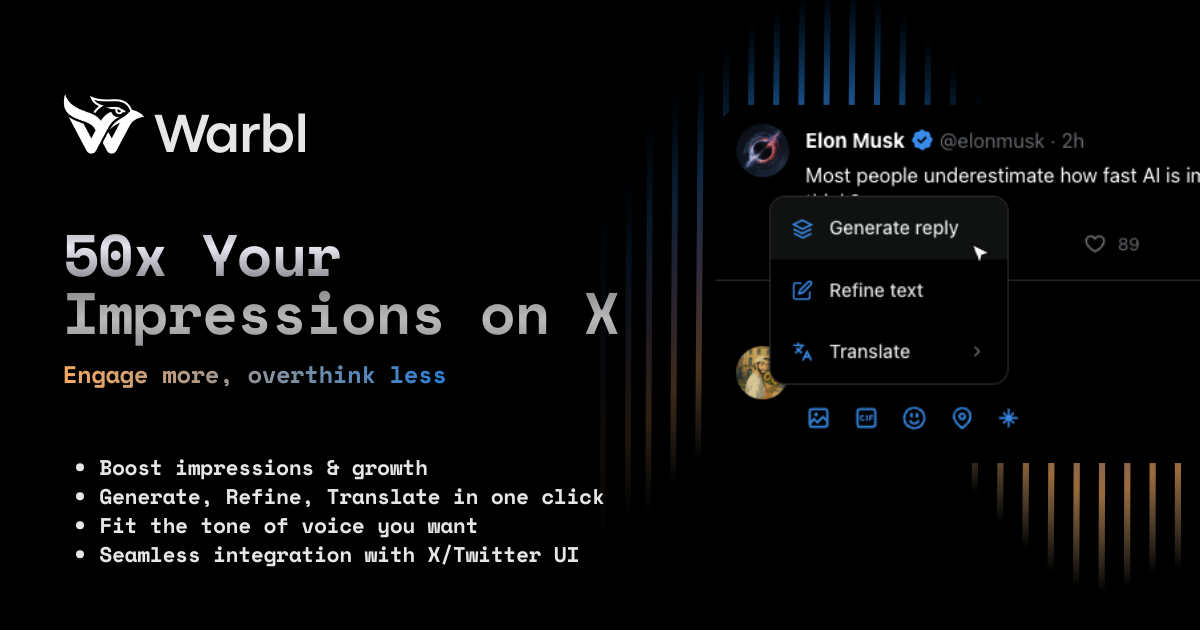
Warbl is an AI-powered Chrome extension that acts as a Twitter reply assistant, built to help users engage faster on X. As a social media productivity tool, it addresses the common pain point of blank page anxiety when composing replies. The core value is to enable users to 50x their impressions by generating authentic, personalized replies in one click. This tool is for anyone who wants to build an audience on X—from casual users to power users—by reducing the mental effort of crafting responses. Warbl’s AI understands context and user preferences, ensuring each reply sounds natural and aligned with the user’s unique voice. By streamlining the reply process, Warbl empowers users to engage more consistently, ultimately driving growth and fostering genuine connections on the platform.
The concrete problem Warbl solves is the time and mental energy wasted on blank reply boxes. Many X users struggle with creative blocks when they see a tweet they want to respond to, often spending minutes thinking of the right words. This hesitation leads to fewer replies, missed opportunities for engagement, and slower audience growth. For professionals and creators, consistent engagement is critical for visibility and building a following, but the effort of crafting unique, timely responses becomes draining. Warbl eliminates this friction by providing a personalized starting point, reducing the cognitive load. Users can overcome the fear of sounding repetitive or inauthentic, because Warbl’s voice profile ensures each reply matches their style. This matters because it allows users to show up consistently without burnout, leading to higher engagement rates and more impressions.
Warbl’s first major feature is the combination of One-Click Replies and Voice Profile customization. The Voice Profile allows users to define their profession, preferred topics, communication goals, and tone during onboarding. Once set, every generated reply is tailored to match that unique style—whether professional, casual, humorous, or insightful. The One-Click Reply feature then uses this profile to instantly generate contextual responses when the user clicks a button on any tweet. This works directly within X’s interface, so there’s no need to switch tabs or copy-paste. The benefit is twofold: users save time normally spent composing from scratch, and they maintain a consistent, authentic voice across all interactions. This builds trust with followers and increases the likelihood of engagement from others, as replies feel human, not automated.
admin
The second set of features includes Smart Web Search and Image Analysis. Smart Web Search automatically retrieves real-time information from the web—such as news articles, statistics, and trending data—relating to the tweet’s content. When a user clicks generate, the AI incorporates this external context to craft more relevant and informed replies. For example, if someone tweets about a recent study, Warbl can pull a key stat to make the reply credible. Image Analysis extends this capability to tweets containing images. The AI analyzes the visual content—like a chart, meme, or photo—and generates a reply that acknowledges what’s in the image. This is particularly useful for engaging with visual content without having to manually describe it. Both features ensure replies are timely, data-driven, and visually aware, enhancing the quality of engagement.
Warbl also offers Native X Integration, support for 9+ languages, and additional controls like Refine Text and Translate. Native Integration means the extension works seamlessly within X’s existing interface—there’s no new dashboard or separate app. Users simply see a “Generate reply” button on tweets, and the suggested reply appears in the compose box. This eliminates copy-paste and reduces workflow friction. The multilingual support allows users to generate replies in English, French, Spanish, German, Portuguese, Italian, Dutch, Japanese, and Chinese, with translation capabilities for cross-language engagement. The Refine Text feature lets users tweak the generated reply before posting, offering minor adjustments for tone or length. Translate helps convert replies into other languages, enabling global audience interaction. These features make Warbl versatile for international users and non-native speakers.
The overall workflow of Warbl is straightforward and user-centric. After installing the Chrome extension, users complete a brief onboarding to set up their Voice Profile, specifying their profession, topics of interest, communication goals, and tone preferences. Once configured, users browse X normally. When they encounter a tweet they want to reply to, they click the Warbl icon or the “Generate reply” button that appears natively in the tweet’s reply box. The AI then analyzes the tweet, considers the user’s Voice Profile, and optionally runs a Smart Web Search or Image Analysis if relevant, producing a contextual reply suggestion. Users can review the suggestion, use Refine Text to polish it, or Translate it to another language before posting. The reply can be posted directly with zero copy-paste. This approach treats Warbl as a writing companion, not a replacement—users remain in control of the final output.
Concrete use cases for Warbl include engaging with high-profile influencers, such as replying to Elon Musk on a tweet about AI advancements. The Smart Web Search might pull current stats to make the reply more compelling. Another scenario is responding to image tweets—like a conference photo or data visualization—where Image Analysis generates a reply referencing the visual. A marketing professional could use Warbl to reply in multiple languages to international followers, expanding their reach. For daily high-volume engagement, power users can generate 50+ replies per day, significantly increasing their impressions and follower growth. The outcome is not just more replies but higher-quality interactions that build genuine connections. Users report 10x more replies and 50x more impressions, alongside a renewed enjoyment of engaging on X, as the mental barrier is removed.
Warbl targets a range of users including indie hackers, content creators, social media managers, marketers, entrepreneurs, and non-native English speakers looking to engage globally. It is currently a Chrome extension for desktop browsers, with future mobile support under consideration. The tech stack uses Supabase for secure authentication and data storage, and is GDPR compliant—data is encrypted and not stored from tweets. Pricing is simple: a free tier offering 5 AI replies per day with full access to voice profile, web search, and image analysis, and a Premium tier at €4.99/month (early adopter price locked permanently) for unlimited replies, plus Refine Text and Translate features. No account is required to start, payments are handled via Lemon Squeezy. Warbl’s overall takeaway is that it empowers users to engage smarter on X by removing friction and unlocking their authentic voice, leading to real audience growth.
Warbl is designed for active X users who want to grow their audience through consistent, high-quality engagement. This includes social media managers managing multiple brand accounts, content creators and indie hackers building personal brands, marketers and entrepreneurs aiming to increase visibility, and non-native English speakers who need language assistance. The free tier suits casual users, while Premium caters to power users who post many replies daily. Additionally, thought leaders, community builders, and anyone experiencing writer’s block or time constraints when replying will benefit from Warbl’s AI-driven assistance. The tool is ideal for desktop Chrome users, with future mobile expansion planned.