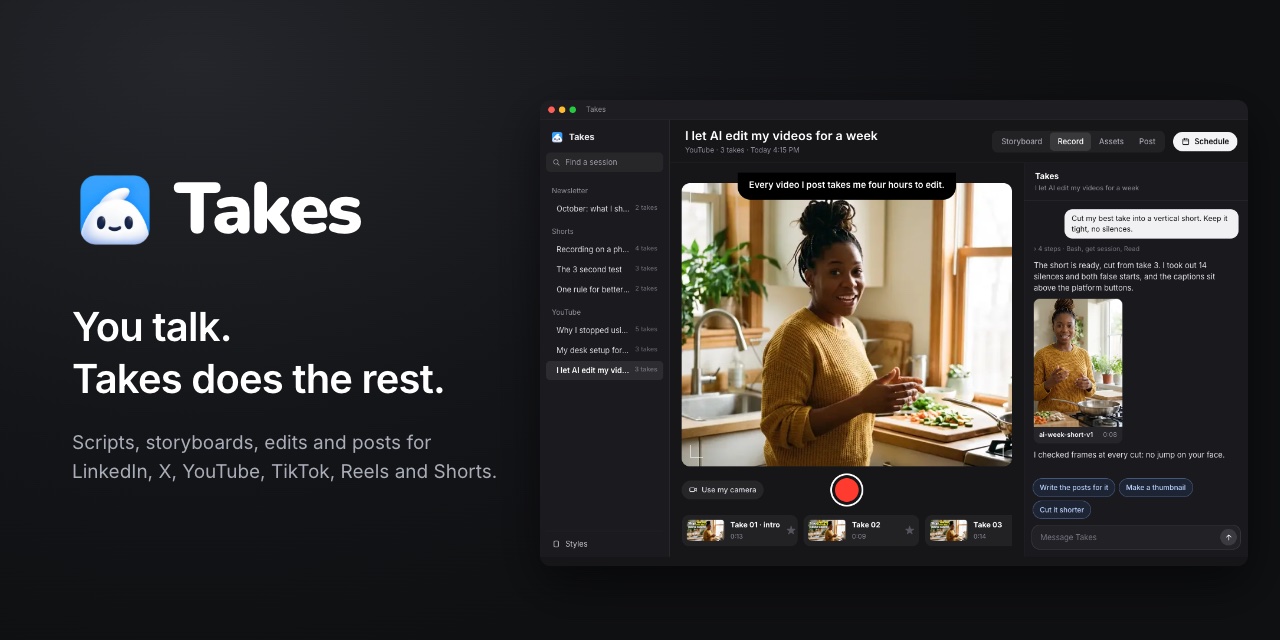
Takes for Mac is a free, open-source Mac app for making talking-head videos. You read your script from a teleprompter that scrolls as you speak, record a few takes and pick the best one. Claude Code, running on your own Claude plan, then storyboards the video, cuts the edit, produces the vertical version and writes the posts. The whole loop — Storyboard, Record, Post — lives in one place, so going from an idea to a posted video does not mean jumping between a scripting tool, a camera app, an editor and a scheduling tool. It is made for the person in front of the camera rather than for someone who wants to spend the evening in a timeline.
The problem Takes is built around is the editing tax on talking-head video. The demo on the site opens with a line many creators recognise: "Every video I post takes me four hours to edit." Most of those hours are not creative. They go on hunting silences, trimming false starts, lining up captions, exporting a second vertical cut, then rewriting the same message for LinkedIn, an X thread, YouTube, Shorts, Reels and TikTok. Takes aims to move that work onto an AI agent that already understands the footage, while you stay focused on the part only you can do: being on camera and saying something worth watching.
Storyboard is the first step. Claude writes the script and splits it into shots, drawing a sketch for each one. Every shot shows its line, how to film it and a Record button, so instead of reading a wall of text you look at seven or so frames that carry the video from a hook through the main body to the end. The built-in chat is a Claude Code chat that sits next to your takes. It reads the same folders the app writes, so it already knows the script, the best take and the posts. You can ask it in plain words — for example, "Cut my best take into a vertical short. Keep it tight, no silences" — and it works through the steps, reporting what it changed. The same chat can also draft the posts when the edit is done.
Record is where the camera work happens. A teleprompter sits beside the camera and follows your voice, so you never lose your place and never look away from the lens. Each shot offers a few opening lines to choose from, so you can start strong instead of settling for the first thing you wrote. You record as often as you need and mark the best take; the app keeps every one in a visual list. Takes records the camera and the screen at the same time, producing two files that are recorded in sync, which means you can show a screen recording or a product demo inside the same talking-head video.
Post is the publishing step. Takes shows a post for each platform the way it will actually look there — LinkedIn, an X thread, YouTube, and vertical formats for TikTok, Reels and Shorts. Line breaks, the "more" cut-off, the thumbnail and the caption all sit where the platform puts them, so you review the real thing rather than a text box. You can try other versions and then schedule the post. Styles control the look of every edit — captions, titles and colours — so the visual identity stays consistent across videos without you rebuilding it each time.
Feedback is what makes the edits improve over time. You point at the frame and say what is wrong: pick the moment, mark the area, type the note. Takes fixes it in a new version and replies with what changed. The rule and the parts you liked are saved to your style, and the next video starts from there. The site shows the effect with a chart of notes per video dropping from six to three to one, and a style panel listing rules such as "Cut every silence longer than 0.4 s", "Calm music, well under the voice" and "Captions sit low, never on a face".
Underneath, Takes deliberately avoids lock-in. Your library is plain folders: the app records into ~/Movies/Takes, one folder per project, one per video, with Markdown scripts, .mov takes and an edits folder. Claude Code works on the same files, and when a file changes the app shows it at once. Nothing lives in a cloud you cannot open, and you back the folders up the way you back up anything else. Claude Code can be driven from the chat panel inside the app, or from any compatible agent. On first launch Takes adds the takes MCP server to each agent it finds on your Mac — Claude Code, Codex, Cursor, Gemini CLI, Antigravity, opencode, pi and Claude Desktop — and Claude Code also gets two skills, so you can ask any of them to "storyboard my next Takes video" or "cut my last take".
The stated benefits are time and cost, not features. Edits happen on work the agent can do, so you write fewer notes each time and the next video arrives closer to finished. Because the AI runs on your own Claude plan through Claude Code, there is no API key and no extra bill — Takes never sees a bill or an API key, and it adds no cost on top of the plan you already pay for. Scripts and posts keep every version, so anything can be undone. The app has no account and sends no usage data, and the code is public on GitHub, with an 85-line install script you can read before running it.
Typical use looks like a weekly posting rhythm. A founder wants a LinkedIn post and a short: they storyboard a seven-shot video, read off the teleprompter, mark the best take, ask for a vertical cut with silence removal, then ask for the posts and schedule them. A creator publishing to YouTube and Shorts films once with camera and screen in sync and gets both a 16:9 edit and a 9:16 short from the same take — the site's own demo shows ai-week-v1 at 16:9 and ai-week-short-v1 at 9:16 cut from the same footage. Someone who already uses Codex or Cursor can drive the same library from that agent instead of the built-in chat.
Takes is aimed at people who talk to a camera and would rather not edit: founders, creators, marketers and anyone posting regularly to LinkedIn, X, YouTube, Shorts, Reels and TikTok. It is a Mac app and needs Apple silicon, macOS 15 or later, and a paid Claude plan (Pro or Max) for Claude Code. The makers stress it is not only for technical users: you paste one line into Terminal once, and after that you work in the app, reading off the teleprompter, picking the best take and asking the chat in plain words. Installation can also be done by downloading the .dmg. Takes is free and the code is public, made by Marvin Aziz, with new versions shipping several times a week and an iPhone app in the repo that you build yourself with your own Apple developer team.
Takes for Mac takes the repetitive parts of talking-head video — silences, false starts, vertical re-cuts, per-platform captions — and hands them to Claude Code, while keeping the teleprompter, the takes and the posts in one plain-folder library on your own Mac. You talk; Takes does the rest.
Publisher
A
admin
Launch Date2026-10-14
Platformdesktop
Pricingfree
Tech Stack
#Claude Code#MCP#ffmpeg