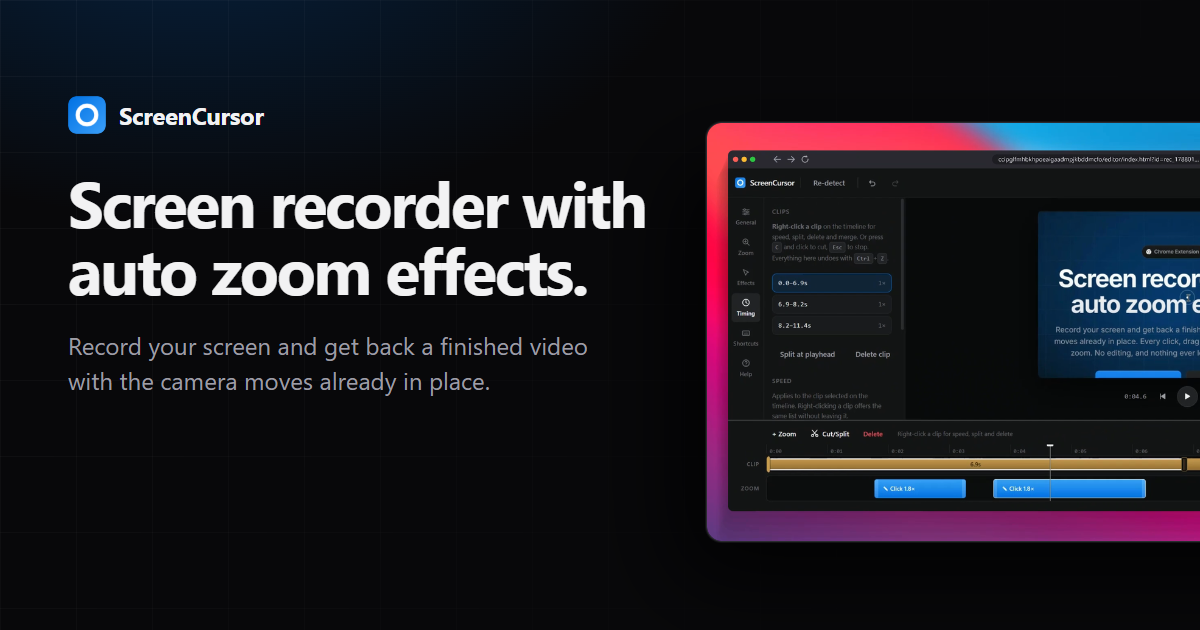
ScreenCursor is a Chrome extension that records your screen and hands back a finished video with the camera moves already in place. Rather than returning a raw capture and leaving the zooming to you, it turns every click, drag and keystroke into a camera move while you are still recording. The result is a screen recording that is already watchable the moment you stop: there is no timeline to learn and no second pass in a video editor required. It is built for anyone who needs to show how something works on a screen — a demo, a walkthrough, a piece of work in progress — and who wants that video done without spending time on editing afterwards. As the site puts it, the middle step of the workflow, the zooming, is the whole product and it is the one you do not have to do.
The problem ScreenCursor sets out to solve is a familiar one. Most screen recording software gives you back exactly what you recorded and leaves the camera work to you in a video editor. That means every demo becomes a two-stage job: record first, then sit down and manually place zooms, trim dead air and frame the footage so a viewer can actually follow what is happening. The site states plainly that the best screen recorders for sharing work are the ones that produce something watchable without a second pass, and that producing that is the only thing this product is trying to be. In other words, the tool is not trying to be a general-purpose video editor; it is trying to remove the editing step from screen recording altogether.
The first feature is the automatic camera work, and it is the one that happens on its own. Clicks, drags and keystrokes are all picked up while you record. Each one gets a zoom at the same depth, and the zoom arrives a beat before the action so the viewer is already looking at the right place at the moment the action happens. Because the timing is anticipatory rather than reactive, the viewer's eye is guided to the click rather than chasing it afterwards. On the site this is summarised as every click, drag and keystroke becoming a camera move, placed and timed for you, with nothing to place by hand.
The remaining features are there for when you want them, and the first of those is full control over every zoom. Nothing is baked in. You can retime a zoom, push its depth in or out, move it, switch the motion between snappy and gentle, or delete the one you did not want, and you can add your own zooms anywhere as well. The camera rebuilds as you drag, so what you are watching is what exports. This matters because automatic placement is only useful if it can be corrected; preserving full adjustment means the automation is a starting point rather than a fixed output.
Framing and timing make up the next group of capabilities. For framing, you can sit the recording on a wallpaper, a gradient or your own image, softened so the backdrop never competes with the picture. You can add a browser frame carrying the real page title, round the corners, and pick the aspect ratio for wherever the video is going. For timing, you can split the clip anywhere, delete the stretches nobody needs to sit through, and speed up the ones that merely drag. Importantly, the zooms move with the cut, so nothing drifts out of step with the picture. Together these let a recording be dressed and paced for its destination without exporting into another tool.
How the product works overall is described in three steps, with the explicit note that the middle one is the whole product and is also the one you do not have to do. Step one is to hit record: you pick your screen and go, and ScreenCursor waits three seconds so you can hide Chrome's sharing bar first, then stays out of your way. Step two is that it zooms itself, turning every click, drag and keystroke into a camera move that arrives before the click, holds steady, and then follows your cursor. Step three is export and ship: you can trim, cut or adjust any zoom if you want to, then export MP4 at up to 1080p straight to your Downloads folder. The whole pipeline — recording, editing and export — happens inside your browser, and the video never leaves your computer. There is no account to create and no server for it to go to.
The benefits that follow from that approach are stated directly on the site. There is no watermark, no account and no subscription, and there is no limit on how much you record. Because everything stays local, recording and editing work offline and nothing is uploaded, ever. The purchase is one payment of $49 at early pricing (regularly listed at $79), yours permanently, with updates included, and one purchase activates on up to three of your own computers. Export is MP4 at 720p or 1080p, delivered to your Downloads folder like any other file, ready to upload anywhere without conversion. The Chrome Web Store rating shown is 5.0.
In practical terms, ScreenCursor is aimed at scenarios where someone has to show a process rather than describe it. That includes recording your whole screen, including anything outside the browser such as other apps, your desktop or a design tool, and producing something a viewer can follow without having sat through the raw capture. It suits demo videos and work-sharing clips where the site's own framing is "sharing work" and, in its closing line, "stop editing your demos." The workflow is deliberately short: pick the screen, hide the sharing bar during the three-second wait, perform the task once while the zooms are placed for you, optionally trim the dead air, and export. One purchase covers a laptop, a desktop and a work computer, and if you replace a machine you can free its slot from the license page inside the extension or from your Polar account and activate the new one. Because it is a Chrome extension it runs wherever Chrome does, including macOS, Windows and Linux; recording performance depends on the machine having hardware video encoding, which the site says almost everything made in the last decade has. The site also positions it against Screen Studio, noting that Screen Studio is macOS-only and costs about $108 a year, while ScreenCursor is $49 once and runs anywhere Chrome does, though it acknowledges Screen Studio does more, including webcam overlay, motion blur and recording an iPhone over USB.
The takeaway is narrow and deliberate: ScreenCursor exists to make screen recordings that are watchable without a second pass. It automates the camera work that normally lands in a video editor, keeps full manual control for when you want to change something, and does all of it locally in the browser with no account, no watermark, no subscription and no upload. If the goal is a demo that is finished when the recording stops, that is the entire value proposition.
Publisher
A
admin
Launch Date2026-09-14
Platformweb
Pricingpaid