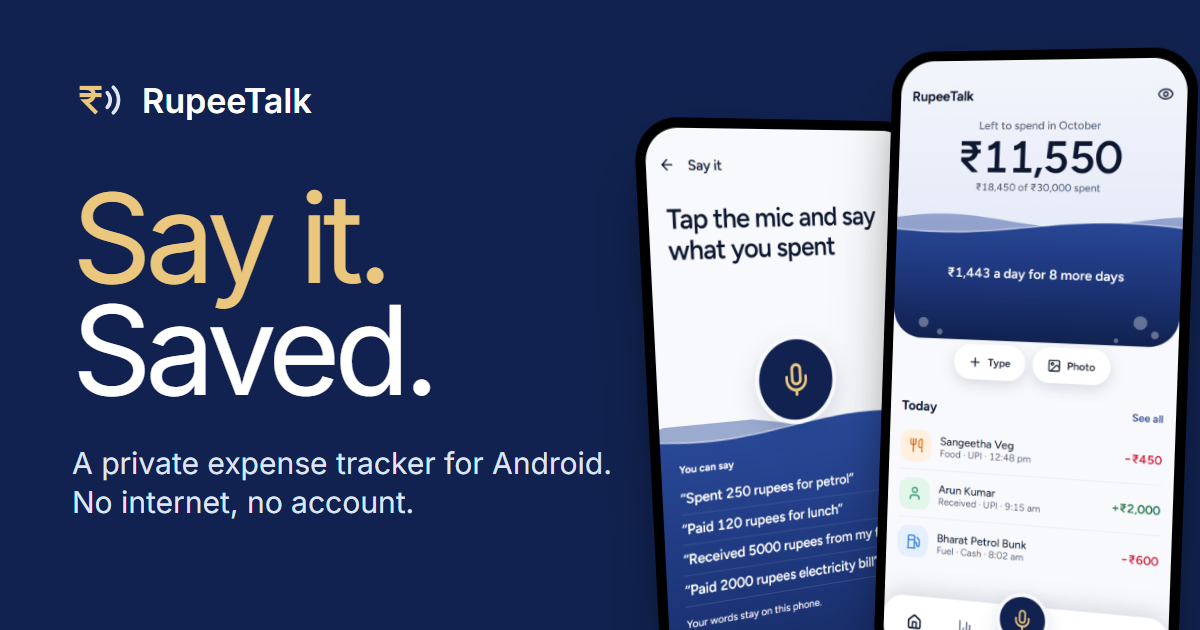
RupeeTalk is a free expense tracker and budget manager built for Android phones. It lets you record what you spend and earn in three ways — by speaking, by typing on a keypad, or by sharing a payment screenshot or receipt — and then shows you where your money went each month through budgets and reports. The app is designed for people who want a simple record of daily spending without connecting a bank account, creating a login, or handing their financial data to a cloud service. Everything is stored on the phone, and the product is built around a single idea: entering an expense should take seconds, not minutes.
The problem RupeeTalk addresses is stated plainly on its site: most expense apps get dropped because entering things is a chore. Tracking spending only works if the record is kept, and the record is only kept if logging a purchase is faster than ignoring it. RupeeTalk's answer is to make entry the shortest part of the experience — a microphone sits in the middle of the menu, you say what happened, and you confirm. The app also strips out the usual friction of financial software: there is no sign-up, no email, no phone number, no bank login, and it never asks for a UPI PIN, banking password, OTP, or card CVV. That combination targets people who want a private, low-effort record rather than a connected finance platform.
The signature feature is Say It. Because the microphone sits in the middle of the menu, it is one tap away on every screen. You say something like 'Paid 120 rupees for lunch' or 'Received 5000 rupees from my friend', and RupeeTalk fills in the amount and suggests a category; you then pick how you paid and save. The app states a voice-to-entry time of under one second. On Android 12 or newer with offline English speech, voice uses that first. Otherwise RupeeTalk asks before using your phone's own speech service, usually Google, which needs internet and may send what you say online — that can be turned off, and typing always works.
Not every expense is worth saying out loud, so RupeeTalk also provides a fast manual path. On the Add screen you enter the amount on a keypad, choose a category, and save; your usual categories come first and quick amounts save you the typing. Separately, RupeeTalk can take a payment screenshot or a bill. You share a screenshot to RupeeTalk and it opens in a small sheet over the app you shared from, or you pick an image from your gallery, or you photograph a receipt. Reading happens on the phone, and nothing is saved until you check it and tap Save. The app is candid that reading real screens and bills is still being tested, so the details should be checked.
The direct APK download adds optional Bank payment alerts. When a bank alert arrives, RupeeTalk reads it and shows a notification with the amount and who the money went to or came from, right on your lock screen. You tap Review to check it and save, or leave it for later; nothing is recorded until you tap Save. The feature covers more than 84 bank SMS formats and stays completely off until you choose to turn it on. It is not part of the Google Play build, because Google Play does not allow apps like this to read SMS.
The Home screen uses a jar as its metaphor for the month. The jar empties as you spend against your monthly limit, so you know where you stand before opening a single list, and budgets and goals work alongside it. Three home-screen widgets keep the month in view without opening the app: the category budgets closest to their limit, today's spending with an Add button, and the payments waiting to be checked. The widgets follow your phone's light or dark mode and respect the Hide amounts setting, so a glance at the home screen never reveals rupee figures you would rather keep private.
Reports turn the same jar into a breakdown. The jar splits into layers for your top categories, with what you earned and kept stated in one plain sentence. From Report you can share your month as a picture: RupeeTalk draws the total, your top five categories, and how the month compares with the month before, then hands it to your phone's share menu. With Hide amounts switched on, the picture shows percentages rather than rupee figures. Report also exports a PDF statement or an Excel workbook for any month, year, or date range. To find a specific entry, you search by merchant or note and filter by expenses, income, refunds, or month, and every entry can be edited or repeated for today. Fixed costs get their own place too: Recurring payments in Settings keeps a list of rent, EMI and subscriptions that you add once and check each month instead of hunting through your entries.
RupeeTalk's privacy design is presented as an architectural fact rather than a policy promise. The app does not have Android's internet permission, so it cannot send your records anywhere; the only exception is that, with your agreement, voice can use your phone's own speech service, which may go online. Your entries are stored in an encrypted database with the key held in your phone's secure storage. There is no account, no sign-up, no email, no phone number and no bank login. Typing, budgets and reports all work in flight mode, the app is described as fast and lightweight with no heavy background processing and no ad tracking, and the microphone listens only after you tap it.
Because everything lives on the phone, RupeeTalk provides encrypted backup and restore. In Settings you create a backup to any folder or cloud drive on your phone; it is a single encrypted file that needs a PIN you set, and nothing leaves the device without it. After reinstalling or moving to a new phone, you restore from that file with the same PIN and your entries come back. The app warns that without a backup, uninstalling deletes your entries, and it recommends creating a backup before switching between the Google Play and APK copies, since one cannot install over the other.
The practical outcome is a spending record that exists without effort or exposure. Because entry is a few seconds of speech or a tap on a keypad, the habit is easier to keep than a form-driven tracker; because the jar and widgets sit on the home screen, the monthly position is visible without opening a list; and because the app has no internet permission, the record is not a data source for anyone else. Sharing is deliberate and opt-in: a picture of the month goes out only through the app you choose from the share menu, and Hide amounts lets you share proportions rather than rupee amounts.
Typical use looks like this. A quick 'Paid 250 for petrol' while still at the pump is auto-categorised as Fuel and saved after a glance. A lunch receipt is photographed and checked at the table. A bank SMS alert is reviewed from the lock screen and saved in a second. At month end the jar shows what is left against the limit, the Report shows the split across top categories, and the recap picture is shared to a family chat with amounts hidden. Before a phone upgrade, a backup is written to a cloud drive and restored on the new device.
RupeeTalk runs on Android 8 or newer and, for now, accepts spoken input in English (India) only. It is free. It is on Google Play, where it installs and updates like any other app and includes everything except bank SMS alerts, and it is offered as a direct APK download of around 24 MB (version 1.2.19) that adds payments from bank SMS. Google Play Protect can block the APK because of the SMS permission, which is why the Play build exists without it, and users switching between the two are told to create a backup, uninstall, install the other copy, and restore.
For anyone who has abandoned a budgeting app because logging purchases felt like data entry, RupeeTalk's proposition is narrow and clear: say it, type it, or share it, and the record stays on your phone. It is a free, offline expense tracker for Android that trades connections and accounts for privacy, and trades form fields for a microphone.
Publisher
A
admin
Launch Date2026-11-17
Platformmobile
Pricingfree