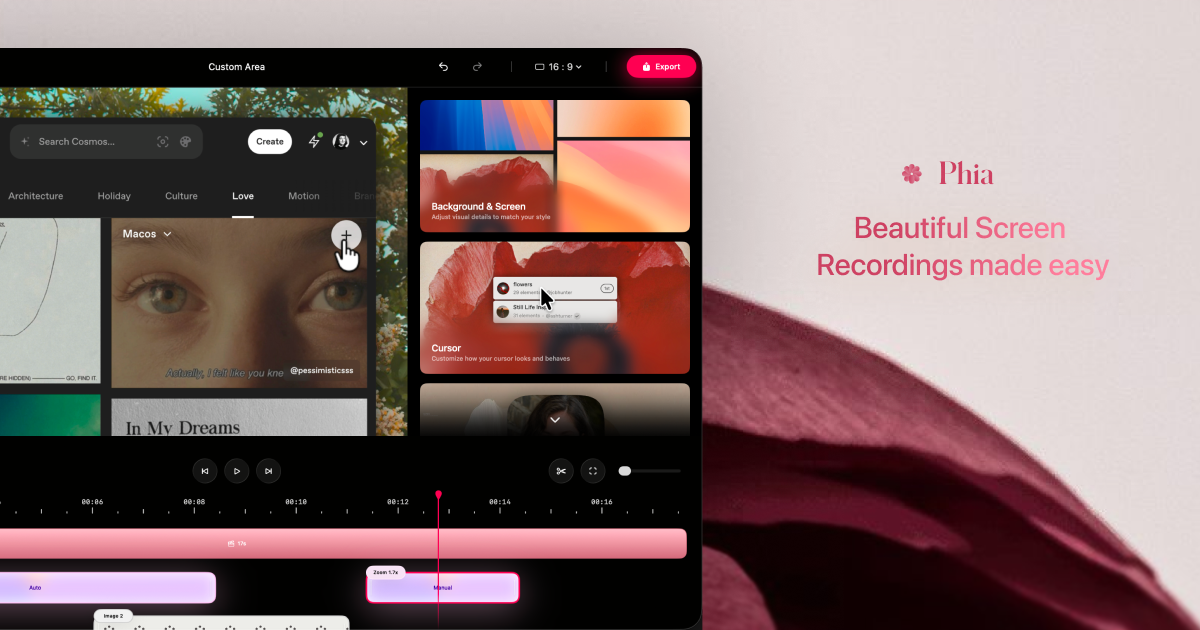
Phia is a native macOS screen recorder that redefines how you capture on-screen activity. Designed for creators, educators, and professionals, this automatic zoom screen recorder transforms ordinary screen captures into visually engaging videos. With a focus on cinematic quality, Phia automatically applies dynamic zoom and smooth cursor movements, eliminating the tedious manual editing usually required to produce polished screencasts. Whether you're recording a software demo, an online tutorial, or a social media clip, Phia ensures your audience sees exactly what matters, when it matters. The tool leverages macOS-native technologies to deliver high performance and seamless integration, making it the go-to choice for anyone who wants their screen recordings to look not just clear, but truly beautiful.
Typical screen recordings suffer from two major drawbacks: static frames that bore viewers and jerky, unnatural cursor movements that distract from the content. Without automated enhancements, creators must spend hours in video editing software adding pans, zooms, and motion blur to make their videos watchable. This extra work is especially burdensome for those who produce frequent walkthroughs or instructional content. Phia addresses these pain points head-on by baking professional-grade visual enhancements directly into the recording process. Instead of fixing problems in post-production, you capture a polished result in real time. The automatic zoom intelligently focuses on the active window or clicked element, while the cursor motion smoothing eliminates the sudden jumps that cheapen the look of a screencast. This means you can create engaging videos without ever opening a video editor, saving time and frustration.
At the heart of Phia is its automatic zoom capability. As you record, Phia monitors your activity and detects when to zoom in on specific interface elements—be it a clicked button, an open dialog, or a highlighted text field. The zoom transitions are smooth and cinematic, gradually scaling into the area of interest rather than abruptly cutting. This technique, once exclusive to professional video editors, is now automatic and effortless. The benefit is twofold: first, it ensures viewers never miss a crucial detail, making your tutorials and demos more effective; second, it keeps the video visually dynamic, preventing the monotony of a static, full-screen recording. For example, when you hover over a menu item, Phia can gently zoom to emphasize that action, then seamlessly zoom back out as you continue. This real-time enhancement makes every recording look like it was hand-edited by a skilled videographer, dramatically raising the production value.
admin
Another standout feature that sets Phia apart is its smooth cursor motion. Normally, a mouse pointer moves in discrete, instantaneous steps that appear shuddery on video, especially at standard frame rates. Phia uses intelligent interpolation to ensure the cursor glides along a fluid, curved path, mimicking the smoothness of a trackpad gesture or a cinematic pan. This subtle but critical improvement removes a common source of amateurishness from screen recordings. The smooth cursor motion works in tandem with the automatic zoom, ensuring that the viewer’s eye is drawn effortlessly to the cursor’s target without being distracted by erratic movements. Whether you’re demonstrating a complex workflow or simply browsing a website, the pointer now flows naturally like a well-animated element in a motion graphic. This transforms your screencast into a cohesive visual narrative, where every on-screen action feels intentional and polished.
Complementing the zoom and cursor enhancements, Phia offers a suite of cinematic effects that elevate the aesthetic of your recordings. These include depth-of-field blur, which softens the background while keeping the focused area sharp, much like a camera lens on a film set. By drawing attention to the active content, the blur effect reduces visual clutter and enhances comprehension. Additionally, Phia can apply subtle color grading and vignettes to give the video a warm, professional tone. All effects are rendered in real time, so you see the final look as you record. There is no need to tweak complex parameters; Phia intelligently applies the optimal settings based on your screen content. These cinematic touches turn a mundane software demonstration into a video that rivals polished marketing materials. For social media creators, these effects make content stand out in crowded feeds, while educators can maintain student focus without extra editing.
Using Phia is straightforward. After installing the native macOS app, you simply select the recording area—full screen, a specific window, or a custom region—and click record. All the automatic enhancements begin immediately: Phia analyzes your interactions, applying zoom when you click or highlight elements, smoothing cursor movement, and layering cinematic effects in real time. The tool cleverly balances these effects so they never overwhelm the content; instead, they serve to guide the viewer’s attention unobtrusively. You can pause and resume recording, and when you’re finished, the output is a polished video file ready for immediate upload or sharing. Because the processing happens during capture, you don’t need to learn any video editing software. This streamlined workflow is ideal for busy professionals and content creators who need to produce high-quality videos quickly. Phia thus bridges the gap between raw screen recording and professional post-production.
The applications for an automatic zoom screen recorder like Phia are vast. Software developers use it to create product demos that highlight new features with automated focus on the UI, increasing conversion rates and user understanding. Educators and online course creators record lecture materials where every click is clear, and the smooth cursor prevents distraction, leading to higher student engagement. Social media managers craft Instagram Reels and TikTok videos that pop with cinematic blur and zoom, making tutorials more shareable. Similarly, UX designers present prototype walkthroughs where zoom automatically reveals fine details without manual keyframing. Sales teams record persuasive presentations that guide prospects step by step, maintaining a professional image effortlessly. In each case, the outcome is a video that looks like it took hours to edit but was actually captured in one take, saving time while amplifying impact.
Phia is built exclusively for macOS, taking full advantage of Apple’s graphics and performance frameworks to deliver smooth, high-definition recordings without bogging down your system. It is intended for a broad range of macOS users, including software engineers, product managers, educators, content creators, and marketers, who need to present screen activity in the most appealing way possible. The tool eliminates the learning curve associated with professional video editing and fills the gap between basic screen capture utilities and complex post-production suites. With its thoughtful automation of zoom, cursor, and cinematic styling, Phia ensures that anyone can create beautiful, engaging screen videos with minimal effort. In a world where attention is currency, Phia empowers you to captivate your audience from the very first frame, making it an indispensable addition to your content creation toolkit on macOS.
Phia is designed for macOS users who need to produce polished screen recordings without complex video editing. It serves software developers and product managers demonstrating applications, UX designers showcasing prototypes, educators and online course creators building instructional content, content creators and social media managers crafting engaging clips, and sales professionals delivering cinematic presentations. Anyone who values automatic zoom, smooth cursor motion, and cinematic enhancements to elevate their screencasts will find Phia indispensable.