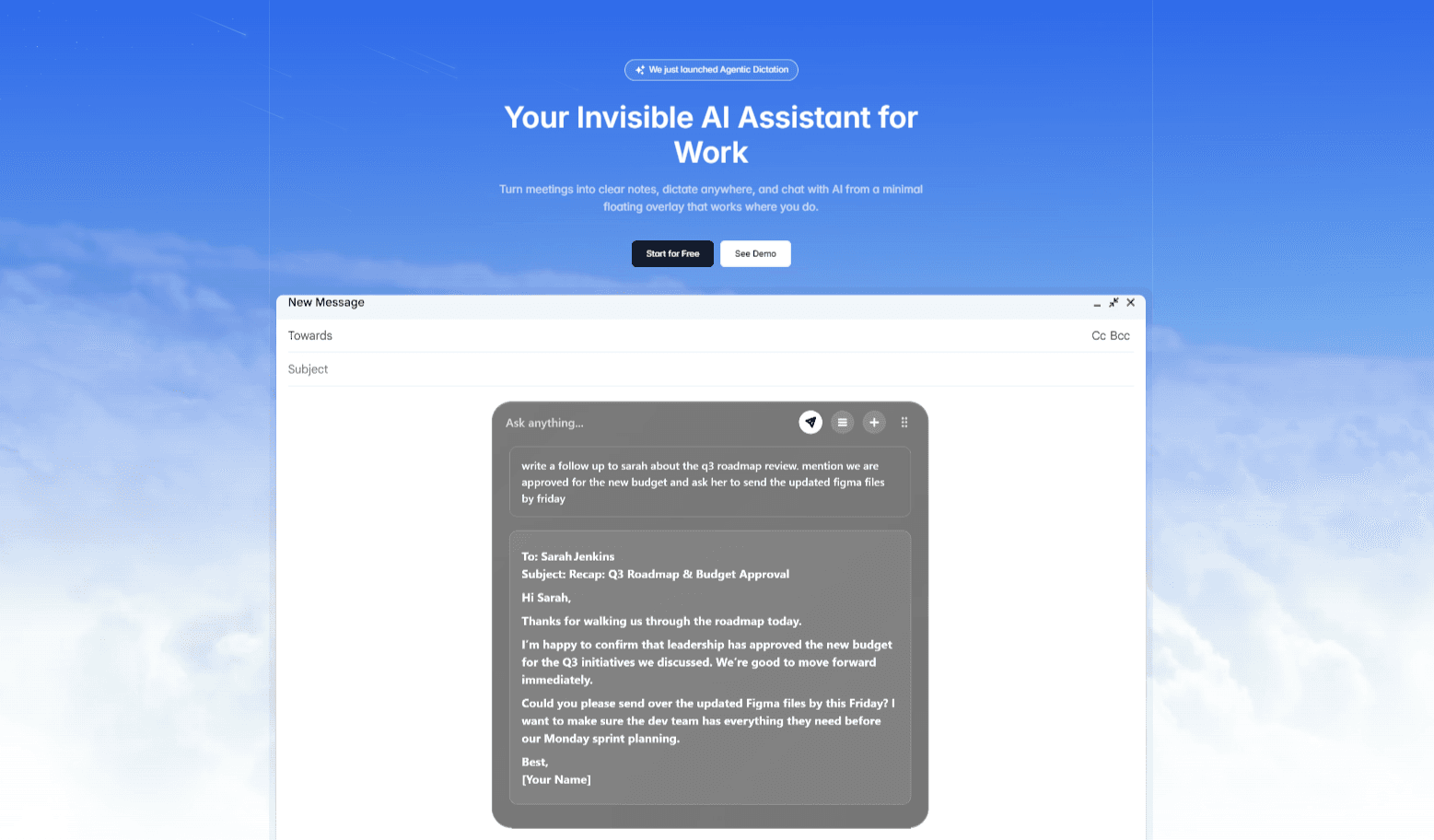
Notto is an AI meeting overlay that functions as an invisible desktop assistant, designed for professionals who need to capture meeting notes, dictate text, and chat with AI without leaving their current applications. It falls under the productivity category, specifically targeting users who attend frequent virtual meetings or write extensively. The core value is its ability to work over any app, providing a transparent floating interface that remains hidden during screen shares. As the only AI that works over apps rather than inside them, Notto enables users to stay in their flow while it handles the busy work of transcription and dictation. This invisible layer ensures that professionals never have to switch windows or lose context.
The concrete pain point Notto addresses is the constant interruption of switching between applications during meetings or while dictating. Professionals often struggle to capture key points while participating in discussions, leading to missed details and lost action items. Traditional note-taking forces them to toggle between meeting windows and note apps, breaking concentration. Additionally, typing can be slow and error-prone, especially for fast-paced conversations. Notto solves this by providing an always-available overlay that transcribes meetings in real time and allows dictation into any text field without disrupting the current application. This eliminates the need to manage multiple tools and reduces the cognitive load of remembering decisions. Users can focus entirely on the conversation, knowing that every word is captured accurately and instantly available for review.
The first major feature group is the AI Meetings Notetaker, which captures every word spoken during a meeting so users never miss anything. How it works: during a video call on platforms like Zoom, Teams, or Google Meet, Notto automatically transcribes the conversation in real time. It then compiles detailed notes and summaries immediately after the meeting ends. This is useful because it frees participants from manual note-taking, allowing them to engage fully in discussions. The outcome is a clean set of notes with action items and to-do lists, ensuring nothing falls through the cracks. As stated on the site, 'Focus on your meeting and let Notto take detailed notes for you instantly.' This feature directly addresses the common frustration of post-meeting confusion.
The second feature group includes Universal Dictation and the Seamless Chat Overlay. Universal Dictation allows users to turn their voice into perfectly formatted text three times faster than typing. It works in any textbox across all applications, supporting over 100 languages. Users simply speak, and Notto converts speech to text in real time, with custom dictionary and snippet support for specialized terminology. The Seamless Chat Overlay is a transparent chat window that floats above the screen, enabling users to interact with AI while keeping their apps visible. This overlay appears only when needed and vanishes when not, providing an unobtrusive interface. Together, these features deliver a fluid way to input text and get AI assistance without breaking workflow.
admin
Advanced capabilities in the Ultra plan include Ghost Mode and Agentic Dictation. Ghost Mode makes the overlay invisible during screen shares, ensuring that meeting participants never see the AI interface. This is critical for presentations where transparency is required. Agentic Dictation takes voice input further by drafting full responses from spoken intent—a user can say 'send an update to the team' and Notto generates the email instantly. Additionally, the upcoming Chat with Your Notes feature (coming soon) will allow users to query past meetings and documents by asking natural language questions. These features transform Notto from a simple transcription tool into an agentic assistant that anticipates user needs while remaining undetectable in shared environments.
Notto operates as an invisible layer on the user's desktop, accessible via a floating overlay that can be summoned or hidden at will. It does not require integration into any specific application; instead, it sits over all windows, listening for commands or transcribing audio from meetings. Users interact through keyboard shortcuts or voice triggers, and the overlay adapts to their current task. For meetings, it automatically detects when a call starts and begins recording (with user permission). For dictation, it monitors for voice input and converts it to text in the active text field. The entire system is designed to be non-intrusive—the overlay disappears when not in use and appears only when needed. This 'invisible advantage' ensures that users can leverage AI without any visual clutter or interruptions to their ongoing work.
Concrete use cases include a project manager who attends back-to-back meetings and uses Notto to capture action items automatically, then dictates follow-up emails in Slack using Universal Dictation. A consultant can query past client meetings via Chat with Notes (coming soon) to recall specific decisions without searching through files. During a presentation, the Ultra subscriber activates Ghost Mode so that the overlay remains hidden while they reference notes discreetly. Agents can use Agentic Dictation to draft proposals from spoken briefs in seconds. The outcomes are consistent: users save time, reduce errors, and maintain focus. Meetings end with clear summaries and to-do lists, eliminating the 'what did we decide?' problem. Overall, productivity increases as professionals reclaim hours previously spent on manual note-taking and context-switching.
Target users include professionals who regularly use video conferencing tools such as Zoom, Teams, and Google Meet—specifically project managers, consultants, executives, writers, developers, and remote workers. Notto works on desktop operating systems as an overlay, with pricing offered in three tiers: a free Starter plan with limited meetings, AI chats, and dictation plus custom dictionary and 100+ language support; a Pro plan at $20/month for unlimited usage and chat with up to 3 notes; and an Ultra plan at $40/month adding Ghost Mode, Agentic Dictation, and unlimited note chat. The free plan is truly free forever. In summary, Notto delivers an invisible AI layer that lets professionals capture, dictate, and query information without ever leaving their flow, reinforcing its value as a seamless productivity enhancer.
Professionals who rely on video conferencing tools like Zoom, Teams, and Google Meet are the primary audience, including project managers, consultants, remote team leads, executives, and sales representatives. Additionally, writers, developers, and researchers who prefer voice dictation for input will benefit from Universal Dictation. The tool caters to individuals who attend many meetings and need to capture detailed notes without manual effort. It also suits presenters who require a discreet AI assistant that does not appear during screen shares. Overall, Notto serves any knowledge worker looking to maximize productivity by reducing context-switching and automating note-taking.