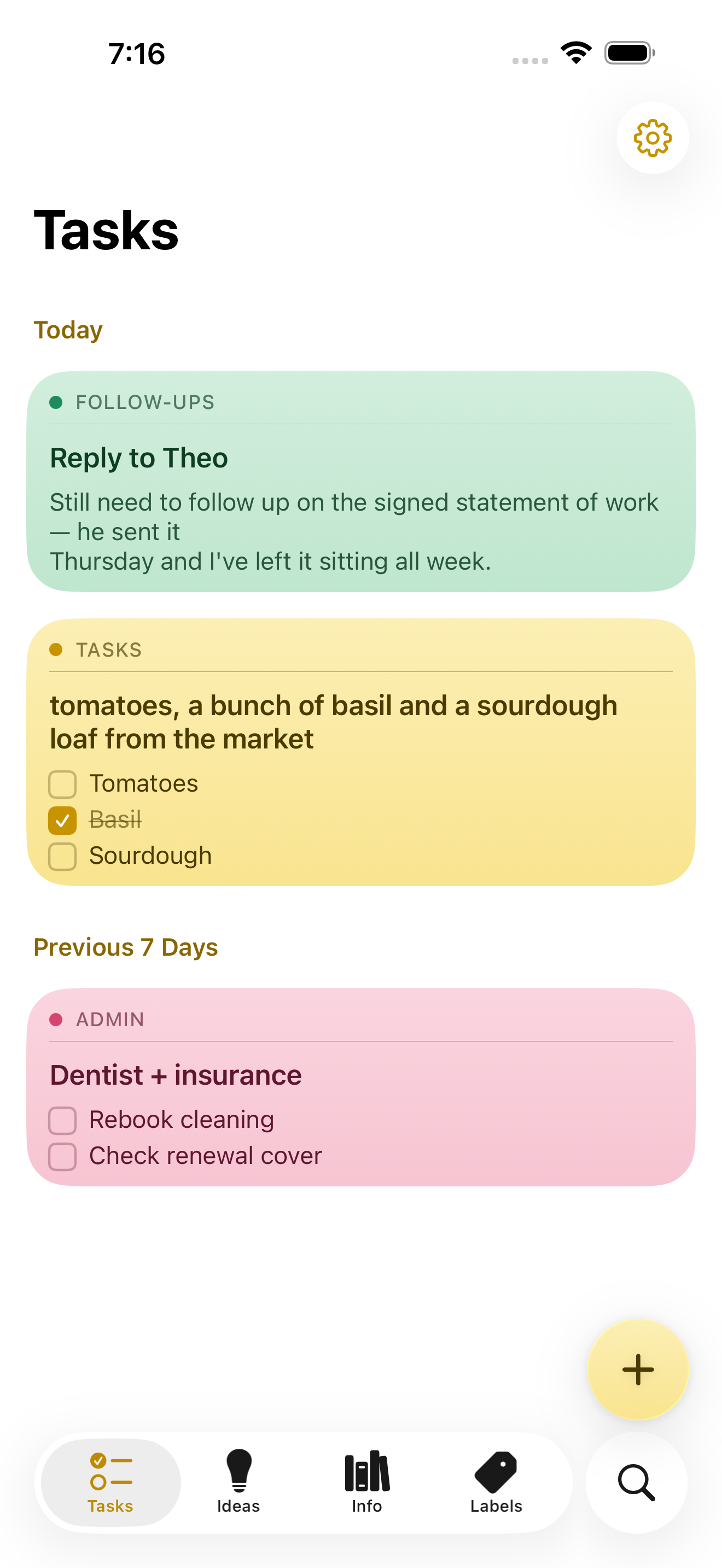
NoteWorthy is a notes app for iPhone, iPad and Mac that writes your titles, summarizes your notes, cleans up your formatting and files everything into the right place. You write the note; the app does the rest. It is made for people who jot things down messily and would rather not spend time tidying, tagging or filing afterwards, because the organizing work happens automatically using AI that runs entirely on the device in your hand or on your desk.
Most note apps leave the boring parts to you: you still have to think of a title, decide which folder something belongs in, and turn a rushed brain-dump into something readable. NoteWorthy targets exactly that gap. Instead of asking a cloud model to read your notes, it bundles the intelligence into the app itself, so the same convenience arrives without the note ever leaving your device. The result is a notes app with AI that keeps the AI local: no account to create, no connection required, and not a single note sent to a server.
The editing surface is rich text backed by real Markdown. You get checkboxes, headings, bold and italic text, tables and images, and you edit the way you would expect in a normal notes app. Underneath, the note is stored as Markdown, which means it is portable: any note exports as Markdown and opens in any other editor. Six paper colors let you give notes a visual tone, and the app can scan text straight out of a photo so information captured on paper or a whiteboard becomes editable text inside a note.
Two on-device features handle messy input. AI Format turns a scrappy line into headings, bullets and checkboxes without changing your wording — it reshapes the structure, not the words. AI Summarize pulls a long page of thinking down to a sentence. Both show you the result before either touches the note, and you can preview it, then copy, insert or replace. Neither uses the network in either direction. On older hardware that cannot run the models, both fall back to fast built-in heuristics.
AI Organize is the filing layer. Every note gets a title and files itself into Tasks, Ideas, Info or Personal, and you can create your own labels with a custom icon and color, pinning the ones you use most to the tab bar. One tap on AI Organize tidies the whole library. The filing is stable: run it twice and nothing moves, because it reads what is already stored rather than asking a model to guess again. Matching is based on meaning rather than keyword, and the model can also decide that a note fits none of your labels.
Capture does not require opening the app. Select something in Safari, share it, and it becomes a note. Siri and Shortcuts handle the rest: five Shortcuts actions are available, and Summarize and Format work on text from any app. Widgets come in four sizes and include checkboxes you can tick without opening anything.
Finding notes works two ways. Inside the app there is keyword search with highlighted matches that you can filter by color. Outside the app, every note is indexed with Spotlight, so system search finds it without opening NoteWorthy at all, and a Spotlight result opens the note directly. Indexing happens on the device, like everything else in the app.
Notes also understand what they contain. A date becomes a calendar event, a name links to your contacts, and an address opens in Maps. If you write “remind me before Friday”, the note offers to set a reminder, which arrives as a local notification. All of this detection happens on device and is never uploaded, and nothing happens until you tap it.
Privacy here is framed as a property of the build rather than a promise. There is no server to trust, because the app makes no network requests at all. No account, no tracking, no analytics and no uploads of our own. Notes are written to disk with file protection, and an optional app lock asks for Face ID or Touch ID before showing them. The app explains itself on first launch with three screens covering what the labels do, what AI Organize does, and exactly what happens to your writing, then gets out of the way.
Two models run on the device. Apple's Foundation Models, running on the Neural Engine, write the words: titles, summaries, the Markdown rewrite and topic extraction, all through Apple Intelligence. A second model, EmbeddingGemma 300M, is a 300M-parameter embedding model, 4-bit, bundled inside the app and run through MLX. It decides where things go by matching a note to a label by meaning rather than by keyword, and being an embedding model it can also say that none of the labels fit. The weights ship inside the app and are never downloaded; Gemma is provided under the Gemma Terms of Use.
NoteWorthy is universal across iPhone, iPad and Mac. On iPhone it behaves like sticky notes, on iPad you get a sidebar and a note board, and on the Mac it is a notebook that waits on the edge of your screen, opened from a rail of labels. It requires an iPhone or iPad on iOS or iPadOS 26 or later, or a Mac with Apple silicon on macOS 26 or later, and it is a single Universal Purchase covering all three. Apple Intelligence is needed only for the writing features such as AI Format, AI Summarize and generated titles; without it, writing, filing and search still work. Sync is not available yet: each device keeps its own notes, and you can move one across by exporting it as Markdown.
Everything NoteWorthy does today is free, with no ads and no subscription. Two features are announced but not shipped: iCloud Sync, which will put your notes on every device through your own iCloud account rather than a server of theirs, and Shared Notes, which will hand a note or a whole label to someone else over that same private channel. When they arrive they will be a single one-time unlock, and everything that happens on your device stays free. Both are opt-in.
The Mac version is in review for the Mac App Store; until it clears, it can be downloaded as a DMG from GitHub and dragged to Applications, or installed with Homebrew using the same notarized build. NoteWorthy is made by Suman Hansada, an independent developer. The app's permissions are deliberately narrow: Photos to import an image and pull the text out of it, Calendar add-only to add an event for a date in a note (it cannot read your calendar), Contacts to link a name in a note to the person, Face ID or Touch ID for the optional app lock, and Camera in the App Clip only to scan text from a photo.
In short, NoteWorthy takes the parts of note-taking that people tend to avoid — titling, summarizing, formatting and filing — and moves them onto the device, where they cost nothing, work offline and never leave your hardware. You write the note. It does the rest.
Publisher
A
admin
Launch Date2026-10-07
Platformmobile
Pricingfree
Tech Stack
#Apple Intelligence Foundation Models#Neural Engine#EmbeddingGemma 300M#MLX#Markdown